

Page 1
MANUFACTURING
A
S
D
L
I
S
T
E
CM
O
I
N
N
I
T
A
T
C
T
I
S
L
US
E
D
NUMBERS:
910 0 922
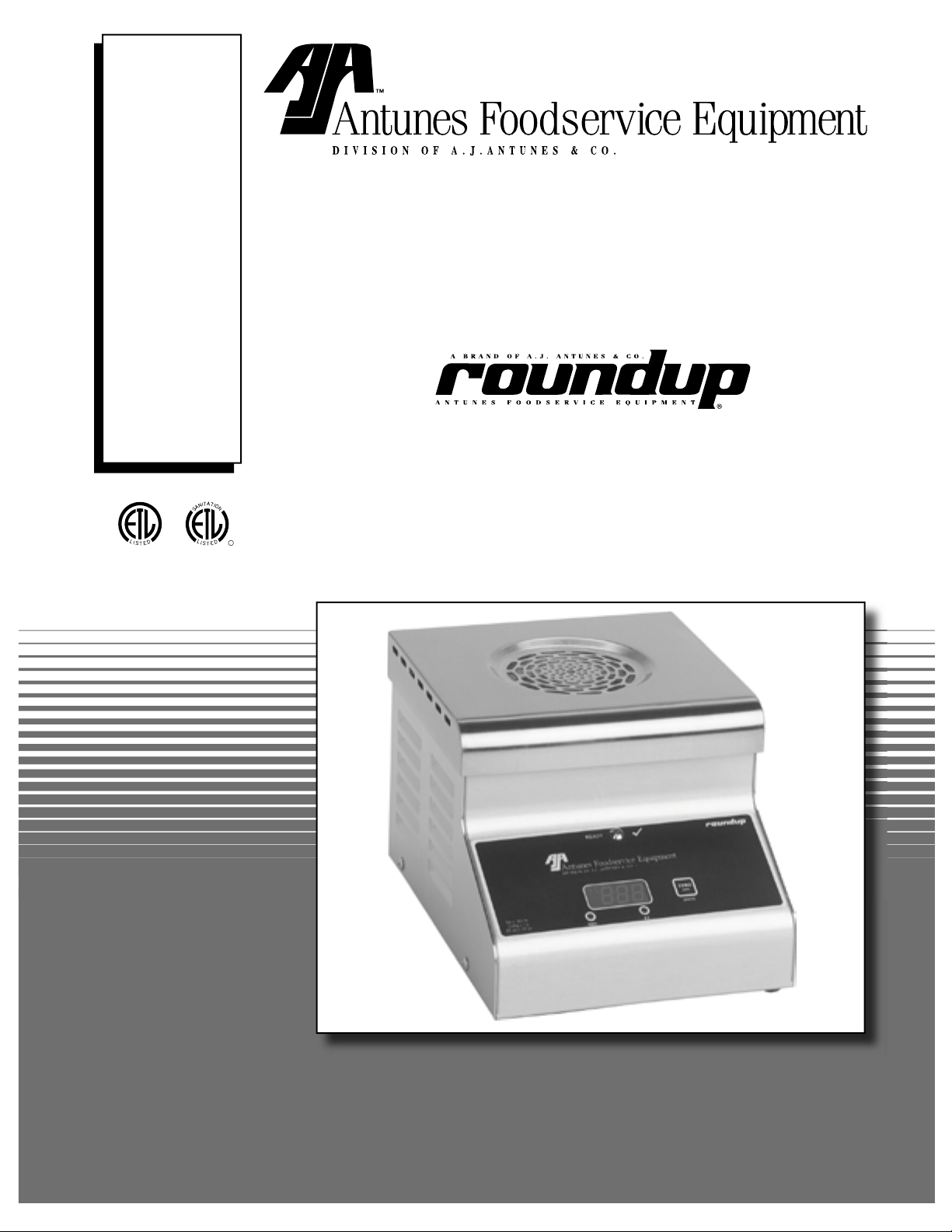
STEAMER/SCALE
Model STS-200
P/N 1010929 03/06
Owner’s Manual
Page 2

STS-200 STEAMER/SCALE
TABLE OF CONTENTS
Owner Information .....................................................2
General ......................................................................2
Warranty Information .................................................2
Service/Technical Assistance ....................................3
Important Safety Information ....................................3
Specifications ............................................................5
Electrical Ratings .......................................................5
Electrical Cord & Plug Configurations .......................5
Model Designation .....................................................5
Dimensions ................................................................6
Installation ...................................................................7
Unpacking ..................................................................7
Equipment Setup .......................................................7
Installation Instructions
for Dual Water Pressure Regulator Kit P/N 7000418 9
General ......................................................................9
Installing the Dual Water Pressure Regulator ...........9
Checking and Cleaning the Water Strainer ............ 10
Adjusting the Water Pressure Regulator ................ 10
Installation Instructions
Optional Water Installation Kit P/N 7000420 ..........12
General ................................................................... 12
Installation .............................................................. 12
Installation Instructions
for Air Bulb Switch Kit P/N 7000419 .......................14
General ................................................................... 14
Replacing the Air Bulb Switch ................................ 14
Operation ...................................................................16
Operating Instructions ............................................ 16
Calibrating the Steamer/Scale ................................ 16
Rotary Switch Settings ........................................... 17
Maintenance .............................................................. 18
Cleaning the STS-200 During Daily Use ................ 18
Cleaning the STS-200 Steamer/Scale Daily .......... 19
Weekly Maintenance .............................................. 19
Cleaning the Water Inlet Tube ................................ 20
Checking/Cleaning the Water Strainer Monthly ..... 20
Weekly- Testing the STS-200
for Weighing Accuracy ............................................ 21
Troubleshooting .......................................................21
Message Codes ...................................................... 21
Error Codes ............................................................ 22
Technical Theory of Operation ...............................26
Technical Theory of Operation ............................... 26
Replacement Parts ...................................................28
Wiring Diagram .........................................................36
NOTES .......................................................................37
LIMITED WARRANTY ............................... Back Cover
OWNER INFORMATION
General
The STS-200 Steamer/Scale produces steam using
plain tap water for quick steaming of sliced meats.
Simple push button action delivers a consistent impulse
of steam. Because the amount of steam is consistent,
it removes the guesswork and produces a uniform finished product from one operator to the next.
This manual provides the safety, installation, and operating procedures for the Steamer/Scale. We recommend that all information contained in this manual be
read prior to installing and operating the unit.
Your Steamer/Scale is manufactured from the finest
materials available and is assembled to Roundup’s
strict quality standards. This unit has been tested at
the factory to ensure dependable trouble-free operation.
Warranty Information
Please read the full text of the Limited Warranty in this
manual.
IMPORTANT! Keep these instructions for future reference. If the unit changes owner-
ship, be sure this manual accompanies the equipment.
If the unit arrives damaged, contact the carrier immediately and file a damage claim with them. Save all
packing materials when filing a claim. Freight damage
claims are the responsibility of the purchaser and are
not covered under warranty.
The warranty does not extend to:
• Damages caused in shipment or damage as
result of improper use.
• Installation of electrical service.
• Normal maintenance as outlined in this manual.
• Malfunction resulting from improper maintenance.
• Damage caused by abuse or careless handling.
• Moisture damage to electrical components.
• Damage from tampering with, removal of, or
changing any preset control or safety device.
2
P/N 1010929 03/06
Page 3
STS-200 STEAMER/SCALE
OWNER INFORMATION (continued)
Service/Technical Assistance
If you experience any problems with the installation
or operation of your unit, contact your local Roundup
Authorized Service Agency. They can be found in the
service agency directory packaged with the equipment.
Fill in the information below and have it handy when
calling your authorized service agency for assistance.
The serial number is on the specification plate located
on the rear of the unit.
Purchased From:
Date of Purchase:
Model No.:
Serial No.:
Mfg. No.:
Refer to the service agency directory and fill in the
information below:
IMPORTANT SAFETY INFORMATION
Authorized Service Agency
Name:
Phone No.:
Address:
Use only genuine Roundup replacement parts in this
unit. Use of replacement parts other than those supplied by the manufacturer will void the warranty. Your
Authorized Service Agency has been factory trained
and has a complete supply of parts for this unit.
You may also contact the factory at 1-877-392-7854 or
1-630-784-1000 if you have trouble locating your local
authorized service agency.
Throughout this manual, you will find the following safety words and symbols that signify important safety issues with
regards to operating or maintaining the Miracle Steamer.
WARNING
GENERAL WARNING. Indicates information important to the proper operation of
the equipment. Failure to observe may
result in damage to the equipment and/or
severe bodily injury or death.
CAUTION
GENERAL CAUTION. Indicates information important to the proper operation of
the equipment. Failure to observe may
result in damage to the equipment.
ELECTRICAL WARNING. Indicates information relating to possible shock hazard.
Failure to observe may result in damage
to the equipment and/or severe bodily
injury or death.
HOT SURFACE WARNING. Indicates
information important to the handling of
equipment and parts. Failure to observe
caution could result in personal injury.
WARNING
WARNING
P/N 1010929 03/06
3
Page 4

STS-200 STEAMER/SCALE
IMPORTANT SAFETY INFORMATION (continued)
In addition to the warnings and cautions in this manual,
use the following guidelines for safe operation of the
unit.
• Read all instructions before using equipment.
• For your safety, the equipment is furnished with
a properly grounded cord connector. Do not
attempt to defeat the grounded connector.
• Install or locate the equipment only for its intended use as described in this manual. Do not use
corrosive chemicals in this equipment.
• Do not operate this equipment if it has a damaged cord or plug, if it is not working properly, or
if it has been damaged or dropped.
• This equipment should be serviced by qualified
personnel only. Contact the nearest Roundup
authorized service facility for adjustment or repair.
• Do not block or cover any openings on the unit.
• Do not immerse cord or plug in water.
• Keep cord away from heated surfaces.
• Do not allow cord to hang over edge of table or
counter.
The following warnings and cautions appear
throughout this manual and should be carefully
observed.
• Turn the unit off, disconnect the power source
and allow unit to cool down before performing
any service or maintenance on the unit.
• The equipment should be grounded according to local electrical codes to prevent the
possibility of electrical shock. It requires a
grounded receptacle with separate electrical
lines, protected by fuses or circuit breaker of
the proper rating.
• All electrical connections must be in accordance with local electrical codes and any
other applicable codes.
• WARNING ELECTRICAL SHOCK HAZARD.
FAILURE TO FOLLOW THESE INSTRUCTIONS
COULD RESULT IN SERIOUS INJURY OR
DEATH.
- Electrical ground is required on this appliance.
- Do not modify the power supply cord plug.
If it does not fit the outlet, have a proper
outlet installed by a qualified electrician.
- Do not use an extension cord with this
appliance.
- Check with a qualified electrician if you
are in doubt as to whether the appliance is
properly grounded.
• This equipment is to be installed to comply with the basic plumbing code of the
Building Officials and Code Administrators,
Inc. (BOCA) and the Food Service Sanitation
Manual of the Food and Drug Administration
(FDA).
• If the supply cord is damaged, it must be
replaced by the manufacturer or its service
agent, or a similarly qualified person.
• Do not clean this appliance with a water jet.
• Do not use a sanitizing solution or abrasive
materials. The use of these may cause damage to the stainless steel finish.
• To ensure proper steaming characteristics,
some mineral deposits must be present on
generator surface. If, during cleaning, the
surface does become free of mineral deposits, one approved method is to add plain tap
water to the generator surface and allow it
to boil off. This will ensure proper steaming
characteristics by creating a thin layer of mineral deposits on the casting.
• Chlorides or phosphates in cleansing agents
(e.g. bleach, sanitizers, degreasers or detergents) could cause permanent damage to
stainless steel equipment. The damage is
usually in the form of discoloration, dulling
of metal surface finish, pits, voids, holes or
cracks. This damage is permanent and not
covered by warranty.
NOTE: This may require repeating several times.
4
P/N 1010929 03/06
Page 5
STS-200 STEAMER/SCALE
WHT
BLK
GRN
IMPORTANT SAFETY INFORMATION (continued)
• The following tips are recommended for maintenance of your stainless steel equipment,
- Always use soft, damp cloth for cleaning,
rinse with clear water and wipe dry. When
required, always rub in direction of metal
polish lines.
- Routine cleaning should be done daily
using soap, and water.
SPECIFICATIONS
Electrical Ratings
Model &
Mfg. No
STS-200
9100922
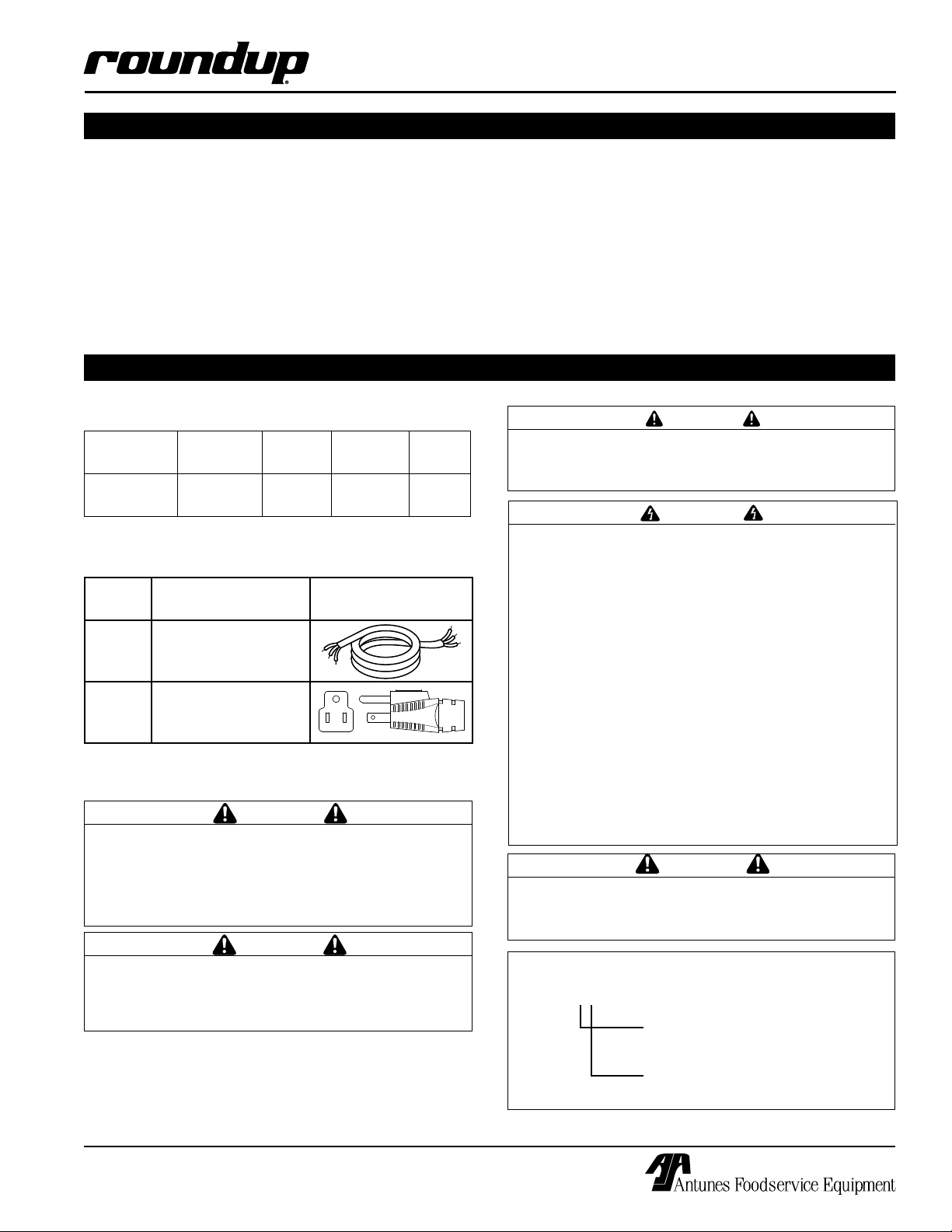
Electrical Cord & Plug Configurations
Letter
Code*
C
(C)F 5-15P, 15 Amp.,
* Used in Model Designation
This equipment is to be installed to comply with
the basic plumbing code of the Building Officials
and Code Administrators, Inc. (BOCA) and the
Food Service Sanitation Manual of the Food and
Drug Administration (FDA).
Handle the Steamer/Scale with care. Do not place
objects other than sliced meat on the unit and
NEVER place anything over 4 pounds (64 ounces)
on the Steamer/Scale.
Voltage Watts Amps Hertz
120 1500 12.5 50/60
Description Configuration
Commercial Cord
120 VAC.,
Non – Locking.
CAUTION
CAUTION
- Stains and spots should be sponged using
a vinegar solution as required.
- Finger marks and smears should be
rubbed off using soap and water.
- Hard water spots should be sponged using
a vinegar solution.
CAUTION
All electrical connections must be in accordance
with local electrical codes and any other applicable codes.
WARNING
ELECTRICAL SHOCK HAZARD.
FAILURE TO FOLLOW THE INSTRUCTIONS IN
THIS MANUAL COULD RESULT IN SERIOUS INJURY OR DEATH.
• Electrical ground is required on this appliance.
• Do not modify the power supply cord plug. If
it does not fit the outlet, have a proper outlet
installed by a qualified electrician.
• Do not use an extension cord with this appliance.
• Check with a qualified electrician if you are in
doubt as to whether the appliance is properly
grounded.
CAUTION
The Steamer/Scale uses a direct water line. Water
pressure coming into the unit must be set to 7 to
9 psi using a Water Pressure Regulator.
Model Designation
STS-200XX
TYPE OF POWER CORD
C = COMMERCIAL
TYPE OF PLUG
F = NEMA 5-15P
P/N 1010929 03/06
5
Page 6
STS-200 STEAMER/SCALE
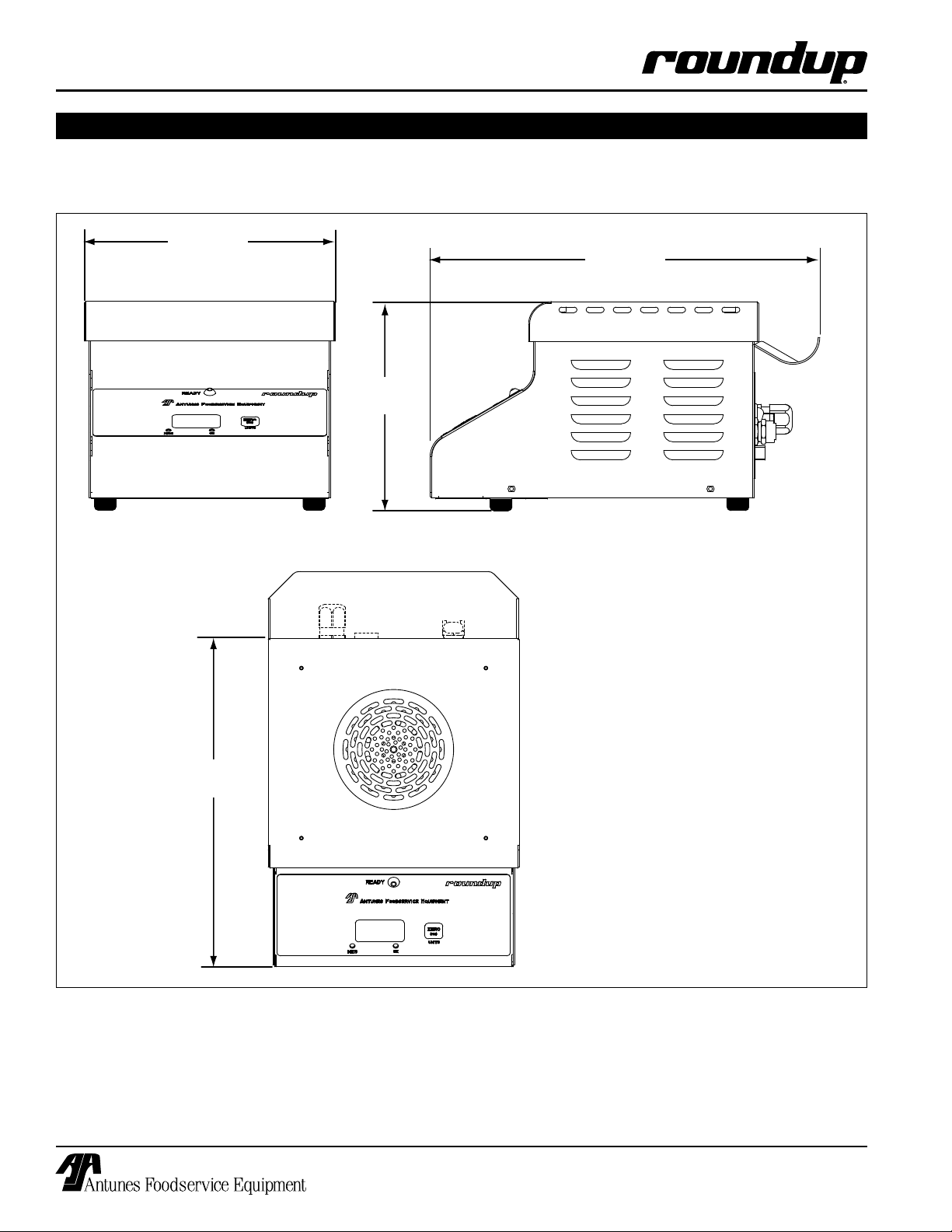
11 1/4"
(285.75 mm)
8 1/2"
(215.9 mm)
7 1/4"
(184.15 mm)
13 1/2"
(32.9 mm)
SPECIFICATIONS (continued)
Dimensions
6
P/N 1010929 03/06
Page 7
ZERO
(on)
3/4"
Locating the
Hidden Button
INSTALLATION
STS-200 STEAMER/SCALE
Unpacking
1. Remove unit and all packing materials from shipping carton.
2. Open the carton. It should contain the following:
• STS-200 Steamer/Scale
• Water Pressure Regulator Kit
• Owner’s Manual and Maintenance Sheet
• 16 ounce Calibration Weight
• Stainless Steel Cleaning Brush
NOTE: If any parts are missing or damaged, contact Antunes Technical Service IMMEDIATELY at
1-877-392-7854 or 1-630-784-1000.
3. Remove all packing materials and protective coverings from the unit.
4. Remove all removable parts and wipe them with
a clean towel dampened with sanitizer. Allow
them to air dry.
5. Wipe all surfaces of the unit with a clean towel
dampened with sanitizer and allow to air dry.
6. Re-install all removed parts and verify that all
parts are present.
Equipment Setup
GENERAL
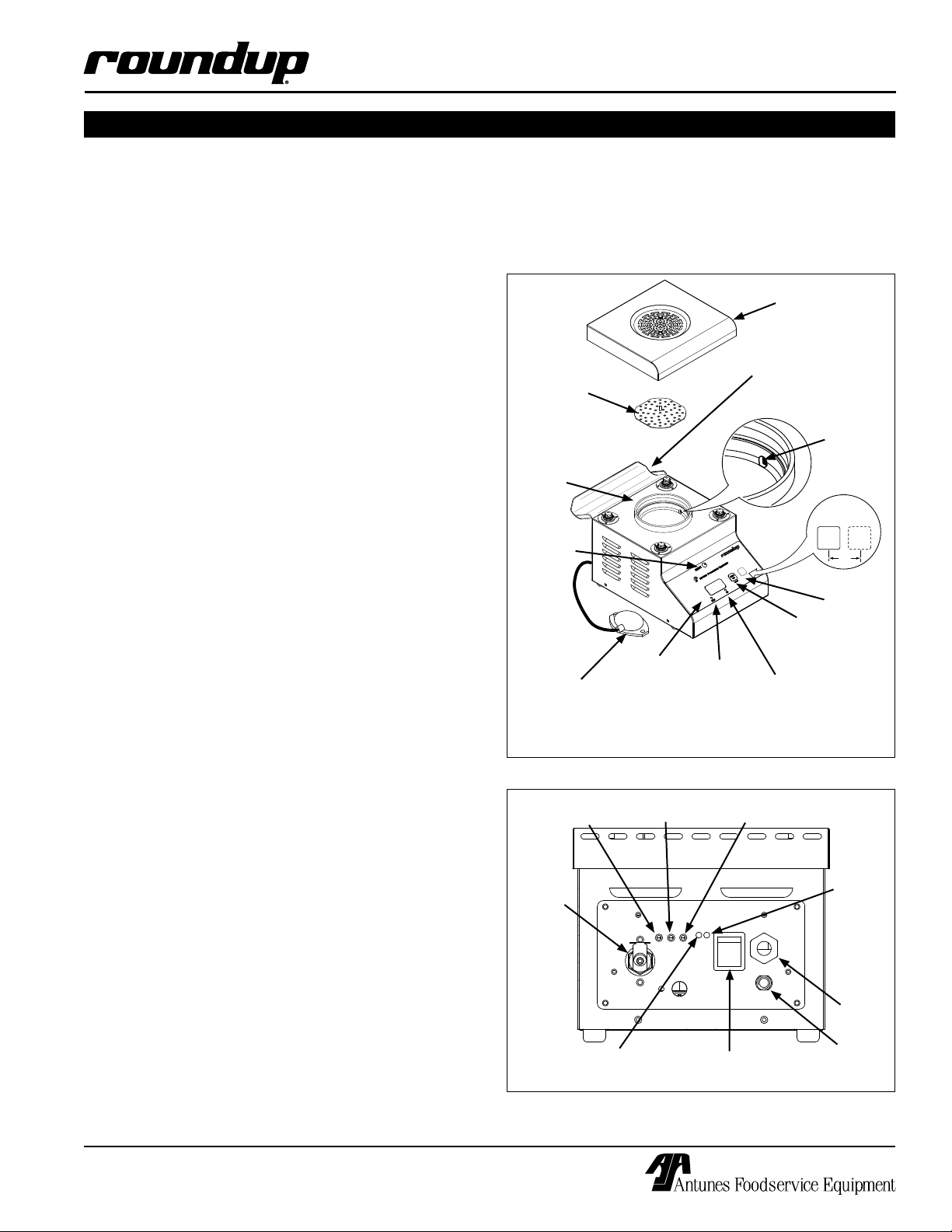
The STS-200 Steamer/Scale is used to heat and portion sliced meats. The Air Bulb Switch initiates a shot
of steam while the digital display shows the weight of
the sliced meat (Figure 1).
5. Plug the power cord into the appropriate outlet.
6. Note that the Rotary Switches on the back of the
unit (Figure 2) are pre-set to
• Temp Rotor Switch - 0
• Cycle Rotor Switch - 4
• Shot Rotor Switch - 4
Top
Cover
Storage Shelf for
Calibration Weight
Diffuser
Steam
Generator
Ready
Light
Ai Bulb
Switch
with
Tubing
Digital
Display
NOTE: The Rocker Switch is
located on the back of unit)
Neg
LED
and Cleaning Brush
Water
Inlet Tube
Hidden
button
Zero (on)
button
Oz LED
STEAMER/SCALE SETUP
When placing the Steamer/Scale into service, pay
attention to the following guidelines:
• Do not block or cover any openings on the units.
• Do not immerse cords or plugs in water.
• Keep cords away from heated surfaces.
• Do not allow cords to hang over edge of table or
counter.
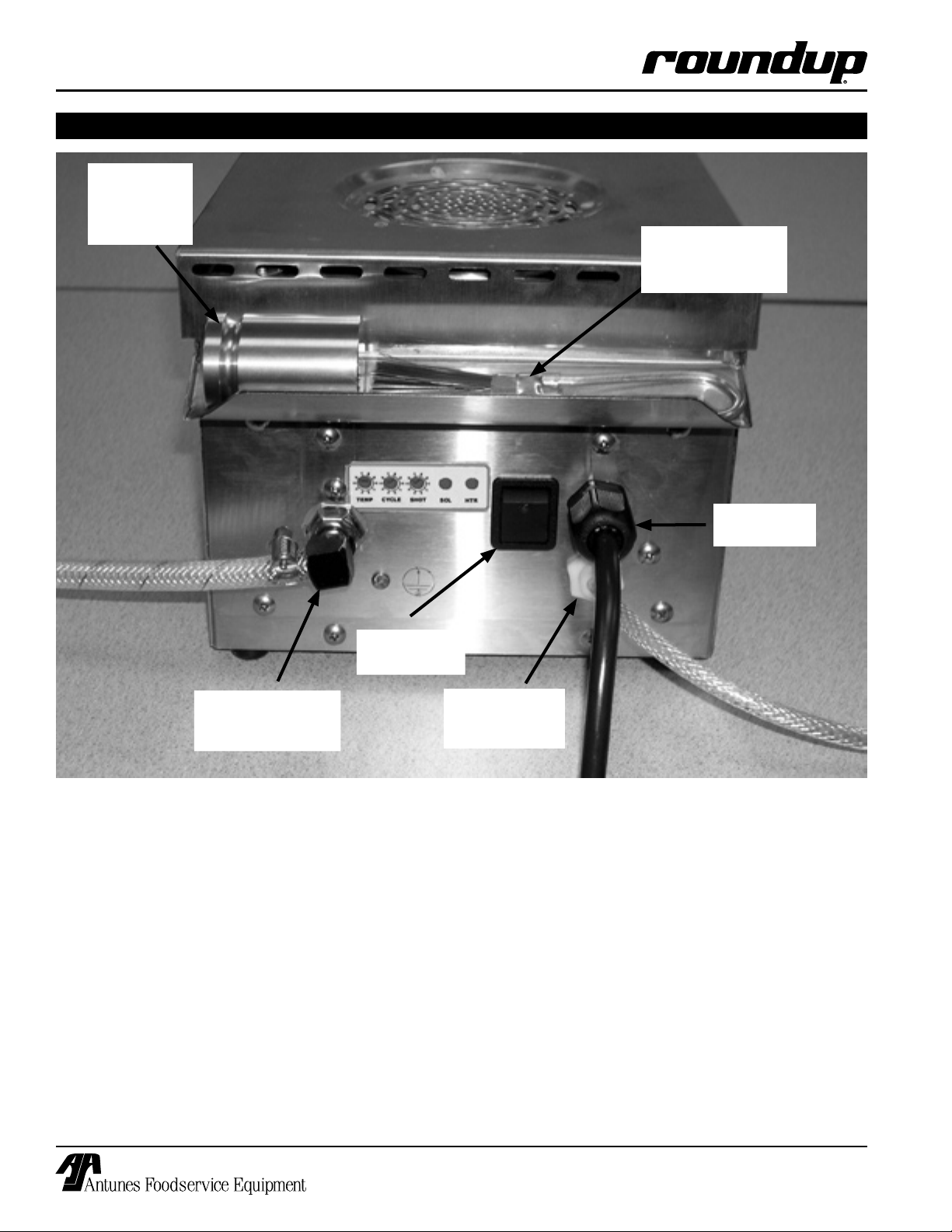
3. Connect the outlet hose/fitting from the Dual
Water Regulator Kit to the Water Inlet Connection
at the rear of the unit (Figures 3 and 4a).
4. Connect the Air Bulb Switch tubing to the
Connection on the back of the unit (figure 3).
Push the tubing onto the connector. See the
instructions for optional mountings.
P/N 1010929 03/06
Connection
7
Figure 1. STS-200 Steamer/Scale
Temp Rotary
Switch
Water Inlet
Cycle Rotary
Switch
Green
Solenoid Led
Shot Rotary
Switch
Rocker Switch
(with Power LED)
Connection
Figure 2. STS-200 Steamer/Scale (Back View)
Without Storage Shelf Shown for Better View.
Yellow
Heater
Led
Power
Cord
Air Hose
Page 8
STS-200 STEAMER/SCALE
INSTALLATION (continued)
16 ounce
(1 pound)
Calibration
Weight
Stainless Steel
Cleaning Brush for
Steam Generator
Power
Cord
Power On/
Off Switch
Water Supply
from Dual Water
Regulator Kit
Figure 3. Back of Steamer/Scale with Calibration Weight and Cleaning Brush
Air Bulb
Switch Tubing
Connection
8
P/N 1010929 03/06
Page 9
STS-200 STEAMER/SCALE
INSTALLATION (continued)
INSTALLATION INSTRUCTIONS
FOR DUAL WATER PRESSURE REGULATOR KIT P/N 7000418
WARNING
Turn the unit off, disconnect the power source
and allow the unit to cool down before performing
any service or maintenance on the unit.
AFFECTED PRODUCTS:
All A.J. Antunes Steamer/Scale units.
PARTS INCLUDED:
• 1 Dual Water Regulator Assy. (P/N 7000418)
• 4 Self-Tapping Screws (P/N 3060144)
Used with a 0.125” drill bit.
• 1 Instruction Sheet (P/N 1010868)
TOOLS:
• Phillips Head Screwdriver
General
If you experience any problems with these instructions,
contact the factory Technical Service Department at 630784-1000 or toll free in the U.S. at 877-392-7854.
Installing the Dual Water Pressure Regulator
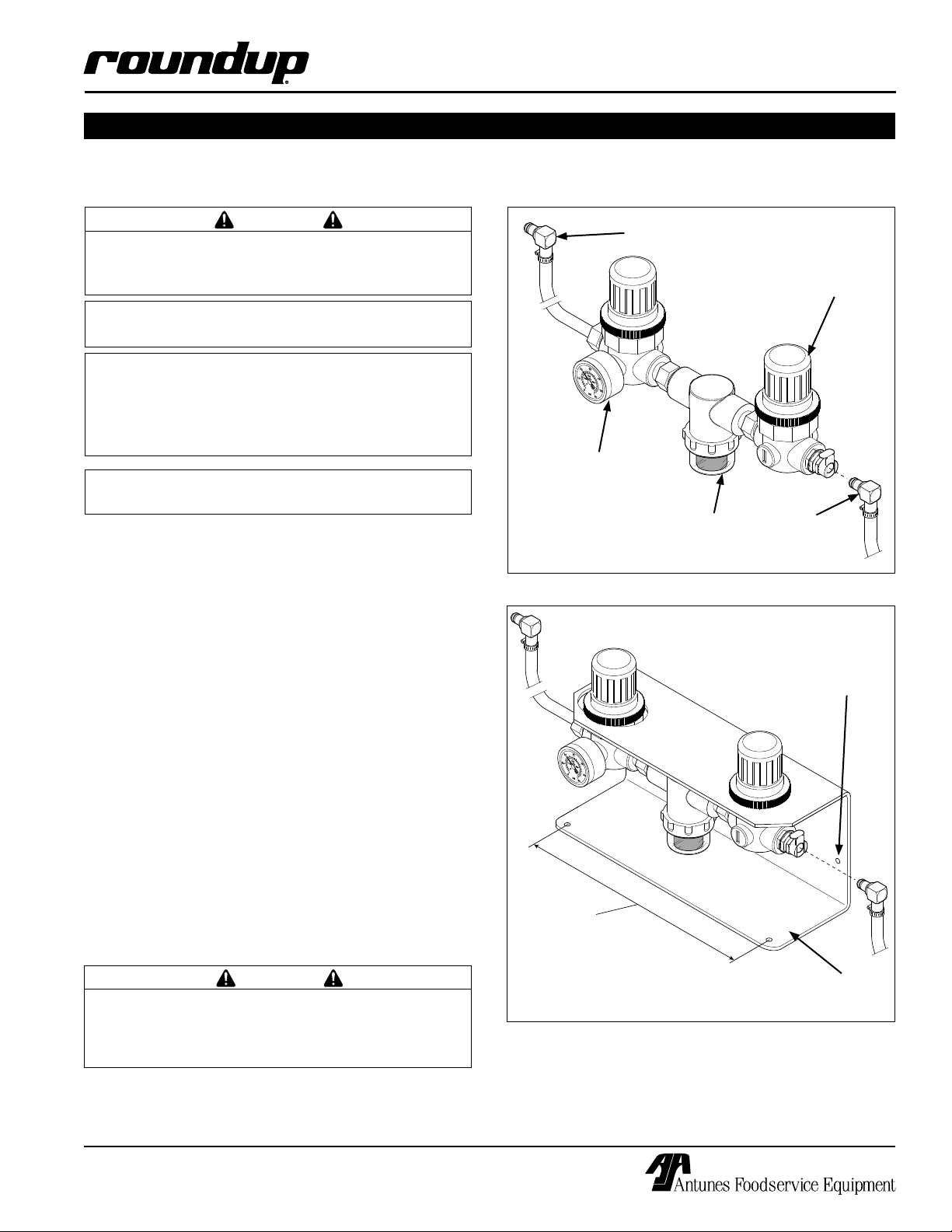
The Dual Water Pressure Regulator can be installed in
any of the following ways:
Water Supply Outlet (to
Water Pressure
Regulator Gauge
Set to 7 to 9 PSI
(adjustable)
Steamer/Scale)
Water
Strainer
Water Pressure
Regulator
Preset to 30
PSI and Fixed
(not adjustable)
Water
Supply Inlet
Connection
Figure 4a. Dual Water Pressure Regulator
Holes for verti-
cal mounting
(7 inches
apart).
• On a vertical surface (Figure 4b)
• On a horizontal surface (Figure 4b)
• Free-Standing (not mounted) (Figure 4b)
When mounting the Dual Water Pressure Regulator
onto a fixed horizontal or vertical surface, you must
use the mounting screws provided with the kit. These
screws are self-tapping and require a 0.125” inch hole
for mounting.
A free-standing mounting does not require use of the
mounting screws.
WARNING
DO NOT mount the Dual Water Pressure Regulator
over an electrical outlet or any other appliance or
area that may be damaged by water or that may
cause personal injury.
P/N 1010929 03/06
7.5 inches
between
mounting
holes.
For horizontal
mounting
Figure 4b. Mounting Options
9
Page 10

STS-200 STEAMER/SCALE
INSTALLATION (continued)
Checking and Cleaning the Water Strainer
The Water Strainer protects your equipment from any
foreign debris in the water line that could get into the
food and damage the unit’s solenoid (causing the unit
to leak or flood), It protects from interference with the
equipment’s proper and consistent operation
To ensure proper and consistent steaming results,
check the water pressure regulator gauge and strainer
cup regularly. If the pressure on the gauge has
dropped, check the clear, plastic strainer “cup” and
clean out the accumulated debris as follows.
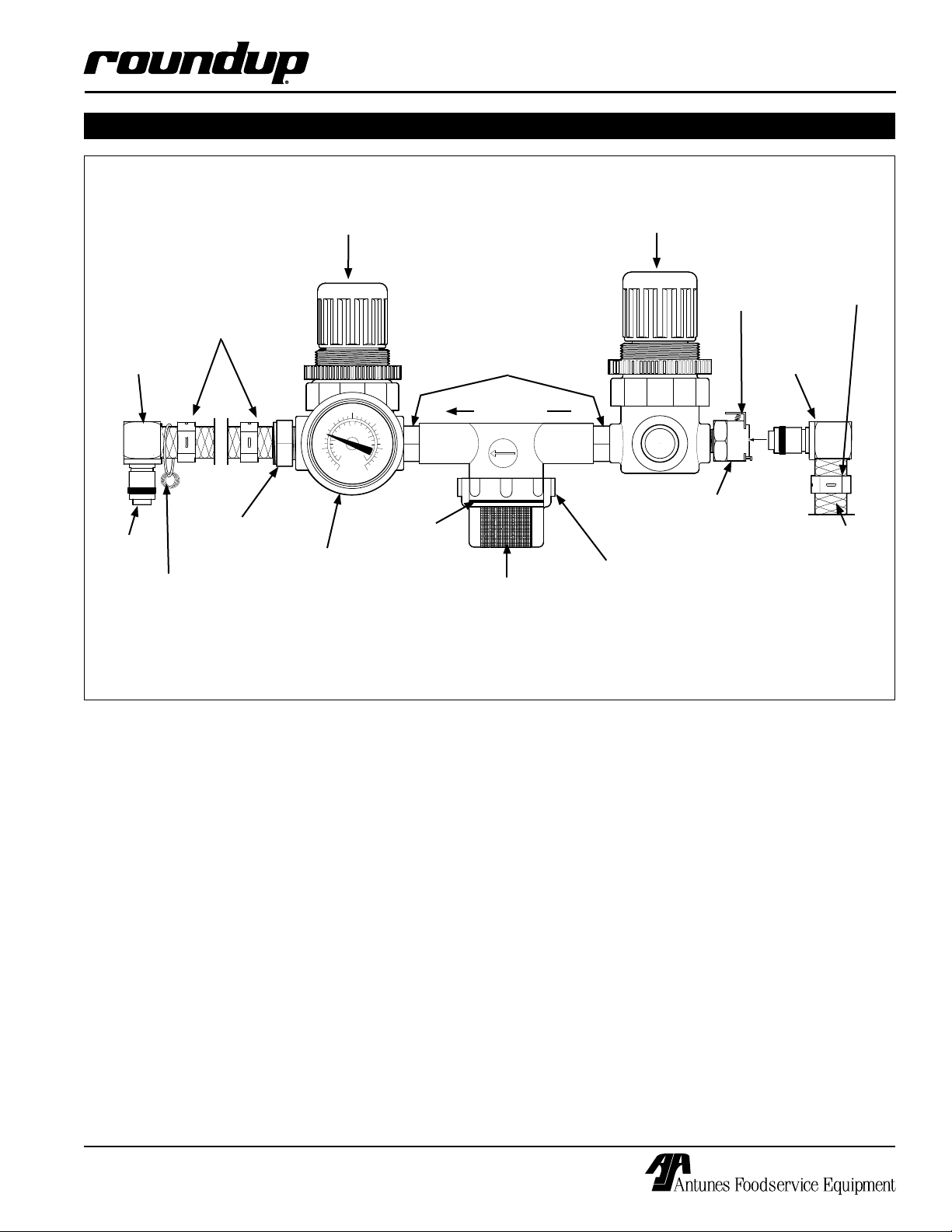
1. Press the Release Tab and remove the Quick
Disconnect Fitting #2 (Figure 4c). Unscrew the
clear, plastic strainer “cup” and carefully remove
the mesh strainer screen (Figure 4c).
NOTE: Some water may drip out from the Quick
Disconnect fitting and Strainer Cup.
2. At the sink, gently flush all of the accumulated
debris from the strainer cup and mesh strainer.
Be especially careful not to damage the mesh
strainer screen.
3 Carefully place the mesh strainer screen into its
seat at the bottom of the clear, plastic cup and
confirm that the orange O-ring is properly seated
in its place before screwing the strainer cup and
top back together.
4. Reinstall the Quick Disconnect until a “click” is
heard.
5. Cycle the steamer several times. This ensures
the air is purged from the Water Line.
6. Replace damaged or worn parts as needed.
7. Verify that the Water Pressure Regulator Gauge
is set to 7 - 9 PSI (.4 - .6 kg/cm2 or 48 - 62 kPa).
Adjusting the Water Pressure Regulator
The Dual Water Pressure Regulator uses a fixed
regulator and an adjustable regulator (Figure 4c). The
adjustable regulator must be set between 7 - 9 PSI (0.4
- 0.6 kg/cm2 or 48 - 62 kPa). Follow these steps to
adjust this regulator:
1. Make sure that the inlet water valve is on.
2. Over a bucket, press and hold the white plastic tip
on the Quick Disconnect #1 (Figure 4c) until good,
steady water flow is noted (this will purge all air
out of the line). Release and note the pressure
on the Water Pressure Regulator gauge. It should
read 7-9 PSI. If it reads more or less, adjust the
pressure by pulling the black knob upwards and
turning it clockwise to increase or counter-clockwise to decrease the water pressure. Push the
knob down to lock it in place.
NOTE: When adjusting the knob, you must relieve
the existing pressure by pressing the white plastic
tip on the Quick Disconnect Insert for 3 seconds.
This allows the newly set pressure to register on
the gauge. Repeat this until the gauge reads 7-9
PSI.
3. Re-install the Quick Disconnect until it “clicks” into
place and test the unit. Re-adjust the regulator as
needed.
10
P/N 1010929 03/06
Page 11
psi
5
0
10
25
30
20
1/4
NPT
DET
PAL
133
DET
PAL
133
15
DET
PAL
133
INSTALLATION (continued)
Water Pressure
Regulator Set to 7 to 9
PSI (adjustable)
STS-200 STEAMER/SCALE
Water Pressure
Regulator Preset to
30 PSI and Fixed
(not adjustable)
Release
Hose Clamp
Tab
Quick
Disconnect #1
(to Steamer/
Scale
Hose Clamp
Nipple
Quick
Disconnect #2
Supplied
Water Flow
Water
Supply Inlet
Connection (with
Release Tab)
Water Inlet Hose
(NOT Supplied
(see Figure 5)
White
Plastic Tip
Extra
O-rings
Male
Adapter
Barbed 1/4”
Gauge
O-Ring
Mesh
Screen
Strainer
Cup
NOTE: An inlet hose is NOT supplied with the Steamer/Scale. Customer/Installer to supply 1/4” ID Nylon
Braided Hose or purchase the Water Installation Kit (P/N 7000420 (Figure 5).
Figure 4c. Dual Water Pressure Regulator
P/N 1010929 03/06
11
Page 12
STS-200 STEAMER/SCALE
INSTALLATION (continued)
INSTALLATION INSTRUCTIONS
OPTIONAL WATER INSTALLATION KIT P/N 7000420
WARNING
Turn the unit off, disconnect the power source
and allow the unit to cool down before performing
any service or maintenance on the unit.
AFFECTED PRODUCTS:
All A.J. Antunes Steamer/Scale units.
PARTS INCLUDED:
• Water Installation Kit (P/N 7000420)
TOOLS:
• General Tools as Required.
General
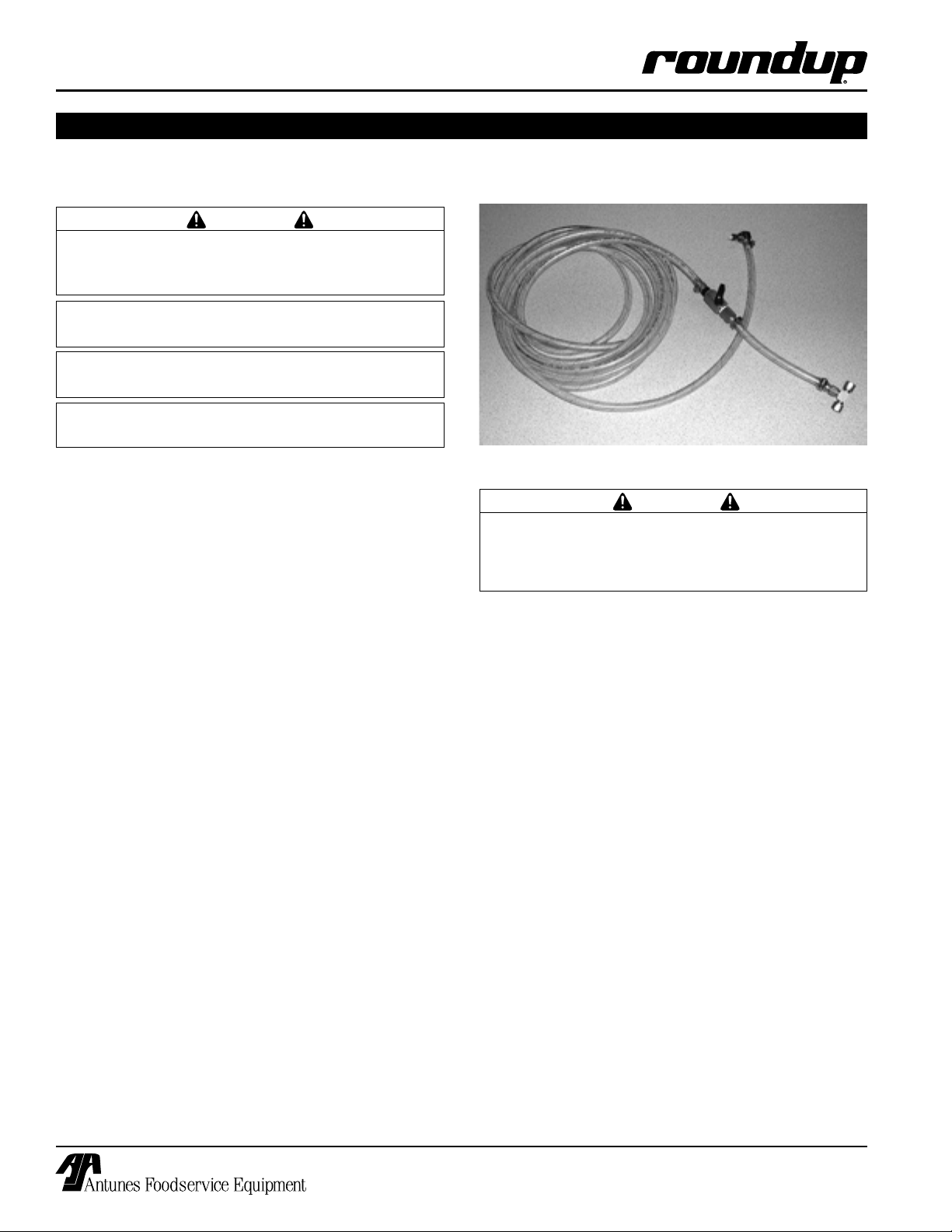
Figure 5. Water Installation Kit
If you experience any problems with these instructions,
contact the factory Technical Service Department at 630784-1000 or toll free in the U.S. at 877-392-7854.
Installation
The optional Water Installation Kit is used in conjunction with the Dual Water Pressure Regulator for the
STS-200.
It allows you to easily connect your existing water supply to the STS-200 Steamer/Scale. It is equipped with
quick disconnect attachments for easy installation and
also has a water shut-off valve for maintenance
(Figure 5).
To install, follow these steps:
1. Make sure that the Water Shut-off Valve is
closed.
2. Attach the T-Fitting to your existing water supply.
NOTE: The T-Fitting is for 1/4” O.D. Tubing
3. Attach the Quick Disconnect fitting to the inlet
connection of the Dual Water Pressure Regulator.
WARNING
Make sure that the water hoses are not kinked or
bent. This could result in poor steaming performance.
12
P/N 1010929 03/06
Page 13

STS-200 STEAMER/SCALE
INSTALLATION (continued)
Dual Water
Regulator Kit
(P/N 7000418)
From Cold
Water Supply
Main Shut
Off Valve
To STS-
200
Optional Water
Installation Kit
(P/N 7000420)
Figure 6. Dual Water Regulator Kit (P/N 7000418) with optional Water Installation Kit (P/N 7000420)
P/N 1010929 03/06
13
Page 14

STS-200 STEAMER/SCALE
INSTALLATION (continued)
INSTALLATION INSTRUCTIONS
FOR AIR BULB SWITCH KIT P/N 7000419
WARNING
Turn the unit off, disconnect the power source
and allow the unit to cool down before performing
any service or maintenance on the unit.
AFFECTED PRODUCTS:
All A.J. Antunes Steamer/Scale units.
PARTS INCLUDED:
• 1 Air Bulb Assembly (P/N 0011778)
• 1 Rubber Grommet 5/16” (P/N 0400342)
Used with a 9/16” drill bit.
• 4 Screws, #6 x 3/4” Self Tapping
(P/N 3060144) Used with a 0.125” drill bit.
• Instruction Sheet (P/N 1010869)
TOOLS:
• Phillips Head Screwdriver
General
If you experience any problems with these instructions,
contact the factory Technical Service Department at 630784-1000 or toll free in the U.S. at 877-392-7854.
Replacing the Air Bulb Switch
NOTE: If you are installing the Air Bulb Switch for
the first time, go to Step 3.
Hole cut into counter
with Rubber Grommet
12 inches behind unit..
12 Inches
(recommended)
Air Bulb Switch is mount-
ed on the front edge of
the counter with the Air
Switch hose running
under the counter top and
then up from a hole cut
through the counter.
Figure 7a. Proper Installation (Option 1)
Air Bulb Switch is
mounted on the front
edge of the counter
with the Air Switch
hose running over the
counter top.
1. Turn the unit off and unplug the power cord.
2. If necessary, remove the old Air Bulb Switch from
the unit by gently pulling the Air Switch Hose from
the connection on the back of the unit
(Figure 7a).
If the old Air Bulb Switch is mounted, carefully
remove and discard the two mounting screws and
the old Air Bulb Switch.
3. To install the new Air Bulb Switch, refer to Figures
7a through 7c. These figures show the proper
mounting options. Choose the best option for
your location.
WARNING
DO NOT mount the Air Bulb Switch as shown in
Figure 7d. Damage to the switch may result. Do
NOT mount the Air Bulb Switch on the floor for
ANY reason. It is NOT a foot switch.
14
Figure 7b. Proper Installation (Option 2)
Air Bulb Switch is
mounted or placed
(free standing) on
the counter top.
Figure 7c. Proper Installation (Option 3)
P/N 1010929 03/06
Page 15

INSTALLATION (continued)
4. If you chose options 2 or 3, skip to Step 5. For
option 1, you must cut a hole through the top
of the counter. This hole MUST be at least 12
inches directly behind the Air Switch Connection
located on the back of the unit.
After cutting the hole, insert the supplied rubber
Grommet into the hole to protect the Air Switch
Hose from nicks and cuts.
NOTE: Failure to use the black Rubber Grommet
may shorten the life-span of the Air Bulb Switch
and/or Air Hose.
5. Use the two self-tapping screws to mount the Air
Bulb Switch according to your chosen option.
NOTE: The use of screws in option three are
optional.
6. Run the Air Switch Hose appropriately according
to your chosen option of installation, and attach
the end to the Air Switch Connection located at
the back of the unit.
STS-200 STEAMER/SCALE
Do NOT install the Air
Bulb Switch with the
hose pointed up from the
edge of the counter top.
Damage to the hose or
switch may result.
Figure 7d. Incorrect Installation (Option 3)
WARNING
DO NOT mount the Air Bulb Switch on the floor
for ANY reason. It is NOT a foot switch.
P/N 1010929 03/06
15
Page 16

STS-200 STEAMER/SCALE
OPERATION
CAUTION
Handle the Steamer/Scale with great care. Do not
place objects other than sliced meat on the unit
and NEVER place anything over 4 pounds (64
ounces) on the Steamer/Scale. Damage to the
unit may result due to careless handling or misuse.
IMPORTANT
Handle the Top Cover with care. If the Top Cover
is bent, dented, or damaged, it may not sit properly on the Steamer/Scale resulting in inaccurate
weight measurements.
Operating Instructions
1. Turn the Rocker Switch (power On/Off) to ON
(Figure 2).
2. Allow the unit to preheat for approximately 30
minutes. The yellow Heater LED, located on the
back of the unit, will illuminate during the time
that the heating element is heating up. When the
unit is ready for operation, the blue Ready light
on the front of the unit will turn on and remain
lit. The unit will display 0.0. If it displays anything
besides 0.0, zero the scale by pressing the “Zero”
button once. If the display still does not read 0.0,
perform the procedures in the “Calibrating the
Steamer Scale” section of this manual.
NOTE: Do NOT press any buttons or use the scale
until it has warmed up and the Blue Ready LED is
ON.
3. Place the sliced meat onto the center of the
Steamer/Scale surface. At the same time, press
the Air Switch (Figure 1). The Steamer/Scale will
initiate a shot of steam.
4. The Blue LED will also turn off for 4 seconds.
This is the timer cycle.
5. Note the weight of the sliced meat and adjust
according to serving requirements.
IMPORTANT
Weight readings are accurate at the center of the
scale surface ONLY. Do not weigh sliced meat on
the edges or corners of the Steamer/Scale.
6. When the blue LED turns on, another steam/time
cycle can be initiated.
7. Remove steamed product and complete the
assembly of the sandwich.
Calibrating the Steamer/Scale
If the Steamer/Scale displays anything other than 0.0
during operation, first zero the scale. If the Steamer/
Scale still does not display 0.0 after it has been zeroed,
you must calibrate it as follows:.
1. Turn the unit on and allow it to warm up for 30
minutes.
2. Turn the unit off and wait for 20 seconds.
3. Ensure nothing is on the Steamer/Scale surface
and that the Top Cover is seated correctly.
4. Directly to the right of the Zero (on) button is the
Hidden button used to adjust the scale (Figure 1).
Simultaneously press and hold both the Zero (button) and the Hidden button and then turn the unit
on. Continue holding the buttons. The system
displays 888, 93, r 1.8, and then rb. At this point,
release both buttons. The unit will then display
C0. If the unit does not display C0, repeats Steps 2
through 4.
5. Press and release the Zero (on) button. Wait for
10 seconds. Do NOT bump the unit, counter,
or touch the Steamer/Scale during this 10
second period! The unit will then display C
and then C1.
6. Place a 1 pound (16 oz.) calibration weight on the
center of the scale surface. Press and release
the Zero (on) button. Wait 10 seconds. Do NOT
bump the unit, counter, or touch the Steamer/
Scale during this 10 seconds! During this 10
second time frame, the unit will display C, don, Sav,
and then 15.9, 16.0, or 16.1.
Remove the 1 pound (16 oz.) calibration weight.
The unit should read 0.0. If it does not, repeat
Steps 2 though 6.
16
P/N 1010929 03/06
Page 17

STS-200 STEAMER/SCALE
HTRSOL
7
3
6
5
4
8
2
9
1
0
7
3
6
5
4
8
2
9
1
0
7
3
6
5
4
8
2
9
1
0
CYCLETEMP
SHOT
OPERATION (continued)
Rotary Switch Settings
At the back of the STS-200 unit are three Rotary
Switches: Temp, Cycle, and Shot.
The Temp Rotary Switch sets the operating temperature
of the unit. The Cycle Rotary Switch sets the length of
a steam cycle in seconds. The Shot Rotary Switch sets
the amount of water used in each cycle of operation.
The standard settings and other possible settings are
listed in the following table.
Setting Temp/F° Cycle/sec Shot/Sec
0 375* 10.0 1.0
9 370 9.0 0.9
8 365 8.0 0.8
7 360 7.0 0.7
6 355 6.0 0.6
5 350 5.0 0.5
4 345 4.0* 0.4*
3 340 3.0 0.3
2 355 2.0 0.2
1 330 1.0 0.1
* These are the Standard Settings for the STS-200.
P/N 1010929 03/06
17
Page 18

STS-200 STEAMER/SCALE
MAINTENANCE
Precaution:
During these checks, hot surfaces will be exposed.
Hazard Communication Standard (HCS) – The procedures on this card include the use of
chemical products. These chemical products will be highlighted with bold face letters fol-
lowed by the abbreviation (HCS) in the tools portion of the procedure. See the Hazard
Communication Standard (HCS) Manual for the appropriate Material Safety Data Sheet(s)
(MSDS).
WARNING
Turn the unit off, disconnect the power source and
allow the unit to cool down before performing any service or maintenance on the unit.
The table below describes the types of cleansers and
detergents used during maintenance of the Steamer/
Scale.
IMPORTANT
Read ALL instructions on the cleaning products used.
Follow all instructions regarding the proper cleaning
product to use as well as the proper mixture and/or
handling of the cleaning product.
You MUST use the appropriate cleanser for the task
based on the appropriate supplier.
Document
Term
General
Detergent
Cleaner (HCS)
Steam
Generator
Cleaner (HCS)
Delimer/Scale
Remover
(HCS)
Sanitizer
Solution (HCS)
Proctor & Gamble
Product Name
Dawn™ Detergent
Solution
Spic and Span® Multisurface Cleaner (the
Green Liquid)
DCT-Delimer Solution
Clean Quick Sanitizer Ster-O-Kem® #15
Damon
Product Name
Lark® Detergent
Solution
SF-77®
Degreaser
Detergent.
---
Sanitizer
CAUTION
Chlorides or phosphates in cleansing agents (such
as bleach, sanitizers, degreasers or detergents) could
cause permanent damage to stainless steel equipment.
The damage is usually in the form of discoloration, dulling of metal surface finish, pits, voids, holes or cracks.
This damage is permanent and not covered by warranty.
NOTE: Frequency of cleaning is determined by water
conditions, usage and water filter systems.
Cover
Water Inlet
Diffuser
Steam
Generator
Steamer/
Scale
Figure 8. Steamer/Scale Components
Tube
Hidden
button
Zero (on)
button
Cleaning the STS-200 During Daily Use
CAUTION
The Top Cover, Diffuser, and Steam Generator are HOT
when performing the following procedures.
During the day’s use, there is a build up of meat and
meat juices on the Top Cover, Diffuser, and in the
Steam Generator.
This should be cleaned throughout the day. To do so,
remove the Top Cover and Diffuser and clean them with
a damp cloth (not dripping).
Using the damp cloth, wipe out the Steam Generator to
remove any meat and/or juices.
If the Water Inlet Tube becomes clogged so that water
cannot flow onto the Steam Generator, refer to the section titled “Cleaning the Water Inlet Tube” in this document.
18
P/N 1010929 03/06
Page 19

STS-200 STEAMER/SCALE
MAINTENANCE (continued)
Cleaning the STS-200 Steamer/Scale Daily
IMPORTANT
Turn the Rocker Switch (power On/Off) to OFF, unplug
the unit and allow it to cool down before proceeding.
1. Check the water quick disconnect fitting and all
hose clamp connections for leakage. If leakage
is apparent, tighten all clamps or replace part if
required.
2. Remove the Top Cover and Diffuser and wash in
a solution of Steam Generator Cleaner (HCS).
Use a wire brush to clean/remove the meat residue from the Top Cover and Diffuser. Rinse in
Sanitizer Solution (HCS) and then with clear
water. Allow to air dry.
3. To clean the Steam Generator, wipe out any meat
and meat juices. Pour some Steam Generator
Cleaner (HCS) into the Steam Generator.
Wait 15 minutes and then use the wire brush to
clean the Steam Generator.
Weekly Maintenance
IMPORTANT
Turn the Rocker Switch (power On/Off) to OFF, unplug
the power cord and allow the unit to cool down before
proceeding.
The STS-200 Steamer/Scale utilizes an open Steam
Generator. Water sprayed into the Steam Generator surface
flashes into steam immediately, but the minerals in the water
do not steam, they stay on the Steam Generator surface and
accumulate. A small amount of mineral deposits are needed
for proper operation, but a build-up of excessive mineral
deposits causes poor steaming efficiency, excessive moisture
(wet steam) and will eventually severely retard the steaming
action completely.
CLEANING STEAM GENERATOR
1. Perform the Daily Maintenance first.
2. Remove the Top Cover from unit.
3. Remove the Steam Diffuser.
4. Clean Steam Generator free of any product spills.
NOTE: If the mineral deposits come off in “flakes” or in
layers, build-up is excessive.
CAUTION
Observe all instructions, precautions, and warnings on
cleaning product labels .
Make sure to remove all meat and meat juices.
Rinse the Steam Generator using Sanitizer
Solution (HCS) and then clear water. If the
Steam Generator is not clean, repeat this step.
4. In this step, the cloths are to be damp, NOT
dripping wet. Clean the Steamer Scale base
using a damp soft cloth and General Detergent
Cleaner (HCS). Rinse using a soft cloth with
Sanitizer Solution (HCS) and then a soft cloth
dampened with clear water.
5. Re-install the Diffuser and Top Cover and plug the
power cord into the appropriate outlet.
6. Turn the Steamer/Scale on, allow the unit to
preheat for 30 minutes, and “zero” it by pressing
“zero” button/switch on the front of the unit
(Figure 8).
7. If the Water Inlet Tube becomes clogged so that
water cannot flow onto the Steam Generator,
refer to the section titled “Cleaning the Water Inlet
Tube” in this document.
5. Use a stainless steel wire brush to loosen and
remove excessive deposits from the Steam
Generator surface. Next, reinstall the Steam
Diffuser.
6. Pour Delimer/Scale Remover (HCS) so that it
just covers the top of the Diffuser. Be sure to follow the delimer manufacturer’s directions for proper mixture and use; it must be safe to be used on
aluminum. Wait one hour.
7. Remove the Delimer/Scale Remover (HCS) from
the Steam Generator and rinse with clear water
to remove all traces of Delimer/Scale Remover
(HCS). Repeat Steps 3 through 7 if needed to
remove mineral deposits.
8. Clean the Cover and Diffuser in a hot solution of
General Detergent Cleaner (HCS) and water,
then rinse in clear water and allow to air dry.
9. Clean unit surface with a hot, clean, damp cloth
(not dripping wet) and wipe dry. Re-install all
parts.
IMPORTANT: To ensure proper steaming characteristics,
some mineral deposits must be present on the Steam
Generator surface. If during cleaning, the surface does
become free of mineral deposits (bare aluminum), add
plain tap water to the surface and allow it to boil off.
P/N 1010929 03/06
19
Page 20

STS-200 STEAMER/SCALE
MAINTENANCE (continued)
IMPORTANT: In soft water areas, it may be necessary to
add a small amount of lime to the Steam Generator surface to “season” it.
This will ensure proper steaming characteristics by
producing a thin coating of mineral deposits on the surface. To season the Steam Generator, Mix 1 teaspoon of
Baking Soda with 3 ounces of water.
Pour the seasoning mixture onto hot Steam Generator.
After mixture is converted to steam, the remaining loose
powder can be removed.
10. Plug the power cord into the appropriate outlet
and connect the water line. Turn the Steamer/
Scale on, allow the unit to preheat for 30 minutes,
and “zero” the unit.
11. If the Water Inlet Tube becomes clogged so that
water cannot flow onto the Steam Generator,
refer to the section titled “Cleaning the Water Inlet
Tube” in this document.
Figure 9. Dirty Steam Generator
Figure 10. Clean Steam Generator
Cleaning the Water Inlet Tube
Sometimes when cleaning the Steam Generator, small
particles may be pushed into the Water Inlet Tube causing it to become clogged.
In a clogged state, the unit is unable to spray water into
the Steam Generator. Follow these steps to clean the
Water Inlet Tube and to restore the unit to proper operating condition:
1. With the unit heated, insert a straightened paper
clip SLIGHTLY into the Water Inlet Tube opening
(Figure 1) and rotate in a circular motion
NOTE: Do NOT shove the paper clip into the tube,
otherwise you may further clog the tube.
2. After cleaning the Water Inlet Tube, remove the
paper clip and cycle the unit several times to flush
out any particles. If the water sprays, the unit is
ready for use. If the water does NOT spray, follow
Steps 3 through 5.
3. Set the adjustable Water Pressure Regulator
(Figure 4c) between 20-25 PSI.
4. Next, cycle the unit several times to flush out any
particles.
5. Once the water sprays, set the water pressure
back to 7-9 PSI.
NOTE: Cycle the Steamer several times while
adjusting the water pressure regulator knob until
the water pressure gauge reads between 7-9 PSI.
Checking/Cleaning the Water Strainer Monthly
GENERAL
The Water Strainer (Figure 4c) protects the unit from
any foreign debris in the water line that could get into
the food, damage the unit’s solenoid (causing the unit
to leak or flood), or interfere with the equipment’s proper and consistent operation.
To ensure proper and consistent steaming results,
visually check the water pressure regulator gauge and
strainer cup regularly. If the pressure on the gauge has
dropped, visually check the clear plastic strainer “cup”
and clean out the accumulated debris as follows.
1. Remove the Quick Disconnect #2 (Figure 4c) from
the incoming water supply or shut off the water
supply valve to the unit. Unscrew the clear plastic strainer “cup” and carefully remove the mesh
strainer screen.
2. Take the strainer cup and mesh strainer to the
sink and gently flush all the accumulated debris
out of them, be especially careful not to damage
the mesh strainer screen.
20
P/N 1010929 03/06
Page 21

STS-200 STEAMER/SCALE
MAINTENANCE (continued)
3. Carefully place the mesh strainer screen into its
seat at the bottom of the clear plastic cup and
verify that the orange O-ring is properly seated in
its place before screwing the Strainer cup and top
back together.
4. Reinstall the quick disconnect until it “clicks” into
place.
5. Purge the air out of the strainer by cycling the unit
through several steam cycles.
6. Replace damaged or worn parts as needed.
NOTE: Refer to the Replacement Parts section of
this manual for a complete list of parts.
Weekly- Testing the STS-200 for Weighing Accuracy
1. Turn the unit on and allow it to warm up for 30
minutes.
TROUBLESHOOTING
Message Codes
2. Ensure nothing is on the Steamer/Scale surface
and that the Top Cover is seated correctly.
3. Press the “Zero” button once. The display should
now read 0.0.
4. Place the certified 16 ounce (1 pound) calibration
weight in the center of the scale surface.
5. The display should register 15.9 to 16.1 ounces
(452.67 to 458.36 grams). If it does, the Steamer/
Scale is weighing properly, and does not need
calibrating.
If the unit does not register 15.9, 16.0, or 16.1
ounces (452.67 to 458.36 grams), you must calibrate the scale according to the Operating section
of this manual.
The table below lists the possible message codes displayed by the unit during operation. Contact the factory
if you have any questions about these message codes.
Message
Code
888
93
r0.3
Ld0
don
SAv
Unt
Int
r b
Display test, all digits on.
Software part number, DSW0093.
Software revision.
Loading zero, shown on start up.
Indicates that calibration is complete.
Indicates that the current values are saved into memory.
Display Units (toggles between ounces or grams).
Initialize or reset all scale settings in memory.
Release button. Prompts user to release the Zero (On) or hidden buttons.
Description
P/N 1010929 03/06
21
Page 22

STS-200 STEAMER/SCALE
TROUBLESHOOTING (continued)
Error Codes
The table below lists the possible error codes displayed by the unit when an error occurs.
NOTE: If any of these errors appear on the Steamer/Scale display, contact the factory.
Error Code Description and Corrective Action
“E1” Program
Rom Error
“E2” Gross
Overload
“E3” Scale
Overload
“E4” Calibration
Span Error
“E5” EEPROM
Error
“E6” Calibration
Range Error
“E7 A/D Failure The scale has detected a failure in A/D circuit. Have the Steamer/Scale serviced by a qualified
The program memory in the Steamer/Scale has become corrupted. Have the Steamer/Scale serviced by a qualified Scale Repair Technician.
The Steamer/Scale is in gross overload. The load exceeds the scale’s input range and might
result in damage to the Load Cell. Remove excess weight immediately or Load Cell connections
may be wired in wrong. Ignore this message for the first 5 seconds after powering the Steamer/
Scale.
The Steamer/Scale is in overload. The load on the scale exceeds capacity by more than 103%.
Remove excess weight from the Steamer/Scale.
The Calibration Span is out of range, refer to A/D Ranging section for additional information.
The setup parameters loaded in nonvolatile memory have been corrupted. The Have the
Steamer/Scale re calibrated by a qualified Steamer/Scale Technician.
The “zero” Calibration is out of range. Refer to the A/D Ranging section for additional information.
Steamer/Scale Repair Technician.
22
P/N 1010929 03/06
Page 23

STS-200 STEAMER/SCALE
TROUBLESHOOTING (continued)
Problem Possible Cause(s) Corrective Action
The unit heats up and steams but
the front display is blank.
Unit operates, but the front display intermittently goes blank then
comes back on after several minutes.
NOTE: The generator surface
temperature is in excess of
375° F. The hi-limit will trip at
450-470° F.
No heat, the front display is blank,
and the light on the power switch
is “Off”
No heat, the front display is on,
and the “Blue” ready light is on
steady.
“Blue” ready light flashes rapidly. Thermistor is open. Contact your maintenance person
No heat, front display is blank, but
the light on the power switch is
ON.
The “Blue” ready light repeatedly
flashes 1 second on 3 seconds off
NOTE: The electrical compartment temperature has exceeded
155° F.
The “Blue” ready light intermittently
flashes 1 second on 1 second off
during normal use.
NOTE: The generator surface
temperature has dropped below
280° F. Proper operating temperature is 375° F.
Faulty scale Control Board. Contact your maintenance person
Faulty temperature Control Board.
Disconnected/Loose wiring harness.
The automatic resetting hi-limit is tripping due to the generator overheating.
Faulty temperature Control board.
Faulty thermistor.
Power cord not plugged into the
appropriate outlet.
Circuit breaker is off or tripped. Verify circuit breaker is on.
Faulty power cord. Contact your maintenance person
Faulty terminal block.
Faulty power switch.
Thermistor is shorted. Contact your maintenance person
Faulty temperature Control Board.
Loose, burnt, or broken wiring in heating circuit.
One of the two generator heaters is
open.
Faulty temperature Control Board.
Faulty transformer. Contact your maintenance person
Faulty temperature Control Board.
Loose or broken wiring in circuit.
Insufficient ventilation around unit. Turn unit off and let cool down. If
Faulty Temperature Control Board
Water pressure regulator is improperly
set.
Rotary switches are not correctly set Set switches to the proper settings
One of the two generator heaters is
open
Faulty Temperature Control Board.
or an Authorized Service Agency for
service.
Contact your maintenance person
or an Authorized Service Agency for
service.
Verify that the power cord is plugged
into the appropriate outlet.
or an Authorized Service Agency for
service.
or an Authorized Service Agency for
service.
or an Authorized Service Agency for
service.
or an Authorized Service Agency for
service.
the problem persists, Contact your
maintenance person or an Authorized
Service Agency for service.
Adjust regulator to 7-9 PSI.
shown under the “Equipment Setup”
section in the manual.
Contact your maintenance person
or an Authorized Service Agency for
service.
P/N 1010929 03/06
23
Page 24

STS-200 STEAMER/SCALE
TROUBLESHOOTING (continued)
Problem Possible Cause(s) Corrective Action
Scale is not weighing properly and/or behaves
erratically
Unit heats, does not steam,
but the green LED at the
rear of the unit DOES turn
on for a split second as the
air bulb is pressed
Unit heats, does not steam,
but the green LED at the
rear of the unit DOES NOT
turn on for a split second
as the air bulb is pressed
Scale requires calibration. Calibrate scale according section titled
Interference/binding with the floating
“Spider” (refer to part number 0504087 on
page 30 in the Replacement Parts section
of this manual.)
Faulty load cell. Contact your maintenance person or an
Faulty scale Control Board. Contact your maintenance person or an
The water valve is in the OFF position. Verify water valve is ON.
The quick disconnect fitting is not fully
inserted into the inlet side of the Water
Pressure Regulator.
The quick disconnect fitting is not fully
inserted into the rear of the scale/steamer.
The water regulator strainer screen is
clogged.
The generator’s water inlet tube is clogged. Clean the inlet tube according to the
Faulty solenoid valve. Contact your maintenance person or an
Air Bulb Hose is not properly connected to
the rear of the unit.
Air Bulb Hose is damaged. Replace Air Bulb or hose if damage is
Air Bulb is damaged.
Faulty Air Bulb Switch. Contact your maintenance person or an
“Calibrating the Steamer Scale” in the
Operation section of this manual.
If unit was recently disassembled and/or
serviced, some possible wiring or component may be interfering / binding with
the floating spider.
Authorized Service Agency for service.
Authorized Service Agency for service.
Remove and reinsert the quick disconnect fitting until a “click” is heard.
Clean the strainer according to the
Maintenance section of this manual.
Maintenance section of this manual.
Authorized Service Agency for service.
Remove and reattach the Air Bulb
Hose.
apparent.
Authorized Service Agency for service.
24
P/N 1010929 03/06
Page 25

STS-200 STEAMER/SCALE
TROUBLESHOOTING (continued)
Problem Possible Cause(s) Corrective Action
The unit is not
steaming the product
properly and/or the
product requires
re-steaming.
The generator surface
continuously fills with
water ONLY when the
power switch is OFF.
The generator surface
continuously fills with
water ONLY when the
power switch is turned
ON.
No heat and the rear
LEDS are off but the
front display is on.
The Water Pressure Regulator is improperly set.
The water regulator strainer screen is
clogged.
Rotary switches are not correctly set. Set switches to the proper settings shown in
The generator water inlet tube is clogged. Clean the inlet tube according to the
The generator needs cleaning. Clean the generator according to the
The unit is not being cleaned as required. Clean the unit according to the Daily, Weekly,
The generator surface is not hot enough. Preheat the unit and verify that the generator
The solenoid valve is leaking due to
debris trapped within its plunger and seat.
The Solenoid Valve is not installed
correctly.
Faulty temperature Control Board Contact your maintenance person or an
Faulty Temperature Control Board. Contact your maintenance person or
Adjust regulator to 7-9 PSI. Refer to the section titled “Adjusting the Water Pressure
Regulator” in this manual.
Clean the strainer according to the
Maintenance section of this manual.
the “Equipment Setup” section of this manual.
Maintenance section of this manual.
Maintenance section of this manual.
& Monthly cleaning procedures found in the
Maintenance section of this manual.
surface temperature is at least 375° F.
Attempt to flush the debris out by increasing
the water regulator to 30 PSI & cycling the
unit several times. Reset the regulator back to
7-9 PSI. If the problem persists. Contact the
Authorized Service Agency for service
If the Solenoid Valve was replaced, verify that
the “IN” and “OUT” labels on the valve correspond to the water flow.
Authorized Service Agency for service.
Authorized Service Agency for service.
P/N 1010929 03/06
25
Page 26

STS-200 STEAMER/SCALE
TECHNICAL THEORY OF OPERATION
Technical Theory of Operation
TEMPERATURE/STEAMING THEORY
When the Rocker Switch (Power On/OFF) is ON, line
voltage flows to the primary side of the step down
transformer. The transformer’s secondary side supplies
12 VAC to terminals T1 and T2 of the multifunctional
temperature Control Board.
Once powered, and provided that the generator surface
temperature is below 375º F (190º C), the multifunctional temperature Control Board calls for heat by energizing its on board mechanical relay. Once energized, the
mechanical relay closes its contacts, which allows line
voltage to flow to the generator.
As the generator begins to heat up, a 100 K ohm
thermistor monitors the internal generator temperature.
As the heat continues to increase, the thermistor’s
ohms begin to decrease. As the internal generator temperature approaches 375-390º (190-198º C), the thermistor is generating approximately 790-665 ohms.
The multifunctional temperature Control Board receives
these ohms and then de-energizes the mechanical
relay since the heating circuit is satisfied. Then, the
mechanical relay contacts open, and the generator
stops heating.
The heating circuit cycles on and off as needed, even
at idle. Once the generator is up to temperature (a state
indicated by a steady “Blue” light), and if the pneumatic
Air Bulb Switch is pressed and released to initiate a
steam cycle, air is directed rapidly through the pneumatic hose which then activates a pneumatic switch.
Once activated, the pneumatic switch contacts momentarily close to complete a circuit to terminal J4 on the
multifunctional temperature Control Board.
Simultaneously, the “Blue” light turns off, and the multifunctional Control Board supplies line voltage to the
Solenoid Valve Coil for a split second. The Solenoid
Valve opens, and allows approximately 2-3 tablespoons
of water to be disbursed onto the Generator surface for
steaming. The water flashes into steam immediately
then rises up through the steam ports and steams the
product.
The multifunctional Control Board incorporates two status LEDs detailed below. If the heating circuit continues
to call for heat and the Generator overheats, an automatic resetting Hi-Limit Thermostat will trip and open
the generator circuit and transformer circuit at approximately 450-470º F (232-243º C).
NOTE: If this condition should repeat, the root
cause must be determined and corrected.
NOTE: The STS-200 Scale/Steamer is shipped with
a dual water pressure regulator assembly. The primary water pressure regulator is fixed at 30 PSI
and is not adjustable. The secondary water pressure regulator is factory set and should remain
set between 7-9 PSI. It should only be momentarily
adjusted if required as per the maintenance section.
WEIGHT SCALE THEORY
As previously stated, when the power switch is on,
line voltage flows to the primary side of the step down
transformer. The transformer’s secondary side supplies 12 VAC to the multifunctional temperature Control
Board terminals T1 and T2.
Once powered, terminal J1 on the multifunctional temperature Control Board supplies 8-10 VDC to terminal
J1 of the scale Control Board by means of a wiring
harness. Once powered, the scale Control Board illuminates its display. In addition, the two outer pins of the
scale Control Board’s J2 terminal powers up the load
cell. These two outer pins supply 4-5 VDC to the load
cell’s “Green” and “Black” wires. The two center pins
receive a signal from the load cell’s “Red” and “White”
wires.
NOTE: The load cell is manufactured with an
integrated wiring harness. The loose end of this
harness plugs into the scale Control Board. The
removable top platform sits on 4 floating steel
pegs. The steel pegs are attached to a floating steel
cage (known as a Spider). The steel cage is attaches to the load cell. The Scale’s maximum operating
weight capacity is 4 lbs. The scale weighs in .1 oz
increments.
After approximately 4 seconds, the “Blue” light turns
back on to indicate that the unit is ready to run another
steam cycle.
26
P/N 1010929 03/06
Page 27

STS-200 STEAMER/SCALE
TECHNICAL THEORY OF OPERATION (continued)
LED FUNCTION
(The following LEDs are viewed from the rear of the
unit)
Yellow (Heat): When lit, it indicates that the unit is in
heat mode. During this time, line voltage is being supplied to the generator. When off, it indicates that the
generator is up to operating temperature.
NOTE: This led will cycle on and off even at idle.
Green (Solenoid Valve): When lit, it indicates that line
voltage is momentarily being supplied to the solenoid
valve coil.
NOTE: This LED is only lit for a split second.
THE FOLLOWING PROVIDES UNIQUE FEATURES
INVOLVING THE “BLUE” LIGHT. THESE ARE HANDY FOR
TROUBLESHOOTING PURPOSES.
During cold start up, the “Blue” light remains off (indicating that the generator is not up to temperature).
During this time, the solenoid valve circuit is disabled
and the unit will not initiate a cycle even if the air bulb is
pressed.
Within 5 minutes after cold start up, the “Blue” light will
turn on steady (indicating that the generator is now up
to operating temperature). During this time, the solenoid
valve circuit is enabled.
BLUE LIGHT BLINKING CODES (REFER ALSO TO THE
TROUBLESHOOTING SECTION)
Rapid Flashing: Under this condition, the generator
may, or may not get hot. The solenoid valve circuit is
disabled until the cause is corrected.
Possible Cause(s): An open thermistor or loose, burnt,
broken wiring in heating circuit or one of the two generator heaters is open, or faulty temperature Control
Board.
Slow Flashing (1 second on and 1 second off):
Under this condition, the generator surface temperature
has dropped below 280º F (137º C). The solenoid valve
circuit is disabled until the temperature rises above 280º
F (137º C) and reaches proper operating temperature.
Possible Cause(s): The water pressure regulator is
improperly set or rotary switches are not correctly set or
one of the two generator heaters is open or faulty temperature Control Board.
Slow Flashing (1 second on and 3 seconds off):
Under this condition, the electrical compartment temperature has exceeded 155º F (68º C). The solenoid
valve circuit is disabled until the electrical compartment
temperature drops below 155º F (68º C).
Possible Cause(s): Insufficient ventilation around the
unit or faulty temperature Control Board.
NOTE: The unit should always be preheated for 30
minutes before use.
P/N 1010929 03/06
27
Page 28

STS-200 STEAMER/SCALE
See Page 29
See Page 30
See
Page 31
See
Page 32
See
Page 33
REPLACEMENT PARTS
28
P/N 1010929 03/06
Page 29

STS-200 STEAMER/SCALE
7
8
1
3
5
4
2
9
11
REPLACEMENT PARTS (continued)
Item Part Description Qty.
No.
1 7000424 Generator Kit 1
(Incl. 2, 4, 5, 7, 8, & 10)
0100245** Generator Machined 1
4050228** Probe, Thermistor 1
0011787** Cartridge Heater Assy. w/ Term. 2
3080192** Set Screw, 8-32 x 3/8 Cup Point 3
2 0400343 Insulation, Generator 1
3 0200242 O-Ring 1
4 2120168 Spacer, #6 4
5 306P101 Nut, Hex #6-32 1
7 7000438 Generator Elbow Kit (Incl. 3) 1
2020117** Tube, Silicone 1
2190142** Elbow 1/8”* 1
Item Part Description Qty.
No.
8 7000458 Hi-Limit Thermostat Kit* 1
4030373** Thermostat 1
3040114** Screw #4-40 x 1/4 2
2140119** Therm Paste 1
9 0504053 Retainer, Insulation 1
10 7000356 Silicone Sealer Kit (Not Shown) 1
11 306P102 Internal Tooth Lock Washer #6 1
* These Parts to be Assembled onto the Generator
Assembly
** The Part Numbers in grey are NOT available for
P/N 1010929 03/06
29
Page 30

STS-200 STEAMER/SCALE
2
3
2
4
5
6
7
8
9
1
10
7
2
REPLACEMENT PARTS (continued)
Item Part Description Qty.
No.
1 308P189 Screw 8-32 x 1/4” (10 pack) 1
2 310P170** Nut, #10-32 NY-Lock (10 pack) 1
3 800P007** Screw, M6 x 16 mm 1
Hex Head
4 0504087** Spider 1
5 0504122** Spacer, Load Cell 2
6 4030367** Load Cell 1
Includes item #5, 3, and 2
7 310P146** Nut, Hex “KEPS” #10-32 1
8 0504082** Plate, Base 1
9 310P180** Screw, Mach. 1
#10-32 x 1-3/4” Lg. (10 pack)
10 0504119 Brace, Spider 1
11 7000459 Base/Load Cell Assembly Kit 1
(Includes Items 1 through 10
assembled)
12 7000460 Load Cell Test Kit (not shown) 1
** The part numbers in grey are NOT available for
individual purchase. You must use item #11 in
their place. Item #11 consists of all of the items
shown.
11
30
P/N 1010929 03/06
Page 31

STS-200 STEAMER/SCALE
8
8
2
1
9
11
10
7
6
5
3
4
12
13
13
REPLACEMENT PARTS (continued)
Item Part Description Qty.
No.
1 0504057 Housing, Steamer 1
2 4060386 Indicator, LED Blue 1
3 1001140 Label, Control Panel 1
4 7000439 Membrane Switch (Incl. #3) 1
5 0504080 Plate, Cover 1
6 7000436 Leg Kit (Pack of 4) 1
7 7000421 Scale Control Board 1
Item Part Description Qty.
No.
8 2120168 Spacer #6 8
9 0504123 Bracket, Terminal Mounting 1
10 4060387 Terminal, Double Row x 2 Con 1
11 306P130 Nut, Hex KEPS #6-32 1
12 7000427 Water Tube with Quick 1
Disconnect Kit (Female)
13 306P102 Internal Tooth Lock Washer #6 1
(pack of 10)
P/N 1010929 03/06
31
Page 32

STS-200 STEAMER/SCALE
33
34
14
26
20
21
23
25
24
22
15
12
11
13
29
30
31
7
2
8
3
5
6
9
28
16
17
18
19
10
1
1
NOTE: Item 8 can be
purchased separately in
kit #7000429
32
27
REPLACEMENT PARTS (continued)
Item Part Description Qty.
No.
1 7000425 Solenoid Assy. (incl. Items 2-9) 1
2 4040175 Solenoid Valve 1
3 0504089 Plate, Solenoid 1
5 3620102 Lock Washer 5/8” Int. 1
6 2080117 Quick Disconnect 1/8” NPT 1
7 2190143 Barb 3/16” tube x 1/8” NPT 1
8 7000429 Solenoid coil 120 VAC 1
9 2020118 Tube, Silicone 3/16” I.D. x 3/8”
O.D. x 10 “ Lg. 1
10 2080124 Elbow, Quick Disconnect 1/8” 1
11 0504072 Panel, Control 1
12 0504071 Housing, Electrical 1
13 3080143 Nut, Hex KEPS #8-32 2
14 4060304 Terminal Block, 3-Pole 1
15 306P101* Nut, Hex #6-32 2
16 300P102* NU, Speed #8-32 “U” 2
17 4010201 Transformer 120v/12v 1
18 0400147 Bushing, Shorty 7/8” 2
19 308P104* Screw, Mach #8-32 x 3/8” Sltrshd 2
20 306P130* Nut, Hex KEPS #6-32 5
21 0504088 Plate, Control 1
22 306P123* Screw, Mach #6-32 x 7/8” Sltrshd 2
Item Part Description Qty.
No.
23 306P105* Screw, Mach #6-32 x 1/2” Sltrshd. 5
24 040P119* Bushing, Shorty 5/8” 1
25 3080189 Screw, Machine #8-32 x 1/4” 5
26 7000422 Temperature Control Board Kit 1
27 0700674 Power Cord 5-15P 120V 1
28 040K251 Strain Relief - Cord Connector 1
29 4010212 Air Switch 1
30 4010151 Switch, Rocker (25 A - 125V) 1
31 308P124* Screw, Mach One-way #8-32 5
32 7000426 Water Supply Kit
(Incl. Items #9 and 10) 1
33 4060389 Ferrite 100 Ohm/100 Mhz 1
34 4060388 Varistor (Mov) Assembly 1
35 1001141* Setting Label (Not shown) 1
36 1001153* Water Label (Not shown) 1
NOTE: Item #8 comes included in Kit 7000425 but is also
available for purchase by itself.
NOTE: Items #11 and 12 are sold as one piece ONLY.
*NOTE: Items only available in a package of 10. The part
numbers in gray are NOT available for individual purchase.
32
P/N 1010929 03/06
Page 33

STS-200 STEAMER/SCALE
7
6
5
4
3
2
1
8
REPLACEMENT PARTS (continued)
Item Part Description Qty.
No.
1 0011784 Top Cover Weldment 1
2 304P114 Screw, Machine #4-40 x 1/4” 2
(10 pack)
3 0504121 Seal Retainer 4
4 0300145 Screw, Locator (peg, steel) 4
5 2120157 Spacer 4
6 2120154 Standoff 4
7 7000423 Seal Kit, pack of 4 (Incl. #2) 4
8 0011776 Diffuser Assembly 1
P/N 1010929 03/06
33
Page 34

STS-200 STEAMER/SCALE
11
3
4
1
10
8
2
9
6
5
7
1
7
Inlet Tubing
NOT Supplied
Must use 1/4" I.D
Nylon Braided
Hose
Strainer
Screen
Strainer Cup
13
12
14
12
2
2
O-Ring
Orange
REPLACEMENT PARTS (continued)
Dual Water Pressure Regulator Kit (P/N 7000418)
Item Part Description Qty.
No.
1 7000139 Elbow, Quick Disconnect 2
(Incl 2 & 12)
2 2110160 Clamp, Ear 17/32” 3
3 2030128 Tubing - 1/4” ID PVC Brd. 30” long 1
4 2040130 Male Adaptor, Barbed - 1/4” 1
5 7000437 Gauge, Pressure (0-30 PSI) 1
6 2170122 Regulator Pressure (adjustable) 1
7 2190129 Nipple 1/4” NPT x 1/4” NPT 2
34
Item Part Description Qty.
No.
8 7000333 Strainer 1/4 FTP (includes O-Ring, 1
Strainer Screen, and Strainer Cup
9 2170124 Regulator, Pressure 1
(non-adjustable)
10 2080118 Quick Disconnect 1/4” NPT 1
11 0504195 Bracket, Regulator 1
12 020P117 O-Rings, Spare (10 Pack) 3
13 306P144 Screw- Self Tapping (10 Pack) 1
14 7000334 Screen & Gasket Kit 1
P/N 1010929 03/06
Page 35

STS-200 STEAMER/SCALE
1
1A
REPLACEMENT PARTS (continued)
Item Part Description Qty.
No.
1 7000435 Weight 1 lb (16 ounces) (Incl 1A) 1
1a 2130173 Wire Brush 1
P/N 1010929 03/06
35
Page 36

STS-200 STEAMER/SCALE
5
2
4
1
# 16 GA. TFE-200°C
UNLESS OTHERWISE SPECIFIED.
NOTE: ALL WIRES TO BE 14 GA. TFE-200°C
22 GA. TFE-200°C
GENERATOR
T4
T3
TEMP CONTROL
T1
T6
T5
SOLENOID
# BLK
THERMISTOR
GEN.
RELAY
LED
BLU
BLU
AIR SWITCH
T2
SCALE CONTROL
12VAC
120/240VAC
X-FORMER
J2
J4
J3J1
LOAD CELL
HI-LIMIT
THERMOSTAT
BLOCK #2
TERMINAL
BLK
# WHT
# BLK
4
3
ZERO/HIDDEN
SWITCH
J1
J2
J3
WHT
POWER
SWITCH
GND
TERMINAL
POWER
BLOCK
CORD
CORE
FERRITE
VARISTORS
(X3)
WIRING DIAGRAM
36
P/N 1010929 03/06
Page 37

NOTES
STS-200 STEAMER/SCALE
P/N 1010929 03/06
37
Page 38

STS-200 STEAMER/SCALE
NOTES
38
P/N 1010929 03/06
Page 39

NOTES
STS-200 STEAMER/SCALE
P/N 1010929 03/06
39
Page 40

A.J. Antunes & Co.
Headquarters/Manufacturing
180 Kehoe Boulevard
Carol Stream, Illinois 60188
USA
Phone (630) 784-1000
Toll Free (800) 253-2991
Fax: (630) 784-1650
Antunes Equipment
Manufacturing (Suzhou) Ltd.,
9 Hou Ju Road, Building #24,
S&T Park, SND
Suzhou, Jiangsu, China 215011
Phone: 86-512-6841-3637
Fax: 86-512-6841-3907
www.ajantunes.com
LIMITED WARRANTY
Equipment manufactured by Roundup Food Equipment Division of A.J. Antunes & Co. has been constructed
of the finest materials available and manufactured to high quality standards. These units are warranted to be
free from mechanical and electrical defects for a period of one year from date of purchase or 18 months from
shipment from factory, whichever occurs first, under normal use and service, and when installed in accordance
with manufacturer’s recommendations.
To insure continued proper operation of the units, follow the maintenance procedure outlined in the Owner’s
Manual.
1. This warranty does not cover cost of installation, defects caused by improper storage or handling prior to placing of
the Equipment. This warranty does not include overtime charges or work done by unauthorized service agencies
or personnel. This warranty does not cover normal maintenance, calibration, or regular adjustments as specified
in operating and maintenance instructions of this manual, and/or labor involved in moving adjacent objects to gain
access to the Equipment. This warranty does not cover consumable items such as Platen Release Sheet and
Conveyor Belt Wraps. This warranty does not pay travel, mileage, or any other charges for an authorized
service agency to reach the equipment location.
2. Roundup reserves the right to make changes in design or add any improvements on any product. The right is
always reserved to modify equipment because of factors beyond our control and government regulations. Changes
to update equipment do not constitute a warranty charge.
3.
If shipment is damaged in transit, the purchaser should make a claim directly upon the carrier. Careful inspection should
be made of the shipment as soon as it arrives and visible damage should be noted upon the carrier’s receipt. Damage
should be reported to the carrier. This damage is not covered under this warranty.
4. Warranty charges do not include freight or foreign, excise, municipal or other sales or use taxes. All such freight
and taxes are the responsibility of the purchaser.
5. THIS WARRANTY IS EXCLUSIVE AND IS IN LIEU OF ALL OTHER WARRANTIES, EXPRESSED OR IMPLIED,
INCLUDING ANY IMPLIED WARRANTY OR MERCHANTABILITY OR FITNESS FOR A PARTICULAR PURPOSE,
EACH OF WHICH IS HEREBY EXPRESSLY DISCLAIMED. REMEDIES DESCRIBED ABOVE ARE EXCLUSIVE
AND IN NO EVENT SHALL ROUNDUP BE LIABLE FOR SPECIAL CONSEQUENTIAL OR INCIDENTAL DAMAGES FOR THE BREACH OR DELAY IN PERFORMANCE OF THIS WARRANTY.
 Loading...