

Page 1

ANTELOPE AUDIO
MODELING CONDENSER MICROPHONES
USER MANUAL
Page 2

CONTENTS
1. BEFORE YOU BEGIN ........................................................................................................... 3
Instructions for proper microphone use: .................................................................................. 3
2. INSTALLING AND AUTHORIZING THE NATIVE MIC EMULATIONS ................................... 4
3. EDGE SOLO .......................................................................................................................... 4
4. EDGE DUO ............................................................................................................................ 7
5.EDGE QUADRO ................................................................................................................... 10
6. EDGE NOTE ........................................................................................................................ 13
7.VERGE ................................................................................................................................. 15
8.CUSTOMER SUPPORT INFORMATION .............................................................................. 17
9.MY ANTELOPE AUDIO PRODUCT ISN’T WORKING. WHAT SHOULD I DO ...................... 18
How do I get an RMA number? ............................................................................................ 18
RMA shipping information ..................................................................................................... 18
10.LIMITED WARRANTY POLICY
Warranty Coverage
Limited Factory Refurbished (B-stock) Warranty
Remedies
Obsolete or Discontinued Products
Exclusions ......................................................................................................................... 21
Limitation of Liability............................................................................................................. 21
Data Recovery ..................................................................................................................... 21
No Other Warranties ............................................................................................................ 22
How to Make a Warranty Claim ........................................................................................... 22
Returning Your Product ......................................................................................................... 22
Request a Return Material Authorization Number (RMA#) .................................................. 22
RMA Return Addresses ........................................................................................................ 22
Products Lost or Damaged During Transit ........................................................................... 23
C
ompany information ........................................................................................................... 23
11. SAFETY NOTES
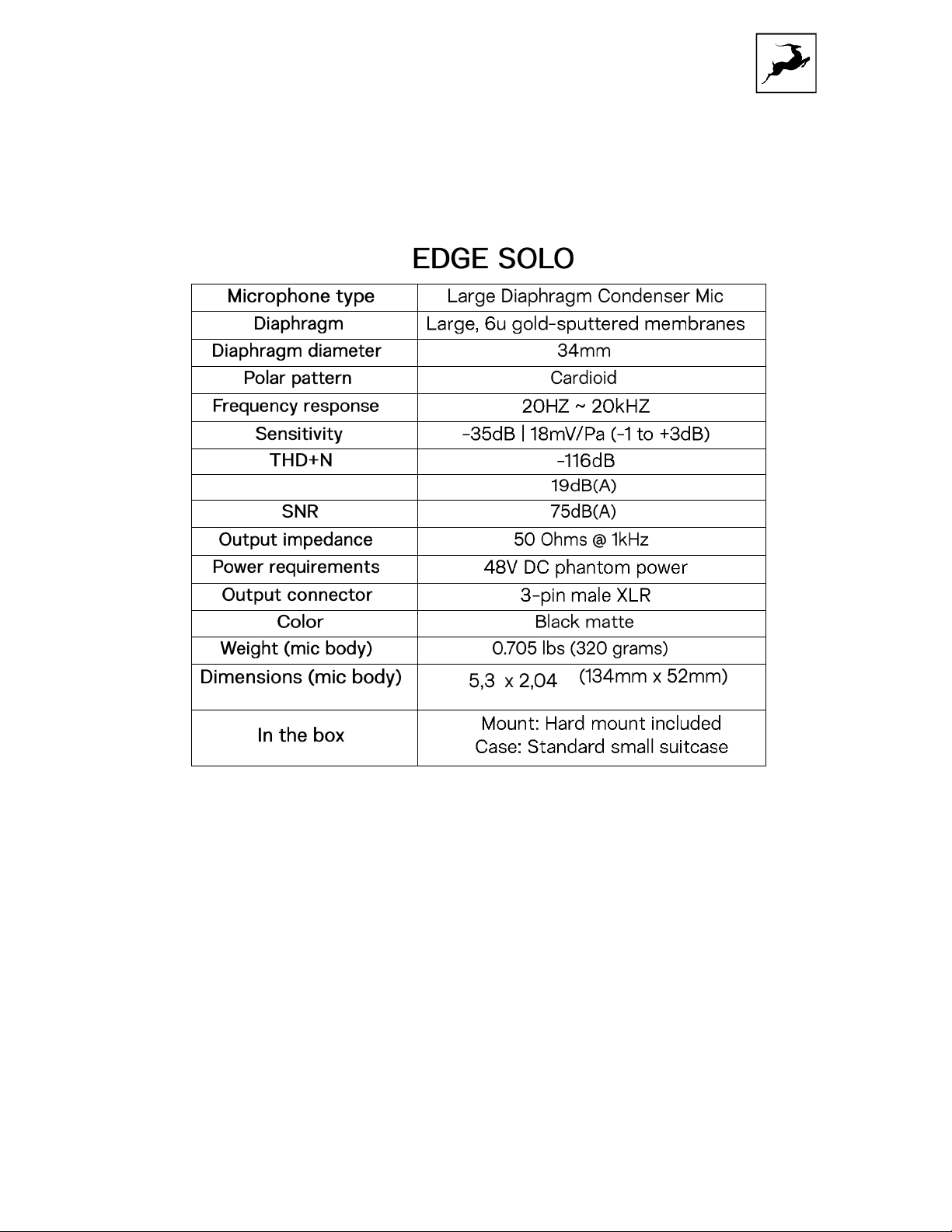
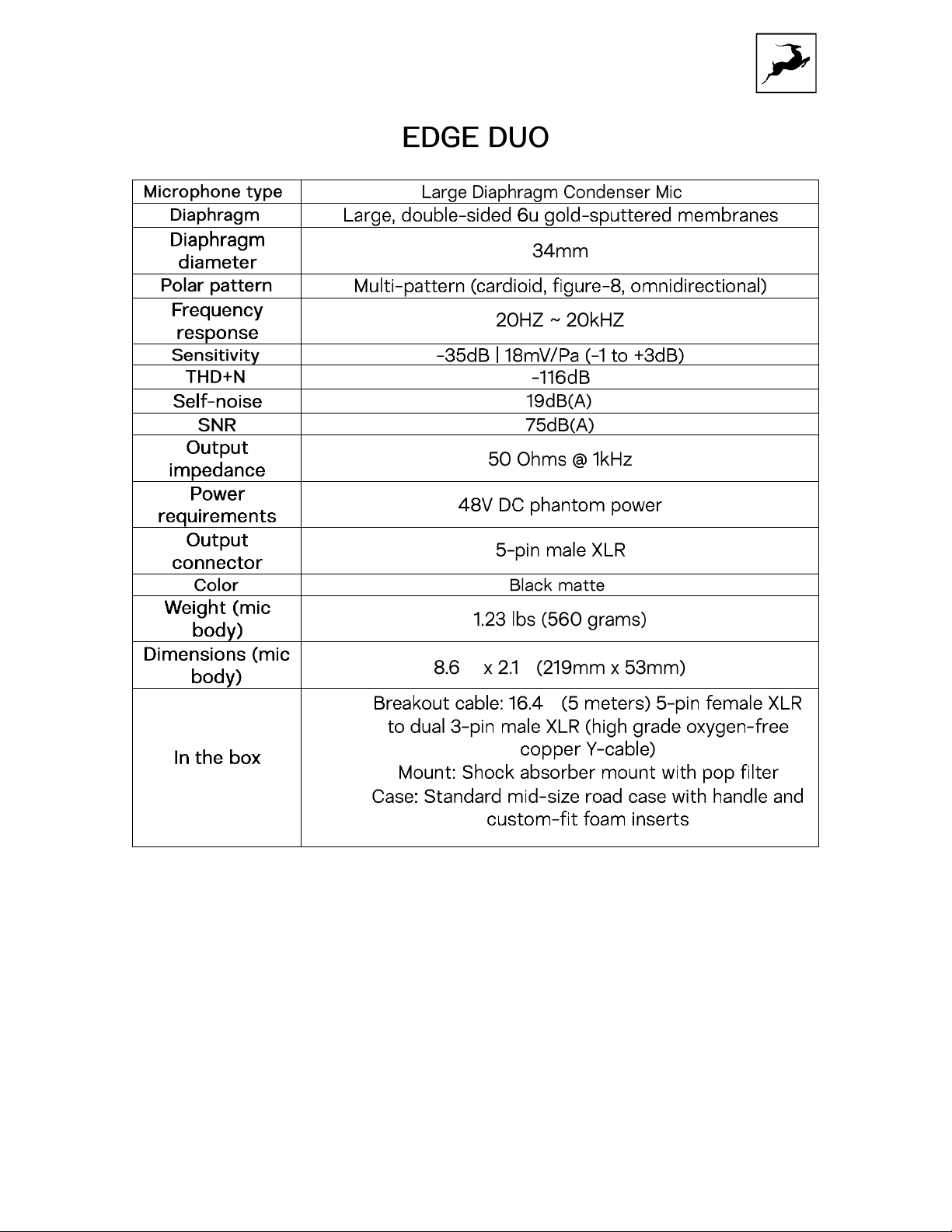
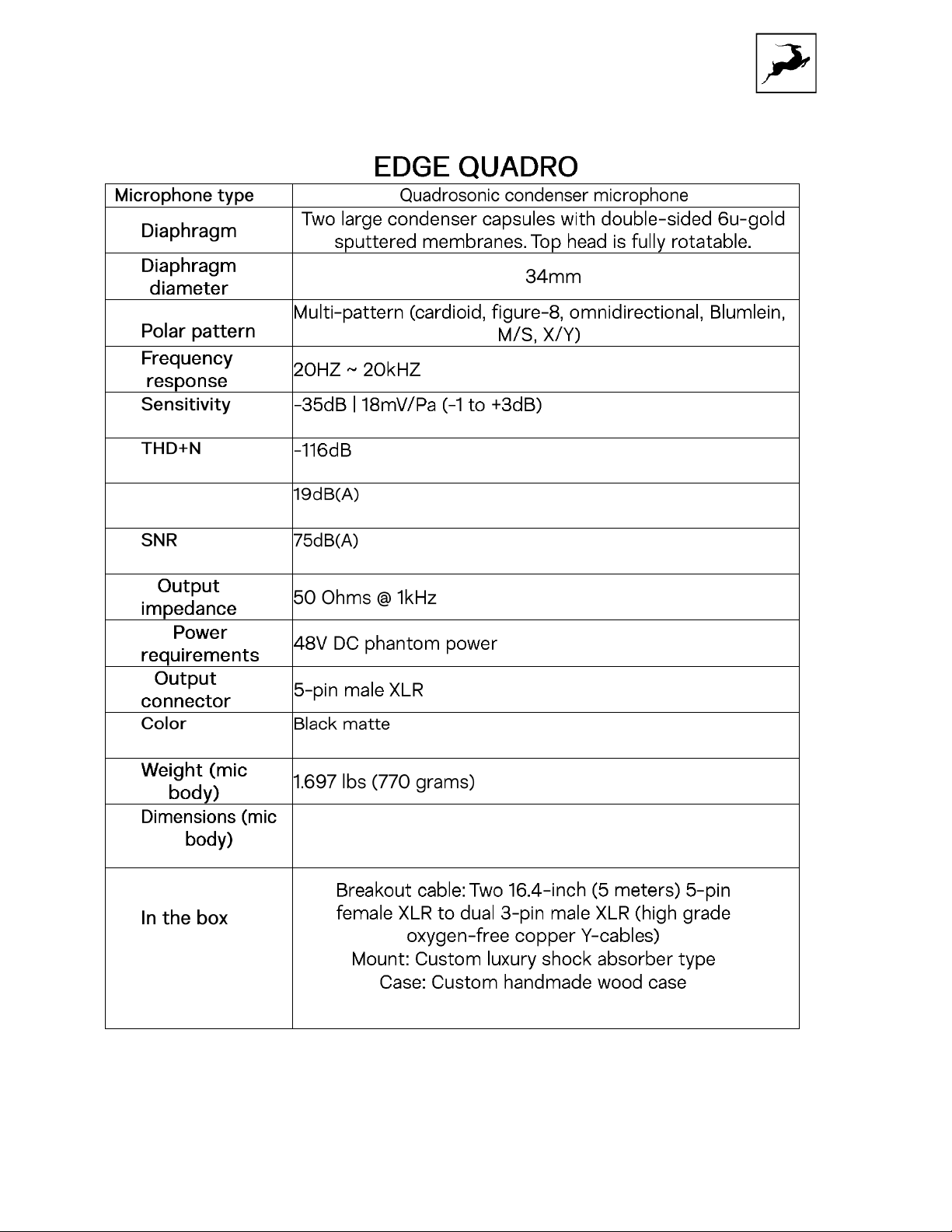
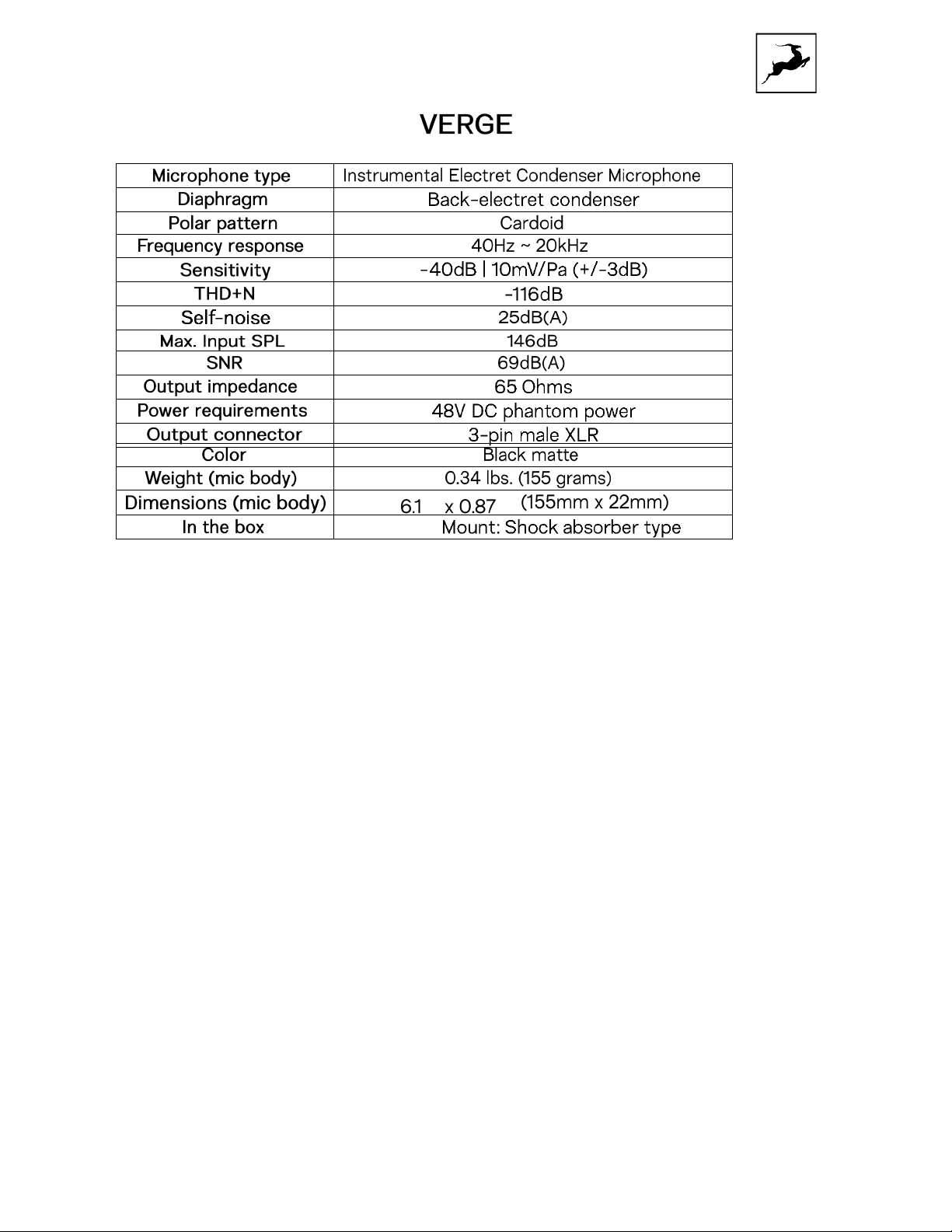
12. TECHNICAL SPECIFICATIONS
......................................................................................................................... 20
......................................................................................................... 19
.............................................................................................................. 23
........................................................................................ 19
.......................................................... 19
................................................................................ 20
..................................................................................... 25
Page 3
1. BEFORE YOU BEGIN
Should you ever find yourself struggling, do not hesitate to contact our Customer Sup-
port team over phone, live chat and our ticket system. You can also visit Antelope Audio
on YouTube and explore our video tutorials or join the Antelope Audio Users Facebook
group and ask for advice. The Knowledge Base is also a good source of information.
Best wishes,
Instructions for proper microphone use:
1. Avoid any mechanical stress. Microphone drops, hits with other objects can detach the
capsule from its body or hurt the thin membrane, thus making the microphone
malfunction.
2. Humidity can affect the microphone performance. If humid air/liquid/human saliva
falls on the microphone, electronic components like the Field Effect Transistor th
ircuit boards inside the microphone can get damaged. To avoid direct contact with
c
humidity.
recommended.
3. Avoid exposure to Dust or smoke – small particles can seep into through the
headbasket and stick to the diaphragm which can cause malfunction
4. Avoid blowing air directly into the capsule from close distance. Large condenser
microphones have very high sensitivity and abnormally high pressure can damage the
membrane and overload the capacitors inside, causing noise or malfunction.
5. When the microphone is not in use, it is recommended to keep it packed in its origina
box to avoid any exposure to humidity, smoke, or dust. Keeping the moistureabsorbing silica together with the microphone is recommended.
Using a pop filter and keeping distance of at least 6”/15cm is highly
e
l
Page 4
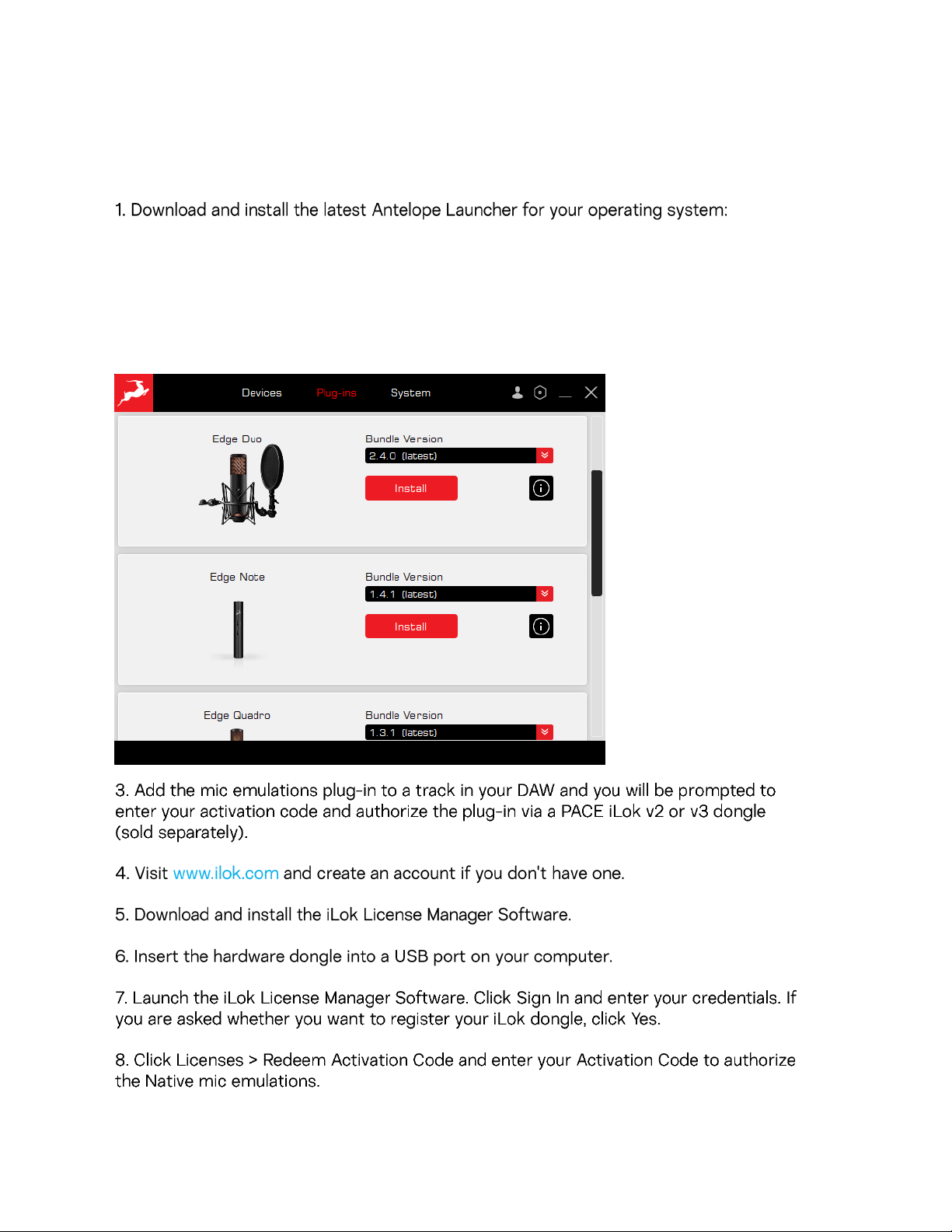
2. INSTALLING AND AUTHORIZING THE
NATIVE MIC EMULATION PLUG-INS
Windows 10/11 | macOS 10.14 and later
*Edge Solo, Quadro & Verge native plug-in emulations are currently not compatible with OS Monterey.
2. Open the Antelope Launcher and click the “Plugin-ins” tab. Navigate to the version of your
modeling microphone and click “Install”.
Following are guides to using the mic emulations and recording for each Antelope Audio
modeling microphone
Page 5
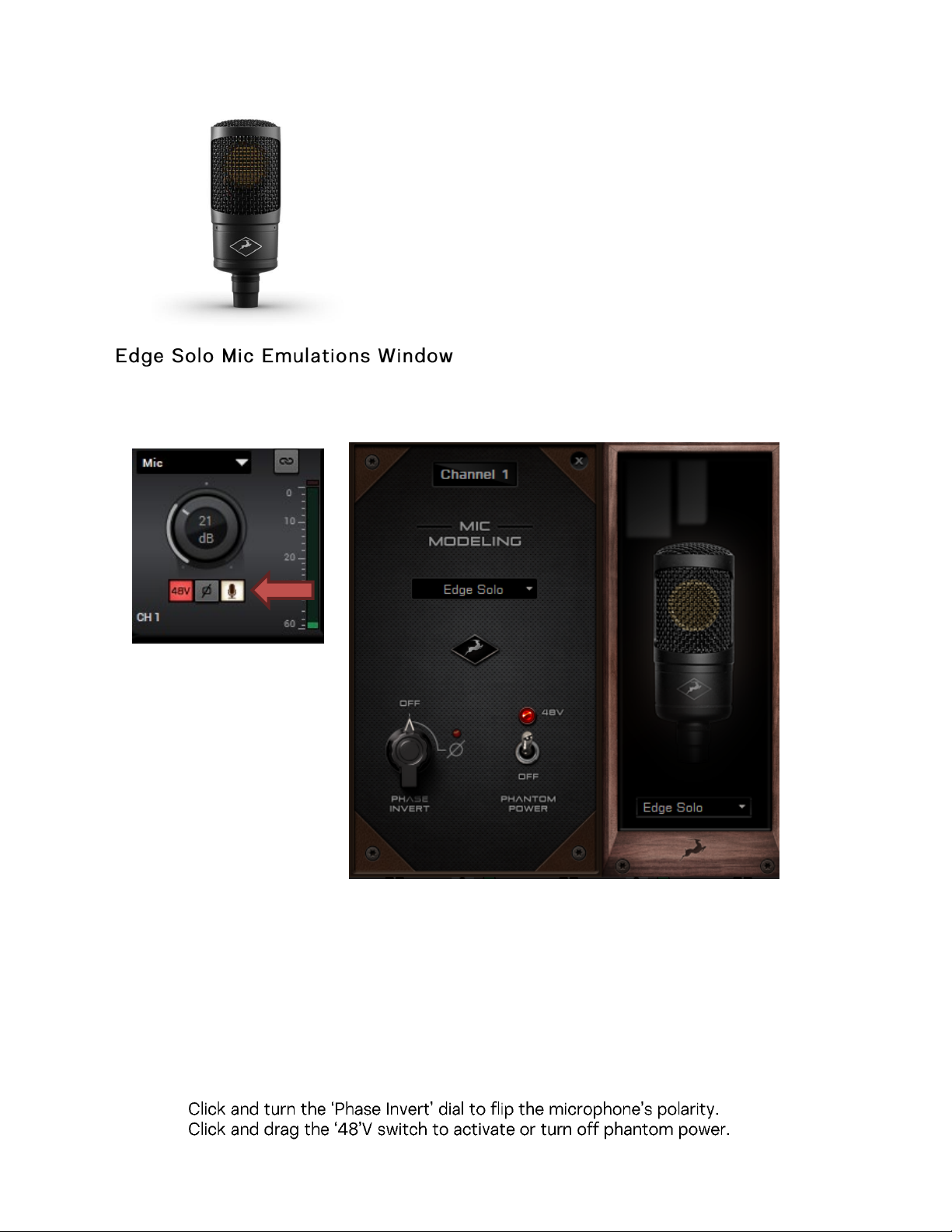
3. EDGE SOLO
To access the Mic emulations within your Antelope interface, you need to click on the “Mic” icon
below the Pream
The Control panel microphone emulations are compatible with the following Antelope
interfaces:
Zen Go SC USB, Zen Go SC TB, Zen Q SC USB, Zen Q SC TB, Zen Tour SC, Orion Studio SC,
Orion Studio rev.2017, Discrete 4 Pro SC, Discrete 8 Pro SC, Discrete 4 SC, Discrete 8 SC,
Discrete 4, Discrete 8, Goliath, Goliath HD, Goliath HD
The following functionality is available:
•
Choose mic emulations from the drop-down menu on the right.
•
Page 6
•
occupy
channels to monitor and r
erlin 47 FT
1. B
2. Berlin 49T
3. Berlin 57
4. Berlin 87
5. Berlin 67
6. Berlin M103
7. Vienna 12
8. Vienna 414
9. Tokyo 800T
10. Berlin V563
11. Illinois 57
12. Illinois 7B
13. Minnesota 20
14. Vienna 112
15. Berlin K86
16. Berlin 47 TU
17. Berlin M251
18. Hamburg 441
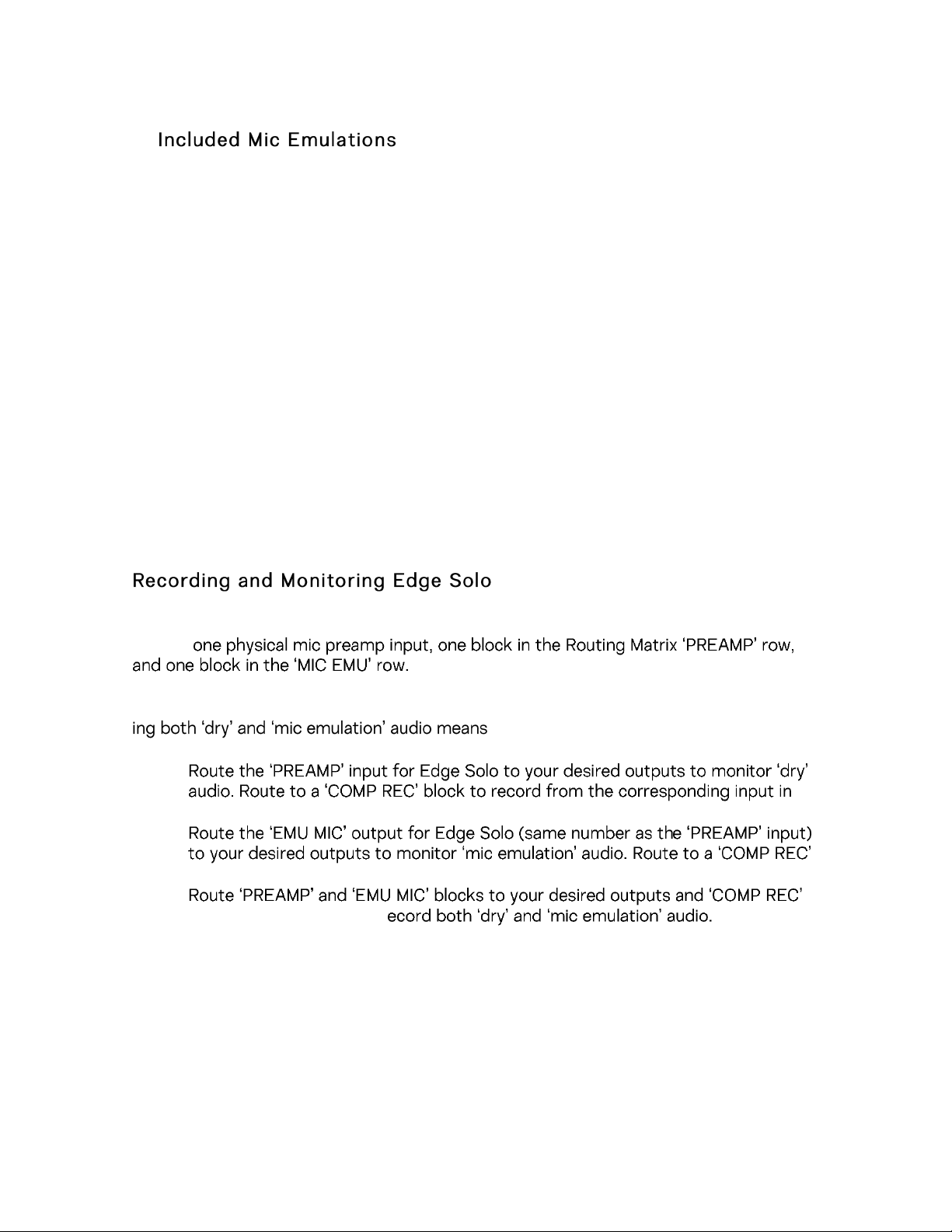
Edge Solo is a single-membrane condenser microphone. This means the microphone will
Edge Solo mic emulations work on a single input audio channel. Recording and monitor-
dealing with two mono tracks.
•
your DAW.
•
block to record from the corresponding input in your DAW.
•
For more information about Edge Solo, visit its product page.
Page 7
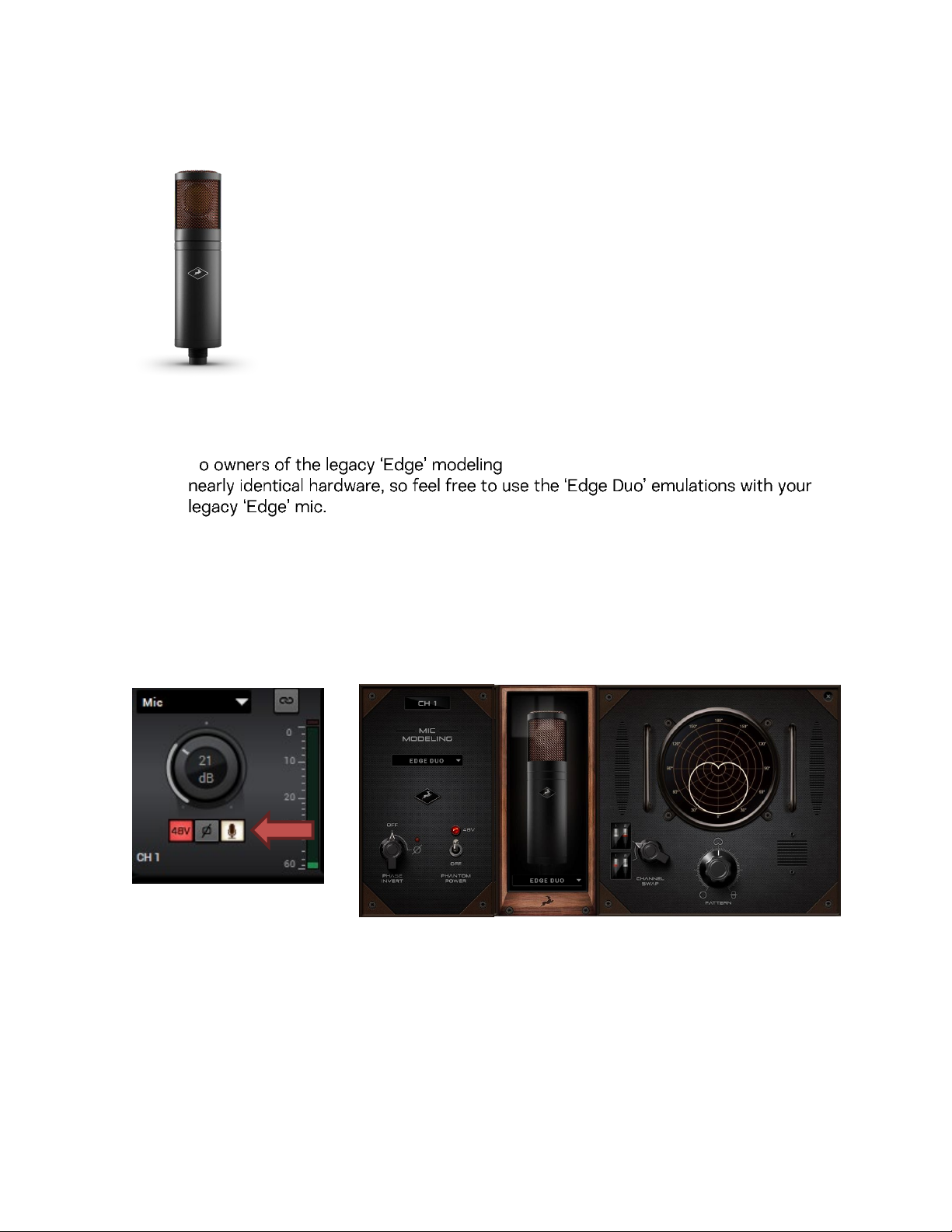
4. EDGE DUO
T
microphone: 'Edge' and 'Edge Duo' have
Notes:
•
• Later Edge Duo revisions ship with a red and blue Y-cable instead of the old red
and white Y-cable. The difference is purely cosmetic. The blue connector is analogous to the white connector referred to in this manual.
T
o access the Mic emulations within your Antelope interface, you need to click
on the “Mic” icon below the Preamp:
The Control panel microphone emulations are compatible with the following Antelope
interfaces:
Zen Go SC USB, Zen Go SC TB, Zen Q SC USB, Zen Q SC TB, Zen Tour SC, Orion Studio SC,
Orion Studio rev.2017, Discrete 4 Pro SC, Discrete 8 Pro SC, Discrete 4 SC, Discrete 8 SC,
Discrete 4, Discrete 8, Goliath, Goliath HD, Goliath HD
Page 8
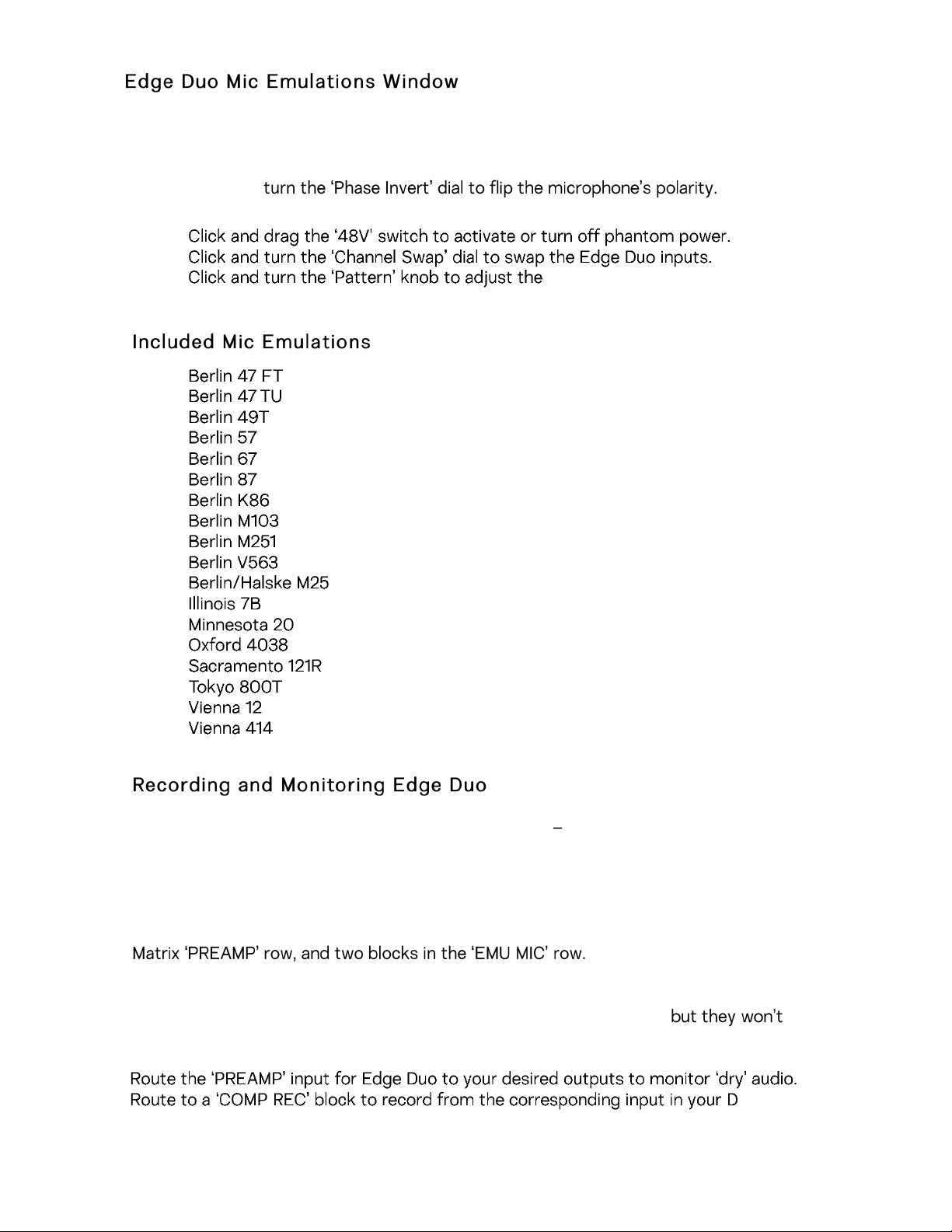
AW.
The following functionality is available:
•
Choose mic emulations from the drop-down menu in the middle.
•
Click and
•
•
•
models have fixed or limited polar pattern adjustment.
1.
2.
3.
4.
5.
6.
7.
8.
9.
10.
11.
12.
13.
14.
15.
16.
17.
18.
polar pattern. Note that some mic
Edge Duo is a dual-membrane condenser microphone it has one capsule with dual
membranes and connects with an Y-XLR cable (included), one XLR connector for each
membrane. The Left (white/blue) connector is the front membrane, the Right (red) is for
the rear membrane.
The microphone occupies two physical mic preamp inputs, two blocks in the Routing
ote: You can use Edge Duo as a single-membrane condenser mic by disconnecting one
N
of the XLR connectors. In this case, the mic emulations will be visible,
function correctly, you cannot swap inputs and you cannot adjust polar pattern.
Page 9
ously
In this case, you will record and monitor two concurrent mono inputs, one coming from
each membrane. They will sound slightly different in tone and volume, due to the physical distance between the membranes and the performer. You may have to compensate
with individual gain adjustments for each membrane.
from the corresponding inputs
in your DAW.
desired outputs for
means handling four concurrent mono signals
trix.
For more information about Edge Duo, visit its product page
Page 10
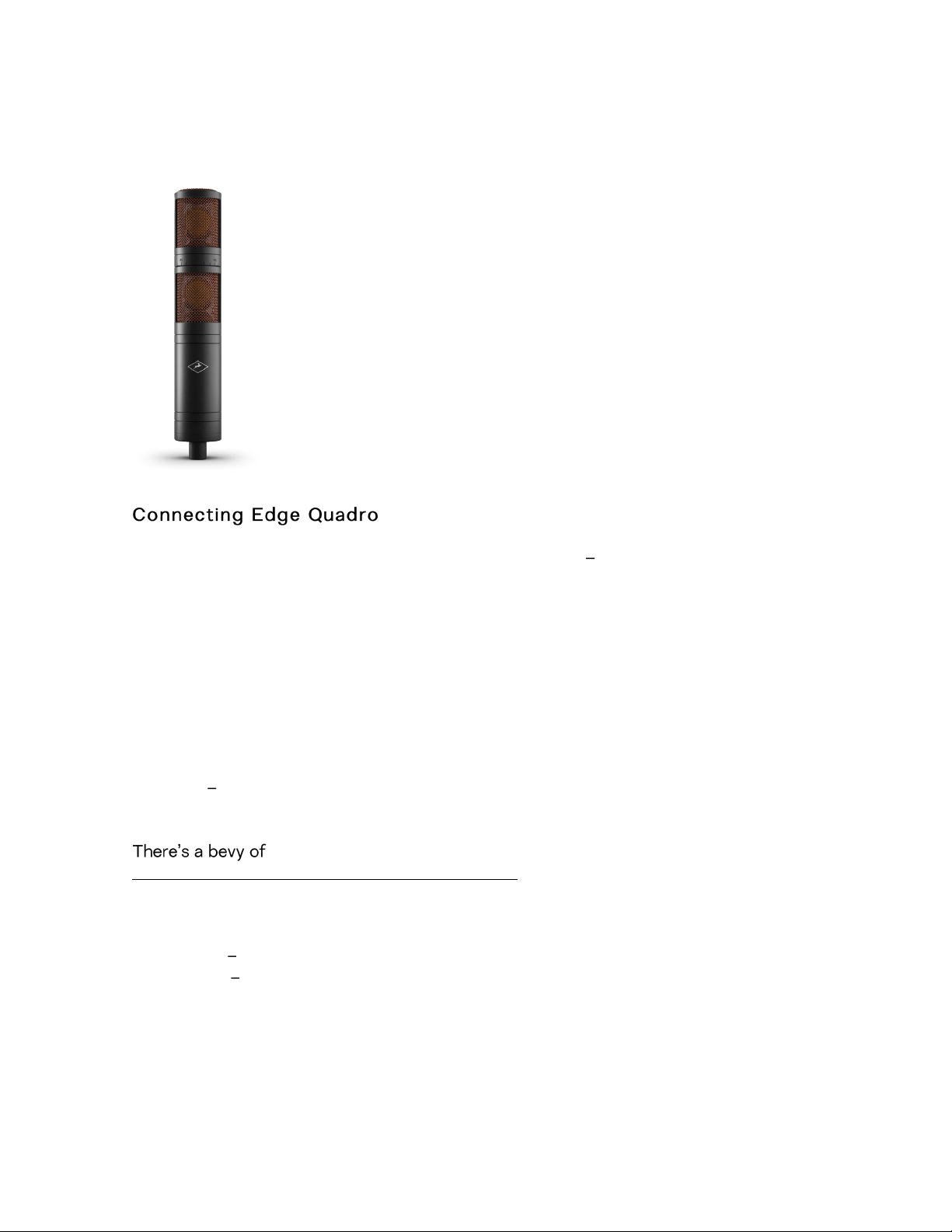
5. EDGE QUADRO
Edge Quadro is a quad-membrane condenser microphone it has two heads, each with
dual membranes. The Top head rotates 360-degrees, enabling stereo recording techniques such as M/S, X/Y, Blumlein, and even 3D sound. Therefore, the microphone is
bundled with a pair of Y-XLR cables. Their Left (White or Blue *) connectors are for the
front membranes, and their Right (red) connectors are for the rear membranes.
* Later Edge Quadro revisions ship with Red and Blue Y-cables instead of Red and White
Y-cables. The difference is purely cosmetic. Thus, the Blue connector corresponds to the
older White connector.
However, each cable is designated for either the Top or Bottom head, and labeled accordingly T (Top) or B (Bottom). The inputs on the microphone are labeled too, letting
you know where each cable needs to be connected.
options for connecting Edge Quadro
As a single-membrane (rotatable) condenser mic. Connect just one XLR from the Top
(rotatable) or Bottom head using the corresponding cable. The possible configurations
are:
1. Top Head - Front Membrane.
2. Top Head - Rear Membrane.
3. Bottom Head - Front Membrane.
4. Bottom Head- Rear Membrane.
Page 11
As a dual-membrane (rotatable) condenser mic. Connect two XLRs from either (or both)
The Control panel microphone emulations are compatible with the following Antelope
the Top and Bottom heads with the corresponding cables. The possible configurations
are:
1. Top Head Front and Rear Membranes.
ottom Head Front and Rear Membranes.
2. B
3. Top Head Front Membrane. Bottom Head Front Membrane.
4. Top Head Front Membrane. Bottom Head Rear Membrane.
5. Top Head Rear Membrane. Bottom Head Front Membrane.
6. Top Head Rear Membrane. Bottom Head Rear Membrane.
s a quad-membrane rotatable condenser microphone. Connect all XLRs from both
A
heads with the corresponding cables. This is the only option for using the Edge Quadro
ic emulations.
m
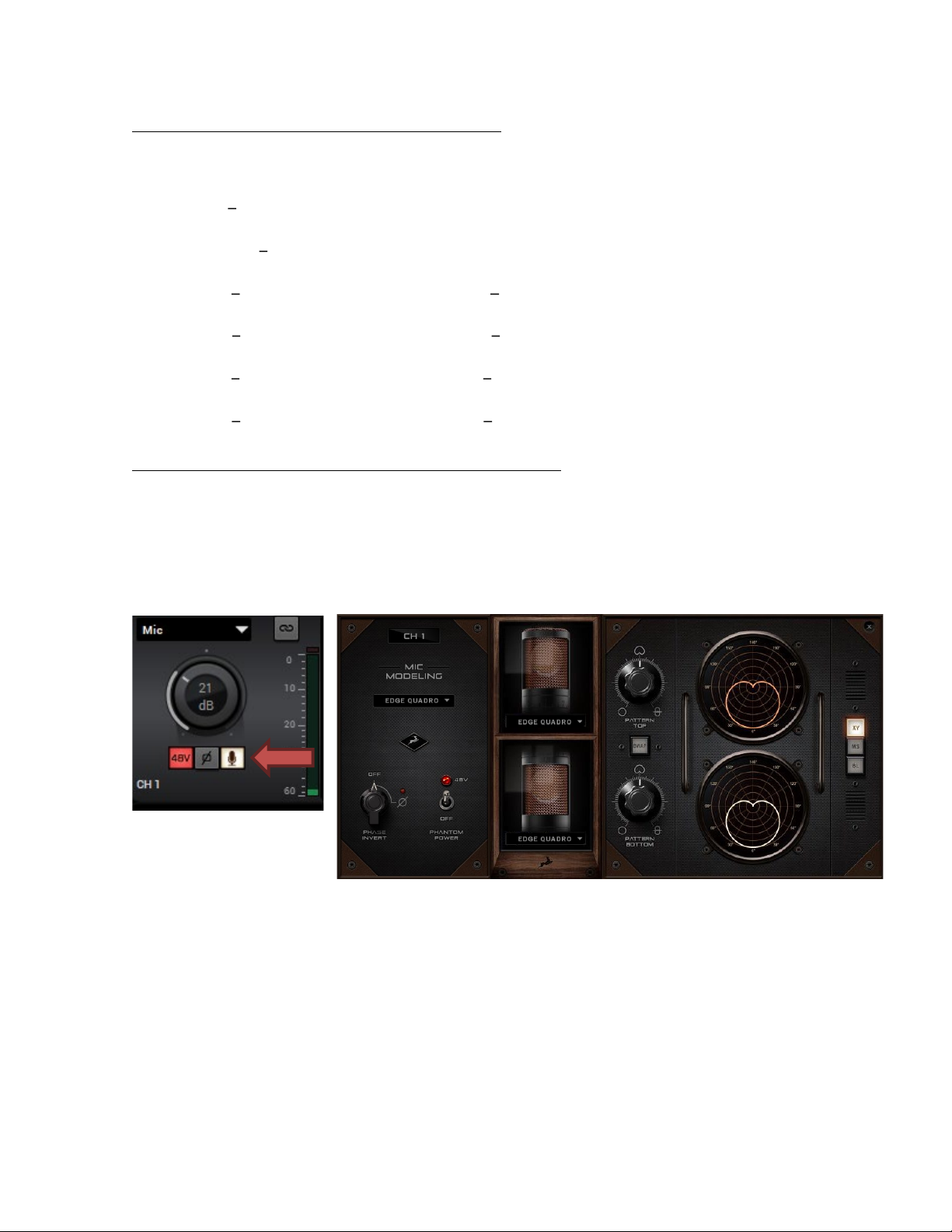
o access the Mic emulations within your Antelope interface, you need to click on the
T
“Mic” icon below the Preamp:
interfaces:
Zen Go SC USB, Zen Go SC TB, Zen Q SC USB, Zen Q SC TB, Zen Tour SC, Orion Studio
SC,
Orion Studio rev.2017, Discrete 4 Pro SC, Discrete 8 Pro SC, Discrete 4 SC, Discrete 8
SC, Discrete 4, Discrete 8, Goliath, Goliath HD, Goliath HD
Page 12
Quadro
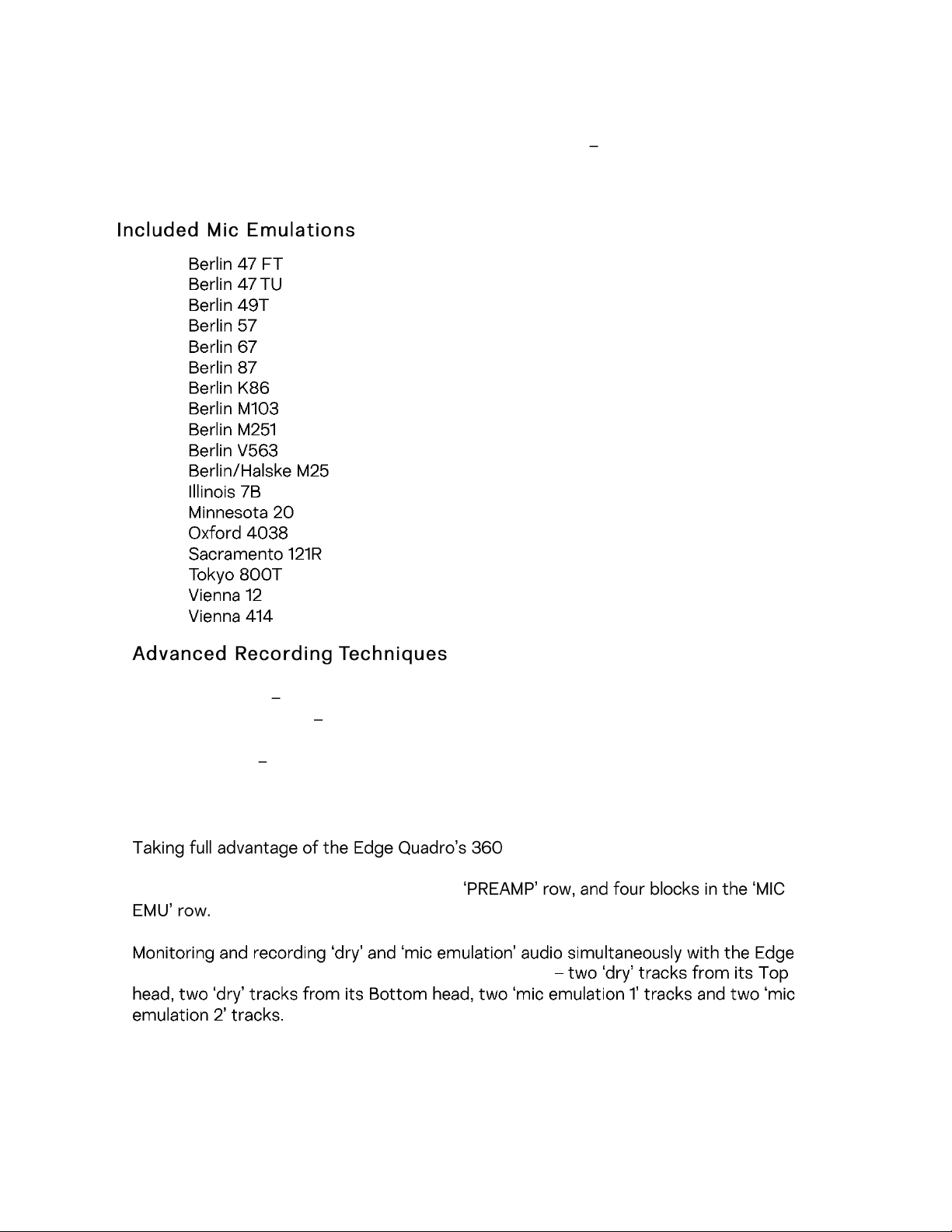
Edge Quadro Mic Emulations Window
Edge Quadro and Edge Duo mic emulations are identical, except for the ability to apply
two different mic emulations in unison - one for each head complete with two different
polar patterns that are also swappable. All in all, the functionality is the same, but with two
mic emulation selectors and two polar pattern changers.
1.
2.
3.
4.
5.
6.
7.
8.
9.
10.
11.
12.
13.
14.
15.
16.
17.
18.
• XY-stereo set both capsules to Cardioid, offset 90°
• Mid-side stereo set the top capsule to Cardioid, and the bottom capsule to fig-
ure-8
• Blumlein Set both capsules to Figure-8, offset 90°
Monitoring and recording Edge Quadro
-degree recording and dual-emulation
capabilities means the microphone will occupy four physical mic preamp inputs, four
blocks in the Routing Matrix/Input selector
means handling eight concurrent mono tracks
With so many signals available, the routing and processing possibilities are extensive. Put
the manual down and explore your skills and creativity.
For more information about Edge Quadro, visit its product page.
Page 13
6. EDGE NOTE
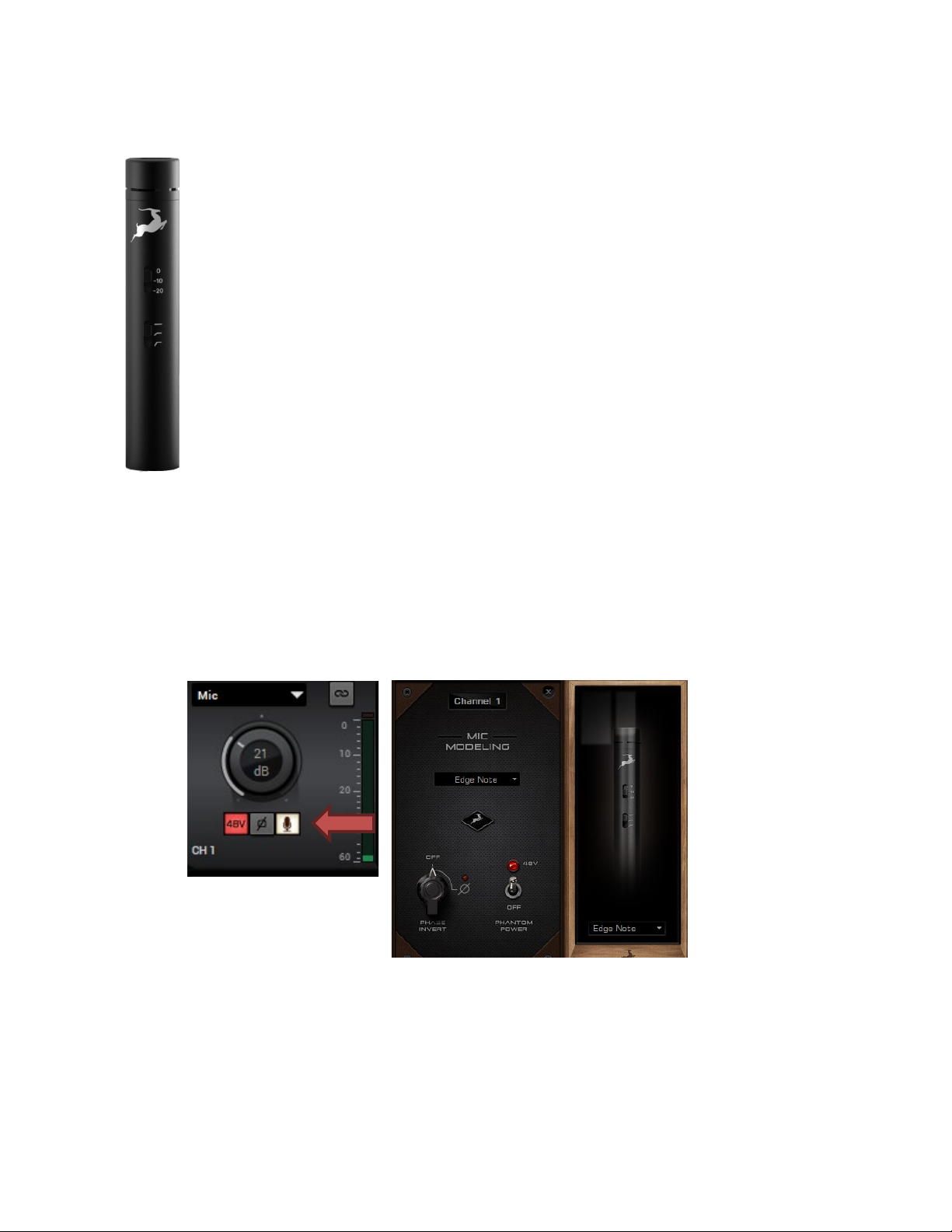
The Edge Note microphone is a perfect studio solution for capturing a wide range of musical
instruments.
Extra features like the Pad attenuation allow you to reduce the input signal with -10 or –
20dB, thus avoiding any unnecessary clipping or distortion. Also, a High-pass filter is added,
allowing you to remove unnecessary low frequencies in the recording.
To access the Mic emulations within your Antelope interface, you need to click on the
“Mic” icon below the Preamp gain knob:
The Control panel microphone emulations are compatible with the following Antelope
interfaces:
Zen Go SC USB, Zen Go SC TB, Zen Q SC USB, Zen Q SC TB, Zen Tour SC, Orion Studio SC,
Discrete 4 Pro SC, Discrete 8 Pro SC.
Page 14
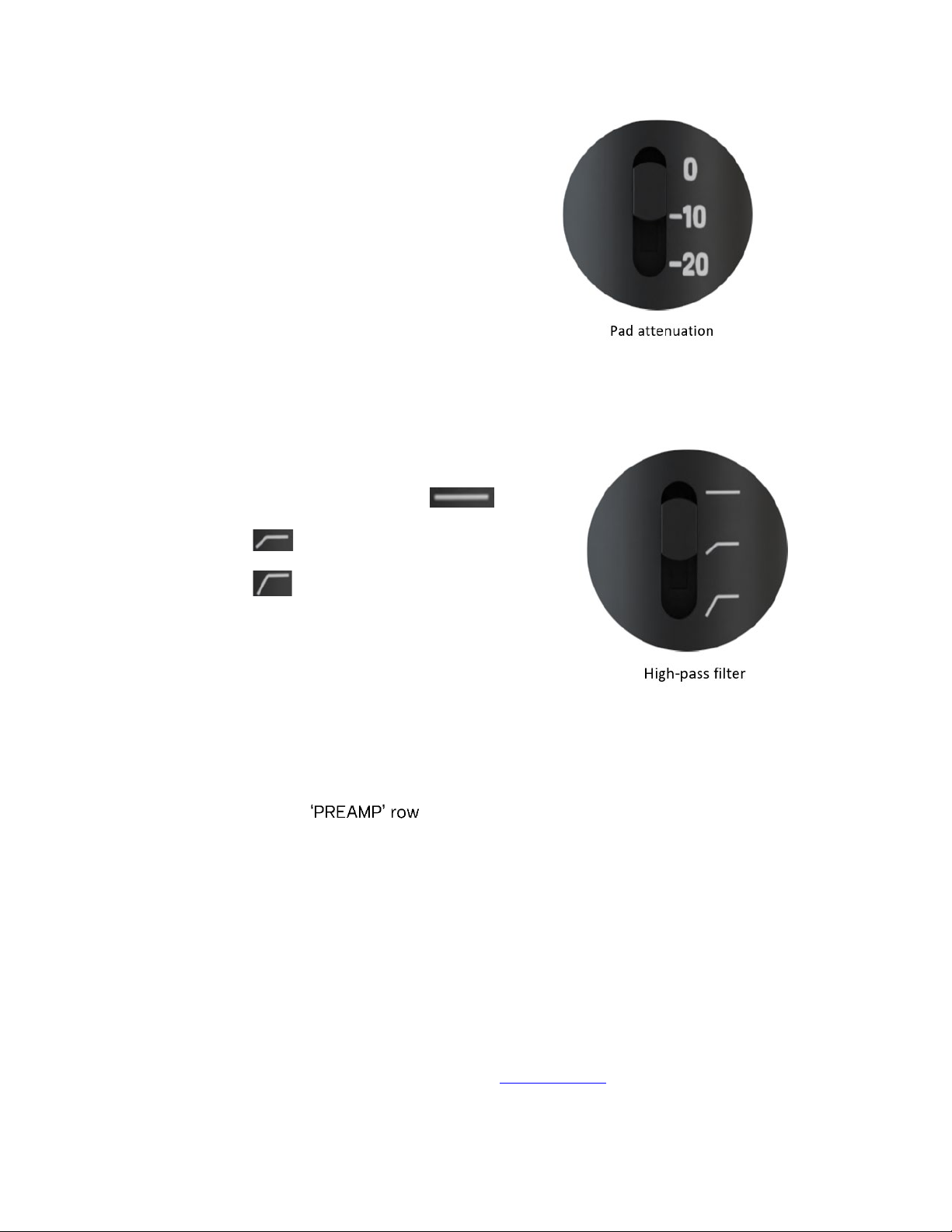
Use the Pad attenuation switch to reduce the level of the signal.
There are 3 settings:
1. 0dB (no attenuation)
2. -10dB
3. -20dB
Us
e the High-pass filter switch to cut the low frequency signal.
There are 3 settings:
eutral, no cut has been applied
1. N
2. 75Hz cut
3. 115Hz cut
Recording and Monitoring Edge Note
ge Note is a single-membrane, small-diaphragm condenser microphone. This means
Ed
the microphone will occupy one physical mic preamp input, one block in the Routing
Matrix/Input Selector
•
Route the “PREAMP” input for Edge Note to your Desired outputs to monitor “dry” audio.
oute the “EMU MIC” input
• R
emulation).
Route to “EMU MIC or “PREAMP” to “COMP REC” block to record from the
•
corresponding input with our without applied emulation in your DAW.
to your Desired outputs to monitor “dry” audio (with applied
For more information about Edge Note, visit its product page.
Page 15
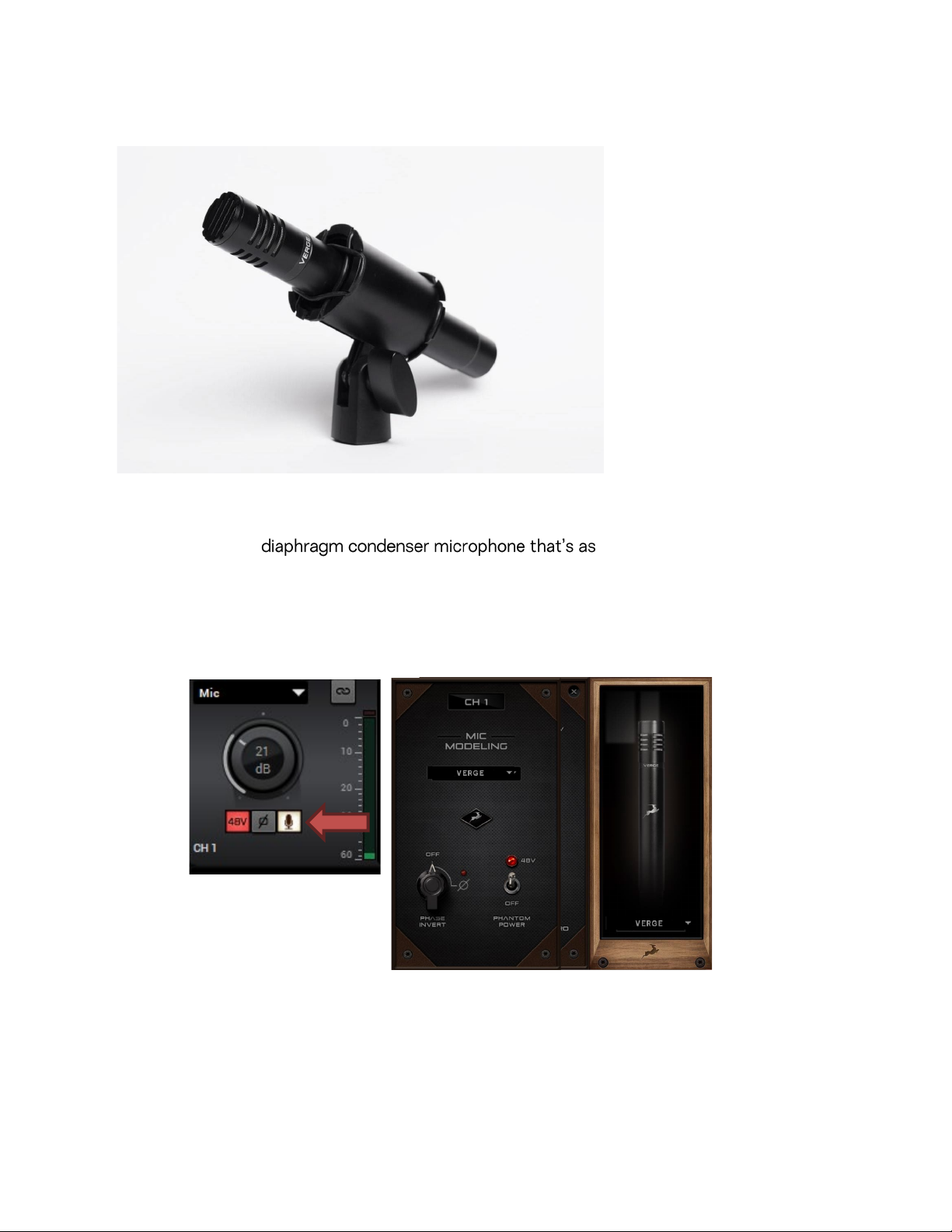
7.VERGE
The Control panel microphone emulations are compatible with the following Antelope
Verge is a small- simple to use as the Edge
Solo. Its dimensions and ability to handle high sound pressure levels make it a better fit
for positioning in tight spaces and recording very loud sources, such as drum kits.
o access the Mic emulations within your Antelope interface, you need to click on the
T
“Mic” icon below the Preamp gain knob:
interfaces:
Zen Go SC USB, Zen Go SC TB, Zen Q SC USB, Zen Q SC TB, Zen Tour SC, Orion Studio SC,
Orion Studio rev.2017, Discrete 4 Pro SC, Discrete 8 Pro SC, Discrete 4 SC, Discrete 8 SC,
Discrete 4, Discrete 8, Goliath, Goliath HD, Goliath HD
Page 16
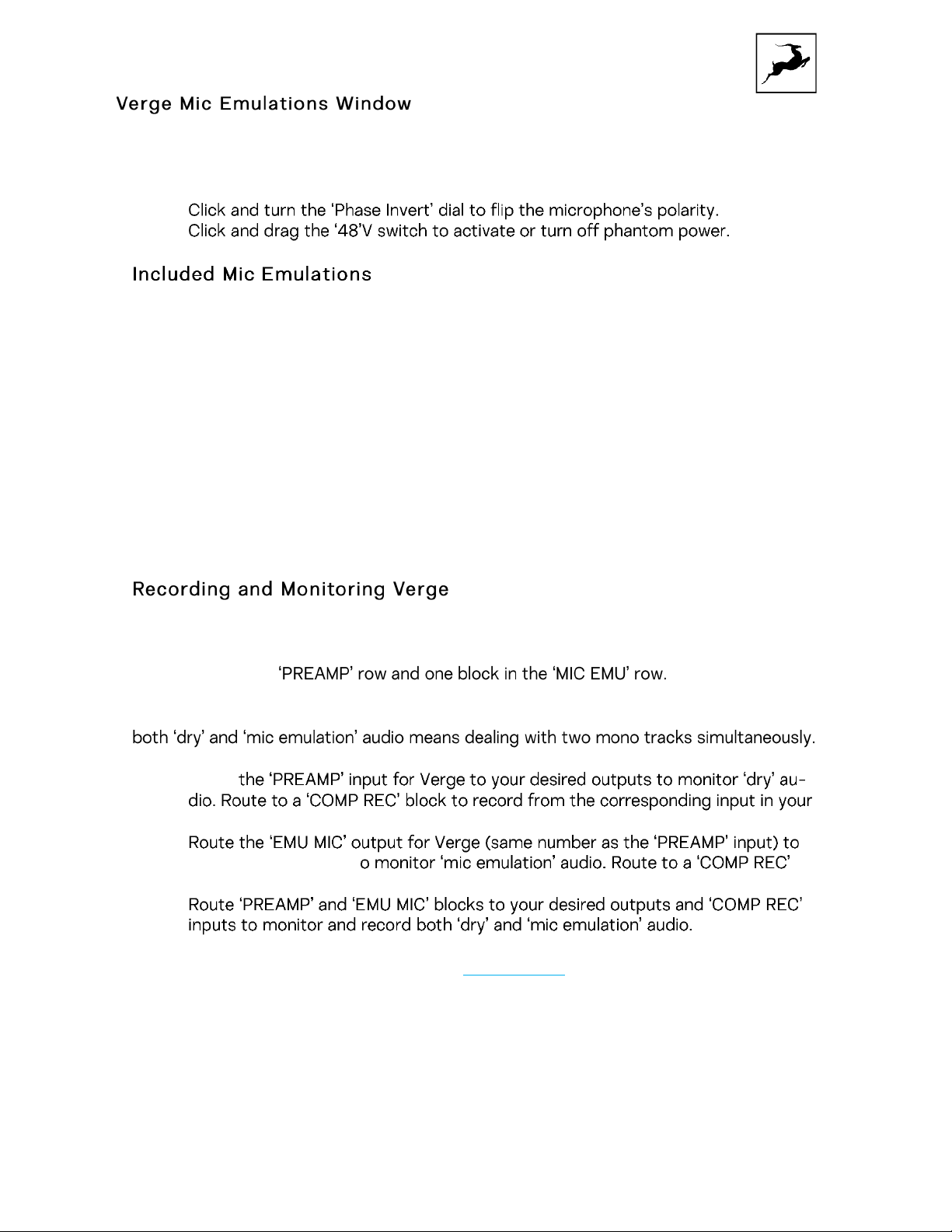
The following functionality is available:
Route
• Choose mic emulations from the drop-down menu on the right.
•
•
1. Berlin 184
2. Perth 55
3. Freiburg 6
4. Aalborg 4006
5. Hamburg 40
6. Berlin K53
7. Berlin K54
8. Berlin K86
9. Illinois 57
10. Hamburg 21
11. Illinois 7B
12. Hamburg 441
rge is a single-membrane, small-diaphragm condenser microphone. This means the
Ve
microphone will occupy one physical mic preamp input, one block in the Routing Matrix/Input Selector
Ve
rge mic emulations work on a single input audio channel. Recording and monitoring
•
AW.
D
•
your desired outputs t
row to record from the corresponding input in your DAW.
•
For more information about Verge, visit its product page.
16
Page 17
8.CUSTOMER SUPPORT INFORMATION
•
•
•
17
Page 18
9.MY ANTELOPE AUDIO PRODUCT ISN’T
WORKING. WHAT SHOULD I DO?
Issuing a RMA (Return Merchandise Authorization) number is required for any factory
service or repair procedure. Please, don't attempt to send us your device without
receiving a RMA number first, as the device will be returned and not serviced.
How do I get an RMA number?
The Antelope Audio Customer Support team is in charge of issuing RMA numbers. Visit
support.antelopeaudio.com and get in touch.
After your RMA has been issued, you will receive an email with instructions on how to
proceed.
RMA shipping information
Alongside the product you are returning please, include a letter containing your full
name, shipping address, RMA number issued by our technical support team and a note
with a short information about the technical issue.
Please use the original box if possible, because a worn out one will surely not protect
your product sufficiently on its way to the Antelope Audio HQ. Additional cushioning
materials in multiple layers between the unit and the box walls to prevent from shock,
vibration and various tears and scratches.
Please remove any labels or old shipment markings it may have and ensure you add your
shipping address inside the box in case the original shipment label becomes illegible
during transportation.
The shipping costs are covered by the owner of the product. Antelope Audio will not
cover any local customs charges.
We recommend using a courier service of your choice (e.g. OHL, UPS, FedEx). The
package should be insured for its real value, marked as fragile and a tracking number
should be provided. We do not recommend using standard mail delivery services.
Please, don't forget to add the RMA number, issued by the Antelope Audio technical
18
Page 19

support, on all shipping paperwork.
Antelope Audio cannot be held responsible for undelivered packages - lost or damaged
on the way to the Antelope Audio HQ. For damage claims, please contact your shipping
service provider of choice.
Antelope Audio cannot cover any repair costs for product damages due to poor
packaging.
10.LIMITED WARRANTY POLICY
This is a non-transferable voluntary Limited Product Warranty provided to endcustomers who have purchased Antelope Audio-branded hardware product (hereinafter
referred to as "Product") from an authorized Antelope Audio re-seller.
For customers covered by consumer protection laws or regulations in their country of
purchase or, if different, their country of residence, the benefits conferred by Antelope
Audio's Limited Warranty are in addition to, and not instead of, rights and remedies
convened by such consumer protection laws and regulations and it does not exclude,
limit or suspend buyer's rights arising from consumer law. Consumers have
the right to choose whether to claim service under the Antelope Audio Limited Warranty
or under their consumer law rights.
All claims made under the Antelope Audio Limited Warranty will be governed by the
terms set out in this warranty document.
Warranty Coverage
Antelope Audio warrants that the Product will be free from defects in material and
workmanship for the period of 1 (one) year commencing on the date of purchase of
Product by end-customer from authorized Antelope Audio's re-seller.
Except where explicitly prohibited by applicable local law, this warranty is limited to the
original purchaser and is non-transferable. This warranty provides you with specific legal
rights, and you may have additional rights that vary under local laws.
In general, this warranty means your Antelope Audio hardware product will operate in
accordance with published technical specifications, as specified by its data-sheet, and in
the operating environment for which it was intended for the length of the warranty
period.
This version of the warranty applies to products purchased on or after January1,2018. For
prior versions of the Antelope Audio limited warranty, please contact customer service.
Limited Factory Refurbished (B-stock) Warranty
Antelope Audio warrants products sold as "B-stock, Factory Refurbished or Open Box"
19
Page 20

to be free from defects in materials (unless otherwise stated in product description) and
workmanship. Only products purchased from an authorized dealer or directly from
Antelope Audio are covered by this Warranty.
The Limited Factory Refurbished CB-stock) Warranty is valid for the period of 6 (six)
months, commencing on the date of purchase of Product, if local regulations do not
require otherwise.
All warranty terms contained hereunder apply also to the B-stock Warranty, unless
otherwise specified.
Remedies
Antelope Audio's entire liability and your exclusive remedy for any Antelope Audio
Product that is not operating in accordance with its published technical specifications is
at Antelope Audio's discretion:
1)
to repair the Product at Antelope Audio's expense using new or equivalent-to new
refurbished parts in good working condition; or
2)
to replace the Product at Antelope Audio's expense with a product with equivalent
functionality formed from new and/or equivalent-to new refurbished parts in good
working condition, or
3)
to refund the price paid. Should Antelope Audio decide to refund the price paid, it may
deduct from the paid Product's price any damages caused to the Product; where, within
fourteen (14) days of the expiration of the warranty period,(i) Antelope Audio has
received written notice of any nonconformity;(ii) after Antelope Audio's written
authorization, customer has returned the nonconforming product to the designated
place; and (iii)Antelope Audio has determined that the Product is nonconforming and
that such non conformity is not the result of any of the exclusions designated below.
These warranty obligations are conditioned upon the hardware being returned to the
original place of purchase, or another place as directed by Antelope Audio, with the
original sales receipt attached. You will be required to pay shipping and handling charges
for returning the product. You may be required to pay any other applicable tariffs, duties,
taxes, or other fees with regard to returning the products.
Any repaired or replacement Product will be warranted for the remainder of the original
warranty period.
Obsolete or Discontinued Products
An obsolete or discontinued product will be repaired or replaced with the same product
if available. If Antelope Audio is unable to replace your obsolete or discontinued product
with the same product, Antelope Audio will replace the obsolete or discontinued
20
Page 21

product, in its sole discretion, with a product having similar function and capacity.
Exclusions
This warranty does not cover problems or damage resulting from, but not limited to, any
of the following: (i)Wear and tear associated with normal use; (ii)Any modification,
abuse, accident, disassembly, misapplication, misuse, negligence, acts of God, accident;
(iii)Unauthorized repair or attempted repair by anyone other than Antelope Audio or
someone authorized by Antelope Audio to do warranty work; any unauthorized repairs
will void this warranty(iv)Any improper operation, maintenance or installation, including
any use not in accordance with any supplied product instructions; (v)Connection to any
improper voltage supply; (vi)Use of consumables or spare parts not supplied by
Antelope Audio, except where such restriction is prohibited by applicable local law;
(vii)Any other cause which does not relate to a Product defect in materials or
workmanship.
The warranty does not apply to any Products which have been subject to misuse,
neglect, accident or modification or which have been soldered or altered such that they
are not capable of being tested under normal test conditions.
This warranty does not cover (i) any counterfeit products, i.e. Products that Antelope
Audio, at its sole discretion, determines were not manufactured by Antelope Audio or
any of its authorized manufacturing partners; (ii) Products purchased from a person or
entity which is not an authorized dealer or re-seller of Antelope Audio; (iii)Product sold
"as is" or "with all faults", to the extend permitted by local law.
This warranty is not valid in case any manufacturer label(s), serial numbers, date
stamp(s) or warranty sticker(s) has been altered or removed from the Product.
Limitation of Liability
ANTELOPE AUDIO SHALL NOT BE LIABLE FOR ANY SPECIAL, INCIDENTAL, INDIRECT,
OR CONSEQUENTIAL DAMAGES WHATSOEVER, INCLUDING BUT NOT LIMITED TO
LOSS OF PROFITS, REVENUE, OR DATA (WHETHER DIRECT OR INDIRECT) OR
COMMERCIAL LOSS FOR BREACH OF ANY EXPRESS OR IMPLIED WARRANTY ON
YOUR PRODUCT EVEN IF Antelope Audio HAS BEEN ADVISED PREVIOUSLY OFTHE
POSSIBILITY OF SUCH DAMAGES. Some local laws do not allow the exclusion or
limitation of special, indirect, incidental or consequential damages, so this limitation or
exclusion may not apply in your jurisdiction.
ANTELOPE AUDIO WILL NOT ASSUME OR AUTHORIZE ANY OTHER PERSON TO
ASSUME FOR IT ANY OTHER LIABILITY IN CONNECTION WITH ITS PRODUCTS.
Data Recovery
In the event of data loss using Antelope Audio storage devices, Antelope Audio is not
responsible for backing up or recovering any data that you may have lost.
21
Page 22

No Other Warranties
No Antelope Audio employee, dealer, re-seller, or other agent is authorized to make any
modification, extension, or addition to this warranty.
How to Make a Warranty Claim
Valid warranty claims should be processed through your point of purchase. Please also
verify the return policy directly with the retailer where you purchased your product. Any
warranty claims that cannot reprocessed through your original point of purchase should
be addressed directly to Antelope Audio. Our customer service contact information can
be found on the web or in the documentation included with your Product.
Returning Your Product
In the event that you need to return your Antelope Audio products for repair or
replacement, Antelope Audio will provide you with a Return Merchandise Authorization
Number (RMA#) as well as return instructions. Do not return your product without prior
approval from Antelope Audio. Any product returned without a valid unique RMA# will be
refused and returned to the sender at the sender's expense. To avoid problems at the
time of receipt, clearly write your RMA# on the outside of the package and include a
copy of your RMA confirmation-mail within the package.
In certain situations, for in-warranty units, we may (entirely at our opinion) offer you a
temporary replacement unit, provided that we have such on stock in your state. To
request a temporary replacement unit, a valid credit card must be provided to secure
the new replacement unit for shipping prior to Antelope Audio receiving the defective
one.
Request a Return Material Authorization Number (RMA#)
Please follow these steps to obtain an RMA number:
(I)
For end user customers, submit a claim online at: support.antelopeaudio.com. For
business to business (B2B) / Direct customers of Antelope Audio please email us at
(ii) A valid proof of purchase is required for RMA processing (i.e. receipt, invoice, etc).
Antelope Audio will provide you with the RMA number within 2 working days as of the
claim submission date.
RMA Return Addresses
We have multiple RMA receiving locations worldwide. Your RMA confirmation will specify
the specific return address you must use when sending your RMA package. Any
packages received at an unauthorized location may be refused and returned to the
sender at the sender's expense.
22
Page 23

Products Lost or Damaged During Transit
The original packaging material should be used to pack the product for return; if the
original packaging is not available, you should use such materials that provide the same
or greater protection to the product. All packages that arrive with any external damage
or appear inadequately packed will be refused and returned to the sender at the sender's
expense. We are not responsible for damage incurred during shipping to our RMA
receiving locations or for lost or stolen products.
Company information
Antelope Audio
under the legislation of the Republic of Bulgaria with UIN: 131052590, is doing business
and is worldwide known. Elsewhere in this document where the trade name
Audio
Shose Blvd., 7th km, Building of BIC IZOT, floor 6, Mladost region, Sofia, Bulgaria.
is used shall refer to Elektrosfera ltd., with address of management: Tsarigradsko
is the trade name, under which the company Elektrosfera ltd., registered
Antelope
If any term hereunder is held to be illegal or unenforceable, it shall be severed from this
warranty and the legality or enforce ability of the remaining terms shall not be affected.
11. SAFETY NOTES
To reduce the risk of electrical shocks, fire, and related hazards:
Do not remove screws, cover, or cabinet. There are no user serviceable parts
•
inside.
Refer servicing to qualified service personnel.
Do not expose this device to rain, moisture or spillover of liquid of any kind.
•
Should any form of liquid or a foreign object enter the device, do not use it.
•
Switch off the device and then unplug it from the power source. Do not operate
the device again until the foreign object is removed or the liquid has completely
dried and its residues fully cleaned up. If in doubt, please consult the
manufacturer.
Do not handle the power cables with wet hands!
•
Make sure the device is switched off when plugging/unplugging it to/from the
•
power source.
Avoid placing things on the cabinet or using the device in a narrow and poorly
•
ventilated place which could affect its operation or the operation of other closely
located components.
If anything goes wrong, turn off the device first and then unplug the power. Do
•
attempt to repair the device yourself. Consult authorized service personnel or your
dealer instead.
not
23
Page 24

Do not install near any heat sources such as radiators, stoves, or other apparatus
•
(including amplifiers) that produce heat.
Do not use harsh chemicals to clean your unit. Clean only with specialized
•
cleaners for electronics equipment.
Connect all your devices before powering your unit.
•
•
•
•
•
•
•
•
24
Page 25
•
12. TECHNICAL SPECIFICATIONS
″ ″
•
25
Page 26
•
″ ″
″
•
•
26
Page 27
Self-noise
11.9’’ x 2,1’’ (303mm x 53mm)
27
Page 28

Type
Instrumental microphone
Diaphragm
Back-electret Condenser
Polar pattern
Cardioid
Freq. response
20Hz ~ 20kHz
Sensitivity
-42dB | 8mV/Pa (+/-3dB)
Self-noise
25dB(A)
SNR
69dB(A)
Max Input SPL
146dB
Output impedance
65 Ohms
Power requirements
48V DC Phantom Power
Output Connector
3-pin male XLR
Color
Black matte
Dimensions (mic body)
4.5" x 0.8" (114mm x 20mm)
In the box
Shock mount holder
EDGE NOTE
28
Page 29
″ ″
29
Page 30

30
Page 31

31
Page 32

32
Page 33

33
Page 34

34
Page 35

Edge & Verge Modeling Condenser Microphones User Manual
35
Page 36

2
Edge & Verge Modeling Condenser Microphones User Manual
Page 37

Edge Modeling Condenser Microphones User Manual
 Loading...