

Page 1
3283430
BLAST CHILLERS/FREEZERS
CELLULES DE REFROIDISSEMENT RAPIDE/CELLULES MIXTES
USE AND INSTALLATION MANUAL
MANUEL D’UTILISATION ET D’INSTALLATION
Rev.4 02/2018
Page 2
GB
FR
Carefully read the instructions contained in the handbook. You may find important safety instructions and
recommendations for use and maintenance.
Please retain the handbook for future reference.
The Manufacturer is not liable for any change s to this handbook, which may be altered w ithout prior
notice.
Lire avec attention les instructions contenues dans ce livret car elles fournissent d'importants renseignements
pour ce qui concerne la sécurité, l'emploi et l'entretien.
Garder avec soin ce livret pour des consultations ultérieures de différents opérateurs.
Le constructeur se réserve le droit d'apporter des modifications à ce manuel, sans préavis ni
responsabilité d'aucune sorte.
Page 3

3283430_GB
INDEX
GENERAL INSTRUCTIONS ON DELIVERY ....................................................................... 5
GENERAL WARNINGS .................................................................................................................................. 5
LIST OF RULES ............................................................................................................................................. 5
TRANSPORT AND HANDLING ....................................................................................................................... 5
UNPACKING ................................................................................................................................................ 5
GENERAL SAFETY WARNINGS ...................................................................................................................... 6
INSTALLATION ............................................................................................................ 7
PLATE DATA ................................................................................................................................................ 7
MAX ROOM TEMPERATURE ........................................................................................................................ 7
INSTALLATION ............................................................................................................................................. 8
DIMENSIONS .................................................................................................................................................................... 9
TECHNICAL DATA ............................................................................................................................................................ 11
WIRING ..................................................................................................................................................... 12
CONDENSATE DRAIN ................................................................................................................................. 12
TESTING .................................................................................................................................................... 12
CONTROL AND SAFETY SYSTEMS ............................................................................................................... 13
REFRIGERANT MATERIAL SAFETY DATA SHEET .......................................................................................... 13
DISPOSAL .................................................................................................................................................. 14
STERILIZATION LAMP INSTALLATION ......................................................................................................... 14
PRINTER INSTALLATION ............................................................................................................................ 14
OPERATION .............................................................................................................. 15
GENERAL DESCRIPTION ............................................................................................................................. 15
SETTING UP .................................................................................................................................................................... 15
MACHINE LOADING ........................................................................................................................................................ 16
POSITION OF TRAYS........................................................................................................................................................ 16
CORE PROBE ................................................................................................................................................................... 16
TEMPERATURES ............................................................................................................................................................. 17
LENGTH .......................................................................................................................................................................... 17
CONTROL PANEL ....................................................................................................................................... 18
FIRST START-UP ......................................................................................................................................... 19
PROGRAM ................................................................................................................................................. 20
PROGRAM DESCRIPTIONS .............................................................................................................................................. 20
STANDARD PROGRAMS .................................................................................................................................................. 22
PROGRAM I.F.R. ............................................................................................................................................................. 23
PROGRAM INFINITY ........................................................................................................................................................ 24
FAVORITE PROGRAMS .................................................................................................................................................... 25
AUTOMATIC PROGRAMS ............................................................................................................................................... 26
STORED PROGRAMS ....................................................................................................................................................... 28
MULTY ............................................................................................................................................................................ 30
COOLING ........................................................................................................................................................................ 31
FUNCTIONS ............................................................................................................................................... 32
DEFROST ......................................................................................................................................................................... 32
SANITATION.................................................................................................................................................................... 33
STORAGE ........................................................................................................................................................................ 34
THAWING ....................................................................................................................................................................... 35
PROVING ........................................................................................................................................................................ 37
PROBE HEATING ............................................................................................................................................................. 39
** VIEW / EDIT PARAMETERS CYCLE .............................................................................................................................. 41
3
Page 4

3283430_GB
HACCP ....................................................................................................................................................... 42
Name and Surname
Address
Tel./fax no.
SETTINGS .................................................................................................................................................. 51
LANGUAGE ..................................................................................................................................................................... 51
SET DATE/CLOCK ............................................................................................................................................................ 52
SECTOR ........................................................................................................................................................................... 53
MULTY ............................................................................................................................................................................ 54
CYCLE CONTROL - AUTO OR MANUAL ........................................................................................................................... 55
SERVICE ..................................................................................................................................................... 56
ALARMS .......................................................................................................................................................................... 56
ALARMS TABLE ............................................................................................................................................................... 57
RESET ALARMS ............................................................................................................................................................... 58
INPUTS OUTPUTS ........................................................................................................................................................... 59
RESTORE ......................................................................................................................................................................... 60
PARAMETERS .................................................................................................................................................................. 61
MAINTENANCE ......................................................................................................... 62
MAINTENANCE AND CLEANING ................................................................................................................. 62
CLEANING THE CABINET ................................................................................................................................................. 62
CLEANING THE AIR CONDENSER .................................................................................................................................... 63
STAINLESS-STEEL MAINTENANCE ................................................................................................................................... 63
DISCONTINUED USE ....................................................................................................................................................... 64
EXTRAORDINARY MAINTENANCE .............................................................................................................. 64
VIDEO BOARD AND ENCODER MAINTENANCE CHECKLIST ............................................................................................ 64
MAINTENANCE OF PANEL BOARD .................................................................................................................................. 65
CONDENSING SYSTEM MAINTENANCE .......................................................................................................................... 66
REPLACEMENT CORE PROBE .......................................................................................................................................... 66
WIRING DIAGRAM PLATE .......................................................................................................................... 67
Annotate the emergency assistance number of specialised maintenance personnel.
4
Page 5
3283430_GB
GENERAL INSTRUCTIONS ON DELIVERY
GENERAL WARNINGS
We assure you have made the best choice in purchasing our products and hope you will be fully satisfied
with the performance. To this purpose, we recommend you strictly comply with the instructions and
regulations contained in this handbook..
The user is required to carefully read the manual, always referring to it and conserving it in a known place,
accessible to all operators.
The equipment is destined only for the function for which it was designed and, being for professional use,
must be used only by qualified personnel.
The manufacturer declines all responsibility and any obligation to warranty if damage occurs to the
equipment, persons or things, imputable to incorrect installation, inappropriate use by untrained personnel,
non specific modifications or interventions, use of non original or non specific replacement parts, failure to
observe, even partially, the indications found in this manual.
Please remember that no reproductions of this handbook are allowed. Due to our constant technological
updating and research, the features described in this handbook may be altered without prior notice.
LIST OF RULES
The cooling cabinet we manufacture fully complies with the following regulations:
UL Listed for electrical safety – UL471 CSA C22.2.120
NSF standard 7 for sanitation
TRANSPORT AND HANDLING
For transportation and handling, all precautions necessary must be taken in order not to damage the
equipment, referring to the indications found on the packaging of the same.
Make sure that the consignment has not been tampered with or damaged during transport.
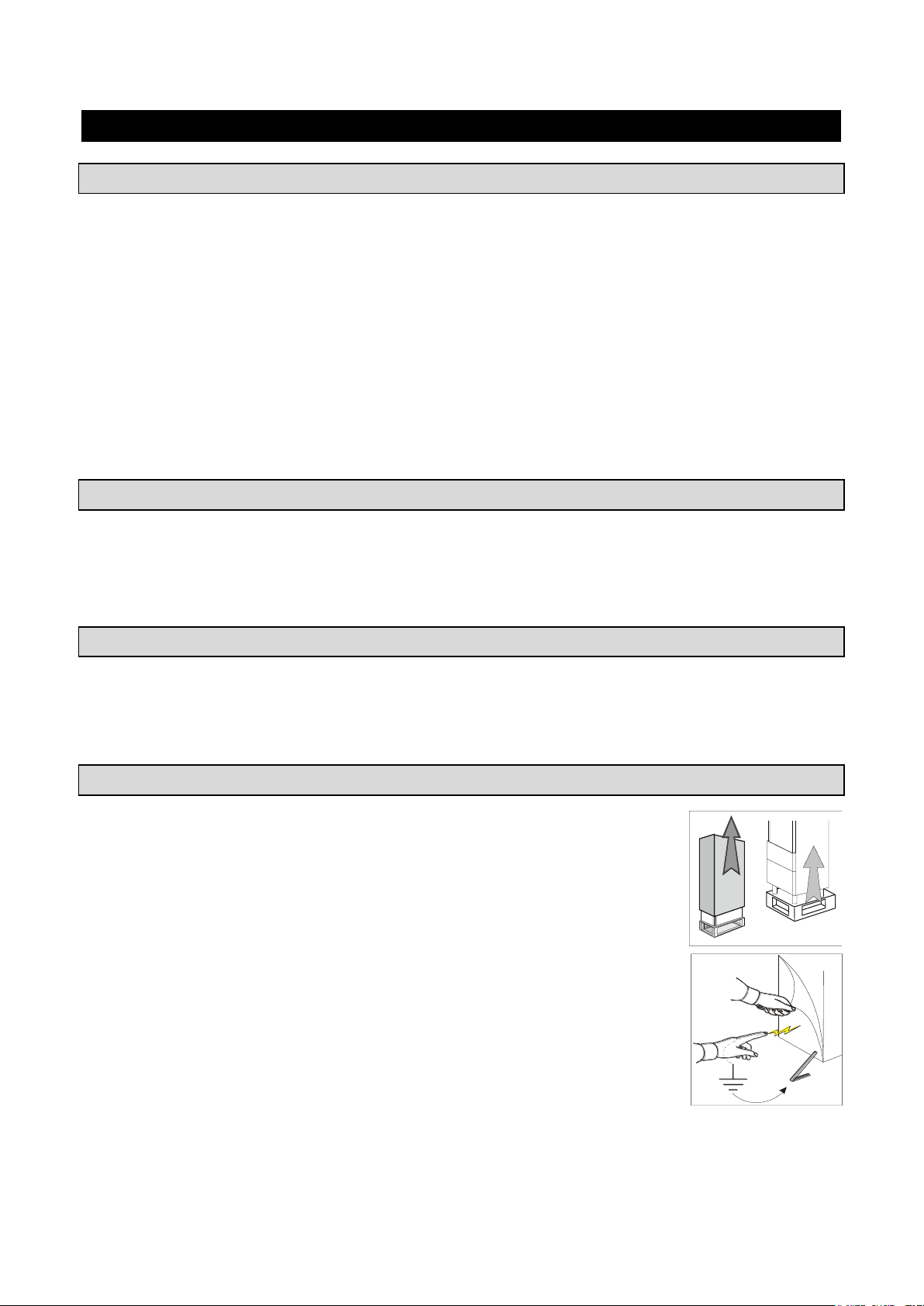
UNPACKING
Installation must be carried out by authorized personnel.
After removing the packaging, ensure the integrity of the equipment and verify that all
the parts or components are present and that the characteristics and state correspond
to the specifications of the your order.
If not, please inform the retailer immediately.
Remove pvc protective film from all over the appliance.
Attention: all the packing material must be disposed of in accordance with the
prevailing regulations in the country where the equipment is used and in any case
must not be dispersed into the environment.
5
Page 6

3283430_GB
GENERAL SAFETY WARNINGS
The user is responsible for operations carried out on the equipment which do not comply with the indications
in this manual, and periodic training of all personnel to work on the equipment is recommended.
List of some general warnings:
- do not touch the equipment with moist or wet hands or feet
- do not insert screwdrivers or kitchen tools or anything else between the guards and the parts in
motion
- before any cleaning or maintenance operation, disconnect the equipment from the electrical mains
- do not pull on the power cord to disconnect the machine from the electrical mains
- during loading/unloading of product in the equipment use kitchen gloves
- use the needle probe to read the temperature at the core of the product, making sure to handle it
with care
6
Page 7
3283430_GB
INSTALLATION
Model
Air q.ty
[cfm]
BC51MU
BF51MU
BF52MU
650
BC101LU
BF101LU
BC101SU
BF101SU
2.060
BC72SU
BF72SU
2.530
BF102SU
5.300
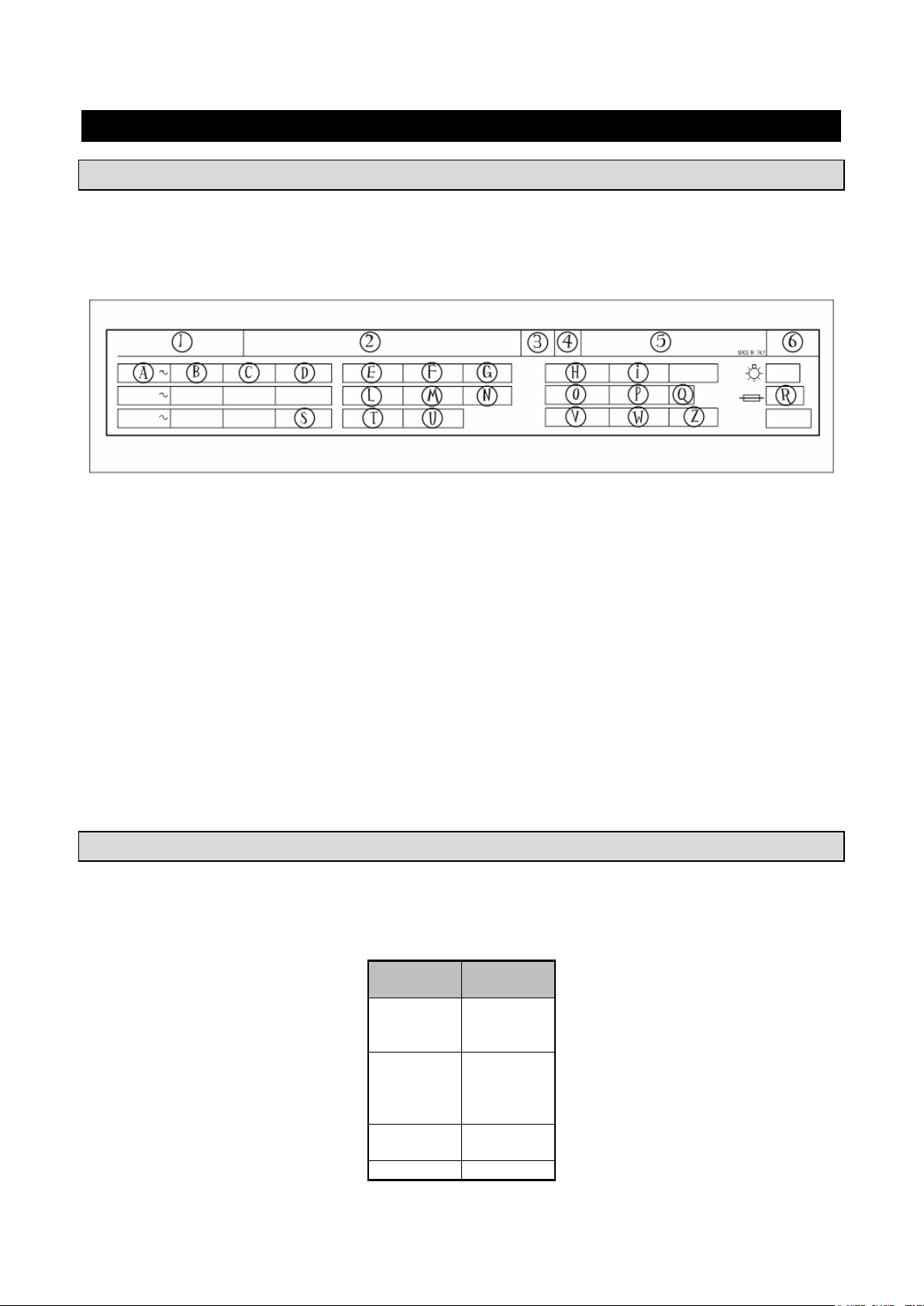
PLATE DATA
Make sure the technical wiring specifications comply with the ratings (i.e., V, kW, Hz, no. phases and mains
power).
Please quote the product's serial number (shown on the rating plate) on any enquiry to the Manufacturer.
List of rates shown on the rating plate:
1) Model
2) Manufacturer’s name and address
3) Insulation class
4) Year of production
5) Serial number
6) Electrical device casing protection rating
A) Input voltage
B) Electric current intensity
C) Frequency
D) Phase
E) Compressor
F) Compressor RLA
G) Compressor LRA
H) Defrost heater
I) Power defrost heater
L) Condenser fan
M) Condenser fan FLA
N) Expanding fluid
O) Refrigerant name
P) Refrigerant quantity
Q) Climatic class
R) Fuse
S) MCA
T) Evaporator fan
U) Evaporator fan FLA
V) Design pressure
W) High side pressure
Z) Low side pressure
MAX ROOM TEMPERATURE
Air-condenser units should not operate if room temperature is over 100°F. Above 90°F maximum output is
not guaranteed.
Min. air circulation
7
Page 8
3283430_GB
INSTALLATION
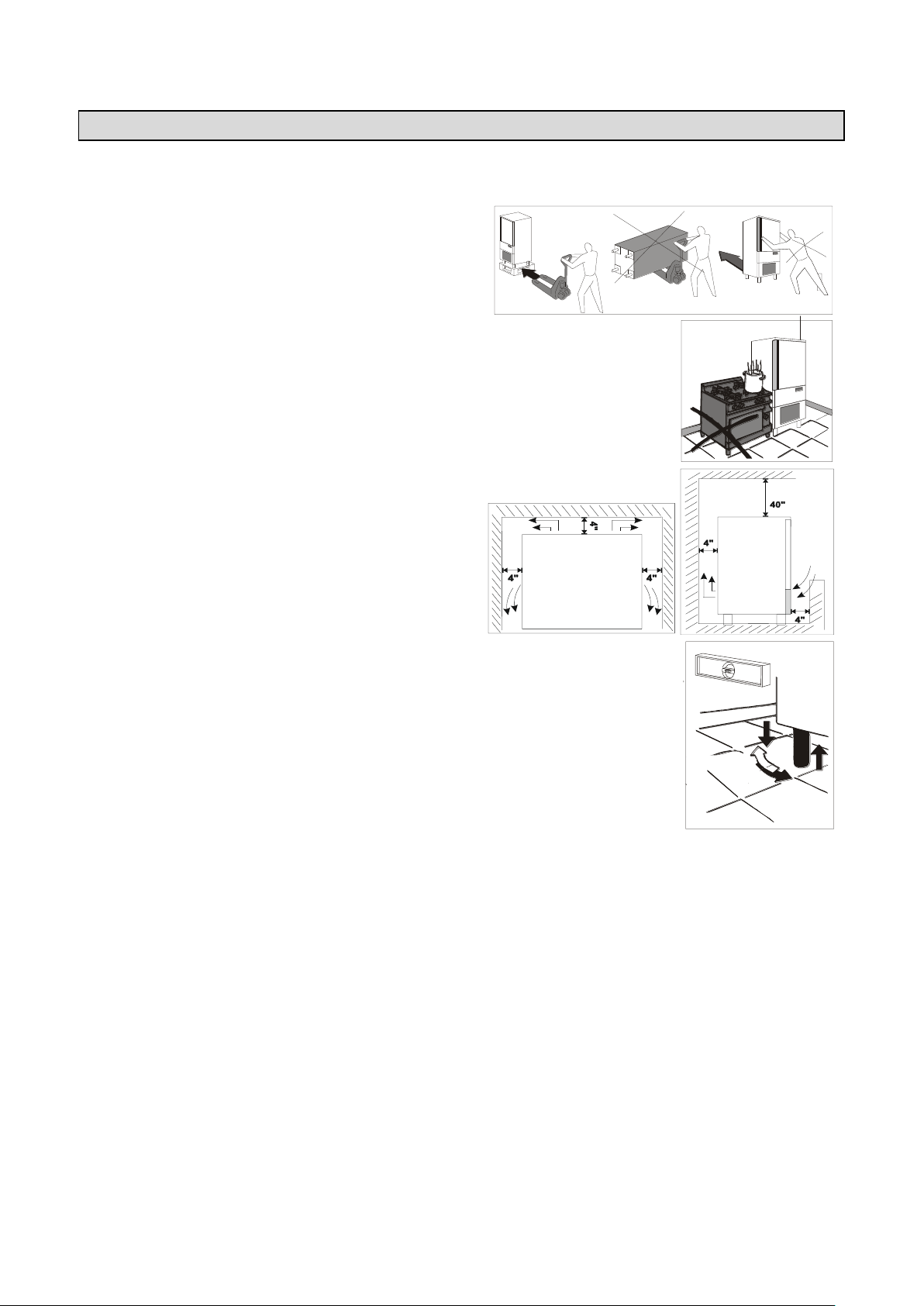
The appliance must be installed and tested in full compliance with accident-prevention regulations contained
in national law and current guidelines. Installers are to comply with any current local regulations.
Place the appliance onto the required working site.
Avoid locations with exposure to direct sunlight.
Do not place the appliance in hot, poorly-ventilated rooms.
Do not place the refrigerated compartment near heat sources.
Leave a min. 4” clearance around the appliance on
the sides where air inlet and outlet are located.
Level the appliance by means of adjustable feet.
WARNING: If the appliance is not properly levelled the performance and condensate drain may be
hampered.
8
Page 9
3283430_GB
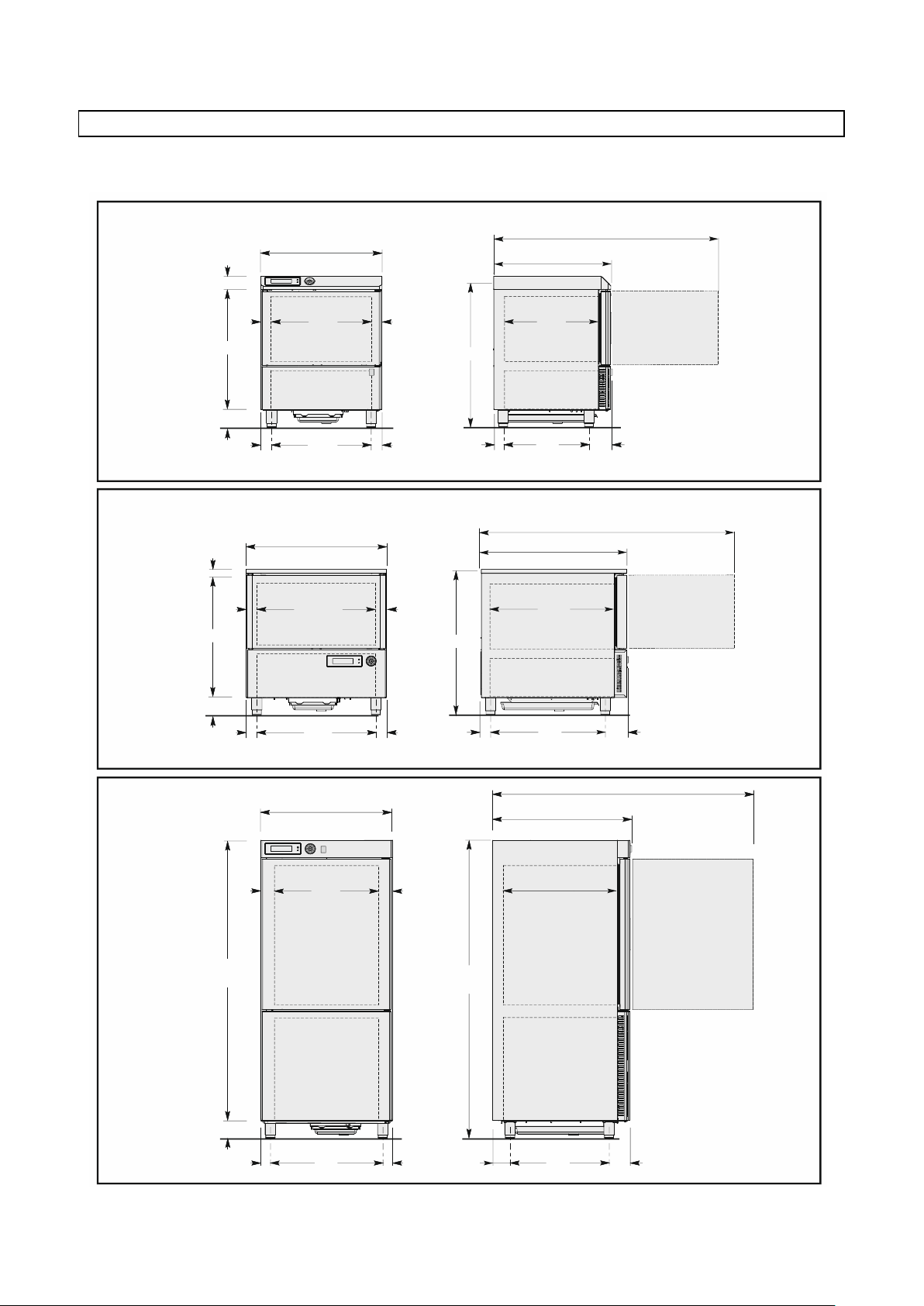
BC51MU
BF51MU
970 (38,19")
746,5 (29,38")
740 (29,13)
80 (3,15")
BC101LU
BF101LU
1565 (61,61")
848 (33,39")
700 (27,56")
800 (31,49")
56,5
(2,22")
56,5
(2,22")
632
(24,88")
60
(2,36")
60
(2,36")
625
(24,6")
150 (5,9")
721 (28,38")
145
(5,7")
535
(21,06")
61,7
(2,43")
600
(23,62")
1407 (55,39")
1710
(67,3")
150 (5,9")
680
(26,77")
60
(2,36")
60
(2,36")
1860
(73,23")
75
(2,95")
75
(2,95")
650
(25,59")
105,5
(4,15")
125,3
(4,93")
600
(23,62")
BF52MU
945 (37,20")
871 (34,29")
770 (30,32")
25 (0,98")
66,5
(2,62")
66,5
(2,62")
737
(29,02")
62,5
(2,46")
62,5
(2,46")
675
(26,58")
150 (5,9")
902 (35,51")
150
(5,9")
710
(27,95")
61,6
(2,42")
775
(30,51")
1713 (67,44")
DIMENSIONS
Please refer to the dimensions of your own appliance.
9
Page 10
3283430_GB
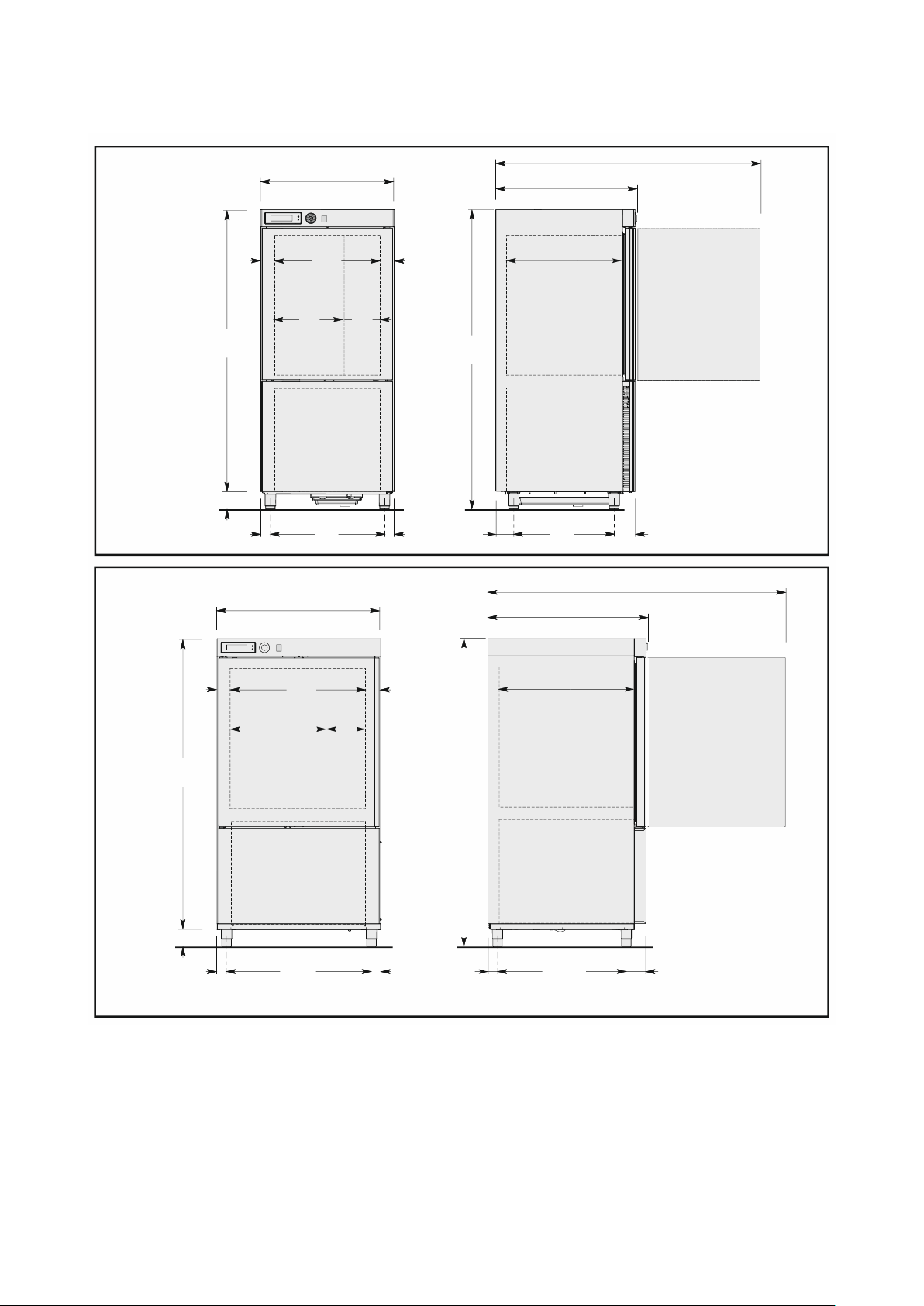
BC101SU
BF101SU
1565 (61,61")
848 (33,39")
700 (27,56")
800 (31,49")
1710
(67,3")
150 (5,9")
680
(26,77")
60
(2,36")
60
(2,36")
1860
(73,23")
75
(2,95")
75
(2,95")
650
(25,59")
105,5
(4,15")
125,3
(4,93")
600
(23,62")
415
(16,34")
235
(9,25")
BC72SU
BF72SU
BF102SU
1980 (78")
1023,5 (40,3")
875 (34,45")
1040 (40,9")
1831
(72,1")
150 (5,9")
920
(36,22")
60
(2,36")
60
(2,36")
1981
(78")
75
(2,95")
75
(2,95")
890
(35")
62,7
(2,47")
125,3
(4,93")
818
(32,2")
270
(10,6")
620
(24,4")
10
Page 11
3283430_GB
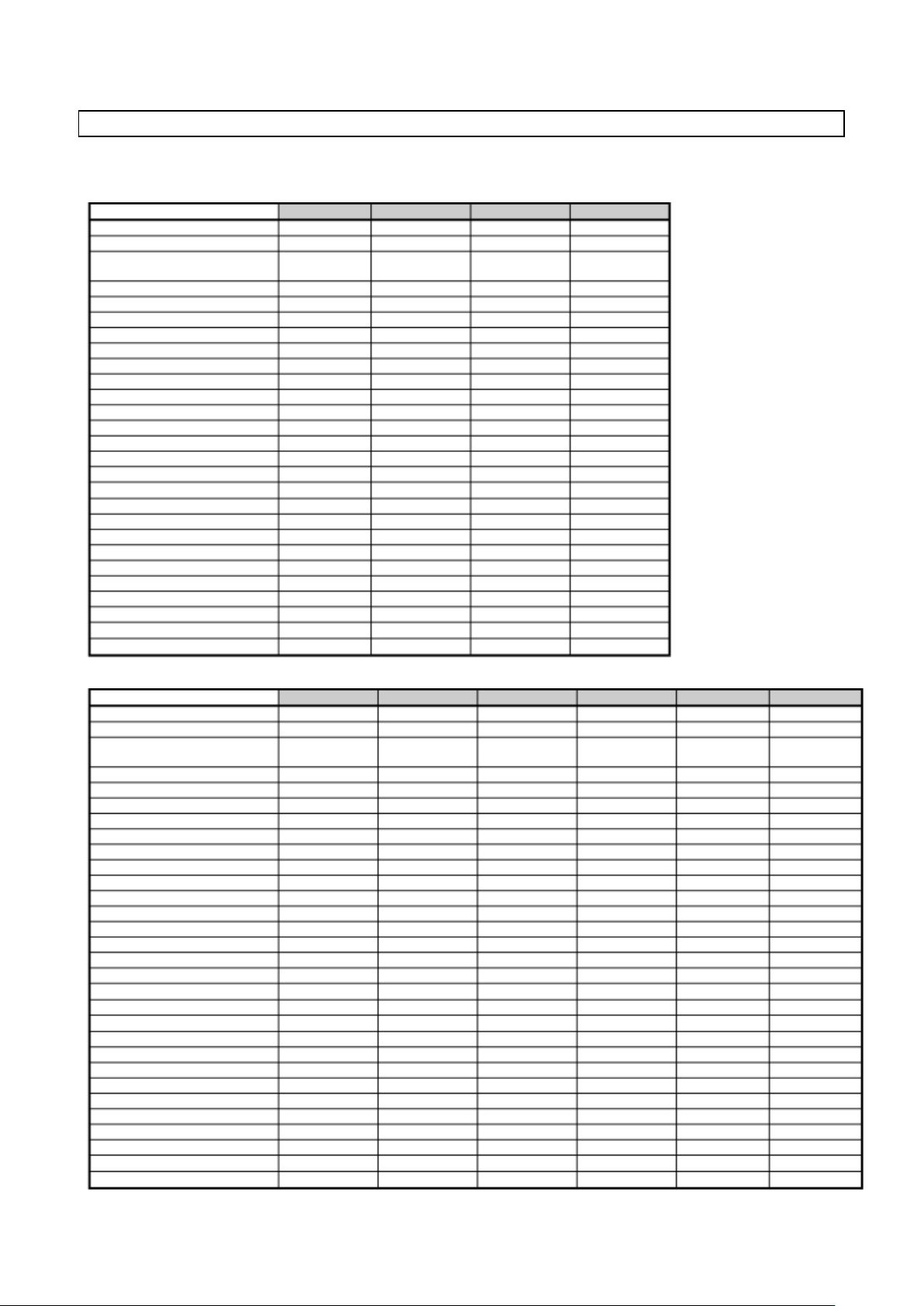
Model
BC51MU
BC101LU
BC101SU
BC72SU
Gross weight [lb]
302
496
496
705
Net weight [lb]
254
441
441
661
Dimensions
29,38”x29,19”
x38,19”
31,49”x33,39”
x73,23”
31,49”x33,39”
x73,23”
40,9”x40,3”x78”
Capacity
Mass /cycle [lb] (+194°F+37°F)
48
100
100
160
Net internal volume [cuft]
2,55
5,52
5,52
13,4
Grids
3 3 3
6
Power supply
Voltage [V]
220 ~
220 ~
220 ~
220 ~
Frequency [Hz]
60
60
60
60
Phase
1 ph
3 ph
3 ph
3 ph
Intensity [A]
6,5
11
11
14,7
Power input [W]
1051
2972
2972
4450
Refrigerating unit
Refrigerating power [W]
1083
4152
4152
5462
Evaporation temperature [°F]
14
14
14
14
Cooling temperature [°F]
+194+37
+194+37
+194+37
+194+37
Cooling time [min]
90
90
90
90
Condensation temperature [°F]
+130
+130
+130
+130
Max room temperature [°F]
+90
+90
+90
+90
Compressor type
Ermetic
Ermetic
Ermetic
Ermetic
Coolant
R404A
R404A
R404A
R404A
Coolant qty [lb]
3
4,4
4,4
4,5
Condesation air
Air
Air
Air
Air
Noise [dB] (A)
65
72
72
72
IFR
Multi-detector probe
Model
BF51MU
BF52MU
BF101LU
BF101SU
BF72SU
BF102SU
Gross weight [lb]
311
353
496
496
752
816
Net weight [lb]
265
298
441
441
705
772
Dimensions
29,38”x29,19”
x38,19”
34,29”x36,27”
x37,20”
31,49”x33,39”
x73,23”
31,49”x33,39”
x73,23”
40,9”x40,3”x78”
40,9”x40,3”x78”
Capacity
Mass /cycle [lb] (+194°F+37°F)
48
55
100
100
160
222
Mass /cycle [lb] (+194°F0°F)
28
33
60
60
80
122
Net internal volume [cuft]
2,55
3,5
5,52
5,52
13,4
13,4
Grids
3 - 3 3 6
10
Power supply
Voltage [V]
220 ~
220 ~
220 ~
220 ~
220 ~
220 ~
Frequency [Hz]
60
60
60
60
60
60
Phase
1 ph
1 ph
3 ph
3 ph
3 ph
3 ph
Intensity [A]
6
6,13
8,5
8,5
12
16,8
Power input [W]
1139
1274
2625
2625
4150
6170
Refrigerating unit
Refrigerating power [W]
1161
1319
3136
3136
3576
4633
Evaporation temperature [°F]
-10
-10
-10
-10
-10
-10
Cooling temperature [°F]
+194+37
+194+37
+194+37
+194+37
+194+37
+194+37
Cooling time [min]
90
90
90
90
90
90
Freezing temperature [°F]
+1940
+1940
+1940
+1940
+1940
+1940
Freezing time [min]
240
240
240
240
240
240
Condensation temperature [°F]
+130
+130
+130
+130
+130
+130
Max room temperature [°F]
+90
+90
+90
+90
+90
+90
Compressor type
Ermetic
Ermetic
Ermetic
Ermetic
Ermetic
Ermetic
Coolant
R404A
R404A
R404A
R404A
R404A
R404A
Coolant qty [lb]
3
3,3
4,4
4,4 6 10
Condesation air
Air
Air
Air
Air
Air
Air
Noise [dB] (A)
65
65
72
72
72
72
IFR
Multi-detector probe
TECHNICAL DATA
Please refer to the technical data of your own appliance.
11
Page 12
3283430_GB
WIRING
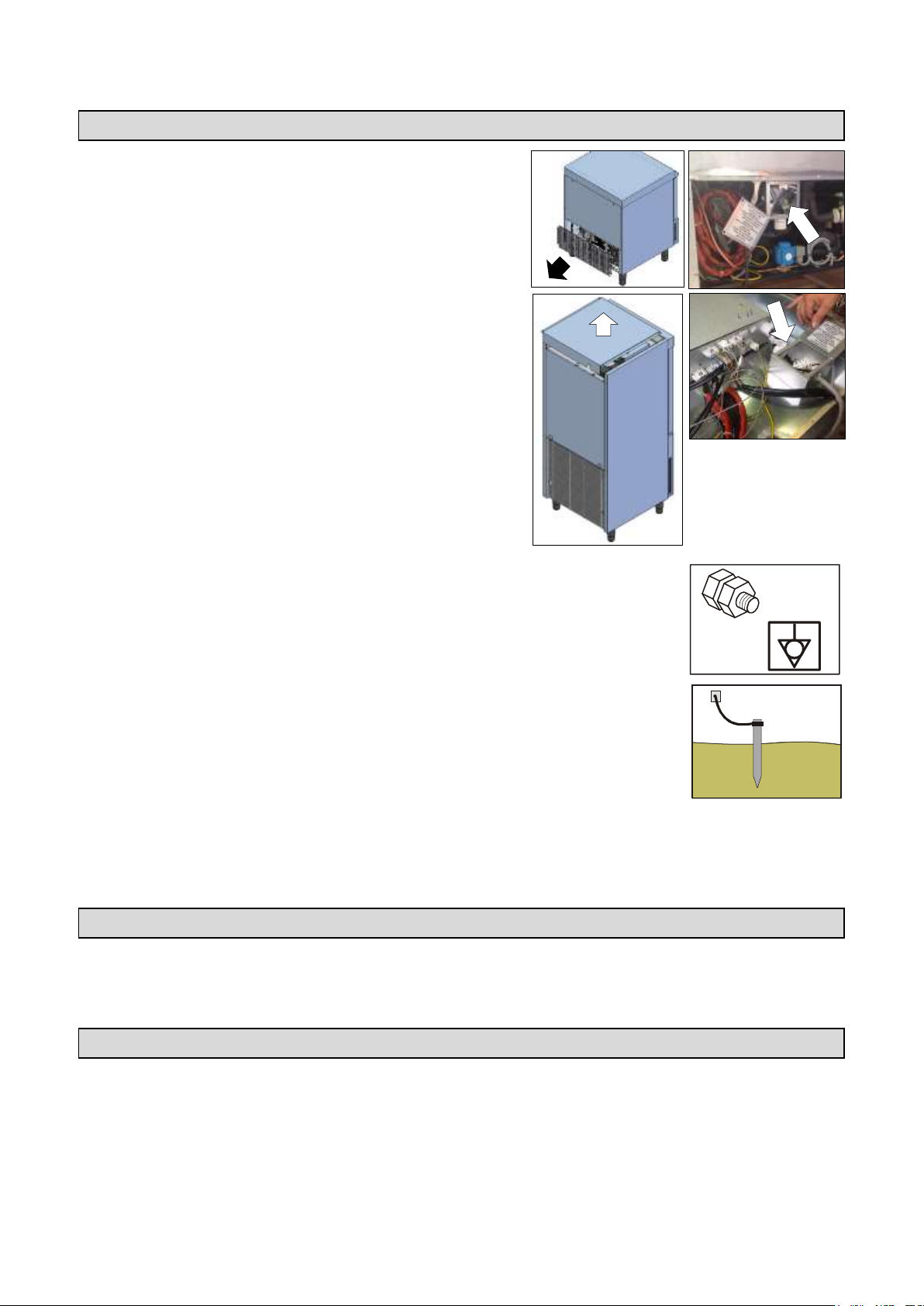
Mod. …51MU – …52MU
The connection to power supply may be carried out at the
back of the appliance after removing the protection grid and
the box cover.
Mod. …101LU – …101SU – …72SU – …102SU
The connection to power supply may be carried out in the
upper part of the appliance after removing the protection
panel and the box cover.
All wiring cables are to comply with the ratings shown on the technical specifications
Cables are to be connected to the no potential difference terminal.
The grounding cable is to be directly connected to a good grounding system.
The guarantee will cease and the Manufacturer will not be liable for any damage to appliances or
operators arising from the non-compliance with the and tamperings to any part of the appliance
(electric, thermodynamic or hydraulic plant).
CONDENSATE DRAIN
The equipment has a condensation collection tray. The tray is extractable from the lower part of the
equipment.
TESTING
Should the appliance have been transported horizontally instead of a vertical position DO NOT START THE
APPLIANCE IMMEDIATELY. WAIT FOR AT LEAST 24 HOURS BEFORE OPERATING.
The manufacturer declines any responsibility and any warranty obligation if damage occurs to the
equipment imputable to transportation in a horizontal position.
Carry out the following checkings:
1) Outside temperatures must be included between 59°F and 100°F.
12
Page 13

3283430_GB
2) Turn on the appliance and wait 30 minutes before the use if the external temperature is “low”.
3) Check power input
4) Carry out at least one full quick cooling cycle
CONTROL AND SAFETY SYSTEMS
The following information concerns skilled staff only.
Door micro-switch: Prevents the appliance from working when the door is open
Overall protection fuses: Protect the whole power circuit from and short-circuits and overloads
Compressor thermal relay: Operates in case of an overload or working failures
Motor-fan thermal relay: Operates in case of an overload or working failures
Safety pressure-switch: Operates in case of coolant over-pressure
Cabinet temperature control: Is run by NTC probe through the relevant electronic card
Core temperature control: Is run by PT100 probe through an electronic card
Electronic boards: based on the parameters entered they command and control any devices connected
to the equipment.
REFRIGERANT MATERIAL SAFETY DATA SHEET
1) R404a: fluid components
trifluoroethane (HFC 143a) 52%
pentafluoroethane (HFC 125) 44%
tetrafluoroethane (HFC 134a) 4%
GWP = 3750
ODP = 0
2) Hazard identification
Overexposure through inhalation may cause anaesthetic effects. Acute overexposure may cause cardiac
rhythm disorders and sudden death. Product mists or sprays may cause ice burns of eyes and skin.
3) First aid procedures
Inhalation: keep injured person away from exposure, warm and relaxed. Use oxygen, if necessary. Give
artificial respiration if respiration has stopped or is about to stop. In case of cardiac arrest give external
cardiac massage. Seek immediate medical attention
Skin: use water to remove ice from affected areas. Remove contaminated clothes.
CAUTION: clothes may adhere to skin in case of ice burns.
In case of contact with skin, wash with copious quantities of lukewarm water. In case of symptoms
(irritation or blisters) seek medical attention.
Eyes: immediately wash with ocular solution or fresh water, keeping eyelids open for at least 10 minutes.
Seek medical attention.
Ingestion: it can cause vomit. If conscious, rinse mouth with water and drink 200-300 ml of water. Seek
medical attention
Other medical treatment: symptomatic treatment and support therapy when indicated. Do not administer
adrenaline or sympatheticomimetic drugs after exposure, due to the risk of arrhythmia and possible
cardiac arrest.
4) Environmental data
Persistence and degradation
HFC 143a: slow decomposition in lower atmosphere (troposphere). Duration in atmosphere is 55 years.
HFC 125: slow decomposition in lower atmosphere (troposphere). Duration in atmosphere is 40 years.
HFC 134a: relatively rapid decomposition in lower atmosphere (troposphere). Duration in atmosphere is
15.6 years
HFC 143a, 125, 134a: does not affect photochemical smog (not included in volatile organic components –
VOC – as established in the UNECE agreement). Does not cause ozone rarefaction.
Product exhausts released in the atmosphere do not cause long-term water contamination.
13
Page 14

3283430_GB
DISPOSAL
WASTE STORAGE
At the end of the product life, avoid release to the environment. The doors should be removed before
disposal. Temporary storage of special waste is permitted while waiting for disposal by treatment and/or final
collection. Dispose of special waste in accordance with the laws in force with regard to protection of the
environment in the country of the user.
PROCEDURE FOR ROUGH DISMANTLING THE APPLIANCE
Countries have different legislation; provision laid down by the laws and the bodies of the
countries where the demolition takes place are therefore to be observed. A general rule is to deliver the
appliance to collection and demolition centers. Dismantle the refrigerator grouping together the
components according to their chemical nature. The compressor contains lubricating oil and refrigerant,
which may be recycled. The refrigerator components are considered special waste, which can be assimilated
with domestic waste. Make the appliance totally unusable by removing the power cable and any door locking
mechanisms in order to avoid the risk of anyone being trapped inside.
DISMANTLING OPERATIONS SHOULD BE CARRIED OUT BY QUALIFIED PERSONNEL.
The improper disposal of Waste Electrical and Electronic Equipment is liable to punishment under
the relevant laws in the countries where the offence is committed.
Waste electrical and Electronic Equipment may contain hazardous substances with potential harmful
effects on the environment and human health. You are urged to dispose of them properly.
STERILIZATION LAMP INSTALLATION
The sterilization lamp kit is not supplied as standard equipment.
Should you purchase the kit, please follow the installation instructions to install.
PRINTER INSTALLATION
The printer is not supplied as standard equipment .
Should you purchase the printer, please follow the installation instructions to install.
14
Page 15
3283430_GB
OPERATION
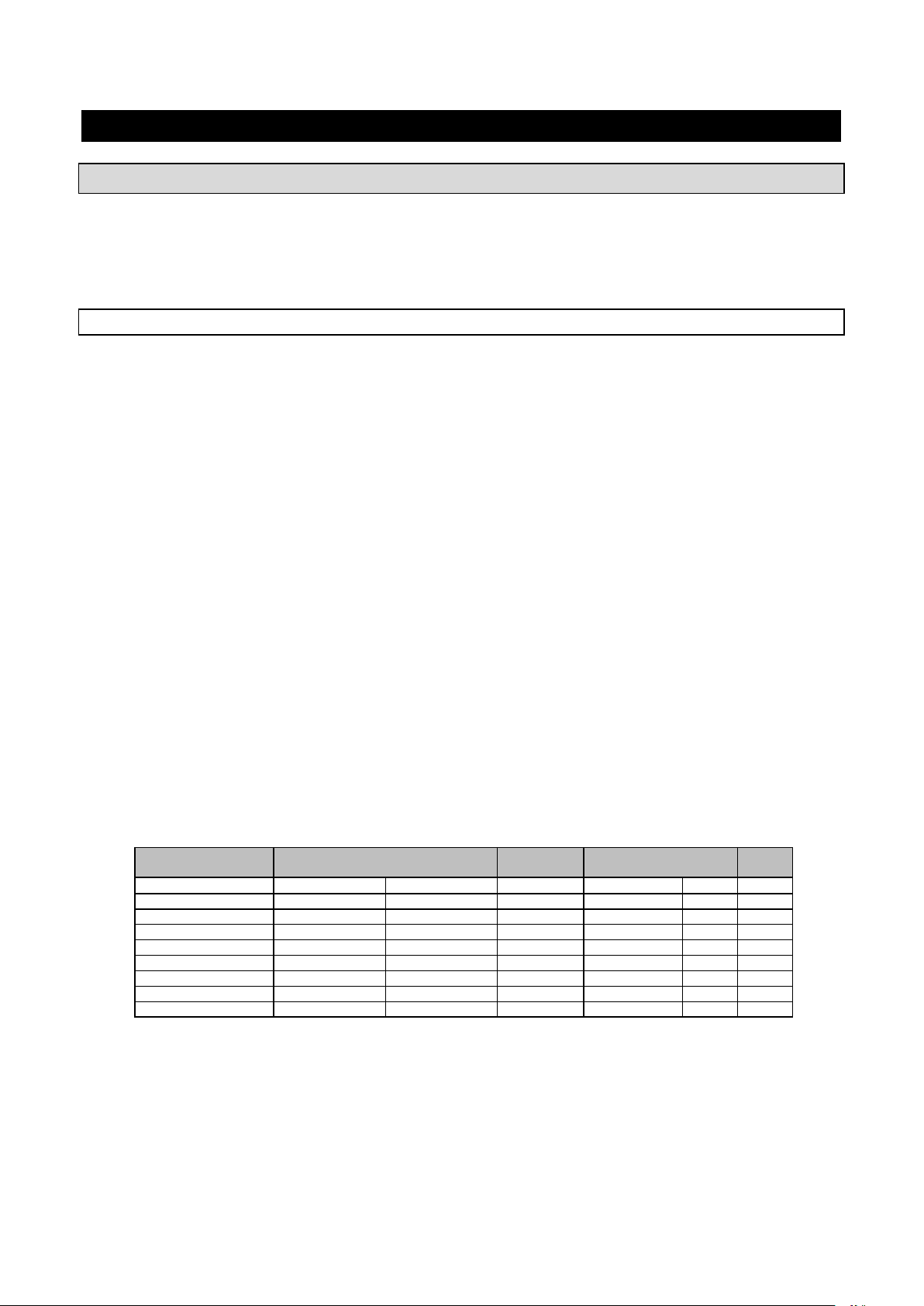
Model
Max. output/cycle
Standard of
shelves
Capacity
h
+194[°F]+37[°F]
+194[°F]0[°F]
n° max
BC51MU
48[lb]
- 3 6
12“x20“
1,5“
BF51MU
48[lb]
28[lb] 3 6
12“x20“
1,5“
BF52MU
55[lb]
33[lb] - 6
18“x26“
1,5“
BC101LU – BC101SU
100[lb]
- 3 12
12“x20“
1,5“
BF101LU – BF101SU
100[lb]
60[lb]
3
12
12“x20“
1,5“
BC72SU
160 [lb]
- 6 26
12“x20“
1,5“
BF72SU
160 [lb]
80 [lb]
6
26
12“x20“
1,5“
BF102SU
222 [lb]
122 [lb]
10
26
12“x20“
1,5“
GENERAL DESCRIPTION
This unit is capable of reducing the internal temperature of the contents from 135°F (57°C) to 40°F (4°C) with
in 4 hours, in order to conserve it for a long period of time without altering the organoleptic characteristics.
Machine capacity as to the quantity to be cooled depend on the model purchased.
SETTING UP
Before setting to operation thoroughly clean the cooling cabinet with a suitable detergent or sodium bycarb
dissolved in lukewarm water. Clean the appliance inside to remove any condensate caused by the
Manufacturer's final testing.
Cooling and freezing speed depends on the following factors:
a) container shape, type and material;
b) whether container lids are used;
c) foodstuff features (density, water contents, fat contents);
d) starting temperature;
e) thermal conduction inside the foodstuffs.
Positive /Negative quick cooling time depends on type of foodstuffs to be processed.
In general the programs the machine is equipped with are based on the chamber temperature management,
the fan speed and the chilling time, in any case never exceed 7lb of load (for 12”x20” pans) or 15lb of load
(for 18”x26” pans) and a thickness of 2” in negative chilling phase and 3” in positive chilling phase (table 2).
Check that the positive chilling program, up to +37°F at the product core, does not take more than 90
minutes and that the negative chilling program, up to 0°F at the product core, does not take more than 4
hours.
We recommend pre-chilling the work chamber before beginning with a chilling program and not covering the
food during the program in order not to increase times.
We recommend using the core probe in order to have the exact core temperature reading. Do not stop the
cycle before reaching a temperature of +37°F during positive quick cooling and 0°F during negative quick
cooling.
Tab.2
15
Page 16
3283430_GB
SON D A A S ING O LO
RIL E VA M E NTO
CU O R E P R OD OT T O
SO N D A A M ULTIPLO
RILEVAMENTO
SUP E R FI CI E P R OD OT TO
SINGLE-DETECTOR
PROBE
MULTI-DETECTOR
PROBE
PRODUCT CORE
PRODUCT SURFACE
0,19”-0,79”
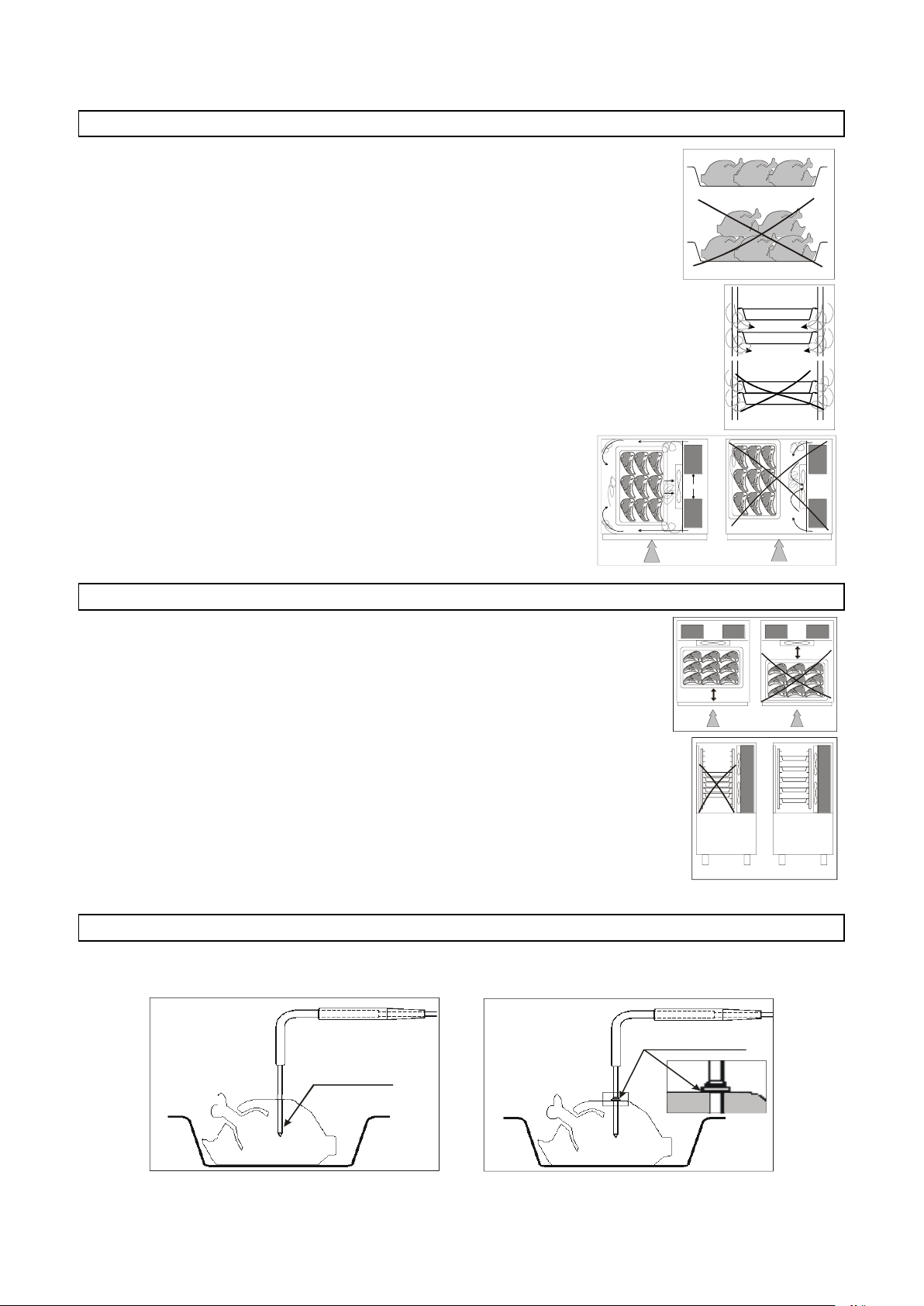
MACHINE LOADING
Do not pile up foodstuffs to be cooled. Thickness should be lower than 2” in
negative quick cooling and lower than 3” in positive quick cooling.
Make sure air circulation is not hampered between food trays.
The grid-holding frame (included in those models which include
trolleys) is to be located at the centre of the cabinet.
POSITION OF TRAYS
Place the trays as close to the evaporator as possible.
If the cabinet is not full place the trays at equal distance from one another.
CORE PROBE
For proper position of the probe, refer to the following pictures.
16
Page 17
3283430_GB
A
B
C
TEMPERATURES
Do not leave the cooked products that are to be chilled/frozen at room temperature.
Avoid humidity losses, which will be detrimental to the conserved fragrance of the product.
We recommend beginning the chilling/freezing program as soon as the preparation or cooking phase has
ended, being careful to insert the product into the equipment at a temperature no lower than +160°F. The
cooked product can enter the equipment even at very high temperatures, greater than +212°F, as long as
the chamber has been pre-chilled.
In any case it should be taken into consideration that the program reference times always start from a
temperature of +194°F, in positive chilling from +194°F to +37°F and in negative chilling from +194°F to 0°F.
LENGTH
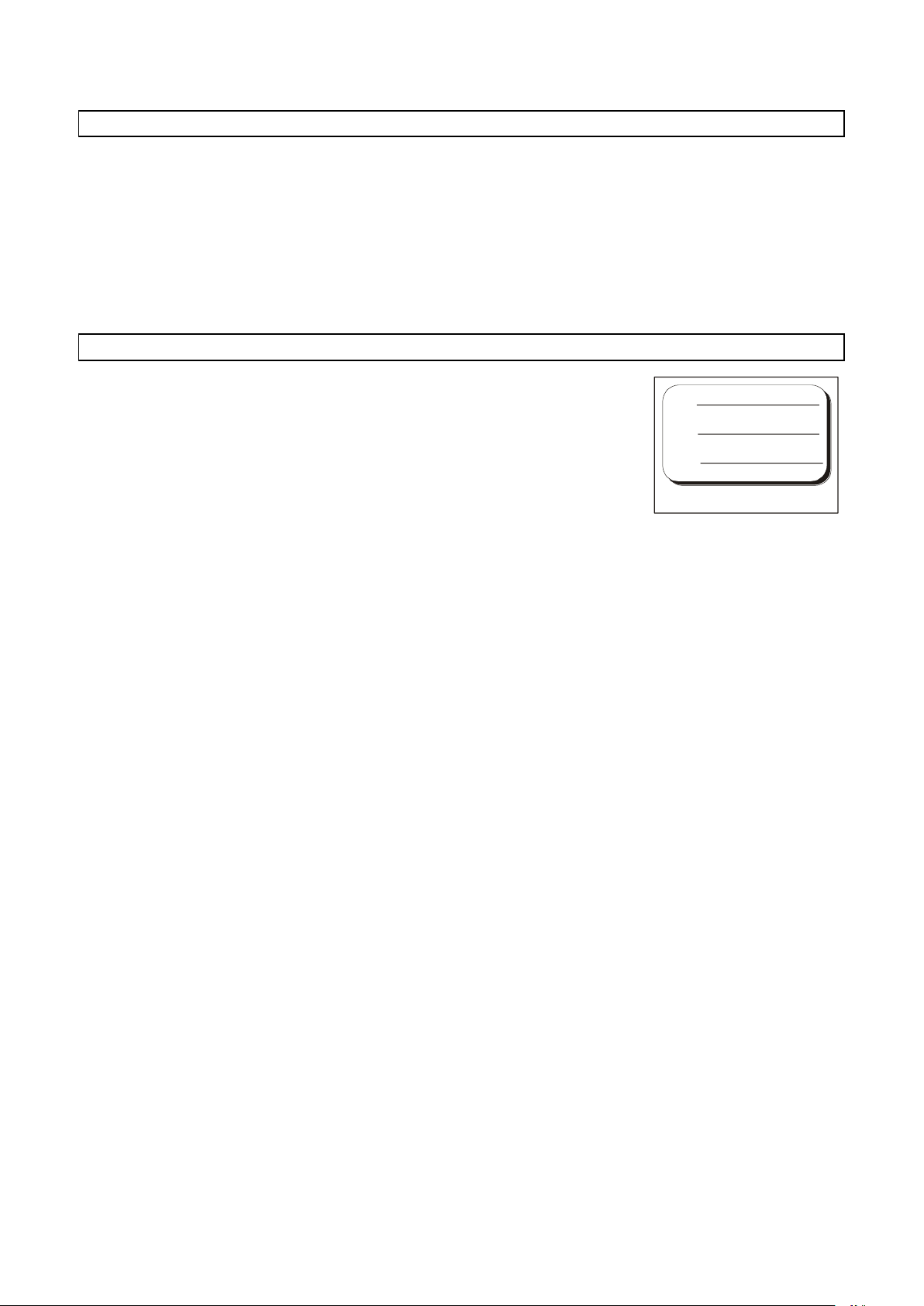
Cooled or frozen processed foodstuffs may be stored in a refrigerator for 5
days of processing with no quality alterations.
For best results we recommend keeping temperature constant throughout the
storing (32°F to 39°F), according to the various commodities.
Storing time may be increased to approx. two weeks by using vacuum
processing.
After a negative quick cooling cycle, foodstuffs may be stored safely for 3 to 18
months, according to the type of foodstuff processed.
We strongly recommend keeping storing temperature at -4°F or below.
The cooled product should be wrapped in a specific film for foodstuffs (better still, vacuum stored) and
provided with a sticker reporting the content [A], date of processing [B] and expiry date [C] written in
permanent type ink.
17
Page 18
3283430_GB
HARD +37°F
SOFT 0°F
HARD 0°F
IFR
MENU
INFINITY
SOFT+37°F
D B C
A
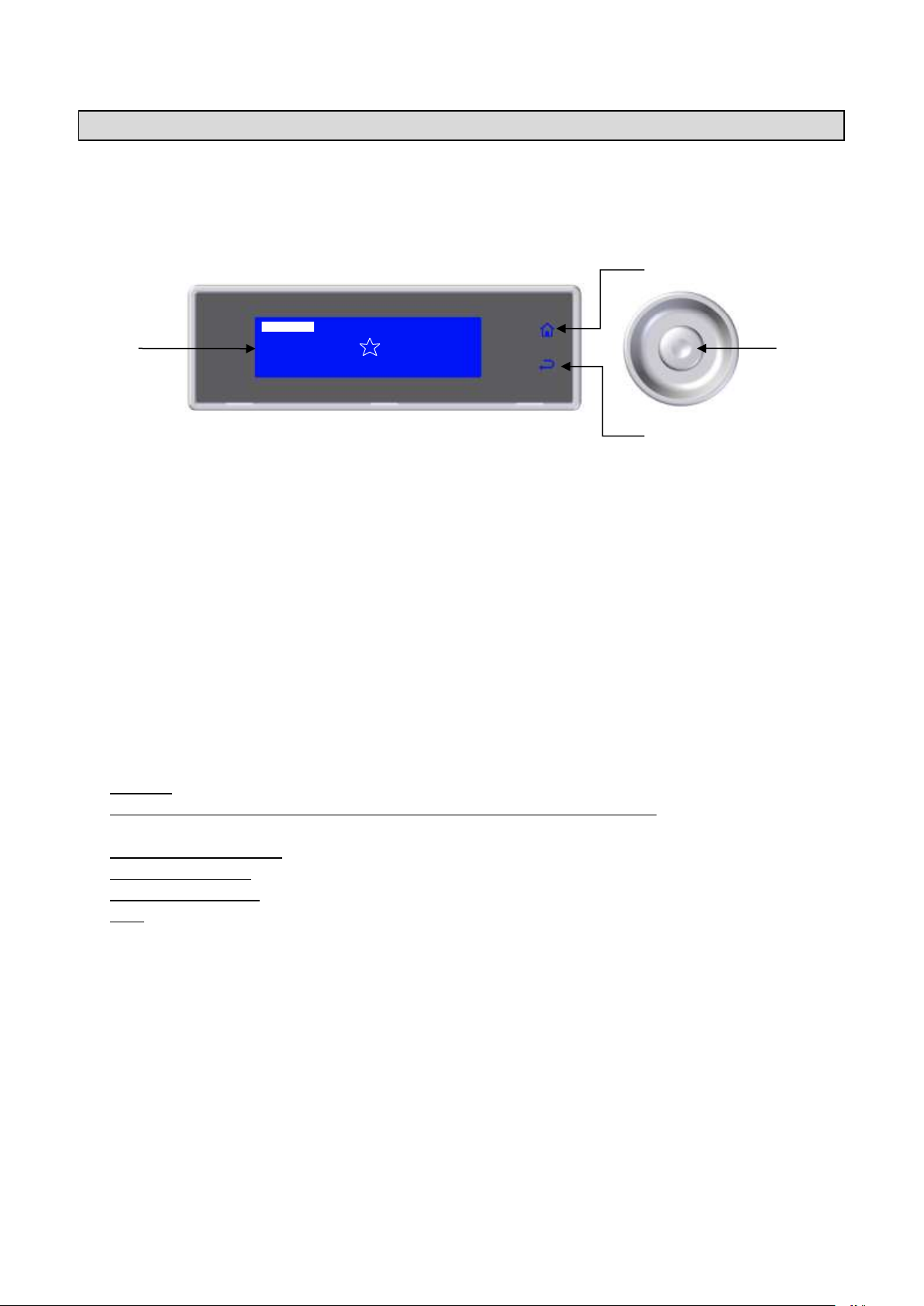
CONTROL PANEL
The illustration shows the equipment control panel, while the list indicates the description and functionality of
the individual commands.
A–Display: Displays all the information relative to the menus on the board and the application in progress.
B– HOME button: In any context, if enabled, this allows the user to return immediately to the main screen. If
the button is enabled this is indicated by the corresponding back lighting.
C– BACK button: During navigation this button allows the user to return to the previous level in the menu
structure, while when any cycle is in progress, it allows the user to modify the control parameters of the
process in progress, temporarily saving the modified values.
D– Knob: The clockwise and anticlockwise turning of the knob allows the user to navigate through the
various menus on the display, while pressing it allows access to the selected item.
The RGB LED bar, built into the door handle, takes on a different color depending on the process in
progress:
- Stand-by: low intensity steady light blue light
- Chilling/freezing cycle (including infinity, Multy) Defrost and Cooling, in progress: high intensity flashing
light blue light
- Conservation in progress: high intensity steady light blue light
- Freezing in progress: high intensity steady red light
- Sanitation in progress: low intensity steady red light
- Fault: steady yellow light
18
Page 19
3283430_GB
1. Select LANGUAGE by rotating the knob
ITALIANO
FRANCAIS
ENGLISH
DEUTSCH
ESPANOL
DUTCH
SVENSKA
DANSK
NORSK
2. Press the knob to confirm the selected
language
The language can also be changed later (see
page 51)
ITALIANO
FRANCAIS
ENGLISH
DEUTSCH
ESPANOL
DUTCH
SVENSKA
DANSK
NORSK
1. Select the SECTOR by rotating the
knob
CATERING
BAKERY
PASTRY
ICE CREAM
2. Press the knob to confirm the selected
sector
The sector can also be changed later (see
page 53)
CATERING
BAKERY
PASTRY
ICE CREAM
FIRST START-UP
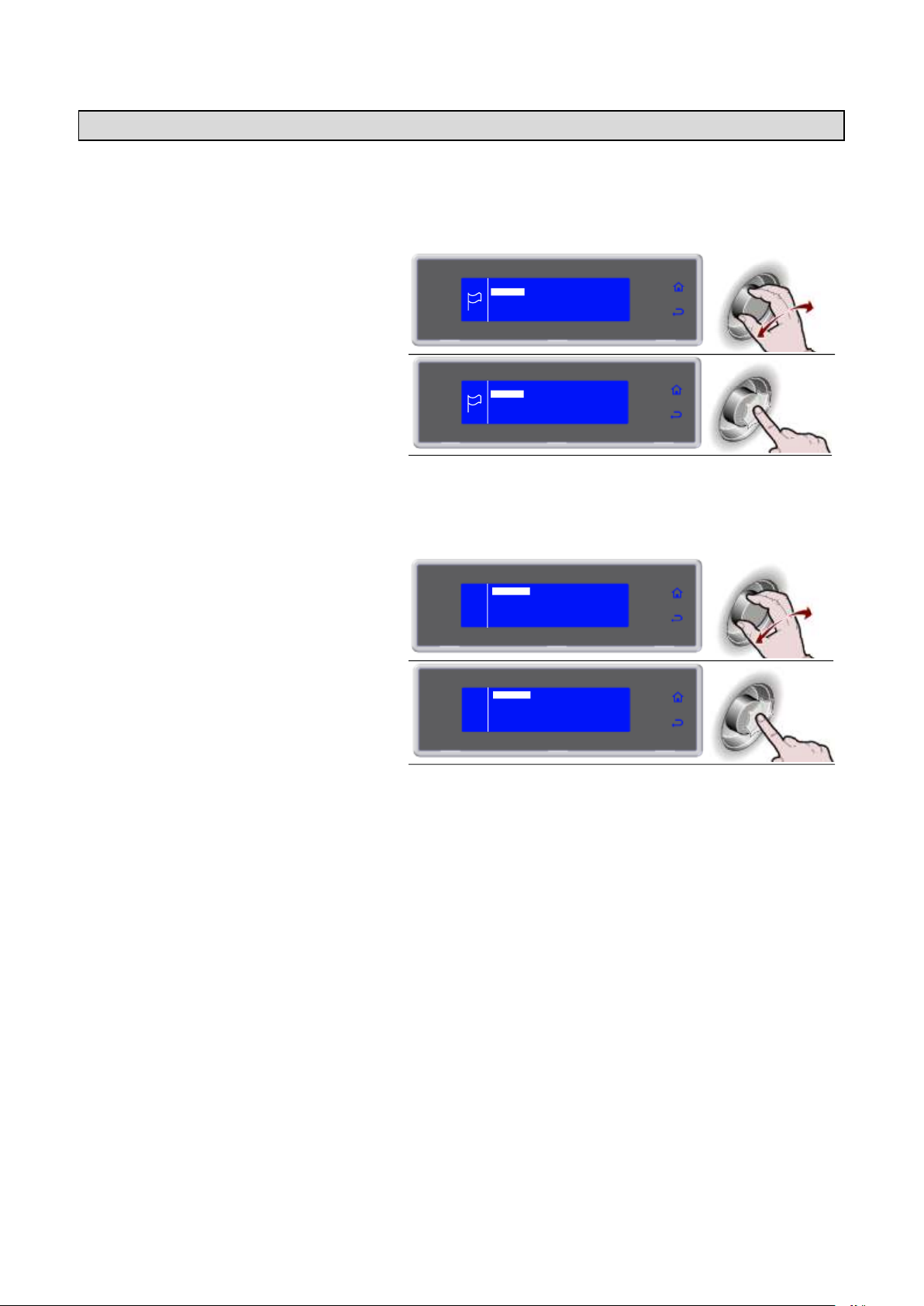
At the first start-up the operator will be asked to choose the language and the sector.
LANGUAGE SETTING
SECTOR SETTING
19
Page 20
3283430_GB
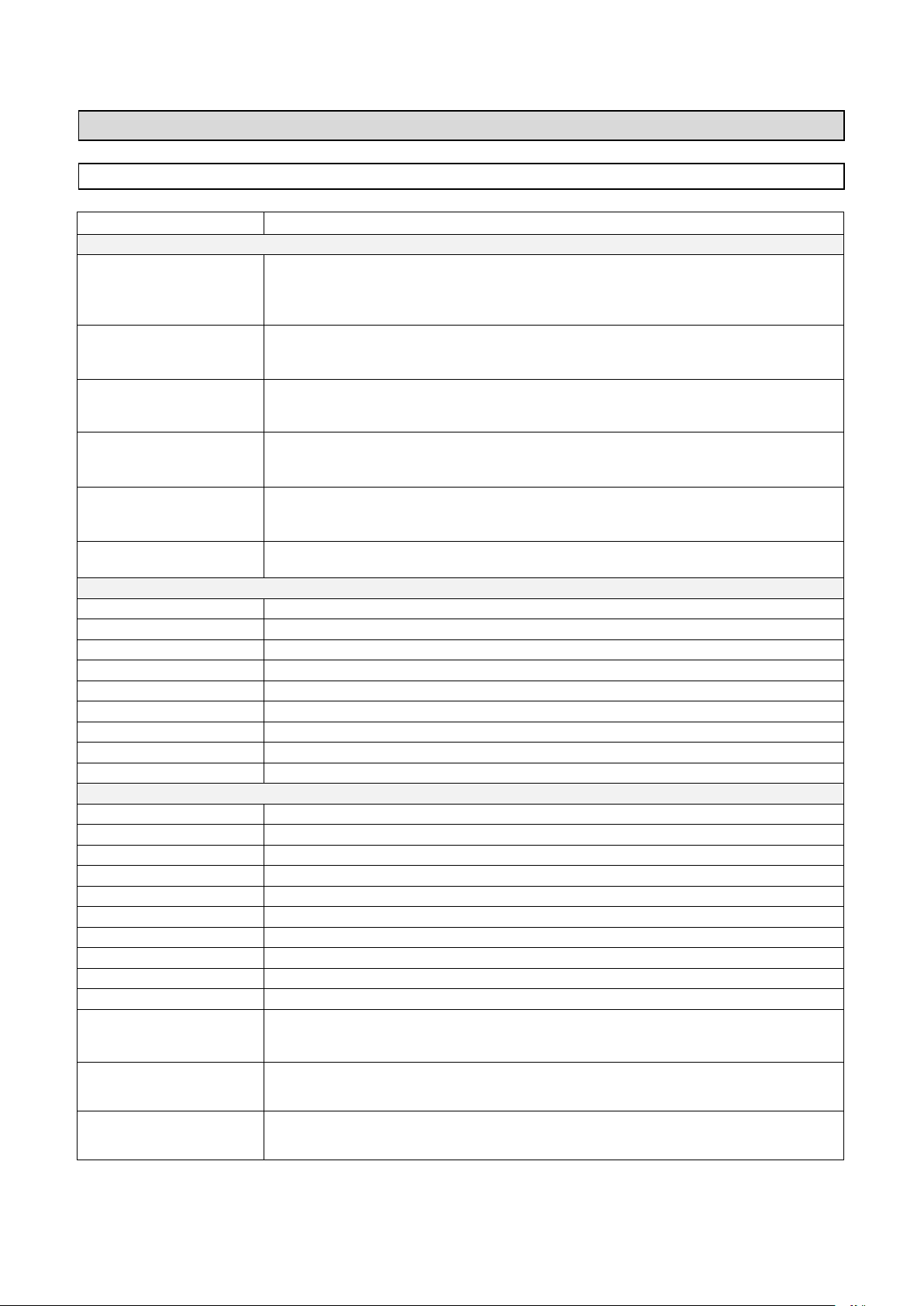
PROGRAM
DESCRIPTION
STANDARD PROGRAMS
SOFT +37°F
Cycle carried out through probe at the core or time, suitable for chilling foods up to +37°F,
using a chamber temperature of about 34°F.
Cycle suitable for delicate products such as mousse, creams, desserts, vegetables or
foods that are not very thick
HARD +37°F
Cycle carried out through probe at the core or time, suitable for chilling foods up to +37°F,
using a chamber temperature varying from 5°F to 34°F.
Cycle suitable for very dense products, with high grease content or large sized products
IFR
I.F.R. is the patented positive blast chilling system that automatically optimises the process
for any type of food, no matter the size and quantity, chilling its surface thanks to the use of
a multipoint, three sensor needle probe
SOFT 0°F
Cycle carried out through probe at the core or time, suitable for freezing foods up to 0°F,
using a chamber temperature varying from 34°F to -40°F.
Cycle suitable for leavened products, baked or cooked foods that are not very thick
HARD 0°F
Cycle carried out through probe at the core or time, suitable for freezing foods up to 0°F,
using a chamber temperature that can reach -40°F.
Cycle suitable for raw or cooked, large size foods
INFINITY
Time chilling/freezing cycle with infinite duration, suitable for cooling various type food
pans. The temperature at the core can be checked
AUTOMATIC PROGRAMS +37°F - CATERING
LASAGNE
Cycle dedicated to chilling of lasagne
SOUPS AND SAUCES
Cycle dedicated to chilling of soups and sauces
RICE AND PASTA
Cycle dedicated to chilling of rice and pasta
MEAT
Cycle dedicated to chilling of meat
FISH
Cycle dedicated to chilling of fish
COOKED VEGETABLES
Cycle dedicated to chilling of cooked vegetables
HOT PASTRY
Cycle dedicated to chilling of hot pastry products
DRY PASTRY
Cycle dedicated to chilling of dry pastry products
WALNUTS VEAL
Cycle dedicated to chilling of walnuts veal
AUTOMATIC PROGRAMS 0°F - CATERING
LASAGNE
Cycle dedicated to freezing of lasagne
SOUPS AND SAUCES
Cycle dedicated to freezing of soups and sauces
RICE AND PASTA
Cycle dedicated to freezing of rice and pasta
MEAT
Cycle dedicated to freezing of meat
FISH
Cycle dedicated to freezing of fish
COOKED VEGETABLES
Cycle dedicated to freezing of cooked vegetables
RAW VEGETABLES
Cycle dedicated to freezing of raw vegetables
PASTRY
Cycle dedicated to freezing of pastry products
RAW FISH
Cycle dedicated to freezing of raw fish
SUSHI
Cycle dedicated to freezing of Sushi
ANISAKIS 24h*
It is a special blast freezing cycle that enables preventive and total food preservation and
restoration. Once the probe reads -4°F at the food core, the appliance will automatically
start the "devitalization phase for 24 hours”
ANISAKIS 15h*
it is a special blast freezing cycle that enables preventive and total food preservation and
restoration. Once the probe reads -31°F at the food core, the appliance will automatically
start the "devitalization phase for 15 hours”
OPISTORKIS 24h
It is a special blast freezing cycle that enables preventive and total food preservation and
restoration. Once the probe reads -4°F at the food core, the appliance will automatically
start the "devitalization phase for 24 hours”
PROGRAM
PROGRAM DESCRIPTIONS
* Tested and validated in cooperation with: University of Naples Federico II - Department of Zootechnical Sciences and Food
inspection and the University Research laboratory at the wholesale fish market of Pozzuoli, Naples
20
Page 21
3283430_GB
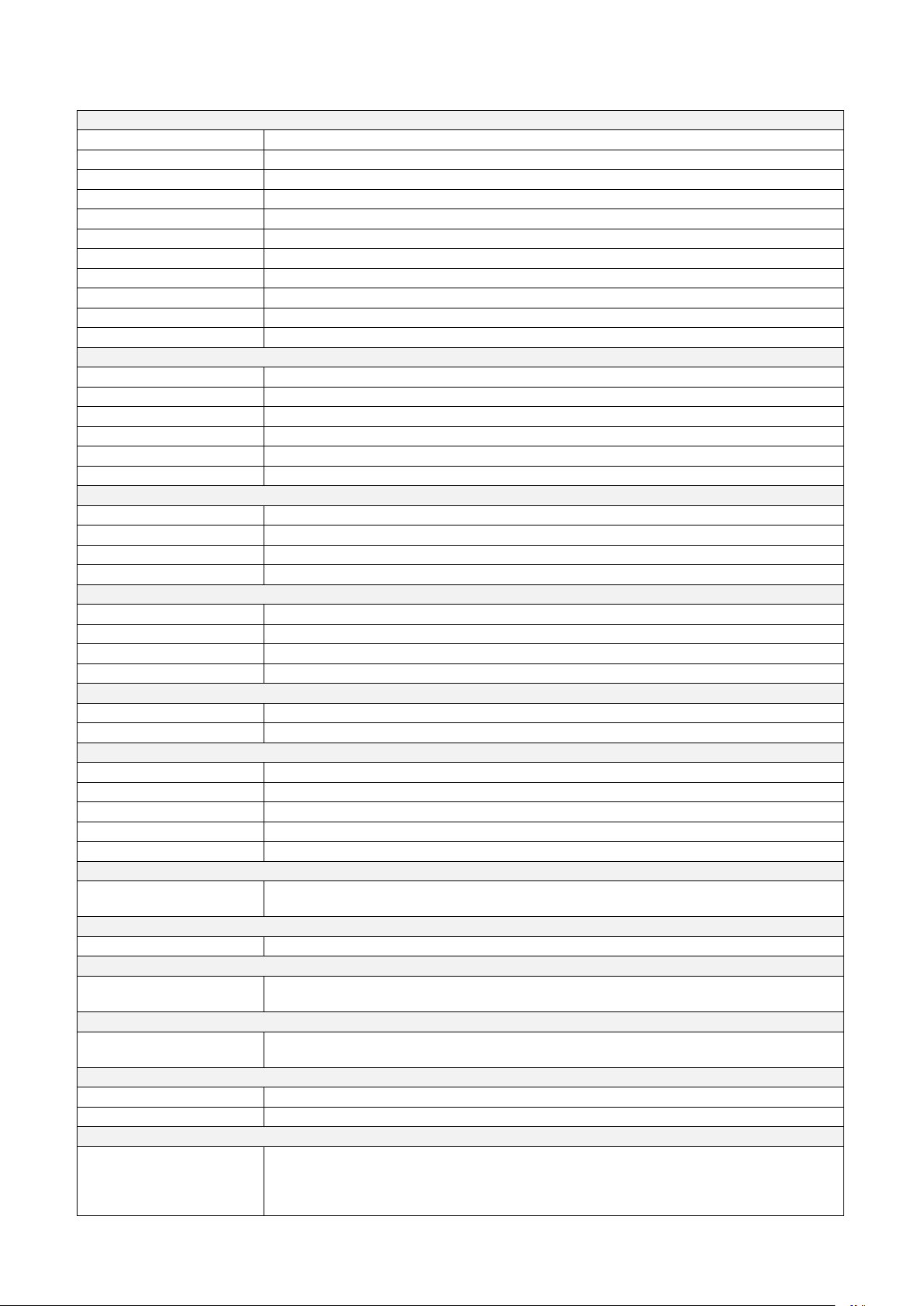
AUTOMATIC PROGRAMS +37°F - PASTRY SHOP
DOUGH SHEETING
Cycle dedicated to chilling of sheet dough
MIXING IN DIE
Cycle dedicated to chilling of moulded dough
CREAM
Cycle dedicated to chilling of creams
LEAVENED
Cycle dedicated to chilling of leavened products
LEAVENED +50°F
Cycle dedicated to chilling of leavened products +50°F
SHORT PASTRY
Cycle dedicated to chilling of shortcrust dough
STUFFED PRODUCTS
Cycle dedicated to chilling of filled products
TARTS
Cycle dedicated to chilling of tarts
BRIOCHE
Cycle dedicated to chilling of brioche
PANNA COTTA
Cycle dedicated to chilling of panna cotta
YOGURT BOX
Cycle dedicated to preparing of yogurt
AUTOMATIC PROGRAMS 0°F - PASTRY SHOP
DOUGH SHEETING
Cycle dedicated to freezing of sheet dough
MIXING IN DIE
Cycle dedicated to freezing of moulded dough
TARTS
Cycle dedicated to freezing of tarts
MOUSSE
Cycle dedicated to freezing of mousse
CROISSANT
Cycle dedicated to freezing of croissants
ICE CREAM
Cycle dedicated to freezing of ice cream
AUTOMATIC PROGRAMS +37°F - BAKERY
TARTS
Cycle dedicated to chilling of tarts
BAKED BREAD
Cycle dedicated to chilling of baked bread
CREAM
Cycle dedicated to chilling of creams
LEAVENED
Cycle dedicated to chilling of leavened products
AUTOMATIC PROGRAMS 0°F - BAKERY
COOKED TARTS
Cycle dedicated to freezing of baked tarts
RAW TARTS
Cycle dedicated to freezing of unbaked tarts
BAKED BREAD
Cycle dedicated to freezing of baked bread
UNCOOKED BREAD
Cycle dedicated to freezing of unbaked bread
AUTOMATIC PROGRAMS +37°F - ICE CREAM PARLOUR
PANNA COTTA
Cycle dedicated to chilling of panna cotta
YOGURT BOX
Cycle dedicated to preparing of yogurt
AUTOMATIC PROGRAMS 0°F - ICE CREAM PARLOUR
ICE CREAM -7°F
Cycle dedicated to freezing of ice cream -7°F
ICE CREAM
Cycle dedicated to freezing of ice cream
COMPLETE MOUSSE
Cycle dedicated to freezing of complete mousse
MOUSSE
Cycle dedicated to freezing of mousse
FROZEN DESSERT
Cycle dedicated to freezing of frozen dessert
MULTY PROGRAM
MULTY
Time chilling/freezing cycle, organized by load levels, with possibility of needle probe
reading, providing the time for each level
BANQUETING PROGRAM
BANQUETING
Cycle dedicated to the catering sector, excellent for preparation of banqueting products
VACUUM PROGRAM
VACUUM
Cycle dedicated to the catering sector for preparation of products before a vacuum-packing
phase
THAWING PROGRAM
THAWING
Cycle carried out by means of temperature probe or by time, dedicated to controlled food
defrosting
PROVING PROGRAM
PROVING
Time cycle, dedicated to direct leavening of foods
RETARDER PROVING
Time cycle, dedicated to scheduled leavening of foods
SMART ON PROGRAM
SMART ON
Cycle with automatic start.
Once a hot product is inserted if an increase in the chamber temperature is detected, after
5 minutes a Soft +37°F cycle will start, either by probe or time, based on whether or not the
needle is used.
21
Page 22
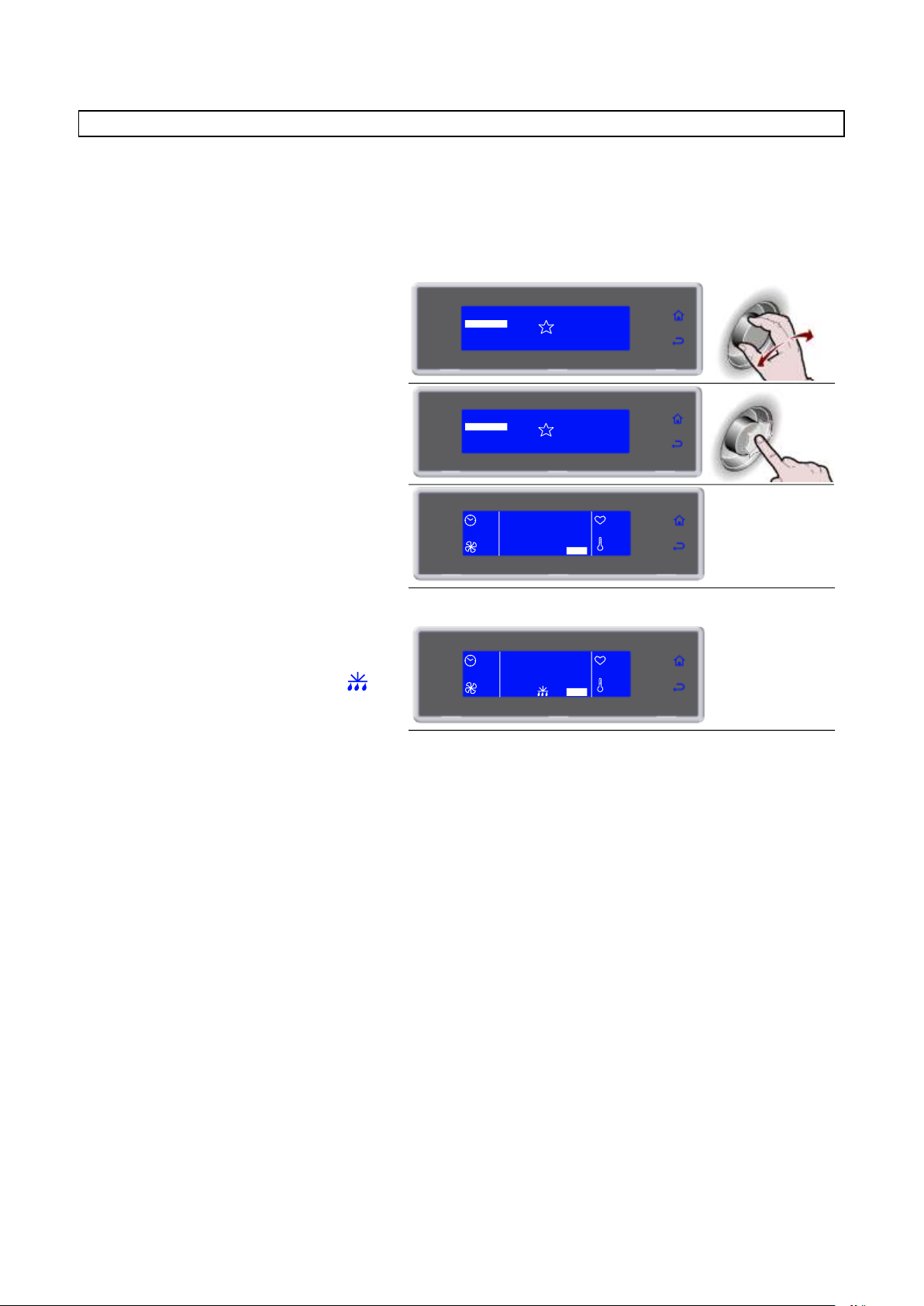
3283430_GB
1. Select the desired cycle by rotating the
knob
SOFT 0°F
HARD 0°F
IFR
MENU
INFINITY
SOFT +37°F
HARD +37°F
2. Press the knob to activate the selected
cycle
During the cycle it is possible:
- to view and modify the default parameters by
selecting SET (see page 41)
- to stop the cycle by selecting STOP
Note: the modified parameters will be saved only
for the cycle in progress
SOFT 0°F
HARD 0°F
IFR
MENU
INFINITY
SOFT +37°F
HARD +37°F
90'
HARD +37°F
100%
+80°F
+75°F
SET STOP
3. Cycle ended, automatic conservation
phase
During conservation it is possible:
- to view and modify the default parameters by
selecting SET (see page 41)
- to activate a manual defrost by selecting
- to stop the cycle by selecting STOP
Note: the modified parameters will be saved only
for the cycle in progress.
If not required, manual defrosting is not performed
--
END CYCLE
CONSERVE
100%
+80°F
+75°F
SET STOP
STANDARD PROGRAMS
Chilling/freezing cycles pre-set by the manufacturer which can be activated by selecting them directly from
the initial screen, SOFT +37°F, HARD +37°F, SOFT 0°F and HARD 0°F.
During execution of the cycle the parameters can be viewed and modified temporarily. The new values will
be valid exclusively for the cycle in progress.
22
Page 23
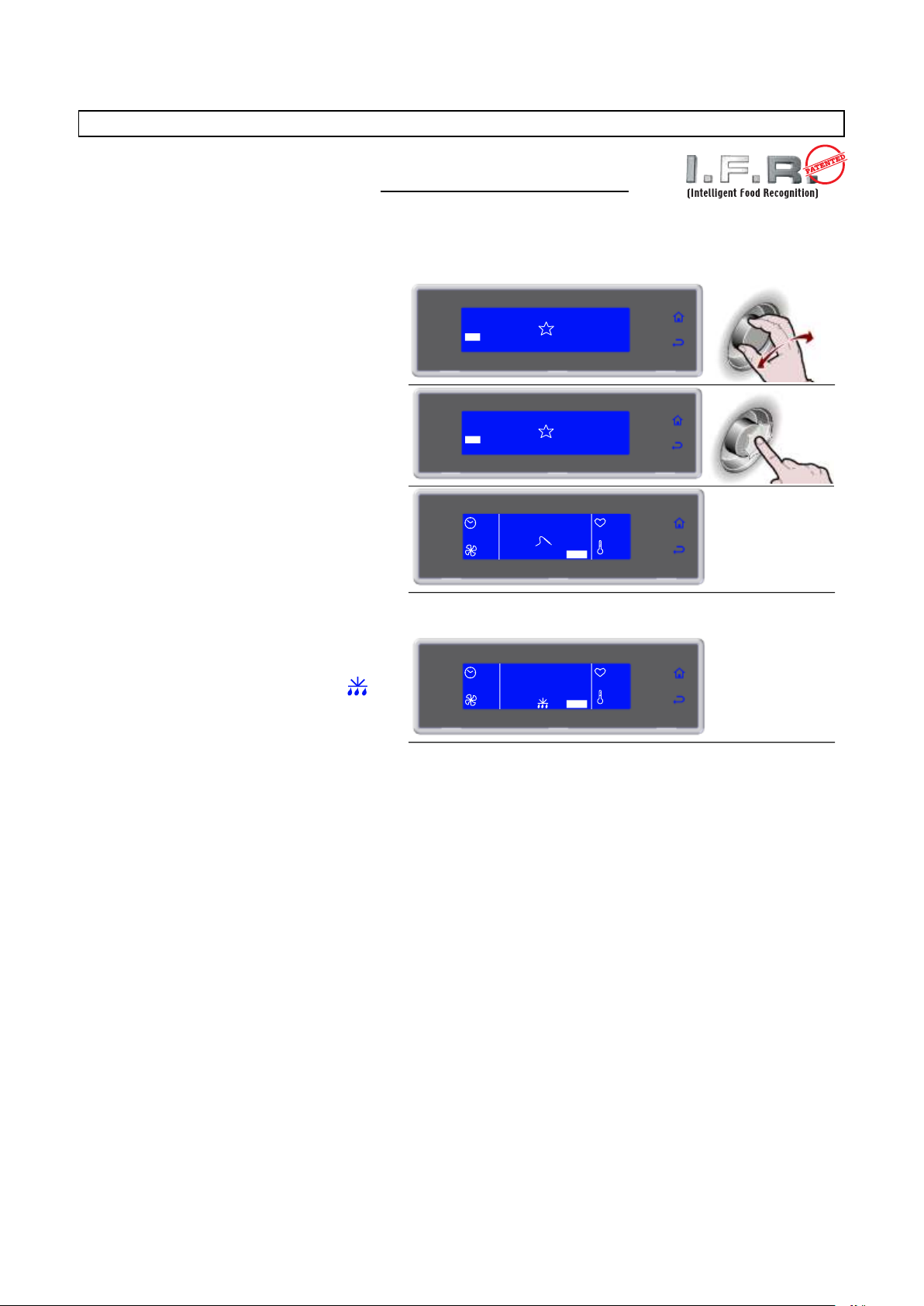
3283430_GB
1. Select the desired cycle by rotating the
knob
SOFT 0°F
HARD 0°F
MENU
INFINITY
SOFT +37°F
HARD +37°F
IFR
2. Press the knob to activate the selected
cycle
During the cycle it is possible:
- select SET to change the fan speed
- to stop the cycle by selecting STOP
Note: the modified value will only be saved for the
cycle in progress
SOFT 0°F
HARD 0°F
MENU
INFINITY
SOFT +37°F
HARD +37°F
IFR
--
IFR
100%
+80°F
+75°F
SET STOP
3. Cycle ended, automatic conservation
phase
During conservation it is possible:
- to view and modify the default parameters by
selecting SET (see page 41)
- to activate a manual defrost by selecting
- to stop the cycle by selecting STOP
Note: the modified parameters will be saved
only for the cycle in progress.
If not required, manual defrosting is not
performed
--
END CYCLE
CONSERVE
100%
+80°F
+75°F
SET STOP
PROGRAM I.F.R.
The IFR is an innovative patented system of positive quick cooling which allows the
cycle optimized for each type of foodstuffs by preventing superficial freezing.
Temperatures are detected by a three-sensor multipoint needle probe. The position
inside the foodstuff is determined univocally by a reference disk located along the needle. (ref. par. “Core
probe”).
23
Page 24
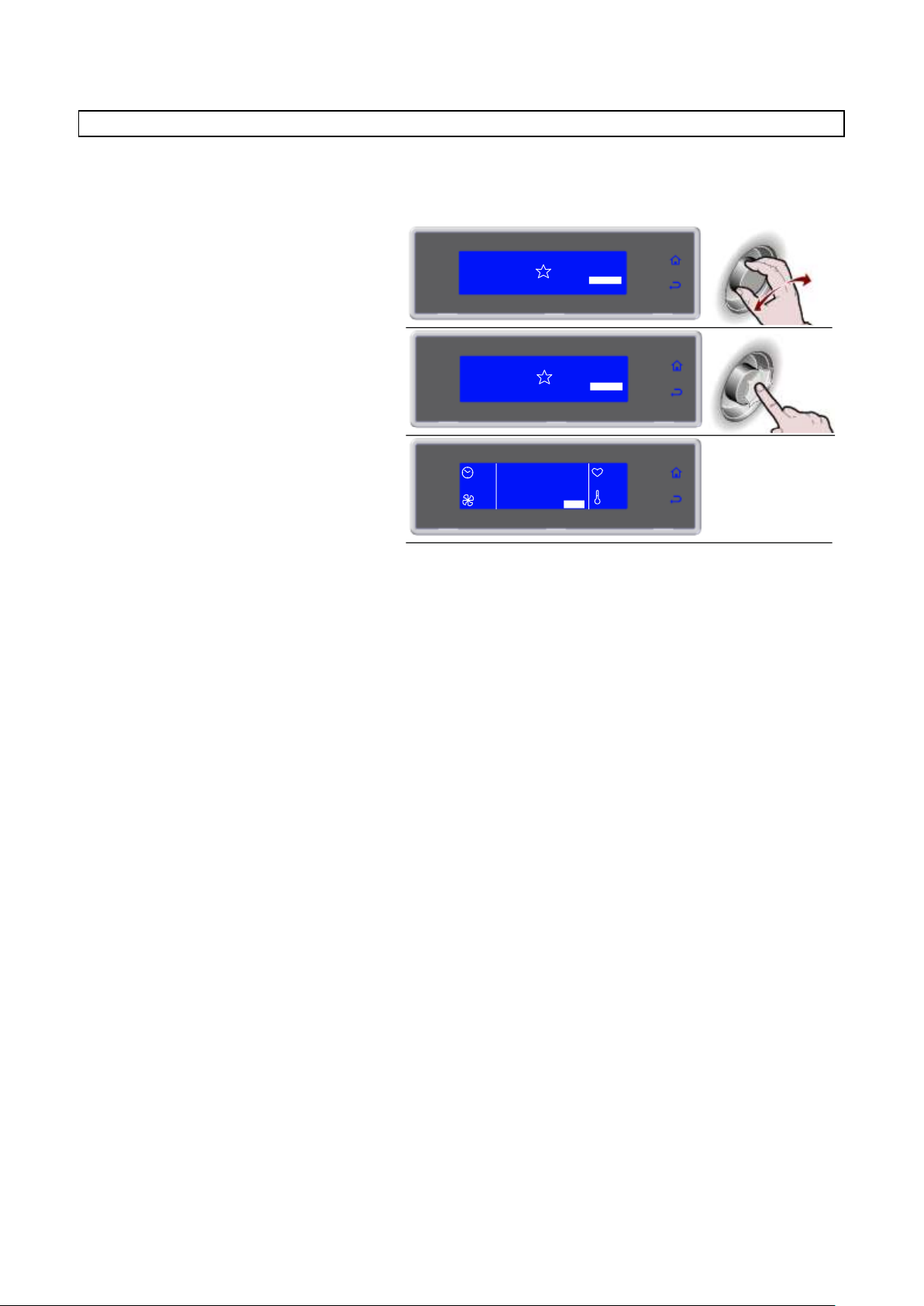
3283430_GB
1. Select the desired cycle by rotating the
knob
SOFT 0°F
HARD 0°F
IFR
MENU
SOFT +37°F
HARD +37°F
INFINITY
4. Cycle ended, automatic conservation
phase
During conservation it is possible:
- select SET to view and modify the chamber
temperature and fan speed
- to stop the cycle by selecting STOP
Note: the modified values will be saved
SOFT 0°F
HARD 0°F
IFR
MENU
SOFT +37°F
HARD +37°F
INFINITY
∞
INFINITY
100%
+80°F
+75°F
SET STOP
PROGRAM INFINITY
Time chilling/freezing cycle with infinite duration, suitable for cooling various type food pans. The
temperature at the core can be checked.
24
Page 25
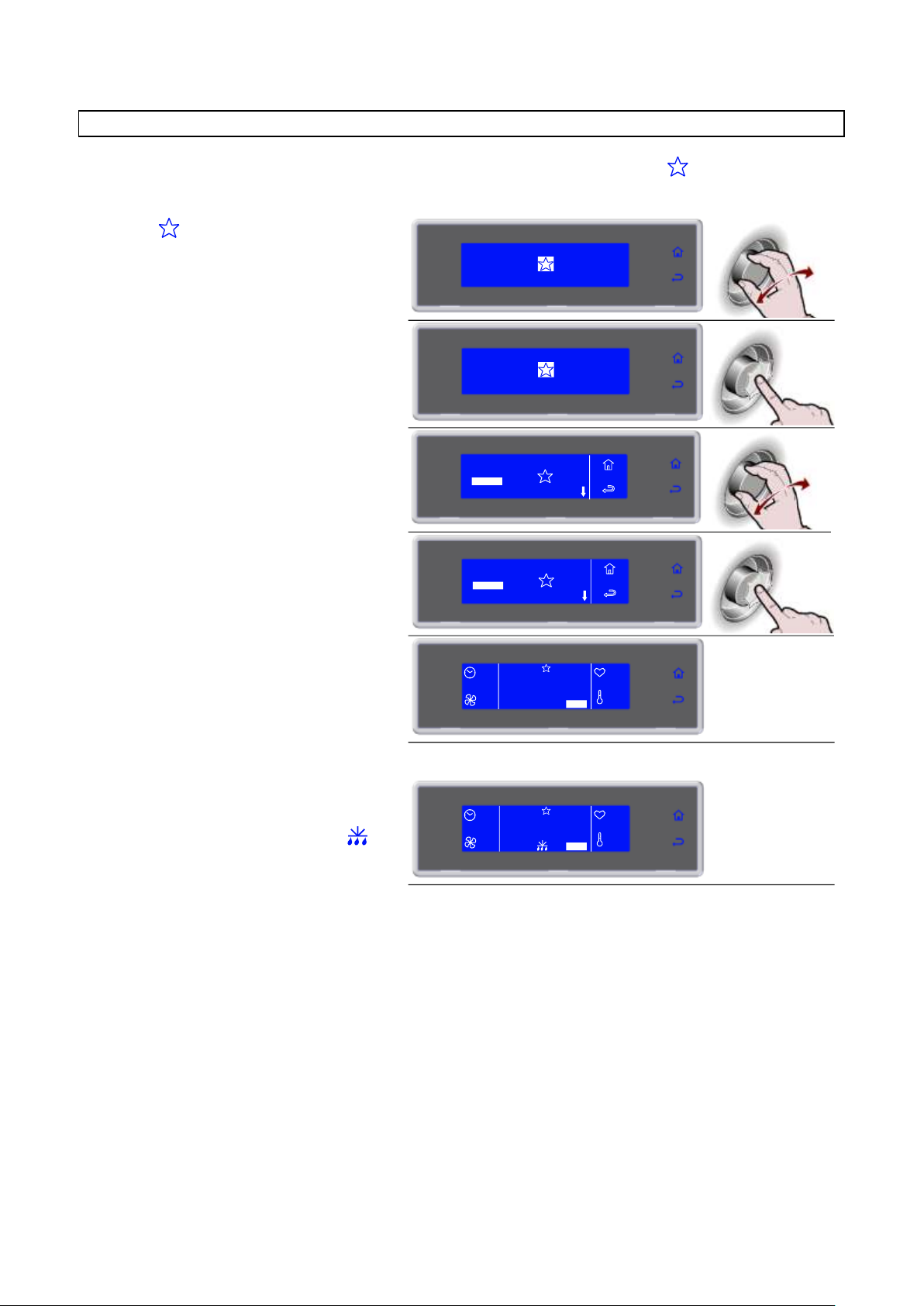
3283430_GB
1. Select by rotating the knob
SOFT 0°F
HARD 0°F
IFR
MENU
INFINITY
SOFT +37°F
HARD +37°F
2. Press the knob to enter section
FAVORITE PROGRAMS
SOFT 0°F
HARD 0°F
IFR
MENU
INFINITY
SOFT +37°F
HARD +37°F
3. Select the desired cycle by rotating the
knob
4. Press the knob to activate the selected
cycle
During the cycle it is possible:
- to view and modify the default parameters by
selecting SET (see page 36)
- to stop the cycle by selecting STOP
Note: the modified parameters will be saved only
for the cycle in progress
90'
CICLO 3
100%
+80°F
+75°F
SET STOP
MEMO +37°F
5. Cycle ended, automatic conservation
phase
During conservation it is possible:
- to view and modify the default parameters by
selecting SET (see page 41)
- to activate a manual defrost by selecting
- to stop the cycle by selecting STOP
Note: the modified parameters will be saved only
for the cycle in progress.
If not required, manual defrosting is not performed
--
END CYCLE
CONSERVE
100%
+80°F
+75°F
SET STOP
MEMO +37°F
3
2 CICLO 2
CICLO 3
4 CICLO 4
1 CICLO 1
3
2 CICLO 2
CICLO 3
4 CICLO 4
1 CICLO 1
FAVORITE PROGRAMS
A library consisting in 10 cycles selected from those stored and labelled as favorites (see page 28)
25
Page 26
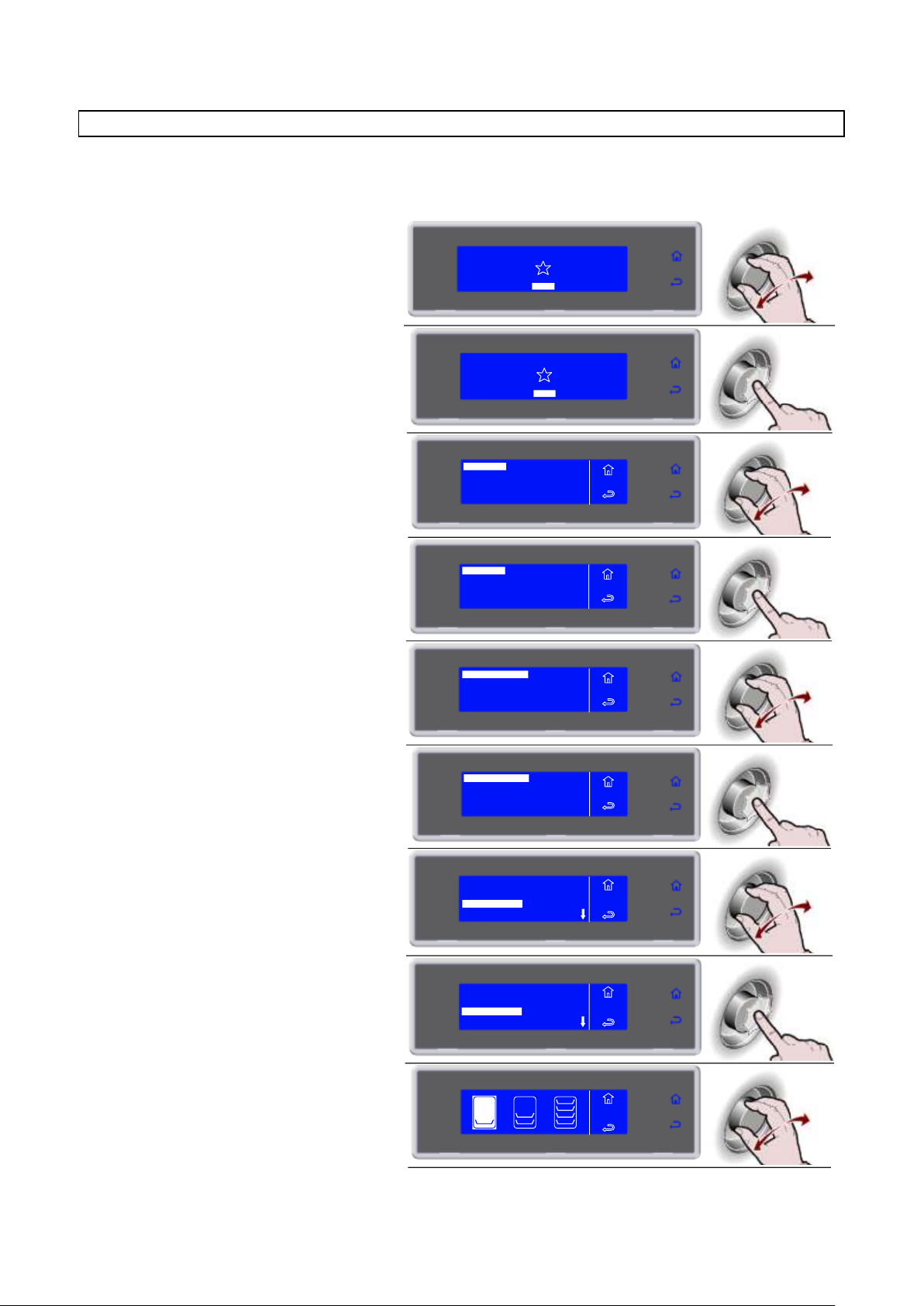
3283430_GB
1. Select MENU by rotating the knob
SOFT 0°F
HARD 0°F
IFR INFINITY
SOFT +37°F
HARD +37°F
MENU
2. Press the knob to enter section MENU
SOFT 0°F
HARD 0°F
IFR INFINITY
SOFT +37°F
HARD +37°F
MENU
3. Select AUTOMATIC by rotating the
knob
4. Press the knob to enter section
AUTOMATIC
5. Select the type of desired cycle by
rotating the knob
AUTOMATIC +37°F
BANQUETING
VACUUM
AUTOMATIC 0°F
MENU
AUTO
6. Press the knob to enter into the
selected type of cycle
MENU
AUTO
AUTOMATIC +37°F
BANQUETING
VACUUM
AUTOMATIC 0°F
7. Select the desired cycle by rotating the
knob
LASAGNE
RICE AND PASTA
MEAT
SOUPS AND SAUCES
MENU
AUTO
AUTO +37°F
8. Press the knob to activate the selected
cycle
LASAGNE
RICE AND PASTA
MEAT
SOUPS AND SAUCES
MENU
AUTO
AUTO +37°F
9. Select the quantity of load to be treated,
minimum, medium, maximum
AUTOMATIC
MULTY
COOLING
STORED
SETTING
SERVICE
HACCP
FUNCTIONS
MENU
AUTOMATIC
MULTY
COOLING
STORED
SETTING
SERVICE
HACCP
FUNCTIONS
MENU
RICE AND
PASTA
AUTOMATIC PROGRAMS
These programs are manufacturer recommended work cycles. During the cycle the parameters can be
viewed, but not modified.
26
Page 27
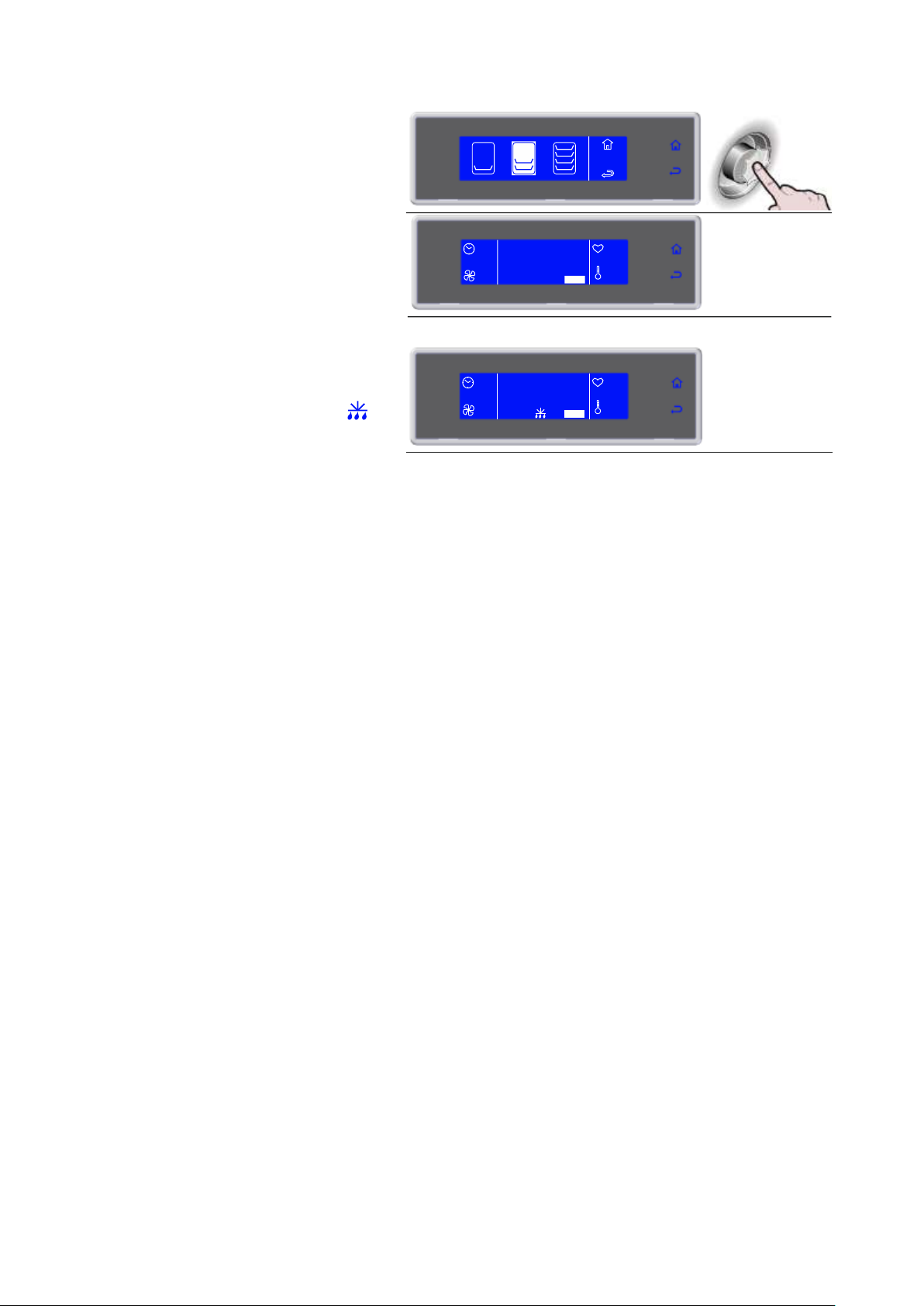
3283430_GB
10. Press the knob to activate the selected
cycle
During the cycle it is possible:
- to view the default parameters by selecting
INFO
- to stop the cycle by selecting STOP
Note: the parameters cannot be modified
45'
RICE AND
PASTA
90%
+80°F
+75°F
INFO STOP
AUTO +37°F
12. Cycle ended, automatic conservation
phase
During conservation it is possible:
- to view the default parameters by selecting
INFO
- to activate a manual defrost by selecting
- to stop the cycle by selecting STOP
Note: the parameters cannot be modified.
If not required, manual defrosting is not performed
--
END CYCLE
CONSERVE
100%
+80°F
+75°F
SET STOP
RICE AND
PASTA
27
Page 28
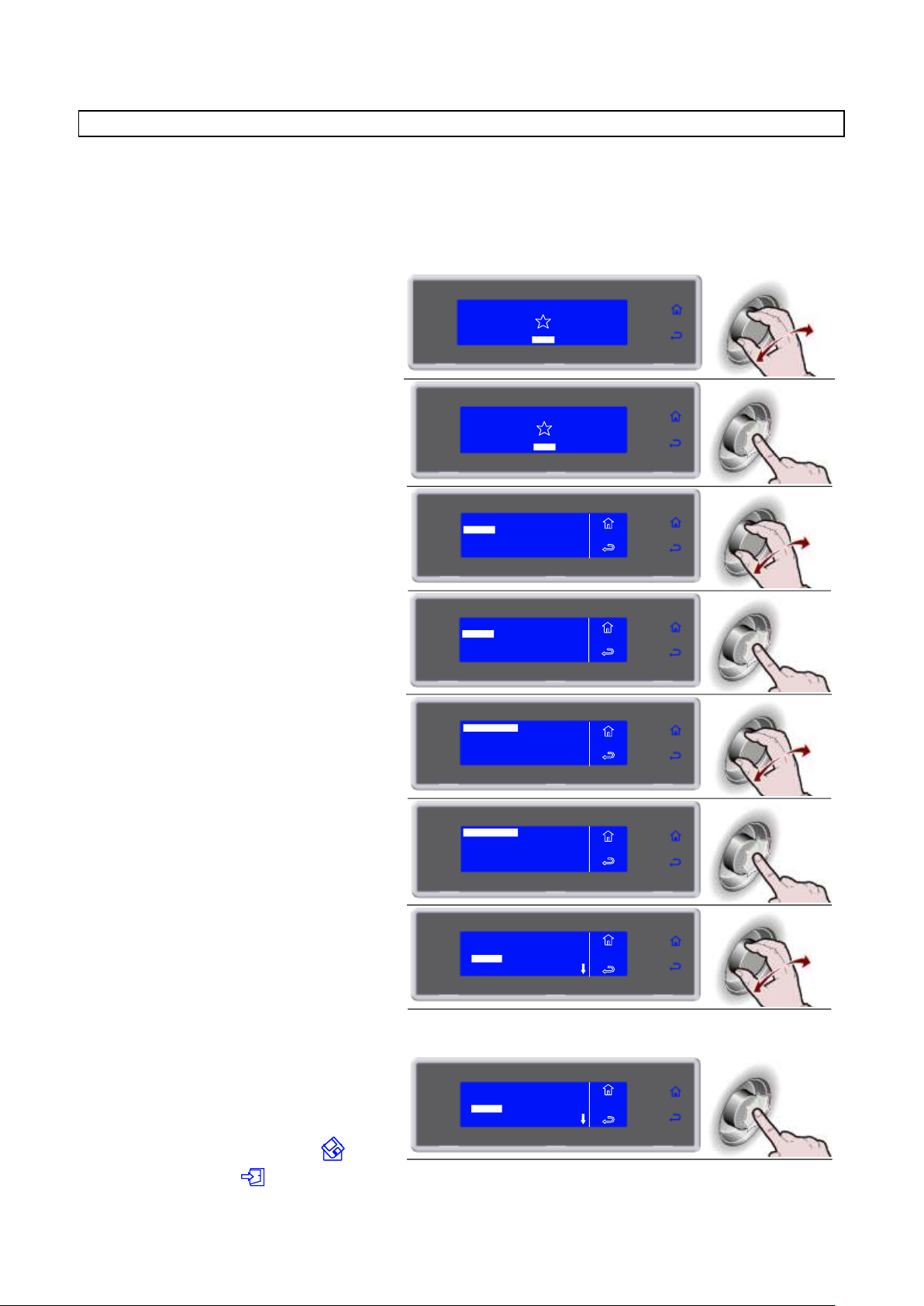
3283430_GB
1. Select MENU by rotating the knob
SOFT 0°F
HARD 0°F
IFR INFINITY
SOFT +37°F
HARD +37°F
MENU
2. Press the knob to enter section MENU
SOFT 0°F
HARD 0°F
IFR INFINITY
SOFT +37°F
HARD +37°F
MENU
3. Press the knob to enter section
STORED
4. Press the knob to enter section
STORED
5. Select the type of desired cycle by
rotating the knob
STORED +37°F
STORED 0°F
MENU
STORED
6. Press the knob to enter into the
selected type of cycle
MENU
STORED
STORED +37°F
STORED 0°F
7. Select the desired cycle by rotating the
knob
3
2 CICLO 2
CICLO 3
4 CICLO 4
1 CICLO 1
MENU
STORED
STOR.+37°F
8. Press the knob to activate the selected
cycle
During the cycle it is possible:
- View, modify the default parameters and make
it a favorite by selecting SET
- to stop the cycle by selecting STOP
Note: the modified parameters can be saved once
the new value is inserted by selecting
otherwise, by selecting , the modifications
will be active only for the cycle in progress.
3
2 CICLO 2
CICLO 3
4 CICLO 4
1 CICLO 1
MENU
STORED
STOR.+37°F
AUTOMATIC
MULTY
COOLING
STORED
SETTING
SERVICE
HACCP
FUNCTIONS
MENU
AUTOMATIC
MULTY
COOLING
STORED
SETTING
SERVICE
HACCP
FUNCTIONS
MENU
STORED PROGRAMS
These are 10 chilling cycles and 10 freezing cycles that can be configured based on the needs of the user,
the names of which can be freely set.
These cycles already have default settings set up by the manufacturer: once modified by the user the new
values can be saved in the memory and recalled at a subsequent start of that cycle.
10 of these programs can be made FAVORITES, organizing them based on the needs of the user.
28
Page 29
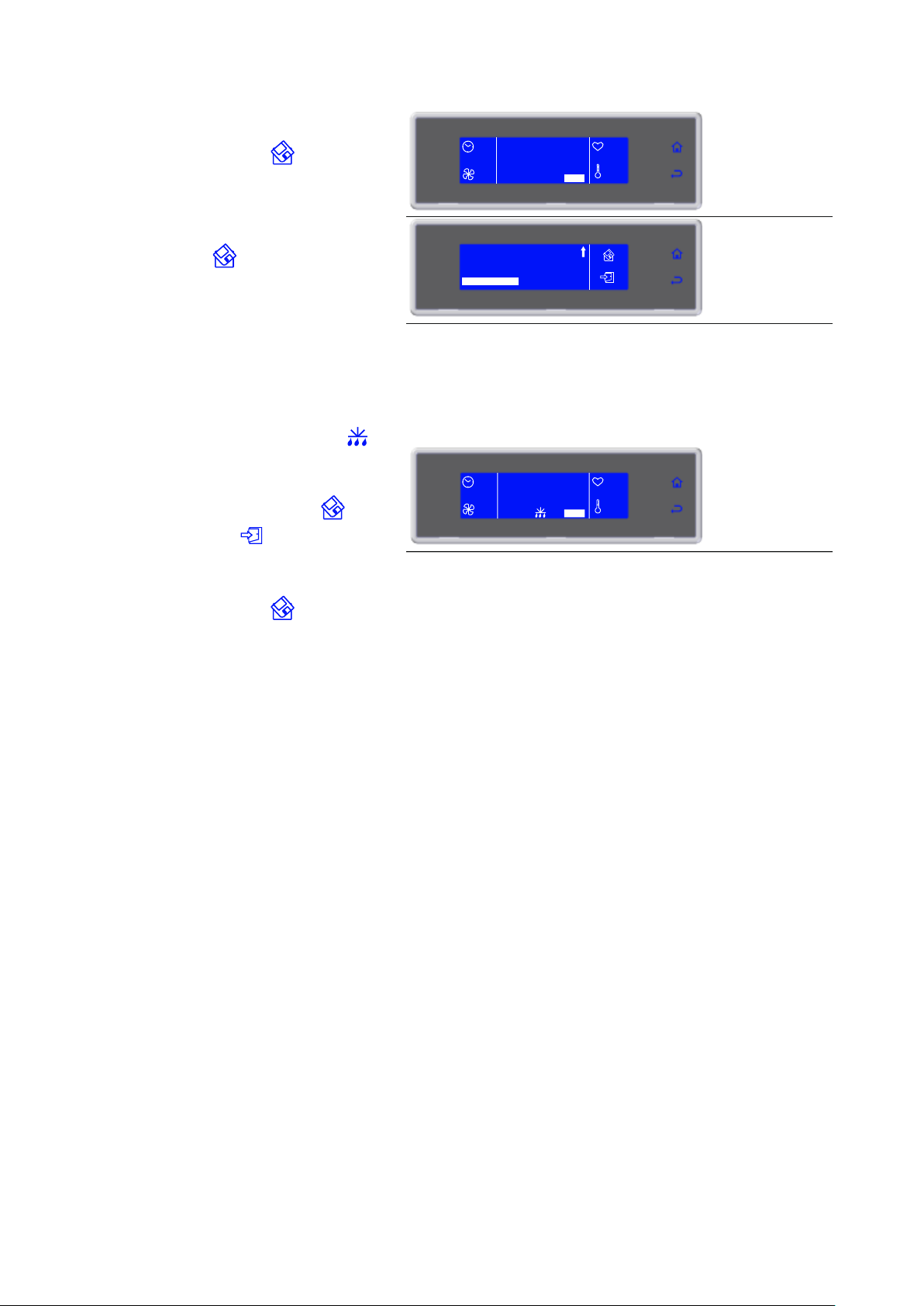
3283430_GB
If the modifications are saved the user will be
asked to assign a name to the cycle. use the knob
to enter the name and press to save it.
To make a cycle a favorite, select MAKE
FAVORITE, found at the end of the parameters
list, and enter the desired position. The cycle will
automatically overwrite the one in that position.
Save by selecting
90'
CICLO 3
100%
+80°F
+75°F
SET STOP
STOR. +37°F
SOFT PHASE TIME
SOFT PHASE FAN
STORAGE
60'
70%
39°F
MAKE FAVORITE
_
9. Cycle ended, automatic conservation
phase
During conservation it is possible:
- View, modify the default parameters and make
it a favorite by selecting SET
- to activate a manual defrost by selecting
- to stop the cycle by selecting STOP
Note: the modified parameters can be saved once
the new value is inserted by selecting
otherwise, by selecting the modifications will
be active only for the cycle in progress.
If the modifications are saved the user will be
asked to assign a name to the cycle. use the knob
to enter the name and press to save it.
If not required, manual defrosting is not performed
--
END CYCLE
CONSERVE
100%
+80°F
+75°F
SET STOP
STOR. +37°F
29
Page 30
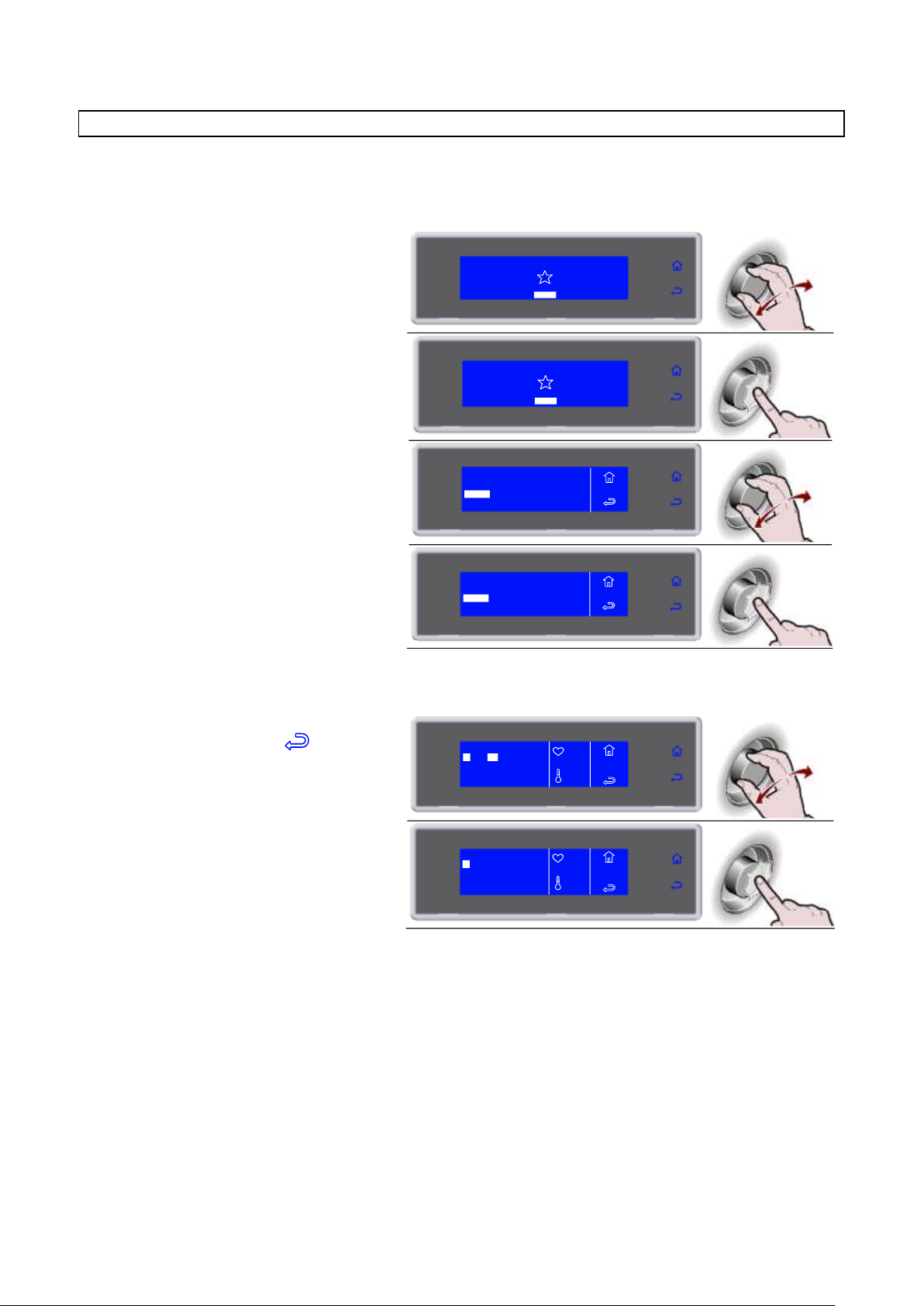
3283430_GB
1. Select MENU by rotating the knob
SOFT 0°F
HARD 0°F
IFR INFINITY
SOFT +37°F
HARD +37°F
MENU
2. Press the knob to enter section MENU
SOFT 0°F
HARD 0°F
IFR INFINITY
SOFT +37°F
HARD +37°F
MENU
3. Select MULTY by rotating the knob
4. Press the knob to enter section MULTY
5. Enter the time for each level and
confirm it with the knob
During the cycle it is possible:
- to view and modify the default parameters by
selecting SET (see page 41)
- to stop the cycle by selecting
Note: the modified parameters will be saved
At the expiry of the set value for each
individual level, the buzzer and the
flashing value alert the user that the
product can be withdrawn.
Once all the set times have expired,
automatic conservation phase
During conservation it is possible:
- to view and modify the default parameters by
selecting SET (see page 41)
Note: the modified parameters will be saved
2
1 30'
MENU
MULTY
5L
3 0'
5 0'
4 0'
+80°F
+75°F
SET
20'
2
1 30'
MENU
MULTY
5L
3 0'
5 0'
4 0'
+80°F
+75°F
SET
20'
AUTOMATIC
MULTY
COOLING
STORED
SETTING
SERVICE
HACCP
FUNCTIONS
MENU
AUTOMATIC
MULTY
COOLING
STORED
SETTING
SERVICE
HACCP
FUNCTIONS
MENU
MULTY
Chilling/freezing cycle by time organized by load levels.
The number of levels available varies depending on the equipment.
30
Page 31
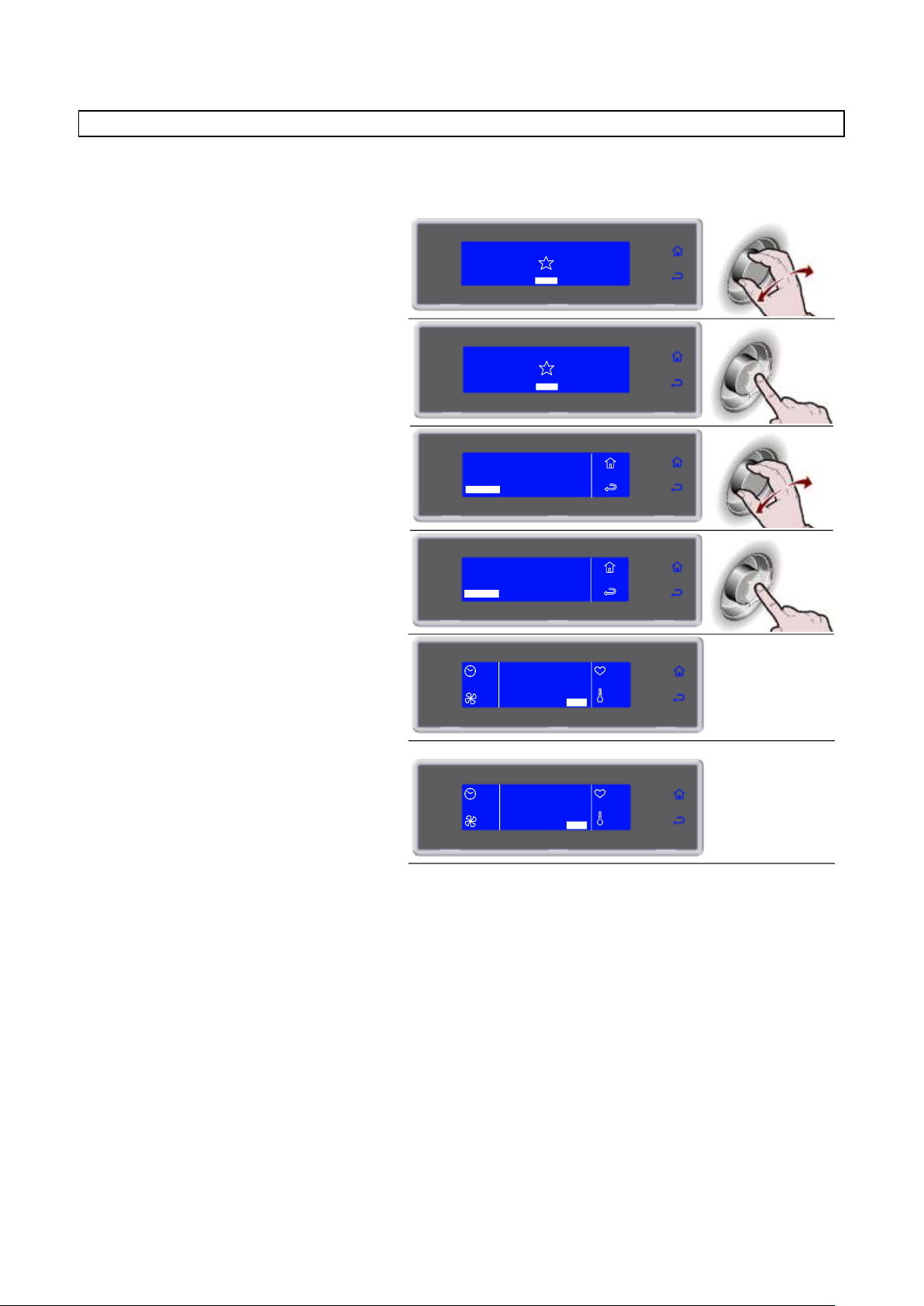
3283430_GB
1. Select MENU by rotating the knob
SOFT 0°F
HARD 0°F
IFR INFINITY
SOFT +37°F
HARD +37°F
MENU
2. Press the knob to enter section MENU
SOFT 0°F
HARD 0°F
IFR INFINITY
SOFT +37°F
HARD +37°F
MENU
3. Select COOLING by rotating the knob
4. Press the knob to activate the selected
cycle
During the cycle it is possible:
- to view and modify the default parameters by
selecting SET (see page 41)
- to stop the cycle by selecting STOP
Note: the modified parameters will be saved only
for the cycle in progress
--
COOLING
100%
+80°F
+75°F
SET STOP
5. Cycle ended, automatic conservation
phase
During conservation it is possible:
- to view and modify the default parameters by
selecting SET (see page 41)
- to stop the cycle by selecting STOP
Note: the modified parameters will be saved only
for the cycle in progress
--
END CYCLE
CONSERVE
100%
+80°F
+75°F
SET STOP
AUTOMATIC
MULTY
COOLING
STORED
SETTING
SERVICE
HACCP
FUNCTIONS
MENU
AUTOMATIC
MULTY
COOLING
STORED
SETTING
SERVICE
HACCP
FUNCTIONS
MENU
COOLING
It is advisable to run a cooling cycle prior to selecting any chilling cycle.
31
Page 32
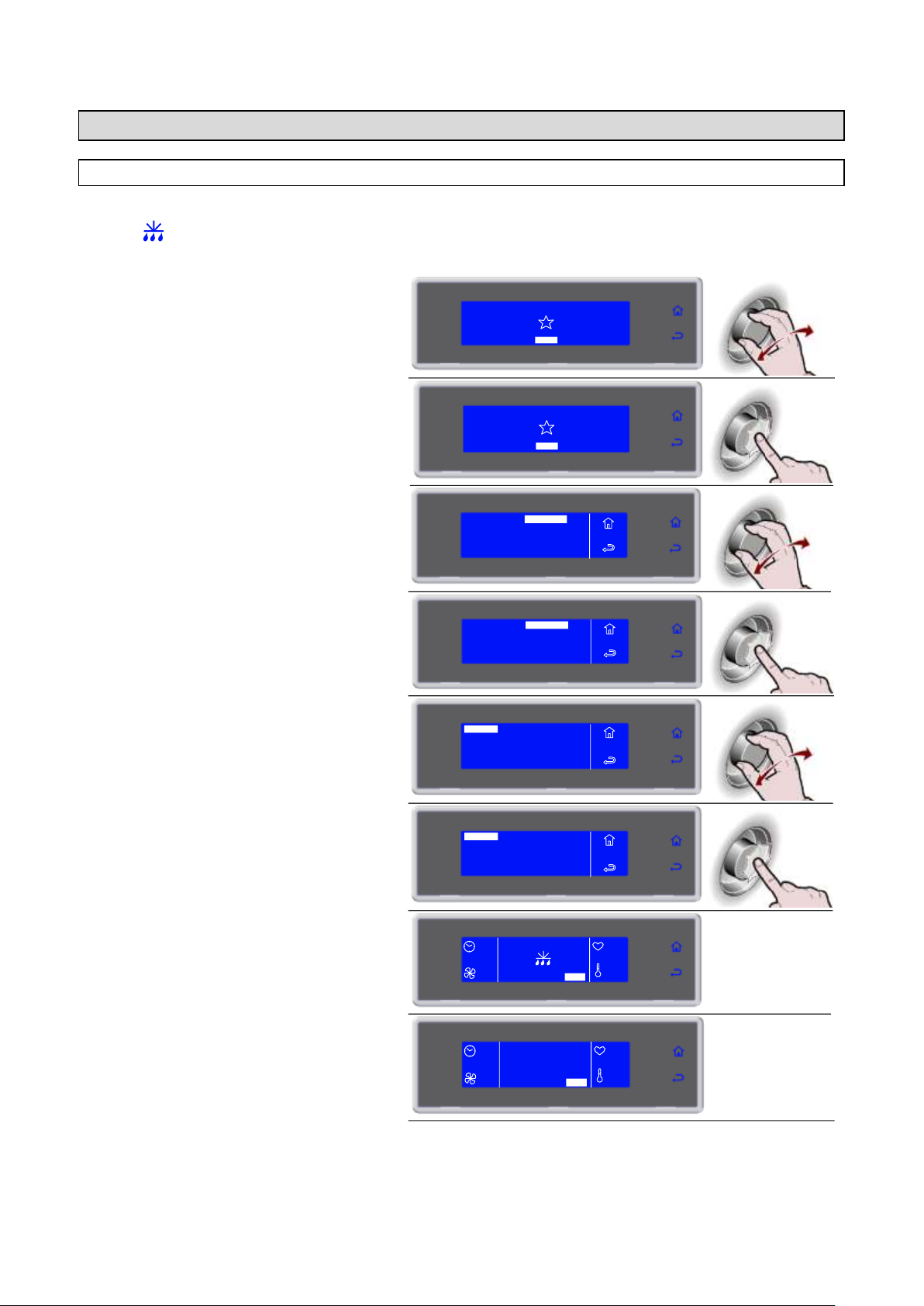
3283430_GB
1. Select MENU by rotating the knob
SOFT 0°F
HARD 0°F
IFR INFINITY
SOFT +37°F
HARD +37°F
MENU
2. Press the knob to enter section MENU
SOFT 0°F
HARD 0°F
IFR INFINITY
SOFT +37°F
HARD +37°F
MENU
3. Select FUNCTIONS by rotating the knob
4. Press the knob to enter section
FUNCTIONS
5. Select DEFROST by rotating the knob
DEFROST
STORAGE
THAWING
SANITATION
MENU
FUNCTIONS
PROBE HEATING
PROVING
6. Press the knob to activate the selected
cycle
During the cycle it is possible
- to view and modify the default parameters by
selecting SET (see page 41)
- to stop the cycle by selecting STOP
Note: the modified parameters will be saved only
for the cycle in progress
MENU
FUNCTIONS
DEFROST
STORAGE
THAWING
SANITATION
PROBE HEATING
PROVING
7. Cycle ended
--
END CYCLE
CONSERVE
SET STOP
--
--
--
AUTOMATIC
MULTY
COOLING
STORED
SETTING
SERVICE
HACCP
FUNCTIONS
MENU
AUTOMATIC
MULTY
COOLING
STORED
SETTING
SERVICE
HACCP
FUNCTIONS
MENU
--
20'
SET STOP
--
--
FUNCTIONS
DEFROST
If not required, the function will not be activated and the display will alternate between showing the defrosting
symbol and the message “NOT REQUIRED”, accompanied by the sound of the buzzer.
32
Page 33
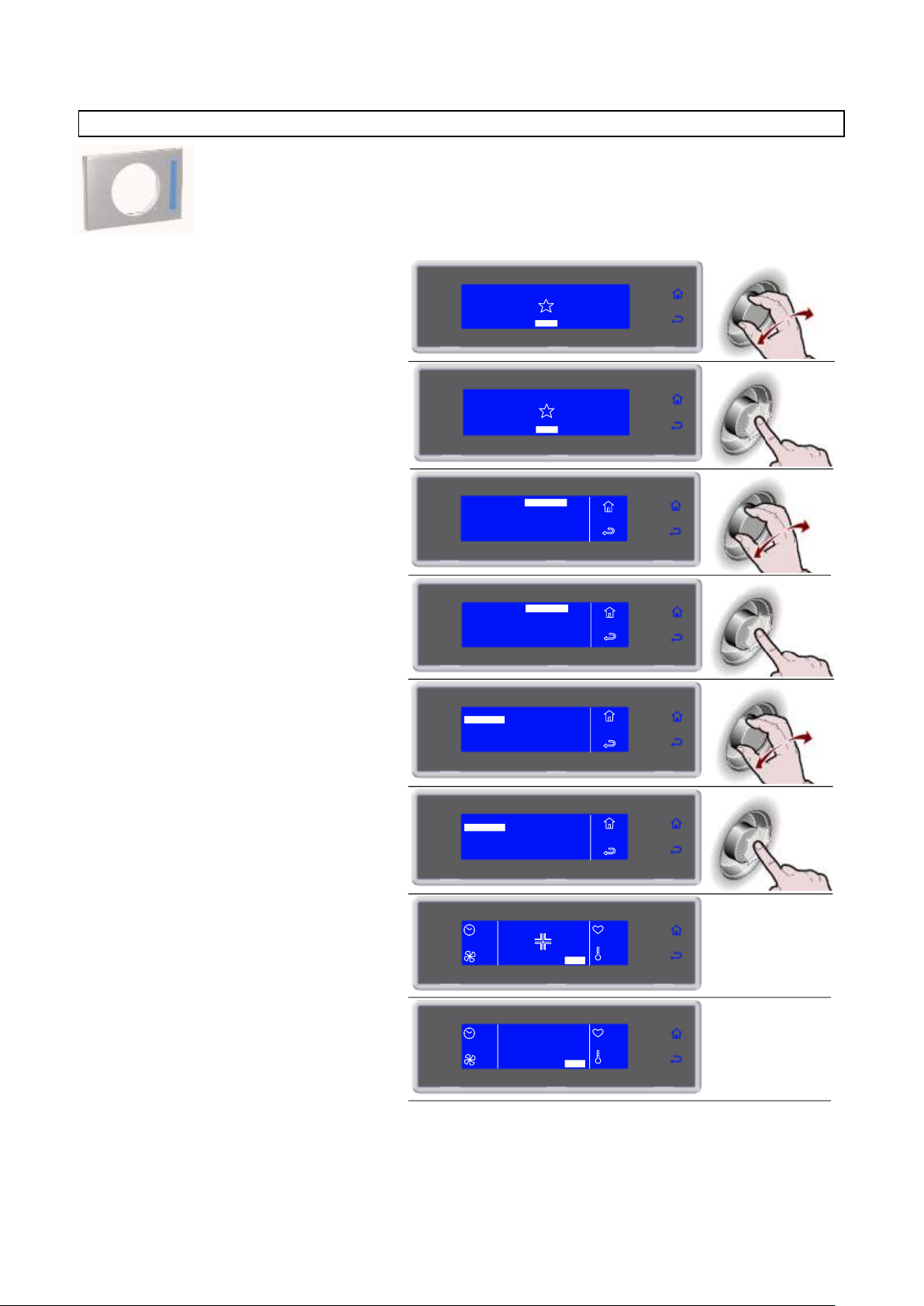
3283430_GB
1. Select MENU by rotating the knob
SOFT 0°F
HARD 0°F
IFR INFINITY
SOFT +37°F
HARD +37°F
MENU
2. Press the knob to enter section MENU
SOFT 0°F
HARD 0°F
IFR INFINITY
SOFT +37°F
HARD +37°F
MENU
3. Select FUNCTIONS by rotating the
knob
4. Press the knob to enter section
FUNCTIONS
5. Select SANITATION by rotating the
knob
DEFROST
STORAGE
THAWING
SANITATION
MENU
FUNCTIONS
PROBE HEATING
PROVING
6. Press the knob to activate the selected
cycle
During the cycle it is possible:
- to view and modify the time of sanitation by
selecting SET (see page 41)
- to stop the cycle by selecting STOP
Note: the modified parameters will be saved only
for the cycle in progress
MENU
FUNCTIONS
DEFROST
STORAGE
THAWING
SANITATION
PROBE HEATING
PROVING
7. Cycle ended
AUTOMATIC
MULTY
COOLING
STORED
SETTING
SERVICE
HACCP
FUNCTIONS
MENU
AUTOMATIC
MULTY
COOLING
STORED
SETTING
SERVICE
HACCP
FUNCTIONS
MENU
--
20'
SET STOP
--
--
END CYCLE
CONSERVE
-SET STOP
--
--
--
STOP
SANITATION
NOTE: the germicidal lamp kit is not supplied as standard equipment. It is an optional item.
Should you purchase the kit, please follow the maintenance instructions to maintain.
33
Page 34
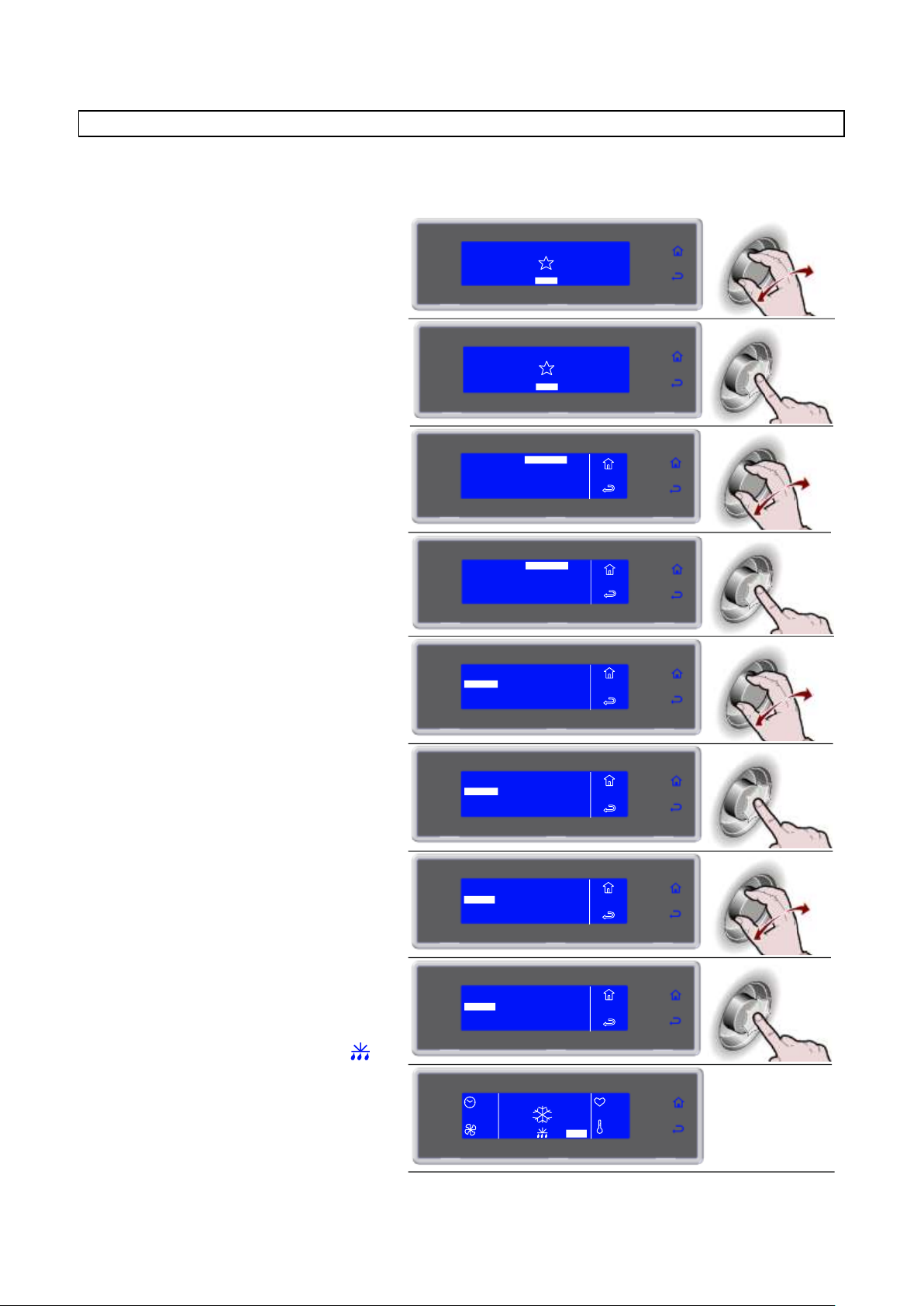
3283430_GB
1. Select MENU by rotating the knob
SOFT 0°F
HARD 0°F
IFR INFINITY
SOFT +37°F
HARD +37°F
MENU
2. Press the knob to enter section MENU
SOFT 0°F
HARD 0°F
IFR INFINITY
SOFT +37°F
HARD +37°F
MENU
3. Select FUNCTIONS by rotating the knob
4. Press the knob to enter section
FUNCTIONS
5. Select STORAGE by rotating the knob
DEFROST
STORAGE
THAWING
SANITATION
MENU
FUNCTIONS
PROBE HEATING
PROVING
6. Press the knob to enter into the
STORAGE
MENU
FUNCTIONS
DEFROST
STORAGE
THAWING
SANITATION
PROBE HEATING
PROVING
7. Select the type of conservation by
rotating the knob
8. Press the knob to activate the selected
cycle
During the cycle it is possible:
- to view and modify the default parameters by
selecting SET (see page 41)
- to activate a manual defrost by selecting
- to stop the cycle by selecting STOP
Note: the modified parameters will be saved only
for the cycle in progress.
If not required, manual defrosting is not performed
--
SET STOP
50%
+80°F
+75°F
AUTOMATIC
MULTY
COOLING
STORED
SETTING
SERVICE
HACCP
FUNCTIONS
MENU
AUTOMATIC
MULTY
COOLING
STORED
SETTING
SERVICE
HACCP
FUNCTIONS
MENU
STORAGE
POSITIVE
NEGATIVE
MENU
FUNCTIONS
STORAGE
POSITIVE
NEGATIVE
MENU
FUNCTIONS
STORAGE
Storing cycles and quick cooling cycles can be started separately.
34
Page 35
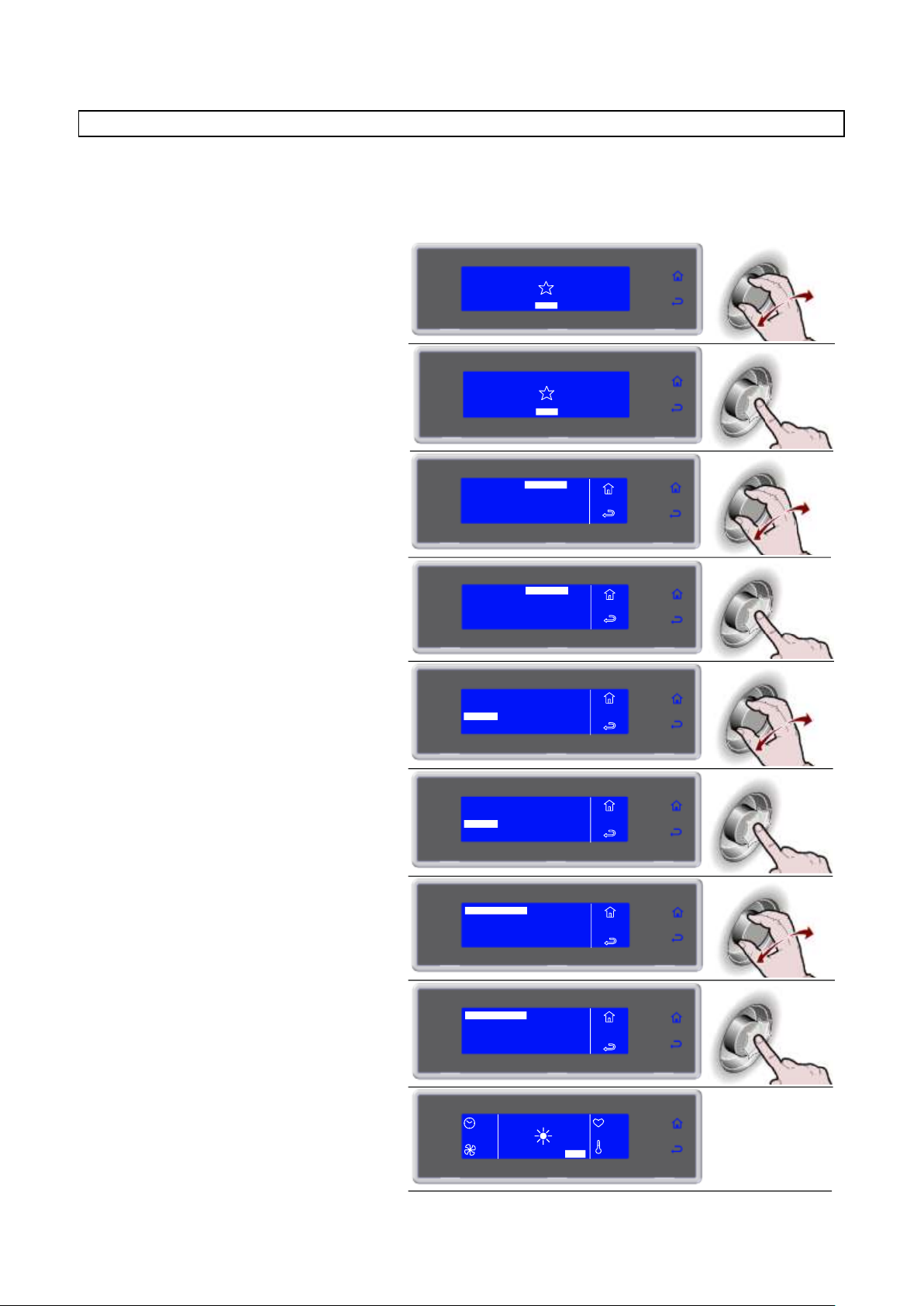
3283430_GB
1. Select MENU by rotating the knob
SOFT 0°F
HARD 0°F
IFR INFINITY
SOFT +37°F
HARD +37°F
MENU
2. Press the knob to enter section MENU
SOFT 0°F
HARD 0°F
IFR INFINITY
SOFT +37°F
HARD +37°F
MENU
3. Select FUNCTIONS by rotating the knob
4. Press the knob to enter section
FUNCTIONS
5. Select THAWING by rotating the knob
DEFROST
STORAGE
THAWING
SANITATION
MENU
FUNCTIONS
PROBE HEATING
PROVING
6. Press the knob to enter into the
THAWING
MENU
FUNCTIONS
DEFROST
STORAGE
THAWING
SANITATION
PROBE HEATING
PROVING
7. Rotate the knob to select the type most
suited for the product to be treated
ICE CREAM TIME
TIME
ICE CREAM PROBE
THAWING
PROBE
8. Press the knob to activate the selected
cycle
In case of time defrosting the cycle will begin
immediately with the date and time values
set by the manufacturer.
- Once the cycle has been started (time
defrosting) the cycle end date and time can
be changed, but only during the first phase
(preservation).
ICE CREAM TIME
TIME
ICE CREAM PROBE
THAWING
PROBE
12:56
SET STOP
100%
+80°F
+75°F
02/10/2013 17:28
AUTOMATIC
MULTY
COOLING
STORED
SETTING
SERVICE
HACCP
FUNCTIONS
MENU
AUTOMATIC
MULTY
COOLING
STORED
SETTING
SERVICE
HACCP
FUNCTIONS
MENU
THAWING
The defrost cycles with probe or by time are automatic. During the cycle the parameters can be modified and
the temperature can be selected or the time at which the food should be defrosted and ready for use.
In the event of time defrosting the operator can decide to change only the cycle end date acting on the date
on the screen of the cycle in progress. This action is valid only if you are in the first phase (preservation)
35
Page 36
3283430_GB
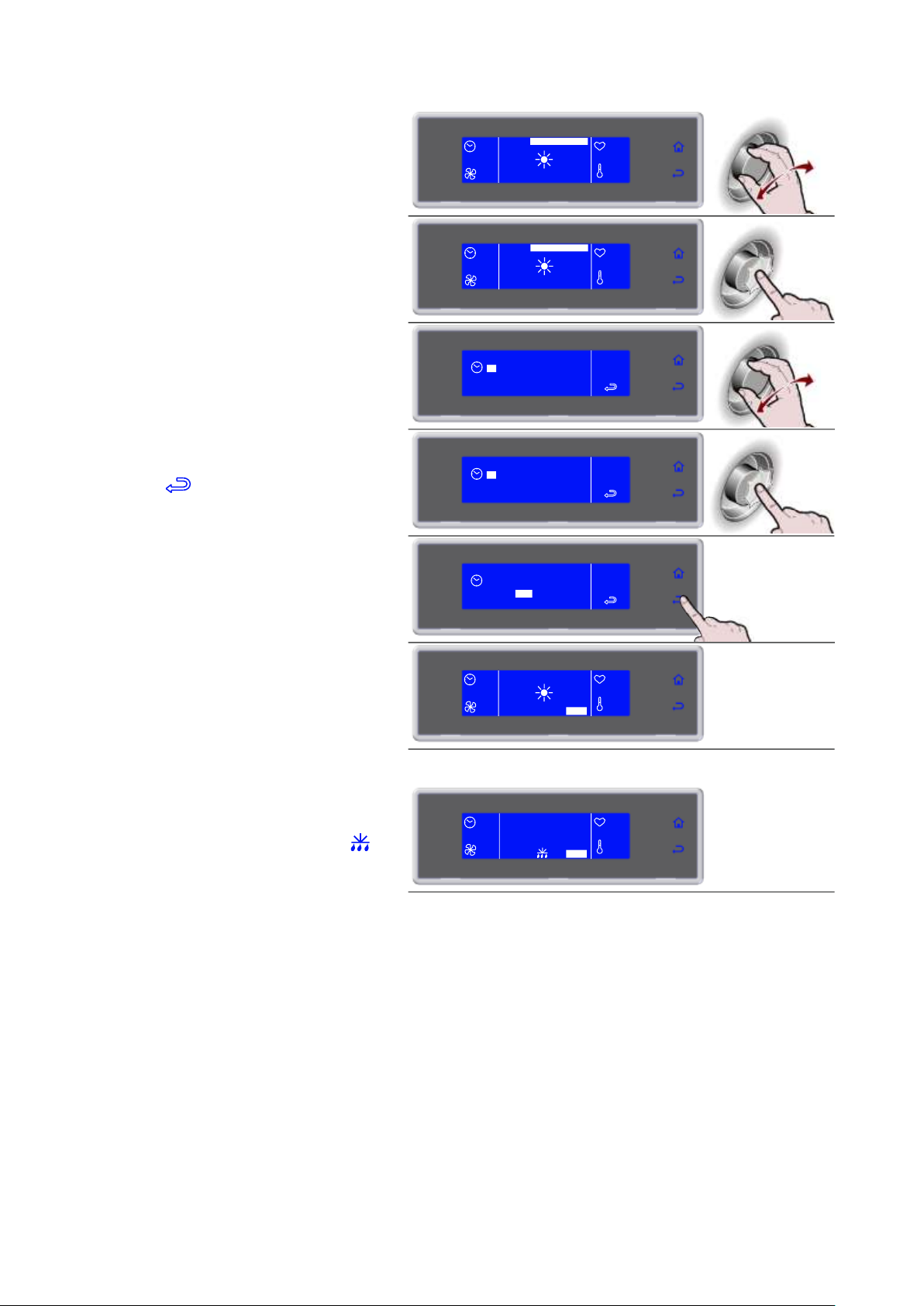
- Rotate the knob to select the date and time
- Press the knob to enter the date and time
value change mode
- Select the new value by rotating the knob
- Press the knob to confirm the new value
and move to the next one
- Select to confirm and exit from the
function
During the cycle it is possible:
- to view and modify the default parameters by
selecting SET (see page 41)
- to stop the cycle by selecting STOP
Note: the modified parameters will be saved only
for the cycle in progress.
In time defrost if the times are changed the cycle
end will automatically be recalculated.
02/10/2013 17:28
12:56
SET STOP
100%
+80°F
+75°F
02/10/2013 17:28
12:56
SET STOP
100%
+80°F
+75°F
02 OTT 2013
17 : 28
SCONG
02 OTT 2013
17 : 28
SCONG
20 : 28
SCONG
02 OTT 2013
02/10/2013 20:28
12:56
SET STOP
100%
+80°F
+75°F
9. Cycle ended, automatic conservation
phase
During conservation it is possible:
- to view and modify the default parameters by
selecting SET (see page 41)
- to activate a manual defrost by selecting
- to stop the cycle by selecting STOP
Note: the modified parameters will be saved only
for the cycle in progress
If not required, manual defrosting is not performed.
--
END CYCLE
CONSERVE
100%
+80°F
+75°F
SET STOP
36
Page 37
3283430_GB
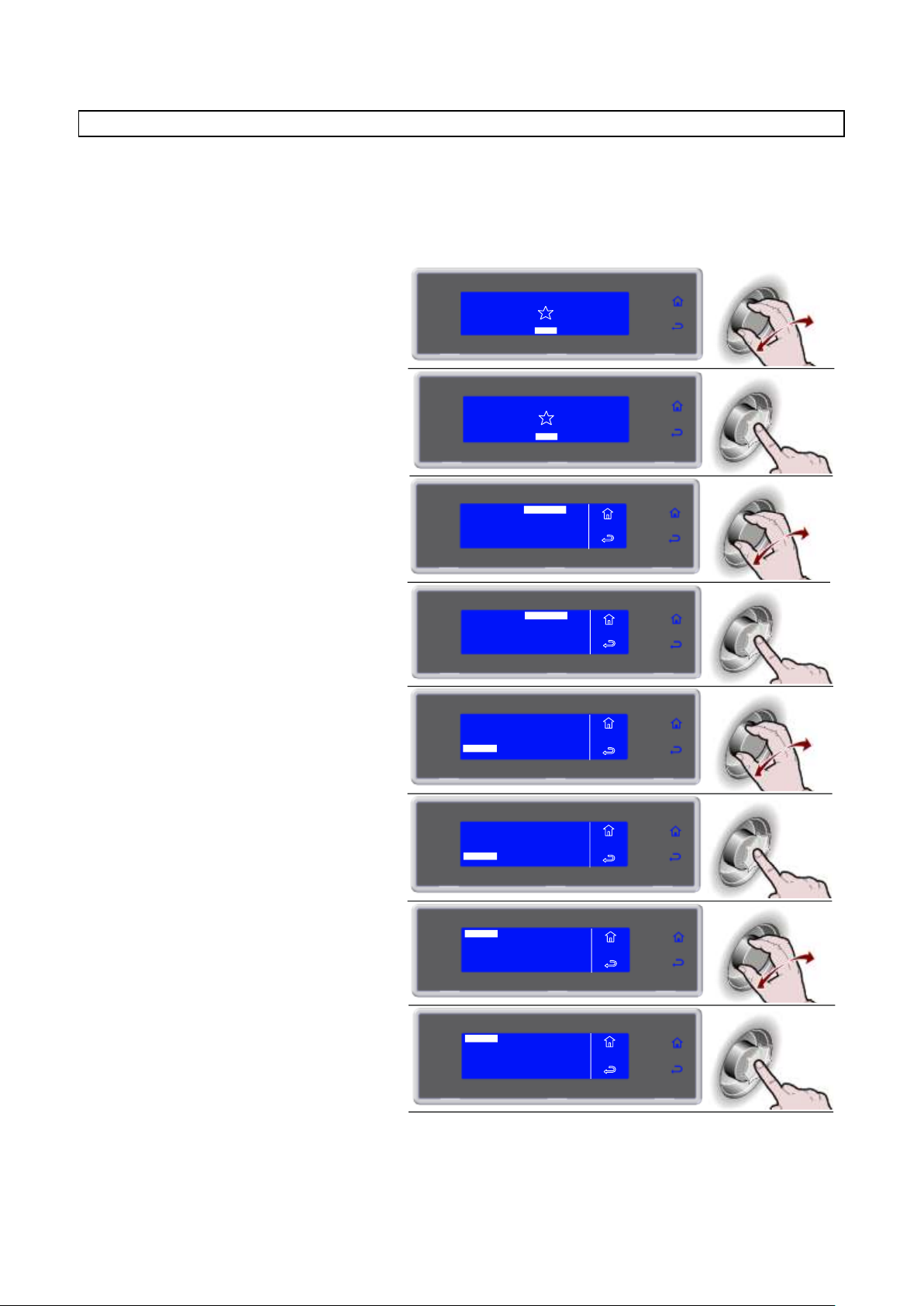
1. Select MENU by rotating the knob
SOFT 0°F
HARD 0°F
IFR INFINITY
SOFT +37°F
HARD +37°F
MENU
2. Press the knob to enter section MENU
SOFT 0°F
HARD 0°F
IFR INFINITY
SOFT +37°F
HARD +37°F
MENU
3. Select FUNCTIONS by rotating the knob
4. Press the knob to enter section
FUNCTIONS
5. Select PROVING by rotating the knob
DEFROST
STORAGE
THAWING
SANITATION
MENU
FUNCTIONS
PROBE HEATING
PROVING
6. Press the knob to enter into the
PROVING
MENU
FUNCTIONS
DEFROST
STORAGE
THAWING
SANITATION
PROBE HEATING
PROVING
7. Select by rotating the knob:
- PROVING for a direct leavening cycle
- RETARDER PROVING for a
scheduled leavening cycle
RETARDER PROVING
LIEVITAZ
PROVING
8. Press the knob to activate the selected
cycle
The cycle will begin immediately with the date and
time values set by the manufacturer.
- Once the cycle has been started the cycle
end date and time can be changed, but
only during the first phase (preservation).
LIEVITAZ
RETARDER PROVING
PROVING
AUTOMATIC
MULTY
COOLING
STORED
SETTING
SERVICE
HACCP
FUNCTIONS
MENU
AUTOMATIC
MULTY
COOLING
STORED
SETTING
SERVICE
HACCP
FUNCTIONS
MENU
PROVING
The leavening and retarding cycles are automatic. During the cycle the parameters can be modified to select
the temperature or the time at which the food should be leavened and ready for use.
The operator can decide to change only the end cycle date by acting on the date shown on the screen of the
cycle in progress, but only during the first phase (preservation), easily scheduling the moment at which the
product should be perfectly leavened.
37
Page 38

3283430_GB
- Rotate the knob to select the date and time
- Press the knob to enter the date and time
value change mode
- Select the new value by rotating the knob
- Press the knob to confirm the new value
and move to the next one
- Select to confirm and exit from the
function
During the cycle it is possible:
- to view and modify the default parameters by
selecting SET (see page 41)
- to stop the cycle by selecting STOP
Note: the modified parameters will be saved only
for the cycle in progress.
If the times are changed the cycle end will
automatically be recalculated.
05:59
SET STOP
100%
+80°F
+75°F
02/10/2013 17:28
05:59
SET STOP
100%
+80°F
+75°F
02/10/2013 17:28
05:59
100%
+80°F
+75°F
SET STOP
02/10/2013 17:28
02 OTT 2013
17 : 28
PROVING
02 OTT 2013
17 : 28
PROVING
20 : 28
PROVING
02 OTT 2013
05:59
SET STOP
100%
+80°F
+75°F
02/10/2013 20:28
9. Cycle ended, automatic conservation
phase
During conservation it is possible:
- to view and modify the default parameters by
selecting SET (see page 41)
- to activate a manual defrost by selecting
- to stop the cycle by selecting STOP
Note: the modified parameters will be saved only
for the cycle in progress
If not required, manual defrosting is not performed.
--
END CYCLE
CONSERVE
100%
+80°F
+75°F
SET STOP
38
Page 39
3283430_GB
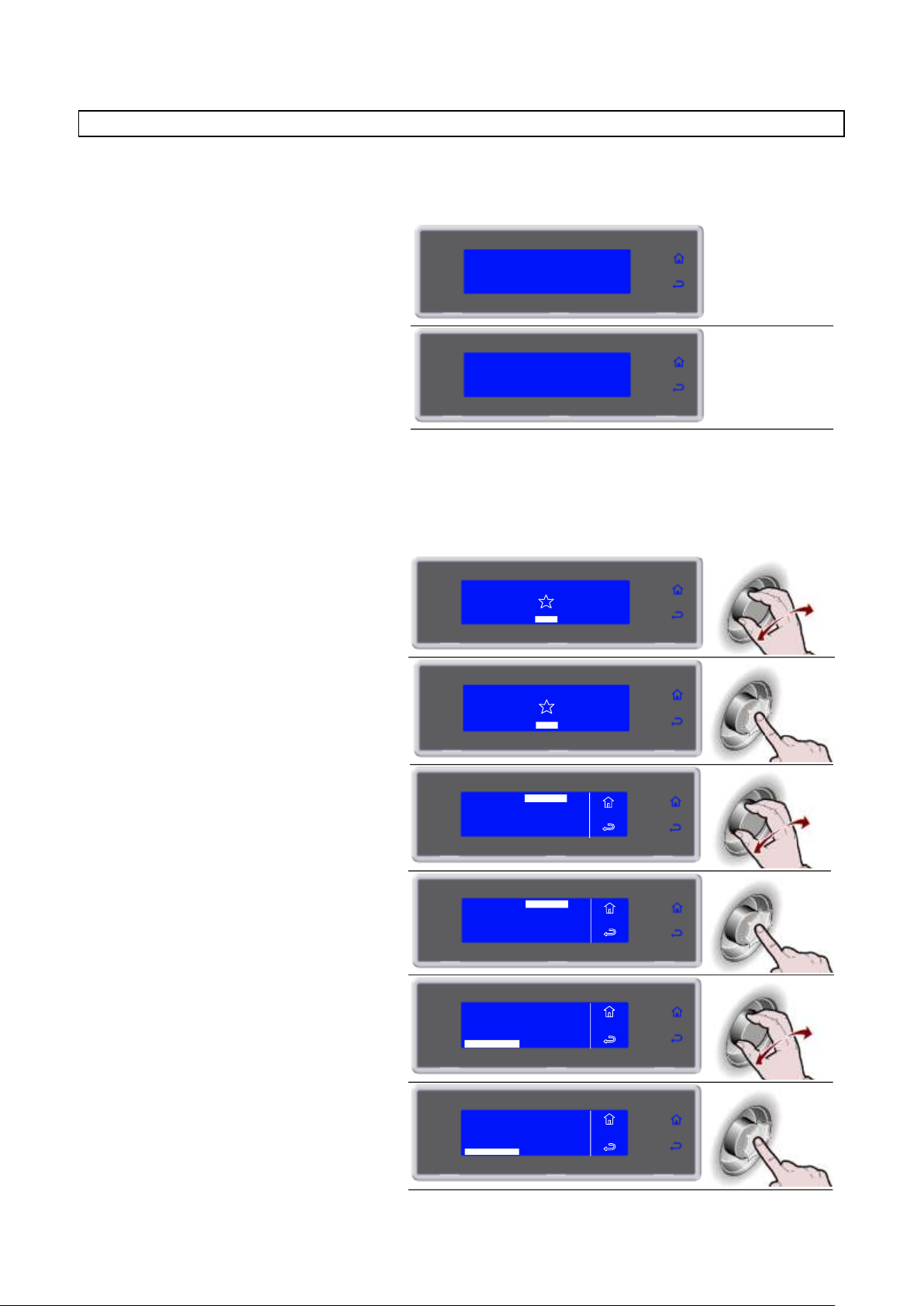
1. Please wait
2. Remove the probe
1. Select MENU by rotating the knob
SOFT 0°F
HARD 0°F
IFR INFINITY
SOFT +37°F
HARD +37°F
MENU
2. Press the knob to enter section MENU
SOFT 0°F
HARD 0°F
IFR INFINITY
SOFT +37°F
HARD +37°F
MENU
3. Select FUNCTIONS by rotating the knob
4. Press the knob to enter section
FUNCTIONS
5. Select PROBE HEATING by rotating the
knob
DEFROST
STORAGE
THAWING
SANITATION
MENU
FUNCTIONS
PROBE HEATING
PROVING
6. Press the knob to activate the selected
function
MENU
FUNCTIONS
DEFROST
STORAGE
THAWING
SANITATION
PROBE HEATING
PROVING
PROBE HEATING
PLEASE WAIT ..
REMOVE THE PROBE
AUTOMATIC
MULTY
COOLING
STORED
SETTING
SERVICE
HACCP
FUNCTIONS
MENU
AUTOMATIC
MULTY
COOLING
STORED
SETTING
SERVICE
HACCP
FUNCTIONS
MENU
PROBE HEATING
Heating of the needle probe is activated automatically, only on a cycle with needle and negative temperature
probe core, after the cycle in progress stops, selecting STOP, and after the subsequent opening of the door
by the operator.
It is always possible to start the function manually.
39
Page 40
3283430_GB
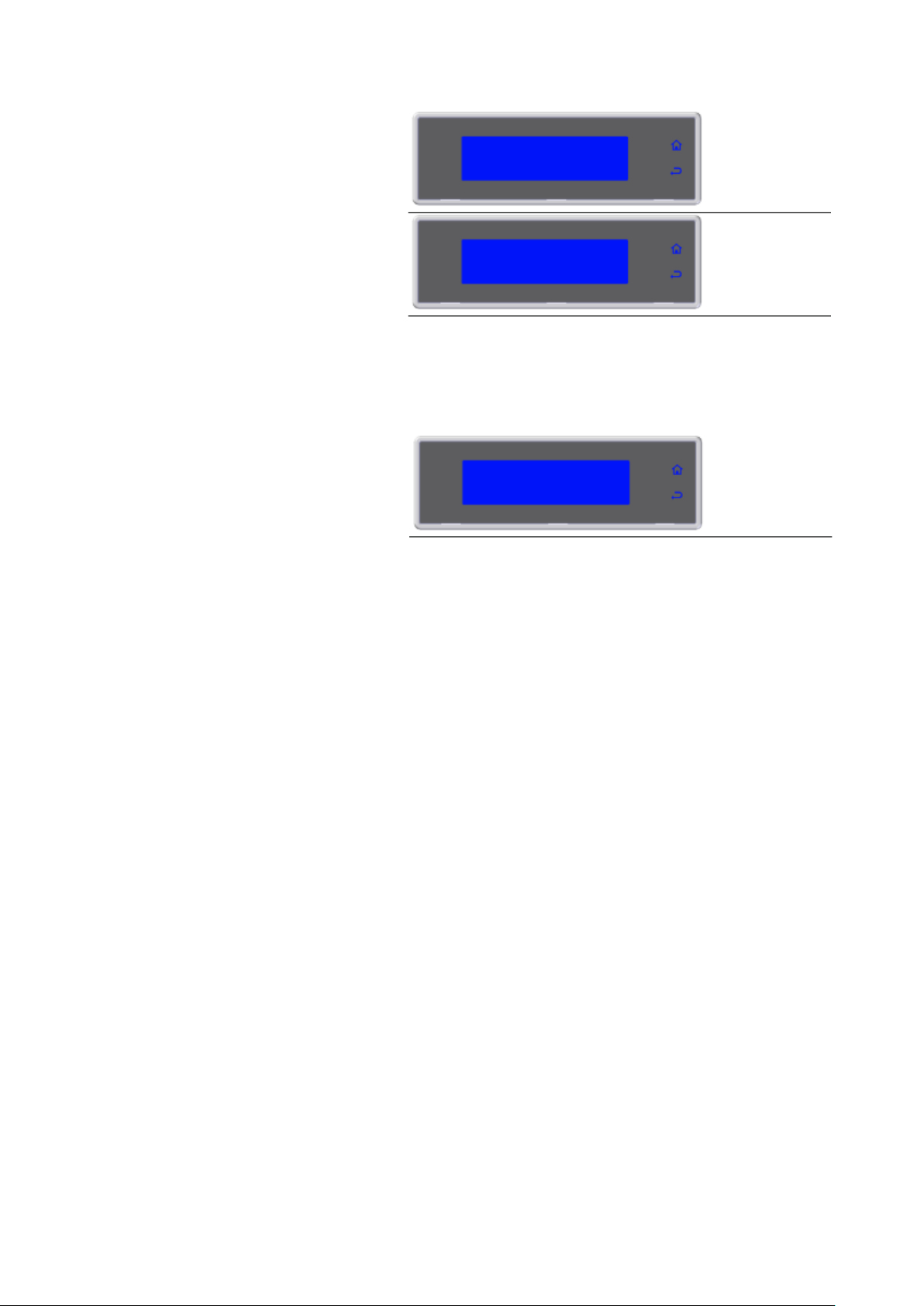
7. Please wait
8. Remove the probe
1. Not needed
PROBE HEATING
PLEASE WAIT ..
REMOVE THE PROBE
NOT NEEDED
In the event that the temperature read by the needle core sensor is not negative, the function will not be
activated.
40
Page 41
3283430_GB
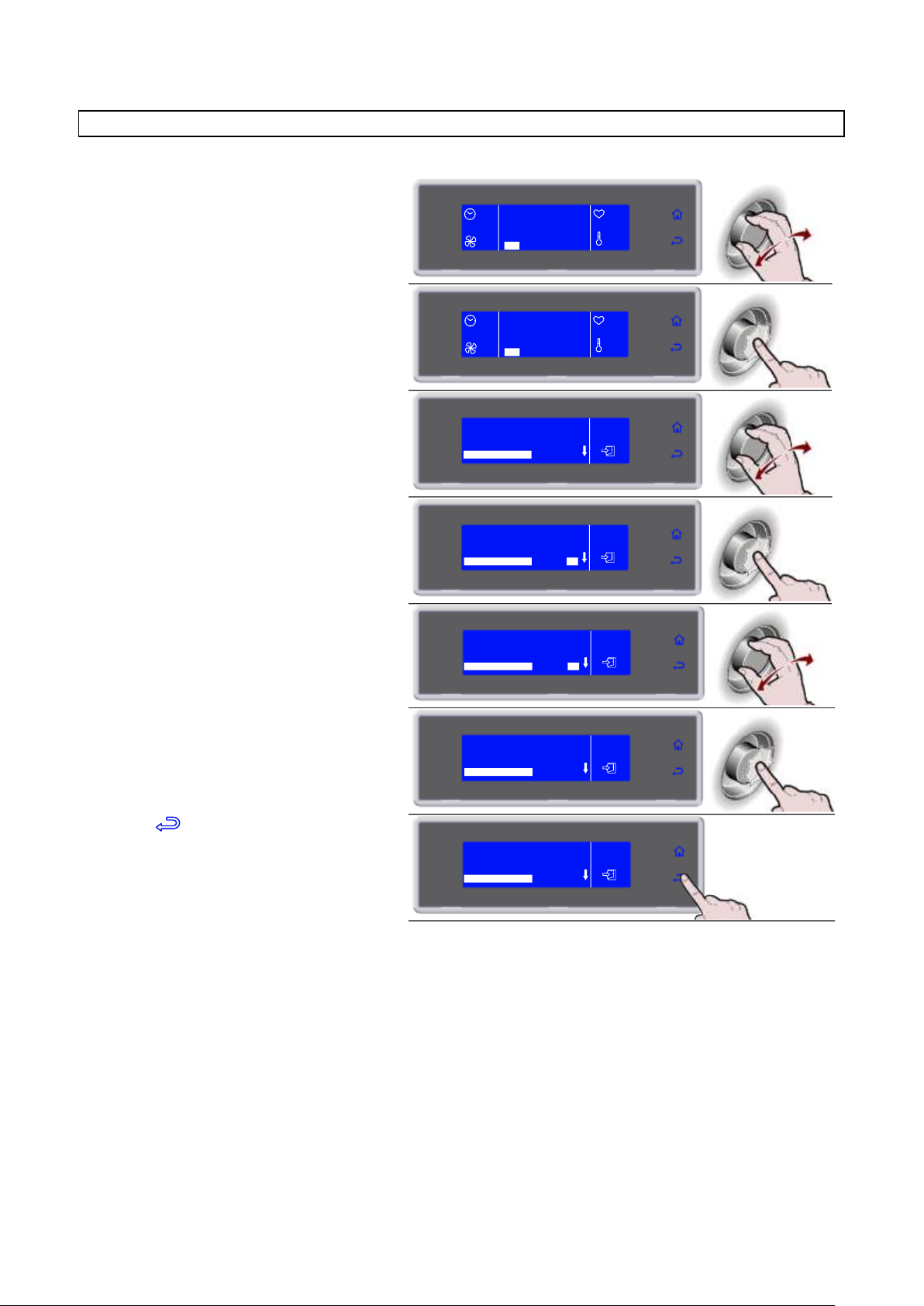
1. During the cycle, select SET by rotating
the knob
90'
HARD +37°F
100%
+80°F
+75°F
SET STOP
2. Press the knob to enter the parameters
list
90'
100%
SET STOP
HARD +37°F
+80°F
+75°F
3. Select the parameter to be modified by
rotating the knob
HARD +37°F
END CYCLE NEEDLE
HARD PHASE AIR
HARD PHASE NEEDLE
HARD PHASE TIME
37°F
5°F
86°F
45'
4. Press the knob to modify the value
45'
HARD +37°F
37°F
5°F
86°F
END CYCLE NEEDLE
HARD PHASE AIR
HARD PHASE NEEDLE
HARD PHASE TIME
5. Select the new value, by rotating the
knob
40'
HARD +37°F
37°F
5°F
86°F
END CYCLE NEEDLE
HARD PHASE AIR
HARD PHASE NEEDLE
HARD PHASE TIME
6. Press the knob to confirm the new value
40'
END CYCLE NEEDLE
HARD PHASE AIR
HARD PHASE NEEDLE
HARD PHASE TIME
HARD +37°F
37°F
5°F
86°F
7. Press to exit the parameters list
40'
HARD +37°F
37°F
5°F
86°F
END CYCLE NEEDLE
HARD PHASE AIR
HARD PHASE NEEDLE
HARD PHASE TIME
** VIEW / EDIT PARAMETERS CYCLE
41
Page 42
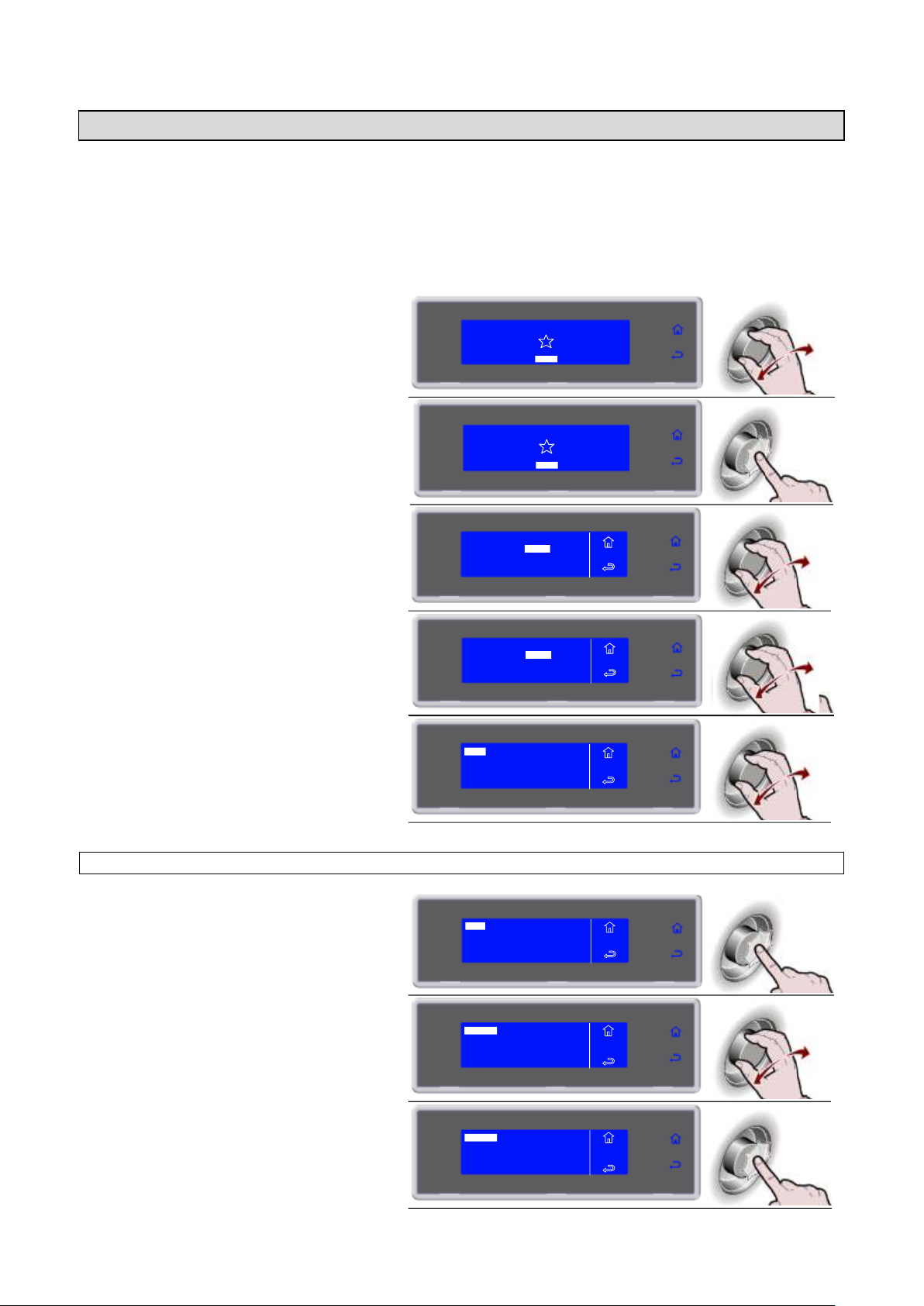
3283430_GB
1. Select MENU by rotating the knob
SOFT 0°F
HARD 0°F
IFR INFINITY
SOFT +37°F
HARD +37°F
MENU
2. Press the knob to enter section MENU
SOFT 0°F
HARD 0°F
IFR INFINITY
SOFT +37°F
HARD +37°F
MENU
3. Select HACCP by rotating the knob
4. Press the knob to enter section HACCP
5. Select the chosen function by rotating
the knob
6. Press the knob to enter the selected
function
7. Select the chosen function by rotating
the knob
8. Press the knob to enter the selected
function
AUTOMATIC
MULTY
COOLING
STORED
SETTING
SERVICE
HACCP
FUNCTIONS
MENU
AUTOMATIC
MULTY
COOLING
STORED
SETTING
SERVICE
HACCP
FUNCTIONS
MENU
VIEW
USB
PRINT
MENU
HACCP
DELETE
VIEW
USB
PRINT
MENU
HACCP
DELETE
BY DATE
BY CYCLE MENU
HACCP
VIEW
BY DATE
BY CYCLE MENU
HACCP
VIEW
HACCP
Lines in print run time = end less.
Storage of 100 log/lines.
If a cycle is made up of 5 log (lines/cycles name, date/time cycle start, cycle end, time of storage start,
defrosting) can store 20 cycles. The twenty-first cycle overwrite the oldest cycle in memory.
The printing/storage takeover interval is variable from 1 to 60 minutes or hours (minimum 1 minute –
maximum 60 hours).
42
VIEW BY DATE
Page 43
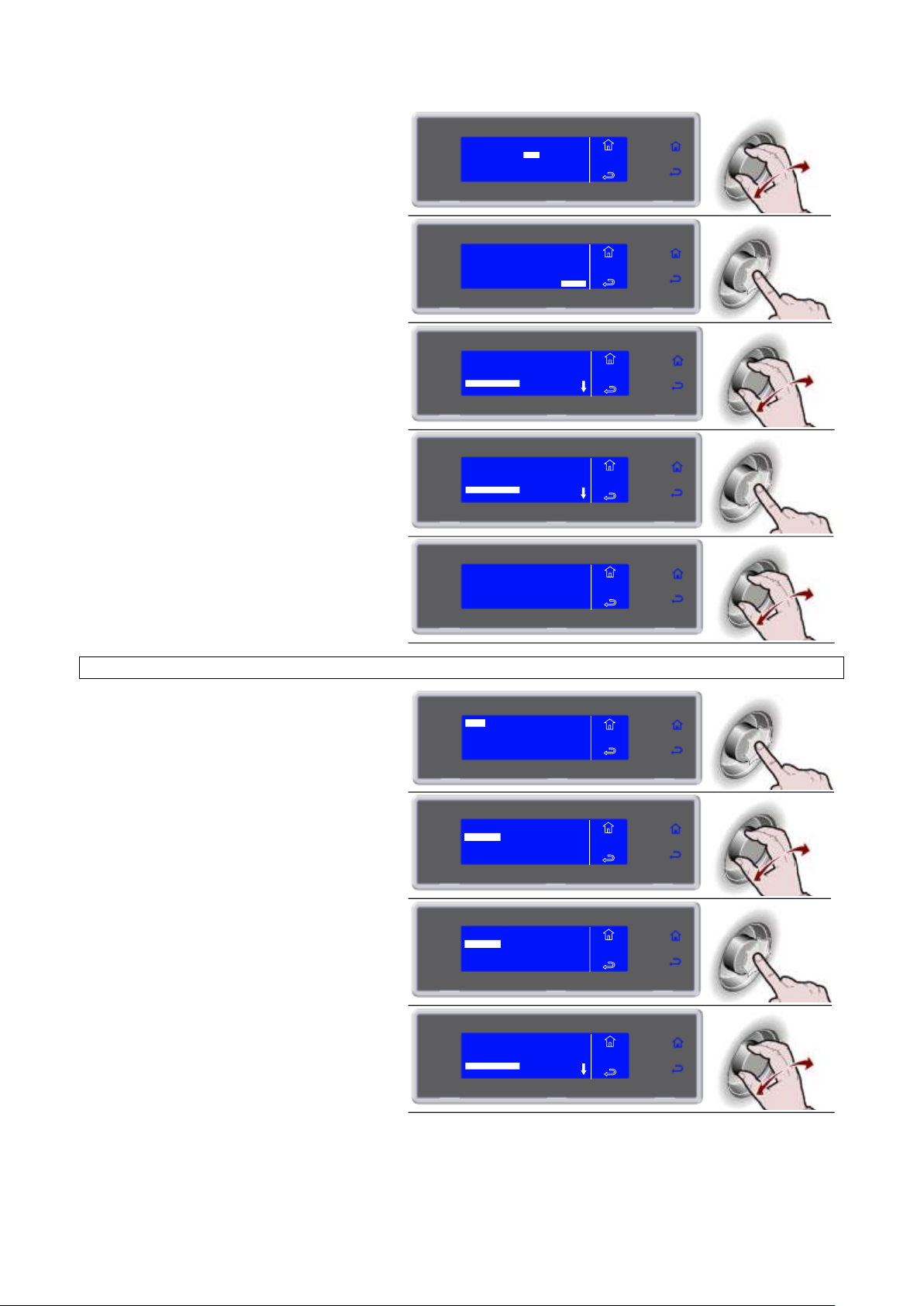
3283430_GB
9. Enter the data by turning the knob and
press to confirm the value and move to
the next one until ENTER is selected
10. Press the knob to view the desired
cycles
11. Select the cycle to be viewed
01/03/2010 14:00
LASAGUE 0°F
01/03/2010 19:00
PASTA +37°F
MENU
HACCP
VIEW
FREEZER 1
12. Press the knob to view the selected
cycle
01/03/2010 14:00
LASAGUE 0°F
01/03/2010 19:00
PASTA +37°F
MENU
HACCP
VIEW
FREEZER 1
13. The parameters list is displayed
PASTA +37°F
01/03/2010 19:00
NEEDLE +70°F AIR +70°F
MENU
HACCP
VIEW
6. Press the knob to enter the selected
function
7. Select the chosen function by rotating
the knob
8. Press the knob to enter the selected
function
9. Select the cycle to be viewed
01/03/2010 14:00
LASAGUE 0°F
01/03/2010 19:00
PASTA +37°F
MENU
HACCP
VIEW
FREEZER 1
ENTER
MENU
HACCP
VIEW
FROM 01/03/2010
TO 02/03/ 2010
ENTER
MENU
HACCP
VIEW
FROM 01/03/2010
TO 02/03/2010
VIEW
USB
PRINT
MENU
HACCP
DELETE
BY DATE
BY CYCLE MENU
HACCP
VIEW
BY DATE
BY CYCLE MENU
HACCP
VIEW
VIEW BY CYCLE
43
Page 44
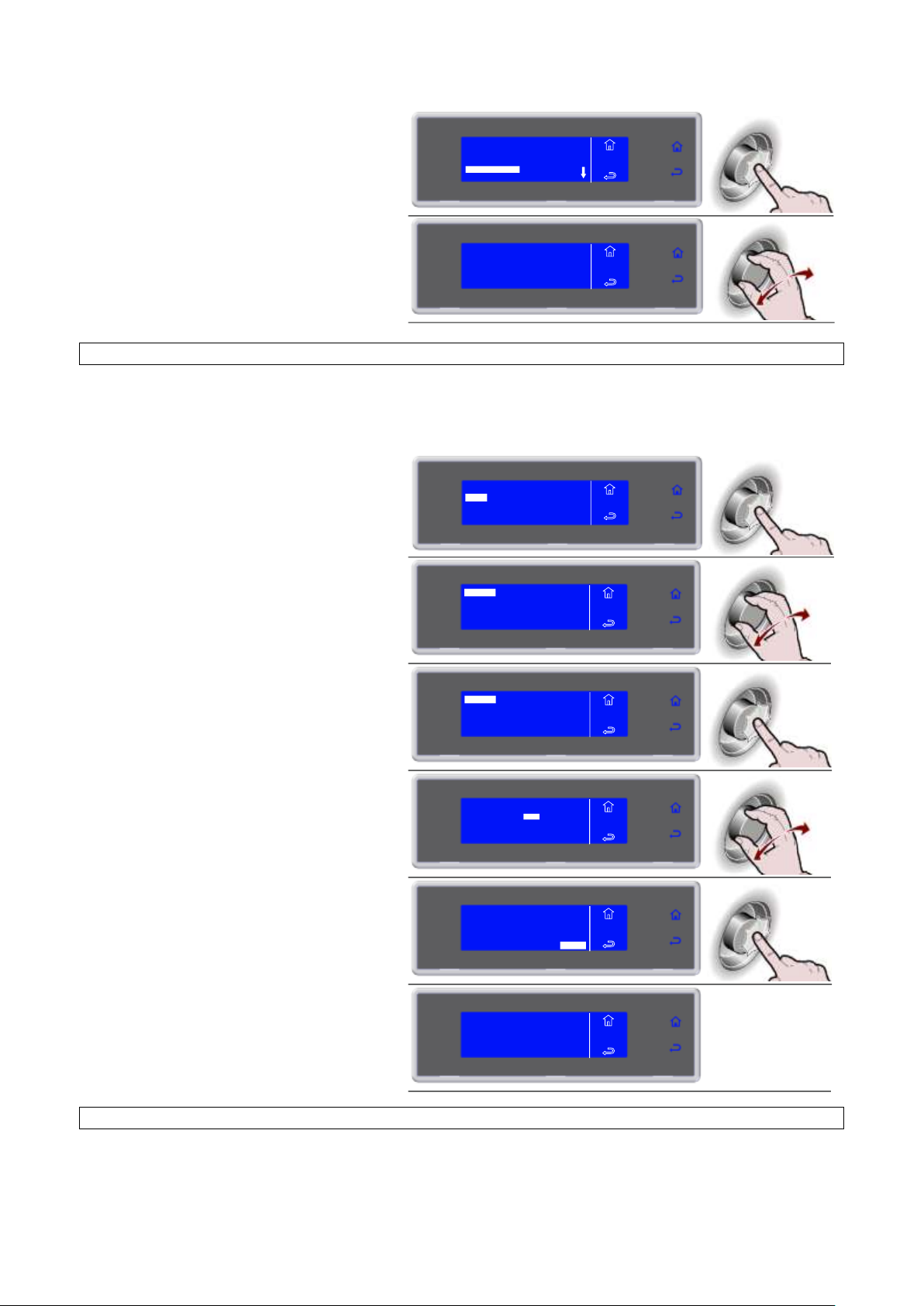
3283430_GB
10. Press the knob to view the selected
cycle
01/03/2010 14:00
LASAGUE 0°F
01/03/2010 19:00
PASTA +37°F
MENU
HACCP
VIEW
FREEZER 1
11. The parameters list is displayed
PASTA +37°F
01/03/2010 19:00
NEEDLE +70°F AIR +70°F
MENU
HACCP
VIEW
6. Press the knob to enter the selected
function
7. Select the chosen function by rotating
the knob
8. Press the knob to enter the selected
function
9. Enter the data by turning the knob and
press to confirm the value and move to
the next one until ENTER is selected
10. Press the knob to start printing
11. Printing in progress
VIEW
USB
PRINT
MENU
HACCP
DELETE
BY DATE
BY CYCLE
ALL
MENU
HACCP
PRINT
BY DATE
BY CYCLE
ALL
MENU
HACCP
PRINT
ENTER
MENU
HACCP
PRINT
FROM 01/03/2010
TO 02/03/ 2010
FROM 01/03/2010
TO 02/03/2010
ENTER
MENU
HACCP
PRINT
IN PROGRESS
MENU
HACCP
PRINT
PRINT BY DATE
NOTE: the printer is not supplied as standard equipment. It is an optional item.
Connect the printer from the rear of the unit, using the MATE-N-LOK connectors on the electrical panel,
identified with the letters R (power) and S (signal).
NOTE: the printer is not supplied as standard equipment. It is an optional item.
Connect the printer from the rear of the unit, using the MATE-N-LOK connectors on the electrical panel,
identified with the letters R (power) and S (signal).
44
PRINT BY CYCLE
Page 45
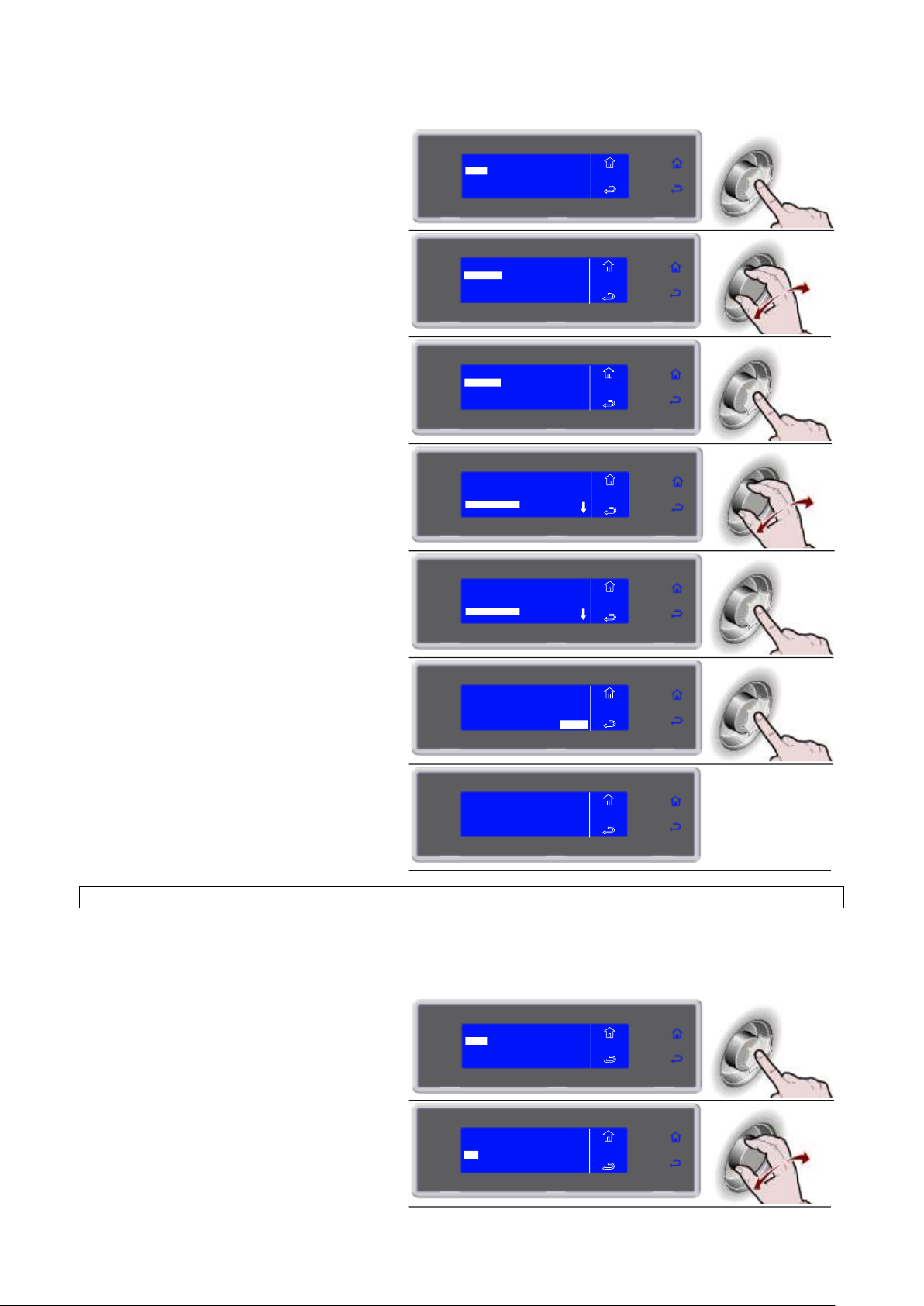
3283430_GB
6. Press the knob to enter the selected
function
7. Select the chosen function by rotating
the knob
8. Press the knob to enter the selected
function
9. Select the cycle to be viewed
01/03/2010 14:00
LASAGUE 0°F
01/03/2010 19:00
PASTA +37°F
MENU
HACCP
PRINT
FREEZER 1
10. Press the knob to confirm the selected
cycle
01/03/2010 14:00
LASAGUE 0°F
01/03/2010 19:00
PASTA +37°F
MENU
HACCP
PRINT
FREEZER 1
11. Press the knob to start printing
PASTA +37°F
01/03/2010 19:00
NEEDLE +70°F AIR +70°F
MENU
HACCP
VIEW
ENTER
12. Printing in progress
6. Press the knob to enter the selected
function
7. Select the chosen function by rotating
the knob
VIEW
USB
PRINT
MENU
HACCP
DELETE
BY DATE
BY CYCLE
ALL
MENU
HACCP
PRINT
BY DATE
BY CYCLE
ALL
MENU
HACCP
PRINT
IN PROGRESS
MENU
HACCP
PRINT
VIEW
USB
PRINT
MENU
HACCP
DELETE
BY DATE
BY CYCLE
ALL
MENU
HACCP
PRINT
NOTE: the printer is not supplied as standard equipment. It is an optional item.
Connect the printer from the rear of the unit, using the MATE-N-LOK connectors on the electrical panel,
identified with the letters R (power) and S (signal).
45
PRINT ALL
Page 46
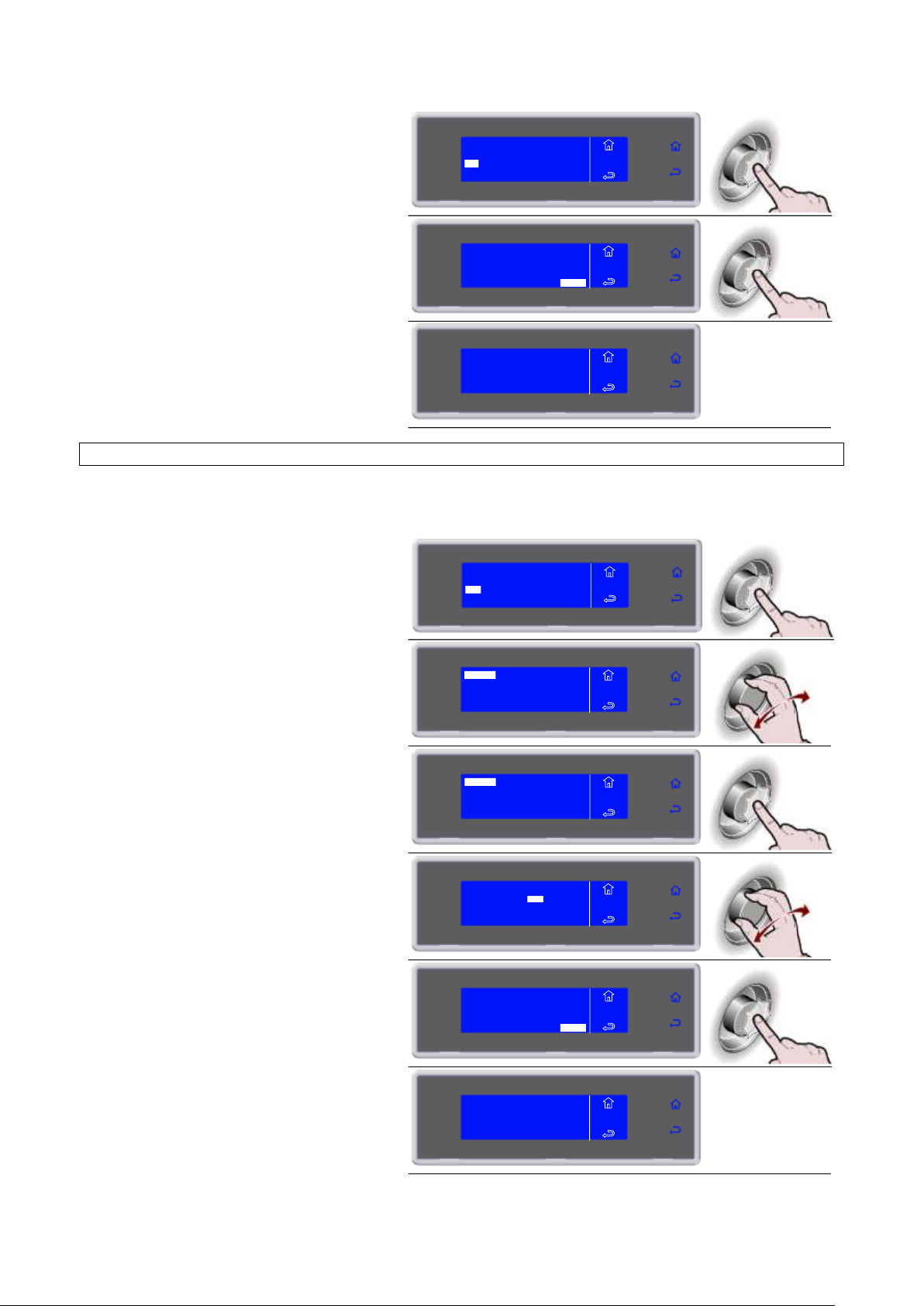
3283430_GB
8. Press the knob to enter the selected
function
9. Press the knob to start printing
ENTER
ALL
MENU
HACCP
PRINT
10. Printing in progress
6. Press the knob to enter the selected
function
USB memory presence is checked
7. Select the chosen function by rotating
the knob
8. Press the knob to enter the selected
function
9. Enter the date by rotating the knob and
select ENTER
10. Press the knob to start downloading
data
11. Data download in progress
BY DATE
BY CYCLE
ALL
MENU
HACCP
PRINT
IN PROGRESS
MENU
HACCP
PRINT
VIEW
USB
PRINT
MENU
HACCP
DELETE
BY DATE
BY CYCLE
ALL
MENU
HACCP
USB
BY DATE
BY CYCLE
ALL
MENU
HACCP
USB
ENTER
MENU
HACCP
USB
FROM 01/03/2010
TO 02/03/ 2010
FROM 01/03/2010
TO 02/03/2010
ENTER
MENU
HACCP
USB
IN PROGRESS
MENU
HACCP
USB
DOWNLOAD DATA BY DATE
Insert a USB flash drive (not supplied) into the USB port “Type A” on the protection of unit’s electrical panel.
In order to access the USB port, please refer to the section entitled "ELECTRICAL PANEL MAINTENANCE”.
46
Page 47
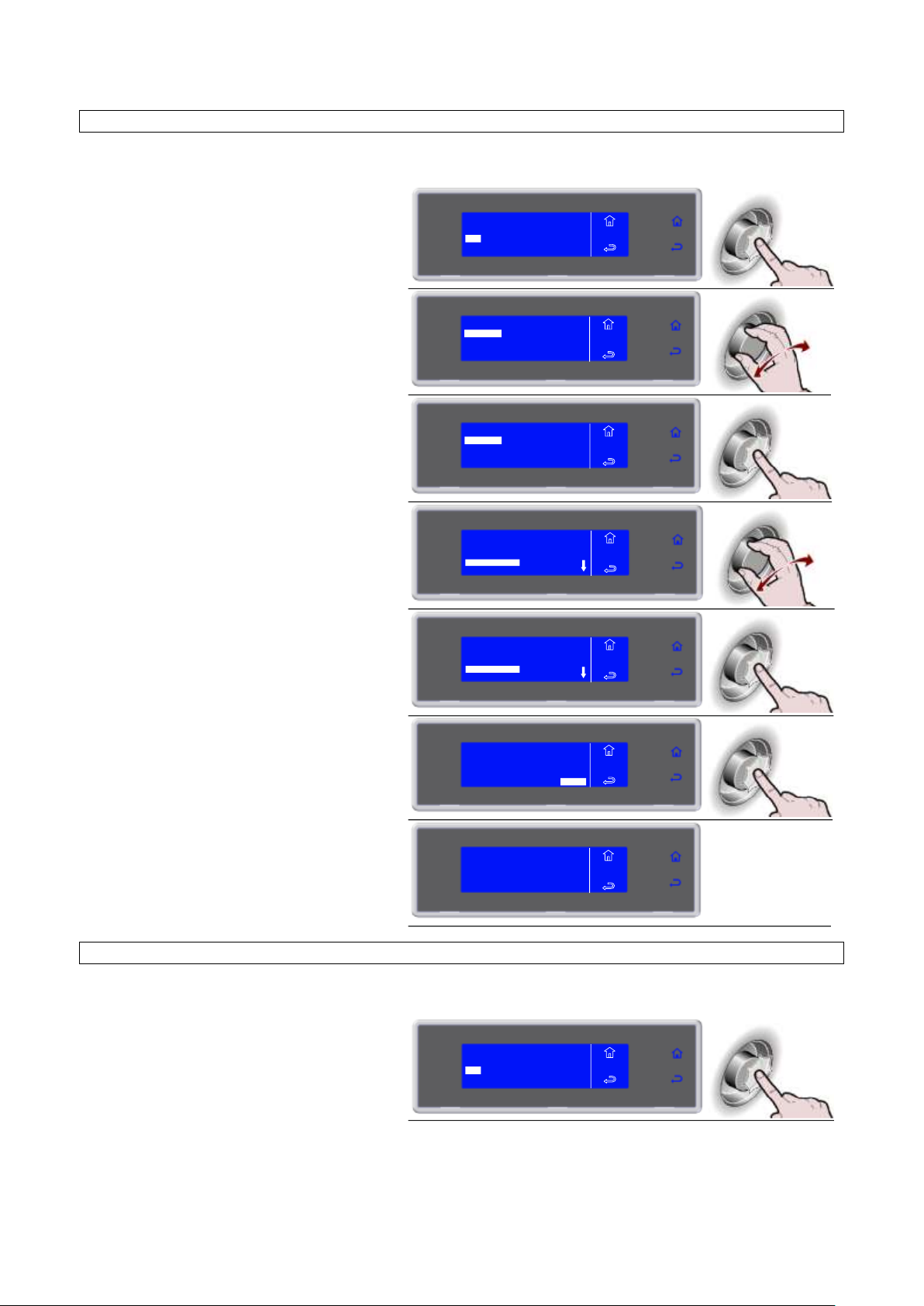
3283430_GB
6. Press the knob to enter the selected
function
USB memory presence is checked
7. Select the chosen function by rotating
the knob
8. Press the knob to enter the selected
function
9. Select the cycle to be viewed
01/03/2010 14:00
LASAGUE 0°F
01/03/2010 19:00
PASTA +37°F
MENU
HACCP
USB
FREEZER 1
10. Press the knob to confirm the selected
cycle
01/03/2010 14:00
LASAGUE 0°F
01/03/2010 19:00
PASTA +37°F
MENU
HACCP
USB
FREEZER 1
11. Press the knob to start downloading
data
PASTA +37°F
01/03/2010 19:00
NEEDLE +70°F AIR +70°F
ENTER
MENU
HACCP
USB
12. Data download in progress
6. Press the knob to enter the selected
function
USB memory presence is checked
VIEW
USB
PRINT
MENU
HACCP
DELETE
BY DATE
BY CYCLE
ALL
MENU
HACCP
USB
BY DATE
BY CYCLE
ALL
MENU
HACCP
USB
IN PROGRESS
MENU
HACCP
USB
VIEW
USB
PRINT
MENU
HACCP
DELETE
DOWNLOAD DATA BY CYCLE
Insert a USB flash drive (not supplied) into the USB port “Type A” on the dashboard.
Insert a USB flash drive (not supplied) into the USB port “Type A” on the dashboard.
47
DOWNLOAD ALL
Page 48
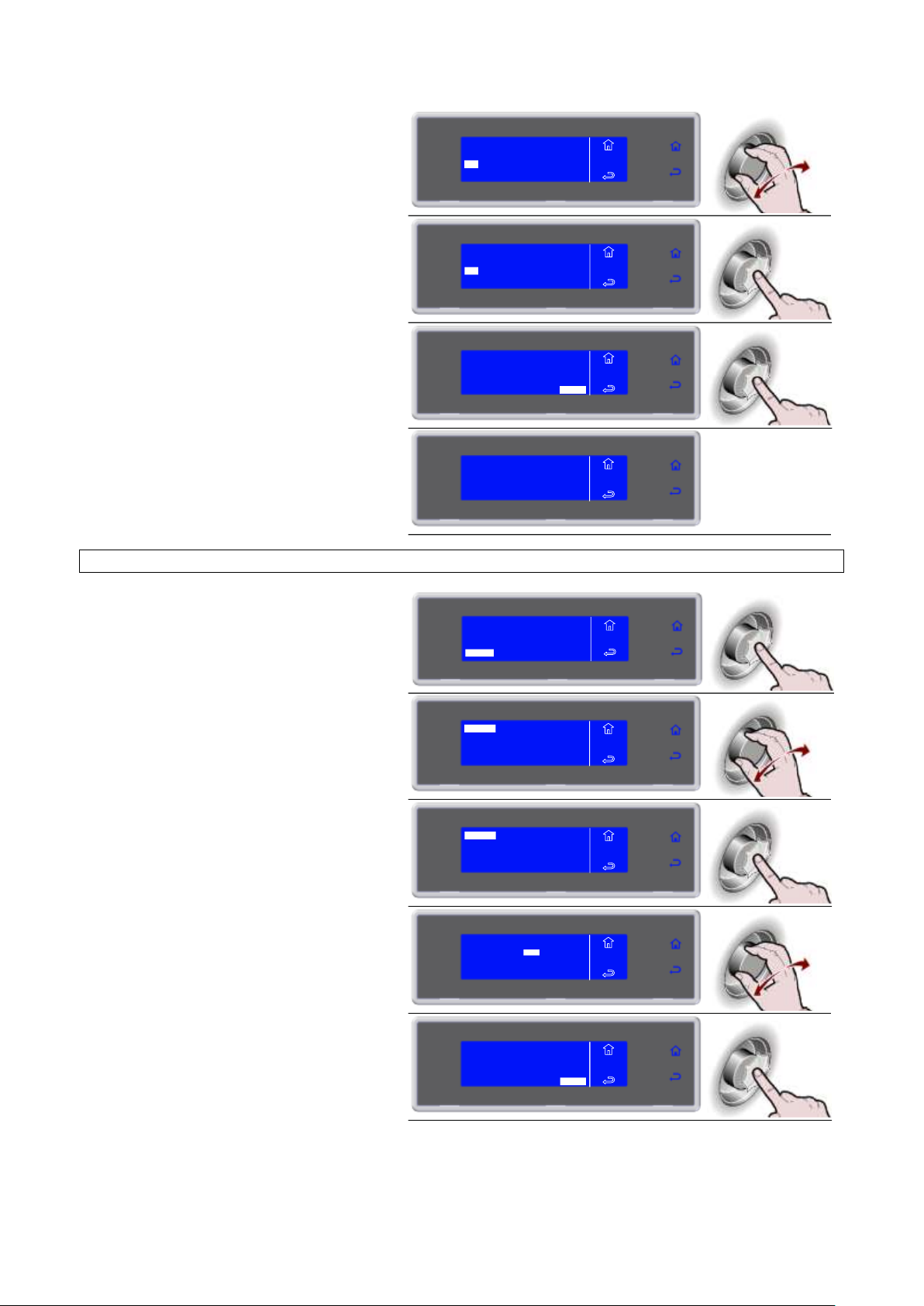
3283430_GB
7. Select the chosen function by rotating
the knob
8. Press the knob to enter the selected
function
9. Press the knob to start downloading
data
ENTER
ALL
MENU
HACCP
USB
10. Data download in progress
6. Press the knob to enter the selected
function
7. Select the chosen function by rotating
the knob
8. Press the knob to enter the selected
function
9. Enter the data by turning the knob and
press to confirm the value and move to
the next one until ENTER is selected
10. Press the knob to start the procedure
BY DATE
BY CYCLE
ALL
MENU
HACCP
USB
BY DATE
BY CYCLE
ALL
MENU
HACCP
USB
IN PROGRESS
MENU
HACCP
USB
VIEW
USB
PRINT
MENU
HACCP
DELETE
BY DATE
BY CYCLE
ALL
MENU
HACCP
DELETE
BY DATE
BY CYCLE
ALL
MENU
HACCP
DELETE
ENTER
MENU
HACCP
DELETE
FROM 01/03/2010
TO 02/03/ 2010
FROM 01/03/2010
TO 02/03/2010
ENTER
MENU
HACCP
DELETE
DELETE DATA BY DATE
48
Page 49

3283430_GB
11. Data deletion in progress
6. Press the knob to enter the selected
function
7. Select the chosen function by rotating
the knob
8. Press the knob to enter the selected
function
9. Select the cycle to be viewed
01/03/2010 14:00
LASAGUE 0°F
01/03/2010 19:00
PASTA +37°F
MENU
HACCP
DELETE
FREEZER 1
10. Press the knob to confirm the selected
cycle
01/03/2010 14:00
LASAGUE 0°F
01/03/2010 19:00
PASTA +37°F
MENU
HACCP
DELETE
FREEZER 1
11. Press the knob to start the procedure
PASTA +37°F
01/03/2010 19:00
NEEDLE +70°F AIR +70°F
ENTER
MENU
HACCP
DELETE
12. Data deletion in progress
6. Press the knob to enter the selected
function
IN PROGRESS
MENU
HACCP
DELETE
VIEW
USB
PRINT
MENU
HACCP
DELETE
BY DATE
BY CYCLE
ALL
MENU
HACCP
DELETE
BY DATE
BY CYCLE
ALL
MENU
HACCP
DELETE
IN PROGRESS
MENU
HACCP
DELETE
VIEW
USB
PRINT
MENU
HACCP
DELETE
DELETE DATA BY CYCLE
49
DELETE ALL
Page 50
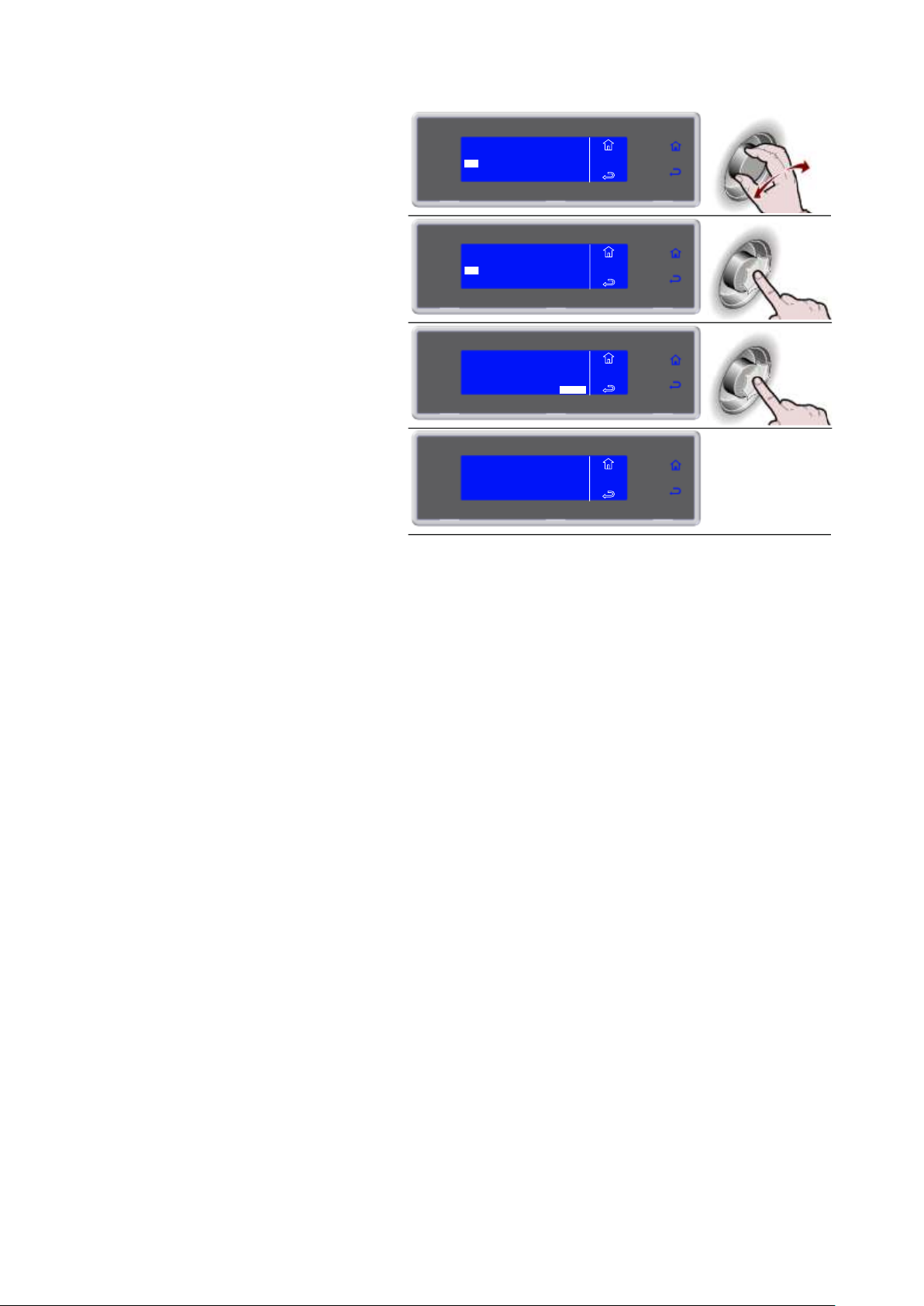
3283430_GB
7. Select the chosen function by rotating
the knob
8. Press the knob to enter the selected
function
9. Press the knob to start the procedure
ENTER
ALL
MENU
HACCP
DELETE
10. Data deletion in progress
BY DATE
BY CYCLE
ALL
MENU
HACCP
DELETE
BY DATE
BY CYCLE
ALL
MENU
HACCP
DELETE
IN PROGRESS
MENU
HACCP
DELETE
50
Page 51
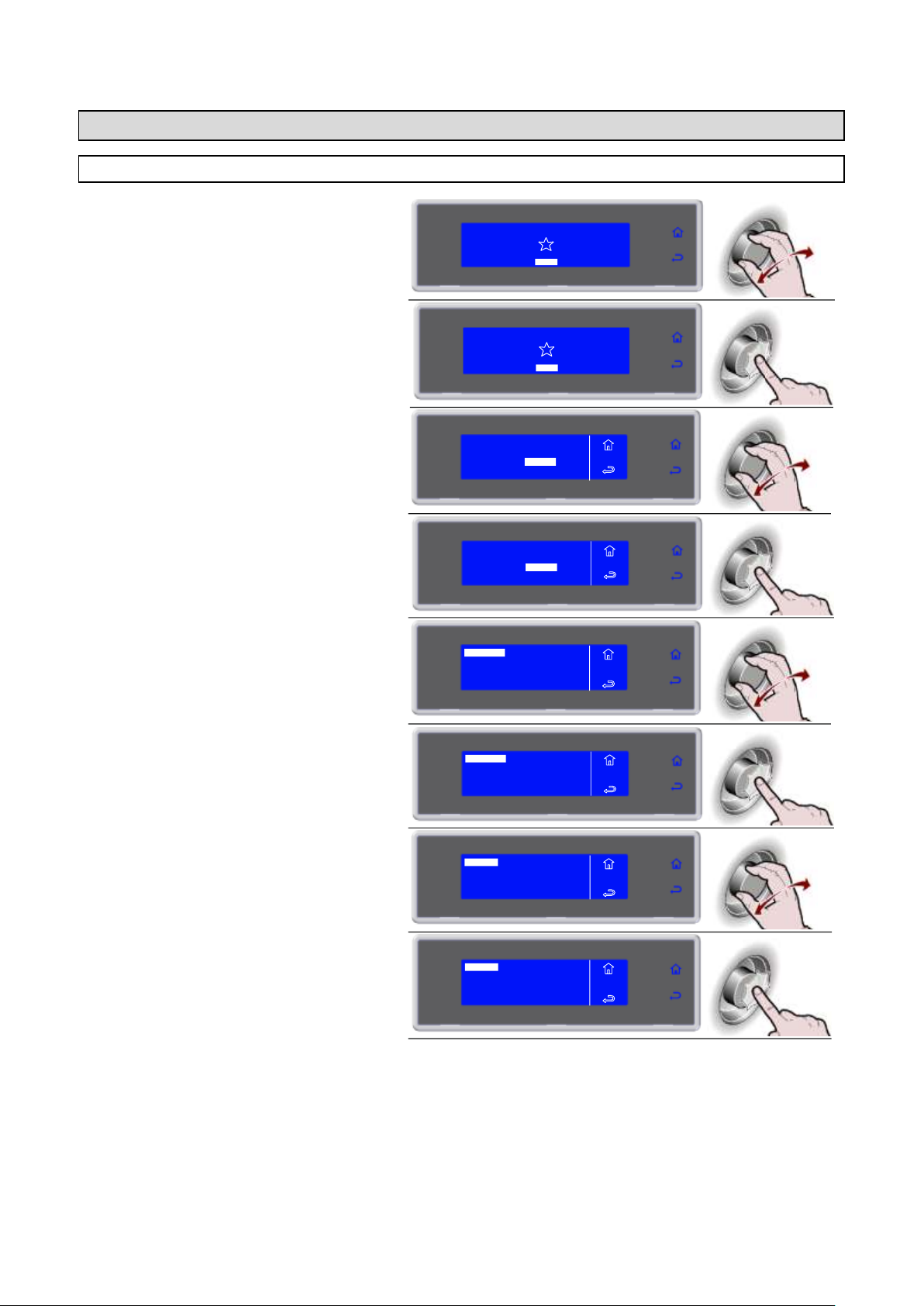
3283430_GB
1. Select MENU by rotating the knob
SOFT 0°F
HARD 0°F
IFR INFINITY
SOFT +37°F
HARD +37°F
MENU
2. Press the knob to enter section MENU
SOFT 0°F
HARD 0°F
IFR INFINITY
SOFT +37°F
HARD +37°F
MENU
3. Select SETTING by rotating the knob
4. Press the knob to enter section
SETTING
5. Select LANGUAGE by rotating the knob
6. Press the knob to enter section
LANGUAGE
7. Select LANGUAGE by rotating the knob
ITALIANO
FRANCAIS
ENGLISH
MENU
SETS
LANGUAGE
DEUTSCH
ESPANOL
SVENSKA
DANSK
DUTCH
NORSK
8. Press the knob to confirm the selected
language
ITALIANO
FRANCAIS
ENGLISH
MENU
SETS
LANGUAGE
DEUTSCH
ESPANOL
SVENSKA
DANSK
DUTCH
NORSK
AUTOMATIC
MULTY
COOLING
STORED
SETTING
SERVICE
HACCP
FUNCTIONS
MENU
AUTOMATIC
MULTY
COOLING
STORED
SETTING
SERVICE
HACCP
FUNCTIONS
MENU
LANGUAGE
SECTOR
SET DATE/CLOCK
MULTY
MENU
SETS
LANGUAGE
SECTOR
SET DATE/CLOCK
MULTY
MENU
SETS
SETTINGS
LANGUAGE
51
Page 52
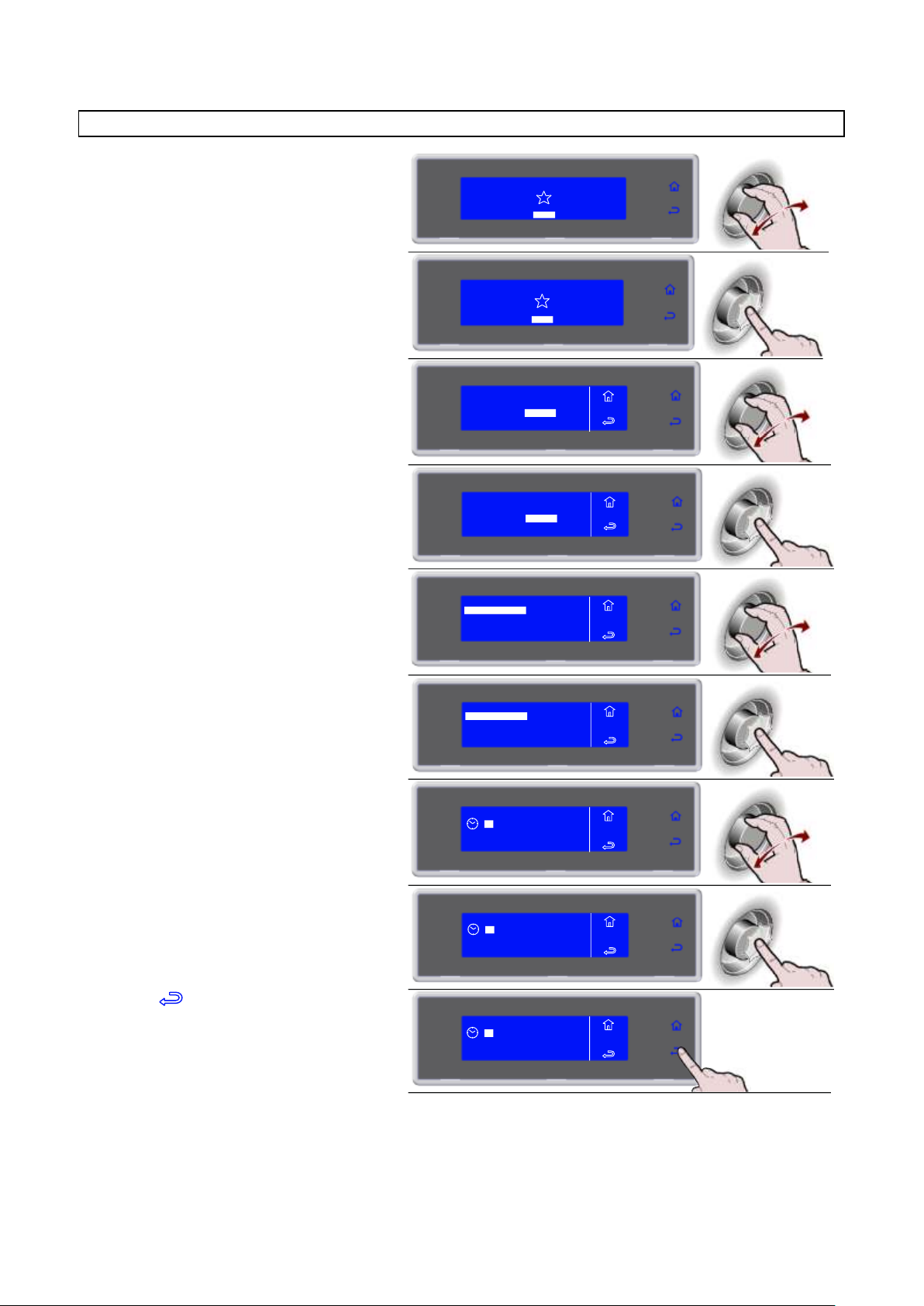
3283430_GB
1. Select MENU by rotating the knob
SOFT 0°F
HARD 0°F
IFR INFINITY
SOFT +37°F
HARD +37°F
MENU
2. Press the knob to enter section MENU
SOFT 0°F
HARD 0°F
IFR INFINITY
SOFT +37°F
HARD +37°F
MENU
3. Select SETTING by rotating the knob
4. Press the knob to enter section
SETTING
5. Select DATA/CLOCK by rotating the
knob
6. Press the knob to enter section
DATA/CLOCK
7. Select the new value by rotating the
knob
8. Press the knob to confirm the new value
and move to the next one
9. Select to confirm and exit from the
function
AUTOMATIC
MULTY
COOLING
STORED
SETTING
SERVICE
HACCP
FUNCTIONS
MENU
AUTOMATIC
MULTY
COOLING
STORED
SETTING
SERVICE
HACCP
FUNCTIONS
MENU
LANGUAGE
SECTOR
SET DATE/CLOCK
MULTY
MENU
SETS
CYCLE CONTROL
MENU
SETS
LANGUAGE
SECTOR
SET DATE/CLOCK
MULTY
CYCLE CONTROL
10
MENU
SETS
DATE/CLOCK
: 46
05 MAR 2012
10 : 46
05 MAR 2012
MENU
SETS
DATE/CLOCK
10 : 46
05 MAR 2012
MENU
SETS
DATE/CLOCK
SET DATE/CLOCK
52
Page 53
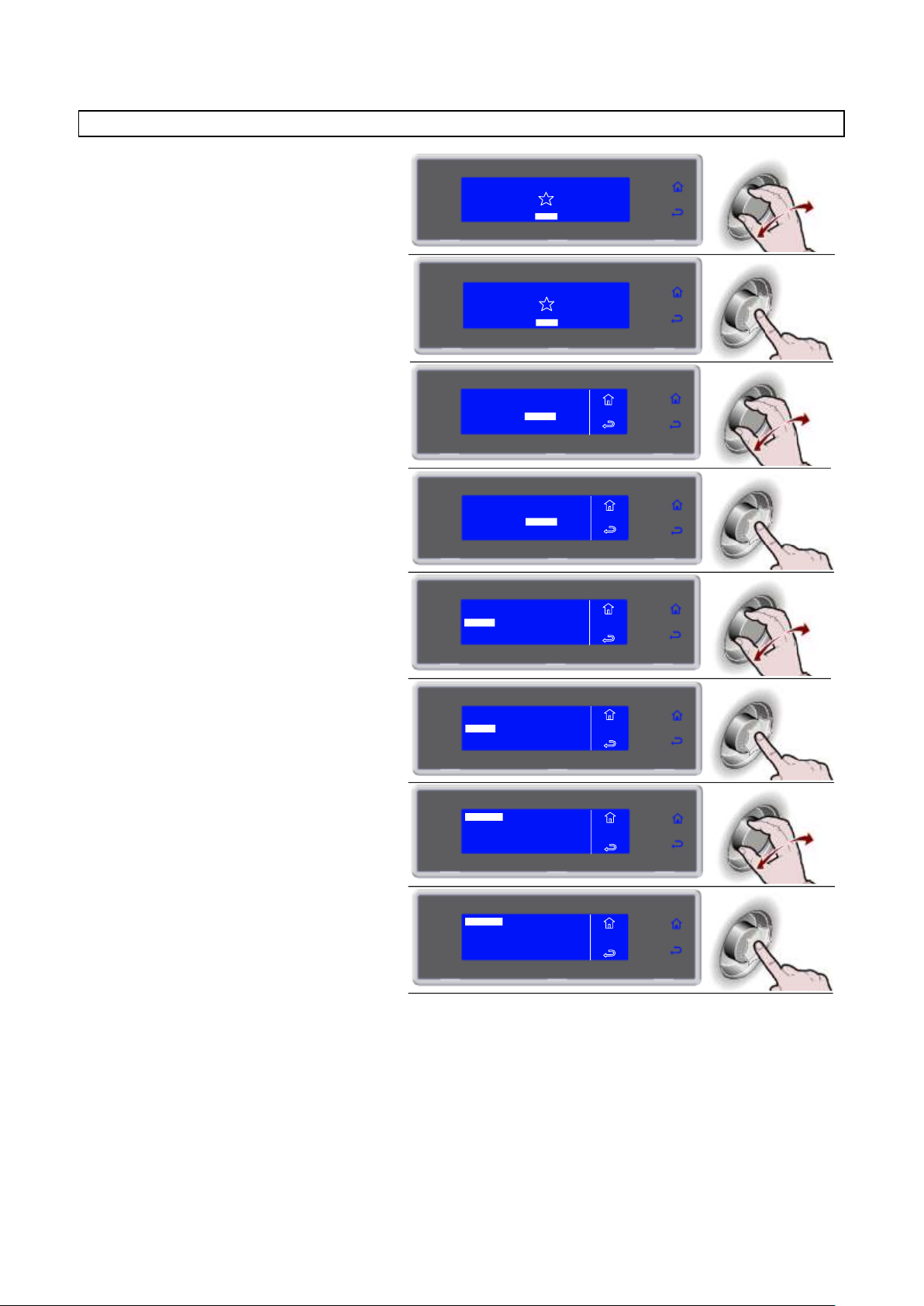
3283430_GB
1. Select MENU by rotating the knob
SOFT 0°F
HARD 0°F
IFR INFINITY
SOFT +37°F
HARD +37°F
MENU
2. Press the knob to enter section MENU
SOFT 0°F
HARD 0°F
IFR INFINITY
SOFT +37°F
HARD +37°F
MENU
3. Select SETTING by rotating the knob
4. Press the knob to enter section
SETTING
5. Select SECTOR by rotating the knob
6. Press the knob to enter section
SECTOR
7. Press the knob to confirm the selected
sector
CATERING
BAKERY
PASTRY
ICE CREAM
MENU
SETS
SECTOR
8. Press the knob to confirm
MENU
SETS
SECTOR
CATERING
BAKERY
PASTRY
ICE CREAM
AUTOMATIC
MULTY
COOLING
STORED
SETTING
SERVICE
HACCP
FUNCTIONS
MENU
AUTOMATIC
MULTY
COOLING
STORED
SETTING
SERVICE
HACCP
FUNCTIONS
MENU
LANGUAGE
SECTOR
SET DATE/CLOCK
MULTY
MENU
SETS
CYCLE CONTROL
MENU
SETS
LANGUAGE
SECTOR
SET DATE/CLOCK
MULTY
CYCLE CONTROL
SECTOR
53
Page 54
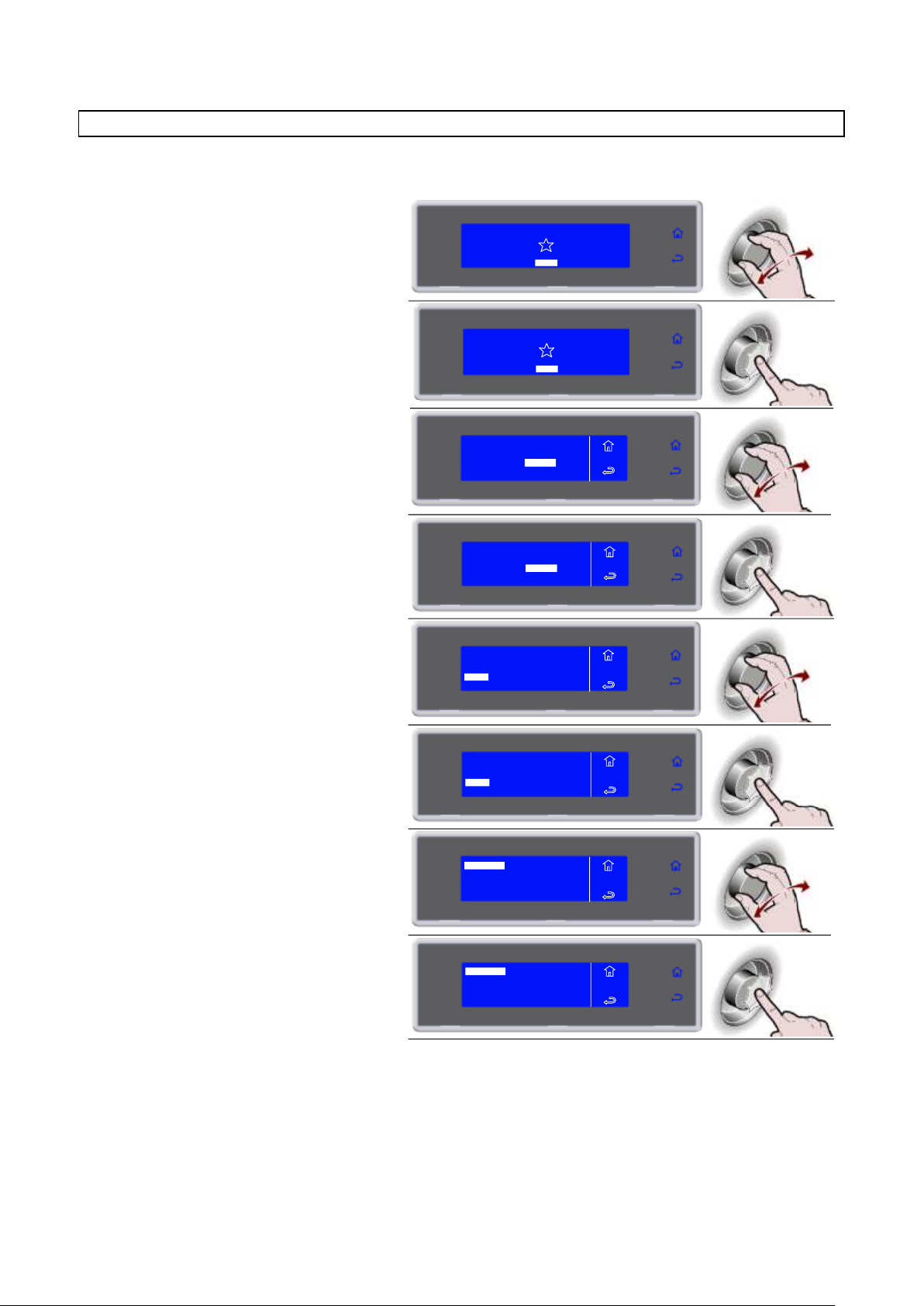
3283430_GB
1. Select MENU by rotating the knob
SOFT 0°F
HARD 0°F
IFR INFINITY
SOFT +37°F
HARD +37°F
MENU
2. Press the knob to enter section MENU
SOFT 0°F
HARD 0°F
IFR INFINITY
SOFT +37°F
HARD +37°F
MENU
3. Select SETTING by rotating the knob
4. Press the knob to enter section
SETTING
5. Select MULTY by rotating the knob
6. Press the knob to enter section MULTY
7. Use the knob to select the number of
levels corresponding to the equipment
used
8. Press the knob to confirm
AUTOMATIC
MULTY
COOLING
STORED
SETTING
SERVICE
HACCP
FUNCTIONS
MENU
AUTOMATIC
MULTY
COOLING
STORED
SETTING
SERVICE
HACCP
FUNCTIONS
MENU
LANGUAGE
SECTOR
SET DATE/CLOCK
MULTY
MENU
SETS
CYCLE CONTROL
MENU
SETS
LANGUAGE
SECTOR
SET DATE/CLOCK
MULTY
CYCLE CONTROL
MENU
SETS
MULTY
5 LEVELS
20 LEVELS
10 LEVELS
MENU
SETS
MULTY
5 LEVELS
20 LEVELS
10 LEVELS
MULTY
The number of levels available varies depending on the equipment.
54
Page 55
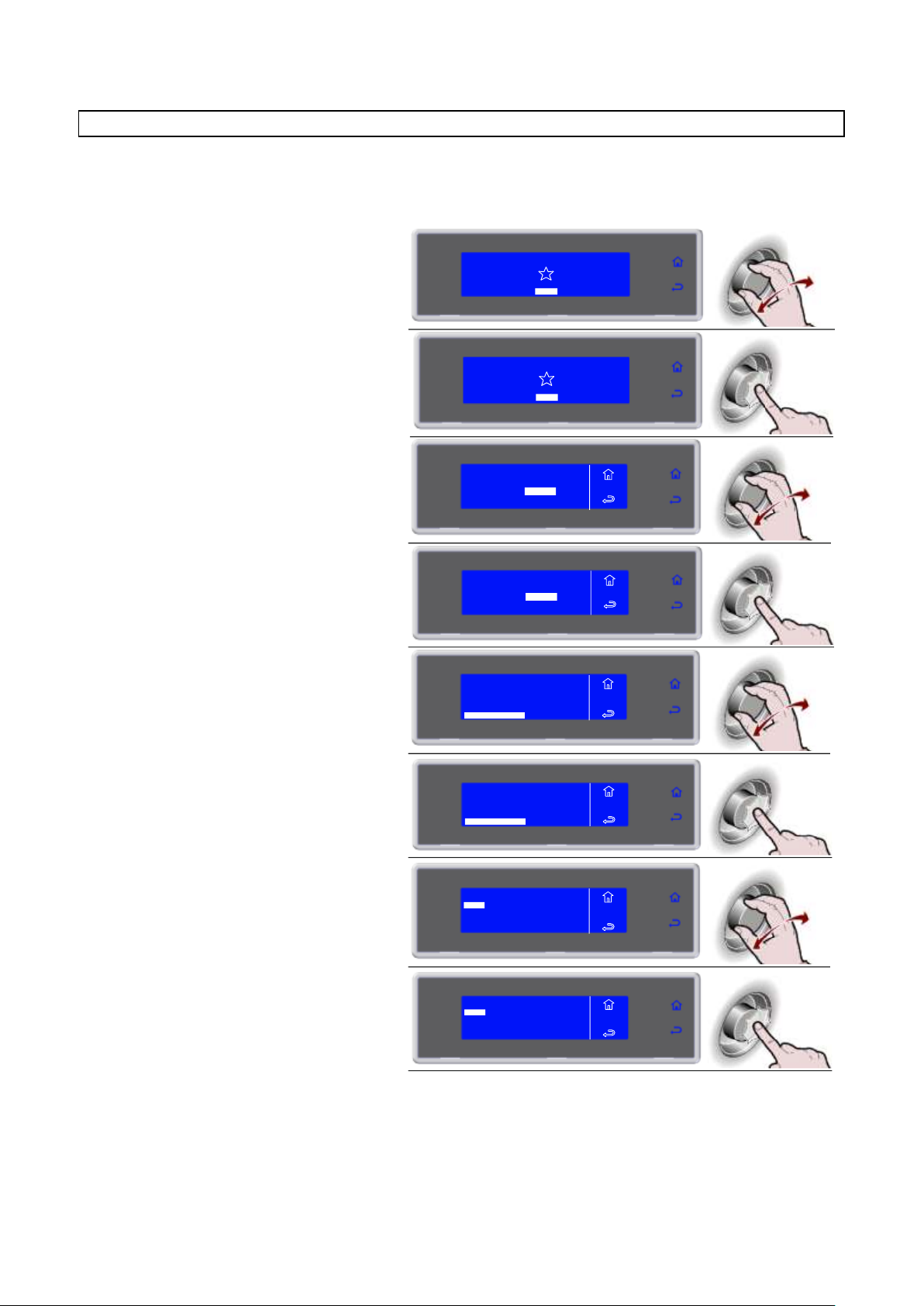
3283430_GB
1. Select MENU by rotating the knob
SOFT 0°F
HARD 0°F
IFR INFINITY
SOFT +37°F
HARD +37°F
MENU
2. Press the knob to enter section MENU
SOFT 0°F
HARD 0°F
IFR INFINITY
SOFT +37°F
HARD +37°F
MENU
3. Select SETTING by rotating the knob
4. Press the knob to enter section
SETTING
5. Select CYCLE CONTROL by rotating
the knob
LANGUAGE
SET DATE/CLOCK
MENU
SETS
SECTOR
MULTY
CYCLE CONTROL
6. Press the knob to enter section CYCLE
CONTROL
LANGUAGE
SET DATE/CLOCK
MENU
SETS
SECTOR
MULTY
CYCLE CONTROL
7. Select the desired type of cycle control
MENU
SETS
AUTO/MANU
MANUAL
AUTO
8. Press the knob to confirm
MENU
SETS
AUTO/MANU
MANUAL
AUTO
AUTOMATIC
MULTY
COOLING
STORED
SETTING
SERVICE
HACCP
FUNCTIONS
MENU
AUTOMATIC
MULTY
COOLING
STORED
SETTING
SERVICE
HACCP
FUNCTIONS
MENU
CYCLE CONTROL - AUTO OR MANUAL
You can choose to control the cycle in automatic mode (AUTO) or by means of operator choice, timed or
using the probe in the core (MANUAL).
The default cycle control setting is automatic mode (AUTO).
55
Page 56
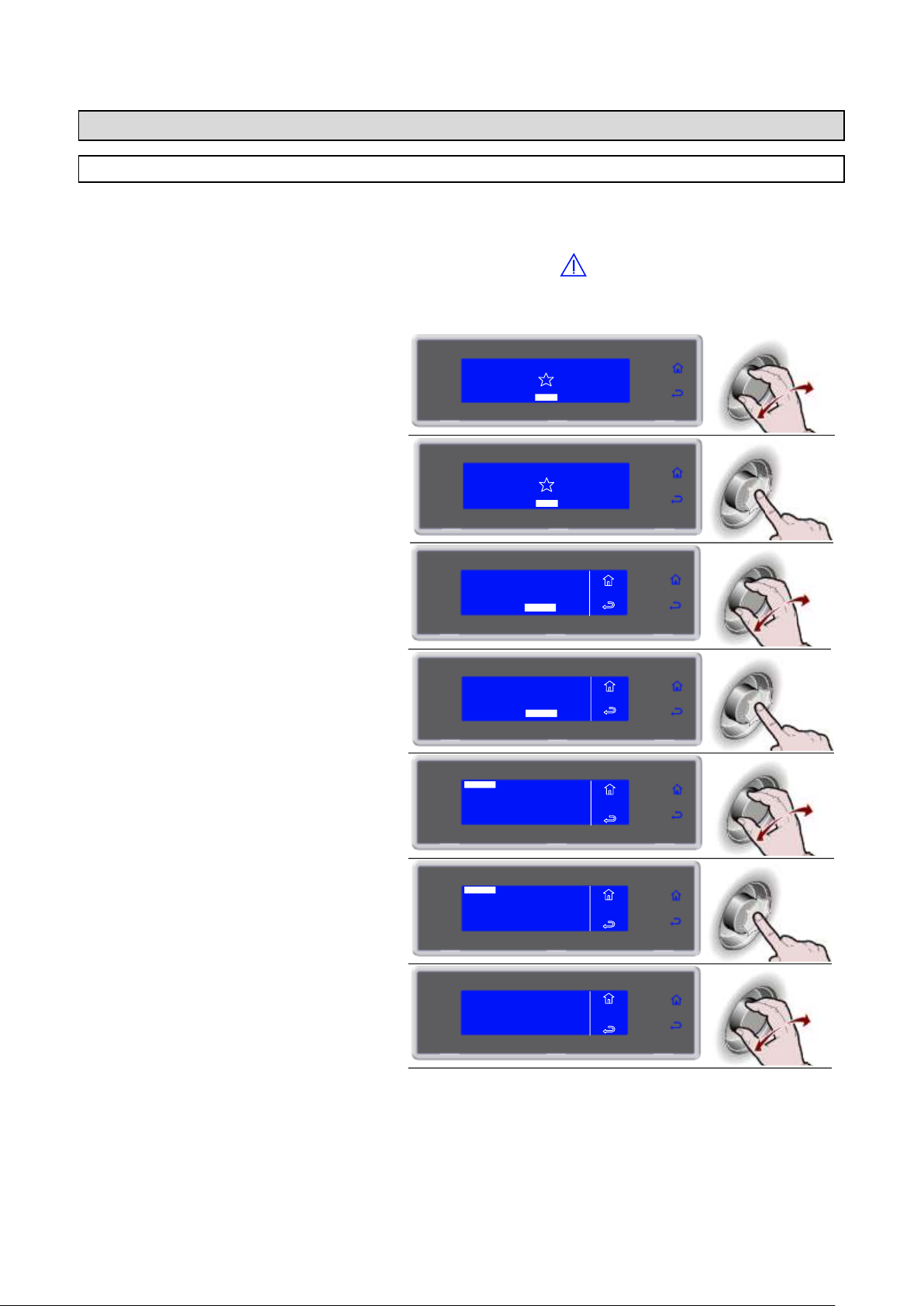
3283430_GB
1. Select MENU by rotating the knob
SOFT 0°F
HARD 0°F
IFR INFINITY
SOFT +37°F
HARD +37°F
MENU
2. Press the knob to enter section MENU
SOFT 0°F
HARD 0°F
IFR INFINITY
SOFT +37°F
HARD +37°F
MENU
3. Select SERVICE by rotating the knob
4. Press the knob to enter section
SERVICE
5. Select ALARMS by rotating the knob
6. Press the knob to view the list ALARMS
7. View the alarms list by rotating the knob
MENU
SERVICE
ALARMS
A04: OPEN DOOR ALARM
START 10:34 28/03/2012
END 10:35 28/03/2012
MAXIMUM TEMPERATURE 62°F
AUTOMATIC
MULTY
COOLING
STORED
SETTING
SERVICE
HACCP
FUNCTIONS
MENU
AUTOMATIC
MULTY
COOLING
STORED
SETTING
SERVICE
HACCP
FUNCTIONS
MENU
MENU
SERVICE
ALARMS RESET
RESTORE
MULTY
PARAMETERS
INPUTS OUTPUTS
ALARMS
FIRMWARE
MENU
SERVICE
ALARMS RESET
RESTORE
MULTY
PARAMETERS
INPUTS OUTPUTS
ALARMS
FIRMWARE
SERVICE
ALARMS
The presence of an active alarm is signalled by the buzzer and the display shows the event alternating with
the screen showing the process in progress. The RGB bar turns yellow.
The alarms are recorded on a list.
The presence of an alarm stored on the list is indicated by the symbol .
You can record up to a maximum of 42 alarms. Any additional event overwrites the oldest one.
56
Page 57
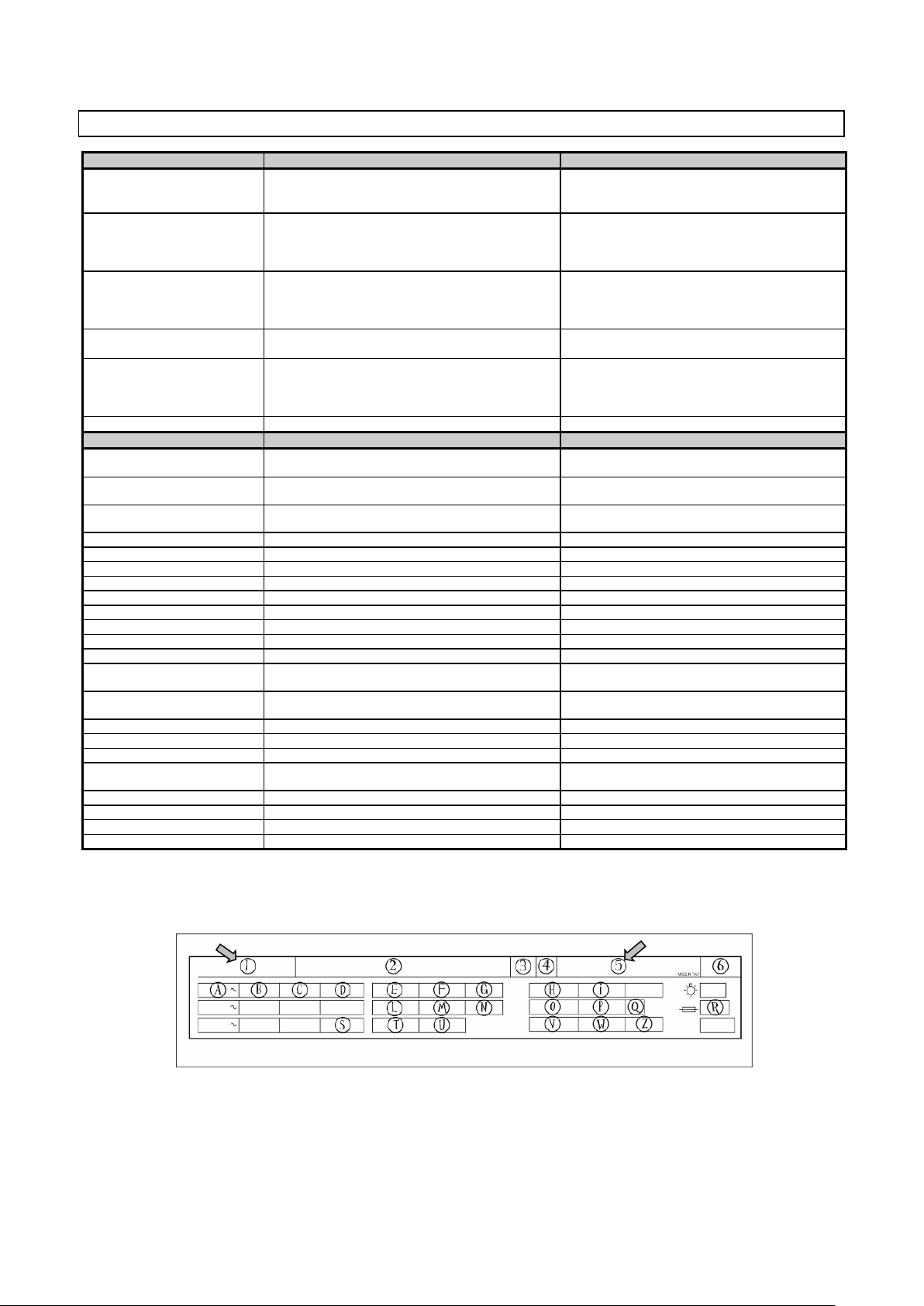
3283430_GB
FAULT
CAUSE
REMEDY
The display board does not
switch on
No power supply
Blown fuse
Loosened connections
Check the connection to the power mains
Replace fuses (qualified technician)
Check connection fitting
Compressor failure
High and Low-pressure pressureswitch on
Clicker on
Contactor failure
Compressor thermal relay on
Qualified technician required
Qualified technician required
Qualified technician required
Qualified technician required
The compressor is working
but the cabinet is not
cooling
Frosted evaporator
No coolant inside the refrigerating system
Delivery solenoid valve failure
Condenser dirty
Open the door and carry out the defrost cycle
Qualified technician required
Qualified technician required
Clean the condenser
Evaporator fans are not
working
Fan failure or short-circuit
Door micro failure
Qualified technician required
Qualified technician required
The condenser fans do not
work
Faulty pressure switch
Faulty fan
Faulty pick-up condenser
Lack of consent from compressor solenoid switch
Qualified technician required
Qualified technician required
Qualified technician required
Qualified technician required
Lack of evaporator defrosting
Incorrect defrosting programming
Check the defrosting cycle programming
ALARM/ EVENT
CAUSE
REMEDY
High temperature alarm
(in conservation)
Room Temp above set value
If the temperature is not within the specified range,
apply to a qualified technician
Low temperature alarm
(in conservation)
Room Temp below set value
If the temperature is not within the specified range,
apply to a qualified technician
Limit temperature alarm
(in chilling/freezing)
Cell or core temperature higher than the set value
If the temperature is not within the specified range,
apply to a qualified technician
Room probe alarm
Room Probe interrupted
Qualified technician required
Evaporator probe alarm
Evap Probe interrupted
Qualified technician required
Condenser probe alarm
Cond Probe interrupted
Qualified technician required
Dirty condenser alarm
Condenser dirty
Clean the condenser
Point needle probe alarm
Needle Probe interrupted
Qualified technician required
Underskin needle probe alarm
Sub-dermis needle probe interrupted
Qualified technician required
External needle probe alarm
External needle probe interrupted
Qualified technician required
Electr.box probe alarm
Electrical panel probe interrupted
Qualified technician required
Electr.box overtemp. alarm
Electrical panel temperature higher than the set value
Qualified technician required
Open door alarm
QC room door open
Door micro faulty
Close the door
Qualified technician required
BlackOut alarm
No power supply
When power is restored, check the max. temperature
reached inside the room
High pressure alarm
Intervention by high pressure switch
Qualified technician required
Low pressure alarm
Intervention by low pressure switch
Qualified technician required
Compressor overload alarm
Compressor thermal relay on
Qualified technician required
Mother board communication
alarm
Communication between the panel board and the
display board interrupted
Qualified technician required
Mother board EEPROM alarm
Data memory corrupted
Qualified technician required
Panel board EEPROM alarm
Data memory corrupted
Qualified technician required
Needle probe 1 alarm
Needle Probe 1 interrupted
Qualified technician required
Needle probe 2 alarm
Needle Probe 2 interrupted
Qualified technician required
ALARMS TABLE
If the fault is not corrected by following the above instructions ask for skilled assistance and avoid carrying
out any other operations, especially on the electricals. When informing the servicing company of the fault,
state 1 and 5 numbers (model and serial number).
57
Page 58
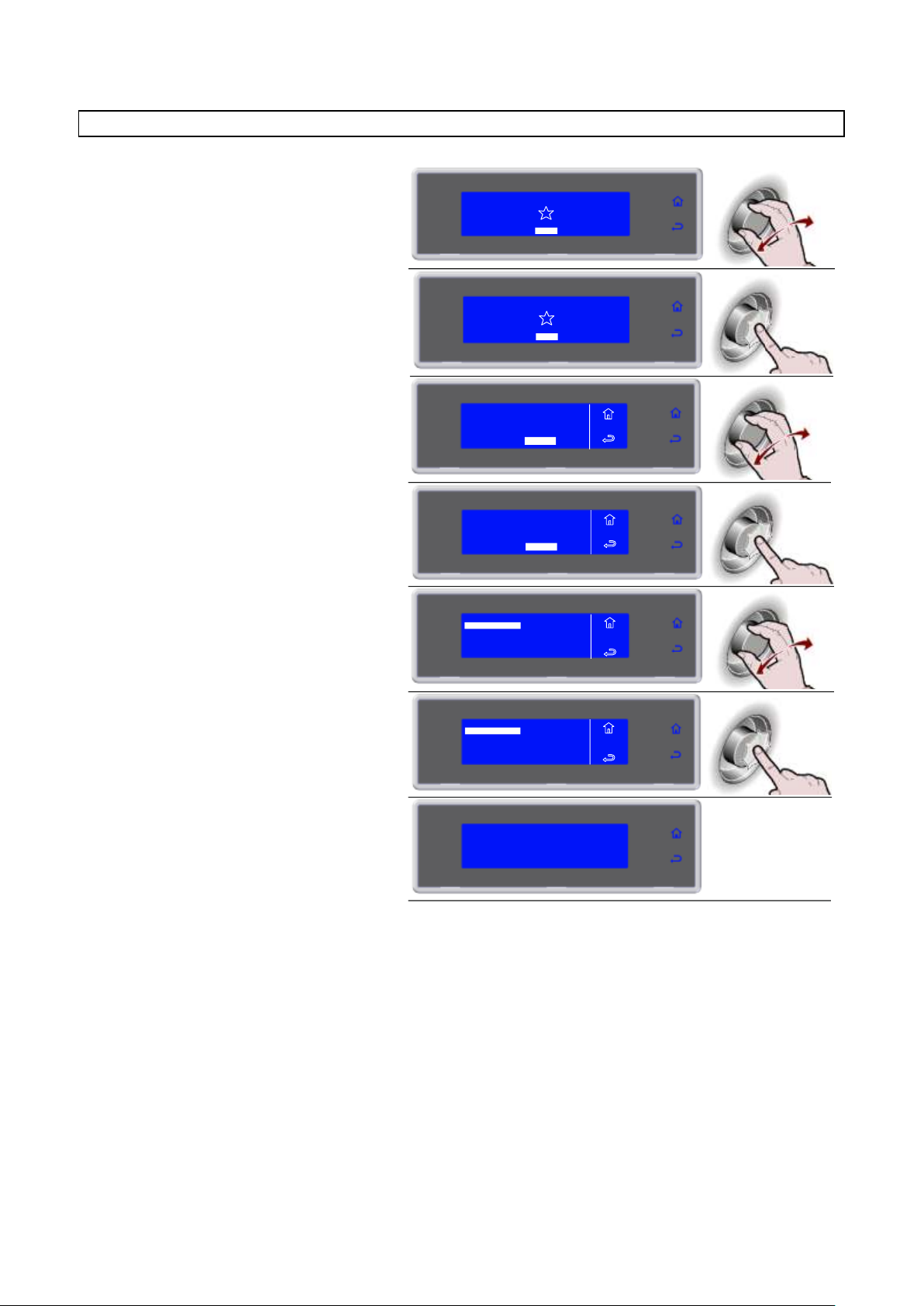
3283430_GB
1. Select MENU by rotating the knob
SOFT 0°F
HARD 0°F
IFR INFINITY
SOFT +37°F
HARD +37°F
MENU
2. Press the knob to enter section MENU
SOFT 0°F
HARD 0°F
IFR INFINITY
SOFT +37°F
HARD +37°F
MENU
3. Select SERVICE by rotating the knob
4. Press the knob to enter section
SERVICE
5. Select ALARMS RESET by rotating the
knob
6. Press the knob to enter section
ALARMS RESET
7. Wait
AUTOMATIC
MULTY
COOLING
STORED
SETTING
SERVICE
HACCP
FUNCTIONS
MENU
AUTOMATIC
MULTY
COOLING
STORED
SETTING
SERVICE
HACCP
FUNCTIONS
MENU
MENU
SERVICE
RESTORE
MULTY
PARAMETERS
INPUTS OUTPUTS
ALARMS
FIRMWARE
ALARMS RESET
MENU
SERVICERESTORE
MULTY
PARAMETERS
INPUTS OUTPUTS
ALARMS
FIRMWARE
ALARMS RESET
ALARMS RESET
RESET ALARMS
58
Page 59
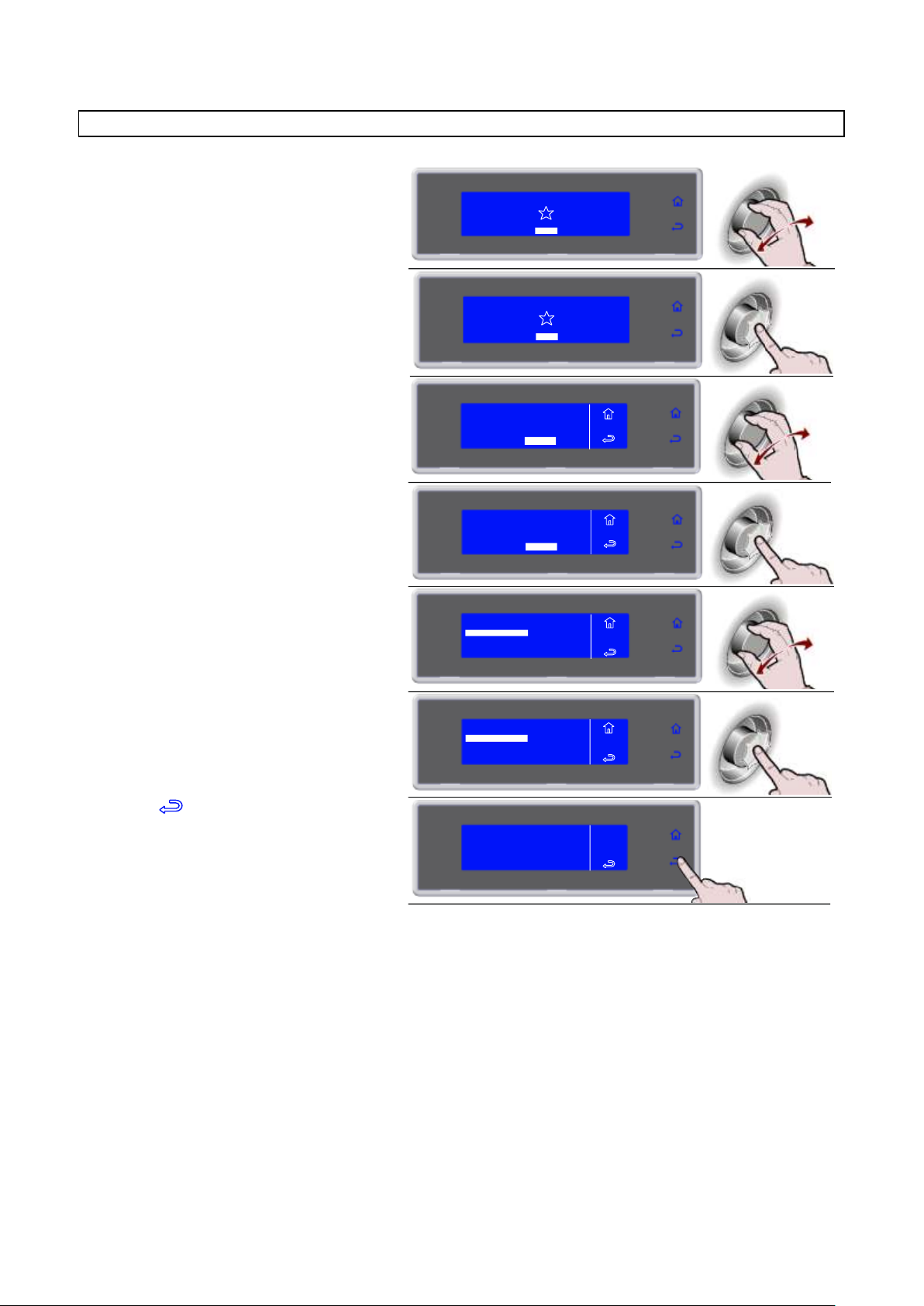
3283430_GB
1. Select MENU by rotating the knob
SOFT 0°F
HARD 0°F
IFR INFINITY
SOFT +37°F
HARD +37°F
MENU
2. Press the knob to enter section MENU
SOFT 0°F
HARD 0°F
IFR INFINITY
SOFT +37°F
HARD +37°F
MENU
3. Select SERVICE by rotating the knob
4. Press the knob to enter section
SERVICE
5. Select INPUTS OUTPUTS by rotating
the knob
6. Press the knob to view the list INPUTS
OUTPUTS
7. Select to exit from the view
MENU
SERVICE
IN/OUT
NEEDLE
UNDERSKIN
EXTERNAL
AIR
EVAPORATOR
CONDENSER
80°F
78°F
84°F
82°F
78°F
77°F
AUTOMATIC
MULTY
COOLING
STORED
SETTING
SERVICE
HACCP
FUNCTIONS
MENU
AUTOMATIC
MULTY
COOLING
STORED
SETTING
SERVICE
HACCP
FUNCTIONS
MENU
MENU
SERVICE
RESTORE
MULTY
PARAMETERS
ALARMS
FIRMWARE
ALARMS RESET
INPUTS OUTPUTS
MENU
SERVICERESTORE
MULTY
PARAMETERS
ALARMS
FIRMWARE
ALARMS RESET
INPUTS OUTPUTS
INPUTS OUTPUTS
59
Page 60
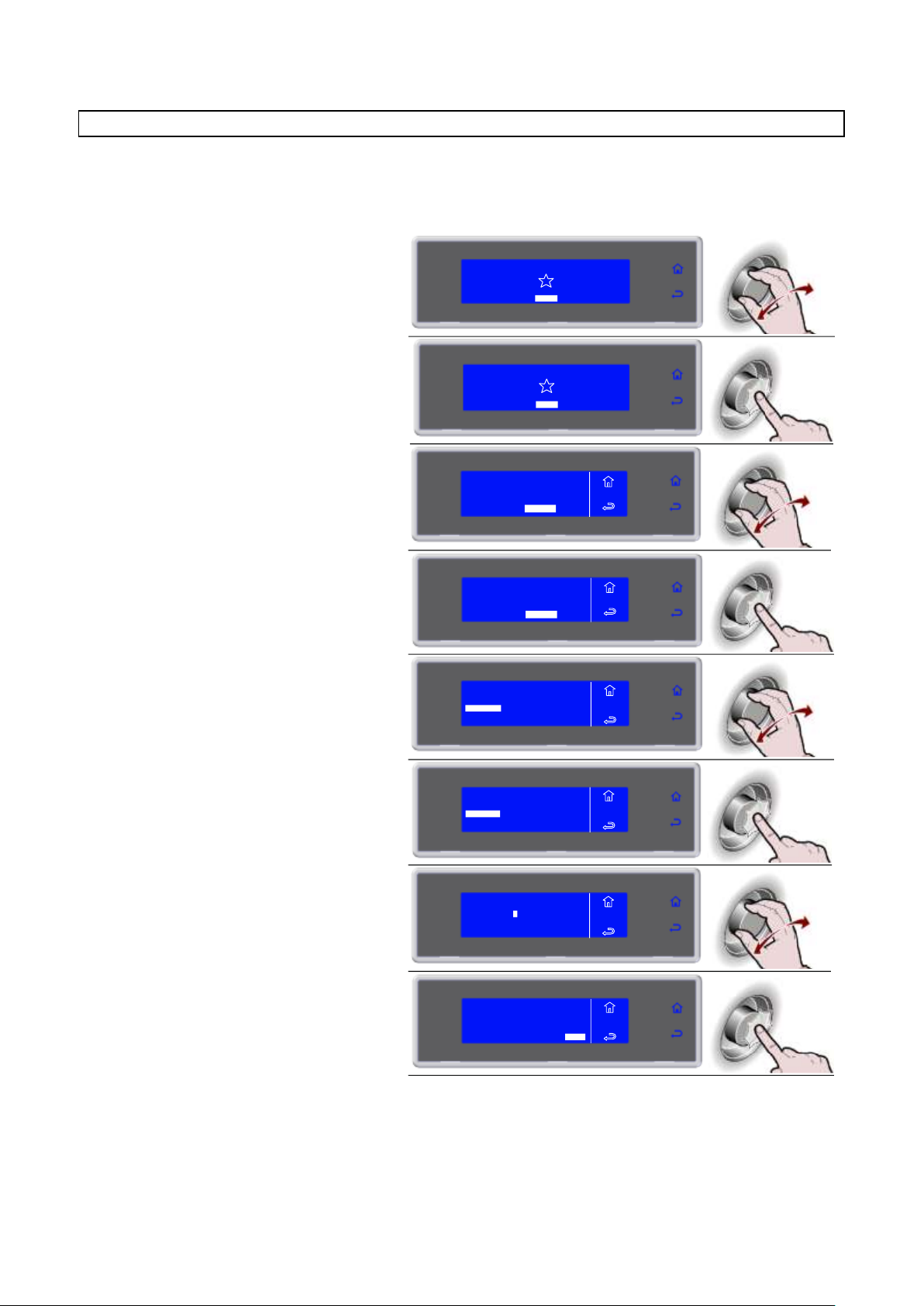
3283430_GB
1. Select MENU by rotating the knob
SOFT 0°F
HARD 0°F
IFR INFINITY
SOFT +37°F
HARD +37°F
MENU
2. Press the knob to enter section MENU
SOFT 0°F
HARD 0°F
IFR INFINITY
SOFT +37°F
HARD +37°F
MENU
3. Select SERVICE by rotating the knob
4. Press the knob to enter section
SERVICE
5. Select RESTORE by rotating the knob
6. Press the knob to enter section
RESTORE
7. Enter the password by turning the knob
and press to confirm the value and move
to the next one until ENTER is selected
Request the password from SERVICE
8. Press the knob to confirm and enter
section RESTORE
AUTOMATIC
MULTY
COOLING
STORED
SETTING
SERVICE
HACCP
FUNCTIONS
MENU
AUTOMATIC
MULTY
COOLING
STORED
SETTING
SERVICE
HACCP
FUNCTIONS
MENU
MENU
SERVICE
MULTY
PARAMETERS
ALARMS
FIRMWARE
ALARMS RESET
INPUTS OUTPUTS
RESTORE
MENU
SERVICE
MULTY
PARAMETERS
ALARMS
FIRMWARE
ALARMS RESET
INPUTS OUTPUTS
RESTORE
MENU
SERVICE
_ _ _ _
PASSWORD
ENTER
MENU
SERVICE
_ _ _ _
PASSWORD
ENTER
* * * *
RESTORE
This function restores the original parameters.
ATTENTION: in case of use of this function as a user, contact the manufacturer for the exact settings of the
configuration parameters.
60
Page 61
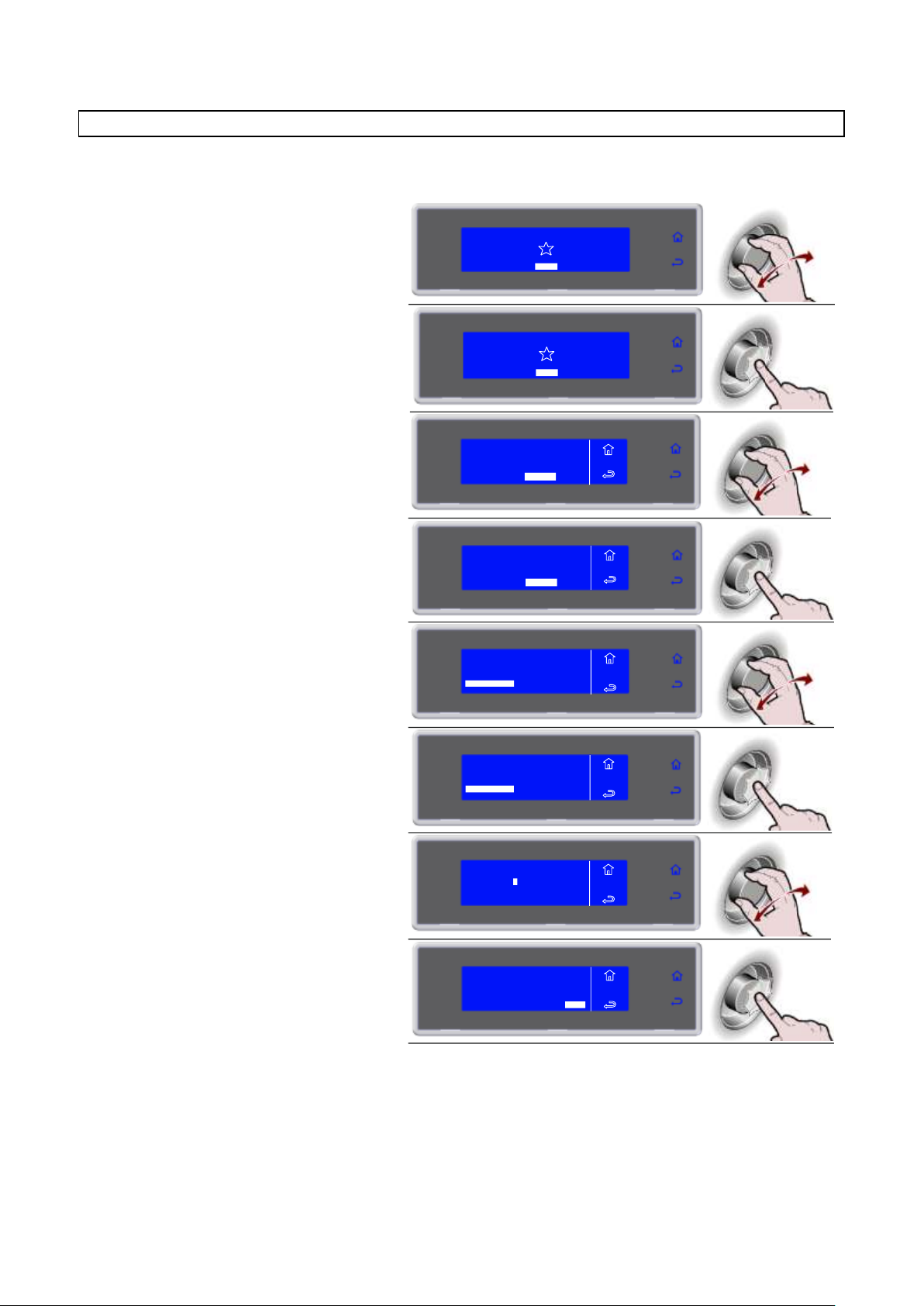
3283430_GB
1. Select MENU by rotating the knob
SOFT 0°F
HARD 0°F
IFR INFINITY
SOFT +37°F
HARD +37°F
MENU
2. Press the knob to enter section MENU
SOFT 0°F
HARD 0°F
IFR INFINITY
SOFT +37°F
HARD +37°F
MENU
3. Select SERVICE by rotating the knob
4. Press the knob to enter section
SERVICE
5. Select PARAMETERS by rotating the
knob
6. Press the knob to enter section
PARAMETERS
7. Enter the password by turning the knob
and press to confirm the value and
move to the next one until ENTER is
selected
Request the password from SERVICE
8. Press the knob to confirm and enter
section PARAMETERS
AUTOMATIC
MULTY
COOLING
STORED
SETTING
SERVICE
HACCP
FUNCTIONS
MENU
AUTOMATIC
MULTY
COOLING
STORED
SETTING
SERVICE
HACCP
FUNCTIONS
MENU
MENU
SERVICE
MULTY
ALARMS
FIRMWARE
ALARMS RESET
INPUTS OUTPUTS
RESTORE
PARAMETERS
MENU
SERVICE
MULTY
ALARMS
FIRMWARE
ALARMS RESET
INPUTS OUTPUTS
RESTORE
PARAMETERS
MENU
SERVICE
_ _ _ _
PASSWORD
ENTER
MENU
SERVICE
_ _ _ _
PASSWORD
ENTER
* * * *
PARAMETERS
ATTENTION: in case of use of this function as a user, contact the manufacturer.
61
Page 62
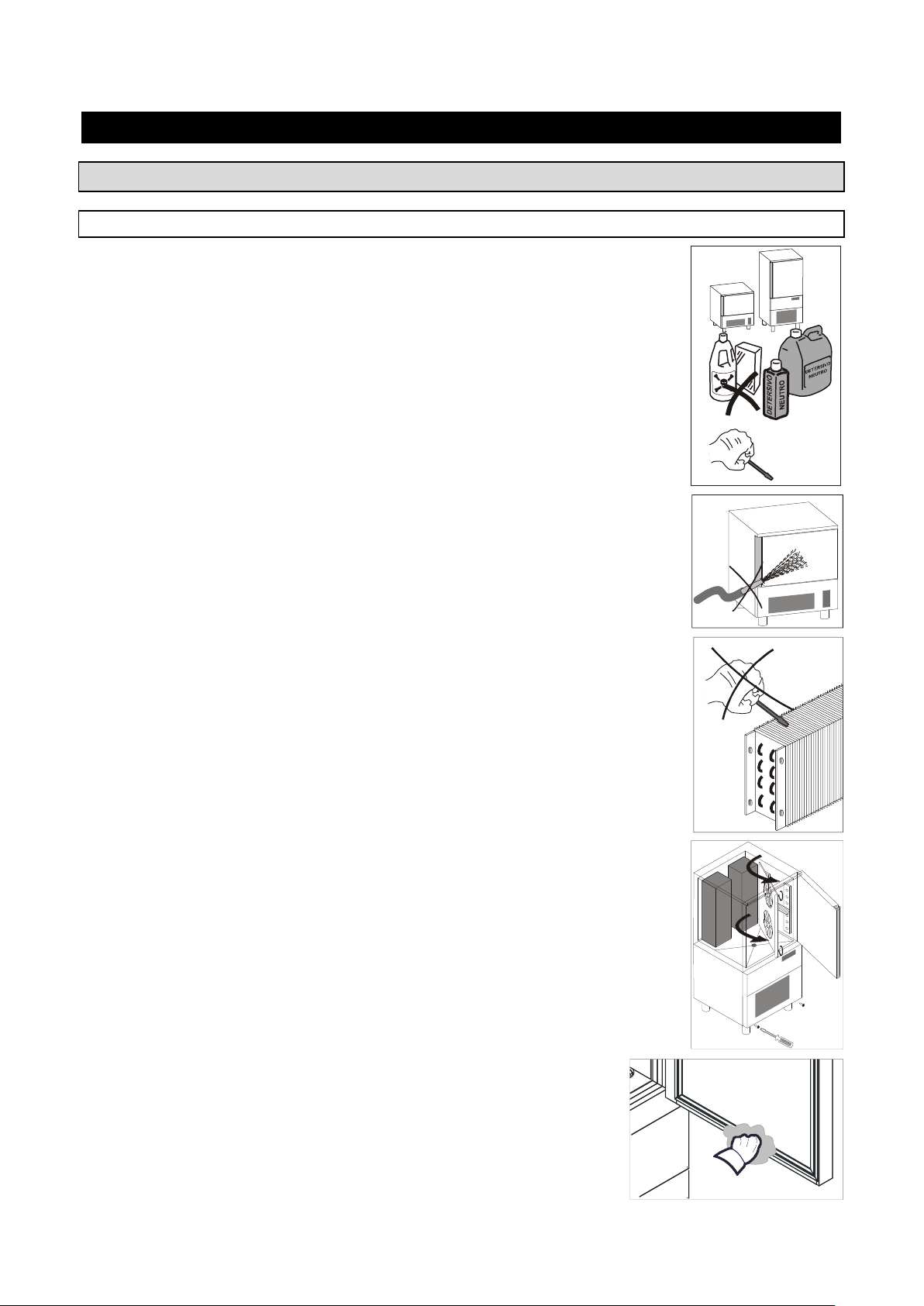
3283430_GB
MAINTENANCE
D
E T E R S I V
O
A
B
R A S I V
O
MAINTENANCE AND CLEANING
CLEANING THE CABINET
Clean inside the cooling cabinet daily.
Both the cabinet and all the internal components have been designed and shaped to
allow washing and cleaning all parts easily.
Before cleaning, defrost the appliance and remove the internal drain.
Disconnect the master switch.
Clean all components (stainless-stell, plastic or painted parts) with lukewarm water
and detergent.
Then rinse and dry without using abrasives or chermical solvents.
Do not wash the appliance by spraying high-pressure water on the machine.
Do not rinse with sharp or abrasive tools, especially the evaporator.
You may clean inside the evaporator after loosening the knobs and rotating the
protection component.
Wash the door gasket with water. Accurately dry with a dry cloth. We
recommend wearing protecting gloves throughout the operations.
62
Page 63

3283430_GB
Hand-wash the probe using lukewarm water and a mild detergent or products
with biodegradability higher than 90%. Rinse with water and sanitary solution.
Do not use detergents containing solvents (such as trichloroethylene, etc) or
abrasive powders
ATTENTION: do not use hot water to wash the probe.
CLEANING THE AIR CONDENSER
The air condenser should be kept clean to ensure the appliance's performance and efficiency, as air should
freely circulate inside the appliance.
The condenser should therefore be cleaned every 30 days, using non-metal brushes to remove all dust and
dirt from condenser blades.
Access to the condenser is from the front.
Unhook the front guard, pulling it towards you.
STAINLESS-STEEL MAINTENANCE
By stainless steel we mean INOX AISI 304 steel.
We recommend following the instructions below for the maintenance and
cleaning of stainless-steel parts.
This is of the utmost importance to ensure the non-toxicity and complete
hygiene of the processed foodstuffs.
Stainless-steel is provided with a thin oxide layer which prevents it from rusting.
However, some detergents may destroy or affect this layer, therefore causing
corrosion.
Before using any cleansing product, ask your dealer about a neutral chloriness
cleansing product, as to avoid steel corrosions.
If the surface has been scratched polish it with fine STAINLESS-STEEL wool
or a synthetic-fibre abrasive sponge. Always rub in the direction of the silking.
WARNING: Never use iron wool for cleaning STAINLESS STEEL.
Furthermore, avoid leaving iron wool on the appliance surface as tiny iron
deposits may cause the surface to rust by contamination and affect the hygiene
of the appliance.
63
Page 64
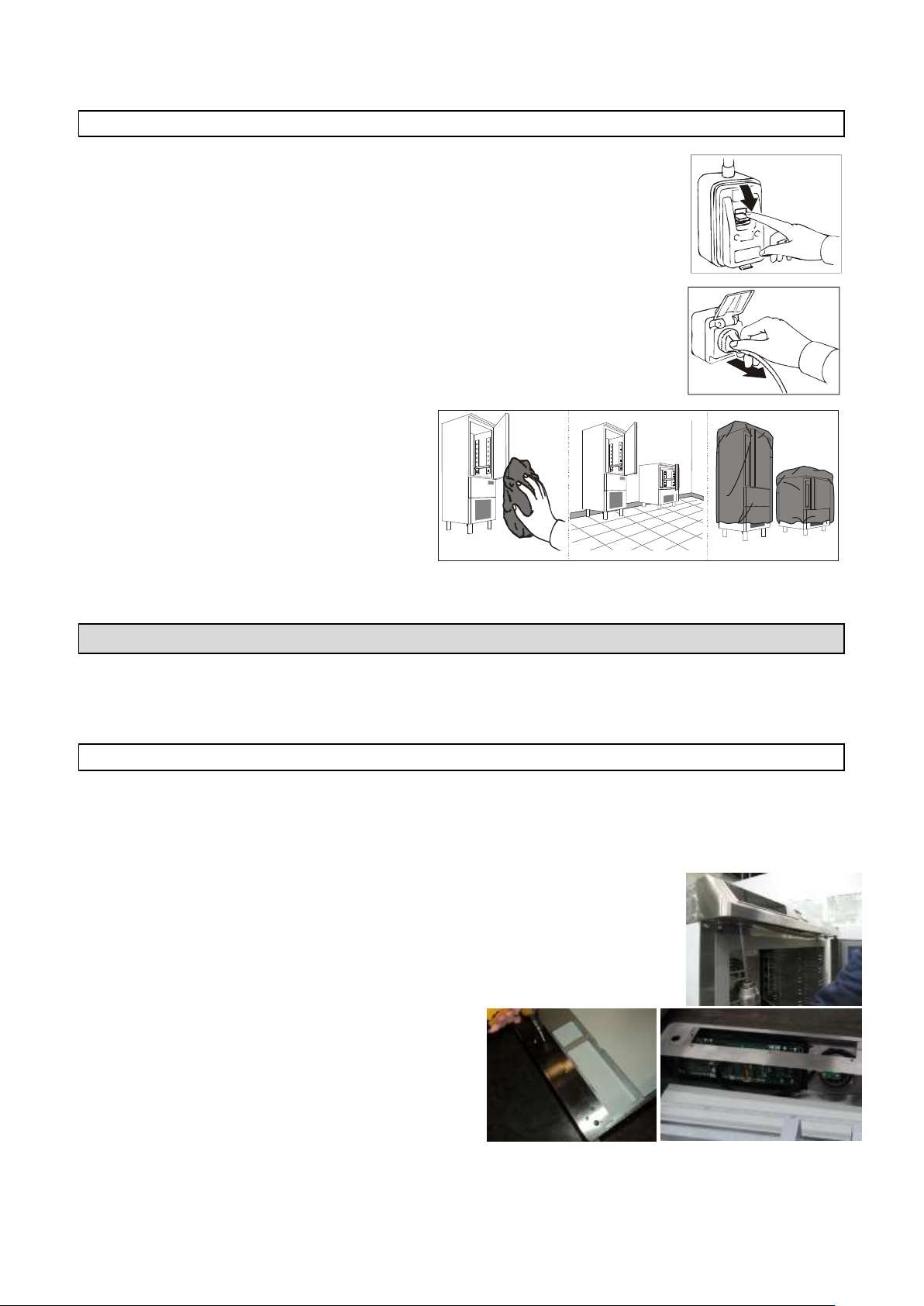
3283430_GB
OFF
DISCONTINUED USE
Should the machine be disconnected over long periods, follow the instructions below
to maintain the appliance in good condition:
Turn the mains switch OFF.
Disconnect the plug.
Empty the appliance and clean it in accordance
with the instructions given in the chapter
"CLEANING".
Leave the door ajar to prevent a
bad smell.
Cover the compressor unit with a nylon cloth to
protect it from dust.
In case of appliances with remote control, if you
decide to turn it off, remember to put the switch
off also in the remote control..
EXTRAORDINARY MAINTENANCE
The information and instructions in this section are reserved for personnel authorized to operate on the
equipment components.
VIDEO BOARD AND ENCODER MAINTENANCE CHECKLIST
Turn the mains switch OFF.
Disconnect the plug.
To access the video board and the encoder:
Mod. …51MU
Undo the two screws securing the plane.
Rotate the plane and unplugging the power cord of
the video board.
Undo the screws and remove the cover to access to
the video card and to the encoder.
64
Page 65
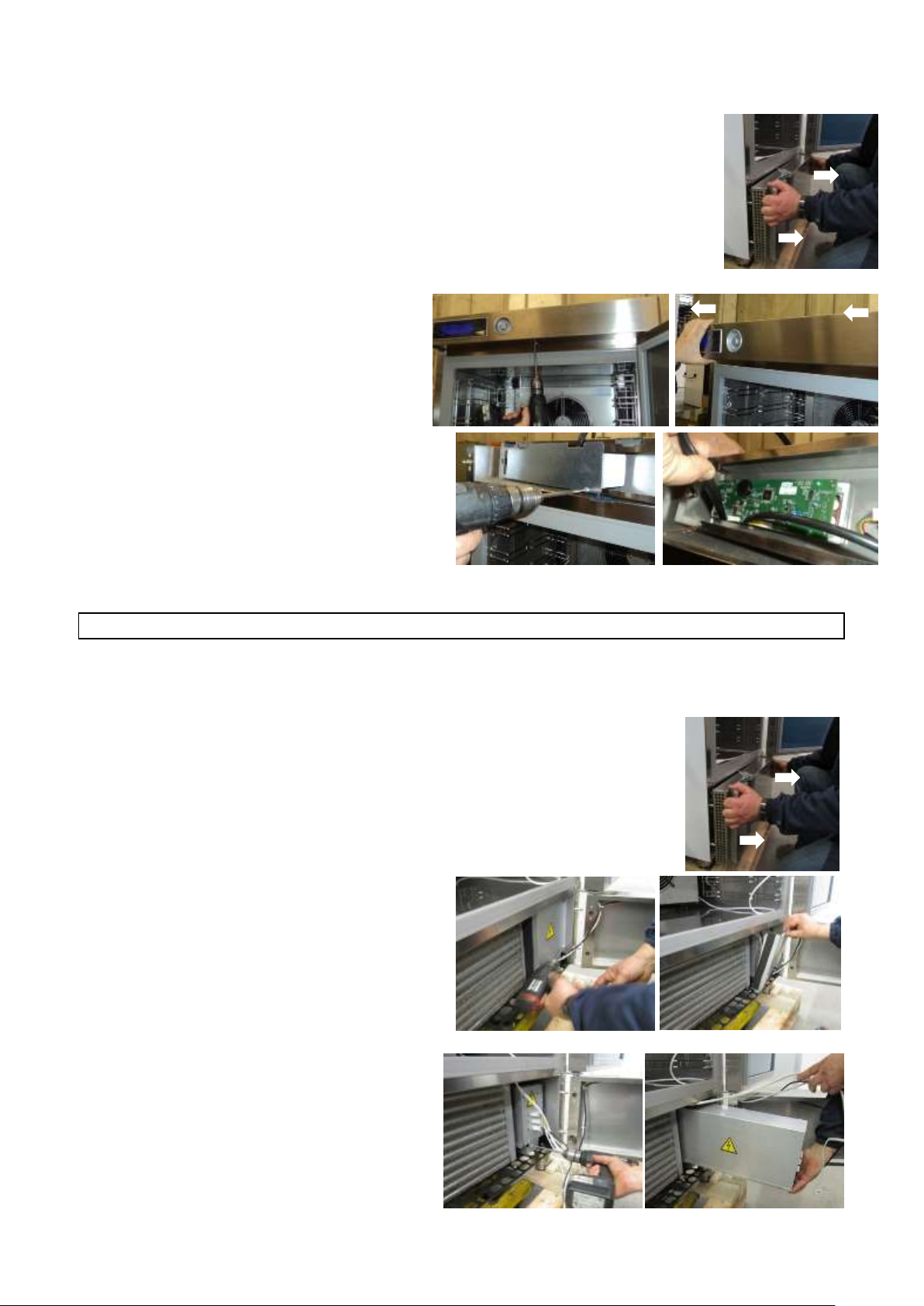
3283430_GB
Mod. …52MU
Unhook the front guard, pulling it towards you.
Undo the guard screws and remove the
cover to access to the video card and to
the encoder.
Mod. …101LU – …101SU – …72SU – …102SU
Undo the screw under the dashboard.
Unhook the dashboard, pulling it forward.
Undo the guard screws and remove the cover
to access to the video card and to the encoder.
MAINTENANCE OF PANEL BOARD
Turn the mains switch OFF.
Disconnect the plug.
To be able to access the electric picture:
Mod. …51MU - …52MU
Unhook the front guard, pulling it towards you.
Remove the closing panel screws.
Remove the closing panel.
Remove the electrical panel locking screw.
Move the electrical panel box along the slide.
65
Page 66
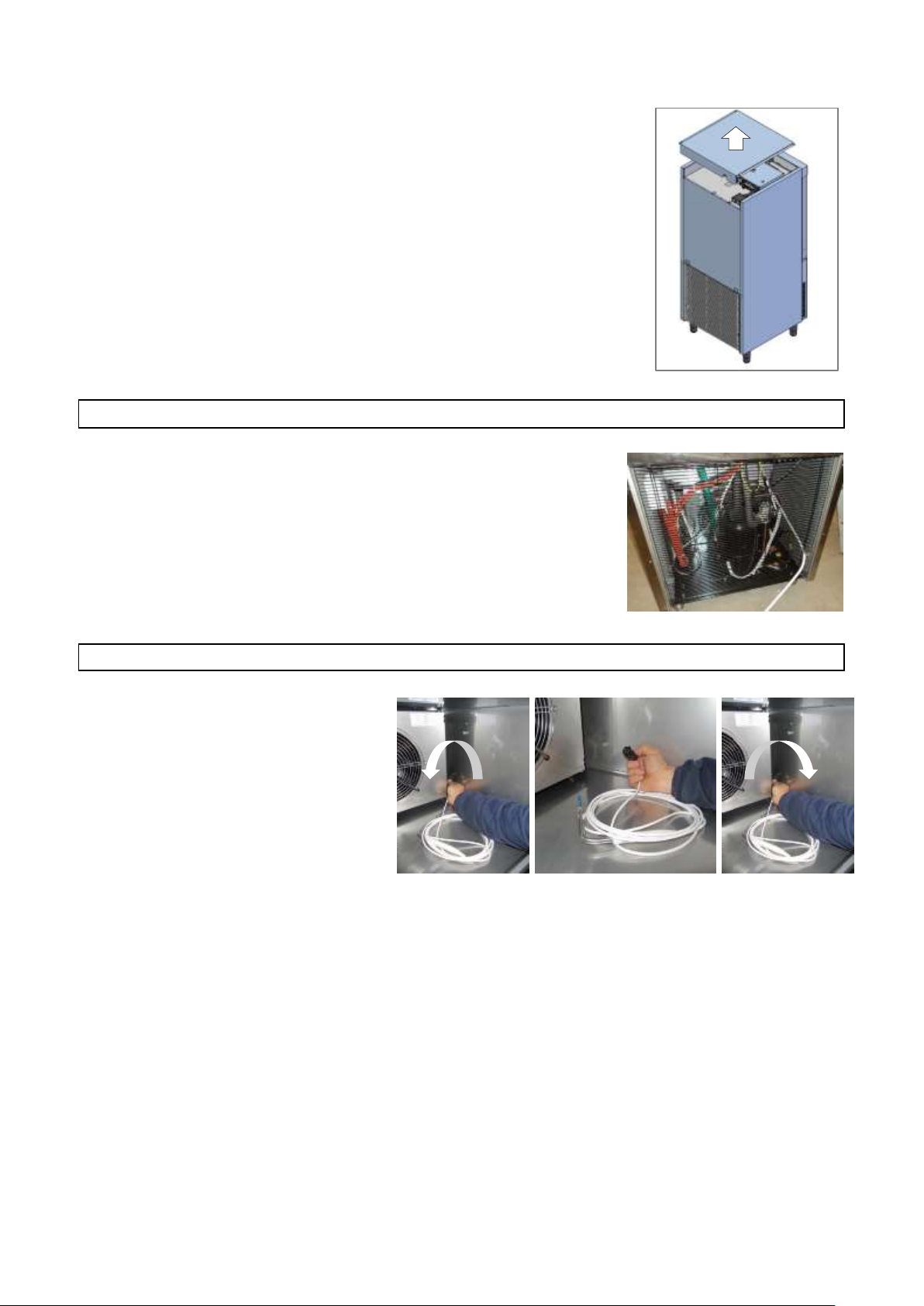
3283430_GB
Mod. …101LU – …101SU - …72SU – …102SU
Remove the protection panel out in the upper part of the appliance.
CONDENSING SYSTEM MAINTENANCE
To access the condensing system, remove the rear protective grille, undoing
the screws.
REPLACEMENT CORE PROBE
Turn left completely unscrewing the
connector to disconnect the cable of the
core probe.
Replace the core probe by screwing the
connector fully.
66
Page 67
3283430_GB
N°
DESCRIPTION
N°
DESCRIPTION
1
COMPRESSOR
70
HIGH PRESSURE PRESSOSTAT
2
CONDENSER FAN
72
ELECTRONIC DATA CARD LCD
2A
THERMOSTATED CONDENSER FAN
73
FUSE-HOLDER WITH UNIPOLAR FUSE
3
GENERAL TERMINAL BOARD
75
ELECTROVALVE
3A
GENERAL TERMINAL BOARD
76
MAGNETIC MICRO-SVWITCH
3B
GENERAL TERMINAL BOARD
77
COMPARTMENT PROBE
9
EVAPORATOR FUN
78
EVAP./DEFROST PROBE
20
DOOR ANTICONDENSING RESISTOR
79A
MULTIPOINT NEEDLE CORE PROBE
21
DEFROST RESISTANCE
79B
MULTIPOINT PROBE RESISTANCE
21A
DEFROST RESISTANCE
80
PTC RESISTANCE FOR COMPRESSOR CASING
25
TRANSFORMER
86
CONDENSER PROBE
44
RELAY COMPRESSOR
87
LCD QUICK COOLER CARD
56
FILTER
97A
EVAP. FAN CHOKE MODULE
65
CONTACTOR
102
BIMETALLIC SAFETY THERMOSTAT
66
THERMAL RELAY
122
LED LAMPS
67
EVAPORATOR FAN RUN CAPACITOR
128
USB ADAPTER
67A
EVAPORATOR FAN RUN CAPACITOR
129
ENCODER ADAPTER
69
GROUNDING TERMINAL
130
RGB CONTROLLER
71
POWER PANEL ELECTRONIC CARD
WIRING DIAGRAM PLATE
The electrical diagram is shown on the last page of the booklet.
67
Page 68

Page 69

3283430_FR
INDEX
DONNEES GENERALES A LA REMISE ............................................................................ 5
AVERTISSEMENTS GÉNÉRAUX ..................................................................................................................... 5
LISTE DES RÉFÉRENCES NORMATIVES .......................................................................................................... 5
TRANSPORT ET DÉPLACEMENT .................................................................................................................... 5
DÉBALLAGE ................................................................................................................................................. 5
AVERTISSEMENTS GÉNÉRAUX DE SÉCURITÉ ................................................................................................. 6
INSTALLATION ............................................................................................................ 7
DONNÉES DE LA PLAQUE ............................................................................................................................. 7
TEMPERATURE MAX DU LOCAL D’UTILISATIN .............................................................................................. 7
MISE EN PLACE ............................................................................................................................................ 8
DIMENSIONS D’ENCOMBREMENT ................................................................................................................................... 9
DONNÉES TECHNIQUES .................................................................................................................................................. 11
BRANCHEMENT ELECTRIQUE ..................................................................................................................... 12
EVACUATION DE CONDENSATION ............................................................................................................. 12
ESSAIS ....................................................................................................................................................... 12
SYSTÉMES DE CONTRÔLE ET TÉMOINS ...................................................................................................... 13
FICHE TECHNIQUE DU REFRIGERANT ......................................................................................................... 13
ECOULEMENT ............................................................................................................................................ 14
INSTALLATION DU KIT LAMPE GERMICIDE ................................................................................................. 14
INSTALLATION DE L’IMPRIMANTE ............................................................................................................. 14
FONCTIONNEMENT ................................................................................................... 15
DESCRIPTION GÉNÉRALE ........................................................................................................................... 15
COMMENT SE PRÉPARER AU DÉMARRAGE.................................................................................................................... 15
CHARGEMENT DE LA CELLULE ........................................................................................................................................ 16
PLACEMENT DES RÉCIPIENTS ......................................................................................................................................... 16
SONDE A COEUR ............................................................................................................................................................. 16
TEMPÉRATURES ............................................................................................................................................................. 17
DURÉE DE CONSERVATION ............................................................................................................................................ 17
PANNEAU DE COMMANDE ........................................................................................................................ 18
PREMIER DÉMARRAGE .............................................................................................................................. 19
PROGRAMMES .......................................................................................................................................... 20
DESCRIPTION DES PROGRAMMES .................................................................................................................................. 20
PROGRAMMES STRANDARDS ........................................................................................................................................ 22
PROGRAMME I.F.R. ........................................................................................................................................................ 23
PROGRAMME INFINITY .................................................................................................................................................. 24
PROGRAMMES FAVORIS ................................................................................................................................................ 25
PROGRAMMES AUTOMATIQUES ................................................................................................................................... 26
PROGRAMMES ENREGISTRÉS ......................................................................................................................................... 28
MULTY ............................................................................................................................................................................ 30
REFROIDISSEMENT ......................................................................................................................................................... 31
FUNCTIONS ............................................................................................................................................... 32
DEGIVRAGE..................................................................................................................................................................... 32
STERILISATION ................................................................................................................................................................ 33
CONSERVATION .............................................................................................................................................................. 34
DECONGELATION ........................................................................................................................................................... 35
FERMENTATION ............................................................................................................................................................. 37
CHAUFFAGE DE SONDE .................................................................................................................................................. 39
** VISUALISATION/MODIFICATION PARAMÈTRES CYCLE .............................................................................................. 41
HACCP ....................................................................................................................................................... 42
3
Page 70

3283430_FR
POSITIONS ................................................................................................................................................ 51
Prénom et nom
Adresse
Tel./Fax
LANGUE .......................................................................................................................................................................... 51
SET DATA/MONTRE ........................................................................................................................................................ 52
SECTEUR ......................................................................................................................................................................... 53
MULTY ............................................................................................................................................................................ 54
CONTROLE CYCLE - AUTO OU MANUEL ......................................................................................................................... 55
SERVICE ..................................................................................................................................................... 56
ALARMES ........................................................................................................................................................................ 56
TABLEAU DES ALARMES ................................................................................................................................................. 57
RESET ALARMES ............................................................................................................................................................. 58
ENTREES SORTIES ........................................................................................................................................................... 59
RETABLISSEMENT ........................................................................................................................................................... 60
PARAMETRES .................................................................................................................................................................. 61
ENTRETIEN ................................................................................................................ 62
NETTOYAGE ET ENTRETIEN ........................................................................................................................ 62
NETTOYAGE ENCEINTE ................................................................................................................................................... 62
NETTOYAGE DU CONDENSEUR A AIR A .......................................................................................................................... 63
ENTRETIEN ACIER INOX .................................................................................................................................................. 63
INTERRUPTION D’UTILISATION ...................................................................................................................................... 64
ENTRETIEN EXTRAORDINAIRE ................................................................................................................... 64
ENTRETIEN DE LA CARTE VIDÉO ET DE L'ENCODEUR ..................................................................................................... 64
ENTRETIEN DU TABLEAU ÉLECTRIQUE ........................................................................................................................... 65
ENTRETIEN DE L'INSTALLATION DE CONDENSATION ..................................................................................................... 66
ENTRETIEN DE LA SONDE À COEUR ................................................................................................................................ 66
PLAQUETTE SCHÉMA ÉLECTRIQUE ............................................................................................................. 67
Prendre note du numéro du service d'urgence du personnel spécialisé en entretien.
4
Page 71
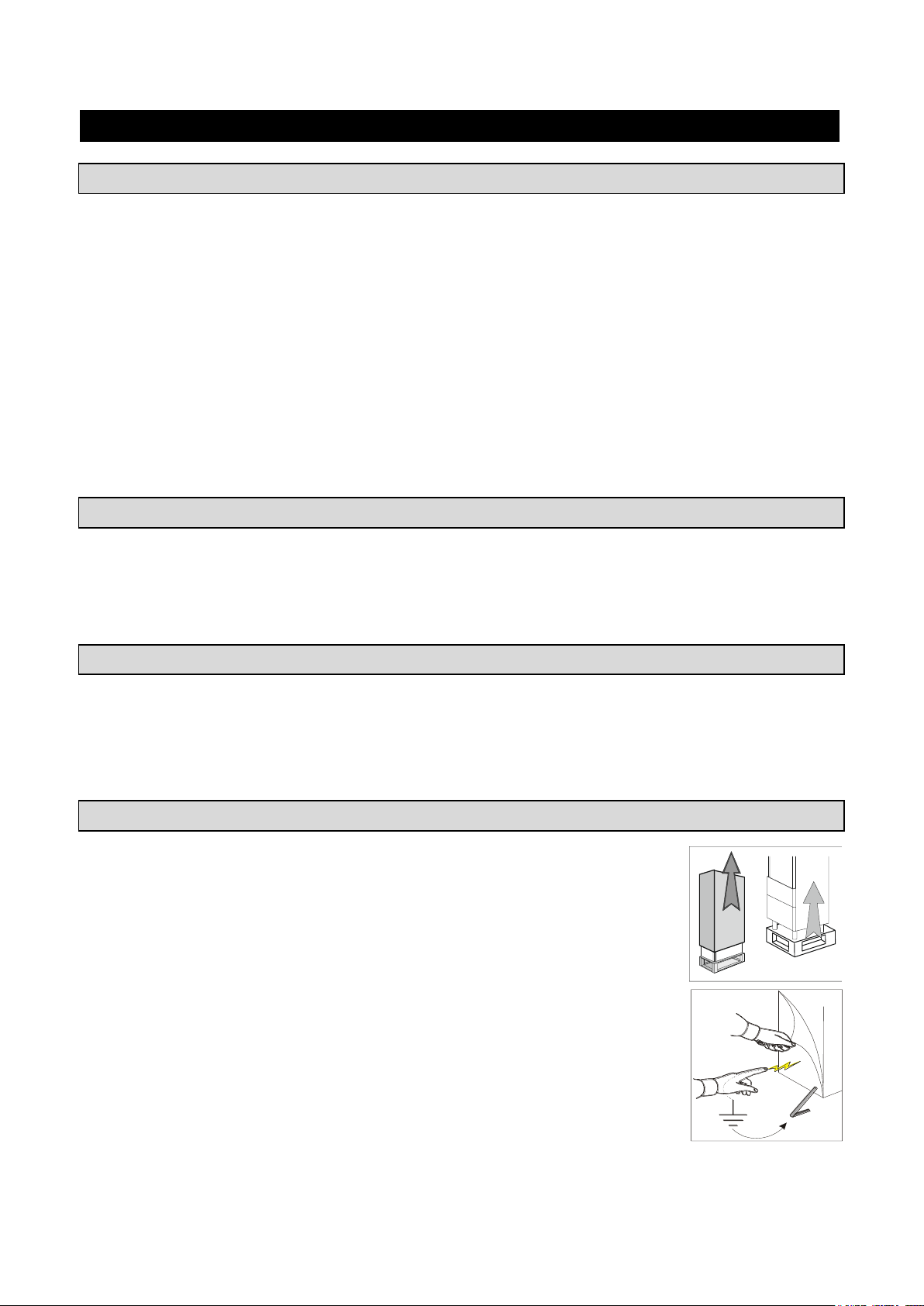
3283430_FR
DONNEES GENERALES A LA REMISE
AVERTISSEMENTS GÉNÉRAUX
Nous vous félicitons pour votre choix et nous vous souhaitons de pouvoir utiliser au mieux nos appareils
suivant les instructions et les précautions nécessarires contenues dans ce manuel.
Il est obligatoire, de la part de l'utilisateur, de lire attentivement le manuel et d'y faire toujours référence ; il
doit être conservé dans un lieu connu et accessible à tous les opérateurs.
L'appareil est destiné uniquement à la fonction pour laquelle il a été conçu et pour une utilisation
professionnelle, il ne doit être utilisé que par du personnel qualifié.
Le fabricant décline toute responsabilité ou toute obligation de garantie pour les dommages faits à
l'équipement, aux personnes et aux choses, en raison d'une mauvaise installation, d'une utilisation impropre
de la part de personnel non qualifié, de modifications ou d'interventions non spécifiques, de l'utilisation de
pièces de rechange non originales ou non spécifiques, du non-respect même partiel des indications
reportées dans ce manuel.
Nous vous rappelons que toute reproduction de ce manuel est interdite et que, en fonction d'une constante
recherche d'innovation et de qualité technique, les caractéristiques indiquées peuvent être modifiées sans
préavis.
LISTE DES RÉFÉRENCES NORMATIVES
Nos cellules mixtes sont conformes aux directives suivantes:
UL Listed pour sureté électrique – UL471 CSA C22.2.120
NSF standard 7 pour le Hygiène alimentaire
TRANSPORT ET DÉPLACEMENT
Pour le transport et le déplacement, il faut adopter toutes les précautions nécessaires pour ne pas
endommager l'appareil, en faisant référence aux indications reportées sur son emballage.
A la réception, vérifiez que l'emballage soit intact et ne soit pas endommagé par le transport.
Si ce nest pas le cas, mettez-vous immédiatement en contact avec votre revendeur.
DÉBALLAGE
L'installation doit être effectuée par du personnel.
Après avoir retiré l'emballage, s'assurer de l'intégrité de l'appareil et vérifier que soient
présents toutes les pièces ou les composants et que les caractéristiques et l'état
correspondent aux caractéristiques de votre commande.
Si ce nest pas le cas, mettez-vous immédiatement en contact avec votre revendeur.
Enlevez complètement la pellicule de protection en PVC de l'appareil.
Attention: tous les matériaux de l'emballage doivent être éliminés selon les normes
en vigueur dans le pays d'utilisation de l'appareil et donc rien ne doit être jeté dans la
nature.
5
Page 72

3283430_FR
AVERTISSEMENTS GÉNÉRAUX DE SÉCURITÉ
Toute opération effectuées sur l'appareil et qui ne respecte pas les indications de ce manuel doivent être de
la responsabilité de l'utilisateur, et nous recommandons une formation périodique de tout le personnel à
travailler sur l'appareil.
Liste de quelques avertissements généraux:
- ne pas toucher l'appareil avec les mains ou les pieds mouillées ou humides
- ne pas insérer de tournevis ou ustensile de cuisine ou autre entre les protections et les pièces en
mouvement
- avant toute opération de nettoyage ou d'entretien, débrancher l'appareil du réseau d'alimentation
électrique
- ne pas tirer sur le câble d'alimentation pour débrancher la machine du réseau électrique
- au cours du chargement/déchargement du produit dans l'appareil, utiliser des gants de cuisine
- utiliser la sonde à piquer uniquement pour relever la température au cœur du produit, en faisant
attention de la manipuler avec précaution
6
Page 73
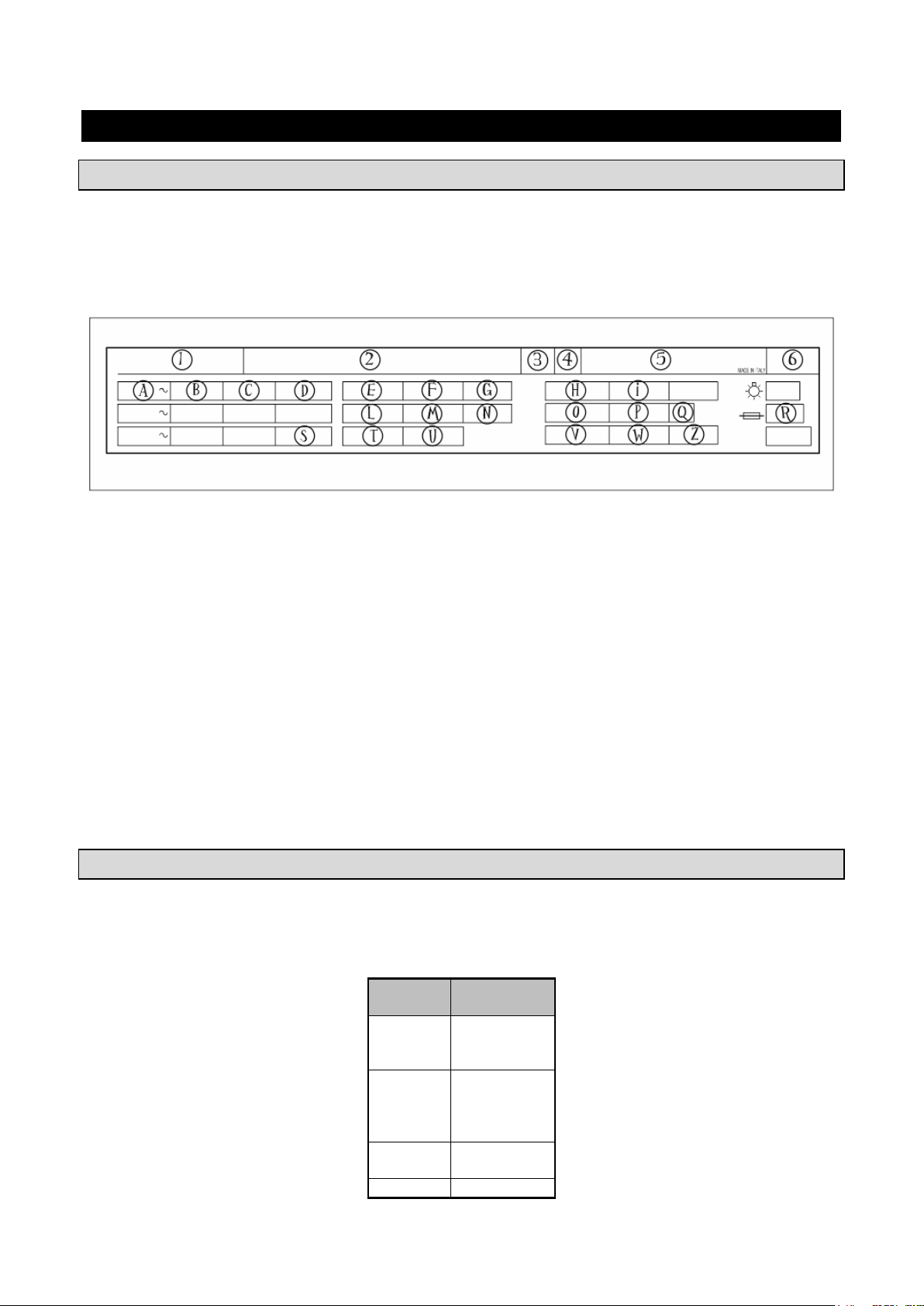
3283430_FR
INSTALLATION
Modèle
Quantité air
[m3/h]
BC51MU
BF51MU
BF52MU
650
BC101LU
BF101LU
BC101SU
BF101SU
2.060
BC72SU
BF72SU
2.530
BF102SU
5.300
DONNÉES DE LA PLAQUE
Vérifier que les données indiquées sur la plaque signalétique (sur le côté droit de la cellule) correspondent
aux caractéristiques techniques de la ligne électrique (V, kW, Hz, n° des phases et puissance du réseau).
Pour toute communication avec le constructeur, donner le numéro de série de l'appareil indiqué sur la
plaque des caractéristiques techniques.
Liste des des caractéristiques techniques
indiquées sur la plaque signalétique:
1) Modèle
2) Constructeur et ses coordonnées
3) Classe èlectrique
4) Année de construction
5) N° de série
6) Degré de protection des enveloppes des
dispositifs électriques
A) Tension d'alimentation électrique
B) Intensité de courant électrique
C) Fréquence
D) Phase
E) Compresseur
F) Compresseur RLA
G) Compresseur LRA
H) Chauffage du dégivrage
I) Puissance dégivrage chauffe
L) Ventilateur du condenseur
M) Ventilateur du condenseur FLA
N) fluide expansion
O) Type de fluide réfrigérant
P) Quantité de fluide réfrigérant
Q) Classe climatique
R) Fusible
S) MCA
T) Ventilateur de l'évaporateur
U) Ventilateur de l'évaporateur FLA
V) Valeur de pression
W) Pression côté haut
Z) Pression côté basse
TEMPERATURE MAX DU LOCAL D’UTILISATIN
Pour les groupes condenseur à air, la température ambiante de fonctionnement ne doit jamais dépasser les
100°F. Au-dessus de 90°F les rendements déclarès ne sont pas garantis.
Circulation air min
7
Page 74
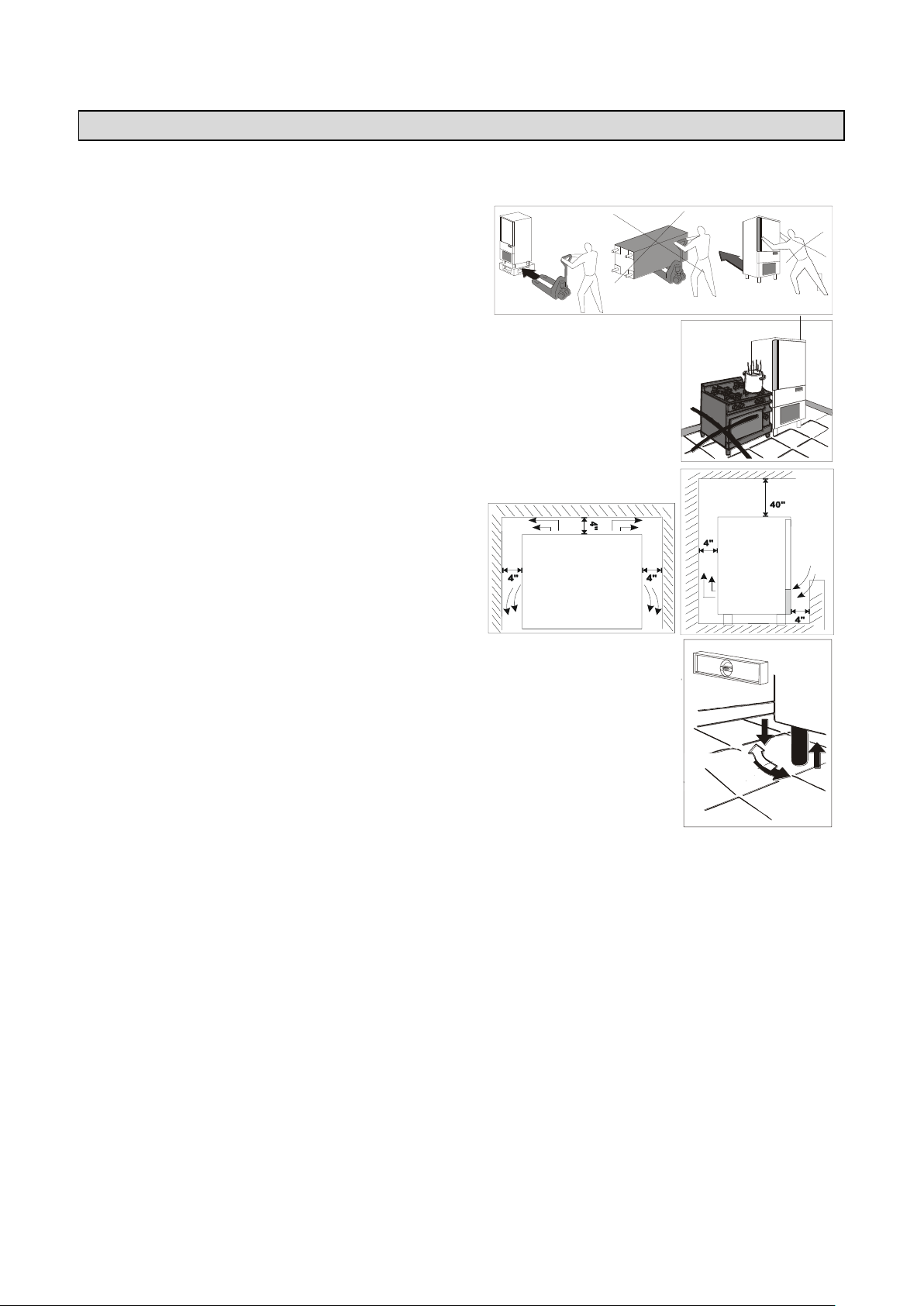
3283430_FR
MISE EN PLACE
L'appareil doit être installé et les essais effectués en respectant complètement les exigences de sécurité
préconisées par la réglementation et les normes nationales.
Disposez l'appareil à sa place de travail.
Evitez de placer l'appareil où il pourrait être exposé aux rayons du soleil
Evitez de placer l'appareil à des endroits peu aérés.
N'installez pas l'appareil en proximité de sources de chaleur.
Il faut garder une distance min. de 4” entre l’appareil
et le mur du local.
Mettez l'appareil à niveau en règlant la hauteur des pieds.
Attention: Si l'appareil n'est pas mis à niveau correctememt, son fonctionnement peut être pertubé et
l'évacuation de la condensation empêchée.
8
Page 75
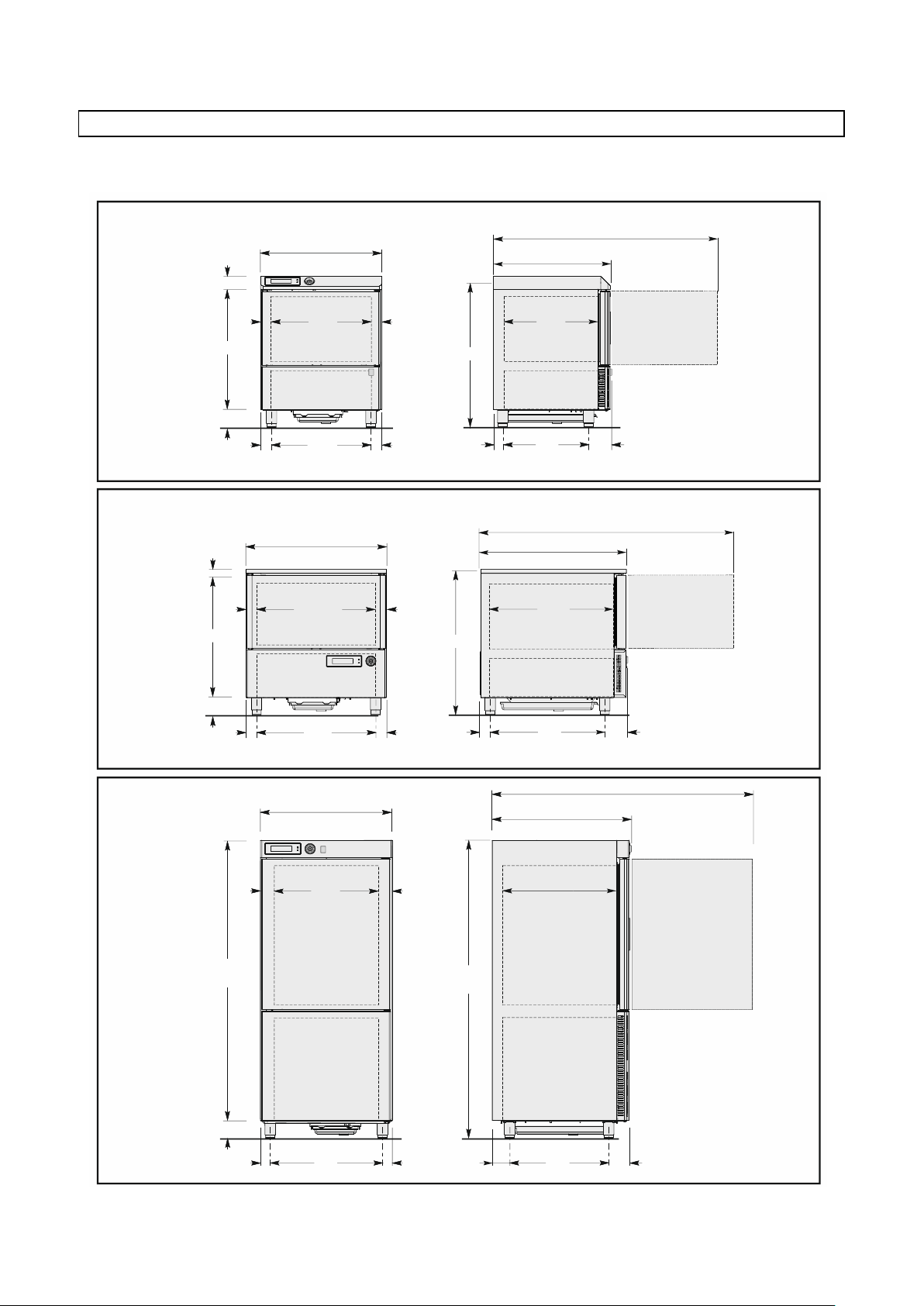
3283430_FR
BC51MU
BF51MU
970 (38,19")
746,5 (29,38")
740 (29,13)
80 (3,15")
BC101LU
BF101LU
1565 (61,61")
848 (33,39")
700 (27,56")
800 (31,49")
56,5
(2,22")
56,5
(2,22")
632
(24,88")
60
(2,36")
60
(2,36")
625
(24,6")
150 (5,9")
721 (28,38")
145
(5,7")
535
(21,06")
61,7
(2,43")
600
(23,62")
1407 (55,39")
1710
(67,3")
150 (5,9")
680
(26,77")
60
(2,36")
60
(2,36")
1860
(73,23")
75
(2,95")
75
(2,95")
650
(25,59")
105,5
(4,15")
125,3
(4,93")
600
(23,62")
BF52MU
945 (37,20")
871 (34,29")
770 (30,32")
25 (0,98")
66,5
(2,62")
66,5
(2,62")
737
(29,02")
62,5
(2,46")
62,5
(2,46")
675
(26,58")
150 (5,9")
902 (35,51")
150
(5,9")
710
(27,95")
61,6
(2,42")
775
(30,51")
1713 (67,44")
DIMENSIONS D’ENCOMBREMENT
Se référer aux dimensions de votre appareil.
9
Page 76
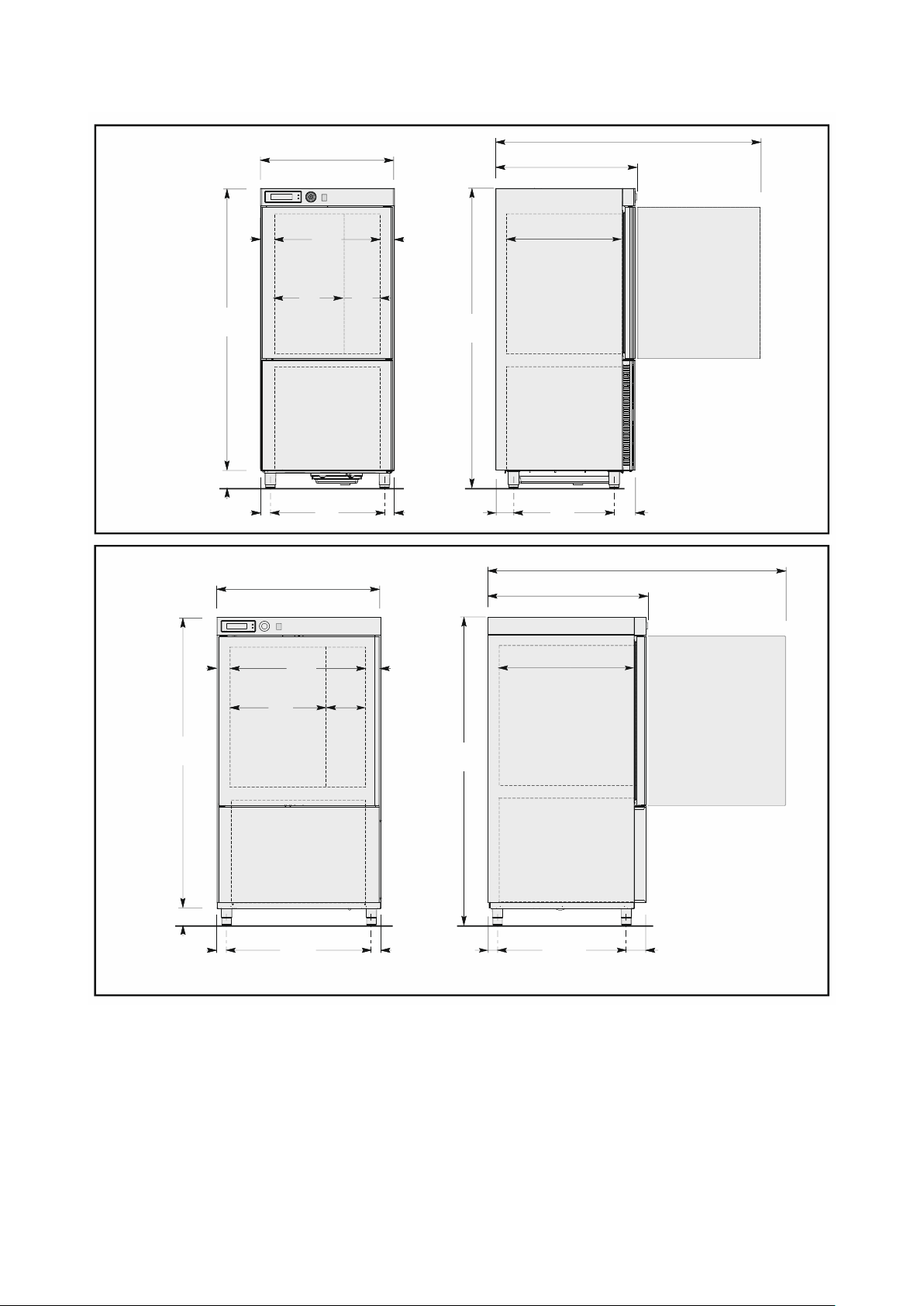
3283430_FR
BC101SU
BF101SU
1565 (61,61")
848 (33,39")
700 (27,56")
800 (31,49")
1710
(67,3")
150 (5,9")
680
(26,77")
60
(2,36")
60
(2,36")
1860
(73,23")
75
(2,95")
75
(2,95")
650
(25,59")
105,5
(4,15")
125,3
(4,93")
600
(23,62")
415
(16,34")
235
(9,25")
BC72SU
BF72SU
BF102SU
1980 (78")
1023,5 (40,3")
875 (34,45")
1040 (40,9")
1831
(72,1")
150 (5,9")
920
(36,22")
60
(2,36")
60
(2,36")
1981
(78")
75
(2,95")
75
(2,95")
890
(35")
62,7
(2,47")
125,3
(4,93")
818
(32,2")
270
(10,6")
620
(24,4")
10
Page 77
3283430_FR
Modéle
BC51MU
BC101LU
BC101SU
BC72SU
Poids brut [lb]
302
496
496
705
Poids net [lb]
254
441
441
661
Dimensions
29,38”x29,19”
x38,19”
31,49”x33,39”
x73,23”
31,49”x33,39”
x73,23”
Capacité
Masse/cycle [lb] (+194°F+37°F)
48
100
100
160
Volume net intérieur [cuft]
2,55
5,52
5,52
13,4
Grades
3 3 3
6
Electricité
Tension [V]
220 ~
220 ~
220 ~
220 ~
Fréquence [Hz]
60
60
60
60
N° Phase
1 ph
3 ph
3 ph
3 ph
Intensité [A]
6,5
11
11
14,7
Puissance absorbé [W]
1051
2972
2972
4450
Groupe réfrigérant
Puissance réfrigérante [W]
1083
4152
4152
5462
Température d’évaporation [°F]
14
14
14
14
Température de réfrigération [°F]
+194+37
+194+37
+194+37
+194+37
Temps de réfrigération [min]
90
90
90
90
Température de condensation [°F]
+130
+130
+130
+130
Température max ambiante [°F]
+90
+90
+90
+90
Type de compresseur
Hermétique
Hermétique
Hermétique
Hermétique
Liquide réfrigérant
R404A
R404A
R404A
R404A
Charge liquide réfrigérant [lb]
3
4,4
4,4
4,5
Condensation
Air
Air
Air
Air
Bruit [dB] (A)
65
72
72
72
IFR
Sonde a relevement multiple
Modéle
BF51MU
BF52MU
BF101LU
BF101SU
BF72SU
BF102SU
Poids brut [lb]
311
353
496
496
752
816
Poids net [lb]
265
298
441
441
705
772
Dimensions
29,38”x29,19”
x38,19”
34,29”x36,27”
x37,20”
31,49”x33,39”
x73,23”
31,49”x33,39”
x73,23”
40,9”x40,3”
x78”
40,9”x40,3”x
78”
Capacité
Masse/cycle [lb] (+194°F+37°F)
48
55
100
100
160
222
Masse/cycle [lb] (+194°F0°F)
28
33
60
60
80
122
Volume net intérieur [cuft]
2,55
3,5
5,52
5,52
13,4
13,4
Grades
3 - 3 3 6
10
Electricité
Tension [V]
220 ~
220 ~
220 ~
220 ~
220 ~
220 ~
Fréquence [Hz]
60
60
60
60
60
60
N° Phase
1 ph
1 ph
3 ph
3 ph
3 ph
3 ph
Intensité [A]
6
6,13
8,5
8,5
12
16,8
Puissance absorbé [W]
1139
1274
2625
2625
4150
6170
Groupe réfrigérant
Puissance réfrigérante [W]
1161
1319
3136
3136
3576
4633
Température d’évaporation [°F]
-10
-10
-10
-10
-10
-10
Température de réfrigération [°F]
+194+37
+194+37
+194+37
+194+37
+194+37
+194+37
Temps de réfrigération [min]
90
90
90
90
90
90
Température de congélation [°F]
+1940
+1940
+1940
+1940
+1940
+1940
Temps de congélation [min]
240
240
240
240
240
240
Température de condensation [°F]
+130
+130
+130
+130
+130
+130
Température max ambiante [°F]
+90
+90
+90
+90
+90
+90
Type de compresseur
Hermétique
Hermétique
Hermétique
Hermétique
Hermétique
Hermétique
Liquide réfrigérant
R404A
R404A
R404A
R404A
R404A
R404A
Charge liquide réfrigérant [lb]
3
3,3
4,4
4,4 6 10
Condensation
Air
Air
Air
Air
Air
Air
Bruit [dB] (A)
65
65
72
72
72
72
IFR
Sonde a relevement multiple
DONNÉES TECHNIQUES
Se référer aux données techniques de votre appareil.
40,9”x40,3”x78”
11
Page 78
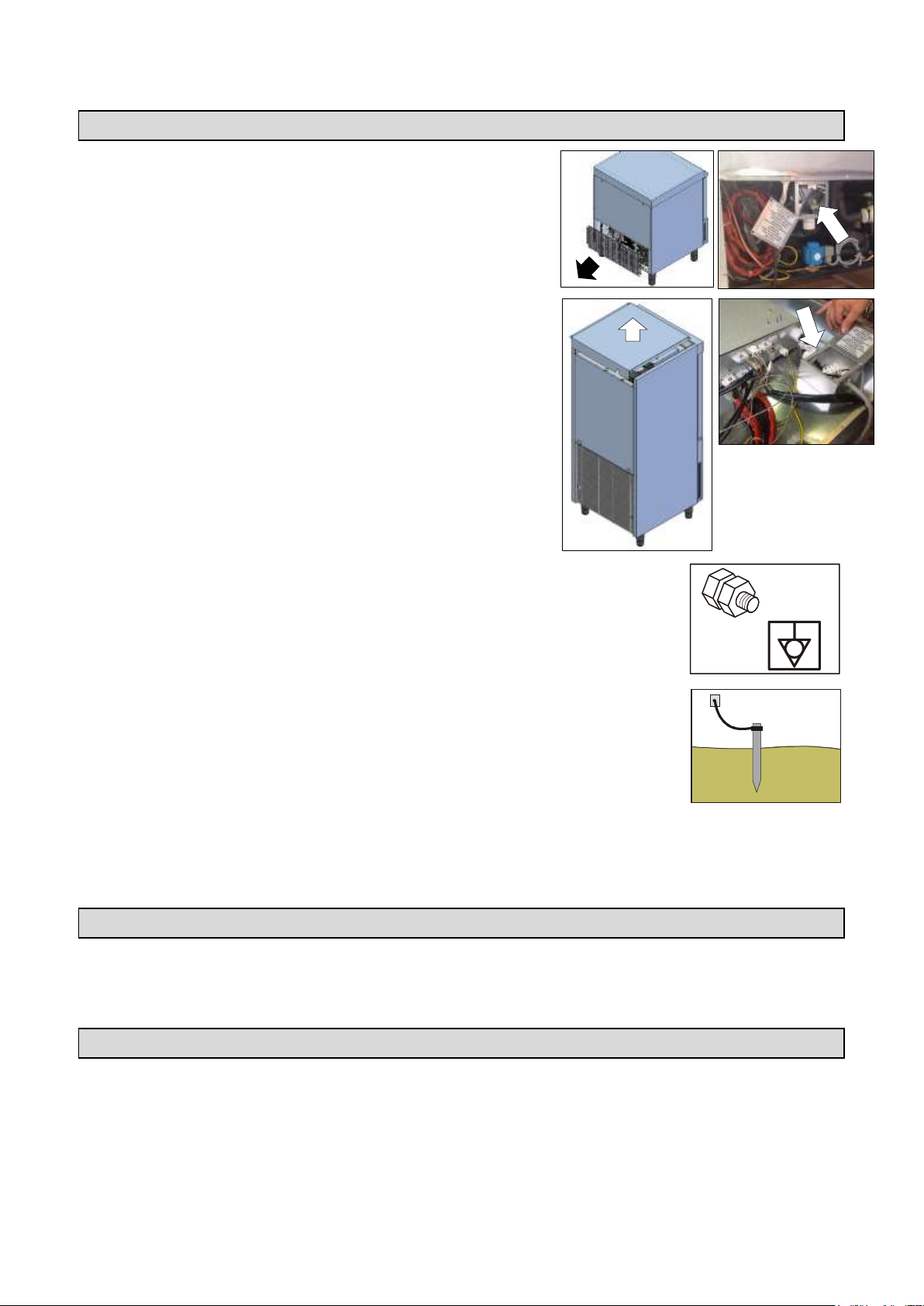
3283430_FR
BRANCHEMENT ELECTRIQUE
Mod. …51MU – …52MU
On réalise le branchement électrique à l'arrière de l'appareil
en enlevant la grille de protection et le couvercle de la boîte.
Mod. …101LU – …101SU – …72SU – …102SU
On réalise le branchement électrique dans la partie
supérieure de l'appareil en enlevant le panneau de
protection et le couvercle de la boîte.
Lea câbles électriques de branchement devront respecter les caractéristiques des
données techniques.
Chaque conducteur doit être relié à la borne équipotentielle.
Le conducteur à terre doit être relié correctement à une installation correcte de mise
à la terre
En cas de non respect de toutes ces dispositions, le constructeur décline toute responsabilité et
toute obligation de garantie, en cas de dommages aux appareils, aux personnes et aux choses et à
l’altération de toute partie de l’appareil (installation éllectrique, thermodynamique,hydraulique).
EVACUATION DE CONDENSATION
Les appareils sont équipés d'une bassine pour la récupération de la condensation. La bassine est amovible
depuis la partie inférieure de l'appareil.
ESSAIS
Si l'appareil a été transporté en position horizontale, IL FAUT ATTENDRE AU MOINS 24 HEURES AVANT
LA PREMIERE UTILISATION.
Le fabricant décline toute responsabilité ou toute obligation de garantie pour des dommages de
l'appareil imputables à un transport en position horizontale.
On doit effectuer les essais suivants:
1) Les températures externes doivent être comprises entre 59°F et 100°F.
12
Page 79
3283430_FR
2) Mettre l’appareil sous tension et attendre 30 minutes avant l’utilisation au cas où la température externe
était trop basse
3) Vérifier le absorptions
4) Exécuter au moins un cycle complet de réfrigération rapide
SYSTÉMES DE CONTRÔLE ET TÉMOINS
Ces instructions concernent le personnel spécialisé.
Micro interrupteur porte: bloque le fonctionnement de l'appareil quand la porte est ouverte
Coupe-circuits de protection générale: protègent le circuit de puissance des court-circuits et des
surcharges
Relais thermique compresseur: est actionné en cas de surcharge ou fonctionnement irrégulier
Contact thermique motoventilateur: est actionné en cas de surcharge ou fonctionnement irrégulier
Pressostat de sécurité: est actionné en cas de surpression du liquide réfrigérant
Contrôle de la température dans l'enceinte: est géré par la sonde NTC par la fiche électronique appropriée
Contrôle de la température au coeur des produits: est géré par la sonde PT100 par la fiche électronique
Fiches électroniques: en fonction des paramètres insérés, elles commandent et contrôlent les
dispositifs branchés sur l'appareil.
FICHE TECHNIQUE DU REFRIGERANT
1) R404A: composants du fluide
Trifluoréthane (HFC 143a) 52%
Pentafluoréthane (HFC 125) 44%
Tétrafluoréthane (HFC 134a) 4%
GWP = 3750
ODP = 0
2) Identification des dangers
L'inhalation prolongée peut provoquer des effets anesthésiques. Des expositions particulièrement
prolongées aux inhalations peuvent provoquer des anomalies du rythme cardiaque et mort subite. Le produit
nébulisé ou sous forme de jets peut provoquer des brûlures de gel aux yeux et à la peau
3) Premiers secours
Inhalation: Eloigner le blessé du lieu de l'exposition, le couvrir pour le réchauffer et le garder au repos. Si
nécessaire, lui donner de l'oxygène. Pratiquer la respiration artificielle si la respiration s'est arrêtée ou
risque de s'arrêter ; en cas d'arrêt cardiaque, pratiquer un massage cardiaque externe. Appeler tout de
suite l'assistance médicale.
Contact avec la peau: Dégeler avec de l'eau les parties blessées. Enlever les vêtements contaminés.
ATTENTION : les vêtements peuvent adhérer à la peau suite à brûlures de gel.
En cas de contact avec la peau, laver immédiatement et abondamment avec de l'eau tiède. Si des
symptômes se manifestent (irritations ou formation d'ampoules), appeler l'assistance médicale.
Contact avec les yeux: Laver immédiatement avec une solution pour lavage oculaire ou de l'eau propre,
en tenant les paupières bien ouvertes, pendant au moins 10 minutes. Appeler l'assistance médicale.
Ingestion: Peut provoquer des vomissements. Si le blessé est conscient, lui faire rincer la bouche avec
de l'eau et lui faire boire 200-300 ml d'eau. Appeler tout de suite l'assistance médicale.
Ultérieurs soins médicaux: Traitement symptomatique et thérapie de support si nécessaire. Ne pas
donner d'adrénaline et des médecines sympathomimétiques similaires suite à exposition, à cause du
danger d'arythmie cardiaque et possible arrêt cardiaque.
4) Informations écologiques
Persistance et dégradation
HFC 143a: Se décompose lentement dans l'atmosphère inférieure (troposphère). Sa durée dans
l'atmosphère est de 55 ans.
HFC 125: Se décompose lentement dans l'atmosphère inférieure (troposphère). Sa durée dans
l'atmosphère est de 40 ans.
13
Page 80

3283430_FR
HFC 134a: Se décompose avec relative rapidité dans l'atmosphère inférieure (troposphère). Sa durée
dans l'atmosphère est de 15,6 ans.
HFC 143a, 125, 134a: N'influencent pas le smog photochimique (c'est à dire n'appartient pas aux
composants organiques volatiles - VOC - conformément à ce convenu par l'accord UNECE). Ne
provoque pas la raréfaction de l'ozone.
Les décharges de produit dans l'atmosphère ne provoquent pas la contamination des eaux à long terme.
ECOULEMENT
STOCKAGE DES DÉCHETS
A la fin du cycle de vie du produit, éviter de jeter l'appareil dans l'environnement. Les portes devront être
démontées avant la destruction de l’appareil.
Les déches spéciaux peuvent être stockés provisoirement avant de les soumettre à un traitement et/ou
stockage définitifs. Dans tous les cas, il est impératif d’observer les lois en vigueur pour la protection de
l’environnement du pays de destination de l’appareil.
PROCÉDURE INHÉRENTE AUX OPÉRATIONS DE DÉMONTAGE DE L’APPAREIL
Étant donné qu’il existe à ce propos une législation différente dans chaque pays, il est impératif d’observer
les contraintes imposées par les lois et les organismes relatifs du pays où aura lieu la destruction.
En règle générale, il faut consigner l’armoire frigorifique à un centre spécialisé pour le collectage de la
ferraille/démolition.
Démonter l’armoire frigorifique en regroupant les composants en fonction de leur nature chimique. Se
rappeler que le compresseur contient de l’huile lubrifiante et du fluide frigorigéne qui peuvent être récupérés
et rèutilisés et que les composants de l’armoire frigorifiques sont des déchets spéciaux (pouvant toutefois
être éliminés comme les ordures ménagéres).
Rendre l’appareil inutilisable en retirant le câble d’alimentation et tout dispositif de verrouillage des
compartiments pour que personne ne puisse s’y enfermer par mégarde.
DANS TOUS LES CAS, LE DÉMONTAGE DOIT ÊTRE EFFECTUÉ PAR UN PERSONNEL QUALIFIÉ.
L’évacuation abusive des déchets d’équipements électriques et électroniques est passible de sanc-
tions conformément aux lois en vigueur dans le territoire où l’infraction a été commise.
Les déchets des équipements électriques et électroniques peuvent contenir des substances
dangereuses avec des effets potentiellement nocifs sur l’environnement et sur la santé des
personnes. L’évacuation et l’élimination doivent être faites de façon correcte.
INSTALLATION DU KIT LAMPE GERMICIDE
Le kit lampe germicide n’est pas fourni de série.
Si l’on désire acheter le kit, suivre les instructions reportées dans le manuel d’instruction relatif pour son
installation.
INSTALLATION DE L’IMPRIMANTE
L’imprimante n’est pas fournie de série.
Si l’on désire acheter l’imprimante, suivre les instructions reportées dans le manuel d’instruction relatif pour
son installation.
14
Page 81
3283430_FR
FONCTIONNEMENT
Modéle
Rendu max/cycle
Standard
niveaux
Capacité
h
+194[°F]+37[°F]
+194[°F]0[°F]
n° max
BC51MU
48[lb]
- 3 6
12“x20“
1,5“
BF51MU
48[lb]
28[lb] 3 6
12“x20“
1,5“
BF52MU
55[lb]
33[lb]
-
12
18“x26“
1,5“
BC101LU – BC101SU
100[lb]
- 3 12
12“x20“
1,5“
BF101LU – BF101SU
100[lb]
60[lb]
3
12
12“x20“
1,5“
BC72SU
160 [lb]
- 6 26
12“x20“
1,5“
BF72SU
160 [lb]
80 [lb]
6
26
12“x20“
1,5“
BF102SU
222 [lb]
122 [lb]
10
26
12“x20“
1,5“
DESCRIPTION GÉNÉRALE
Cette unité est capable de réduire la température interne du contenu à partir de 135°F (57°C) à 40°F (4°C)
dans les 4 heures, pour le conserver sur une longue période sans en altérer les caractéristiques
organoleptiques.
La quantité de denrèes à réfrigérer et/ou à congeler dépend du modèle que l'on a acheté.
COMMENT SE PRÉPARER AU DÉMARRAGE
Avant toute utilisation, il faut nettoyer l’intérieur de la cellule d'une manière soignée, avec une solution
détergente apprpriée.
La durée de réfrigeration rapide et de congelation dépend des facteurs suivants:
a) forme, type et matériel des contenants utilisés;
b) utilisation de couvercles sur les contenants;
c) caractéristiques de l'aliment (densité, teneur en eau, teneur en graisses);
d) température en dèbut de cycle;
e) conduction thermique de l'aliment.
Le temps de réfrigération rapide positive et de réfrigération rapide négative est en fonction du type de produit
traité.
En général, les programmes de fonctionnement de la machine, se basent sur la gestion de la température
de la chambre, de la vitesse des ventilateurs et sur le temps de refroidissement, et dans tous les cas, il ne
faut pas excéder 7lb de charge (pour des plats 12”x20”) ou 15lb de charge (pour les plats 18”x26”) et une
épaisseur de 2” en phase de réfrigération négative et de 3” en phase de réfrigération positive (tab.2).
Vérifier que le programme de réfrigération positive, jusqu'à +37°F au cœur du produit, ne prenne pas plus de
90 minutes et que le programme de réfrigération négative, jusqu'à 0°F au cœur du produit, ne dépasse pas
les 4 heures.
Il est conseillé de pré-refroidir la chambre de travail avant de commencer un programme de réfrigération et de
ne pas couvrir les aliments pendant le programme pour ne pas augmenter le temps de refroidissement.
Quand l’épaisseur du produit le consent, utiliser toujours la sonde à coeur pour connaître la température
exacte atteinte au coeur du produit, et ne pas interrompre le cycle avant qu’on atteigne la température de
+37°F en réfrigération rapide positive et 0°F en réfrigération rapide négative.
Tab.2
15
Page 82
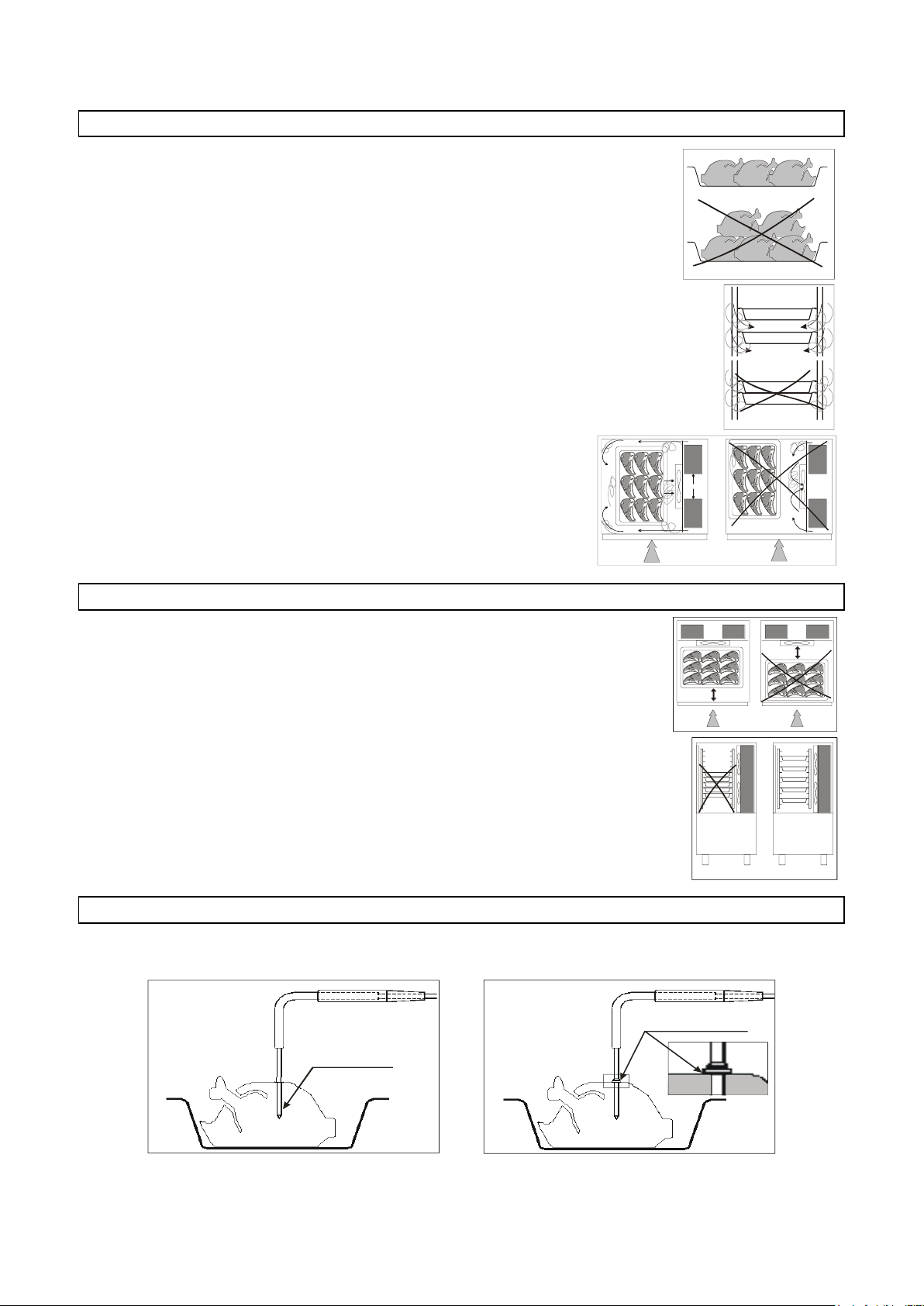
3283430_FR
SON D A A S ING O LO
RIL E VA M E NTO
CU O R E P R OD OT T O
SO N D A A M ULTIPLO
RILEVAMENTO
SUP E R FI CI E P R ODOT T O
0.5 - 2 cm.
SONDE A RELEVEMENT
UNIQUE
SONDE A RELEVEMENT
MULTIPLE
COEUR PRODUIT
SUPERFICIE PRODUIT
CHARGEMENT DE LA CELLULE
Faire attention à ce que les produits à réfrigérer rapidement ne soient pas
superposés. Les épaisseurs doivent être inférieures à 2” en réfrigération rapide
négative et 3” en réfrigération rapide positive.
S'assurer que l'air circule suffisamment entre les contenants.
Si l’on utilise un chariot pour charger la cellule, il faut placer la
structure porte-clayettes au centre de l'enceinte.
PLACEMENT DES RÉCIPIENTS
Il faut placer les contenants près de l'évaporateur.
Si l'appareil n'est pas totalememt rempli, il faut placer les contenants à
une distance égale les uns de l'autre.
SONDE A COEUR
Pour garantir un bon fonctionnement de la sonde se référer aux figures suivantes.
16
Page 83
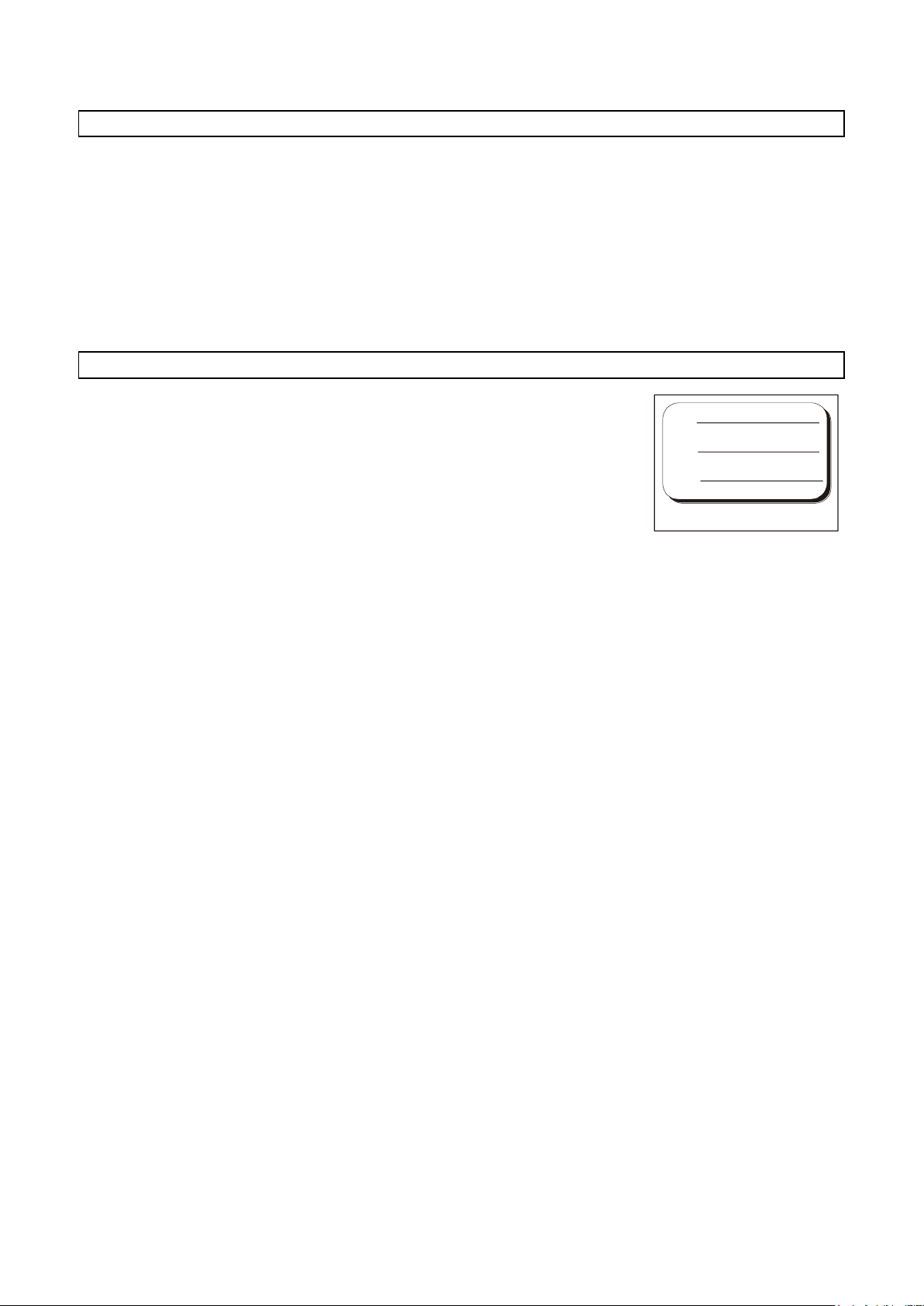
3283430_FR
A
B
C
TEMPÉRATURES
Ne pas laisser à température ambiante les produits cuits et à abattre/congeler.
Éviter la perte d'humidité, sous peine de perdre la fragrance conservée du produit.
Il est conseillé de commencer le programme de réfrigération/congélation juste après avoir terminé la phase
de préparation ou de cuisson, en prenant soin d'insérer le produit dans l'appareil à une température d'au
moins +160°F. Le produit cuit peut entrer dans l'appareil même avec une température très élevée,
supérieure à +212°F, du moment que la chambre ait été pré-refroidie.
Il faut toujours garder à l'esprit que les temps de référence des programmes partent toujours à partir de la
température de +194°F, en réfrigération positive, de +194°F à +37°F, et en réfrigération négative de +194°F
à 0°F.
DURÉE DE CONSERVATION
Un produit cuit et ensuite refrigeré ou congélé peut être conservé dans le
réfrigérateur sans perdre ses proprietés essentielles jusqu'à 5 jours après le
traitement.
Il est très important de respecter la chaîne du froid, c'est à dire, de maintenir
pendant la conservation une température constante entre 32°F et 39°F,
selon le type d'aliment traité.
Le temps de conservation peut être prolongé jusqu'à 15 jours environ, par la
technique du traitement sous vide.
Les produits qui ont subi un cycle d réfrigération rapide négative peuvent être
conservés avec sécurité pendant une durée comprise entre 3 et 18 mois et ce
d’après l’aliment traité.
On conseille de respecter une température de conservation égale ou inférieure à -4°F.
Le produit réfrigéré doit être protégé par une pellicule pour aliments (mieux encore, sous vide) et muni d'une
etiquette adhésive sur laquelle on a écrit la description du contenu [A], le jour de préparation [B] et la date
d'écheance prévue [C], en caractères ineffaçables.
17
Page 84
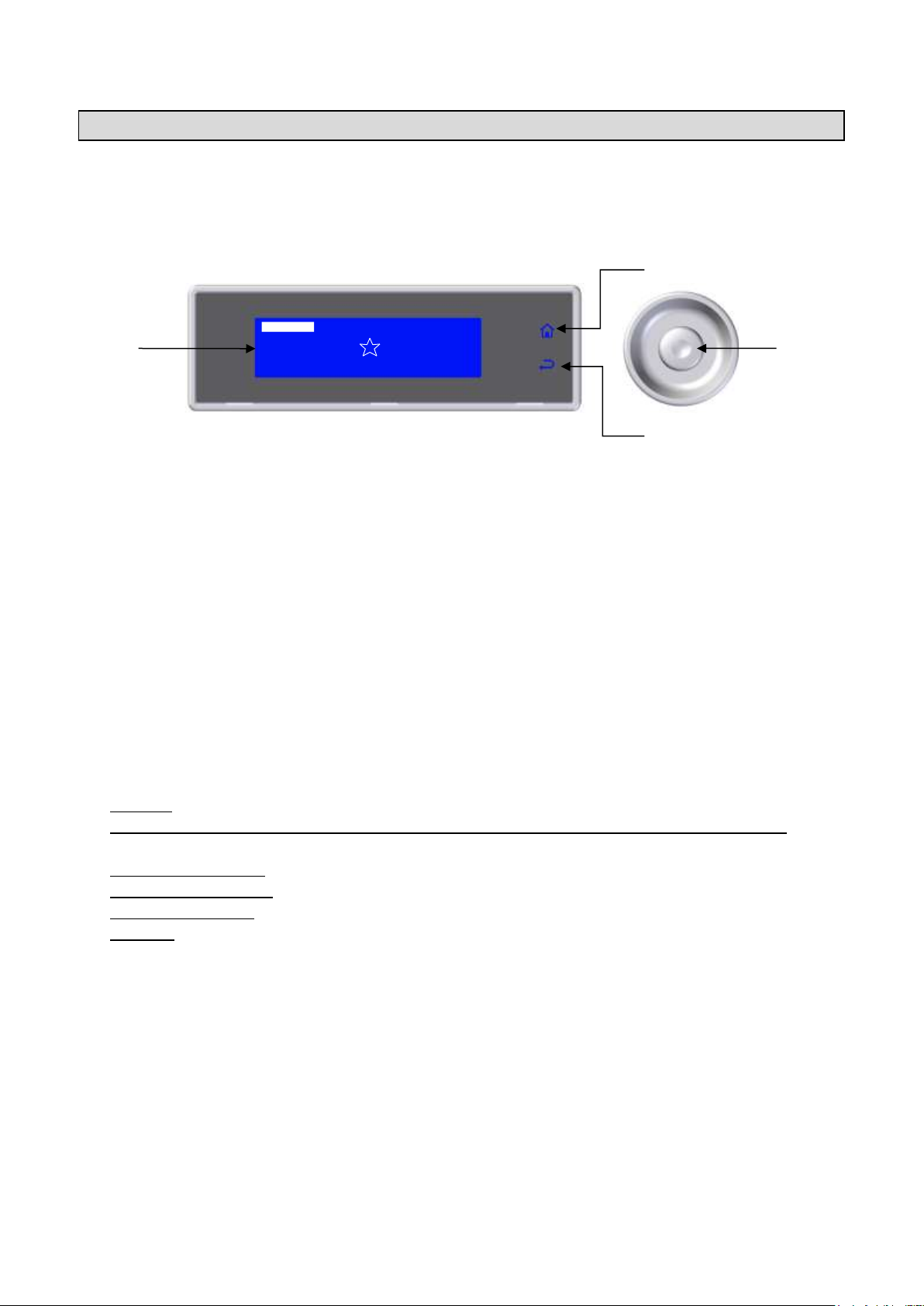
3283430_FR
HARD +37°F
SOFT 0°F
HARD 0°F
IFR
MENU
INFINITY
SOFT+37°F
D B C
A
PANNEAU DE COMMANDE
L'illustration présente le panneau de commande de l'appareil, alors que la liste indique la description et la
fonction de chaque commande.
A–Écran: il affiche toutes les informations relatives aux menus présents sur la fiche et aux applications en
cours.
B–Touche HOME: Depuis n'importe quel contexte, elle permet, si elle est activée, de revenir immédiatement
à la page vidéo principale. Le rétro-éclairage de la touche prouve qu'elle a été activée.
C–Touche BACK: Pendant la navigation, elle permet de revenir à un niveau immédiatement supérieur dans
la structure des menus, alors que se un cycle est en cours, elle permet de sortir de la modification des
paramètres de contrôle du processus en cours, et d'enregistrer temporairement les valeurs modifiées.
D–Molette: La rotation horaire et antihoraire de la molette permet de naviguer à travers les menus visibles
sur l'écran alors que si l'on appuie dessus, elle permet d'accéder à l'entrée sélectionnée.
La barre LED RGB, intégrée à l'intérieur de la poignée de la porte, change de couleur en fonction du
processus en cours:
- Stand-by: lumière fixe bleue de faible intensité
- Cycle de réfrigération/congélation (inclus Infinity, Multy) décongélation et refroidissement, en cours:
lumière intermittente bleue de forte intensité
- Conservation en cours: lumière fixe bleue de forte intensité
- Décongélation en cours: lumière fixe rouge de faible intensité
- Sterilisation en cours: lumière fixe rouge de faible intensité
- Anomalie: lumière fixe jaune
18
Page 85
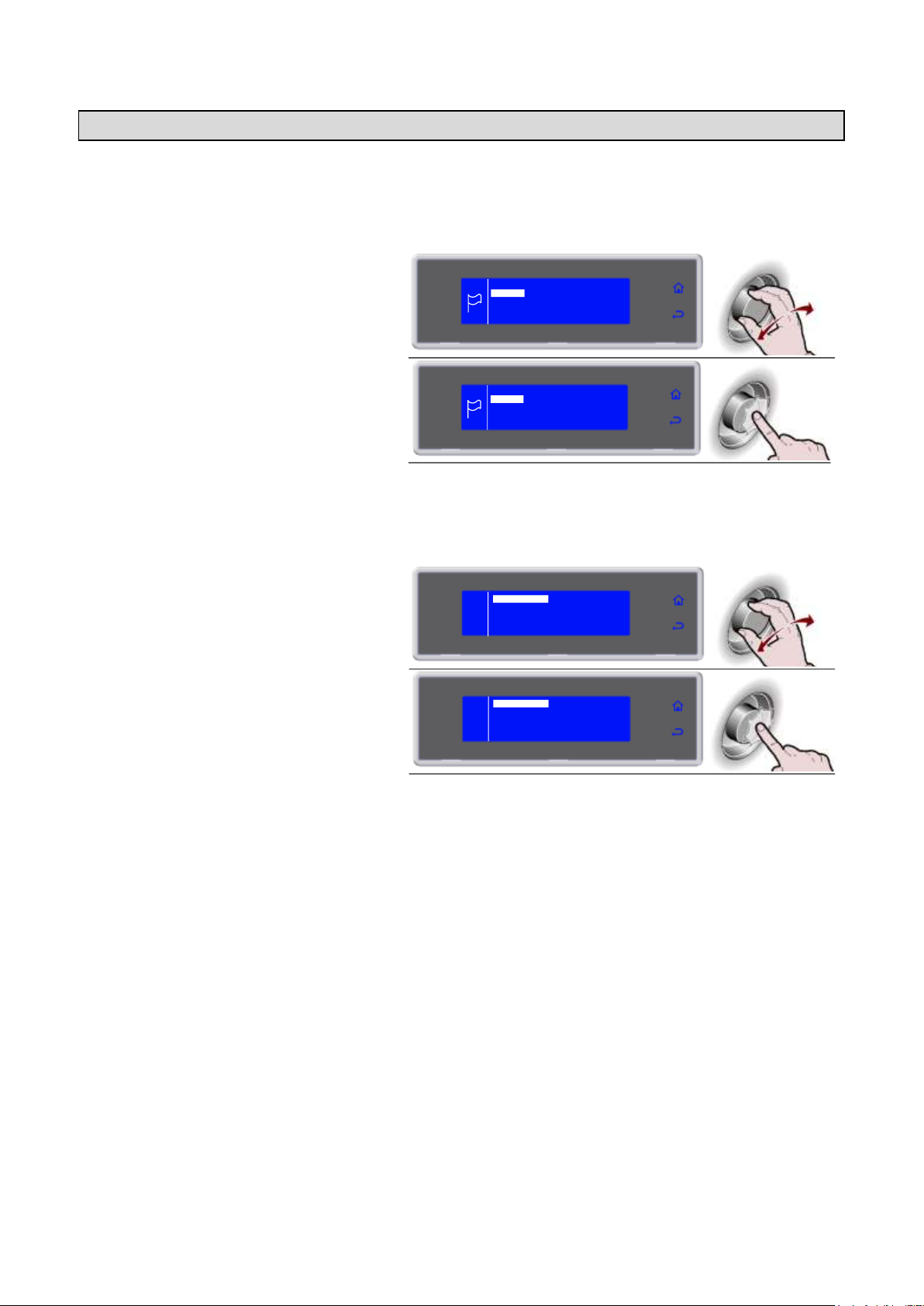
3283430_FR
1. Sélectionner la langue en tournant la
molette
ITALIANO
FRANCAIS
ENGLISH
DEUTSCH
ESPANOL
DUTCH
SVENSKA
DANSK
NORSK
2. Appuyer sur la molette pour confirmer la
langue sélectionnée
Il est également possible de modifier la langue
successivement (voir pag.51)
ITALIANO
FRANCAIS
ENGLISH
DEUTSCH
ESPANOL
DUTCH
SVENSKA
DANSK
NORSK
1. Sélectionner le SECTEUR en tournant la
molette
RESTAURATION
BOULANGERIE
PATISSERIE
GLACIER
2. Appuyer sur la molette pour confirmer le
secteur sélectionné
Il est également possible de modifier le secteur
successivement (voir pag.53)
RESTAURATION
BOULANGERIE
PATISSERIE
GLACIER
PREMIER DÉMARRAGE
Lors du premier allumage, il vous sera demander de choisir la langue et le secteur.
RÉGLAGE LANGUE
RÉGLAGE SECTEUR
19
Page 86
3283430_FR
PROGRAMME
DESCRIPTION
PROGRAMMES STRANDARDS
SOFT +37°F
Cycle réalisé à l'aide d'une sonde au cœur ou à temps, idéal pour refroidir des aliments
jusqu'à +37°F, en utilisant une température de chambre autour de 0°F. Cycle indiqué pour
des produits délicats tels que mousses, crèmes, desserts, légumes ou aliments ayant une
épaisseur réduite
HARD +37°F
Cycle réalisé à l'aide d'une sonde au cœur ou à temps, idéal pour refroidir des aliments
jusqu'à +37°F, en utilisant une température de chambre pouvant varier de 5°F à 34°F.
Cycle indiqué pour des produits très denses, à fort contenu en graisse ou de grand format
IFR
I.F.R. est le système breveté de réfrigération positive qui optimise automatiquement le
processus quelle que soit la typologie d'aliment, indépendamment du format et de la
quantité, prévenant sa congélation superficielle, grâce à l'utilisation d'une sonde à piquer
multipoint à trois capteurs
SOFT 0°F
Cycle réalisé à l'aide d'une sonde au cœur ou à temps, idéal pour congeler des aliments
jusqu'à 0°F, en utilisant une température de chambre pouvant varier de 34°F à -40°F.
Cycle indiqué pour des produits au levain, pour four ou des aliments cuits d'une épaisseur
réduite
HARD 0°F
Cycle réalisé à l'aide d'une sonde au cœur ou à temps, idéal pour congeler des aliments
jusqu'à 0°F, en utilisant une température de chambre qui peut atteindre -40°F.
Cycle indiqué pour des produits crus ou cuits de grand format
INFINITY
Cycle de réfrigération / congélation à temps dont la durée est infinie, idéal pour refroidir
des plats d'aliments de typologie différente. Il est possible de contrôler la température au
cœur
PROGRAMMES AUTOMATIQUES +37°F - RESTAURATION
LASAGNE
Cycle pour la réfrigération de lasagne
SOUPES ET SAUCES
Cycle pour la réfrigération de soupes et de sauces
RIZ ET PATE
Cycle pour la réfrigération de riz et de pâtes
VIANDE
Cycle pour la réfrigération de viande
POISSON
Cycle pour la réfrigération de poisson
LEGUMES CRUITS
Cycle pour la réfrigération de légumes cuits
PATISSERIE CHAUDE
Cycle pour la réfrigération de produits de pâtisserie chaude
PATISSERIE SECHER
Cycle pour la réfrigération de produits de pâtisserie sèche
VEAU NOIX
Cycle pour la réfrigération de produits de veau noix
PROGRAMMES AUTOMATIQUES 0°F - RESTAURATION
LASAGNE
Cycle pour la congélation de lasagne
SOUPES ET SAUCES
Cycle pour la congélation de soupes et de sauces
RIZ ET PATE
Cycle pour la congélation de riz et de pâtes
VIANDE
Cycle pour la congélation de viande
POISSON
Cycle pour la congélation de poisson
LEGUMES CRUITS
Cycle pour la congélation de légumes cuits
LEGUMES CRUS
Cycle pour la congélation de légumes crus
PATISSERIE
Cycle pour la congélation de produits de pâtisserie
POISSON CRU
Cycle pour la congélation de poisson cru
SUSHI
Cycle pour la congélation de Sushi
ANISAKIS 24h*
Cycle de surgélation qui permet l'assainissement préventif et complet du produit à base de
poisson. La sonde relève la limite de la température au cœur de l'aliment de -4°F donnant
le déclic à la machine de faire partir la phase de “dévitalisation pendant 24 heures”
ANISAKIS 15h*
Cycle de surgélation qui permet l'assainissement préventif et complet du produit à base de
poisson. La sonde relève la limite de la température au cœur de l'aliment de -31°F donnant
le déclic à la machine de faire partir la phase de “dévitalisation pendant 15 heures”
OPISTORKIS 24h
Cycle de surgélation qui permet l'assainissement préventif et complet du produit à base de
poisson. La sonde relève la limite de la température au cœur de l'aliment de -4°F donnant
le déclic à la machine de faire partir la phase de “dévitalisation pendant 24 heures”
PROGRAMMES
DESCRIPTION DES PROGRAMMES
* Testés et validés en collaboration avec: L'Université Federico II de Naples - Département de Sciences Zootechniques et Inspection
Aliments Section Inspection Aliments et Laboratoire de Recherche Universitaire pour le marché du poisson en gros de Pozzuoli.
20
Page 87
3283430_FR
PROGRAMMES AUTOMATIQUES +37°F - PÂTISSERIE
PETRISSAGE IN FEUILLES
Cycle pour la réfrigération de riz et de pâte en feuille
PETRISSAGE IN MOULE
Cycle pour la réfrigération de pâtes moulées
CREMES
Cycle pour la réfrigération de crèmes
LEVES
Cycle pour la réfrigération de produits au levain
LEVES +50°F
Cycle pour la réfrigération de produits au levain +50°F
PATE BRISEE
Cycle pour la réfrigération de pâte brisée
PRODUIT REMPLIS
Cycle pour la réfrigération de produits fourrés
TARTES
Cycle pour la réfrigération de tartes
BRIOCHE
Cycle pour la réfrigération de brioche
CREME SURPLUS
Cycle pour la réfrigération de creme surplus
YOGURT BOX
Cycle pour la préparation de yogurt
PROGRAMMES AUTOMATIQUES 0°F - PÂTISSERIE
PETRISSAGE IN FEUILLES
Cycle pour la congélation de pâtes en feuille
PETRISSAGE IN MOULE
Cycle pour la congélation de pâtes moulées
TARTES
Cycle pour la congélation de tartes
MOUSSE
Cycle pour la congélation de mousses
CROISSANTE
Cycle pour la congélation de croissants
GLACE
Cycle pour la congélation de glaces
PROGRAMMES AUTOMATIQUES +37°F - BOULANGERIE
TARTES
Cycle pour la réfrigération de tartes
PAIN CUIT
Cycle pour la réfrigération de pain cuit
CREMES
Cycle pour la réfrigération de crèmes
LEVES
Cycle pour la réfrigération de produits au levain
PROGRAMMES AUTOMATIQUES 0°F - BOULANGERIE
TARTES CUISSONS
Cycle pour la congélation de tartes cuites
TARTES CRUES
Cycle pour la congélation de tartes crues
PAIN CUIT
Cycle pour la congélation de pain cuit
PAIN CRU
Cycle pour la congélation de pain cru
PROGRAMMES AUTOMATIQUES +37°F - GLACIER
CREME SURPLUS
Cycle pour la réfrigération de creme surplus
YOGURT BOX
Cycle pour la préparation de yogurt
PROGRAMMES AUTOMATIQUES 0°F - GLACIER
GLACE -7°F
Cycle pour la congélation de glaces -7°F
GLACE
Cycle pour la congélation de glaces
MOUSSES COMPLETES
Cycle pour la congélation de mousses complètes
MOUSSE
Cycle pour la congélation de mousses
SEMIFREDDO
Cycle pour la congélation de semifreddo
PROGRAMME MULTY
MULTY
Cycle de réfrigération / congélation à temps, organisé par niveaux de charge, avec la
possibilité de lecture avec une sonde à piquer, laissant à chaque niveau son temps
PROGRAMME BANQUETING
BANQUETING
Cycle dédié au secteur de la restauration, idéal pour la préparation de produits de banquet
PROGRAMME VACUUM
VACUUM
Cycle dédié au secteur de la restauration, pour la préparation de produits avant une phase
de sous-vide
PROGRAMME DECONGELATION
DECONGELATION
Cycle dédié à la décongélation contrôlée des aliments, réalisé par sonde à cœur ou par
temps
PROGRAMME FERMENTATION
FERMENTATION
Cycle par temps, dédié au levage direct des aliments
FERMENTATION
CONTROLEE
Cycle par temps, dédié au levage programmé des aliments
PROGRAMME SMART ON
SMART ON
Cycle avec démarrage automatique.
Une fois un produit chaud inséré, si une augmentation de température est relevée dans la
chambre, après 5 minutes, un cycle Soft 37°F démarre automatiquement, à sonde ou à
temps, en fonction de l'utilisation ou pas de la sonde à piquer.
21
Page 88
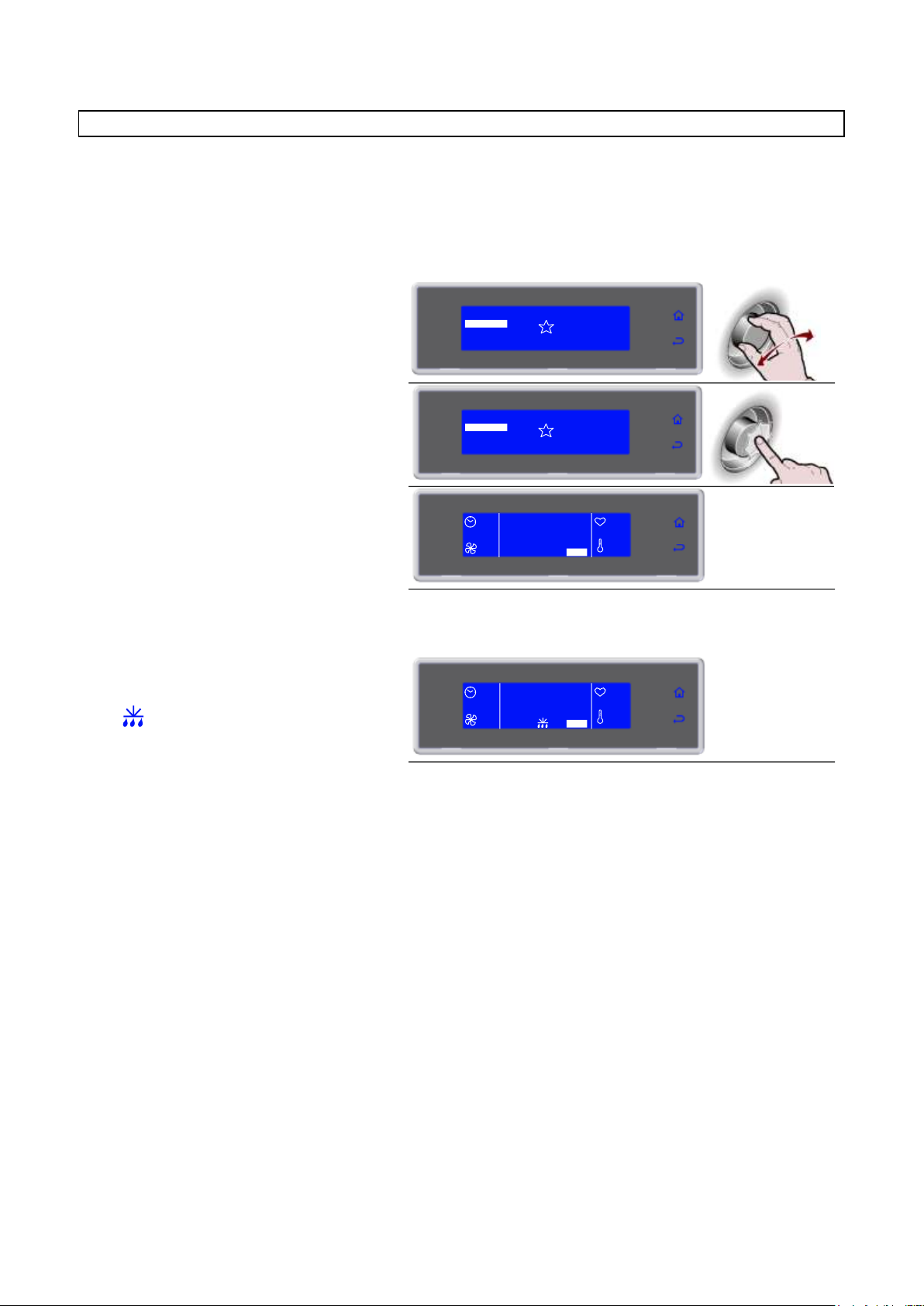
3283430_FR
1. Sélectionner le cycle désiré en tournant
la molette
SOFT 0°F
HARD 0°F
IFR
MENU
INFINITY
SOFT +37°F
HARD +37°F
2. Appuyer sur la molette pour activer le
cycle sélectionné
Pendant le cycle, il est possible de:
- visualiser et modifier les paramètres par défaut
en sélectionnant SET (voir pag.41)
- d'arrêter le cycle en sélectionnant STOP
Remarque: les paramètres modifiés seront
enregistrés uniquement pour le cycle en cours
SOFT 0°F
HARD 0°F
IFR
MENU
INFINITY
SOFT +37°F
HARD +37°F
90'
HARD +37°F
100%
+80°F
+75°F
SET STOP
3. Une fois le cycle terminé, une phase de
conservation démarre automatiquement
Pendant la conservation, il est possible
de:
- visualiser et modifier les paramètres par défaut
en sélectionnant SET (voir pag.41)
- activer le dégivrage manuel, en sélectionnant
- d'arrêter le cycle en sélectionnant STOP
Remarque: les paramètres modifiés seront
enregistrés uniquement pour le cycle en cours.
Si cela n’est pas nécessaire, le dégivrage manuel
n’est pas effectué
--
FIN CYCLE
CONSERVE
100%
+80°F
+75°F
SET STOP
PROGRAMMES STRANDARDS
Cycles de réfrigération/congélation préréglés par le constructeur et qui peuvent être activés en les
sélectionnant directement depuis la page vidéo initiale, SOFT +37°F, HARD +37°F, SOFT 0°F et HARD 0°F.
Pendant l'exécution du cycle, il est possible de visualiser les paramètres et de les modifier de manière
temporaire, les nouvelles valeurs auront validité exclusivement pour le cycle en cours.
22
Page 89
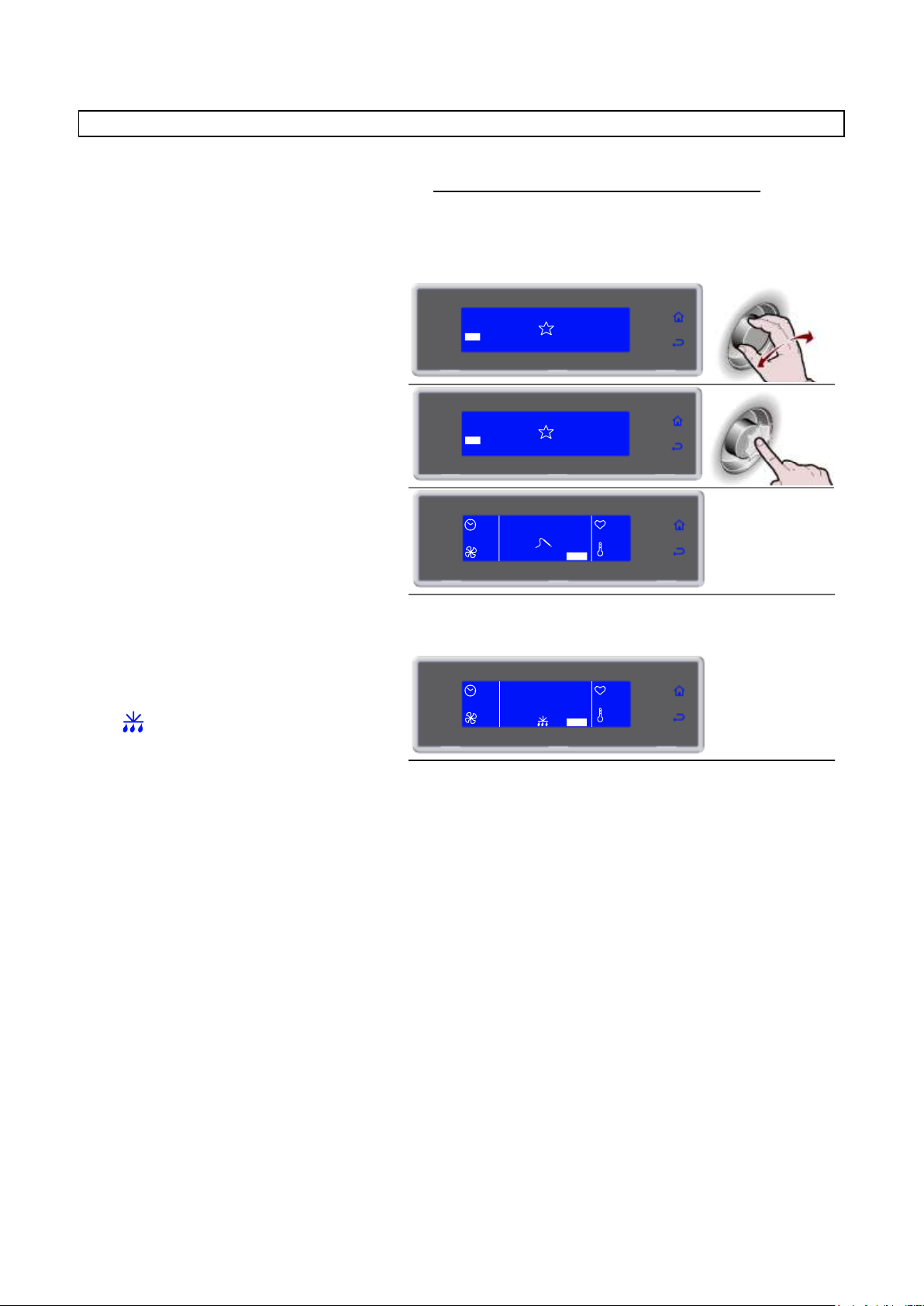
3283430_FR
1. Sélectionner le cycle désiré en tournant
la molette
SOFT 0°F
HARD 0°F
MENU
INFINITY
SOFT +37°F
HARD +37°F
IFR
2. Appuyer sur la molette pour activer le
cycle sélectionné
Pendant le cycle, il est possible de:
- Modifier la vitesse des ventilateurs en
sélectionnant SET
- d'arrêter le cycle en sélectionnant STOP
Remarque : la valeur modifiée sera enregistrée
uniquement pour le cycle en cours
SOFT 0°F
HARD 0°F
MENU
INFINITY
SOFT +37°F
HARD +37°F
IFR
--
IFR
100%
+80°F
+75°F
SET STOP
4. Une fois le cycle terminé, une phase de
conservation démarre automatiquement
Pendant la conservation, il est possible
de:
- visualiser et modifier les paramètres par défaut
en sélectionnant SET (voir pag.41)
- activer le dégivrage manuel, en sélectionnant
- d'arrêter le cycle en sélectionnant STOP
Remarque: les paramètres modifiés seront
enregistrés uniquement pour le cycle en cours.
Si cela n’est pas nécessaire, le dégivrage
manuel n’est pas effectué
--
FIN CYCLE
CONSERVE
100%
+80°F
+75°F
SET STOP
PROGRAMME I.F.R.
I.F.R. est un système révolutionnaire breveté de réfrigération rapide positive qui de manière automatique
optimise le cycle pour chaque typologie d’aliment en en prévenant sa congélation superficielle.
Les températures sont relevées grâce à la présence d’une sonde à piquer multipoint à trois senseurs. Le
positionnement à l’intérieur de l’aliment est déterminé de manière univoque par la présence d’un petit disque
de référence le long du pointeau (voir paragraphe “Sonde à coeur”).
23
Page 90
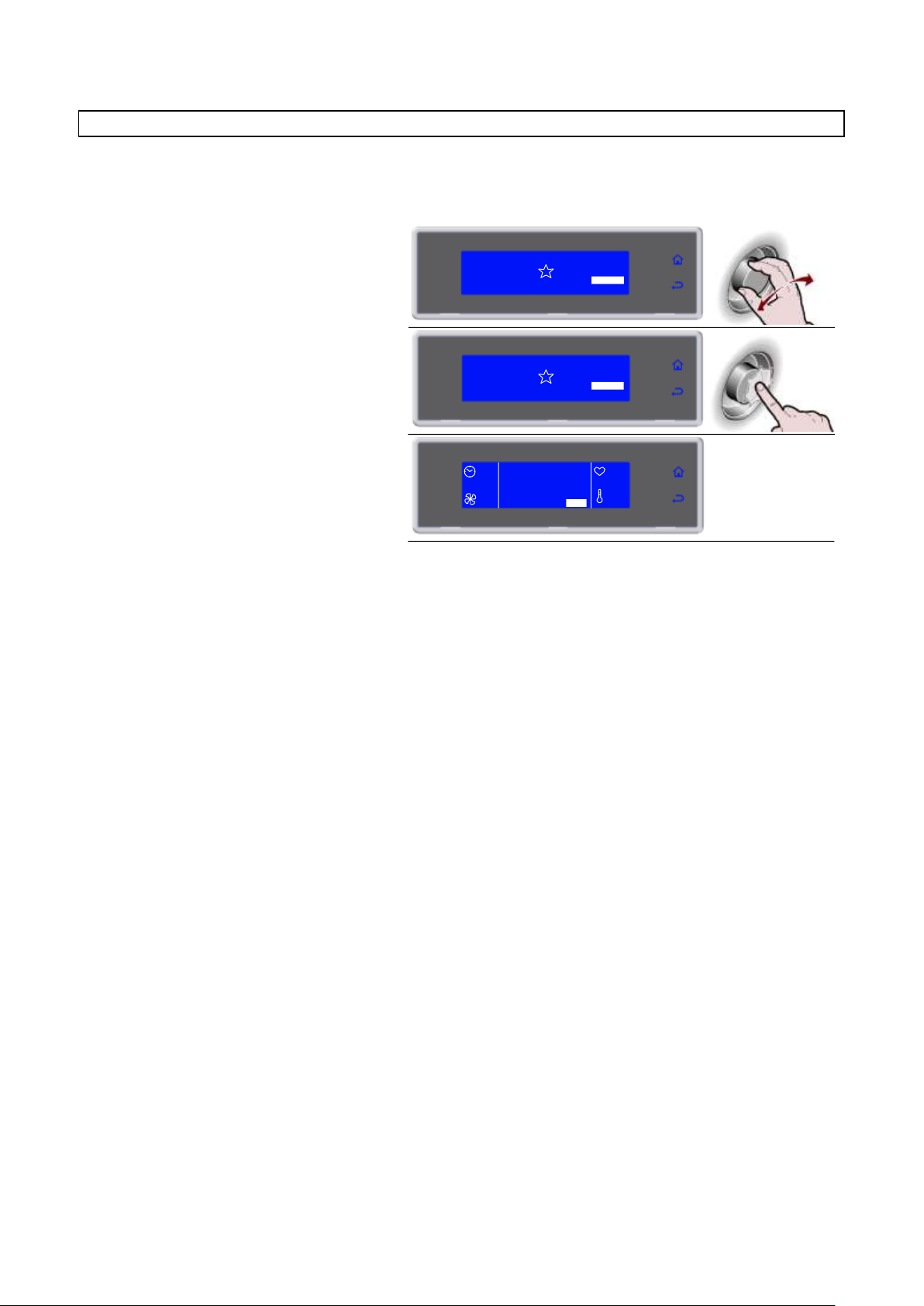
3283430_FR
1. Sélectionner le cycle désiré en tournant
la molette
SOFT 0°F
HARD 0°F
IFR
MENU
SOFT +37°F
HARD +37°F
INFINITY
2. Appuyer sur la molette pour activer le
cycle sélectionné
Pendant le cycle, il est possible de:
- afficher et modifier la température de la chambre
et la vitesse des ventilateurs, en sélectionnant
SET
- d'arrêter le cycle en sélectionnant STOP
Remarque : les valeurs modifiées seront
enregistrées
SOFT 0°F
HARD 0°F
IFR
MENU
SOFT +37°F
HARD +37°F
INFINITY
∞
INFINITY
100%
+80°F
+75°F
SET STOP
PROGRAMME INFINITY
Cycle de réfrigération / congélation à temps dont la durée est infinie, idéal pour refroidir des plats d'aliments
de typologie différente. Il est possible de contrôler la température au cœur.
24
Page 91
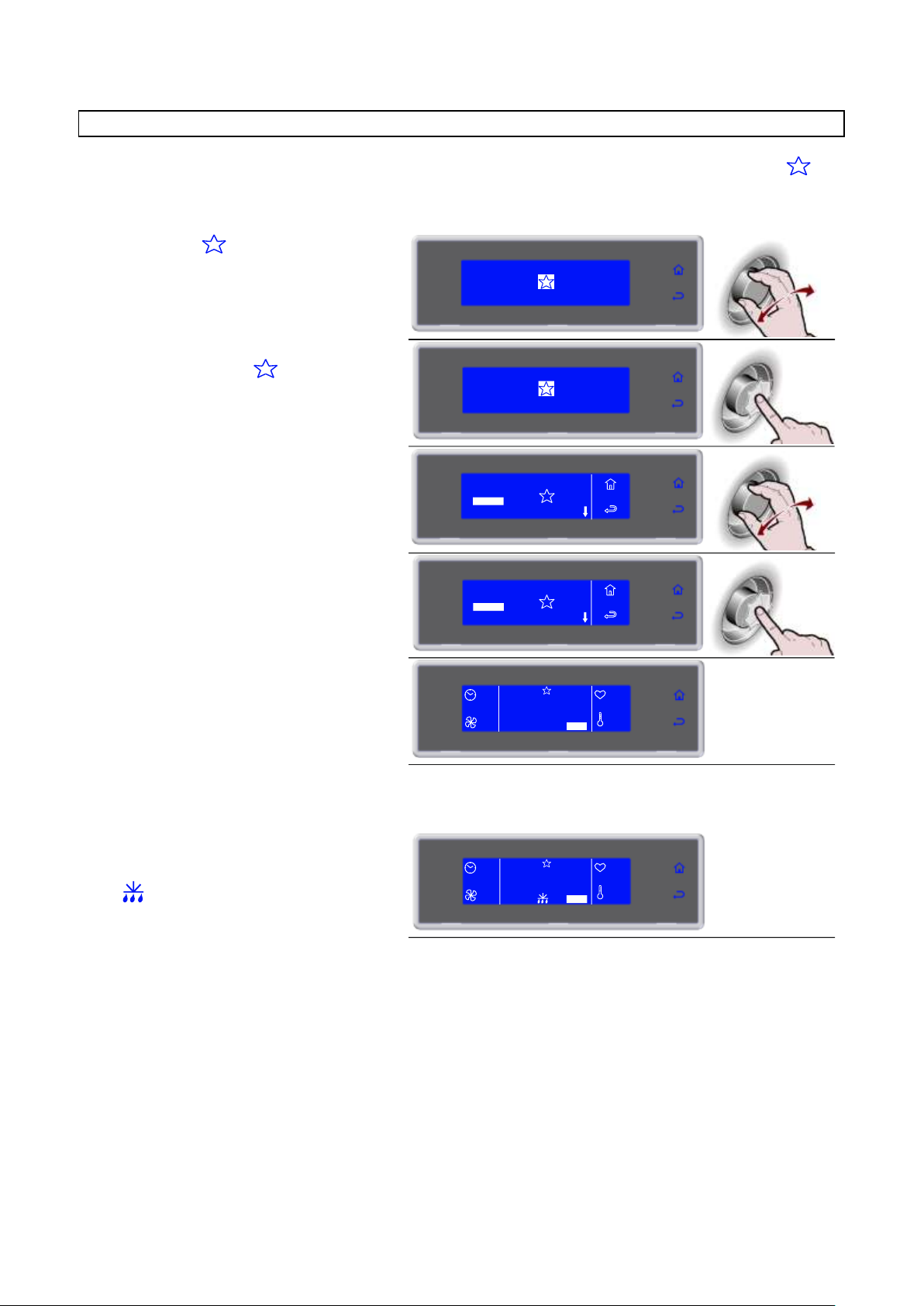
3283430_FR
1. Sélectionner en tournant la molette
SOFT 0°F
HARD 0°F
IFR
MENU
INFINITY
SOFT +37°F
HARD +37°F
2. Appuyer sur la molette pour entrer dans
la section FAVORIS
SOFT 0°F
HARD 0°F
IFR
MENU
INFINITY
SOFT +37°F
HARD +37°F
3. Sélectionner le cycle désiré en tournant
la molette
3
2 CICLO 2
CICLO 3
4 CICLO 4
1 CICLO 1
5. Appuyer sur la molette pour activer le
cycle sélectionné
Pendant le cycle, il est possible de:
- visualiser et modifier les paramètres par défaut
en sélectionnant SET (voir pag.41)
- d'arrêter le cycle en sélectionnant STOP
Remarque: les paramètres modifiés seront
enregistrés uniquement pour le cycle en cours
3
2 CICLO 2
CICLO 3
4 CICLO 4
1 CICLO 1
90'
CICLO 3
100%
+80°F
+75°F
SET STOP
MEMO +37°F
6. Une fois le cycle terminé, une phase de
conservation démarre automatiquement
Pendant la conservation, il est possible
de:
- visualiser et modifier les paramètres par défaut
en sélectionnant SET (voir pag.41)
- activer le dégivrage manuel, en sélectionnant
- d'arrêter le cycle en sélectionnant STOP
Remarque: les paramètres modifiés seront
enregistrés uniquement pour le cycle en cours.
Si cela n’est pas nécessaire, le dégivrage manuel
n’est pas effectué
--
FIN CYCLE
CONSERVE
100%
+80°F
+75°F
SET STOP
MEMO +37°F
PROGRAMMES FAVORIS
Bibliothèque composée de 10 cycles sélectionnés parmi ceux enregistrés et étiquetés comme favoris
(voir pag.28)
25
Page 92
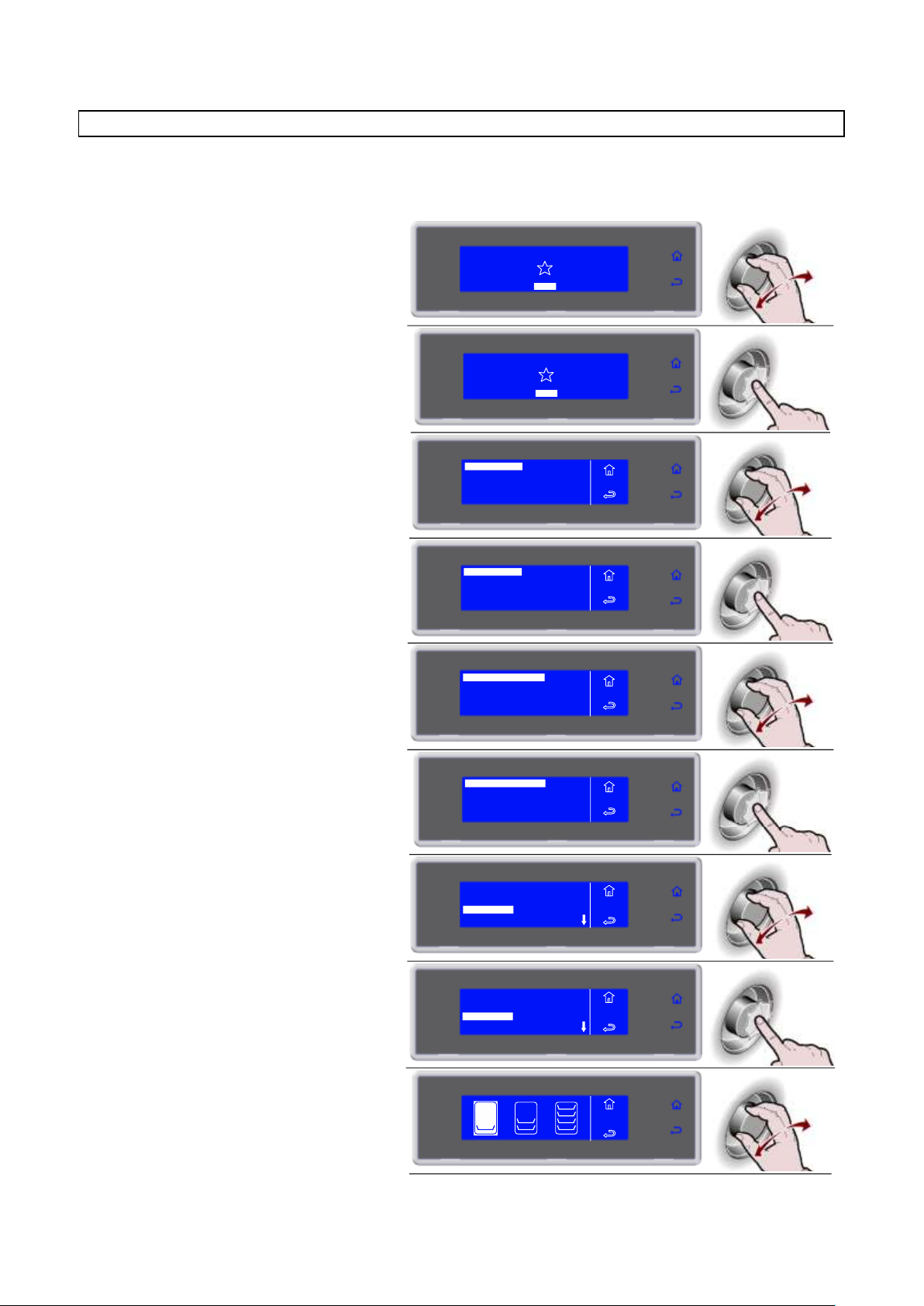
3283430_FR
1. Sélectionner MENU en tournant la
molette
SOFT 0°F
HARD 0°F
IFR INFINITY
SOFT +37°F
HARD +37°F
MENU
2. Appuyer sur la molette pour entrer dans
la section MENU
SOFT 0°F
HARD 0°F
IFR INFINITY
SOFT +37°F
HARD +37°F
MENU
3. Sélectionner AUTOMATIQUES en
tournant la molette
AUTOMATIQUES
MULTY
REFROIDISS.
STOCKEES
POSITIONS
SERVICE
HACCP
FUNCTIONS
MENU
4. Appuyer sur la molette pour entrer dans
la section AUTOMATIQUES
AUTOMATIQUES
MULTY
REFROIDISS.
STOCKEES
POSITIONS
SERVICE
HACCP
FUNCTIONS
MENU
5. Sélectionner la typologie de cycle désiré
en tournant la molette
AUTOMATIQUES +37°F
BANQUETING
VACUUM
AUTOMATIQUES 0°F
MENU
AUTO
6. Appuyer sur la molette pour entrer dans
la typologie de cycle sélectionné
MENU
AUTO
AUTOMATIQUES +37°F
BANQUETING
VACUUM
AUTOMATIQUES 0°F
7. Sélectionner le cycle désiré en tournant
la molette
LASAGNE
RIZ ET PATES
VIANDE
SOUPS ET SAUCES
MENU
AUTO
AUTO +37°F
8. Appuyer sur la molette pour activer le
cycle sélectionné
LASAGNE
RIZ ET PATES
VIANDE
SOUPS ET SAUCES
MENU
AUTO
AUTO +37°F
9. Sélectionner la quantité de charge à
traiter, le minimum, la moyenne, le
maximum
RIZ
ET PATES
PROGRAMMES AUTOMATIQUES
Ces programmes sont des cycles de travail conseillés par le constructeur. Il est possible, pendant le cycle,
de visualiser les paramètres, mais pas de les modifier.
26
Page 93
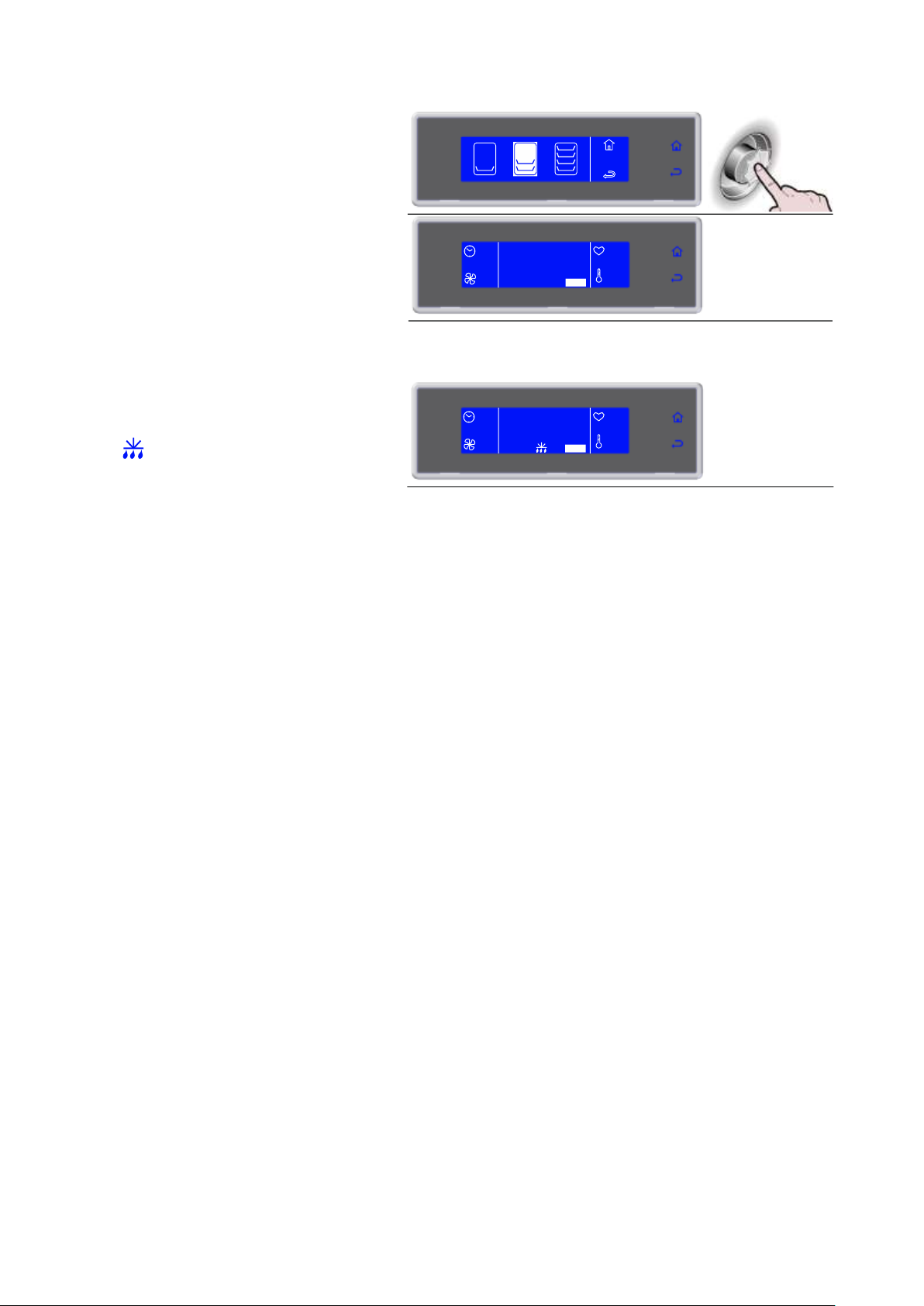
3283430_FR
10. Appuyer sur la molette pour activer le
cycle
Pendant le cycle, il est possible de:
- visualiser les paramètres, en sélectionnant
INFO
- d'arrêter le cycle en sélectionnant STOP
Remarque: les paramètres ne sont pas
modifiables
RIZ
ET PATES
45'
RIZ
ET PATES
90%
+80°F
+75°F
INFO STOP
AUTO +37°F
11. Une fois le cycle terminé, une phase de
conservation démarre automatiquement
Pendant la conservation, il est possible
de:
- visualiser les paramètres, en sélectionnant
INFO
- activer le dégivrage manuel, en sélectionnant
- d'arrêter le cycle en sélectionnant STOP
Remarque: les paramètres ne sont pas
modifiables.
Si cela n’est pas nécessaire, le dégivrage manuel
n’est pas effectué
--
FIN CYCLE
CONSERVE
100%
+80°F
+75°F
SET STOP
27
Page 94

3283430_FR
1. Sélectionner MENU en tournant la
molette
SOFT 0°F
HARD 0°F
IFR INFINITY
SOFT +37°F
HARD +37°F
MENU
2. Appuyer sur la molette pour entrer dans
la section MENU
SOFT 0°F
HARD 0°F
IFR INFINITY
SOFT +37°F
HARD +37°F
MENU
3. Sélectionner STOCKEES en tournant la
molette
AUTOMATIQUES
MULTY
REFROIDISS.
STOCKEES
POSITIONS
SERVICE
HACCP
FUNCTIONS
MENU
4. Appuyer sur la molette pour entrer dans
la section STOCKEES
AUTOMATIQUES
MULTY
REFROIDISS.
STOCKEES
POSITIONS
SERVICE
HACCP
FUNCTIONS
MENU
5. Sélectionner la typologie de cycle
désiré en tournant la molette
STOCKEES +37°F
STOCKEES 0°F
MENU
STOCK.
6. Appuyer sur la molette pour entrer dans
la typologie de cycle sélectionné
MENU
STOCK.
STOCKEES +37°F
STOCKEES 0°F
7. Sélectionner le cycle désiré en tournant
la molette
3
2 CICLO 2
CICLO 3
4 CICLO 4
1 CICLO 1
MENU
STOCK.
STOCK.+37°F
3
2 CICLO 2
CICLO 3
4 CICLO 4
1 CICLO 1
MENU
STOCK.
STOCK.+37°F
PROGRAMMES ENREGISTRÉS
Il s'agit de 10 cycles de réfrigération et 10 cycles de congélation qui peuvent être réglés en fonction des
exigences de l'utilisateur et dont le nom peut être réglé à discrétion.
Ces cycles possèdent déjà des réglages par défaut, effectués par le constructeur : une fois modifiées par
l'utilisateur, les nouvelles valeurs peuvent être enregistrées en mémoire et rappelées lors d'un démarrage
successif à ce cycle.
10 de ces programmes peuvent être choisis comme FAVORIS, en les organisant en fonction des exigences
de l'utilisateur.
28
Page 95
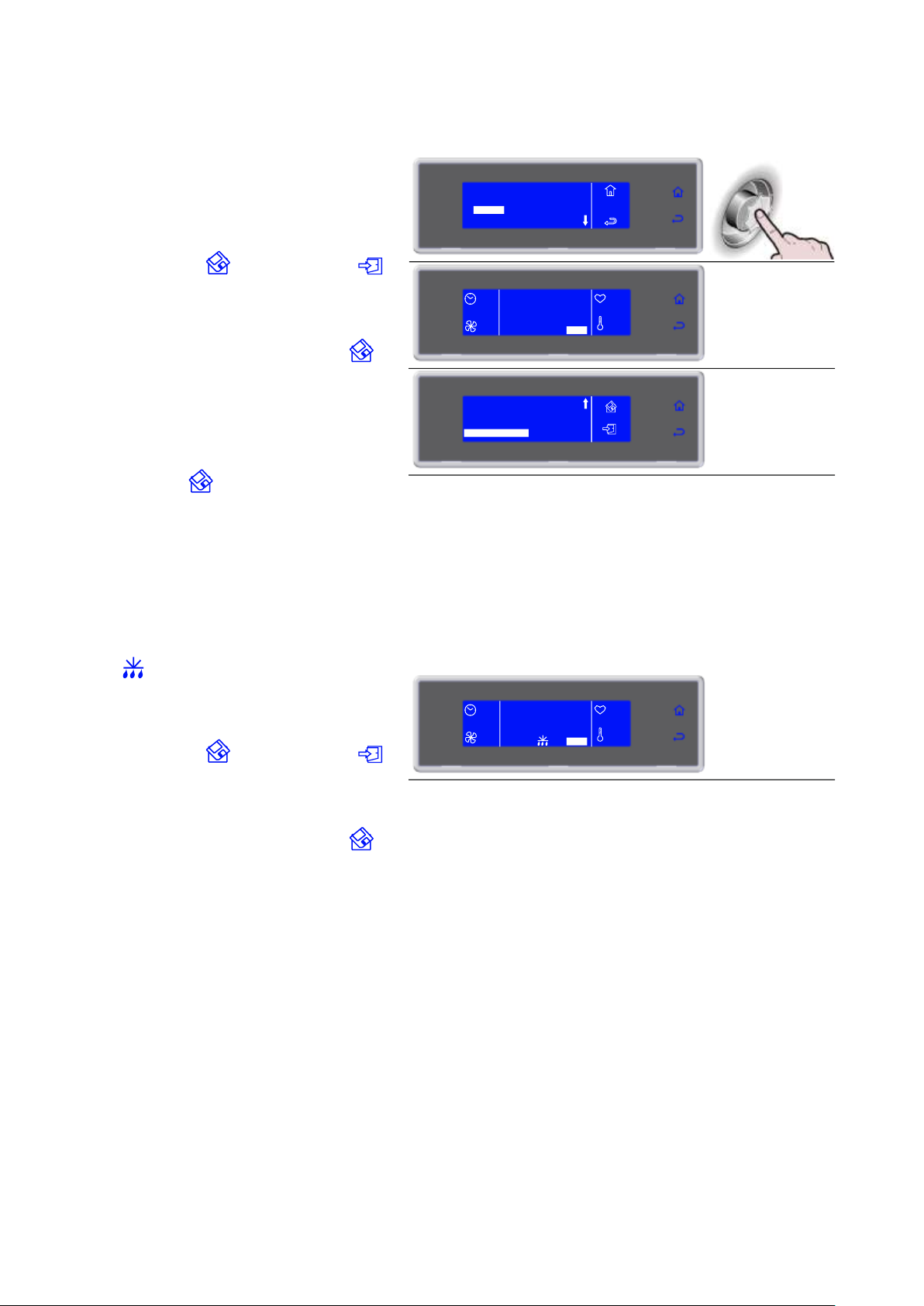
3283430_FR
8. Appuyer sur la molette pour activer le
cycle sélectionné
Pendant le cycle, il est possible de:
- Visualiser, modifier les paramètres par défaut et
faire devenir favoris en appuyant sur SET
- d'arrêter le cycle en sélectionnant STOP
Remarque: les paramètres modifiés peuvent être
enregistrés, une fois enregistrée la nouvelle valeur,
en sélectionnant inon en sélectionnant
es modifications seront actives uniquement pour le
cycle en cours.
Si les modifications sont enregistrées, il sera
demandé d'attribuer un nom au cycle ; utiliser la
molette pour insérer le nom et appuyer sur
our l'enregistrer.
Pour faire qu'un cycle devienne favori, sélectionner
RENDRE PREFERE, présent à la fin de la liste
des paramètres, et insérer la position souhaitée.
Le cycle supprimera automatiquement celui
présent à cette position. Enregistrer, en
sélectionnant
3
2 CICLO 2
CICLO 3
4 CICLO 4
1 CICLO 1
MENU
STOCK.
STOCK.+37°F
90'
CICLO 3
100%
+80°F
+75°F
SET STOP
STOCK.+37°F
TEMPS STADE SOFT
VENTILATEURS STADE SOFT
CONSERVATION
60'
70%
39°F
RENDRE PREFERE
_
9. Une fois le cycle terminé, une phase de
conservation démarre automatiquement
Pendant la conservation, il est possible
de:
- Visualiser, modifier les paramètres par défaut et
faire devenir favoris en appuyant sur SET
- activer le dégivrage manuel, en sélectionnant
- d'arrêter le cycle en sélectionnant STOP
Remarque: les paramètres modifiés peuvent être
enregistrés, une fois enregistrée la nouvelle valeur,
en sélectionnant inon en sélectionnant
es modifications seront actives uniquement pour le
cycle en cours.
Si les modifications sont enregistrées, il sera
demandé d'attribuer un nom au cycle ; utiliser la
molette pour insérer le nom et appuyer sur
our l'enregistrer.
Si cela n’est pas nécessaire, le dégivrage manuel
n’est pas effectué.
--
FIN CYCLE
CONSERVE
100%
+80°F
+75°F
SET STOP
STOCK. +37°F
29
Page 96
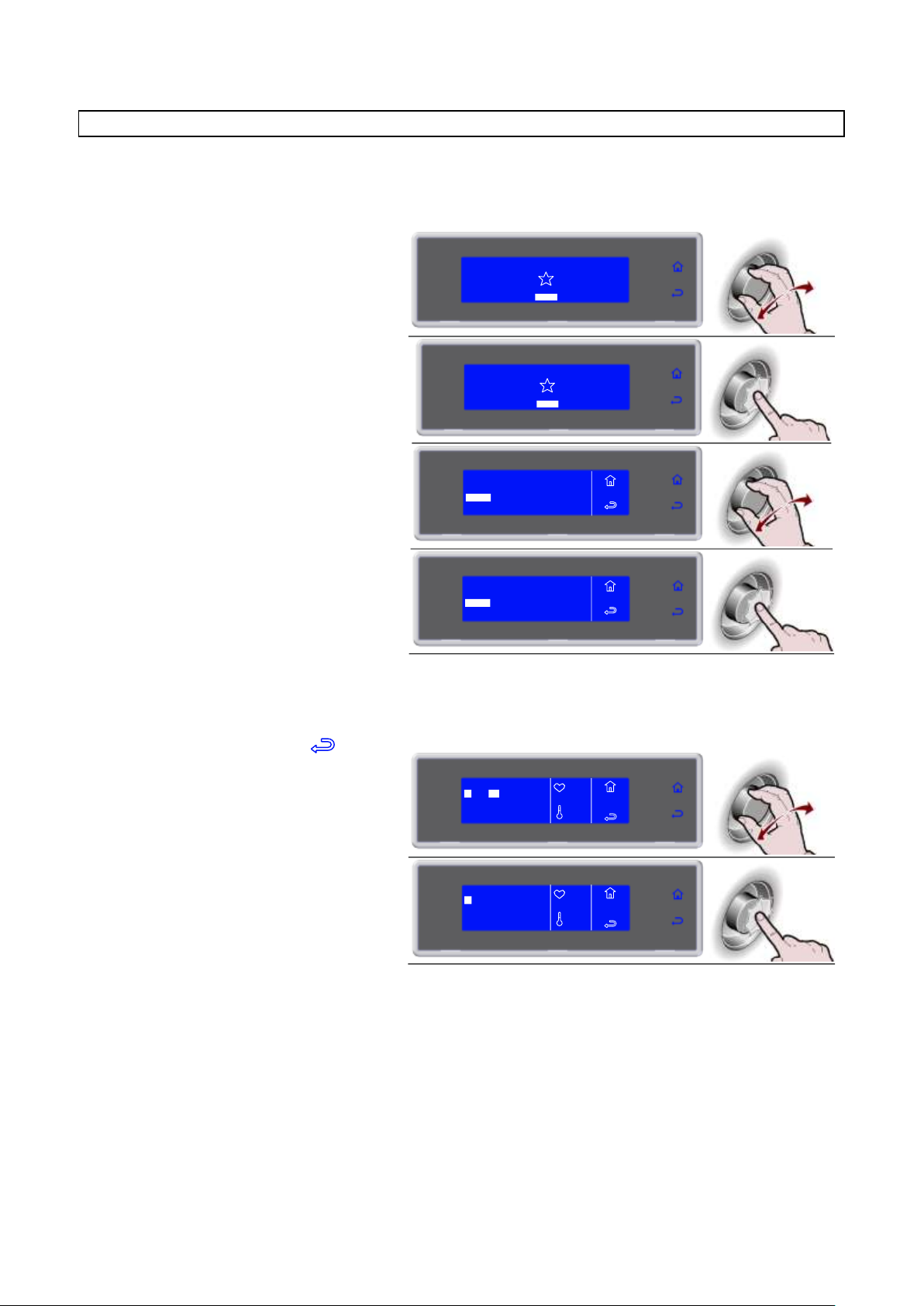
3283430_FR
1. Sélectionner MENU en tournant la
molette
SOFT 0°F
HARD 0°F
IFR INFINITY
SOFT +37°F
HARD +37°F
MENU
2. Appuyer sur la molette pour entrer dans
la section MENU
SOFT 0°F
HARD 0°F
IFR INFINITY
SOFT +37°F
HARD +37°F
MENU
3. Sélectionner MULTY en tournant la
molette
AUTOMATIQUES
MULTY
REFROIDISS.
STOCKEES
POSITIONS
SERVICE
HACCP
FUNCTIONS
MENU
4. Appuyer sur la molette pour entrer dans
la section MULTY
MENU
AUTOMATIQUES
MULTY
REFROIDISS.
STOCKEES
POSITIONS
SERVICE
HACCP
FUNCTIONS
5. Insérer le temps pour chaque niveau et
le confirmer avec la molette
Pendant le cycle, il est possible de:
- visualiser et modifier les paramètres par défaut
en sélectionnant SET (voir pag.41)
- d'arrêter le cycle en sélectionnant
Remarque: les paramètres modifiés seront
enregistrés
À la fin de la valeur réglée pour chaque
niveau, le bip et la valeur clignotante
avertissent l'utilisateur que le produit
peut être prélevé.
Une fois tous les temps réglés écoulés,
une phase de conservation démarre
automatiquement
Pendant la conservation, il est possible
de:
- visualiser et modifier les paramètres par défaut
en sélectionnant SET (voir pag.41)
Remarque: les paramètres modifiés seront
enregistrés
2
1 30'
MENU
MULTY
5L
3 0'
5 0'
4 0'
+80°F
+75°F
SET
20'
2
1 30'
MENU
MULTY
5L
3 0'
5 0'
4 0'
+80°F
+75°F
SET
20'
MULTY
Cycle de réfrigération/congélation à temps organisé pour les niveaux de charge.
Le nombre de niveaux disponibles varie en fonction de l'appareil.
30
Page 97
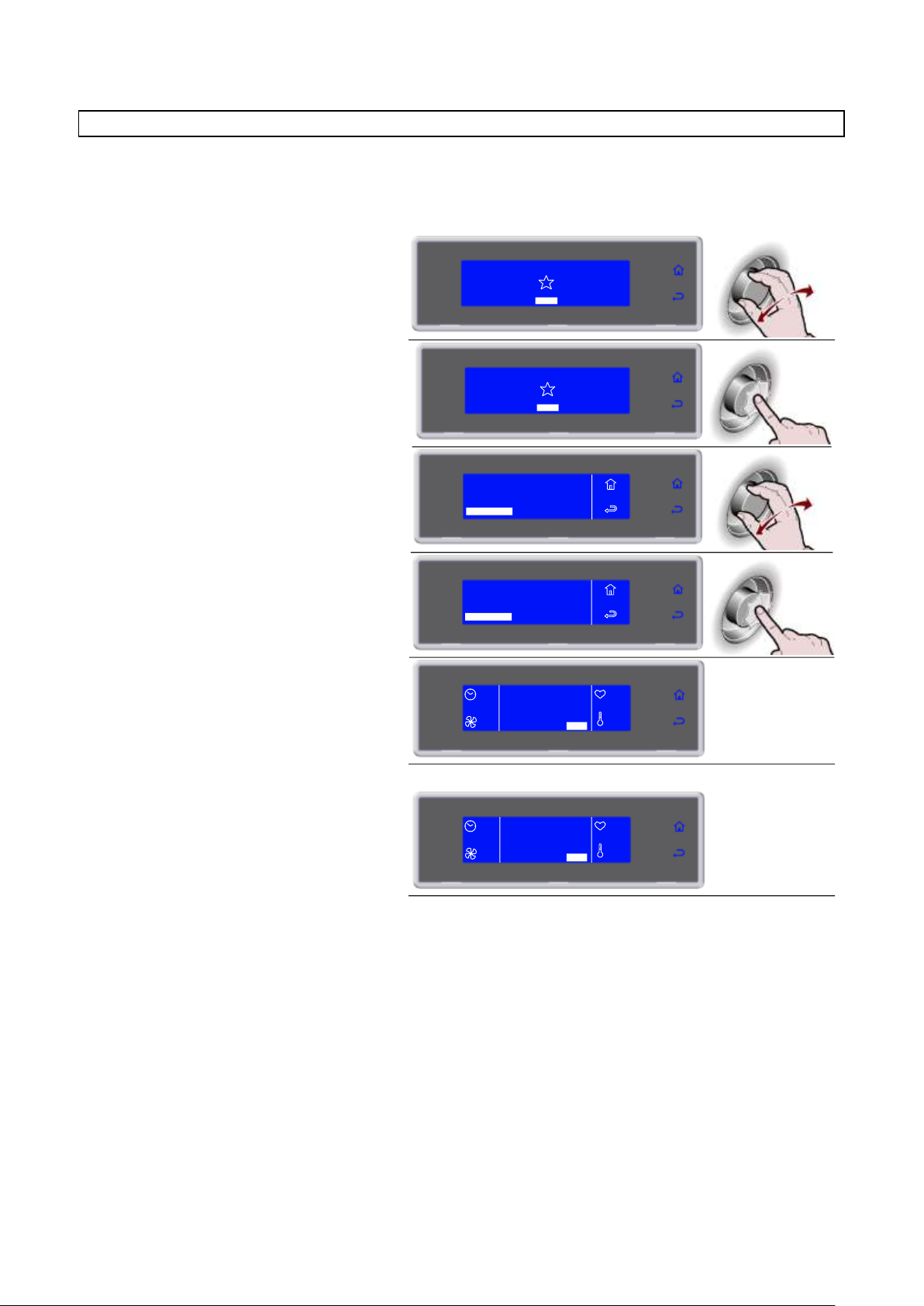
3283430_FR
1. Sélectionner MENU en tournant la
molette
SOFT 0°F
HARD 0°F
IFR INFINITY
SOFT +37°F
HARD +37°F
MENU
2. Appuyer sur la molette pour entrer dans
la section MENU
SOFT 0°F
HARD 0°F
IFR INFINITY
SOFT +37°F
HARD +37°F
MENU
3. Sélectionner REFROIDISS. en tournant
la molette
AUTOMATIQUES
MULTY
REFROIDISS.
STOCKEES
POSITIONS
SERVICE
HACCP
FUNCTIONS
MENU
4. Appuyer sur la molette pour activer le
cycle sélectionné
Pendant le cycle, il est possible de:
- visualiser et modifier les paramètres par défaut
en sélectionnant SET (voir pag.41)
- d'arrêter le cycle en sélectionnant STOP
Remarque: les paramètres modifiés seront
enregistrés uniquement pour le cycle en cours
AUTOMATIQUES
MULTY
REFROIDISS.
STOCKEES
POSITIONS
SERVICE
HACCP
FUNCTIONS
MENU
--
REFROIDISS.
100%
+80°F
+75°F
SET STOP
5. Une fois le cycle terminé, une phase de
conservation démarre automatiquement
Pendant la conservation, il est possible
de
- visualiser et modifier les paramètres par défaut
en sélectionnant SET (voir pag.41)
- d'arrêter le cycle en sélectionnant STOP
Remarque: les paramètres modifiés seront
enregistrés uniquement pour le cycle en cours
--
FIN CYCLE
CONSERVE
100%
+80°F
+75°F
SET STOP
REFROIDISSEMENT
On conseille de démarrer un cycle de refroidissement avant de sélectionner toute sorte de cycle de
refroidissement rapide.
31
Page 98
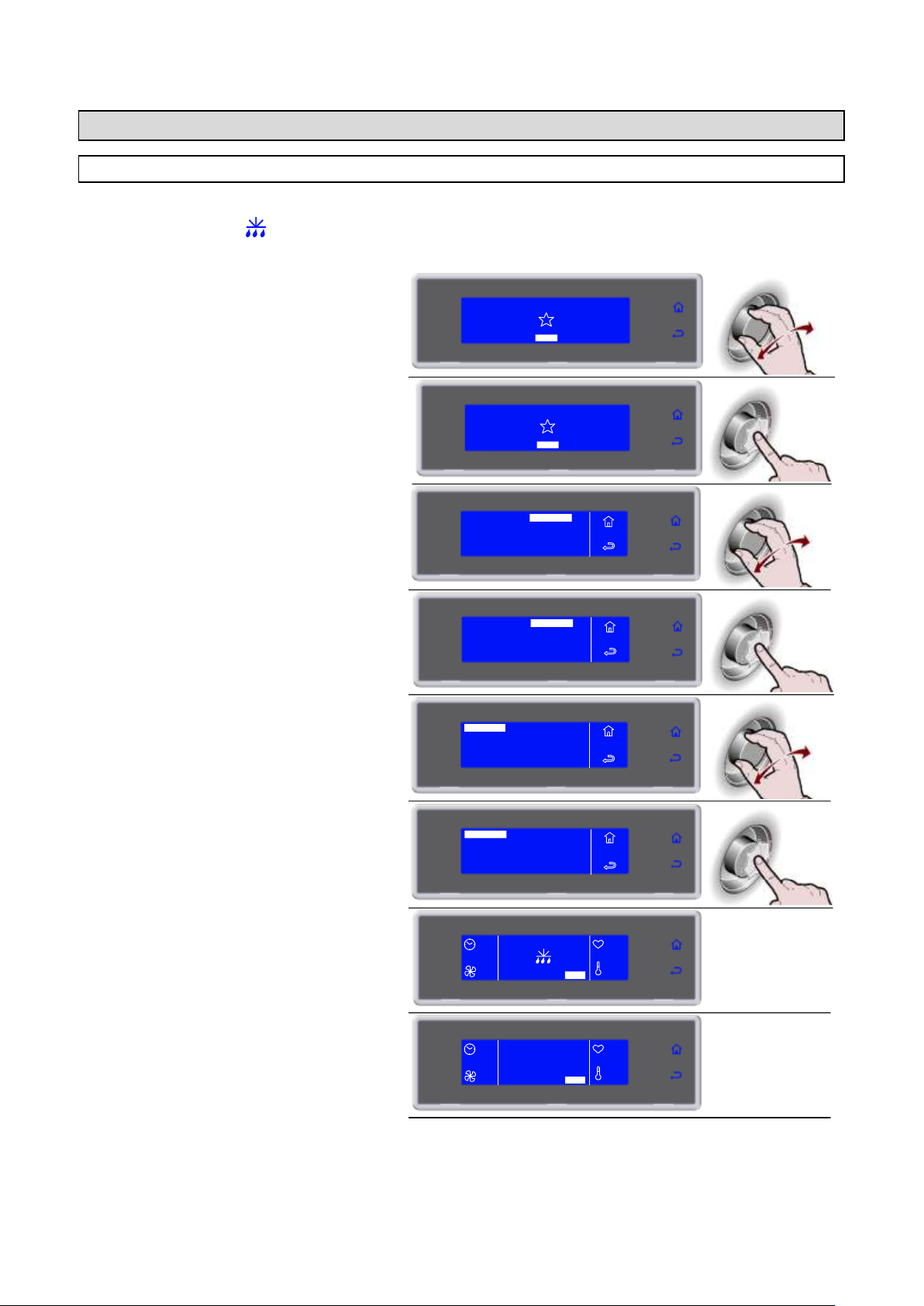
3283430_FR
1. Sélectionner MENU en tournant la
molette
SOFT 0°F
HARD 0°F
IFR INFINITY
SOFT +37°F
HARD +37°F
MENU
2. Appuyer sur la molette pour entrer dans
la section MENU
SOFT 0°F
HARD 0°F
IFR INFINITY
SOFT +37°F
HARD +37°F
MENU
3. Sélectionner FUNCTIONS en tournant la
molette
AUTOMATIQUES
MULTY
REFROIDISS.
STOCKEES
POSITIONS
SERVICE
HACCP
FUNCTIONS
MENU
4. Appuyer sur la molette pour entrer dans
la section FUNCTIONS
MENU
AUTOMATIQUES
MULTY
REFROIDISS.
STOCKEES
POSITIONS
SERVICE
HACCP
FUNCTIONS
5. Sélectionner DEGIVRAGE en tournant
la molette
DEGIVRAGE
CONSERVATION
DECONGELATION
STERILISATION
MENU
FONCTIONS
CHAUFFAGE DE SONDE
6. Appuyer sur la molette pour activer le
cycle sélectionné
Pendant le cycle, il est possible de:
- visualiser et modifier les paramètres par défaut
en sélectionnant SET (voir pag.41)
- d'arrêter le cycle en sélectionnant STOP
Remarque: les paramètres modifiés seront
enregistrés uniquement pour le cycle en cours
DEGIVRAGE
CONSERVATION
DECONGELATION
STERILISATION
MENU
FONCTIONS
CHAUFFAGE DE SONDE
--
20'
SET STOP
--
--
7. Cycle terminé
CYCLE
TERMINE
-SET STOP
--
--
--
STOP
FUNCTIONS
DEGIVRAGE
Si cela n'est pas nécessaire, la fonction ne sera pas activée et sur l'écran apparaîtra de façon alternée le
symbole de dégivrage et l'inscription « NON NÉCESSAIRE », accompagnés du son du bipeur.
32
Page 99
3283430_FR
1. Sélectionner MENU en tournant la
molette
SOFT 0°F
HARD 0°F
IFR INFINITY
SOFT +37°F
HARD +37°F
MENU
2. Appuyer sur la molette pour entrer dans
la section MENU
SOFT 0°F
HARD 0°F
IFR INFINITY
SOFT +37°F
HARD +37°F
MENU
3. Sélectionner FUNCTIONS en tournant la
molette
AUTOMATIQUES
MULTY
REFROIDISS.
STOCKEES
POSITIONS
SERVICE
HACCP
FUNCTIONS
MENU
4. Appuyer sur la molette pour entrer dans
la section FUNCTIONS
MENU
AUTOMATIQUES
MULTY
REFROIDISS.
STOCKEES
POSITIONS
SERVICE
HACCP
FUNCTIONS
5. Sélectionner STERILISATION en
tournant la molette
MENU
FONCTIONS
DEGIVRAGE
CONSERVATION
DECONGELATION
STERILISATION
CHAUFFAGE DE SONDE
FERMENTATION
6. Appuyer sur la molette pour activer le
cycle sélectionné
Pendant le cycle, il est possible de:
- visualiser et modifier le temps d'assainissement
en sélectionnant (voir pag.41)
- d'arrêter le cycle en sélectionnant STOP
Remarque: les paramètres modifiés seront
enregistrés uniquement pour le cycle en cours
MENU
FONCTIONS
DEGIVRAGE
CONSERVATION
DECONGELATION
STERILISATION
CHAUFFAGE DE SONDE
FERMENTATION
--
20'
SET STOP
--
--
7. Cycle terminé
CYCLE
TERMINE
-SET STOP
--
--
--
STOP
STERILISATION
NOTE: Le kit lampe germicide n’est pas fourni de série; il s’agit d’un accessoire en
option à installer.
Si l’on désire acheter le kit, suivre les instructions reportées dans le manuel d’instruction
relatif pour son entretien
33
Page 100
3283430_FR
1. Sélectionner MENU en tournant la
molette
SOFT 0°F
HARD 0°F
IFR INFINITY
SOFT +37°F
HARD +37°F
MENU
2. Appuyer sur la molette pour entrer dans
la section MENU
SOFT 0°F
HARD 0°F
IFR INFINITY
SOFT +37°F
HARD +37°F
MENU
3. Sélectionner FUNCTIONS en tournant la
molette
AUTOMATIQUES
MULTY
REFROIDISS.
STOCKEES
POSITIONS
SERVICE
HACCP
FUNCTIONS
MENU
4. Appuyer sur la molette pour entrer dans
la section FUNCTIONS
MENU
AUTOMATIQUES
MULTY
REFROIDISS.
STOCKEES
POSITIONS
SERVICE
HACCP
FUNCTIONS
5. Sélectionner CONSERVATION en
tournant la molette
MENU
FONCTIONS
DEGIVRAGE
CONSERVATION
DECONGELATION
STERILISATION
CHAUFFAGE DE SONDE
FERMENTATION
6. Appuyer sur la molette pour entrer dans
la CONSERVATION
MENU
FONCTIONS
DEGIVRAGE
CONSERVATION
DECONGELATION
STERILISATION
CHAUFFAGE DE SONDE
FERMENTATION
7. Sélectionner le type de conservation en
tournant la molette
CONSERVATION
POSITIVE
NEGATIVE
MENU
FONCTIONS
8. Appuyer sur la molette pour activer le
cycle sélectionné
Pendant le cycle, il est possible de:
- visualiser et modifier les paramètres par défaut
en sélectionnant SET (voir pag.41)
- activer le dégivrage manuel, en sélectionnant
d'arrêter le cycle en sélectionnant STOP
Remarque: les paramètres modifiés seront
enregistrés uniquement pour le cycle en cours.
Si cela n’est pas nécessaire, le dégivrage manuel
n’est pas effectué
CONSERVATION
POSITIVE
NEGATIVE
MENU
FONCTIONS
--
SET STOP
50%
+80°F
+75°F
CONSERVATION
Il est possible d’activer un cycle de conservation indépendamment d’un cycle de réfrigération rapide.
34
 Loading...