

Page 1

Spread Spectrum Technologies, Inc. Trinaural Processor Manual
TRINAURAL PROCESSOR
PRELIMINARY OWNER'S MANUAL
Welcome to the world of trinaural sound. Some of you may remember the transition from mono to stereo back in the
mid-late '50s. The same similar transition is now about to happen again. While stereo was a huge improvement over
mono, the truth is that the stereo format has always been terribly flawed. All sounds in nature are created in MONO
and not stereo. Hence, stereo is a concoction of man's ingenuity. Stereo does NOT exist in the natural world. Neither
does digital, for that matter.
Human hearing processes information: direction, distance, and finally-recognition. It's this first item, direction, which
is where all the trouble lies. The second and third items become redundant if the first item is not satisfied. Correct and
proper directional clues are the main source of creating "reality" in the acoustic presentation. After all, the main goal of
sound reproduction is the "You are there" or "It is here" factor. Furthermore, it becomes vitally important for the
listener to comprehend this because vision is left out of the equation.
There have been many attempts at creating an improved sound format over the last several decades. Every last one of
these attempts has been a total disaster because of the complete failure in solving the "riddle" of the directionality
problem-until now. Many of you may remember the Dynaco quad adapter, the awful SQ and QS systems of the '70s,
the Ambisonics system, sonic holography systems, and lately the SDS systems. There have been others. None of them
addressed the proper issues.
The Trinaural Processor is a totally different concept compared to any of these other systems. Firstly, it is an
ANALOG processor-not digital. Secondly, it does not alter in any way, the frequency response of the system. What it
does do is algebraically reprocess the directional information. This process requires a third center channel in the
playback system. DO NOT ASSUME that this is merely adding a summed center channel. IT IS NOT!!! The stereo
composite signals are algebraically revectorized into 3 front channels. In addition, the cross-coupled error signals,
which are necessary for stereo to work in the first place, are virtually eliminated. As an aside, the cross-coupled error
signals are also the main Achilles heel of the stereo reproduction system. One should understand that in reality, there is
actually very little absolute left only and/or right only information. Most of the acoustic information is located
BETWEEN the speakers. Most importantly, the vast majority of soloists are located smack dead center. Even in the
very best stereo systems, one must sit virtually in the center (the sweet spot) in order to perceive any proper
perspective. Moving either right or left most assuredly causes shifts in directionality. This of course, is positively
unacceptable and is what the Trinaural Processor improves upon by orders of magnitude.
CAVEAT - THE LEARNING CURVE
The ear-brain linkage is very similar to the muscle-brain linkage in that memory is a key function. For example,
athletes sometimes have to go through great pains in relearning a process because muscle memory must be overcome.
In other words, one must unlearn the fault(s) before learning the new. Our human hearing is similar to this. When
file:///C|/Users/Hans%20Zeeuwe/Desktop/Spread%20Sp...ogies,%20Inc_%20Trinaural%20Processor%20Manual.htm (1 van 4) [25-6-2009 14:17:59]
Page 2
Spread Spectrum Technologies, Inc. Trinaural Processor Manual
presented with a new format, one must RELEARN how to listen. This brings up a vital point. DO NOT ATTEMPT
TO COMPARE THE TRINAURAL SYSTEM WITH NORMAL STEREO. Disregarding this mandatory guideline
will surely meet with less than acceptable results. All of the new directional cues must be learned. Trying to compare
results with the old stereo will certainly lead to confusion. SST WILL NOT be responsible for less than satisfactory
results from those who choose not to follow the prescribed methodology.
It may take you a week or two to begin to get used to the effects of the Trinaural Processor. At first, after proper
calibration, you will undoubtedly sense a "center heavy" quality to the acoustic presentation. This is obvious since
there was NO center speaker there before. Your ears are now getting new informational cues from a REAL center
source. This is NORMAL. There is nothing wrong with your hearing or the system. Your normal initial reaction might
be to turn down the level of the center channel. YOU MUST NOT DO THIS. Over a short period of time, this
perception will fade.
Secondly, our human hearing is "leading tone sensitive' which is actually a musical term. In other words, our hearing
tends to "identify" higher frequencies primarily. For example, in listening to a group of moving chords, our hearing
will automatically identify the top note of each chord as the melody. Obviously, if we didn't have this ability, there is
no way that we could enjoy listening to any kind of music, as there would be no identification. Therefore, relative to
this, when first listening to the Processor, the sound quality will probably sound a little "hot" or strident in the higher
frequencies. Again, this is due to the fact that there was no center speaker there before. This effect too, will disappear
after a short period of time. After conditioning, you will be continuously surprised at the detail and clarity that you've
not experienced before. Another interesting effect that we noticed during extensive listening sessions is that less than
stellar speakers tend to sound much better than they did in just normal stereo. This is because the sound field has been
opened up to such a degree as to make the speakers more transparent and therefore less obvious. Of course, all of the
great possibilities will only occur if the system is set up properly and correctly calibrated.
SYSTEM SETUP AND CALIBRATION
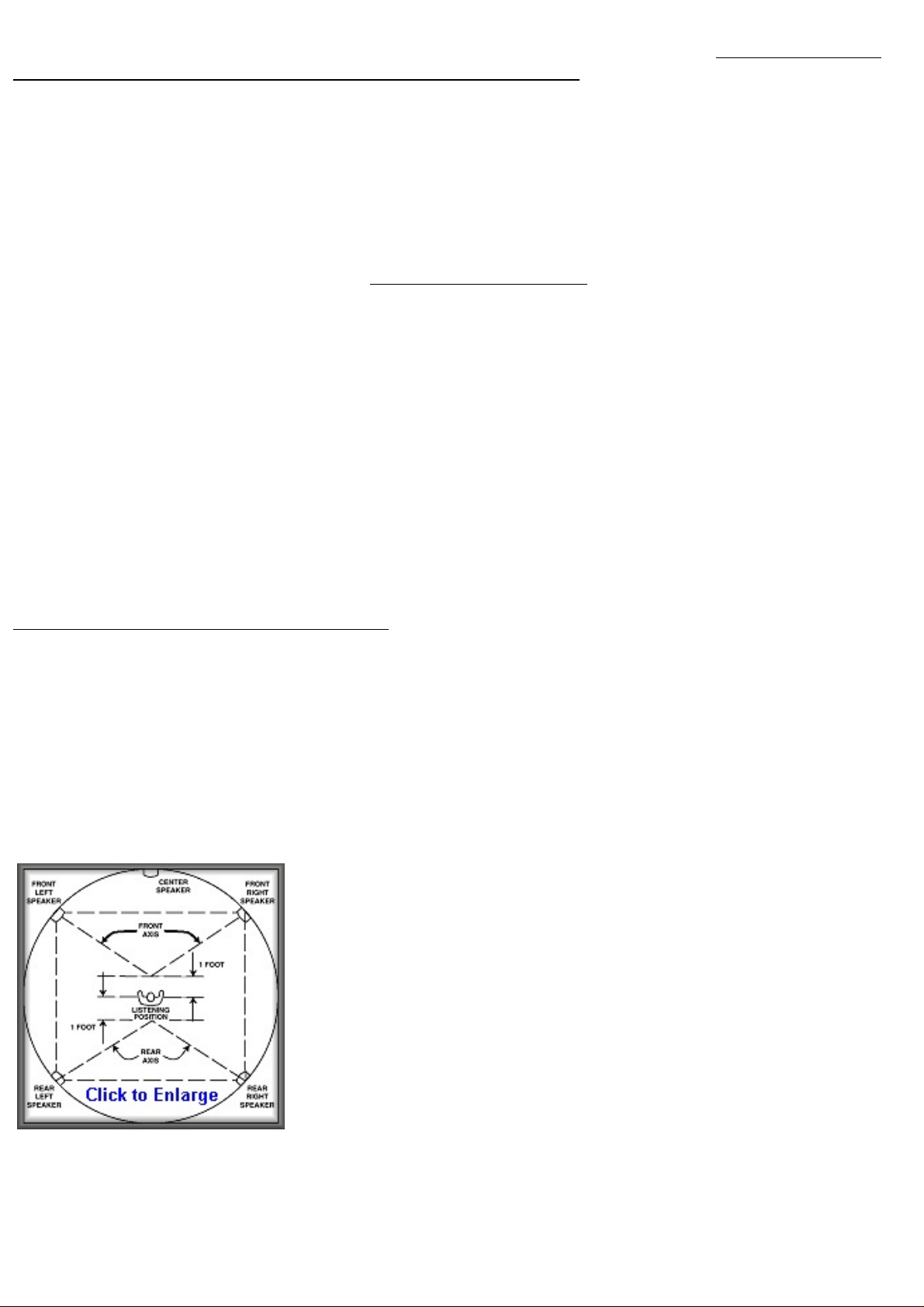
Included is a drawing showing the proper acoustic setup. It is absolutely mandatory that you understand the reasoning
behind our recommendations. The speakers must be placed dimensionally in order for the "time of arrival" of all
sounds to be precisely correct. In addition, the angles must also coincide properly. Finally, the acoustic levels must be
calibrated. The best way to start is to try to arrange your acoustic setup as a perfect square. Even if your room is longer
in the listening direction, try to center the speaker setup to achieve this. The drawing is a composite showing two
locations for the left and right speakers. It is even possible that for those of you who do not have home theater setups
to have both arrangements simultaneously i.e. both front and rear speakers. A simple switch can easily handle this for
the speakers.
The first time setup should have the speakers in the front as shown. The correct
angles of location for the right and left speakers is approximately 45 degrees off
center BUT still located "on the arc" of the circle. This is extremely important as
the distance to the point where all three speaker axis cross MUST be the same. As
shown, this axis point should beapproximately 1 foot in front of your sitting
position.
When the system is first turned on DO NOT play any music. Before you turn the
system on however, MAKE SURE that the recessed CAL-LEVEL screwdriver
adjust control is turned all the way down. Next, turn the noise level on-off control
so that you feel a click indicating that the noise generator has been engaged. You
should hear broadband white noise coming ONLY from the center channel
speaker. Now switch the spring loaded L-CTR-R switch to either the left or the
right. You should hear noise now from ONLY the right or left speaker depending on which you chose. There should be
more noise coming from the right or left speaker than from the center speaker. If the level is too low to hear, carefully
turn up the noise level control. BE CAREFULL!!! Noise is very broadband and VERY powerful and you don't want to
damage your speakers. Now, carefully adjust the cal control so that the noise is EXACTLY the same level coming
file:///C|/Users/Hans%20Zeeuwe/Desktop/Spread%20Sp...ogies,%20Inc_%20Trinaural%20Processor%20Manual.htm (2 van 4) [25-6-2009 14:17:59]
Page 3

Spread Spectrum Technologies, Inc. Trinaural Processor Manual
from the center relative to the right or left.
For those of you that may have a sound pressure measuring system, you may also use this if you don't trust your ears
that much. Remember to face the microphone at each of the speakers (from the exact same axis point) in order to get
the correct results. Once you have obtained the required level match, you are finished.
Those of you that may want to have a dual setup, that is also using rear speakers for certain recordings, should use
amplifiers that have level controls so that the levels can be precisely matched to the front setup. This way you don't
have to recalibrate every time you switch from front to rear. The calibration technique is however, exactly the same for
the rear speakers.
A word to explain why you may want to use rear speakers under certain circumstances. Some live recordings may
produce an effect that puts you right smack in the middle of the audience when using the Trinaural Processor. When
properly calibrated however, ALL of the musical information will still emanate from the front, even though the left
and right speakers are behind you. This is because the front center speaker is always dominant.
It is also highly recommended that you locate your speakers at ear level at the very least or preferably above ear level.
Secondly, we highly recommend that you install a center channel speaker that is at least of the same quality as your
left and right speakers, preferably even a higher quality speaker.
SUBWOOFER
For those of you that have and are using a subwoofer, the processor has a built it crossover which is at 80Hz. The
crossover is phase equalized and 2nd order. There is also a level control provided. Actually, the subwoofer output is
ALWAYS ACTIVE. The switch merely activates the high pass function especially for those of you that are using
satellite speakers that cannot handle the low frequency energy.
OUTPUTS
True balanced outputs via XLR jacks have been provided for all outputs. In addition, standard phono outputs are also
provided for single ended operation. In addition, both the center channel output and the subwoofer output have phono
jacks of both polarities i.e. + and - phases. There are also four inputs that are "pass through". These are for those of you
that are using the processor in a home theater setup. In other words, when the processor switch is turned off, then these
four inputs are activated passing the four inputs (left, right, center, subwoofer), which are coming from your home
theater processor, to the main outputs.
HOME THEATER SET UP
Home theater operation presents a special problem for audiophiles. Obviously, an audio system is used primarily for
high quality sound reproduction. On the other hand, a home theater system has a dual function which is both Video
AND audio reproduction. However, the video is always dominant. Also, and unfortunately, virtually ALL of the center
channel speakers that are supplied with these systems are less than acceptable for high quality audio reproduction.
Additionally, being designed in horizontal fashion makes things even worse. If it is mandatory that you use one of
these speakers then we make the following recommendations. Turn the speaker so that it is vertical instead of
horizontal. This will raise the viewing screen higher, but that is a good thing. Or, if this is not possible, then put the
speaker above the screen instead of below.
For those of you with larger rooms there is another very unique possibility that has never been written about or
considered. A great many of you may not have an ideal listening setup in that your listening position may be against a
rear wall. Of course, in this case, you won't be getting the full impact of home theater because you won't have any
actual "rear" speakers. The correct listening position is out "into" the room so that the rear channels can be effective. If
however, you place the screen BEHIND you, then a very unique situation can occur. Your video system can be at one
file:///C|/Users/Hans%20Zeeuwe/Desktop/Spread%20Sp...ogies,%20Inc_%20Trinaural%20Processor%20Manual.htm (3 van 4) [25-6-2009 14:17:59]
Page 4

Spread Spectrum Technologies, Inc. Trinaural Processor Manual
end of the room, and your audio system can be at the other end of the room. In this way, you can have your cake and
eat it to, so to speak. In other words, getting rid of the screen in the center, for your audio system, allows you to
maximize the potential audio performance of the system. After all, for audio, your best speakers should be used for the
three front channels. THIS IS NOT AS IMPORTANT A REQUIREMENT FOR HOME THEATER. With this setup,
your (now) three rear speakers, which are now the front for your home theater, only have to be decent quality. The key
to this whole setup is having a "swivel" seat in the center of the room that can be rotated 180 degrees. An external
switching box is all that is needed in order to make this work.
Balance Control
When using the Trinaural Processor, the balance control will no longer function in the normal manner. Due to the out
of phase components appearing in the opposite channel(s), the levels obviously cannot be reduced to zero on one side
or the other. Therefore, it is critical that the left to right balance be adjusted BEFORE the processor is installed and
calibrated. If you have an imbalance say, in the phono cartridge, you will need to readjust the balance control FIRST
and mark the position for this source.
back to the Trinaural Processor page
file:///C|/Users/Hans%20Zeeuwe/Desktop/Spread%20Sp...ogies,%20Inc_%20Trinaural%20Processor%20Manual.htm (4 van 4) [25-6-2009 14:17:59]
 Loading...