

Page 1
Allflex ISO Compatible RF/ID Compact Reader
Model No. RS200-V2
User Manual
(Rev C June 2006 / Software V2.06)
These instructions guide the user through the basic setup, configuration, and operation
of the Allflex Compact Reader, Model RS200-V2, an RF/ID scanner capable of
reading and displaying ISO HDX and FDX-B type transponder identification codes.
Unpacking
The Compact Reader is shipped in a box with this instruction guide, one 9 volt alkaline
battery, and a protective carrying case. Remove the reader and battery from the box,
and follow the directions contained in this guide for battery installation, setup, and
operating instructions. Transponders (not supplied with Reader) are helpful in
verifying the configuration and operation procedures described in this guide.
Compact Reader User Interface
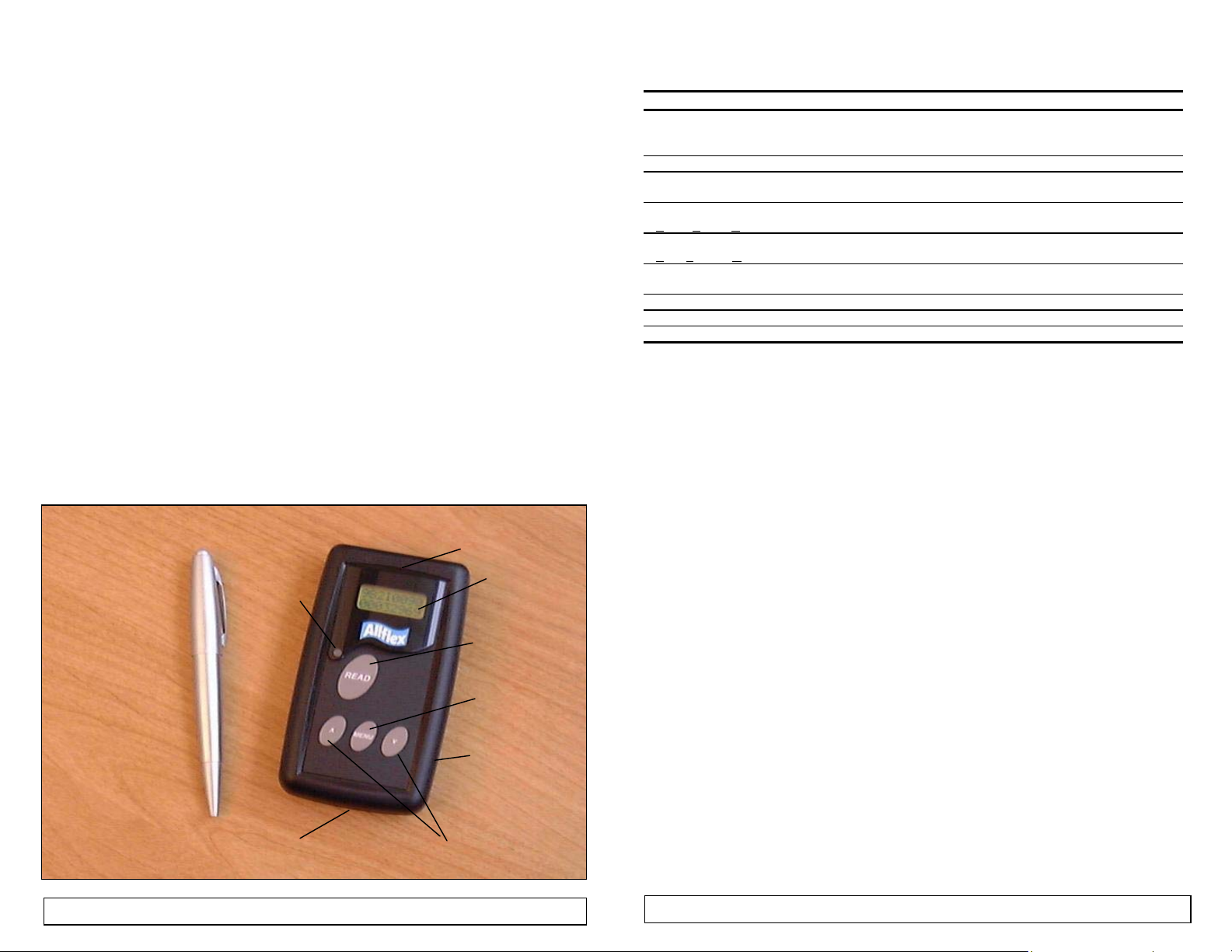
The figure below illustrates the Compact Reader’s features that are instructive to its
operation and use. Each feature and its corresponding function are described in the
accompanying Table 1 on the following page.
Figure 1 - Compact Reader Features and User Interface
Red LED
BATTERY
COMPARTMENT
ANTENNA
2x8 LCD
READ
MENU
ENCLOSURE
SCROLL UP
SCROLL DN
Table 1 - Compact Reader Features and Descriptions of Use
Feature/Item Description of Use
READ Button Turns Reader ON from OFF state
MENU Button Activates Options Menu / Selects Options Menu Category
SCROLL UP/SCROLL
DOWN Buttons
2x8 Character LCD
(
Liquid Crystal Display)
Red LED Indicator
Light Emitting Diode)
(
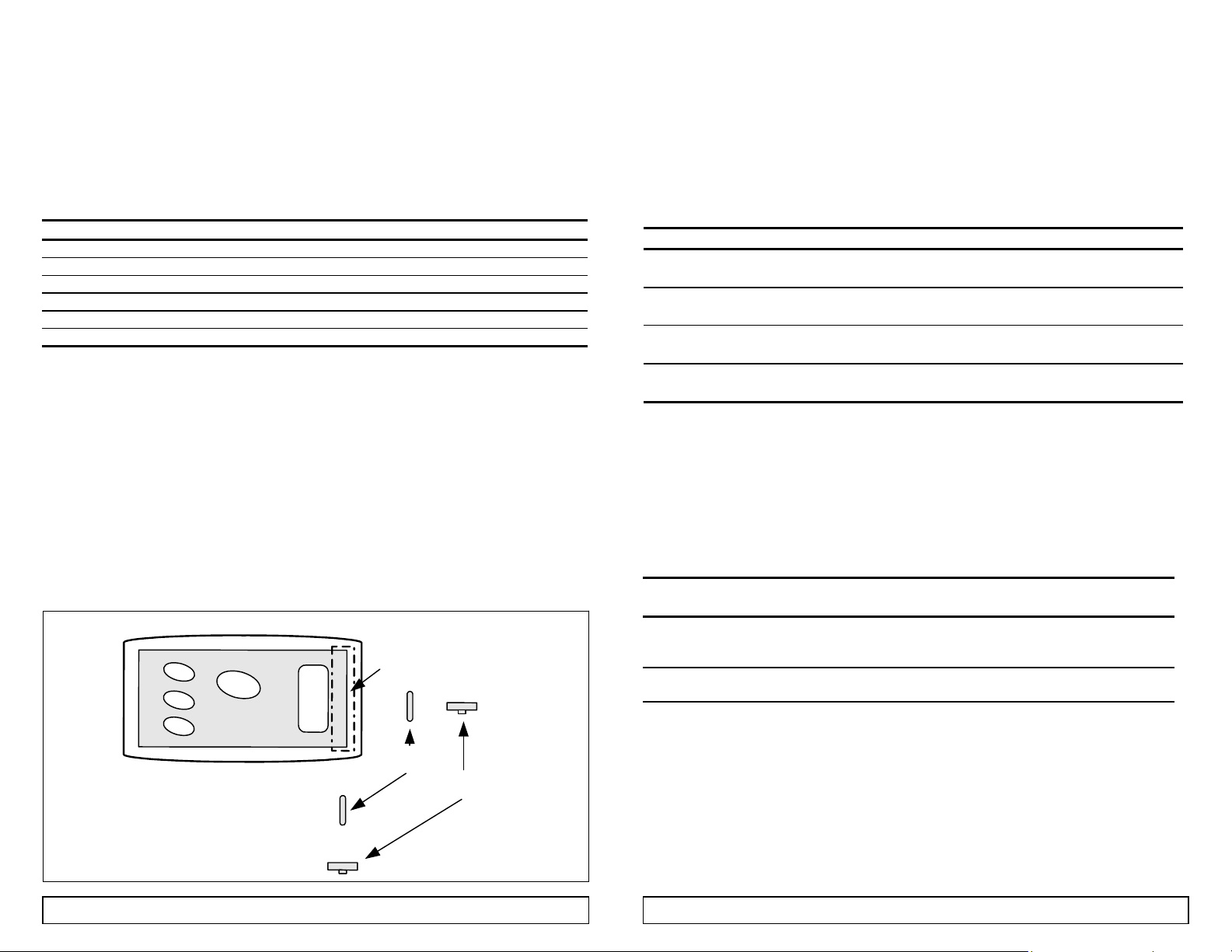
Antenna Coil Transponder coil axis should be coaxial or parallel to Reader antenna axis
Battery Compartment Accepts single 9 volt alkaline or nickel-cadmium battery (bottom)
Equipment Label Provides model, serial number, and agency certification notices (bottom)
Enclosure Compact ergonomic case
Activates transponder reading from ON state
Selects certain option alternatives in Options Menu
Navigates Options Menu
(Press both buttons simultaneously to turn off unit)
Displays transponder ID Code information, Reader status, and Options
Menu selections
Lights when valid transponder ID Codes are detected
(optionally lights with Options Menu selections)
for maximum reading distance (mounted inside enclosure – see Figure 3)
Setup
The Compact Reader requires only installation of the 9 volt battery in order to begin
reading transponders. The Reader also permits the user to configure several options
that control its functions and ID code presentation format.
Battery Installation Instructions
The Compact Reader is supplied with one 9 volt alkaline type disposable battery. A
variety of battery technologies, both disposable and rechargeable types, can be used.
Table 2 lists one manufacturer’s compatible battery types, and the estimated service
life each type will provide in use with the Compact Reader.
To install or replace the battery (ensure Reader is turned off before proceeding):
• Turn the Reader over so that the equipment label is visible. Push down gently on
the small ribbed spot just beneath the label and push laterally away from the label.
• When the battery compartment cover has slid open approximately 10mm, it can be
removed from the channel in which it fits to expose the battery compartment.
• Install the 9 volt battery observing the polarity orientation etching which appears
in the bottom of the enclosure.
Note: Incorrect installation of the battery will not damage the reader. However, the Reader will
fail to operate unless the battery polarity is correctly oriented.
Reposition the battery compartment cover and snap it into the chann el approximately
10mm from the closed position. Once in the channel, press down gently on the ribbed
spot and slide the cover back into the fully closed position.
1
2
Page 2
Note: FDX-B reading distance performance may be slightly less when a nickel cadmium type
battery is installed in the reader. Both HDX and FDX-B reading distance will gradually
deteriorate as any type battery is discharged through normal use. The Compact Reader provides
a Low Battery indication on its LCD display when the battery requires charging or replacement.
Note: Rechargeable batteries must be charged in compatible external charging apparatus.
Note: Actual number of transponder reads per battery life will vary with the pattern of use of
the Reader. Numbers shown in Table 2 are based on 1 second scan intervals to level at which
HDX transponder read distance is diminished to approximately 1/2 initial distance.
Note: When battery life has been exhausted to a point at which battery replacement is required,
the LCD readout will indicate “LOW BATTERY / POWERING DOWN” and will automatically
turn off.
Table 2 - Recommended Battery Types (all Eveready/Energizer®)
Type Number Chemistry Capacity mAH Est. No. of Reads
1222 (Heavy Duty) Zinc-Manganese < 50 300
522 Alkaline 600 10,000
L522 Lithium 1200 20,000
CH22 * Nickel-Cadmium 120 3,000
Note: Nickel Cadmium is rechargeable battery type.
Operating and Using the Compact Reader
Activating the Compact Reader
After installing the battery, the Compact Reader is ready for use. The Reader is
activated from its normally OFF state by pressing the READ button for about 1
second. Upon depression of this button, the Reader is turned ON, and an indication of
this state is enunciated by momentary flashing of the red LED visual indicator, beeping
of the audible indicator, and displaying of READER READY on its LCD indicator.
Note: If the LAST TAG option in the Options Menu has been set ON, and a transponder has
been previously read, the LCD indicator will show the ID code number of the last transponder
tag that was read.
Reading a Transponder Tag
The Reader is immediately ready for use once it is turned on. Transponder scanning is
performed by pressing the READ button. If the READ button is pressed momentarily,
scanning will be active for a default interval of 3 seconds. If a transponder is detected
during this time, its ID code will be displayed on the LCD, and the LED indicator will
flash once, and the audible beeper will beep once. If the same ID code is read
repetitively, the LED and beeper will flash and beep twice. If no transponder is
detected after 3 seconds of scanning, the LCD will indicate NO TAG FOUND, and
scanning will cease. Pressing READ again initiates the scanning sequence.
Alternately, the READ button may be pressed continuously until the tag is read.
Scanning automatically stops upon ID code acquisition, and the READ button must be
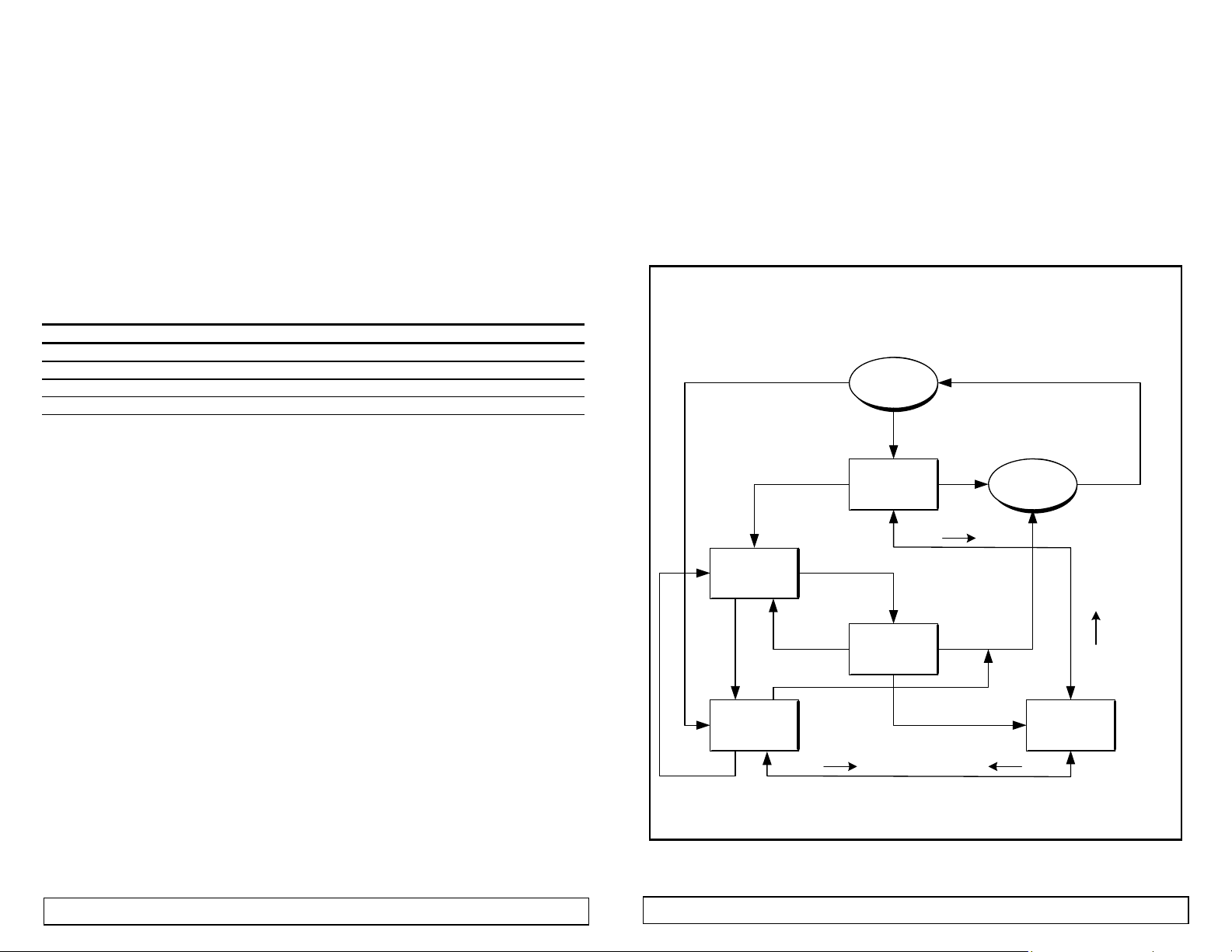
released and pressed again to perform a subsequent reading operation. See Figure 2
for a graphical illustration of the Compact Reader’s operating sequence.
Note: The battery is checked each time the reader is powered on. If the battery life is nearing
its end, a LOW BATTERY indication will automatically appear on the LCD indicator. If the
battery has become severely discharged, the Reader will fail to power up altogether.
Note: The Compact Reader turns itself off automatically after 30 seconds (or the user selected
Options Menu alternative time). The Reader can be turned off manually by simultaneously
pressing the SCROLL UP and SCROLL DOWN keys.
Figure 2 - Compact Reader Functional Sequence
Compact Reader State Diagram
TAG ID
(3 SEC
TIMEOUT)
READ
POWER ON
(RESET)
(LAST TAG = OFF)
READ
READER
READY
MENU
NO TAG
FOUND
MENU
30 SEC
TIMEOUT
30 SEC
TIMEOUT
READER
OFF
OPTIONS
(5 SEC TIM EOUT)
READ
READ
(5 SEC TIM EOUT)
MENU
READ
(LAST TAG = ON)
READ
READING
( ( ) )
TAG ID
FOUND
982 0000
00031277
READ READ
MENU
NOT FOUND
30 SEC
TIMEOUT
3
4
Page 3
Reading Transponders
Prior to reading transponders in situ, it is recommended that the Reader be checked
with test transponders to ensure satisfactory performance. The user should have
available spare transponders of the types that the Allflex Compact Reader is capable of
reading for this purpose. The chart below provides nominal read distance performance
that can be expected when the transponder is optimally oriented to the Reader.
Table 3 - Nominal Read Range Performances (with new 9V alkaline battery)
Manufacturer Transponder Description Read Range (cm)
Allflex FDX-B (ISO) 12mm Glass Implantable 6
Allflex FDX-B Plastic Eartag 10
Allflex HDX Plastic Eartag – High Performance 15
Allflex HDX Plastic Eartag – Light Weight 12
Allflex HDX 23mm Glass Implantable 9
Allflex HDX 31mm Glass Implantable 11
Note: In order to read a transponder, position the transponder as shown in Figure 3 below
within the read range specified in Table 3. Press and release the READ button. The Reader
will search for a transponder for 3 seconds (the factory set default value). If the transponder is
detected during this interval, the Red LED will flash, the audible beeper will sound, and the ID
Code will be displayed on the LCD readout. If no transponder is detected during this search
interval, there will be no audible/visual indication, and the LCD will display NO TAG FOUND.
When any tag is read repeatedly, the LED and beeper flash and sound a double indication.
Holding the READ button down permits scanning until a tag is read.
Note: When reading installed transponders whose orientation cannot be ascertained, the
reading distance may be less than those listed in Table 3. The Reader may need to be moved
and its orientation may need to be changed in order to obtain a reading. Generally, reading such
non-visible (implanted) transponders will require such Reader movement.
Figure 3 - Optimal Read Range Transponder Orientation
F
r
e
r
i
A
e
t
n
n
n
e
t
a
s
s
a
l
G
T
n
a
l
p
m
I
r
t
s
n
a
e
d
n
o
p
r
E
r
a
t
s
i
D
/
g
a
c
T
r
a
n
o
p
s
n
r
e
d
Interpreting the Visual ID Codes
The Compact Reader is capable of reading the ISO HDX and FDX-B transponder
technologies, and it can be configured via the Options Menu to display the
corresponding tag information in various ways. Table 4 lists the available options, and
provides illustrations of the corresponding display formats. Factory set default option
settings are shown in bold type.
Table 4 - Display Setup Options
Option Setting Display Format
# Format
Lead 0’s
Cty Code
F / H
Hex Dec 3D6
Yes No 982 0000 982
Alpha Numeric USA 0001 840 0001
Yes No 982F0000 982 0000
The Manufacturer’s Code is displayed for ISO compliant HDX and FDX-B transponders
Note:
that contain a decimal value in the range of 900 to 999, per ISO 11784 requirements, and per
ICAR assignment. When a value less than 900 is detected, it represents a three letter Country
Code per ISO 3166. Alternately, the three digit (decimal or hexadecimal) ISO 3166 alpha
country code can be displayed by changing the Menu option (for example, “USA” would be
displayed as “840” (decimal) or “348” (hexadecimal)).
Table 5 - Manufacturer and Country Code Designations
Manufacturer/
Country Code
900 > 999
(384 > 3E7 Hex)
001 > 899
(001 > 383 Hex)
ISO Compatible HDX or FDX-B type transponder
Manufacturer Code per ISO 11784 and ICAR assignment ( Note: 999
is reserved for universal use to designate a prototype transponder).
ISO Compatible HDX or FDX-B type transponder
Country Code per ISO 11784 and ISO 3166 or Country Alpha
The Manufacturer or Country Code information appears on the LCD as the left-most 3
Note:
digits or characters on the top line of the display. When the LCD format has been set for
hexadecimal representation, a subscript “H” character follows the last character of the numeric
Manufacturer or Country Code and the Identification Code (see Table 4).
000 982 0000
H
0C45AE9
H
12868329
12868329 12868329
23456800 23456800
12868329 12868329
Interpretation
5
6
Page 4
Reading Performance
RFID Readers are most frequently assessed with respect to performance by reading distance.
The reading distance performance of a Reader is principally affected by the following effects:
Transponder Orientation - For maximum reading distance, the axes of the transponder and
reader antenna coils must be oriented coaxially.
Transponder Quality - Each manufacturer’s transponder differs in (a) the amount of exciter
signal energy necessary to sufficiently operate the transponder’s internal circuitry, and (b) the
signal level of the ID Code information that is returned to the reader. Consequently, it is normal
for transponders of a common type (FDX-B, for example) made by different manufacturers to
exhibit different read range performance characteristics.
Transponder Motion - Most portable readers have small antenna geometries, and consequently
small effective “reading zones”. Portable readers are generally designed for reading
transponders under quasi-static conditions. Transponders that are moving quickly past the
reader may not be present within the reader’s read zone sufficiently long for all the ID Code
information to be obtained.
Transponder Size - Physically larger transponders generally contain larger receiving coils which
produce longer reading distances than smaller transponders.
Transponder Type - HDX transponders generally exhibit greater reading distances than FDX-B
transponders of comparable size.
Proximal Metallic Objects - Metal objects located near the transponder or Reader can attenuate
and distort the electromagnetic fields generated in RFID systems, and thus diminish read
distance performance.
Electrical Noise Interference - RFID transponders and readers use electromagnetic signals as a
premise of operation. Other electromagnetic phenomena – radiated electrical noise from
computer displays, for example – can interfere with the transmission and reception of RFID
signals, and consequently reduce reading distance.
Transponder/Reader Interference - Multiple transponders within the sensing range of the
reader, or other readers emitting excitation energy in the immediate vicinity will adversely affect
the reading performance or prevent operation of the Compact Reader.
7
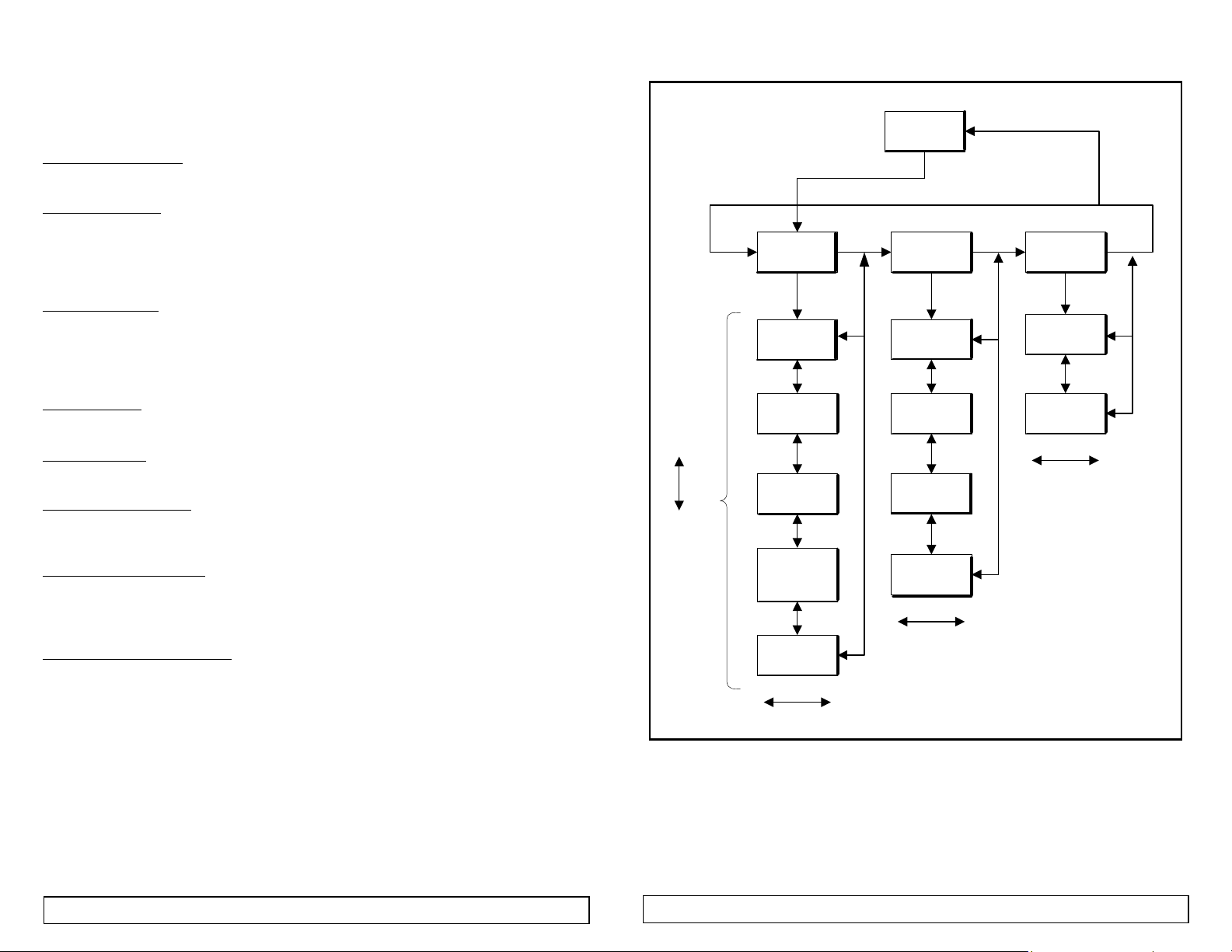
Figure 5 - Options Menu Navigation
MENU
MENU
MDISPLAY
MENU MENU
SETUP
SCR DN MENU SCR DNSCR DN
#FORMAT:
HEX *DEC
LEAD 0's
*YES NO
SCROLL
UP
LAST TAG
*YES NO
SCROLL
DOWN
CTY CODE
*ALPHA
(*NUMERIC)
F / H ?
YES *NO
READ
READER
READY
MREADER
SETTINGS
MENUBEEP
*ON OFF
WRLSSYNC
ON *OFF
MENU
MENU
READ
MREADER
INFO
MENU
M INFO
SW V2.06
M INFO
HW V2.00
READ
TIME ON:
0:30 MIN
READTIME
3 SEC
READ
NOTES:
1. All option menu screens time-out to "REA DER REA DY" mode if no keys
are pressed for 5 seconds.
2. The small "M" designates Options Menu
8
Page 5

Default Option Settings
The Options Menu (see Figure 5) provides the user with means to configure the
Compact Reader in a manner that best suits the user and the Reader’s intended
application.
• Press the MENU button until the desired Option Category listed in Table 5
appears on the LCD.
• Press SCROLL UP or SCROLL DOWN until the Option Item appears on the
LCD
• Press the READ button to select the desired option setting
The Compact Reader is shipped from the factory with these options set in the default
state. An abbreviated listing of the principal options is provided in Table 5.
Table 5 - Option Menu Categories, Items, and Default Settings
Option
Category
DISPLAY
SETUP
READER
SETTINGS
VERSION
INFO
#FORMAT: DEC(imal) or HEX(adecimal)
LEAD 0’s: YES or NO
LAST TAG ON or OFF
CTY CODE ALPHA or NUMERIC
F / H ? YES or NO
MENUBEEP ON or OFF
WRLSSYNC ON or OFF
TIME ON 20, 30, 40, 50 seconds
1, 1.5, 2, 2.5, 3, 3.5, 4 minutes
TIMEOFF (i.e., no automatic shutoff)
READTIME 1, 2, 3, 4, 5, 7, 9 seconds
None – information only SW V2.06
Allflex Europe Allflex USA, Inc. Allflex Australasia
ZI. de Plagué P.O. Box 612266 Private Bag 11003
Route des Eaux, B.P. 90219 Dallas/Ft. Worth Airport Palmerston North
35502 Vitre Cedex, France Texas 75261-2266 New Zealand
Tel 33 (0)2.99.75.77.00 Tel (972) 456-3686 Tel 64 (06) 356-7199
Fax 33 (0)2.99.75.77.29 Fax (972) 456-3882 Fax 64 (06) 358-5982
Note: This equipment has been tested and found to comply with the limits for a Class A digital device pursuant to Part 15 of the FCC
Rules. These limits are designed to provide reasonable protection against harmful interference when the equipment is operated in a
commercial environment. This equipment generates, uses, and can radiate radio frequency energy, and if not installed and used in
accordance with the instruction manual, may cause harmful interference to radio communications. Operation of this equipment in a
residential area is likely to cause harmful interference in which case the user will be required to correct the interference at his own
expense.
NOTE: THE MANUFACTURER IS NOT RESPONSIBLE FOR ANY RADIO OR TV INTERFERENCE CAUSED BY
UNAUTHORIZED MODIFICATIONS TO THIS EQUIPMENT. SUCH MODIFICATIONS
AUTHORITY TO OPERATE THE EQUIPMENT.
This device has been tested and meets the Electromagnetic Compatibility (EMC) requirements of EN50082-1, EN50022, and ETSI 300
330-1 for the CE Declaration of Conformity (DoC), and with Industry Canada RSS-210.
Option / Possible Settings Default Setting
DEC(imal)
YES
ON
ALPHA
NO
ON
OFF
30 Seconds
3 seconds
HW V2.00
Allflex Worldwide Sales Offices
FCC ID: NQY-930042
COULD VOID THE USER'S
Compact Reader Technical Specifications
GENERAL
RFID Compatibility: ISO 11784 & 11785 HDX and FDX-B and Industrial HDX
Form Factor: Portable Handheld ABS Plastic Enclosure
User Interface: Single “On/Press to Read” Activation Button
ID Code Display Format Decimal or Hexadecimal
Memory: Holds last ID Code in memory and on display indefinitely until next
Battery Power: 1 9V Alkaline Battery (disposable), or
Electromagnetic
Compatibility (EMC)
Certifications
PHYSICAL/ENVIRONMENTAL
Dimensions: 125.5mm L x 70mm W x 24mm H (4.9” L x 2.75” W x 0.94” H)
Weight: 0.18 kg. (6.5 oz.) with alkaline battery installed
Material: ABS UL94 HB Plastic
Color: Black
Operate Temperature +5ºC to +40ºC (IEC68.2.1/.2)
Storage Temperature -10ºC to +55ºC (IEC68.2.1/.2)
Humidity: 0 to 95% (IEC68.2.56)
Altitude: -100 to +3,000 meters
Mechanical Shock: Per IEC 68-2-27
Vibration: Per IEC 68-2-6
Hermeticity: IP-50 (dust resistant / no protection against water) per IEC 529
RELIABILITY
MTBF: 50,000 hours
MTTR: 0.5 hours
Expected Life: 5 years, minimum
PERFORMANCE
Read Distance: 6cm (typical - Allflex 11.5mm FDX-B transponder)
Reading Orientation: 0º to 45º with less than 10% range decrease
Read Error Rate: Less than 1 in 10
Read Cycles/Battery: 10,000 - Alkaline (disposable) (based on 2 second read intervals)
The disposal of exhausted rechargeable and non-rechargeable batteries is regulated by local laws, and such
laws vary significantly among countries worldwide. All batteries must be disposed of in a manner compliant
with the local requirements, and proper compliance is entirely the responsibility of the owner and/or user of
the Compact Reader.
Menu & Scroll Up/Down Option Select Buttons
16 character (2x8) LCD display
Audible Beeper and Red LED “Read” Indicators
read
1 9V Ni-Cad Battery (externally recharged)
FCC Part 15 Class A
CISPR 22 (EN55022), and EN50082-1
ETSI 300 330-1
Industry Canada RSS-210
15cm (typical – Allflex HDX eartag)
6
3,000 - Ni-Cad (rechargeable)
Battery Disposal Information
9
10
 Loading...