

Page 1
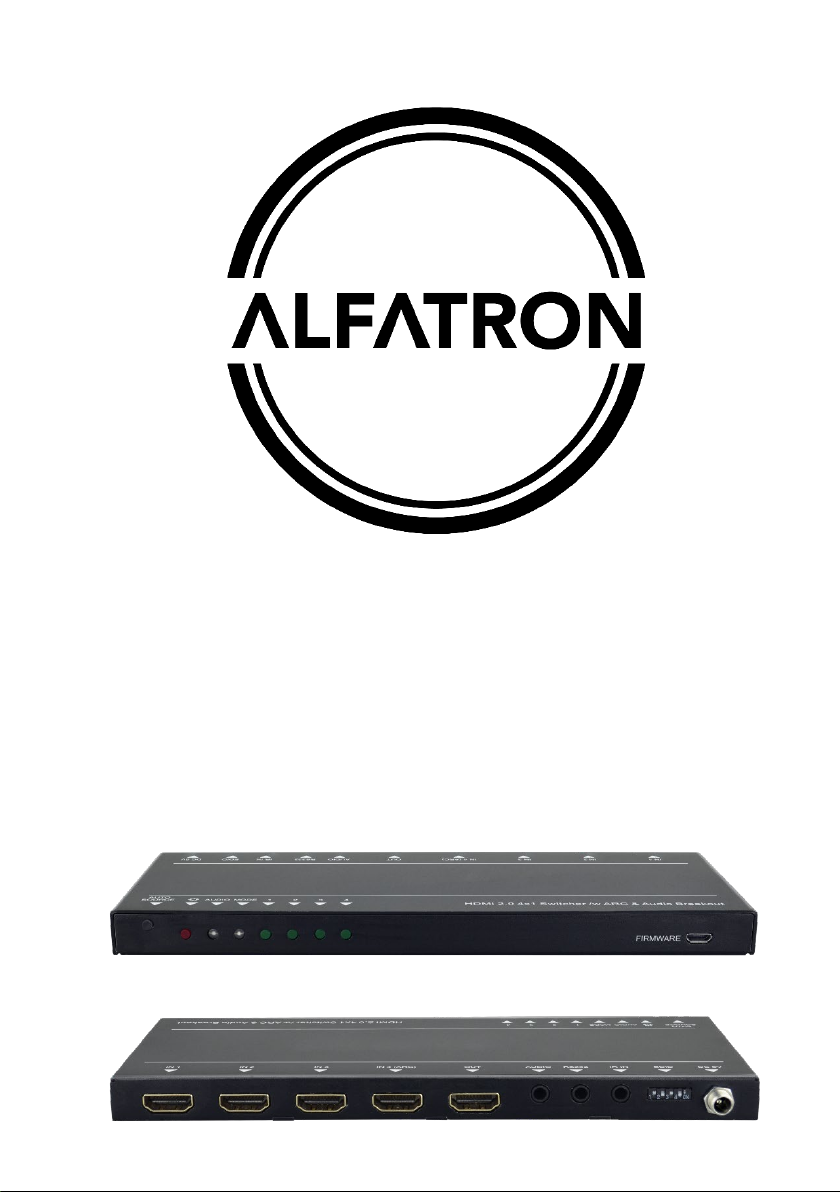
ALF-WUK4A
Full 4K Switcher
Page 2

ALFATRON ALF-WUK4A
Preface
Read this user manual carefully before using the product. Pictures are shown in this
manual for reference only. Different models and specifications are subject to real
product.
This manual is only for operation instruction, please contact the local distributor for
maintenance assistance. In the constant effort to improve the product, we reserve the
right to make function or parameter changes without notice or obligation.
FCC Statement
This equipment generates, uses and can radiate radio frequency energy and, if not
installed and used in accordance with the instructions, may cause harmful interference
to radio communications. It has been tested and found to comply with the limits for a
Class B digital device, pursuant to part 15 of the FCC Rules. These limits are designed
to provide reasonable protection against harmful interference in a commercial
installation.
Operation of this equipment in a residential area is likely to cause interference, in which
case the user at their own expense will be required to take whatever measures may be
necessary to correct the interference.
Any changes or modifications not expressly approved by the manufacture would void
the user’s authority to operate the equipment.
Page 3

ALFATRON ALF-WUK4A
SAFETY PRECAUTIONS
To ensure the best performance from the product, please read all instructions carefully
before using the device. Save this manual for further reference.
Unpack the equipment carefully and save the original box and packing material for
possible future shipment.
Follow basic safety precautions to reduce the risk of fire, electrical shock and injury
to persons.
Do not dismantle the housing or modify the module. It may result in electrical shock
or burn.
Using supplies or parts not meeting the products’ specifications may cause damage,
deterioration or malfunction.
Refer all servicing to qualified service personnel.
To prevent fire or shock hazard, do not expose the unit to rain, moisture or install
this product near water.
Do not put any heavy items on the extension cable.
Do not remove the housing of the device as opening or removing housing may
expose you to dangerous voltage or other hazards.
Install the device in a place with adequate ventilation to avoid damage caused by
overheating.
Keep the module away from liquids.
Spillage into the housing may result in fire, electrical shock, or equipment damage.
If an object or liquid falls or spills on to the housing, unplug the module immediately.
Do not twist or pull the ends of the optical cable. It can cause malfunction.
Do not use liquid or aerosol cleaners to clean this unit. Always unplug the power to
the device before cleaning.
Unplug the power cord when left unused for a long period of time.
Information on disposal for scrapped devices: do not burn or mix with general
household waste, please treat this as normal electrical wastes.
Page 4

ALFATRON ALF-WUK4A
Table of Content
1. Product Introduction .................................................................................................... 1
1.1 Features ............................................................................................................ 1
1.2 Package List ...................................................................................................... 2
2. Technical Specification ................................................................................................ 3
3. Panel Description ........................................................................................................ 4
3.1 Front Panel ........................................................................................................ 4
3.2 Rear Panel ......................................................................................................... 5
4. System Connection ..................................................................................................... 6
4.1 Usage Precaution .............................................................................................. 6
4.2 System Diagram ................................................................................................ 6
5. Source Button Control................................................................................................. 7
5.1 Manual Switching .............................................................................................. 7
5.2 Automatic Switching .......................................................................................... 7
6. IR Remote Control ...................................................................................................... 8
7. RS232 Control ............................................................................................................ 9
7.1 RS232 Control Software .................................................................................... 9
7.2 RS232 Commands .......................................................................................... 11
7.2.1 Signal Switching .................................................................................... 11
7.2.2 Source Device Control ........................................................................... 11
7.2.3 Display Device Control .......................................................................... 12
7.2.4 Audio Selection ...................................................................................... 13
7.2.5 System Control ...................................................................................... 13
8. EDID Management ................................................................................................... 14
8.1 Predefined EDID Setting.................................................................................. 14
8.2 User Defined EDID Setting .............................................................................. 15
9. ARC Mode ................................................................................................................ 16
10. Firmware Upgrade .................................................................................................. 17
11. Panel Drawing ........................................................................................................ 17
12. Troubleshooting & Maintenance ............................................................................. 18
13. Customer Service ................................................................................................... 19
Page 5

ALFATRON ALF-WUK4A
1. Product Introduction
The ALF-W UK4A is an ultrathin auto switcher with four HDMI video inputs and one
HDMI output. This switcher supports HDMI video resolution up to 4Kx2K@60Hz 4:4:4
HDR and multichannel audio. Except passing EDID information from the display, there
are multiple built-in EDID settings to simplify an installation. The switcher will de-embed
digital stereo audio to provide an analog audio source for an existing audio system. The
switcher also supports audio return channel (ARC) for transmitting audio back to HDMI
input port from the connected display.
In auto-switch mode, it switches to an HDMI input as soon as a new source is
connected. When the active input is removed, the switcher will select the first source on
the lowest numbered input. The switcher may also be controlled via RS232, IR with the
included remote, or from the source button on the front of the switcher.
1.1 Features
Switches any one of four HDMI inputs to one HDMI output.
Supports video resolution up to 4Kx2K@60Hz 4:4:4 HDR.
18Gbps high bandwidth.
Fully compliant with the HDMI 2.0 and HDCP2.2 specifications.
Supports audio return channel (ARC).
Advanced EDID management: multiple preset and user defined allowed.
Controllable via RS232 and IR.
Supports CEC.
Provides seven LEDs to indicate the current operating status and to assist
troubleshooting an installation.
Firmware upgrade by Micro-USB port.
1
Page 6

ALFATRON ALF-WUK4A
1.2 Package List
1x HDMI2.0 4x1 Switcher
2x Mounting Ears
4x Mounting Screws
4x Plastic Cushions
1x RS232 Cable (3.5mm to DB9)
1x IR Remote
1x IR Receiver
1x Power Adapter (5V DC 1A)
1x User Manual
Note: Please contact your distributor immediately if any damage or defect in the
components is found.
2
Page 7
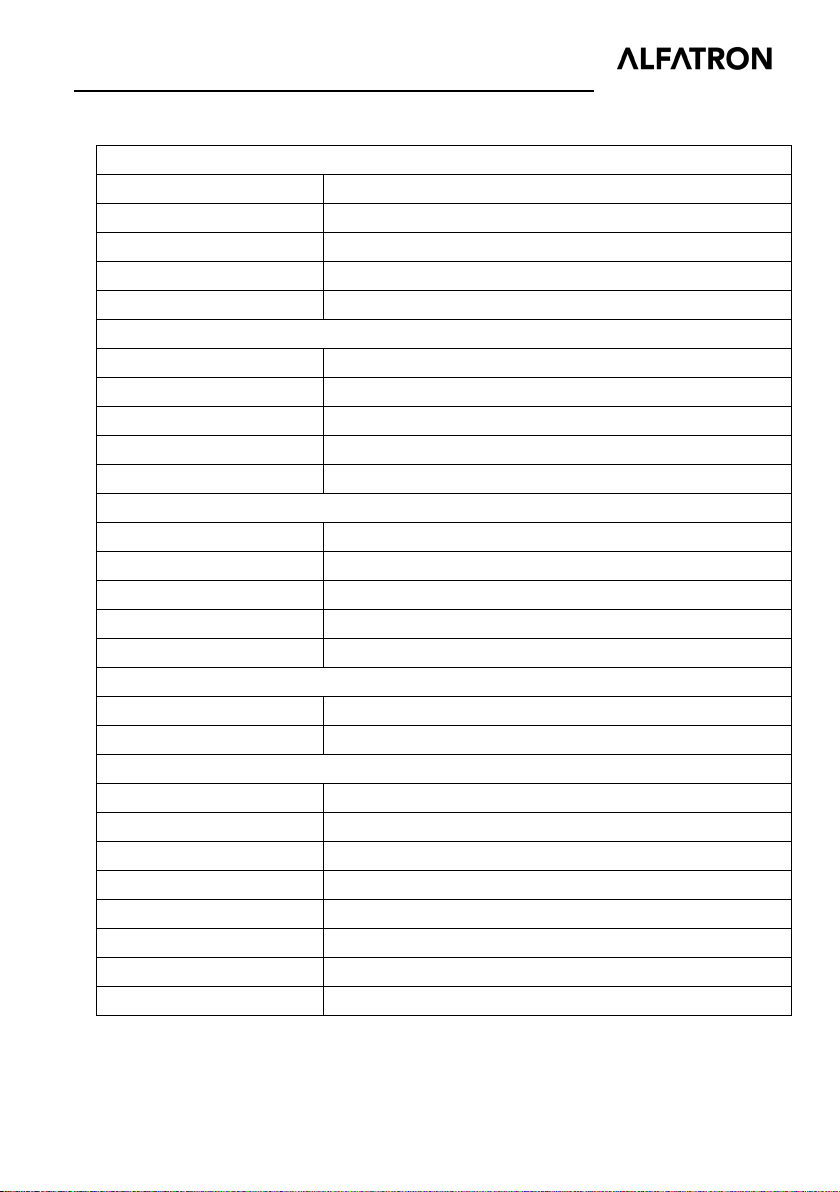
ALFATRON ALF-WUK4A
Video Input
Input
(4) HDMI
Input Connector
(4) Female type-A HDMI
HDMI Standard
2.0
Video Output
Output
(1) HDMI
Output Connector
(1) Female type-A HDMI
HDMI Standard
2.0
Audio
Output
(1) AUDIO
Output Connector
(1) 3.5mm mini stereo audio jack
Audio Output Impedance
70 Ohms
Control
Control
(1) IR IN; (1) RS232
Control Connector
(2) 3.5mm mini jack
General
Bandwidth
18Gbps
Storage Temperature
-25℃ ~ +70℃
Relative Humility
10%-90%
Power Supply
Input:100V~240V AC; Output: 5V DC 1A
Dimension (W*H*D)
194mm x 15mm x 81mm
2. Technical Specification
HDMI Input Resolution Up to 4Kx2K@60Hz 4:4:4
HDCP Version 2.2
HDMI Output Resolution Up to 4Kx2K@60Hz 4:4:4
HDCP Version 2.2
Audio Format PCM
Frequency Response 20Hz to 20kHz, ±3dB
Operation Temperature -10℃ ~ +55℃
Power Consumption 5W(Max)
Net Weight 324g
Note: Please adopt high-qualified HDMI cable fully compliant with HDMI2.0 for reliable transmission and
connection.
3
Page 8

ALFATRON ALF-WUK4A
FIRMWARE
AUTO
SOURCE
AUDIO
MODE
1
2
3
4
1
2
3
4
5
6
3. Panel Description
3.1 Front Panel
① Auto/Source Button:
Press to switch to next input source.
Press and hold at least three seconds to switch between manual mode and
auto mode.
② Power LED: The LED illuminates red when power is applied.
③ Audio Mode LED:
Illuminates green when de-embedding audio.
Illuminates yellow when in ARC mode.
④ Switching Mode LED:
Illuminates green in manual switch mode.
Illuminates yellow in auto-switch mode.
⑤ Input 1~4 LED: The LED illuminates green when there is HDMI input on the
corresponding channel.
4
Page 9

ALFATRON ALF-WUK4A
DC 5VEDID
IR INRS232AUDIOOUT
IN 1
IN 2
IN 3
1
2
3
4
5
6
7
3.2 Rear Panel
① IN 1~4: Four type-A female HDMI input ports to connect HDMI sources. The input 4
port supports ARC.
② OU T: Type-A female HDMI output port to connect HDMI display.
③ AUDIO: 3.5mm mini jack for analog audio output.
④ RS232: 3.5mm mini jack to connect control device (e.g. PC).
⑤ IR IN: 3.5mm mini jack to connect the included IR remote.
⑥ EDID: 4-pin DIP switch for EDID setting.
⑦ DC 5V: DC port to connect a 5V DC AC power adapter.
Note: Output HDCP compliant status depends on input signal. When the input signal is
with HDCP, then output signal is with HDCP and vice versa.
5
Page 10
ALFATRON ALF-WUK4A
Game Console Laptop
STB
5 6 7
Receiver Remote
Central Control
System
Ray-Blu DVD
TV
Speaker
HDMI:
Control:
Audio:
RS232:
4. System Connection
4.1 Usage Precaution
Make sure all components and accessories are included before installation.
System should be installed in a clean environment with proper temperature and
humidity.
All of the power switches, plugs, sockets, and power cords should be insulated and
safe.
All devices should be connected before power on.
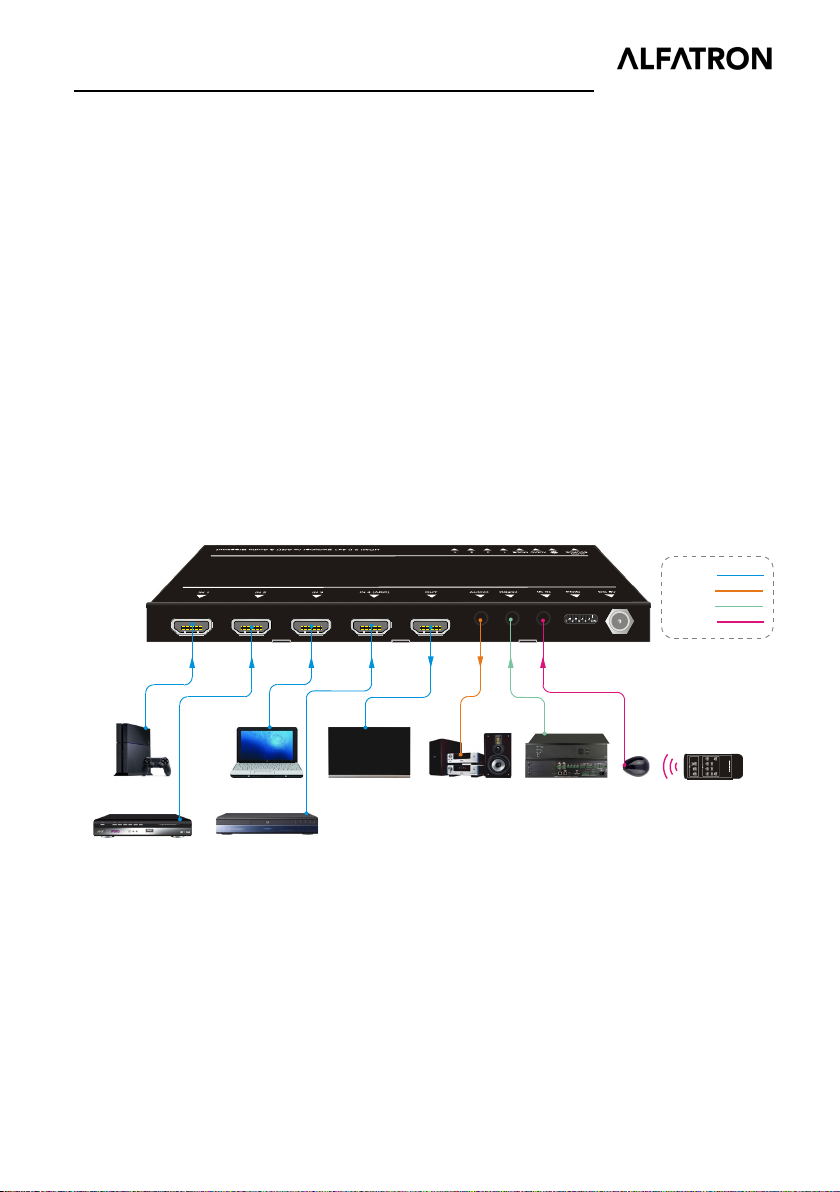
4.2 System Diagram
The following diagram illustrates typical input and output connections that can be
utilized with this switcher:
6
Page 11

ALFATRON ALF-WUK4A
5. Source Button Control
5.1 Manual Switching
When the switcher is in manual switching mode, the Switching Mode LED will be green.
Press Auto/Source button to switch to the next input.
5.2 Automatic Switching
To enable automatic switching, press and hold the Auto/Source button for three
seconds. The Switching Mode LED will turn to yellow.
When in auto-switch mode, the switcher follows the rules in the certain circumstances:
New Input: Upon detecting a new input, the switcher will automatically select the
new source.
Reboot: Once power is restored to the switcher, if the last selected source is still
available, the switcher will still output this signal, otherwise, the switcher will switch
to the first available active input starting at HDMI Input 1.
Source Removed: When an active source is removed, the switcher will switch to the
first available active input starting at HDMI Input 1.
7
Page 12
ALFATRON ALF-WUK4A
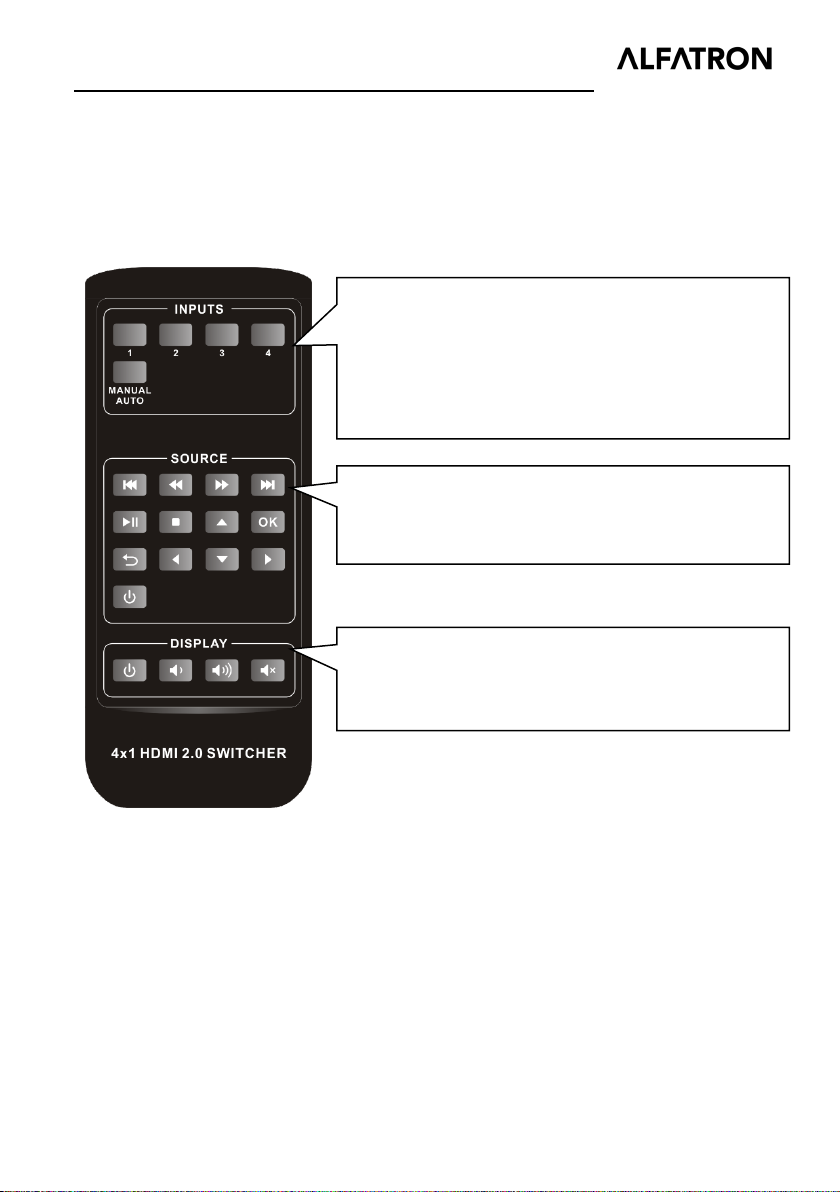
DISPLAY: Control the display (e.g. HDTV).
6. IR Remote Control
Please connect an IR receiver to the IR input port; the IR remote is used for signal
switching and it can also be used to control source and display devices based on CEC
function.
INPUTS:
1~4: Select the corresponding input source.
MANUAL/AUTO: Switch Auto or manual mode.
SOURCE: Control the input source (e.g. DVD).
Note:
Due to the HDMI input 4 port does not support CEC, the source device connected
to this port cannot be controlled by IR remote.
The source and display devices are required to support CEC when the IR remote is
used to control them.
8
Page 13

ALFATRON ALF-WUK4A
7. RS232 Control
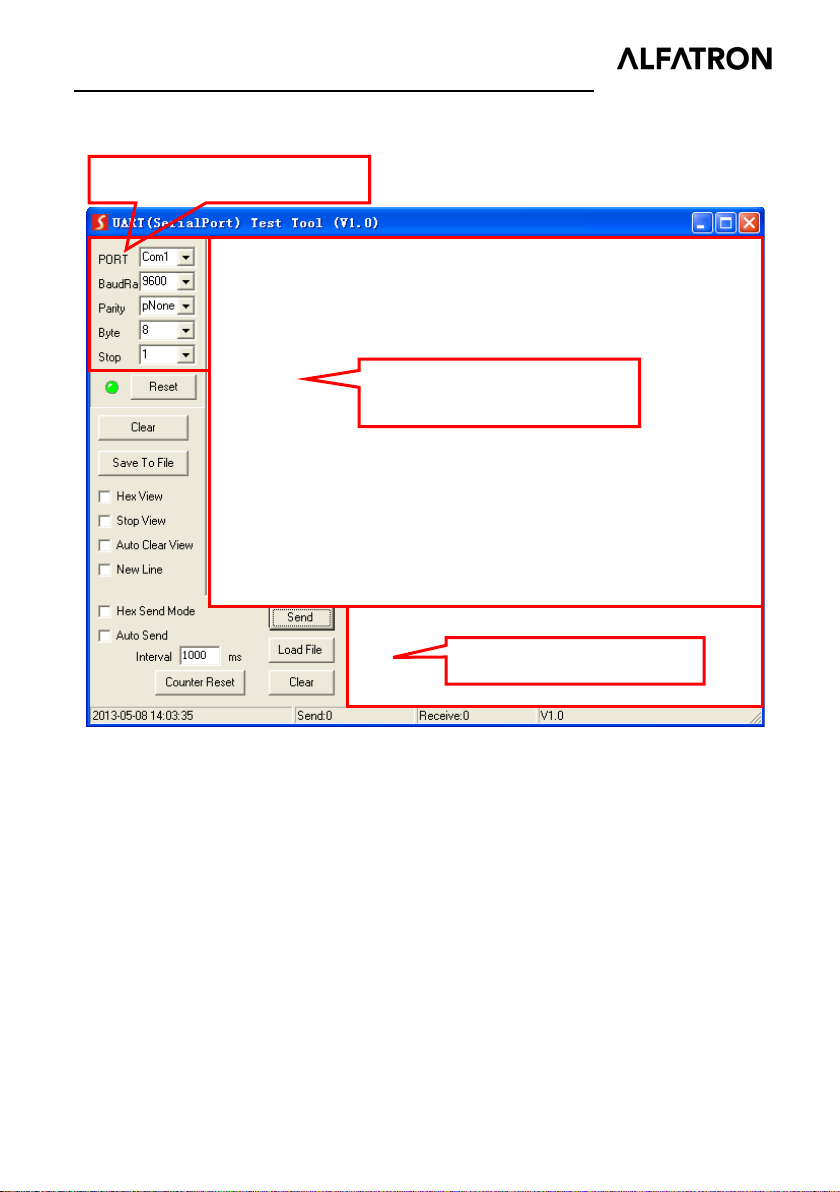
Connect the switcher to the control device (e.g. PC) with RS232 cable and set the
parameters in this manner, the control device can control this switcher by RS232
commands.
7.1 RS232 Control Software
Installation: Copy the control software file to the computer connected with this
switcher.
Uninstallation: Delete all the control software files in corresponding file path.
Basic Settings
First of all, please connect all input devices and output devices, then connect to
computer which has the RS232 control software installed
Below take the software CommWatch.exe as example.
Double-click the following icon:
9
Page 14
ALFATRON ALF-WUK4A
Parameter configuration area
the command sent works.
The interface of the control software is shown as below:
Monitoring area, indicates if
Please set the parameters of COM number, bound rate, data bit, stop bit and the parity
bit correctly, then the RS232 commands can be sent in Command Sending Area.
Baud rate: 9600;
Data bit: 8;
Stop bit: 1;
Parity bit: none.
Command sending area
10
Page 15
ALFATRON ALF-WUK4A
Function
Command
Feedback Example
Function
Command
Feedback Example
7.2 RS232 Commands
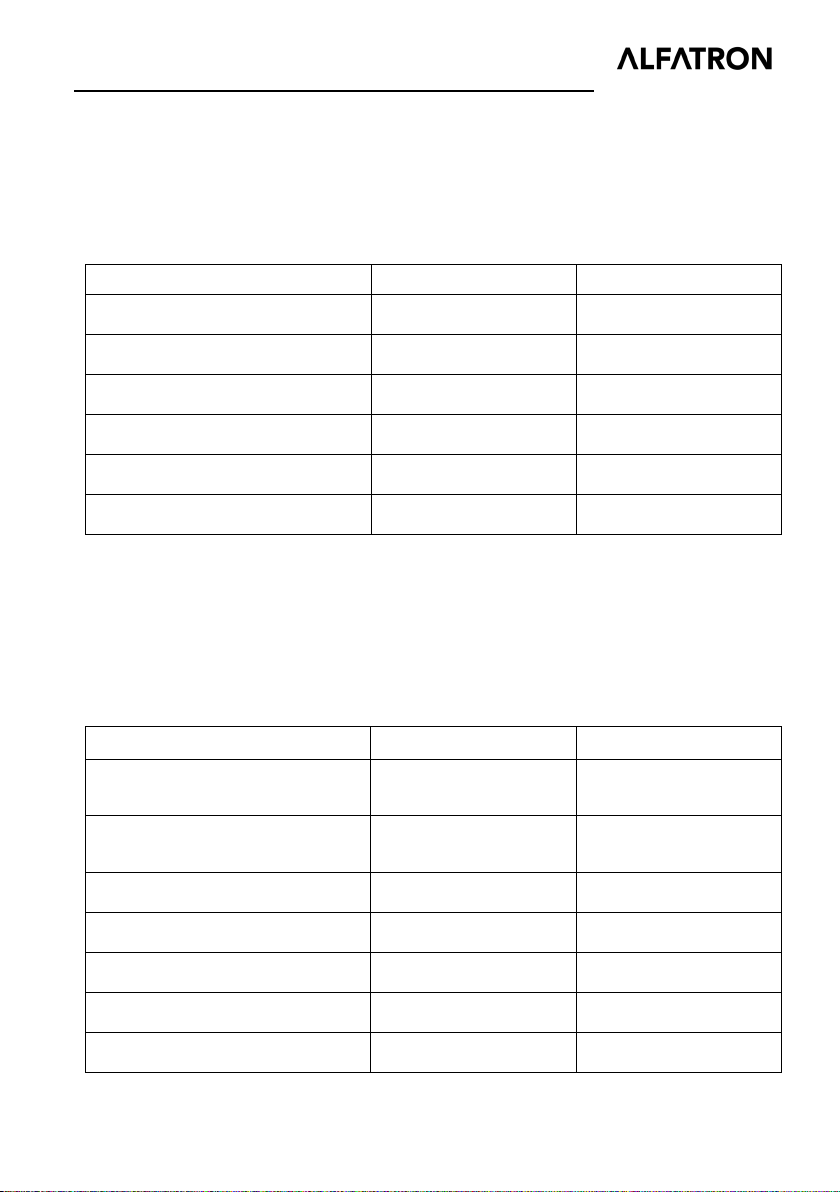
Note: All commands must be ended with “<CR><LF>”.
7.2.1 Signal Switching
Switch to HDMI input 1.
Switch to HDMI input 2.
Switch to HDMI input 3.
Switch to HDMI input 4.
Enable auto-switching mode.
Enable manual switching mode. >>MANUAL <<MANUAL Switch
7.2.2 Source Device Control
Note:
The input source device is required to support CEC.
Due to the HDMI input 4 port does not support CEC, the source device connected
to this port cannot be controlled by IR remote.
Turn on the input source device,
e.g. Blue-ray DVD.
Turn off the input source device,
e.g. Blue-ray DVD.
Play
>>HDMI1 <<HDMI1
>>HDMI2 <<HDMI2
>>HDMI3 <<HDMI3
>>HDMI4 <<HDMI4
>>AUTO <<AUTO Switch
>>SRCOn
>>SRCOff
>>SRCPlay
<<SRCOn
<<SRCOff
<<SRCPlay
Pause
Stop
Fast Forward x1
Fast Rewind x1
>>SRCPause
>>SRCStop
>>SRCForward
>>SRCBackward
11
<<SRCPause
<<SRCStop
>>SRCForward
<<SRCBackward
Page 16
ALFATRON ALF-WUK4A
Turn on the display device, e.g.
Next Section
Previous Section
Open the menu setting
Go back
Confirm (OK)
Exit
Up direction
Down direction
Left direction
Right direction
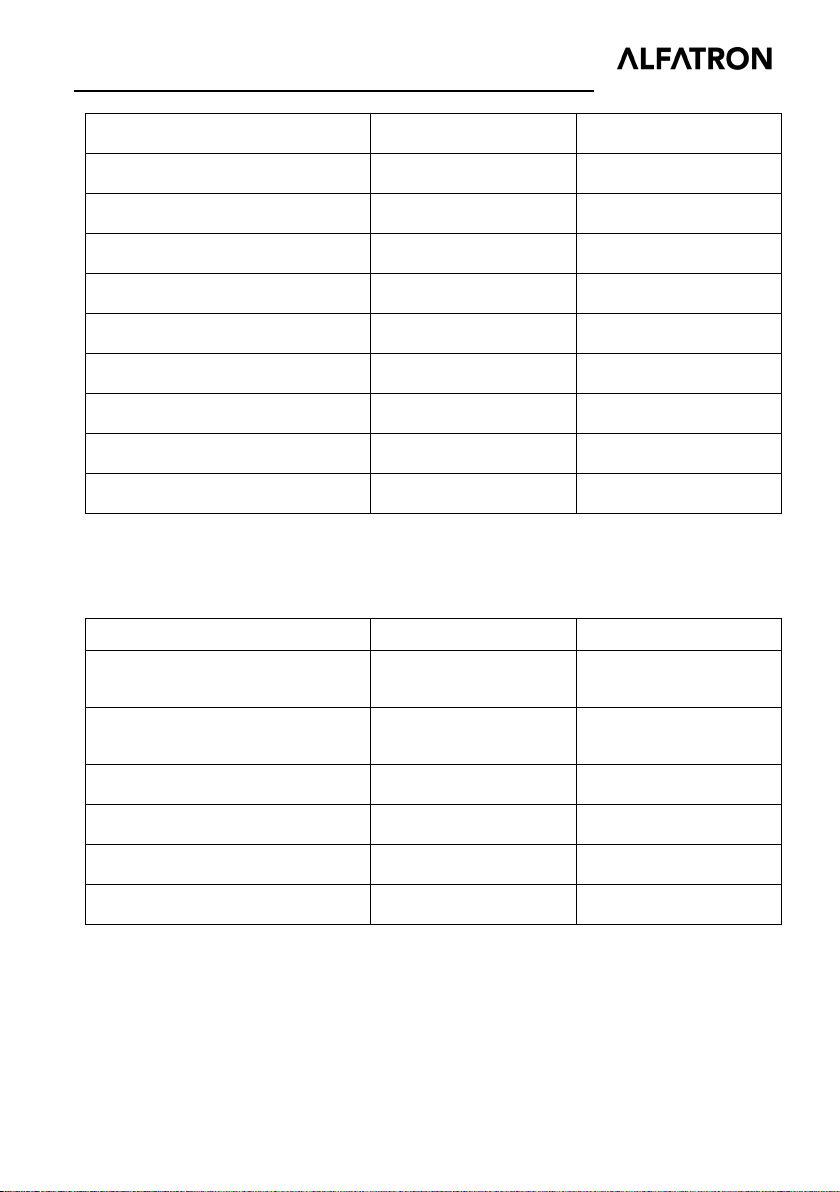
7.2.3 Display Device Control
Note: The display device is required to support CEC.
Function Command Feedback Example
HDTV.
Turn off the display device, e.g.
HDTV.
>>SRCSkipForward
>>SRCSkipBackward
>>SRCMenu
>>SRCBack
>>SRCOk
>>SRCExit
>>SRCUp
>>SRCDown
>>SRCLeft
>>SRCRight
>>TVOn
>>TVOff
>>SRCSkipForward
<<SRCSkipBackward
>>SRCMenu
>>SRCBack
>>SRCOk
>>SRCExit
>>SRCUp
>>SRCDown
>>SRCLeft
<<SRCRight
>>TVOn
>>TVOff
Volume up.
Volume down.
Mute.
Unmute
>>TVVOL+
>>TVVOL-
>>TVMUTE
<<TVUNMUTE
12
>>TVVOL+
>>TVVOL-
>>TVMUTE
<<TVUNMUTE
Page 17
ALFATRON ALF-WUK4A
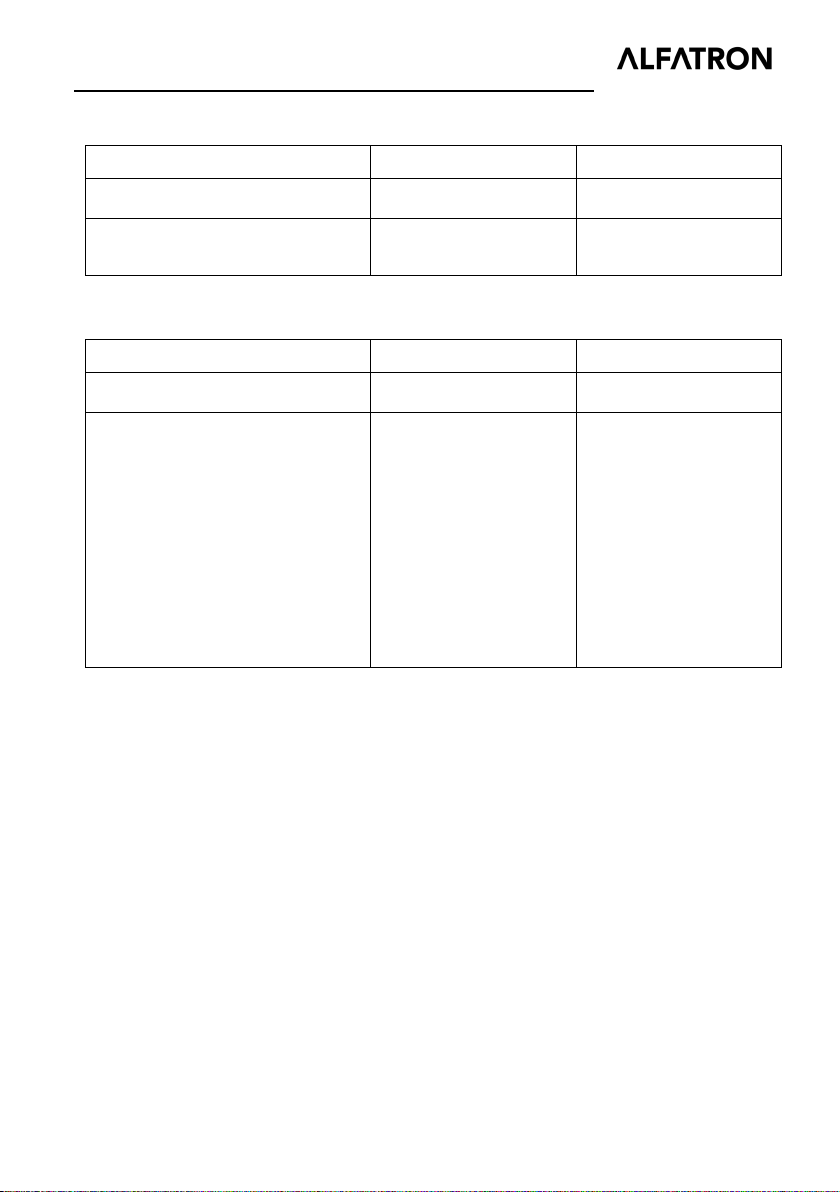
Select the HDMI audio input
7.2.4 Audio Selection
Function Command Feedback Example
Select ARC audio channel.
channel.
7.2.5 System Control
Function Command Feedback Example
System reset.
Get system information.
>>AUDExternal
>>AUDInternal
>>RESET
>>SYSInfo
<<AUDExternal
>>AUDInternal
>>RESET
<<AUDExternal
<< ALF-WUK4A
<< V1.0.0
<< --------
<<HDMI1
<<Auto Switch
<<AUDExternal
<<EDID0
13
Page 18
ALFATRON ALF-WUK4A
Switch
0
0000
Pass though
Pass though
1920x1080p@60Hz 4:4:4
1920x1080p@60Hz 4:4:4
3840x2160p@60Hz 4:2:0
3840x2160p@60Hz 4:4:4
8. EDID Management
8.1 Predefined EDID Setting
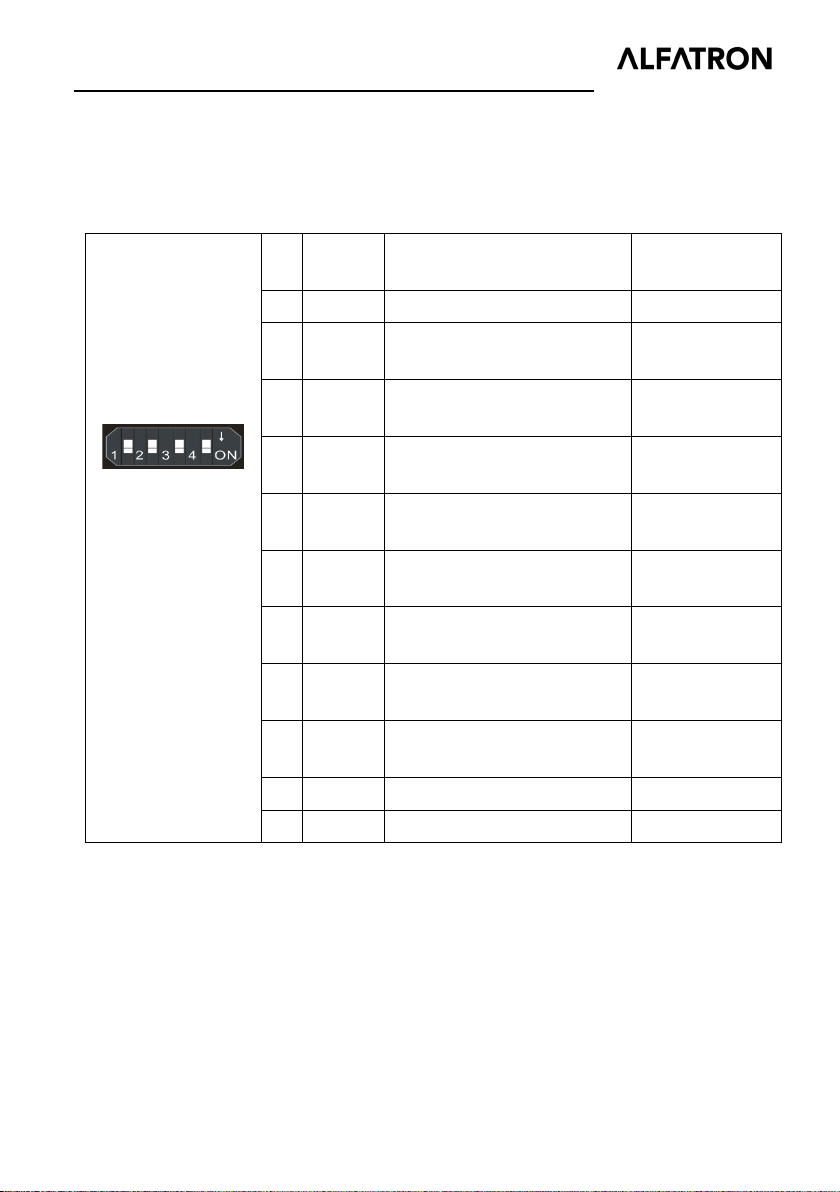
The rear panel boasts a 4-pin DIP switch to set the predefined EDID. The ten types of
embedded EDID and their corresponding switch status are shown in the below list.
When in the lower
position, the switch
represents “ON”,
while putting the
switch in the up
position, it
represents “OFF”.
ID
Status
1 0001
2 0010
3 0011
4 0100
5 0101
6 0110
7 0111
8 1000
9 1001 1280x800@60Hz Stereo
10 1010 1920x1200@60Hz Stereo
1920x1080p@60Hz 4:4:4
1920x1080p@60Hz 4:4:4
3840x2160p@60Hz 4:2:0
3840x2160p@60Hz 4:4:4
Video Audio
RGB 8bit
RGB 8bit
RGB 12bit
RGB 12bit
RGB 8bit
RGB 8bit
RGB 10bit HDR
RGB 10bit HDR
High Definition
High Definition
High Definition
High Definition
Stereo
Stereo
Stereo
Stereo
14
Page 19

ALFATRON ALF-WUK4A
11
1011
13
1101
8.2 User Defined EDID Setting
Except directly invoking the embedded EDID, the specific EDID can be customized.
There are five EDID that can be customized following the below operations.
1) Rename the user defined EDID according the following format.
EC_xx_xxxx_xxx.bin
EC: Represents EDID.
xx: Represents EDID ID. It is 11~15.
xxxx: Represents the video parameter.
xxx: Represents the audio format.
Example: EC_11_720P_LPCM.bin
2) Power on the switcher, and then connect the switcher to the PC with USB cable.
The PC will automatically detect a U-disk named “BOOTDISK”.
3) Double-click the U-disk, a file named “READY.TXT” will be showed.
4) Copy the user defined EDID (such as EC_11_720P_LPCM.bin) to the
“BOOTDISK” U-disk.
5) Reopen the U-disk to check the filename “READY.TXT” which automatically
becomes “SUCCESS.TXT”, if yes, the user defined EDID was imported into the
switcher and saved as its corresponding EDID ID successfully.
6) Repeat the above third to fifth step to copy other user defined EDIDs to the
“BOOTDISK” U-disk.
7) Remove the USB cable, connect the adaptor to power on the switcher.
8) The new EDID also can be invoked via the 4-pin DIP switch directly. The EDID ID
and its corresponding switch status are shown in the below list.
ID Switch Status
12 1100
14 1110
15 1111
15
Page 20
ALFATRON ALF-WUK4A
DC 5V
EDIDIR IN
RS232
AUDIO
OUT
IN 1 IN 2
IN 3
Speaker
Speakers
Amplifier
TV
ARC AUDIO:
9. ARC Mode
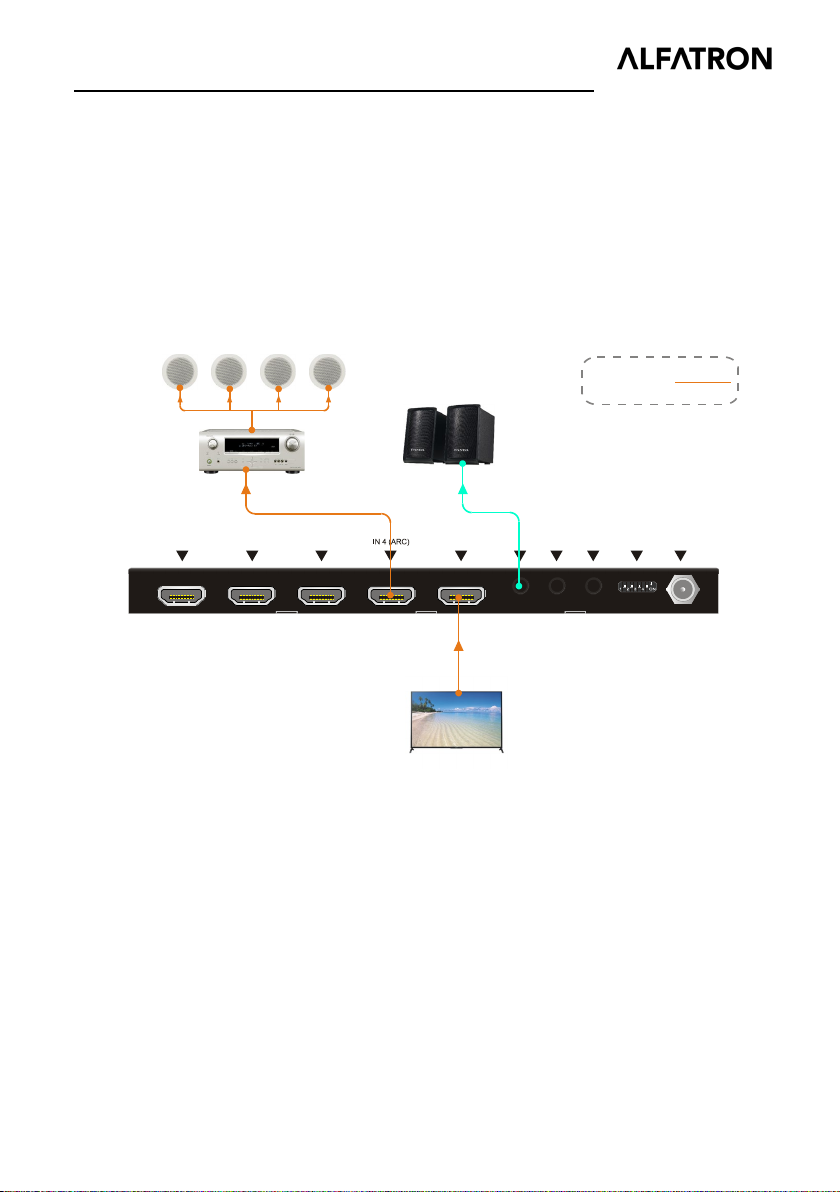
Audio Return Channel (ARC) allows audio from a display to pass “upstream” through
an HDMI cable to an audio processing device, such as an AV amplifier. When ARC
mode is active on the switcher, the ARC stream will pass to the active HDMI source
device if it can process the signal.
Only the HDMI input 4 port features ARC, when the display and AV amplifier support
ARC, the audio connection diagram is shown below:
16
Page 21
ALFATRON ALF-WUK4A
m
10. Firmware Upgrade
Please follow the steps as below to upgrade firmware by the Micro-USB port on the
rear panel:
1) Prepare the latest upgrade file (.bin) and rename it as “USERAPP.bin”
2) Connect the switcher to the PC with USB cable, and then power on the switcher.
The PC will automatically detect a U-disk named of “BOOTDISK”.
3) Double-click the U-disk, a file named of “READY.TXT” will be showed.
4) Directly copy the latest upgrade file (.bin) to the “BOOTDISK” U-disk.
5) Reopen the U-disk to check the filename “READY.TXT” which automatically
becomes “SUCCESS.TXT”, if yes, the firmware was updated successfully,
otherwise, the firmware update has failed, the name of upgrade file (.bin) should be
confirmed again, and then follow the above steps to update again.
6) Remove the USB cable after firmware upgrade.
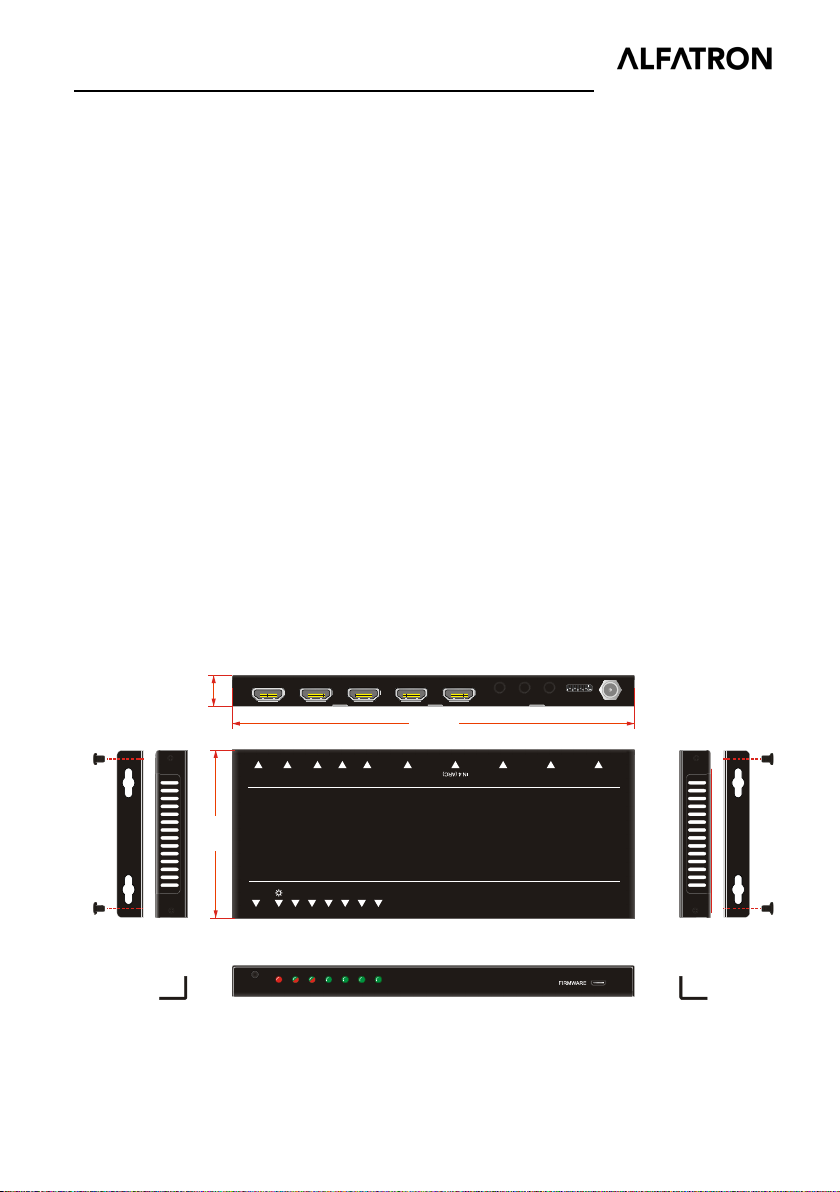
11. Panel Drawing
15. 00 m
DC 5VED
IDIR INR
S232AUD
81 mm
AUTO
SOURCE AUDIOMODE
1 2 3 4
IOOUT
194.00 mm
N 3
HDMI 2.0 4x1 Switcher /w ARC & Audio Breakout
IN 1 IN 2 I
17
Page 22

ALFATRON ALF-WUK4A
12. Troubleshooting & Maintenance
Problems Potential Causes Solutions
Color loss or no video
signal output in HDMI
display.
No HDMI signal while
local HDMI input is in
normal working state.
The connecting cables
may not be connected
correctly or may be
broken.
Check whether the cables
are connected correctly
and in working condition.
Splash screen on output
devices.
Cannot control this
switcher by control device
(e.g. a PC) through
RS232 port.
Static becomes stronger
when connecting the
video connectors.
Note: If your problem still remains after following the above troubleshooting steps,
please contact your local dealer or distributor for further assistance.
Poor quality connecting
cable.
Wrong RS232
communication
parameters.
This switcher is broken.
Bad grounding.
Change for another cable
of good quality.
Make sure the RS232
communication
parameters are correct.
Send it to authorized
dealer for repairing.
Check the grounding and
make sure it is connected
well.
18
Page 23

ALFATRON ALF-WUK4A
13. Customer Service
The return of a product to our Customer Service implies the full agreement of the terms
and conditions hereinafter. There terms and conditions may be changed without prior
notice.
Remarks: For further assistance please contact your local distributor.
After-sales Service
If you experience any problems using the ALF-SUK4, please refer to this user manual.
Any transport costs are borne by the users during the warranty.
1) Product Limited Warranty: ALFAtron warrants that its products will be free from
defects in materials and workmanship for SEVEN years, which starts from the day
you buy this product (The purchase invoice shall prevail).
Proof of purchase - in the form of a bill of sale or receipted invoice which is
evidence that the unit is within the Warranty period - must be presented to obtain
warranty service.
2) What the warranty does not cover (servicing available for a fee):
● Warranty expiration.
● Factory applied serial number has been altered or removed from the product.
● Damage, deterioration or malfunction caused by:
● Normal wear and tear
● Use of supplies or parts not meeting our specifications
● No certificate or invoice as the proof of warranty.
● The product model showed on the warranty card does not match with the
model of the product for repairing or had been altered.
● Damage caused by force majeure.
● Servicing not authorized by ALFAtron
● Any other cause which does not relate to a product defect
● Delivery, installation or labour charges for installation or setup of the product
3) Technical Support: Email our after-sales department and please inform us of the
following information about your case.
● Product version and name.
● Detailed failure description
19
Page 24

ALFATRON ALF-WUK4A
1. Limited warranty in respect of Alfatron Products Only
1.1 This limited warranty covers defects in materials and workmanship in this product.
1.2 Should warranty service be required, proof of purchase must be presented to the
Company. The serial number on the product must be clearly visible and not have been
tampered with in any way whatsoever.
1.3 This limited warranty does not cover any damage, deterioration or malfunction
resulting from any alteration, modification, improper or unreasonable use or
maintenance, misuse, abuse, accident, neglect, exposure to excess moisture, fire,
improper packing and shipping (such claims must be presented to the carrier),
lightning, power surges, or other acts of nature. This limited warranty does not cover
any damage, deterioration or malfunction resulting from the installation or removal of
this product from any installation, any unauthorized tampering with this product, any
repairs attempted by anyone unauthorized by the Company to make such repairs, or
any other cause which does not relate directly to a defect in materials and/or
workmanship of this product. This limited warranty does not cover equipment
enclosures, cables or accessories used in conjunction with this product.
This limited warranty does not cover the cost of normal maintenance. Failure of the
product due to insufficient or improper maintenance is not covered.
1.4 The Company does not warrant that the product covered hereby, including, without
limitation, the technology and/or integrated circuit(s) included in the product, will not
become obsolete or that such items are or will remain compatible with any other
product or technology with which the product may be used.
1.5 Only the original purchaser of this product is covered under this limited warranty.
This limited warranty is not transferable to subsequent purchasers or owners of this
product.
1.6 Unless otherwise specified, the goods are warranted in accordance with the
manufacturer’s product specific warranties against any defect attributable to faulty
workmanship or materials, fair wear and tear being excluded.
20
Page 25

ALFATRON ALF-WUK4A
1.7 This limited warranty only covers the cost of faulty goods and does not include the
cost of labor and travel to return the goods to the Company’s premises.
1.8 In the event of any improper maintenance, repair or service being carried out by
any third persons during the warranty period without the Company’s written
authorization, the limited warranty shall be void.
1.9 A 7 (seven) year limited warranty is given on the aforesaid product where used
correctly according to the Company’s instructions, and only with the use of the
Company’s components.
1.10 The Company will, at its sole option, provide one of the following three remedies
to whatever extent it shall deem necessary to satisfy a proper claim under this limited
warranty:
1.10.1 Elect to repair or facilitate the repair of any defective parts within a reasonable
period of time, free of any charge for the necessary parts and labor to complete the
repair and restore this product to its proper operating condition.; or
1.10.2 Replace this product with a direct replacement or with a similar product deemed
by the Company to perform substantially the same function as the original product; or
1.10.3 Issue a refund of the original purchase price less depreciation to be determined
based on the age of the product at the time remedy is sought under this limited
warranty.
1.11 The Company is not obligated to provide the Customer with a substitute unit
during the limited warranty period or at any time thereafter.
1.12 If this product is returned to the Company this product must be insured during
shipment, with the insurance and shipping charges prepaid by the Customer. If this
product is returned uninsured, the Customer assumes all risks of loss or damage
during shipment. The Company will not be responsible for any costs related to the
removal or reinstallation of this product from or into any installation. The Company will
not be responsible for any costs related to any setting up this product, any adjustment
of user controls or any programming required for a specific installation of this product.
21
Page 26

ALFATRON ALF-WUK4A
1.13 Please be aware that the Company’s products and components have not been
tested with competitor’s products and therefore the Company cannot warrant products
and/or components used in conjunction with competitor’s products.
1.14 The appropriateness of the goods for the purpose intended is only warranted to
the extent that the goods are used in accordance with the Company’s installation,
classification and usage instructions.
1.15 Any claim by the Customer which is based on any defect in the quality or condition
of the goods or their failure to correspond with specification shall be notified in writing to
the Company within 7 days of delivery or (where the defect or failure was not apparent
on reasonable inspection by the Customer) within a reasonable time after discovery of
the defect or failure, but, in any event, within 6 months of delivery.
1.16 If delivery is not refused, and the Customer does not notify the Company
accordingly, the Customer may not reject the goods and the Company shall have no
liability and the Customer shall pay the price as if the goods had been delivered in
accordance with the Agreement.
1.17 THE MAXIMUM LIABILITY OF THE COMPANY UNDER THIS LIMITED
WARRANTY SHALL NOT EXCEED THE ACTUAL PURCHASE PRICE PAID FOR
THE PRODUCT.
22
 Loading...