

Page 1
382
Quick Start Guide
For more information about how to use the phone, please go
to www.alcatelonetouch.com to download electronic version.
Moreover, from the website you can also consult FAQ, realize
software upgrade, etc.
English - CJB32C0TUAAA
Table of Contents
1 Your mobile .............................................................. 3
2 Getting started ........................................................ 8
3 Calls ......................................................................... 11
4 Recent calls............................................................. 12
5 Contacts.................................................................. 13
6 Messages ................................................................. 13
7 Alarm ...................................................................... 14
8 Settings ................................................................... 16
9 Tools ........................................................................ 17
10 Latin input mode ................................................... 19
11 Safety and use ........................................................ 20
12 General information
13 Telephone warranty............................................... 28
14 Troubleshooting. .................................................... 30
www.sar-tick.com
Prolonged exposure to music at full volume on the music
player may damage the listener's hearing. Set your phone
volume safely. Use only headphones recommended by
TCT Mobile Limited and its affiliates.
12
............................................... 26
This product meets applicable national SAR
limits of 2.0 W/kg. The specific maximum
SAR values can be found on page 25 of this
user guide.
When carrying the product or using it while
worn on your body, either use an approved
accessory such as a holster or otherwise
maintain a distance of 1.5 cm from the body
to ensure compliance with RF exposure
requirements. Note that the product may
be transmitting even if you are not making
a phone call.
Page 2
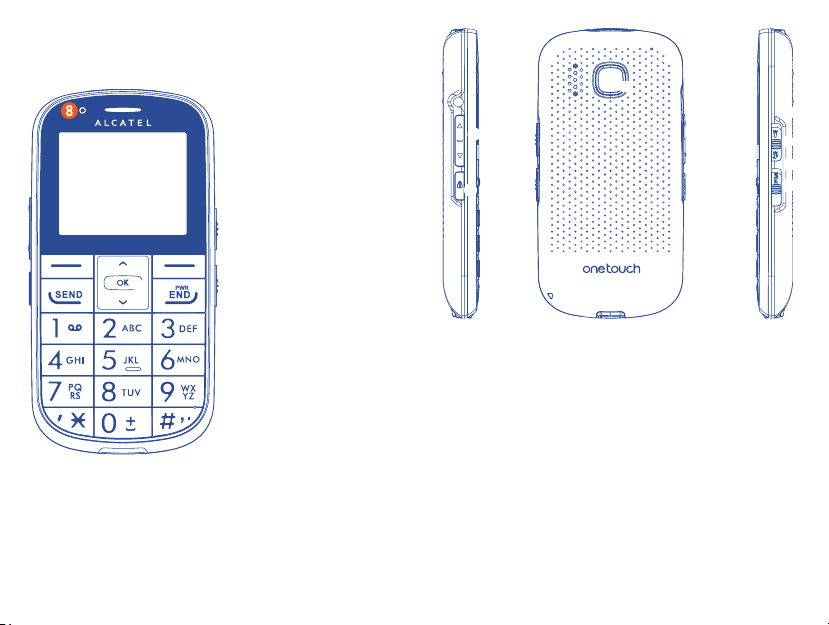
Your mobile1 .............
q
e
u
y
t
q Left softkey
w Right softkey
e Send key
r End key
t OK key
y Up/Down
u Voicemail
w
u LED light
r
(press and hold)
f
o
a
o Volume key
a Lock key
Switch locked/unlocked (press and hold)
s To r c h
Switch on/off
d FM Radio
f SOS key:
Call predefined SOS contact
34
s
d
Page 3
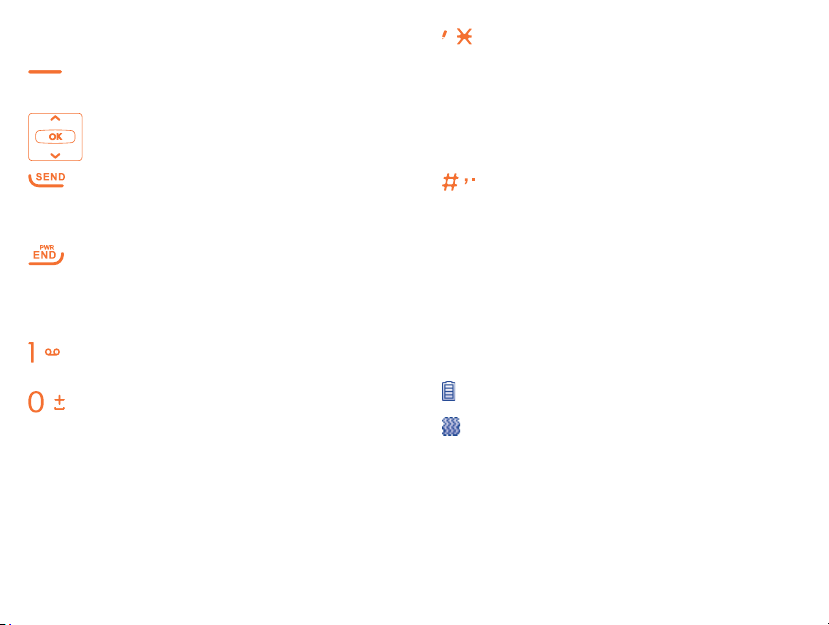
Keys1.1
Key: Left softkey
Right softkey
Navigation (up/down)
Key:
Confirm an option (OK key)
Key: Send call
In idle screen:
Access recent calls (press)
Key:
Key:
Key:
Switch on/Switch off the
telephone (press and hold)
End call
Return to idle screen
Dial a voicemail number
(press and hold)
In idle screen:
Input 0 (press)
Input '+'/'P'/'W' (press and
hold)
In edit mode:
Input space (press)
Key:
In idle screen:
Access pre-set number (press
and hold)
Input * (press)
In edit mode:
Change input mode
Key:
In idle screen:
Access pre-set number (press
and hold)
Input # (press)
In edit mode:
Change symbol
Status bar icons 1.2
(1)
Battery charge level.
Vibrate alert: your phone vibrates,
but doesn't ring or beep.
(1)
The icons and illustrations in this guide
are provided for informational purposes
only.
56
Page 4
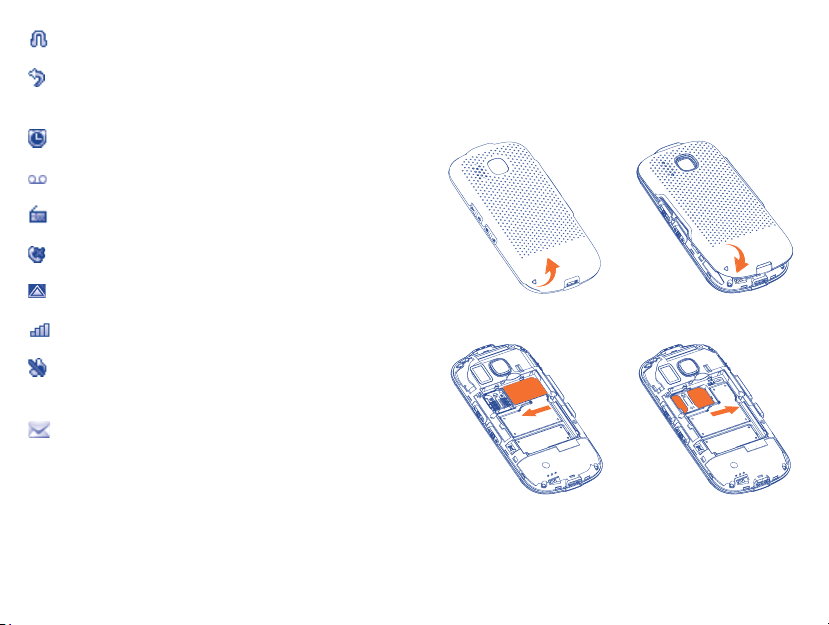
Headset connected.
Call forwarding activated: your calls
are forwarded.
Alarm clock programmed.
New Voicemail.
FM radio is on.
Missed calls.
Roaming.
Signal strength indicator.
Light only: your phone neither rings,
beeps nor vibrates.
Unread message.
Getting started2 .......
Set-up2.1
Removing or installing the back cover
Inserting or removing the SIM card
78
Page 5
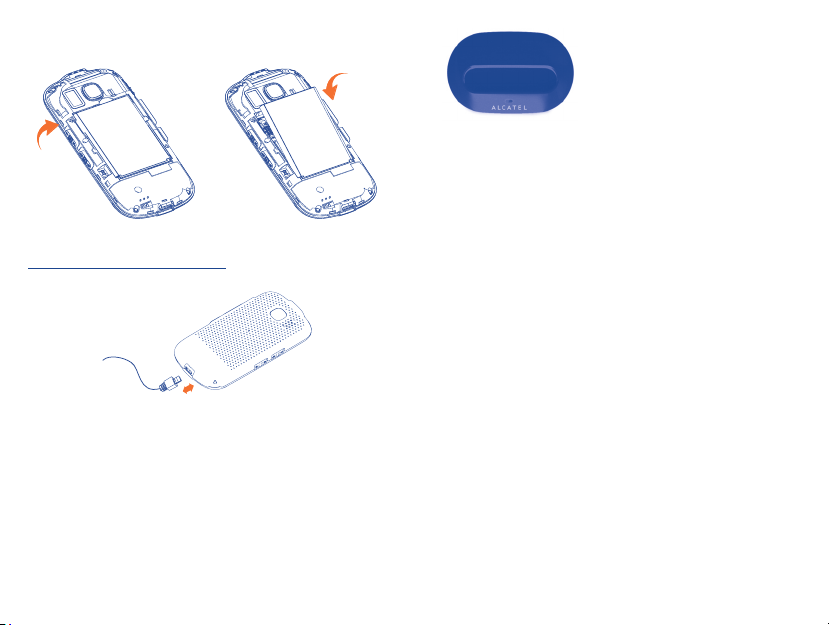
Installing or removing the battery
Charging the battery
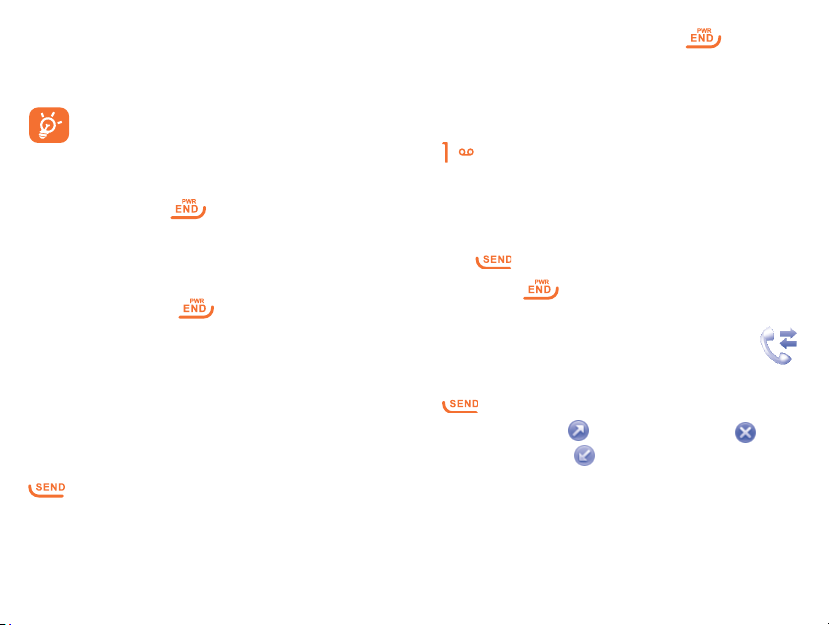
Connect the battery charger to your phone
and outlet respectively. The LED light will be
lit up during battery charging.
You can also put your
phone in cradle for
charging. When you see the
white LED light turn on, on
the top left corner of the
phone, that is the indication
the phone is charging.
If your battery has no charge left, using an •
outlet instead of the cradle to charge, will
require 20 minutes before your phone will
have enough charge to power on.
Before using your phone for the first time, •
make sure it is fully charged, this will take
approximately 3 hours.
Ensure your battery is inserted correctly •
before connecting the phone to either
charger or cradle.
The outlet must be near to the phone and •
easily accessible (avoid electric extension
cables).
910
Page 6
To reduce power consumption and energy •
waste, always disconnect your phone from
its charge.
The charge is complete when the
animation stops.
Power on your phone2.2
Hold down the key until the phone
powers on.
Power off your phone2.3
Hold down the key from the idle
screen.
To hang up the call, press the
Calling your voicemail 3.2
To access your voicemail, hold down the
key.
key.
(1)
Receiving a call3.3
When you receive an incoming call, press
the key to answer and to end the call
press the key.
Recent calls4 ........
Calls3 ..........................
Making a call3.1
Dial the desired number then press the
key to place the call. If you make a
mistake, you can delete the incorrect digits
by pressing the Right softkey.
11 12
You can access your call memory by pressing
from the idle screen, and you will see
Dialed call(s) , Missed call(s) and
Received call(s) .
(1)
Contact your network operator to
check service availability.
Page 7
Contacts5 ............
Consulting your contacts5.1
To access your Contacts from the main
menu, press the Menu softkey and select
the icon from the menu. Trick: You can
quickly find a contact by inputting their
initial letter in the search bar.
Adding a contact5.2
You can type a message, or you're also
able to insert a pre-defined message from
Templates.
You can save any messages that you send
often to Drafts.
Specific letters (with accents) will
increase the size of the message, this
may cause multiple messages to be
sent to your recipient.
You can create a new contact by tapping
Options\Add.
Messages6 ............
Create message6.1
From the main menu select Messages to
create a text message.
While writing a message, select Options to
access all the message options.
13 14
Alarm7 ...............
Your mobile phone has a built-in alarm clock
with a snooze feature. You can set up to five
separate alarms and choose whether or not
the alarm should repeat.
Page 8

Repeat You may select Once
(default)/Everyday/Days or
customize to your desire.
Snooze The alarm will repeat at
regular intervals.
Alert type You may select the type of
Alert: Vibrate and Ring
(default), Ring only or
Vibrate only.
Alarm beep
Settings8 ...............
From the main menu, select the menu icon
and select the function of your choice in
order to customize your telephone: Sound,
Phone settings, Call settings, Airplane
mode, Security, Networks, Restore
default settings.
Sound8.1
With this menu, you can personalize ringtones
for different events and environments.
Ring tone You may choose one melody
as your Alarm beep.
Radio You may input the FM channel
name into the list manually as
your Alarm beep.
15 16
Phone settings8.2
You can set Date and time, Display,
Languages, Input mode, Auto keypad
lock according to your choice.
Call settings8.3
You can access a number of items with this
option: Speed dial, Call waiting, Call
forwarding, Call barring, Caller ID, Text
phone, Call time display.
Page 9
Speed dial•
Access Speed dial from Settings\Call
settings. Select
from to to set the speed dial key,
add the contact number and press .
Text Phone•
Text phone can be used by people who are
hearing or speech impaired.
, or any number key
Tools9 ...................
Radio9.1
Your phone comes with a radio
support Radio Data System, with an
embedded FM internal antenna so you can
listen to FM broadcasts without inserting
headphones. You can use the application as a
traditional radio with saved channels or with
(1)
The quality of the radio depends on the
coverage of the radio station in that
particular area.
(1)
which
17 18
parallel visual information relating to the
radio program on the display if you tune to
stations that offer Visual Radio service.
Calendar9.2
Once you enter this menu from the main
menu Tools, there is a date display.
Calculator9.3
Enter a number, select the type of operation
to be performed by using the up or down
key, and enter the second number. Then
press = to display the result.
Notes9.4
You can create a note to write down
inspirations, ideas, excerpts, things to do and
all those things you may want to keep for
future reference.
Page 10

SOS9.5
Your phone comes with a preinstalled SOS
emergency alert system. This feature allows
you to quickly get the help you need in times
of emergency. In order to use this feature, you
must first set up a predefined SOS contact.
By pressing the key, you can be quickly
connected to an emergency contact, primary
physician etc.
Latin input mode10 ....
This mode allows you to type text by
choosing a letter or a sequence of characters
associated with a key. Press the key several
times until the desired letter is highlighted.
When you release the key the highlighted
character is inserted into the text.
19 20
Safety and use11 .........
We recommend that you read this chapter carefully before using
your phone. The manufacturer disclaims any liability for damage,
which may result as a consequence of improper use or use
contrary to the instructions contained herein.
• TRAFFIC SAFETY:
Given that studies show that using a mobile phone while driving
a vehicle constitutes a real risk, even when the hands-free kit is
used (car kit, headset...), drivers are requested to refrain from
using their mobile when the vehicle is not parked.
When driving, do not use your phone and headphone to listen to
music or to the radio. Using a headphone can be dangerous and
forbidden in some areas.
When switched on, your phone emits electromagnetic waves
that can interfere with the vehicle’s electronic systems such
as ABS anti-lock brakes or airbags. To ensure that there is no
problem:
- do not place your phone on top of the dashboard or within an
airbag deployment area,
- check with your car dealer or the car manufacturer to make
sure that the dashboard is adequately shielded from mobile
phone RF energy.
• CONDITIONS OF USE:
You are advised to switch off the telephone from time to time to
optimise its performance.
Switch the phone off before boarding an aircraft.
Switch the phone off when you are in health care facilities, except
in designated areas. As with many other types of equipment
now in regular use, mobile telephones can interfere with other
electrical or electronic devices, or equipment using radio
frequency.
Switch the phone off when you are near gas or flammable liquids.
Strictly obey all signs and instructions posted in a fuel depot,
Page 11

petrol station, or chemical plant, or in any potentially explosive
atmosphere.
When the phone is switched on, it should be kept at least 15 cm
from any medical device such as a pacemaker, a hearing aid or
insulin pump, etc. In particular when using the phone, you should
hold it against the ear on the opposite side to the device, if any.
To avoid hearing impairment, pick up the call before holding your
phone to your ear. Also move the handset away from your ear
while using the “hands-free” mode because the amplified volume
might cause hearing damage.
Do not let children use the phone and/or play with the telephone
and accessories without supervision.
When replacing the cover please note that your phone may
contain substances that could create an allergic reaction.
Always handle your phone with care and keep it in a clean and
dust-free place.
Do not allow your phone to be exposed to adverse weather or
environmental conditions (moisture, humidity, rain, infiltration
of liquids, dust, sea air, etc). The manufacturer’s recommended
operating temperature range is -10°C to +55°C.
At over 55°C the legibility of the phone’s display may be impaired,
though this is temporary and not serious.
Emergency call numbers may not be reachable on all cellular
networks. You should never rely only on your phone for
emergency calls.
Do not open, dismantle or attempt to repair your mobile phone
yourself.
Do not drop, throw or bend your mobile phone.
Do not use the phone if the glass made screen, is damaged,
cracked or broken to avoid any injury.
Do not paint it.
Use only batteries, battery chargers, and accessories which are
recommended by TCT Mobile Limited and its affiliates and are
compatible with your phone model. TCT Mobile Limited and
its affiliates disclaim any liability for damage caused by the use of
other chargers or batteries.
21 22
Remember to make back-up copies or keep a written record of
all important information stored in your phone.
Some people may suffer epileptic seizures or blackouts when
exposed to flashing lights, or when playing video games. These
seizures or blackouts may occur even if a person never had a
previous seizure or blackout. If you have experienced seizures
or blackouts, or if you have a family history of such occurrences,
please consult your doctor before playing video games on your
phone or enabling a flashing-lights feature on your phone.
Parents should monitor their children’s use of video games or
other features that incorporate flashing lights on the phones. All
persons should discontinue use and consult a doctor if any of the
following symptoms occur: convulsion, eye or muscle twitching,
loss of awareness, involuntary movements, or disorientation. To
limit the likelihood of such symptoms, please take the following
safety precautions:
- Do not play or use a flashing-lights feature if you are tired or
need sleep.
- Take a minimum of a 15-minute break hourly.
- Play in a room in which all lights are on.
- Play at the farthest distance possible from the screen.
- If your hands, wrists, or arms become tired or sore while
playing, stop and rest for several hours before playing again.
- If you continue to have sore hands, wrists, or arms during or
after playing, stop the game and see a doctor.
When you play games on your phone, you may experience
occasional discomfort in your hands, arms, shoulders, neck,
or other parts of your body. Follow the instructions to avoid
problems such as tendinitis, carpal tunnel syndrome, or other
musculoskeletal disorders.
Prolonged exposure to music at full volume may damage
the listener’s hearing. Set your phone volume safely. Use
only headphones recommended by TCT Mobile Limited
and its affiliates.
Page 12

• PRIVACY:
Please note that you must respect the laws and regulations in
force in your jurisdiction or other jurisdiction(s) where you
will use your mobile phone regarding taking photographs and
recording sounds with your mobile telephone. Pursuant to
such laws and regulations, it may be strictly forbidden to take
photographs and/or to record the voices of other people or any
of their personal attributes, and duplicate or distribute them,
as this may be considered to be an invasion of privacy. It is the
user’s sole responsibility to ensure that prior authorisation be
obtained, if necessary, in order to record private or confidential
conversations or take a photograph of another person; the
manufacturer, the seller or vendor of your mobile phone
(including the operator) disclaim any liability which may result
from the improper use of the mobile phone.
• BATTERY:
Before removing the battery from your phone, please make sure
that the phone is switched off.
Observe the following precautions for battery use:
- Do not attempt to open the battery (due to the risk of toxic
fumes and burns).
- Do not puncture, disassemble or cause a short-circuit in a
battery,
- Do not burn or dispose of a used battery in household rubbish
or store it at temperatures above 60 °C.
Batteries must be disposed of in accordance with locally applicable
environmental regulations. Only use the battery for the purpose
for which it was designed. Never use damaged batteries or those
not recommended by TCT Mobile Limited and/or its affiliates.
This symbol on your telephone, the battery and the
accessories means that these phones must be taken
- Municipal waste disposal centres with specific bins
- Collection bins at points of sale.
to collection points at the end of their life:
for these items of equipment
23 24
They will then be recycled, preventing substances being disposed
of in the environment, so that their components can be reused.
In European Union countries:
These collection points are accessible free of charge.
All phones with this sign must be brought to these collection
points.
In non European Union jurisdictions:
Items of equipment with this symbol are not to be thrown into
ordinary bins if your jurisdiction or your region has suitable
recycling and collection facilities; instead they are to be taken to
collection points for them to be recycled.
CAUTION: RISK OF EXPLOSION IF BATTERY IS REPLACED
BY AN INCORRECT TYPE. DISPOSE OF USED BATTERIES
ACCORDING TO THE INSTRUCTIONS
• CHARGERS
Mains powered chargers will operate within the temperature
range of: 0 °C to 40 °C.
The chargers designed for your mobile phone meet with the
standard for safety of information technology equipment and
office equipment use. They are also compliant to the ecodesign
directive 2009/125/EC. Due to different applicable electrical
specifications, a charger you purchased in one jurisdiction may
not work in another jurisdiction. They should be used for this
purpose only.
• RADIO WAVES:
Proof of compliance with international standards (ICNIRP) or
with European Directive 1999/5/EC (R&TTE) is required of all
mobile phone models before they can be put on the market.
The protection of the health and safety for the user and any
other person is an essential requirement of these standards or
this directive.
THIS DEVICE MEETS INTERNATIONAL GUIDELINES FOR
EXPOSURE TO RADIO WAVES.
Page 13
Your mobile device is a radio transmitter and receiver. It
is designed not to exceed the limits for exposure to radio
waves (radio frequency electromagnetic fields) recommended
by international guidelines. The guidelines were developed by
an independent scientific organization (ICNIRP) and include
a substantial safety margin designed to assure the safety of all
persons, regardless of age and health.
The radio wave exposure guidelines use a unit of measurement
known as the Specific Absorption Rate, or SAR. The SAR limit for
mobile devices is 2 W/kg.
Tests for SAR are conducted using standard operating positions
with the device transmitting at its highest certified power level
in all tested frequency bands. The highest SAR values under the
ICNIRP guidelines for this device model are:
Maximum SAR for this model and conditions under which it
Head SAR GSM 900 0.802 W/kg
Body-worn SAR UMTS 2100 0.691 W/kg
During use, the actual SAR values for this device are usually well
below the values stated above. This is because, for purposes of
system efficiency and to minimize interference on the network,
the operating power of your mobile device is automatically
decreased when full power is not needed for the call. The lower
the power output of the device, the lower its SAR value.
Body-worn SAR testing has been carried out at a separation
distance of 1.5 cm. To meet RF exposure guidelines during bodyworn operation, the device should be positioned at least this
distance away from the body. If you are not using an approved
accessory ensure that whatever product is used is free of any
metal and that it positions the phone the indicated distance away
from the body.
was recorded.
25 26
Organizations such as the World Health Organization and the
US Food and Drug Administration have stated that if people are
concerned and want to reduce their exposure they could use a
hands-free device to keep the phone away from the head and
body during phone calls, or reduce the amount of time spent
on the phone.
For more information you can go to www.alcatelonetouch.com
Additional information about electromagnetic fields and public
health are available on the following site: http://www.who.int/
peh-emf.
Your telephone is equipped with a built-in antenna. For optimal
operation, you should avoid touching it or degrading it.
As mobile devices offer a range of functions, they can be used
in positions other than against your ear. In such circumstances
the device will be compliant with the guidelines when used with
headset or usb data cable. If you are using another accessory
ensure that whatever product is used is free of any metal and that
it positions the phone at least 1.5 cm away from the body.
• LICENCE
TouchPal™ and CooTek™ are trademarks
of Shanghai HanXiang (CooTek)Information
Technology Co., Ltd. and/or its Affiliates.
General information12
Internet address: • www.alcatelonetouch.com
Hot Line Number: • see "TCT Mobile Services" leaflet or
go to our Internet site.
On our Internet site, you will find our FAQ (Frequently Asked
Questions) section. You can also contact us by e-mail to ask
any questions you may have.
Page 14

An electronic version of this user guide is available in English
and other languages according to availability on our server:
www.alcatelonetouch.com
Your cellphone is a transceiver that operates on GSM
networks with 850/900/1800/1900 MHz bands or UMTS
networks with 900/2100 MHz.
This equipment is in compliance with the essential
requirements and other relevant provisions of Directive
1999/5/EC. The entire copy of the Declaration of Conformity
for your telephone can be obtained through our website:
www.alcatelonetouch.com.
Protection against theft
(1)
Your telephone is identified by an IMEI (phone serial number)
shown on the packaging label and in the phone’s memory. We
recommend that you note the number the first time you use
your telephone by entering * # 0 6 # and keep it in a safe
place. It may be requested by the police or your operator if
your telephone is stolen. This number allows your mobile
telephone to be blocked preventing a third person from using
it, even with a different SIM card.
(1)
Contact your network operator for service availability.
27 28
Disclaimer
There may be certain differences between the user manual
description and the phone’s operation, depending on the
software release of your telephone or specific operator
services.
TCT Mobile shall not be held legally responsible for such
differences, if any, nor for their potential consequences, which
responsibility shall be borne by the operator exclusively.
Telephone warranty13
Your phone is warranted against any defect or malfunctioning
which may occur in conditions of normal use during the
warranty period of twelve (12) months
purchase as shown on your original invoice.
(2)
Batteries
warranted against any defect which may occur during the first
six (6) months
and accessories sold with your phone are also
(1)
from the date of purchase as shown on your
original invoice.
(1)
The warranty period may vary depending on your
country.
(2)
The life of a rechargeable mobile phone battery in terms
of conversation time standby time, and total service
life, will depend on the conditions of use and network
configuration. Batteries being considered expendable
supplies, the specifications state that you should obtain
optimal performance for your phone during the first six
months after purchase and for approximately 200 more
recharges.
(1)
from the date of
Page 15

In case of any defect of your phone which prevents you from
normal use thereof, you must immediately inform your vendor
and present your phone with your proof of purchase.
If the defect is confirmed, your phone or part thereof will be
either replaced or repaired, as appropriate. Repaired Phone and
accessories are entitled to a one (1) month warranty for the
same defect. Repair or replacement may be carried out using
reconditioned components offering equivalent functionality.
This warranty covers the cost of parts and labor but excludes
any other costs.
This warranty shall not apply to defects to your phone and/or
accessory due to (without any limitation):
1) Non-compliance with the instructions for use or installation,
or with technical and safety standards applicable in the
geographical area where your phone is used,
2) Connection to any equipment not supplied or not
recommended by TCT Mobile Limited,
3) Modification or repair performed by individuals not
authorised by TCT Mobile Limited or its affiliates or your
vendor,
4) Inclement weather, lightning, fire, humidity, infiltration of
liquids or foods, chemical phones, download of files, crash,
high voltage, corrosion, oxidation…
Your phone will not be repaired in case labels or serial numbers
(IMEI) have been removed or altered.
There are no express warranties, whether written, oral or
implied, other than this printed limited warranty or the
mandatory warranty provided by your country or jurisdiction.
29 30
In no event shall TCT Mobile Limited or any of its affiliates be
liable for indirect, incidental or consequential damages of any
nature whatsoever, including but not limited commercial or
financial loss or damage, loss of data or loss of image to the full
extent those damages can be disclaimed by law.
Some countries/states do not allow the exclusion or limitation
of indirect, incidental or consequential damages, or limitation of
the duration of implied warranties, so the preceding limitations
or exclusions may not apply to you.
Troubleshooting.14 .....
Before contacting the service center, you are
advised to follow the instructions below:
You are advised to fully charge ( • ) the battery
for optimal operation.
Avoid storing in your phone as this may affect •
its performance.
Use User Data Format to perform phone •
formatting, (to perform User Data format,
hold down * while simultaneously pressing the
power on/off key under the power off mode).
and carry out the following checks:
My phone cannot switch on
Check the battery contacts, remove and reinstall •
your battery, then turn your phone on
Page 16

Check the battery power level, charge for at •
least 20 minutes
If it still does not work, please use User Data •
Format to reset the phone
(1)
My phone is frozen or has not responded
for several minutes
Restart your phone by pressing and holding the •
key
Remove the battery and re-insert it, then •
restart the phone
If it still does not work, please use User Data •
Format to reset the phone
(1)
My phone turns off by itself
Check that your keypad is locked when you are •
not using your phone, and make sure power off
key is not accidentally touched while unlocking
keypad.
Check the battery charge level•
If it still does not work, please use User Data •
Format to reset the phone
(1)
My phone cannot charge properly
Make sure you are using an Alcatel battery and •
the charger from the box
31 32
Make sure your battery is inserted properly and •
clean the battery contact if it’s dirty. It must be
inserted before plugging in the charger
Make sure that your battery is not completely •
discharged; if the battery power is empty for
a long time, it may take around 20 minutes to
display the battery charger indicator on the
screen
Make sure charging is carried out under normal •
conditions (32°F (0°C) to 104°F (+40°C))
When abroad, check that the voltage input is •
compatible
My phone cannot connect to a network or
“No service” is displayed
Try connecting in another location•
Verify the network coverage with your •
operator
Check with your operator that your SIM card •
is valid
Try selecting the available network(s) manually •
Try connecting at a later time if the network is •
overloaded
Invalid SIM card
Make sure the SIM card has been correctly •
inserted
Page 17

Make sure the chip on your SIM card is not •
damaged or scratched
Make sure the service of your SIM card is •
available
Unable to make outgoing calls
Make sure you have dialed a valid number and •
press the
key
For international calls, check the country and •
area codes
Make sure your phone is connected to a •
network, and the network is not overloaded
or unavailable
Check your subscription status with your •
operator (credit, SIM card valid, etc.)
Make sure you have not barred outgoing calls•
Unable to receive incoming calls
Make sure your phone is switched on and •
connected to a network (check for overloaded
or unavailable network)
Check your subscription status with your •
operator (credit, SIM card valid, etc.)
Make sure you have not forwarded incoming •
calls
Make sure that you have not barred certain •
calls
The caller’s name/number does not appear
when a call is received
Check that you have subscribed to this service •
with your operator
Your caller has concealed his/her name or •
number
I cannot find my contacts
Make sure your SIM card is not broken•
Make sure your SIM card is inserted properly•
Import all contacts stored in SIM card to •
phone
The sound quality of the calls is poor
You can adjust the volume during a call by •
pressing the Volume key
Check the network strength •
Make sure that the receiver, connector or •
speaker on your phone is clean
I am unable to use the features described
in the manual
Check with your operator to make sure that •
your subscription includes this service
Make sure this feature does not require an •
Alcatel accessory
33 34
Page 18
When I select a number from my contacts,
the number cannot be dialed
Make sure that you have correctly recorded the •
number in your file
Make sure that you have entered the country •
prefix when calling a foreign country
I am unable to add a contact in my
contacts
Make sure that your SIM card contacts are •
not full; delete some files or save the files in
the phone contacts (i.e. your professional or
personal directories)
My callers are unable to leave messages on
my voicemail
Contact your network operator to check •
service availability
The flickering
icon is displayed on my
standby screen
You have saved too many short messages on •
your SIM card; delete some of them or archive
them in the phone memory
SIM card PIN locked
Contact your network operator to obtain the •
PUK code (Personal Unblocking Key)
35 36
How to make your battery last longer
Make sure you follow the complete charge time •
(minimum 3 hours)
After a partial charge, the battery level indicator •
may not be exact. Wait for at least 20 minutes
after removing the charger to obtain an exact
indication
Switch on the backlight upon request•
(1)
User Data Format ALL user phone
data: Contacts, messages and files will
be lost permanently. Please store phone
data in SIM card before you want to
format
ALCATEL is a trademark of
Alcatel-Lucent and used under license by
TCT Mobile Limited.
All rights reserved © Copyright 2012
TCT Mobile Limited.
TCT Mobile Limited reserves the right to alter
material or technical specification without prior
notice.
 Loading...