

Page 1
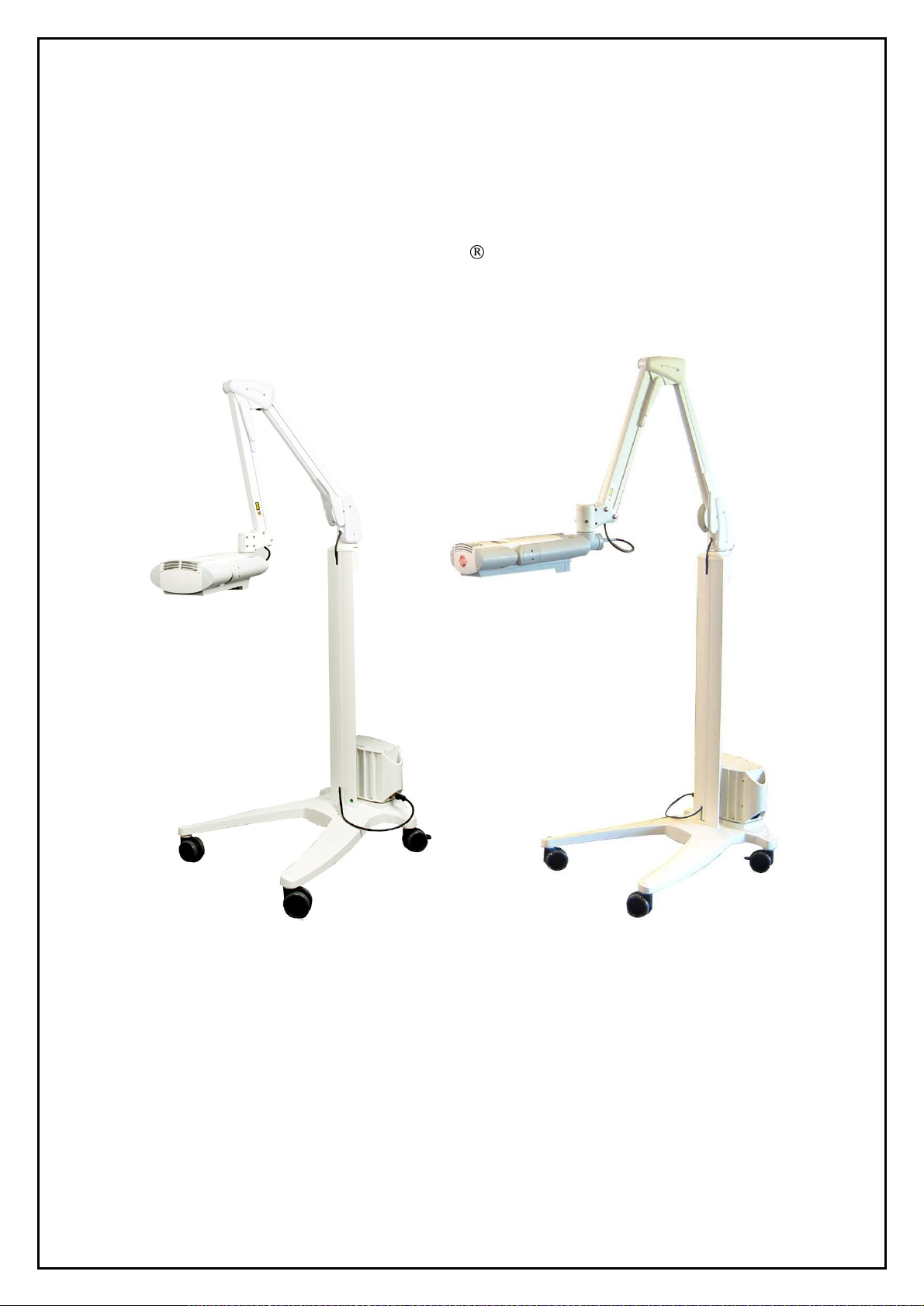
SERVICE MANUAL
Aktilite
Ver 1.
CL128
3
Photoc
Hoffsveien 48
NO-
0377 OSLO, Norway
Phone: +47 22 06 22 10
www.photocure.com
ure ASA
Page 2

Service Manual Aktilite
SERVICE
MANUAL
Aktilite
Any kind of service should only be carried out by authorised personnel.
Refer
to the User Manual for further information regarding safety and precautions.
TABLE OF CONTENTS
1
ASSEMBLY OF AKTILITE
1.1 M
1.1.1 Tools needed for the assembly of lamp with fixed lamp head................................3
1.1.2
1.2 R
1.3 HO
1.4 L
1.5 G
1.6 P
1.6.1
1.6.2
1.7 H
1.8 H
1.9 L
1.9.1
1.9.2
1.9.3
1.10 S
1.11 L
1.11.1
1.11.2
1.12 P
1.12.1
1.12.2
1.13 L
ATERIAL/EQUIPMENT..................................................................................................
Tools need
EADY TESTED SYSTEM ELECTRONICS MODULE
USING TOP MODULE
IGHT MODULE
LUE LENSES .................................................................................................................
OSITIONING ARM MODUL
Fixed lamp head .....................................................................................................
Detachable lamp head............................................................................................
OUSING BOTTOM MODULE
OUSING BACK MODULE
AMP HEAD MODULE
Fixed lamp head ...................................................................................................10
Detachable lamp head..........................................................................................11
Disassemly and Assembly of the lamp
TOP BLOCK MODULE (TS1
AMP INCLUDING PARALL
Fixed lamp head (128
Detachable lamp head (128
ARALLEL ARM WITH LAM
Fixed lamp head (128
Detachable lamp head (128
ABELS PLACEMENT DESC
CL128 LAMP WITH PAR
ed for the assembly of lamp with detachable lamp head ......................
(128
-0-
610)
ASSEMBLY .............................................................
(128
-0-
750) ..........................................................................................
E
(128
-0-
400)
ASSEMBLY ......................................................
(128
-0-
820) .......................................................................
(128
-0-
810)
ASSEMBLY ..........................................................
(128
-0-
200)
ASSEMBLY..............................................................10
-0-
250)
ASSEMBLY ............................................................27
EL ARM ASSEMBLY...............................................................28
-0-
250)...............................................................................28
-0-
252)......................................................................29
P HEAD HOLDER UNIT A
-0-
210)...............................................................................31
-0-
212)......................................................................32
RIPTION ...............................................................................33
CL128
CL128
slide series............................................12
ALLEL ARM.....................
(128
-0-
439)
ASSEMBLY.....................
SSEMBLY ........................................31
3
3
3
4
5
6
6
7
7
8
9
9
2 REPLACING THE DC POW
3
ASSEMBLY OF AKTILITE
3.1 M
3.2
3.3
3.4
3.5 P
4
ERROR CO
Version 1.
ATERIAL/EQUIPMENT................................................................................................35
PS
ELECTRONICS MODULE
PS
HOUSING MODULE
PS
HOUSING MODULE
OWER SUPPLY
DES ..............................................................................................................40
3
(128
-0-
A
B
300)
(128
(128
ER PLUG.......................................................................34
CL128 POWER SUPPLY.............................................35
(128
-0-
330)
ASSEMBLY......................................................36
-0-
310)
ASSEMBLY..........................................................37
-0-
320)
ASSEMBLY..........................................................38
ASSEMBLY.......................................................................39
Page 2 of 41
Page 3

This service manual is primarily meant for mechanical repairs
with fixed and deta
The electronic control board in the lamp head has to be programmed with the parameters
calibrated light module. If the electronic control board is faulty then the complete board is changed and
programmed with the original p
Device History Record for the lamp kept at the factory
mode can only be done by trained service personnel. The
and lenses.
If a power supply
Photocure. However, this has to be tested for leakage current,
test by qualified personnel.
1
1.1 Material/Equipment
Assembly of Aktilite CL128 Lamp with Parallel Arm
If a led diode is faulty then the complete
chable lamp head.
electronics board
Service Manual Aktilite
arameters for the light module. These
is faulty, a new tested power supply can be obtained from
CL128
and entering the device factory programming
light module consist of led arra
light module
and covers both Aktilite
can
only
be retrieved from the
is changed.
eart
h continuity and withstanding voltage
CL128 lamps
to match
ys, heat sink
the
1.1.1 Tools needed for the assembly of lamp with fixed lamp head
Required tools
# of
items
1
1
1
1
1
1.1.2 Tools needed for the assembly of lamp with detachable lamp head
Required tools
# of
items
1
1
1
1
1
1
1
1
1
1
1
Description
Screwdriver,
Screwdriver, Pozidrive 2
Screwdriver, Torx
Screwdriver, Torx
Screwdriver, Torx T 20
Description
Screwdriver, Pozidrive 1
Screwdriver, Pozidrive 2
Screwdriver, Torx T 10
Screwdriver, Torx T 15
Screwdriver, Torx T 20
Allen key, 5mm
Press nut tool
Crimping tool LEMO DPC.91-701V
Locator male DCE.91.135.BVC
Locator female DCE.91.130.BVM
Ex
traction tool LEMO DCF.91.133.5LT
Pozidrive 1
T 7
T 10
Umbraco
Version 1.
3
Page 3 of 41
Page 4
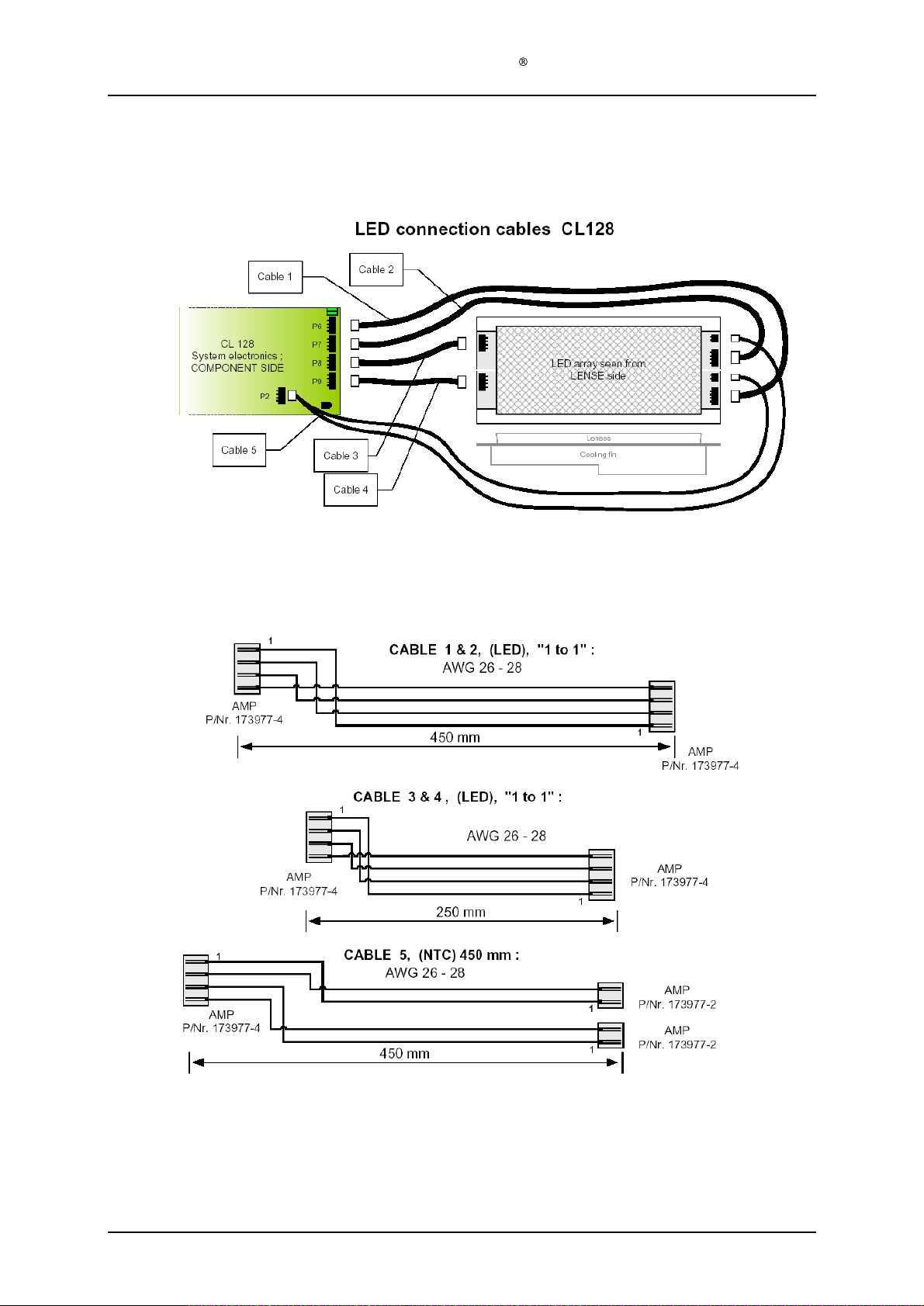
Service Manual Aktilite
1.2 Ready Tested System
Electronics
Module
CL128
(128
-0-
439
) assembly
Version 1.
3
Page 4 of 41
Page 5
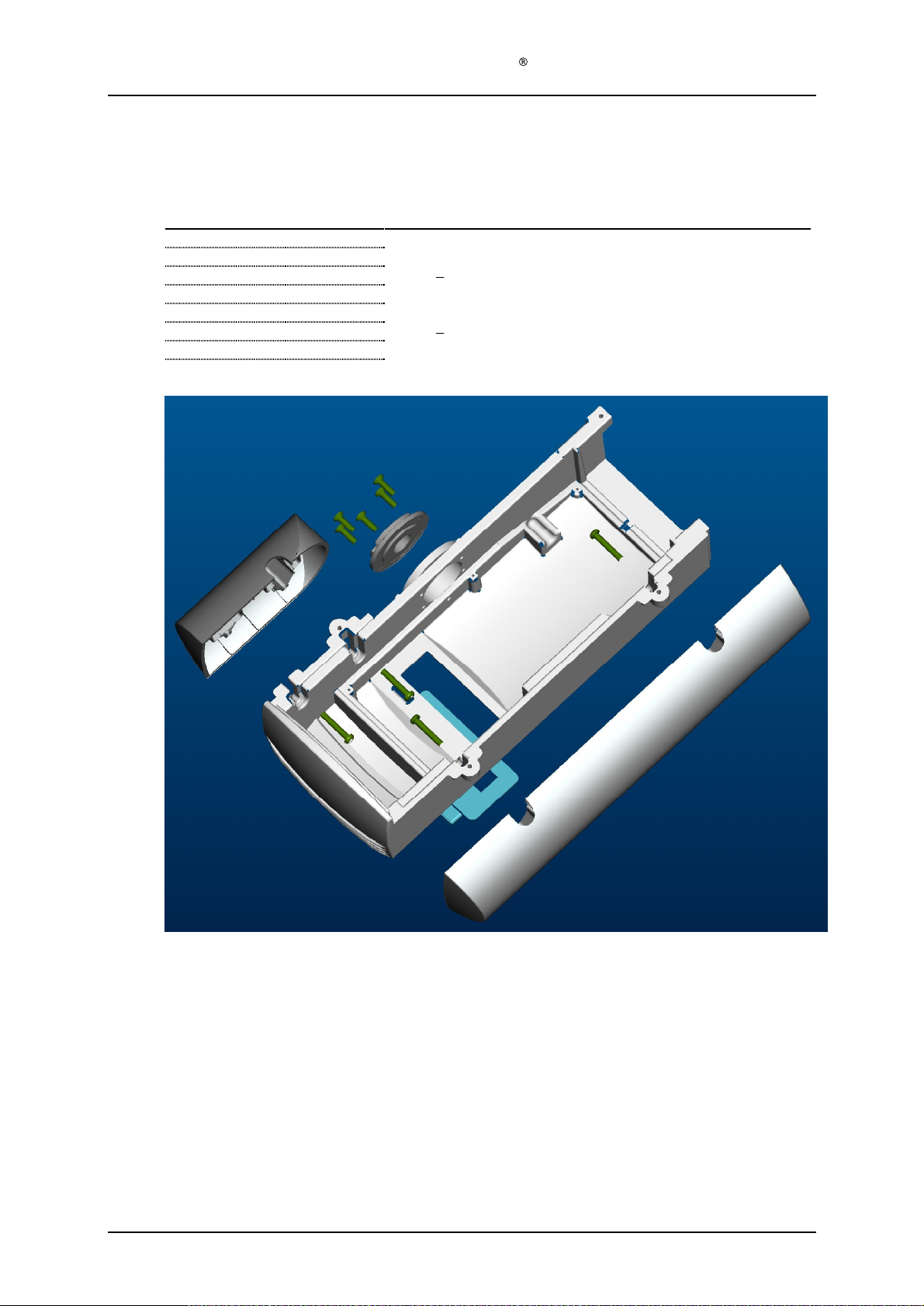
Service Manual Aktilite
1.3 Housing top module (128
Required items
Part #
128
-0-
978
1
128
-1-
637
1
128
-1-
932
5
128
-1-
626
1
128
-1-
628
1
128
-1-
931
4
128
-1-
636
1
# of items
CL128
-0-
610) assembly
Description
Housing top (mould
Housing top slide bearing
Screw
Housing right (moulded plastic)
Housing left (moulded plastic)
Screw
User interface (foil keyboard w/ta
Rubbing alcohol (fat free)
PT4x16 countersunk
PT4x25
ed plastic)
il)
Version 1.
Assembly description
Step 1)
Assemble the housing top slide bearing (128
the five countersunk PT4x16 screws (128
Step 2)
Assemble the housing left (128
(128
-0-
978) using the four PT4x25 screws (128
Step 3)
Clean the recessed area at the top of the housing top (128
alcohol
Step 4)
Glue the Key Touch panel (128
3
-1-
637) to the housing top (128
-1-
932).
-1-
628) and housing right (128
-1-
931).
-1-
636) to the housing top (128
-1-
626) to the housing top
-0-
978) using a cloth and rubbing
-0-
978).
-0-
978) using
Page 5 of 41
Page 6
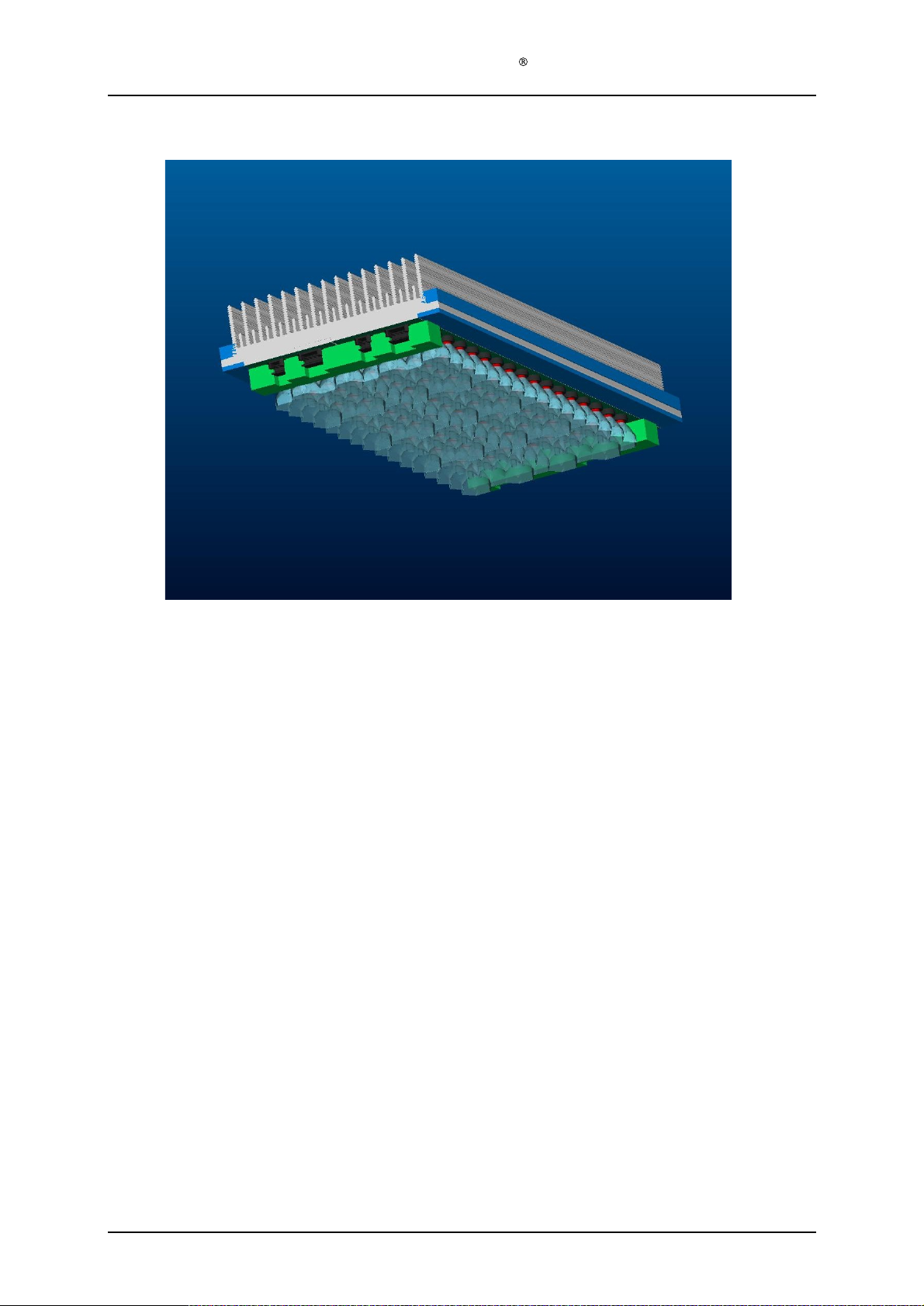
1.4 Ligh
t module (128
Service Manual Aktilite
-0-
750)
CL128
This light module comes as a ready
control electronics
the documentation f
comprehensive tests has to be done with spectrometer and radiometer so this can only
be done at the factory. The dose factor is a factor that is a combination of wavelength
and irradiance and will vary slightly from light modu
1.5 Glue lenses
If one of the lenses is loose they can be glued on to the substrate using
glue
.
and currents
ollowing
the specific light module. To determine the dose factor,
tested and
(set in factoring mode) has to be adjusted according to
calibrated part. The dose factor in the
le to light module.
Loctite 435
Version 1.
3
Page 6 of 41
Page 7
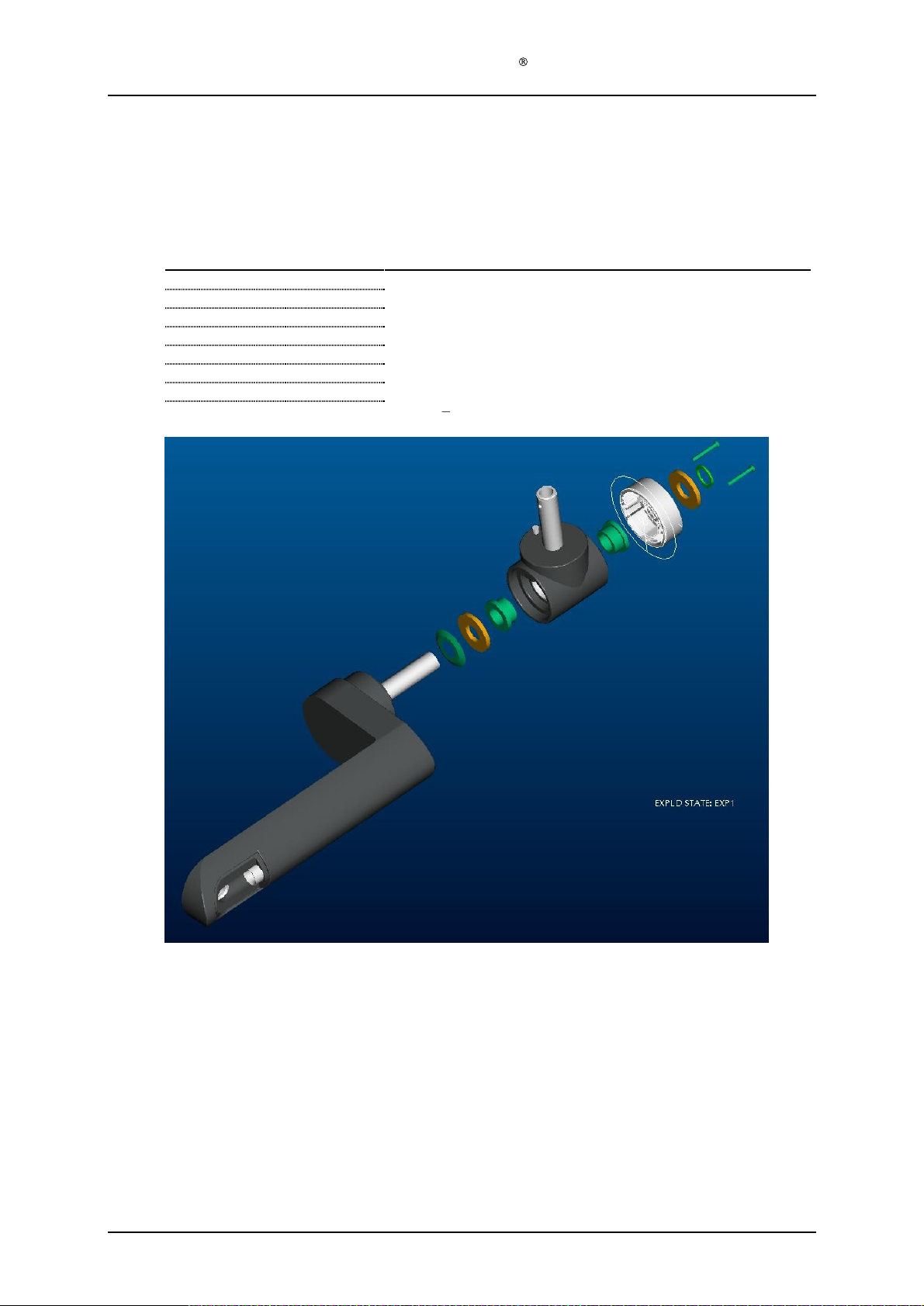
Service Manual Aktilite
1.6 Positioning arm module (128
1.6.1
F
ixed lamp head
Required items
Part #
128
-0-437 1 T-piece (Moulded plastic)
128
-1-
910
2
128
-0-
428
1
128
-1-
914
2
128
-1-
912
1
128
-1-
916
1
128
-1-
424
1 T-
128
-1-
926
2
# of items
Description
Plastic bearing
Main arm (Moulded plastic)
Aluminium washer
Conical spring
Circlip
Screws PT3x25
CL128
-0-
400) assembly
s
s
piece cover (Moulded plastic)
Version 1.
Assem
Step 1)
Step 2)
Step 3)
Step 4)
Step 5)
Step 6)
3
bly description
Press the two plastic bearings (128
tool is necessary for this or a jig made by Kitron.)
Slide conical spring (128
end of the
Assemble one aluminium washer (128
already assembled plastic bearings (128
Compress the conical spring (128
the main arm (128
Assemble another aluminium washer (128
the Circlip is well located in the g
Assemble T-piece cover (128
conic spring (128
-1-
910) into the T-piece (128
-1-
912) onto aft tube of the main arm (128
-1-
912) goes towards the plastic of the main arm (128
-1-
914) and the T-piece (128
-1-
-1-
912) by
-1-
428). (This compression and holding can be done with one hand.)
roove.
-1-
424) using the two PT3x25 screws (128
910)).
holding the T-piece (128
-1-
914) and circlip (128
-0-437
). (Specially made
-0-
428), The pointed
-0-437
) (Including the
-1-437) tightly against
-1-
916). Make sure that
-1-
926).
-0-
428).
Page 7 of 41
Page 8
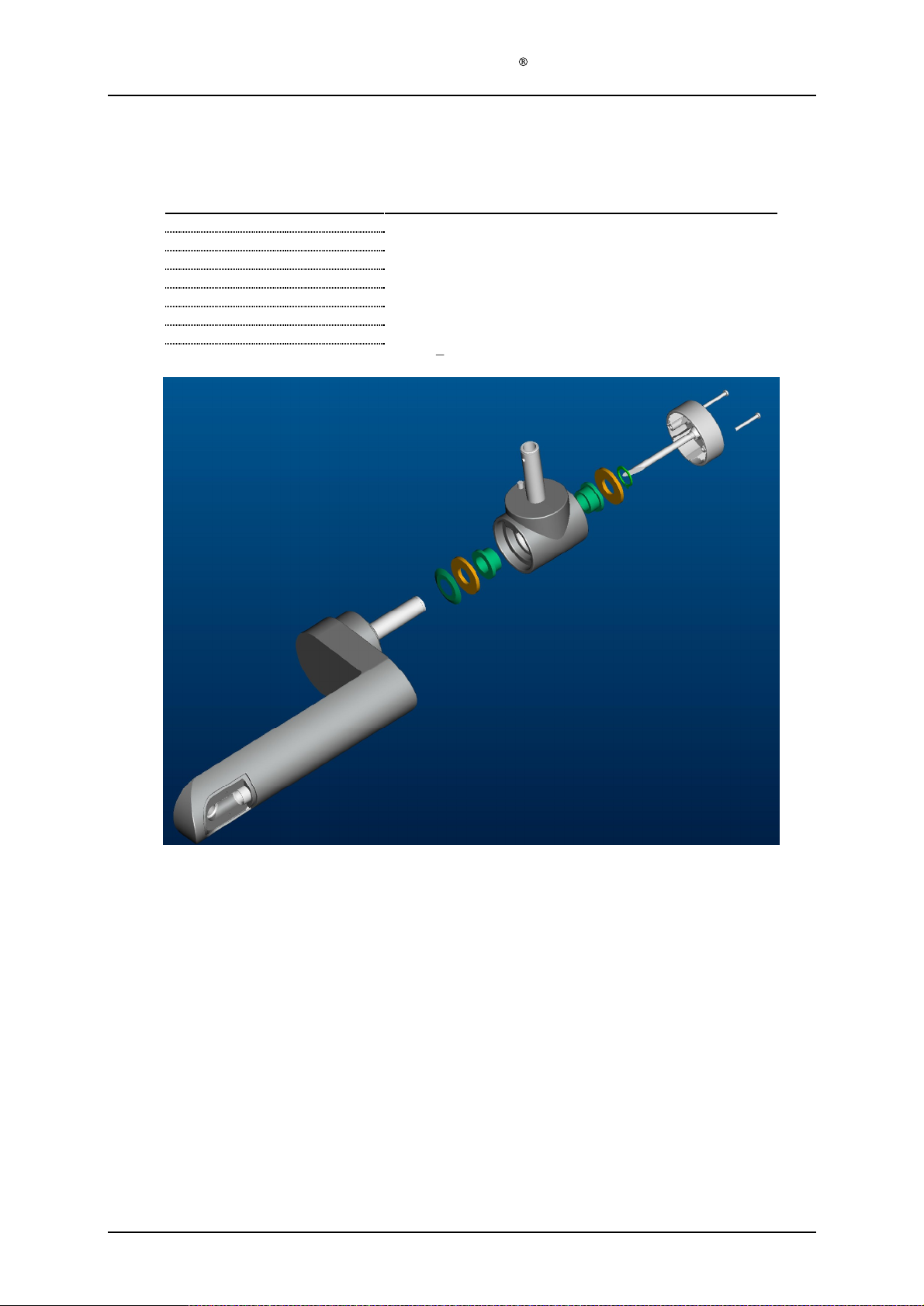
1.6.2
Deta
chable lamp head
Required Items
Part #
128
-0-
437
1 T-
128
-1-
910
2
128
-0-
428
1
128
-1-
914
2
128
-1-
912
1
128
-1-
916
1
128
-0-
988
1
128
-1-
926
2
Service Manual Aktilite
# of items
Description
piece (Moulded plastic)
Plastic bearing
Main arm (Moulded plastic)
Aluminium washer
Conical spring
Circlip
Cable from system electronics to lamp head connector
Screw
PT3x25
CL128
Version 1.
Assembly description
Step 1) Press the two plastic bearing
is necessary for this or a jig made by Kitron.)
Step 2) Broach the plastic bearings to Ø16,2mm after insertion in T-piece
Step 3) Slide conical spring (128
the conic spring (128
Step 4) Assemble one aluminium washer (128
already assembled plastic bearings (128
Step 5) Compress the conical
the main arm (128
Step 6) Assemble another aluminium washer (128
Circlip is
Step 7) Assemble power cable assembly (128
module (128
Step 8) Put in the cord and fasten the T-piece cover (128
988) using the two PT3x25
3
well located in the groove.
-0-
s (128
-1-
910) into the T-piece (128
-1-
912) onto aft tube of the main arm (128
-1-
912) goes towards the plastic of the main arm (128
-1-
914) and the T-piece (128
-1-
910)).
spring (128
-1-
428). (This compression and holding can be done with one hand.)
400).
-1-
912) by holding the T-piece (128
-0-
screws (128
-1-
914) and circlip (128
988) by inserting the cable thru the positioning arm
-1-
424) in the power cable assembly (128
-1-
926).
-0-
437). (Specially made tool
-0-
428), T
he pointed end of
-0-
428).
-0-
437) (Including the
-0-
437) tightly against
-1-
916). Make sure that the
Page 8 of 41
-0-
Page 9
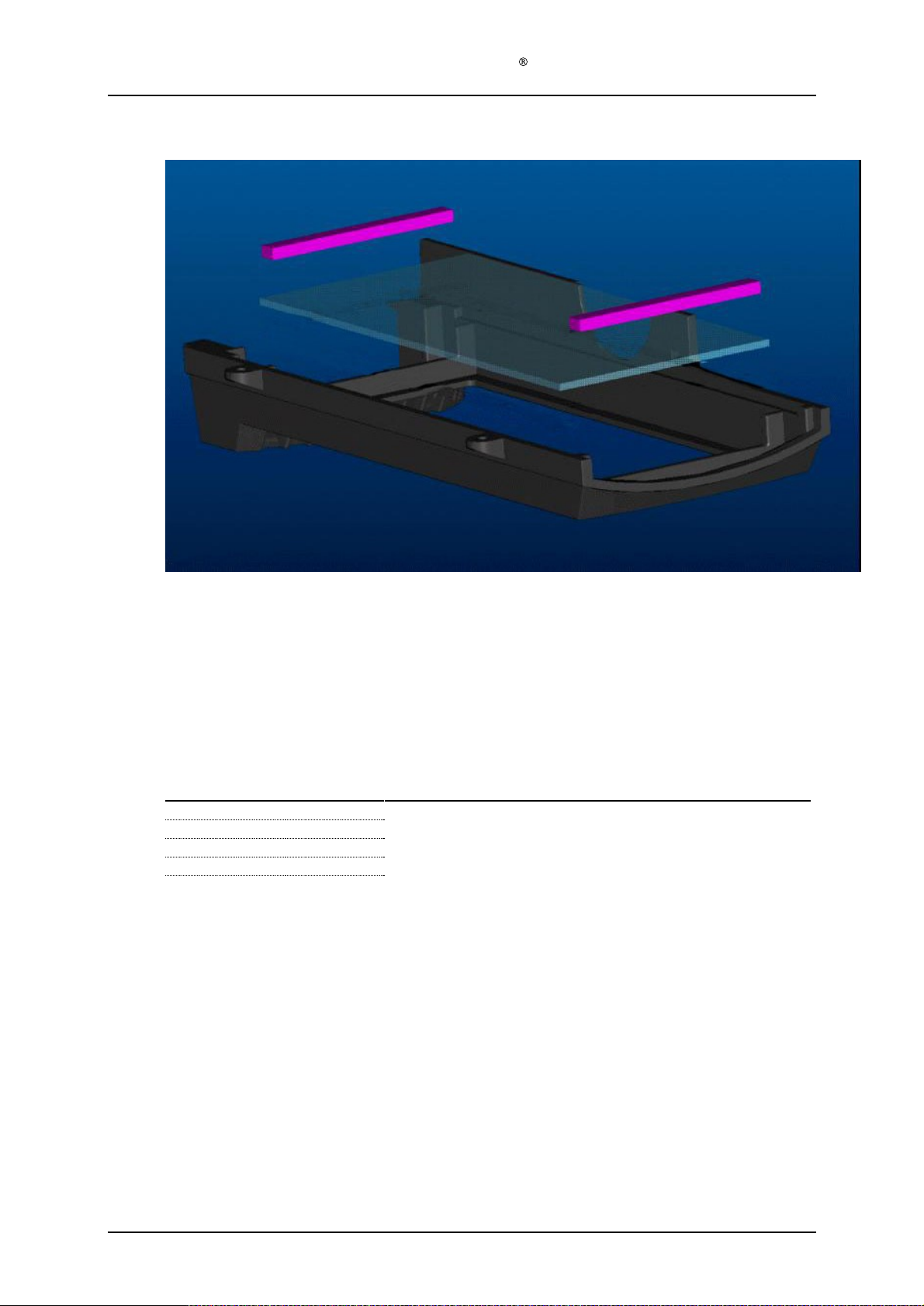
Service Manual Aktilite
1.7 Housing bottom module (128
-0-
820)
CL128
The housing bottom c
Clean the glass if necessary before final assembly.
1.8 Housing back module (128
Required items
Part #
128
-1-
812
1
128
-1-
905
1
128
-1-
814
4
128
-1-
815
4
Assembly description
Step 1)
Place the fan (128
using the four M4x10 screws (128
must face upwards relative to the housing back (128
the top than at the bottom)
# of items
-1-
905) in the recess of the back housing (128
omes fully assembled as a s
-0-
810) assembly
Description
Housing back (Moulded plastic)
Fan
Screws M4x10 (DIN 7985)
Washer
s
-1-
814) and the four washers (128
-1-
pare part.
-1-
812) and mount the fan
812). (The housing back is wider at
-1-
815). The fan cable
Version 1.
3
Page 9 of 41
Page 10

Service Manual Aktilite
1.9 Lamp head module (128
-
1.9.1
see slide series
F
ixed lamp head
Required items
Part #
128
-0-
610
128
-0-
400
128
-1-
914
128
-1-
912
128
-1-
916
128
-1-
202
128
-0-
810
128
-1-
928
128
-0-
439
128
-1-
921
128
-0-
750
128
-0-
820
128
-1-
929
128
-1-
890
128
-1-
923
128
-1-
945
inm Chapter 1.9.3
# of items
1
1
2
1
1
1
1
4
1
6
1
1
4
1
2
1
CL128
-0-
200) assembly
.
Description
Housing top module
Positioning arm module
Aluminium washer
Conic spring
Circlip
Power cable
Housing back module
Screws PT 4x30
System electronics module
Screws PT 2,5x8
Light module
Housing bottom module
Screws PT 4x10
Main arm mini cover (moulded plastic)
Screws PT 3x10
Ca
ble tension release
From PS to lamp head (fixed lamp head only)
s
(fixed lamp head only)
Assembly description
Step 1)
Assemble position arm module (128
the short axle of the main arm (128
Step 2)
Slide an alumi
aluminium washer (128
inside of the housing.
Step 3)
Compress the conical spring (128
easiest
done with a special made tool (see pictures)
securely in the groove.
Step 4)
Assemble power cable (128
(128
-0-
400). Leave exc
Step 5)
Position housing back module (128
0-
610). Do not assemble with screws yet.
Step 6)
Insert power cable (128
cable marked 2 is minus [-]), fan cable plug from housing back module (128
from the user interface of the housing top module 128
the system electronics module (128
06.03.2002: "LED cables CL128, Rev. A".
Step 7)
Fasten the system electronics module (128
using the six PT 2,5x8 screws (128
302) from the lamp head.
Step 8)
Plug the six cables from the system electronics module (128
connectors on the LED-panels (128
Step 9)
Tidy the cables from the system electronics modul
four miniature cable holders (128
Step 10) Seat the light module (128
Step 11) Remove the protective foil from the protective window
module (128
Step 12) Assemble the housing bottom module (128
using the four PT 4x10 screws (128
Step 13) Fasten the housing back module (128
4x30 screws (128
Step 14) Assemble the main arm mini cover (128
using the two PT 3x10 screws (128
Step 15) Assemble the cable tension release (128
inserting it into the T-piece cover (128
nium washer (128
-1-
914) onto the short axle of the main arm (128
This is very important.
ess cable inside the lamp head to simplify assembly in a later step.
-1-
302) ends into appropriate rece
-0-
-0-
820).
-1-
928).
-0-
400) to housing top module (128
-0-
428) thru the housing top slide bearing (128
-1-
914), a conical spring (128
-1-
912) and assemble the circlip (128
. Make sure that the circlip is located
-1-
302) by inserting the cable thru the positioning arm module
-0-
810) at the back end of the housing top module (128
-0-
-0-
439
). Refer to cable spec from Kitron Development
-0-
439
) to the housing top module (128
-1-
921). And pull out the excess powe
-1-
762) of the light module (128
e (128
-1-
944) on the light module (128
750) properly in the housing top module (128
-0-
820) to the housing top module (128
-1-
929).
-0-
820) to the rest of the lamp head us
-1-
890) to the positioning arm module (128
-1-
923).
-1-
945) around the power cable (128
-1-
424) of the positioning arm module (128
-0-
610) by sliding
-1-
632).
-1-
912) and another
-0-
428) from the
-1-
916). This is
ptors (cable marked 1 is plus [+],
-0-
810) and tail
610 into appropriate connectors on
-0-
610)
r cable (128
-0-
439
) into the appropriate
-0-
750).
-0-
439) by inserting them thru the
-0-
750).
-0-
(128
-1-
826) of the housing bottom
ing the four PT
-1-
610).
-0-
-0-
302) and
-0-
-1-
610)
400)
400).
-
Version 1.
3
Page 10
of 41
Page 11

Service Manual Aktilite
1.9.2 Detachable lamp head
Required items
Part #
128
-0-
610
1
128
-0-
400
1
128
-1-
914
2
128
-1-
912
1
128
-1-
916
1
128
-0-
810
1
128
-1-
928
4
128
-0-
439
1
128
-1-
921
6
128
-0-
750
1
128
-0-
820
1
128
-1-
929
4
128
-1-
890
1
128
-1-
923
2
# of items
CL128
Description
Housing top module
Positioning arm module
Aluminium washer
Conic spring
Circlip
Housing back module
Screw
System electronics module
Screw
Light module
Housing bottom module
Screw
Main arm mini cover (moulded plastic)
Screw
PT-K 40x30 WN 1452
PT 2,5x8
PT 4x10
PT 3x10
Assembly description
Step 1)
Assemble position arm module (128
the short axle of the main arm (128
Step 2)
Slide an aluminium washer (128
aluminium washer (128
inside of the housing.
Step 3)
Compress the
be done with a special made tool. Similar to a large pair of channel locks, but with custom
heads. Make sure that the circlip is located securely in the groove.
Step 4)
Position housing bac
0-
610). Do not assemble with screws yet.
Step 5)
Insert power cable (128
cable marked 2 is minus [-])
Step 6)
Fan cable plug from housin
the housing top module 128
system electronics module (128
Step 7)
Refer to PCU-010-128 for the connection of the cables going fro
board to the LED arrays..
Step 8)
Fasten the system electronics module (128
using the six PT 2,5x8 screws (128
302) from the lamp head.
Step 9)
Pl
ug the six cables from the system electronics module (128
connectors on the LED-panels (128
Step 10) Tidy the cables from the system electronics module (128
four miniature cable holders (128
Step 11) Seat the light module (128
Step 12) Remove the protective foil from the protective window (128
module (
Step 13) Assemble the housing bottom module (128
using the four PT 4x10 screws (128
Step 14) Fasten the housing back module (128
K 40x30 screws (128
Step 15) Assemble the main arm mini cover (128
using the two PT 3x10 screws (128
128
-1-
914) onto the short axle of the main arm (128
conical spring (128
k module (128
-0-
988) ends into appropriate receptors (cable marked 1 is plus [+],
g back module (128
-0-
-0-
-0-
820).
-1-
928)
.
-0-
400) to housing top module (128
-0-
428) thru the housing top slide bearing (128
-1-
914), a conical spring (128
-1-
912) and assemble the circlip (128
-0-
810) at the back end of the housing top module (128
-0-
810) and tail from the user interface of
610 shall be inserted into appropriate connectors on the
-0-
439
).
-0-
439
) to the housing top module (128
-1-
921). And pull out the excess power cable (128
-1-
762) of the light module (128
-0-
-1-
944) on the light module (128
750) properly in the housing top module (128
-0-
820) to the housing top module (128
-1-
929).
-0-
810) to the rest of the lamp head using the four PT
-1-
890) to the positioning arm module (128
-1-
923).
-0-
610) by sliding
-1-
-1-
912) and another
-0-
428), from the
-1-
916). This must
m the electronic control
-0-
-0-
439
) into the appropriate
-0-
750).
439
) by inserting them thru
-0-
750).
-0-
610).
-1-
826) of the housing bottom
-0-
632).
610)
-1-
610)
-0-
-
the
-
400)
Version 1.
3
Page 11
of 41
Page 12
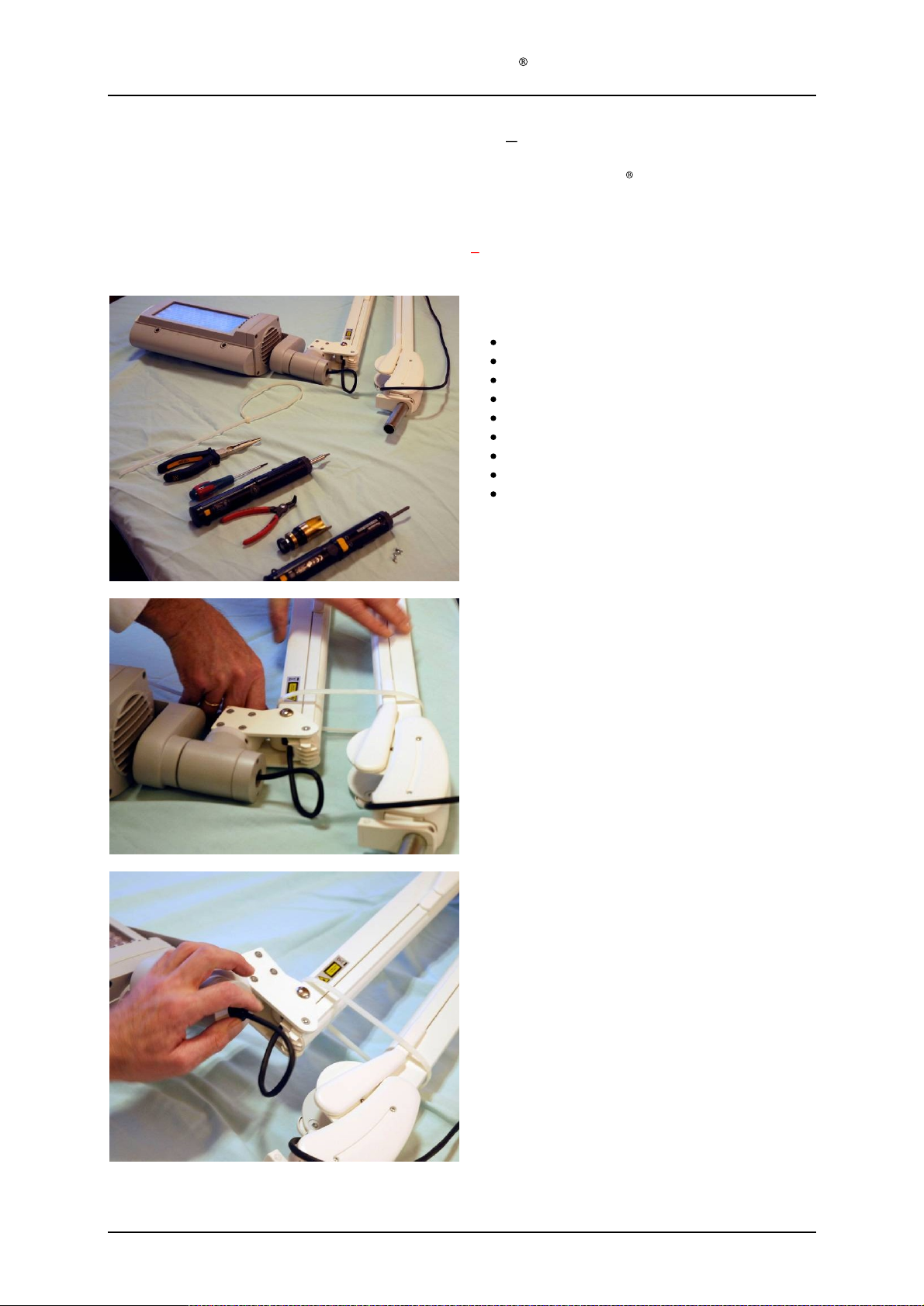
Service Manual Aktilite
1.9.3 Disassemly and Assembly of
The lamp head module assembly slide series in this chapter is based on
head. However, there are only minor differences between lamp head module assembly for fixed and detachable
lamp head
Warning: The gas springs inside the arm is very powerful
. The below slide series is therefore common for both lamp head variations.
the lamp
therefore secure the arm with a strap
CL128
slide series
Required Tools
Nylon Strap length minimum 45 cm
Pair of telephone pliers
Circlip pliers for 16 mm circlip
Torx T7 screwdriver
Torx T10 screwdriver
Torx T20 screwdriver
Philips PH
Tool to compress the spring mechanism
Allen key (5mm)
the Aktilite
:
2 screwdriver
CL128 with fixed lamp
Step 1
Put on a strap or similar to secure the parallel arm.
Step 2
Step 2-5 is only necessary if you need to take off the
main arm, the housing or replace the cable.
Remove the
main arm using a pair of pliers
F
or lamps with deta
Disconnect the
plug and
lamp head holder locking screw using the
Allen key
strain relief (black) on the end of the
.
chable lamp head:
cable
plug
from the T-piece cover
detach
the lamp head by
.
removing
the
provided
Version 1.
3
Page 12
of 41
Page 13

Service Manual Aktilite
Step 3
Step 2-5 is only necessary if you need to take off the
main arm, the housing or replace the cable.
Remove the strain relief.
Not applicable for lamps with detachable lamp
head
Step 4
Step 2-5 is only necessary if you need
main arm, the housing or replace the cable.
Remove the small cover on the main arm
T10 screwdriver
CL128
to take off the
using the
Step 5
Step 2-5 is only necessary if you need to take off the
main arm, the housing or replace the cable.
Feed a few cm
loop as shown.
of cord through the arm to make a
Version 1.
3
Page 13
of 41
Page 14
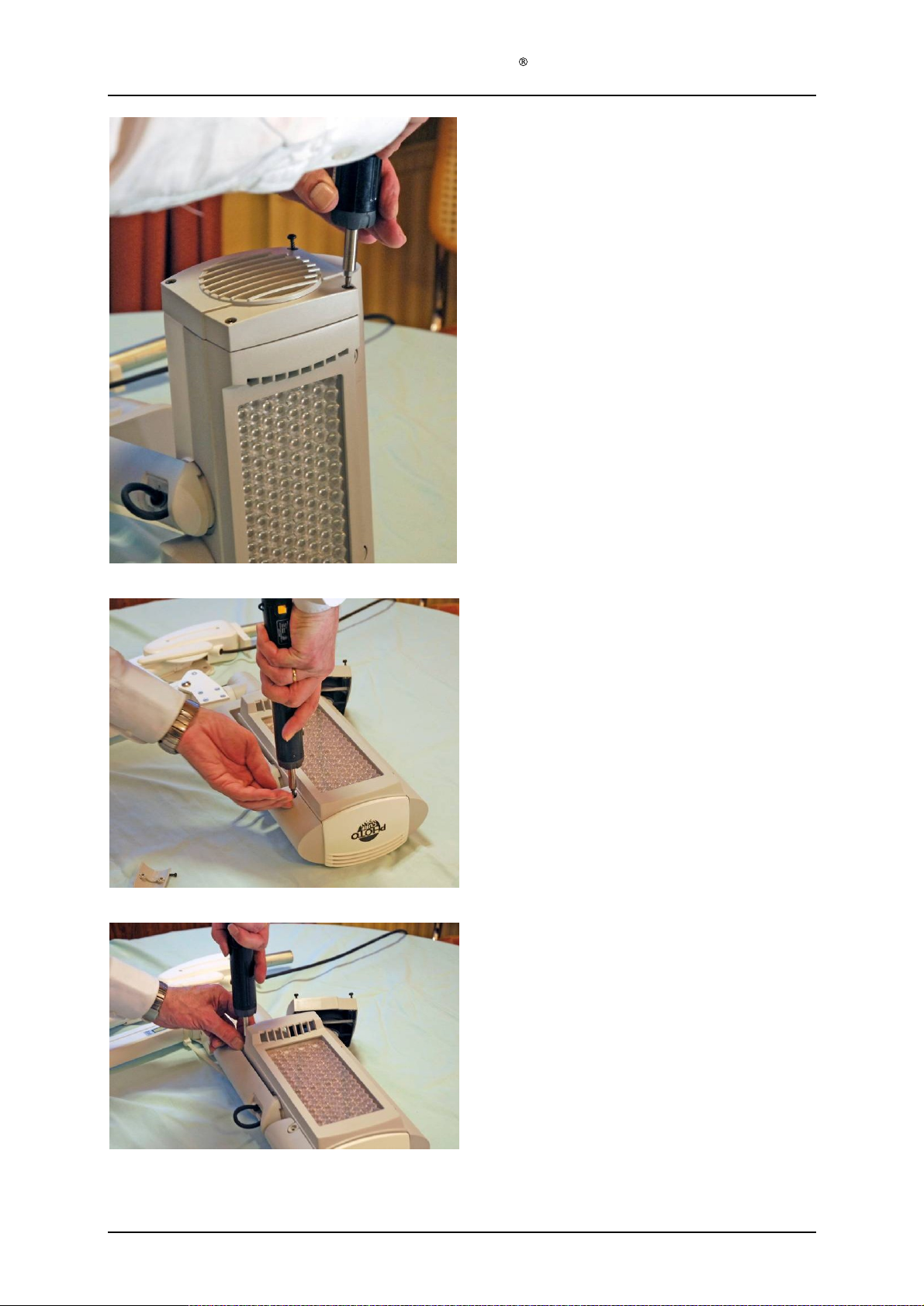
Service Manual Aktilite
Step 6
Unscrew the fan housing
screwdriver.
CL128
(4 Screws)
using the T20
Step
7
Unscrew the
screwdriver. (
Step 8
The last screw sits by the fan.
housing bottom using the T20
4 screws)
Version 1.
3
Page 14
of 41
Page 15
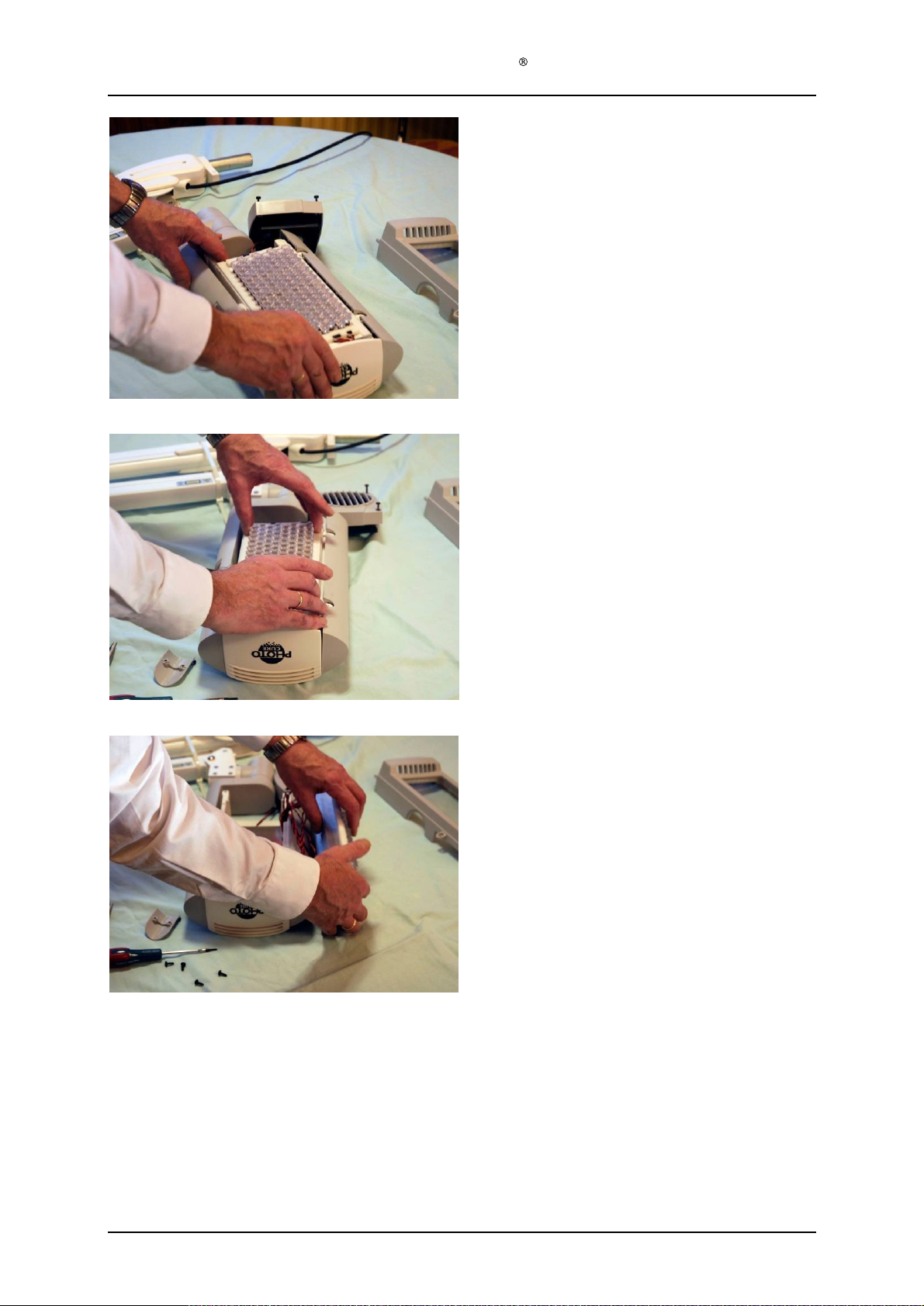
Service Manual Aktilite
Step 9
Carefully lift up the light module.
Do not lift by the lenses, but lift the heat sink.
Step 10
Gently remove the light module.
CL128
Step 11
Place the light module on the side of the housing.
Be careful with the leads.
Version 1.
3
Page 15
of 41
Page 16
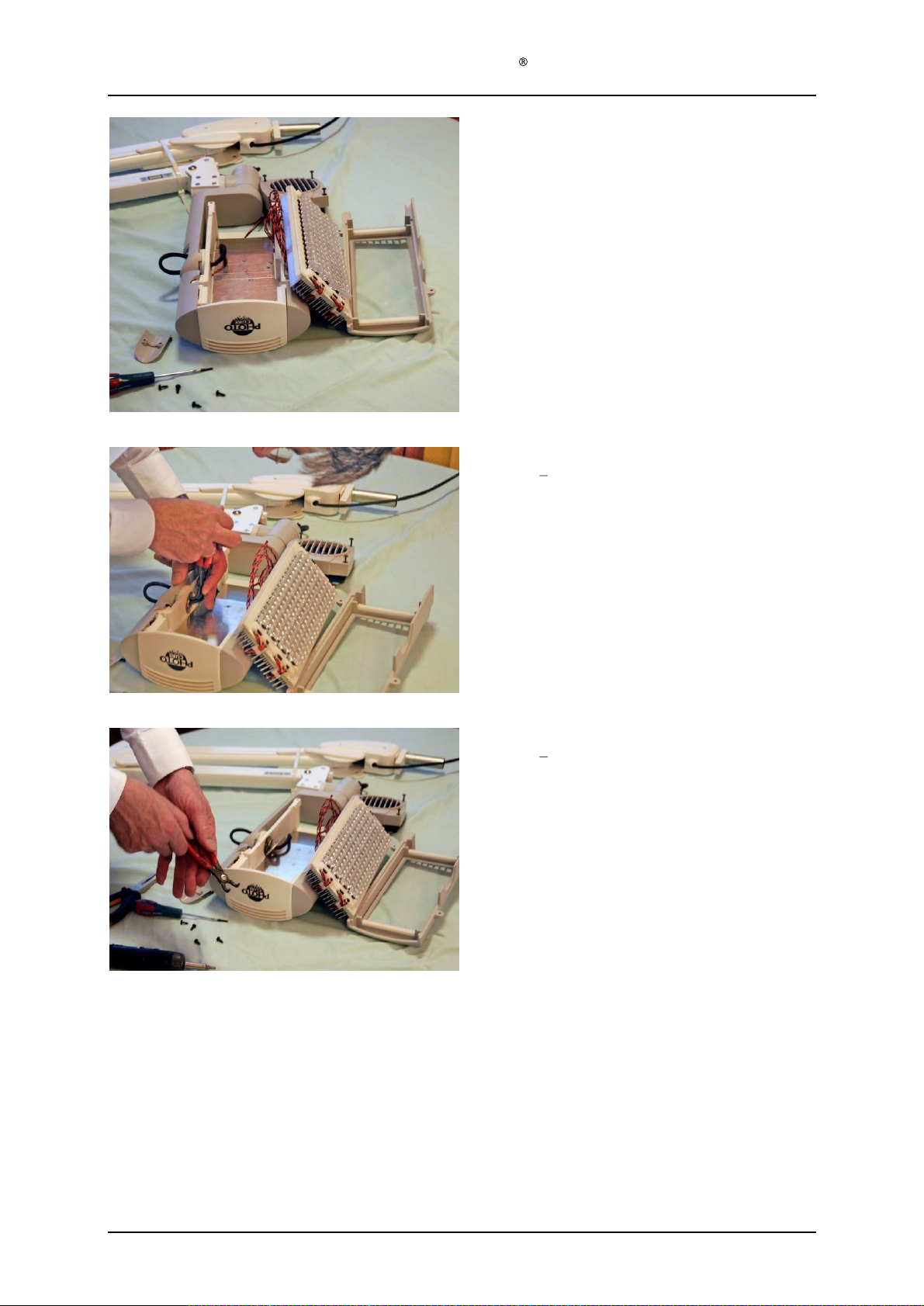
Service Manual Aktilite
Step12
P
ut somethin
support it.
Step 13
Step 13
the main arm or the housing
CL128
g underneath
16
is only necessary if you need to change
the light module to
Use the circlip pliers to release the circlip.
Step 14
Step 13
t
Circlip tool
16
is only necessary if you need to change
he main arm or the housing
Version 1.
3
Page 16
of 41
Page 17
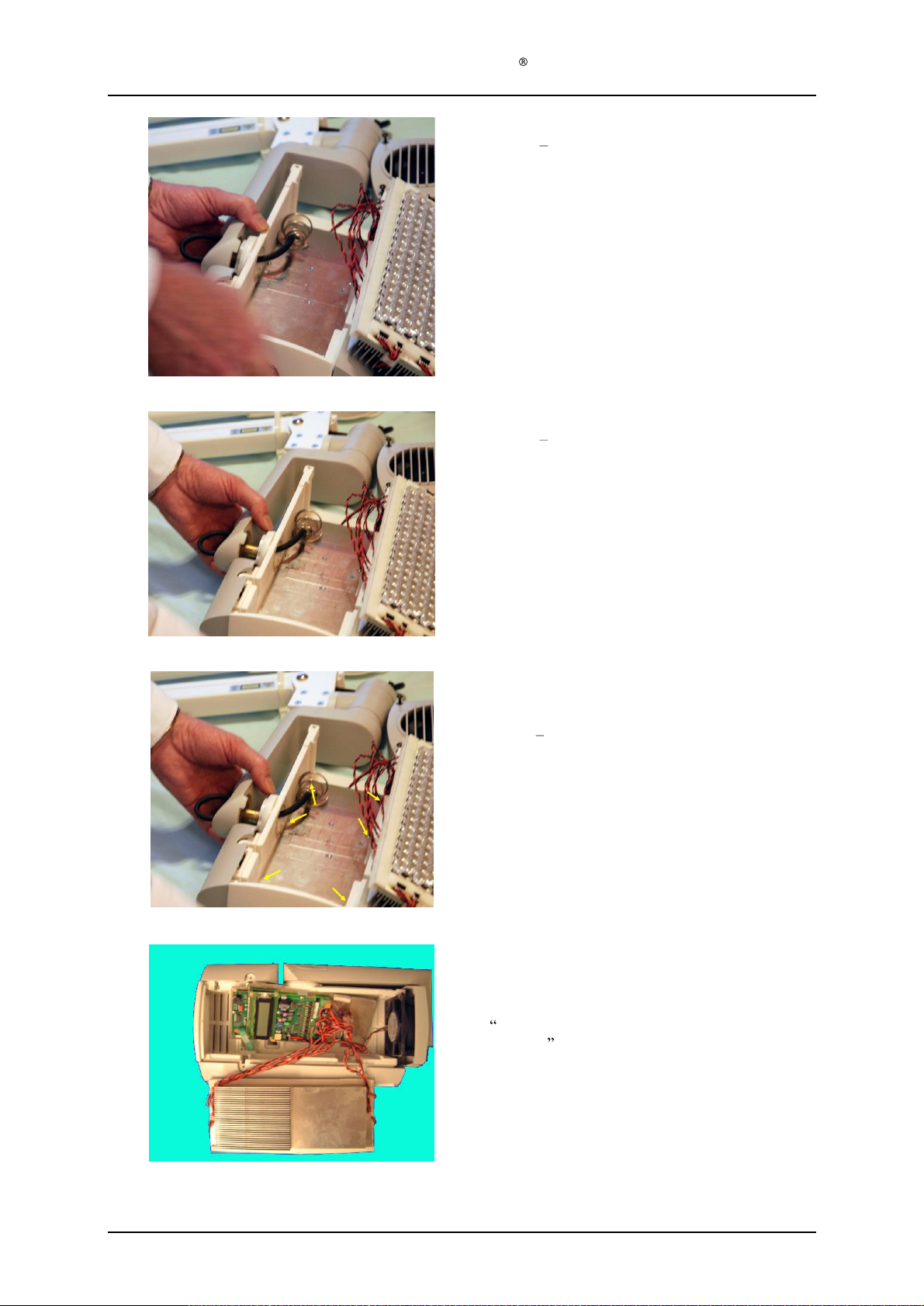
Service Manual Aktilite
Step 15
Step 13
the main arm or the housing
Take off the washers and spring.
Step 16
Step 13
the main arm or the
Bring out
CL128
16
is only necessary if you need to change
16
is only necessary if you need to change
housing
the main arm
Step 17
The control electronics is fastened with 6 Torx 0,7
screws
Step 18
The picture shows the electronics control board and
its connections. Wiring can be found in chapter 1.2
assembly
shown by the arrows.
Read
y tetst system electronics module (128
and on the next page.
-0-
439
)
Version 1.
3
Page 17
of 41
Page 18
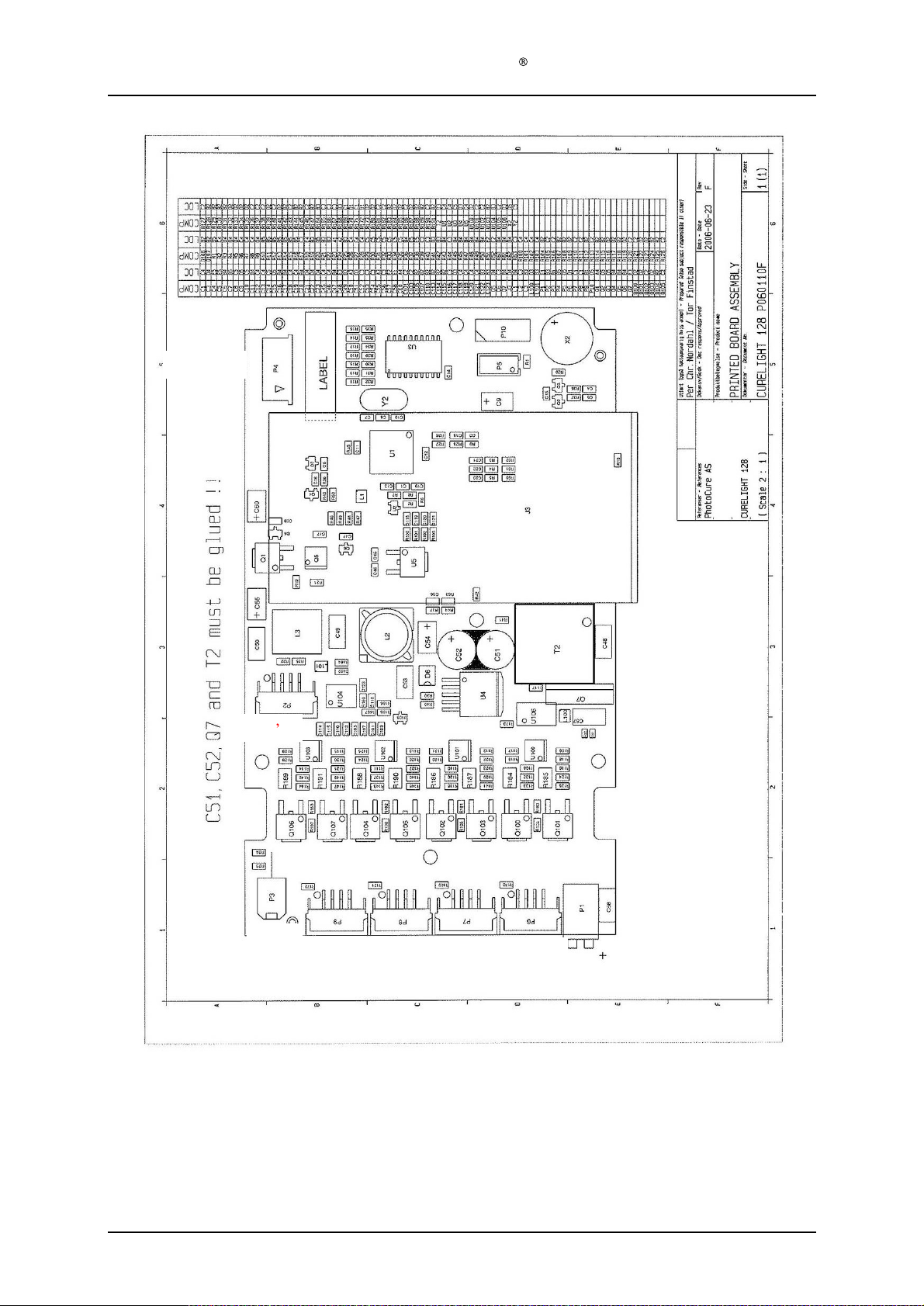
PWR
FAN
NTC s
KEYPAD
Service Manual Aktilite
CL128
Version 1.
3
LED
LED
4
3
LED2 LED
1
Page 18
of 41
Page 19
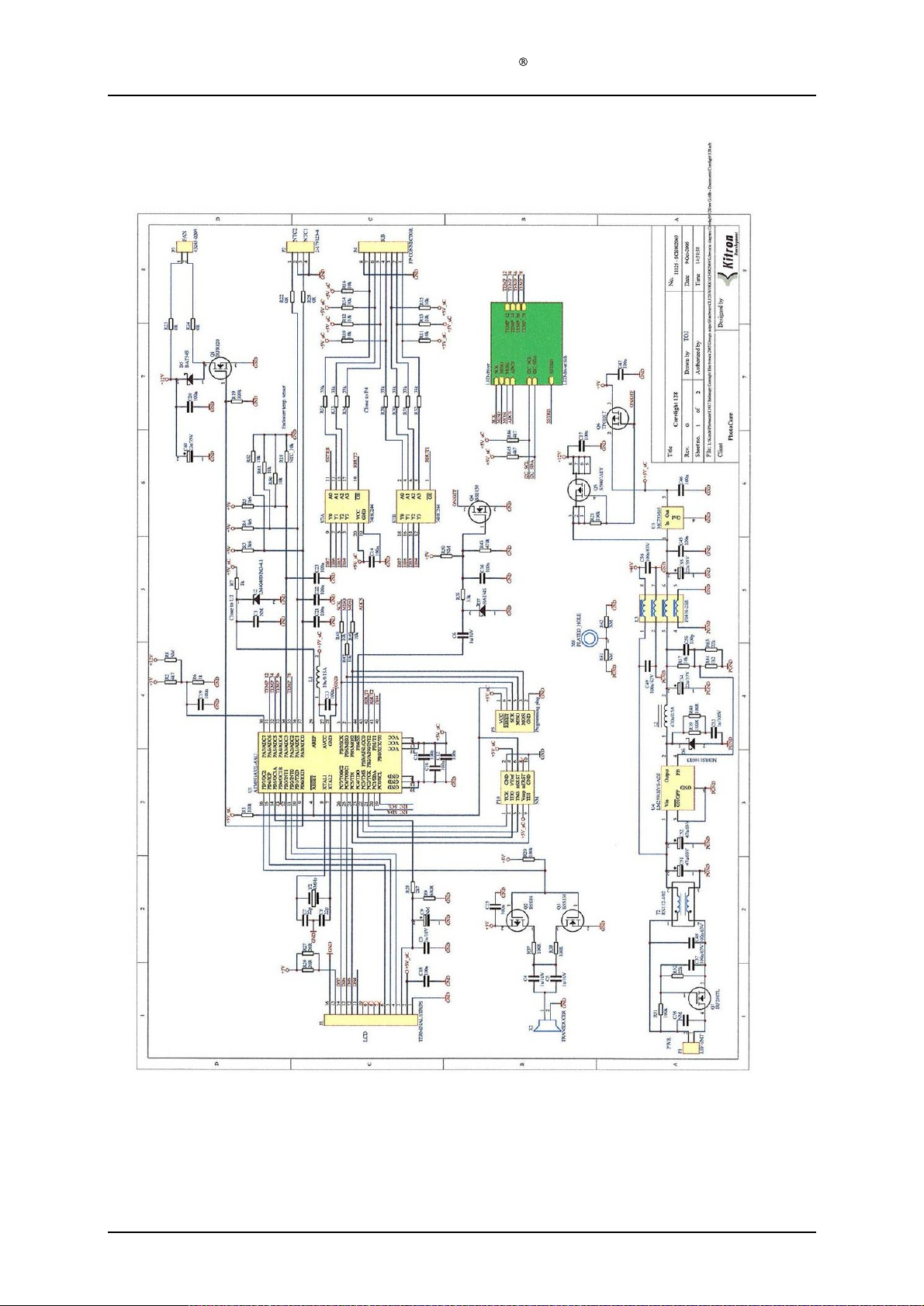
Service Manual Aktilite
CL128
Version 1.
3
Page 19
of 41
Page 20
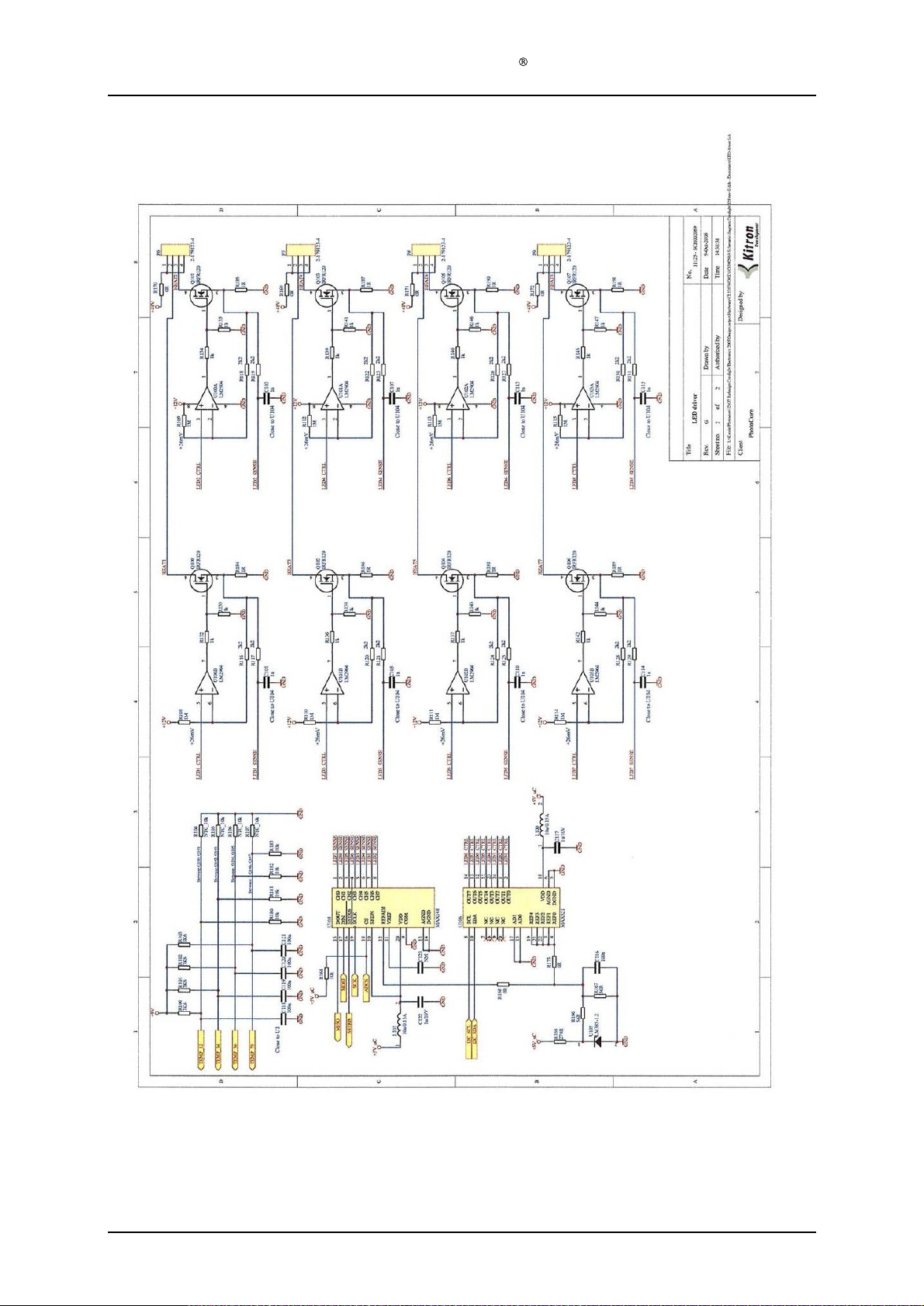
Service Manual Aktilite
CL128
Version 1.
3
Page 20
of 41
Page 21
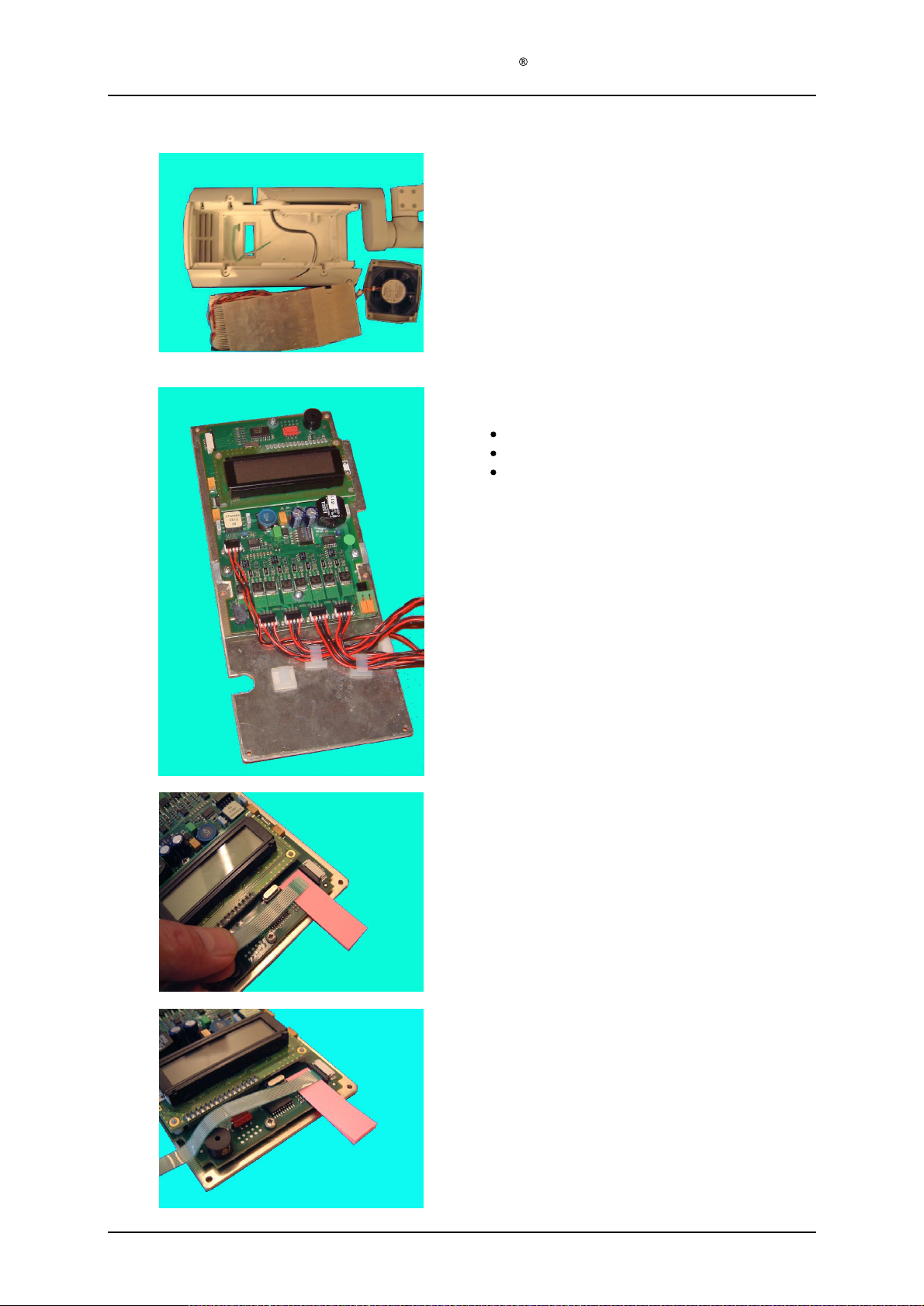
Service Manual Aktilite
Step 19
If you change the electronics, the DC input cable
and
Step 20
CL128
flat
DC cable (+) is at the right most position
The cable is marked with a (1) sign
The fan connector can be seen to the left most
position
keypad cable has to be
disconnected.
Version 1.
3
Step 21
It is easier to engage the flat cable to the connector
receptacle by having a
Step 22
You can use a very small flat pair of pliers to
engage the cable.
0.5 mm spacer underneath.
Page 21
of 41
Page 22
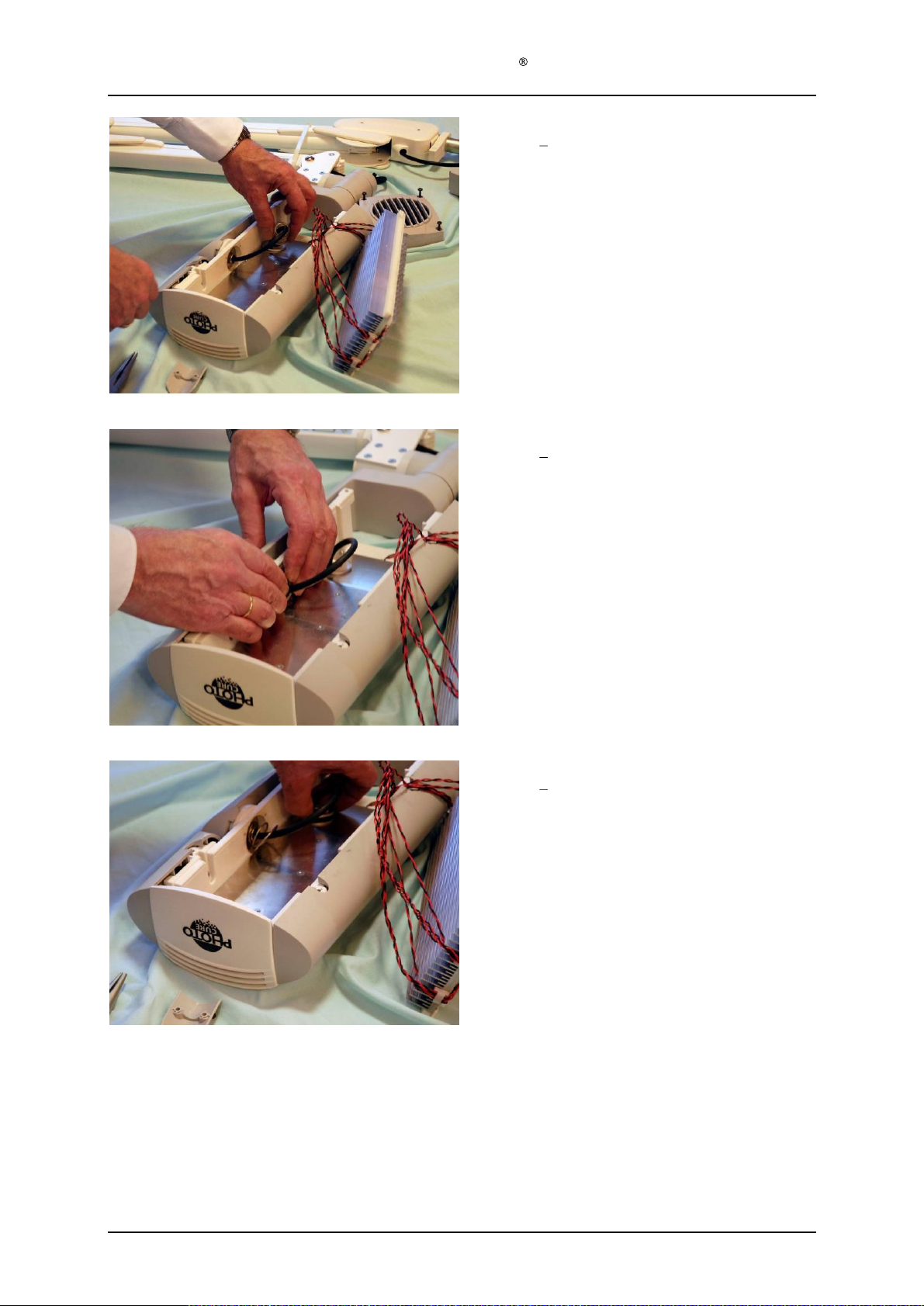
Service Manual Aktilite
Step 23
Step 23
the housing or main arm.
Put back on the washers and spring.
Step 24
Step 23
the housing or main arm.
The last washer must be properly seated into the
hole.
CL128
30
is only relevant if you have changed
30
is only relevant if you have changed
Step 25
Step 23
the housing or main arm.
You have to get the washer well inside the hole
else it will not fit on to the axle.
30
is only relevant if you have changed
or
Version 1.
3
Page 22
of 41
Page 23
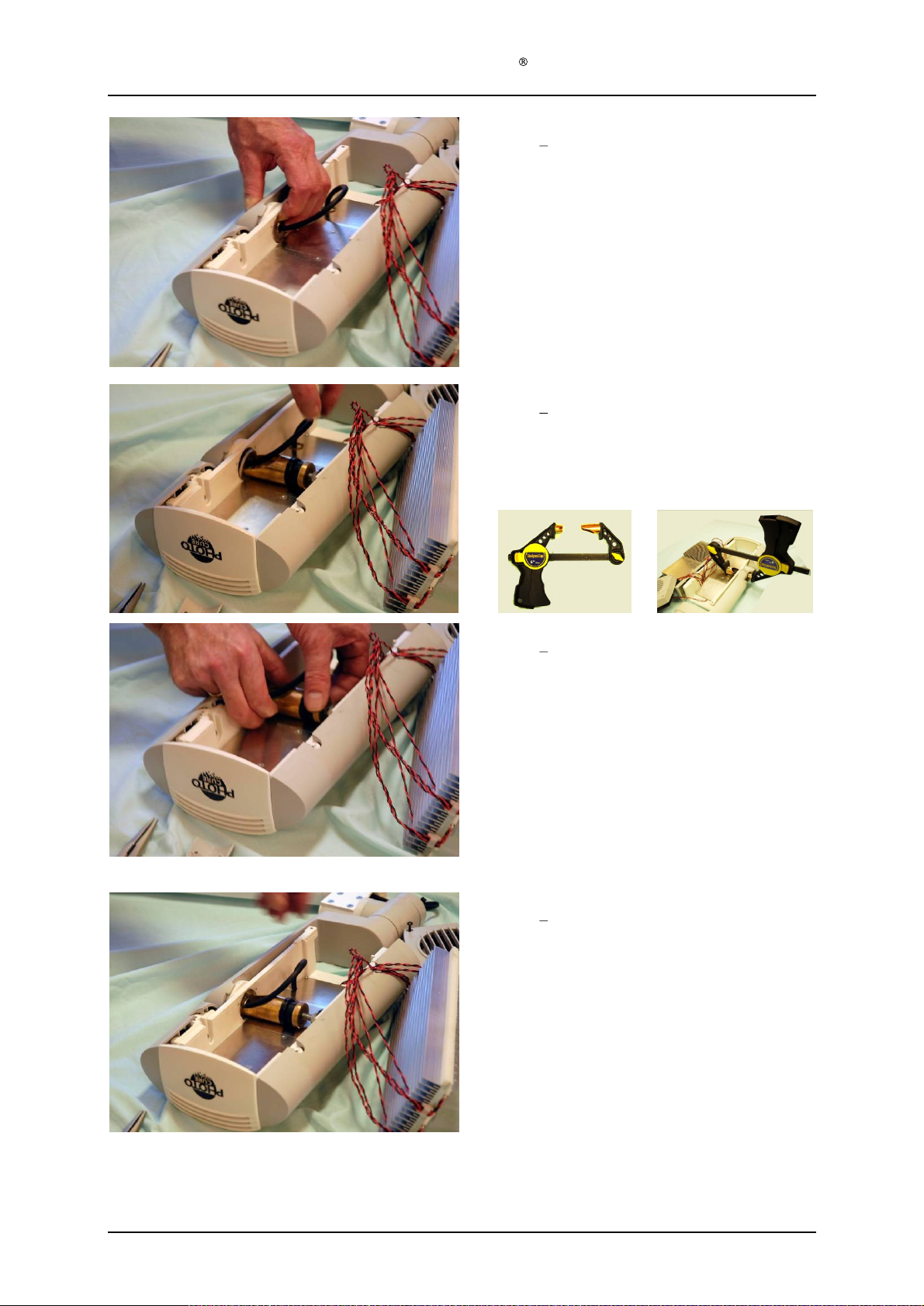
Service Manual Aktilite
Step 26
Step 23
the housing or main arm.
Test that the washer fits on to the axle.
Step 27
Step 23
the housing or main arm.
Use a tool to compress the spring mechanism.
tool may look different to the one on the picture)
A
modified
CL128
30
is only relevant if you have changed
30
is only relevant if you have changed
clamp can also be used.
(The
Step 28
Step 23
the housing or main arm.
Compressing the spring by turning the rotary wheel
on the tool clock-wise.
Step 29
Step 23
the housing or main arm.
The circlip can now be engaged on the main arm
axle.
30
is only relevant if you have changed
30
is only relevant if you have changed
Version 1.
3
Page 23
of 41
Page 24
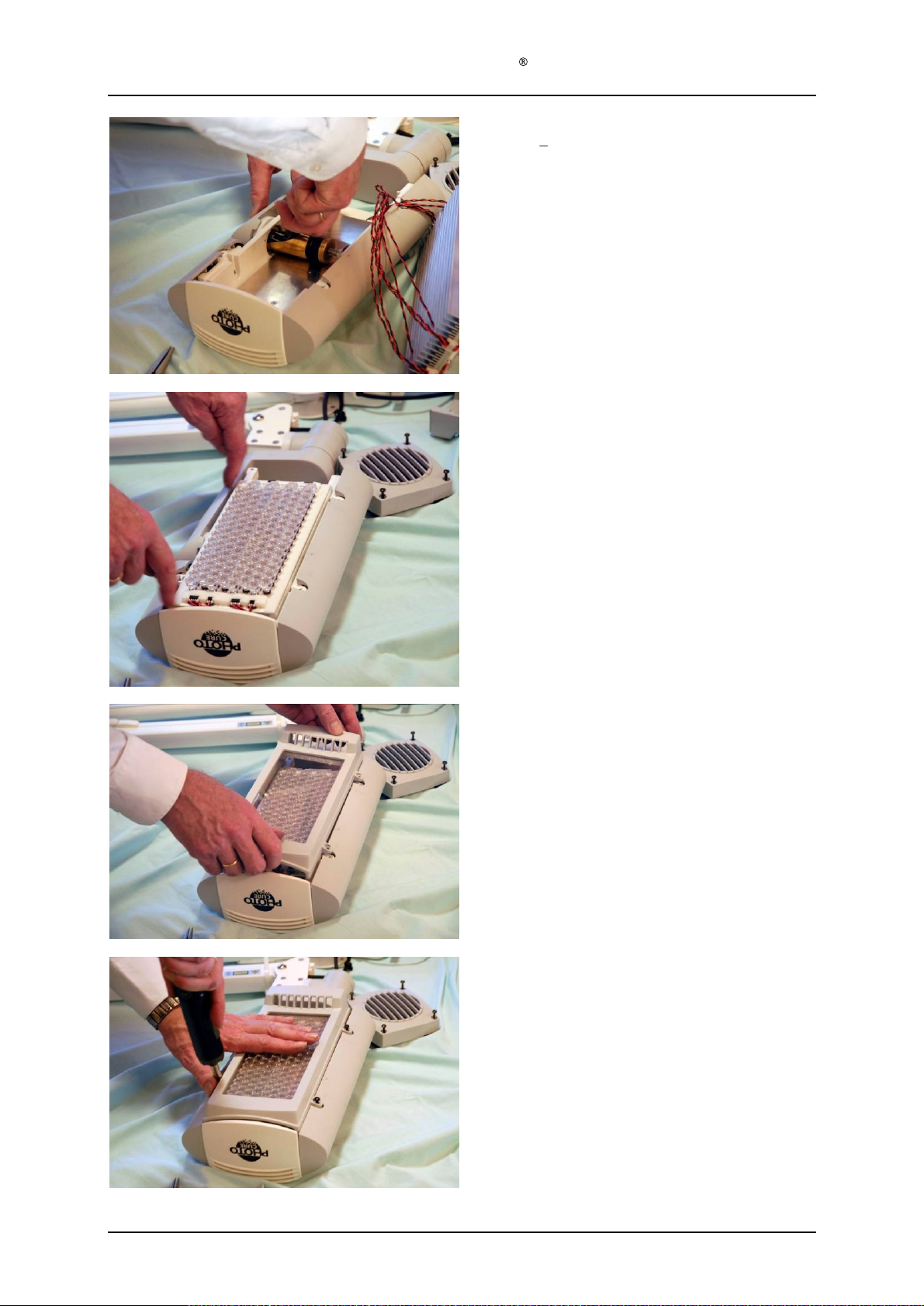
Service Manual Aktilite
Step 30
Step 23
the housing or main arm.
Make sure that the circlip is properly engaged in the
groove.
This is very important.
The main arm my fall of and heart the patient if this
is not done properly.
Step 31
Place the light module back on the housing.
You
CL128
can see the positioning marks on the housing.
30
is only relevant if you have chang
ed
Step 32
Position the housing bottom
Step 33
Mount back the 4 Torx
20 screws.
.
Version 1.
3
Page 24
of 41
Page 25
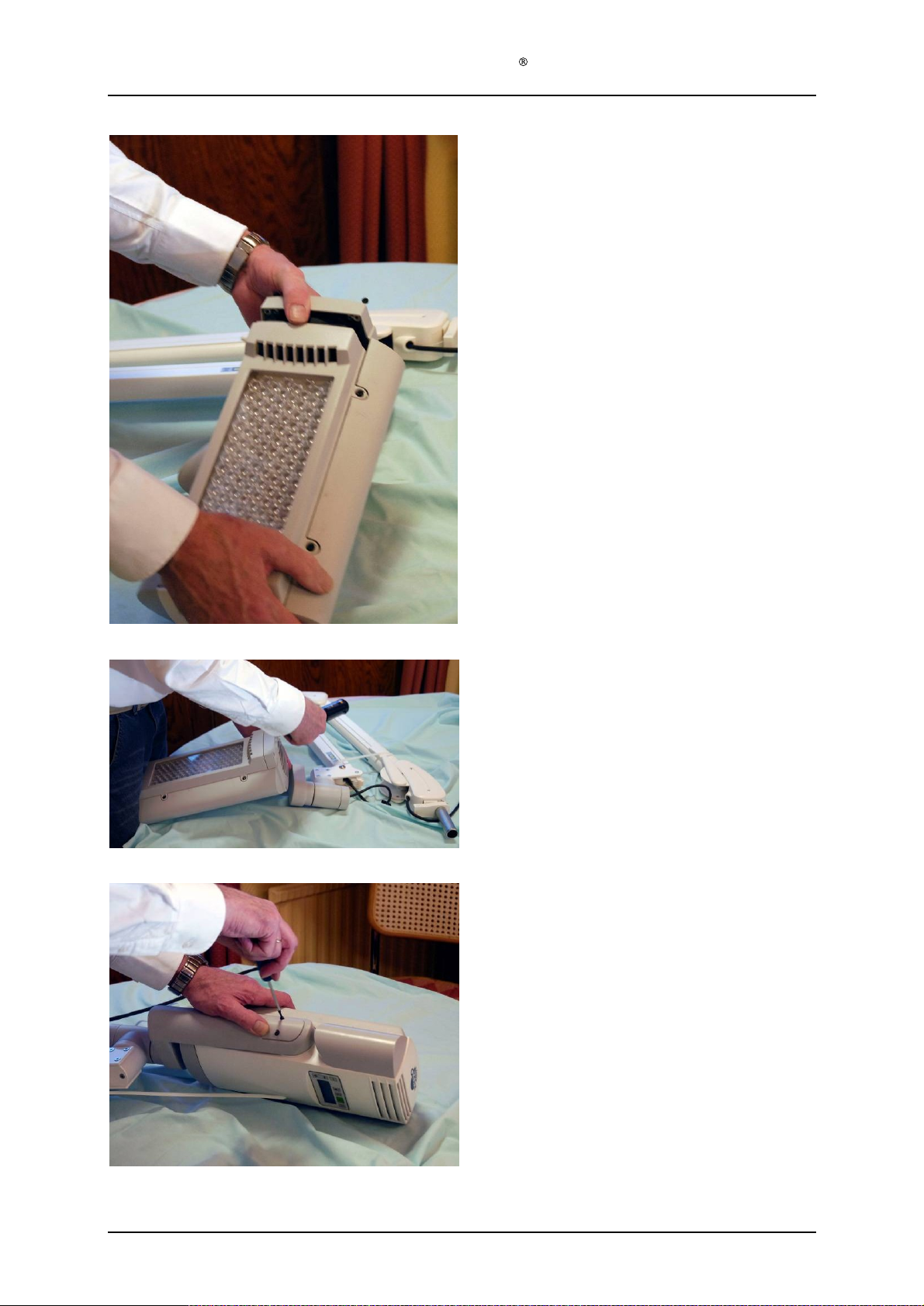
Service Manual Aktilite
Step 34
Put
Make sure that the fan wires are not hitting the fan
blade.
CL128
back
the fan
and
cover.
Step 35
F
Step 36
Tighten up the cord and put on the side cover using
the T10 screwdriver.
asten the fan with the 4 Torx 20 screws.
Version 1.
3
Page 25
of 41
Page 26
Service Manual Aktilite
Step 37
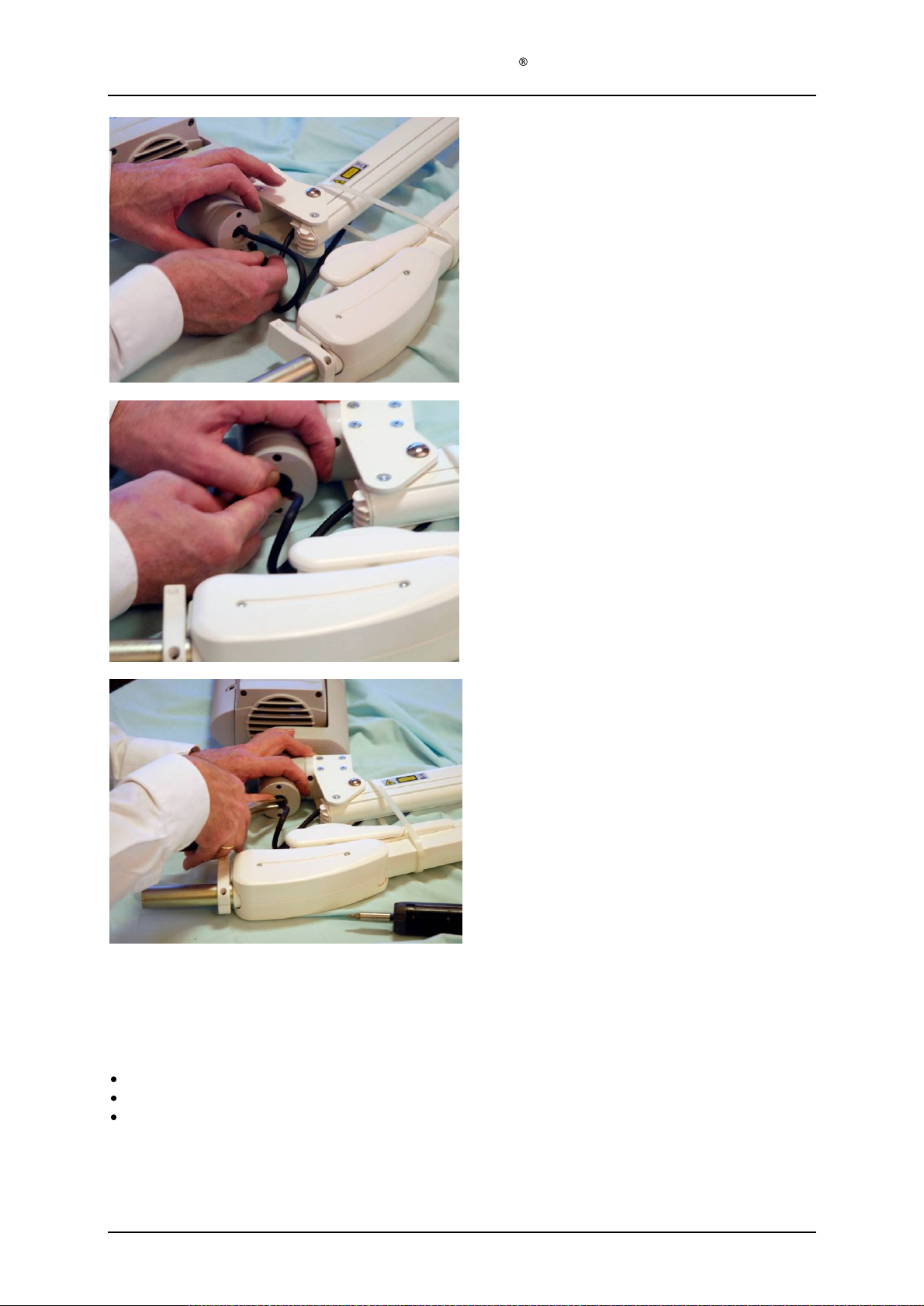
Put on the strain relief
F
or lamps with deta
Place the lamp head in the lamp head holder on t
parallel arm and secure the connection with the
locking screw using the provided Allen key.
Connect the cable plug in the T-piece cover plug
Step 38
Position the strain relief into the hole in the cap.
CL128
.
chable lamp head:
he
.
Not applicable for lamps with detachable
head
Step 39
Use a pair of
of the strain relief.
Not applicable for lamps with detachable lamp
head
telephone
pliers for the final assembly
lamp
Step 40
After final assembly, test that the lamp is functioning OK and that nothing is obstructing the fan.
This is done by:
If the repairs are done to the light module or electronics the lamp has to be fully tested according to test
specifications.
Version 1.
Attaching power to the lamp and pressing the start button on the display panel.
After self test is over, press start again to start the lamp. Do not stair into the light.
Press stop after a few seconds of operation to stop the
Ref. Instructions in PCU-009-128.
3
lamp.
Page 26
of 41
Page 27
Service Manual Aktilite
1.10 Stop block module (TS1
Required items
Part #
128
-1-
223
1
TS1
-1-
250
1
# of items
-0-
250) assembly
Description
Parallel arm
Stop block module
CL128
Version 1.
Assembly description
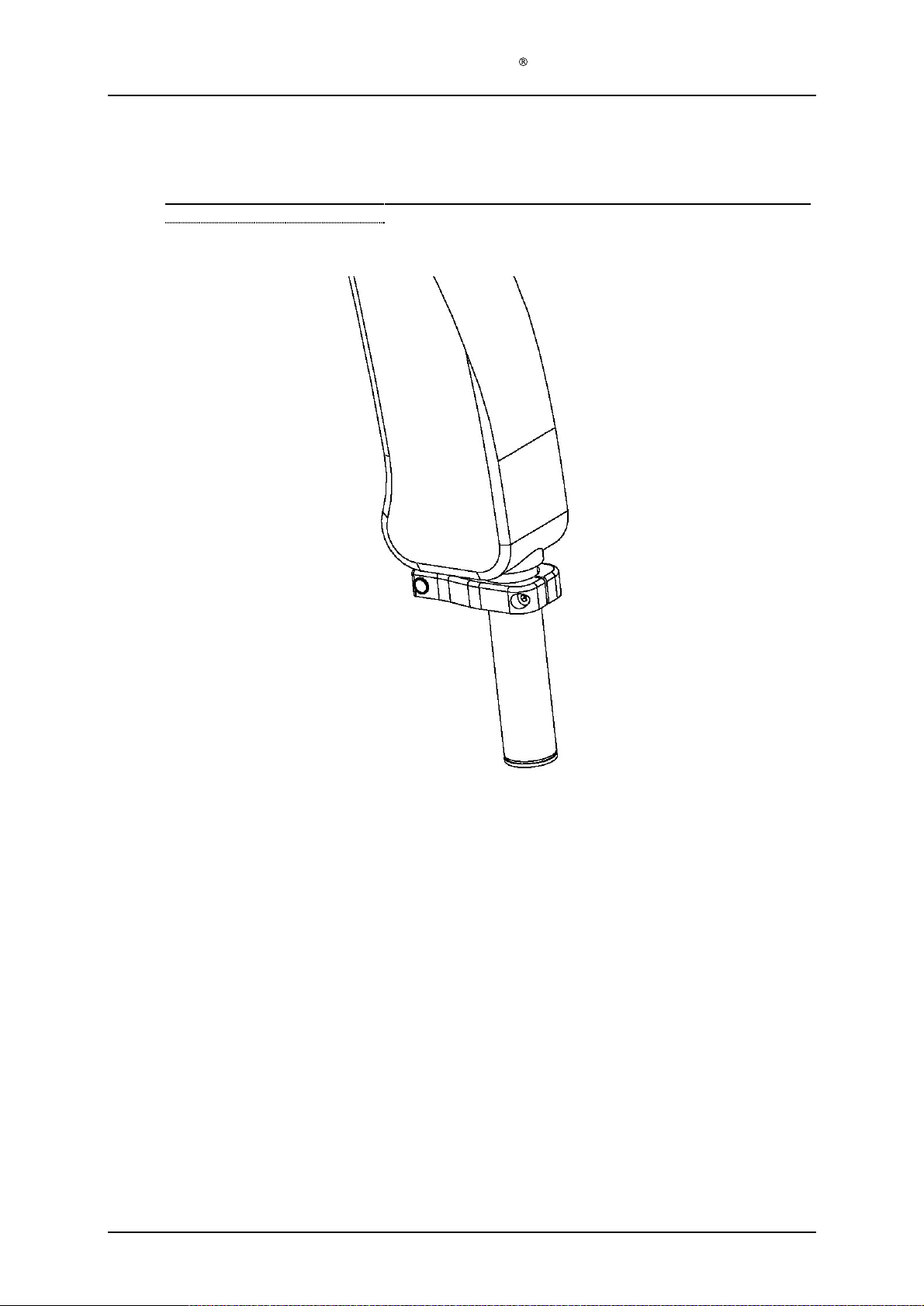
Step 1)
Fit the stop block module onto the shaft of the parallel arm.
stop plate points upwards and engages with the slot on the parallel arm.
ham
mer and a purpose-made cylinder over the shaft to knock the stop block module into
place. The gap between the arm and the stop block module should be as little as possible
and no more than 1 mm.
Step 2)
Secure the stop plate by tightening the S3
driver.
3
Assure that the tap on the
Use a
Allen
screw to a t
orque of 3.0 Nm using a torque
Page 27
of 41
Page 28
Service Manual Aktilite
1.11 Lamp including parallel arm assembly
1.11.1 Fixed lamp head (128
Required items
Part #
128
-0-
200
1
128
-0-
210
1
128
-1-
216
1
128
-0-
213
1
128
-1-
937
1
128
-1-
942
1
128
-1-
916
1
128
-1-
211
1
128
-1-
936
2
128
-1-261 1
128
-1-
136
1
128
-1-
956
# of items
-0-
250)
Description
Lamp head module
Parallel arm with lamp head holder unit
Fricti
Spring unit
Screw
Aluminium washer
Circlip
Cover
Screws M4x10 countersunk
Re
ceptacle Body (Bayonet plug)
Label Power Plug
Loctite 243 glue
on pad
Set screw M8x12
Lamp head holder unit
CL128
Assembly description
Step 1)
Insert the friction pad (128
210).
Step 2)
Slide the vertical axle of the lamp head modul
of the parallel arm (128
Step 3)
Slide the aluminium washer (128
Step 4)
Assemble the circlip (128
sure that the circlip is fully engaged in the groove
Step 5)
Insert the spring unit (128
unit of the parallel arm (128
Step 6)
Assemble the M6x12 set screw (128
holder unit of the parallel arm (128
friction in the vert
Step 7)
Assemble the cover (128
210) using the two countersunk M4x10 screws (128
Step 8)
Pull the power cable (128
arm (128
(128
extreme positions of the lamp head.)
Step 9)
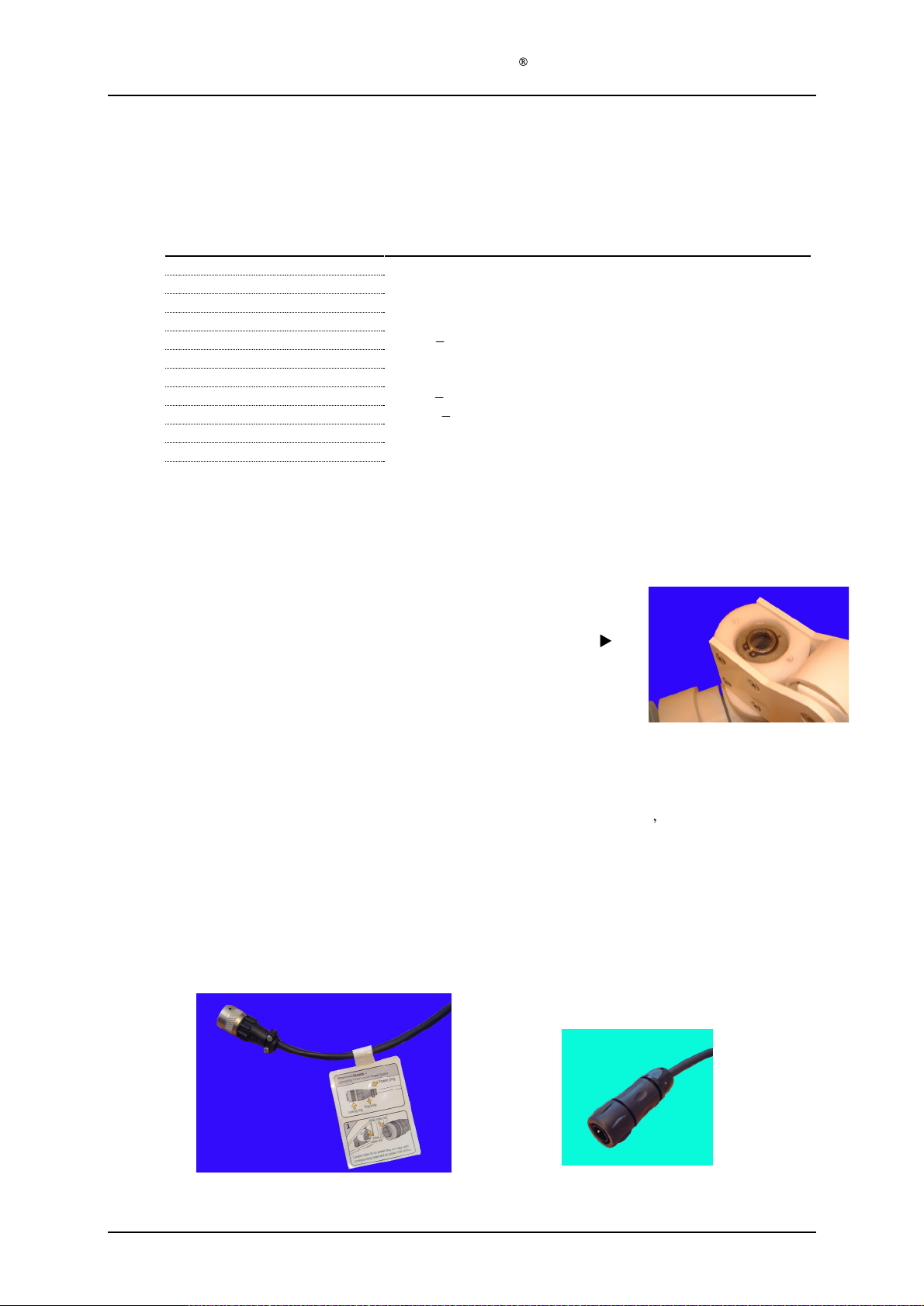
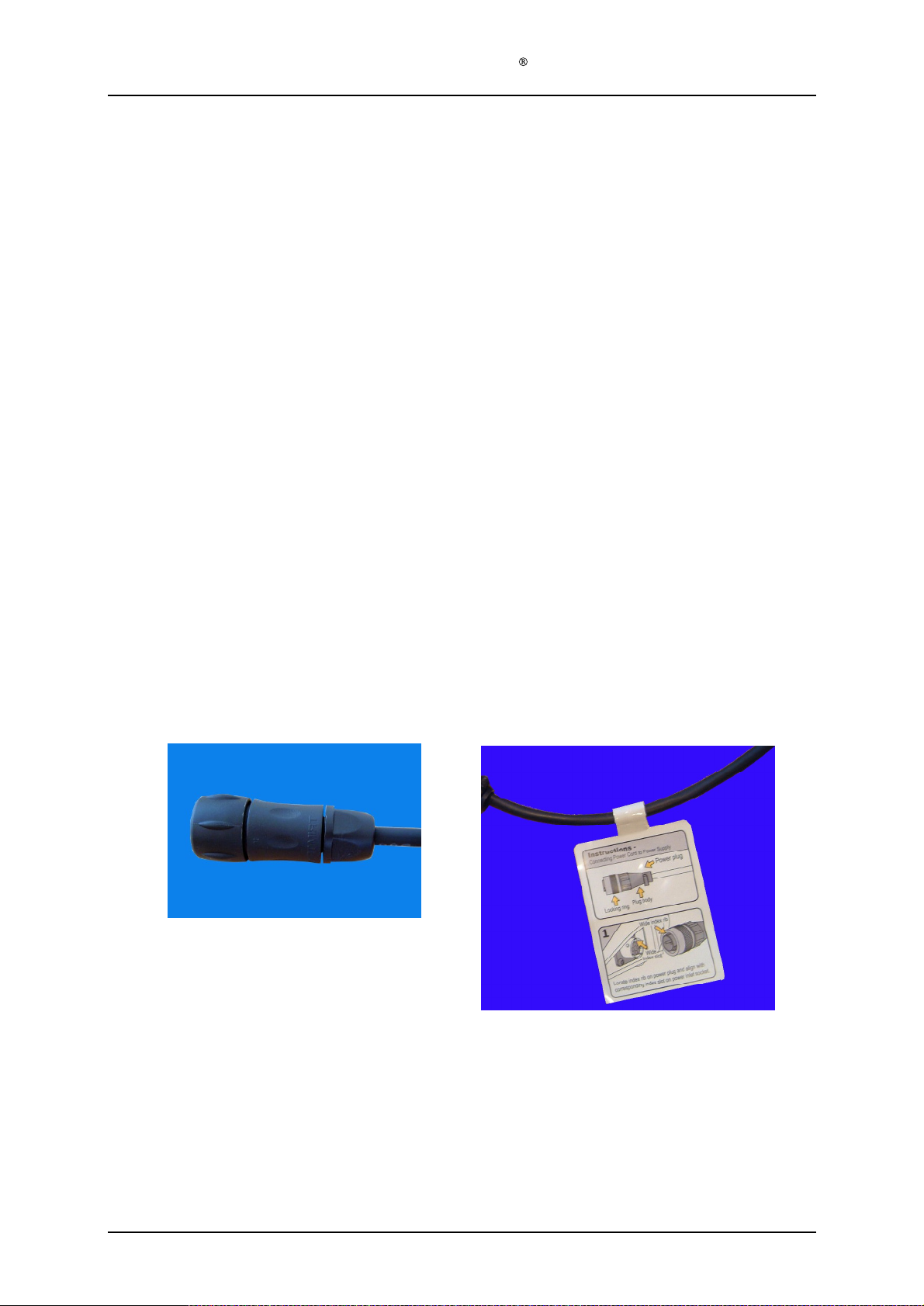
Put the stain relief onto the DC power
made crimping tool. Put the cord numbered 1 into "D" [+] in the
with cord marked 2 in "B" [-] in the
specially made extract
Step 10) Put a drop of Loctite 243 on the threads at the strain relieve threads and screw the strain
relief to the
Step 11) Remove the pr
attach the label to the cord, next to the
-0-
-0-
200) and the parallel arm (128
-1-
216) in the lamp head holder unit of the parallel arm (128
e (128
-0-
200) into the lamp head holder unit
-0-
210).
-1-
942) onto the vertical axle.
-1-
916) onto the vertical axle. Make
on the axle.
-0-
213) into the lamp head holder
-0-
210).
-1-
937) into the lamp head
-0-
210). Tighten until the
ical axle is appropriate.
-1-
211) onto the lamp head holder unit of the parallel arm (128
-1-
302) from the lamp head module (128
210). Leave about 10 cm of slack on the cable between the lamp head module
or tool to release the pins from the
bayonet
plug. Secure the lead with the cross bar and two self threading screws.
otective paper from the backside of the Label Power Plug (128
-1-
936).
-0-210). (So the cable doesn t get stretched at the
cable. Put on the male crimp pins using the specially
bayonet
NB! Use new stronger plug
plug. If you make a mistake, you can use the
bayonet
plug (see picture below).
for repair
ed lamps, ref Chapter
bayonet
-0-
200) thru the para
bayonet
plug again.
Souriau UTS 6JC104P
plug, and the pin
-1-
136) and
2
-0-
-0-
llel
Version 1.
3
Page 28
of 41
Page 29
1.11.2
Service Manual Aktilite
D
etachable lamp head (128
Required items
Part #
128
-0-
200
1
128
-0-
212
1
128
-1-
959
1
128
-1-
960
1
128
-1-
963
1
128
-1-
964
2
128
-1-
974
2
128
-1-
973
2
128
-1-
975
2
128
-1-
972
1
128
-1-
976
1
128
-1-
977
1
128
-1-
980
1
128
-1-
916
1
128
-1-
263
2
128
-1-
956
1
128
-1-
991
1
128
-1-
136
1
# of items
CL128
-0-
252)
Description
Lamp head module
Parallel arm with lamp head holder unit
Lamp head holder inner right
Lamp head holder
Lamp head holder top cover
Break shoe
Break pad spring
Umbraco screw DIN912 M5×25
Hexagonal nut DIN934 M5
Spring lock washer DIN127A M5
Teflon-bronze wash
Security pin DIN1481 Ø4×20
Umbraco screw DIN912 M5×45
Circlip
Crimp pin
Loctite 243 glue
Plug UTS6JC104P
Label Power Plug
inner left
er (Frimet)
Version 1.
3
Page 29
of 41
Page 30
Service Manual Aktilite
Assembly description
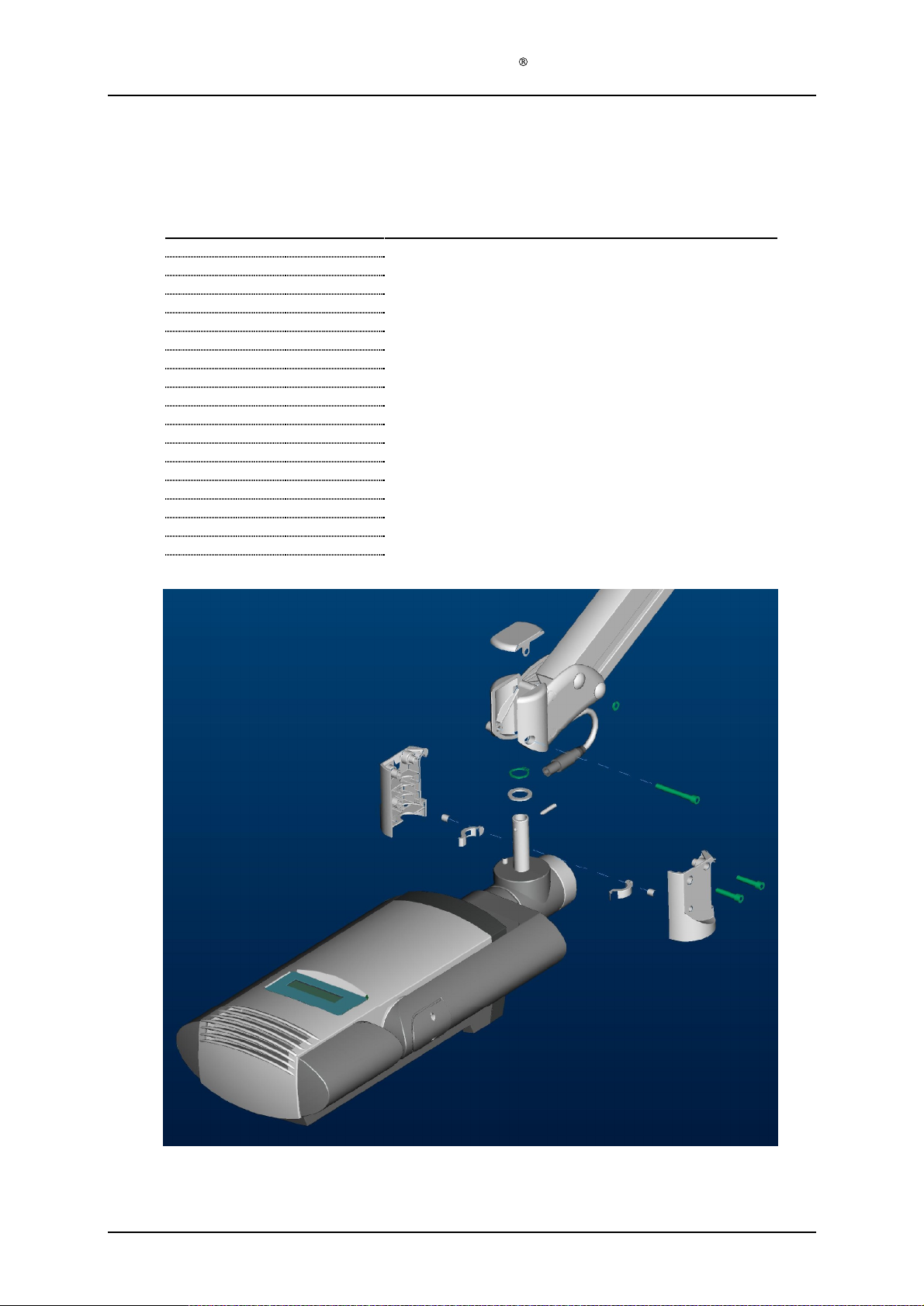
Step 1) Ass
Step 2) Insert break shoe (128
Step 3) Assemble the inner lamp head holders (128
NOTE: The parallel arm shall be secured with
Step 4) Assemble the lamp head module (128
Step 5) Assemble the top cover (128
Step 6) Put the stain
Step 7) Put a dr
Step 8) Remove the protective paper from the backside of the Label Power Plug (128
emble chronologically the security pin (128
(128
-1-
916) onto the T-piece
engaged in the groove on the axle.
959 and 128
lamp head holder for the
437)
corresponding nuts (128
open uncontrolled. There are very strong springs inside the parallel arm that can cause
serious damage when the lamp head is not installed.
outer lamp head holder on the parallel arm (128
spring lock washer (128
and outer lamp head holders.
Note that the cover shall be installed with the knobs located on the inside of the cover at the
lamp head side, i.e. away from the parallel arm.
made crimpi
cord marked 2 in "B" [-] in the bajonet plug. If you make a mistake, you can use the specially
made extractor tool to release the pins from the bajonet plug again.
relief
attach the label to the cord, next to the bajonet plug
-1-
vertical axle and secure them using the two M5×25 umbraco screws (128
relief
ng tool. Put the cord numbered 1 into "D" [+] in the bajonet plug, and the pin with
op of Locktite 243 (128
to the bajonet plug.
(128
-0-
437)
vertical axle. Make sure that the circlip is fully
-1-
964)
and
sprin
g (128
960). The orientation of the break shoe is given by a small recess
spring to rest again
-1-
975)
the
-0-
200) by position the inner lamp head holder to the
-1-
972) and the M5×45 umbraco screw (128
-1-
963) onto the lamp head holder by pressing it down in pos
onto the DC power cable. Put on the male crimp pins using the specially
-1-
956) on the threads at the strain
CL128
-1-
977), teflon washer (128
-1-
974) in
st
-1-
959 and 128
attached strap to avoid the
-0-
212
both
inner lamp head
-1-
960
) onto the T-piece (128
). Secure the position by installing the
relief
(see picture below).
-1-
parallel arm to
-1-
980) through both inner
and screw the strain
976) and circlip
holders (128
in the inner
-1-
973) and
-1-
136) and
-1-
-0-
ition.
Version 1.
3
Page 30
of 41
Page 31

Service Manual Aktilite
1.12 Parallel arm with lamp head holder unit
1.12.1 Fixed lamp head
Required items
Part #
128
-1-
223
1
128
-1-
220
1
128
-1-
221
1
128
-1-
222
1
128
-1-
943
4
128
-1-
939
8
128
-1-
940
4
Assembly description
Step 1)
Screw one side plate R (128
that the bracket has the right orientati
Step 2)
Put the bushings (128
Step 3)
Assemble the bracket with the side plate to the parallel
parallel arm enters the bushings.
Step 4)
Assemble the side plate L (128
the parallel arm. Screw it to the bracket using 4
Step 5)
Secure the two 52 x 6 mm
Caps on both sides. Use a plastic hammer to prevent the C
(128
# of items
-0-210)
Description
Parallel arm
Bracket
Side plate R
Side pl
Bushing
Screws PT-5 x 12 mm
Starlocks Caps BV 6666-03C
ate L
s
-1-
221) to the bracket (128
on, refer to drawing.
-1-
943) in the holes in both side plates.
-1-
222) to t
pin bolts
going through the
CL128
assembly
he bracket, so that the bushing enters the axle on
PT
-1-
220) using 4
arm;
assuring that the axles from the
screws.
side plates
aps to be damaged.
PT
screws . Assure
R and L with Starlock
Version 1.
3
Page 31
of 41
Page 32
Service Manual Aktilite
1.12.2 Detachable lamp head (128
Required Items
Part #
128
-1-
223
1
128
-1-
961
1
128
-1-962 1
128
-1-
968
1
128
-1-
969
1
128
-1-
965
1
128
-1-
966
1
128
-1-
967
2
128
-1-
940
4
128
-0-
989
1
# of items
Description
Parallel arm
Lamp head holder outer right
Lamp head holder outer left
Pinbolt upper
Pinb
Screw cap for top screw
Screw cap for bottom screw
Screw
Starlock Caps BV 6666-03C
Cable from PS unit to lamp head connector
-0-
212)
olt lower
PT-K 40x35
CL128
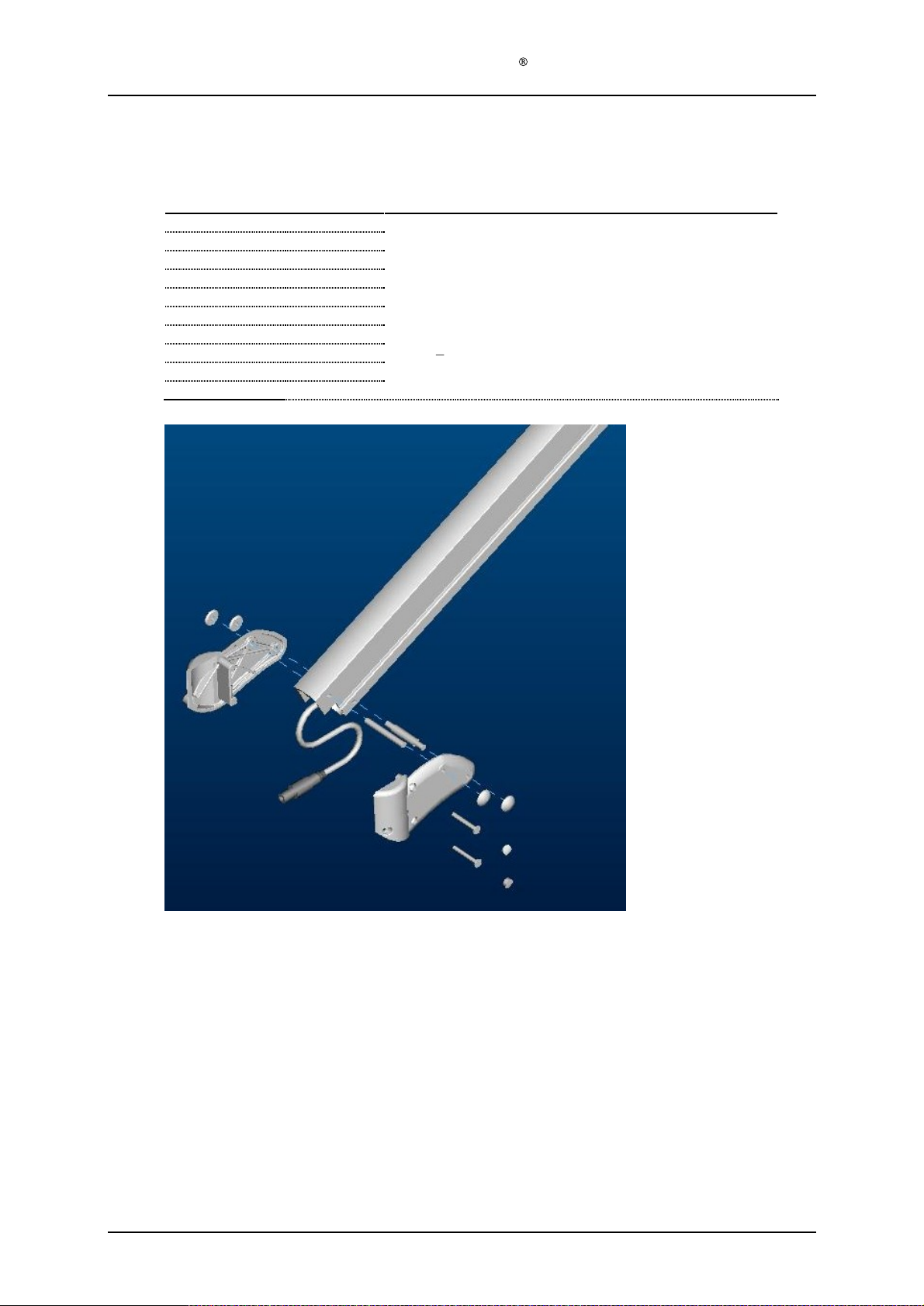
Step 1) Position the pow
Step 2) Install the upper (128
Step 3) Assemble the right (128
Step 4) Screw the two PT-K 40x35 (128
Step 5) Assemble the upper (128
Version 1.
Assembly description
er cable (128
connector at the lamp head side. The power cable shall be positioned with sufficient slack
(approx. 15cm) on the lamp head side to avoid the cable to get stretched at the extreme
positions of the lamp head.
parallel
arm
.
secure the position with the four
(128
-1-
961)
.
3
-0-
989) in the parallel arm (128
-1-
968) and lower (128
-1-
961) and left (
starlock
-1-
967) through the holes in the outer right lamp head holder
-1-
965) and lower (128
-1-
223) with the installed male
-1-
969) pinbolt in the respective holes in the
128
-1-
962
) lamp head holders in the pinbolts and
cap
s (128
-1-
940)
. Avoid damage to the starlocks.
-1-
966) screw cap
.
Page 32
of 41
Page 33
Service Manual Aktilite
1.13 Labels placement description
Required items
Part #
128
-0-
250
1
128
-1-
138
1
128
-1-
142
1
128
-1-
146
1
# of items
A
Description
Lamp including parallel arm
Label Serial Number
Label Warning and Special Waste
Label Detachable Lamp Head Warning
Only applicable for lamps with detachabl
CL128
e lamp head
B
C
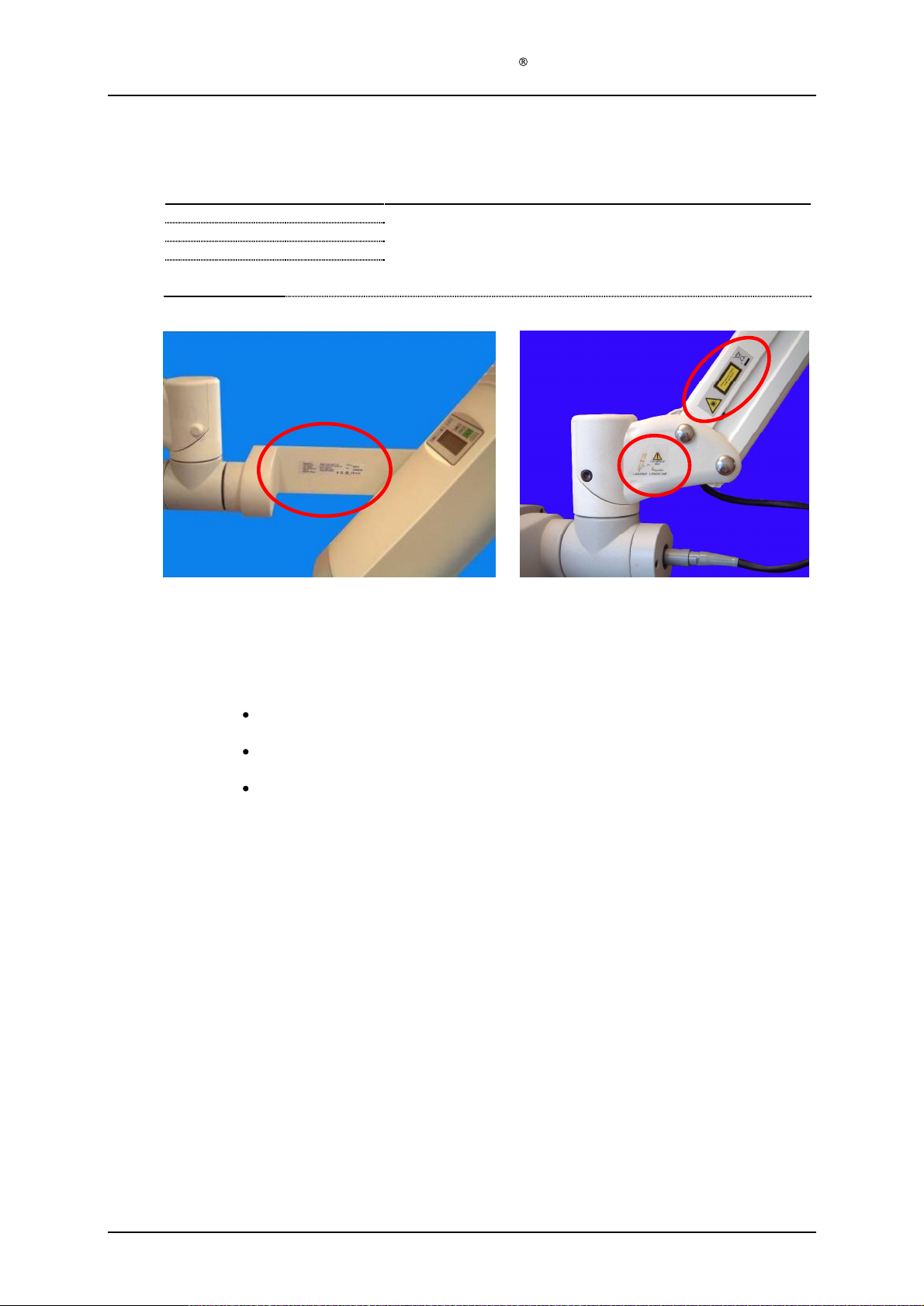
Assembly description
Step 1)
Place the labels
Product label with S
arm (ref. position A)
Label Warning and Special Waste on the left side
head
(ref. position C)
Label Detachable Lamp Head Warning
Only applic
according to the pictures above
erial no.
able for lamps with detachable lamp head
and manufacturing date on
on the left lamp head holder
:
of the parallel arm
the inside of the positioning
, near the lamp
(ref. position
B)
Version 1.
3
Page 33
of 41
Page 34
2
Service Manual Aktilite
Replacing the DC Power Plug
Assembly description
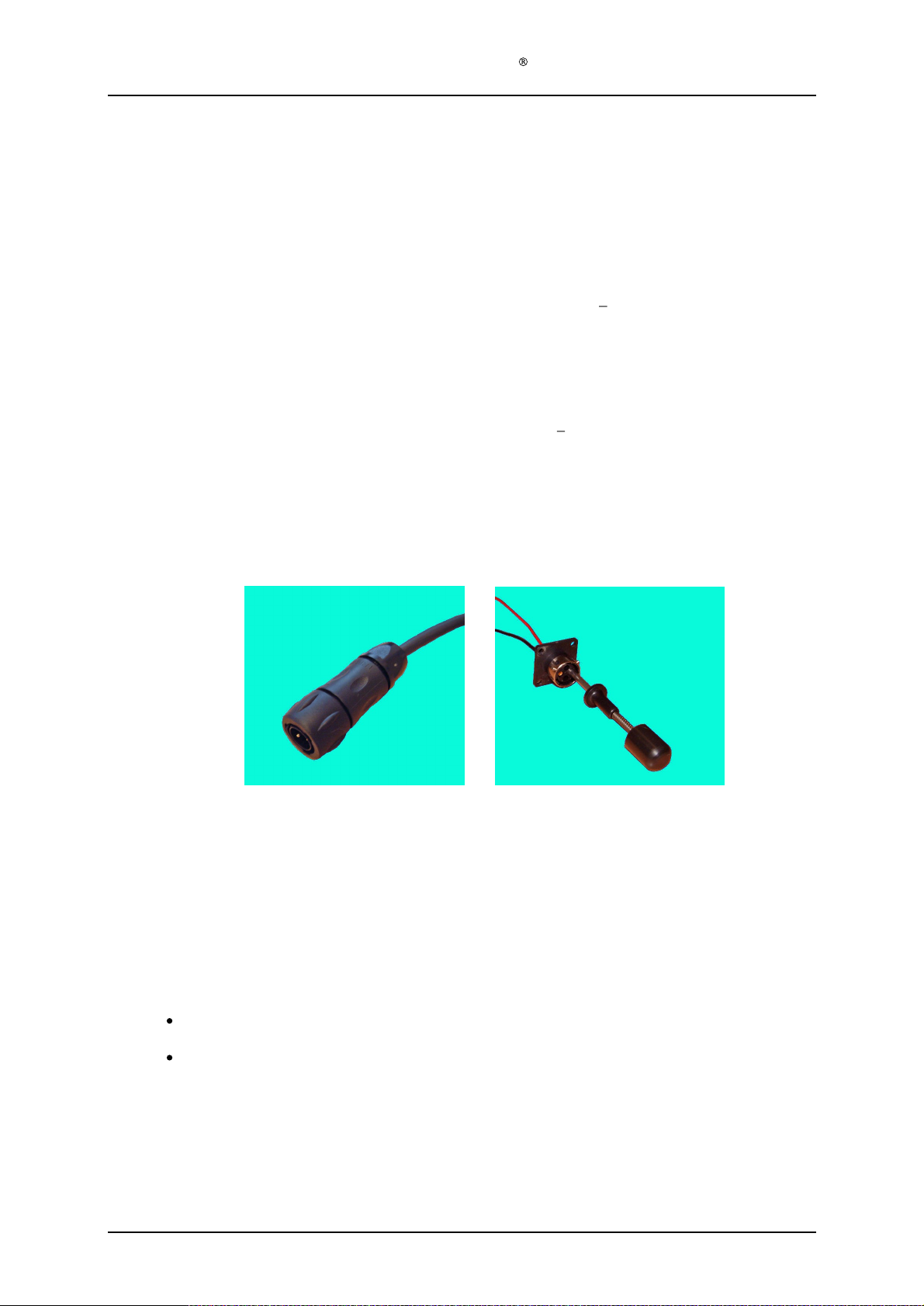
Step 1)
Dismantle the existing plug
Step 2)
Step 3)
Step 4)
Step 5)
cross bar.
to release the pins from the bajonet plug
Put the stain relief
crimp pins using the specially made crimping tool. Put the cord numbered 1 into "D" [+] in
the
make a mistake, you can use the specially made extractor tool to release the pins from the
bayonet
Put a drop of Loc
the
Double check:
If you have a CL16 power supply available when you perform the plug replacement on the
CL128, you can use this to t
the lamp with full light, but you can start the lamp and see that the menu switches on when
you push the start button. The CL16 supply is not powerful enough to harm the lamp in any
way, but
wrong polarity is used. If the test is OK, switch over to the CL128 power supply.
Unscrew the
bay
onet
plug again.
bayonet
the CL128 power supply will damage the protection circuit of the lamp if the
(128
-1-
strain relieve
for the new plug
plug, and the pin with cord marked 2 in "B" [
tite on the threads at the strain relief thread
plug.
Cord marked
Cord marked
est that you have the right polarity. You will not be able to run
CL128
261)
by removing the two self threading screws for the
from
the plug. Use the specia
.
(128
-1-
991)
onto the DC power cable. Put on the male
1 into "D" [+
2 into "B" [
] in the
or red
or black
lly made extractor tool
bayonet
s and screw the strain relief to
]
]
plug. If you
Version 1.
New plug
The plug may look s
instead of
To use the extractor tool, press the tool firmly into the connector by holding the
centrepiece of the tool, and continue to press onto the top piece.
If wires have to be reconnected to the pins, it is recommended to solder them on,
as otherwise this requires special crimping tools.
3
black
Part
number for the
(
RM16M23K
Pa
rt number for the wall mounted
128
-1-
345 (RC16M23K)
lightly different from the
.
Souriau UTS 6JC104P plug is
)
connector
above picture. It also comes with a
128
is
128
-1-
323 Souriau UTO 0104SH with mating pins
Extractor tool
-1-991 with pins (extra) 128
silver
ring in the front
-1-
263
Page 34
of 41
Page 35

3
3.1 Material/Equipment
Assembly of Aktilite CL128 Power Supply
Tools needed for the assembly of the Aktilite CL128 Power Supply
Required to
# of items
1
1
1
1
ols
Description
Screwdriver, Pozidrive 2
Screwdriver, Torx 10 Tool B
Screwdriver, Torx 20 Tool C
Paint removing tool (drill or grinder)
Service Manual Aktilite
Tool A
CL128
Tool D
Version 1.
3
Page 35
of 41
Page 36

Service Manual Aktilite
3.2 PS electronics module (128
Required items
Part #
#
128
-1-
331
1
128
-0-
332
1
128
-0-
333
1
128
-0-
334
1
128
-0-
335
1
128
-0-
336
1
128
-1-
337
1
Assembly description
Step 1)
Assemble the cables A (128
electronics (128
marked N, Cable B (brown) is connected to the terminal marked L, and Cable C
(green/yellow) is connected to the terminal marked with the ground symbol. Bend the three
cable shoes to a 45 deg
Step 2)
Assemble the cables D (128
using Tool A. Cable D is connected to terminal 1, and cable E is connected to terminal 4.
Step 3)
Thread both loa
Step 4)
Make sure that the 7 cable terminal screws are securely tightened.
Step 5)
Remove the two printed forms that are tucked between some components on the power
supply electronics. Save them for markin
Record.
of items
-1-3
31), by using Tool A. Cable A (blue) is connected to the terminal
ree angle upwards when the electronics lies flat on the table.
d cables (Cables D and E) through the ferrite (128
CL128
-0-
330) assembly
Description
PS electronics
Cable A
Cable B
Cable C
Cable D
Cable E
Ferrite (for the load cables)
Tool A - Screwdriver, pozidrive 2
-0-
332), B (128
-0-
335) and E (128
Blue AC conductor
Brown AC conductor
Green/yellow
Red D
Black DC cable
g of the complete unit and the Device History
Tested to medical std. and adjusted by Kitron
ground
C cable
-0-
333) and C (128
-0-
336) to the power supply electronics, by
cable
-0-
334) to the power supply
-1-
337) 5 times.
Version 1.
3
Page 36
of 41
Page 37
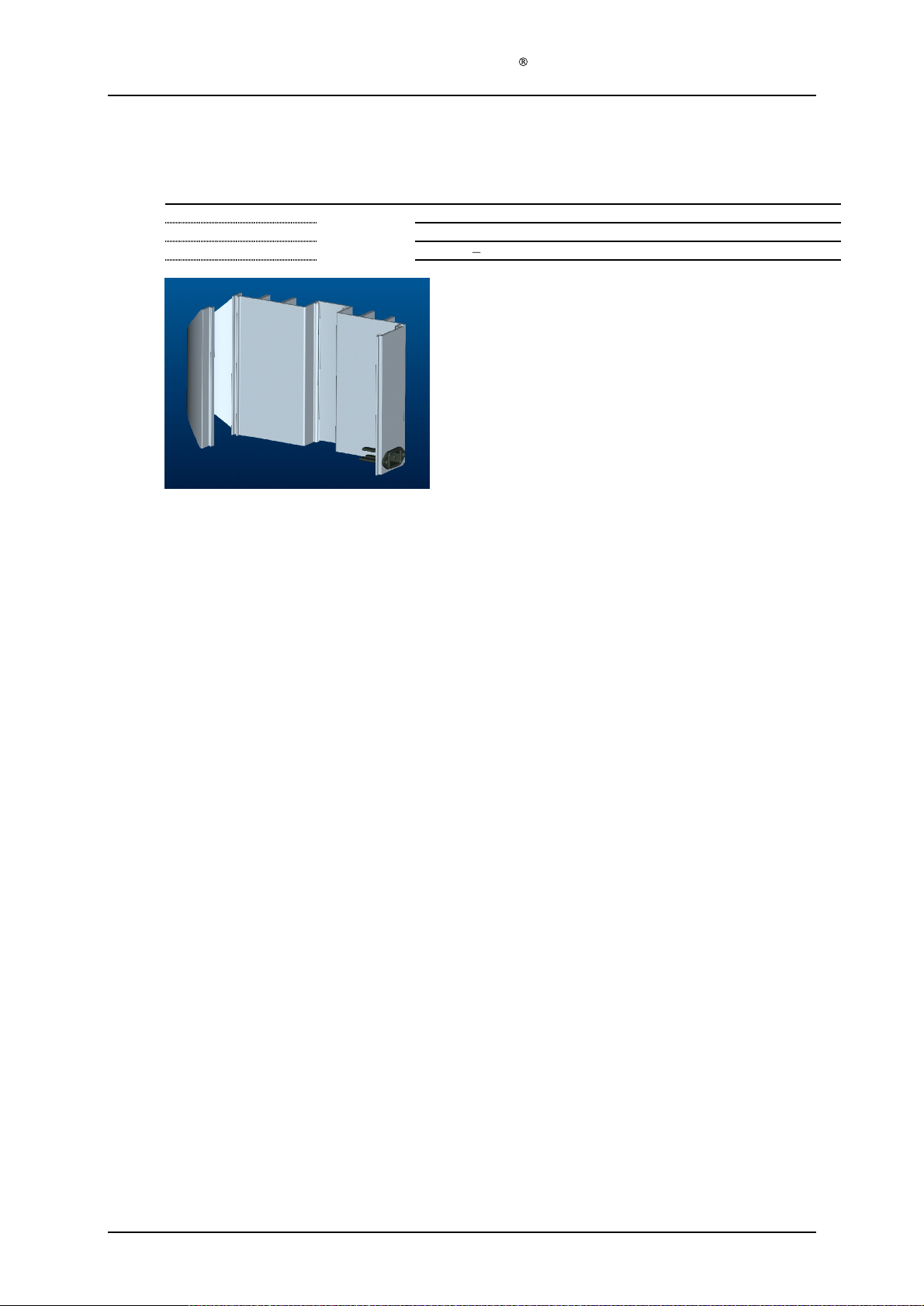
Service Manual Aktilite
3.3 PS housing module A (128
Required items
Part #
128
-1-
311
1
128
-1-
312
1
128
-1-
313
2
# of items
CL128
-0-
310) assembly
Description
PS housing profile, type A
AC power inlet plug
Screws PT3x10 wn1553K30x10
Tool B, screwdriver Torx 10
Assembly description
Step 1)
Assemble the AC power inlet plug (128
311), with the 2 screws (128
the central pin facing upwards. Use Tool B.
-1-
312) onto the PS housing profile, type B (128
-1-
313). Make sure it is fastened in the correct position, with
-1-
Version 1.
3
Page 37
of 41
Page 38
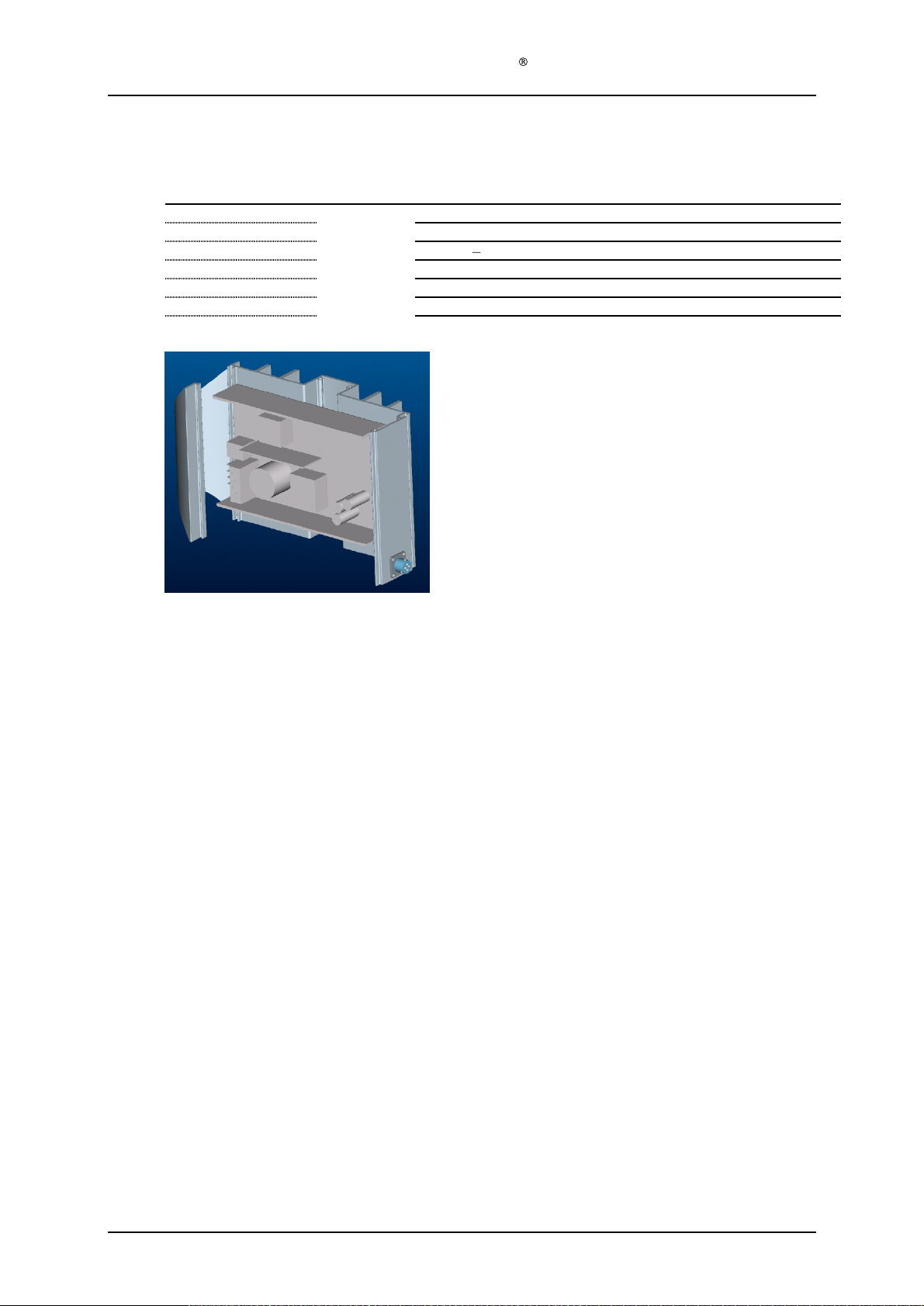
Service Manual Aktilite
3.4 PS housing module B (128
Required items
Part #
128
-1-
321
1
128
-1-
323
1
128
-1-
324
4
128
-0-
330
1
128
-1-
322
4
# of items
CL128
-0-
320) assembly
Description
Power supply housing profile, type B
DC power outlet plug
Screws PT 3x8
Power supply electronics module
Screws M4x10 countersunk
Tool B, screwdriver Torx 10
Tool C, screwdriver Torx 20
pan head
Assembly description
Step 1)
Assemble the DC power outlet plug (128
321), with the 4 button head PT-DG screws (128
correct position, with one of the 3 locking pins facing upwards. Use Tool B.
Step 2)
Remove the paint from two of the 4 holes in the PS h
PS electronics module, to ensure electric contact between the M4 screw and the PS housing
profile B. Use Tool D.
Step 3)
Assemble the PS electronics module (128
1-
321), with the 4
the same side of the profile as the power outlet plug. Use the Use Tool C.
Step 4)
Plug the red and black load cables into the correct holes in the power outlet plug. The red
load cable (+) goes into the slot marked D, and the black load cable (-) goes into the slot
marked B.
screws (128
-1-323) onto the PS housing profile B (128
-1-
324). Make sure it is fastened in the
ousing profile B, for assembling the
-0-
330) onto the PS housing profile, type B (128
-1-
322). Make sure that the red and black load cables are on
-1-
-
Version 1.
3
Page 38
of 41
Page 39
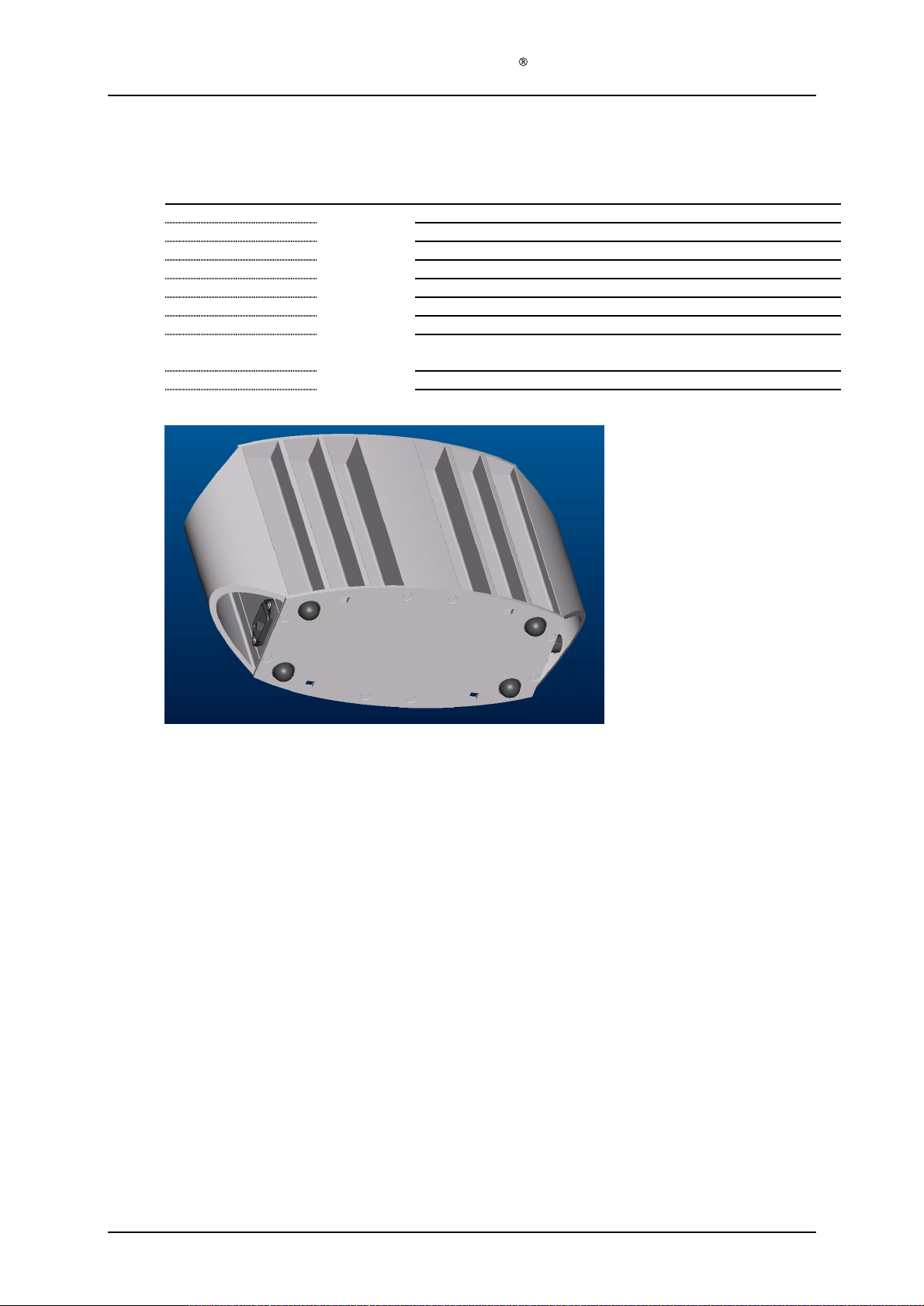
3.5 Power supply (128
Required items
Part #
128
-0-
320
1
128
-0-
310
1
128
-1-
301
1
128
-1-
302
1
128
-1-
306
128
-1-
307
4
128
-1-
309
1
Service Manual Aktilite
-0-
300) assembly
# of items
16
Description
PS housing module B
PS housing module A
PS housing
PS housing bottom cover
Countersunk s
Rubber pads (self adhesive)
Label on
Strip, glue or other suitable means of fixing the ferrite to the PS
electro
nics metal casing.
Tool C screwdriver Torx T20
Tool D, paint removing tool (drill or grinder)
CL128
top cover
crews 4.2x19
side wall of power supply
Assembly description
Step 1)
Put the PS housing module B (128
Step 2)
Step 3)
Step 4)
Step 5)
Step 6)
Step 7)
module A (128
sure that the three power inlet cables are reachable.
Connect the three AC power inlet cables to the AC power inlet plug. Make sure that the
cables are correctly connected, blue cable to the tongue marked N, brown
tongue marked L, and the green/yellow cable to the metal tongue marked with the ground
symbol.
See that the voltage can be adjusted to more than 51.2 Volts and then adjust the voltage
down again to 50.4 Volts by means of a thin screwdriv
power supply cannot be adjusted to 51.2 V or more, the power supply should be rejected.
Fix the ferrite to the PS electronics' metal casing with a strip, silicone or other means. There
are two holes in the PS electronics
Remove the paint from two of the 8 holes in each of the PS housing end covers, to ensure
electric contact between the PT-DG screw and the PS housing profiles. Use Tool D
Assemble one PS housing top cover (128
Make sure that the two housing modules are aligned before inserting the two screws that
engage with both modules. These two screws may be left until the other 6 screws are
tightened. Ensure electric contact between the end cov
Assemble the other power supply end cover (128
-0-
-0-
320) upside down on the table. Slide the PS housing
310) gently into module B.
' metal casing, suitable for this.
-1-
Make sure that all 4 grooves engage. Make
cable to the metal
er according to TCU-002-128. If the
301) with
the PT-DG screws (128
ers and one of the housing modules.
-1-
301).
-1-
306).
Version 1.
3
Page 39
of 41
Page 40
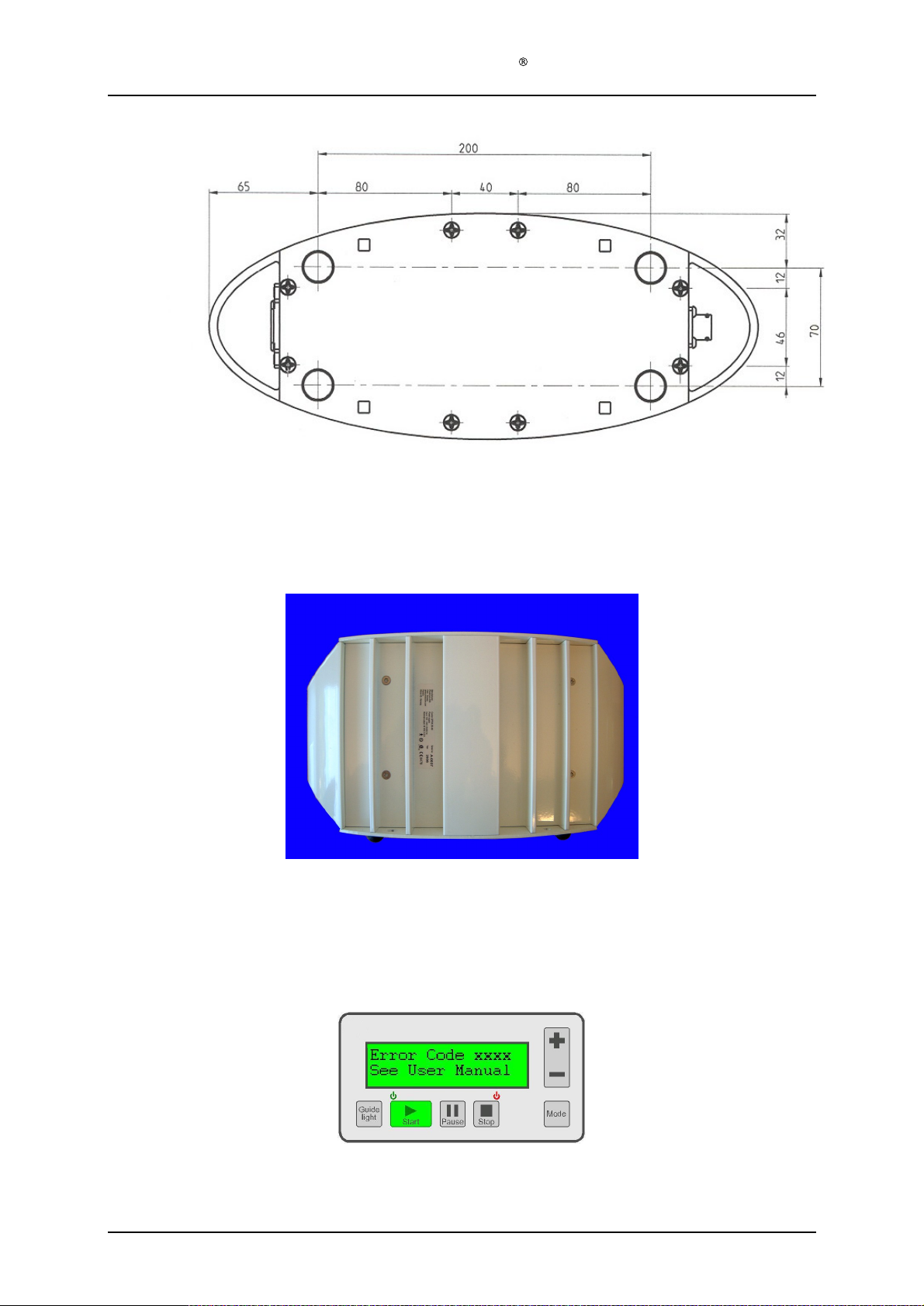
Step 8)
Step 9)
Service Manual Aktilite
Place the four rubber pads (128
picture above.
Apply label (128
-1-
-1-
307) on the lower PS housing end cover, as shown on the
309) to the Power Supply
CL128
side wall.
4
The Aktilite CL128 has in-built monitoring features. If an error should occur, the display will show the
following message and five rapid beeps will be heard:
If an error code is displayed, or if any other unexpected condition occurs (e.g. lamp does not operate), the
following steps should be taken:
Version 1.
Error Codes
3
Page 40
of 41
Page 41

Service Manual Aktilite
1. Disconnect the mains ca
2. Reconnect the mains cable
3. Check all cables and connections
4. Switch on and check if the lamp can be used as normal
5. If the error persists, refer to the table below
Error
Code
1101
1102
1103
1
104
1105
1107
1109
1110
1112
1117
1206
1208
1211
2105
2107
2109
2110
2112
2206
2208
2211
2213
2214
2215
2216
Device internal error
Device internal error
Device internal error
Key was pressed during switch-on
self-test
or
Device internal error
Device internal error
Device internal error
Device internal
Device internal error
Device internal error
The lamp has reached the maximum
allow
Obstruction of cooling air inlet/outlet
or
Device internal error
Obstruction of cooling air inlet/outlet
or
Device inte
Obstruction of cooling air inlet/outlet
or
Device internal error
Device internal error
Device
Device internal error
Device internal error
Device internal error
Obstruction of cooling air inlet/outlet
or
Device internal error
Obstruction of cooling air inlet/outlet
or
Device internal error
Obstruction of cooling air inlet/outlet
or
Device internal error
Device internal error
De
Device internal error
Device internal error
ed number of illumination hours.
internal error
vice internal error
ble for at least 20 seconds
Aktilite CL128 Error Codes
NOTE: Refer to the instructions above
Possible Causes
error
rnal error
POST FLASH (Program memory) error.
POST EEPROM (System parameters) error.
POST RAM (Static memory) error.
POST key stuck error.
POST too low enclosure temperature error.
POST too low LED driver temperature error.
POST too big variation LED driver temperatures error.
POST too
POST too big variation LED
Need to recalibrate or replace the light source.
POST too high
POST too
POST to high LED array temperature error.
Self-test too low enclosure temperature error.
Self-test too
Self-test too big variation LED driver temperatures error.
Self-test too
Self-test too big variation LED driver temperatures error.
Self-test too high enclosure temperature error.
Self-te
Self-test too
Self-test watchdog error. The software has been restarted.
Self-test too high LED current for
Self-test too high LED current for GUIDE LIGHT mode.
Self-test too high or too low LED current for FULL LIGHT mode.
st too high LED
CL128
low
LED
enclosure
high
LED
low LED driver
low
LED
high
before using the table
Description
array
temperature error.
array
temperature error.
driver
temperature error.
temperature error.
array
temperature error.
driver
temperature error.
LED array temperature error.
temperatures error.
OFF
mode.
Version 1.
3
Page 41
of 41
 Loading...