

Page 1
U-TAP Series
HDMI or SDI to USB Mini-Converter
Installation and Operation Guide
Version 1.2
Published February 23, 2017
Page 2

Notices
Trademarks
AJA® and Because it matters.® are registered trademarks of AJA Video Systems, Inc.
for use with most AJA products. AJA™ is a trademark of AJA Video Systems, Inc. for
use with recorder, router, software and camera products. Because it matters.™ is a
trademark of AJA Video Systems, Inc. for use with camera products.
CION®, Corvid Ultra®, lo®, Ki Pro®, KONA®, KUMO®, ROI® and T-Tap® are registered
trademarks of AJA Video Systems, Inc.
AJA Control Room™, KiStor™, Science of the Beautiful™, TruScale™, TruZoom™,
V2Analog™ and V2Digital™ are trademarks of AJA Video Systems, Inc.
AirPort, Apple, Apple logo, AppleShare, AppleTalk, FireWire, iPod, iPod touch,
Mac, Macintosh and ProRes, are registered trademarks of Apple Inc. Final Cut Pro,
QuickTime and QuickTime logo are trademarks of Apple Inc.
Avid, Avid DNxHD and Media Composer are registered trademarks of Avid
Technology, Inc.
Adobe is a registered trademark of Adobe Systems Incorporated in the United States
and/or other countries.
HDMI, the HDMI logo and High-Definition Multimedia Interface are trademarks or
registered trademarks of HDMI Licensing, LLC.
DVI is a registered trademark of DDWG.
TASCAM is a registered trademark of TEAC Corporation.
Dolby and the double-D Dolby logo are registered trademarks of Dolby Laboratories
Licensing Corporation.
openGear® Ross, ROSS, ROSS®, and MLE are registered trademarks of Ross Video.
DashBoard Control System™ is a trademark of Ross Video.
All other trademarks are the property of their respective holders.
Copyright
Copyright © 2017 AJA Video Systems, Inc. All rights reserved. All information in
this manual is subject to change without notice. No part of the document may be
reproduced or transmitted in any form, or by any means, electronic or mechanical,
including photocopying or recording, without the express written permission of AJA
Video Systems, Inc.
Contacting AJA Support
When calling for support, have all information at hand prior to calling. To contact AJA
for sales or support, use any of the following methods:
Telephone +1.530.271.3190
FAX +1.530.271.3140
Web http://www.aja.com
Support Email [email protected]
Sales Email [email protected]
U-TAP Series HDMI or SDI to USB Mini-Converter v1.2 2 www.aja.com
Page 3

Contents
Notices . . . . . . . . . . . . . . . . . . . . . . . . . . . . . . . . . . . . . .2
Trademarks . . . . . . . . . . . . . . . . . . . . . . . . . . . . . . . . . . . . . . . . . . . 2
Copyright . . . . . . . . . . . . . . . . . . . . . . . . . . . . . . . . . . . . . . . . . . . . 2
Contacting AJA Support . . . . . . . . . . . . . . . . . . . . . . . . . . . . . . . . . . . 2
Chapter 1 – Introduction . . . . . . . . . . . . . . . . . . . . . . . . . . . 4
Overview. . . . . . . . . . . . . . . . . . . . . . . . . . . . . . . . . . . . . . . . . . . . .4
U-TAP Features . . . . . . . . . . . . . . . . . . . . . . . . . . . . . . . . . . . . . . . 4
Simplied Block Diagrams. . . . . . . . . . . . . . . . . . . . . . . . . . . . . . . . . . 5
Cable Connections . . . . . . . . . . . . . . . . . . . . . . . . . . . . . . . . . . . . . . 5
In This Manual . . . . . . . . . . . . . . . . . . . . . . . . . . . . . . . . . . . . . . . . . 7
Chapter 2 – Installation . . . . . . . . . . . . . . . . . . . . . . . . . . . . 8
Unpacking U-TAP . . . . . . . . . . . . . . . . . . . . . . . . . . . . . . . . . . . . . . . 8
Installation Overview . . . . . . . . . . . . . . . . . . . . . . . . . . . . . . . . . . . . . 8
Firmware Update Procedure . . . . . . . . . . . . . . . . . . . . . . . . . . . . . . . . 9
Chapter 3 – Operation. . . . . . . . . . . . . . . . . . . . . . . . . . . . 11
Introduction . . . . . . . . . . . . . . . . . . . . . . . . . . . . . . . . . . . . . . . . 11
Quicktime Operation . . . . . . . . . . . . . . . . . . . . . . . . . . . . . . . . . . 11
Appendix A – Specications . . . . . . . . . . . . . . . . . . . . . . . . 12
U-TAP HDMI Specications . . . . . . . . . . . . . . . . . . . . . . . . . . . . . . . . 12
U-TAP SDI Specications . . . . . . . . . . . . . . . . . . . . . . . . . . . . . . . . . . 13
Appendix B – Safety and Compliance . . . . . . . . . . . . . . . . . .15
Warrantity Information . . . . . . . . . . . . . . . . . . . . . . . . . . . 20
Limited Warranty. . . . . . . . . . . . . . . . . . . . . . . . . . . . . . . . . . . . . . . 20
Limitation of Liability . . . . . . . . . . . . . . . . . . . . . . . . . . . . . . . . . . . . 20
U-TAP Series HDMI or SDI to USB Mini-Converter v1.2 3 www.aja.com
Page 4
Chapter 1 – Introduction
Overview
AJA’s U-TAP Mini-Converter series provides video professionals with inexpensive,
extremely compact devices that convert an HDMI 1.4a or 3G-SDI video stream to
USB 3.0. U-TAP accepts up to 1920x1080 HDMI or SDI inputs ranging from 23.98
fps up to 60 fps. The input signal is automatically scaled (if necessary) to the
output size determined by the host application.
The USB 3.0 interface provides enough bandwidth for full broadcast-quality video
and audio, available if the host environment can support that bandwidth. U-TAP is
powered via the USB 3.0 connection with no need for an additional power supply,
minimizing cabling and maximizing portability.
NOTE: U-TAP is compatible with standard UVC video/UAC audio drivers, which means
wide USB support by OS X and Windows operating systems, with no need
to install special drivers, and can work directly with a broad range of video
applications (for example, VLC or QuickTime player).
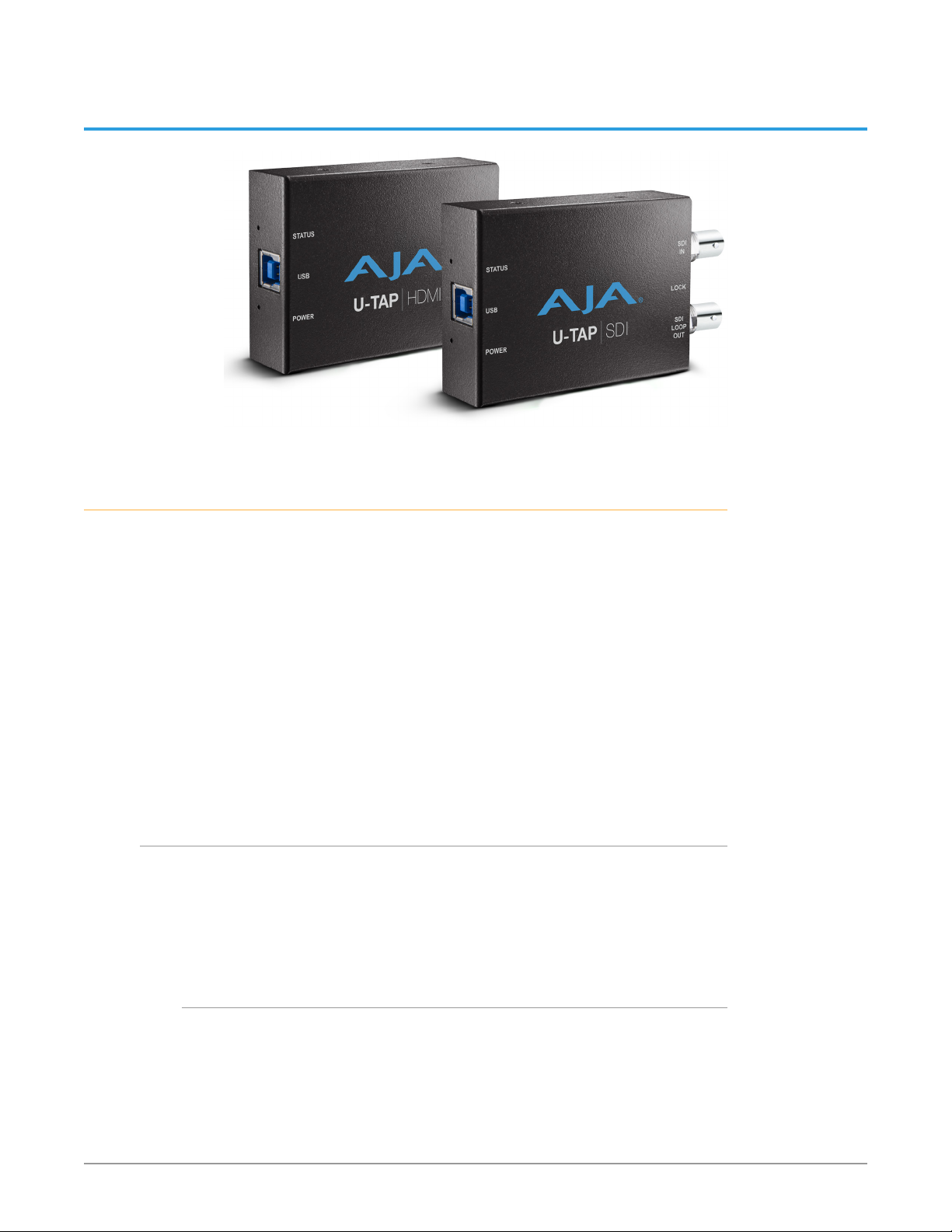
Two models of U-TAP are available, each with different input capabilities.
U-TAP Features
• One USB 3.0 port
• 8-bit video support
• 2-Channel embedded audio support
• Rugged compact size
• Power via USB
U-TAP-HDMI Models
• One HDMI v1.4a input
NOTE: U-TAP does not support HDCP.
U-TAP Series HDMI or SDI to USB Mini-Converter v1.2 4 www.aja.com
Page 5
U-TAP-SDI Models
USB type B Port
U-TAP-HDMI
HDMI In with
SDI Loop Out
U-TAP-SDI
USB type B Port
• One 3G-SDI BNC input
• One 3G-SDI BNC looping output
Video Signal Formats
The Video Signal Formats supported by U-TAP are listed in Appendix A:
Specifications (see page 11).
U-TAP Firmware
The latest U-TAP-HDMI and U-TAP-SDI firmware is installed on the units before
shipment. The firmware can be updated using a downloadable zip file for either
PC or Mac that includes readme instructions and all the required files.
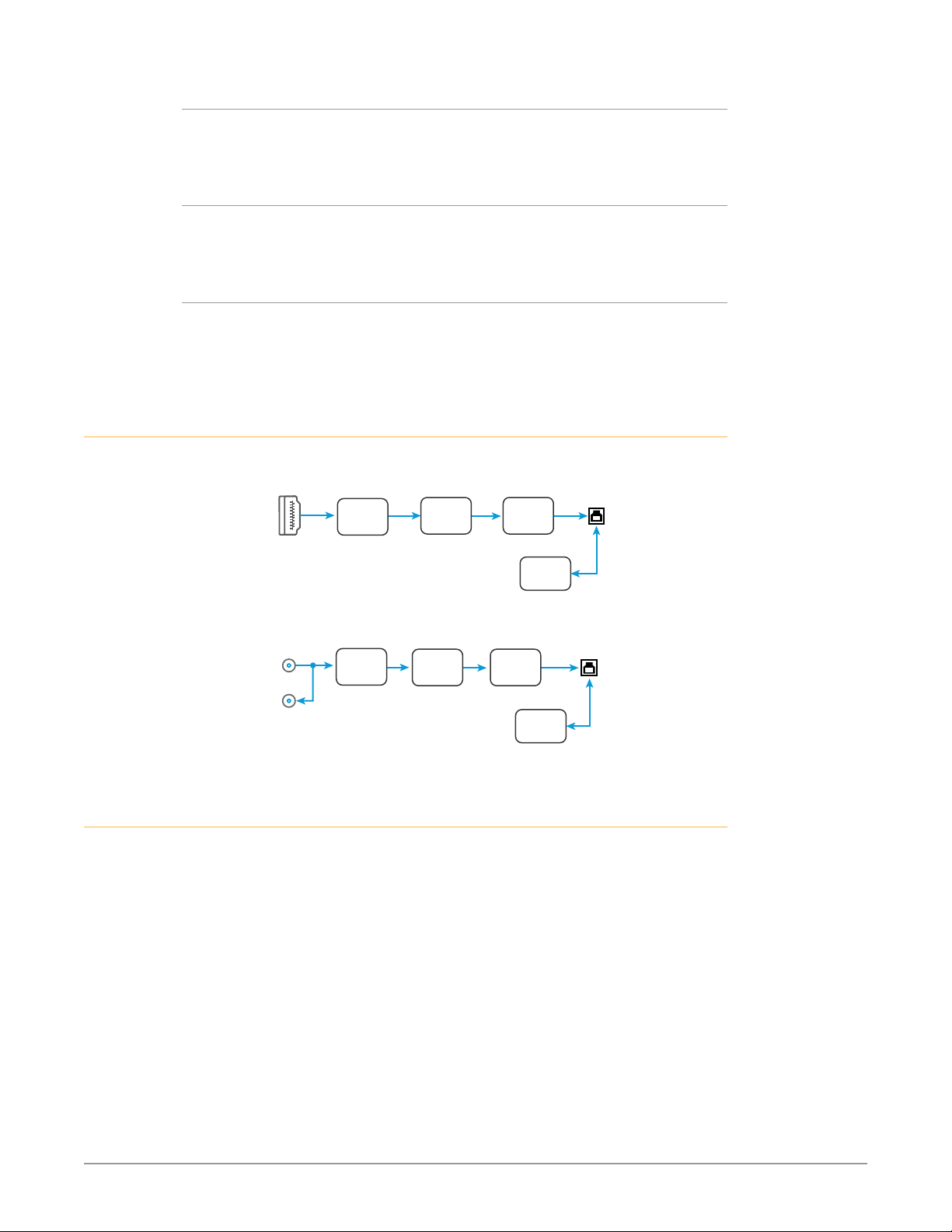
Simplified Block Diagrams
Figure 1. U-TAP-HDMI Block Diagram
Embedded
Audio
Figure 2. U-TAP-SDI Block Diagram
SDI In with
Embedded
Audio
Cable Connections
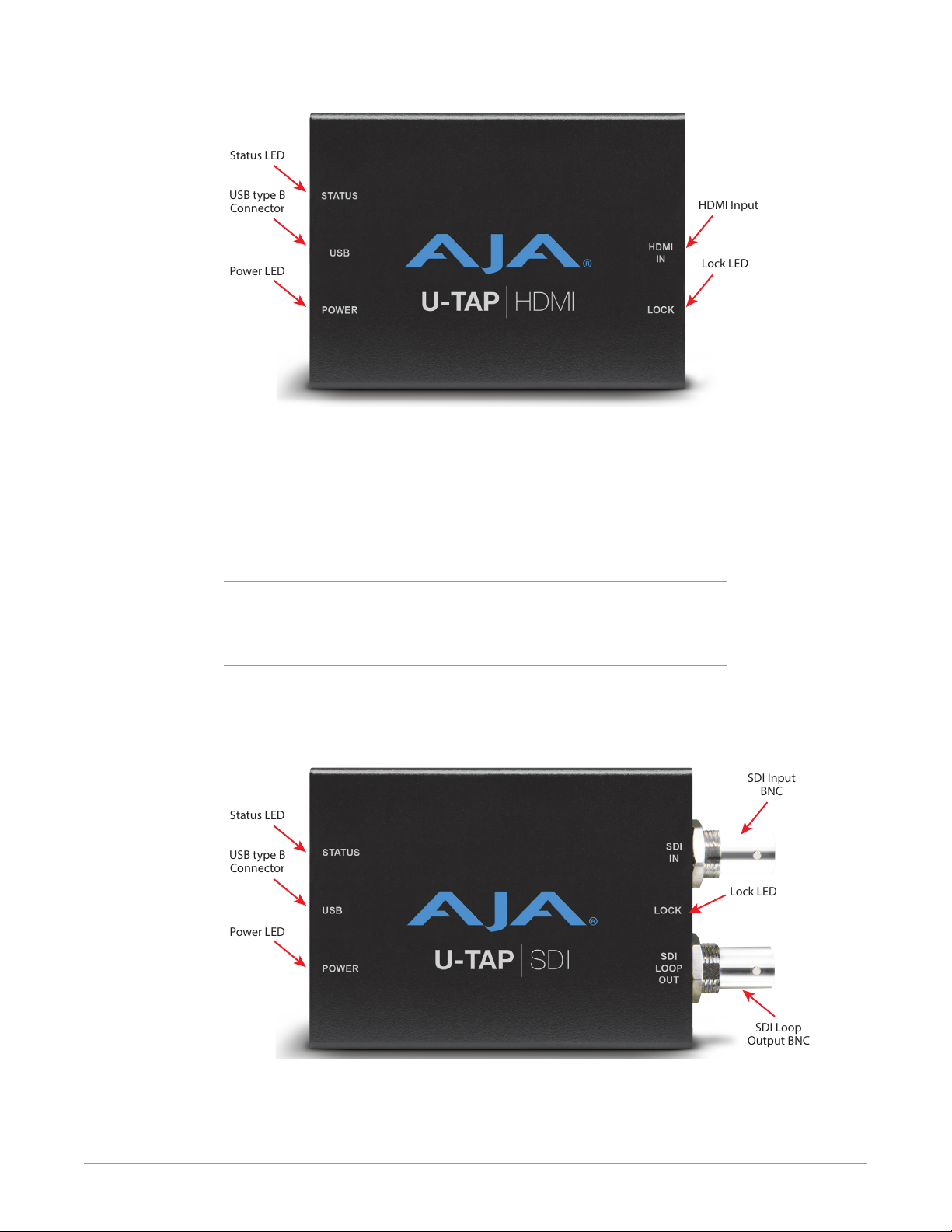
U-TAP connections are made directly to the unit’s connectors located on each
side. LEDs also report various statuses by color.
HDMI
RCVR
SDI
RCVR
Video and
Audio
Processing
Video and
Audio
Processing
Interface
USB
Interface
USB
Control
Control
Video Out with
2 Ch Audio
Conguration
(PC or Mac)
Video Out with
2 Ch Audio
Conguration
(PC or Mac)
U-TAP Series HDMI or SDI to USB Mini-Converter v1.2 5 www.aja.com
Page 6
Lock LED
Status LED
USB type B
Connector
Power LED
HDMI Input
Lock LED
Status LED
USB type B
Connector
Power LED
SDI Input
BNC
SDI Loop
Output BNC
Figure 3. U-TAP-HDMI Connectors and LEDs (on Each Side)
Status LED
• O = not connected
• Red = USB connected to a USB 2.0 port
• Green = USB connected to a USB 3.0 port
• Blinking = U-TAP is streaming video, audio, or both
Power LED
• O = no power
• Green = power present
U-TAP HDMI LOCK LED
• O = not locked to source video
• Green = locked to SD video source
• Red = locked to HD video source
Figure 4. U-TAP-SDI Connectors and LEDs (on Each Side)
U-TAP Series HDMI or SDI to USB Mini-Converter v1.2 6 www.aja.com
Page 7

Status LED
• O = not connected
• Red = USB connected to a USB 2.0 port
• Green = USB connected to a USB 3.0 port
• Blinking = U-TAP is streaming video, audio, or both
Power LED
• O = no power
• Green = power present
U-TAP SDI LOCK LED
• O = not locked to source video
• Green = locked to 270Mbps source
• Red = locked to 1.5Gbps video source
• Amber = locked to 3Gbps video source
In This Manual
Chapter 1 is the introduction listing features, box contents, and general
information.
Chapter 2 provides instructions for installation.
Chapter 3 provides basic operational information.
Appendix A presents a list of technical specifications for the product.
Appendix B contains relevant Safety & Compliance information.
U-TAP Series HDMI or SDI to USB Mini-Converter v1.2 7 www.aja.com
Page 8

Chapter 2 – Installation
Unpacking U-TAP
As you unpack U-TAP, carefully examine the unit to ensure that nothing was
damaged during shipment. If you find any damage, immediately notify the
shipping service and supply them with a complete description of the damage.
AJA will repair or replace damaged units. If you find shipping damage, contact
your AJA dealer or distributor for details on how to have your U-TAP repaired or
replaced.
Save packing materials and the shipping box. If you ever require service or move
your system—use the packaging materials and box for safe shipment.
After you unpack your U-TAP, go to the AJA website to download the latest
software package and updated documentation. You will need a USB cable to
connect to your computer.
Installation Overview
The installation and setup of U-TAP is very simple. The steps of installation and
configuration are discussed here and summarized as follows:
1. Unpack the shipping box (see above).
2. Ensure that appropriate application software is installed on your USB
equipped computer, as detailed in its user documentation.
3. Connect the U-TAP USB output port to your computer, using the provided
cable. The U-TAP is powered through the USB 3.0 port.
NOTE: The first time U-TAP is connected to a computer extra time may be required for
the OS to access and configure the appropriate drivers. On Windows machines
could take from 3 to 5 minutes. On Macs this time should be much shorter.
Each OS should report successful driver installation. Subsequent U-TAP USB
connections should occur immediately.
4. Connect the SDI or HDMI input to your source device.
5. U-TAP will now be operational, automatically detecting the input signal
format and decoding the video (and two channels of embedded audio if
present) to the USB output.
NOTE: Connecting multiple U-TAPs could compromise power delivery, and excessive USB
bus traffic (from another U-TAP or other devices sharing that USB bus) can reduce
the computer’s performance.
6. Launch your video application on the connected computer and use its
UI controls to access the video and audio being converted by U-TAP. For
example:
• For VLC, go to Media/Open Capture device, and select U-TAP.
• For QuickTime Player, go to File menu, click New Movie Recording, and
select U-TAP using the down arrow next to the record button.
U-TAP Series HDMI or SDI to USB Mini-Converter v1.2 8 www.aja.com
Page 9
HDMI
Digital Video
Camera
USB
Computer
Running Video
Applications
SDI
Loop Out
SDI
Video Switcher
USB
Computer
Running Video
Applications
SDI
Monitor
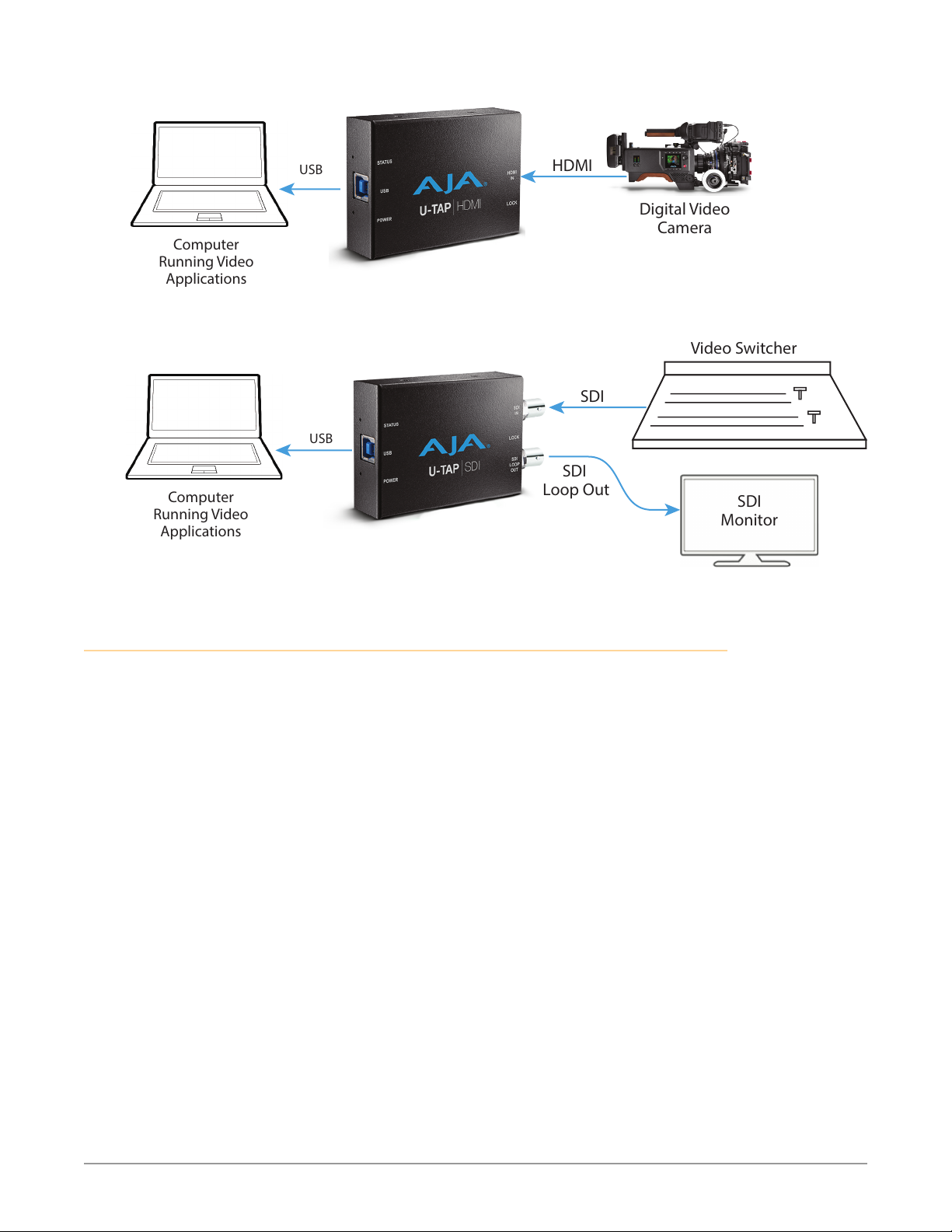
Figure 5. Typical U-TAP-HDMI Laptop System Connections
Figure 6. Typical U-TAP-SDI Laptop System Connections
Firmware Update Procedure
U-TAP firmware and updater .zip files are available for download from the AJA
website:
1. Download from the AJA website the free AJA_U-TAP.zip package for your
computer operating system.
• AJA_U-TAP_Win_.zip. or
• A JA _U-TAP_ M ac _. zi p
2. Extract the .zip le on your computer.
3. Connect the U-TAP Mini-Converter to your computer with the provided
USB3 cable.
NOTE: Only one U-TAP should be connected to your computer when updating firmware.
4. Run the .dmg or .exe le and install the Updater application.
5. Launch the AJA U-TAP Updater application. If a connected U-TAP is found,
a window opens reporting the current rmware versions installed and the
versions available for update.
NOTE: If a U-TAP is not detected, a No Module Connected message is displayed.
U-TAP Series HDMI or SDI to USB Mini-Converter v1.2 9 www.aja.com
Page 10
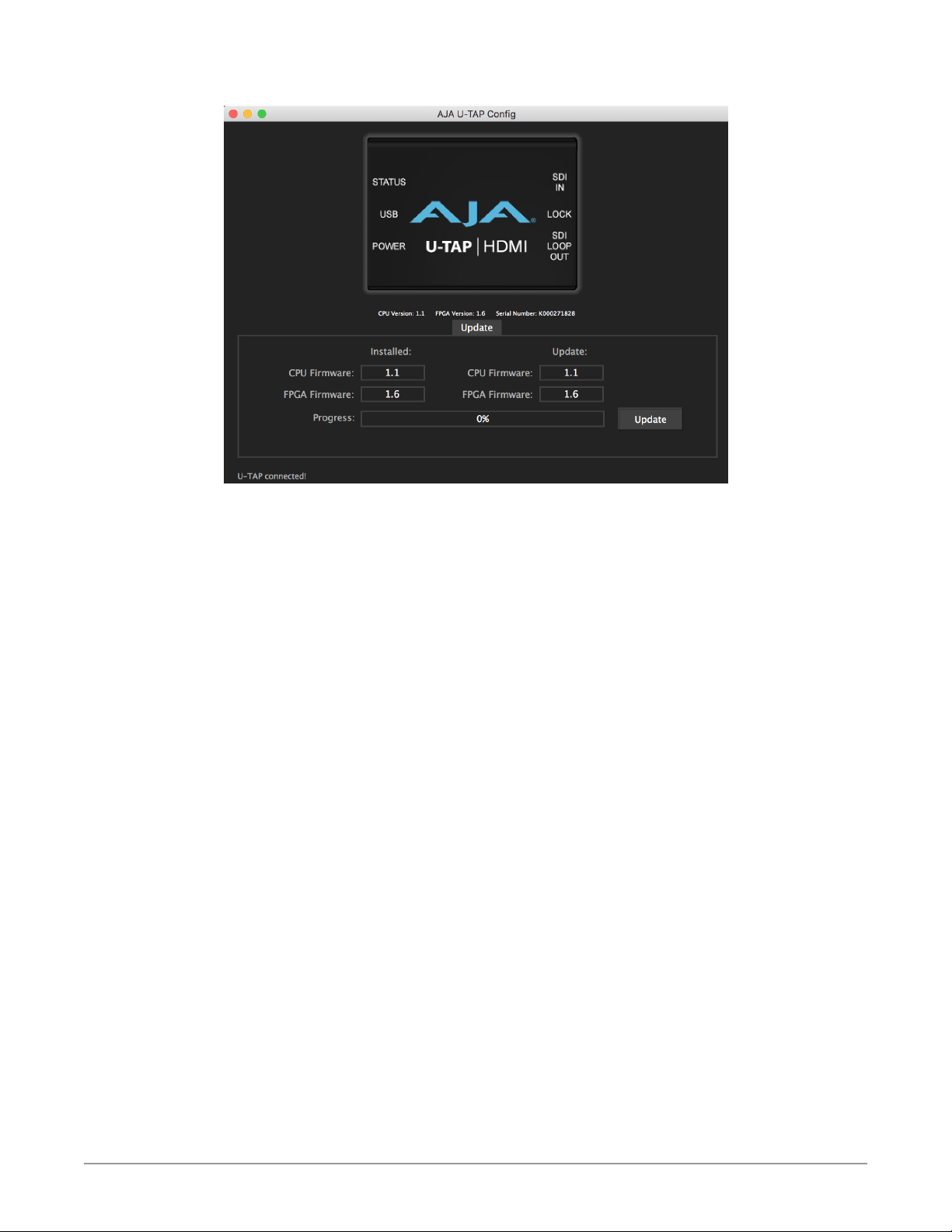
Figure 7. U-TAP Updater Screen
6. Click on the Update button to update the U-TAP rmware.
7. A progress bar will report the progress of each rmware update.
NOTE: Macs typically require 2 or 3 minutes to install the U-TAP firmware. Windows
machines typically install the U-TAP firmware in about a minute.
8. When complete, a message indicates the U-TAP must be rebooted.
9. Reboot the U-TAP by disconnecting and reconnecting the USB cable.
10. Your U-TAP will now be operational with the new rmware.
U-TAP Series HDMI or SDI to USB Mini-Converter v1.2 10 www.aja.com
Page 11
Menu
Selections
Quicktime
Menu Button
Chapter 3 – Operation
Introduction
Once installed, U-TAP operation depends on the application being used, and
often can be extremely simple. U-TAP works with each application using the
standard signal routing methods used by that application.
Quicktime Operation
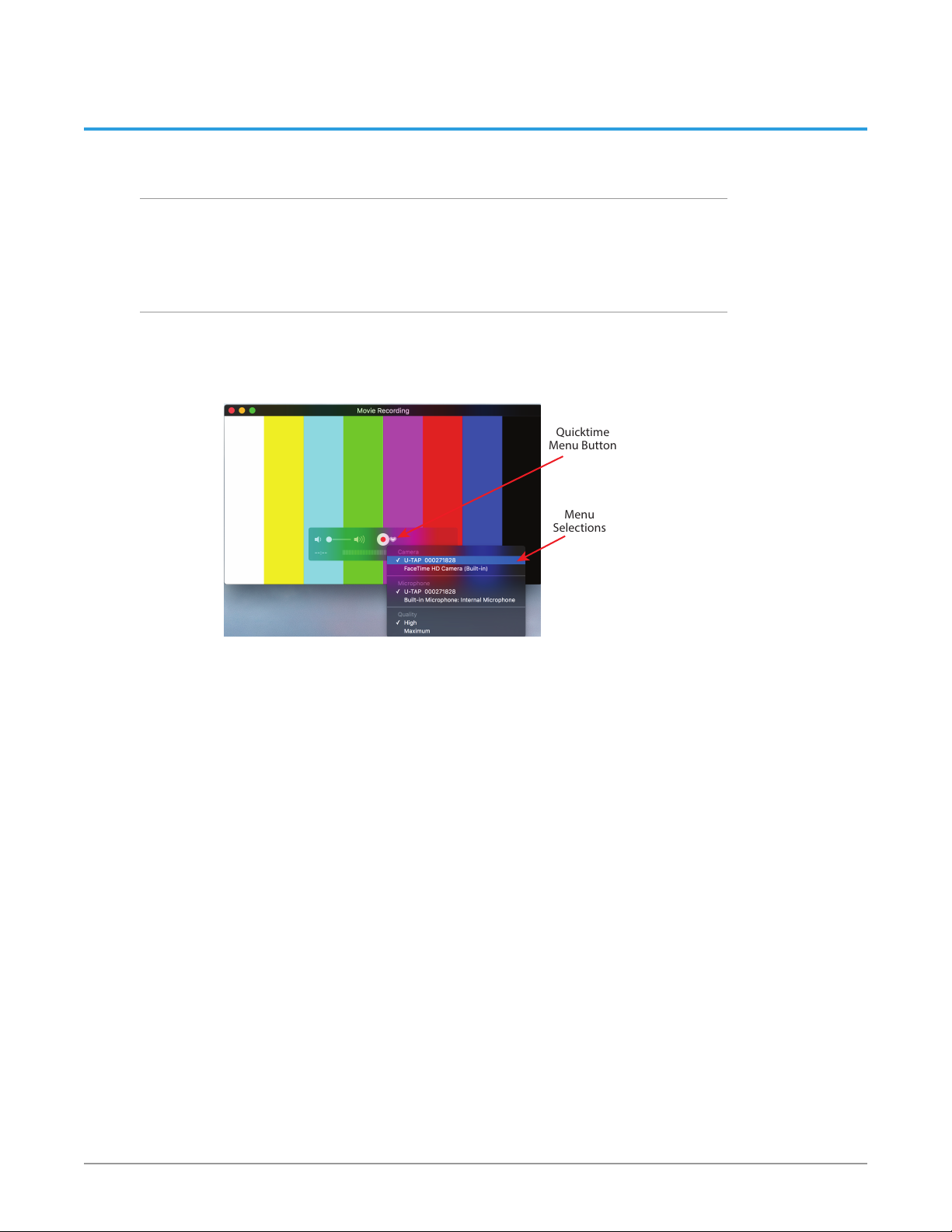
As an example, for QuickTime operation on Mac OS, simply launch QuickTime,
click on the menu button next to the record button, and then select the desired
U-TAP and signal sources.
Figure 8. Quicktime U-TAP Operation
Multiple U-TAP Mini-Converters can be connected to the computer
simultaneously. Each U-TAP unit is given a uniquely numbered name before
shipment from the factory.
U-TAP Series HDMI or SDI to USB Mini-Converter v1.2 11 www.aja.com
Page 12

Appendix A – Specifications
U-TAP HDMI Specifications
Video Formats
Video (HDMI)
• (HD) 1920 x 1080p 23.98, 24, 25, 29.97, 30, 50, 59.94, 60
• (HD) 1920 x 1080i 25, 29.97, 30
• (HD) 1280 x 720p 50, 59.94, 60
• (SD) 625p 25
• (SD) 625i 25
• (SD) 525p 29.97
• (SD) 525i 29.97
Computer (HDMI), up to 60 Hz max for all formats
• 1920 x 1080p
• 1680 x 1050p
• 1600 x 1200p
• 1600 x 1024p
• 1280 x 1024p
• 1280 x 960p
• 1280 x 768p
• 1024 x 768p
• 800 x 600p
• 640 x 480p
Scaled (USB), Frame rates for all formats: 7.5, 15, 25, 29.97, 30, 50, 59.94, 60
• 1920 x 1080p
• 1440 x 1080p
• 1280 x 720p
• 1024 x 576p
• 960 x 540p
• 856 x 480p
• 800 x 600p
• 768 x 576p
• 720 x 576p
• 720 x 480p
• 640 x 480p
• 640 x 360p
• 432 x 240p
• 352 x 288p
• 320 x 240p
• 176 x 144p
Video Input Digital
• HDMI v1.4a, 24, 30, or 36 bits/pixel, RGB or YUV
U-TAP Series HDMI or SDI to USB Mini-Converter v1.2 12 www.aja.com
Page 13

Audio Input Digital
• 2-Channel, 24-bit HDMI embedded audio, 48 kHz sample rate
Capture Video
• 16-bits/pixel, YUV (input video will be truncated as required)
Capture Audio
• 2-Channel, 16-bit, 48 kHz sample rate (input audio will be truncated as
required)
Host Interface
• USB 3.0/USB 2.0 UVC/UAC compliant
Size (w x d x h)
• 3.3" x 2.4" x 1.0" (84mm x 61mm x 25mm)
Weight
• 0.3 lbs (0.2 kg)
Power
• 5V USB bus powered; 3.5W max
Environment
• Safe Operating Temperature: 0 to 40 degrees C (32 to 104 degrees F)
• Safe Storage Temperature (Power OFF): -40 to 60 degrees C (-40 to 140
degrees F)
• Operating Relative Humidity: 10-90% noncondensing
• Operating Altitude: <3,000 meters (<10,000 feet)
U-TAP SDI Specifications
Video Formats
Video (SDI)
• (HD) 1920 x 1080p 23.98, 24, 25, 29.97, 30, 50, 59.94, 60
• (HD) 1920 x 1080i 25, 29.97, 30
• (HD) 1280 x 720p 50, 59.94, 60
• (SD) 625i 25
• (SD) 525i 29.97
Scaled (USB), Frame rates for all formats: 7.5, 15, 25, 29.97, 30, 50, 59.94, 60
• 1920 x 1080p
• 1440 x 1080p
• 1280 x 720p
• 1024 x 576p
• 960 x 540p
• 856 x 480p
• 800 x 600p
• 768 x 576p
• 720 x 576p
• 720 x 480p
• 640 x 480p
U-TAP Series HDMI or SDI to USB Mini-Converter v1.2 13 www.aja.com
Page 14

• 640 x 360p
• 432 x 240p
• 352 x 288p
• 320 x 240p
• 176 x 144p
Video Input Digital
• 3G-SDI, SMPTE-259/292/424, YCbCr 4:2:2 (1 x BNC)
Video Loop Output
• 1 x 3G-SDI (1 x BNC)
Audio Input Digital
• 2-Channel, 24-bit SDI embedded audio, 48 kHz sample rate
Capture Video
• 16-bits/pixel, YUV (input video will be truncated as required)
Capture Audio
• 2-Channel, 16-bit, 48 kHz sample rate (input audio will be truncated as
required)
Host Interface
• USB 3.0/USB 2.0 UVC/UAC compliant
Size (w x d x h)
• 4.1" x 2.4" x 1.0" (103 mm x 61mm x 25mm)
Weight
• 0.3 lbs (0.2 kg)
Power
• 5V USB bus powered; 4W max
Environment
• Safe Operating Temperature: 0 to 40 degrees C (32 to 104 degrees F)
• Safe Storage Temperature (Power OFF): -40 to 60 degrees C (-40 to 140
• Operating Relative Humidity: 10-90% noncondensing
• Operating Altitude: <3,000 meters (<10,000 feet)
degrees F)
U-TAP Series HDMI or SDI to USB Mini-Converter v1.2 14 www.aja.com
Page 15

Appendix B – Safety and Compliance
Federal Communications Commission (FCC) Compliance Notices
Class A Interference Statement
This equipment has been tested and found to comply with the limits for a Class
A digital device, pursuant to Part 15, Subpart B of the FCC Rules. These limits
are designed to provide reasonable protection against harmful interference
in a residential installation. This equipment generates, uses, and can radiate
radio frequency energy and, if not installed and used in accordance with the
instructions, may cause harmful interference to radio communications. However,
there is no guarantee that interference will not occur in a particular installation. If
this equipment does cause harmful interference to radio or television reception,
which can be determined by turning the equipment off and on, the user is
encouraged to try to correct the interference by one or more of the following
measures:
• Reorient or relocate the receiving antenna.
• Increase the separation between the equipment and receiver.
• Connect the equipment into an outlet on a circuit dierent from that to which
the receiver is connected.
• Consult the dealer or an experienced radio/TV technician for help.
FCC Caution
This device complies with Part 15 of the FCC Rules. Operation is subject to the
following two conditions: (1) This device may not cause harmful interference, and
(2) this device must accept any interference received, including interference that
may cause undesired operation.
Canadian ICES Statement
Canadian Department of Communications Radio Interference Regulations
This digital apparatus does not exceed the Class A limits for radio-noise emissions
from a digital apparatus as set out in the Radio Interference Regulations of
the Canadian Department of Communications. This Class A digital apparatus
complies with Canadian ICES-003.
Règlement sur le brouillage radioélectrique du ministère des Communications
Cet appareil numérique respecte les limites de bruits radioélectriques visant les
appareils numériques de classe A prescrites dans le Règlement sur le brouillage
radioélectrique du ministère des Communications du Canada. Cet appareil
numérique de la Classe A est conforme à la norme NMB-003 du Canada.
European Union and European Free Trade Association (EFTA)
Regulatory Compliance
This equipment may be operated in the countries that comprise the member
countries of the European Union and the European Free Trade Association. These
countries, listed in the following paragraph, are referred to as The European
Community throughout this document:
AUSTRIA, BELGIUM, BULGARIA, CYPRUS, CZECH REPUBLIC, DENMARK, ESTONIA,
FINLAND, FRANCE, GERMANY, GREECE, HUNGARY, IRELAND, ITALY, LATVIA,
LITHUANIA, LUXEMBOURG, MALTA, NETHERLANDS, POLAND, PORTUGAL,
ROMANIA, SLOVAKIA, SLOVENIA, SPAIN, SWEDEN, UNITED KINGDOM, ICELAND,
LICHTENSTEIN, NORWAY, SWITZERLAND
U-TAP Series HDMI or SDI to USB Mini-Converter v1.2 15 www.aja.com
Page 16
Declaration of Conformity
Marking by this symbol indicates compliance with the Essential Requirements of
the EMC Directive of the European Union 2004/108/EC.
This equipment meets the following conformance standards:
Safety
EN 60065: 2002 + A1: 2006 + A11: 2008 + A2: 2010 + A12: 2011 (GS License)
IEC 60065: 2001 + A1: 2005 + A2: 2010 (CB Scheme Report/Certificate)
Additional licenses issued for specific countries available on request.
Emissions
EN 55032: 2012, CISPR 22: 2008
Immunity
EN 55103-2: 2009
EN 55103-2: 2009, EN 61000-4-2:2009, EN 61000-4-3:2006 +A1:2008 +A2:2010,
EN 61000-4-4:2004 +A1:2010, EN 61000-4-6:2009
Environments: E2, E3 and E4
The product is also licensed for additional country specific standards as required
for the International Marketplace
Warning! This is a Class A product. In a domestic environment, this product
may cause radio interference, in which case, the user may be required to take
appropriate measures.
Achtung! Dieses ist ein Gerät der Funkstörgrenzwertklasse A. In Wohnbereichen
können bei Betrieb dieses Gerätes Rundfunkstörungen auftreten, in welchen
Fällen der Benutzer für entsprechende Gegenmaßnahmen verantwortlich ist.
Attention! Ceci est un produit de Classe A. Dans un environnement domestique,
ce produit risque de créer des interférences radioélectriques, il appartiendra
alors à l?utilisateur de prendre les mesures spéciques appropriées..
Recycling Notice
This symbol on the product or its packaging indicates that this product must not be
disposed of with your other household waste. Instead, it is your responsibility to dispose
of your waste equipment by handing it over to a designated collection point for the
recycling of waste electrical and electronic equipment. The separate collection and
recycling of your waste equipment at the time of disposal will help conserve natural
resources and ensure that it is recycled in a manner that protects human health and
the environment. For more information about where you can drop o your waste for
recycling, please contact your local authority, or where you purchased your product.
Korea KCC Compliance Statement
A급기기
(업무용 방송통신기자재)
이 기기는 업무용(A급) 전자파적합기기로서 판매자또는 사용자는
이점을주의하시기 바라며, 가정외의 지역에서사용하는것을
목적으로 합니다.
Class A
(Broadcasting Communication
Equipment for Office Use)
U-TAP Series HDMI or SDI to USB Mini-Converter v1.2 16 www.aja.com
As an electromagnetic wave equipment for office use (Class A),
this equipment is intended to use in other than home area.
Sellers or users need to take note of this.
Page 17
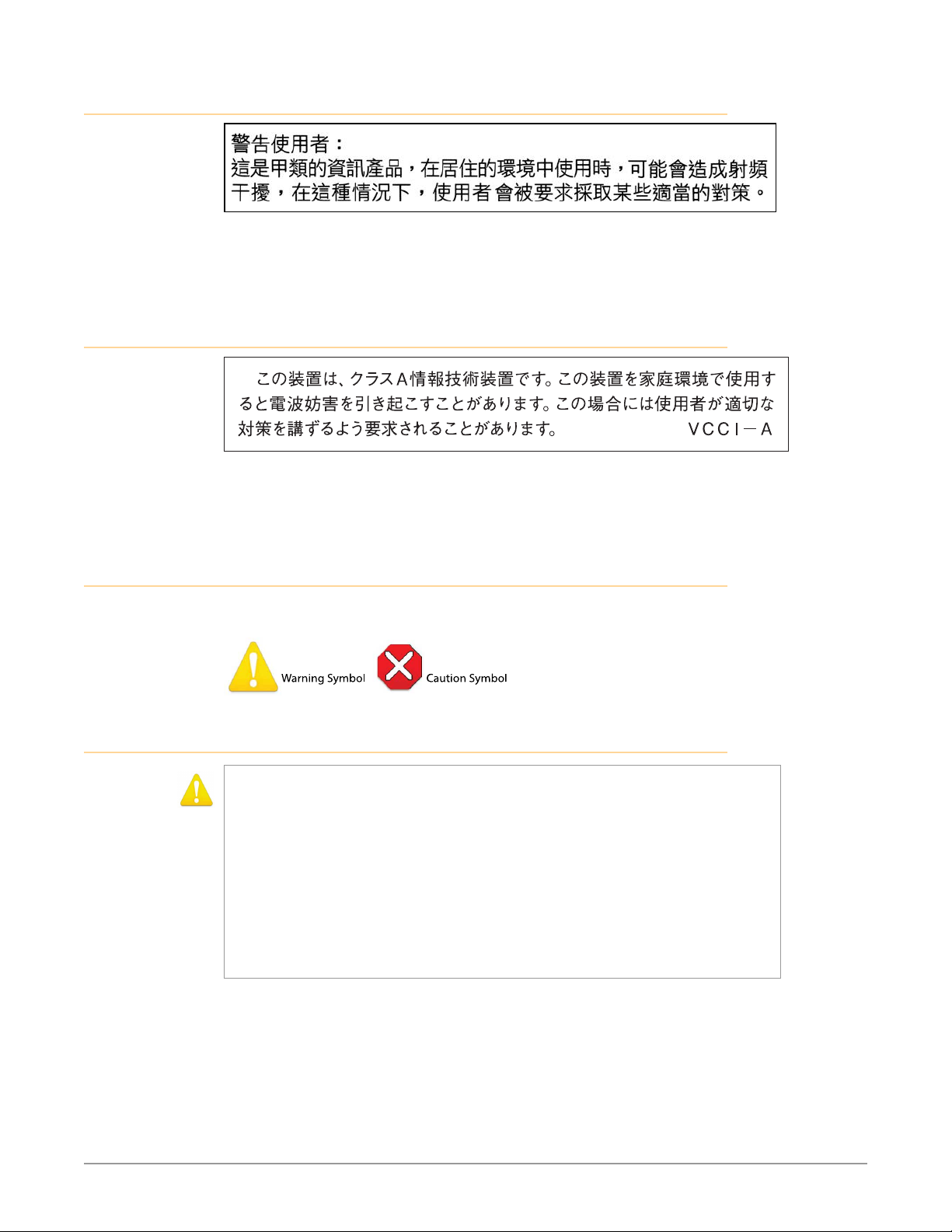
Taiwan Compliance Statement
This is a Class A product based on the standard of the Bureau of Standards,
Metrology and Inspection (BSMI) CNS 13438, Class A. In a domestic environment
this product may cause radio interference in which case the user may be required
to take adequate measures.
Japanese Compliance Statement
This is a Class A product based on the standard of the VCCI Council (VCCI
V-3/2015.04). If this equipment is used in a domestic environment, radio
interference may occur, in which case, the user may be required to take corrective
actions.
Translated Warning and Caution Messages
The following caution statements, warning conventions, and warning messages
apply to this product and manual.
Before Operation Please Read These Instructions
Warning! Read and follow all warning notices and instructions marked on the product or
included in the documentation.
Avertissement! Lisez et conformez-vous à tous les avis et instructions d'avertissement
indiqués sur le produit ou dans la documentation.
Warnung! Lesen und befolgen Sie die Warnhinweise und Anweisungen, die auf dem
Produkt angebracht oder in der Dokumentation enthalten sind.
¡Advertencia! Lea y siga todas las instrucciones y advertencias marcadas en el producto o
incluidas en la documentación.
Aviso! Leia e siga todos os avisos e instruções assinalados no produto ou incluídos na
documentação.
Avviso! Leggere e seguire tutti gli avvisi e le istruzioni presenti sul prodotto o inclusi nella
documentazione.
U-TAP Series HDMI or SDI to USB Mini-Converter v1.2 17 www.aja.com
Page 18
Warning! Do not use this device near water and clean only with a dry cloth.
Avertissement! N'utilisez pas cet appareil près de l'eau et nettoyez-le seulement avec un
tissu sec.
Warnung! Das Gerät nicht in der Nähe von Wasser verwenden und nur mit einem trockenen
Tuch säubern.
¡Advertencia! No utilice este dispositivo cerca del agua y límpielo solamente con un paño
seco.
Aviso! Não utilize este dispositivo perto da água e limpe-o somente com um pano seco.
Avviso! Non utilizzare questo dispositivo vicino all'acqua e pulirlo soltanto con un panno
asciutto.
Warning! Do not block any ventilation openings. Install in accordance with the
manufacturer's instructions.
Avertissement! Ne bloquez aucune ouverture de ventilation. Suivez les instructions du
fabricant lors de l'installation.
Warnung! Die Lüftungsönungen dürfen nicht blockiert werden. Nur gemäß den
Anweisungen des Herstellers installieren.
¡Advertencia! No bloquee ninguna de las aberturas de la ventilación. Instale de acuerdo con
las instrucciones del fabricante.
Aviso! Não obstrua nenhuma das aberturas de ventilação. Instale de acordo com as
instruções do fabricante.
Avviso! Non ostruire le aperture di ventilazione. Installare in conformità con le istruzioni del
fornitore.
Warning! Do not install near any heat sources such as radiators, heat registers, stoves, or
other apparatus (including ampliers) that produce heat.
Avertissement! N'installez pas l'appareil près d'une source de chaleur telle que des
radiateurs, des bouches d'air de chauage, des fourneaux ou d'autres appareils
(amplicateurs compris) qui produisent de la chaleur.
Warnung! Nicht in der Nähe von Wärmequellen wie Heizkörpern, Heizregistern, Öfen oder
anderen Wärme erzeugenden Geräten (einschließlich Verstärkern) aufstellen.
¡Advertencia! No instale cerca de fuentes de calor tales como radiadores, registros de calor,
estufas u otros aparatos (incluidos amplicadores) que generan calor.
Aviso! Não instale perto de nenhuma fonte de calor tal como radiadores, saídas de calor,
fogões ou outros aparelhos (incluindo amplicadores) que produzam calor.
Avviso! Non installare vicino a fonti di calore come termosifoni, diusori di aria calda, stufe o
altri apparecchi (amplicatori compresi) che emettono calore
Warning! Unplug this device during lightning storms or when unused for long periods of
time.
Avertissement! Débranchez cet appareil pendant les orages avec éclairsou s'il est inutilisé
pendant de longues périodes.
Warnung! Das Gerät ist bei Gewitterstürmen oder wenn es über lange Zeiträume ungenutzt
bleibt vom Netz zu trennen.
¡Advertencia! Desenchufe este dispositivo durante tormentas eléctricas o cuando no se lo
utilice por largos periodos del tiempo.
Aviso! Desconecte este dispositivo da tomada durante trovoadas ou quando não é utilizado
durante longos períodos de tempo.
Avviso! Utilizzare soltanto i collegamenti e gli accessori specicati e/o venduti dal
produttore, quali il treppiedi e l'esoscheletro.
U-TAP Series HDMI or SDI to USB Mini-Converter v1.2 18 www.aja.com
Page 19
Warning! Do not open the chassis. There are no user-serviceable parts inside. Opening
the chassis will void the warranty unless performed by an AJA service center or licensed
facility.
Avertissement! Ne pas ouvrir le châssis. Aucun élément à l’intérieur du châssis ne peut être
réparé par l’utilisateur. La garantie sera annulée si le châssis est ouvert par toute autre
personne qu’un technicien d’un centre de service ou d’un établissement agréé AJA.
Warnung! Önen Sie das Gehäuse nicht. Keine der Geräteteile können vom Benutzer
gewartet werden. Durch das Önen des Gehäuses wird die Garantie hinfällig, es sei denn,
solche Wartungsarbeiten werden in einem AJA-Service-Center oder einem lizenzierten
Betrieb vorgenommen.
¡Advertencia! No abra el chasis. El interior no contiene piezas reparables por el usuario. El
abrir el chasis anulará la garantía a menos que se lo haga en un centro de servicio AJA o en
un local autorizado.
Advertência! Não abra o chassi. Não há internamente nenhuma peça que permita
manutenção pelo usuário. Abrir o chassi anula a garantia, a menos que a abertura seja
realizada por uma central de serviços da AJA ou por um local autorizado.
Avvertenza! Non aprire lo chassis. All’interno non ci sono parti riparabili dall’utente.
L’apertura dello chassis invaliderà la garanzia se non viene eettuata da un centro uciale
o autorizzato AJA.
Warning! Only use attachments and accessories specied and/or sold by the manufacturer.
Avertissement! Utilisez seulement les attaches et accessoires spéciés et/ou vendus par le
fabricant.
Warnung! Verwenden Sie nur Zusatzgeräte und Zubehör angegeben und / oder verkauft
wurde durch den Hersteller.
¡Advertencia! Utilice solamente los accesorios y conexiones especicados y/o vendidos por
el fabricante.
Aviso! Utilize apenas equipamentos/acessórios especicados e/ou vendidos pelo fabricante.
Avviso! Utilizzare soltanto i collegamenti e gli accessori specicati e/o venduti dal
produttore.
Warning! Refer all servicing to qualied service personnel. Servicing is required when the
device has been damaged in any way, such as power-supply cord or plug is damaged,
liquid has been spilled or objects have fallen into the device, the device has been exposed
to rain or moisture, does not operate normally, or has been dropped.
Avertissement! Référez-vous au personnel de service qualié pour tout entretien.
L'entretien est exigé quand l'appareil a été endommagé de quelque manière que ce soit,
par exemple lorsque le cordon d'alimentation ou la prise sont endommagés, que du
liquide a été versé ou des objets sont tombés dans l'appareil, que l'appareil a été exposé à
la pluie ou à l'humidité, ne fonctionne pas normalement ou est tombé.
Warnung! Das Gerät sollte nur von qualizierten Fachkräften gewartet werden. Eine
Wartung ist fällig, wenn das Gerät in irgendeiner Weise beschädigt wurde, wie bei
beschädigtem Netzkabel oder Netzstecker, falls Flüssigkeiten oder Objekte in das Gerät
gelangen, das Gerät Regen oder Feuchtigkeit ausgesetzt wurde, nicht ordnungsgemäß
funktioniert oder fallen gelassen wurde.
¡Advertencia! Consulte al personal calicado por cuestiones de reparación. El servicio
de reparación se requiere cuando el dispositivo ha recibido cualquier tipo de daño, por
ejemplo cable o espigas dañadas, se ha derramado líquido o se han caído objetos dentro
del dispositivo, el dispositivo ha sido expuesto a la lluvia o humedad, o no funciona de
modo normal, o se ha caído.
Aviso! Remeta todos os serviços de manutenção para o pessoal de assistência qualicado.
A prestação de serviços de manutenção é exigida quando o dispositivo foi danicado
mediante qualquer forma, como um cabo de alimentação ou cha que se encontra
danicado/a, quando foi derramado líquido ou caíram objectos sobre o dispositivo,
quando o dispositivo foi exposto à chuva ou à humidade, quando não funciona
normalmente ou quando foi deixado cair.
Avviso! Fare riferimento al personale qualicato per tutti gli interventi di assistenza.
L'assistenza è necessaria quando il dispositivo è stato danneggiato in qualche modo, ad
esempio se il cavo di alimentazione o la spina sono danneggiati, è stato rovesciato del
liquido è stato rovesciato o qualche oggetto è caduto nel dispositivo, il dispositivo è stato
esposto a pioggia o umidità, non funziona correttamente o è caduto
U-TAP Series HDMI or SDI to USB Mini-Converter v1.2 19 www.aja.com
Page 20

Warrantity Information
Limited Warranty
AJA Video Systems, Inc. (AJA Video) warrants that the product, not including storage
modules, will be free from defects in materials and workmanship for a period of three
years from the date of purchase. AJA Video warrants that the storage modules, will
be free from defects in materials and workmanship for a period of one year from the
date of purchase. If a product proves to be defective during this warranty period, AJA
Video, at its option, will either repair the defective product without charge for parts
and labor, or will provide a replacement in exchange for the defective product.
To obtain service under this warranty, the Customer must notify AJA Video of the
defect before expiration of the warranty period and make suitable arrangements for
the performance of service by contacting AJA Video support through the channels
set forth on the support contacts web page at http://www.aja.com/support/index.
php. Except as stated, the Customer shall bear all shipping, packing, insurance and
other costs, excluding parts and labor, to effectuate repair. Customer shall pack and
ship the defective product to a service center designated by AJA Video, with shipping
charges prepaid. AJA Video shall pay to return the product to Customer but only if to
a location within the country in which the AJA Video service center is located.
This warranty shall not apply to any defect, failure or damage caused by negligent,
inadequate or improper use, handling or maintenance. Without limiting the
foregoing, AJA Video shall not be obligated to furnish service under this warranty
or repair any damage or malfunction a) resulting from attempts by personnel other
than AJA Video representatives to install, repair or service the product, b) resulting
from improper use or connection to incompatible equipment, c) caused by the use
of non-AJA Video parts or supplies, d) if the product has been modified or integrated
with other products when the effect of such a modification or integration increases
the time or difficulty of servicing the product, or (e) resulting from being dropped
or otherwise subjected to undue force, exposure to moisture or other corrosive or
conductive substances, exposure to strong magnetic fields, use with improperly
regulated power supplies, exposure to electric shock, use in temperatures outside the
specified operating range, or otherwise failing to treat the product in accordance with
the standard of care appropriate to sensitive and delicate electronic equipment.
EXCEPT AS STATED ABOVE, AJA VIDEO AND ITS VENDORS DISCLAIM IN THEIR
ENTIRETY ALL OTHER WARRANTIES, EXPRESS OR IMPLIED, INCLUDING WITHOUT
LIMITATION ALL WARRANTIES OF MERCHANTABILITY OR FITNESS FOR A PARTICULAR
PURPOSE. AJA VIDEO'S RESPONSIBILITY TO REPAIR OR REPLACE TIMELY REPORTED
DEFECTIVE PRODUCTS IS THE WHOLE AND EXCLUSIVE REMEDY CUSTOMER IS
PROVIDED.
THE PRODUCT IS NOT INTENDED, STATED, OR WARRANTED TO OPERATE
UNINTERRUPTED OR ERROR-FREE. YOU UNDERSTAND AND ACKNOWLEDGE THAT THE
PRODUCT IS NOT INTENDED TO BE USED AS THE SOLE OR PRIMARY DATA SOURCE OR
TARGET FOR CRITICAL DATA, AND THAT IT IS YOUR RESPONSIBILITY TO IMPLEMENT
REDUNDANT CAPTURE AND BACKUP SYSTEMS AS APPROPRIATE.
Limitation of Liability
UNDER NO CIRCUMSTANCES SHALL AJA VIDEO BE LIABLE IN ANY WAY FOR ANY
LOST, CORRUPTED OR DESTROYED DATA, FOOTAGE OR WORK, OR FOR ANY OTHER
INDIRECT, SPECIAL, INCIDENTAL OR CONSEQUENTIAL DAMAGES, OR FOR ANY THIRD
PARTY CLAIM, IN CONNECTION WITH THE PRODUCT, WHETHER RESULTING FROM
DEFECTS IN THE PRODUCT, SOFTWARE OR HARDWARE FAILURE, OR ANY OTHER
CAUSE WHATSOEVER, EVEN IF AJA VIDEO HAS BEEN ADVISED OF THE POSSIBLITY OF
SUCH DAMAGES. AJA VIDEO's LIABILITY IN CONNECTION WITH THIS PRODUCT SHALL
UNDER NO CIRCUMSTANCES EXCEED THE PURCHASE PRICE PAID FOR THE PRODUCT
U-TAP Series HDMI or SDI to USB Mini-Converter v1.2 20 www.aja.com
 Loading...