

Page 1
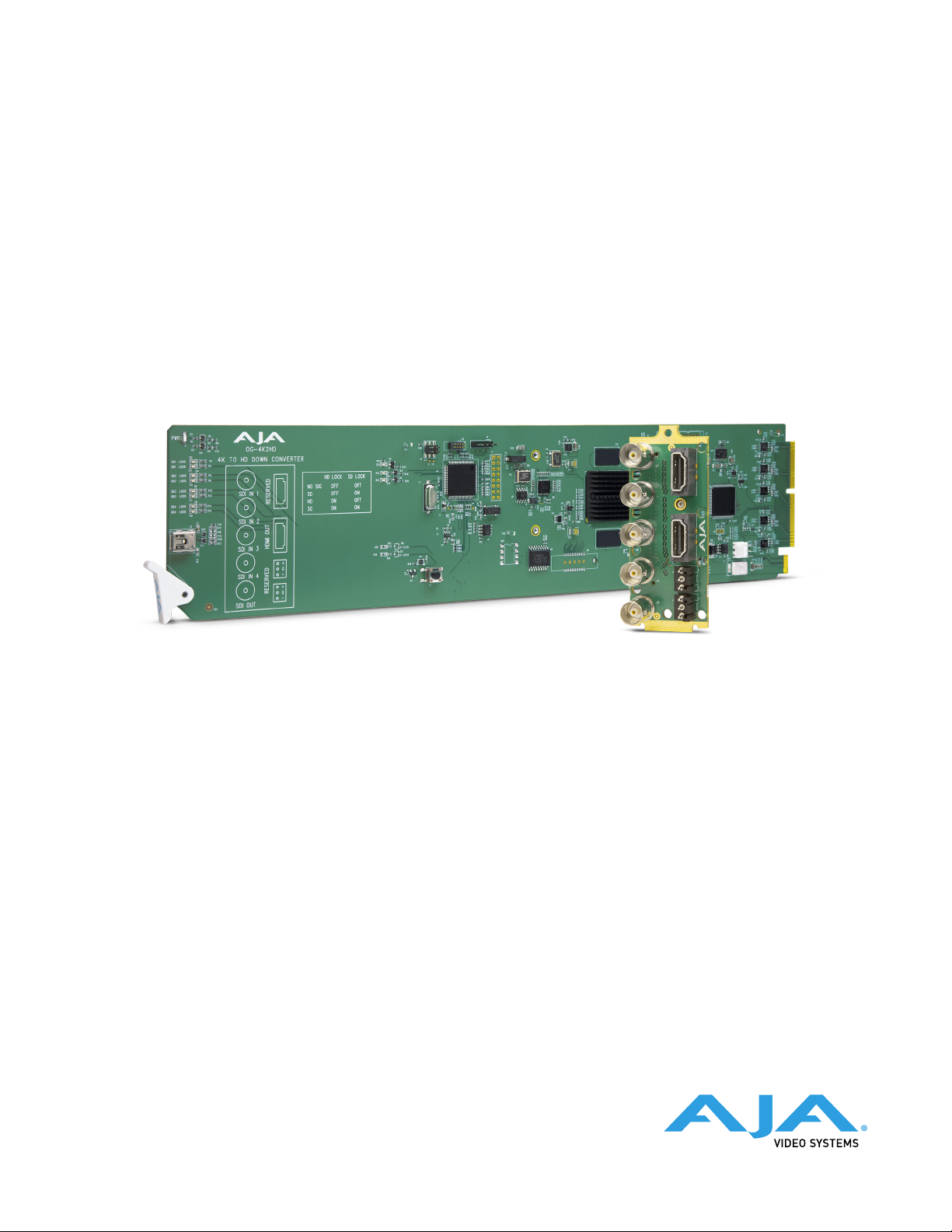
OG-4K2HD
4K/UltraHD-SDI to 3G-SDI Down-Converter
Installation and Operation Guide
Version 1.0
Published August 10, 2018
Page 2
Notices
Trademarks
Copyright
AJA® and Because it matters.® are registered trademarks of AJA Video Systems, Inc.
for use with most AJA products. AJA™ is a trademark of AJA Video Systems, Inc. for
use with recorder, router, software and camera products. Because it matters.™ is a
trademark of AJA Video Systems, Inc. for use with camera products.
CION®, Corvid Ultra®, lo®, Ki Pro®, KONA®, KUMO®, ROI® and T-Tap® are registered
trademarks of AJA Video Systems, Inc.
AJA Control Room™, KiStor™, Science of the Beautiful™, TruScale™, TruZoom™,
V2Analog™ and V2Digital™ are trademarks of AJA Video Systems, Inc.
All other trademarks are the property of their respective owners.
Copyright © 2018 AJA Video Systems, Inc. All rights reserved. All information in
this manual is subject to change without notice. No part of the document may be
reproduced or transmitted in any form, or by any means, electronic or mechanical,
including photocopying or recording, without the express written permission of AJA
Video Systems, Inc.
Contacting AJA Support
When calling for support, have all information at hand prior to calling. To contact AJA
for sales or support, use any of the following methods:
Telephone +1.530.271.3190
FAX +1.530.271.3140
Web https://www.aja.com
Support Email support@aja.com
Sales Email sales@aja.com
OG-4K2HD 4K/UltraHD-SDI to 3G-SDI Down-Converter v1.0 2 www.aja.com
Page 3

Contents
Notices . . . . . . . . . . . . . . . . . . . . . . . . . . . . . . . . . . . . . .2
Trademarks . . . . . . . . . . . . . . . . . . . . . . . . . . . . . . . . . . . . . . . . . . . 2
Copyright . . . . . . . . . . . . . . . . . . . . . . . . . . . . . . . . . . . . . . . . . . . . 2
Contacting AJA Support . . . . . . . . . . . . . . . . . . . . . . . . . . . . . . . . . . . 2
Chapter 1 – Introduction . . . . . . . . . . . . . . . . . . . . . . . . . . . 4
Overview. . . . . . . . . . . . . . . . . . . . . . . . . . . . . . . . . . . . . . . . . . . . . 4
OG-4K2HD Operating Modes . . . . . . . . . . . . . . . . . . . . . . . . . . . . . . 4
Default Operation . . . . . . . . . . . . . . . . . . . . . . . . . . . . . . . . . . . . . 5
Video Output . . . . . . . . . . . . . . . . . . . . . . . . . . . . . . . . . . . . . . . . 5
DashBoard Control . . . . . . . . . . . . . . . . . . . . . . . . . . . . . . . . . . . . .5
Features . . . . . . . . . . . . . . . . . . . . . . . . . . . . . . . . . . . . . . . . . . . . . 6
Block Diagram . . . . . . . . . . . . . . . . . . . . . . . . . . . . . . . . . . . . . . . . . 7
openGear and AJA. . . . . . . . . . . . . . . . . . . . . . . . . . . . . . . . . . . . . . . 7
I/O Connections . . . . . . . . . . . . . . . . . . . . . . . . . . . . . . . . . . . . . . . . 7
Signal Indicators on the OG-4K2HD Card. . . . . . . . . . . . . . . . . . . . . . .8
Signal Indicators in the DashBoard Control System . . . . . . . . . . . . . . . . 8
User Controls . . . . . . . . . . . . . . . . . . . . . . . . . . . . . . . . . . . . . . . . . 10
DashBoard Control System. . . . . . . . . . . . . . . . . . . . . . . . . . . . . . . 10
Installation. . . . . . . . . . . . . . . . . . . . . . . . . . . . . . . . . . . . . . . . . . . 10
Summary . . . . . . . . . . . . . . . . . . . . . . . . . . . . . . . . . . . . . . . . . . 10
Unpacking . . . . . . . . . . . . . . . . . . . . . . . . . . . . . . . . . . . . . . . . . 10
Rear OG-4K2HD Card Installation. . . . . . . . . . . . . . . . . . . . . . . . . . . 10
Front OG-4K2HD Card Installation . . . . . . . . . . . . . . . . . . . . . . . . . . 11
Cabling . . . . . . . . . . . . . . . . . . . . . . . . . . . . . . . . . . . . . . . . . . . 12
Chapter 2 – Operation. . . . . . . . . . . . . . . . . . . . . . . . . . . . 13
Using the DashBoard Control System. . . . . . . . . . . . . . . . . . . . . . . . . . 13
Requirements . . . . . . . . . . . . . . . . . . . . . . . . . . . . . . . . . . . . . . . 13
Control Interface Basic Components . . . . . . . . . . . . . . . . . . . . . . . . 13
Card Tab Screen. . . . . . . . . . . . . . . . . . . . . . . . . . . . . . . . . . . . . . 15
Signal Status Tab Screen . . . . . . . . . . . . . . . . . . . . . . . . . . . . . . . . 16
Cong Status Tab Screen . . . . . . . . . . . . . . . . . . . . . . . . . . . . . . . . 17
Input Tab Screen . . . . . . . . . . . . . . . . . . . . . . . . . . . . . . . . . . . . . 18
Output Tab Screen . . . . . . . . . . . . . . . . . . . . . . . . . . . . . . . . . . . . 19
HDMI Tab Screen . . . . . . . . . . . . . . . . . . . . . . . . . . . . . . . . . . . . . 21
Audio Tab Screen . . . . . . . . . . . . . . . . . . . . . . . . . . . . . . . . . . . . . 22
Setup Tab Screen . . . . . . . . . . . . . . . . . . . . . . . . . . . . . . . . . . . . . 22
Upload Screen. . . . . . . . . . . . . . . . . . . . . . . . . . . . . . . . . . . . . . . 23
Rebooting . . . . . . . . . . . . . . . . . . . . . . . . . . . . . . . . . . . . . . . . . 25
Appendix A – Specications . . . . . . . . . . . . . . . . . . . . . . . . 26
OG-4K2HD Tech Specs . . . . . . . . . . . . . . . . . . . . . . . . . . . . . . . . . . . 26
Appendix B – Safety and Compliance . . . . . . . . . . . . . . . . . . 29
Warranty and Liability Information . . . . . . . . . . . . . . . . . . . .38
Limited Warranty on Hardware. . . . . . . . . . . . . . . . . . . . . . . . . . . . . . 38
Limitation of Liability . . . . . . . . . . . . . . . . . . . . . . . . . . . . . . . . . . . . 39
Governing Law and Language; Your Rights. . . . . . . . . . . . . . . . . . . . . . 39
Index. . . . . . . . . . . . . . . . . . . . . . . . . . . . . . . . . . . . . . .40
OG-4K2HD 4K/UltraHD-SDI to 3G-SDI Down-Converter v1.0 3 www.aja.com
Page 4
Chapter 1 – Introduction
Overview
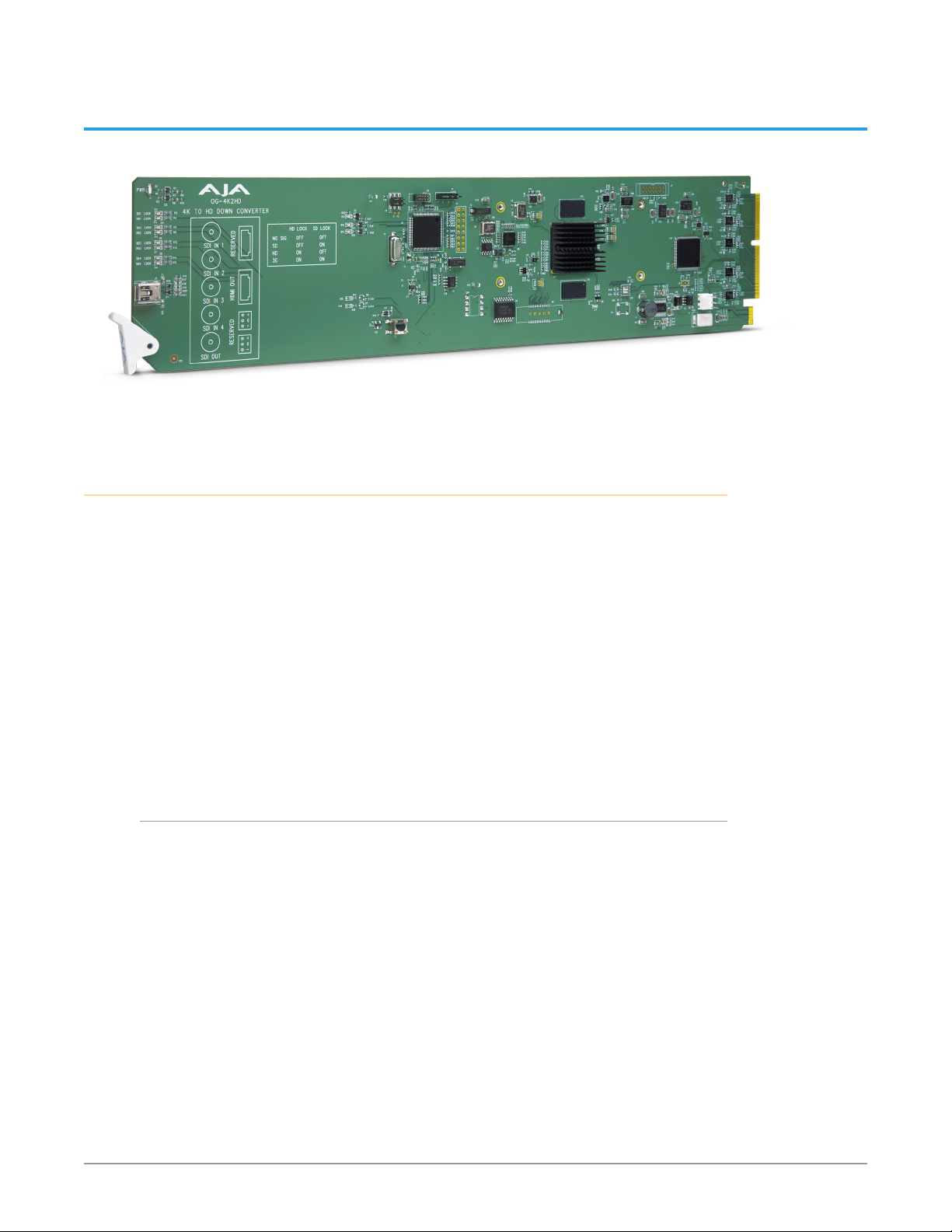
OG-4K2HD is an openGear card that down-converts professional 3G-SDI 4K/
UltraHD signals to HD resolution using AJA’s high-quality scaling for cost-effective
monitoring and conversion. OG-4K2HD’s HD-SDI and HDMI outputs are live
simultaneously, producing fantastic-looking HD images for on set monitoring or
direct-to-air broadcast.
OG-4K2HD supports high frame rate (HFR) 4K/UltraHD inputs at 50 and 60fps
and converts to HD outputs at 50 and 60fps for accurate viewing. OG-4K2HD’s
configuration options allow extraction of an HD resolution image from the 4K
input to provide a one-to-one pixel image for 4K focus checks on HD displays.
Designed for use in high-density openGear’s 2RU frames including AJA’s OG-X-FR
2RU frame, new DashBoard Software support on Windows®, macOS® and Linux®
offers remote control and monitoring of the openGear architecture and provides
convenient and industry-standard configuration, monitoring and control options
over a PC or local network.
OG-4K2HD Operating Modes
OG-4K2HD has three working modes: 4K Down-Conversion mode, Non-4K mode,
and Center Cut mode. The first two modes are selected automatically depending
on the input video. These modes can also be manually set using the DashBoard
application.
• 4K Down Conversion mode: If the format of the input video is detected as 4K
or UltraHD format, or the unit is congured by DashBoard, 4K/UltraHD input
video is down-scaled to 2K/HD video and then output on both the HDMI and
the SDI outputs.
• Non-4K mode: If the format of the input video is detected as a non-4K video
source, for example, 720p60, OG-4K2HD will output video that matches the
signal format and resolution of the input signal.
• Center Cut mode: OG-4K2HD will be in Center Cut mode if the input video
is 4K/UltraHD format, and the mode has been enabled through DashBoard.
In this mode the 2K/HD center of 4K/UltraHD input video will be output to
the HDMI and SDI outputs. No down-scaling occurs, and the output format
is either 1920x1080 or 2048x1080 (depending the input source and the 2K
cropping conguration).
OG-4K2HD 4K/UltraHD-SDI to 3G-SDI Down-Converter v1.0 4 www.aja.com
Page 5

Default Operation
The OG-4K2HD auto configures to the connected inputs.
The auto-configure function identifies the connected inputs and generates the
default outputs for the given input. Default operation can be overridden and set
manually using AJA’s DashBoard application.
NOTE: Signal conversion requires the presence of a valid SDI video signal on the SDI IN 1
BNC.
For single SD or HD inputs, BNC input 1 is the default input. For dual-link 1.5Gb
HD inputs, and 4K/UltraHD dual-stream 3Gb SDI inputs, inputs 1 and 2 are
default. Where applicable, both level A and B 3Gb inputs are auto-detected and
supported.
When connecting the OG-4K2HD with multiple SDI inputs in the auto-configure
mode (default), as the user connects the first HD-SDI to input 1, the unit will
output that input as a full screen HD. As soon as the second input is connected,
the unit will know that either QuadHD or 4K x 2160 is present and the display will
change to show the two connected quadrants in the upper left and upper right of
the output. The remaining two quadrants will be displayed as they are connected.
It is possible to use two dual-stream 3G inputs to make 3840 or 4K video. In this
case SDI1 and SDI2 are assumed to be the inputs: SDI1 linkA makes the top left
quadrant, SDI1 linkB makes the top right quadrant, SDI2 linkA makes the lower
left quadrant, and SDI2 linkB makes the lower right quadrant. To use this mode
change the Video Source Selection to ‘2 X SDI 4K’.
Video Output
OG-4K2HD has two output connectors, HDMI and SDI, that are both active
simultaneously.
For 4096x2160 inputs, the OG-4K2HD will output 2048x1080 if 2K crop option is
turned off (through DashBoard), otherwise 4096x2160 inputs will be scaled to
2048x1080, then cropped to 1920x1080. OG-4K2HD will not scale 4096 to 1920
pixels.
The HDMI and SDI output connectors will generally be the same video, with the
exception of non-4K PsF video input.
SDI passthrough is enabled by default if the input video is 2K/HD PsF. In this
case, SDI output is PsF format, and HDMI output is progressive format. The HDMI
output is delayed one frame, compared to the SDI output. The SDI passthrough
can be disabled by DashBoard. If disabled, the SDI output will be progressive
format, the same as HDMI output, with no frame delay.
HDMI and SDI Output Control Differences
Some video output control options are only applicable to HDMI output, such
as color range, sample structure or HDMI/DVI standard. Some options are only
applicable to SDI output, such as Level B control, or PsF passthrough. And some
output control options are applied to both, such as Center Cut.
DashBoard Control
Configuration set via DashBoard is stored in the OG-4K2HD unit through
subsequent power cycles.
OG-4K2HD 4K/UltraHD-SDI to 3G-SDI Down-Converter v1.0 5 www.aja.com
Page 6

DashBoard Control Functions
Input Video Selections
• Video Source (Auto, 4xSDI 4K, 2xSDI 4K, 2xSDI HD-DL, SDI 1-4)
• Color Space (Auto, 422 YCbCr, 444 RGB, or 444 YCbCr)
• RGB Range (SMPTE or Full color range).
• Bit Depth (Auto, 8-bit, or 10-bit)
• Mapping (Quadrant or 2SI)
• Video Format (Auto, Progressive, Interlaced, or PsF).
• 3G-B Mode (Auto, Dual Link, 2xHD, 1 x HD DS1, 1 x HD DS2)
Output Video Selections
• 4K Convert (Downconvert, Center Cut)
• 2K Crop (On or O)
• SDI Out (Passthrough or Processed)
• Edge Filtering (On or O)
• 1080p to 1080i interlacer
HDMI Output
• Color Space (Auto, 4:2:2 YCbCr, 4:4:4 RGB, 4:4:4 YCbCr)
• Bit Depth (Auto, 8-bit, or 10-bit)
• RGB Range (Auto, SMPTE or Full)
• Color Dithering (O or On)
• HDMI/DVI (Auto, HDMI, or DVI)
Features
Audio
• Input Source (Ch 1-8 or Ch 9-16 from any SDI input)
• HDMI Channel Count (Auto, 2, 8)
• Audio Oset In Frames
• openGear compatible card
• 4K (4096x2160) and UltraHD (3840x2160) support
• Downconversion for supporting 4K on HD-SDI and HDMI devices
• Simultaneous HD-SDI and HDMI output
• Controlled by DashBoard network control software
• Aspect ratio conversion from full 4K to HD
• Supports up to 4K/UltraHD 50/60fps high frame rate input formats
• Requires Two Slots in openGear Frame
• Rear I/O Card Included
• Use with openGear 2RU frames including AJA’s OG-3-FR frame
• Five year warranty
OG-4K2HD 4K/UltraHD-SDI to 3G-SDI Down-Converter v1.0 6 www.aja.com
Page 7
Block Diagram
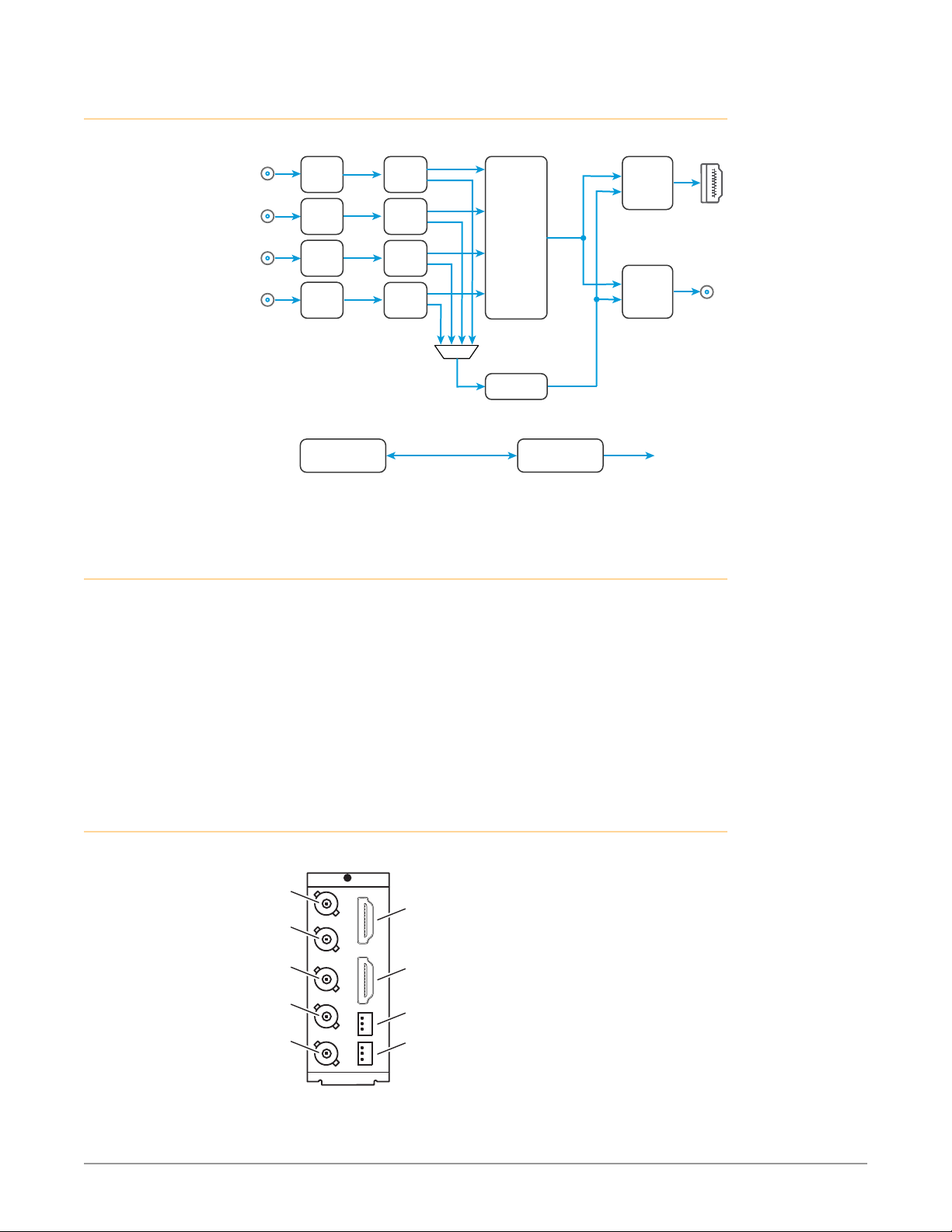
Figure 1. OG-4K2HD, Simplified Block Diagram
SDI In 1
SDI In 2
SDI In 3
SDI In 4
openGear and AJA
openGear is an open-architecture, modular frame system designed by Ross
Video and supported by a diverse range of terminal equipment manufacturers,
including AJA. Ross Video manufactures the frames, power supplies and network
cards for openGear. AJA is a reseller of the openGear frames.
AJA Video is a leading manufacturer of video interface technologies, converters,
digital video recording solutions and professional cameras, bringing highquality, cost-effective products to the professional, broadcast and postproduction markets. AJA products, including openGear cards, are designed and
manufactured at our facilities in Grass Valley, California.
SDI
RCVR
SDI
RCVR
SDI
RCVR
SDI
RCVR
DashBoard
Reclock
Reclock
Reclock
Reclock
Video
Processing
Audio
Processing
Video
Audio
Control
HDMI
XMIT
SDI
XMIT
12C to HDMI XMIT
and EDID Readback
HDMI
Output with
Embedded
Audio
SDI Out
with Embedded
Audio
I/O Connections
Figure 2. I/O Connections for the OG-4K2HD
SDI Input 1
BNC (J1)
SDI Input 2
BNC (J2)
SDI Input 3
BNC (J3)
SDI Input 4
BNC (J4)
SDI Output
BNC (J5)
OG-4K2HD 4K/UltraHD-SDI to 3G-SDI Down-Converter v1.0 7 www.aja.com
(inactive)
HDMI Output
(inactive)
(inactive)
Page 8
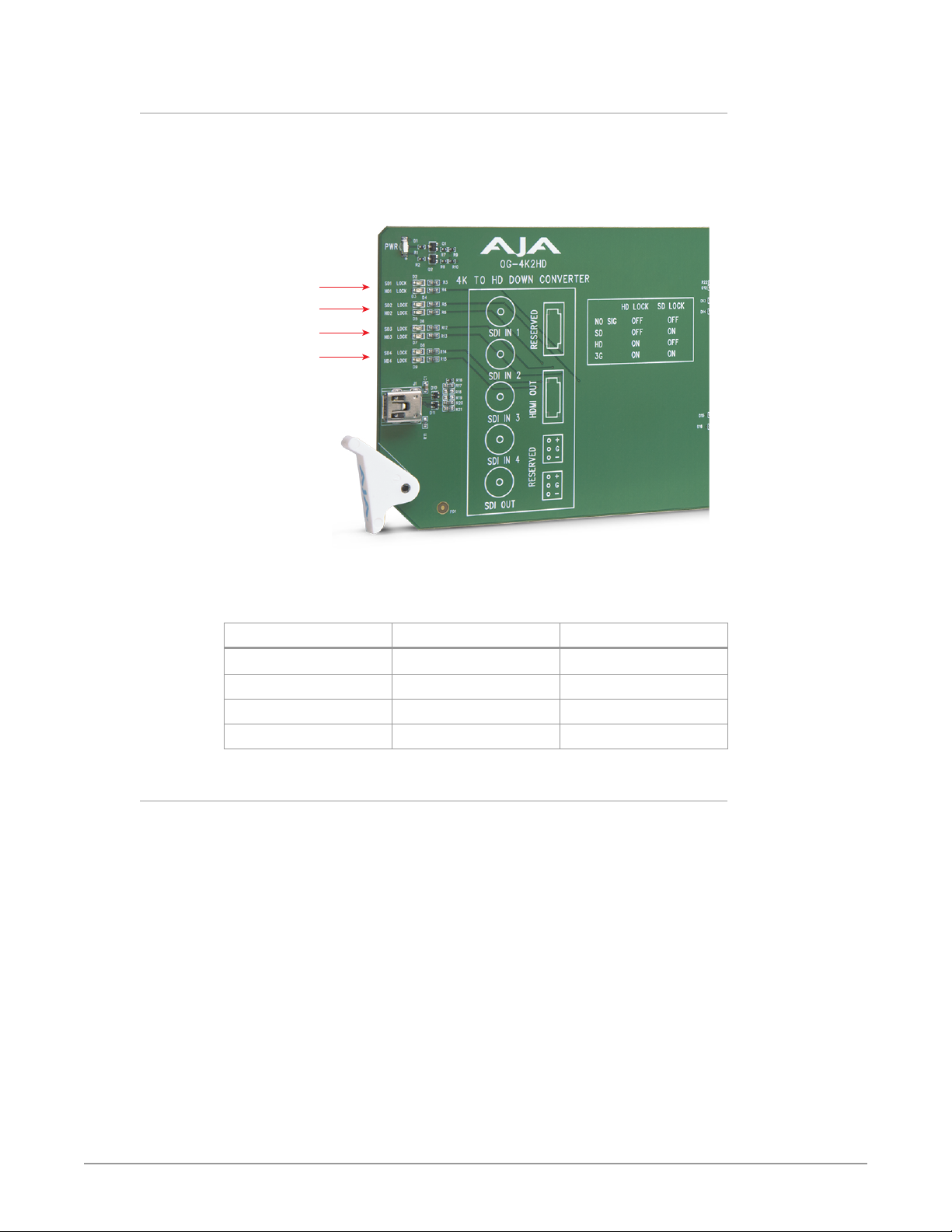
Signal Indicators on the OG-4K2HD Card
Located at the upper front area of the OG-4K2HD card, the SD Lock and HD Lock
LEDs work in combination to indicate the type of signal detected for each SDI
input.
Figure 3. LED lights on card
Four pair of
SD and HD
Lock LEDs
corresponding
to SDI Inputs
1, 2, 3 and 4
Table 1. The meaning of the behaviors of the lights for each pair of SD and HD
Lock LEDs.
Signal Detected HD Lock Light SD Lock Light
No Signal O O
SD Signal O On
HD Signal On O
3G Signal On On
Signal Indicators in the DashBoard Control System
When the signal is either not present or is not locked, the DashBoard Control
System shows a red Card State alarm under the Signal Status tab. Additionally, the
SDI Signal is shown as "No Input."
OG-4K2HD 4K/UltraHD-SDI to 3G-SDI Down-Converter v1.0 8 www.aja.com
Page 9
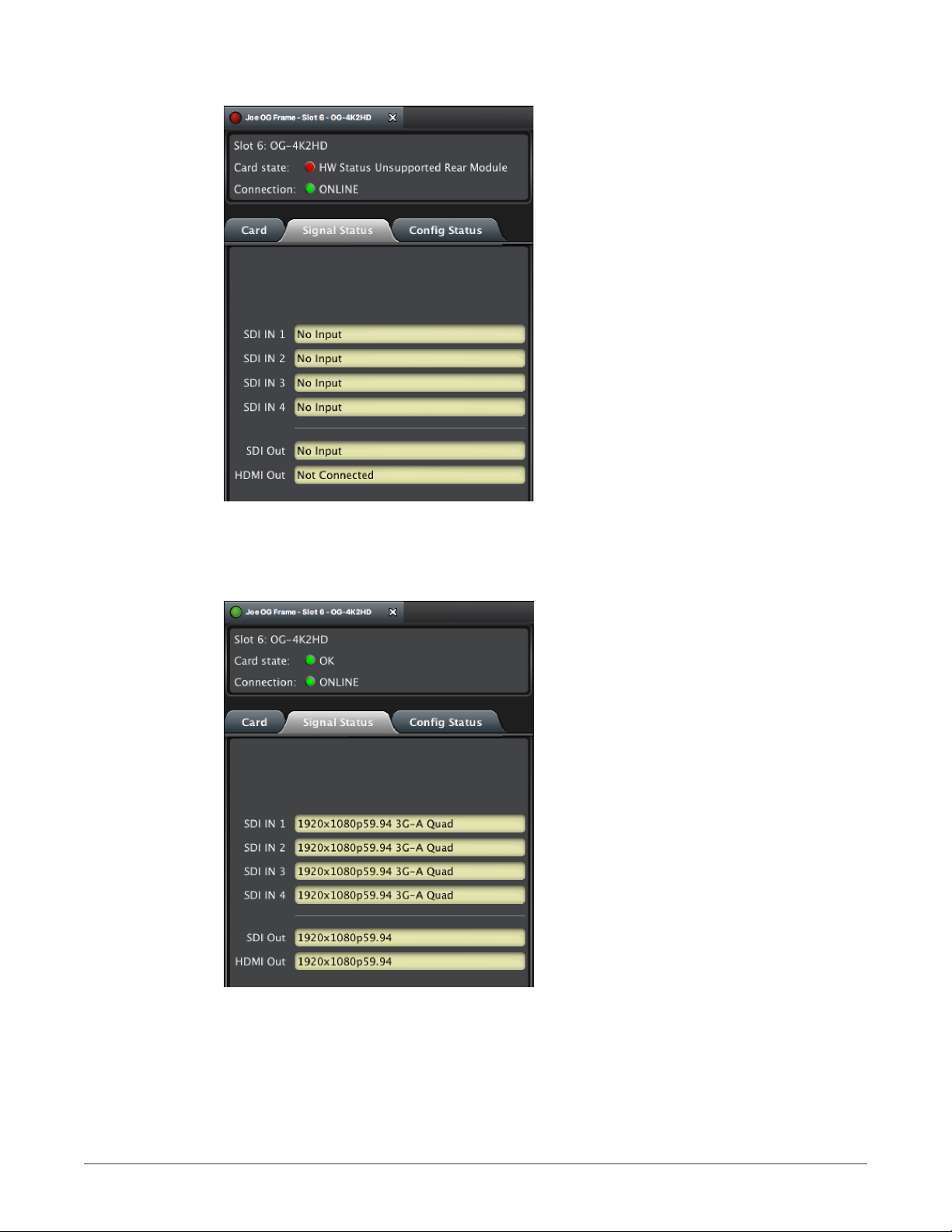
Figure 4. Signal not present or not locked
When a signal is present and locked, the DashBoard Control System shows a
green Card State and a green Connection under the Signal Status tab. The SDI
Signal is also indicated (for example, "1920x1080p59.94 3G-A Quad").
Figure 5. Signal is present and locked
OG-4K2HD 4K/UltraHD-SDI to 3G-SDI Down-Converter v1.0 9 www.aja.com
Page 10
User Controls
The OG-4K2HD can be used right out of the box for many applications, since
it is designed to recognize inputs and perform standard actions automatically.
However, you can also manually configure the OG-4K2HD using remote
conguration through the DashBoard Control System for an openGear Frame.
DashBoard Control System
The DashBoard Control System, created by Ross Video, provides a control
interface between Windows, macOS and Linux computers and the cards installed
in an openGear frame. DashBoard operates through TCP/IP communication
and requires an Ethernet connection between the controlling computer and an
openGear frame.
For details about acquiring and using the DashBoard Control System, refer to
"Using the DashBoard Control System" on page 13.
Installation
Summary
Installing an OG-4K2HD card into a OG3 openGear frame consists of the following
steps:
• Install the Rear Panel onto the back of the frame corresponding to the slot pair
• Insert the OG-4K2HD card into the frame in the right (even numbered) slot of
• Connect the BNC, HDMI and audio cabling to the Rear Panel.
ESD Susceptibility - Static discharge can cause serious damage to sensitive
Unpacking
Unpack each openGear product you received from the shipping container and
ensure that all items are included. If any items are missing or damaged, contact
your sales representative or AJA directly.
Parts List
Quantity Description
1 OG-4K2HD Front Card in ESD bag
you will be using for the OG-4K2HD card.
the pair.
semiconductor devices. Avoid handling circuit boards in high static
environments such as carpeted areas, and when wearing synthetic ber clothing.
Always exercise proper grounding precautions when working on circuit boards
and related equipment.
1 BNC Rear Card
Rear OG-4K2HD Card Installation
1. Ensure that the frame is properly installed.
2. Locate the card frame slot on the rear of the openGear frame into which you
wish to install the openGear card.
OG-4K2HD 4K/UltraHD-SDI to 3G-SDI Down-Converter v1.0 10 www.aja.com
Page 11
NOTE: An OG-4K2HD card occupies two slots in the frame.
3. Using a Phillips screwdriver, unscrew the top screw from the desired blank
rear plate and remove the rear plate.
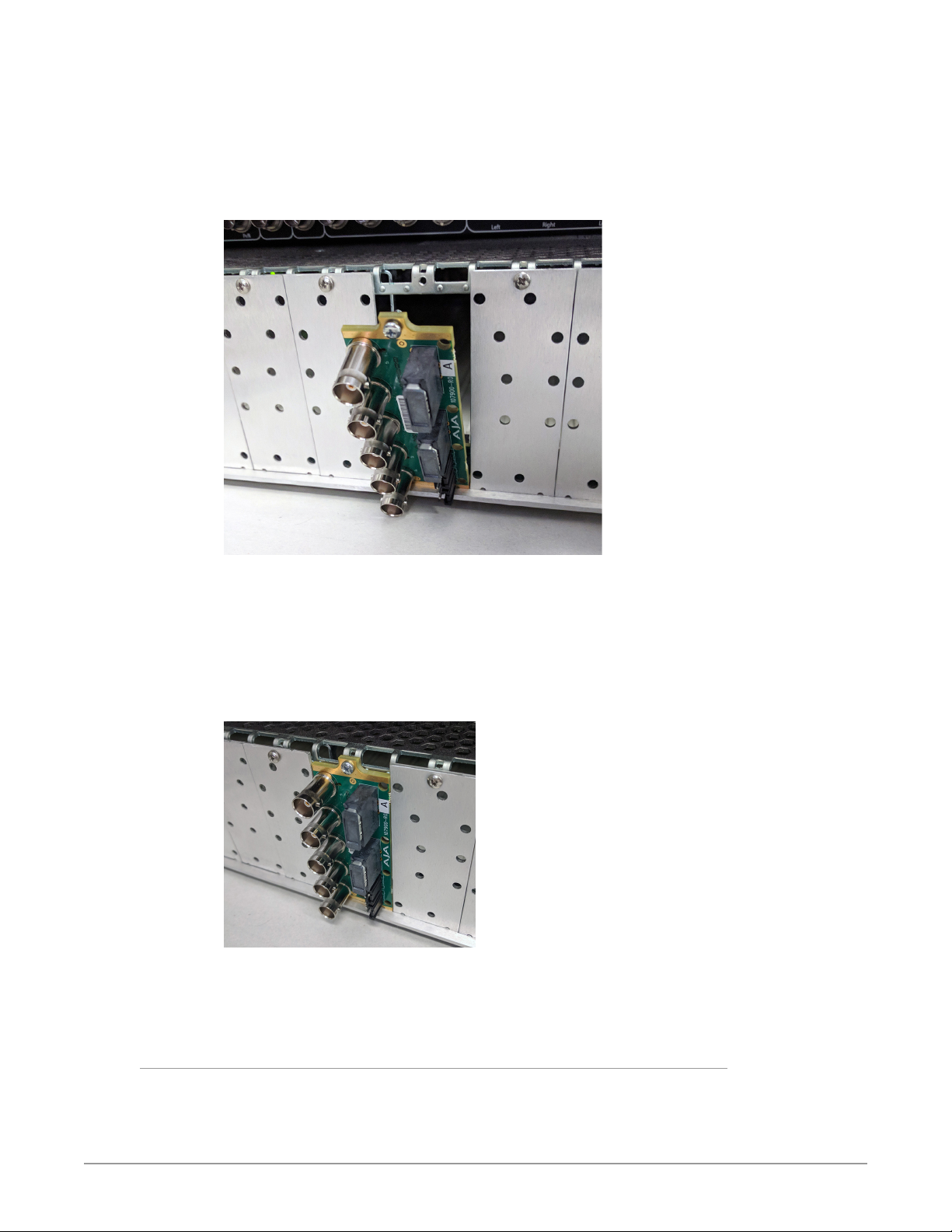
4. Seat the bottom of the Rear Card in the seating slot at the base of the frame
back plane.
Figure 6. Rear Card Inserting Into Frame Seating Slot
5. Align the top screw of the Rear Card with the screw hole on the top edge of
the frame back plane.
6. Ensure the Rear Card aligns with the desired card slot before tightening the
screw.
7. Using a Phillips screwdriver, fasten the Rear Card to the frame back plane.
Do not over tighten.
Figure 7. Rear Card Inserted Into Frame Seating Slot
8. Ensure proper frame cooling and ventilation by having all rear frame slots
covered with rear modules or blank metal plates if plates are not preinstalled.
Front OG-4K2HD Card Installation
1. Open the openGear frame door as follows:
A. Gently pull the side door tabs towards the center of the door, releasing the
door from the frame.
OG-4K2HD 4K/UltraHD-SDI to 3G-SDI Down-Converter v1.0 11 www.aja.com
Page 12

B. Using both hands, pull the door towards you. The door extender arms
prevent the door from falling.
2. Locate the Rear Card you installed as described above. The interior slot
number is dependent on the slot combinations into which you installed the
Rear Card. This allows adequate spacing to avoid damaging the card, the
cards installed in the neighboring slots, or both.
3. Hold the card by the edges and carefully align the card edges with the rails
inside the frame. The slots are numbered starting from the left-most slot
when facing the fame front.
IM PORTA NT: OG-4K2HD cards are installed into the right (even numbered) slot of the pair
in order to connect with the rear panel.
4. Fully insert the card into the frame until the card is properly seated in the
Rear Card.
Figure 8. OG-4K2HD card inserted Into Right Slot
Cabling
5. Close the frame door as follows:
A. Slide the door into the frame.
B. Pull and release the door tabs to ensure the frame door is securely locked
to the frame.
Refer to "I/O Connections for the OG-4K2HD" on page 7 to identify the input and
output signal connectors.
OG-4K2HD 4K/UltraHD-SDI to 3G-SDI Down-Converter v1.0 12 www.aja.com
Page 13

Chapter 2 – Operation
Using the DashBoard Control System
The DashBoard Control System is available as a free download from the openGear
DashBoard Software Download webpage:
http://www.opengear.tv/dashboard-software/#support_box
Ross Video offers comprehensive documentation that covers the extensive
capabilities of the DashBoard Control System:
https://www.rossvideo.com/support/product-documentation/dashboard/
This AJA OG-4K2HD manual addresses only those essential aspects of the
DashBoard Control System needed to control the OG-4K2HD card.
Requirements
The DashBoard Control System requires the following components:
• openGear frame with a Frame Controller card
• Ethernet connection betweeen the controlling computer and the openGear
frame
NOTE: The openGear frame ships from AJA with the MFC-8322-S Frame Controller card
for controlling the new AJA DashBoard cards. The openGear frame also supports
the MFC-0G3-N Advanced Networking Frame Controller card, which can be used
to control compatible OG cards.
DashBoard automatically discovers openGear and DashBoard Connect devices,
such as openGear frames and cards that are present and accessible on your
network.
Control Interface Basic Components
The basic components of the DashBoard Control System user interface consist of
the basic tree view of frames and cards, the card information and status panel,
and the parameter controls panel. These elements are shown below in Figure 6.
The basic tree view of frames and cards shows the frames and cards that are
discoverable by DashBoard on your network.
The card information and status panel, shown in the middle panel, display the
basic status of the card currently selected in DashBoard.
The parameter controls panel shows the tabs and parameters that the selected
card has available for configuration and control.
OG-4K2HD 4K/UltraHD-SDI to 3G-SDI Down-Converter v1.0 13 www.aja.com
Page 14

Figure 9. Main Sections of the DashBoard User Interface
Basic Tree View of
Frames and Cards
Card Information
and Status
Parameter
Controls
OG-4K2HD 4K/UltraHD-SDI to 3G-SDI Down-Converter v1.0 14 www.aja.com
Page 15

Card Tab Screen
Figure 10. OG-4K2HD Card Tab Screen in DashBoard
The Card tab screen indicates the basic information about the card itself such as
the card name, hardware status, serial number, software version and other items.
OG-4K2HD 4K/UltraHD-SDI to 3G-SDI Down-Converter v1.0 15 www.aja.com
Page 16

Signal Status Tab Screen
Figure 11. OG-4K2HD Signal Status Tab Screen in DashBoard
The SDI In 1 - 4 status controls report whether the signal is connected, or No
Input.
Each SDI Input reports the signal detected by the card's corresponding inputs.
OG-4K2HD 4K/UltraHD-SDI to 3G-SDI Down-Converter v1.0 16 www.aja.com
Page 17

Config Status Tab Screen
Figure 12. OG-4K2HD Config Status Tab Screen in DashBoard
The Config Status tab screen reports the current setting of configuration
parameters that are set to Auto.
OG-4K2HD 4K/UltraHD-SDI to 3G-SDI Down-Converter v1.0 17 www.aja.com
Page 18

Input Tab Screen
Figure 13. OG-4K2HD Input Tab Screen in DashBoard
Click on the Input tab to view and make changes to the converter’s input settings.
Video Source
Selects the input video format. Choose from the following:
Auto - automatically selects the format based on the input video parameters.
4xSDI 4K
2xSDI 4K - (3G-B Dual Stream input required)
2xSDI HD-DL - (2 wire SMTPE 372)
SDI 1, SDI 2, SDI 3, or SDI 4
NOTE: One of the 4 incoming quadrants of 4K video can be shown full screen on the
HDMI/SDI outputs. This is accomplished by selecting one of the 4 SDI inputs, but
requires that all 4 SDI inputs are connected.
Color Space
Selects the Input Video Color Space. Choose Auto, 422 YCbCr, 444 RGB, or 444
YCbCr. Choosing “Auto” will automatically select color mode based on the input
video parameters and the payload ID.
RGB Range
Selects the Input Video Color Range. Choose SMPTE (default) or Full color range.
There is no auto detection for color range.
Bit Depth
Selects the input video bit depth. Choose Auto, 8-bit or 10-bit. Choosing “Auto”
automatically selects the bit depth based on the input video parameters and the
payload ID.
Mapping
Select the 4K/UltraHD mapping format:
OG-4K2HD 4K/UltraHD-SDI to 3G-SDI Down-Converter v1.0 18 www.aja.com
Page 19

Auto (default) -automatically selects the mapping based on the input video.
2SI - Two Sample Interleave
Quadrant - Square Division
Video Format
Selects the Input Video Format. Choose from Auto, Progressive, Interlaced, or PsF
(progressive segmented frame). Choosing “Auto” automatically selects the format
based on the input video parameters and the payload ID.
3G-B Mode
Selects the 3G level B Video Mode. Choose from the following:
Auto - automatically selects the format based on the input video parameters.
Level B DL - select this when the input is Dual Link, your 3G signal is carrying 444
information, or the input is 1080p50/59.94.
Level B DS - Dual Stream - each Data Stream is an independent source.
Level B DS Link 1 - use only Data Stream 1 as a single video.
Level B DS Link 2 - use only Data Stream 2 as a single video.
Output Tab Screen
Figure 14. OG-4K2HD Output Tab Screen in DashBoard
Click on the Output tab to view and make changes to the OG-4K2HD Output
settings. These settings can affect both the HDMI and SDI outputs.
Output Mode
4K Convert
Downconvert - Downconverts incoming 4K signal to HD (default setting).
Center Cut - Selects the center portion of the incoming 4K signal for display. No
down-scaling occurs, and the output format is either 1920x1080 or 2048x1080
(depending the input source and the 2K Crop setting.
OG-4K2HD 4K/UltraHD-SDI to 3G-SDI Down-Converter v1.0 19 www.aja.com
Page 20

2K Crop
Choose On or Off. Provides the option of center cutting 2Kx1080 video signals to
make 1920x1080, or center cutting a 4Kx2160 signal to make 1920x1080. Default
is On.
Edge Filtering
Choose On or Off. You can disable edge filtering with this control. This is useful if
you are stitching together multiple images of OG-4K2HD outputs. An example is
using four OG-4K2HDs to view UHD-2 or 8K on a UltraHD/4K or HD monitor. Each
OG-4K2HD downconverts one quarter of the 8K image. Disabling edge filtering
can eliminate the center vertical and horizontal lines that would occur between
the quadrants in that situation. Default setting is On.
Passthrough
Choose Auto, Off, or On (default is Auto). This setting can be used with HD or 2K
psf format input signals. When On, psf format will passthrough to the SDI output
instead of the converted, progressive format signal.
3Gb Mode
Choose Auto (default), 3G-A, or 3G-B.
Progressive to Interlace Enable
Choose Off or On. When On, a 4K/UHD progressive input will be output as a
1920x1080 interlace signal when possible.
More specifically, when Progressive to Interlace is enabled, the OG-4K2HD
converts 4096x2160 or 3840x2160 progressive signals to a 1920x1080 interlace
signal. Crop is automatically applied if the input signal is 4K.
This conversion is functional for the 4K and UHD input formats listed below:
Input Output
3840x2160p25
3840x2160p50
4096x2160p25
4096x2160p50
3840x2160p29.97
3840x2160p59.94
4096x2160p29.97
4096x2160p59.94
3840x2160p30
3840x2160p60
4096x2160p30
4096x2160p60
1920x1080i25
1920x1080i29.97
1920x1080i30
OG-4K2HD 4K/UltraHD-SDI to 3G-SDI Down-Converter v1.0 20 www.aja.com
Page 21

HDMI Tab Screen
Figure 15. OG-4K2HD HDMI Tab Screen in DashBoard
Click on the HDMI tab to view and make changes to the OG-4K2HD HDMI output
settings.
Color Space
Selects the desired output video format. Choose from the following:
Auto - selects the video format based on the input video and the attached
device’s capabilities (default setting).
4:2:2 YCbCr - (cannot exceed 10-bit depth)
4:4:4 RGB
4:4:4 YCbCr
Bit Depth
Choose from Auto, 8-bit, or 10-bit (see limitations above). Choosing “Auto”
automatically selects the bit depth based on the input video and the attached
device’s capabilities.
RGB Range
Choose Auto, SMPTE or Full. Choosing “Auto” automatically selects the same
value as the input range setting.
Color Dithering
Choose Off or On. Default is Off.
HDMI/DVI
Choose Auto, HDMI, or DVI. When DVI is selected, any audio signals present are
not passed. Choosing “Auto” automatically selects the output mode based on the
attached device’s capabilities. Default is Auto.
OG-4K2HD 4K/UltraHD-SDI to 3G-SDI Down-Converter v1.0 21 www.aja.com
Page 22

Audio Tab Screen
Figure 16. OG-4K2HD Audio Tab Screen in DashBoard
Click on the Audio tab to view and make changes to the OG-4K2HD audio
settings.
HDMI Channel Count
Choose Auto, 2 of 8 channels or 8 channels embedded audio. Choosing “Auto”
automatically selects the audio channels based on the attached device’s
capabilities.
The SDI output embedded audio always follows the selected HDMI Output source
selection and is limited to 8 channels max.
Audio Input Source
Choose which embedded audio channels are routed to the HDMI output. Eight
channels are routed at a time. You can choose Ch 1-8 or Ch 9-16 from any SDI
input.
Audio Offset In Frames
Permits time shifting the embedded audio in relationship to the video (for
example, to correct for lip sync problems), in 1/16 of a frame increments. Range is
from -0.8125 video frame to +7.0 video frames. The actual time duration of delay
will vary depending on the frame rate of the format being converted.
Default offset value is 0 frame to match the video delay path, resulting in timealigned audio on the output. Positive offset delays the audio additional frames
(relative to the video output), negative offset advances the audio relative to the
video output.
Setup Tab Screen
Click on the Setup tab to view and make changes to the card name or to restore
card settings to factory default values.
OG-4K2HD 4K/UltraHD-SDI to 3G-SDI Down-Converter v1.0 22 www.aja.com
Page 23

Figure 17. OG-4K2HD Setup Tab Screen in DashBoard
Card Name - By default, this field is pre-populated with the card name
OG-4K2HD. You can change the card name by editing the text in the Card
Name field.
Factory Settings - If you would like to revert the card settings to factory default
values, click Restore.
Upload Screen
To Upload New Software
1. Check the AJA website for new software for your OG-4K2HD. If new
software is found, download it and uncompress the le archive (zip).
2. Click the Upload button in the lower panel of the DashBoard Control System
to open the Upload Software Wizard.
OG-4K2HD 4K/UltraHD-SDI to 3G-SDI Down-Converter v1.0 23 www.aja.com
Page 24

Figure 18. OG-4K2HD Upload Software Wizard window in DashBoard
3. From the Upload Software Wizard window, select Browse.
4. Navigate to the location of the downloaded .bin le containing the software
update. Select the .bin le, then select Open. The Upload Software Wizard
window displays characteristics of the selected le for uploading.
5. Click Finish. The Uploading to Selected Devices window displays with a
progress bar.
Figure 19. OG-4K2HD Uploading to Selected Devices window in DashBoard
6. When the progress bar indicates that the uploading is nished and status
indicates "Complete," click OK.
7. To verify the version of software or rmware currently installed on your
card, select the Card tab from the center panel of DashBoard.
OG-4K2HD 4K/UltraHD-SDI to 3G-SDI Down-Converter v1.0 24 www.aja.com
Page 25

Figure 20. OG-4K2HD Card Tab Screen in DashBoard indicating the currently
installed software version.
Rebooting
Rebooting is a standard function built in to the DashBoard Control System, and
should only be performed if the board has become unresponsive.
WARN ING: During a reboot, any down-converting operations will be briefly
interrupted, but will be restored once the reboot has completed.
To Reboot the OG-4K2HD
1. Click the Reboot button in the lower panel of DashBoard. The reboot
conrmation message displays.
Figure 21. Reboot confirmation window
2. Click Ye s. The message "Loading data, please wait. Refreshing device data"
displays for a moment. The card will be oine for a few seconds, and any
current conversion operations will be interrupted.
3. Following a Reboot operation, the board conguration will return to the
settings that were in place at the time of rebooting.
OG-4K2HD 4K/UltraHD-SDI to 3G-SDI Down-Converter v1.0 25 www.aja.com
Page 26

Appendix A – Specications
OG-4K2HD Tech Specs
Video Formats
• (4K) 4096 x 2160p
• (4K) 4096 x 2160PsF
• (UltraHD) 3840 x 2160p
• (Ultra HD) 3840 x 2160PsF
• (2K) 2048 x 1080p
• (2K) 2048 x 1080Psf
• (HD) 1920 x 1080p
• (HD) 1920 x 1080Psf
• (HD) 1920 x 1080i
• (HD) 1280 x 720p
• (SD) 720 x 576i
• (SD) 720 x 480i
Video Input Digital
• 4x 3G-SDI BNC, SMPTE-259/292/372/424
• YCbCr 4:2:2/4:4:4
• RGB 4:4:4, SMPTE or Full level
• 8 or 10-bit
• Two Sample Interleave (2SI) or Square Division (Quadrant) source mapping
• 4x 3 Gb SDI (Level A or B-Dual Link)
• (4K) 4096 x 2160p 23.98, 24, 25, 29.97, 30, 50, 59.94, 60
• (4K) 4096 x 2160PsF* 23.98, 24, 25, 29.97, 30
• (UltraHD) 3840 x 2160p 23.98, 24, 25, 29.97, 30, 50, 59.94, 60
• (Ultra HD) 3840 x 2160PsF* 23.98, 24, 25, 29.97, 30
• 4x 1.5 Gb SDI
• (4K) 4096 x 2160p 23.98, 24, 25, 29.97, 30
• (4K) 4096 x 2160PsF 23.98, 24, 25, 29.97, 30
• (UltraHD) 3840 x 2160p 23.98, 24, 25, 29.97, 30
• (UltraHD) 3840 x 2160PsF 23.98, 24, 25, 29.97, 30
• 2x 3 Gb SDI (Level B-Dual Stream)
• (4K) 4096 x 2160p 23.98, 24, 25, 29.97, 30
• (4K) 4096 x 2160PsF 23.98, 24, 25, 29.97, 30
• (UltraHD) 3840 x 2160p 23.98, 24, 25, 29.97, 30
• (UltraHD) 3840 x 2160PsF 23.98, 24, 25, 29.97, 30
• 1x 3 Gb SDI (Level A or B-Dual Link)
• (2K) 2048 x 1080p 23.98, 24, 25, 29.97, 30, 50, 59.94, 60
• (2K) 2048 x 1080PsF 23.98, 24, 25, 29.97, 30
• (HD) 1920 x 1080p 23.98, 24, 25, 29.97, 30, 50, 59.94, 60
• (HD) 1920 x 1080PsF 23.98, 24, 25, 29.97, 30
• (HD) 1920 x 1080i 50, 59.94, 60
• (HD) 1280 x 720p** 50, 59.94, 60
OG-4K2HD 4K/UltraHD-SDI to 3G-SDI Down-Converter v1.0 26 www.aja.com
Page 27

• 2x 1.5 Gb SDI
• (HD) 1920 x 1080p 50, 59.94, 60
• 1x 1.5 Gb SDI
• (2K) 2048 x 1080p 23.98, 24, 25, 29.97, 30
• (2K) 2048 x 1080PsF 23.98, 24, 25, 29.97, 30
• (HD) 1920 x 1080p 23.98, 24, 25, 29.97, 30
• (HD) 1920 x 1080PsF 23.98, 24, 25, 29.97, 30
• (HD) 1920 x 1080i 50, 59.94, 60
• (HD) 1280 x 720p 50, 59.94, 60
• 1x 270 Mb SDI
• (SD) 625i 50
• (SD) 525i 59.94
*PsF is Level B-Dual Link
**1280 x 720p is Level A Only
Video Output Digital
• 1x 3G-SDI BNC, SMPTE-259/292/372/424
• Color space and sampling match input signal
• 1x 3 Gb SDI (Level A or B-Dual Link)
• (2K) 2048 x 1080p 23.98, 24, 25, 29.97, 30, 50, 59.94, 60
• (2K) 2048 x 1080PsF 23.98, 24, 25, 29.97, 30
• (HD) 1920 x 1080p 23.98, 24, 25, 29.97, 30, 50, 59.94, 60
• (HD) 1920 x 1080PsF 23.98, 24, 25, 29.97, 30
• (HD) 1920 x 1080i 50, 59.94, 60
• (HD) 1280 x 720p* 50, 59.94, 60
• 1x 1.5 Gb SDI
• (2K) 2048 x 1080p 23.98, 24, 25, 29.97, 30
• (2K) 2048 x 1080PsF 23.98, 24, 25, 29.97, 30
• (HD) 1920 x 1080p 23.98, 24, 25, 29.97, 30
• (HD) 1920 x 1080PsF 23.98, 24, 25, 29.97, 30
• (HD) 1920 x 1080i 50, 59.94, 60
• (HD) 1280 x 720p 50, 59.94, 60
• 1x 270 Mb SDI
• (SD) 625i 50
• (SD) 525i 59.94
• 1x HDMI Type A connector, HDMI v1.4
• YCbCr 4:2:2/4:4:4
• RGB 4:4:4, SMPTE or Full level
• 8 or 10-bit (4:4:4 limited to 8 bit)
• (2K) 2048 x 1080p 23.98, 24, 25, 29.97, 30, 50, 59.94, 60
• (HD) 1920 x 1080p 23.98, 24, 25, 29.97, 30, 50, 59.94, 60
• (HD) 1920 x 1080i 50, 59.94, 60
• (HD) 1280 x 720p 50, 59.94, 60
• (SD) 720 x 576i 50
• (SD) 720 x 480i 59.94
*1280 x 720p is Level A Only
Audio Input Digital
• SDI embedded audio, 24-bit, 8-Channel
OG-4K2HD 4K/UltraHD-SDI to 3G-SDI Down-Converter v1.0 27 www.aja.com
Page 28

Audio Output Digital
• SDI embedded audio, 24-bit, 8-Channel
• HDMI embedded audio, 24-bit, 8-Channel
User Controls
• openGear DashBoard network control software via Windows, macOS or Linux
Size
• openGear standard form factor, front slot and rear card. Two slots required for
each card
Weight
• 0.5 lb (0.3 kg)
Power
• openGear frame compatible, 11.0 watts max per card
Environment
• Safe Operating Temperature: 0 to 40 C (32 to 104 F)
• Safe Storage Temperature (Power OFF): -40 to 60 C (-40 to 140 F)
• Operating Relative Humidity: 10-90% noncondensing
• Operating Altitude: <3,000 meters (<10,000 feet)
OG-4K2HD 4K/UltraHD-SDI to 3G-SDI Down-Converter v1.0 28 www.aja.com
Page 29

Appendix B – Safety and Compliance
Federal Communications Commission (FCC) Compliance Notices
Class A Interference Statement
This equipment has been tested and found to comply with the limits for a Class
A digital device, pursuant to Part 15, Subpart B of the FCC Rules. These limits
are designed to provide reasonable protection against harmful interference
in a residential installation. This equipment generates, uses, and can radiate
radio frequency energy and, if not installed and used in accordance with the
instructions, may cause harmful interference to radio communications. However,
there is no guarantee that interference will not occur in a particular installation. If
this equipment does cause harmful interference to radio or television reception,
which can be determined by turning the equipment off and on, the user is
encouraged to try to correct the interference by one or more of the following
measures:
• Reorient or relocate the receiving antenna.
• Increase the separation between the equipment and receiver.
• Connect the equipment into an outlet on a circuit dierent from that to which
the receiver is connected.
• Consult the dealer or an experienced radio/TV technician for help.
FCC Caution
This device complies with Part 15 of the FCC Rules. Operation is subject to the
following two conditions: (1) This device may not cause harmful interference, and
(2) this device must accept any interference received, including interference that
may cause undesired operation.
Canadian ICES Statement
Canadian Department of Communications Radio Interference Regulations
This digital apparatus does not exceed the Class A limits for radio-noise emissions
from a digital apparatus as set out in the Radio Interference Regulations of
the Canadian Department of Communications. This Class A digital apparatus
complies with Canadian ICES-003.
Règlement sur le brouillage radioélectrique du ministère des Communications
Cet appareil numérique respecte les limites de bruits radioélectriques visant les
appareils numériques de classe A prescrites dans le Règlement sur le brouillage
radioélectrique du ministère des Communications du Canada. Cet appareil
numérique de la Classe A est conforme à la norme NMB-003 du Canada.
European Union and European Free Trade Association (EFTA)
Regulatory Compliance
This equipment may be operated in the countries that comprise the member
countries of the European Union and the European Free Trade Association. These
countries, listed in the following paragraph, are referred to as The European
Community throughout this document:
AUSTRIA, BELGIUM, BULGARIA, CYPRUS, CZECH REPUBLIC, DENMARK, ESTONIA,
FINLAND, FRANCE, GERMANY, GREECE, HUNGARY, IRELAND, ITALY, LATVIA,
LITHUANIA, LUXEMBOURG, MALTA, NETHERLANDS, POLAND, PORTUGAL,
ROMANIA, SLOVAKIA, SLOVENIA, SPAIN, SWEDEN, UNITED KINGDOM, ICELAND,
LICHTENSTEIN, NORWAY, SWITZERLAND
OG-4K2HD 4K/UltraHD-SDI to 3G-SDI Down-Converter v1.0 29 www.aja.com
Page 30

Declaration of Conformity
Marking by this symbol indicates compliance with the Essential Requirements of
the EMC Directive of the European Union 2014/30/EU.
This equipment meets the following conformance standards:
Safety
EN 60065: 2014 (T-Mark License),
IEC 60065: 2014 (CB Scheme Report/Certificate)
Additional licenses issued for specific countries available on request.
Emissions
EN 55032: 2012, CISPR 32: 2015,
EN 61000-3-2: 2014, EN 61000-3-3: 2013
Immunity
EN 55103-2: 2009, EN 61000-4-2:2009, EN 61000-4-3: 2006 + A1:2008 + A2:2010,
EN 61000-4-4: 2004 + A1:2010, EN 61000-4-5:2006, EN 61000-4-6:2009,
EN 61000-4-11:2004
Environments: E2, E3 and E4
The product is also licensed for additional country specific standards as required
for the International Marketplace.
Warning! This is a Class A product. In a domestic environment, this product
may cause radio interference, in which case, the user may be required to take
appropriate measures.
Achtung! Dieses ist ein Gerät der Funkstörgrenzwertklasse A. In Wohnbereichen
können bei Betrieb dieses Gerätes Rundfunkstörungen auftreten, in welchen
Fällen der Benutzer für entsprechende Gegenmaßnahmen verantwortlich ist.
Attention! Ceci est un produit de Classe A. Dans un environnement domestique,
ce produit risque de créer des interférences radioélectriques, il appartiendra
alors à l?utilisateur de prendre les mesures spéciques appropriées..
Recycling Notice
This symbol on the product or its packaging indicates that this product
must not be disposed of with your other household waste. Instead, it is your
responsibility to dispose of your waste equipment by handing it over to a
designated collection point for the recycling of waste electrical and electronic
equipment. The separate collection and recycling of your waste equipment
at the time of disposal will help conserve natural resources and ensure that
it is recycled in a manner that protects human health and the environment.
For more information about where you can drop o your waste for recycling,
please contact your local authority, or where you purchased your product.
OG-4K2HD 4K/UltraHD-SDI to 3G-SDI Down-Converter v1.0 30 www.aja.com
Page 31

Korea KCC Compliance Statement
A급기기
(업무용 방송통신기자재)
Class A
(Broadcasting Communication
Equipment for Office Use)
Taiwan Compliance Statement
This is a Class A product based on the standard of the Bureau of Standards,
Metrology and Inspection (BSMI) CNS 13438, Class A. In a domestic environment
this product may cause radio interference in which case the user may be required
to take adequate measures.
Japan Compliance Statement
이 기기는 업무용(A급) 전자파적합기기로서 판매자또는 사용자는
이점을주의하시기 바라며, 가정외의 지역에서사용하는것을
목적으로 합니다.
As an electromagnetic wave equipment for office use (Class A),
this equipment is intended to use in other than home area.
Sellers or users need to take note of this.
This is a Class A product based on the standard of the VCCI Council (VCCI32:2016).
If this equipment is used in a domestic environment, radio interference may
occur, in which case, the user may be required to take corrective actions.
Translated Warning and Caution Messages
The following caution statements, warning conventions, and warning messages
apply to this product and manual.
OG-4K2HD 4K/UltraHD-SDI to 3G-SDI Down-Converter v1.0 31 www.aja.com
Page 32

Before Operation Please Read These Instructions
Warning! Read and follow all warning notices and instructions marked on the
product or included in the documentation.
Avertissement! Lisez et conformez-vous à tous les avis et instructions
d'avertissement indiqués sur le produit ou dans la documentation.
Warnung! Lesen und befolgen Sie die Warnhinweise und Anweisungen, die auf
dem Produkt angebracht oder in der Dokumentation enthalten sind.
¡Advertencia! Lea y siga todas las instrucciones y advertencias marcadas en el
producto o incluidas en la documentación.
Aviso! Leia e siga todos os avisos e instruções assinalados no produto ou incluídos
na documentação.
Avviso! Leggere e seguire tutti gli avvisi e le istruzioni presenti sul prodotto o
inclusi nella documentazione.
Warning! Do not use this device near water and clean only with a dry cloth.
Avertissement! N'utilisez pas cet appareil près de l'eau et nettoyez-le seulement
avec un tissu sec.
Warnung! Das Gerät nicht in der Nähe von Wasser verwenden und nur mit einem
trockenen Tuch säubern.
¡Advertencia! No utilice este dispositivo cerca del agua y límpielo solamente con
un paño seco.
Aviso! Não utilize este dispositivo perto da água e limpe-o somente com um pano
seco.
Avviso! Non utilizzare questo dispositivo vicino all'acqua e pulirlo soltanto con un
panno asciutto.
Warning! Do not block any ventilation openings. Install in accordance with the
manufacturer's instructions.
Avertissement! Ne bloquez aucune ouverture de ventilation. Suivez les
instructions du fabricant lors de l'installation.
Warnung! Die Lüftungsönungen dürfen nicht blockiert werden. Nur gemäß den
Anweisungen des Herstellers installieren.
¡Advertencia! No bloquee ninguna de las aberturas de la ventilación. Instale de
acuerdo con las instrucciones del fabricante.
Aviso! Não obstrua nenhuma das aberturas de ventilação. Instale de acordo com as
instruções do fabricante.
Avviso! Non ostruire le aperture di ventilazione. Installare in conformità con le
istruzioni del fornitore.
Warning! Do not install near any heat sources such as radiators, heat registers,
stoves, or other apparatus (including ampliers) that produce heat.
Avertissement! N'installez pas l'appareil près d'une source de chaleur telle que des
radiateurs, des bouches d'air de chauage, des fourneaux ou d'autres appareils
(amplicateurs compris) qui produisent de la chaleur.
Warnung! Nicht in der Nähe von Wärmequellen wie Heizkörpern, Heizregistern,
Öfen oder anderen Wärme erzeugenden Geräten (einschließlich Verstärkern)
aufstellen.
¡Advertencia! No instale cerca de fuentes de calor tales como radiadores, registros
de calor, estufas u otros aparatos (incluidos amplicadores) que generan calor.
Aviso! Não instale perto de nenhuma fonte de calor tal como radiadores, saídas de
calor, fogões ou outros aparelhos (incluindo amplicadores) que produzam calor.
Avviso! Non installare vicino a fonti di calore come termosifoni, diusori di aria
calda, stufe o altri apparecchi (amplicatori compresi) che emettono calore
OG-4K2HD 4K/UltraHD-SDI to 3G-SDI Down-Converter v1.0 32 www.aja.com
Page 33

Warning! Do not defeat the safety purpose of the polarized or grounding-
type plug. A polarized plug has two blades with one wider than the other. A
grounding type plug has two blades and a third grounding prong. The wide
blade or the third prong are provided for your safety. If the provided plug does
not t into your outlet, consult an electrician for replacement of the obsolete
outlet.
Avertissement! La sécurité de la prise polarisée ou de la prise de type mise à la
terre ne doit en aucun cas être empêchée de fonctionner. Une prise polarisée
a deux broches, l'une étant plus large que l'autre. Une prise de type mise à la
terre a deux broches et une troisième broche pour la mise à la terre. La broche
large ou la troisième broche sont fournies pour votre sécurité. Si la prise
fournie ne s'insère pas dans votre prise femelle, consultez un électricien pour le
remplacement de la prise femelle obsolète.
Warnung! Der Sicherheitszweck des gepolten bzw. Schukosteckers ist zu
berücksichtigen. Ein gepolter Stecker verfügt über zwei Pole, von denen einer
breiter als der andere ist. Ein Schukostecker verfügt neben den zwei Polen noch
über einen dritten Pol zur Erdung. Der breite Pol bzw. der Erdungspol dienen der
Sicherheit. Wenn der zur Verfügung gestellte Stecker nicht in Ihren Anschluss
passt, konsultieren Sie einen Elektriker, um den veralteten Anschluss zu ersetzen.
¡Advertencia! No eche por tierra la nalidad del tipo de enchufe polarizado con
conexión a tierra. Un enchufe polarizado tiene dos espigas, una más ancha
que la otra. Un enchufe con conexión a tierra tiene dos espigas iguales y una
tercera espiga que sirve para la conexión a tierra. La expiga ancha, o la tercera
espiga, sirven para su seguridad. Si el enchufe suministrado no encaja en el
tomacorriente, consulte con un electricista para reemplazar el tomacorriente
obsoleto.
Aviso! Não anule a nalidade da segurança da cha polarizada ou do tipo ligação
terra. Uma cha polarizada tem duas lâminas sendo uma mais larga do que
a outra. Uma cha do tipo de ligação à terra tem duas lâminas e um terceiro
terminal de ligação à terra. A lâmina larga ou o terceiro terminal são fornecidos
para sua segurança. Se a cha fornecida não couber na sua tomada, consulte um
electricista para a substituição da tomada obsoleta.
Avviso! Non compromettere la sicurezza della spina polarizzata o con messa a
terra. Una spina polarizzata ha due spinotti, di cui uno più largo. Una spina con
messa a terra ha due spinotti e un terzo polo per la messa a terra. Lo spinotto
largo o il terzo polo sono forniti per motivi di sicurezza. Se la spina fornita non
si inserisce nella presa di corrente, contattare un elettricista per la sostituzione
della presa obsoleta.
Warning! Since the Mains plug is used as the disconnection for the device, it must
remain readily accessible and operable.
Avertissement! Puisque la prise principale est utilisée pour débrancher l'appareil,
elle doit rester aisément accessible et fonctionnelle.
Warnung! Da der Netzstecker als Trennvorrichtung dient, muss er stets zugänglich
und funktionsfähig sein.
¡Advertencia! Puesto que el enchufe de la red eléctrica se utiliza como dispositivo
de desconexión, debe seguir siendo fácilmente accesible y operable.
Aviso! Dado que a cha principal é utilizada como a desconexão para o dispositivo,
esta deve manter-se prontamente acessível e funcional.
Avviso! Poiché il cavo di alimentazione viene usato come dispositivo di
sconnessione, deve rimane prontamente accessibile e operabile.
OG-4K2HD 4K/UltraHD-SDI to 3G-SDI Down-Converter v1.0 33 www.aja.com
Page 34

Warning! Protect the power cord from being walked on or pinched particularly at
plugs, convenience receptacles, and the point where they exit from the device.
Avertissement! Protégez le cordon d'alimentation pour que l'on ne marche
pas dessus ou qu'on le pince, en particulier au niveau des prises mâles, des
réceptacles de convenance, et à l'endroit où il sort de l'appareil.
Warnung! Vermeiden Sie, dass auf das Netzkabel getreten oder das Kabel geknickt
wird, insbesondere an den Steckern, den Steckdosen und am Kabelausgang am
Gerät.
¡Advertencia! Proteja el cable de energía para que no se le pise ni apriete, en
especial cerca del enchufe, los receptáculos de conveniencia y el punto del que
salen del equipo.
Aviso! Proteja o cabo de alimentação de ser pisado ou de ser comprimido
particularmente nas chas, em tomadas de parede de conveniência e no ponto
de onde sai do dispositivo.
Avviso! Proteggere il cavo di alimentazione in modo che nessuno ci cammini sopra
e che non venga schiacciato soprattutto in corrispondenza delle spine e del
punto in cui esce dal dispositivo.
Warning! Unplug this device during lightning storms or when unused for long
periods of time.
Avertissement! Débranchez cet appareil pendant les orages avec éclairsou s'il est
inutilisé pendant de longues périodes.
Warnung! Das Gerät ist bei Gewitterstürmen oder wenn es über lange Zeiträume
ungenutzt bleibt vom Netz zu trennen.
¡Advertencia! Desenchufe este dispositivo durante tormentas eléctricas o cuando
no se lo utilice por largos periodos del tiempo.
Aviso! Desconecte este dispositivo da tomada durante trovoadas ou quando não é
utilizado durante longos períodos de tempo.
Avviso! Utilizzare soltanto i collegamenti e gli accessori specicati e/o venduti dal
produttore, quali il treppiedi e l'esoscheletro.
OG-4K2HD 4K/UltraHD-SDI to 3G-SDI Down-Converter v1.0 34 www.aja.com
Page 35

Warning! Refer all servicing to qualied service personnel. Servicing is required
when the device has been damaged in any way, such as power-supply cord or
plug is damaged, liquid has been spilled or objects have fallen into the device,
the device has been exposed to rain or moisture, does not operate normally, or
has been dropped.
Avertissement! Référez-vous au personnel de service qualié pour tout entretien.
L'entretien est exigé quand l'appareil a été endommagé de quelque manière
que ce soit, par exemple lorsque le cordon d'alimentation ou la prise sont
endommagés, que du liquide a été versé ou des objets sont tombés dans
l'appareil, que l'appareil a été exposé à la pluie ou à l'humidité, ne fonctionne pas
normalement ou est tombé.
Warnung! Das Gerät sollte nur von qualizierten Fachkräften gewartet werden.
Eine Wartung ist fällig, wenn das Gerät in irgendeiner Weise beschädigt wurde,
wie bei beschädigtem Netzkabel oder Netzstecker, falls Flüssigkeiten oder
Objekte in das Gerät gelangen, das Gerät Regen oder Feuchtigkeit ausgesetzt
wurde, nicht ordnungsgemäß funktioniert oder fallen gelassen wurde.
¡Advertencia! Consulte al personal calicado por cuestiones de reparación. El
servicio de reparación se requiere cuando el dispositivo ha recibido cualquier
tipo de daño, por ejemplo cable o espigas dañadas, se ha derramado líquido o
se han caído objetos dentro del dispositivo, el dispositivo ha sido expuesto a la
lluvia o humedad, o no funciona de modo normal, o se ha caído.
Aviso! Remeta todos os serviços de manutenção para o pessoal de assistência
qualicado. A prestação de serviços de manutenção é exigida quando o
dispositivo foi danicado mediante qualquer forma, como um cabo de
alimentação ou cha que se encontra danicado/a, quando foi derramado líquido
ou caíram objectos sobre o dispositivo, quando o dispositivo foi exposto à chuva
ou à humidade, quando não funciona normalmente ou quando foi deixado cair.
Avviso! Fare riferimento al personale qualicato per tutti gli interventi di assistenza.
L'assistenza è necessaria quando il dispositivo è stato danneggiato in qualche
modo, ad esempio se il cavo di alimentazione o la spina sono danneggiati, è
stato rovesciato del liquido è stato rovesciato o qualche oggetto è caduto nel
dispositivo, il dispositivo è stato esposto a pioggia o umidità, non funziona
correttamente o è caduto
Warning! Do not open the chassis. There are no user-serviceable parts inside.
Opening the chassis will void the warranty unless performed by an AJA service
center or licensed facility.
Avertissement! Ne pas ouvrir le châssis. Aucun élément à l’intérieur du châssis
ne peut être réparé par l’utilisateur. La garantie sera annulée si le châssis est
ouvert par toute autre personne qu’un technicien d’un centre de service ou d’un
établissement agréé AJA.
Warnung! Önen Sie das Gehäuse nicht. Keine der Geräteteile können vom
Benutzer gewartet werden. Durch das Önen des Gehäuses wird die Garantie
hinfällig, es sei denn, solche Wartungsarbeiten werden in einem AJA-ServiceCenter oder einem lizenzierten Betrieb vorgenommen.
¡Advertencia! No abra el chasis. El interior no contiene piezas reparables por el
usuario. El abrir el chasis anulará la garantía a menos que se lo haga en un centro
de servicio AJA o en un local autorizado.
Advertência! Não abra o chassi. Não há internamente nenhuma peça que permita
manutenção pelo usuário. Abrir o chassi anula a garantia, a menos que a abertura
seja realizada por uma central de serviços da AJA ou por um local autorizado.
Avvertenza! Non aprire lo chassis. All’interno non ci sono parti riparabili
dall’utente. L’apertura dello chassis invaliderà la garanzia se non viene eettuata
da un centro uciale o autorizzato AJA.
OG-4K2HD 4K/UltraHD-SDI to 3G-SDI Down-Converter v1.0 35 www.aja.com
Page 36

Warning! Disconnect the external AC power supply line cord(s) from the mains
power before moving the unit.
Avertissement! Retirez le ou les cordons d’alimentation en CA de la source
d’alimentation principale lorsque vous déplacez l’appareil.
Warnung! Trennen Sie die Wechselstrom-Versorgungskabel vom Netzstrom, bevor
Sie das Gerät verschieben.
¡Advertencia! Cuando mueva la unidad desenchufe de la red eléctrica el/los
cable(s) de la fuente de alimentación CA tipo brick.
Advertência! Remova os cabos CA de alimentação brick da rede elétrica ao mover
a unidade.
Avvertenza! Scollegare il cavo dell’alimentatore quando si sposta l’unità.
Warning! Only use attachments and accessories specied and/or sold by the
manufacturer.
Avertissement! Utilisez seulement les attaches et accessoires spéciés et/ou
vendus par le fabricant.
Warnung! Verwenden Sie nur Zusatzgeräte und Zubehör angegeben und / oder
verkauft wurde durch den Hersteller.
¡Advertencia! Utilice solamente los accesorios y conexiones especicados y/o
vendidos por el fabricante.
Aviso! Utilize apenas equipamentos/acessórios especicados e/ou vendidos pelo
fabricante.
Avviso! Utilizzare soltanto i collegamenti e gli accessori specicati e/o venduti dal
produttore.
Hazard! High Voltage. This situation or condition can cause injury due to electric
shock.
Avertissement! Tension élevée. Cette situation ou condition peut causer des
blessures dues à un choc électrique.
Warnung! Hochspannung. Diese Situation oder Bedingung kann zu Verletzungen
durch Stromschlag führen.
¡Advertencia! Alto voltaje . Esta situación o condición puede causar lesiones
debidas a una descarga eléctrica.
Aviso! Alta Tensão . Esta situação ou condição pode causar danos devido a
choques elétricos.
Avviso! Alta tensione. Questa situazione o condizione può causare lesioni a causa
di scosse elettriche.
Caution! To meet safety regulations for leakage current, connect the dual power
supplies to separate branch circuits.
¡Advertencia! Para cumplir con las normas de seguridad para la corriente de fuga,
conecte las dos fuentes de alimentación para circuitos derivados diferentes.
Attention! Pour répondre aux mesures de sécurité concernant le courant de
fuite, raccorder les sources d'alimentation doubles à des circuits de dérivation
distincts.
Warnung! Zur Erfüllung der Sicherheitsbestimmungen bezüglich Reststrom
schließen Sie bitte die zwei Netzteile an unterschiedlichen Abzweigleitungen an.
Cuidado! Para atender aos regulamentos de segurança para correntes de fuga,
conecte as fontes duplas a circuitos elétricos separados.
Attenzione! Per soddisfare le norme di sicurezza sulla corrente di perdita,
collegare i doppi alimentatori a circuiti derivati separati.
OG-4K2HD 4K/UltraHD-SDI to 3G-SDI Down-Converter v1.0 36 www.aja.com
Page 37

Warning! Ensure Mains Power is disconnected before installing the OG-4K2HD
modules into the frame, or installing and removing options. If a Mains switch
is not provided, the power cord(s) of this equipment provide the means of
disconnection. The socket outlet must be installed near the equipment and must
be easily accessible.
Avertissement ! Avant d'installer des modules OG-3-FR dans la structure, ainsi
qu'avant d'installer ou d'enlever des options, assurez-vous d'avoir déconnecté
l'alimentation électrique. S'il n'y a pas d'interrupteur électrique, il faut
débrancher les câbles électriques de l'équipement. La prise électrique doit être
située à proximité de l'équipement et doit être aisément accessible.
Achtung! Sicherstellen, dass die Netzleitung entkoppelt ist, bevor die OG-3-FR
Module in das Gestell eingebaut oder Wahlteile eingebaut bzw. ausgebaut
werden. Wenn kein Netzschalter vorgesehen ist, dient das bzw. dienen die
Netzkabel dieser Vorrichtung als Entkopplungsmittel. Die Steckdose muss in der
Nähe der Vorrichtung installiert und leicht zugänglich sein.
Avvertenza. Accertarsi che l'alimentazione di rete sia scollegata prima di installare
i moduli OG-3-FR nel frame o di installare e rimuovere componenti opzionali. Se
non è presente un interruttore di accensione/spegnimento, occorre scollegare
il cavo (o i cavi) di alimentazione di questo apparecchio dalla presa di corrente.
La presa di corrente deve essere situata presso l'apparecchio e facilmente
accessibile.
Aviso! Certique-se que a fonte principal de energia elétrica está desconectada
antes de instalar os módulos OG-3-FR no bastidor ou antes de instalar e remover
opções. Se o interruptor principal não existir, o cabo elétrico deste equipamento
proporciona o meio de desconexão. A tomada elétrica deverá ser instalada perto
do equipamento e deverá ser de fácil acesso.
¡Advertencia! Asegúrese que la red de alimentación está desconectada antes
de instalar los módulos OG-3-FR en el marco, o la instalación y extracción de
opciones. Si no se proporciona un conmutador de red, el cable de alimentación
de este equipo proporciona los medios de desconexión. El zócalo tomacorriente
debe estar instalado cerca del equipo y debe ser fácilmente accesible.
Warning! Dual Power Cord Notice—please read this. To reduce the risk of electrical
shock, disconnect both power cords before servicing equipment.
Avertissement ! Avis concernant la double alimentation électrique—à lire
soigneusement. Pour éviter tout risque d'électrocution, débranchez les deux
câbles électriques avant d'intervenir sur l'équipement.
Achtung! Hinweis auf Doppel-Netzkabel-bitte lesen. Um das Risiko eines
Elektroschocks zu verringern, müssen beide Netzkabel ausgestöpselt werden,
bevor die Vorrichtung gewartet wird.
Avvertenza. Avviso concernente il cavo di alimentazione doppio - leggere
attentamente. Per ridurre il rischio di elettrocuzione, scollegare entrambi i cavi
di alimentazione prima di eseguire la manutenzione o riparazioni di questo
apparecchio.
Aviso! Aviso de Cabo Elétrico Duplo - por favor, leia isto. Para reduzir o risco
de choque elétrico, desconecte ambos os cabos elétricos antes de fazer
manutenção ao equipamento.
¡Advertencia! Aviso del doble cable de alimentación - leer esto por favor.
Para reducir el riesgo de descarga eléctrica, desconecte ambos cables de
alimentación antes de dar servicio al equipo.
Caution! The OG-4K2HD front fan door is heavy. Remove with Caution.
Attention! La porte du ventilateur avant OG- 3 - FR est lourd. Retirer avec
précaution.
Achtung! Die OG -3- FR -Frontlüfter Tür ist schwer. Bitte vorsichtig entfernen.
¡Precaución! LLa puerta del ventilador frontal OG- 3 -FR es pesado. Extraer con
precaución.
Atenção! A porta do ventilador frontal OG -3- FR é pesado. Remova com cuidado.
Attenzione! La porta ventola anteriore OG -3 - FR è pesante. Rimuovere con
cautela.
OG-4K2HD 4K/UltraHD-SDI to 3G-SDI Down-Converter v1.0 37 www.aja.com
Page 38

Warranty and Liability Information
AJA VIDEO SYSTEMS, INC.
Limited Warranty on Hardware
AJA Video Systems, Inc. (AJA Video) warrants that the hardware product, not
including storage modules or software components, will be free from defects in
materials and workmanship for a period of five (5) years from the date of purchase.
AJA Video warrants that the storage modules provided as part of the hardware
product will be free from defects in materials and workmanship for a period of one
year from the date of purchase. AJA Video provides a separate software warranty as
part of the license agreement applicable to software components.
If a hardware product or storage module (hereafter, a “product”) proves to be
defective during the applicable warranty period, AJA Video, at its option, will either
repair the defective product without charge for parts and labor, or will provide a
replacement in exchange for the defective product.
To obtain service under this warranty, the Customer must notify AJA Video of the
defect before expiration of the warranty period and make suitable arrangements for
the performance of service by contacting AJA Video support through the channels
set forth on the support contacts web page at http://www.aja.com/support. Except
as stated, the Customer shall bear all shipping, packing, insurance and other costs,
excluding parts and labor, to effectuate repair. Customer shall pack and ship the
defective product to a service center designated by AJA Video, with shipping charges
prepaid. AJA Video shall pay to return the product to Customer but only if to a
location within the country in which the AJA Video service center is located.
This warranty shall not apply to any defect, failure or damage caused by negligent,
inadequate or improper use, handling or maintenance. Without limiting the
foregoing, AJA Video shall not be obligated to furnish service under this warranty
or repair any damage or malfunction a) resulting from attempts by personnel other
than AJA Video representatives to install, repair or service the product, b) resulting
from improper use or connection to incompatible equipment, c) caused by the use
of non-AJA Video parts or supplies, d) if the product has been modified or integrated
with other products when the effect of such a modification or integration increases
the time or difficulty of servicing the product, or e) resulting from being dropped
or otherwise subjected to undue force, exposure to moisture or other corrosive or
conductive substances, exposure to strong magnetic fields, use with improperly
regulated power supplies, exposure to electric shock, use in temperatures outside the
specified operating range, or otherwise failing to treat the product in accordance with
the standard of care appropriate to sensitive and delicate electronic equipment.
EXCEPT AS STATED ABOVE, AJA VIDEO AND ITS VENDORS DISCLAIM IN THEIR
ENTIRETY ALL OTHER WARRANTIES, EXPRESS OR IMPLIED, INCLUDING WITHOUT
LIMITATION ALL WARRANTIES OF MERCHANTABILITY OR FITNESS FOR A PARTICULAR
PURPOSE. AJA VIDEO’S RESPONSIBILITY TO REPAIR OR REPLACE TIMELY REPORTED
DEFECTIVE PRODUCTS IS THE WHOLE AND EXCLUSIVE REMEDY CUSTOMER IS
PROVIDED WITH RESPECT TO HARDWARE PRODUCTS AND THEIR STORAGE MODULES.
SOME JURISDICTIONS DO NOT ALLOW THE EXCLUSION OF IMPLIED WARRANTIES OR
LIMITATIONS ON APPLICABLE STATUTORY RIGHTS OF A CONSUMER, SO SOME OR ALL
OF THE TERMS OF THIS PARAGRAPH MAY NOT APPLY TO YOU.
THE PRODUCT IS NOT INTENDED, STATED, OR WARRANTED TO OPERATE
UNINTERRUPTED OR ERROR-FREE. YOU UNDERSTAND AND ACKNOWLEDGE THAT THE
PRODUCT IS NOT INTENDED TO BE USED AS THE SOLE OR PRIMARY DATA SOURCE OR
TARGET FOR CRITICAL DATA, AND THAT IT IS YOUR RESPONSIBILITY TO IMPLEMENT
REDUNDANT CAPTURE AND BACKUP SYSTEMS AS APPROPRIATE.
OG-4K2HD 4K/UltraHD-SDI to 3G-SDI Down-Converter v1.0 38 www.aja.com
Page 39

Limitation of Liability
Under no circumstances shall AJA video BE LIABLE IN ANY WAY FOR ANY LOST,
CORRUPTED OR DESTROYED DATA, FOOTAGE OR WORK, OR FOR ANY OTHER
INDIRECT, SPECIAL, INCIDENTAL OR CONSEQUENTIAL DAMAGES OR LOST PROFITS,
OR FOR ANY THIRD PARTY CLAIM, IN CONNECTION WITH THE PRODUCT, WHETHER
RESULTING FROM DEFECTS IN THE PRODUCT, SOFTWARE OR HARDWARE FAILURE,
OR ANY OTHER CAUSE WHATSOEVER, EVEN IF AJA VIDEO HAS BEEN ADVISED OF THE
POSSIBILITY OF SUCH DAMAGES. AJA VIDEO’S LIABILITY IN CONNECTION WITH THE
PRODUCT SHALL UNDER NO CIRCUMSTANCES EXCEED THE PURCHASE PRICE PAID
FOR THE PRODUCT. The foregoing limitations apply even if any remedy set forth in
this LIMITED WARRANTY fails of its essential purpose. SOME JURISDICTIONS DO NOT
ALLOW THE LIMITATION OF LIABILITY FOR PERSONAL INJURY, OR OF INCIDENTAL OR
CONSEQUENTIAL DAMAGES, SO SOME OR ALL OF THE TERMS OF THIS PARAGRAPH
MAY NOT APPLY TO YOU.
Governing Law and Language; Your Rights.
This limited warranty is the only warranty provided by AJA Video on the hardware
product. It supersedes all prior or contemporaneous understandings regarding such
subject matter. No amendment to or modification of this warranty will be binding
unless in writing and signed by AJA Video. The laws of the State of California, USA
will govern this warranty and any dispute arising from it. Any translation of this
Agreement is intended for convenience and to meet local requirements and in the
event of a dispute between the English and any non-English versions, the English
version of this warranty will govern. This limited warranty gives you specific legal
rights and you may have other rights that vary from jurisdiction to jurisdiction, some
of which are noted above.
OG-4K2HD 4K/UltraHD-SDI to 3G-SDI Down-Converter v1.0 39 www.aja.com
Page 40

Index
Symbols
2K Crop 20
2SI 19
3Gb Mode 20
3G-B Mode 19
4K Convert 19
4K Down Conversion Mode 4
4K/UltraHD Dual-stream 3Gb SDI
Input 5
A
AJA Support 2
Audio Input Source 22
Audio Offset In Frames 22
B
Bit Depth 18, 21
C
Card Tab Screen 15
Center Cut Mode 4
Color Dithering 21
Color Space 18
Color Space
21
D
DashBoard Control 5
DashBoard Control System 10
Documentation 13
Downloading 13
Rebooting 25
Requirements 13
Setup Tab Screen 22
Uploading New Software 23
Using 13
Default Operation 5
Dual-link 1.5Gb Input 5
Dual-Stream 3G
Two Inputs 5
E
Edge Filtering 20
Cabling 12
Front Card Installation 11
Rear Card Installation 10
I/O Connections 7
M
Mapping 18
Modes 4
N
Non-4K Mode 4
O
OG-4K2HD
Modes 4
openGear and AJA 7
Operation 13
Output Control Differences
HDMI and SDI 5
Output Mode 19
Overview 4
P
Passthrough 20
Q
Quadrant 19
R
RGB Range 18, 21
S
Safety and Compliance 29
SDI inputs
Multiple 5
SDI Output Control
Dierence From HDMI 5
SDI Passthrough 5
Signal Status Tab Screen 16
Single HD Input 5
Single SD Input 5
Square Division 19
F
Features 6
T
Technical Specifications 26
Technical Support 2
Two Sample Interleave 19
H
HDMI Channel Count 22
HDMI/DVI 21
HDMI Output Control
Dierence From SDI 5
U
User Controls 10
V
I
Installation 10
OG-4K2HD 4K/UltraHD-SDI to 3G-SDI Down-Converter v1.0 40 www.aja.com
Video Format 19
Video Output 5
Video Source 18
 Loading...