

Page 1

AJA Diskover Media Edition
Version 1.0
Published April 14, 2022
Plugins Operation Guide
Page 2

Notices
Trademarks
Copyright
AJA® and Because it matters.® are registered trademarks of AJA Video Systems, Inc.
for use with most AJA products. AJA™ is a trademark of AJA Video Systems, Inc. for
use with recorder, router, software and camera products. Because it matters.™ is a
trademark of AJA Video Systems, Inc. for use with camera products.
Corvid Ultra®, lo®, Ki Pro®, KONA®, KUMO®, ROI® and T-Tap® are registered trademarks of
AJA Video Systems, Inc.
AJA Control Room™, KiStor™, Science of the Beautiful™, TruScale™, V2Analog™ and
V2Digital™ are trademarks of AJA Video Systems, Inc.
All other trademarks are the property of their respective owners.
Copyright © 2022 AJA Video Systems, Inc. All rights reserved. All information in
this manual is subject to change without notice. No part of the document may be
reproduced or transmitted in any form, or by any means, electronic or mechanical,
including photocopying or recording, without the express written permission of AJA
Video Systems, Inc.
Contacting AJA Support
When calling for support, have all information at hand prior to calling. To contact AJA
for sales or support, use any of the following methods:
Telephone +1.530.271.3190
FAX +1.530.271.3140
Web https://www.aja.com
Support Email [email protected]
Sales Email [email protected]
AJA Diskover Media Edition Plugins Operation Guide v1.0 2 www.aja.com
Page 3

Contents
Notices . . . . . . . . . . . . . . . . . . . . . . . . . . . . . . . . . . . . . . 2
Trademarks . . . . . . . . . . . . . . . . . . . . . . . . . . . . . . . . . . . . . . . . . . . 2
Copyright . . . . . . . . . . . . . . . . . . . . . . . . . . . . . . . . . . . . . . . . . . . . 2
Contacting AJA Support . . . . . . . . . . . . . . . . . . . . . . . . . . . . . . . . . . . 2
Chapter 1 – Introduction . . . . . . . . . . . . . . . . . . . . . . . . . . . 4
Installation and Conguration . . . . . . . . . . . . . . . . . . . . . . . . . . . . . . . 4
Documentation . . . . . . . . . . . . . . . . . . . . . . . . . . . . . . . . . . . . . . . . 4
Data Curation . . . . . . . . . . . . . . . . . . . . . . . . . . . . . . . . . . . . . . . . . . 4
Software Overview . . . . . . . . . . . . . . . . . . . . . . . . . . . . . . . . . . . . . . 4
The Basics of AJA Diskover Media Edition . . . . . . . . . . . . . . . . . . . . . . 4
How AJA Diskover Media Edition is Unique . . . . . . . . . . . . . . . . . . . . . 5
Improves Workow and Reduces Operating Costs. . . . . . . . . . . . . . . . .5
Consumers of Data . . . . . . . . . . . . . . . . . . . . . . . . . . . . . . . . . . . . . . 6
Access to Features . . . . . . . . . . . . . . . . . . . . . . . . . . . . . . . . . . . . . . . 7
Use Cases . . . . . . . . . . . . . . . . . . . . . . . . . . . . . . . . . . . . . . . . . . . . 8
Chapter 2 – Media Specic Challenges and Solutions . . . . . . . . 10
Lack of Files Visibility . . . . . . . . . . . . . . . . . . . . . . . . . . . . . . . . . . . . 10
Inecient Workows . . . . . . . . . . . . . . . . . . . . . . . . . . . . . . . . . . . . 10
Fast Pace Environments . . . . . . . . . . . . . . . . . . . . . . . . . . . . . . . . . . 11
Chapter 3 – Media Edition Plugins Overview. . . . . . . . . . . . . .12
Chapter 4 – Media Attributes . . . . . . . . . . . . . . . . . . . . . . . 14
Hide/Unhide Media Info Column in Search Results Pane . . . . . . . . . . . . . 14
View Detailed Media Attributes . . . . . . . . . . . . . . . . . . . . . . . . . . . . . 15
Search on Media Attributes . . . . . . . . . . . . . . . . . . . . . . . . . . . . . . . . 15
File resolution . . . . . . . . . . . . . . . . . . . . . . . . . . . . . . . . . . . . . . . 16
Codec . . . . . . . . . . . . . . . . . . . . . . . . . . . . . . . . . . . . . . . . . . . . 16
Codec long . . . . . . . . . . . . . . . . . . . . . . . . . . . . . . . . . . . . . . . . . 16
Pixel format . . . . . . . . . . . . . . . . . . . . . . . . . . . . . . . . . . . . . . . . 16
Frames. . . . . . . . . . . . . . . . . . . . . . . . . . . . . . . . . . . . . . . . . . . . 16
Duration . . . . . . . . . . . . . . . . . . . . . . . . . . . . . . . . . . . . . . . . . . 16
Framerate. . . . . . . . . . . . . . . . . . . . . . . . . . . . . . . . . . . . . . . . . . 17
Bitrate . . . . . . . . . . . . . . . . . . . . . . . . . . . . . . . . . . . . . . . . . . . . 17
Search on Media Info Fields with Operators . . . . . . . . . . . . . . . . . . . . . 17
Media Info Fields Containing Error or Warning . . . . . . . . . . . . . . . . . . . . 17
Chapter 5 – Find All Files in a Sequence . . . . . . . . . . . . . . . . .18
Chapter 6 – Xytech MediaPulse Order Management. . . . . . . . .20
Xytech MediaPulse Asset Creation . . . . . . . . . . . . . . . . . . . . . . . . . . . 20
Xytech MediaPulse Order Status . . . . . . . . . . . . . . . . . . . . . . . . . . . . . 22
Chapter 7 – Telestream GLIM and Vantage Workow Automation 24
Preview/Validate Media Files with GLIM . . . . . . . . . . . . . . . . . . . . . . . . 24
Submit Transcoding Jobs to Vantage Directly from Diskover. . . . . . . . . . . 25
Steps to Submit a File for Transcoding . . . . . . . . . . . . . . . . . . . . . . . 25
Chapter 8 – Support and Warranty . . . . . . . . . . . . . . . . . . . . 28
Help within the Software . . . . . . . . . . . . . . . . . . . . . . . . . . . . . . . . . 28
Documentation . . . . . . . . . . . . . . . . . . . . . . . . . . . . . . . . . . . . . . . 28
Troubleshooting . . . . . . . . . . . . . . . . . . . . . . . . . . . . . . . . . . . . . . . 28
Email and Phone Support for Paid Subscription Solutions . . . . . . . . . . . . 28
Technical Support and Resources . . . . . . . . . . . . . . . . . . . . . . . . . . . . 28
SOFTWARE LICENSE AGREEMENT . . . . . . . . . . . . . . . . . . . . .29
Index. . . . . . . . . . . . . . . . . . . . . . . . . . . . . . . . . . . . . . .32
AJA Diskover Media Edition Plugins Operation Guide v1.0 3 www.aja.com
Page 4

Chapter 1 – Introduction
NOTE: This guide is intended for daily operations by the Line of Business Users.
An unparalleled data management and curation solution, AJA Diskover
Media Edition consolidates in a global index, unstructured data spread across
heterogeneous repositories including direct attached storage, cloud, AWS
buckets and more. Cutting-edge analytical tools combined with uniquely
fast search capabilities empower all levels of an organization to have their
own relationship with data, resulting in informed decision making, significant
operating cost reductions, along with enhanced workflows and their
monetization.
Installation and Configuration
Although AJA Diskover Media Edition is intuitive and easy to use by any Line
of Business Users, its installation and configuration must be accomplished by a
System Administrator or someone with equivalent expertise.
Documentation
This document is intended as a supplemental user guide explaining the unique
and powerful features and plug-ins that are available with AJA Diskover Media
Edition Software.
For more detailed and frequently updated documentation including technical
guides and user guides, please visit:
https://docs.diskoverdata.com
Data Curation
Data curation is the practice of managing data collected from various sources as
a valuable asset to unlock its potential, organization and cost analysis decision
making. Managing data effectively requires having a data strategy and reliable
methods to access, integrate, cleanse, govern, store, archive, mark for deletion
and prepare data for analytics. The value of the data is maintained over time and
remains available for reuse and preservation.
Software Overview
The Basics of AJA Diskover Media Edition
• Efficiently and quickly searches data fragmented across heterogeneous
repositories bringing you all the answers in one global view.
• Works with Elasticsearch, giving you extraordinary speed and reliability, as
well as continuously updating all your indices in parallel in real-time.
• Provides a global index in non-proprietary format, enabling organizations to
maintain data independence of their index.
• Well suited for long term asset preservation.
AJA Diskover Media Edition Plugins Operation Guide v1.0 4 www.aja.com
Page 5

• 100% open-source tool allows for add-on plug-ins to be developed
alongside plug-ins unique to the media industry that are included as part of
AJA Diskover Media Edition
• Supports all known file types.
How AJA Diskover Media Edition is Unique
• AJA Diskover Media Edition scales data by using Elasticsearch search engine
in the back-end, allowing for massive amounts of data to be searched
instantaneously.
• AJA Diskover Media Edition is the only data management software in the
industry able to rapidly scan and index all of your storage volumes at the same
time, regardless of where they are located.
• AJA Diskover Media Edition-Web’s global index offers the ability to be fully
cloud-based, meaning that all storage volumes can be indexed all at the
same time and in the cloud, instead of each storage volume being indexed,
separately and sometimes serially, in their own location.
• Points in time indices snapshots, allowing the ability to search and compare
indexed data, as well as analyze anomalies.
• The powerful heatmap report is unique to AJA Diskover Media Edition and
allows for at-a-glance comparisons between two points in time on any
scanned indices.
In addition to Diskover's core features, the AJA Diskover Media Edition offers
distinctive features developed for the Media and Entertainment industry. The
bridge between AJA Video Systems products and Diskover Data software offers
cutting-edge tools to handle media assets.
Both entities combined their extended expertise of the Media and Entertainment
industry to develop and plan future features undoubtedly lacking for efficient
file-based production line, as well as asset monetization and preservation.
Improves Workflow and Reduces Operating Costs
• Harvests metadata to add business context to extensive searches and
analytics.
• Enables everyone to accurately answer questions with the simplicity of clever
search queries, which provide immediate relevant information.
• Enhances collective efficiency by streamlining file-based workflows.
• Assists all stakeholders in making the right data related decisions about time,
resources, and investments.
• Significantly improves the efficiency of the organization and its people, in
addition to reducing storage cost.
AJA Diskover Media Edition Plugins Operation Guide v1.0 5 www.aja.com
Page 6
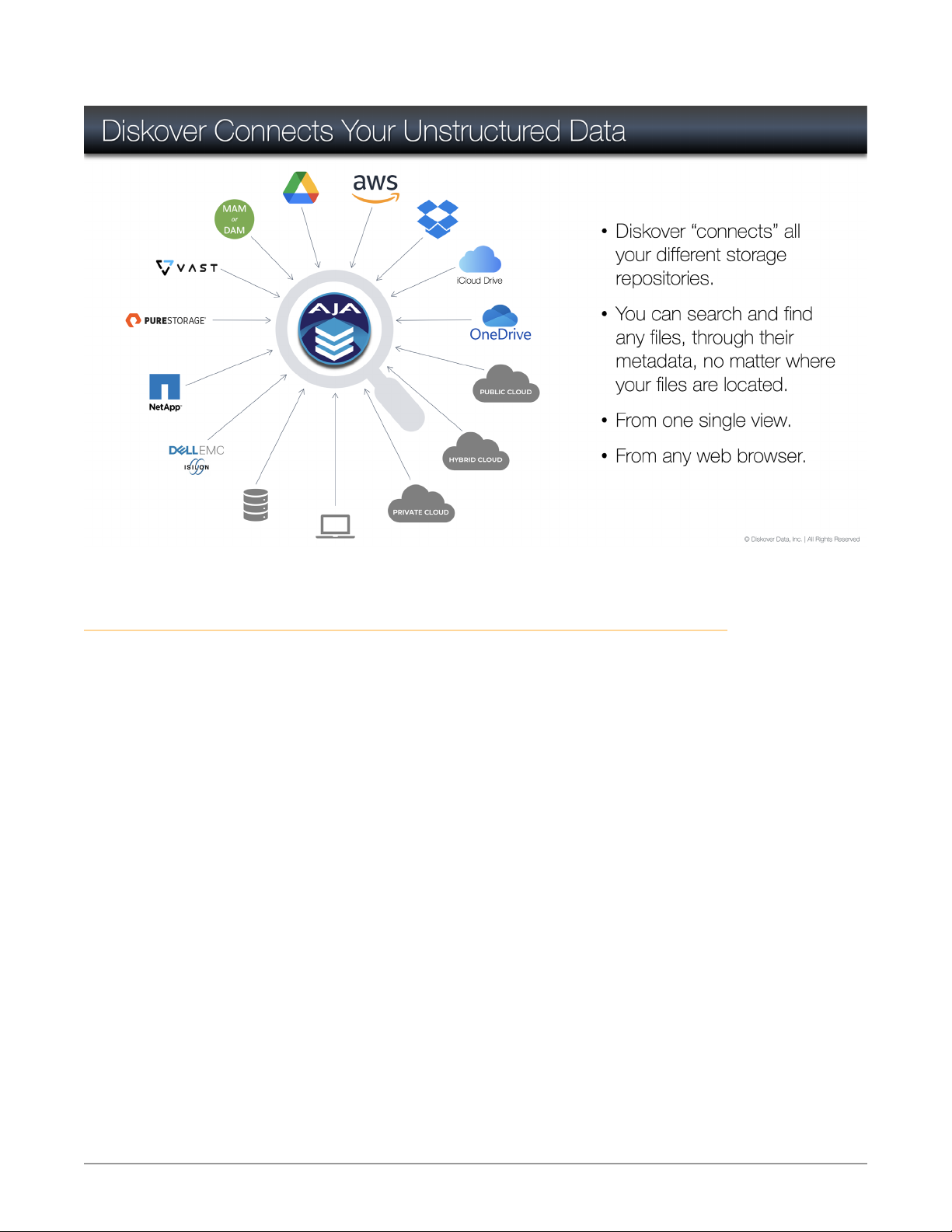
Figure 1. AJA Diskover Media Edition Connects Your Unstructured Data
Consumers of Data
AJA Diskover Media Edition allows all stakeholders within an organization to have
their own specific relationship with data. Here is a generic example of Line of
Business Users, their needs, and challenges:
AJA Diskover Media Edition Plugins Operation Guide v1.0 6 www.aja.com
Page 7
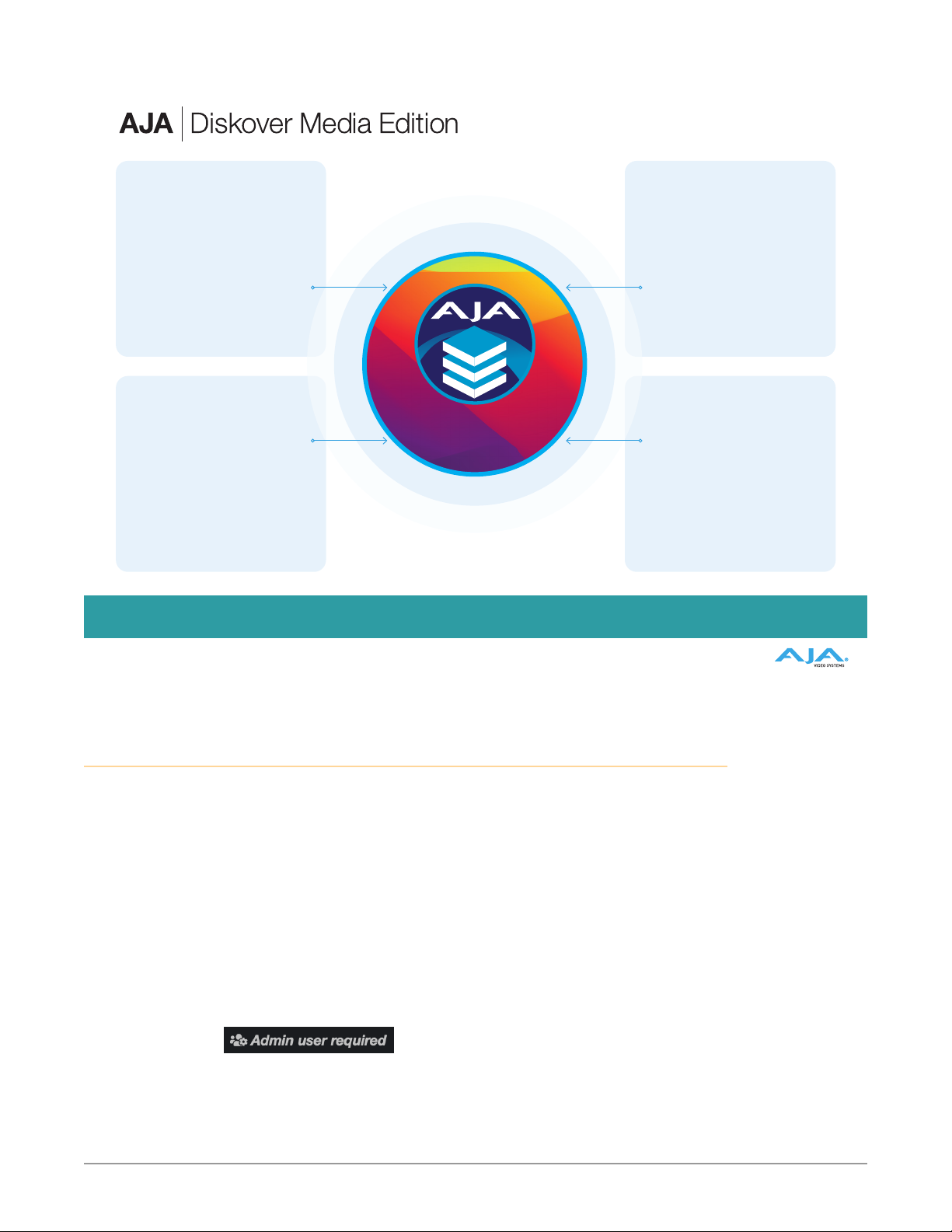
Figure 2. Consumers of Data
LOB Users System Administrator
Needs: Ease of search and share, files
statuses duri ng the cycle of a project
Challenges: Knowledge workers spending
valuable time f inding related data. 52% of
time is spent on non- productive data tasks
and only 48% on creat ing/extract ing value
from date
Solution: AJA Diskover Media Edition’s
global index, muk ltiple search tools and
easy sharing of result s/files/paths, tag ging.
Needs: Data preservat ion, security, compli-
ance, automated stora ge management, etc.
Challenges: Due to a lack of global system,
data is exponen tially growing ins tead of
being curated, manua l management is prone
to human errors.
Solution: AJA Diskover Media Edition’s
asset preservation and data management via
tags and automated sche duled tasks allow
prompt, accurate and safe data curation
Operations
Needs: Create complex work orders
quickly and accurately, reporting,
monitoring, analytics.
Challenges: Serious lack of centralized
index to access, act, anal yze and monitor
data, create strateg ies upon results.
Solution: AJA Diskover Media Edition’s
global index, vario us analytical repor ts,
tagging, plugins automating workflows,
monitoring.
Access to Features
Even though several data features will be added over time, AJA Diskover Media
Edition will mostly remain a search and read-only tool for the end-users; data
integrity and protection being the ultimate objective.
AJA Diskover Media Edition allows all end-users to have access to the data via
a global index in a read-only format, for them to make informed decisions, and
then in turn for the System Administrators to curate the data in a secure and
controlled environment.
Your System Administrator creates all login accounts. Depending on your data
relation needs within your scope of work, your account level will be as an enduser or an admin, the latter allowing for additional editing access (reports, etc.).
While working with AJA Diskover Media Edition as an end-user, you might come
across the icon below, indicating that you need to communicate any requests
with someone with an admin level account.
Data
USB Recording Mapping 4 Camera feeds, Primary and Backup Recording
Consumers of Data
Executives
Needs: Make sounds financial decisions
related to data (stor age purchases, hiring ,
accurately charg e clients for data stor age).
Challenges: Decision makers a re not
data enabled as t here are no tools for them
to make informed decisions.
Solution: AJA Diskover media Edit ion’s
analyt ical tools allow expendi ture visibility
by project /customer/storage usage,
therefore increasing reven ues and lowering
operating costs.
Here is a brief list of shared roles:
AJA Diskover Media Edition Plugins Operation Guide v1.0 7 www.aja.com
Page 8

Feature
File search Yes Yes Yes
Use of analytical reports Yes Yes Yes
Analytical reports editing Yes Yes
Export/share search results Yes Yes Yes
Manual tagging Yes Yes Yes
Tags editing Yes Yes
Auto-tagging Yes
Basic settings editing Yes Yes Yes
Advanced settings editing
(add fields, etc.)
Select, compare, analyze
indices
Schedule background
tasks
Data curation (move,
delete, archive, etc.)
Diskover install, config &
main admin
End-User
Account
Yes Yes Yes
Admin
Account
Yes Yes
Yes Yes
System
Administrator
Yes
Yes
Use Cases
With media workflows, there is the need to protect content from piracy; facilities
often build two completely independent networks 1) where users have access
to the Internet, and 2) a production network with no Internet access and strict
controls on personnel that have access to this network. However, in production
workflows, Customer Service Representatives, Producers, and Operations often
need to search the production network. AJA Diskover Media Edition provides
visibility to search for content, without providing access to the actual content.
AJA Diskover Media Edition offers numerous search tools, reports, and other
functions to fulfill the needs of all stakeholders. Below is a simplistic example of
AJA Diskover Media Edition’s tools being used in a media environment:
AJA Diskover Media Edition Plugins Operation Guide v1.0 8 www.aja.com
Page 9
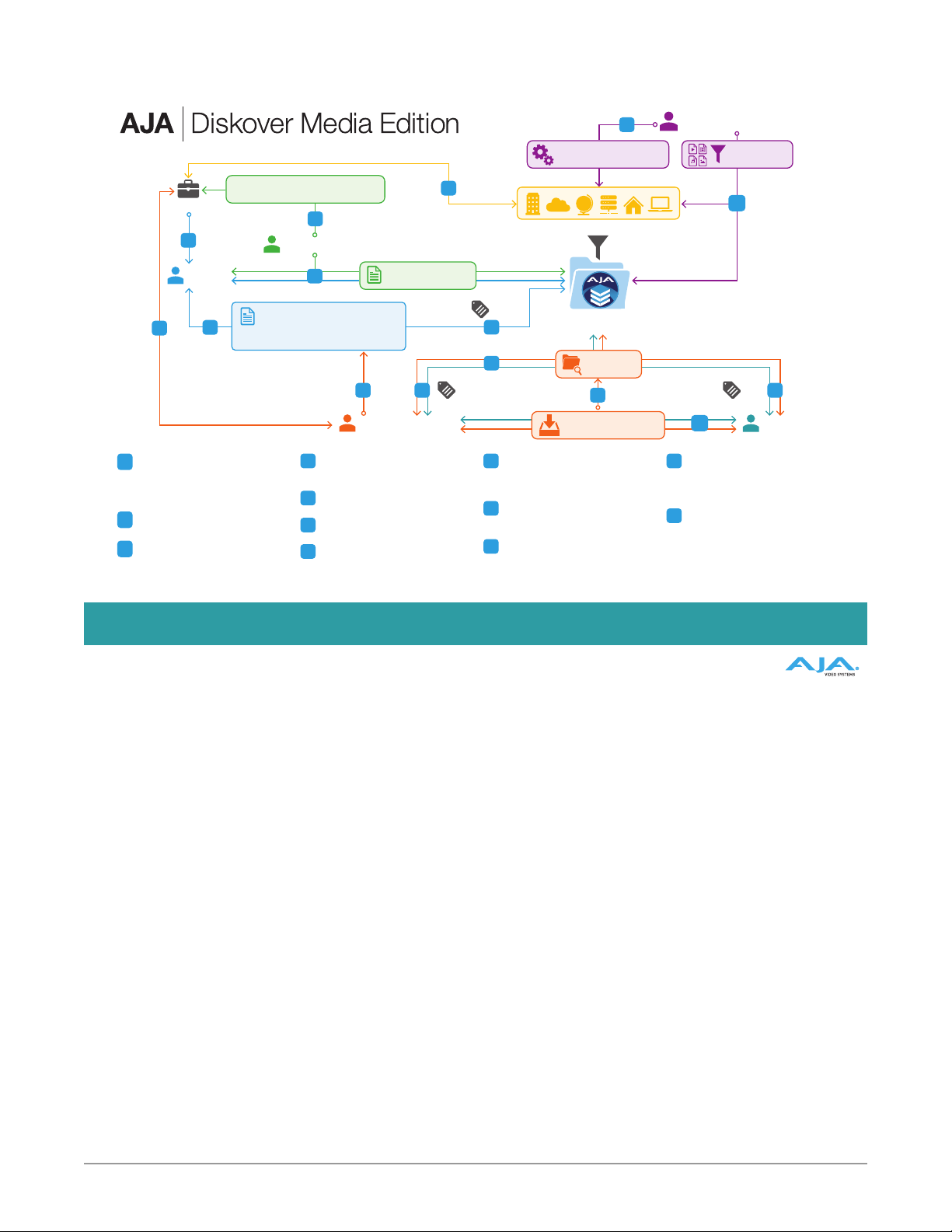
Figure 3. AJA Diskover Media Edition's Toolkit Overview
Project
$$
2
Data
Manager
10
Installat ion of AJA Diskover Media
1
Edition and configuration of all storage
volumes for indexing , as well as all other
parameters (ex: s torage cost per GB),
automated tasks , login accounts, etc.
Data Manager recei ves details of new
2
project for space an d cost analysis.
Analysis of available space to onboard
3
new project and ne ed assessment
for curation (cleanup, archive, etc.) of
existing dat a via reporting and t ags to
make space for new project
3
Accurately Quote and Invoice
for Storage Space
5
Sales & Execs
4
Reporting & Analysis Tools
• Smart Searc hes
• Heatmap
• File Tree
• Treemap
• User Analys is
3
Operations Manager Artist
Cost analy sis of storage space for
4
project, a s well as planning for ser vice
level agreement af ter delivery, etc.
Abilit y to properly quote and invoice
5
for storage space.
Client sends f iles for the project as
6
directed.
Operations M anager receives details
7
of project and searches /finds associa ted
files to create work order.
6
Cost Analysis Repor t
T
Tags
1
Installation, Configuration
& Administration
All Unstructured Data Available in a Global Index
Tags
T
7
AJA Diskover
Media Edition Data
File Search
8
Efficient creation of
accurate work orders
Work order creation is au tomated
8
and enhanced by the Me dia Pulse
plugin, increasi ng production and
reducing human.
Artis ts receive work order and are
9
able to search/f ind files as needed
and complete the project.
Project is deli vered to the client and
10
files are eithe r kept, archived or deleted
as per the ser vice level agreement ,
allowing for promp t invoicing and
methodical data curation.
System Administrator
Data Curation
11
Tags
T
9
System Adminis trator can accuratel y
11
and effic iently curate data t hrough
tags repor t and/or scheduled
automated task s.
Tagging can happen a t any point of
T
the process a nd is a crucial par t of
workflows and curation (clean, keep,
delete, archive, fix naming convention
issues, etc.)
AJA Diskover Media Edition: Tools and Workflow Overview
AJA Diskover Media Edition Plugins Operation Guide v1.0 9 www.aja.com
Page 10

Chapter 2 – Media Specic Challenges and
Solutions
This chapter describes the prominent challenges that most Media and
Entertainment facilities are currently facing.
Lack of Files Visibility
The lack of visibility and access to files' location and metadata is a real problem
for end-users in media facilities, mostly due to the protected production network,
as security is paramount because of piracy concerns and possible leaks to the
public prior to release dates.
Challenges Solutions
There is a difficult to non-existing
balance between allowing people
to do their jobs while keeping the
appropriate level of security around
clients’ file.
Difficulty finding disorganized assets
from different sources (ex: intra and
inter companies’ systems).
Users need to be notified when files
are available and where they are
located.
Too many search results due to the
inability to refine searches.
Unable to verify if the file found/
needed is the right one.
Diskover gives read-only access to
the files’ metadata and attributes
therefore safeguarding your valuable
assets while allowing employees to
efficiently find the files they need.
Diskover scans all fragmented
data living across heterogeneous
repositories and brings all the
information in one global index.
Diskover offers extraordinary speed
and reliability with Elasticsearch in the
back-end continuously indexing all
storage volumes in parallel for instant
findability.
Diskover includes many search tools
and filters, as well as granular search
on media specific attributes (ex:
resolution, codec, duration, etc.)
Diskover's media info plugin enriches
the ability to locate the correct file.
Future thumbnail/preview plugin
functionality will further increase
accuracy.
Inefficient Workflows
Tremendous amounts of person-hours are wasted due to a lack of continuity and
automation around file-based production lines.
Challenges Solutions
Need to track orders through the
production process, from order
creation to invoicing and delivery.
AJA Diskover Media Edition Plugins Operation Guide v1.0 10 www.aja.com
Diskover order management and
scheduling plugins reduce or
eliminate manual correlations and
provide automation and scaling
capabilities. One example of such
plugin is Xytech MediaPulse.
Page 11

Challenges Solutions
Order system is usually not an integral
part of the storage infrastructure,
affecting the ability to charge
accurately for storage per specific
project.
The inability to identify files that need
to be managed at the source.
Fast Pace Environments
Significant increase of order volume is compounded with shorter deadlines.
Challenges Solutions
Manual orders are prone to errors and
don’t scale with today’s high volume.
The cost analysis tool within Diskover
provides the ability to associate a
storage element to the cost of goods
sold to a project, client, work order,
etc.
Diskover’s manual tagging and
automated scheduled tasks insure for
safe and methodical file management,
as well as file findability.
Diskover’s global view and accuracy
combined with order management
and scheduling plugins allow
for reduced human prone errors
associated with manual processes,
as well as increased automation and
scalability of production processes
associated with file-based workflows.
AJA Diskover Media Edition Plugins Operation Guide v1.0 11 www.aja.com
Page 12
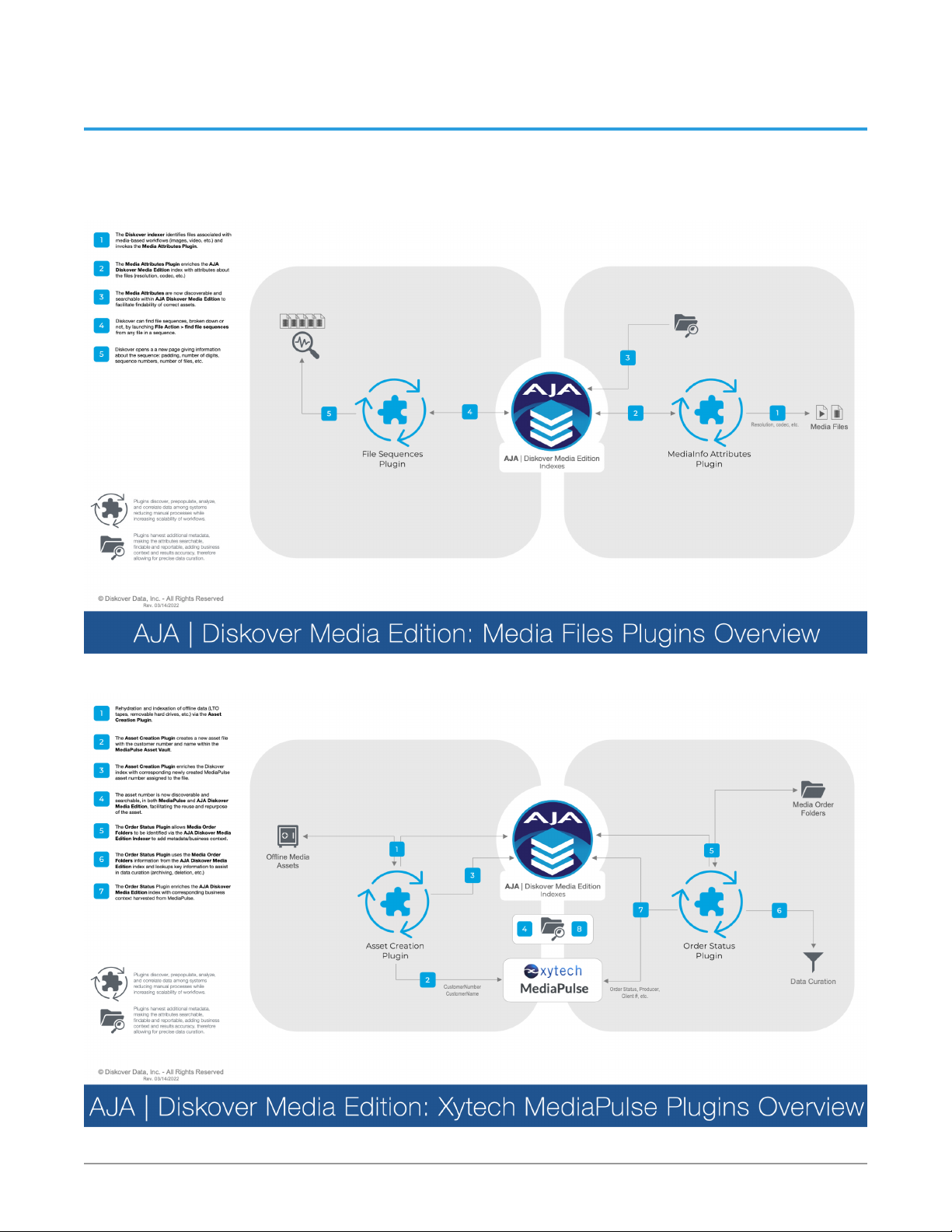
Chapter 3 – Media Edition Plugins Overview
The following diagrams illustrate the functionality of the features included with
AJA Diskover Media Edition. More plugins and features will be added over time.
Figure 4. AJA | Diskover Media Edition: Media Files Plugins Overview
Figure 5. AJA | Diskover Media Edition: Xytech MediaPulse Plugins Overview
AJA Diskover Media Edition Plugins Operation Guide v1.0 12 www.aja.com
Page 13
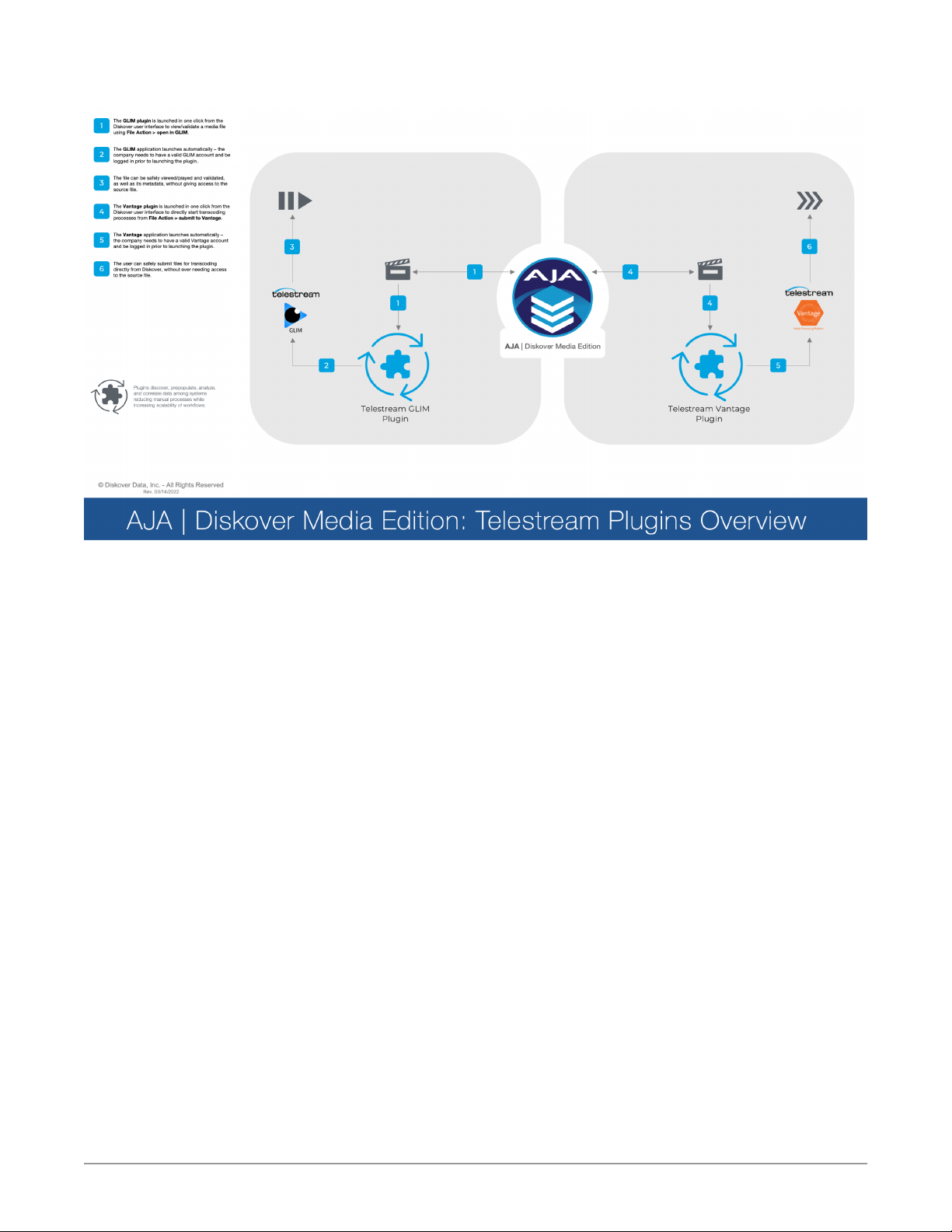
Figure 6. AJA | Diskover Media Edition: Telestream Plugins Overview
AJA Diskover Media Edition Plugins Operation Guide v1.0 13 www.aja.com
Page 14
Chapter 4 – Media Attributes
Media attributes, like file resolution, codec, etc., are harvested during indexing
and are therefore available to enhance in-depth searches and to deliver accurate
results.
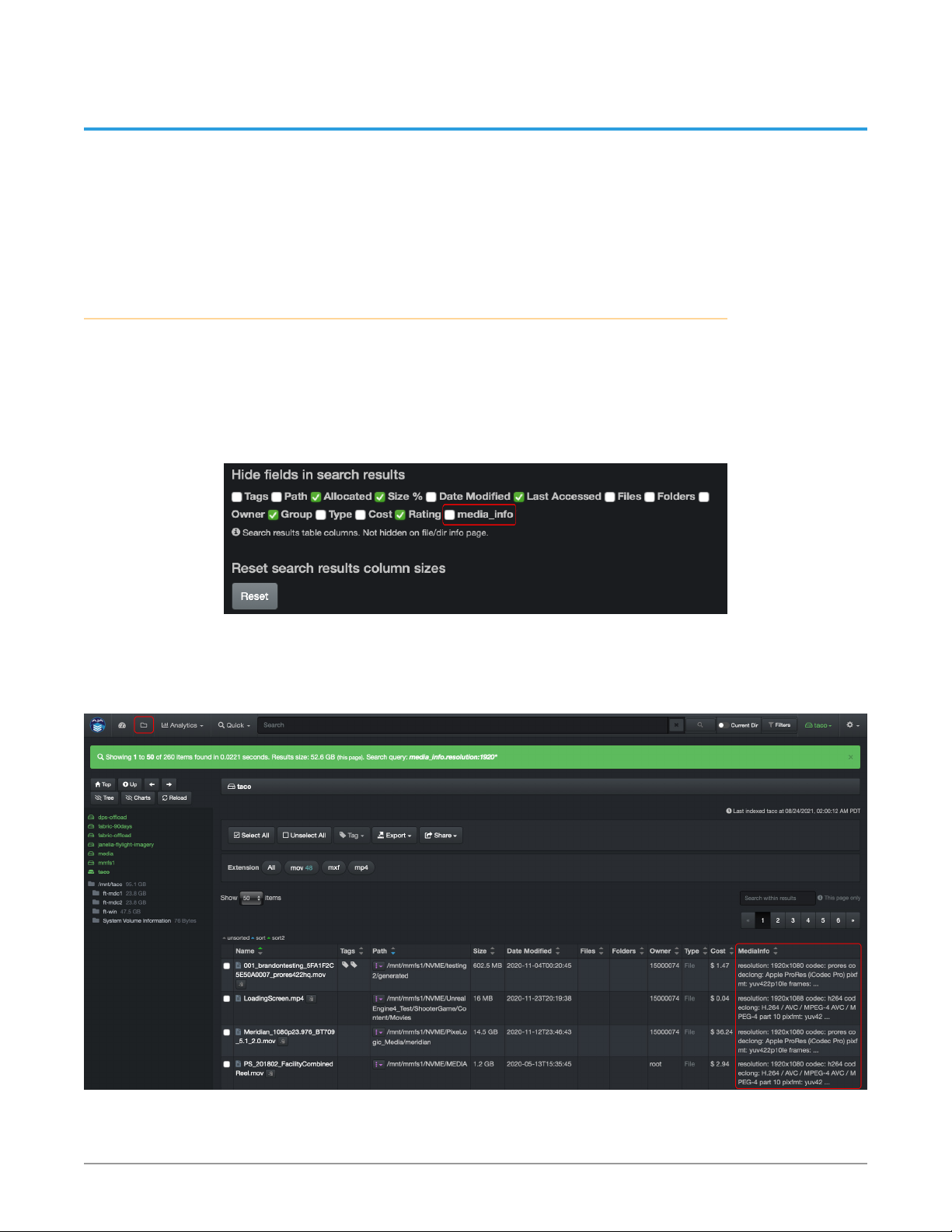
Hide/Unhide Media Info Column in Search Results Pane
When using the file search page, you have access to a column with all the media
attributes. If you cannot see that column, it means that it is hidden. To unhide that
column:
1. Go to Settings > Hide fields in search results.
2. De-select the box in front of media_info.
Figure 7. Hide fields in search results
The media_info column will then be available within the search results pane. If
the column is visible but there are no attributes for a file, this means that there
was no media metadata associated with the source file to begin with.
Figure 8. Media Info Column
AJA Diskover Media Edition Plugins Operation Guide v1.0 14 www.aja.com
Page 15
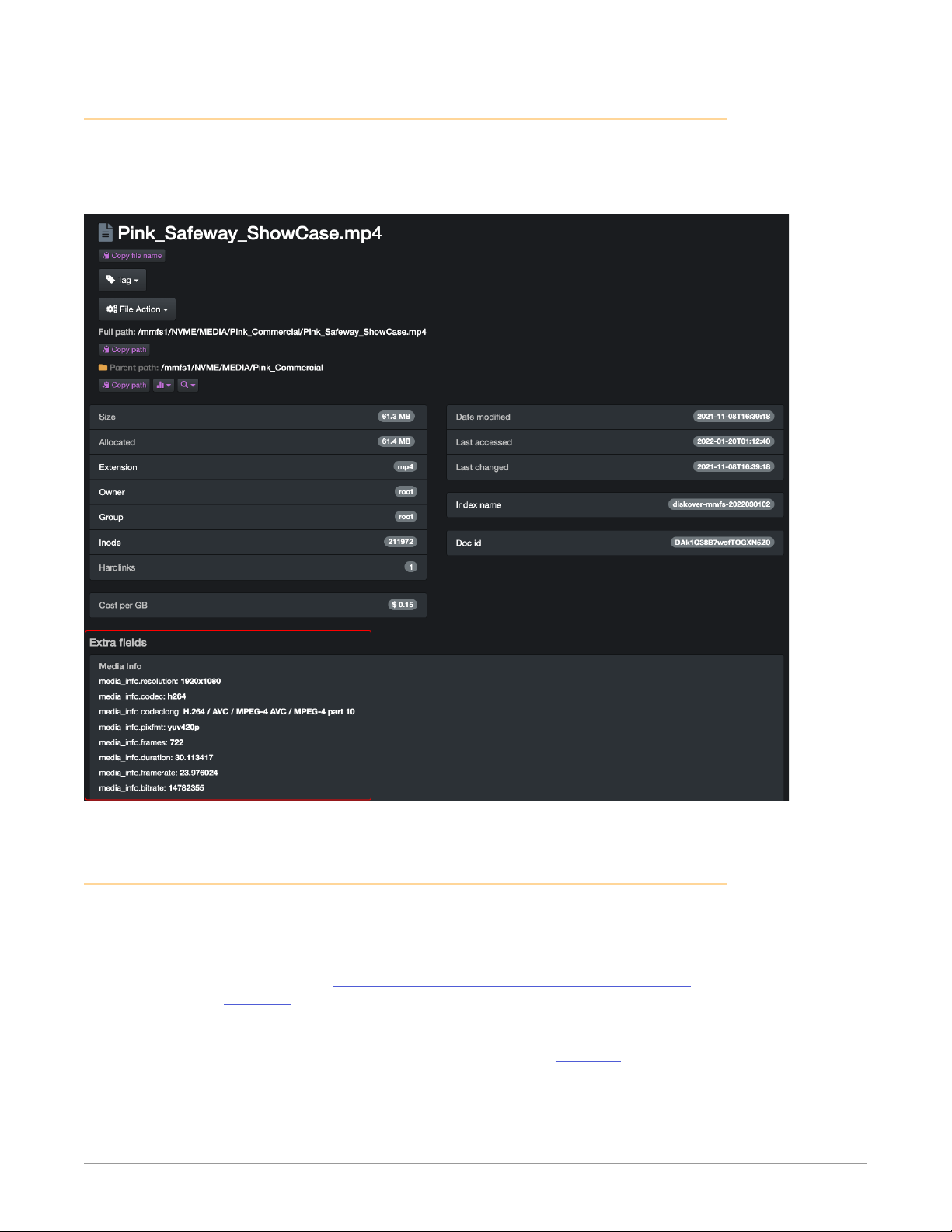
View Detailed Media Attributes
Below is an example of the location where you can see detailed media attributes.
You can access this page by clicking on a file in the search results pane or
wherever you see the magnifying glass icon:
Figure 9. Detailed Media Attributes
Search on Media Attributes
The media attributes are part of the metadata harvested exclusively by the
AJA Diskover Media Edition. If a file at the source doesn’t include any of these
attributes, it goes without saying that no details will be harvested and/or be
available.
In addition to the manual file searches and syntax explained in the Diskover
User Guide, the AJA Diskover Media Edition allows end-users to search on media
specific attributes.
• As media fields’ info can be complex, unless you know exactly what you
are looking for, we strongly recommend using the * wild card for ease of
searching and to expand your results.
• The fields described below are meant to be copied/typed in the search bar of
the Diskover user interface.
• Searching on media_info is case insensitive.
AJA Diskover Media Edition Plugins Operation Guide v1.0 15 www.aja.com
Page 16

• The following syntax needs to be respected media_info.<key>:<value> and
the < > are not meant to by typed, they are only for visual and isolating where
to input the variables:
• For more details on search syntax, please refer to our core Diskover User
Guide.
File resolution
Field name: media_info.resolution
media_info.resolution:3840x2160
media_info.resolution:*1080*
(Would return all files with 1080 somewhere in the resolution)
Codec
Field name: media_info.codec
media_info.codec:prores
media_info.codec:h264
Codec long
Field name: media_info.codeclong
Pixel format
Field name: media_info.pixfmt
Frames
Field name: media_info.frames
NOTE: Use a specific number only if you know the exact number of frames a file would
Duration
Field name: media_info.pixfmt
NOTE: This field will eventually reads time in this format hh:mm:ss, but is currently
media_info.codeclong:*apple*
media_info.codeclong:*quicktime*
media_info.pixfmt:*yuv*
media_info.pixfmt:*422*
media_info.frames:30
media_info.frames:*30*
have, otherwise use the * to expand your results.
showing duration in seconds, ex: 30.5071 = 30 seconds and 5071 milliseconds)
media_info.duration:30.*
NOTE: Use the * if you’re looking for a file for which you know the duration is 30 seconds
but the milliseconds are unknown.
AJA Diskover Media Edition Plugins Operation Guide v1.0 16 www.aja.com
Page 17

Framerate
Field name: media_info.framerate
media_info.framerate:*23*
NOTE: Would return all files with standard framerate of 23.976
Bitrate
Field name: media_info.bitrate
media_info.bitrate:*765*
NOTE: Bitrate is a difficult field to search on, but not impossible.
Search on Media Info Fields with Operators
Operators and, or, not are explained in the Diskover User Guide, but here are a
few query examples using media info fields with operators:
media_info.resolution:1920x1080 AND media_info.
codeclong:*quicktime*
Would find all files with resolution 1920x1080 with QuickTime in codeclong.
*jurassic* NOT media_info.resolution:*1080*
Would find all files containing "jurassic" in the file name and/or path, but with
any other resolution beside 1080 being part of that field.
media_info.resolution:*1080* AND mov NOT mp4
Would find all files with 1080 being part of the resolution and with file
extension .mov, but would exclude file extension .mp4 from the results.
media_info.pixfmt:*444* OR media_info.pixfmt:*422*
Would find all files with pixel format either containing 444 or 422.
Media Info Fields Containing Error or Warning
If the media fields at the source are corrupted and/or Diskover determines the
file as "suspect", the media info fields will show either error or warning within
Diskover. Below are search queries to either exclude or pinpoint files with those
values:
To search all files with valid media info fields while excluding files with "error" and
"warning":
media_info:* NOT (media_info.error:* OR media_info.
warning:*)
To search all files with media info fields containing "error" and "warning":
media_info.error:* OR media_info.warning:*
AJA Diskover Media Edition Plugins Operation Guide v1.0 17 www.aja.com
Page 18
Chapter 5 – Find All Files in a Sequence
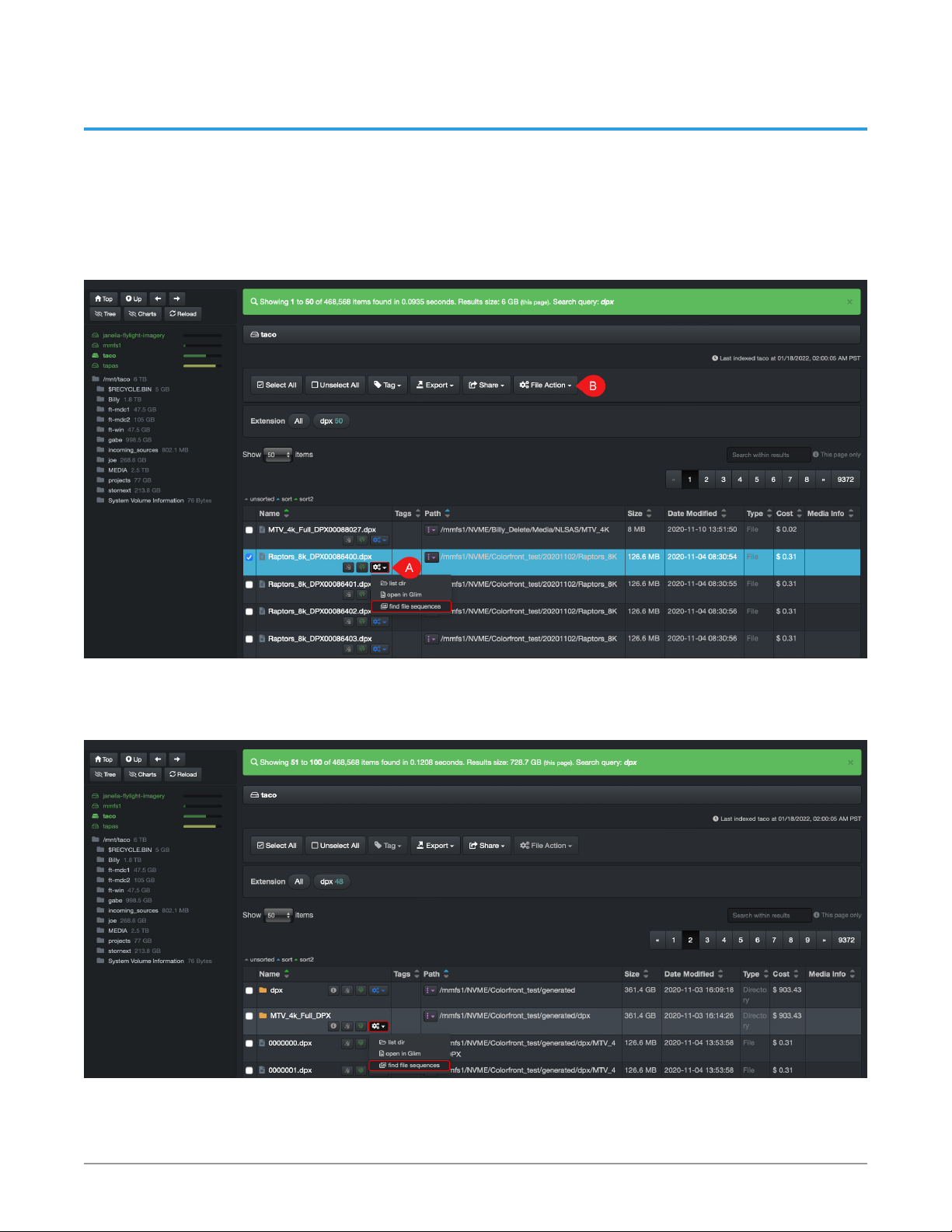
AJA Diskover Media Edition allows you to easily find all files in a sequence via File
Action.
Launch from a file - You do not need to select the line if you launch directly from
the A) inline icon. It has been selected in this example to show the option of
launching it from the B) File Action button:
Figure 10. File Action Launch from File
Launch from a directory - The same logic as launching form a file applies here as
well:
Figure 11. File Action Launch from Directory
The results will open in a new page and will show the complete path where the
sequence is located, as seen at the bottom of the following screenshot:
AJA Diskover Media Edition Plugins Operation Guide v1.0 18 www.aja.com
Page 19

Figure 12. File Action Results
A - Will confirm if a sequence was found.
B - Will give you the sequence range. If there was a break in the sequence, there
would be [multiple brackets].
C - In this example, the value means that the sequence has 0 padding and is 8
digits long, DPX being included in the digits > DPX86400.
AJA Diskover Media Edition Plugins Operation Guide v1.0 19 www.aja.com
Page 20

Chapter 6 – Xytech MediaPulse Order Management
This chapter describes the features that are currently released enhancing filebased production workflows. Please stay tuned as many more features are in
development and are on the roadmap.
More About the Xytech MediaPulse Product
Xytech MediaPulse Asset Creation
Post facilities often have customers’ assets that have been archived and lack
findability, visibility, searchability, and therefore the opaque nature of these
assets make them difficult to reuse or repurpose. Companies with years of such
archived assets have often stored these on tape media or removable hard drives
which are often stored in a physical vault.
Assets were often stored on such “offline” media due to costs. However, with
the advent of cloud and object storage, the economics are now making it viable
to store such vaulted assets on more “online media”. Although, simply putting
these assets onto online media does not necessarily make these assets findable in
context or within the facility’s order management system.
The Xytech MediaPulse asset creation tool is designed to find and index newly
restored online assets from LTO tapes, removable hard drives, etc., making
them available, findable, and searchable within the Xytech MediaPulse order
management system, as well as AJA Diskover Media Edition.
The plugin operates on the assumption that the assets restored to online media
are placed into a folder with the following naming convention: CustomerID_
CustomerName
The path location is added to the asset within MediaPulse and the asset number
is assigned to the file via a tag within the AJA Diskover Media Edition Index.
Here is an example of an asset rehydration as viewed in the MediaPulse
application:
AJA Diskover Media Edition Plugins Operation Guide v1.0 20 www.aja.com
Page 21
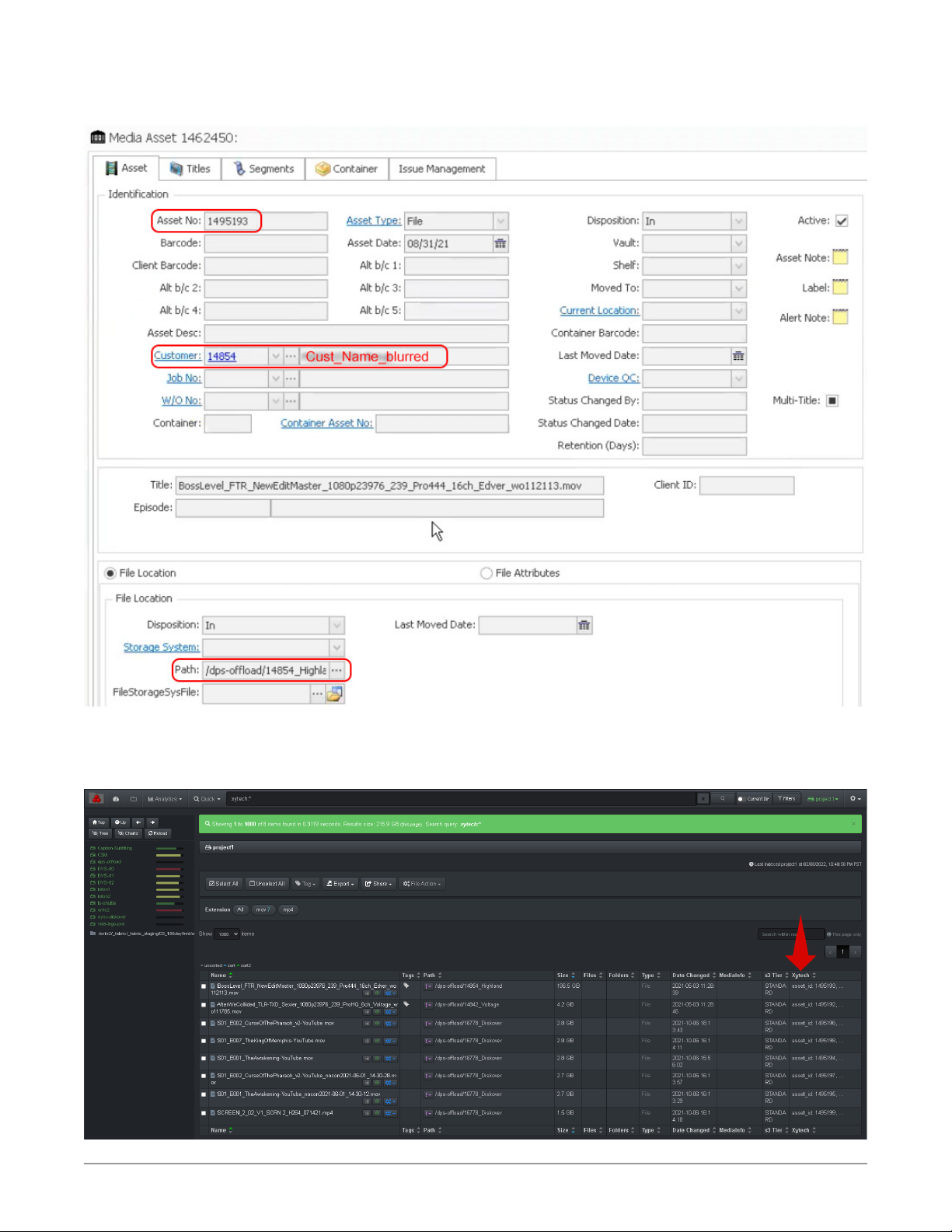
Figure 13. Example of an Asset Rehydration as Viewed in the MediaPulse
Application
Here are the same values, customer ID and asset ID, displayed within AJA Diskover
Media Edition:
Figure 14. MediaPulse Asset Creation within Diskover UI Results Pane
AJA Diskover Media Edition Plugins Operation Guide v1.0 21 www.aja.com
Page 22
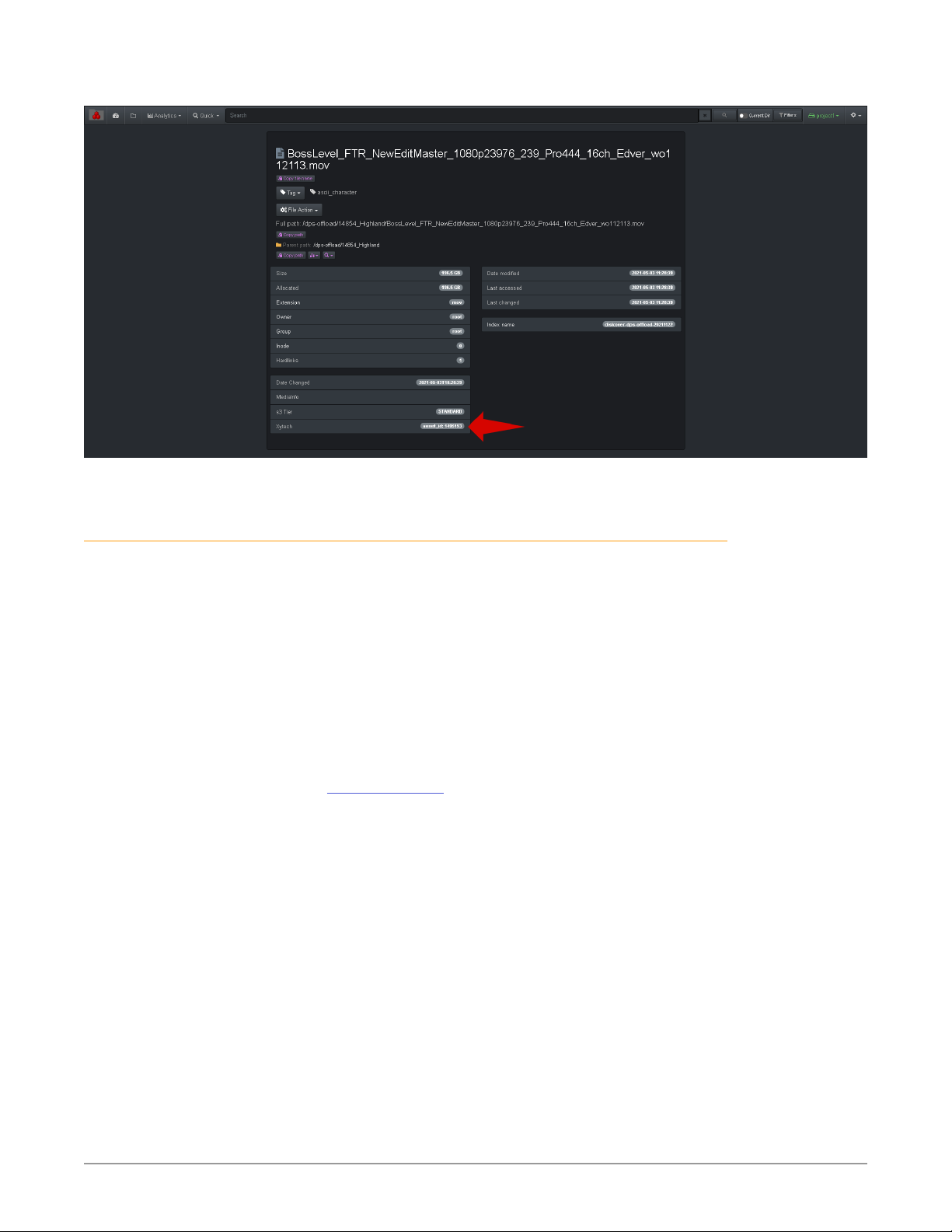
Figure 15. MediaPulse Asset Creation within Diskover UI File Attribute
Xytech MediaPulse Order Status
Facilities often manually correlate the order management system with the
storage repositories. However, manual processes are subject to human error and
are difficult to scale as the volume of media orders and data turnover increases
rapidly and constantly.
Therefore, the lack of integration for file-based workflows between the order
management system and the underlying storage repositories makes data
management decisions difficult as they are solely based on attributes of files
or objects on storage. Additional business context is needed from the order
management system to increase precision and accuracy of data management
decisions.
An instance of key information might be the invoice date for a work order. A
status change for a work order can be a key indicator for data management. For
example, once a Xytech MediaPulse media order has been invoiced, then the data
associated with that media order can be a candidate for archival.
The MediaPulse order status plugin is designed to automate the correlation
of the order management system and the storage system by harvesting
key business context from MediaPulse and applying that context within the
AJA Diskover Media Edition platform.
AJA Diskover Media Edition Plugins Operation Guide v1.0 22 www.aja.com
Page 23
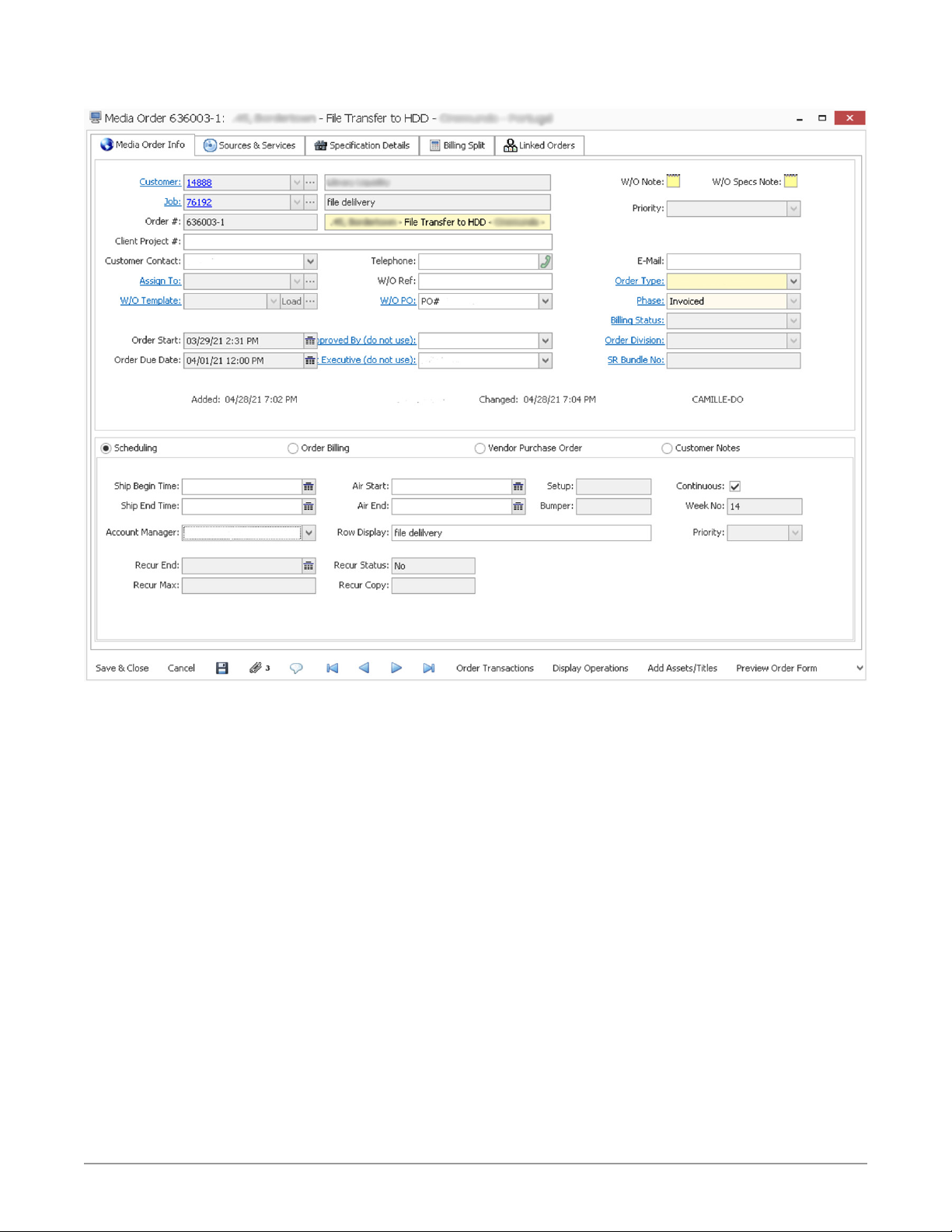
Figure 16. MediaPulse Order Status in Xytech
AJA Diskover Media Edition Plugins Operation Guide v1.0 23 www.aja.com
Page 24
Chapter 7 – Telestream GLIM and Vantage
Workow Automation
The GLIM and Vantage web tools allow end-users to view and confirm source files,
as well as submit files for transcoding, directly from AJA Diskover Media Edition,
without ever leaving your web browser.
Preview/Validate Media Files with GLIM
You can do an advanced search/validation of a media file and playback right from
AJA Diskover Media Edition.
NOTE: Make sure you are logged in your Telestream account before using this feature.
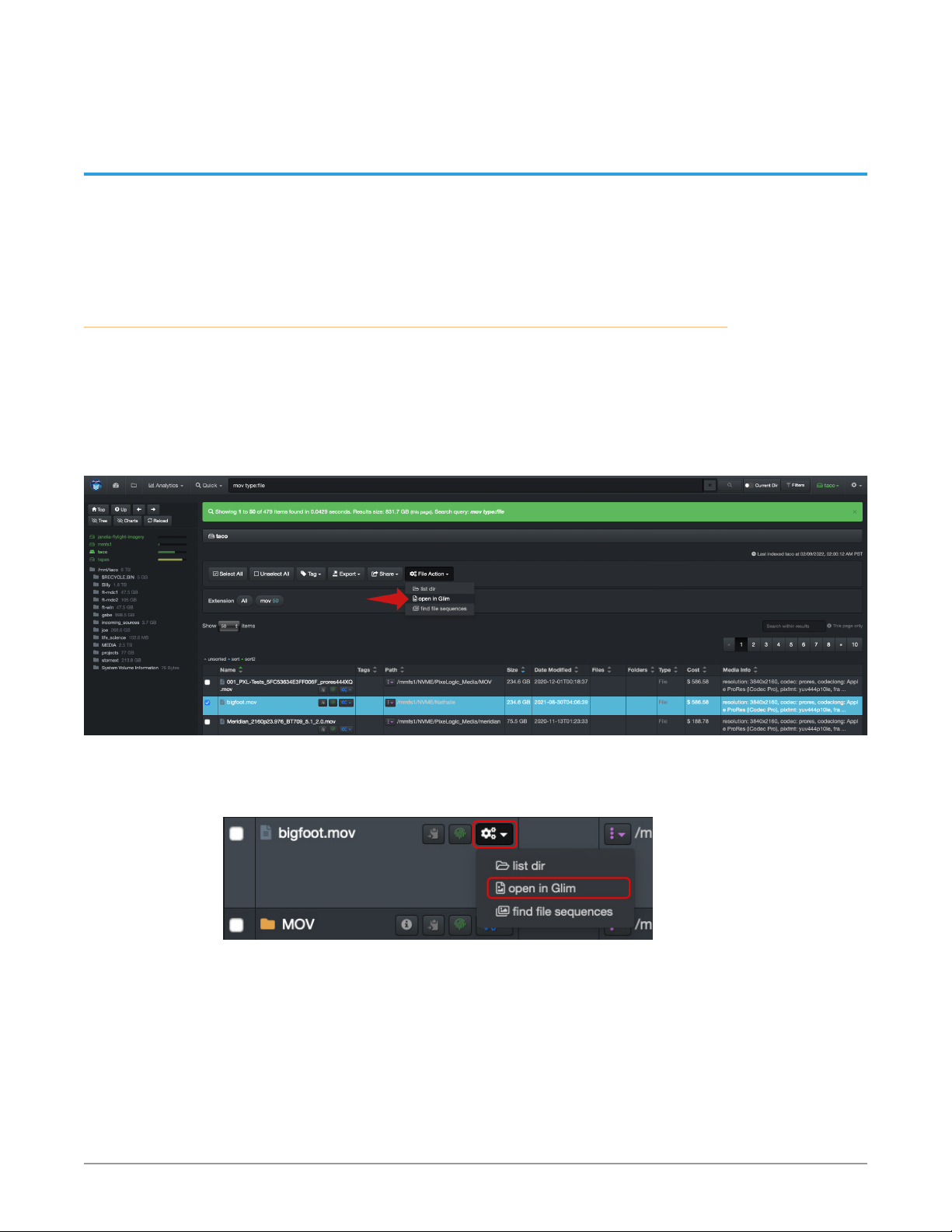
You can access File Action > open in GLIM by selecting a file and clicking the File
Action button as shown below:
Figure 17. File Action GLIM Selection
Alternatively, beneath the gear icon on the line item that you want to preview
with GLIM, select open with Glim.
Figure 18. File Action GLIM Gear Icon Selection
This will launch GLIM where you will be able to validate/preview the file.
AJA Diskover Media Edition Plugins Operation Guide v1.0 24 www.aja.com
Page 25
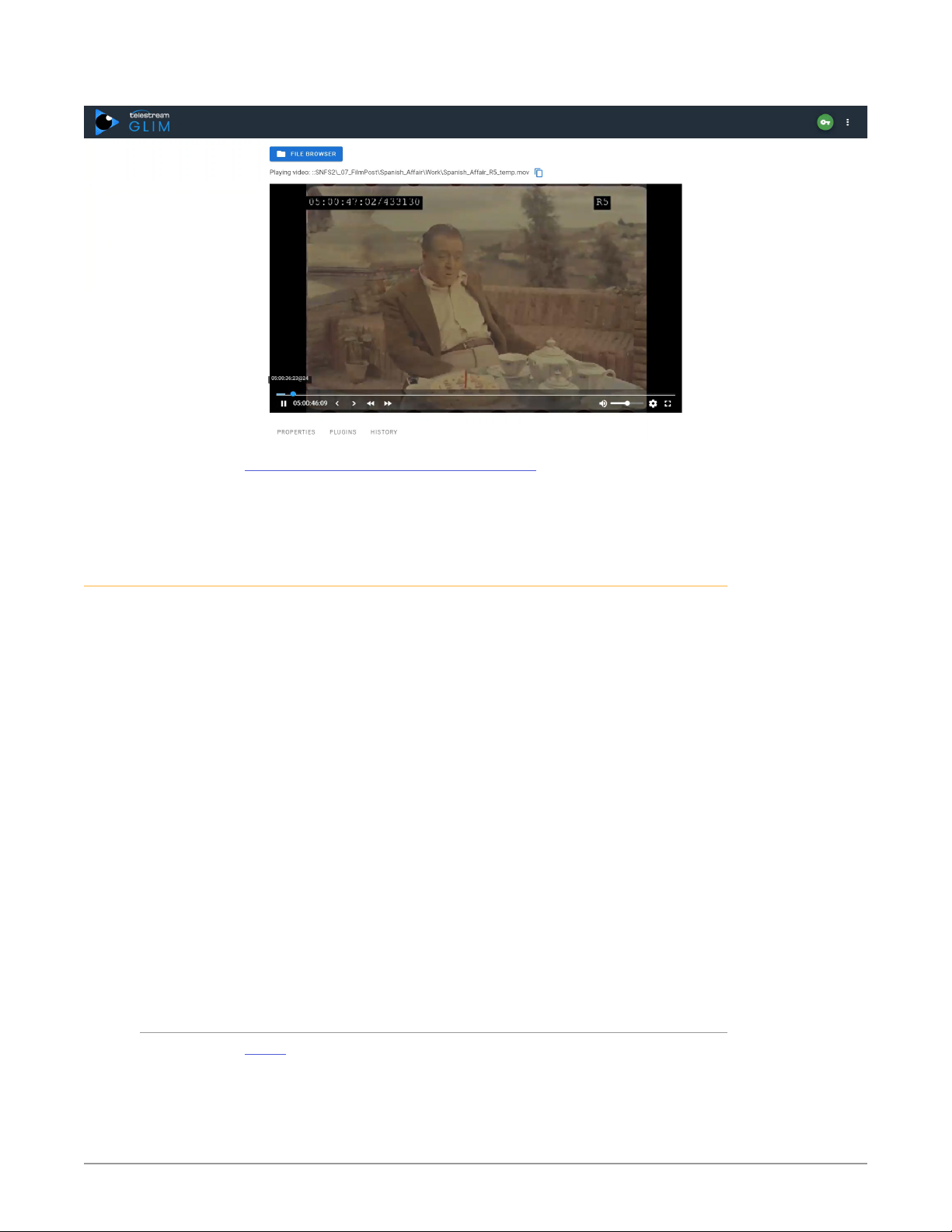
Figure 19. File Action GLIM Preview
Learn More about the Telestream GLIM Product
Submit Transcoding Jobs to Vantage Directly from Diskover
With the AJA Diskover Media Edition Telestream Vantage Plugin, you can submit
files for transcoding directly from the AJA Diskover Media Edition user interface.
This process can be utilized by all end-users without needing access to the
production tools and source files.
The major benefits include the following:
• The plugin eliminates many steps from going back and forth between the two
software tools.
• Vantage offers several transcoding options which can be confusing to nontechnical users. The plugin allows for limiting the number of options to only
the ones relevant to the end-users.
• Creating a Vantage account for an end-user is intensive as it requires
complex and time consuming configurations. Single end-user accounts
for Vantage are not required with the plugin as all they need is access to
AJA Diskover Media Edition.
• End-users with a Vantage account have access to your production network.
The plugin keeps your network secure as the end-users only have access to
read-only information via AJA Diskover Media Edition.
• Files are very easy to find within AJA Diskover Media Edition’s global index
compared to Vantage where one needs to know where to look.
• The learning curve is quick and easy for new end-users.
Steps to Submit a File for Transcoding
1. Search for the desired file(s) within AJA Diskover Media Edition.
2. Select the le you wish to submit for transcoding by clicking the File Action
> submit to Vantage icon (gears icon) in line with the le. If you wish to
submit multiple les at a time, select the les by clicking the check box in
front of the le, then select the File Action > submit to Vantage button.
AJA Diskover Media Edition Plugins Operation Guide v1.0 25 www.aja.com
Page 26
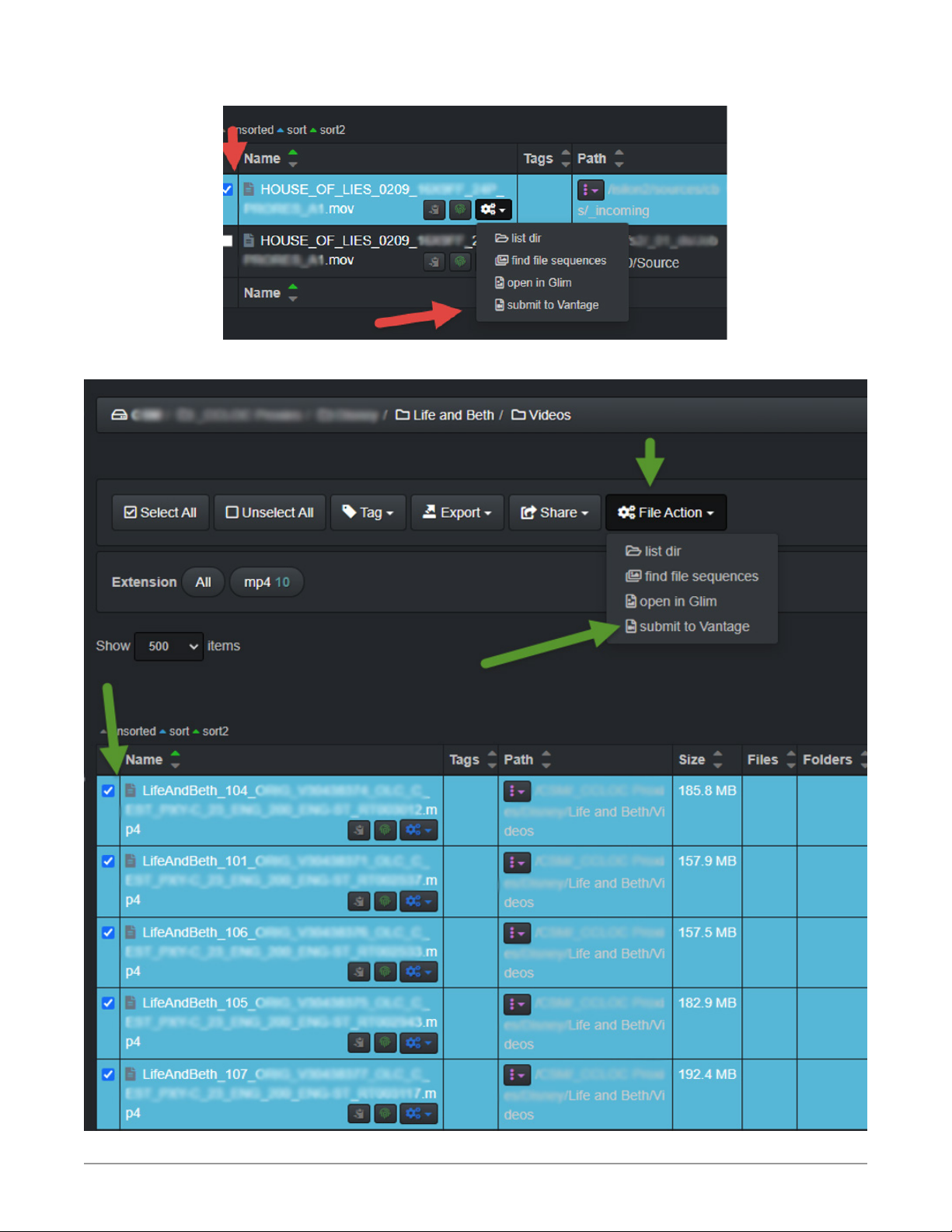
Figure 20. Telestream Vantage Selection
Figure 21. MediaPulse Order Status in Xytech
AJA Diskover Media Edition Plugins Operation Guide v1.0 26 www.aja.com
Page 27
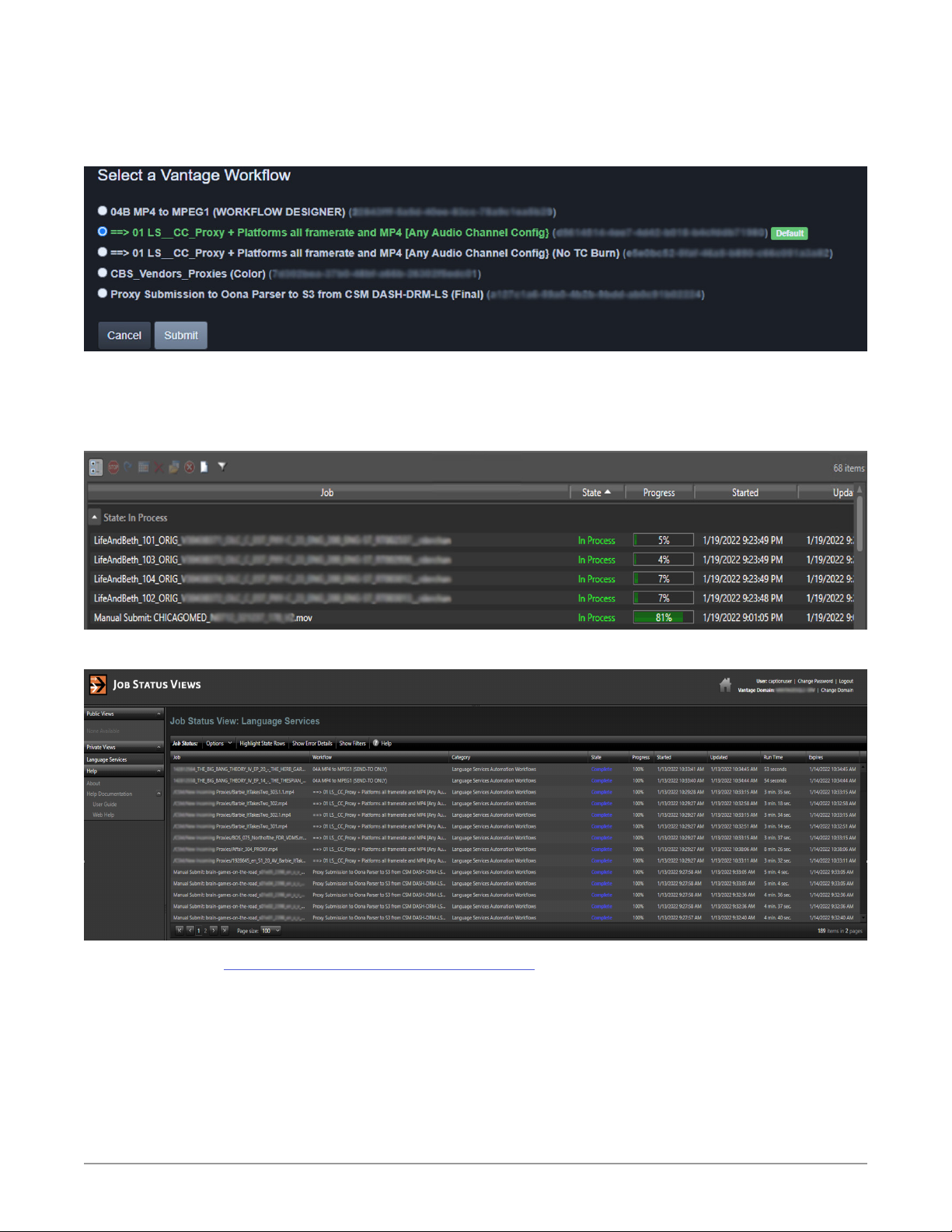
3. A window will open with a series of submission options. After clicking the
Submit button, you will get a message that the le has been submitted to
Vantage successfully.
Figure 22. Telestream Vantage Job Submission
4. If you have access to the jobs submission status view in Vantage (webpage
location to be supplied by your system administrator), you will see the
progress status of your request(s).
Figure 23. Telestream Vantage Job Processing Status
Figure 24. Telestream Vantage Job Status
Learn More about the Telestream Vantage Product.
AJA Diskover Media Edition Plugins Operation Guide v1.0 27 www.aja.com
Page 28

Chapter 8 – Support and Warranty
Help within the Software
From the AJA Diskover Media Edition interface, you can find help with search
syntax and other subjects under Settings (gear icon) > Help.
Documentation
Please see Diskover Documentation for in-depth instructions for end users,
as well as for system administrators and technical professionals involved with
installation and configuration tasks.
Troubleshooting
Please see the Technical Troubleshooting Guide for answers related to
installation, configuration and more.
Please see the End-User Troubleshooting Guide for answers related to the daily
operation of AJA Diskover Media Edition.
Email and Phone Support for Paid Subscription Solutions
AJA is focused on meeting customer needs with proven services and support.
www.aja.com/support/
Technical Support and Resources
AJA Diskover Media Edition general Information:
www.aja.com/products/aja-diskover-media-edition
AJA Diskover Media Edition support, including documentation:
www.aja.com/products/aja-diskover-media-edition#support
The Diskover Slack workspace forum is also a great place to ask questions to the
Diskover community:
https://diskoverworkspace.slack.com/ssb/redirect#/
AJA Diskover Media Edition Plugins Operation Guide v1.0 28 www.aja.com
Page 29

SOFTWARE LICENSE AGREEMENT
AJA VIDEO SYSTEMS, INC.
SOFTWARE LICENSE AGREEMENT FOR “AJA DISKOVER MEDIA EDITION” SOFTWARE
THIS IS AN AGREEMENT BETWEEN AJA VIDEO SYSTEMS, INC. (“AJA”) AND THE PERSON,
OR ENTITY ON BEHALF OF WHOM YOU ARE ACTING (COLLECTIVELY, “YOU”) THAT
OBTAINED A SUBSCRIPTION AND LICENSE KEY FOR THE SOFTWARE DESCRIBED
ABOVE. THIS AGREEMENT GOVERNS YOUR USE OF THE SOFTWARE.
The AJA Diskover Media Edition “Software” is the media-focused version of the
Diskover Data Curation Platform software developed by Diskover Data, Inc. and
distributed by AJA and our resellers and distribution channels. The “Software”
includes all updates and new versions of such software made available to you by
AJA during your Subscription Term (as described below), together with all related
documentation. BY INSTALLING OR USING THE SOFTWARE, YOU ARE AGREEING TO BE
BOUND BY THE TERMS OF THIS AGREEMENT. IF YOU DO NOT AGREE TO THE TERMS
OF THIS AGREEMENT, DO NOT INSTALL OR USE IT AND, IF APPLICABLE, YOU MAY
REQUEST A REFUND OF THE AMOUNT YOU PAID FOR A SUBSCRIPTION AND LICENSE
KEY FOR THE SOFTWARE.
1. Order Form and Software Subscription. Your license to the Software starts when
you download, access or otherwise use the Software, or such other effective date as
is specified in the order form (an “Order Form”) by which you purchase a subscription
and license key for the Software. Your Order Form specifies the duration of your
subscription (“Subscription Term”) and the fees, if any, payable by you to AJA for
the Subscription Term (“Fees”). AJA may provide certain support for the Software
during the Subscription Term as described in the Order Form or under separate terms
available from AJA.
2. License Grant. AJA hereby grants you a nonexclusive, personal, non-
sublicenseable and limited license, subject to your compliance with this Agreement,
to install and use the Software during the Subscription Term in your computing
environment for internal purposes only. The foregoing license includes the right to
make copies of the Software in machine-readable form for installation and backup
purposes only, and provided that each copy you make must include all copyright or
other proprietary notices contained on the original.
3. Limitations. You will not, directly or indirectly, (a) decompile, reverse engineer,
disassemble, modify, or create derivative works of the Software or any part thereof
except to the extent (if any) authorized by applicable law notwithstanding the
foregoing restriction; (b) rent, lease, lend, loan, distribute or act as a service bureau
or “cloud service” provider with respect to use of the Software or any functionality
thereof; (c) circumvent or bypass any limitations imposed or preserved by any license
key or other access code for the Software; (d) remove, delete, alter, or obscure any
copyright or other proprietary rights notices included in the Software; (e) use the
Software in violation of any applicable law or regulation; or (f) use the Software for
purposes of competitive analysis of the Software or the development of a competing
software product or service.
4. Evaluation License. If you have acquired, under an Order Form or other written
terms with AJA or its authorized channels, a license to use the Software only for an
initial evaluation (an “Evaluation License”), the license rights granted above are valid
only for internal evaluation purposes, and only during the period specified by AJA,
starting from date on which you access the Software for such evaluation (“Evaluation
Period”). You agree that you will not distribute the Software to any third party for any
reason whatsoever under an Evaluation License.
5. Reservation of Rights. The Software is protected by law, including without
limitation copyright law. The Software is licensed, not sold, to you. AJA and its
licensors reserve all rights not expressly granted to you by this Agreement.
6. Open Source Software. Certain open source software contained or referenced
in the Software (“Open Source Software”) is not licensed under the terms of this
Agreement, but is instead licensed under the applicable open source license(s) as
described at https://www.diskoverdata.com/apache-license/ (“Open Source License”).
Licensee’s use of the Open Source Software is subject to the terms of each applicable
Open Source License, notwithstanding anything to the contrary in this Agreement.
AJA Diskover Media Edition Plugins Operation Guide v1.0 29 www.aja.com
Page 30

7. Assignment. You may not assign this Agreement, in whole or in part, without
the prior written consent of AJA. Any assignment in violation of this paragraph
shall be void and of no effect. Subject to the foregoing, this Agreement is binding
upon, inures to the benefit of and is enforceable by the parties and their respective
successors and assigns.
8. Termination and Subscription Term Expiration. Your rights in the Software are
conditioned on complying with this Agreement, and those rights (together with
this Agreement) will terminate automatically, without notice from AJA, if you fail to
comply with any term(s) of this Agreement. Upon expiration of your Subscription
Term or any earlier termination of this Agreement, you must cease all use of the
Software and destroy all copies, full or partial, of the Software in your possession or
control.
9. Limited Warranty on Software. If you comply with all terms of this Agreement
and use the Software in accordance with its documentation, and you install any
patches or other updates made available for the Software by AJA, AJA warrants
that the Software will perform substantially in accordance with its documentation
for a period of ninety (90) days from the beginning of your Subscription Term. Your
exclusive remedy under this warranty will be, at AJA’s option, a refund of the purchase
price of the Software or an update to or replacement of the Software (or applicable
component of it). THIS LIMITED WARRANTY AND ANY IMPLIED WARRANTIES
APPLICABLE TO THE SOFTWARE ARE LIMITED IN DURATION TO NINETY (90) DAYS
FROM THE BEGINNING OF YOUR SUBSCRIPTION TERM, AND DO NOT APPLY TO AN
EVALUATION LICENSE. SOME JURISDICTIONS DO NOT ALLOW LIMITATIONS ON HOW
LONG A WARRANTY LASTS, SO THE ABOVE LIMITATION MAY NOT APPLY TO YOU. THIS
LIMITED WARRANTY GIVES YOU SPECIFIC LEGAL RIGHTS, AND YOU MAY ALSO HAVE
OTHER RIGHTS WHICH VARY BY JURISDICTION.
10. Disclaimer of Other Warranties on the Software. EXCEPT FOR THE LIMITED
WARRANTY ON SOFTWARE SET FORTH ABOVE, AJA AND AJA'S LICENSORS
(COLLECTIVELY REFERRED TO AS "AJA" FOR THE PURPOSES OF SECTIONS 10 AND
11) HEREBY DISCLAIM ALL WARRANTIES AND CONDITIONS WITH RESPECT TO THE
SOFTWARE, WHETHER EXPRESS, IMPLIED OR STATUTORY, INCLUDING, BUT NOT
LIMITED TO, THE IMPLIED WARRANTIES AND/OR CONDITIONS OF MERCHANTABILITY,
OF SATISFACTORY QUALITY, OF FITNESS FOR A PARTICULAR PURPOSE, OF ACCURACY,
AND OF QUIET ENJOYMENT. FURTHER, AJA DOES NOT MAKE ANY WARRANTY
REGARDING NON-INFRINGEMENT OF THIRD PARTY RIGHTS. SUBJECT ONLY TO THE
LIMITED WARRANTY SET FORTH IN SECTION 9, YOU ACKNOWLEDGE AND AGREE THAT
USE OF THE SOFTWARE IS AT YOUR SOLE RISK. AJA DOES NOT WARRANT AGAINST
INTERFERENCE WITH YOUR ENJOYMENT OF THE SOFTWARE, THAT THE SOFTWARE
WILL MEET YOUR REQUIREMENTS, THAT THE OPERATION OF THE SOFTWARE WILL
BE UNINTERRUPTED OR ERROR-FREE, OR THAT DEFECTS IN THE SOFTWARE WILL BE
CORRECTED. NO ORAL OR WRITTEN INFORMATION OR ADVICE GIVEN BY AJA OR AN
AJA AUTHORIZED REPRESENTATIVE (INCLUDING WITHOUT LIMITATION IN ANY ORDER
FORM) WILL CREATE A WARRANTY. SOME JURISDICTIONS DO NOT ALLOW THE
EXCLUSION OF IMPLIED WARRANTIES OR LIMITATIONS ON APPLICABLE STATUTORY
RIGHTS OF A CONSUMER, SO SOME OR ALL OF THE TERMS OF THIS PARAGRAPH MAY
NOT APPLY TO YOU.
11. Limitation of Liability. TO THE EXTENT NOT PROHIBITED BY LAW, IN NO EVENT
WILL AJA BE LIABLE FOR PERSONAL INJURY, OR ANY INCIDENTAL, SPECIAL, INDIRECT
OR CONSEQUENTIAL DAMAGES OR LOST PROFITS WHATSOEVER, INCLUDING,
WITHOUT LIMITATION, DAMAGES FOR LOSS OF DATA, BUSINESS INTERRUPTION OR
ANY OTHER COMMERCIAL DAMAGES OR LOSSES, ARISING OUT OF OR RELATED TO
YOUR USE OR INABILITY TO USE THE SOFTWARE, HOWEVER CAUSED, REGARDLESS OF
THE THEORY OF LIABILITY (E.G., WHETHER UNDER CONTRACT, TORT OR OTHERWISE)
AND EVEN IF AJA HAS BEEN ADVISED OF THE POSSIBILITY OF SUCH DAMAGES. IN NO
EVENT WILL AJA'S TOTAL LIABILITY TO YOU FOR ALL DAMAGES (INCLUDING WITHOUT
LIMITATION BREACH OF WARRANTY) EXCEED THE AMOUNT OF FIFTY DOLLARS
($50.00). THE FOREGOING LIMITATIONS WILL APPLY EVEN IF THE ANY REMEDY SET
FORTH IN THIS AGREEMENT FAILS OF ITS ESSENTIAL PURPOSE. SOME JURISDICTIONS
DO NOT ALLOW THE LIMITATION OF LIABILITY FOR PERSONAL INJURY, OR OF
INCIDENTAL OR CONSEQUENTIAL DAMAGES, SO SOME OR ALL OF THE TERMS OF THIS
PARAGRAPH MAY NOT APPLY TO YOU.
12. Export Law Assurances. You may not use or otherwise export or reexport the
Software except as authorized by United States law and the laws of the jurisdiction
in which the Software was obtained. In particular, but without limitation, the
Software may not be exported or re-exported (a) into (or to a national or resident of)
any U.S. embargoed countries, or (b) to anyone on the U.S. Treasury Department's
AJA Diskover Media Edition Plugins Operation Guide v1.0 30 www.aja.com
Page 31

list of Specially Designated Nationals or the U.S. Department of Commerce Denied
Persons List or Entity List or any similar legal designation. By using the Software, you
represent and warrant that you are not located in, under control of, or a national or
resident of any such country or on any such list.
13. Controlling Law and Severability. This Agreement will be governed by and
construed in accordance with the laws of the State of California, as applied to
agreements entered into and to be performed entirely within California between
California residents. This Agreement will not be governed by the United Nations
Convention on Contracts for the International Sale of Goods, the application of which
is expressly excluded. If for any reason a court of competent jurisdiction finds any
provision, or portion thereof, to be unenforceable, the remainder of this Agreement
will continue in full force and effect.
14. Complete Agreement; Governing Language. This Agreement constitutes
the entire agreement between the parties with respect to the use of the Software
licensed hereunder and supersedes all prior or contemporaneous understandings
regarding such subject matter. No amendment to or modification of this Agreement
will be binding unless in writing and signed by the parties. This Agreement is separate
from the Order Form and any other agreements between you and AJA or any third
party reseller or distribution entity, and such agreements do not modify or supersede
any term or condition of this Agreement. This Agreement supersedes the terms of
any “click-to-accept” end user license agreement that may be embedded within the
Software, except for any Open Source License for Open Source Software as described
above. Any translation of this Agreement is intended for convenience and to meet
local requirements and in the event of a dispute between the English and any nonEnglish versions, the English version of this Agreement will govern.
AJA Diskover Media Edition Plugins Operation Guide v1.0 31 www.aja.com
Page 32

Index
A
AJA Support 2
analytical reports 8
analytical tools 4
D
data curation 4, 8
E
Elasticsearch 4, 5
G
GLIM
Telestream Plugin 24
I
index 4, 7
M
media assets 5
Media attributes 14, 15
metadata 5
O
operating cost 4, 5
Operators 17
overview 4, 9
X
Xytech MediaPulse Plugin 20
Q
queries 5
R
report 7, 8
heatmap 5
reports 8
roles 7
S
search results 8
system administrator 7, 8
T
tags
editing 8
Technical Support 2
Telestream GLIM Plugin 24
Telestream Vantage Plugin 25
V
Vantage
Telestream Plugin 25
W
workflow 4, 5, 8
AJA Diskover Media Edition Plugins Operation Guide v1.0 32 www.aja.com
 Loading...