

Keysight_DigitalTestApps_Programming_Getting_Started Keysight Automated DigitalTest Applications Programming Getting Started c20140925 [18]
Table of contents
 Loading...
Agilent Keysight_DigitalTestApps_Programming_Getting_Started Keysight Automated DigitalTest Applications Programming Getting Started c20140925 [18] Datasheet
Page 1

Keysight DigitalTestApps
Programming
Getting Started
Page 2

Notices
CAUTION
WARNING
© Keysight Technologies, Inc. 2008-2014
No part of this manual may be reproduced in
any form or by any means (includ ing electronic storage and retrieval or translation
into a foreign language) without prior agreement and written consent from Keysight
Technologies, Inc. as governed by United
States and international copyright laws.
Manual Part Number
Version 03.30.0000
Edition
October 1, 2014
Available in electronic format only
Published by:
Keysight Technologies, Inc.
1900 Garden of the Gods Road
Colorado Springs, CO 80907 USA
Warranty
The material contained in this document is provided “as is,” and is subject
to being changed, without notice, in
future editions. Further, to the maximum extent permitted by applicable
law, Keysight disclaims all warranties,
either express or implied, with regard
to this manual and any information
contained herein, includ ing but not
limited to the implied warranties of
merchantability and fitness for a particular purpose. Keysight shall not be
liable for errors or for incidental or
consequential damages in connection
with the furnishing, use, or performance of this document or of any information contained herein. Should
Keysight and the user have a separate
written agreement with warranty terms
covering the material in this document
that conflict with these terms, the warranty terms in the separate agreement
shall control.
Technology Licenses
The hardware and/or software described in
this document are furnished under a license
and may be used or copied only in accordance with the terms of such license.
2.101(a) or as “Restricted computer software” as defined in FAR 52.227-19 (June
1987) or any equivalent agency regulation or
contract clause. Use, duplication or disclosure of Software is subject to Keysight Technologies’ standard commercial license
terms, and non-DOD Departments and
Agencies of the U.S. Government will receive
no greater than Restricted Rights as defined
in FAR 52.227-19(c)(1-2) (June 1987). U.S.
Government users will receive no greater
than Limited Rights as defined in FAR
52.227-14 (June 1987) or DFAR
252.227-7015 (b)(2) (November 1995), as
applicable in any technical data.
Safety Notices
A CAUTION notice denotes a hazard.
It calls attention to an operating
procedure, practice, or the like that,
if not correctly performed or
adhered to, could result in damage
to the product or loss of important
data. Do not proceed beyond a CAU-
TION notice until the indicated conditions are fully understood and
met.
A WARNING notice denotes a hazard. It calls attention to an operating procedure, practice, or the like
that, if not correctly performed or
adhered to, could result in personal
injury or death. Do not proceed
beyond a WARNING notice until the
indicated conditions are fully
understood and met.
Restricted Rights Legend
If software is for use in the performance of a
U.S. Government prime contract or subcontract, Software is delivered and licensed as
“Commercial computer software” as defined
in DFAR 252.227-7014 (June 1995), or as a
“commercial item” as defined in FAR
Page 3

In This Book
This book is an introduction to the Keysight DigitalTestApps Remote Programming
Interface. For more information, please see the Keysight DigitalTestApps
Programming Guide.
Keysight DigitalTestApps Programming Getting Started 3
Page 4

4 Keysight DigitalTestApps Programming Getting Started
Page 5

Contents
1 Introduction to Programming
In This Book / 3
How to Use This Toolkit / 8
Remote Development Toolkit / 8
Usage Scenarios / 8
System Requirements / 12
On the Server / 12
On the Client / 13
Programming Languages / 14
ARSL / 14
.NET / 15
Python / 15
LabVIEW / 15
Index
Keysight DigitalTestApps Programming Getting Started 5
Page 6

6 Keysight DigitalTestApps Programming Getting Started
Page 7

Keysight DigitalTestApps
Programming Getting Started
1 Introduction to Programming
How to Use This Toolkit / 8
System Requirements / 12
Programming Languages / 14
This document introduces the basics for remote programming of an automated
test application. The programming commands provide the means of remote
control. Basic operations that you can do remotely with a computer and an
automated test application running on an oscilloscope or PC include:
• Launching and closing the application.
• Configuring the options.
• Running tests.
•Getting results.
• Controlling when and where dialogs get displayed.
• Saving and loading projects.
You can accomplish other tasks by combining these functions.
Computers communicate to an automated test application running on an
oscilloscope by sending and receiving messages over a Microsoft .NET Remoting
interface. This may be accomplished in any of three ways:
1 Using one of the remote client executables provided by Keysight Technologies
in the N5452A Automated Test Application Remote Development Toolkit.
2 Create a custom remote client containing commands written in a .NET 2.0 (or
newer) programming language such as C# 2.0. Freely available samples are
provided by Keysight Technologies in the Automated Test Application Remote
Development Toolkit.
3 Perform graphical programming using National Instrument's LabVIEW 8.5
environment.
7
Page 8

1 Introduction to Programming
NOTE
How to Use This Toolkit
Remote Development Toolkit
If you haven't done this already, download and install on your development
computer the N5452A Automated Test Application Remote Development Toolkit
from the Keysight web site at "www.keysight.com/find/scope-apps". This toolkit
contains helpful guides, executable sample clients (including source code), and
projects to help you get started developing your own remote client. It contains
programming examples written in Microsoft C# 2.0 (which may be compiled using
a .NET 2.0-compatible compiler such as Microsoft Visual Studio 2008), Python,
and in National Instruments LabVIEW (which requires the LabVIEW 8.5
environment).
After installing the toolkit on your development computer, you can access its contents by
using either the "Keysight Automated DigitalTest App Remote Toolkit" shortcut on your
desktop or the Start menu path: All Programs > Keysight DigitalTest Applications > Remote
Development Toolkit.
Usage Scenarios
If one of the following scenarios describes what you need to do, read the topics
listed in the section to learn more about it.
• “I want to write commands for the 'Automation' tab of my automated test
application" on page 8
• “I want to try a sample remote client provided by the toolkit" on page 9
• “I am using a test harness that can execute .NET assemblies" on page 9
• “I am using a test harness that can execute Python" on page 10
• “I want to develop my own remote client using a Microsoft .NET programming
language" on page 10
• “I am using LabVIEW" on page 11
I want to write commands for the 'Automation' tab of my automated test
application
In this Getting Started Guide, see:
•Chapter 1:
• Programming Languages: “ARSL" on page 14
In the Programming Guide, see:
•Chapter 1:
• Opening paragraphs
8 Keysight DigitalTestApps Programming Getting Started
Page 9

Introduction to Programming 1
• Remote Interface Documentation
•Chapter 3:
• The Automated Test Remote Scripting Language (ARSL)
•Chapter 4:
• All
I want to try a sample remote client provided by the toolkit
In this Getting Started Guide, see:
•Chapter 1:
• “System Requirements" on page 12
In the Programming Guide, see:
•Chapter 1:
• Opening paragraphs
• Remote Interface Documentation
•Chapter 2:
• All
• Troubleshooting:
• As needed.
I am using a test harness that can execute .NET assemblies
In this Getting Started Guide, see:
•Chapter 1:
• “System Requirements" on page 12
• Programming Languages: “.NET" on page 15
In the Programming Guide, see:
•Chapter 1:
• Opening paragraphs
• Remote Interface Documentation
• .NET Interface
•Chapter 3:
• Microsoft .NET
•Chapter 4:
• All
Keysight DigitalTestApps Programming Getting Started 9
Page 10

1 Introduction to Programming
I am using a test harness that can execute Python
In this Getting Started Guide, see:
•Chapter 1:
• “System Requirements" on page 12
• Programming Languages: “Python" on page 15
In the Programming Guide, see:
•Chapter 1:
• Opening paragraphs
• Remote Interface Documentation
• .NET Interface
•Chapter 3:
• Python
•Chapter 4:
• All
I want to develop my own remote client using a Microsoft .NET
programming language
In this Getting Started Guide, see:
•Chapter 1:
• “System Requirements" on page 12
• Programming Languages: “.NET" on page 15
In the Programming Guide, see:
•Chapter 1:
• Opening paragraphs
• Remote Interface Documentation
• .NET Interface
•Chapter 3:
• Microsoft .NET
•Chapter 4:
• All
•Chapter 5:
• Simple Remote Client
• ARSL Command Line Utility Implementation
• Simple GUI Remote Client Implementation
• Message Handling Remote Client Implementation
10 Keysight DigitalTestApps Programming Getting Started
Page 11

• Troubleshooting:
• As needed.
I am using LabVIEW
In this Getting Started Guide, see:
•Chapter 1:
• “System Requirements" on page 12
• Programming Languages: “LabVIEW" on page 15
In the Programming Guide, see:
•Chapter 1:
• Opening paragraphs
• Remote Interface Documentation
• LabVIEW Interface
•Chapter 4:
Introduction to Programming 1
• All
•Chapter 5:
• LabVIEW Simple Remote Client
• LabVIEW Demo Client Construction
• Troubleshooting:
• As needed.
Keysight DigitalTestApps Programming Getting Started 11
Page 12
1 Introduction to Programming
NOTE
System Requirements
This section describes how to configure the computers on which the automated
test application and the remote client program are running to enable remote
control of the automated test application.
On the Server
For automated test applications that run directly on a Windows-based
oscilloscope, "machine" below refers to the oscilloscope. For automated test apps
that run on a separate computer, "machine" below means refers to that computer.
1 Your client computer must be able to access the machine via your network.
2 (Real-time 9xxx and 9xxxx Series Infiniium versions 3.19 and older only, Remote
Interface versions 1.90 and older only) An automated test application remote
control license must be installed on the oscilloscope.
A single application remote control license enables control of all remote-capable automated
test applications installed on the oscilloscope.
To purchase an N5452A remote programming option license, please visit
"www.keysight.com/find/scope-apps".
3 A remote-capable automated test application must be installed on the machine
and fully licensed on the oscilloscope.
4 The Windows Firewall on the machine must have these port exceptions defined
(this is automatically taken care of during installation of a remote-capable
automated test application):
Legacy (Agilent) apps require ports 9944 and 49944
Keysight apps require ports 49944 and 59944
Various names may exist for these exceptions (differences are unimpor
tant).
5 The automated test application must be running on the machine. Launch it in
one of these ways:
a To launch applications that run directly on the oscilloscope:
• (Infiniium real-time only) Use the Infiniium menu system: Analyze >
Automated Test Apps > (application name)
- or -
• (FlexDCA only) Use the FlexDCA menu system: Apps > Automated Test Apps
> (application name)
- or -
• Use the Keysight IO Libraries utility and the GPIB command:
:SYSTEM:LAUNCH "application name"
12 Keysight DigitalTestApps Programming Getting Started
Page 13

Introduction to Programming 1
where application name is the name as it appears in the menu (case
sensitive).
(Infiniium 3.00 or newer) If the same name appears in another Infiniium
menu (for example, Demos), you must prefix the name with as many
backslash-separated segments as needed to make a unique path, for
example "Automated Test Apps\USB Test").
b To launch applications that run on a separate computer:
• Use the Windows Start Menu.
- or -
• (Infiniium real-time only) Use the Infiniium offline menu system: Analyze >
Automated Test Apps > (application name)
- or -
• (FlexDCA only) Use the FlexDCA menu system: Apps > Automated Test Apps
> (application name)
On the Client
The "computer" below refers to the PC on which you are running your remote
client program.
1 The computer must be able to access the server (defined above) via your
2 The computer must have Microsoft .NET 3.5 installed.
3 (LabVIEW clients only) The computer must have LabVIEW 8.5 installed.
4 Your remote client must be able to access the .NET assembly that defines the
network.
Automated Test Engine interface:
• Legacy (Agilent) apps: Agilent.Infiniium.AppFW.Remote.dll
• Keysight apps: Keysight.DigitalTestApps.Framework.Remote.dll
(Please see the readme.txt file in the "Agilent-Keysight Transition" or "Keysight
Apps Only" subdirectories for more information on the Agilent-to-Keysight
transition.)
Keysight DigitalTestApps Programming Getting Started 13
Page 14
1 Introduction to Programming
Programming Languages
You may program a Keysight DigitalTest app using different languages, according
to your preferences and requirements:
• Using the Automated Test Engine Remote Scripting Language, or ARSL.
• Using a .NET language, such as C#.
• Using the LabVIEW graphical programming environment.
ARSL
ARSL commands are SCPI-like text that enable you to automate an application
with a minimum of programming expertise. They may be sent to an automated test
application using either of the following methods:
1 Using the ARSL Command Line Utility.
This tool is provided in the Remote Development Toolkit in the "Tools" folder
and is executed in a Command Prompt window.
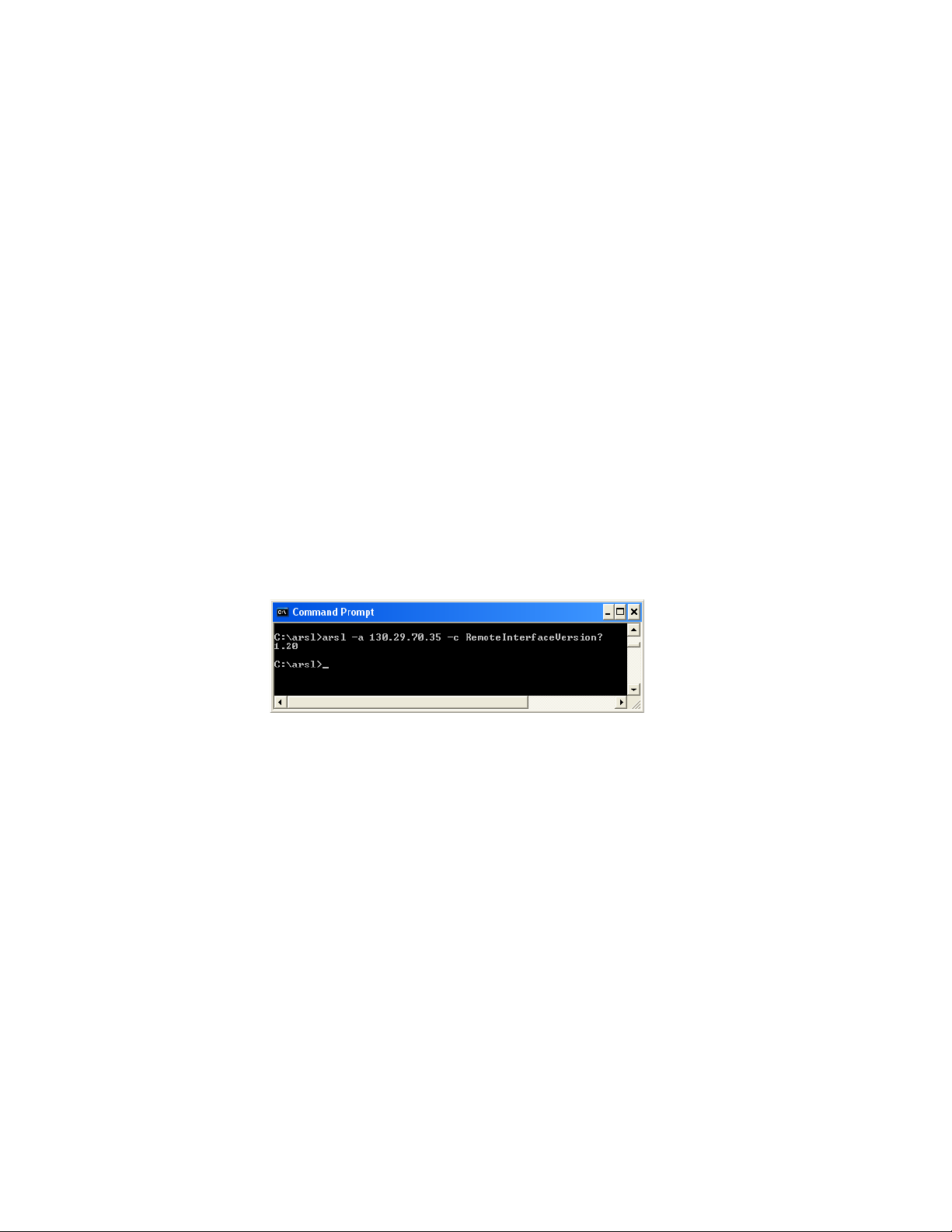
Here is an example of an ARSL command being executed in the utility:
In the example, the utility is running on a PC, the automated test application is
running on an oscilloscope at IP address 130.29.70.35, and the command
being sent is a property query to discover the version of the app's remote
interface (1.20).
ARSL syntax has a simple mapping to .NET languages and can be used to query
and set properties and execute methods, even those with custom type
parameters.
You may execute files containing scripts of ARSL commands, too.
ARSL is appropriate to use only when you do not require conditional or looping
algorithms or callback constructs, such as event subscriptions. If you need
these additional capabilities, use .NET programming.
In addition to providing the ARSL Command Line Utility itself, the Toolkit also
provides the Visual Studio project and source code used to build the tool.
2 Using the .NET API method, ExecuteArsl().
14 Keysight DigitalTestApps Programming Getting Started
Page 15
.NET
Introduction to Programming 1
ExecuteArsl() may be called by any .NET program or from scripting languages
that provide support for .NET interfaces, such as Python.
Use of a .NET language enables access to the full spectrum of automated test
application programming capabilities, although it does require software
programming skills.
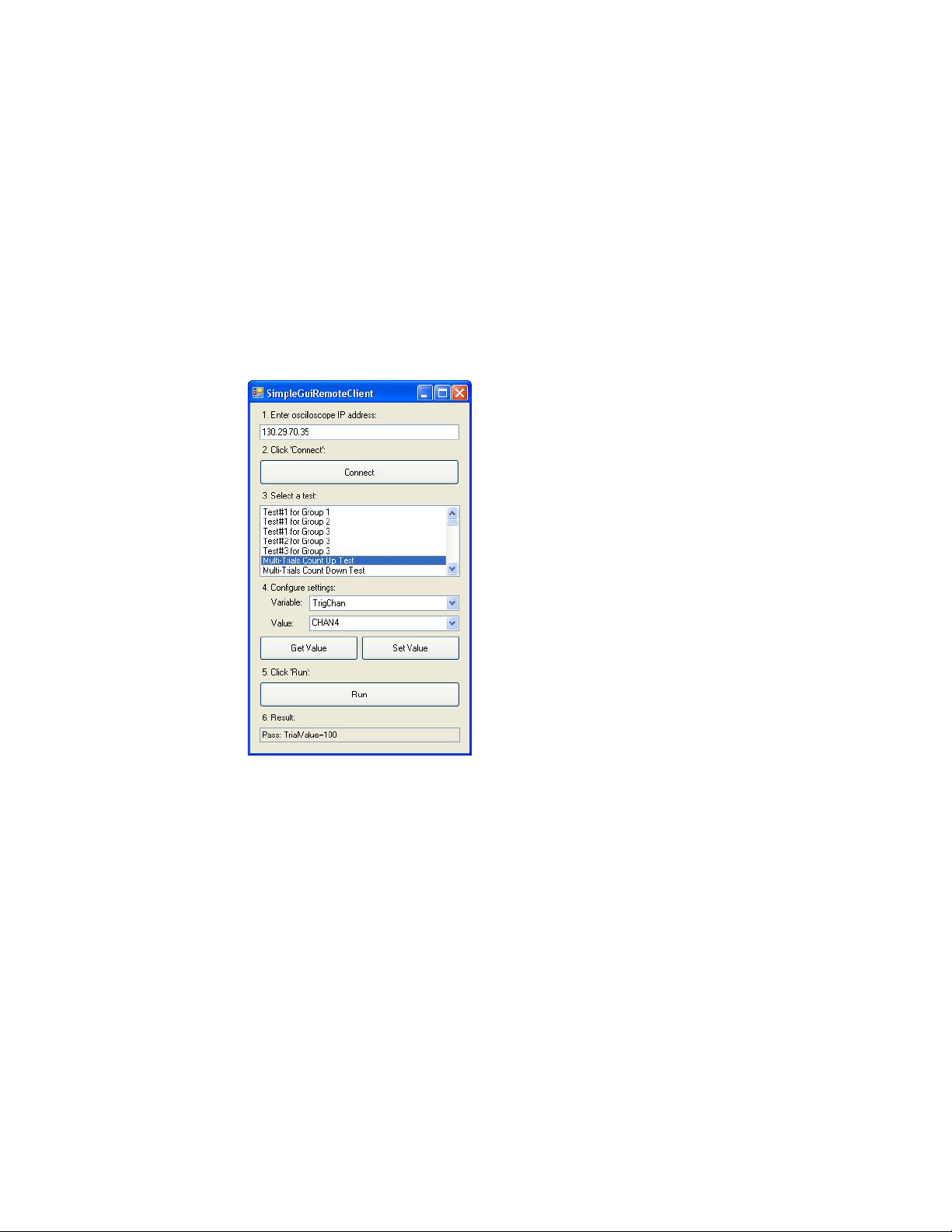
Here is an example of a C#-based remote client, the "Simple GUI Remote Client":
Python
LabVIEW
You may use the Python programming language to automate Keysight
oscilloscopes as well. By adding the "Python for .NET" module, which is
compatible with versions up to 2.7, you can develop scripts using both "method
call" and SCPI-like "text based" paradigms.
Remote Clients constructed using National Instrument's LabVIEW graphical
programming environment are also possible. Please see the Toolkit for details.
Keysight DigitalTestApps Programming Getting Started 15
Page 16

1 Introduction to Programming
16 Keysight DigitalTestApps Programming Getting Started
Page 17

Index
Symbols
.NET programming languages, 15
A
application name, 13
ARSL programming language, 14
Automation tab, commands for, 8
C
client requirements, 13
I
in this book, 3
introduction to programming, 7
K
Keysight.DigitalTestApps.Framework.Remot
e.dll, 13
programming, introduction to, 7
Python programming language, 15
R
remote client, Microsoft .NET, 10
remote client, sample, 9
remote development toolkit, 8
requirements, 12
requirements, client, 13
requirements, server, 12
S
sample remote client, 9
scenarios, usage, 8
server requirements, 12
system requirements, 12
T
test harness, .NET assemblies, 9
test harness, Python, 10
toolkit, how to use, 8
L
LabVIEW 8.5, 13
LabVIEW programming language, 15
LabVIEW, using, 11
languages, programming, 14
licensing requirements, 12
U
usage scenarios, 8
W
Windows Firewall exceptions, 12
M
Microsoft .NET 2.0, 13
N
notices, 3
P
programming languages, 14
Keysight DigitalTestApps Programming Getting Started 17
Page 18

Index
18 Keysight DigitalTestApps Programming Getting Started
Loading...