

Page 1
2015
O W N E R ’ S M A N U A L
FIAT 500
Page 2

VEHICLES SOLD IN CANADA
With respect to any Vehicles Sold in Canada, the name Chrysler
Group LLC shall be deemed to be deleted and the name
Chrysler Canada Inc. used in substitution therefore.
DRIVING AND ALCOHOL
Drunken driving is one of the most frequent causes of accidents.
Your driving ability can be seriously impaired with blood alcohol
levels far below the legal minimum. If you are drinking, don’t
drive. Ride with a designated non-drinking driver, call a cab, a
friend, or use public transportation.
WARNING!
Driving after drinking can lead to an accident. Your
perceptions are less sharp, your reflexes are slower, and
your judgment is impaired when you have been drinking.
Never drink and then drive.
This manual illustrates and describes the operation of features
and equipment that are either standard or optional on this
vehicle.This manual may also include a description of features
and equipment that are no longer available or were not
ordered on this vehicle. Please disregard any features and
equipment described in this manual that are not on this
vehicle.
Chrysler Group LLC reserves the right to make changes in
design and specifications, and/or make additions to or improvements to its products without imposing any obligation
upon itself to install them on products previously manufactured.
FIAT is a registered trademark of Fiat Group Marketing &
Corporate Communication S.p.A., used under license
by Chrysler Group LLC.
Copyright © 2014 Chrysler Group LLC
Page 3

SECTION PAGE
INTRODUCTION . ..............................................................3
1
THINGS TO KNOW BEFORE STARTING YOUR VEHICLE ..................................9
2
UNDERSTANDING THE FEATURES OF YOUR VEHICLE ..................................83
3
UNDERSTANDING YOUR INSTRUMENT PANEL ......................................141
4
STARTING AND OPERATING . . . . . . . . . . . . . . . . . . . . . . . . . . . . . . . . . . . . . . . . . . . . . . . . . . . . 221
5
TABLE OF CONTENTS
1
2
3
4
5
WHAT TO DO IN EMERGENCIES . . . . . . . . . . . . . . . . . . . . . . . . . . . . . . . . . . . . . . . . . . . . . . . . . . 307
6
MAINTAINING YOUR VEHICLE . . . . . . . . . . . . . . . . . . . . . . . . . . . . . . . . . . . . . . . . . . . . . . . . . . . 349
7
MAINTENANCE SCHEDULES ....................................................407
8
IF YOU NEED CONSUMER ASSISTANCE ............................................415
9
INDEX . . . . . . . . . . . . . . . . . . . . . . . . . . . . . . . . . . . . . . . . . . . . . . . . . . . . . . . . . . . . . . . . . . . . . 425
10
6
7
8
9
10
Page 4

Page 5

INTRODUCTION
CONTENTS
! INTRODUCTION ........................4
1
! VEHICLE IDENTIFICATION NUMBER ........7
! HOW TO USE THIS MANUAL ..............5
! WARNINGS AND CAUTIONS ..............7
! VEHICLE MODIFICATIONS/ALTERATIONS ....8
Page 6

4INTRODUCTION
INTRODUCTION
Congratulations on selecting your new vehicle. Be assured that it represents precision workmanship, distinctive styling, and high quality - all essentials that are
traditional to our vehicles.
This Owner’s Manual has been prepared with the assistance of service and engineering specialists to acquaint
you with the operation and maintenance of your vehicle.
It is supplemented by Warranty Information, and various
customer-oriented documents. Please take the time to
read these publications carefully. Following the instructions and recommendations in this manual will help
assure safe and enjoyable operation of your vehicle.
The enclosed Warranty Information lists the services that
FIAT Group Automobiles offers to its customers:
• The Warranty Certificate with terms and conditions for
maintaining its validity
• The range of additional services available to FIAT
Group Automobiles customers
NOTE: After reviewing the owner information, it
should be stored in the vehicle for convenient referencing and remain with the vehicle when sold.
When it comes to service, remember that your authorized
dealer knows your vehicle best, has factory-trained technicians and genuine parts, and cares about your satisfaction.
Page 7

HOW TO USE THIS MANUAL
Consult the Table of Contents to determine which section
contains the information you desire.
Since the specification of your vehicle depends on the
items of equipment ordered, certain descriptions and
illustrations may differ from your vehicle’s equipment.
The detailed index at the back of this Owner’s Manual
contains a complete listing of all subjects.
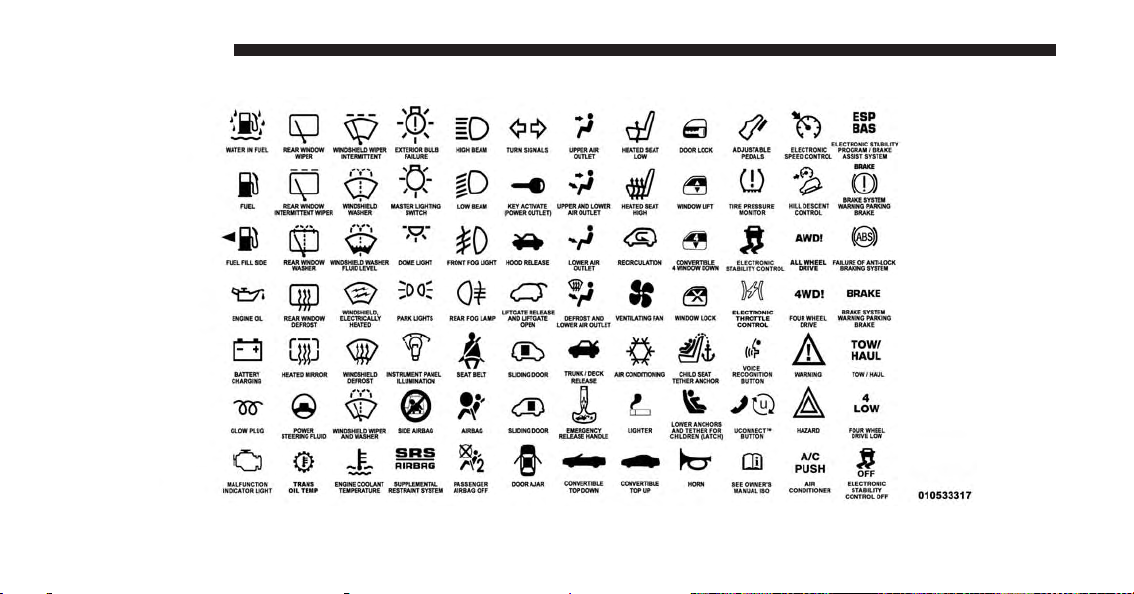
Consult the following table for a description of the
symbols that may be used on your vehicle or throughout
this Owner’s Manual:
INTRODUCTION 5
1
Page 8
6INTRODUCTION
Page 9
WARNINGS AND CAUTIONS
This Owners Manual contains WARNINGS against op-
erating procedures that could result in a collision or
bodily injury. It also contains CAUTIONS against procedures that could result in damage to your vehicle. If you
do not read this entire Owner’s Manual, you may miss
important information. Observe all Warnings and Cautions.
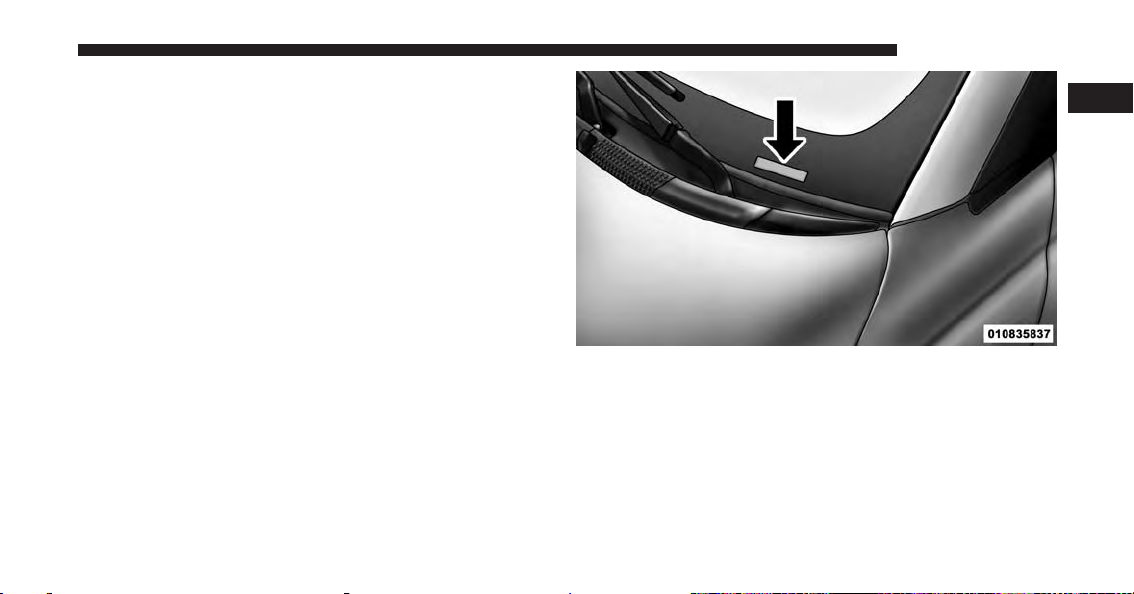
VEHICLE IDENTIFICATION NUMBER
The Vehicle Identification Number (VIN) is found on the
left front corner of the instrument panel, visible through
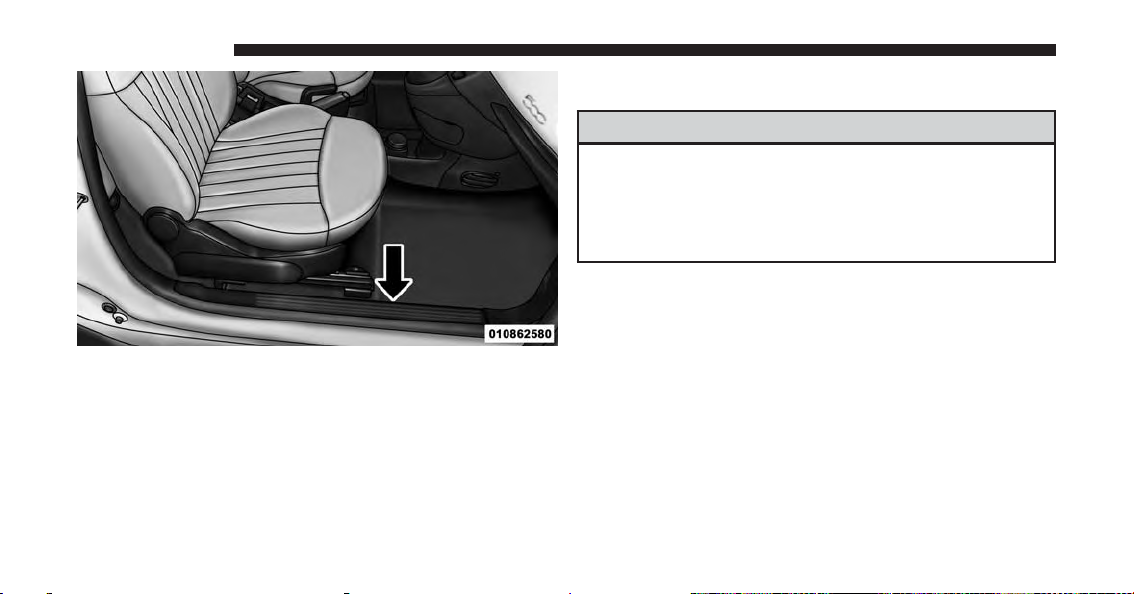
the windshield. This number also appears engraved on
the right front door sill under the sill scuff plate, on an
adhesive label applied to the right door opening on the
B-Pillar, on the vehicle registration and title.
INTRODUCTION 7
1
Vehicle Identification Number
Page 10
8INTRODUCTION
Stamped VIN Location
NOTE: It is illegal to remove or alter the VIN.
VEHICLE MODIFICATIONS/ALTERATIONS
WARNING!
Any modifications or alterations to this vehicle could
seriously affect its roadworthiness and safety and
may lead to a collision resulting in serious injury or
death.
Page 11

THINGS TO KNOW BEFORE STARTING YOUR VEHICLE
CONTENTS
! A WORD ABOUT YOUR KEYS .............11
▫ Ignition Key Removal ...................11
▫ Locking Doors With A Key................13
▫ Key-In-Ignition Reminder ................13
! SENTRY KEY® .........................13
▫ Replacement Keys .....................14
▫ General Information ....................14
! REMOTE KEYLESS ENTRY (RKE) — IF
EQUIPPED ............................15
▫ To Unlock The Doors And Liftgate ..........16
▫ Remote Key Unlock, Driver Door/All Doors 1st
Press . . . . . . . . . . . . . . . . . . . . . . . . . . . . . . .16
▫ Open/Close Power Top Remote Function —
If Equipped ..........................16
▫ To Lock The Doors And Liftgate ............18
▫ Programming Additional Transmitters........18
▫ Transmitter Battery Replacement ...........18
▫ General Information ....................20
! DOOR LOCKS .........................20
▫ Power Door Locks — If Equipped ..........22
2
Page 12

10 THINGS TO KNOW BEFORE STARTING YOUR VEHICLE
▫ Auto Door Locks ......................23
▫ Child Restraints .......................57
! POWER WINDOWS .....................24
▫ Power Window Switches .................24
▫ Auto-Down ..........................25
▫ Wind Buffeting .......................25
! LIFTGATE ............................25
! OCCUPANT RESTRAINT SYSTEMS ..........27
▫ Important Safety Precautions ..............27
▫ Seat Belt Systems ......................28
▫ Supplemental Restraint System (SRS) ........40
▫ Transporting Pets ......................76
! ENGINE BREAK-IN RECOMMENDATIONS ....76
! SAFETY TIPS ..........................77
▫ Transporting Passengers..................77
▫ Exhaust Gas ..........................78
▫ Safety Checks You Should Make Inside The
Vehicle .............................79
▫ Periodic Safety Checks You Should Make
Outside The Vehicle ....................81
Page 13
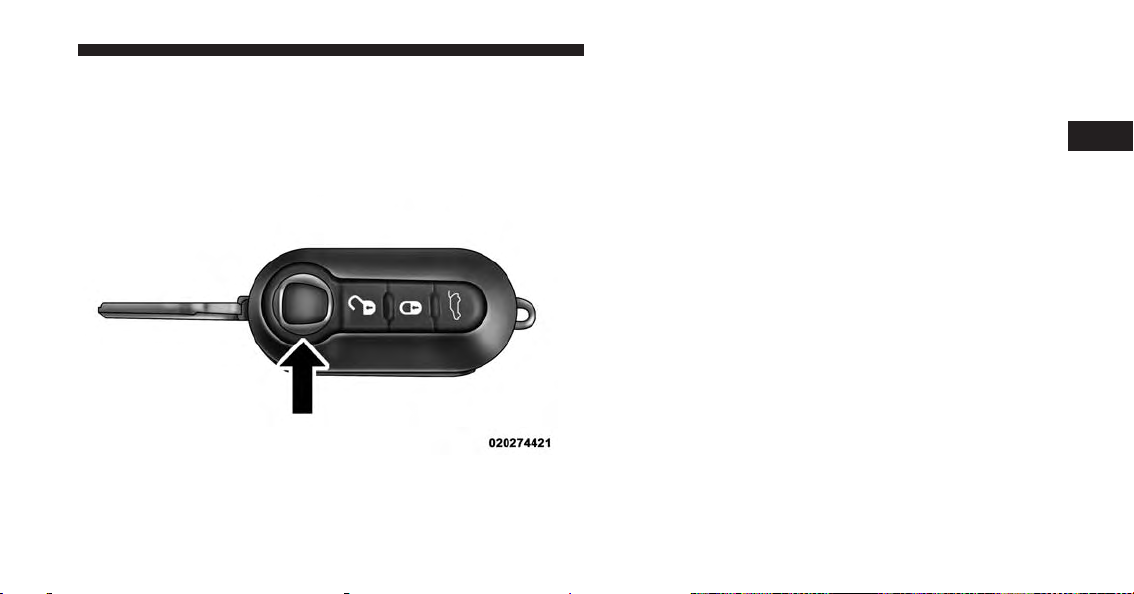
A WORD ABOUT YOUR KEYS
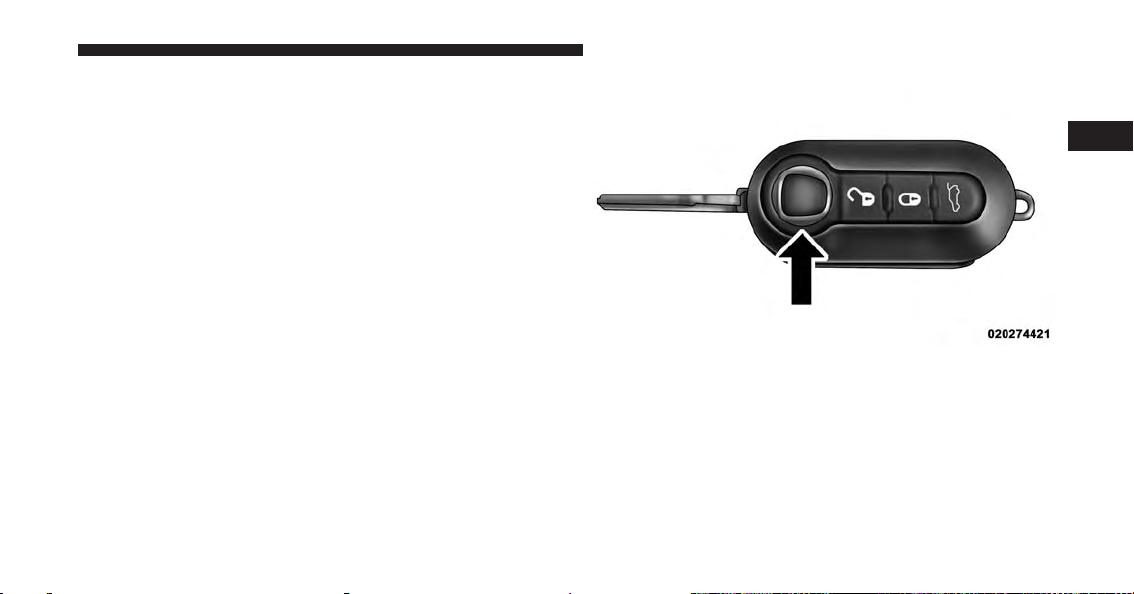
The key fob contains the Remote Keyless Entry (RKE)
transmitter with an integrated key. To use the mechanical
key, simply push the mechanical key release button.
Mechanical Key Release Button
THINGS TO KNOW BEFORE STARTING YOUR VEHICLE 11
The vehicle is supplied with a code card containing key
code numbers to order duplicate keys, and the authorized dealer that sold you your new vehicle has the key
code numbers for your vehicle locks. These numbers can
be used to order duplicate keys.
Ignition Key Removal
1. Place the shift lever in PARK (if equipped with an
automatic transmission).
2. Rotate the key to the OFF/LOCK position.
3. Remove the key from the ignition switch lock cylinder.
2
Page 14
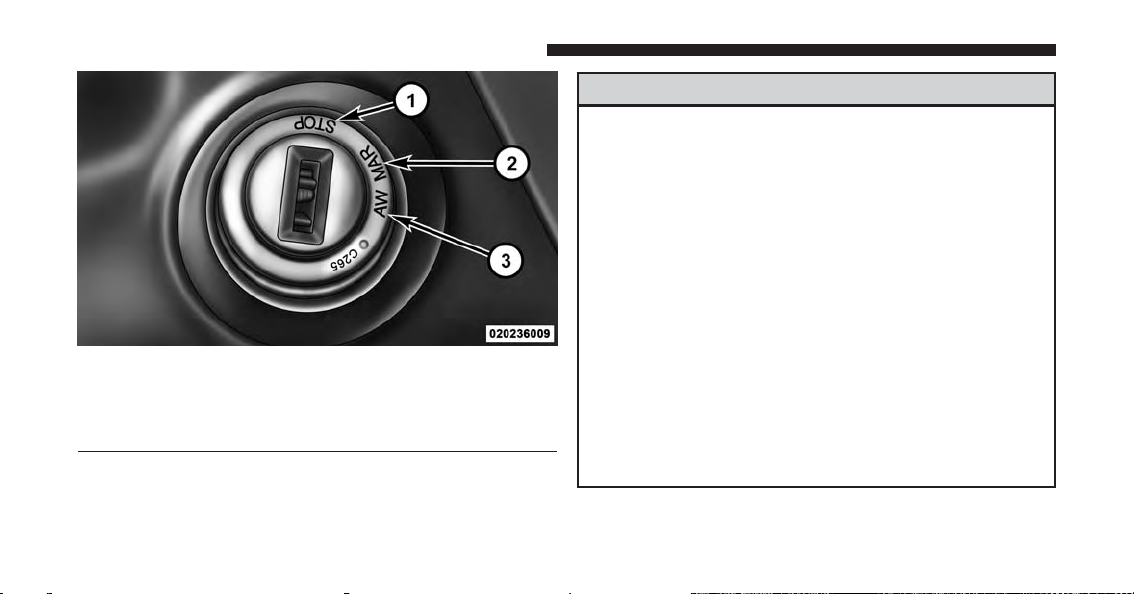
12 THINGS TO KNOW BEFORE STARTING YOUR VEHICLE
Ignition Switch Positions
1—STOP(OFF/LOCK)
2—MAR(ACC/ON/RUN)
3—AVV(START)
WARNING!
• Before exiting a vehicle, always apply the parking
brake, shift the transmission into PARK and remove the Key Fob from the vehicle. When leaving
the vehicle, always lock your vehicle.
• Never leave children alone in a vehicle, or with
access to an unlocked vehicle.
• Allowing children to be in a vehicle unattended is
dangerous for a number of reasons. A child or
others could be seriously or fatally injured. Children should be warned not to touch the parking
brake, brake pedal or the gear selector.
• Do not leave the Key Fob in or near the vehicle, or
in a location accessible to children. A child could
operate power windows, other controls, or move
the vehicle.
(Continued)
Page 15
WARNING! (Continued)
• Do not leave children or animals inside parked
vehicles in hot weather. Interior heat build-up may
cause serious injury or death.
CAUTION!
An unlocked car is an invitation to thieves. Always
remove the key from the ignition and lock all the
doors when leaving the vehicle unattended.
Locking Doors With A Key
You can insert the key with either side up. To lock the
door, turn the key to the left. To unlock the door, turn the
key to the right. Refer to “Body Lubrication” in “Maintaining Your Vehicle” for maintenance procedures.
THINGS TO KNOW BEFORE STARTING YOUR VEHICLE 13
Key-In-Ignition Reminder
Opening the driver’s door when the key is in the ignition
and the ignition switch position is OFF/LOCK sounds a
signal to remove the key.
SENTRY KEY®
The Sentry Key® Immobilizer System prevents unauthorized vehicle operation by disabling the engine. The
system does not need to be armed or activated. Operation
is automatic, regardless of whether the vehicle is locked
or unlocked.
The system uses ignition keys which have an embedded
electronic chip (transponder) to prevent unauthorized
vehicle operation. Therefore, only keys that are programmed to the vehicle can be used to start and operate
the vehicle.
2
Page 16
14 THINGS TO KNOW BEFORE STARTING YOUR VEHICLE
NOTE: A key which has not been programmed is also
considered an invalid key, even if it is cut to fit the
ignition switch lock cylinder for that vehicle.
If the Vehicle Security Light is on after the key is turned
to the ON/RUN position, it indicates that there is a
problem with the electronics.
CAUTION!
• Always remove the Sentry Key® from the vehicle
and lock all doors when leaving the vehicle unattended.
• The Sentry Key® Immobilizer system is not compatible with some aftermarket remote starting systems. Use of these systems may result in vehicle
starting problems and loss of security protection.
All of the keys provided with your new vehicle have
been programmed to the vehicle electronics.
Replacement Keys
NOTE: Only keys that have been programmed to the
vehicle electronics can be used to start the vehicle. Once
a Sentry Key® has been programmed to a vehicle, it
cannot be programmed to any other vehicle. When having the Sentry Key® Immobilizer System serviced, bring
all vehicle keys with you to an authorized dealer.
The VIN is required for authorized dealer replacement of
keys. Duplication of keys may be performed at an
authorized dealer.
General Information
The Sentry Key® system complies with FCC rules part 15
and with RSS-210 of Industry Canada. Operation is
subject to the following conditions:
• This device may not cause harmful interference.
Page 17
• This device must accept any interference that may be
received, including interference that may cause undesired operation.
NOTE: Changes or modifications not expressly approved
by the party responsible for compliance could void the
user’s authority to operate the equipment.
REMOTE KEYLESS ENTRY (RKE) — IF EQUIPPED
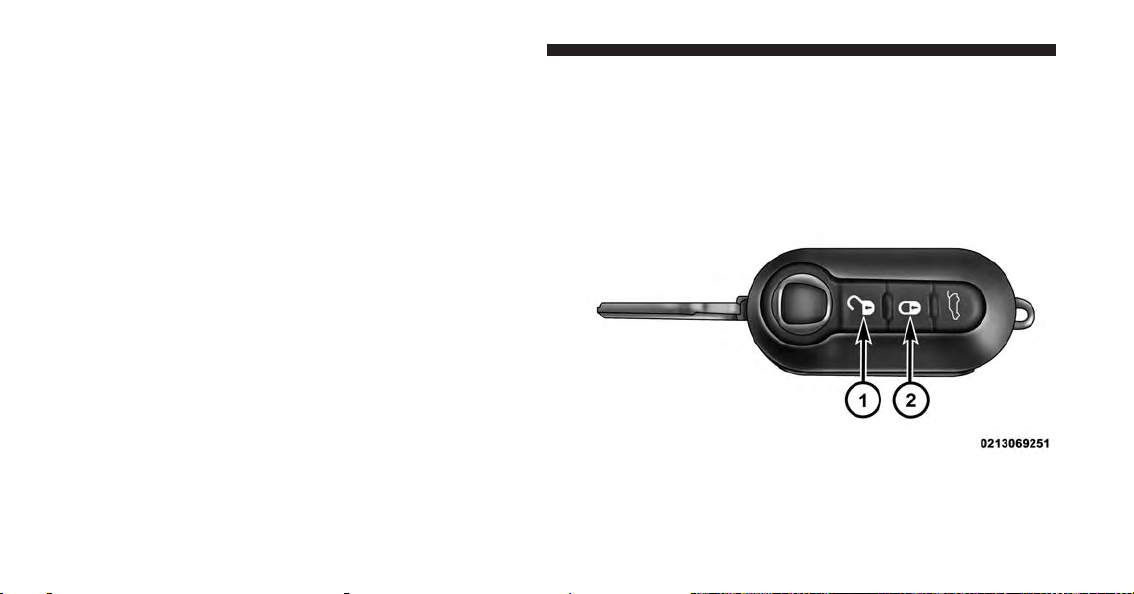
This system allows you to lock or unlock the doors and
liftgate from distances up to approximately 66 ft (20 m)
using a hand-held Remote Keyless Entry (RKE) transmitter. The RKE transmitter does not need to be pointed at
the vehicle to activate the system.
THINGS TO KNOW BEFORE STARTING YOUR VEHICLE 15
2
Remote Keyless Entry Transmitter With Mechanical Key
Release Button
NOTE: The line of transmission must not be blocked
with metal objects.
Page 18
16 THINGS TO KNOW BEFORE STARTING YOUR VEHICLE
To Unlock The Doors And Liftgate
Push and release the UNLOCK button on the RKE
transmitter once to unlock the driver’s door or twice,
within five seconds, to unlock all doors and the liftgate.
The turn signal lights will flash to acknowledge the
unlock signal. The illuminated entry system will also
turn on.
Remote Key Unlock, Driver Door/All Doors 1st Press
This feature lets you program the system to unlock either
the driver ’s door or all doors on the first push of the
UNLOCK button on the RKE transmitter. To change the
current setting, refer to “Personal Settings (CustomerProgrammable Features)” in “Understanding Your Instrument Panel” for further information.
Open/Close Power Top Remote Function — If Equipped
The remote control can only be used with the engine off
and the doors closed.
Remote Keyless Power Top Function
NOTE: The remote control can be used to open the power
top to the spoiler position.
Page 19
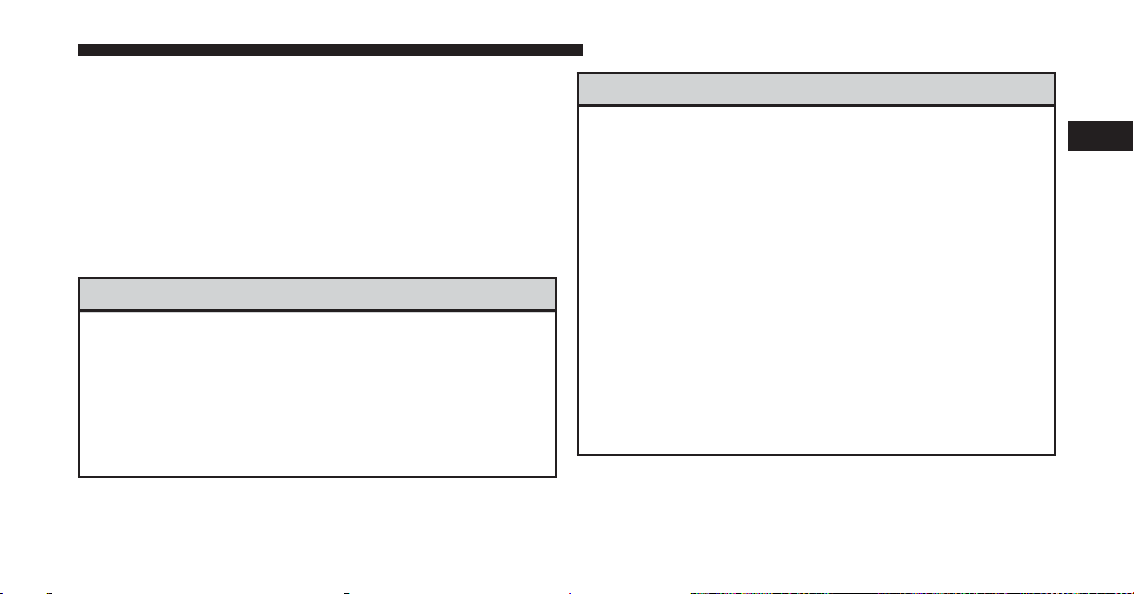
Open/Close Power Top Remote Function — If Equipped:
1. OPEN — Push and hold the unlock button down to
cycle the convertible top to the desired partial/full
open position.
2. CLOSE — Push and hold the lock button down to
cycle the convertible top to the desired partial/full
closed position.
WARNING!
Failure to follow these warnings can result in injuries
that are serious or fatal to you, your passengers, and
others around you:
• Before operating the power top, make sure that no
moving parts of the convertible top can injure a
person or animal.
(Continued)
THINGS TO KNOW BEFORE STARTING YOUR VEHICLE 17
WARNING! (Continued)
• Never place any extremities (hands, feet, etc.) near
the convertible top components, the upper windshield area, the shelf area behind the rear seats, or
the convertible top stowage area while raising or
lowering the convertible top.
• When using the power top button on RKE transmitter, if potential danger exists while lowering the
top, release the button immediately to interrupt the
operation.
• Only drive the vehicle with the convertible top
completely closed and latched or fully lowered into
its stowage compartment.
• Do not operate the power top when the vehicle is in
motion.
2
Page 20
18 THINGS TO KNOW BEFORE STARTING YOUR VEHICLE
To Lock The Doors And Liftgate
Push and release the LOCK button on the RKE transmitter to lock all doors and the liftgate. The turn signal lights
will flash and the horn will chirp to acknowledge the
signal.
Programming Additional Transmitters
Refer to Sentry Key® “Customer Key Programming.”
If you do not have a programmed RKE transmitter,
contact your authorized dealer for details.
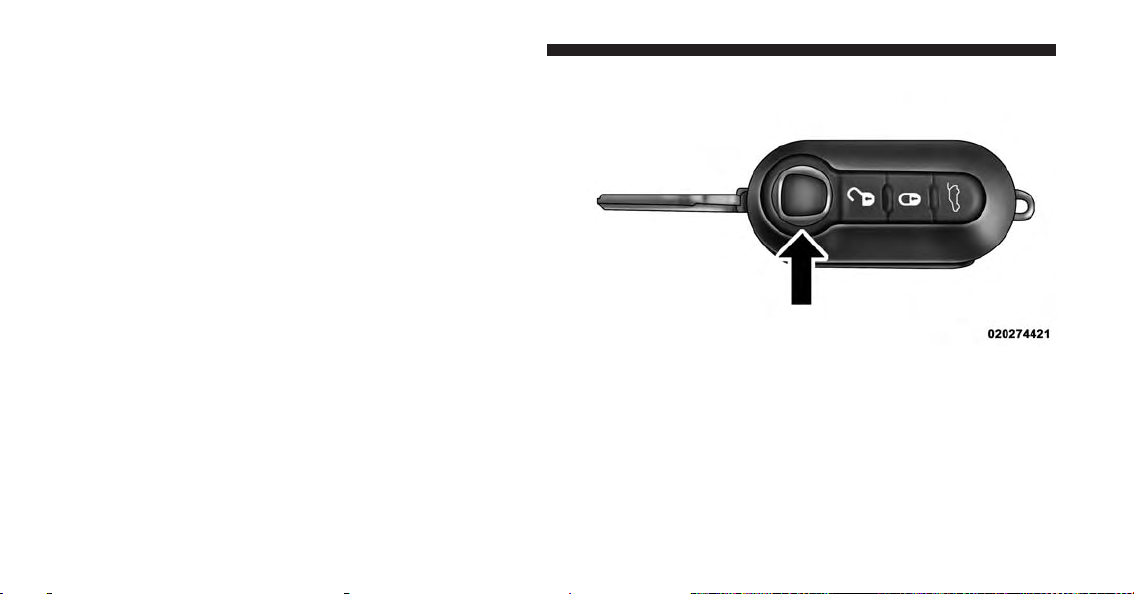
Transmitter Battery Replacement
NOTE: Perchlorate Material – special handling may apply. See www.dtsc.ca.gov/hazardouswaste/perchlorate
The recommended replacement battery is CR2032.
1. Push the mechanical key release button and release the
mechanical key to access the battery case screw located on the side of the Key Fob.
Mechanical Key Release Button
2. Rotate the screw located on the side of the Key Fob
using a small screwdriver.
Page 21
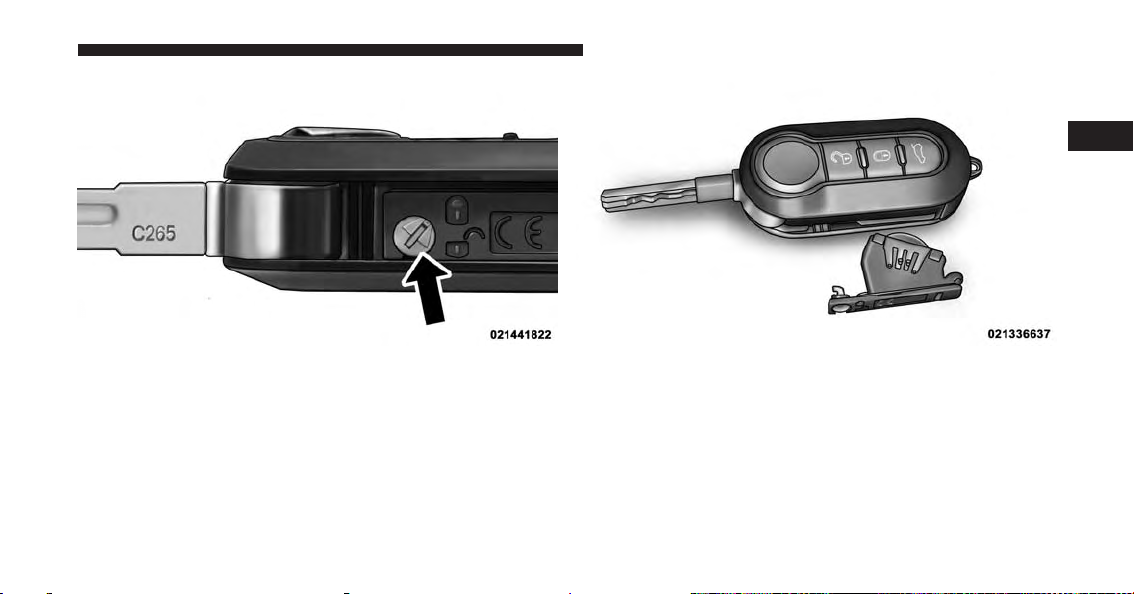
Key Fob Screw Location Battery Case Removed
3. Take out the battery case. Remove and replace the
battery observing its polarity.
THINGS TO KNOW BEFORE STARTING YOUR VEHICLE 19
2
4. Refit the battery case inside the Key Fob and turn the
screw to lock it into place.
Page 22

20 THINGS TO KNOW BEFORE STARTING YOUR VEHICLE
General Information
This device complies with Part 15 of the FCC rules and
RSS 210 of Industry Canada. Operation is subject to the
following conditions:
• This device may not cause harmful interference.
• This device must accept any interference received,
including interference that may cause undesired operation.
NOTE: Changes or modifications not expressly approved
by the party responsible for compliance could void the
user’s authority to operate the equipment.
If your RKE transmitter fails to operate from a normal
distance, check for these two conditions:
1. A weak battery in the transmitter. The expected life of
the battery is a minimum of three years.
2. Closeness to a radio transmitter such as a radio station
tower, airport transmitter, and some mobile or CB
radios.
DOOR LOCKS
The door locks can be manually locked or unlocked from
inside the vehicle by using the door handle. If the door
handle is pushed a red lock indicator will show on the
door handle (indicating locked) when the door is closed,
the door will lock.
Page 23
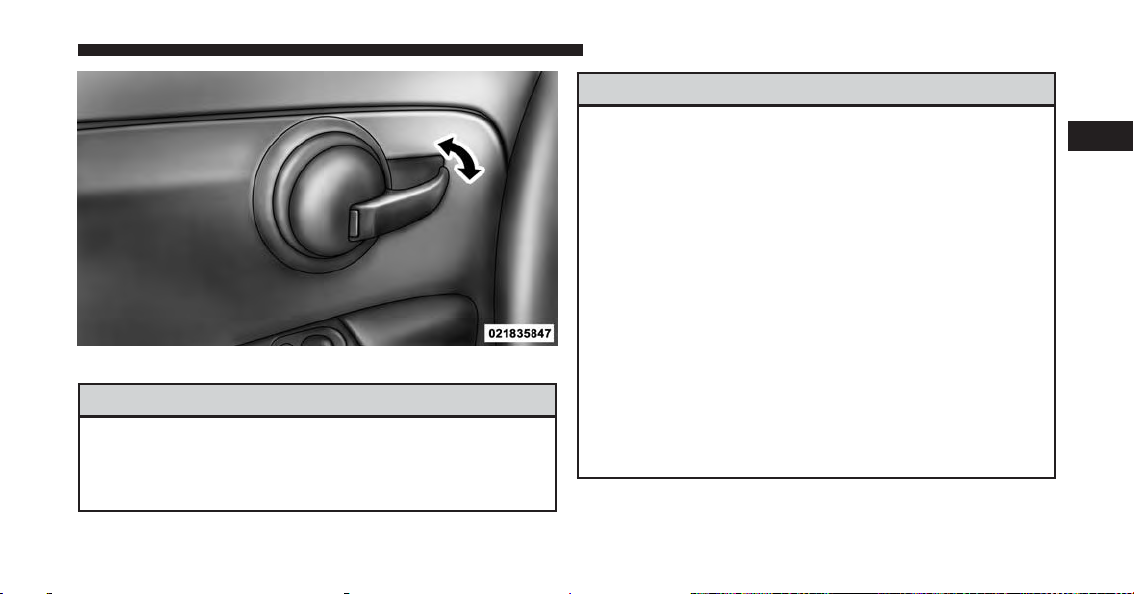
Driver’s Door Lock Handle
WARNING!
• Do not leave children or animals inside parked
vehicles in hot weather. Interior heat build-up may
cause serious injury or death.
(Continued)
THINGS TO KNOW BEFORE STARTING YOUR VEHICLE 21
WARNING! (Continued)
• For personal security and safety in the event of a
collision, lock the vehicle doors as you drive as
well as when you park and leave the vehicle.
• Before exiting a vehicle, always turn the ignition to
the OFF/LOCK position, apply the parking brake,
shift the transmission into REVERSE gear, and
remove the Key Fob from the vehicle. When leaving the vehicle, always lock your vehicle.
• Never leave children alone in a vehicle, or with
access to an unlocked vehicle.
• Allowing children to be in a vehicle unattended is
dangerous for a number of reasons. A child or
others could be seriously or fatally injured. Children should be warned not to touch the parking
brake, brake pedal or the gear selector.
(Continued)
2
Page 24
22 THINGS TO KNOW BEFORE STARTING YOUR VEHICLE
WARNING! (Continued)
• Do not leave the Key Fob in or near the vehicle, or
in a location accessible to children. A child could
operate power windows, other controls, or move
the vehicle.
CAUTION!
An unlocked vehicle is an invitation to thieves.
Always remove the key from the ignition and lock all
of the doors when leaving the vehicle unattended.
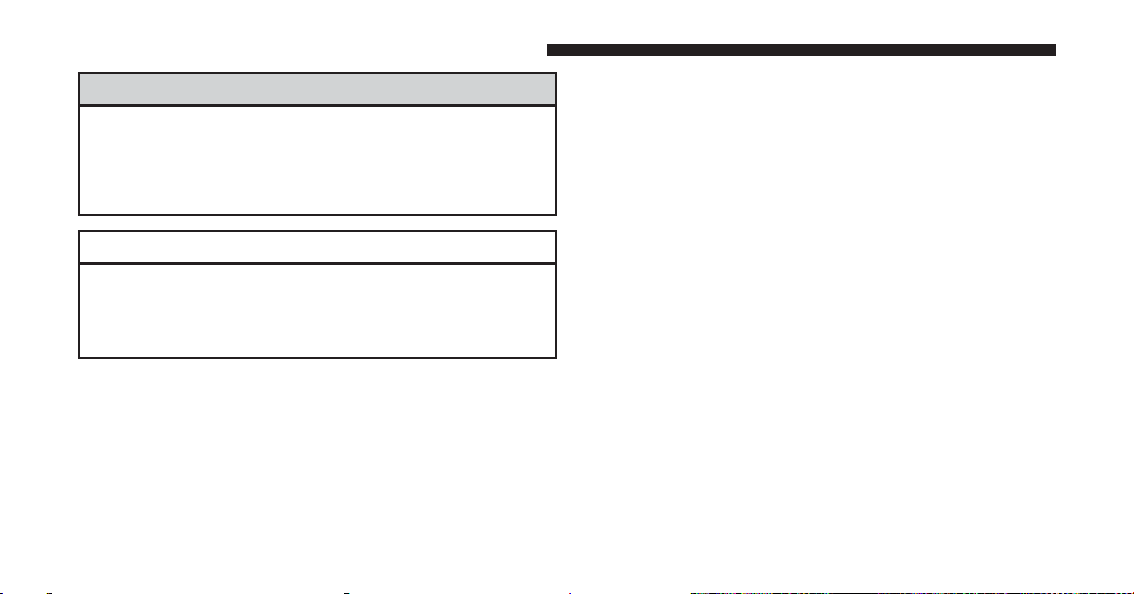
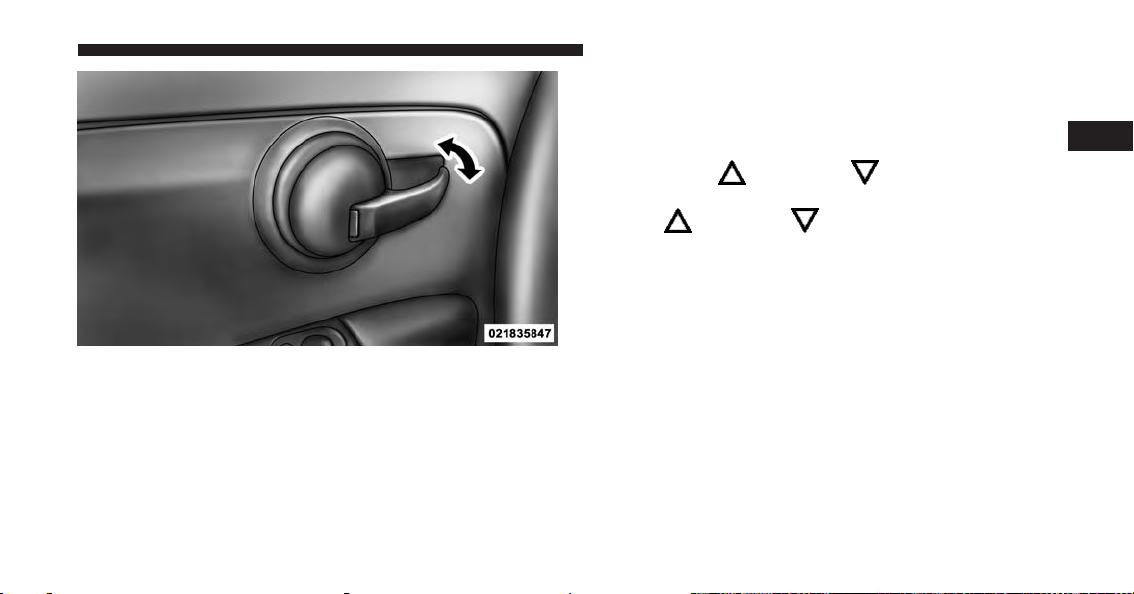
Power Door Locks — If Equipped
A power door lock switch is incorporated into the driver
door handle. Push or pull the handle to lock or unlock the
doors and liftgate. If the driver’s door handle is pushed
a red lock indicator will show on the driver’s door handle
(indicating locked) when the door is closed, the door will
lock.
NOTE: To prevent the key from being locked in the
vehicle, the doors will automatically unlock if the driver’s door handle is pushed when the key is in the
ignition.
Page 25
THINGS TO KNOW BEFORE STARTING YOUR VEHICLE 23
To change the setting proceed as follows:
1. Briefly push the MENU button to enter the MENU
screen.
2
Driver’s Power Door Lock Handle
Auto Door Locks
When enabled, the door locks will lock automatically
when the vehicles speed exceeds 15 mph (24 km/h).
2. Push the UP
or DOWN button to highlight
“Auto Door Locks”. Push the MENU button, use
the UP
or DOWN buttons to turn setting ON
or OFF
3. Briefly push the MENU button to go back to the menu
screen, or push and hold the MENU button (approximately one second) to go back to the main screen
without storing the settings.
NOTE: Use the Automatic Door Locks feature in accordance with local laws.
Refer to “Electronic Vehicle Information Center (EVIC)”
in “Understanding Your Instrument Panel” in your
owner manual on your DVD for further information.
Page 26
24 THINGS TO KNOW BEFORE STARTING YOUR VEHICLE
POWER WINDOWS
Power Window Switches
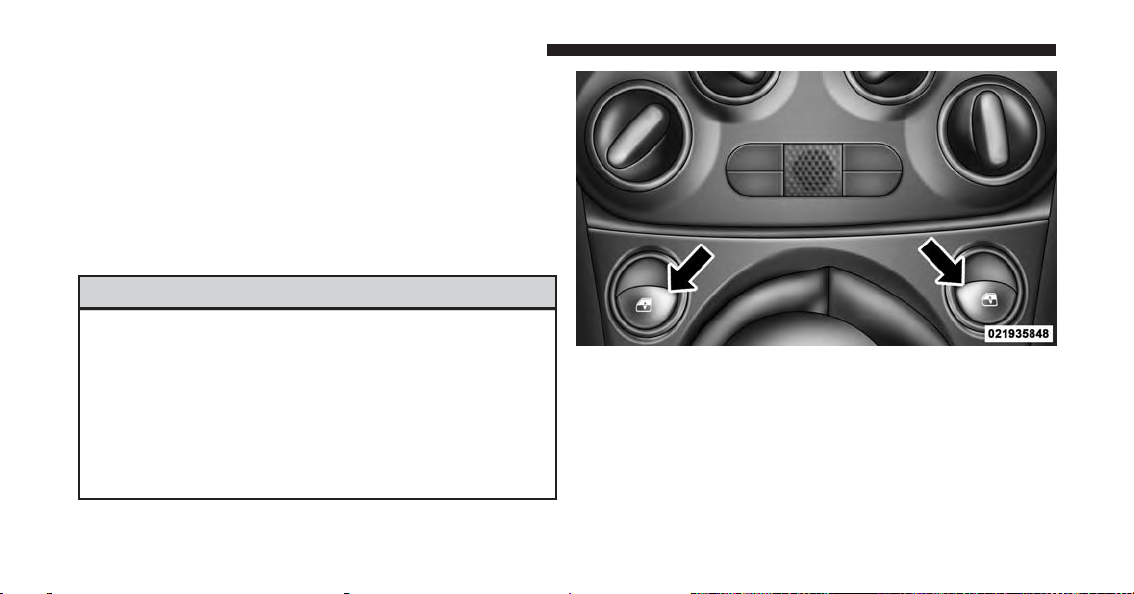
There are single window controls located on the shifter
bezel, below the climate controls, which operate the
driver and passenger door windows. The window controls will operate when the ignition switch is in the
ON/RUN position.
WARNING!
Never leave children unattended in a vehicle, and do
not let children play with power windows. Do not
leave the Key Fob in or near the vehicle, or in a location
accessible to children. Occupants, particularly unattended children, can become entrapped by the windows while operating the power window switches.
Such entrapment may result in serious injury or death.
Power Window Switches
Page 27

Auto-Down
The driver’s door window switch has an Auto-Down
feature. Push the window switch for approximately one
second, release, and the window will go down automatically. To cancel the Auto-Down movement, operate the
switch in either the up or down direction and release the
switch.
Wind Buffeting
Wind buffeting can be described as the perception of
pressure on the ears or a helicopter-type sound in the
ears. Your vehicle may exhibit wind buffeting with the
windows down, or the sunroof (if equipped) in certain
open or partially open positions. This is a normal occurrence and can be minimized. If the buffeting occurs with
the sunroof open, adjust the sunroof opening to minimize
the buffeting or open any window.
THINGS TO KNOW BEFORE STARTING YOUR VEHICLE 25
LIFTGATE
To unlock the liftgate, use the Remote Keyless Entry
(RKE) transmitter or activate the power door lock
switches located on the driver door handle.
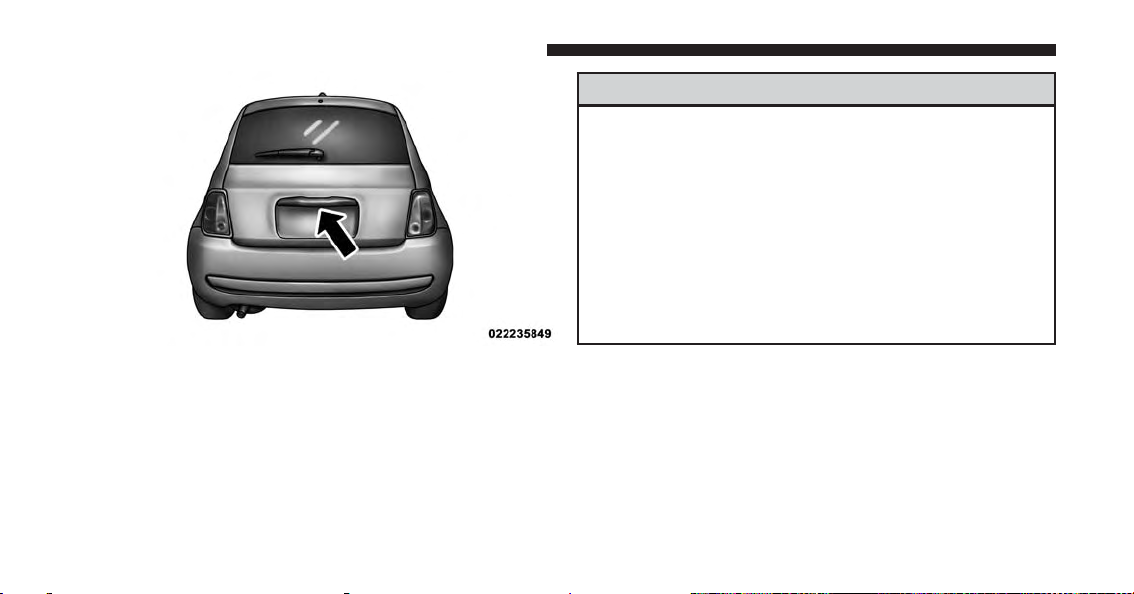
To open the liftgate, squeeze the liftgate release handle
and pull the liftgate open with one fluid motion.
2
Page 28
26 THINGS TO KNOW BEFORE STARTING YOUR VEHICLE
WARNING!
• Driving with the liftgate open can allow poisonous
exhaust gases into your vehicle. You and your
passengers could be injured by these fumes. Keep
the liftgate closed when you are operating the
vehicle.
• If you are required to drive with the liftgate open,
make sure that all windows are closed, and the
climate control blower switch is set at high speed.
Do not use the recirculation mode.
Liftgate Handle
NOTE: Gas props support the liftgate in the open posi-
tion. However, because the gas pressure drops with
temperature, it may be necessary to assist the props when
opening the liftgate in cold weather.
Page 29

OCCUPANT RESTRAINT SYSTEMS
Some of the most important safety features in your
vehicle are the restraint systems:
• Seat Belt Systems
• Supplemental Restraint Systems (SRS) Air Bags
• Child Restraints
Important Safety Precautions
Please pay close attention to the information in this
section. It tells you how to use your restraint system
properly, to keep you and your passengers as safe as
possible.
Here are some simple steps you can take to minimize the
risk of harm from a deploying air bag:
1. Children 12 years old and under should always ride
buckled up in a vehicle with a rear seat.
THINGS TO KNOW BEFORE STARTING YOUR VEHICLE 27
2. If a child from 2 to 12 years old (not in a rear-facing
child restraint) must ride in the front passenger seat,
move the seat as far back as possible and use the
proper child restraint. (Refer to “Child Restraints”)
3. Children that are not big enough to wear the vehicle
seat belt properly (Refer to #Child Restraints#) should
be secured in a vehicle with a rear seat in child
restraints or belt-positioning booster seats. Older children who do not use child restraints or beltpositioning booster seats should ride properly buckled
up in a vehicle with a rear seat.
4. Never allow children to slide the shoulder belt behind
them or under their arm.
5. You should read the instructions provided with your
child restraint to make sure that you are using it
properly.
2
Page 30
28 THINGS TO KNOW BEFORE STARTING YOUR VEHICLE
6. All occupants should always wear their lap and
shoulder belts properly.
7. The driver and front passenger seats should be moved
back as far as practical to allow the Advanced Front
Air Bags room to inflate.
8. Do not lean against the door or window. If your
vehicle has side air bags, and deployment occurs, the
side air bags will inflate forcefully into the space
between you and the door and you could be injured.
9. If the air bag system in this vehicle needs to be
modified to accommodate a disabled person, contact
the Customer Center. Phone numbers are provided
under #If You Need Assistance.#
WARNING!
• Never place a rear-facing child restraint in front of
an air bag. A deploying Passenger Advanced Front
Air Bag can cause death or serious injury to a child
12 years or younger, including a child in a rearfacing child restraint.
• Only use rear-facing child restraint in a vehicle
with a rear seat.
Seat Belt Systems
Buckle up even though you are an excellent driver, even
on short trips. Someone on the road may be a poor driver
and could cause a collision that includes you. This can
happen far away from home or on your own street.
Research has shown that seat belts save lives, and they
can reduce the seriousness of injuries in a collision. Some
of the worst injuries happen when people are thrown
from the vehicle. Seat belts reduce the possibility of
Page 31

ejection and the risk of injury caused by striking the
inside of the vehicle. Everyone in a motor vehicle should
be belted at all times.
Enhanced Seat Belt Use Reminder System (BeltAlert)
BeltAlert is a feature intended to remind the driver
and outboard front passenger (if equipped with outboard front passenger BeltAlert) to buckle their seat
belts. The feature is active whenever the ignition
switch is in the START or ON/RUN position. If the
driver or outboard front seat passenger is unbelted,
the Seat Belt Reminder Light will turn on and remain
on until both outboard front seat belts are buckled.
The BeltAlert warning sequence begins after the vehicle
speed is over 5 mph (8 km/h) by blinking the Seat Belt
Reminder Light and sounding an intermittent chime.
Once the sequence starts, it will continue for the entire
duration or until the respective seat belts are buckled.
THINGS TO KNOW BEFORE STARTING YOUR VEHICLE 29
After the sequence completes, the Seat Belt Reminder
Light remains illuminated until the respective seat belts
are buckled. The driver should instruct all other occupants to buckle their seat belts. If an outboard front seat
belt is unbuckled while traveling at speeds greater than
5 mph (8 km/h), BeltAlert will provide both audio and
visual notification.
The outboard front passenger seat BeltAlert is not active
when the outboard front passenger seat is unoccupied.
BeltAlert may be triggered when an animal or heavy
object is on the outboard front passenger seat or when the
seat is folded flat (if equipped). It is recommended that
pets be restrained in the rear seat (if equipped) in pet
harnesses or pet carriers that are secured by seat belts,
and cargo is properly stowed.
BeltAlert can be activated or deactivated by your authorized dealer. Chrysler Group LLC does not recommend
deactivating BeltAlert.
2
Page 32

30 THINGS TO KNOW BEFORE STARTING YOUR VEHICLE
NOTE: If BeltAlert has been deactivated, the Seat Belt
Reminder Light will continue to illuminate while the
driver’s or outboard front passenger’s (if equipped with
BeltAlert) seat belt remains unbuckled.
Lap/Shoulder Belts
All seating positions in your vehicle are equipped with
lap/shoulder belts.
The seat belt webbing retractor will lock only during very
sudden stops or collisions. This feature allows the shoulder part of the seat belt to move freely with you under
normal conditions. However, in a collision the seat belt
will lock and reduce your risk of striking the inside of the
vehicle or being thrown out of the vehicle.
WARNING!
• Relying on the air bags alone could lead to more
severe injuries in a collision. The air bags work
with your seat belt to restrain you properly. In
some collisions, the air bags won’t deploy at all.
Always wear your seat belt even though you have
air bags.
• In a collision, you and your passengers can suffer
much greater injuries if you are not properly buckled up. You can strike the interior of your vehicle or
other passengers, or you can be thrown out of the
vehicle. Always be sure you and others in your
vehicle are buckled up properly.
• It is dangerous to ride in a cargo area, inside or
outside of a vehicle. In a collision, people riding in
these areas are more likely to be seriously injured
or killed.
(Continued)
Page 33

THINGS TO KNOW BEFORE STARTING YOUR VEHICLE 31
WARNING! (Continued)
• Do not allow people to ride in any area of your
vehicle that is not equipped with seats and seat
belts.
• Be sure everyone in your vehicle is in a seat and
using a seat belt properly.
• Wearing your seat belt incorrectly could make your
injuries in a collision much worse. You might
suffer internal injuries, or you could even slide out
of the seat belt. Follow these instructions to wear
your seat belt safely and to keep your passengers
safe, too.
• Two people should never be belted into a single
seat belt. People belted together can crash into one
another in a collision, hurting one another badly.
Never use a lap/shoulder belt or a lap belt for more
than one person, no matter what their size.
(Continued)
WARNING! (Continued)
• A lap belt worn too high can increase the risk of
injury in a collision. The seat belt forces won’t be at
the strong hip and pelvic bones, but across your
abdomen. Always wear the lap part of your seat
belt as low as possible and keep it snug.
• A twisted seat belt may not protect you properly. In
a collision, it could even cut into you. Be sure the
seat belt is flat against your body, without twists. If
you can’t straighten a seat belt in your vehicle, take
it to your authorized dealer immediately and have
it fixed.
• A seat belt that is buckled into the wrong buckle
will not protect you properly. The lap portion could
ride too high on your body, possibly causing internal injuries. Always buckle your seat belt into the
buckle nearest you.
(Continued)
2
Page 34

32 THINGS TO KNOW BEFORE STARTING YOUR VEHICLE
WARNING! (Continued)
• A seat belt that is too loose will not protect you
properly. In a sudden stop, you could move too far
forward, increasing the possibility of injury. Wear
your seat belt snugly.
• A seat belt that is worn under your arm is dangerous. Your body could strike the inside surfaces of
the vehicle in a collision, increasing head and neck
injury. A seat belt worn under the arm can cause
internal injuries. Ribs aren’t as strong as shoulder
bones. Wear the seat belt over your shoulder so that
your strongest bones will take the force in a collision.
(Continued)
WARNING! (Continued)
• A shoulder belt placed behind you will not protect
you from injury during a collision. You are more
likely to hit your head in a collision if you do not
wear your shoulder belt. The lap and shoulder belt
are meant to be used together.
• A frayed or torn seat belt could rip apart in a
collision and leave you with no protection. Inspect
the seat belt system periodically, checking for cuts,
frays, or loose parts. Damaged parts must be replaced immediately. Do not disassemble or modify
the seat belt system. Seat belt assemblies must be
replaced after a collision.
Page 35

Lap/Shoulder Belt Operating Instructions
1. Enter the vehicle and close the door. Sit back and
adjust the seat.
2. The seat belt latch plate is above the back of the front
seat, and next to your arm in the rear seat (for vehicles
equipped with a rear seat). Grasp the latch plate and
pull out the seat belt. Slide the latch plate up the
webbing as far as necessary to allow the seat belt to go
around your lap.
THINGS TO KNOW BEFORE STARTING YOUR VEHICLE 33
2
Pulling Out The Latch Plate
3. When the seat belt is long enough to fit, insert the latch
plate into the buckle until you hear a “click.”
Page 36

34 THINGS TO KNOW BEFORE STARTING YOUR VEHICLE
Inserting Latch Plate Into Buckle Positioning The Lap Belt
4. Position the lap belt so that it is snug and lies low
across your hips, below your abdomen. To remove
slack in the lap belt portion, pull up on the shoulder
belt. To loosen the lap belt if it is too tight, tilt the latch
plate and pull on the lap belt. A snug seat belt reduces
the risk of sliding under the seat belt in a collision.
5. Position the shoulder belt across the shoulder and
chest with minimal, if any slack so that it is comfortable and not resting on your neck. The retractor will
withdraw any slack in the shoulder belt.
Page 37

6. To release the seat belt, push the red button on the
buckle. The seat belt will automatically retract to its
stowed position. If necessary, slide the latch plate
down the webbing to allow the seat belt to retract
fully.
Lap/Shoulder Belt Untwisting Procedure
Use the following procedure to untwist a twisted lap/
shoulder belt.
1. Position the latch plate as close as possible to the
anchor point.
2. At about 6 to 12 inches (15 to 30 cm) above the latch
plate, grasp and twist the seat belt webbing 180° to
create a fold that begins immediately above the latch
plate.
THINGS TO KNOW BEFORE STARTING YOUR VEHICLE 35
3. Slide the latch plate upward over the folded webbing.
The folded webbing must enter the slot at the top of
the latch plate.
4. Continue to slide the latch plate up until it clears the
folded webbing and the seat belt is no longer twisted.
Seat Belt Extender
If a seat belt is not long enough to fit properly, even when
the webbing is fully extended and the adjustable upper
shoulder belt anchorage (if equipped) is in its lowest
position, your authorized dealer can provide you with a
Seat Belt Extender. The Seat Belt Extender should be used
only if the existing seat belt is not long enough. When the
Seat Belt Extender is not required for a different occupant, it must be removed.
2
Page 38

36 THINGS TO KNOW BEFORE STARTING YOUR VEHICLE
WARNING!
• ONLY use a Seat Belt Extender if it is physically
required in order to properly fit the original seat
belt system. DO NOT USE the Seat Belt Extender
if, when worn, the distance between the front edge
of the Seat Belt Extender buckle and the center of
the occupant’s body is LESS than 6 inches.
• Using a Seat Belt Extender when not needed can
increase the risk of serious injury or death in a
collision. Only use the Seat Belt Extender when the
lap belt is not long enough and only use in the
recommended seating positions. Remove and store
the Seat Belt Extender when not needed.
Seat Belts And Pregnant Women
We recommend that pregnant women use the seat belts
throughout their pregnancy. Keeping the mother safe is
the best way to keep the baby safe.
Pregnant women should wear the lap part of the seat belt
across the thighs and as snug across the hips as possible.
Keep the seat belt low so that it does not come across the
abdomen. That way the strong bones of the hips will take
the force if there is a collision.
Seat Belt Pretensioner
The front seat belt system is equipped with pretensioning
devices that are designed to remove slack from the seat belt
in the event of a collision. These devices may improve the
performance of the seat belt by removing slack from the
seat belt early in a collision. Pretensioners work for all size
occupants, including those in child restraints.
Page 39

NOTE: These devices are not a substitute for proper seat
belt placement by the occupant. The seat belt still must be
worn snugly and positioned properly.
The pretensioners are triggered by the Occupant Restraint Controller (ORC). Like the air bags, the pretensioners are single use items. A deployed pretensioner or
a deployed air bag must be replaced immediately.
Energy Management Feature
This vehicle has a seat belt system with an Energy
Management feature in the front seating positions that
may help further reduce the risk of injury in the event of
a collision. This seat belt system has a retractor assembly
that is designed to release webbing in a controlled
manner.
THINGS TO KNOW BEFORE STARTING YOUR VEHICLE 37
Switchable Automatic Locking Retractor (ALR) — If Equipped
The seat belts in the passenger seating positions may be
equipped with a switchable Automatic Locking Retractor
(ALR) which is used to secure a child restraint system.
For additional information, refer to “Installing Child
Restraints Using The Vehicle Seat Belt” under the “Child
Restraints” section of this manual. The table below
defines the type of feature for each seating position.
2
Page 40

38 THINGS TO KNOW BEFORE STARTING YOUR VEHICLE
•
Lower Anchorage Symbol 2 anchorages per
seating position
•
Top Tether Anchorage Symbol
Driver Center Passenger
First Row N/A N/A ALR
Second
ALR N/A ALR
Row
• N/A — Not Applicable
• ALR — Automatic Locking Retractor
If the passenger seating position is equipped with an
ALR and is being used for normal usage, only pull the
seat belt webbing out far enough to comfortably wrap
around the occupant’s mid-section so as to not activate
the ALR. If the ALR is activated, you will hear a clicking
sound as the seat belt retracts. Allow the webbing to
retract completely in this case and then carefully pull out
only the amount of webbing necessary to comfort- ably
wrap around the occupant’s mid-section. Slide the latch
plate into the buckle until you hear a #click.#
Page 41

In Automatic Locking Mode, the shoulder belt is automatically pre locked. The seat belt will still retract to
remove any slack in the shoulder belt. The Automatic
Locking Mode is available on all passenger seating
positions with a combination lap/shoulder belt. Use the
Automatic Locking Mode anytime a child restraint is
installed in a seating position that has a seat belt with this
feature. Children 12 years old and under should always
be properly restrained in a vehicle with a rear seat.
WARNING!
• Never place a rear-facing child restraint in front of
an air bag. A deploying Passenger Advanced Front
Air Bag can cause death or serious injury to a child
12 years or younger, including a child in a rearfacing child restraint.
• Only use rear-facing child restraint in a vehicle
with a rear seat.
THINGS TO KNOW BEFORE STARTING YOUR VEHICLE 39
How To Engage The Automatic Locking Mode
1. Buckle the combination lap and shoulder belt.
2. Grasp the shoulder portion and pull downward until
the entire seat belt is extracted.
3. Allow the seat belt to retract. As the seat belt retracts,
you will hear a clicking sound. This indicates the seat
belt is now in the Automatic Locking Mode.
How To Disengage The Automatic Locking Mode
Unbuckle the combination lap/shoulder belt and allow it
to retract completely to disengage the Automatic Locking
Mode and activate the vehicle sensitive (emergency)
locking mode.
2
Page 42

40 THINGS TO KNOW BEFORE STARTING YOUR VEHICLE
WARNING!
• The seat belt assembly must be replaced if the
switchable Automatic Locking Retractor (ALR) feature or any other seat belt function is not working
properly when checked according to the procedures in the Service Manual.
• Failure to replace the seat belt assembly could
increase the risk of injury in collisions.
• Do not use the Automatic Locking Mode to restrain
occupants who are wearing the seat belt or children
who are using booster seats. The locked mode is
only used to install rear-facing or forward-facing
child restraints that have a harness for restraining
the child.
Supplemental Restraint System (SRS)
Air Bag System Components
Your vehicle may be equipped with the following air bag
system components:
• Occupant Restraint Controller (ORC)
• Air Bag Warning Light
• Steering Wheel and Column
• Instrument Panel
• Knee Impact Bolsters
• Advanced Front Air Bags
• Supplemental Side Air Bags
• Supplemental Knee Air Bag
• Front and Side Impact Sensors
Page 43

• Seat Belt Pretenioners
• Seat Belt Buckle Switch
• Seat Track Position Sensors
Advanced Front Air Bags
This vehicle has Advanced Front Air Bags for both the
driver and front passenger as a supplement to the seat
belt restraint systems. The driver’s Advanced Front Air
Bag is mounted in the center of the steering wheel. The
passenger’s Advanced Front Air Bag is mounted in the
instrument panel, above the glove compartment. The
words “SRS AIRBAG” and “AIRBAG” are embossed on
the air bag covers.
THINGS TO KNOW BEFORE STARTING YOUR VEHICLE 41
2
Advanced Front Air Bag And Knee Bolster Locations
1—DriverAndPassengerAdvancedFrontAirBags
2 — Passenger Knee Impact Bolster
3 — Supplemental Driver Side Knee Air Bag/Driver Knee Impact
Bolster
Page 44

42 THINGS TO KNOW BEFORE STARTING YOUR VEHICLE
WARNING!
• Being too close to the steering wheel or instrument
panel during Advanced Front Air Bag deployment
could cause serious injury, including death. Air
bags need room to inflate. Sit back, comfortably
extending your arms to reach the steering wheel or
instrument panel.
• Never place a rear-facing child restraint in front of
an air bag. A deploying Passenger Advanced Front
Air Bag can cause death or serious injury to a child
12 years or younger, including a child in a rearfacing child restraint.
• Only use a rear-facing child restraint in a vehicle
with a rear seat.
Advanced Front Air Bag Features
The Advanced Front Air Bag system has multistage
driver and front passenger air bags. This system provides
output appropriate to the severity and type of collision as
determined by the Occupant Restraint Controller (ORC),
which may receive information from the front impact
sensors or other system components.
The first stage inflator is triggered immediately during an
impact that requires air bag deployment. A low energy
output is used in less severe collisions. A higher energy
output is used for more severe collisions.
This vehicle may be equipped with driver and/or front
passenger seat track position sensors that may adjust the
inflation rate of the Advanced Front Air Bags based upon
seat position.
This vehicle may be equipped with a driver and/or front
passenger seat belt buckle switch that detects whether
Page 45

the driver or front passenger seat belt is buckled. The seat
belt buckle switch may adjust the inflation rate of the
Advanced Front Air Bags.
WARNING!
• No objects should be placed over or near the air
bag on the instrument panel or steering wheel,
because any such objects could cause harm if the
vehicle is in a collision severe enough to cause the
air bags to inflate.
• Do not put anything on or around the air bag
covers or attempt to open them manually. You may
damage the air bags and you could be injured
because the air bags may no longer be functional.
The protective covers for the air bag cushions are
designed to open only when the air bags are
inflating.
(Continued)
THINGS TO KNOW BEFORE STARTING YOUR VEHICLE 43
WARNING! (Continued)
• Relying on the air bags alone could lead to more
severe injuries in a collision. The air bags work
with your seat belt to restrain you properly. In
some collisions, air bags won’t deploy at all. Always wear your seat belts even though you have air
bags.
Advanced Front Air Bag Operation
Advanced Front Air Bags are designed to provide additional protection by supplementing the seat belts. Advanced Front Air Bags are not expected to reduce the risk
of injury in rear, side, or rollover collisions. The Advanced Front Air Bags will not deploy in all frontal
collisions, including some that may produce substantial
vehicle damage — for example, some pole collisions,
truck underrides, and angle offset collisions.
2
Page 46

44 THINGS TO KNOW BEFORE STARTING YOUR VEHICLE
On the other hand, depending on the type and location of
impact, Advanced Front Air Bags may deploy in crashes
with little vehicle front-end damage but that produce a
severe initial deceleration.
way as the air bags inflate to their full size. The Advanced
Front Air Bags fully inflate in less time than it takes to
blink your eyes. The air bags then quickly deflate while
helping to restrain the driver and front passenger.
Because air bag sensors measure vehicle deceleration
over time, vehicle speed and damage by themselves are
not good indicators of whether or not an air bag should
have deployed.
Seat belts are necessary for your protection in all collisions, and also are needed to help keep you in position,
away from an inflating air bag.
When the ORC detects a collision requiring the Advanced Front Air Bags, it signals the inflator units. A large
quantity of non-toxic gas is generated to inflate the
Advanced Front Air Bags.
The steering wheel hub trim cover and the upper right
side of the instrument panel separate and fold out of the
Knee Impact Bolsters
The Knee Impact Bolsters help protect the knees of the
driver and front passenger, and position the front occupants for improved interaction with the Advanced Front
Air Bags.
WARNING!
• Do not drill, cut, or tamper with the knee impact
bolsters in any way.
• Do not mount any accessories to the knee impact
bolsters such as alarm lights, stereos, citizen band
radios, etc.
Page 47

Supplemental Driver Knee Air Bag
This vehicle is equipped with a Supplemental Driver
Knee Air Bag mounted in the instrument panel below the
steering column.
The Supplemental Driver Knee Air Bag provides enhanced protection during a frontal impact by working
together with the seat belts, pretensioners, and Advanced
Front Air Bags.
Supplemental Side Air Bags
Your vehicle is equipped with two types of side air bags:
• Supplemental Seat-Mounted Side Air Bags (SABs):
Located in the outboard side of the front seats. The
SABs are marked with a “SRS AIRBAG” or “AIRBAG”
label sewn into the outboard side of the seats.
THINGS TO KNOW BEFORE STARTING YOUR VEHICLE 45
2
Supplemental Seat-Mounted Side Air Bag Label
The SABs may help to reduce the risk of occupant injury
during certain side impacts, in addition to the injury
reduction potential provided by the seat belts and body
structure.
Page 48

46 THINGS TO KNOW BEFORE STARTING YOUR VEHICLE
When the SAB deploys, it opens the seam on the outboard side of the seatback’s trim cover. The inflating SAB
deploys through the seat seam into the space between the
occupant and the door. The SAB moves at a very high
speed and with such a high force that it could injure you
if you are not seated properly, or if items are positioned
in the area where the SAB inflates. Children are at an
even greater risk of injury from a deploying air bag.
WARNING!
Do not use accessory seat covers or place objects
between you and the Side Air Bags; the performance
could be adversely affected and/or objects could be
pushed into you, causing serious injury.
• Supplemental Side Air Bag Inflatable Curtains
(SABICs): Located above the side windows. The trim
covering the SABICs is labeled “SRS AIRBAG” or
“AIRBAG.”
Supplemental Side Air Bag Inflatable Curtain (SABIC)
Label Location
SABICs may help reduce the risk of head injury to front
and rear seat outboard occupants in certain side impacts.
SABICs may reduce the risk of injuries in certain side
impacts, in addition to the injury reduction potential
provided by the seat belts and body structure.
Page 49

The SABIC deploys downward, covering the side windows. An inflating SABIC pushes the outside edge of the
headliner out of the way and covers the window. The
SABICs inflate with enough force to injure you if you are
not belted and seated properly, or if items are positioned
in the area where the SABICs inflate. Children are at an
even greater risk of injury from a deploying air bag.
The SABICs may help reduce the risk of partial or
complete ejection of vehicle occupants through side
windows in certain side impact events.
THINGS TO KNOW BEFORE STARTING YOUR VEHICLE 47
WARNING!
• Your vehicle is equipped with left and right
Supplemental Side Air Bag Inflatable Curtains
(SABICs). Do not stack luggage or other cargo up
high enough to block the deployment of the
SABICs. The trim covering above the side windows where the SABIC and its deployment path
are located should remain free from any obstructions.
• Your vehicle is equipped with SABICs. In order for
the SABICs to work as intended, do not install any
accessory items in your vehicle which could alter
the roof. Do not add an aftermarket sunroof to your
vehicle. Do not add roof racks that require permanent attachments (bolts or screws) for installation
on the vehicle roof. Do not drill into the roof of the
vehicle for any reason.
2
Page 50

48 THINGS TO KNOW BEFORE STARTING YOUR VEHICLE
The SABICs and SABs (“Side Air Bags”) are designed to
activate in certain side impacts. The Occupant Restraint
Controller (“ORC”) determines whether the deployment of
the Side Air Bags in a particular impact event is appropriate, based on the severity and type of collision. The side
impact sensors aid the ORC in determining the appropriate
response to impact events. The system is calibrated to
deploy the Side Air Bags on the impact side of the vehicle
during impacts that require Side Air Bag occupant protection. In side impacts, the Side Air Bags deploy independently; a left side impact deploys the left Side Air Bags only
and a right-side impact deploys the right Side Air Bags
only. Vehicle damage by itself is not a good indicator of
whether or not Side Air Bags should have deployed.
The Side Air Bags will not deploy in all side collisions,
including some collisions at certain angles, or some side
collisions that do not impact the area of the passenger
compartment. The Side Air Bags may deploy during
angled or offset frontal collisions where the Advanced
Front Air Bags deploy.
Side Air Bags are a supplement to the seat belt restraint
system. Side Air Bags deploy in less time than it takes to
blink your eyes. Occupants, including children, who are
up against or very close to Side Air Bags can be seriously
injured or killed. Occupants, including children, should
never lean on or sleep against the door, side windows, or
area where the Side Air Bags inflate, even if they are in an
infant or child restraint.
Seat belts (and child restraints where appropriate) are
necessary for your protection in all collisions. They also
help keep you in position, away from inflating Side Air
Bags. To get the best protection from the Side Air Bags,
occupants must wear their seat belts properly and sit
upright with their backs against the seats. Children must
Page 51

be properly restrained in a child restraint or booster seat
that is appropriate for the size of the child.
WARNING!
• Side Air Bags need room to inflate. Do not lean
against the door or window. Sit upright in the
center of the seat.
• Being too close to the Side Air Bags during deployment could cause you to be severely injured or
killed.
• Relying on the Side Air Bags alone could lead to
more severe injuries in a collision. The Side Air
Bags work with your seat belt to restrain you
properly. In some collisions, Side Air Bags won’t
deploy at all. Always wear your seat belt even
though you have Side Air Bags.
NOTE: Air bag covers may not be obvious in the interior
trim, but they will open during air bag deployment.
THINGS TO KNOW BEFORE STARTING YOUR VEHICLE 49
If A Deployment Occurs
The Advanced Front Air Bags are designed to deflate
immediately after deployment.
NOTE: Front and/or side air bags will not deploy in all
collisions. This does not mean something is wrong with
the air bag system.
If you do have a collision, which deploys the air bags, any
or all of the following may occur:
• The air bag material may sometimes cause abrasions
and/or skin reddening to the occupants as the air bags
deploy and unfold. The abrasions are similar to friction rope burns or those you might get sliding along a
carpet or gymnasium floor. They are not caused by
contact with chemicals. They are not permanent and
normally heal quickly. However, if you haven’t healed
significantly within a few days, or if you have any
blistering, see your doctor immediately.
2
Page 52

50 THINGS TO KNOW BEFORE STARTING YOUR VEHICLE
• As the air bags deflate, you may see some smoke-like
particles. The particles are a normal by-product of the
process that generates the non-toxic gas used for air
bag inflation. These airborne particles may irritate the
skin, eyes, nose, or throat. If you have skin or eye
irritation, rinse the area with cool water. For nose or
throat irritation, move to fresh air. If the irritation
continues, see your doctor. If these particles settle on
your clothing, follow the garment manufacturer’s instructions for cleaning.
Do not drive your vehicle after the air bags have deployed. If you are involved in another collision, the air
bags will not be in place to protect you.
WARNING!
Deployed air bags and seat belt pretensioners cannot
protect you in another collision. Have the air bags,
seat belt pretensioners, and the seat belt retractor
assemblies replaced by an authorized dealer immediately. Also, have the Occupant Restraint Controller
System serviced as well.
NOTE:
• Air bag covers may not be obvious in the interior trim,
but they will open during air bag deployment.
• After any collision, the vehicle should be taken to an
authorized dealer immediately.
Page 53

Enhanced Accident Response System
In the event of an impact, if the communication network
remains intact, and the power remains intact, depending
on the nature of the event, the ORC will determine
whether to have the Enhanced Accident Response System perform the following functions:
• Cut off fuel to the engine.
• Flash hazard lights as long as the battery has power or
until the ignition is placed in the “OFF” position.
• Turn on the interior lights, which remain on as long as
the battery has power or until the ignition is placed in
the “OFF” position.
• Unlock the doors automatically.
THINGS TO KNOW BEFORE STARTING YOUR VEHICLE 51
System Reset Procedure
Depending on the nature of the event the left and right
turn signal lights, located in the instrument panel cluster,
may both be blinking and will continue to blink until the
ignition switch is turned to the OFF position. In order to
move your vehicle to the side of the road, you must
follow the system reset procedure.
2
Page 54

52 THINGS TO KNOW BEFORE STARTING YOUR VEHICLE
Customer Action Customer Will See
1. Turn ignition OFF. (Turn Signal Switch Must be
placed in Neutral State).
2. Turn ignition ON. Left Turn Light is OFF. Right Turn Light BLINKS.
3. Turn Right Turn Signal Switch ON. Right Turn Light is ON SOLID. Left Turn Light
BLINKS.
4. Turn Left Turn Signal Switch ON. Left Turn Light is ON SOLID. Right Turn Light
BLINKS.
5. Turn Right Turn Signal Switch ON. Right Turn Light is ON SOLID. Left Turn Light
BLINKS.
6. Turn Left Turn Signal Switch ON. Left Turn Light is ON SOLID. Right Turn Light is ON
SOLID.
7. Turn Left Turn Signal Switch OFF. (Turn Signal
Left Turn Light is OFF. Right Turn Light is OFF.
Switch Must be placed in Neutral State).
8. Turn ignition OFF.
9. Turn Hazard Flashers OFF (Manually). System is now reset and the engine may be started.
Page 55

If a reset procedure step is not completed within 45
seconds, then the turn signal lights will turn off and the
reset procedure must be performed again in order to be
successful.
Air Bag Warning Light
The air bags must be ready to inflate for your
protection in a collision. The Occupant Restraint Controller (ORC) monitors the internal
circuits and interconnecting wiring associated
with air bag system electrical components.
The ORC monitors the readiness of the electronic parts of
the air bag system whenever the ignition is in the START
or ON/RUN position. If the ignition is in the OFF
position, the air bag system is not on and the air bags will
not inflate.
THINGS TO KNOW BEFORE STARTING YOUR VEHICLE 53
The ORC contains a backup power supply system that
may deploy the air bags even if the battery loses power or
it becomes disconnected prior to deployment.
The ORC turns on the Air Bag Warning Light in the
instrument panel for approximately four to eight seconds
for a self-check when the ignition is first placed in the
ON/RUN position. After the self-check, the Air Bag
Warning Light will turn off. If the ORC detects a malfunction in any part of the system, it turns on the Air Bag
Warning Light, either momentarily or continuously. A
single chime will sound to alert you if the light comes on
again after initial startup.
The ORC also includes diagnostics that will illuminate
the instrument panel Air Bag Warning Light if a malfunction is detected that could affect the air bag system. The
diagnostics also record the nature of the malfunction.
While the air bag system is designed to be maintenance
2
Page 56

54 THINGS TO KNOW BEFORE STARTING YOUR VEHICLE
free, if any of the following occurs, have an authorized
dealer service the air bag system immediately.
• The Air Bag Warning Light does not come on during
the four to eight seconds when the ignition is first
placed in the ON/RUN position.
• The Air Bag Warning Light remains on after the four to
eight-second interval.
• The Air Bag Warning Light comes on intermittently or
remains on while driving.
NOTE: If the speedometer, tachometer, or any engine
related gauges are not working, the Occupant Restraint
Controller (ORC) may also be disabled. In this condition
the air bags may not be ready to inflate for your protection. Have an authorized dealer service the air bag
system immediately.
WARNING!
Ignoring the Air Bag Warning Light in your instrument panel could mean you won’t have the air bags
to protect you in a collision. If the light does not come
on as a bulb check when the ignition is first placed in
the on position, and stays on after you start the
vehicle, or if it comes on as you drive, have an
authorized dealer service the air bag system immediately.
Page 57

Maintaining Your Air Bag System
WARNING!
• Modifications to any part of the air bag system
could cause it to fail when you need it. You could
be injured if the air bag system is not there to
protect you. Do not modify the components or
wiring, including adding any kind of badges or
stickers to the steering wheel hub trim cover or the
upper right side of the instrument panel. Do not
modify the front bumper, vehicle body structure, or
add aftermarket side steps or running boards.
• It is dangerous to try to repair any part of the air
bag system yourself. Be sure to tell anyone who
works on your vehicle that it has an air bag system.
(Continued)
THINGS TO KNOW BEFORE STARTING YOUR VEHICLE 55
WARNING! (Continued)
• Do not attempt to modify any part of your air bag
system. The air bag may inflate accidentally or may
not function properly if modifications are made.
Take your vehicle to an authorized dealer for any
air bag system service. If your seat, including your
trim cover and cushion, needs to be serviced in any
way (including removal or loosening/tightening of
seat attachment bolts), take the vehicle to your
authorized dealer. Only manufacturer approved
seat accessories may be used. If it is necessary to
modify the air bag system for persons with disabilities, contact your authorized dealer.
2
Page 58

56 THINGS TO KNOW BEFORE STARTING YOUR VEHICLE
Event Data Recorder (EDR)
This vehicle is equipped with an event data recorder
(EDR). The main purpose of an EDR is to record, in
certain crash or near crash-like situations, such as an air
bag deployment or hitting a road obstacle, data that will
assist in understanding how a vehicle’s systems performed. The EDR is designed to record data related to
vehicle dynamics and safety systems for a short period of
time, typically 30 seconds or less. The EDR in this vehicle
is designed to record such data as:
• How various systems in your vehicle were operating;
• Whether or not the driver and passenger safety belts
were buckled/fastened;
• How far (if at all) the driver was pushing the accelerator and/or brake pedal; and,
• How fast the vehicle was traveling.
These data can help provide a better understanding of
the circumstances in which crashes and injuries occur.
NOTE: EDR data are recorded by your vehicle only if a
non-trivial crash situation occurs; no data are recorded by
the EDR under normal driving conditions and no personal data (e.g., name, gender, age, and crash location)
are recorded. However, other parties, such as law enforcement, could combine the EDR data with the type of
personally identifying data routinely acquired during a
crash investigation.
To read data recorded by an EDR, special equipment is
required, and access to the vehicle or the EDR is needed.
In addition to the vehicle manufacturer, other parties,
such as law enforcement, that have the special equipment, can read the information if they have access to the
vehicle or the EDR.
Page 59

Child Restraints
Everyone in your vehicle needs to be buckled up at all
times, including babies and children.
Every state in the United States, and every Canadian
province, requires that small children ride in proper
restraint systems. This is the law, and you can be prosecuted for ignoring it.
Children 12 years or younger should ride properly
buckled up in a rear seat, if available. According to crash
statistics, children are safer when properly restrained in
the rear seats rather than in the front.
WARNING!
In a collision, an unrestrained child can become a
projectile inside the vehicle. The force required to
hold even an infant on your lap could become so
(Continued)
THINGS TO KNOW BEFORE STARTING YOUR VEHICLE 57
WARNING! (Continued)
great that you could not hold the child, no matter
how strong you are. The child and others could be
badly injured. Any child riding in your vehicle
should be in a proper restraint for the child’s size.
There are different sizes and types of restraints for
children from newborn size to the child almost large
enough for an adult seat belt. Always check the child seat
Owner’s Manual to make sure you have the correct seat
for your child. Carefully read and follow all the instructions and warnings in the child restraint Owner’s Manual
and on all the labels attached to the child restraint.
Before buying any restraint system, make sure that it has
a label certifying that it meets all applicable Safety
Standards. You should also make sure that you can install
it in the vehicle where you will use it.
2
Page 60

58 THINGS TO KNOW BEFORE STARTING YOUR VEHICLE
NOTE:
For additional information, refer to www.seatcheck.org
•
• www.tc.gc.ca/eng/roadsafety/safedrivers-
childsafety-index-53.htm
or call 1–866–SEATCHECK (732–8243). Canadian residents should refer to Transport Canada’s website for
additional information:
Summary Of Recommendations For Restraining Children In Vehicles
Child Size, Height, Weight Or
Age
Infants and Toddlers Children who are two years old or
younger and who have not
reached the height or weight limits
of their child restraint
Small Children Children who are at least two
years old or who have out-grown
the height or weight limit of their
rear-facing child restraint
Recommended Type Of Child
Restraint
Either an Infant Carrier or a Con-
vertible Child Restraint, facing
rearward in the rear seat of the
vehicle
Forward-Facing Child Restraint
with a five-point Harness, facing
forward in the rear seat of the
vehicle
Page 61

THINGS TO KNOW BEFORE STARTING YOUR VEHICLE 59
Child Size, Height, Weight Or
Larger Children Children who have out-grown
their forward-facing child restraint,
but are too small to properly fit
the vehicle’s seat belt
Children Too Large for Child Re-
straints
Children 12 years old or younger,
who have out-grown the height or
weight limit of their booster seat
Infants And Child Restraints
Safety experts recommend that children ride rear-facing
in the vehicle until they are two years old or until they
reach either the height or weight limit of their rear-facing
child restraint. Two types of child restraints can be used
rear-facing: infant carriers and convertible child seats.
The infant carrier is only used rear-facing in the vehicle. It
is recommended for children from birth until they reach the
Recommended Type Of Child
Age
Restraint
Belt Positioning Booster Seat and
the vehicle seat belt, seated in the
rear seat of the vehicle
Vehicle Seat Belt, seated in the rear
seat of the vehicle
weight or height limit of the infant carrier. Convertible
child seats can be used either rear-facing or forward-facing
in the vehicle. Convertible child seats often have a higher
weight limit in the rear-facing direction than infant carriers
do, so they can be used rear-facing by children who have
outgrown their infant carrier but are still less than at least
two years old. Children should remain rear-facing until
they reach the highest weight or height allowed by their
convertible child seat.
2
Page 62

60 THINGS TO KNOW BEFORE STARTING YOUR VEHICLE
WARNING!
• Never place a rear-facing child restraint in front of
an air bag. A deploying passenger Advanced Front
Air Bag can cause death or serious injury to a child
12 years or younger, including a child in a rearfacing child restraint.
• Only use a rear-facing child restraint in a vehicle
with a rear seat.
Older Children And Child Restraints
Children who are two years old or who have outgrown
their rear-facing convertible child seat can ride forwardfacing in the vehicle. Forward-facing child seats and
convertible child seats used in the forward-facing direction are for children who are over two years old or who
have outgrown the rear-facing weight or height limit of
their rear-facing convertible child seat. Children should
remain in a forward-facing child seat with a harness for
as long as possible, up to the highest weight or height
allowed by the child seat.
All children whose weight or height is above the
forward-facing limit for the child seat should use a
belt-positioning booster seat until the vehicle’s seat belts
fit properly. If the child cannot sit with knees bent over
the vehicle’s seat cushion while the child’s back is against
the seatback, they should use a belt-positioning booster
seat. The child and belt-positioning booster seat are held
in the vehicle by the seat belt.
Page 63

THINGS TO KNOW BEFORE STARTING YOUR VEHICLE 61
WARNING!
• Improper installation can lead to failure of an
infant or child restraint. It could come loose in a
collision. The child could be badly injured or
killed. Follow the child restraint manufacturer’s
directions exactly when installing an infant or
child restraint.
• After a child restraint is installed in the vehicle, do
not move the vehicle seat forward or rearward
because it can loosen the child restraint attachments. Remove the child restraint before adjusting
the vehicle seat position. When the vehicle seat has
been adjusted, reinstall the child restraint.
(Continued)
WARNING! (Continued)
• When your child restraint is not in use, secure it in
the vehicle with the seat belt or LATCH anchorages, or remove it from the vehicle. Do not leave it
loose in the vehicle. In a sudden stop or accident, it
could strike the occupants or seatbacks and cause
serious personal injury.
Children Too Large For Booster Seats
Children who are large enough to wear the shoulder belt
comfortably, and whose legs are long enough to bend
over the front of the seat when their back is against the
seatback, should use the seat belt in a rear seat. Use this
simple 5-step test to decide whether the child can use the
vehicle’s seat belt alone:
1. Can the child sit all the way back against the back of
the vehicle seat?
2
Page 64

62 THINGS TO KNOW BEFORE STARTING YOUR VEHICLE
2. Do the child’s knees bend comfortably over the front
of the vehicle seat – while they are still sitting all the
way back?
3. Does the shoulder belt cross the child’s shoulder
between their neck and arm?
4. Is the lap part of the seat belt as low as possible,
touching the child’s thighs and not their stomach?
5. Can the child stay seated like this for the whole trip?
If the answer to any of these questions was “no,” then the
child still needs to use a booster seat in this vehicle. If the
child is using the lap/shoulder belt, check seat belt fit
periodically and make sure the seat belt buckle is latched.
A child’s squirming or slouching can move the seat belt
out of position. If the shoulder belt contacts the face or
neck, move the child closer to the center of the vehicle, or
use a booster seat to position the seat belt on the child
correctly.
WARNING!
Never allow a child to put the shoulder belt under an
arm or behind their back. In a crash, the shoulder belt
will not protect a child properly, which may result in
serious injury or death. A child must always wear
both the lap and shoulder portions of the seat belt
correctly.
Page 65

Recommendations For Attaching Child Restraints
THINGS TO KNOW BEFORE STARTING YOUR VEHICLE 63
Restraint Type Combined
Weight of the
Child + Child
Restraint
Rear-Facing
Child Restraint
Rear-Facing
Child Restraint
Forward-Facing
Child Restraint
Forward-Facing
Child Restraint
Up to 65 lbs
(29.5 kg)
More than
65 lbs (29.5 kg)
Up to 65 lbs
(29.5 kg)
More than
65 lbs (29.5 kg)
Use any attachment method shown with an “X” Below
LATCH –
Lower Anchors
Only
XX
Seat Belt Only LATCH –
Lower Anchors
+ Top Tether
Anchor
X
XX
2
Seat Belt + Top
Tether Anchor
X
Page 66

64 THINGS TO KNOW BEFORE STARTING YOUR VEHICLE
Lower Anchors And Tethers For Children (LATCH) Restraint System
Your vehicle is equipped with the child restraint anchorage system called LATCH, which stands for Lower
Anchors and Tethers for CHildren. The LATCH system
has three vehicle anchor points for installing LATCHequipped child seats. There are two lower anchorages
located at the back of the seat cushion where it meets the
seatback and one top tether anchorage located behind the
seating position. These anchorages are used to install
LATCH-equipped child seats without using the vehicle’s
seat belts. Some seating positions may have a top tether
anchorage but no lower anchorages. In these seating
positions, the seat belt must be used with the top tether
anchorage to install the child restraint. Please see the
following table for more information.
Page 67

LATCH Positions For Installing Child Restraints In This Vehicle
THINGS TO KNOW BEFORE STARTING YOUR VEHICLE 65
2
•
Lower Anchorage Symbol 2 anchorages per
seating position
•
Top Tether Anchorage Symbol
Page 68

66 THINGS TO KNOW BEFORE STARTING YOUR VEHICLE
What is the weight limit (child’s weight +
weight of the child restraint) for using the
LATCH anchorage system to attach the child
restraint?
Can the LATCH anchorages and the seat
belt be used together to attach a rear-
facing or forward-facing child restraint?
Can two child restraints be attached using
a common lower LATCH anchorage?
65 lbs (29.5 kg) Use the LATCH anchorage system until
the combined weight of the child and the
child restraint is 65 lbs (29.5 kg). Use the
seat belt and tether anchor instead of the
LATCH system once the combined weight
is more than 65 lbs (29.5 kg).
No Do not use the seat belt when you use the
LATCH anchorage system to attach a rear-
facing or forward-facing child restraint.
No Never “share” a LATCH anchorage with
two or more child restraints. If the center
position does not have dedicated LATCH
lower anchorages, use the seat belt to in-
stall a child seat in the center position next
to a child seat using the LATCH anchor-
ages in an outboard position.
Page 69

THINGS TO KNOW BEFORE STARTING YOUR VEHICLE 67
Can the rear-facing child restraint touch
the back of the front passenger seat?
Yes The child seat may touch the back of the
front passenger seat if the child restraint
manufacturer also allows contact. See your
child restraint owner’s manual for more
information.
Can the head restraints be removed? Yes Yes, all may be removed
Locating LATCH Anchorages
The lower anchorages are round bars that are
found at the rear of the seat cushion where it
meets the seatback, below the anchorage sym-
bols on the seatback. They are just visible when
you lean into the rear seat to install the child restraint.
You will easily feel them if you run your finger along the
gap between the seatback and seat cushion.
LATCH Anchorages
2
Page 70

68 THINGS TO KNOW BEFORE STARTING YOUR VEHICLE
Locating Tether Anchorages
Center Seat LATCH
There are tether strap anchorages behind each
rear seating position located on the back of the
seat.
LATCH-compatible child restraint systems will be
equipped with a rigid bar or a flexible strap on each side.
Each will have a hook or connector to attach to the lower
anchorage and a way to tighten the connection to the
anchorage. Forward-facing child restraints and some
rear-facing child restraints will also be equipped with a
tether strap. The tether strap will have a hook at the end
to attach to the top tether anchorage and a way to tighten
the strap after it is attached to the anchorage.
WARNING!
This vehicle does not have a center seating position.
Do not use the center lower LATCH anchorages to
install a child seat in the center of the back seat.
Always follow the directions of the child restraint manufacturer when installing your child restraint. Not all child
restraint systems will be installed as described here.
To Install A LATCH-Compatible Child Restraint
If the selected seating position has a Switchable Automatic Locking Retractor (ALR) seat belt, stow the seat
belt, following the instructions below. See the section
“Installing Child Restraints Using the Vehicle Seat Belt”
to check what type of seat belt each seating position has.
Page 71

1. Loosen the adjusters on the lower straps and on the
tether strap of the child seat so that you can more
easily attach the hooks or connectors to the vehicle
anchorages.
THINGS TO KNOW BEFORE STARTING YOUR VEHICLE 69
4. If the child restraint has a tether strap, connect it to the
top tether anchorage. See the section “Installing Child
Restraints Using the Top Tether Anchorage” for directions to attach a tether anchor.
2
2. Place the child seat between the lower anchorages for
that seating position. For some second row seats, you
may need to recline the seat and/or raise the head
restraint to get a better fit. If the rear seat can be moved
forward and rearward in the vehicle, you may wish to
move it to its rear-most position to make room for the
child seat. You may also move the front seat forward
to allow more room for the child seat.
3. Attach the lower hooks or connectors of the child
restraint to the lower anchorages in the selected seating position.
5. Tighten all of the straps as you push the child restraint
rearward and downward into the seat. Remove slack
in the straps according to the child restraint manufacturer’s instructions.
6. Test that the child restraint is installed tightly by
pulling back and forth on the child seat at the belt
path. It should not move more than 1 inch (25.4 mm)
in any direction.
Page 72

70 THINGS TO KNOW BEFORE STARTING YOUR VEHICLE
How To Stow An Unused ALR Seat Belt:
When using the LATCH attaching system to install a
child restraint, stow all ALR seat belts that are not being
used by other occupants or being used to secure child
restraints. An unused belt could injure a child if they play
with it and accidentally lock the seat belt retractor. Before
installing a child restraint using the LATCH system,
buckle the seat belt behind the child restraint and out of
the child’s reach. If the buckled seat belt interferes with
the child restraint installation, instead of buckling it
behind the child restraint, route the seat belt through the
child restraint belt path and then buckle it. Do not lock
the seat belt. Remind all children in the vehicle that the
seat belts are not toys and that they should not play with
them.
WARNING!
• Improper installation of a child restraint to the
LATCH anchorages can lead to failure of the restraint. The child could be badly injured or killed.
Follow the child restraint manufacturer’s directions
exactly when installing an infant or child restraint.
• Child restraint anchorages are designed to withstand only those loads imposed by correctly-fitted
child restraints. Under no circumstances are they to
be used for adult seat belts, harnesses, or for
attaching other items or equipment to the vehicle.
Page 73

Installing Child Restraints Using The Vehicle Seat Belt
The seat belts in the passenger seating positions are
equipped with a Switchable Automatic Locking Retractor
(ALR) that is designed to keep the lap portion of the seat
belt tight around the child restraint so that it is not
necessary to use a locking clip. The ALR retractor can be
“switched” into a locked mode by pulling all of the
webbing out of the retractor and then letting the webbing
retract back into the retractor. If it is locked, the ALR will
make a clicking noise while the webbing is pulled back
into the retractor. For additional information on ALR,
refer to the “Automatic Locking Mode” description under “Occupant Restraints.”
THINGS TO KNOW BEFORE STARTING YOUR VEHICLE 71
Lap/Shoulder Belt Systems For Installing Child Restraints In This Vehicle
• ALR = Switchable Automatic Locking Retractor
Top Tether Anchorage Symbol
•
2
Page 74

72 THINGS TO KNOW BEFORE STARTING YOUR VEHICLE
What is the weight limit (child’s
weight + weight of the child restraint) for using the Tether Anchor
with the seat belt to attach a forward
facing child restraint?
Can the rear-facing child restraint
touch the back of the front passen-
ger seat?
Can the head restraints be re-
moved?
Can the buckle stalk be twisted to
tighten the seat belt against the belt
path of the child restraint?
Weight limit of the Child Restraint Always use the tether anchor when
using the seat belt to install a for-
ward facing child restraint, up to
the recommended weight limit of
the child restraint.
Yes Contact between the front passen-
ger seat and the child restraint is
allowed, if the child restraint
manufacturer also allows contact.
Yes Yes, all may be removed
No Do not twist the buckle stalk in a
seating position with an ALR re-
tractor.
Page 75

Installing A Child Restraint With A Switchable Automatic Locking Retractor (ALR)
1. Place the child seat in the center of the seating
position. For some second row seats, you may need to
recline the seat and/or raise the head restraint to get a
better fit. If the rear seat can be moved forward and
rearward in the vehicle, you may wish to move it to its
rear-most position to make room for the child seat.
You may also move the front seat forward to allow
more room for the child seat.
Pull enough of the seat belt webbing from the retractor
2.
to pass it through the seat belt path of the child restraint.
Do not twist the belt webbing in the belt path.
THINGS TO KNOW BEFORE STARTING YOUR VEHICLE 73
5. To lock the seat belt, pull down on the shoulder part of
the seat belt until you have pulled all the seat belt
webbing out of the retractor. Then, allow the webbing
to retract back into the retractor. As the webbing
retracts, you will hear a clicking sound. This means the
seat belt is now in the Automatic Locking mode.
6. Try to pull the webbing out of the retractor. If it is
locked, you should not be able to pull out any webbing. If the retractor is not locked, repeat step 5.
7. Finally, pull up on any excess webbing to tighten the
lap portion around the child restraint while you push
the child restraint rearward and downward into the
vehicle seat.
2
3. Slide the latch plate into the buckle until you hear a
“click.”
4. Pull on the webbing to make the lap portion tight
against the child seat.
8. If the child restraint has a top tether strap and the
seating position has a top tether anchorage, connect
the tether strap to the anchorage and tighten the tether
Page 76

74 THINGS TO KNOW BEFORE STARTING YOUR VEHICLE
strap. See the section “Installing Child Restraints
Using the Top Tether Anchorage” for directions to
attach a tether anchor.
9. Test that the child restraint is installed tightly by
pulling back and forth on the child seat at the seat belt
path. It should not move more than 1 inch (25.4 mm)
in any direction.
Any seat belt system will loosen with time, so check the
seat belt occasionally, and pull it tight if necessary.
Installing Child Restraints Using The Top Tether Anchorage
WARNING!
Do not attach a tether strap for a rear-facing car seat
to any location in front of the car seat, including the
seat frame or a tether anchorage. Only attach the
(Continued)
WARNING! (Continued)
tether strap of a rear-facing car seat to the tether
anchorage that is approved for that seating position,
located behind the top of the vehicle seat. See the
section “Lower Anchors and Tethers for CHildren
(LATCH) Restraint System” for the location of approved tether anchorages in your vehicle.
1. Look behind the seating position where you plan to
install the child restraint to find the tether anchorage.
You may need to move the seat forward to provide
better access to the tether anchorage. If there is no top
Page 77

tether anchorage for that seating position, move the
child restraint to another position in the vehicle if one
is available.
2. Route the tether strap to provide the most direct path
for the strap between the anchor and the child seat. If
your vehicle is equipped with adjustable rear head
restraints, raise the head restraint, and where possible,
route the tether strap under the head restraint and
between the two posts. If not possible, lower the head
restraint and pass the tether strap around the outboard
side of the head restraint.
3. Attach the tether strap hook of the child restraint to
the top tether anchorage as shown in the diagram.
THINGS TO KNOW BEFORE STARTING YOUR VEHICLE 75
2
Rear Seat Tether Strap Mounting
4. Remove slack in the tether strap according to the child
restraint manufacturer’s instructions.
Page 78

76 THINGS TO KNOW BEFORE STARTING YOUR VEHICLE
WARNING!
• An incorrectly anchored tether strap could lead to
increased head motion and possible injury to the
child. Use only the anchorage position directly
behind the child seat to secure a child restraint top
tether strap.
• If your vehicle is equipped with a split rear seat,
make sure the tether strap does not slip into the
opening between the seatbacks as you remove
slack in the strap.
ENGINE BREAK-IN RECOMMENDATIONS
A long break-in period is not required for the engine and
drivetrain (transmission and axle) in your vehicle.
Drive moderately during the first 300 miles (500 km).
After the initial 60 miles (100 km), speeds up to 50 or
55 mph (80 or 90 km/h) are desirable.
While cruising, brief full-throttle acceleration within the
limits of local traffic laws contributes to a good break-in.
Wide-open throttle acceleration in low gear can be detrimental and should be avoided.
Transporting Pets
Air Bags deploying in the front seat could harm your pet.
An unrestrained pet will be thrown about and possibly
injured, or could injure a passenger during panic braking
or in a collision.
Pets should be restrained in the rear seat in pet harnesses
or pet carriers that are secured by seat belts.
The engine oil installed in the engine at the factory is a
high-quality energy conserving type lubricant. Oil
changes should be consistent with anticipated climate
conditions under which vehicle operations will occur. For
the recommended viscosity and quality grades, refer to
“Maintenance Procedures” in “Maintaining Your Vehicle.”
Page 79

THINGS TO KNOW BEFORE STARTING YOUR VEHICLE 77
CAUTION!
Never use Non-Detergent Oil or Straight Mineral Oil
in the engine or damage may result.
NOTE: A new engine may consume some oil during its
first few thousand miles (kilometers) of operation. This
should be considered a normal part of the break-in and
not interpreted as a problem.
SAFETY TIPS
Transporting Passengers
NEVER TRANSPORT PASSENGERS IN THE CARGO
AREA.
WARNING!
• Do not leave children or animals inside parked
vehicles in hot weather. Interior heat build-up may
cause serious injury or death.
• It is extremely dangerous to ride in a cargo area,
inside or outside of a vehicle. In a collision, people
riding in these areas are more likely to be seriously
injured or killed.
• Do not allow people to ride in any area of your
vehicle that is not equipped with seats and seat
belts.
• Be sure everyone in your vehicle is in a seat and
using a seat belt properly.
2
Page 80

78 THINGS TO KNOW BEFORE STARTING YOUR VEHICLE
Exhaust Gas
WARNING!
Exhaust gases can injure or kill. They contain carbon
monoxide (CO), which is colorless and odorless.
Breathing it can make you unconscious and can
eventually poison you. To avoid breathing (CO),
follow these safety tips:
• Do not run the engine in a closed garage or in
confined areas any longer than needed to move
your vehicle in or out of the area.
• If you are required to drive with the trunk/liftgate/
rear doors open, make sure that all windows are
closed and the climate control BLOWER switch is
set at high speed. DO NOT use the recirculation
mode.
(Continued)
WARNING! (Continued)
• If it is necessary to sit in a parked vehicle with the
engine running, adjust your heating or cooling
controls to force outside air into the vehicle. Set the
blower at high speed.
The best protection against carbon monoxide entry into
the vehicle body is a properly maintained engine exhaust
system.
Whenever a change is noticed in the sound of the exhaust
system, when exhaust fumes can be detected inside the
vehicle, or when the underside or rear of the vehicle is
damaged, have a competent mechanic inspect the complete exhaust system and adjacent body areas for broken,
damaged, deteriorated, or mispositioned parts. Open
seams or loose connections could permit exhaust fumes
to seep into the passenger compartment. In addition,
inspect the exhaust system each time the vehicle is raised
for lubrication or oil change. Replace as required.
Page 81

Safety Checks You Should Make Inside The Vehicle
Seat Belts
Inspect the seat belt system periodically, checking for
cuts, frays, and loose parts. Damaged parts must be
replaced immediately. Do not disassemble or modify the
system.
Front seat belt assemblies must be replaced after a
collision. Rear seat belt assemblies must be replaced after
a collision if they have been damaged (i.e., bent retractor,
torn webbing, etc.). If there is any question regarding seat
belt or retractor condition, replace the seat belt.
Air Bag Warning Light
The light should come on and remain on for
four to eight seconds as a bulb check when the
ignition switch is first turned ON. If the light is
THINGS TO KNOW BEFORE STARTING YOUR VEHICLE 79
not lit during starting, see your authorized dealer. If the
light stays on, flickers, or comes on while driving, have
the system checked by an authorized dealer.
Defroster
Check operation by selecting the defrost mode and place
the blower control on high speed. You should be able to
feel the air directed against the windshield. See your
authorized dealer for service if your defroster is inoperable.
Floor Mat Safety Information
Always use floor mats designed to fit the footwell of your
vehicle. Use only floor mats that leave the pedal area
unobstructed and that are firmly secured so that they
cannot slip out of position and interfere with the pedals
or impair safe operation of your vehicle in other ways.
2
Page 82

80 THINGS TO KNOW BEFORE STARTING YOUR VEHICLE
WARNING!
Pedals that cannot move freely can cause loss of
vehicle control and increase the risk of serious personal injury.
• Always make sure that floor mats are properly
attached to the floor mat fasteners.
• Never place or install floor mats or other floor
coverings in the vehicle that cannot be properly
secured to prevent them from moving and interfering with the pedals or the ability to control the
vehicle.
• Never put floor mats or other floor coverings on top
of already installed floor mats. Additional floor
mats and other coverings will reduce the size of the
pedal area and interfere with the pedals.
(Continued)
WARNING! (Continued)
• Check mounting of mats on a regular basis. Always
properly reinstall and secure floor mats that have
been removed for cleaning.
• Always make sure that objects cannot fall into the
driver footwell while the vehicle is moving. Objects can become trapped under the brake pedal
and accelerator pedal causing a loss of vehicle
control.
• If required, mounting posts must be properly installed, if not equipped from the factory.
Failure to properly follow floor mat installation or
mounting can cause interference with the brake
pedal and accelerator pedal operation causing loss of
control of the vehicle.
Page 83

Periodic Safety Checks You Should Make Outside The Vehicle
Tires
Examine tires for excessive tread wear and uneven wear
patterns. Check for stones, nails, glass, or other objects
lodged in the tread or sidewall. Inspect the tread for cuts
and cracks. Inspect sidewalls for cuts, cracks and bulges.
Check the wheel bolts for tightness. Check the tires
(including spare) for proper cold inflation pressure.
Lights
Have someone observe the operation of brake lights and
exterior lights while you work the controls. Check turn
signal and high beam indicator lights on the instrument
panel.
THINGS TO KNOW BEFORE STARTING YOUR VEHICLE 81
Door Latches
Check for proper closing, latching, and locking.
Fluid Leaks
Check area under vehicle after overnight parking for fuel,
engine coolant, oil, or other fluid leaks. Also, if gasoline
fumes are detected or if fuel, power steering fluid (if
equipped), or brake fluid leaks are suspected. The cause
should be located and corrected immediately.
2
Page 84

Page 85

UNDERSTANDING THE FEATURES OF YOUR VEHICLE
CONTENTS
! POWER CONVERTIBLE TOP — IF EQUIPPED . .86
▫ Lowering The Power Top.................86
▫ Raising The Power Top ..................86
▫ Power Convertible Top Relearn Procedure .....88
▫ Wind Stop ...........................89
! MIRRORS .............................89
▫ Inside Day/Night Mirror .................89
▫ Automatic Dimming Mirror — If Equipped . . .90
▫ Power Mirrors ........................91
▫ Folding Mirrors........................92
▫ Heated Mirrors — If Equipped ............92
3
▫ Sun Visors ...........................92
! BLUE&ME™ HANDS-FREE
COMMUNICATION......................93
▫ Blue&Me™ Hands-Free Communication
Overview — If Equipped .................93
▫ The Hands-Free Kit .....................94
! SEATS . . . . . . . . . . . . . . . . . . . . . . . . . . . . . .100
▫ Forward/Rearward Adjustment ...........101
▫ Recline Adjustment ....................102
Page 86

84 UNDERSTANDING THE FEATURES OF YOUR VEHICLE
▫ Seat Height Adjustment .................103
▫ Turn Signals .........................111
▫ EZ Entry Feature ......................103
▫ Memory Feature ......................104
▫ Heated Seats — If Equipped .............104
▫ Head Restraints ......................105
! TO OPEN AND CLOSE THE HOOD .........108
! LIGHTS .............................110
▫ Multifunction Lever ....................110
▫ Headlights ..........................110
▫ High Beams .........................111
▫ Flash-To-Pass ........................111
▫ Parking Lights .......................111
▫ Daytime Running Lights — If Equipped .....111
▫ Lane Change Assist ....................112
▫ Follow Me Home/Headlight Delay .........112
▫ Interior Lights .......................113
▫ Front Fog Lights — If Equipped ...........114
! WINDSHIELD WIPERS AND WASHERS ......115
▫ Front Windshield Wiper Operation .........115
▫ Rear Windshield Wiper .................117
! TILT STEERING COLUMN — IF EQUIPPED . . .118
! ELECTRONIC SPEED CONTROL ...........119
▫ To Activate ..........................120
▫ To Set A Desired Speed .................120
▫ To Deactivate ........................121
Page 87

▫ To Resume Speed .....................121
UNDERSTANDING THE FEATURES OF YOUR VEHICLE 85
▫ To Close ............................131
▫ To Vary The Speed Setting ...............121
▫ To Accelerate For Passing ................122
! REAR PARK ASSIST — IF EQUIPPED ........123
▫ Rear Park Assist Sensors ................123
▫ Rear Park Assist Warning Display ..........124
▫ Rear Park Assist Display ................124
▫ Rear Park Assist Audible Alerts ...........124
▫ Failure Indications .....................126
▫ Cleaning The Rear Park Assist System .......127
▫ Park Assist System Usage Precautions .......127
! POWER SUNROOF — IF EQUIPPED ........130
▫ To Open ............................131
▫ Pinch Protect Feature ...................131
▫ Wind Buffeting .......................131
▫ Emergency Operation...................132
▫ Sun Shade — If Equipped ...............132
! ELECTRICAL POWER OUTLETS ...........133
! CIGAR LIGHTER — IF EQUIPPED ..........135
! CUPHOLDERS ........................135
! STORAGE ............................137
▫ Glove Compartment ...................137
! CARGO AREA FEATURES ................138
! REAR WINDOW FEATURES ..............139
▫ Rear Window Defroster .................139
3
Page 88

86 UNDERSTANDING THE FEATURES OF YOUR VEHICLE
POWER CONVERTIBLE TOP — IF EQUIPPED
On vehicles equipped with a power convertible top, the
power convertible top switch is located on the overhead
console. The switch contains two buttons. The passenger
side button, is used to open the power top, and the driver
side button, is used to close the power top.
Power Convertible Top Switch
NOTE:
• The power top buttons will operate when the ignition
switch is turned to the ACC/ON/RUN position.
• The power top may be remotely operated with the key
fob if equipped. Refer to “Open/Close Power Top
Remote Function” in “Things To Know Before Starting” for more information.
Lowering The Power Top
Push the top open button approximately one second for
the three-quarter open position. Push the top open button
for approximately one second a second time to fully open
the convertible top.
Raising The Power Top
From the convertible top fully open position, push the
top close button for approximately one second for the
three-quarter open position. Push the top close button for
Page 89

approximately one second a second time for the onequarter open position. Push and hold close button to
fully close convertible top.
NOTE: Rail lubrication is recommended every 2000
cycles, or if scratching noises due to dust are present.
Refer to “Fluids, Lubes, and Genuine Part” in “Maintaining Your Vehicle” for information.
CAUTION!
UNDERSTANDING THE FEATURES OF YOUR VEHICLE 87
CAUTION! (Continued)
•
Remove any standing water from the top and dry the
surface before opening it. Operating the top, opening
a door or lowering a window while the top is wet
may allow water to drip into the vehicle’s interior.
• Use care when washing the vehicle, water pressure
directed at the weather strip seals may cause water
to leak into the vehicle’s interior.
3
Failure to follow these cautions may cause interior
water damage, stains or mildew on the top material:
• Avoid high-pressure car washes, as they can damage the top material. Also, increased water pressure
may force water past the weather strips.
(Continued)
WARNING!
The convertible top does not provide the structural
protection that a reinforced metal roof does and the
fabric top cannot be expected to prevent the ejection
of the occupants in a collision. Therefore, it is important that all occupants wear their seat belts at all
times. Death or serious injuries could occur if you are
ejected from the vehicle during a collision.
Page 90

88 UNDERSTANDING THE FEATURES OF YOUR VEHICLE
Power Convertible Top Relearn Procedure
If your power convertible top does not operate in the
Auto Opening/Closing mode (automatically opening/
closing to the one-quarter open and three-quarter open
comfort stops), or if the trunk lid does not open - the
following relearn procedure may be necessary.
1. Confirm that the door/trunk lid are closed.
2. Begin with the top in the fully closed position (using
manual mode).
3. Hold the OPEN button to move the top to the fully
open position.
4. CONTINUE to hold the OPEN button for an additional three seconds.
5. Release the OPEN button.
6. Hold the CLOSED button to move the top to the fully
closed position.
7. CONTINUE to hold the CLOSED button until the top
begins to cycle fully open, then release the CLOSED
button.
At the end of step 7 the top will automatically cycle to the
fully open position, and then close to the 1/4 open
position.
This will confirm that the relearn procedure was successful.
Auto Open/Close will now be functional. Trunk lid
operation will be functional.
NOTE: DO NOT interrupt this activity.
If the power convertible top does not relearn repeat the
procedure a second time.
Page 91

Wind Stop
The Wind Stop installs in the backseat area of the vehicle.
The Wind Stop will not interfere with power top operation. Therefore, it can remain installed when the top is up.
MIRRORS
Inside Day/Night Mirror
The mirror can be adjusted up, down, left, and right for
various drivers. The mirror should be adjusted to center
on the view through the rear window.
Headlight glare from vehicles behind you can be reduced
by moving the small control under the mirror to the night
position (toward the rear of the vehicle). The mirror
should be adjusted while set in the day position (toward
the windshield).
UNDERSTANDING THE FEATURES OF YOUR VEHICLE 89
3
Adjusting Rearview Mirror
Page 92

90 UNDERSTANDING THE FEATURES OF YOUR VEHICLE
Automatic Dimming Mirror — If Equipped
This mirror automatically adjusts for headlight glare
from vehicles behind you. You can turn the feature on or
off by pushing the button at the base of the mirror. A light
to the left of the button will illuminate to indicate when
the dimming feature is activated. The sensor to the right
of the button does not illuminate.
NOTE: This feature is disabled when the vehicle is
moving in reverse.
Automatic Dimming Mirror
CAUTION!
To avoid damage to the mirror during cleaning, never
spray any cleaning solution directly onto the mirror.
Apply the solution onto a clean cloth and wipe the
mirror clean.
Page 93

Power Mirrors
The power mirror controls are located on the driver’s
door trim panel.
Power Mirror Switches
The power mirror controls consist of a mirror select
switch and a four-way mirror control switch. To adjust a
UNDERSTANDING THE FEATURES OF YOUR VEHICLE 91
mirror, push the mirror select switch to either the L (left)
or R (right) to select the mirror you need to adjust.
Using the mirror control switch, push on any of the four
arrows for the direction that you want the mirror to
move.
WARNING!
Vehicles and other objects seen in the passenger side
convex mirror will look smaller and farther away
than they really are. Relying too much on your
passenger side mirror could cause you to collide with
another vehicle or other object. Use your inside
mirror when judging the size or distance of a vehicle
seen in the passenger side convex mirror.
3
Page 94

92 UNDERSTANDING THE FEATURES OF YOUR VEHICLE
Spotter Mirror — If Equipped
Some models are equipped with a driver’s side spotter
mirror. The spotter mirror allows for a greater range of
visibility on the driver’s side of the vehicle.
Spotter Mirror
Folding Mirrors
The exterior mirrors are hinged to allow the mirror to
pivot forward or rearward to help avoid damage. The
mirror has three detent positions: full forward, normal
and full rearward.
Heated Mirrors — If Equipped
These mirrors are heated to melt frost or ice. This
feature can be activated whenever you turn on the
rear window defroster (if equipped). Refer to “Rear
Window Features” in “Understanding The Features Of
Your Vehicle” for further information.
Sun Visors
The driver and passenger sun visors are located on the
headliner, near the front windshield. The sun visor can be
rotated downward or up against the door glass. Both sun
visors are equipped with courtesy mirrors.
Page 95

Sun Visor (Passenger Side Shown)
UNDERSTANDING THE FEATURES OF YOUR VEHICLE 93
BLUE&ME™ HANDS-FREE COMMUNICATION
Blue&Me™ Hands-Free Communication Overview — If Equipped
Windows Mobile™-based FIAT BLUE&ME™ is a personal telematic system enabling you to use communication and entertainment applications expressly designed
for use in the car.
The BLUE&ME™ system installed on your car is
equipped with a hands-free kit, message reader and
media player, and it is preset for future installation of
additional services.
The BLUE&ME™ system, fully integrated with voice
commands, buttons on the steering wheel and multifunction display messages, gives you the possibility of interacting with your Bluetooth® wireless technology mobile
phone (even if you keep it in your pocket or bag) without
having to take your eyes off the road or remove your
hands from the steering wheel. To use voice commands
3
Page 96

94 UNDERSTANDING THE FEATURES OF YOUR VEHICLE
you are not required to train the voice recognition system
to recognize your voice. This implies that the system is
nearly equally performing with different persons, i.e.: the
voice recognition system is of the “speaker independent”
type.
With this system you can also play your favorite music
stored on USB device and select tracks and playback
modes with both voice commands or buttons on the
steering wheel.
This device complies with Part 15 of the FCC rules
subject to the following two conditions:
• This device may not cause harmful interference.
• This device must accept all interference received, in-
cluding interference that may cause undesired operation.
The Hands-Free Kit
The basic characteristic of this hands-free kit is voice
recognition with Bluetooth® wireless technology. With
this system you can make and receive calls safely and
securely by using either voice commands or buttons on
the steering wheel. This can be done under any driving
condition without ever having to take your eyes off the
road or remove your hands from the steering wheel, as
required by current laws.
Bluetooth® wireless technology enables wireless connection between your mobile phone and the hands-free kit
installed on your car.
To use the hands-free kit, you need a Bluetooth® wireless
technology enabled mobile phone. This hands-free kit
gives you the possibility of interacting vocally with your
mobile phone while driving, even if your mobile device
does not feature Voice Recognition. You can also interact
with your mobile phone manually and visually using the
Page 97

steering wheel controls and the instrument panel multifunction display. Please refer to the Fiat Blue & Me Radio
Supplement for further information.
Steering Wheel Hands Free Buttons
1—Mute/ESC 3—PhoneHangUp
2—Phone/Main 4—VoiceRecognition(VR)
UNDERSTANDING THE FEATURES OF YOUR VEHICLE 95
To get started with BLUE&ME™ hands-free kit with
voice recognition, you have to simply pair your
Bluetooth® wireless technology enabled mobile phone
with the system.
Pairing is an operation that has to be made only once.
NOTE:
• During the mobile phone pairing procedure,
BLUE&ME™ attempts to detect a phone equipped
with Bluetooth® wireless technology within range and
then establishes the connection using a Personal Identification Number (PIN).
• Once your phone is paired, you have the option to
transfer your mobile phone contacts to the hands-free
kit, to make a phone call either by using the contacts
list or directly pronouncing the phone number, to
answer a call and also to answer another incoming
phone call.
3
Page 98

96 UNDERSTANDING THE FEATURES OF YOUR VEHICLE
• To interact with BLUE&ME™ you can use either the
buttons on the steering wheel or voice commands.
With voice recognition, you can perform system functions by speaking voice commands, also identified as
“keywords”. When the system recognizes a keyword,
it will respond with the appropriate action. Voice
recognition is an easy and convenient way to use
BLUE&ME™.
All the system functions are available within the
BLUE&ME™ Main Menu. When the car is not moving,
you can scroll through the complete menu by using either
the buttons on the steering wheel or the voice commands.
When you are traveling, you can interact with
BLUE&ME™ by using the buttons on the steering wheel
or voice commands relevant only to phone functions
(LAST CALLS and PHONEBOOK) and the media player.
To activate settings when travelling you can only use
voice commands.
The hands-free kit enables the following operations:
• Contact Calling By Voice — You can call a contact in
your mobile phone phonebook using your voice. You
can also call a contact in your phonebook by scanning
through the entries on the multifunction display. (To
use this option you have to transfer your mobile phone
contacts to the hands-free kit phonebook).
• Digit Dialing By Voice — You can dial a phone
number by pushing the VR button on the steering
wheel and speaking the digits to be dialed.
• To Call The SMS Text Sender — Call directly the last
SMS text sender or the sender of a message received
and stored in the BLUE&ME™ inbox.
• To Answer A Call — You can answer an incoming call
by pushing the MAIN/Phone button on the steering
wheel.
Page 99

• Conference Call — You can call another contact while
you are engaged in a phone conversation (with
Bluetooth® phones supporting this option).
• Call Waiting — While engaged in a phone conversa-
tion, you can receive notification of another incoming
phone call, answer the other incoming phone call, and
switch between two ongoing phone conversations.
(Call waiting is only supported by a subset of compatible mobile phones).
• Refusing Incoming Call Or Ending A Call —
You can
refuse an incoming call or end a current call by pushing
the Phone Hang-up button on the steering wheel.
After pairing and connecting your phone with the
BLUE&ME™ system, you can make phone calls by
speaking keywords or pushing buttons on the steering
wheel. When using the hands-free phone, the audio
output of a phone conversation is heard through your car
sound speakers.
UNDERSTANDING THE FEATURES OF YOUR VEHICLE 97
Message Reader
The BLUE&ME™ message reader enables automatic
reading, through the car sound system, of the SMS texts
you receive on your Bluetooth® wireless technology
mobile phone that are received when the phone is paired
and connected to the BLUE&ME™ system. It does not
provide access to messages that were received before the
device was connected with the BLUE&ME™ system. The
message reader will also interpret many abbreviations
and emoticons contained in the SMS text.
NOTE: Not all mobile phones support the SMS text
message reader function or automatic phonebook transfer via Bluetooth®. For further information on the list of
compatible mobile phones go to http://
www.fiatusa.com, find the SUPPORT section near the
bottom of web page and click on the Bluetooth® logo.
3
Page 100

98 UNDERSTANDING THE FEATURES OF YOUR VEHICLE
Message reader functions are managed by the control
buttons on the steering wheel or by the BLUE&ME™
voice commands.
• To delete individual messages or the entire inbox using
the buttons on the steering wheel or voice commands.
The BLUE&ME™ message reader enables the following
operations:
• To display an indicator on the instrument panel that
indicates you have received a new SMS text. It will
display the sender’s number/name and will ask you
whether to read the text of the message to you.
• To manage the list of SMS texts received on your
BLUE&ME™ paired mobile phone.
• To read the messages received and stored. Messages
can be read multiple times.
• To call the SMS text sender using the buttons on the
steering wheel or voice commands.
The BLUE&ME™ system can also recognize and read
abbreviations, if any (e.g. “ILUVU” will be read like “I
love you”) and interpret the most usual emoticons (e.g. :-)
will be read like “Smile”), that are currently used to write
SMS texts.
Media Player
With the BLUE&ME™ media player you can play the
digital audio files stored on a USB device by simply
connecting it to the USB port located in the center console
of the car. A second USB port, used for charging only, is
located in the glovebox.
In this way, while you are driving you can play your
favorite music collections.
 Loading...