

Page 1
- 1 -
Audio Bluetooth Set
Manual
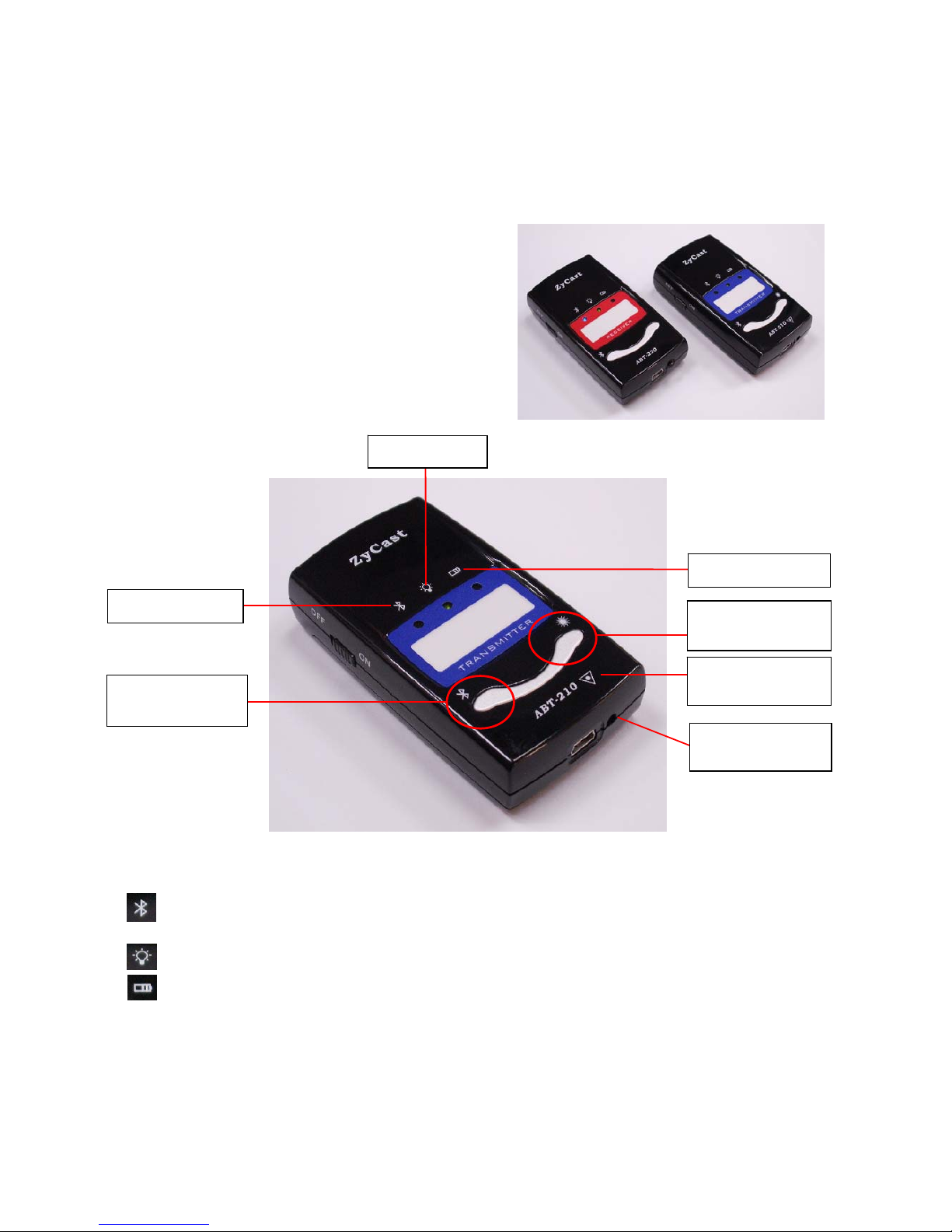
ABT-210 Bluetooth Transmitter
ABT-220 Bluetooth Receiver
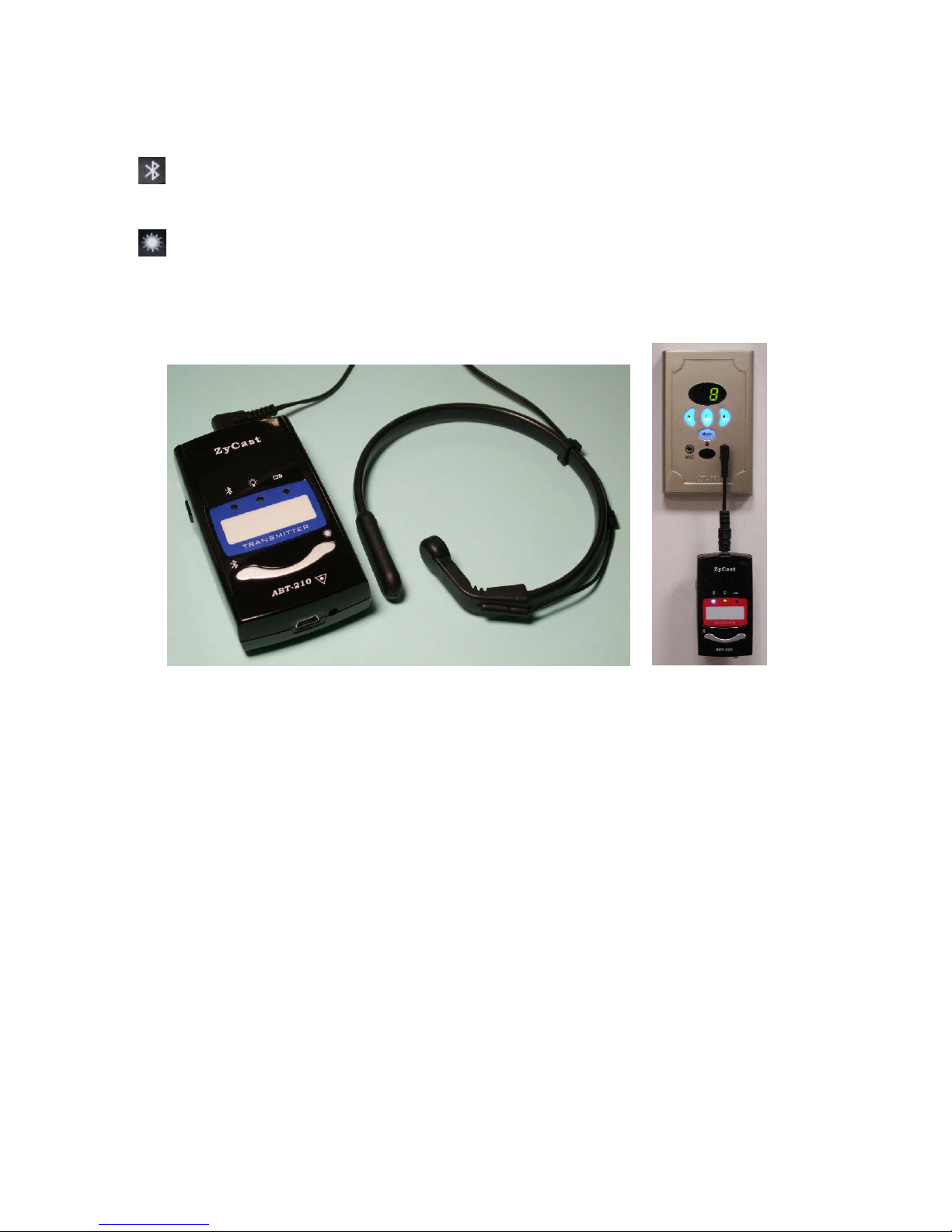
VVM-230 Vocal Vibration Microphone
LED Display :
Bluetooth LED : Blue LED flashing quickly when turn on the power, the LED flashing
slowly after connected.
Power LED : Power LED always on after turn on the power
Battery LED : RED LED flashing when battery low
Green LED flashing when battery poor contact or charging suspended
Green LED always on while charging battery
LED off when battery normal or battery fully charged
Bluetooth LED
Battery LED
Power LED
Bluetooth
re-pair button
Laser Pointer
button
Laser Pointer
hole
Laser pointer
indication
Page 2
- 2 -
Buttons :
Press this button to r-pair the units. (The product is default paired. They will
automatically making the connection after turn on the power . Please DO NOT pres s
this button unless necessary.)
Press this button to enforce Laser Pointer. (ABT-210 function button)
Connection :
1. Use Phone Jack cable to connect ABT-220and VCM AUX Phone Jack socket.
2. Connect VVM-230 Vocal Vibration Microphone to ABT-210.
1. Turn on ABT-210 and ABT-220, Bluetooth LED will flashing quickly.
2. The product is default paired. They will automatically making the connection after turn on
the power. You will hear two short toot sounds when connected, and the Bluetooth LED
will become flashing slowly. Now, you can use the vocal vibration microphone to
broadcast. Please adjust the volume to suitable level.
3. There will be a long beep sound whenever disconnected, and the Bluetooth LED will
become flashing quickly.
Remark :
1. Accessory NP60 battery is 3.7V, at least 1000mAh Li-ion battery with stand
by time for more than 16 hours.
2. Please fully charge of the battery until the battery LED off before the first time
using of the units. DO NOT use the units while in charging.
Accessories :
1. Battery * 2
2. Phone Jack cable * 1
3. Household power adaptor assembly for battery recharging * 1
4. Product hanger * 1 (gift)
Page 3
- 3 -
According to FCC Part 15.21 Information to user.
Caution: The user that changes or modifications not expressly approved by the party
responsible for compliance could void the user's authority to operate the equipment.
NOTE: This equipment has been tested and found to comply with the limits for a Class B
digital device, pursuant to Part 15 of the FCC Rules. These limits are designed to provide
reasonable protection against harmful interference in a residential installation. This
equipment generates, uses, and can radiate radio frequency energy and, if not installed
and used in accordance with the instructions, may cause harmful interference to radio
communications. However, there is no guarantee that interference will not occur in a
particular installation.
This device complies with part 15 of the FCC Rules. Operation is subject to the following
two conditions: (1) This device may not cause harmful interference, and (2) this device
must accept any interference received, including interference that may cause undesired
operation.
 Loading...