

Page 1

ZTE
ZTE Blade A52 Lite
Quick Start Guide
Page 2

Page 3

1
LEGAL INFORMATION
Copyright © 2022 ZTE CORPORATION.
All rights reserved.
No part of this publication may be quoted,
reproduced, translated or used in any form or
by any means, electronic or mechanical,
including photocopying and microfilm, without
the prior written permission of ZTE
Corporation.
Notice
ZTE Corporation reserves the right to make
modifications on print errors or update
specifications in this guide without prior notice.
We offer self-service for our smart terminal
device users. Please visit the ZTE official
website (at www.ztedevices.mx) for more
information on user manual, self-service and
supported product models. Information on the
website takes precedence.
Disclaimer
ZTE Corporation expressly disclaims any
liability for faults and damages caused by
unauthorized modifications of the software.
Images and screenshots used in this guide
may differ from the actual product. Content in
this guide may differ from the actual product or
software.
Trademarks
ZTE and the ZTE logos are trademarks of ZTE
Corporation.
Android™ is a trademark of Google LLC.
The Bluetooth® word mark and logos are
registered trademarks owned by the Bluetooth
SIG, Inc. and any use of such marks by ZTE
Corporation is under license.
microSDXC Logo is a trademark of SD-
3C, LLC.
Other trademarks and trade names are those
of their respective owners.
Page 4

2
Page 5
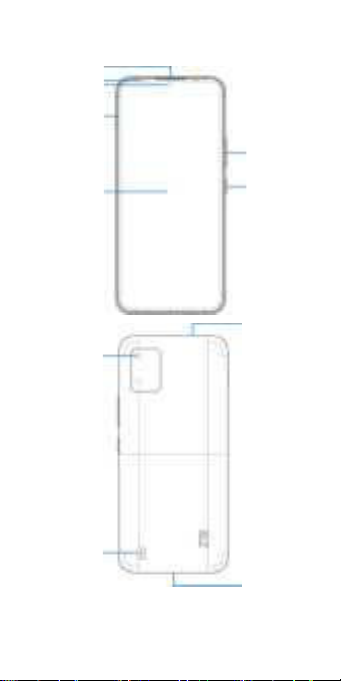
3
Front camera
Touch
Earpiece
Volume key
Power key
Headset jack
Back cameras
Flash
nano-SIM/
microSDXC
Charging/
micro-USB jack
Getting to Know Your Phone
Page 6
4
Setting Up Your Phone
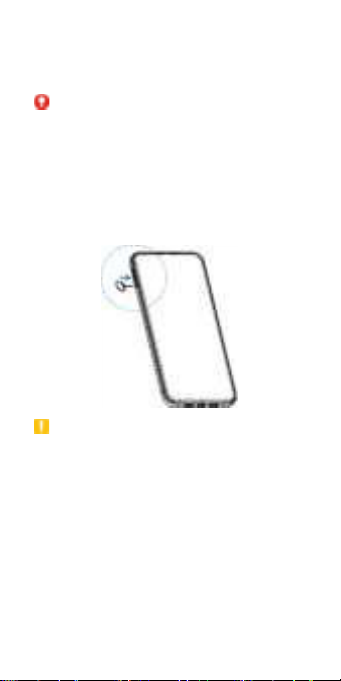
The nano-SIM card can be installed or
removed while the phone is turned on.
WARNING!
To avoid damage to the phone, do not use any
other kind of SIM cards, or any non-standard
nano-SIM card cut from a SIM card. You can
get a standard nano-SIM card from your
service provider.
1. Insert the tip of the tray eject tool into the
hole on the card tray.
CAUTION:
Never replace the included tray eject tool with
sharp objects. Ensure that the tray eject tool is
perpendicular to the hole. Otherwise, the
phone may be damaged.
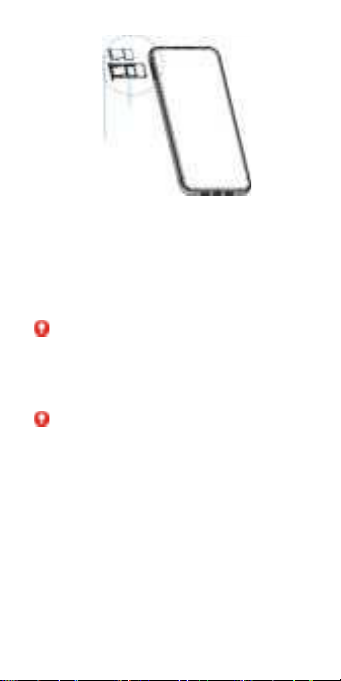
2. Pull out the card tray and place the nano-
SIM card and the microSDXC card
(optional) on the tray, as shown. Carefully
slide the tray back into place.
Page 7
5
Single-SIM model
Charging the Phone
Your phone’s battery should have enough
power for the phone to turn on, find a signal,
and make a few calls. You should fully charge
the battery as soon as possible.
WARNING!
Use only ZTE-approved chargers and USB
cables. The use of unapproved accessories
could damage your phone or cause the battery
to explode.
WARNING!
Do not remove the back cover. The battery
is not removable. Removal may cause fire
or explosion.
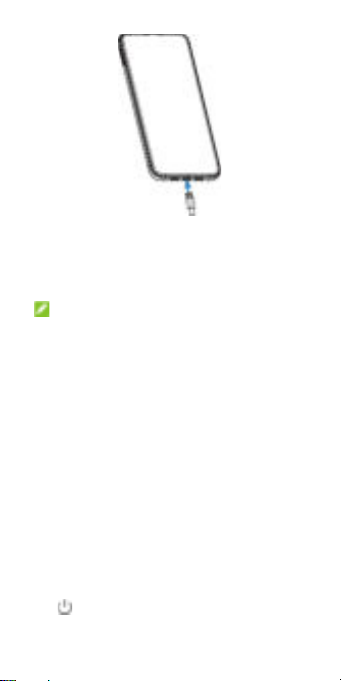
1. Connect the adapter to the charging jack.
Ensure that the adapter is inserted in the
correct direction.
Page 8
6
2. Connect the charger to a standard AC
power outlet.
3. Disconnect the charger when the battery is
fully charged.
NOTE:
If the battery is extremely low, you may be
unable to power on the phone even when it is
being charged. In this case, try again after
charging the phone for at least 20 minutes.
Contact the customer service if you still cannot
power on the phone after prolonged charging.
The operating temperature of the phone is 10℃~35℃.
Powering On/Off Your Phone
Make sure the battery is charged before
powering on.
• Press and hold the Power key to turn on
your phone.
• To power off, press and hold the Power
key to open the options menu, and touch
.
Page 9
7
NOTE:
If the screen freezes or takes too long to
respond, try pressing and holding the Power
key for over 10 seconds to restart the phone.
FM Radio
Scanning for Channels
1. Plug in a wired headset and open FM
Radio.
2. Touch Radio Stations > . Your phone
scans for all available channels and saves
them to the channel list.
Listening to FM Radio
1. Open FM Radio while the headset is
connected.
2. Touch Radio Stations and select a
channel.
You can also drag the white button along the
frequency panel or touch or to switch to
other channels.
NOTES:
• Touch to add the channel to favorites.
• Touch to listen to the radio through the
phone speaker.
• The FM radio feature does not require an
Internet connection.
Page 10
8
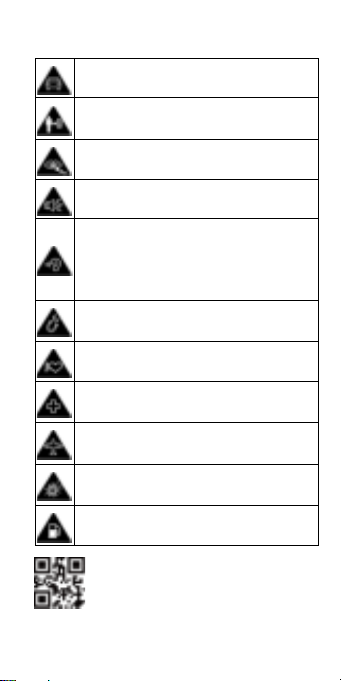
Don’t make or receive phone calls while
driving. Never text while driving.
Keep your phone at least 10 mm away
from your body while making calls.
Small parts may cause choking.
Your phone can produce a loud sound.
To prevent possible hearing damage, do
not listen at high volume levels for long
periods. Exercise caution when holding
your phone near your ear while the
loudspeaker is in use.
Avoid contact with anything magnetic.
Keep away from pacemakers and other
electronic medical devices.
Turn off when asked to in hospitals and
medical facilities.
Turn off when told to on aircraft and at
airports.
Turn off when near explosive materials or
liquids.
Don’t use at gas stations.
Product Safety Information
711608064331
Page 11
9
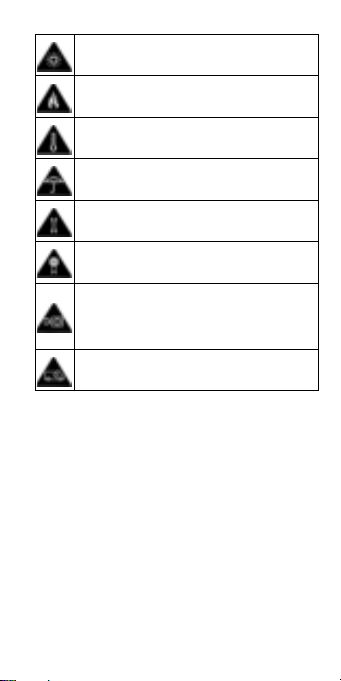
Your phone may produce a bright or
flashing light.
Don’t dispose of your phone in fire.
Avoid extreme temperatures.
Avoid contact with liquids. Keep your
phone dry.
Do not attempt to disassemble your
phone.
Only use approved accessories.
For pluggable equipment, the socketoutlet shall be installed near the
equipment and shall be easily
accessible.
Don’t rely on your phone as a primary
device for emergency communications.
FCC RF Exposure Information
(SAR)
This phone is designed and manufactured not
to exceed the emission limits for exposure to
radio frequency (RF) energy set by the Federal
Communications Commission of the United
States.
During SAR testing, this device was set to
transmit at its highest certified power level in all
tested frequency bands, and placed in
Page 12

10
positions that simulate RF exposure in usage
against the head with no separation, and near
the body with the separation of 10 mm.
Although the SAR is determined at the highest
certified power level, the actual SAR level of
the device while operating can be well below
the maximum value. This is because the phone
is designed to operate at multiple power levels
so as to use only the power required to reach
the network. In general, the closer you are to a
wireless base station antenna, the lower the
power output.
The exposure standard for wireless devices
employing a unit of measurement is known as
the Specific Absorption Rate, or SAR. The SAR
limit set by the FCC 1.6W/kg.
This device is complied with SAR for general
population/uncontrolled exposure limits in
ANSI/IEEE C95.1-1992 and had been tested in
accordance with the measurement methods
and procedures specified in IEEE1528.
The FCC has granted an Equipment
Authorization for this model phone with all
reported SAR levels evaluated as in
compliance with the FCC RF exposure
guidelines. SAR information on this model
phone is on file with the FCC and can be found
under the Display Grant section of
www.fcc.gov/oet/ea/fccid after searching on
FCC ID: SRQ-ZTEA52LITE.
Page 13

11
For this device, the highest reported SAR
value for usage against the head is 1.25W/kg,
and for usage near the body is 1.47W/kg.
While there may be differences between the
SAR levels of various phones and at various
positions, they all meet the government
requirements.
SAR compliance for body-worn operation is
based on a separation distance of 10 mm
between the unit and the human body. Carry
this device at least 10 mm away from your
body to ensure RF exposure level compliant or
lower to the reported level. To support bodyworn operation, choose the belt clips or
holsters, which do not contain metallic
components, to maintain a separation of 10
mm between this device and your body.
RF exposure compliance with any body-worn
accessory, which contains metal, was not
tested and certified, and using such body-worn
accessory should be avoided.
Page 14

12
FCC REGULATIONS
This device complies with part 15 of the FCC
Rules. Operation is subject to the following two
conditions: (1) This device may not cause harmful
interference, and (2) this device must accept any
interference received, including interference that
may cause undesired operation.
This equipment has been tested and found to
comply with the limits for a Class B digital device,
pursuant to part 15 of the FCC Rules. These limits
are designed to provide reasonable protection
against harmful interference in a residential
installation. This equipment generates, uses and
can radiate radio frequency energy and, if not
installed and used in accordance with the
instructions, may cause harmful interference to
radio communications. However, there is no
guarantee that interference will not occur in a
particular installation. If this equipment does
cause harmful interference to radio or television
reception, which can be determined by turning the
equipment off and on, the user is encouraged to
try to correct the interference by one or more of
the following measures:
• Reorient or relocate the receiving antenna.
• Increase the separation between the equipment
and receiver.
• Connect the equipment into an outlet on a
circuit different from that to which the receiver is
connected.
• Contact Customer Service at (888) 835 -6047.
Page 15

13
CAUTION: Changes or modifications not
expressly approved by the manufacturer could
void the user’s authority to operate the
equipment.
The antenna(s) used for this transmitter must not
be co-located or operating in conjunction with any
other antenna or transmitter.
Page 16

14
IFT: “La operación de este equipo está sujeta a
las siguientes condiciones:
1) Este equipo no causará interferencias
perjudiciales
2) Este equipo aceptará cualquier
interferencia, incluyendo la que pueda causar
su operación no deseada
DATOS ELECTRICOS DE OPERACIÓN:
Teléfono: 3.85 V
Adaptador de Corriente ca/cc:
Entrada: 100 – 240 V ~ 50/60 Hz 400 mA
Salida: 5.0 V 2 000 mA
Póliza de Garantía
Teléfono Celular
ZTE CORPORATION DE MÉXICO S. DE R.L.
DE C.V. con domicilio en Lago Zurich 245,
Torre Frisco, piso 1 Col. Ampliación Granada,
Miguel Hidalgo c.p 11520, Ciudad de México
Tel. (55) 52073422 está muy agradecido con
usted por haber realizado la compra de este
producto.
Su equipo cuenta con una garantía de 365
días contra cualquier defecto de fabricación e
imperfección de materiales, contados a partir
de su facturación y adquisición como equipo
nuevo.
Condiciones:
Page 17

15
Para hacer efectiva esta garantía deberá
acudir al lugar donde adquirió el producto o
bien a la dirección señalada al inicio, de igual
forma deberá cumplir con los siguientes
requisitos:
⚫ Presentar el producto completo.
⚫ Presentar la póliza correspondiente,
debidamente sellada por el establecimiento
que lo vendió, o la factura, o recibo o
comprobante, en el que consten los datos
específicos del producto objeto de la
compraventa.
⚫ La garantía será válida únicamente para
productos adquiridos en la República
Mexicana y con distribuidores autorizados.
Cobertura:
ZTE CORPORATION DE MÉXICO S. DE R.L.
DE C.V. se compromete a cambiar o
reemplazar partes y componentes del producto
defectuoso, incluyendo mano de obra así
como de los gastos de transportación del
producto que deriven de su cumplimiento
dentro de su red de servicio.
En caso que la presente garantía sea
extraviada, el cliente puede acudir a la
sucursal donde adquirió el producto, para que
se le expida otra póliza de garantía previa
presentación de la nota de compra o factura.
Limitaciones:
Page 18

16
La garantía cubre exclusivamente lo que haya
sido instalado y original de fábrica y no incluirá
en ningún caso modificaciones realizadas por
el propietario o terceras personas.
La garantía quedara anulada en cualquier de
los
siguientes casos:
a) Cuando el producto se hubiese utilizado en
condiciones distintas a las normales.
b) Cuando el producto no hubiese sido
operado de acuerdo con el instructivo de
uso que se le acompaña.
c) Cuando el producto hubiese sido alterado o
reparado por personas no autorizadas por el
fabricante nacional, importador o
comercializador responsable respectivo.
Información del consumidor:
Nombre del consumidor:
Dirección y Teléfono:
Marca:
Modelo del equipo:
Número de serie:
Fecha de Compra:
Firma o sello de la Tienda:
Información del consumidor:
Favor de leer el manual de usuario impreso
para la correcta operación del equipo.
Page 19

17
Centro de Servicio Autorizado:
Para la adquisición de partes, componentes,
consumibles y accesorios, acudir a ZTE
CORPORATION DE MÉXICO S.DE R.L. DE
C.V. ubicado en Lago Zurich 245, Torre Frisco,
piso 1 Col. Ampliación Granada, Miguel
Hidalgo c.p 11520, Ciudad de México Tel.
52792070
 Loading...