

Page 1
Join In. Follow Us.
/ZopoMobileBrand
www.zopomobile.com
Flash G5
<ZP781>
Quick Guide | Guida Rapida
Plus
Page 2

Thanks for choosing us.
We're working hard for you.
Page 3

JORGELORENZO
Three-time MotoGP World Champion
Page 4
JorgeLorenzo
ENGLISH
01
Page 5
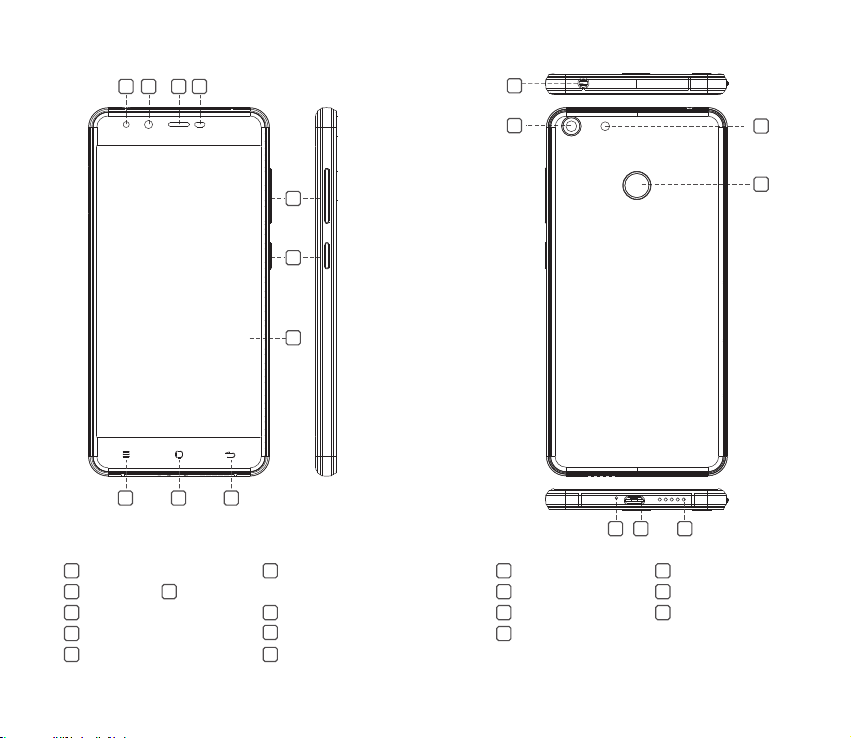
3
1
4
2
11
13
8
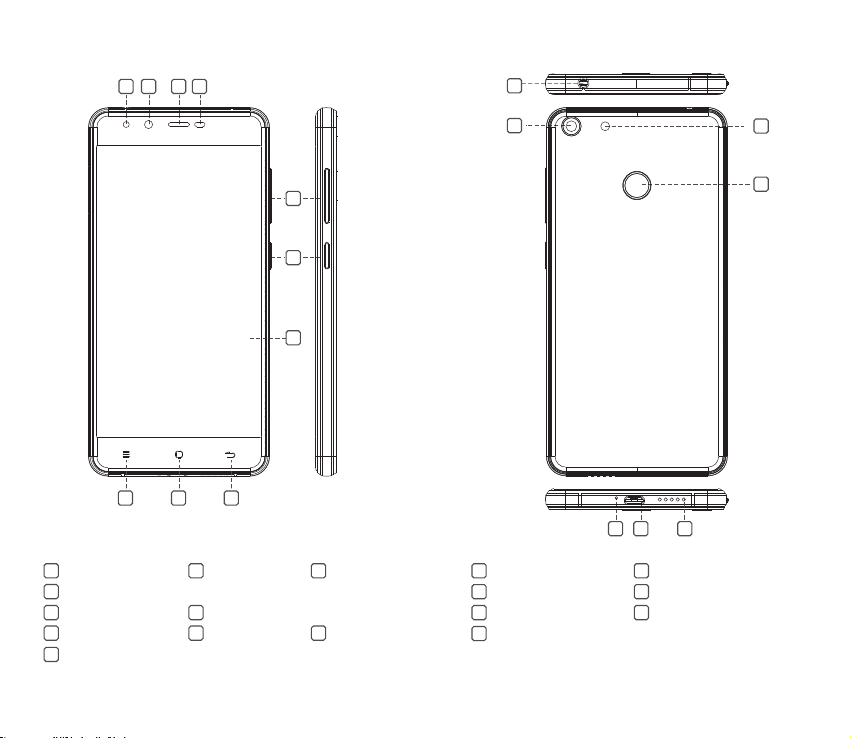
Flash
1
3
Receiver
5
Volume buttons +/-
7
LCD screen
9
Home
5
6
7
10
9
2
Front camera
4
Light sensor / Proximity sensor
6
Power button
8
Menu
10
Back
151216 17
Headset jack
11 12
13
Flash
Microphone
15
Speaker
17
0302
Rear camera
14
Fingerprint reader
USB jack
16
14
Page 6
①
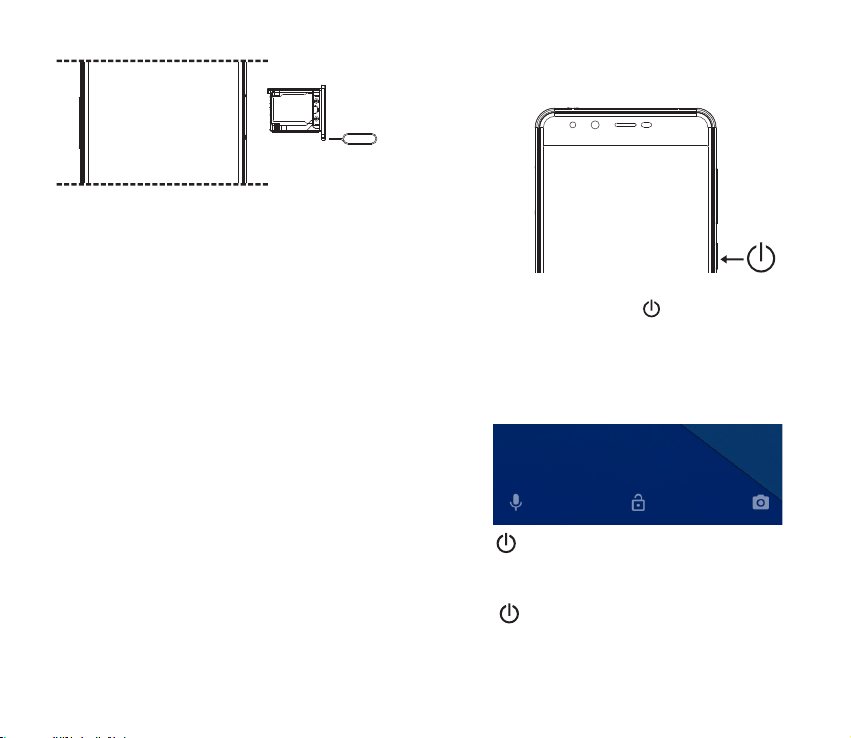
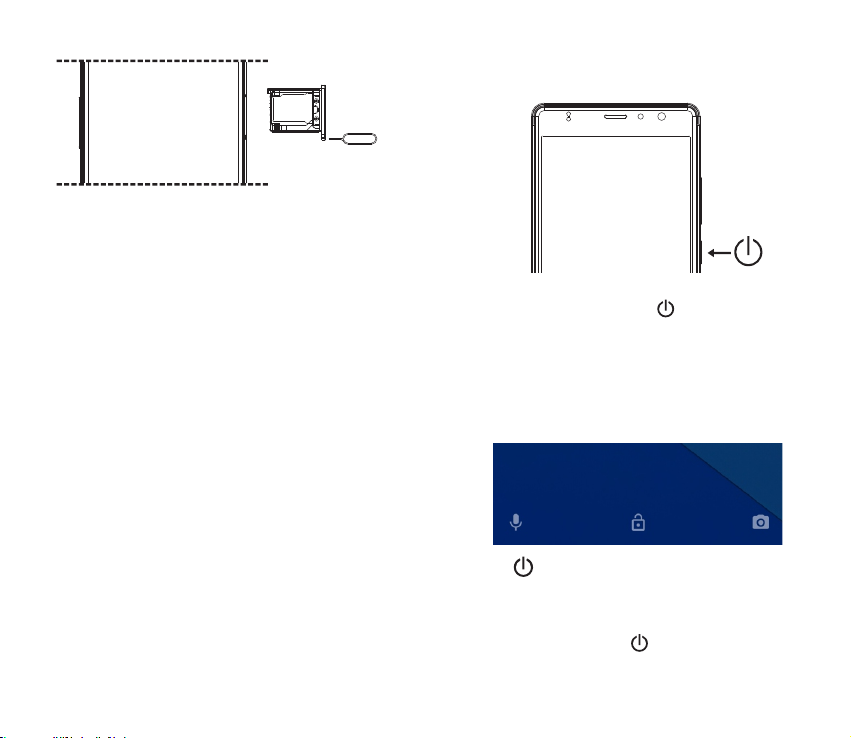
Ensure the phone is powered off.
②
Insert the SIM card tool into the pinhole and push.
③
The SIM tray will pop out, on the top side place a Micro-SIM
card.
④
On the bottom side, place either a Micro-SIM or a Micro-SD
card.
⑤
Insert the SIM tray back inside, and turn on the phone.
Power On
1. Press and hold the power button until the screen turns on.
2. Wait a few seconds for the phone to power on.
Unlock and Lock screen
Unlock
Press and swipe up on screen to unlock.
Lock Screen
Press at any time and the phone will lock and enter standby
mode.
04 05
Page 7
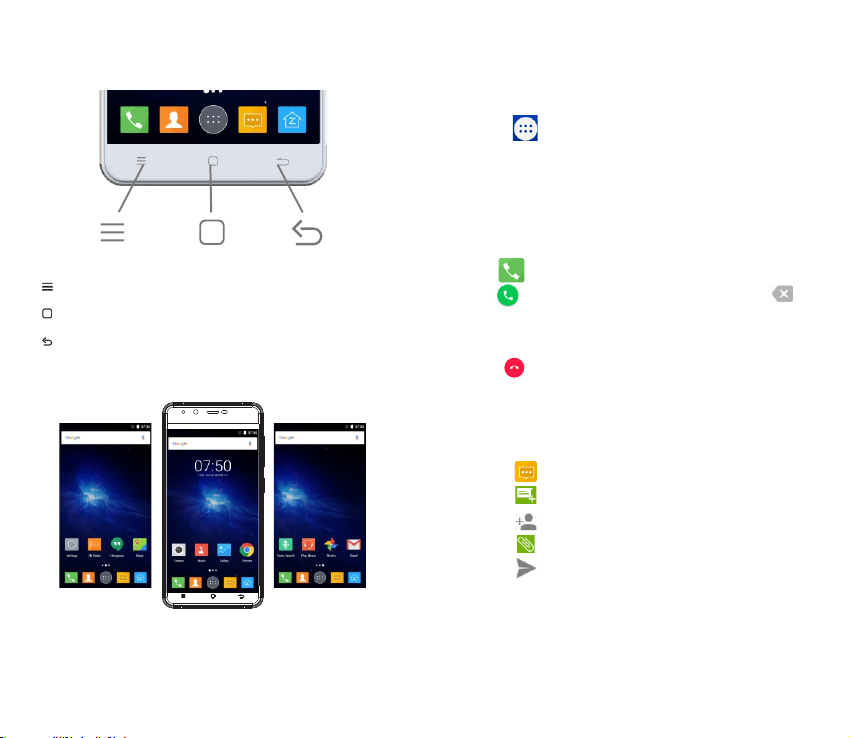
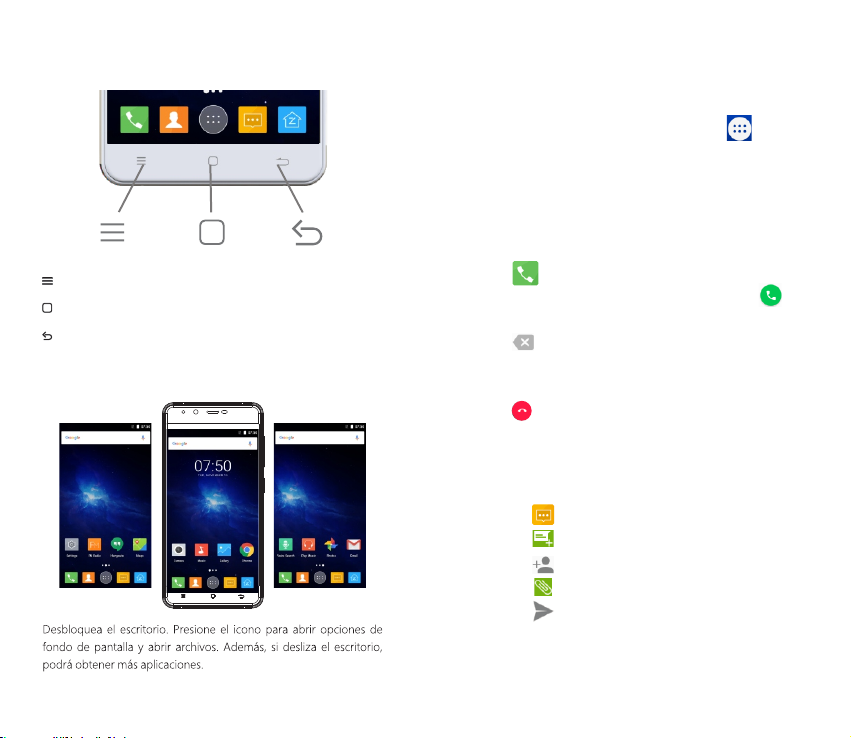
Button
Recent Apps button :
Home Button :
Back Button :
Displays recently
used applications
Return to home screen
Return to previous screen
Home screen
You can tap the icons to open the corresponding applications. You
can also swipe left and right to see more applications.
Applications Menu
You can enter the applications menu from the home screen by
pressing .
Start Applications
In the applications menu, tap the app you want.
Dial
Press then search contacts or enter the phone number then
press to dial out. If you want to delete the number, press .
End calls
Press during the call.
Messages (SMS/MMS)
Sending
1. Press to enter the messaging app.
2. Press to create a new message.
3. Press to add one or more contacts.
4. Press to insert pictures, audio and video.
5. Press to send your message.
06 07
Page 8
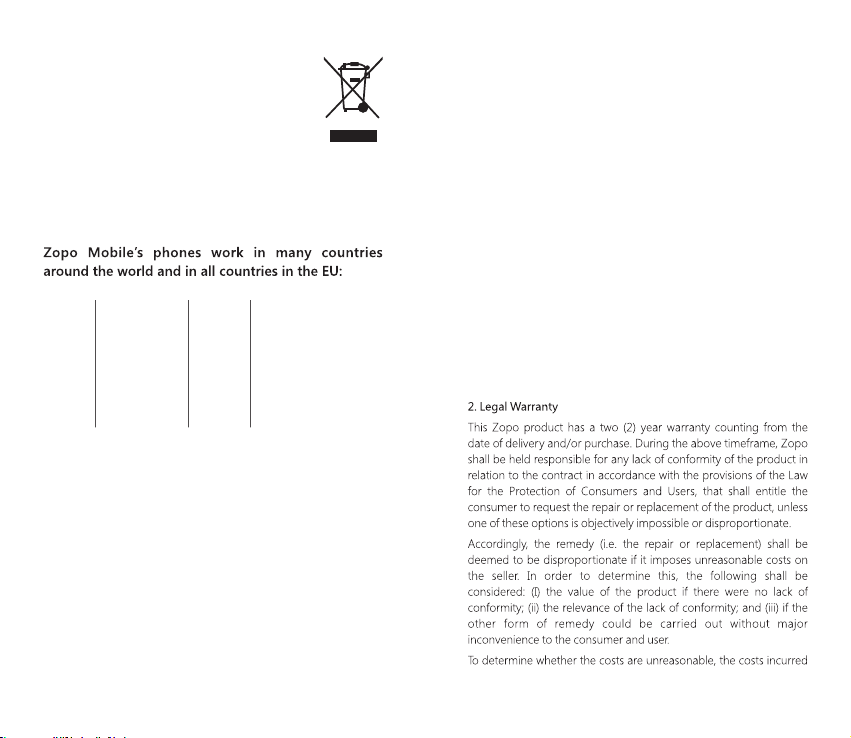
The WEEE marking on this product (see right) or its
documentation indicates that the product must not
be disposed of together with household waste. To
prevent possible harm to human health and/or the
environment, the product must be disposed of in an
approved and environmentally safe recycling process. For further
information on how to dispose of this product correctly, contact the
product supplier, or local authority responsible for waste disposal in
your area.
Austria
Cyprus
Finland
Hungary
Lithuania
Poland
Slovenia
Belgium
Czech Republic
France
Ireland
Luxembourg
Portugal
Spain
Bulgaria
Denmark
Germany
Italy
Malta
Romania
Sweden
Croatia
Estonia
Greece
Latvia
Netherlands
Slovakia
United Kingdom
EUROPEAN WARRANTY
1. General
This warranty is granted without prejudice and in addition to the
recognized rights for the consumer vis-à-vis the seller provided in
the Royal Legislative Decree of 16 November, approving the restated
text of the General Law for the Protection of Consumers and Users
and other complementary legislation. Therefore, the recognized
legal rights for the consumer are not limited or excluded according
to the relevant Regional, National or European legislation.
This warranty shall be valid in all the European Union Member States
with the limitations that legally correspond in the country in which
they are intended to be implemented in accordance with their
implementing legislation.
Notwithstanding the foregoing, Zopo shall respect the rights and
limitations related to the product warranty that legally correspond in
each of the States listed in the Attachment in accordance with their
implementing legislation for any product provided that it is intended
for the EU market and has been purchased or used by the consumer
or user within the EEA.
08 09
Page 9
10 11
Page 10
For further information go to www.zopomobile.com You can also
contact:
SHENZHEN ZOPO COMMUNICATION EQUIPMENT CO. LTD.
23F Haowei Technology Building, Keji S. 8th Rd.
518057 Shenzhen, CHINA
SAFETY AND PRECAUTION WARNINGS
www.sar-tick.com
12
Instruction icons
Copyright
This guide is protected by international copyright laws.
Safety information
This section contains safety information for mobile devices. Some
13
Page 11
of the content may not apply to your device. In order to avoid
injury to yourself or third parties or damage to the device, read
the device’s safety information before you use it.
Warning
14
15
Page 12
16 17
Page 13
18 19
Page 14
When you use earphones, protect your hearing and your ears.
20
21
Page 15
22
23
Page 16
Maximum SAR for this model and conditions under which it registered
SAR for positions near the head.
SAR for positions near the body.
24 25
0.692 W/kg
0.889 W/Kg
Page 17
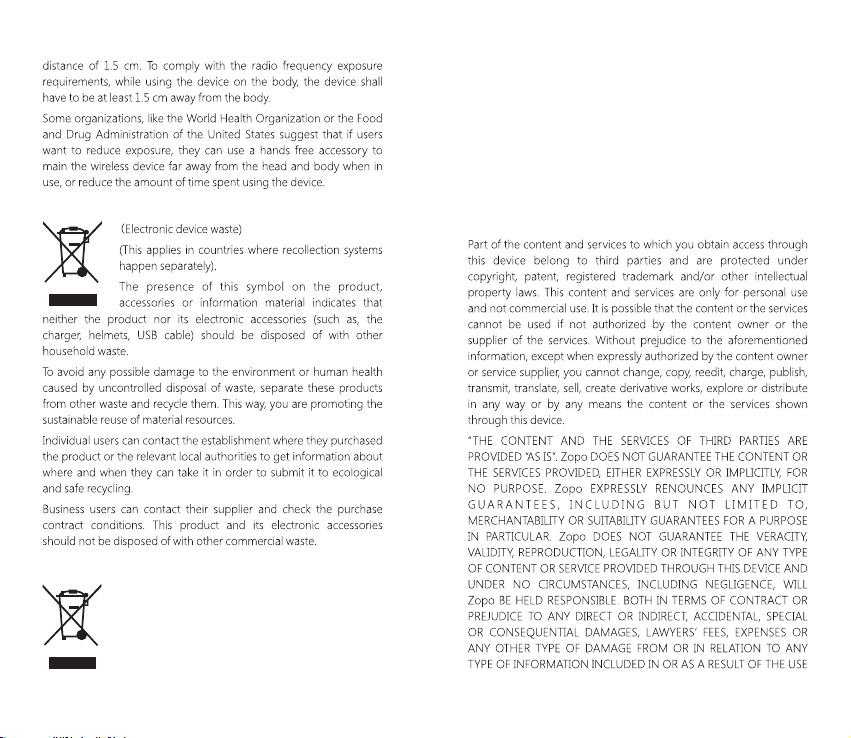
Correct disposal of this product.
Correct disposal of this product’s batteries
(This applies in countries where recollection systems
happen separately).
The presence of this mark on the batteries, manual or
product packaging indicates that when the service
life of the batteries has ended they should not be
26 27
disposed of with other household waste. The chemical symbols Hg,
Cd and Pb indicate that the battery has mercury, cadmium or lead at
levels a lot higher than the reference values admitted by the 2006/6
Directive of the European Union.
If the batteries are not disposed of correctly, these substances may
cause personal injury or damage the environment.
To protect natural resources and promote recycling, separate the
batteries from other waste and recycle them through the free
collection service in your area.
Exemption from responsibility clause
Page 18
Download the entire manual at: www.zopomobile.com/download/
28
Declaration Of Conformity
We the Shenzhen ZOPO Communication Equipment Co.Ltd.
Address:Floor 23, Haowei Technology Mansion, Keji south eighth
Road, Gaoxin Sci-Tech. Park(South Zone) Shenzhen, China
Product: MOBILE PHONE
Model No. : ZP781
Trade Mark: ZOPO
Here by declare that the ZOPO MOBILE PHONE complies with the
standards and provisione of the Directives:
Directive (2011/65/EU)-ROHS
Directive (1999/5/EC)-R&TTE
In addition to the following harmonized standards:
EN60950-1:2006+A11:2009+A1:2010+A12:2011+A2:2013
EN50332-1:2000, EN50332-2:2003, EN62471:2008,
EN50360:2001+AC:2006+A1:2012, EN62209-1:2006, EN622092:2010, EN 62479:2010, EN50566:2013+AC:2014, EN301 489-1
V1.9.2, EN301 489-3 V1.6.1, EN301 489-7 V1.3.1, EN301 489-17
V2.2.1, EN301 489-24 V1.5.1, EN300 440-1 V1.6.1, EN300 440-2
V1.4.1, EN301 511 V9.0.2, EN301 908-1 V6.2.1, EN 301 908-2
V6.2.1, EN301 908-13 V6.2.1, EN 300 328 V1.8.1. The procedure for
the decaration of conformity, set out in Article 10.5 of R&TTE
Directive 1999/5/EC, was conducted under the supervision of the
following organization:
PHOENIX TESLAB GmbH, Königswinkel 10 D-32825 Blomberg,
Germany,
www.phoenix-testlab.de
Phone: + 49(0)5235-9500-24
Fax: + 49(0)5235-9500-28
The maximum SAR value tested on this device when used in its
normal position at the head is 0.692W/kg and 0.889W/kg when
used close to the body, at a minimum distance at 15mm.
Note: For use at the body, please keep a distance of 15 mm
29
0700
Page 19

between the appliance and your body.
15/11/2016
ESPAÑOL
30 31
Page 20
3
1
4
2
11
13
8
9
1
Flash o linterna
4
Sensor de luz / Sensor de distancia
5
Botón de volumen
7
Pantalla LCD
10
Atrás
2
Cámara frontal
6
Botón de encendido
8
Menú
32 33
5
6
7
10
151216 17
Receptor
3
9
Inicio
11 12
Salida para auriculares
13
Flash o linterna
15
Micrófono
17
Altavoz
Cámara trasera
14
Lector de Huellas Digitales
Salida para USB
16
14
Page 21
①
Ensure the phone is powered off.
②
Insert the SIM card tool into the pinhole and push.
③
La bandeja de la tarjeta SIM saldrá, inserta una tarjeta MicroSIM en la parte superior de ésta.
④
En la parte inferior de la bandeja puede insertar una tarjeta
Micro-SIM o una Micro-SD.
⑤
Insert the SIM tray back inside, and turn on the phone.
34 35
Encendido
1. Presione el botón de encendido hasta que la pantalla se
encienda.
2. Por favor espere unos segundos para que se encienda.
Desbloquear y bloquear pantalla
Desbloquear
Presione el botón de encendido rápidamente y deslice hacia
arriba para desbloquear.
Bloquear
Presione el botón de encendido en cualquier interfaz y el móvil
entrará en modo de reposo.
Page 22
Teclado
Botón reciente
Aplicaciones :
Tecla de retroceso :
Tecla de inicio :
Muestra las aplicaciones utilizadas
recientemente
Vuelve al último menú
Entrar a escritorio
Menú de aplicaciones
Usted podrá acceder al menú de aplicaciones desde la fecha de
inicio. Después de desbloquear la pantalla, presione .
Inicio de aplicaciones
En el menú de aplicaciones, presione la aplicación que usted desee.
Marcado
Presione , para buscar a través de la lista de contactos o para
agregar un número telefónico, luego presione de nuevo para
llamar. Si usted quiere eliminar el número telefónico, por favor
presione .
Escritorio
Terminar llamada
Presione durante la llamada.
Mensajes
Enviar mensaje
1. Presione para entrar al menú de mensajes.
2. Presione para crear un nuevo mensaje.
3. Presione para añadir uno o más contactos.
4. Presione para añadir textos o insertar imagenes, videos, etc.
5. Presione cuando haya terminado de enviar un mensaje.
36 37
Page 23
Teléfonos Zopo Mobile funcionan en muchos países
de todo el mundo y en todos los países de la UE.
Austria
Chipre
Finlandia
Hungría
Lituania
Polonia
Eslovenia
Bélgica
República Checa
Francia
Irlanda
Luxemburgo
Portugal
España
Bulgaria
Dinamarca
Alemania
Italia
Malta
Rumania
Suecia
Croacia
Estonia
Grecia
Letonia
Países Bajos
Eslovaquia
Reino Unido
GARANTÍA EUROPEA
38 39
Page 24
40 41
Page 25
SHENZHEN ZOPO COMMUNICATION EQUIPMENT CO. LTD.
23F Haowei Technology Building, Keji S. 8th Rd.
Shenzhen, CHINA 518057
SAFETY AND PRECAUTION WARNINGS
Iconos instructivos
Copyright
www.sar-tick.com
Esta guía se encuentra protegida por las leyes internacionales de
derechos de autor.
42 43
Page 26
Advertencia
En caso de no cumplir con estas normas y advertencias de
seguridad, el usuario podría sufrir lesiones graves o muerte.
No utilice cables de alimentación o conectores dañados ni
enchufes sueltos
Las conexiones inseguras pueden provocar una descarga eléctrica o
incendio
No toque el cable de alimentación con las manos mojadas ni tire
del cable para desconectar el cargador
Si lo hace, podría resultar electrocutado.
No doble ni dañe el cable de alimentación
Si lo hace, podría provocar una descarga eléctrica
No cause un cortocircuito en el cargador ni en el dispositivo
Si lo hace, podría provocar una descarga eléctrica, o el dispositivo
podría no funcionar correctamente.
44 45
Page 27
46 47
Page 28
48 49
Page 29
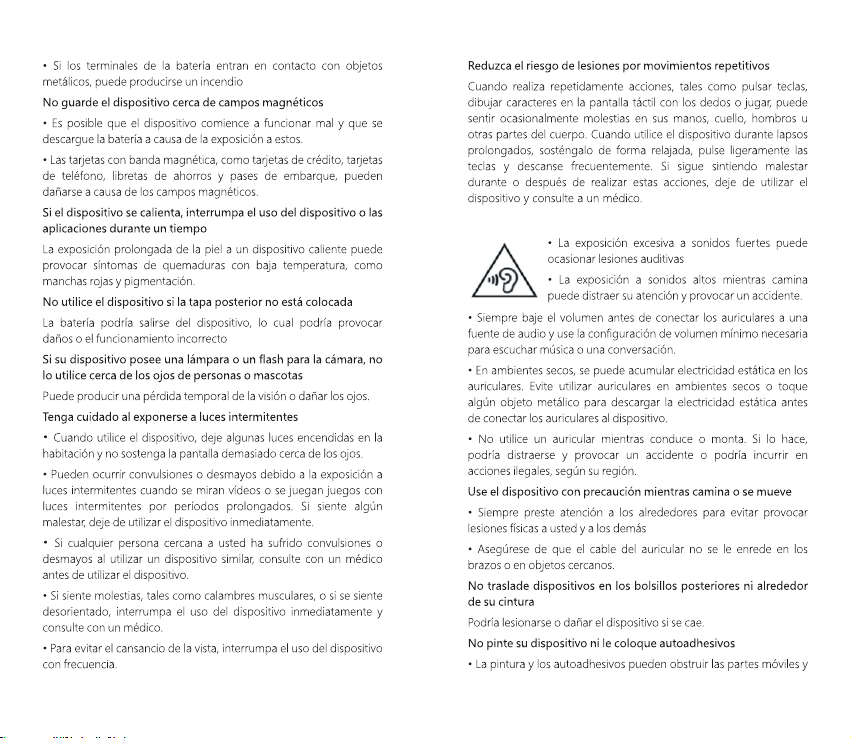
Cuando utilice auriculares, proteja su audición y sus oídos
50 51
Page 30
52 53
Page 31
54 55
Page 32
SAR máxio para este modelo y condiciones bajo las cuales se registró
SAR para posiciones cerca de la cabeza
SAR para posiciones cerca del cuerpo
56 57
0,692 W/Kg
0,889 W/Kg
Eliminación correcta de este producto
Eliminación correcta de las baterías de este producto
Page 33
Cláusula de exención de responsabilidad
58 59
Descargar el manual aquí: www.zopomobile.com/download/
Page 34
DECLARACIÓN DE CONFORMIDAD
Shenzhen ZOPO Communication Equipment Co. Ltd.
Dirección: Piso 23, Edificio Haowei Technology, Carretera Keji South
Eight, Parque Gaoxin Sci-Tech (Zona Sur), Shenzhen, China
Producto: TELÉFONO MÓVIL
Modelo No: ZP781
Marca Registrada: ZOPO
Por la presente declaramos que los TEÉFONOS ZOPO MOBILE
cumplen con los estádares y previsiones de las Directivas:
Directiva (2011/65/EU)-ROHS
Directiva (1999/5/EC)-R&TE
Adicionalmente a los siguientes estándares armonizados:
EN60950-1:2006+A11:2009+A1:2010+A12:2011+A2:2013
EN50332-1:2000, EN50332-2:2003, EN62471:2008,
EN50360:2001+AC:2006+A1:2012, EN62209-1:2006, EN622092:2010, EN 62479:2010, EN50566:2013+AC:2014, EN301 489-1
V1.9.2, EN301 489-3 V1.6.1, EN301 489-7 V1.3.1, EN301 489-17
V2.2.1, EN301 489-24 V1.5.1, EN300 440-1 V1.6.1, EN300 440-2
V1.4.1, EN301 511 V9.0.2, EN301 908-1 V6.2,1, EN301 908-2
V6.2.1, EN301 908-13 V6.2.1, EN300 328 V1.8.1. El proceso para la
declaración de conformidad, fijado en el Artículo 10.5 de la
Directiva R&TTE 1999/5/EC, se realizó bajo la supervisión de la
siguiente organización:
PHOENIX TESLAB GmbH, Königswinkel 10 D-32825 Blomberg,
Germany,
www.phoenix-testlab.de
Teléfono: + 49(0)5235-9500-24
Fax: + 49(0)5235-9500-28
El valor SAR máximo testeado en este producto utilizándose en la
posición habitual junto a la cabeza es de 0.692W/kg, y de
0.889W/Kg cuando se utiliza cercano al cuerpo, a una distancia
mínima de 15mm.
60 61
0700
Nota: Para una utilización en cuerpo, debe utilizarse a una distancia
entre aparato y cuerpo de 15mm.
15/11/2016
Descargar el manual aquí:www.zopomobile.com/download/
 Loading...