

Page 1
For more product details,
welcome to visit ZOPO's official website.
www.zopomobile.com
QUICK GUIDE
GUIDA RAPIDA
Page 2

ENGLISH
01
Page 3
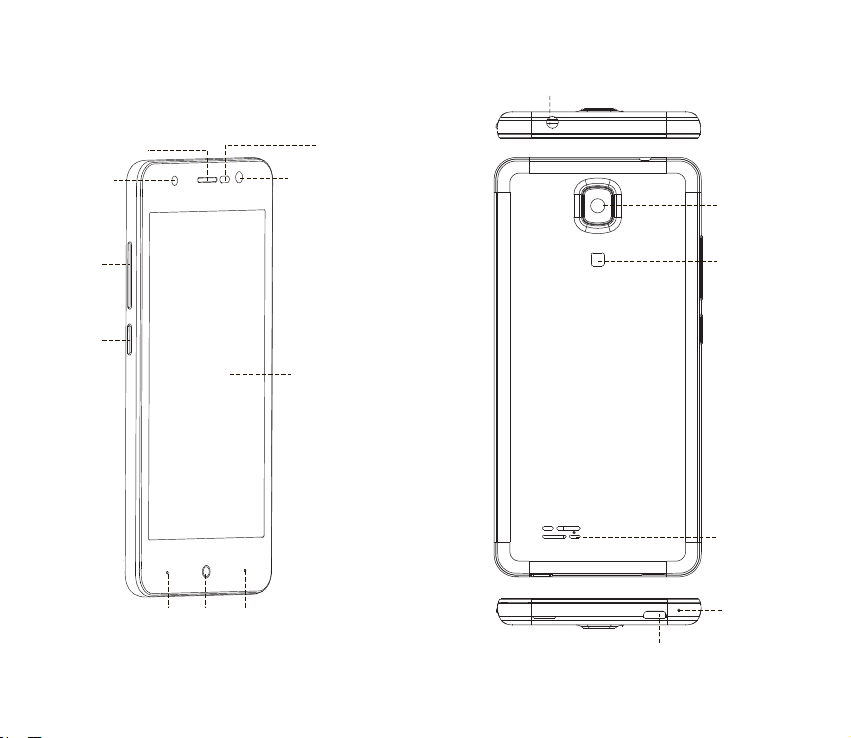
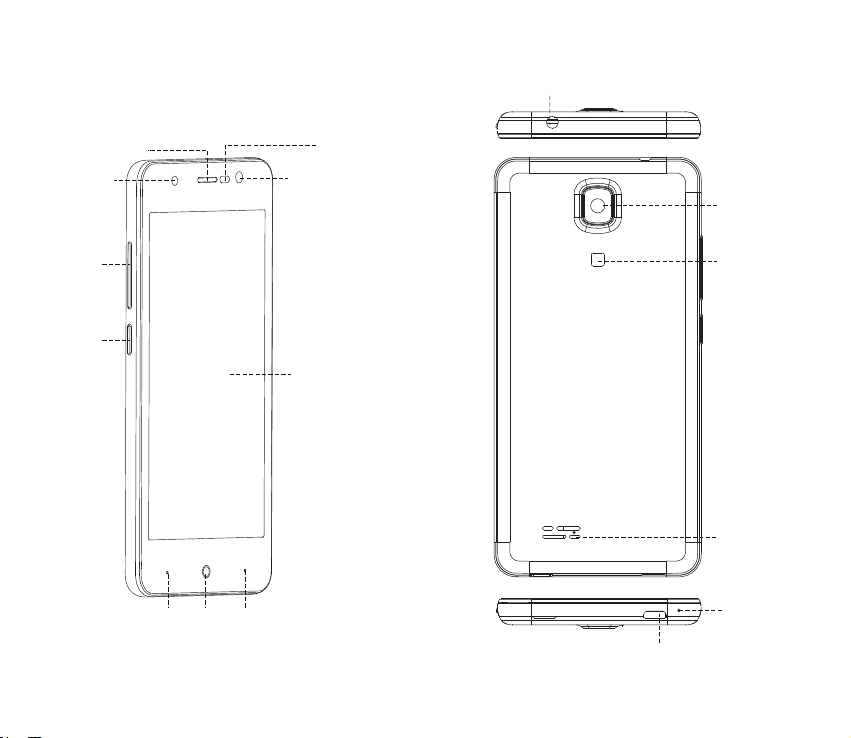
Receiver
Headset jack
Light sensor
Distance sensor
Flash light
Volume
buttons
Power
button
Menu Home Back
Front camera
Rear camera
Flash light
LCD screen
Speaker
Mic
USB jack
0302
Page 4
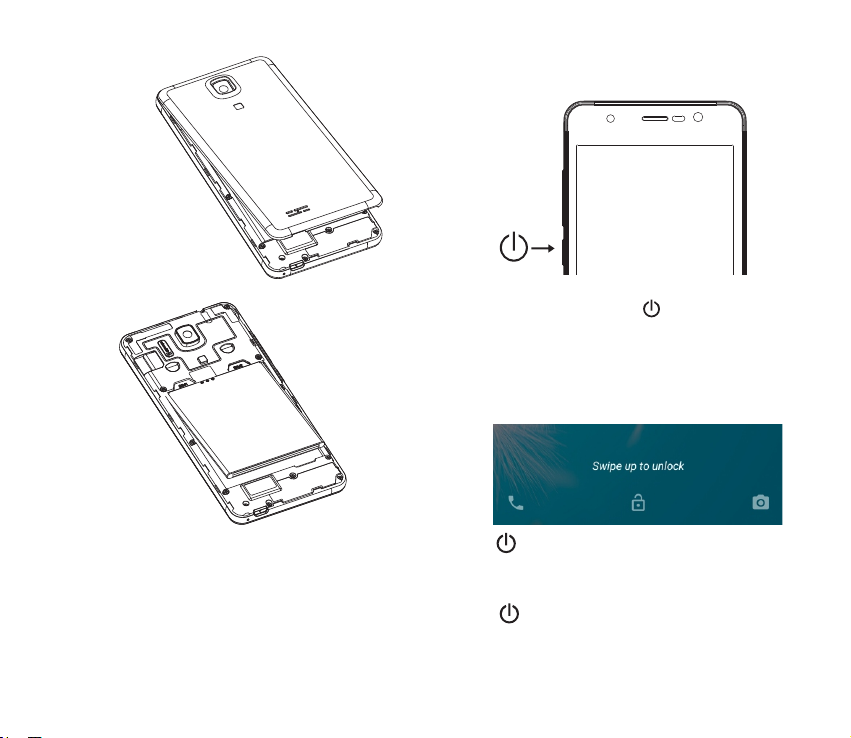
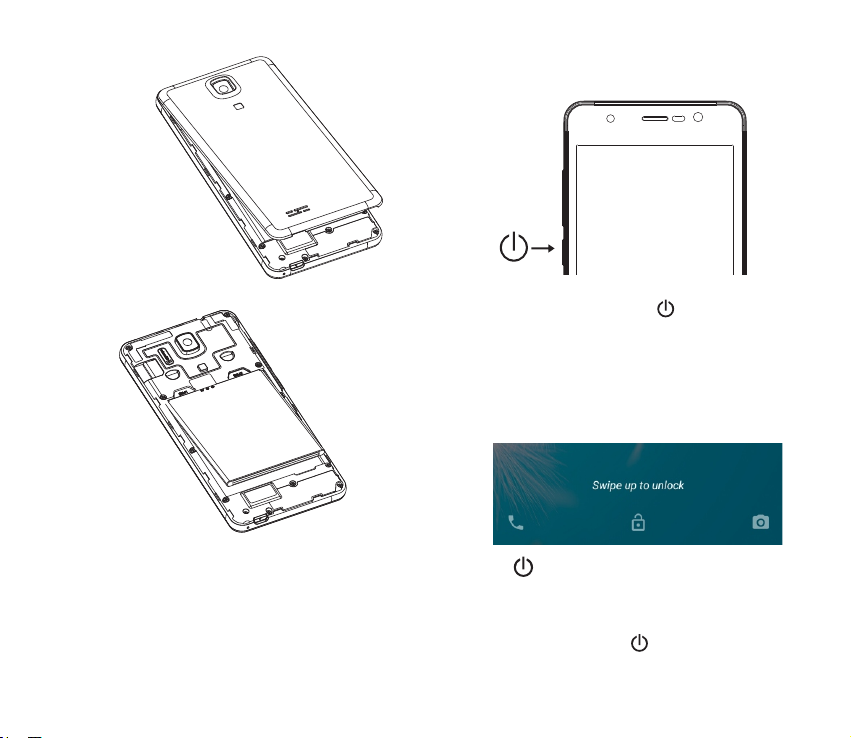
Open the notch on the lid,
Then pull lightly along the lid cracks.
Power On
1. Press and hold the power button until the screen turns on.
2. Wait a few seconds for the phone to power on.
Unlock and Lock screen
Unlock
N o ti ce : I n a cc orda n c e w i th t he i ns truc t i on s, y ou
should be prompted to insert or remove the battery to avoid
unnecessary damage to the body or battery.
Insert the battery
Match the metal plat of the battery bin with the battery contactor,
and then lightly press the battery in.
04 05
Press and swipe up on screen to unlock.
Lock Screen
Press at any time and the phone will lock and enter standby
mode.
Page 5
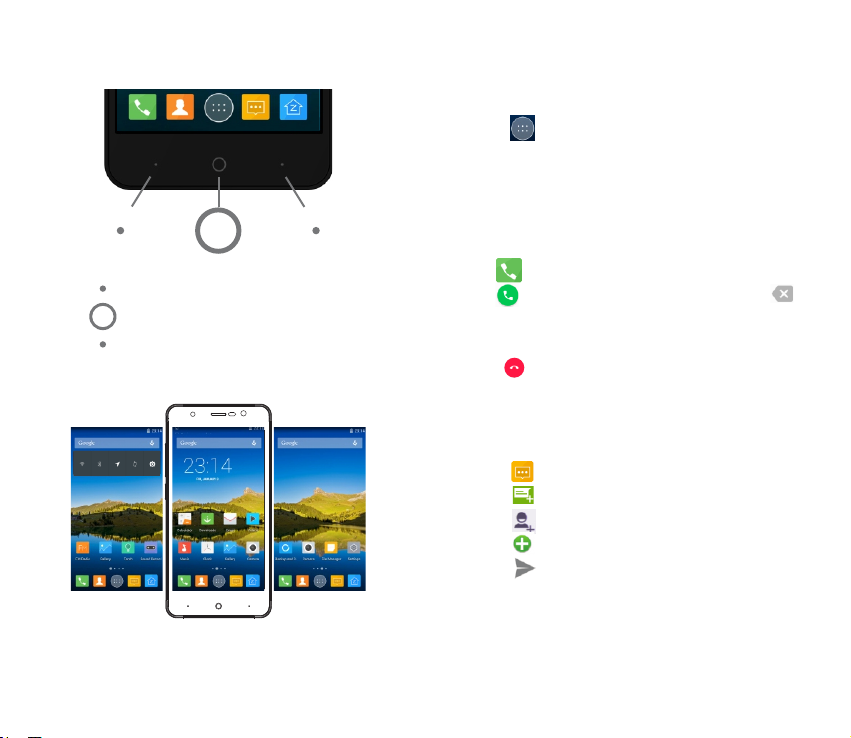
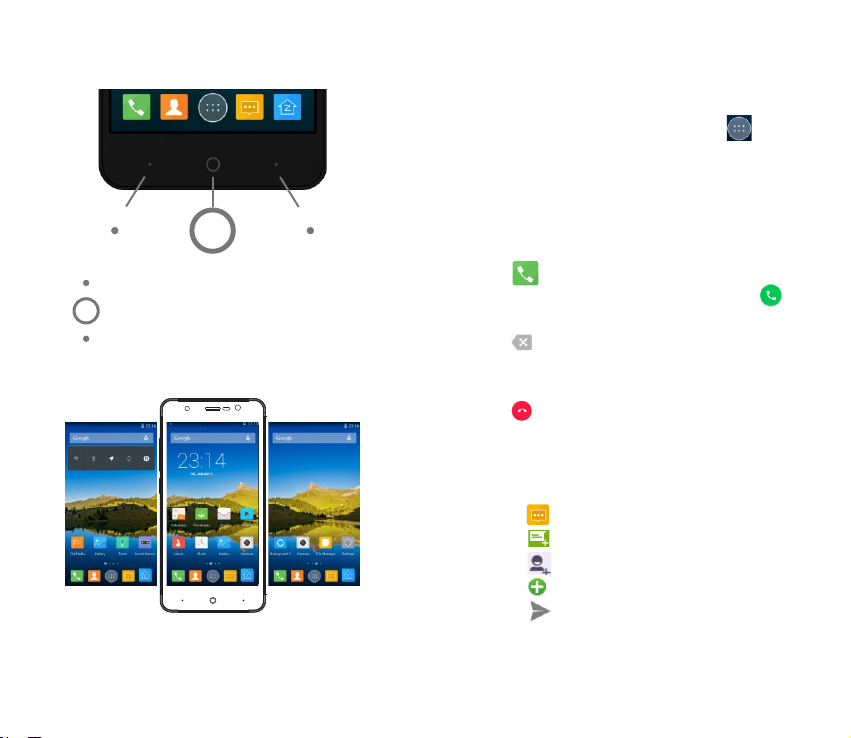
Button
Menu Key :
Home Key :
Back Key :
Enter for fast setting
Enter to desktop
Turn back to last menu
Home screen
You can tap the icons to open the corresponding applications. You
can also swipe left and right to see more applications.
Applications Menu
You can enter the applications menu from the home screen by
pressing .
Start Applications
In the applications menu, tap the app you want.
Dial
Press then search contacts or enter the phone number then
press to dial out. If you want to delete the number, press .
End calls
Press during the call.
Messages (SMS/MMS)
Sending
1. Press to enter the messaging app.
2. Press to create a new message.
3. Press to add one or more contacts.
4. Press to insert pictures, audio and video.
5. Press to send your message.
06 07
Page 6

The WEEE marking on this product (see right) or its
documentation indicates that the product must not
be disposed of together with household waste. To
prevent possible harm to human health and/or the
environment, the product must be disposed of in an
approved and environmentally safe recycling process. For further
information on how to dispose of this product correctly, contact the
product supplier, or local authority responsible for waste disposal in
your area.
Zopo Mobile’s phones work in many countries
around the world and in all countries in the EU:
Austria
Cyprus
Finland
Hungary
Lithuania
Poland
Slovenia
08 09
Belgium
Czech Republic
France
Ireland
Luxembourg
Portugal
Spain
Bulgaria
Denmark
Germany
Italy
Malta
Romania
Sweden
Croatia
Estonia
Greece
Latvia
Netherlands
Slovakia
United Kingdom
EUROPEAN WARRANTY
1. General
This warranty is granted without prejudice and in addition to the
recognized rights for the consumer vis-à-vis the seller provided in
the Royal Legislative Decree of 16 November, approving the restated
text of the General Law for the Protection of Consumers and Users
and other complementary legislation. Therefore, the recognized
legal rights for the consumer are not limited or excluded according
to the relevant Regional, National or European legislation.
This warranty shall be valid in all the European Union Member States
with the limitations that legally correspond in the country in which
they are intended to be implemented in accordance with their
implementing legislation.
Notwithstanding the foregoing, Zopo shall respect the rights and
limitations related to the product warranty that legally correspond in
each of the States listed in the Attachment in accordance with their
implementing legislation for any product provided that it is intended
for the EU market and has been purchased or used by the consumer
or user within the EEA.
2. Legal Warranty
This Zopo product has a two (2) year warranty counting from the
date of delivery and/or purchase. During the above timeframe, Zopo
shall be held responsible for any lack of conformity of the product in
relation to the contract in accordance with the provisions of the Law
for the Protection of Consumers and Users, that shall entitle the
consumer to request the repair or replacement of the product, unless
one of these options is objectively impossible or disproportionate.
Accordingly, the remedy (i.e. the repair or replacement) shall be
deemed to be disproportionate if it imposes unreasonable costs on
the seller. In order to determine this, the following shall be
considered: (I) the value of the product if there were no lack of
conformity; (ii) the relevance of the lack of conformity; and (iii) if the
other form of remedy could be carried out without major
inconvenience to the consumer and user.
To determine whether the costs are unreasonable, the costs incurred
Page 7

by one form of remedy must be significantly higher than the costs
corresponding to the other form of remedy.
In addition, the consumer may choose between requesting a
reduction in the price or terminating the contract, if he is not entitled
to demand the repair or replacement of the product and whenever
these actions would not be completed within a reasonable timeframe
and would cause more inconvenience to the consumer and user.
However, the termination shall not take place where the lack of
conformity is minor.
Both the repair and the replacement of the product as result of the
product’s lack of conformity shall be free of charge for the consumer
and user, including labour and materials.
In any case, repairs under warranty shall be carried out by Zopo’s
Official Technical Assistance Service or its authorized distributors.
3. Conditions for the warranty to be exercised
To exercise the legal and commercial warranty, it is necessary to
submit documentar y evidence showing the delivery and/or
purchase date of the product, whether the invoice, receipt,
delivery slip or sealed and dated warranty card. Documents
which have been tampered with or falsified will not be accepted.
The consumer shall contact Zopo’s Customer Service Team using
the website (under the support section) and will be informed
about what action to take. At that time, the consumer shall have
to provide a clear description of the malfunction or the lack of
conformity of the product with the contract.
In any case, repairs under the warranty shall be carried out by
Zopo’s Official Technical Assistance Services or its authorized
distributors so that Zopo can be held responsible under the legal
and/or commercial warranty.
4. Exceptions
The warranty does not foresee or include periodic maintenance
or product installation revisions.
In addition, the product will not be considered as lacking
conformity in relation to the contract and therefore, it will not be
10 11
covered by the legal or commercial warranty when:
• The lack of conformity corresponds to a discrepancy with the
safety standards or the local or national techniques of a different
country to the one it was originally designed and produced in;
• This product or any of its identification features (number of
series, etc.) have been partially or completely opened, assembled,
unassembled, handled and/or repaired by a person not part of
Zopo’s Official Technical Assistance Services team or its
authorized distributors
• The lack of conformity is a result of an incorrect installation
(except if the installation has been carried out by one of Zopo’s
authorized sellers or under its responsibility, or by the consumer
following Zopo’s installation instructions) or an abusive or
inadequate use of the product, including but not limited to, a
usage that is not in accordance to the normal purpose of the
product or the directions for use and maintenance, as defined by
Zopo;
• The lack of conformity has been caused by a computer virus, an
action or a manipulation of passwords, software installation,
manipulation or reinstallation, etc.;
• The lack of conformity is due to the use of accessories, chargers
or consumables that are not Zopo originals and therefore are not
designed for that product;
• The lack of conformity is due to the use of any third party
software or application that modifies, changes or adapts the
software that was approved and/or included by Zopo in the
product;
• The lack of conformity is a result of downloading or using third
party multimedia services and/or contents available or accessible
through the product;
• Damages in or through the battery, which are due to it being
overcharged, are produced;
• Any of the box seals or battery cells have been damaged, or
there is clear evidence that shows these were handled; and/or
• The product damages are caused by any unforeseeable or force
Page 8
majeur circumstances, especially, lightning, water, fire, applying
incorrect voltage or any other cause that is not due to the
product manufacturing or design.
Under no circumstances will Zopo be held responsible for the
loss of any data stored in the product. The consumer will be held
responsible for any back-up copies and the protection of any
data from loss, damage or destruction.
None of the warranties included here cover the replacement of
parts, due to ware or rupture of mechanisms, rubber, boxes
and/or plastic, as well as any aesthetic damage resulting from the
normal use of the product, for example, if the screen loses its
shine with the use of the product. In the same way, the warranties
do not cover any type of damage produced during the
transportation of the product (including but not limited to
aesthetic damage, blows, lines, scratches, stains, dents, etc.) in
which case the applicable provisions under Zopo’s general
contract conditions will apply.
For further information go to www.zopomobile.com You can also
contact:
SHENZHEN ZOPO COMMUNICATION EQUIPMENT CO. LTD.
23F Haowei Technology Building, Keji S. 8th Rd.
518057 Shenzhen, CHINA
SAFETY AND PRECAUTION WARNINGS
This product can be adjusted to the SAR
national limits of 2 W/Kg. The specific SAR
maximum values are in the information section
of this guide.
When you hold the product or use it on your
body, maintain a distance of 1.5 cm from your
body to ensure the radio frequency exposure
www.sar-tick.com
This device offers communication and entertainment ser vices that
follow Zopo’s high standards and technological experience.
12
standards.
• The content may differ from the final product of the software
provided by the suppliers of services or transmitters and it is subject
to alteration without prior notice.
• The elements that come with the device and any available
accessory may vary according to the region or supplier of the
services.
• The elements provided are designed uniquely for this device and
may not be compatible with other devices.
• You may purchase additional accessories at your local Zopo
distributor. Ensure that they are compatible with the device before
you purchase them.
• Other accessories may not be compatible with the device.
• Zopo is not held responsible for problems of insufficient return or
any change to the operating system’s software. Any attempt to
personalize the operating system may cause the device or the
applications to function incorrectly.
Instruction icons
Warning: Situations that can cause injuries to
yourself or third parties.
Precaution: Situations that can cause damages to
the device or other equipment.
Note: Notes, recommendations of use or additional
information.
Copyright
Copyright 2016 Shenzhen Zopo Communications Equipment
Co. Ltd.
This guide is protected by international copyright laws.
Reproduction, distribution, translation or transmission of any part of
this guide is not allowed under any circumstances or through any
means, be it electronic or mechanic. This includes photocopies,
records or storage in any information retrieval and storage systems,
without previous written authorization from Shenzhen Zopo
Communications Equipment Co. Ltd.
13
Page 9

Safety information
This section contains safety information for mobile devices. Some
of the content may not apply to your device. In order to avoid
injury to yourself or third parties or damage to the device, read
the device’s safety information before you use it.
Warning
If you do not comply with these safety regulations and warnings,
you may suffer serious injury or even death.
Do not use damaged power cords or connectors or loose
sockets.
Unsafe connections may cause an electric discharge or a fire.
Do not touch the power cord if your hands are wet and do not
pull the cord to disconnect the charger.
If you do so, you may be electrocuted.
Do not bend or damage the power cord.
If you so do, this may cause an electric discharge.
Do not cause a short-circuit in the charger or the device.
If you do so, this may cause an electric discharge or the device may
not function correctly.
Use batteries, chargers, accessories and supplies that have been
approved by the manufacturer.
• The use of generic batteries or chargers may shorten the useful life
of the device or cause incorrect functioning. It may also cause a fire
or the battery may explode.
• Only use batteries or chargers that have been approved by Zopo,
specifically designed for the device. Any non compatible batteries
and chargers may cause serious physical injuries or damage the
device.
• Zopo will not be held responsible for the safety of the user
whenever accessories or supplies that have not been approved by
the brand are used.
Do not cut or drop the charger or the device.
14
When handling or disposing of the device and charger do so with
caution.
• Never throw the battery or the device into the fire. Never place the
battery or the device on any sources of heat, such as, ovens,
microwaves, glasshouses or radiators, etc. If it overheats, the device
may explode. Follow all local regulations with regards to disposing of
the used battery or device.
• Do not squash the device or make holes in it.
• Avoid exposing the device to high pressure because this may cause
an internal short-circuit and overheating.
Protect the device, battery and charger in order to stop them
from getting damaged.
• Avoid exposing the device and battery to very high or very low
temperatures.
• Extreme temperatures may damage the device and reduce the
charging capacity and the duration of the device and battery.
• Avoid the battery entering into contact with metal objects because
this may cause a connection between the positive and negative
terminals of the battery and damage it temporarily or permanently.
• Never use damaged chargers or batteries.
Do not store the device in or near heaters, microwaves, heated
kitchen equipment or high pressure containers.
• The battery may have leakages.
• The device may overheat and cause a fire.
Do not use or store the device in places with a lot of dust or
material transported by air.
Dust or foreign materials may cause the device to malfunction and
may result in a fire or an electric discharge.
Safety information
Do not bite or suck the device or the battery.
• This may damage the device or cause an explosion or a fire.
• Children and animals may choke on small pieces.
• When children use the device, ensure that they do so correctly.
15
Page 10

Do not insert the device or the accessories provided into your
eyes, ears or mouth.
If you do so, you make choke or suffer serious injuries.
Do not handle damaged lithium-ion batteries or batteries that
show evidence of leakage.
To dispose of lithium-ion batteries safely, contact your closest
authorized service centre.
Precaution
If you do not comply with these regulations and warnings, you
may suffer injuries or cause material damage.
Do not use the device near other electronic devices.
• Most electronic devices use radio frequency signals. The device
may interfere with other electronic devices.
• If you use a LTE data connection, this may cause an interference
with other devices, such as audio equipment and telephones.
Do not use the device in a hospital, plane or car that may be
affected by interference caused by radio frequency.
• If possible, avoid using the device at any distance lower than 15 cm
from a pacemaker, because the device may cause interferences with
it.
• To minimize any possible interference with a pacemaker, use the
device only on the opposite side of the body in relation to the
position of the pacemaker.
• If you use medical equipment, contact the manufacturer of the
equipment before using the device in order to ascertain whether the
equipment will be affected by the radio frequency emitted by the
device.
• If electronic devices are used on a plane, these may interfere with
the electronic navigation instruments. Ensure that the device is
turned off during take-off and landing. After take-off you may use
the device on “airplane mode” as long as this is allowed by the cabin
crew.
• The electronic devices in your car may malfunction due to the radio
16
interference of the device. Contact the manufacturer for further
information.
Do not expose the device to smoke or strong emanations.
If you do so, you may damage the outside part of the device or
cause its malfunctioning.
If you use hearing devices, contact the manufacturer for further
information about radio interference.
The radio frequency that the device emits may interfere with some
hearing devices. Before using the device, contact the manufacturer in
order to ascertain whether the hearing device will be affected by the
radio frequency emitted by the device.
Do not use the device near other devices or apparatuses that
emit radio frequency, such as sound systems or radio towers.
Radio frequency may cause the malfunctioning of the device.
Turn off the device in potentially explosive atmospheres.
• Turn off the device instead of removing the battery in potentially
explosive atmospheres.
• Always respect the standards, instructions and warning signs in
potentially explosive atmospheres.
• Do not use the device in petrol stations or near fuel or chemicals or
in demolition areas.
• Do not store or transport flammable liquids, gases or explosive
material in the same compartment in which the device, its par ts or
accessories are.
If you become aware of the device or the battery letting off
strange odours or sounds or if you see smoke or liquid coming
out of the device or battery, stop using the device immediately
and take it to an authorized service Centre.
If you do not do so, this may cause a fire or an explosion.
Comply with all the safety regulations and warnings related to
the use of mobile devices when driving a vehicle.
When driving, your main responsibility is to control the vehicle safely.
If the law does not allow mobile phone use when driving, do not use
the mobile device. For your and others’ safety use your common
17
Page 11

sense and remember the following advice:
• Get to know the device and its operating functions, like speed
dialing and recall system. These functions allow the time necessary to
make and receive calls to be reduced.
• Put the device in a place where it is easy to reach. Make sure that
you can access the wireless device without taking your eyes off the
road. If you receive a telephone call at an inconvenient time, let
voice-mail answer it.
• Stop phone calls when there is heavy traffic or when there are
adverse climate conditions. Rain, sleet, snow, ice and heavy traffic
can be very dangerous.
• Do not jot down or look for telephone numbers. Jotting down a
task or looking at your calendar may distract you from your main
responsibility, which is to drive safely.
• Dial carefully and assess the state of the traffic. Make phone calls
when you are not moving or before hitting traffic. Try to schedule
phone calls when the car is parked.
• Do not have very stressful or emotional phone calls that may
distract you. Tell the person that you are speaking to that you are
driving and end any conversations that may take away your attention
from the road.
Correct use and maintenance of the mobile device.
Keep the device dry.
• Humidity and liquids may damage the parts or the electronic
circuits of the device.
• Do not turn on the device if it is wet. If it is already turned on, turn it
off and take the battery out immediately (if you cannot turn it off or
take the battery out, just leave it as it is). After this, dry the device
with a towel and take it to the service centre.
• Liquids will change the colour of the label which indicates the
damage caused by the water inside the device. The damage caused
by the water in the device may cancel the manufacturer’s warranty.
Place the device only on flat surfaces.
If it drops, the device may get damaged.
18
Do not store the device in ver y hot or cold places. It is
recommended that you use the device at temperatures between
5º and 35º.
• Do not store the device in places with very high temperatures, such
as inside a car in the summer. If you do so, you may cause the screen
to malfunction, the device may get damaged or the battery may
explode.
• Do not expose the device to direct sunlight for long periods of time
(for example, on the dashboard of a car).
• Store the battery at temperatures between 0º and 45º.
Do not store the device with metal objects, such as coins, keys
and necklaces.
• The device may get scratches or stop working properly.
• If the battery terminals come into contact with metal objects, a fire
may occur.
Do not store the device near magnetic fields.
• It is possible for the device to start malfunctioning and for the
battery to lose power due to being exposed to these fields.
• Cards with magnetic stripe, such as credit cards, telephone cards,
travel passes may get damaged due to the magnetic fields.
If the device overheats, stop using it and its applications for a
while.
Prolonged skin exposure to a hot device may cause symptoms of
burning with low temperature, such as red spots and pigmentation.
Do not use the device if the back cover is not in place.
The battery may come out of the device, which can cause damage or
malfunctioning.
If the device has a lamp or a camera flash, do not use it near
people’s or animal’s eyes.
This may cause a temporary loss of vision or damage the eyes.
Be careful when exposing yourself to intermittent light.
• When you use the device, leave some lights turned on in the
bedroom and do not have the screen too close to your eyes.
19
Page 12

• Convulsions or fainting may occur due to exposure to intermittent
light when looking at videos or playing games with intermittent lights
for prolonged periods of time. If you feel unwell, stop using the
device immediately.
• If anyone close to you suffered from convulsions or fainting when
using a similar device, visit a doctor before using the device.
• If you feel discomfort, such as muscle cramps or you feel
disoriented, stop using the device immediately and visit a doctor.
• To avoid eye fatigue, have frequents breaks when using the device.
Reduce the risk of injury caused by repetitive movements.
When you carry out repeated actions, such as pressing keys, drawing
characters on the touch screen or playing a game, you may feel
discomfort in your hands, neck, shoulders or other parts of the body.
When you use the device during prolonged periods of time, hold it
with relaxed hands, touch the keys lightly and rest frequently. If you
continue feeling discomfort during or after taking these steps, stop
using the device and visit a doctor.
When you use earphones, protect your hearing and your ears.
• Always lower the sound before connecting the earphones to an
audio source and use the minimum amount of volume necessary to
listen to music or have a conversation.
• In dry environments, static electricity may accumulate in the
earphones. Avoid using earphones in dry environments or touch
metal objects to discharge the static electricity before connecting the
arphones to the device.
• Do not use an earphone while you are driving or riding a vehicle. If
you do so you may get distracted and cause an accident or you may
be subject to legal action, depending on the area where you are
driving.
Use the device with caution while you are walking or moving.
20
• Excessive exposure to loud sounds can cause
damage to hearing.
• Exposure to loud sounds while you are walking
may distract you and cause an accident.
• Always pay attention to what is happening around you to avoid
physical injury to yourself and others.
• Make sure the earphone cord does not get entangled round your
arms or nearby objects.
Do not take devices in your front pockets or round your waist.
You may get injured or damage the device if it falls.
Do not paint your device or put any stickers on it.
• Paint and stickers can obstruct the mobile parts and stop the device
from working properly.
• If you are allergic to paint or to the metal parts of the device, you
may get a stingy feeling, eczema or swelling. If this happens, stop
using the device and visit a doctor.
Do not use the device if the screen is cracked or broken.
The broken glass can cause hand and face injuries. Take the device to
an authorized service centre to get it repaired.
Install the mobile devices and the equipment with caution.
• Make sure that the whole mobile device or related equipment that
is installed in your vehicle is assembled safely.
• Avoid placing the device and the accessories where the airbag is or
next to it. Any wireless equipment installed incorrectly can cause
serious injuries when the airbags inflate quickly.
Do not allow the product to fall or to be subject to strong
impacts.
• The device may get damaged or malfunction.
• If you bend or deform it the device may get damaged and its parts
may malfunction.
Guarantee of the maximum duration of the battery and charger.
• Avoid charging the device for over a week, because overcharging
can reduce the battery’s service life.
• With time, the device will run out of battery (even when it is not
being used) and you will need to recharge it to use it again.
• Disconnect the charger from the power sources when it is not being
used.
21
Page 13

• Use the batter y only for the purpose for which it was designed.
• If you do not use the batter y for a long time, you may reduce its
service life and performance. You may also cause the malfunctioning
or explosion of the battery or a fire.
• Follow all the instructions in this manual to guarantee the longest
service life possible for your device and battery. Any damage or
operating problems caused by not complying with the warnings and
instructions may cancel the manufacturer’s warranty.
• With time, the device may wear out. Some parts and repairs are
covered under the warranty during the validity period; however, the
damages or deterioration caused by the use of accessories not
approved by the brand are not covered.
Take the following information into account when using the
device.
• Use it in a vertical position, as you would a traditional telephone.
• Speak directly into the microphone.
• Do not cover the antenna area with your hands or other objects.
This may cause connection problems or cause the battery to run
down.
Do not unassembled, change or repair the device.
• Any alteration or change to the device may cancel the
manufacturer’s warranty. If you need to repair the device, take it to an
authorized service centre.
• Do not disassemble or make holes in the battery, this may cause an
explosion or a fire.
• Turn off the device before removing the battery. If you remove the
battery while the device is still turned on, this may cause
malfunctioning.
Take the following information into account when cleaning the
device.
• Use a towel or a rubber cloth to clean the device and the charger.
• Clean the batter y terminals with cotton or with a towel.
• Do not use chemical substances or detergents. If you do so, you
22
may cause discoloration or corrosion of the outside part of the
device or you may cause an electric discharge or a fire.
Do not use it for any other purpose other than the one it was
designed for.
The device may malfunction.
When you use the device in public, try not to disturb others.
Only allow qualified professionals to carry out the maintenance
of your device.
It is possible for damages to occur and the manufacturer’s warranty
is cancelled if you allow non qualified personnel to carry out the
maintenance of the device.
Be careful when handling SIM cards, memory cards or cables.
• When inserting a card or connecting a cable to the device, make
sure the card is inserted correctly or that the cable is connected on
the right side.
• Do not take the card out when the device is transferring
information or it has access to it, because you may lose data and
damage the card or the device.
• Protect the cards from strong discharges, static electricity and noise
generated from other electronic devices.
• Do not touch the contacts or the gold terminals with your fingers or
with metal objects. If the card is dirty clean it with a soft cloth.
• If you insert a card or connect a cable forcefully or incorrectly you
may cause damage to the multifunctional socket or other parts of the
device.
Make sure you have access to emergency services.
It is possible that in some areas or circumstances you may not be
able to make emergency phone calls. Before travelling to remote
areas or developing countries, plan an alternative form of
communicating with the emergency services.
Protect your personal data and avoid confidential information
from being spread or used incorrectly.
• When you use the device, make sure you make back-up copies of
important data. Zopo will not be held responsible for any loss of
23
Page 14
data.
• When you dispose of the device, make a back-up copy of all the
data and after re-establish the device to avoid personal information
from being used inappropriately.
• Rea d the licenses s creen carefu lly when yo u dow nlo ad
applications.Be especially careful with applications that have access
to various functions or a significant amount of your personal
information.
• Control your accounts frequently to avoid any suspicious or nonauthorized use. If you find any indication of your personal
information not being used appropriately, contact your services
supplier to delete or change the information in your account.
• If you lose the device or it is stolen, change the passwords of your
accounts to protect your personal information.
• Avoid using applications from unknown sources and block the
device with a pattern, a password or a PIN.
Do not distribute material protected with copyright.
Do not distribute material protected with copyright without the
authorization of the content owners. If you do so, you may violate
copyright laws. The manufacturer will not be held responsible for any
legal problem caused by illegal use of material protected by the user.
Malware and virus
Follow these suggestions to protect the device against malware
and virus. If you do not do so, you may cause damages or loss of
data that may not be covered under the warranty.
• Do not download unknown applications.
• Do not use unreliable websites.
• Delete any suspicious text messages or emails from unknown
senders.
• Create a password and change it regularly.
• Deactivate the wireless functions, such as Bluetooth, when you are
not using them.
• If the device behaves strangely, execute an antivirus program to
detect a possible infection.
24 25
• Execute an antivirus program on the device before starting
applications and files that you just downloaded.
• Install anti-virus programs on your computer and execute them
regularly to detect any possible infections.
• Do not edit the registration adjustments or change the device’s
operating system.
Information about the certification of the Specific Absorption
Rate (SAR).
THIS DEVICE FOLLOWS INTERNATIONAL STANDARDS O F
EXPOSURE TO RADIO WAVES.
Your mobile device is a radio transmitter and receiver. It was
designed to not exceed the limits of exposure to radio waves
(electromagneticfields of radio frequency) recommended by
international standards.The standards were developed by an
independent scientific organi zation (ICNIRP) and include a
substantial safety margin designed to ensure the safety of all people,
regardless of their age or state of health.
The exposure to radio wave standards use a measurement unit
known as the Specific Absorption Rate, SAR. The SAR limit for mobile
devices is 2 W/Kg. The SAR tests are carried out using standard
operation positions with the device transmitting at its maximum
certified energy level in all frequency bands. The highest SAR
amounts under the ICNIRP standards for this device model are:
Maximum SAR for this model and conditions under which it registered
SAR for positions near the head.
SAR for positions near the body.
During the use, the real SAR values for this device are usually a lot
lower from the values indicated previously. This is due to maximizing
the system’s efficiency and to minimize the interference with the
network, the operation capacity of your mobile device reduces
automatically when the maximum power is not needed for the
call.The lower the amount of energy leaving the device, the lower the
SAR amount will be.
A SAR test was carried out with the device on the body with a
0.422 W/kg
0.733 W/Kg
Page 15
distance of 1.5 cm. To comply with the radio frequency exposure
requirements, while using the device on the body, the device shall
have to be at least 1.5 cm away from the body.
Some organizations, like the World Health Organization or the Food
and Drug Administration of the United States suggest that if users
want to reduce exposure, they can use a hands free accessory to
main the wireless device far away from the head and body when in
use, or reduce the amount of time spent using the device.
Correct disposal of this product.
(Electronic device waste)
(This applies in countries where recollection systems
happen separately).
The presence of this symbol on the product,
neither the product nor its electronic accessories (such as, the
charger, helmets, USB cable) should be disposed of with other
household waste.
To avoid any possible damage to the environment or human health
caused by uncontrolled disposal of waste, separate these products
from other waste and recycle them. This way, you are promoting the
sustainable reuse of material resources.
Individual users can contact the establishment where they purchased
the product or the relevant local authorities to get information about
where and when they can take it in order to submit it to ecological
and safe recycling.
Business users can contact their supplier and check the purchase
contract conditions. This product and its electronic accessories
should not be disposed of with other commercial waste.
Correct disposal of this product’s batteries
26 27
accessories or information material indicates that
(This applies in countries where recollection systems
happen separately).
The presence of this mark on the batteries, manual or
product packaging indicates that when the service
life of the batteries has ended they should not be
disposed of with other household waste. The chemical symbols Hg,
Cd and Pb indicate that the battery has mercury, cadmium or lead at
levels a lot higher than the reference values admitted by the 2006/6
Directive of the European Union.
If the batteries are not disposed of correctly, these substances may
cause personal injury or damage the environment.
To protect natural resources and promote recycling, separate the
batteries from other waste and recycle them through the free
collection service in your area.
Exemption from responsibility clause
Part of the content and services to which you obtain access through
this device belong to third parties and are protected under
copyright, patent, registered trademark and/or other intellectual
property laws. This content and services are only for personal use
and not commercial use. It is possible that the content or the services
cannot be used if not authorized by the content owner or the
supplier of the services. Without prejudice to the aforementioned
information, except when expressly authorized by the content owner
or service supplier, you cannot change, copy, reedit, charge, publish,
transmit, translate, sell, create derivative works, explore or distribute
in any way or by any means the content or the services shown
through this device.
“THE CONTENT AND THE SERVICES OF THIRD PARTIES ARE
PROVIDED “AS IS”. Zopo DOES NOT GUARANTEE THE CONTENT OR
THE SERVICES PROVIDED, EITHER EXPRESSLY OR IMPLICITLY, FOR
NO PURPOSE. Zopo EXPRESSLY RENOUNCES ANY IMPLICIT
G UA RA N T EE S, I NC LU D IN G B UT N OT L IM I T ED TO,
MERCHANTABILITY OR SUITABILITY GUARANTEES FOR A PURPOSE
IN PARTICULAR. Zopo DOES NOT GUARANTEE THE VERACITY,
VALIDITY, REPRODUCTION, LEGALITY OR INTEGRITY OF ANY TYPE
OF CONTENT OR SERVICE PROVIDED THROUGH THIS DEVICE AND
UNDER NO CIRCUMSTANCES, INCLUDING NEGLIGENCE, WILL
Zopo BE HELD RESPONSIBLE. BOTH IN TERMS OF CONTRACT OR
PREJUDICE TO ANY DIRECT OR INDIRECT, ACCIDENTAL, SPECIAL
OR CONSEQUENTIAL DAMAGES, LAWYERS’ FEES, EXPENSES OR
ANY OTHER TYPE OF DAMAGE FROM OR IN REL ATION TO ANY
TYPE OF INFORMATION INCLUDED IN OR AS A RESULT OF THE USE
Page 16
OF ANY TYPE OF CONTENT OR SERVICE BY YOURSELF OR A THIRD
PARTY, THE POSSIBILITY OF THE REFERRED DAMAGES IS KNOWN.”
The services of third parties may cease or be interrupted at any time
and Zopo does not carry out representations or guarantees in
relation to the availability of content or service for any period of time.
The content and services are transmitted by third parties through
networks and transmission locations over which Zopo has no control.
Without limiting the generality of this clause, Zopo expressly
renounces any responsibility for any interruption or suspension of
content or service provided through this device.
Zopo is not responsible for customer ser vice regarding content and
services. Any question or request for service regarding content or
services should be sent directly to the services and content suppliers.
28
Declaration Of Conformity
We the Shenzhen ZOPO Communication Equipment Co.Ltd.
Address: Floor 23, Haowei Technology Mansion, Keji south eighth
Road, Gaoxin Sci-Tech. Park(South Zone) Shenzhen, China
Product: MOBILE PHONE
Model No. : ZP330,
Trade Mark: ZOPO
Here by declare that the ZOPO MOBILE PHONE complies with the
standards and provisione of the Directives:
Directive (2011/65/EU)-ROHS
Directive (1999/5/EC)- R&TTE
In addition to the following harmonized standards:
EN60950-1:2006+A11:2009+A1:2010+A12:2011+A2:2013
EN50332 -1:2 000, EN 50 33 2-2: 2003 , E N624 71:2 008 ,
EN50360:2001+AC:2006+A1:2012, EN62209-1:2006, EN622092:2010, EN62479:2010, EN50566:2013+AC:2014, EN301 489-1
V1.9.2, EN301 489-3 V1.6.1, EN301 489-7 V1.3.1, EN301 489-17
V2.2.1, EN301 489-24 V1.5.1, EN300 440-1 V1.6.1, EN300 440-2
V1.4.1, EN301 511 V9.0.2, EN301 908-1 V6.2.1, EN301 908-2
V6,2.1, EN301 908-13 V6.2.1, EN300 328 V1.8.1 . The procedure for
the decaration of conformity, set out in Ar ticle 10.5 of R&TTE
Directive 1999/5/EC, was conducted under the supervision of the
following organization:
PHOENIX TESLAB GmbH, Königswinkel 10
D-32825 Blomberg, Germany,
www.phoenix-testlab.de
Phone: + 49(0)5235-9500-24
Fax: + 49(0)5235-9500-28
The maximum SAR value tested on this device when used in its
normal position at the head is 0.422W/kg and 0.733W/kg when
used close to the body, at a minimum distance at 15mm.
0700
29
Page 17
Note: For use at the body, please keep a distance of 15 mm
between the appliance and your body.
26/06/2015
Download the entire manual at: www.zopomobile.com/download/
ESPAÑOL
30 31
Page 18
Receptor
Salida para auriculares
Sensor de luz
Sensor de distancia
Flash
Cámara frontal
Cámara trasera
Botón de
Flash o linterna
volumen
Botón de
encendido
Pantalla LCD
Altavoz
Menú Inicio Atrás
Micrófono
Salida para USB
32 33
Page 19
Abra la hendedura de la cubierta
Tire ligeramente de la fisura de la cubierta
Encendido
1. Presione el botón de encendido hasta que la pantalla se
encienda.
2. Por favor espere unos segundos para que se encienda.
Desbloquear y bloquear pantalla
Desbloquear
Atención: De acuerdo a las instrucciones, deberá inser tar o
extraer la batería lo antes posible para evitar daños innecesarios a
la estructura o a la batería.
Inserte la batería
Coloque la parte metálica de la batería dentro del contacto y
luego presione ligeramente la batería hacia dentro.
34 35
Presione el botón de encendido rápidamente y deslice hacia
arriba para desbloquear.
Bloquear
Presione el botón de encendido en cualquier interfaz y el móvil
entrará en modo de reposo.
Page 20
Teclado
Tecla de menú :
Tecla de inicio :
Tecla de retroceso :
Entra a configuración
rápida
Entrar a escritorio
Vuelve al último menú
Menú de aplicaciones
Usted podrá acceder al menú de aplicaciones desde la fecha de
inicio. Después de desbloquear la pantalla, presione .
Inicio de aplicaciones
En el menú de aplicaciones, presione la aplicación que usted desee.
Marcado
Presione , para buscar a través de la lista de contactos o para
agregar un número telefónico, luego presione de nuevo para
llamar. Si usted quiere eliminar el número telefónico, por favor
presione .
Escritorio
Terminar llamada
Presione durante la llamada.
Mensajes
Enviar mensaje
1. Presione para entrar al menú de mensajes.
2. Presione para crear un nuevo mensaje.
3. Presione para añadir uno o más contactos.
4. Presione para añadir textos o insertar imagenes, videos, etc.
Desbloquea el escritorio. Presione el icono para abrir opciones de
fondo de pantalla y abrir archivos. Además, si desliza el escritorio,
podrá obtener más aplicaciones.
36 37
5. Presione cuando haya terminado de enviar un mensaje.
Page 21
La WEEE marcada en este producto (ver a la derecha)
o en su documentación, indica que el producto no
debe desecharse con la basura doméstica. Así evitar
posibles daños a la salud humana y/o el medio
ambiente, este producto debe ser desechado en un
proceso de reciclaje aprobado y ambientalmente seguro. Para
ma yor in for ma ció n so br e c ómo de sec ha r el product o
correctamente, póngase en contacto con el proveedor del
producto, o la autoridad local responsable de la eliminación de
residuos en su área.
Teléfonos Zopo Mobile funcionan en muchos países
de todo el mundo y en todos los países de la UE.
Austria
Chipre
Finlandia
Hungría
Lituania
Polonia
Eslovenia
38 39
Bélgica
República Checa
Francia
Irlanda
Luxemburgo
Portugal
España
Bulgaria
Dinamarca
Alemania
Italia
Malta
Rumania
Suecia
Croacia
Estonia
Grecia
Letonia
Países Bajos
Eslovaquia
Reino Unido
GARANTÍA EUROPEA
1. General
La presente garantía se otorga sin perjuicio y además de los
derechos reconocidos al consumidor frente al vendedor por el Real
Decreto Legislativo 1/2007 de 16 de noviembre por el que se
aprueba el texto refundido de la Ley General para la Defensa de
Consu midores y Usua rios (l a “LC U”) y dem ás l egisl ación
complementaria. Por lo tanto, no se excluyen, ni limitan los derechos
legales reconocidos al consumidor en vir tud de la legislación
autonómica, nacional o europea aplicable.
La presente garantía será válida en todos los Estados Miembros de la
Unión Europea con las limitaciones que correspondan legalmente en
el país en que se pretendan ejercitar de conformidad con su
normativa de aplicación.
Sin perjuicio de lo anterior, Zopo respetará los derechos y
limitaciones en materia de garantía de producto que correspondan
legalmente en cada uno de los estados enumerados en el Anexo de
conformidad con su normativa de aplicación para cualquier
producto siempre que el mismo esté destinado al mercado de la UE
y fuera adquirido y usado por un consumidor o usuario dentro del
EEE.
2. Garantía Legal
Este producto Zopo está garantizado por un plazo de dos (2) años a
partir de la fecha de entrega y/o compra. Durante dicho plazo, Zopo
responderá de las faltas de conformidad del producto con el
contrato de acuerdo con lo dispuesto en la LCU, lo que dará derecho
al consumidor a solicitar la reparación o sustitución del producto,
salvo que una de estas dos opciones resulte objetivamente imposible
o desproporcionada.
En este sentido, se considerará desproporcionada la forma de
saneamiento, es decir, la reparación o sustitución, cuando ésta
imponga al vendedor costes que no sean razonables. Para
determinar esto, se tendrá en cuenta lo siguiente: (i) el valor del
producto si no hubiera falta de conformidad; (ii) la relevancia de la
falta de conformidad; y (iii) si la forma de saneamiento alternativa se
pudiese realizar sin inconvenientes mayores para el consumidor y
Page 22

usuario.
Para determinar si los costes no son razonables, los gastos
correspondientes a una forma de saneamiento deben ser, además,
considerablemente más elevados que los gastos correspondientes a
la otra forma de saneamiento.
Adicionalmente, el consumidor podrá optar entre solicitar la rebaja
del precio o la resolución del contrato, cuando no pudiera exigir la
reparación o la sustitución y en los casos en que éstas no se hubieran
llevado a cabo en plazo razonable o si mayores inconvenientes para
el consumidor y usuario. No obstante, la resolución no procederá
cuando la falta de conformidad sea de escasa importancia.
Tanto la reparación como la sustitución del producto como
consecuencia de la falta de conformidad del producto serán
gratuitas para el consumidor y usuario, incluyendo mano de obra y
materiales.
En todo caso, las reparaciones en garantía deben ser efectuadas por
Servicio de Asistencia Técnica Oficial de Zopo o distribuidores
autorizados.
3. Condiciones para el ejercicio de la Garantía
Para ejercer tanto la garantía legal como la garantía comercial, es
indispensable presentar justificación documental que acredite la
fecha de entrega y/o compra del producto, ya sea la factura,
ticket de compra, albarán de entrega o tarjeta de garantía sellada
y fechada. No se aceptarán aquellos documentos que hayan sido
manipulados o falsificados.
El consumidor deberá ponerse en contacto con el Servicio de
Atención al Cliente de Zopo accediendo a la pagina web
apartado soporte, donde se le informará del proceso a seguir. En
ese momento, e l consumidor deberá propo rcionar u na
descripción clara de la avería o de la falta de conformidad del
producto con el contrato.
En todo caso, las reparaciones en garantía deberán ser
efectuadas por Servicios de Asistencia Técnica Oficial de Zopo o
distribuidores autorizados para que Zopo responda por la
garantía legal y/o la garantía comercial.
40 41
4. Exclusiones
La garantía no prevé, ni incluye las revisiones periódicas , de
mantenimiento o la instalación del producto.
Además, no podrá entenderse que existe falta de conformidad del
producto con el contrato y, por lo tanto, éste no estará cubierto ni
por la garantía legal, ni por la comercial cuando:
• la falta de conformidad corresponda a una discrepancia con las
normas de seguridad o técnicas locales o nacionales de un país
distinto al cual originalmente fue diseñado y producido;
• dicho producto o cualquiera de sus identificativos (número de
serie, etc) hayan sido, total o parcialmente, abiertos, montados,
desmontados, manipulados y/o reparados por persona ajena a los
Servicios de Asistencia Técnica Oficial o distribuidores autorizados de
Zopo
• la falta de conformidad sea consecuencia de una instalación
incorrecta (salvo que la instalación haya sido realizada por el
vendedor autorizado de Zopo o bajo su responsabilidad, o por el
consumidor siguiendo las instrucciones de instalación de Zopo) o de
un uso abusivo o indebido del producto, incluyéndose, a título
enunciativo y no limitativo, un uso que no se ajuste a las finalidades
normales del producto o que no sea acorde con las instrucciones de
uso y mantenimiento y definidas por Zopo;
• la falta de conformidad haya sido causada por un virus informático,
una acción o una manipulación de contraseñas, una instalación,
manipulación o reinstalación de software, etc;
• la falta de conformidad se deba al uso de accesorios, cargadores o
consumibles que no sean originales de Zopo y diseñados para el
producto;
• la falta de conformidad se deba al uso de cualquier software o
aplicación de terceros que modifique, altere o adapte el software
aprobado y/o incluido en el producto por Zopo;
• la falta de conformidad sea consecuencia de la descarga o el uso
de servicios multimedia de terceros y/o contenidos de terceros
disponibles o accesibles a través del producto;
• se produzcan daños en o por la batería cuya causa sea una
sobrecarga de la misma;
Page 23
• haya rotura de cualquiera de los sellos de la carcasa o celdas de la
batería, o bien, indicios evidentes de manipulación en los mismos;
y/o
• los daños que se produjeran en el producto fueran causados por
cualquier causa de fuerza mayor o caso fortuito, en especial, por
rayos, agua, fuego, aplicación del voltaje incorrecto, ventilación
incorrecta o cualquier otra causa no atribuible a la fabricación y al
diseño del mismo.
Zopo no será responsable, bajo ningún concepto, por la pérdida de
cualesquiera datos almacenados en el producto. El consumidor será
responsable por las copias de seguridad y la protección de sus datos
frente a pérdidas, daños y destrucción de los mismos.
Ninguna de las garantías aquí recogidas cubre la sustitución de
piezas, debido al desgaste o rotura de mecanismos, gomas, carcasas
y/o plásticos, así como los deterioros estéticos, debidos al uso
normal del producto, a efectos aclarativos, la pantalla pierde el brillo
con el uso del propio producto. Del mismo modo, las garantías no
cubren ningún tipo de daño producido durante el transporte del
producto (incluyendo, a título enunciativo y no limitativo, daños
estéticos, golpes, rayas, arañazos, manchas, abolladuras, etc), en
cuyo caso serán de aplicación las disposiciones recogidas en las
condiciones generales de contratación de Zopo que sean aplicables.
Para más información visite www.zopomobile.com También puede
ponerse en contacto con:
SHENZHEN ZOPO COMMUNICATION EQUIPMENT CO. LTD.
23F Haowei Technology Building, Keji S. 8th Rd.
Shenzhen, CHINA 518057
SAFETY AND PRECAUTION WARNINGS
Este producto se ajusta a los límites nacionales
de SAR de 2,0W/Kg. Los valores máximos
específicos de SAR figuran en la sección de
información de esta guía.
www.sar-tick.com
42
Cuando sostenga el producto o lo utilice sobre
el cuerpo, mantenga una distancia de 1,5 cm del cuerpo para
asegurar el cumplimiento con los requisitos de exposición a
radiofrecuencia.
Este dispositivo ofrece ser vicios de comunicación y entretenimiento
bajo los altos estándares y la experiencia tecnológica de Zopo.
• El contenido puede diferir del producto final del software
proporcionado por los proveedores de servicios o transmisores y se
encuentra sujeto a cambio sin previo aviso.
• Los elementos que vienen con el dispositivo y cualquier accesorio
disponible pueden variar según la región o el proveedor de servicios.
• Los elementos suministrados están diseñados sólo para este
dispositivo y podrían no ser compatibles con otros.
• Podrá comprar accesorios adicionales en su distribuidor local de
Zopo. Asegúrese de que sean compatibles con el dispositivo antes
de comprarlos.
• Otros accesorios podrían no ser compatibles con el dispositivo.
• Zopo no se hace responsable de los problemas de rendimiento o la
alteración del software del sistema operativo. El intento de
personalizar el sistema operativo puede provocar que el dispositivo
o las aplicaciones funcionen de forma incorrecta.
Iconos instructivos
Advertencia: Situaciones que pueden provocarle
lesiones a usted o a otras personas.
Precaución: Situaciones que pueden provocar
daños al dispositivo o a otros equipos.
Nota: Notas, consejos de uso o información
adicional
Copyright
Copyright 2016 Shenzhen Zopo Communications Equipment
Co. Ltd.
Esta guía se encuentra protegida por las leyes internacionales de
derechos de autor.
43
Page 24

No está permitido reproducir, distribuir, traducir o transmitir ninguna
parte de esta guía de ningún modo o por ningún medio, ya sea
electrónico o mecánico, incluyendo fotocopias, grabaciones o
almacenamiento en cualquier sistema de almacenamiento y
recuperación de información, sin el permiso previo por escrito de
Shenzhen Zopo Communications Equipment Co. Ltd.
Información sobre seguridad
Esta sección contiene información sobre seguridad para
dispositivos móviles. Algunos de los contenidos podrían no
aplicarse a su dispositivo. A fin de evitar lesiones a usted mismo y
a otras personas o daños al dispositivo, lea la información sobre
seguridad del dispositivo antes de utilizarlo.
Advertencia
En caso de no cumplir con estas normas y advertencias de
seguridad, el usuario podría sufrir lesiones graves o muerte.
No utilice cables de alimentación o conectores dañados ni
enchufes sueltos
Las conexiones inseguras pueden provocar una descarga eléctrica o
incendio
No toque el cable de alimentación con las manos mojadas ni tire
del cable para desconectar el cargador
Si lo hace, podría resultar electrocutado.
No doble ni dañe el cable de alimentación
Si lo hace, podría provocar una descarga eléctrica
No cause un cortocircuito en el cargador ni en el dispositivo
Si lo hace, podría provocar una descarga eléctrica, o el dispositivo
podría no funcionar correctamente.
Use baterías, cargadores, accesorios y suministros aprobados por
el fabricante
• El uso de baterías o cargadores genéricos puede acortar la vida útil
del dispositivo o provocar el funcionamiento incorrecto. También
puede provocar un incendio o la explosión de la batería.
44 45
• Us e só lo baterí as y carga dores apr obados por Zopo ,
específicamente diseñados para el dispositivo. Las baterías y
cargadores no compatibles pueden causarle lesiones físicas graves o
dañar el dispositivo.
• Zopo no se hace responsable de la seguridad del usuario en casos
en que se utilicen accesorios o suministros que no estén aprobados
por la marca.
No golpee ni deje caer el cargador o el dispositivo
Manipule y deseche el dispositivo y el cargador con precaución
• Nunca arroje la batería o el dispositivo al fuego. No coloque nunca
la batería o el dispositivo sobre aparatos de calor, como hornos,
microondas, estufas o radiadores. Si se sobrecalienta, el dispositivo
podría explotar. Siga todas las normas locales para desechar la
batería o el dispositivo usados.
• Nunca aplaste ni perfore el dispositivo
• Evite exponer el dispositivo a presiones externas altas, ya que
puede producirse un cortocircuito interno y sobrecalentamiento.
Proteja el dispositivo, la batería y el cargador para evitar que se
dañen
• Evite exponer el dispositivo y la batería a temperaturas muy altas o
muy bajas.
• Las temperaturas extremas pueden dañar el dispositivo y reducir la
capacidad de carga y la duración del dispositivo y la batería.
• Evite que la batería entre en contacto con objetos metálicos, ya que
esto puede crear una conexión entre los terminales positivo y
negativo de la batería y dañarla de forma permanente o temporal.
• Nunca utilice cargadores ni baterías dañados.
No guarde el dispositivo en calefactores, microondas,
equipamientos de cocina caliente ni contenedores de alta
presión, ni cerca de ellos.
• La batería puede presentar fugas
• El dispositivo puede sobrecalentarse y producir un incendio.
No utilice ni gu arde e l dispositiv o en zonas con altas
Page 25

concentraciones de polvo o materiales transportados por el aire
El polvo o los materiales extraños pueden provocar el mal
funcionamiento del dispositivo y pueden resultar en un incendio o
una descarga eléctrica.
Información sobre seguridad
No muerda ni chupe el dispositivo ni la batería
• Esto puede dañar el dispositivo o causar una explosión o un
incendio
• Los niños o animales pueden ahogarse con las piezas pequeñas
• Cuando sean niños los que utilicen el dispositivo, asegúrese de que
lo hagan correctamente.
No introduzca el dispositivo o los accesorios suministrados en
sus ojos, oídos o boca
Si lo hace podría ahogarse o sufrir lesiones serias.
No manipule baterías de iones de litio dañadas o que presenten
fugas
Para desechar la batería de iones de litio de la manera más segura,
comuníquese con el centro de servicio autorizado más próximo.
Precaución
En caso de no cumplir con estas normas y advertencias de
precaución, el usuario podría sufrir lesiones o provocar daños
materiales
No utilice el dispositivo cerca de otros dispositivos electrónicos
• La mayoría de los dispositivos electrónicos utilizan señales de
radiofrecuencia. El dispositivo puede interferir con otros dispositivos
electrónicos.
• Si utiliza una conexión de datos LTE, podría provocar la
interferencia con otros dispositivos, tales como equipos de audio y
teléfonos.
No utilice el dispositivo en un hospital, en un avión o en
automóvil que pudiese sufrir inter ferencias causadas por
46 47
radiofrecuencia.
• Si es posible, evite usar el dispositivo a una distancia inferior a 15
cm de un marcapasos, ya que el dispositivo puede interferir con él.
• Para minimizar la posible interferencia con un marcapasos, utilice el
dispositivo sólo del lado opuesto del cuerpo respecto de la posición
del marcapasos.
• Si utiliza equipos médicos, comuníquese con el fabricante de los
equipos antes de utilizar el dispositivo, a fin de determinar si el
equipo se verá afectado por la radiofrecuencia emitida por el
dispositivo.
• Si se utilizan dispositivos electrónicos en un avión, estos pueden
inte rferir con los instrumentos electrónicos d e navegación.
Asegúrese de que el dispositivo se encuentre apagado durante
los procedimientos de despegue y aterrizaje. Después del despegue,
podrá utilizar el dispositivo en modo avión, siempre y cuando se lo
permita el personal del avión.
• Los dispositivos electrónicos de su automóvil pueden funcionar de
forma incorrecta a causa de la interferencia de radio del dispositivo.
Comuníquese con el fabricante para obtener más información.
No exponga el dispositivo al humo o a emanaciones pesadas Si lo
hace, podría dañar la parte externa del dispositivo o provocar su mal
funcionamiento.
Si utiliza audífonos, comuníquese con el fabricante para obtener
información a cerca de la interferencia de radio
La radiofrecuencia que el dispositivo emite puede interferir con
algunos audífonos. Antes de utilizar el dispositivo, comuníquese con
el fabricante a fin de determinar si el audífono se verá afectado por la
radiofrecuencia emitida por el dispositivo.
No utilice el dispositivo cerca de otros dispositivos o aparatos
que emitan frecuencia de radio, como sistemas de sonido o
torres de radiotransmisión
Las frecuencias de radio pueden provocar el mal funcionamiento del
dispositivo.
Apague el dispositivo en entornos potencialmente explosivos
• En entornos potencialmente explosivos, apague el dispositivo, en
Page 26

lugar de quitarle la batería.
• Respete siempre las normas, las instrucciones y las señales de aviso
en entornos potencialmente explosivos.
• No use el dispositivo en puntos de carga de combustible
(gasolineras) ni cerca de combustibles o químicos o en áreas de
demolición.
• No almacene ni lleve líquidos inflamables, gases o materiales
explosivos en el mismo compartimiento en el que está el dispositivo,
sus piezas o sus accesorios.
Si percibe que el dispositivo o la batería emiten olores o sonidos
raros o si ve humo o líquidos salir del dispositivo o la batería,
interrumpa el uso del dispositivo inmediatamente y llévelo a un
Centro de servicios autorizado.
Si no lo hace, podría provocar un incendio o una explosión.
Cumpla con todas las advertencias y normas de seguridad
relacionadas con el uso de dispositivos móviles, mientras
conduce un vehículo.
Mientras conduce, su responsabilidad principal es controlar el
vehículo de forma segura. Si la ley lo prohíbe, no utilice el dispositivo
móvil mientras conduce. Por su seguridad y la de los demás, utilice
su sentido común y recuerde los siguientes consejos:
• Conozca el dispositivo y sus funciones de practicidad, como la
marcación rápida y la rellamada. Estas funciones le permiten reducir
el tiempo necesario para realizar o recibir llamadas con el dispositivo
móvil.
• Coloque el dispositivo en un lugar de fácil alcance. Asegúrese de
poder tener acceso al dispositivo inalámbrico sin quitar los ojos del
camino. Si recibe una llamada en un momento inapropiado, deje
que el buzón de voz conteste por usted.
• Interrumpa las llamadas en situaciones de tráfico denso o en
condiciones meteorológicas adversas. La lluvia, el aguanieve, la
nieve, el hielo o el tráfico denso pueden ser peligrosos.
• No anote ni busque números de teléfono. Anotar alguna tarea o
mirar la agenda lo distrae de su responsabilidad principal que es
conducir de forma segura.
48 49
• Marque prudentemente y evalúe el tráfico. Realice llamadas
cuando no se esté desplazando o antes de incorporarse al tráfico.
Intente programar las llamadas cuando el automóvil se encuentre
estacionado.
• No mantenga conversaciones estresantes ni emotivas que puedan
distraerle. Hágale saber a su interlocutor que está conduciendo y
termine las conversaciones que puedan desviar su atención del
camino.
Uso y mantenimiento correctos del dispositivo móvil
Mantenga el dispositivo seco
• La humedad y los líquidos pueden dañar las partes o los circuitos
electrónicos del dispositivo.
• No encienda el dispositivo si está mojado. Si ya está encendido,
apáguelo y quite inmediatamente la batería (si no puede apagarlo ni
quitarle la batería, déjelo como está). Después, seque el dispositivo
con una toalla y llévelo al centro de servicio.
• Los líquidos cambiarán el color de la etiqueta que indica el daño
causado por el agua dentro del dispositivo. El daño causado por
agua en el dispositivo puede anular la garantía del fabricante.
Guarde el dispositivo sólo sobre superficies planas
Si se cae, el dispositivo podría dañarse.
No guarde el dispositivo en áreas de calor o frío. Se recomienda
utilizar el dispositivo en temperaturas de entre 5 ºC y 35 ºC
• No almacene el dispositivo en zonas de temperaturas muy
elevadas, como por ejemplo dentro de un automóvil en verano. Si lo
hace, podría provocar el mal funcionamiento de la pantalla, daños al
dispositivo o la explosión de la batería.
• No exponga el dispositivo a la luz directa del sol durante largos
períodos (por ejemplo, sobre el salpicadero de un automóvil).
• Guarde la batería a temperaturas de entre 0 ºC y 45 ºC
No guarde el dispositivo con objetos metálicos, tales como
monedas, llaves y collares
• El dispositivo podría rayarse o funcionar de forma incorrecta
Page 27
• Si los terminales de la batería entran en contacto con objetos
metálicos, puede producirse un incendio
No guarde el dispositivo cerca de campos magnéticos
• Es posible que el dispositivo comience a funcionar mal y que se
descargue la batería a causa de la exposición a estos.
• Las tarjetas con banda magnética, como tarjetas de crédito, tarjetas
de teléfono, libretas de ahorros y pases de embarque, pueden
dañarse a causa de los campos magnéticos.
Si el dispositivo se calienta, interrumpa el uso del dispositivo o las
aplicaciones durante un tiempo
La exposición prolongada de la piel a un dispositivo caliente puede
provocar síntomas de quemaduras con baja temperatura, como
manchas rojas y pigmentación.
No utilice el dispositivo si la tapa posterior no está colocada
La batería podría salirse del dispositivo, lo cual podría provocar
daños o el funcionamiento incorrecto
Si su dispositivo posee una lámpara o un flash para la cámara, no
lo utilice cerca de los ojos de personas o mascotas
Puede producir una pérdida temporal de la visión o dañar los ojos.
Tenga cuidado al exponerse a luces intermitentes
• Cuando utilice el dispositivo, deje algunas luces encendidas en la
habitación y no sostenga la pantalla demasiado cerca de los ojos.
• Pueden ocurrir convulsiones o desmayos debido a la exposición a
luces intermitentes cuando se miran vídeos o se juegan juegos con
luces intermitentes por períodos prolongados. Si siente algún
malestar, deje de utilizar el dispositivo inmediatamente.
• Si cualquier persona cercana a usted ha sufrido convulsiones o
desmayos al utilizar un dispositivo similar, consulte con un médico
antes de utilizar el dispositivo.
• Si siente molestias, tales como calambres musculares, o si se siente
desorientado, interrumpa el uso del dispositivo inmediatamente y
consulte con un médico.
• Para evitar el cansancio de la vista, interrumpa el uso del dispositivo
con frecuencia.
50 51
Reduzca el riesgo de lesiones por movimientos repetitivos
Cuando realiza repetidamente acciones, tales como pulsar teclas,
dibujar caracteres en la pantalla táctil con los dedos o jugar, puede
sentir ocasionalmente molestias en sus manos, cuello, hombros u
otras partes del cuerpo. Cuando utilice el dispositivo durante lapsos
prolongados, sosténgalo de forma relajada, pulse ligeramente las
teclas y descanse frecuentemente. Si sigue sintiendo malestar
durante o después de realizar estas acciones, deje de utilizar el
dispositivo y consulte a un médico.
Cuando utilice auriculares, proteja su audición y sus oídos
• Siempre baje el volumen antes de conectar los auriculares a una
fuente de audio y use la configuración de volumen mínimo necesaria
para escuchar música o una conversación.
• En ambientes secos, se puede acumular electricidad estática en los
auriculares. Evite utilizar auriculares en ambientes secos o toque
algún objeto metálico para descargar la electricidad estática antes
de conectar los auriculares al dispositivo.
• No utilice un auricular mientras conduce o monta. Si lo hace,
podría distraerse y provocar un accidente o podría incurrir en
acciones ilegales, según su región.
Use el dispositivo con precaución mientras camina o se mueve
• Siempre preste atención a los alrededores para evitar provocar
lesiones físicas a usted y a los demás
• Asegúrese de que el cable del auricular no se le enrede en los
brazos o en objetos cercanos.
No traslade dispositivos en los bolsillos posteriores ni alrededor
de su cintura
Podría lesionarse o dañar el dispositivo si se cae.
No pinte su dispositivo ni le coloque autoadhesivos
• La pintura y los autoadhesivos pueden obstruir las partes móviles y
• La exposición excesiva a sonidos fuertes puede
ocasionar lesiones auditivas
• La exposición a sonidos altos mientras camina
puede distraer su atención y provocar un accidente.
Page 28

evitar un funcionamiento adecuado
• Si es alérgico a la pintura o a las partes metálicas del dispositivo,
podrá sufrir picazón, eccema o hinchazón en la piel. Si esto sucede,
deje de utilizar el dispositivo y consulte a su médico.
No utilice el dispositivo si la pantalla está quebrada o rota
El vidrio roto puede causar lesiones en las manos y el rostro. Lleve el
dispositivo a un centro de servicios autorizado para hacerlo reparar.
Instale los dispositivos móviles y el equipo con precaución
• Asegúrese de que todo dispositivo móvil o equipo relacionado que
se instale en su vehículo esté montado de manera segura.
• Evite colocar el dispositivo y los accesorios en el área de despliegue
del airbag o cerca de él. Los equipos inalámbricos instalados
incorrectamente pueden provocar lesiones graves cuando los
airbags se inflan rápidamente.
No permita que el producto se caiga ni lo someta a impactos
fuertes
• El dispositivo podría dañarse o funcionar de forma incorrecta.
• Si lo dobla o deforma, el dispositivo puede dañarse y sus piezas
pueden funcionar de forma incorrecta.
Garantice la máxima duración de la batería y el cargador
• Evite cargar el dispositivo por más de una semana, ya que la
sobrecarga puede acortar la vida útil de la batería.
• Con el tiempo, el dispositivo sin usar se descarga y es necesario
volver a cargarlo para usarlo.
• Desconecte el cargador de las fuentes de alimentación cuando no
esté en uso.
• Use la batería sólo para los fines para los que fue diseñada.
• Si no utiliza la batería durante mucho tiempo, podría acortar su
vida útil y su rend imie nto. Tam bi én podría pro voca r el
funcionamiento incorrecto o la explosión de la batería, o un
incendio.
• Siga todas las instrucciones de este manual para garantizar la
mayor vida útil posible del dispositivo y la batería. Los daños o lo
fallos de funcionamiento provocados por la falta de cumplimiento
con estas advertencias e instrucciones podrían anular la garantía del
fabricante.
• Con el tiempo, el dispositivo puede desgastarse. Algunas piezas y
reparaciones están cubier tas por la garantía dentro del período de
validez, sin embargo los daños o el deterioro provocados por el uso
de accesorios no aprobados no poseen cobertura.
Tenga en cuenta la siguiente información al utilizar el dispositivo
• Manténgalo en posición vertical, tal como lo haría con un teléfono
tradicional.
• Hable directamente cerca del micrófono
• No cubra el área de la antena con las manos u otros objetos. Esto
podría provocar problemas de conectividad o agotar la batería.
No desarme, modifique ni repare el dispositivo
• Cualquier cambio o modificación en el dispositivo puede anular la
garantía del fabricante. Sin necesita reparar el dispositivo, llévelo a
un centro de servicios autorizado.
• No desarme ni perfore la batería, esto puede provocar una
explosión o un incendio.
• Apague el dispositivo antes de retirar la batería. Si retira la batería
mientras el dispositivo está encendido, podría provocar fallos en el
funcionamiento.
Tenga en cuenta la siguiente información al limpiar el dispositivo
• Utilice una toalla o un paño de goma para limpiar el dispositivo o el
cargador.
• Limpie los terminales de la batería con algodón o con una toalla
• No utilice sustancias químicas ni detergentes. Si lo hace, podría
provocar la decoloración o la corrosión de la parte externa del
dispositivo o podría provocar una descarga eléctrica o un incendio.
No lo utilice para ningún fin que no sea aquél para el que se lo
diseñó
El dispositivo podría no funcionar correctamente.
Cuando utilice el dispositivo en público, trate de no molestar a
52 53
Page 29

los demás
Permita que sólo personal cualificado realice el mantenimiento
de su dispositivo
Es posible que se produzcan daños y se anule la garantía del
fabr ican te si permite qu e personal no ca lificado realice el
mantenimiento del dispositivo.
Tenga cuidado al manipular las tarjetas SIM, las tarjetas de
memoria o los cables
• Al insertar una tarjeta o conectar un cable en el dispositivo,
asegúrese de que la tarjeta esté insertada o el cable esté conectado
del lado correcto.
• No extraiga la tarjeta mientras el dispositivo transfiere información
o tiene acceso a ella, ya que podría perder datos y dañar la tarjeta o
el dispositivo.
• Proteja las tarjetas de descargas fuertes, electricidad estática y
ruido eléctrico provenientes de otros dispositivos.
• No toque los contactos o los terminales dorados con los dedos o
con objetos metálicos. Si la tarjeta está sucia, límpiela con un paño
suave.
• Si inserta una tarjeta o conecta un cable a la fuerza o en forma
incorrecta podría provocar daños en la toma multifuncional u otras
partes del dispositivo.
Asegúrese de tener acceso a los servicios de emergencia
Es posible que, en algunas áreas o circunstancia, no pueda efectuar
llamadas de emergencia. Antes de viajar a zonas remotas o en vías
de desarrollo, planifique un método alternativo para comunicarse
con el personal de los servicios de emergencia.
Proteja sus datos personales y evite la divulgación o el uso
incorrecto de información confidencial
• Cuando utilice el dispositivo, asegúrese de realizar copias de
seguridad de los datos importantes. Zopo no se responsabiliza de la
pérdida de ningún dato.
• Cuando deseche el dispositivo, realice una copia de seguridad de
todos los datos y, después, restablezca el dispositivo para evitar el
54 55
uso indebido de su información personal.
• Lea la pantalla de permisos cuidadosamente al descargar
aplicaciones. Tenga particular cuidado con las aplicaciones que
tienen acceso a varias funciones o a una cantidad importante de su
información personal.
• Controle sus cuentas regularmente para descartar el uso
sospechosos o no autorizado. Si encuentra algún signo de mal uso
de su información personal, contacte a su proveedor de servicios
para eliminar o cambiar la información de su cuenta.
• En caso de perder el dispositivo o que se lo roben, cambie las
contraseñas de sus cuentas para proteger su información personal.
• Evite el uso de aplicaciones de fuentes desconocidas y bloquee el
dispositivo con un patrón, una contraseña o un PIN.
No distribuya material protegido por derechos de autor
No distribuyas material protegido por las leyes de derecho de autor
sin el permiso de los propietarios del contenido. Al hacer esto, podría
violar las leyes de derechos de autor. El fabricante no será
responsable de ningún problema legal provocado por el uso ilegal
de material protegido por parte del usuario.
Malware y virus
Siga las siguientes sugerencias a fin de proteger el dispositivo
contra malware y virus. Si no lo hace, podría provocar daños o la
pérdida de datos, los cuales podrían no estar cubiertos por la
garantía
• No descargue aplicaciones desconocidas.
• No entre en sitios Web poco fiables
• Elimine los mensajes de texto o de correo electrónico sospechosos
de remitentes desconocidos.
• Establezca una contraseña y modifíquela con regularidad
• Desactive las funciones inalámbricas, tales como Bluetooth, cuando
no las utilice.
• Si el dispositivo se comporta de modo extraño, ejecute un
programa de antivirus para detectar una posible infección.
• Ejecute un programa de antivirus en el dispositivo antes de iniciar
Page 30
aplicaciones y archivos que acaba de descargar.
• Instale programas de antivirus en su ordenador y ejecútelos con
regularidad para detectar posibles infecciones.
• No edite los ajustes de registro ni modifique el sistema operativo
del dispositivo.
Información sobre la certificación de la tasa de absorción
específica (SAR, Specific Absorption Rate)
E ST E D I SP O S IT I VO C UM P LE C ON L A S N OR M AS
INTERNACIONALES DE EXPOSICIÓN A ONDAS DE RADIO
Su dispositivo móvil es un transmisor y receptor de radio. Esta
diseñado para no exceder los límites de exposición a ondas de radios
(campos electromagnéticos de radiofrecuencia) recomendados por
las normas internacionales. Las normas fueron desarrolladas por una
organización científica independiente (ICNIRP) e incluyen un margen
de seguridad sustancial diseñado para asegurar la seguridad de
todas las personas, sin importar su edad o salud.
Las normas de exposición a ondas de radio utilizan una unidad de
medida conocida como Coeficiente de Absorción Específica o SAR.
El límite de SAR para dispositivos móviles es de 2,0W/Kg. Las
pruebas de SAR se realizan utilizando posiciones de operación
estándar con el dispositivo transmitiendo a su máximo nivel de
energía certificado en todas las bandas de frecuencia. Los valores de
SAR más altos bajo las normas ICNIRP para este modelo de
dispositivo son:
SAR máxio para este modelo y condiciones bajo las cuales se registró
SAR para posiciones cerca de la cabeza
SAR para posiciones cerca del cuerpo
Durante el uso, los valores reales de SAR para este dispositivo suelen
encontrarse muy por debajo de los valores indicados anteriormente.
Esto se debe a que para propósitos de eficiencia del sistema y para
minimizar la interferencia con la red, el poder de operación de su
dispositivo móvil disminuye automáticamente cuando no se necesita
la potencia máxima para la llamada. Cuanto menor sea la salida de
energía del dispositivo, menor será el valor de SAR.
56 57
0,285 W/Kg
0,0399 W/Kg
Se ha realizado una prueba SAR con el dispositivo sobre el cuerpo
con una separación de 1,5cm. Para cumplir con los requisitos de
exposición a radiofrecuencia, mientras use el dispositivo sobre el
cuerpo, el dispositivo debe situarse a, por lo menos, 1,5cm del
cuerpo.
Algunas organizaciones, como la Organización Mundial de la Salud
o la Administración de Alimentos y Medicamentos de los Estados
Unidos, han sugerido que, si las personas desean reducir la
exposición, podrían utilizar un accesorio de manos libres para
mantener el dispositivo inalámbrico lejos de su cabeza y su cuerpo
mientras lo utilizan, o reducir la cantidad de tiempo que pasan
utilizando el dispositivo.
Eliminación correcta de este producto
(Residuos de aparatos eléctricos)
(Se aplica en países con sistemas de recolección por
separado)
La presencia de este símbolo en el producto,
indica que ni el producto ni sus accesorios electrónicos (como el
cargador, cascos, cable USB) deberán eliminarse junto con otros
residuos domésticos.
Para evitar los posibles daños al medio ambiente o a la salud
humana que representa la eliminación incontrolada de residuos,
separe estos productos de otros tipos de residuos y recíclelos
correctamente. De esta forma, se promueve la reutilización
sostenible de recursos materiales.
Los usuarios par ticulares pueden contactar con el establecimiento
donde adquirieron el producto o con las autoridades locales
pertinentes para informarse sobre cómo y dónde pueden llevarlo
para que sea sometido a un reciclaje ecológico y seguro.
Los usuarios comerciales pueden contactar con su proveedor y
consultar las condiciones del contrato de compra. Este producto y
sus accesorios electrónicos no deben eliminarse junto a otros
residuos comerciales.
Eliminación correcta de las baterías de este producto
accesorios o material informativo que lo acompañan,
Page 31

(Se aplica en países con sistemas de recolección por
separado)
La presencia de esta marca en las baterías, el manual
o el paquete del producto indica que cuando haya
eliminarse junto con otros residuos domésticos. Los símbolos
químicos Hg, Cd o Pb, si aparecen, indican que la batería contiene
mercurio, cadmio o plomo en niveles superiores a los valores de
referencia admitidos por la Directiva 2006/66 de la Unión Europea.
Si las baterías no se desechan correctamente, estas sustancias
podrían provocar lesiones personales o dañar el medioambiente.
Para proteger los recursos naturales y promover el reciclaje, separe
las baterías de los demás residuos y recíclelas mediante el sistema de
recogida gratuito de su localidad.
Cláusula de exención de responsabilidad
Parte del contenido y de los servicios a los que se obtiene acceso
mediante este dispositivo pertenecen a terceros y están protegidos
por derechos de autor, patente, marca registrada y/u otras leyes de
propiedad intelectual. Dicho contenido y dichos servicios se
proporcionan únicamente para uso personal y no comercial. Es
posible que no puedan utilizar el contenido o los servicios de forma
que no haya sido autorizada por el propietario de contenido o
proveedor de servicios. Sin perjuicio de lo anterior, excepto que sea
autorizado expresamente por el propietario de contenido o
proveedor de ser vicios, no puede modificar, copiar, reeditar, cargar,
publicar, transmitir, traducir, vender , crear obras derivadas, explotar
ni distribuir de ninguna manera ni por ningún medio el contenido o
los servicios exhibidos mediante este dispositivo.
“E L CO NTEN IDO Y LOS SE RV IC IO S D E T ER CE RO S SE
PR OP ORCIONAN “ TAL CUA L”. Zo po NO G AR ANTIZA EL
CONTENIDO NI LOS SERVICIOS PROPORCIONADOS, YA SEA
EXPRESAMENTE O IMPLÍCITAMENTE, PARA NINGÚN FIN, Zopo
RENUNCIA EXPRESAMENTE A CUALESQUIERA GARANTIAS
IMP LIC ITAS, IN CLUYENDO, PER O NO LIMITANDO A ELLO,
GARANTÍAS DE COMERCIABILIDAD O IDONEIDAD PARA UN FIN EN
PARTICULAR. Zopo NO GARANTIZA LA VERACIDAD, VALIDEZ,
58 59
finalizado la vida útil de las baterías, no deberán
REPRODUCCIÓN, LEGALIDAD O INTEGRIDAD DE CUALQUIER TIPO
DE CONTENIDO O SERVICIO PROPORCIONADO MEDIANTE ESTE
DISPOSITIVO Y, BAJO NINGUNA CIRCUNSTANCIA, INCLUYENDO
NEGLIGENCIA, Zopo SERA RESPONSABLE. YA SEA EN TÉRMINOS
DE CONTRATO O AGRAVIO, DE CUALQUIER DAÑO DIRECTO,
IN DIRECTO, I NC ID ENTAL, ESPECIAL O CO NSECUENCIAL,
HONORARIOS DE ABOGADOS, GASTOS O CUALQUIER OTRO
DAÑO QUE DERIVE DE, O EN REALCIÓN CON, CUALQUIER TIPO DE
INFORMACIÓN INCLUIDA EN, O COMO RESULTADO DEL USO DE
CUALQUIER TIPO DE CONTENIDO O SERVICIO POR USTED O UN
TERCERO, AUN SI CONOCE LA POSIBILIDAD DE DICHOS DAÑOS”.
Los ser vicios de terceros pueden finalizar o interrumpirse en
cualquier momento y Zopo no ofrece representación ni garantía
respecto de la disponibilidad de contenido o servicio para ningún
período de tiempo. El contenido y los servicios son transmitidos por
terceros mediante redes e instalaciones de transmisión sobre las
cuales Zopo no tiene control. Sin limitar la generalidad de esta
cláusula, Zopo renuncia expresamente a cualquier responsabilidad
por cualquier interrupción o suspensión de contenido o servicio
proporcionado mediante este dispositivo.
Zopo no es responsable de la atención al cliente relacionada con el
contenido y los servicios. Cualquier pregunta o solicitud de ser vicio
en relación con el contenido o los servicios deben enviarse
directamente a los proveedores de servicios y contenido.
Page 32
DECLARACIÓN DE CONFORMIDAD
Shenzhen ZOPO Communication Equipment Co. Ltd.
Dirección: Piso 23, Edificio Haowei Technology, Carretera Keji South
Eight, Parque Gaoxin Sci-Tech (Zona Sur), Shenzhen, China
Producto: TELÉFONO MÓVIL
Modelo No: ZP330,
Marca Registrada: ZOPO
Por la presente declaramos que los TEÉFONOS ZOPO MOBILE
cumplen con los estádares y previsiones de las Directivas:
Directiva (2011/65/EU)-ROHS
Directiva (1999/5/EC)-R&TE
Adicionalmente a los siguientes estándares armonizados:
EN60950-1:2006+A11:2009+A1:2010+A12:2011+A2:2013
EN50332-1:2000, EN50332-2:2003, EN62471:2008,
EN50360:2001+AC:2006+A1:2012, EN62209-1:2006, EN622092:2010, EN62479:2010, EN50566:2013+AC:2014, EN301 489-1
V1.9.2, EN301 489-3 V1.6.1, EN301 489-7 V1.3.1, EN301 489-17
V2.2.1, EN301 489-24 V1.5.1, EN300 440-1 V1.6.1, EN300 440-2
V1.4.1, EN301 511 V9.0.2, EN301 908-1 V6.2.1, EN301 908-2
V6.2.1, EN301 908-13 V6.2.1, EN300 328 V1.8.1. El proceso para la
declaración de conformidad, fijado en el Artículo 10.5 de la
Directiva R&TTE 1999/5/EC, se realizó bajo la supervisión de la
siguiente organización:
PHOENIX TESLAB GmbH, Königswinkel 10
D-32825 Blomberg, Germany,
www.phoenix-testlab.de
Teléfono: + 49(0)5235-9500-24
Fax: + 49(0)5235-9500-28
El valor SAR máximo testeado en este producto utilizándose en la
posición habitual junto a la cabeza es de 0,422W/kg, y de
0,733W/Kg cuando se utiliza cercano al cuerpo, a una distancia
0700
mínima de 15mm.
Nota: Para una utilización en cuerpo, debe utilizarse a una distancia
entre aparato y cuerpo de 15mm.
26/06/2015
Descargar el manual aquí:www.zopomobile.com/download/
60 61
 Loading...