

Page 1
Zonar 2020 User’s Guide 1
Zonar 2020 User’s Guide
Page 2

Zonar 2020 User’s Guide 2
Version: 9/20/2012
Page 3

Zonar 2020 User’s Guide 3
Introduction
The Zonar 2020 is an Android-based tablet focused on providing a rugged device with
all-in-one technology that drivers can use to perform inspections, navigate routes, view
workflows, tasks, send and receive messages, maintain electronic HOS records and
receive driving feedback. Also, drivers and their managers can easily access these
records through Zonar’s servers in order to improve efficiency and safety across their
projects. In addition, the 2020 can scale and grow to develop additional applications that
can be applicable to any business or business needs of our customers.
This guide’s primary purpose is to serve as a general use for drivers and field
technicians for the basic function of the 2020. While we attempt to point out the most
common operation questions and issues, common sense, good housekeeping
procedures, attention to detail and safety adherence of the user are critical for a
successful use and maintenance of the Zonar 2020. For the day-to-day users of the
2020 and other Zonar products, we have included additional materials with the device to
aid in the regular use and maintenance of this product while on the job. Digital files on
the tablet provide deeper explanations of the tablet’s functions are built into the 2020’s
help menu. Quick reference guides are included as well for drivers to quickly learn basic
functions.
The software applications installed on the 2020 vary from device to device. This guide’s
primary purpose is to give drivers a basic overview of the general functions of the 2020
hardware and any applications that are built into every device. Details of the new
applications are covered in detail in the specific help documentation for each application.
Further information on each application can be found in the help documents for each.
A professional team of Zonar support technicians and engineers are available to answer
all technical and usage questions. Contact Zonar at 1-877-843b-3847 or by email at
[email protected].
Page 4

Zonar 2020 User’s Guide 4
Table of Contents
Introduction ...................................................................................................................................................3
Zonar 2020 Tablet.........................................................................................................................................5
Glossary of Abbreviations/Acronyms............................................................................................................7
2020 First-time boot up Guide ......................................................................................................................9
2020 Driver ID/PIN setup in GTC................................................................................................................10
2020 Driver’s Login Guide................................. ..........................................................................................11
Logging in a single Driver............................................. ... .... .... .... .... ... .... .... ........ ... .... .... .... ......................11
Logging in as a Team....................................................... ... .... .... .... ... .... .... .... ... .... .... ....... .......................11
Logout .....................................................................................................................................................12
Login a Co-Driver after Primary Driver Login..............................................................................................13
2020 Home Screen....................................................................................................... ..............................14
2020 Hard Menu .............................................. .... .... .... ... .... .... .... .... ... .... ........ .... ... .... .... .... ......................15
2020 Self-Check Guide...............................................................................................................................17
2020 Sleep Mode........................................................................................................................................19
Change Active Driver..................................................................................................................................20
2020 Built-in Applications............................................................................................................................21
Using Applications.......................................................................................................................................23
Updating Applications ........................... .... .... .... ....... .... .... ... .... .... .... .... ... .... .... ........ ... .... .... ..........................24
2020 Battery/Signal Display Levels ............................. .... ... .... .... .... ... .... .... .... .... ....... .... .... .... ... ...................25
Docking Station.......................................................................................... .................................................26
Docking and Undocking..........................................................................................................................27
Strap Installation .........................................................................................................................................29
2020 Unit Settings.......................................................................................................................................30
Accessing Help ...........................................................................................................................................33
Caring for the 2020 .....................................................................................................................................35
Cleaning the 2020...................................................................................................................................35
Troubleshooting ..........................................................................................................................................36
Warranty......................................................................................................................................................38
Important Notices................................................................................... .... .... .... .... ... .... ..............................40
Page 5
Zonar 2020 User’s Guide 5
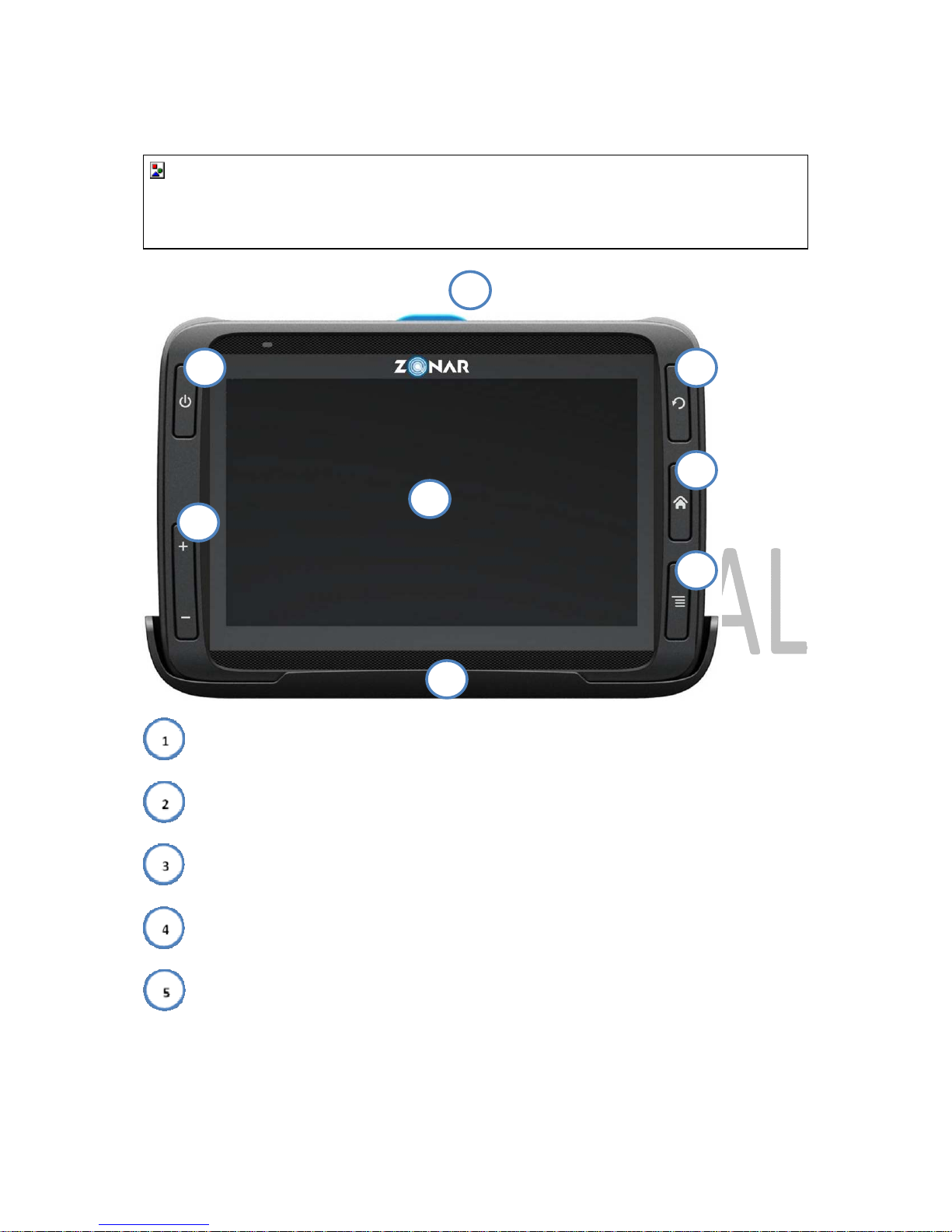
Zonar 2020 Tablet
- Power
- Volume/Brightness Adjustment
- Touchscreen
- Eject (located on docking station)
- Refresh Page
1
2
3
4
5
6
7
8
Page 6
Zonar 2020 User’s Guide 6
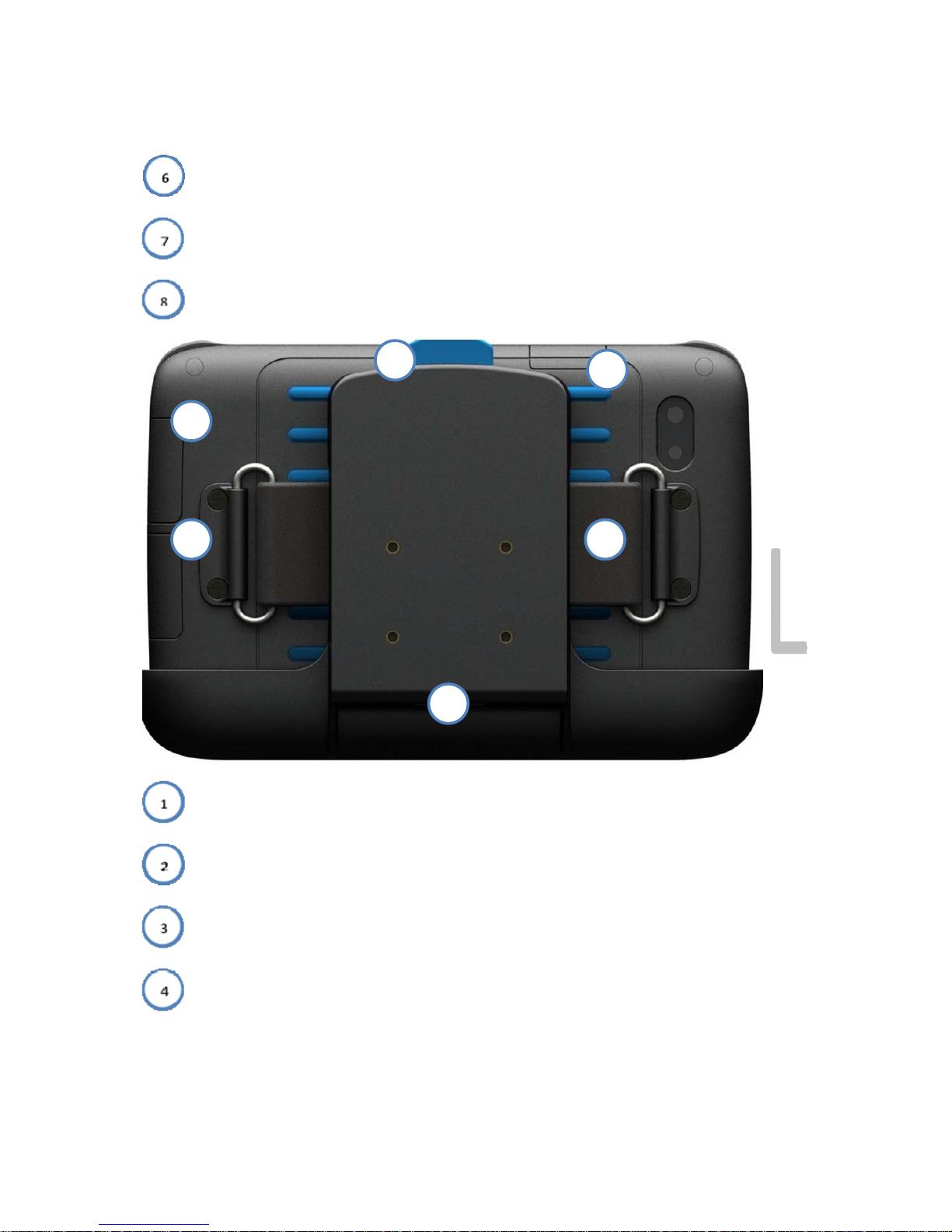
- Return to Home Screen
- Access Settings/Help
- 2020 Docking Station
- Headphones and Mini USB port
- SD Card port
- Eject
- USB port
1
2
4
6
5
3
Page 7
Zonar 2020 User’s Guide 7
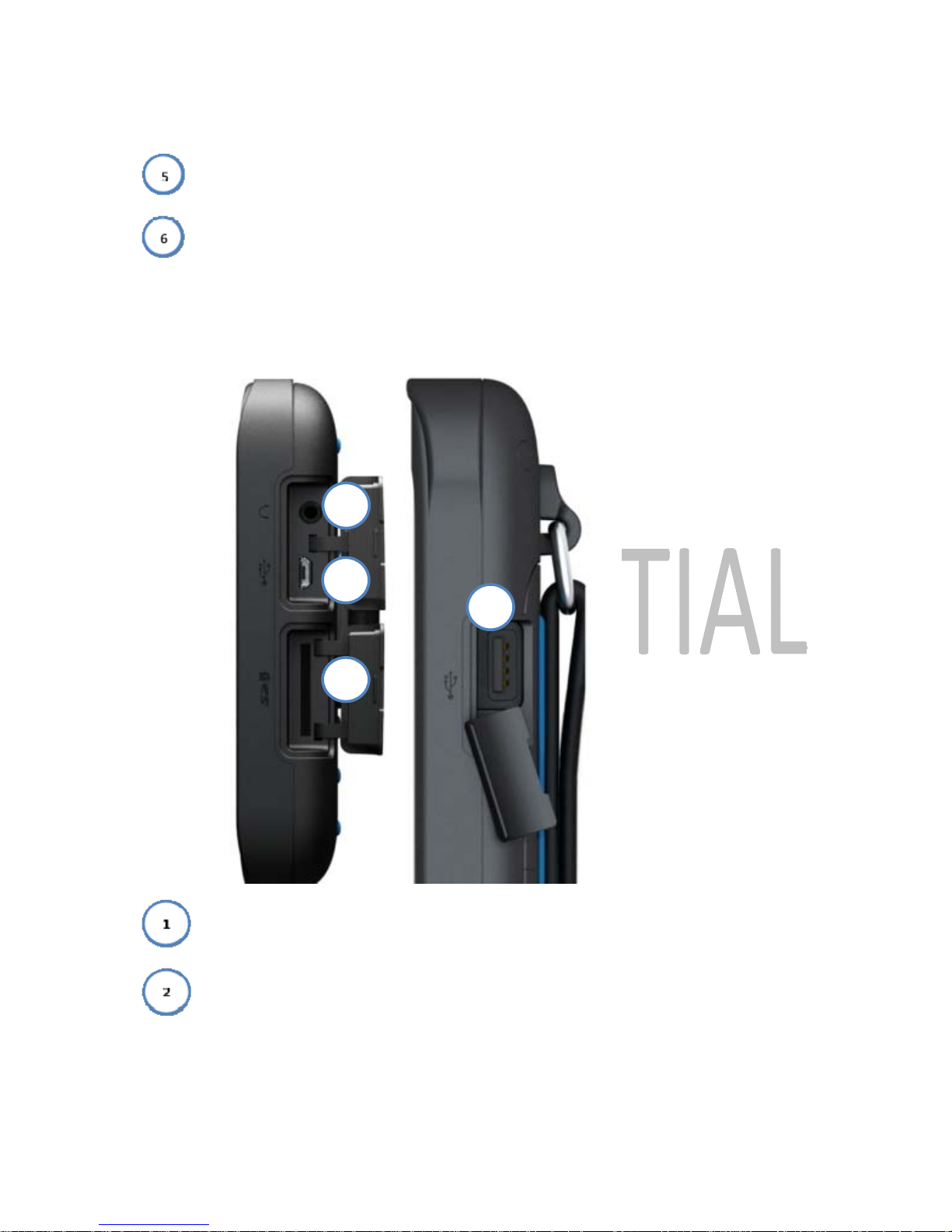
- Strap (optional)
- 2020 Docking Station (back view)
- Headphone Port
- MiniUSB Port
2
3
1
4
Right Side Top
Page 8

Zonar 2020 User’s Guide 8
- SD Card Port
- USB Port
Glossary of Abbreviations/Acronyms
This guide and other 2020 documentation use a number of abbreviations and acronyms.
ECM-
Engine Control Module
EVIR –
Electronic Vehicle Inspection Report
GPS-
Global Positioning System
GTC –
Zonar Ground Traffic Control
HOS-
Hours of Service
PIN-
Personal Identification Number
RFID-
Radio Frequency Identification
Page 9

Zonar 2020 User’s Guide 9
2020 First-time boot up Guide
The first time the 2020 is booted up, the device performs a series of internal checks and tests to
ensure that it is ready for use. The 2020 checks for and loads the Organization and Asset
Profiles. Organization Profiles contain all of the information associated with the organization
including the settings and loaded applications in their 2020s. Asset Profiles contain all of the
information on the vehicles or assets that the 2020 will interact with.
Typically, a technician performs this first-time boot up, and they can perform any necessary
fixes as well as accept the license agreements of the 2020 and Navigation software.
1)
Technician powers on 2020
2)
The 2020 checks for a cellular connection
a. If no cellular connection is found, 2020 checks for existing profiles in cache
b.
If no profiles are found, error message is displayed and the user is sent back
3)
Once connected, the 2020 sends Org/Asset ping with the current version and date
a.
If the version does not match what is found on the server, they are wirelessly
retrieved and updated in the cache
4)
Once the most current profiles are loaded, the 2020 checks for Navigation in the profile
a. If Navigation is found, a warning message is displayed, requiring the user to
accept it before moving on to the next step
5)
The technician is presented with and accepts the License Agreements
6)
Users may log in normally
Page 10

Zonar 2020 User’s Guide 10
2020 Driver ID/PIN setup in GTC
In order to access the 2020 tablet and its applications, drivers must prove a Driver ID and PIN.
These features are bundled in with Zonar’s Ground Traffic Control system. In order to fully log in,
the 2020 must have the following:
Driver ID
o
In the GTC, the Driver ID is referred to as the Zonar Tag Number
PIN
Set Home location
If these are not set when they attempt to use it, the driver cannot log in to the 2020 or use any of
its tools or applications.
Please refer to the Zonar GTC manual
for full details on setting up and maintaining GTC login
information.
Page 11
Zonar 2020 User’s Guide 11
2020 Driver’s Login Guide
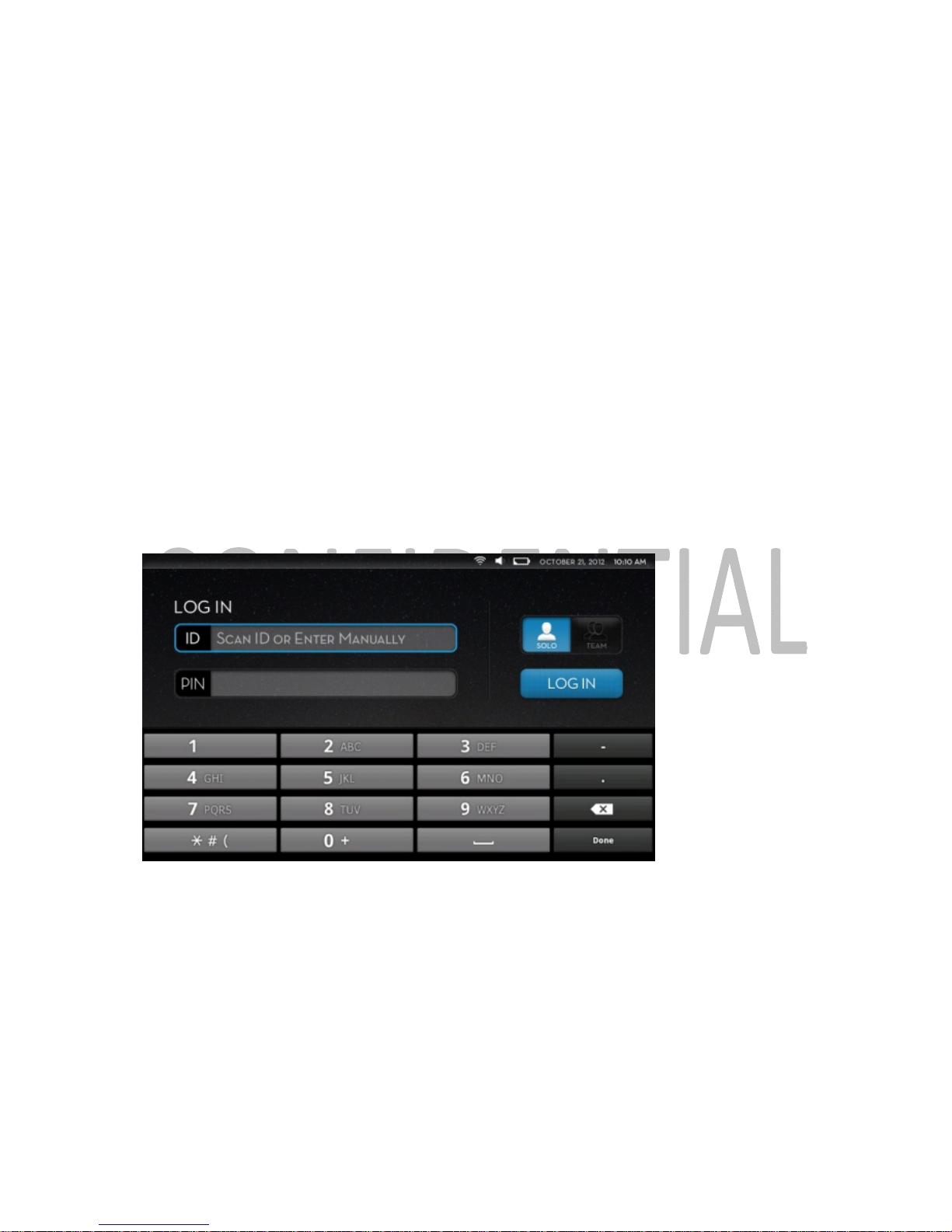
Logging in a single Driver
1)
Power on device
2)
2020 automatically performs self-check
a.
Checks for location, time, odometer, battery voltage and GPS memory
b. 2020 self-tests memory and battery levels
c.
If any test fails, the driver must prepare a written log for manager/dispatcher
3)
Driver Login Screen appears
a.
The driver may enter their ID or scan their card
4) Log in with Driver ID and PIN
Driver log-in screen
Logging in as a Team
1) After entering the PIN, the first driver selects the “Team” option
2)
The second driver completes the login process
3)
Once completed, the team must select an Active Driver and press Continue
Page 12
Zonar 2020 User’s Guide 12
Logout
1)
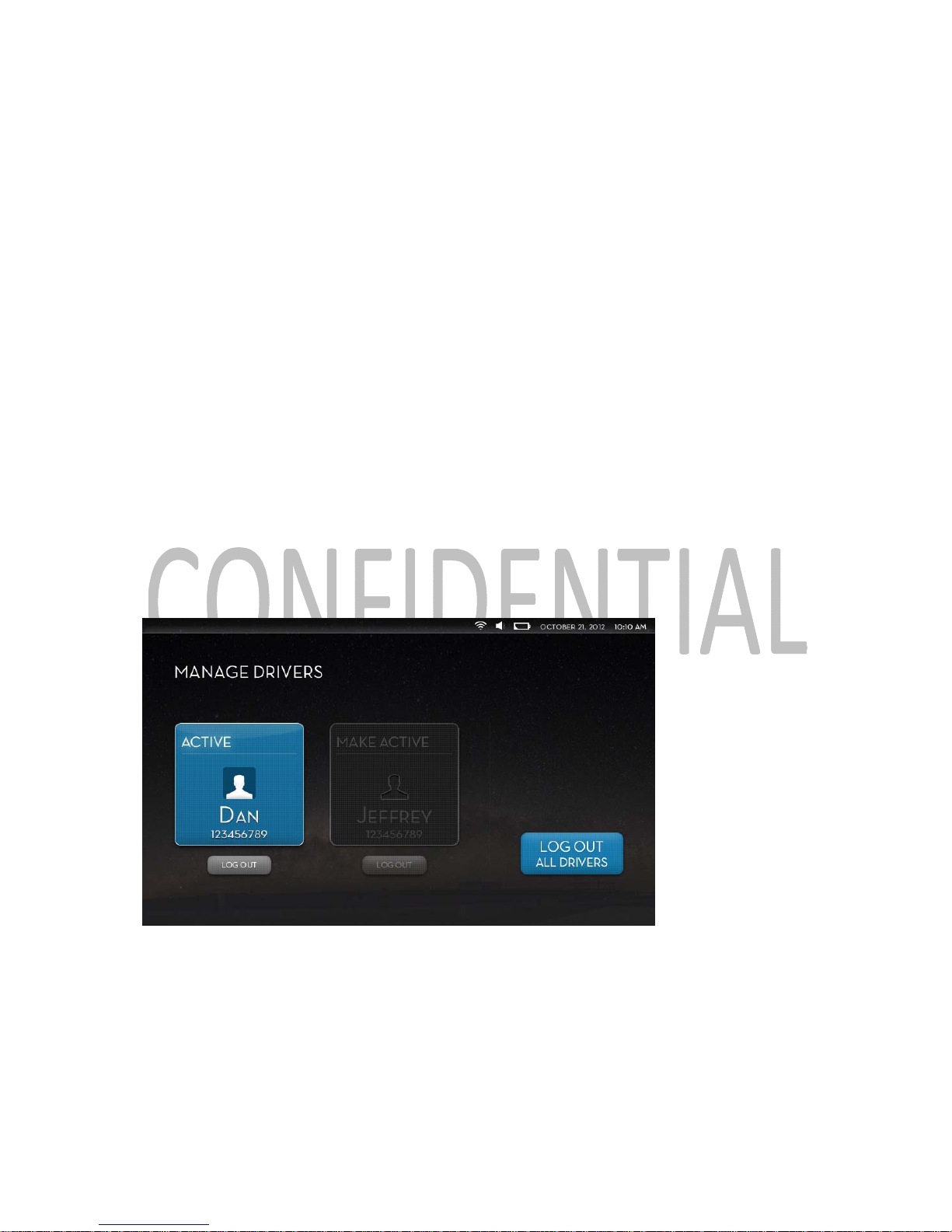
On the Home Screen, press the driver tile in the upper right corner to enter the Manage
Drivers screen
2)
Press Log Out
a.
If a team wishes to log out both members, select Log Out All Drivers
b.
If a single member of a team wishes to log out, press the Log Out button specific
to the member logging out
3)
Press the appropriate logout button
Note:
Users must press the logout button twice to fully log out of the 2020.
Manage Drivers/logout screen
Page 13
Zonar 2020 User’s Guide 13
Login a Co-Driver after Primary Driver Login
1)
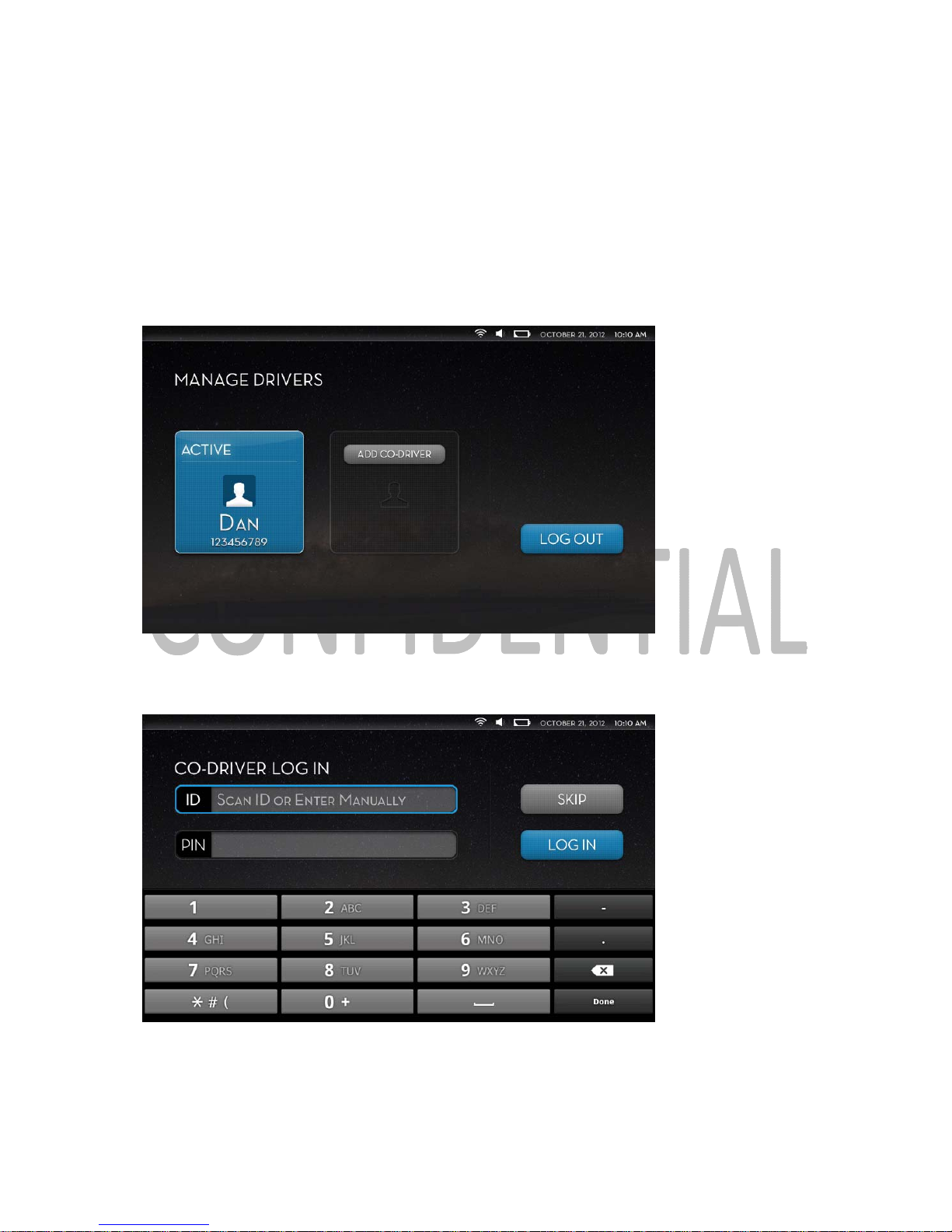
On the Home Screen, press the driver button in the upper right corner to enter the
Manage Drivers screen
2)
Select Add Co-Driver
Manage drivers screen
3)
Co-driver inputs their Driver ID and PIN
Co-driver login screen
Page 14
Zonar 2020 User’s Guide 14
2020 Home Screen
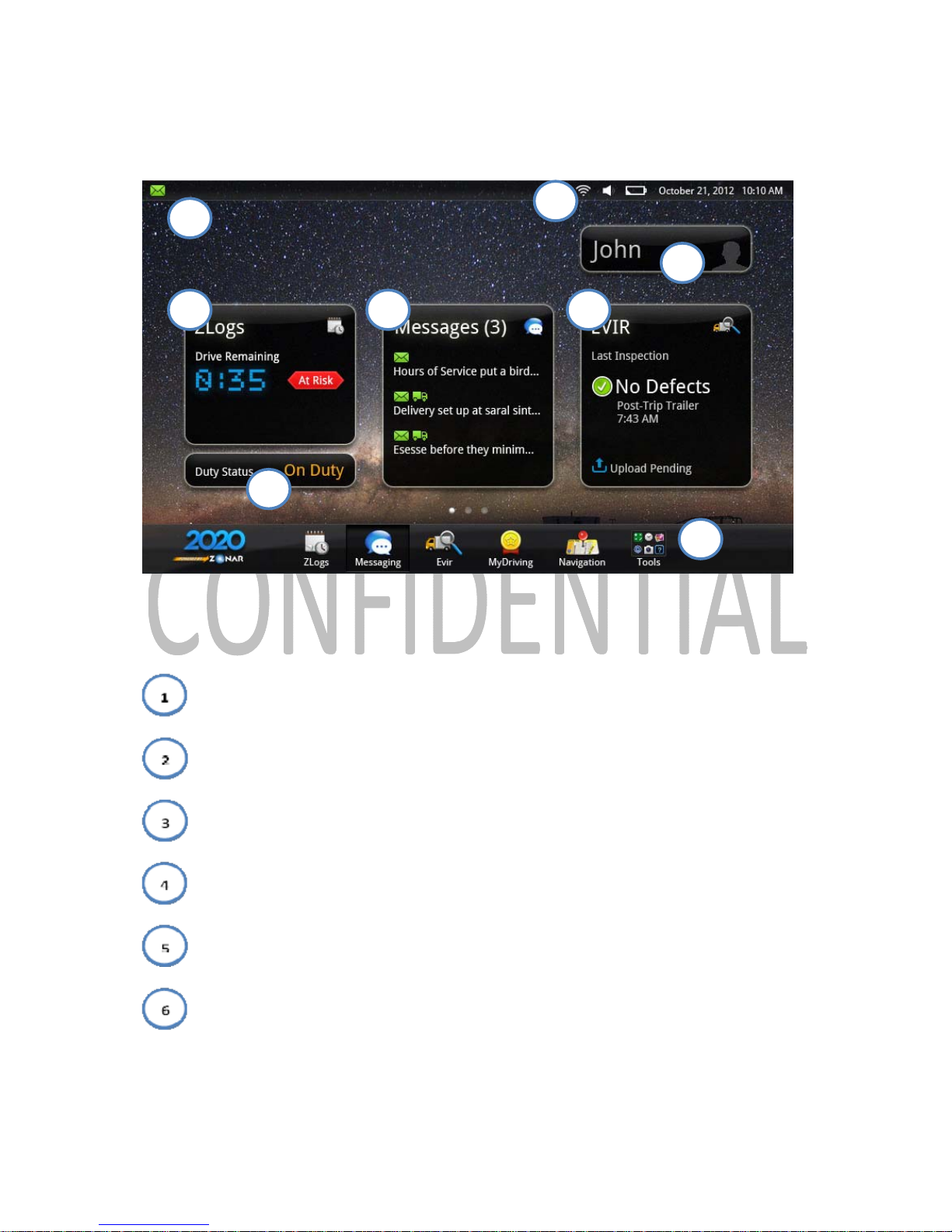
2020 Home Screen
The basic home screen for the 2020 allows for quick access to the major applications and tools
installed on the device.
- New notification display
- Date, time, volume and signal/battery strength
- Manage Drivers
- Status display of installed applications
- Duty Status
- Application and Tools access
1
2
3
4
5
6
4 4
Page 15
Zonar 2020 User’s Guide 15
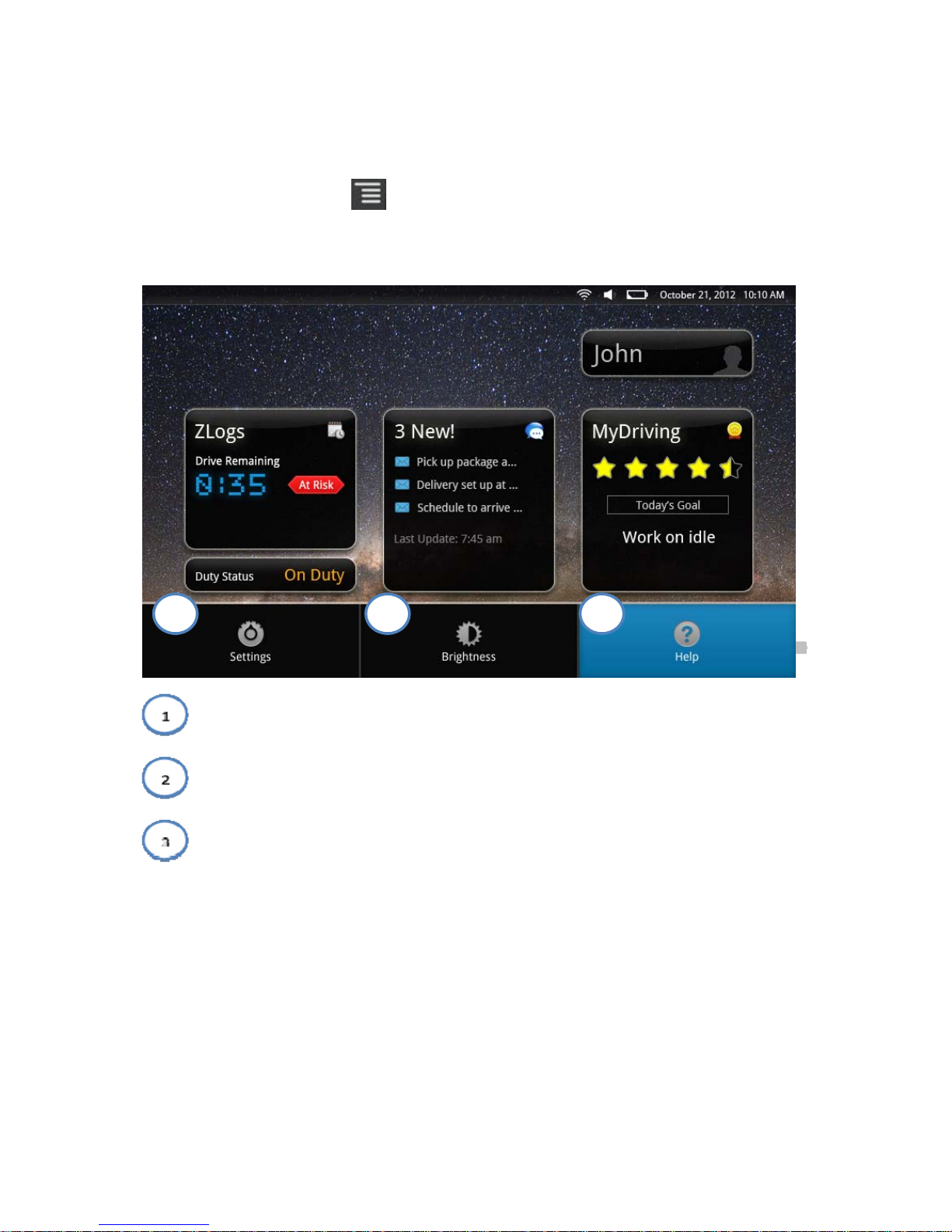
2020 Hard Menu
The 2020’s hard menu button allows users to access an alternative menu than that of the
main home screen.
If the 2020 is docked, this menu appears when the menu button is pressed.
- Access 2020 settings
- Adjust 2020 screen brightness
- Access 2020 Help
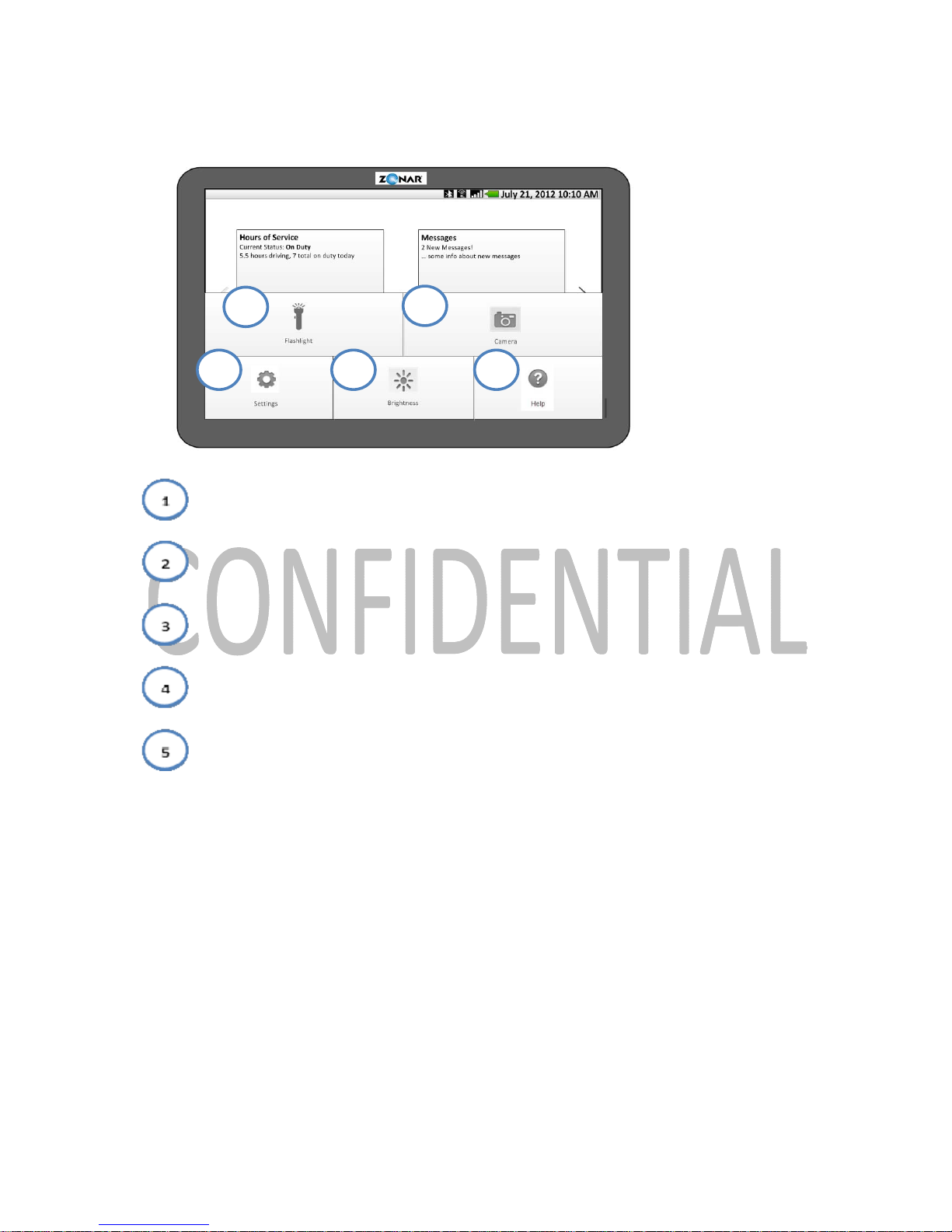
If the 2020 is not docked, this menu appears when the button is pressed
1 2 3
Page 16
Zonar 2020 User’s Guide 16
- Activate the 2020 flashlight
- Activate the 2020 camera
- Access 2020 settings
- Adjust 2020 screen brightness
- Access 2020 Help
1
54 3
2
Page 17

Zonar 2020 User’s Guide 17
2020 Self-Check Guide
The 2020 performs a self-check every time it is powered on. In addition, the driver may use the
Self-Check option to run the test as well through the ZLogs application. Normally, this is done
when the 2020 loses its wireless signal and the 2020 prompts the user to run the self-test as
soon as the signal is re-acquired and the unit is back online.
1)
Check for enabled HOS
2)
Test for connection to Zonar V2J/V3
3)
GPS Unit tests
a. Memory check
i.
If available memory is equal to or greater than 95%, the 2020 reports a
failure
1.
On failure, the driver must prepare a paper log
b.
Voltage check
i.
If the CMV battery voltage is equal to or greater than 11.8 volts, the 2020
reports a failure
1.
On failure, the driver must prepare a paper log
c.
Clock check
i.
If the time does not update successfully, the 2020 reports a failure
1.
On failure, the driver must prepare a paper log
d.
GPS check
i.
If no latitude/longitude data is returned, the 2020 reports a failure
1.
On failure, the driver is notified to verify location at next stop
a.
See ZLogs application for more information
e.
Odometer value
i.
If ECM odometer mileage cannot be found, the 2020 reports a failure.
1.
On failure, driver is prompted to enter mileage at next duty status
change
a. See ZLogs application for more information
4)
2020 Unit Tests
Page 18

Zonar 2020 User’s Guide 18
a.
2020 Memory
i.
If available memory is equal to or greater than 95%, the 2020 reports a
failure
b.
2020 Battery
i. If remaining battery is less than 10%, the 2020 reports a failure
5)
GPS Unit
a.
If no response is found, test is logged as a failure
b.
If there is a response, a self-test analysis is performed, logging success or failure
Page 19
Zonar 2020 User’s Guide 19
2020 Sleep Mode
When the 2020 is undocked, or docked on a vehicle without power, the device times out and
enters a sleep mode after a certain period of time to improve driver management and device
security. By default, this period is 2 minutes, but this may be adjusted to 30 seconds, 1 minute,
10 minutes or 30 minutes.
To exit from sleep mode, a user presses the Power button.
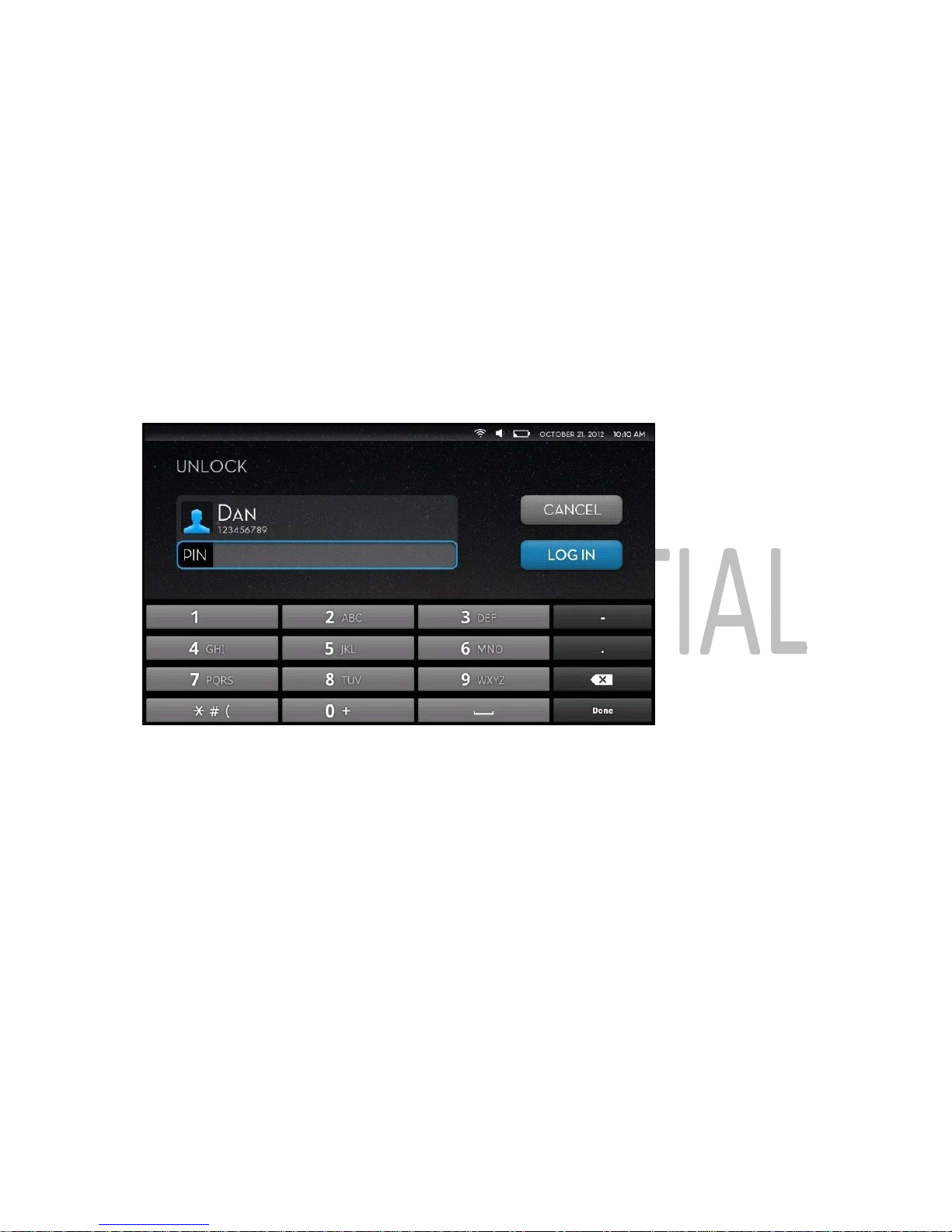
When coming out of sleep mode, a user must choose which driver to log in as, and enter the
appropriate PIN.
Unlock screen
Additionally, the 2020 automatically logs a driver off after a set period of inactive time. By default,
the time is 8 days, but t he value be adjusted from 0 t o 30 days.
Page 20
Zonar 2020 User’s Guide 20
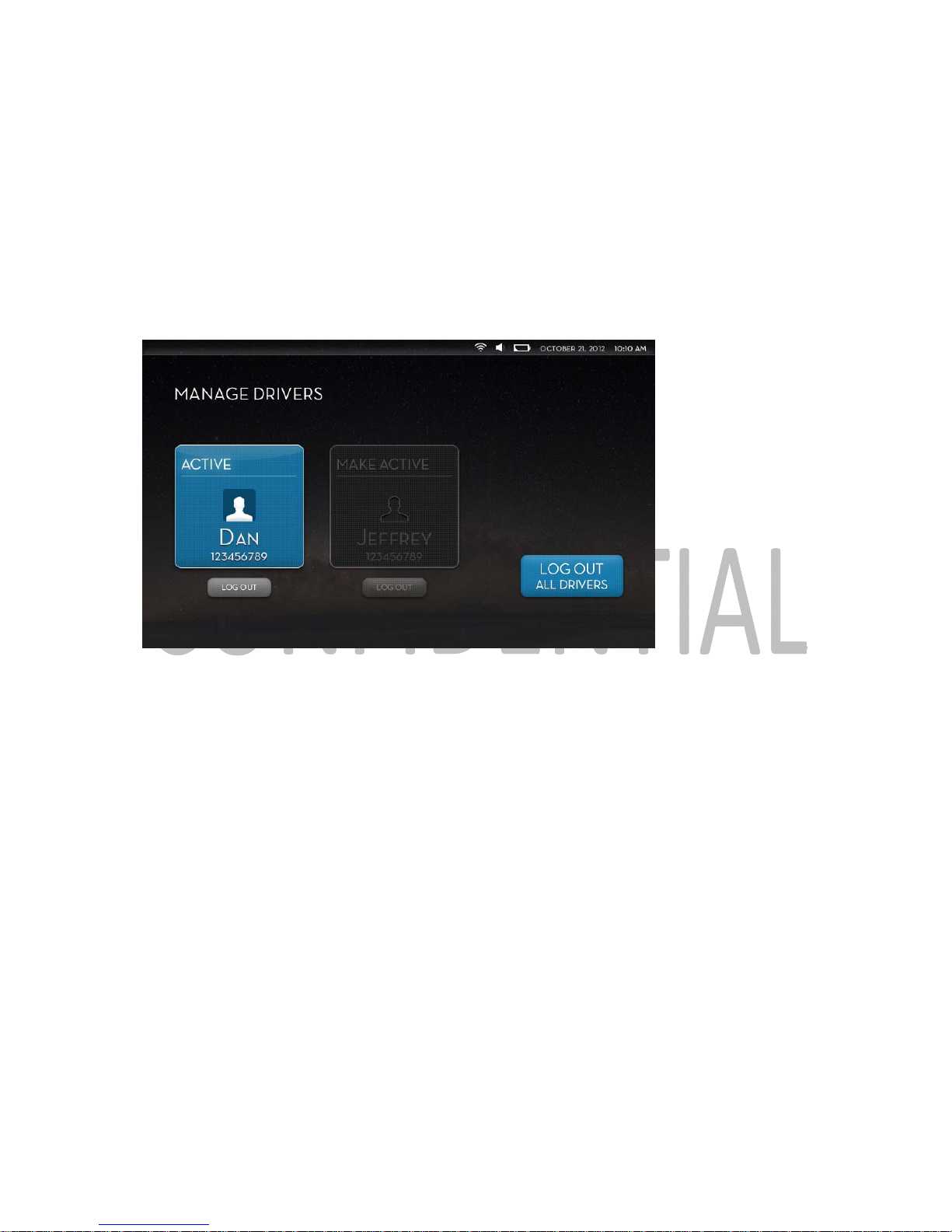
Change Active Driver
1)
On the Home Screen, press the driver tile in the upper right corner
2) Highlight which driver is to be made active
3)
Select Make Active
Manage Driver screen
Note:
When a team is switching who is driving, they must change the Active Driver in the 2020.
One of the users accesses the Manage Drivers screen from the Home Screen. Pressing Make
Active on the non-active driver highlights that driver and shifts their status to active. The 2020
then makes this the active driver for purposes of logging Hours of Service and Driver
Performance.
Page 21
Zonar 2020 User’s Guide 21
2020 Built-in Applications
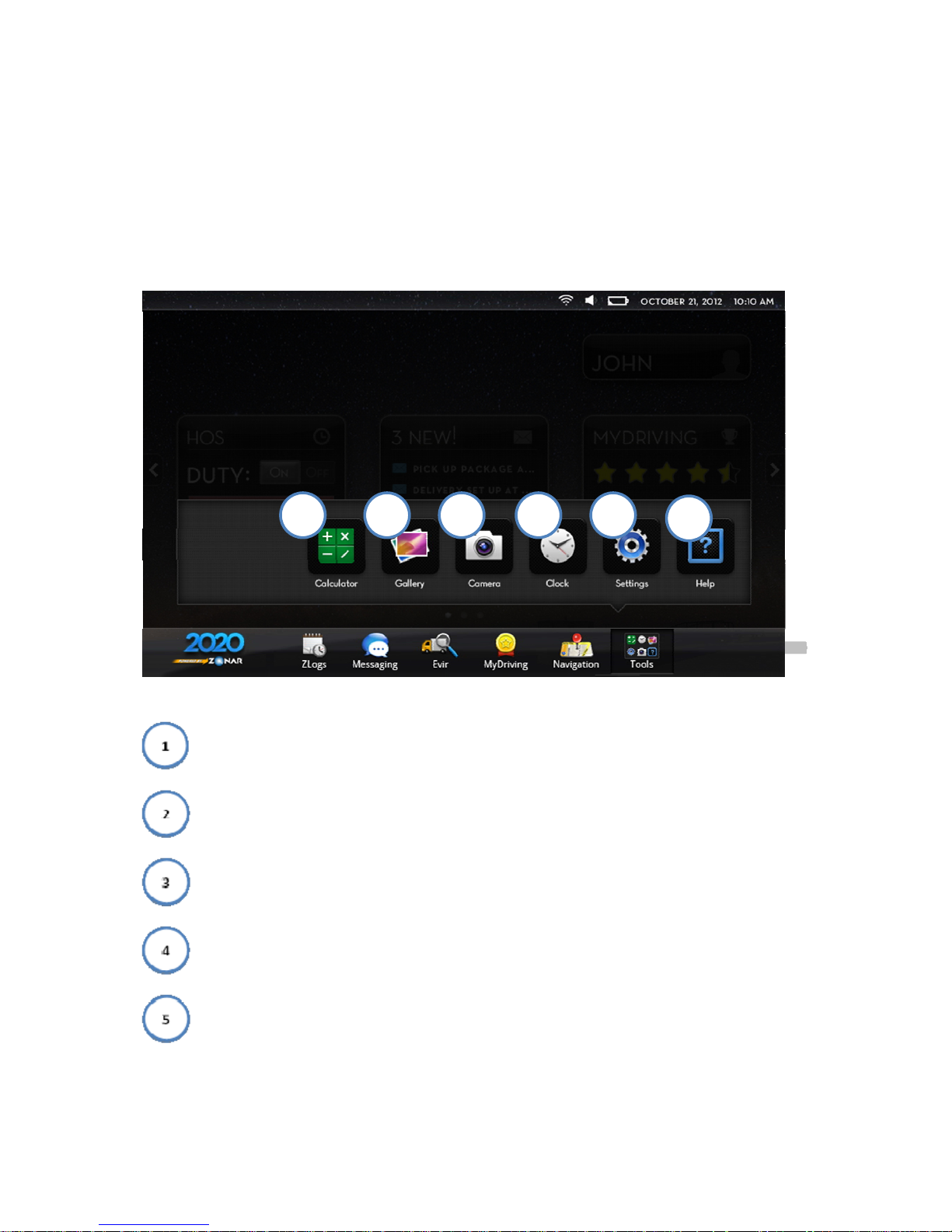
The 2020 unit carries a number of stock applications that exist on every tablet. Users access the
built-in applications through the main Home screen of the 2020 via the Tools section.
Tools Menu
- Calculator
- Gallery
- Camera/Camcorder
- Clock/Alarm
- Settings
1 2 3 4 5
6
Page 22

Zonar 2020 User’s Guide 22
- Help
Page 23
Zonar 2020 User’s Guide 23
Using Applications
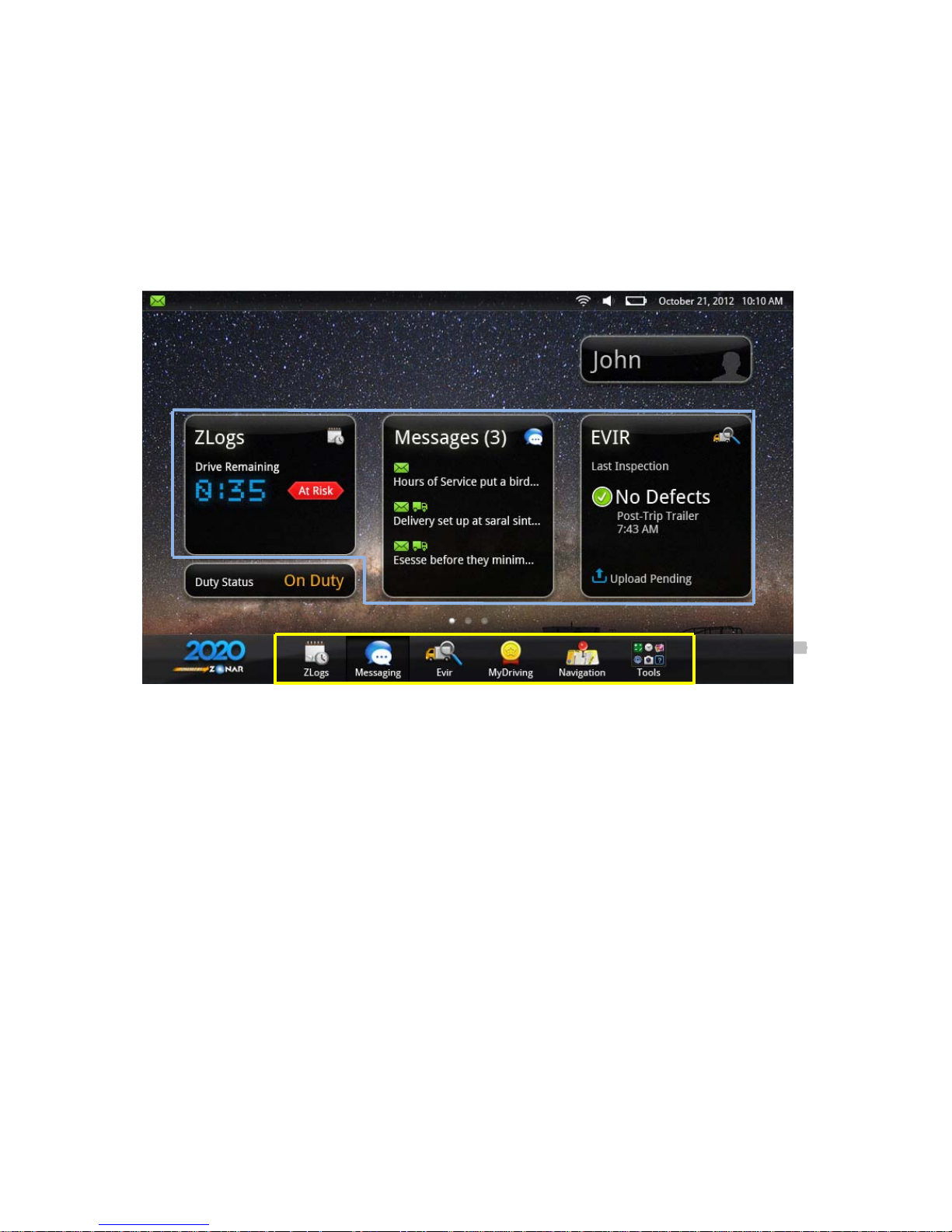
A driver may access and use installed applications through the Home screen with one of two
methods:
Users may start an application by either pressing the large status icon of the installed
applications (circled in blue) or through the home screen’s tool bar (yellow). Both lead drivers to
the same application.
Page 24

Zonar 2020 User’s Guide 24
Updating Applications
In order to maintain the most up-to-date versions of installed applications, the 2020
automatically checks for and, if able, downloads updates to loaded applications. While each
2020’s load of installed applications may vary, the process used to update them remains the
same between applications.
1) Application versions on the 2020 are compared to the versions on the manifest
a.
If the application versions match, the process ends successfully
2)
If necessary updates are found, the 2020 checks for WiFi connectivity
3)
If WiFi connectivity is found:
a. 2020 notifies the user of pending updates and asks to proceed with the download
i.
If the approval is given to proceed, the 2020 downloads the updates
immediately
ii.
If the user does not allow the download, and the application is non-critical,
the 2020 disables the application until it is fully updated
iii. If it is a critical application, the application is disabled until updated
1. NOTE:
If the update is smaller than 1mb in size, the 2020
downloads and installs the update via cellular network if no WiFi
connection is available
b.
Once downloaded, applications are installed and applied automatically
4)
If WiFi connectivity cannot be found:
a.
2020 notifies the user of pending updates available for download
b.
If it is a non-critical update, the application is disabled until fully updated.
c. If it is a critical application, it is disabled until updated
i. NOTE:
If the update is smaller than 1mb in size, the 2020 downloads and
applies the update over cellular signal if no WiFi connection is available
5) Once all application versions are updated, the user may use their applications, unless
disabled by the 2020 for uninstalled updates
Page 25
Zonar 2020 User’s Guide 25
2020 Battery/Signal Display Levels
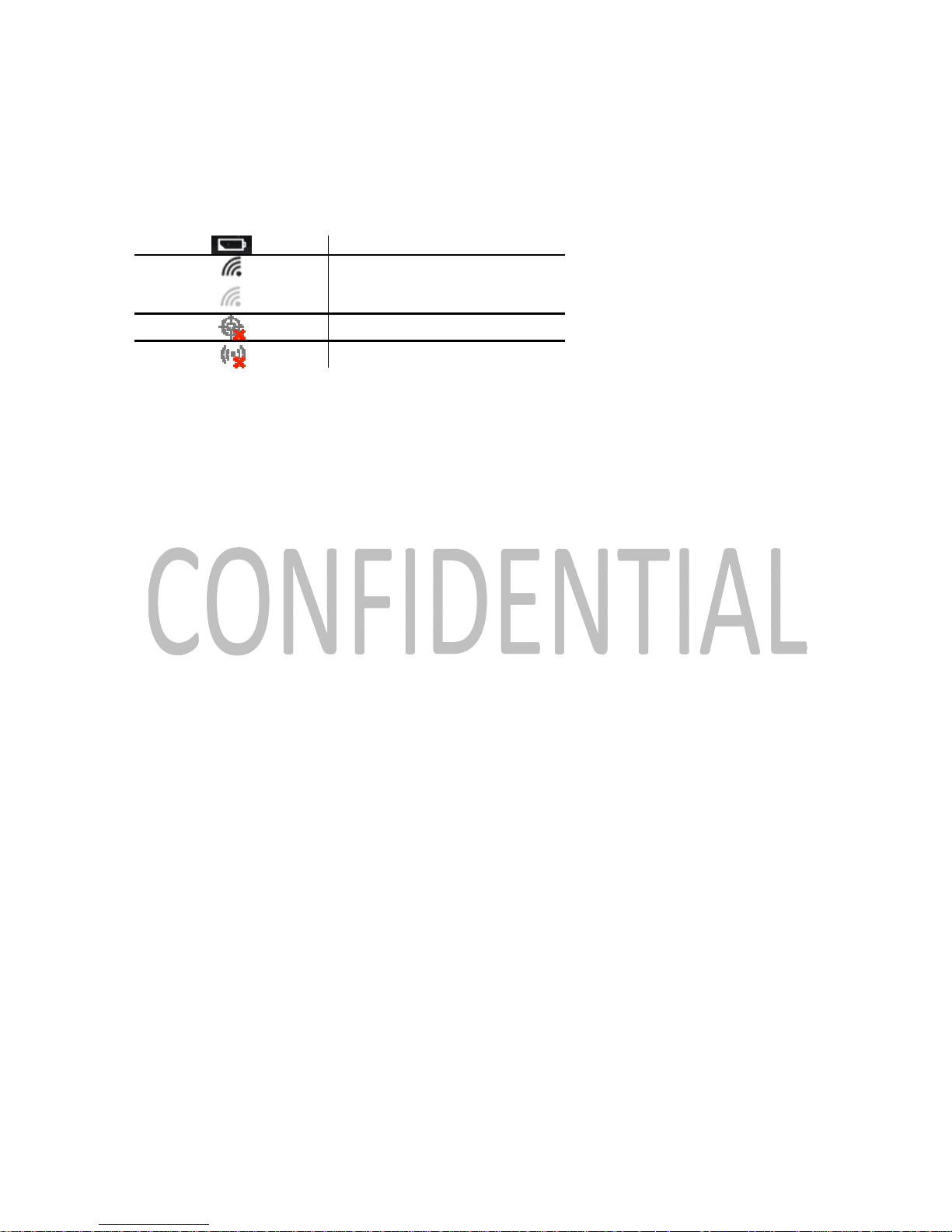
Battery level
WiFi connected
No WiFi connection
No GPS connection
No cellular connection
Page 26
Zonar 2020 User’s Guide 26
Docking Station
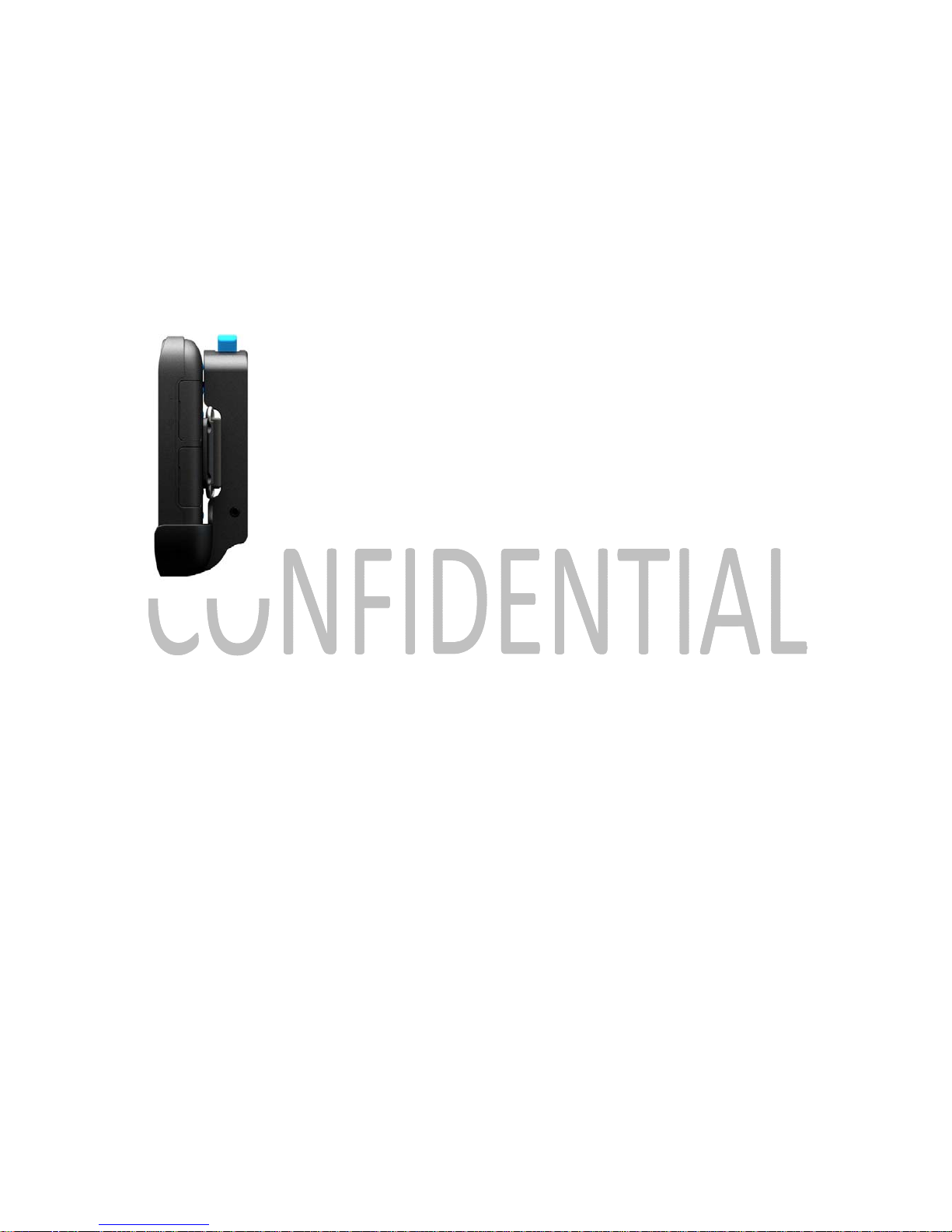
The 2020 docking station fits into the vehicle and serves as a home for the tablet. From the
dock, the 2020 tablet is charged and works to both charge the tablet while not in use, but also
as a wireless communication hub.
2020 Docking Station (with docked 2020)
When docked, information obtained during an EVIR scan wirelessly transmits to Zonar’s
backend server for collection and analysis.
Page 27
Zonar 2020 User’s Guide 27
Docking and Undocking
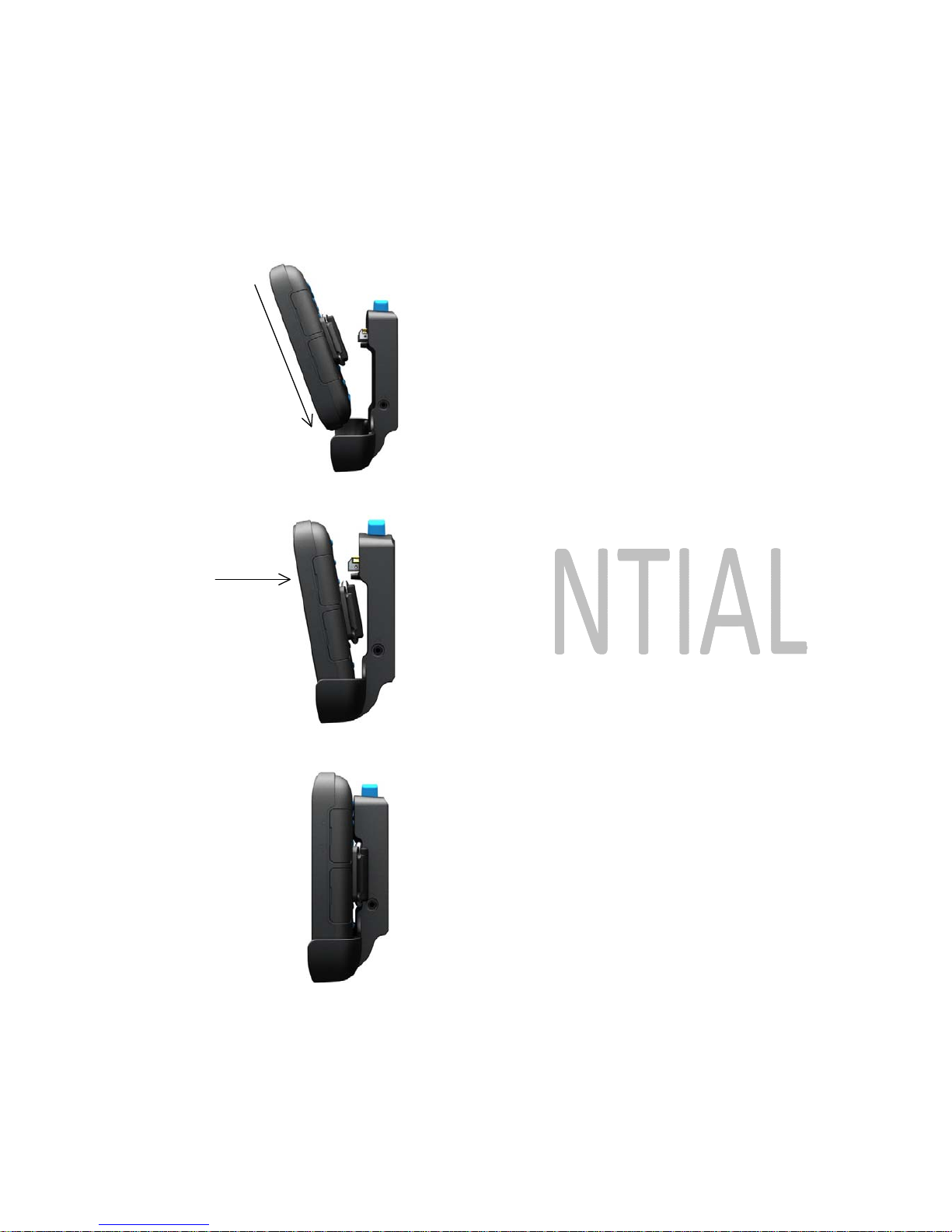
To dock the 2020 tablet:
Place the bottom of the tablet in the dock
2020 Docking procedure
Push forward until the tablet fully locks and latches in the docking station
Page 28
Zonar 2020 User’s Guide 28
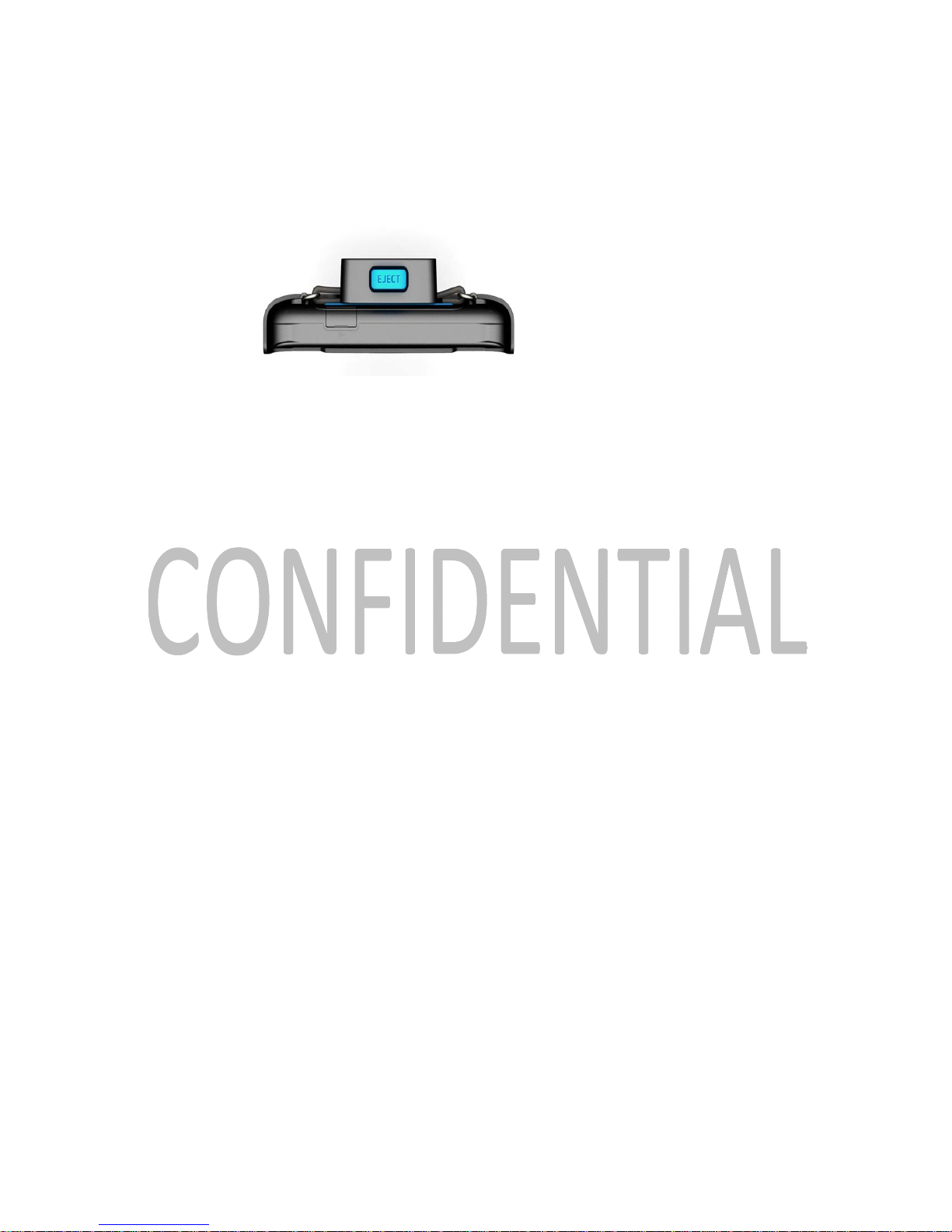
To undock the 2020 tablet:
Pr es s t h e Ejec t but t on
Eject Button at top of Docking Station
Remove the tablet from the docking station
Page 29
Zonar 2020 User’s Guide 29
Strap Installation
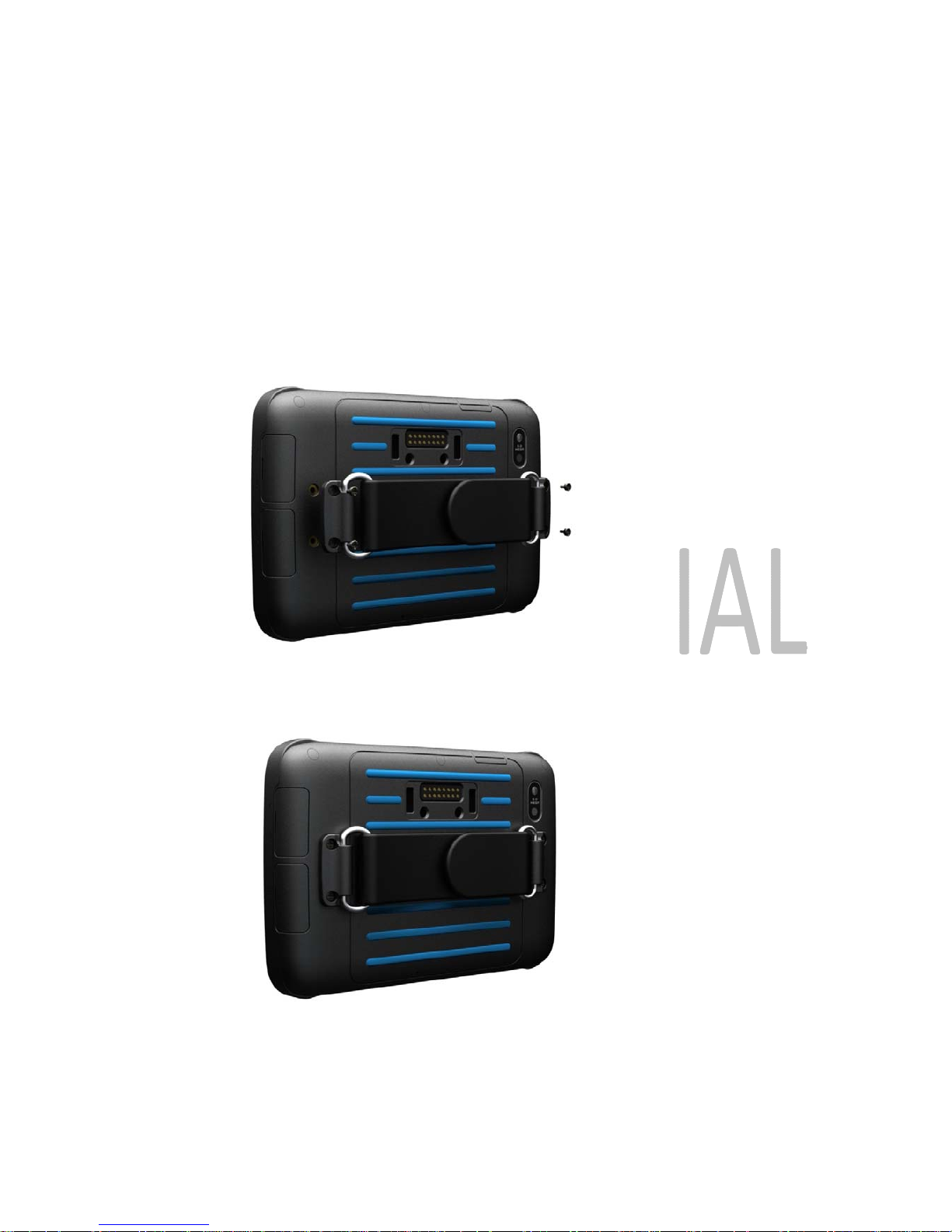
The 2020 tablet comes with an additional strap accessory to securely carry the tablet while out
of the docking station.
To install the strap, users attach it to the back of the tablet with the four provided screws.
Screw hole locations
Successfully attached strap
Page 30

Zonar 2020 User’s Guide 30
2020 Unit Settings
The 2020 unit makes these setting visible and available for regular users.
Wireless & Networks
o
Airplane mode
o Wi-Fi
o Wi-Fi settings
o
Bluetooth
o
Bluetooth settings
Sounds
o
General
Silent Mode
Vibrate
Volume
o
Notifications
Notification ringtone
o Feedback
Audible touch tones
Audible selection
Screen lock sounds
Haptic feedback
Display
o Brightness
o Auto-rotate screen
o
Animations
Page 31

Zonar 2020 User’s Guide 31
o
Screen timeout
Backlight
o Button backlight
Location & Security
o My Location
Use wireless networks
Use GPS satellites
o SIM Card lock
Set up SIM card lock
o
Passwords
Visible passwords
o Device Administration
Select device administrators
o
Credential Storage
Use secure credentials
Install from SD card
Set password
Clear storage
Applications
o
Storage use
o
Battery use
Accounts & Sync
o
Background data
o Auto-sync
o Add account
Page 32

Zonar 2020 User’s Guide 32
Privacy
o Factory data reset
Storage
o SD Card
Total space
Available space
Unmount SD card
Erase SD card
o Internal Storage
Available space
Language & Keyboard
o Language Settings
Select Language
English, French, Spanish
User Dictionary
o
Keyboard Settings
Android Keyboard
Voice Input & Output
o
Text-to-speech settings
Accessibility
o
Accessibility
o
Power Button ends call
Date & Time
o
Automatic
o Use 24-hour format
o Select date format
Page 33
Zonar 2020 User’s Guide 33
About Phone
o Status
o Battery use
o
Legal information
o Model information
o Android version
o Baseband version
o
Kernel version
o
Build number
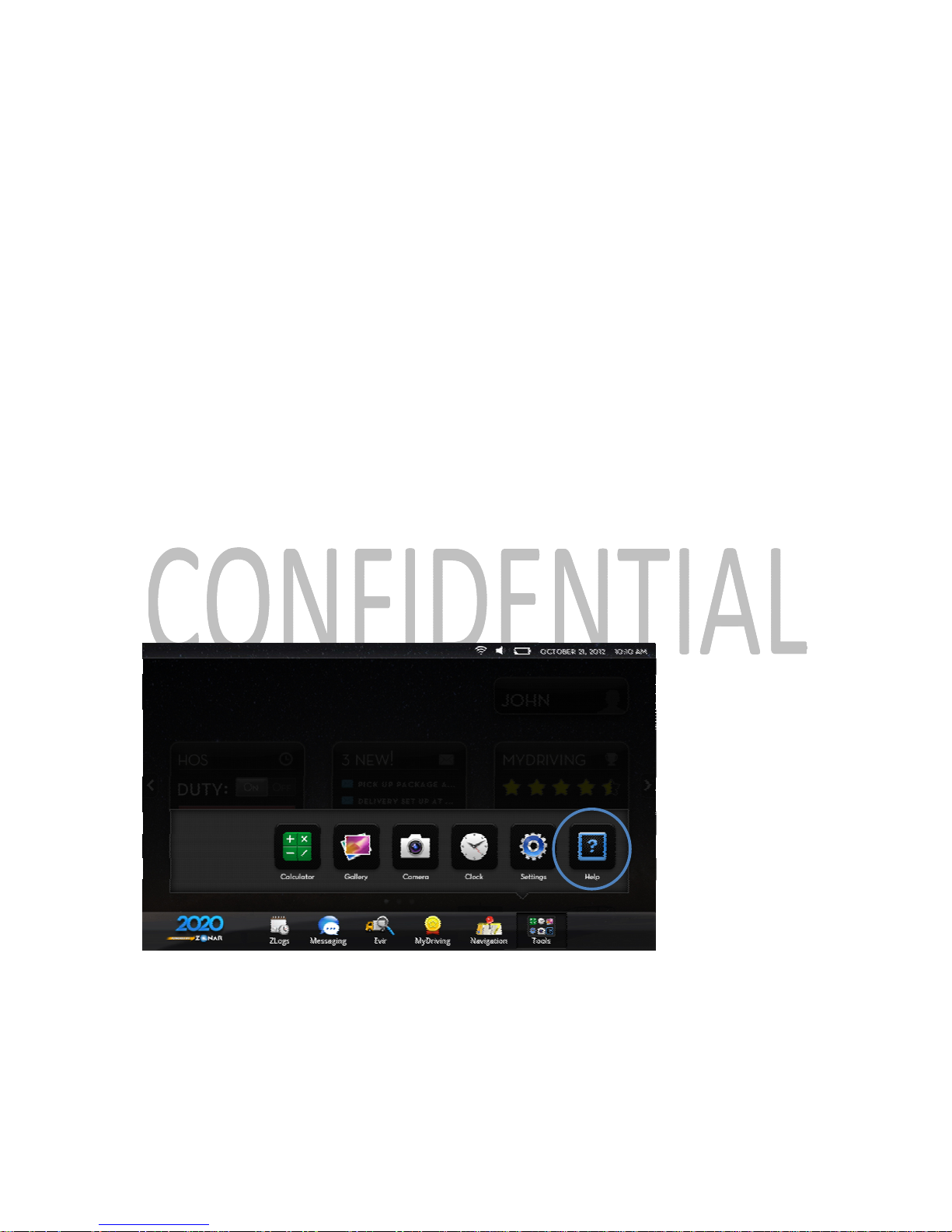
Accessing Help
If a driver needs assistance with the 2020 or any of the applications loaded onto it, they may
access Help documents through the 2020 home screen.
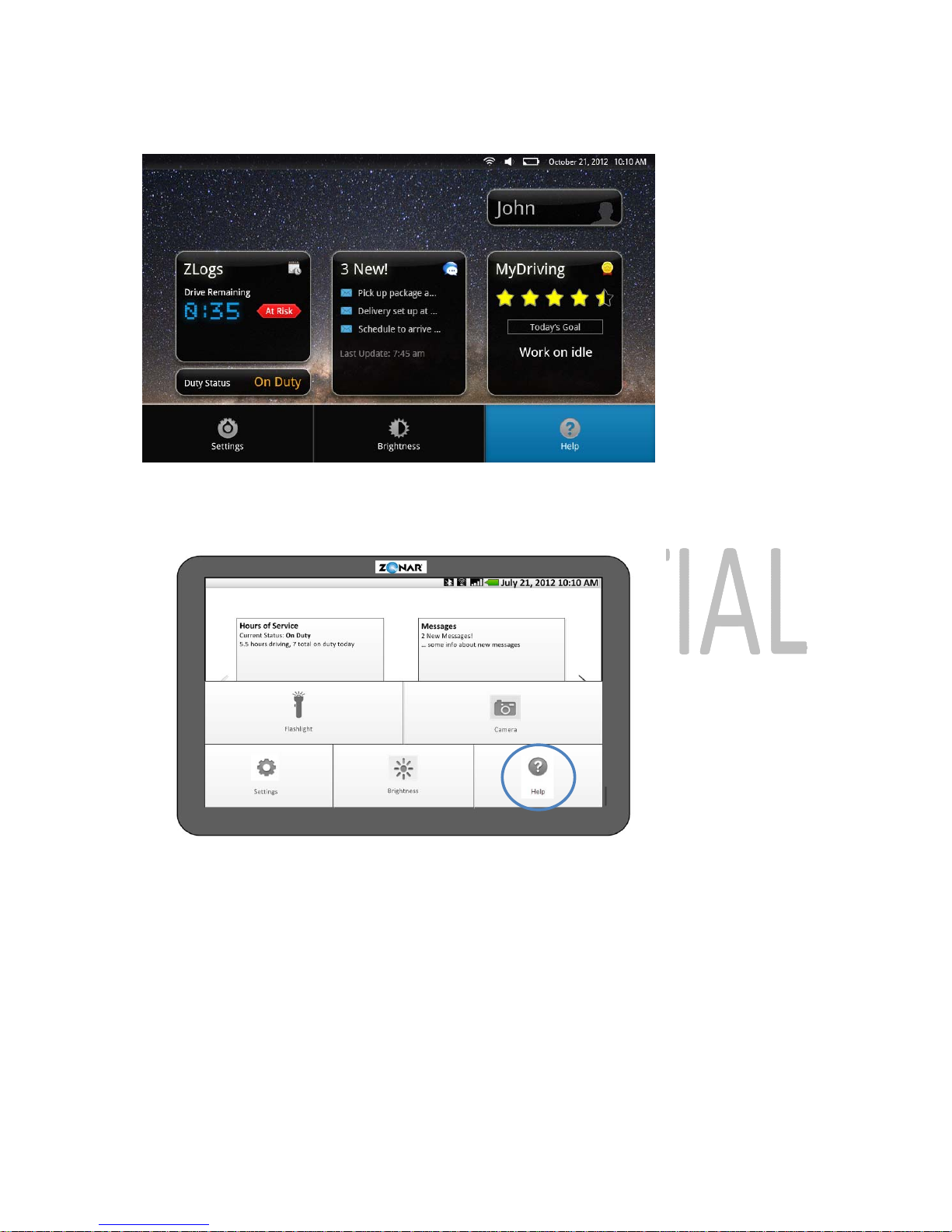
At the home screen, driver selects Tools
Driver selects Help
Help access via soft Tools button
Additionally, the user can use the Menu hard button on the 2020 device to call up a Help
option as well
o If the 2020 is docked in the docking station, the user will see this help menu
Page 34
Zonar 2020 User’s Guide 34
Help access via hard Menu button when 2020 is docked
o
If the 2020 is undocked, help is located on this menu
Help access via hard Menu button when 2020 is undocked
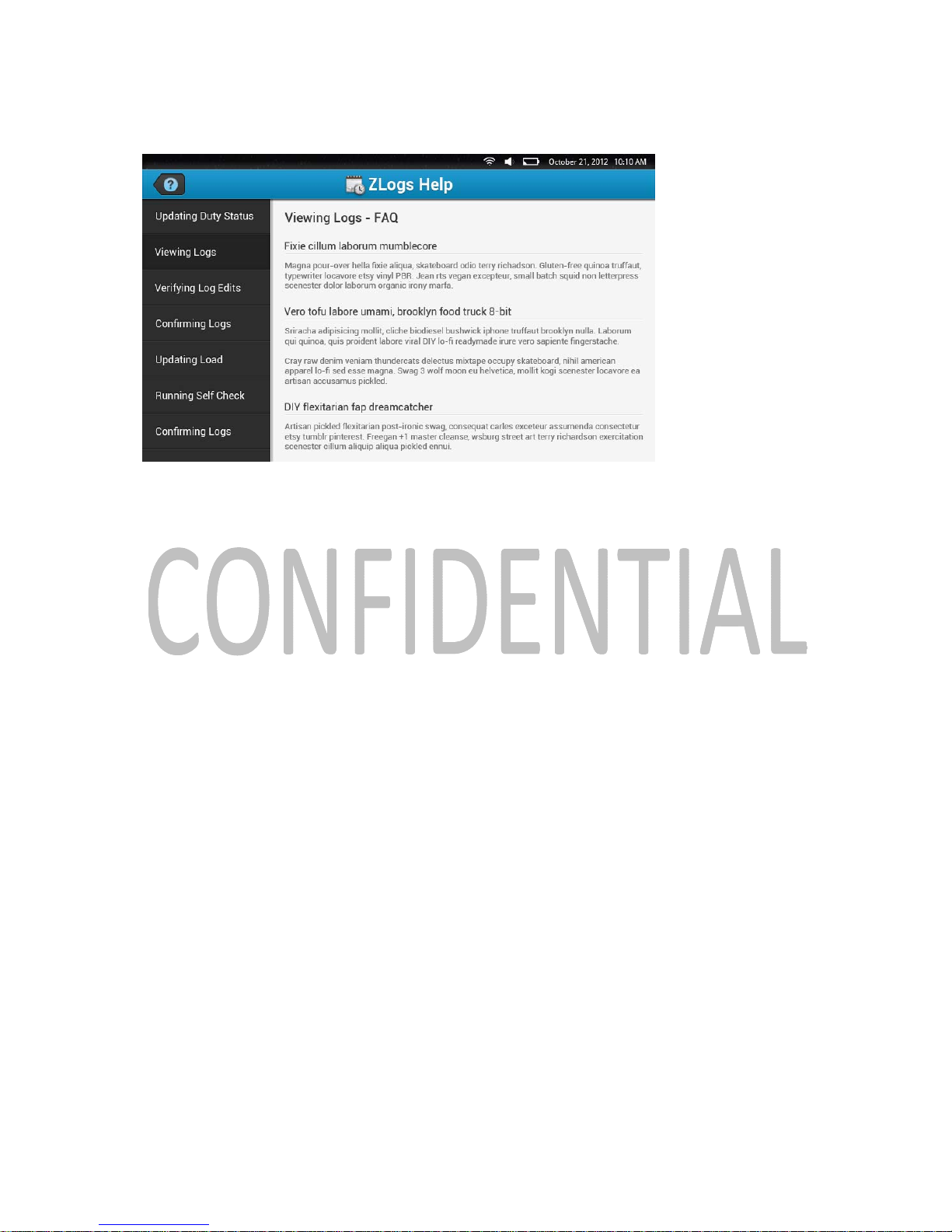
Driver selects appropriate help document from the sidebar
o Help documents are organized by application
o
Once an application is chosen, specific topics can be selected
Page 35
Zonar 2020 User’s Guide 35
Help screen
Caring for the 2020
Avoid dropping the 2020 and operating it in high-shock and high-vibration environments
Do not expose the 2020 to water
o Contact with water can cause the 2020 to malfunction
Do not store the 2020 where prolonged exposure to extreme temperatures can occur
o Prolonged exposure can permanently damage the 2020
Never use a hard or sharp object to operate the 2020 touchscreen
o Doing so may damage the touchscreen and leave it nonfunctional
Cleaning the 2020
Notice: Avoid chemical cleaners and solvents that can damage plastic components.
1. Clean the outer casing of the 2020 (not the touchscreen) using a cloth dampened with a
mild detergent solution
2. Wipe the device dry with a clean, dry cloth
Cleaning the Touchscreen
Page 36
Zonar 2020 User’s Guide 36
1. Use a soft, clean, lint-free cloth
2. If necessary, use water, isopropyl alcohol or eyeglass lens cleaner
3. Apply the liquid to the cloth
4. Gently wipe the 2020 screen with the cloth
Troubleshooting
Occasionally, a driver may need to address minor technical issues with the 2020, or adjust
settings to ensure that the device is receiving signals and operating properly. To use this guide,
drivers simply follow the button presses that are in bold, and use the arrows to move from
selection to selection to find the appropriate settings and options to correct any incorrect device
settings.
My device is not acquiring a signal.
Ensure that WiFi is enabled
o
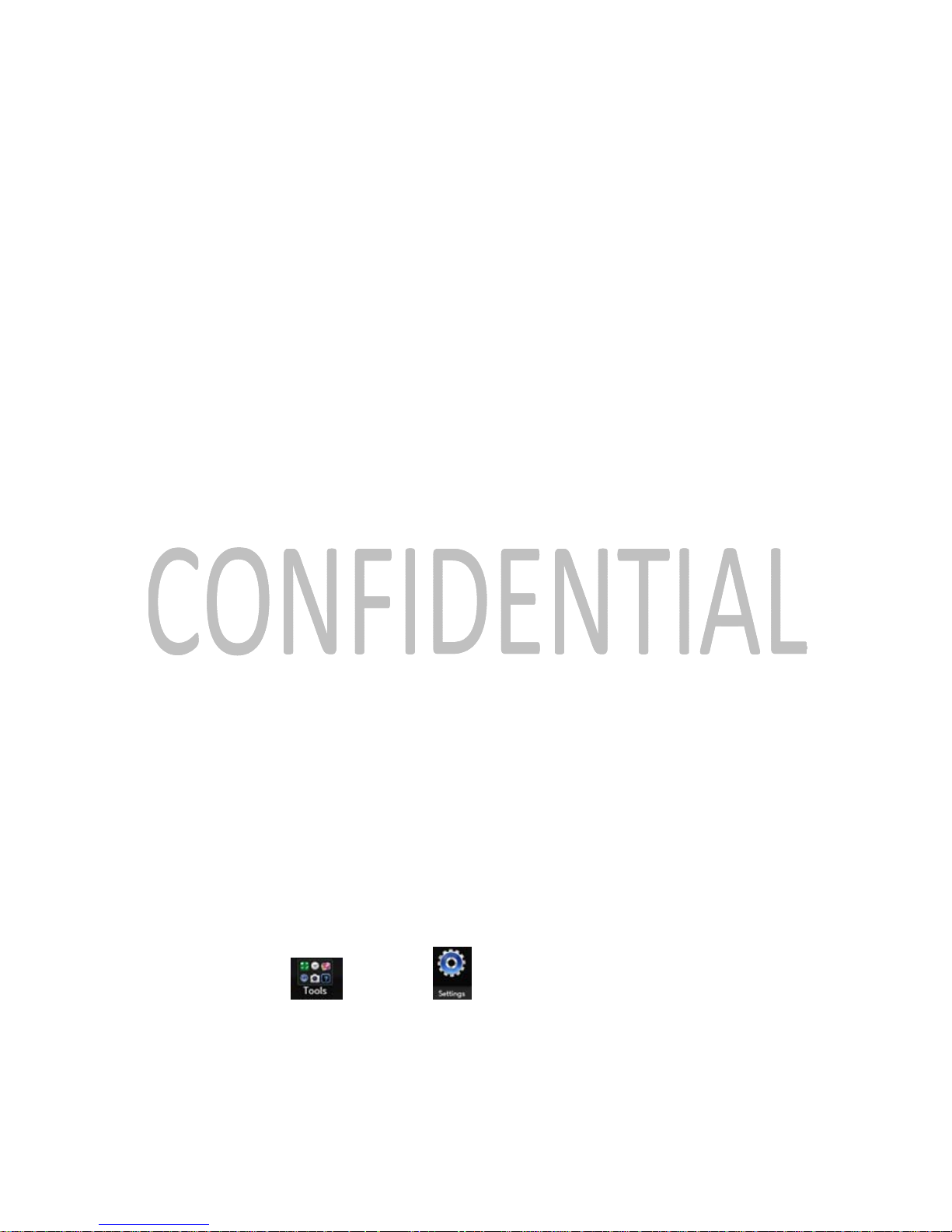
Tools
→ Settings
→ Wireless & Networks → WiFi
Make sure it is checked
Ensure that GPS and Wireless satellites are used
Page 37
Zonar 2020 User’s Guide 37
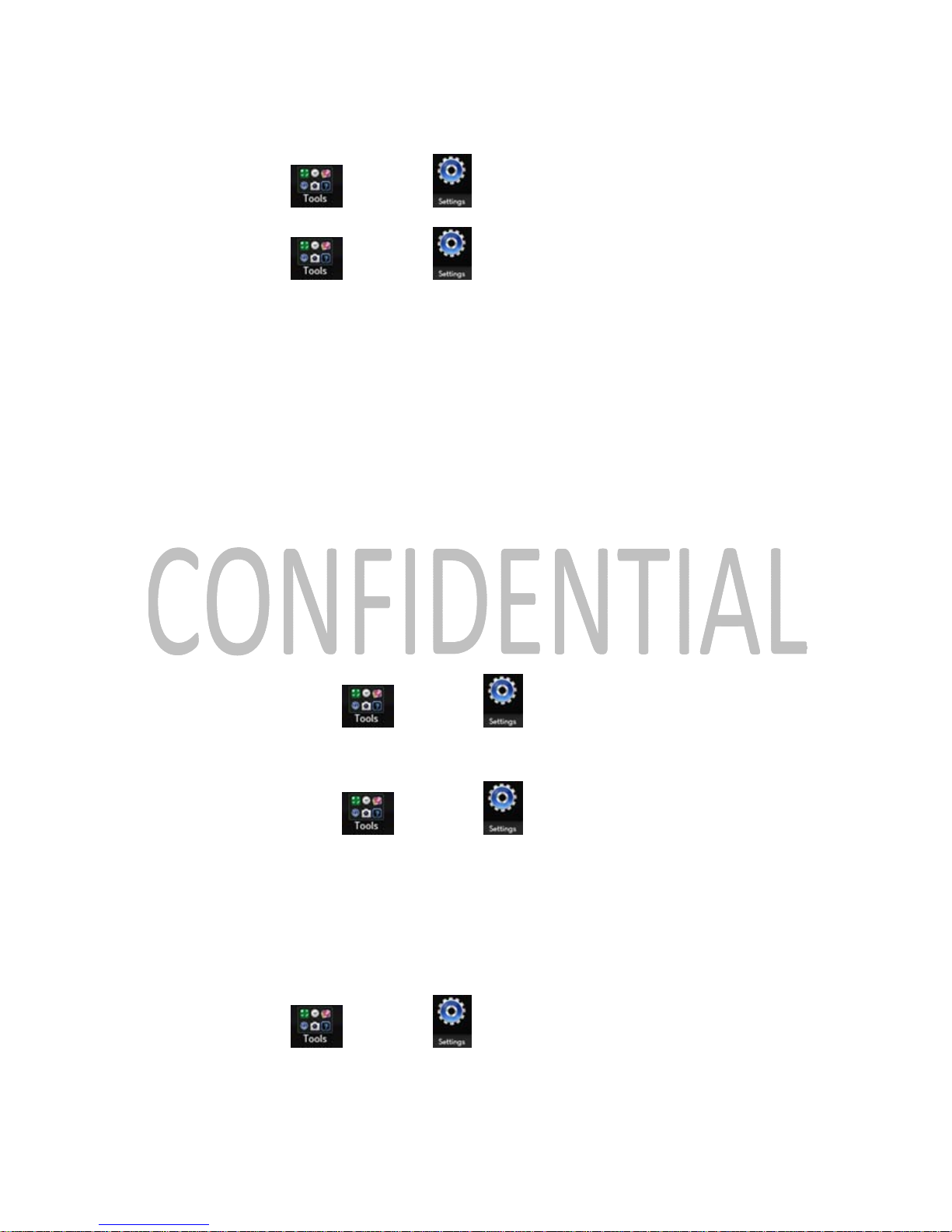
o Tools
→ Settings
→ Location & Security → Use GPS Satellites
o Tools
→ Settings → Location & Security → Use Wireless
Networks
Make sure both boxes are checked
My device is not charging in my vehicle.
Ensure the 2020 tablet is properly loaded into the docking station
Check the fuse in the V2J/V3
Re-seat the 2020 in the docking station
The 2020 can only charge between 32° F and 113° F (between 0° C and 45° C)
o
If the temperature is outside of this range, it may not charge properly
My 2020 runs out of battery power very quickly.
To maximize the time between charges, turn down the backlight
o
Turn down the brightness of the 2020
Tools
→ Settings
→ Display → Brightness
o
Turn off the button backlight
Tools
→ Settings
→ Backlight → Button Backlight
My screen is difficult to read.
Adjust the 2020’s screen brightness
o Tools
→ Settings
→ Display → Brightness
Page 38
Zonar 2020 User’s Guide 38
Adjust the 2020’s button backlights
o
Tools
→ Settings
→ Backlight → Button Backlight
Warranty
LIMITED WARRANTY
Page 39

Zonar 2020 User’s Guide 39
Zonar warrants that the Hardware provided under this agreement is free from all material
defects in workmanship under normal use and service. Zonar’s warranty period for its Hardware
is as follows:
V3 - 5 Years
EVIRTM - 3 Years
All Other Hardware - 1 Year
The above warranty periods run from the date of shipment. Provided that the Hardware is used
and handled as intended, Zonar will replace any failed or functionally impaired Hardware with
equivalent Hardware in terms of performance and functionality.
This warranty does not apply to any Hardware that has been misused, altered, willfully abused
or that has been damaged due to improper installation by the customer. † Hardware
installations must follow Zonar’s equipment specific installation guidelines.† If product returned
is determined to be damaged due to any of the aforementioned circumstances, the Customer
will be charged the price of a refurbished unit plus shipping and handling.
CUSTOMER’S SOLE AND EXCLUSIVE REMEDY AND ZONAR’S ENTIRE OBLIGATION
UNDER THESE LIMITED WARRANTIES for defective equipment is the repair and replacement
of the equipment free of charge by Zonar. Zonar shall not be liable to Customer or any third
party for any general, special, punitive, incidental, indirect or consequential damages, or any
lost profits or business, arising out of Zonar’s Subscription Agreement.
Page 40
Zonar 2020 User’s Guide 40
Important Notices
Important Notice
It is the Owner's sole responsibility to install and use the Zonar products in a manner that will
not cause accidents, personal injury or property damage. For the purposes of this notice,
"Owner", "you" and "your" means the party (including any person authorized by that party to use
and/or install the Product) that has either: (a) purchased the Product; or (b) leased the Product
from Zonar Systems, Inc or its related companies. The Owner of this product is solely
responsible for observing safe driving practices. The choice, location, and installation of all
components of the Product is critical. If installation is not correct, the Product may not perform at
its designed potential or specifications. If in doubt, consult your vehicle's manufacturer.
Lithium-Ion Battery Warning
This product contains a lithium-ion battery. To prevent the possibility of personal injury or
product damage caused by battery exposure to extreme heat, remove the device from the
vehicle when exiting or store it out of direct sunlight.
Distracted Driving Warning
Do not use this device while the vehicle is in mo tion or in any other driving situation. U sing the
device while driving can create dangerous situations where the driver may not be focused on
the road or task at hand.
FCC Compliance Statement (Part 15.19) IC Compliance Statement (RSS-210)
This device complies with Part 15 of the FCC Rules and with RSS-210 of Industry Canada (IC).
Operation is subject to the following two conditions:
1. This device may not cause harmful interference, and
2. This device must accept any interference received, including interference that may cause
undesired operation.
Page 41
Zonar 2020 User’s Guide 41
Warning: (Part 15.21)
Changes or modifications not expressly approved by Zonar Systems could void the user's
authority to operate the equipment.
Industry Canada Compliance Statements
"This device has been designed to operate with an antenna having a maximum gain of [3.3] dB. Antenna
having a higher gain is strictly prohibited per regulations of Industry Canada. The required antenna
impedance is [50] ohms."
"To reduce potential radio interference to other users, the antenna type and its gain should be
so chosen that the equivalent is isotropically radiated power (EIRP) is not more than that
required for successful communication."
"The installer of this radio equipment must ensure that the antenna is located or pointed such
that it does not emit RF field in excess of Health Canada limits for the general population;
consult Safety Code 6, obtainable from Health Canada's website, www.hcsc.gc.ca/rpb."
Page 42

Zonar 2020 User’s Guide 42
FEDERAL COMMUNICATIONS COMMISSION INTERFERENCE STATEMENT
This equipment has been tested and found to comply with the limits for a Class B digital
device, pursuant to part 15 of the FCC Ru le s. These limits are designed to provide reas onable
protection against harmful interference in a residential installation. This equipment genera tes,
uses and can radiate radio frequency energy and, if not installed and used in accord ance with
the instructions, may cause harmful interference to radio communications. However, there is
no guarantee that interference will not occur in a particular installation. If this equipment does
cause harmful interference to radio or television reception, which can be determined by turning
the equipment off and on, the user is encoura ged to try to correct the interference by one or
more of the following measures:
-Reorient or relocat e the receiving antenna.
-Increase the separation between the equipment and receiver.
-Connect the equipment into an outlet on a circuit different from that to which the
receiver is connected.
-Consult the dealer or an experienced radio/ TV technician for help.
RF exposure warning
This equipment must be installed and operated in accordance with provided instructions and
must not be co-located or operating in conjunction with any other antenna or transmitter. Endusers and installers must be providing with antenna installation instructions and transmitter
operating conditions for satisfying RF exposure compliance.
SAR Value:
0.188
W/kg
Page 43

Zonar 2020 User’s Guide 43
Canada, Industry Canada (IC) Notices
This Class B digital apparatus complies with Ca nadian ICES-003 and RSS-210.
Operation is subject to the following two conditions: (1) this device may not cause interference, and
(2) this device must accept any interference, including interference that may cause undesired
operation of the device.
Radio Frequency (RF) Exposure Information
The radiated output power of the Wireless Device is below the Industry Canada (IC) radio
frequency exposure limits . The Wireless Device should be used in such a manner such that the
potential for human contact during normal operation is minimized.
This device has been evaluated for and shown compliant with the IC Specific Absorption Rate
(“SAR”) limits when installed in specific host products operated in portable exposure co nditions.
Canada, avis d'Industry Canada (IC)
Cet appareil numérique de classe B est conforme aux normes canadiennes ICES-003 et RSS-210.
Son fonctionnement est soumis aux deux conditions suivantes : (1) cet appareil ne doit pas causer
d'interférence et (2) cet appareil doit accepter toute interférence, notamment les interférences qui
peuvent affecter son fonctionnement.
Informations concernant l'exposition aux fréquences radio (RF)
La puissance de sortie émise par l’appareil de sans fil est inférieure à la limite d ' exposition aux
fréquences radio d'Industry Canada (IC). Utilisez l’appa re il de sans fil de façon à minimiser les
contacts humains lors du fonctionnement normal.
Ce périphérique a été évalué et démontré conforme aux limites SAR (Specific Absorption Rate – Taux
d'absorption spécifique) d'IC lorsqu'il est installé dans des produits hôtes particuliers qui fonctionnent
dans des conditions d'exposition à des appareils portables.
 Loading...