

Page 1

Quick Start Guide
OB2000
Version: 1.0
Date: July 2018
1
Page 2

1. Overview
7-Inches Color Screen
Fingerprint Sensor
⑤
Power Key
Speaker
Security Screw Holes (for securing the OB2000
Camera
Front view
Rear view
①
②
①Battery Box ②Hanging hole
③Power Socket ④Ethernet Interface
⑤GPIO ⑥USB Port
④
③
⑥
Bottom view
onto its back plate)
1
Page 3
1
2
3
Microphone
Left Side View
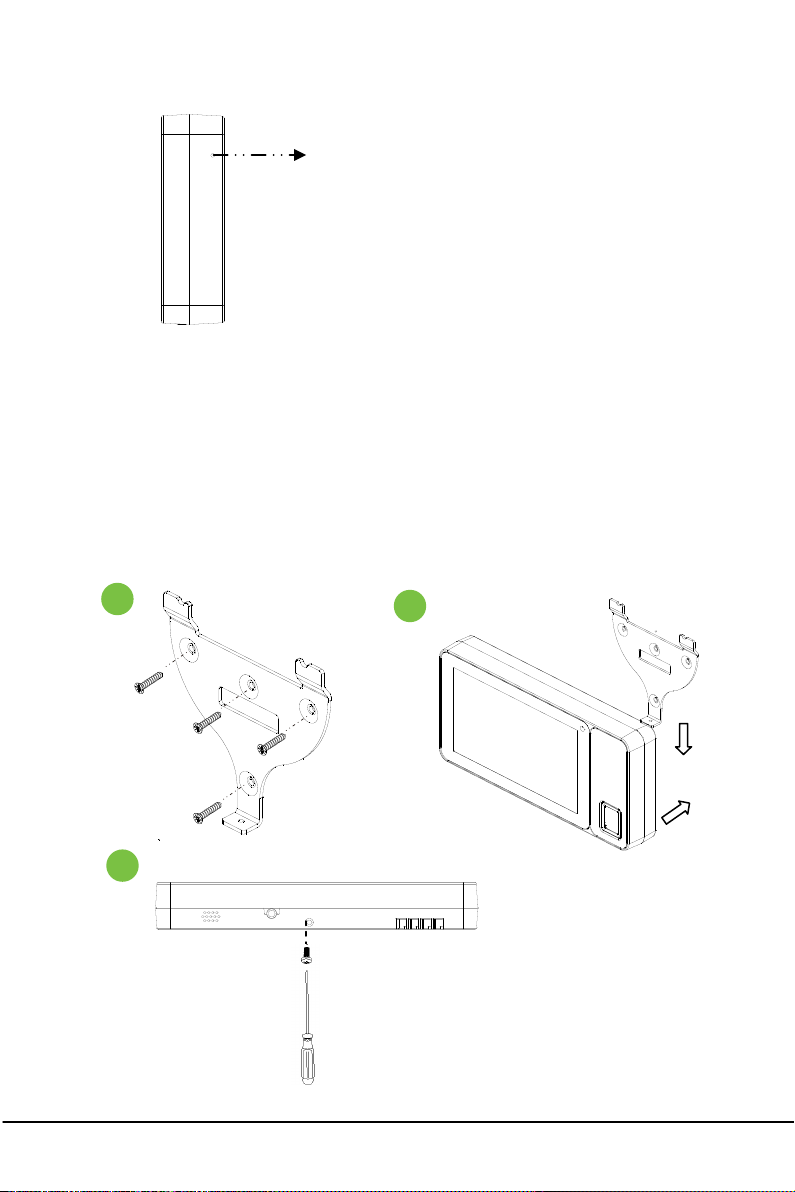
2. Mounting the OB2000 on Wall
(1) Fix the OB2000 back plate onto wall using wall mount screws. The
recommended installation height is 1.45 meters.
(2) Connect the OB2000 to its back plate.
(3) Use security screws to fasten the OB2000 to back plate.
①
②
2
Page 4

3. Wiring
5V Adaptor
③
⑦ ⑧ ⑨ ⑩
USB
PC
4. Basic Operation
4.1 Initial Interface
④
⑤
(supplied with OB2000)
①
②
⑥
3
Page 5

Status Bar
Applications
①
③Clock ④Google Search
⑤Voice Search ⑥Turn down the volume key
⑦Backspace key ⑧Home key
⑨Background key ⑩Turn up the volume key
②
4.2 Add Desktop Widgets
1) Long press on the desktop, the following interface appears:
2) Click the WIDGETS icon, touch and hold to pick up a widget. And drag the
widget to the desktop.
Note: If you want to delete a widget on the desktop, also long press the icon and
drag it to the Χ area. The widget will be deleted.
4.3 Main Interface
Click icon to enter to the main interface. You will see all the applications on
it.
Click icon to enter the S ettings interface. You can set the Wireless&networks,
Device, Personal and System.
4
Page 6

4.4 Quick Settings and Notifications
Long press the status bar and slide down it. It will show the recent
notifications that have not been read. Also you can quickly set functions such
as Volume, Wi-Fi, Bluetooth, Airplane mode, Landscape, Screenshot and so on.
5
Page 7

FCC Caution:
Any changes or modifications not expressly approved by the party responsible
for
compliance could void the user's authority to operate the equipment.
This device complies with part 15 of the FCC Rules. Operation is subject to the
following two conditions: (1) This device may not cause harmful interference,
and (2) this device must accept any interference received, including
interference that may cause undesired operation.
Note: This equipment has been tested and found to comply with the limits for
a Class B digital device, pursuant to part 15 of the FCC Rules. These limits are
designed to provide reasonable protection against harmful interference when
the equipment is operated in a commercial environment. This equipment
generates, uses, and can radiate radio frequency energy and, if not installed
and used in accordance with the instruction manual, may cause harmful
interference to radio communications. Operation of this equipment in a
residential area is likely to cause harmful interference in which case the user
will be required to correct the interference at his own expense.
This equipment complies with FCC radiation exposure limits set forth for an
uncontrolled environment .This equipment should be installed and operated
with minimum distance 20cm between the radiator & your body.
This transmitter must not be co-located or operating in conjunction with any
other antenna or transmitter.
ZK Building, Wuhe Road, Gangtou, Bantian, Buji
Town, Longgang District, Shenzhen China 518129
Tel: +86 755-89602345
Fax: +86 755-89602394
www.zkteco.com
© Copyright 2018. ZKTeco Inc. ZKTeco Logo is a registered trademark of ZKTeco or a related company. All other product and
company names mentioned are used for.
6
 Loading...