

Page 1

USER MANUAL
GL300
Version: 1.0
Date: July 2018
1
Page 2

Table of Contents
Read Before Use .................................................................................................................................. 1
Safety Caution .......................................................................................................................................................... 1
Lock Parts ..................................................................................................................................................................... 2
Basic Function ..................................................................................................................................... 3
Random Password ................................................................................................................................................. 3
Initialization ................................................................................................................................................................ 3
Normal Open Mode.............................................................................................................................................. 3
Low Battery Warning ............................................................................................................................................ 4
Others ............................................................................................................................................................................ 4
Capacity ........................................................................................................................................................................ 5
Operation Guide ..................................................................................................................................................... 6
How to Use ........................................................................................................................................... 7
Verify Administrator .............................................................................................................................................. 7
Modify Administrator Password/Card/Fingerprint ............................................................................ 8
Page 3

Add User ...................................................................................................................................................................... 9
Delete User .............................................................................................................................................................. 10
Volume Adjustment ........................................................................................................................................... 11
Time Setting ........................................................................................................................................................... 12
Remote Control .................................................................................................................................................... 13
Page 4

Read
Before Use
Safety Caution
1. Do not use in environments with corrosive substances such as intense radiation, high
magnetic field, high temperature, high salinity, etc.
2. Please set electronic key immediately in case the door is opened illegally.
3. For your safety, please check the key box is opened or not.
4. To power on the lock, four alkaline AA batteries (not included) are required.
Non-alkaline and rechargeable batteries ARE NOT RECOMMENDED.
5. Do not remove batteries when the lock is in working state.
Page | 1
Page 5
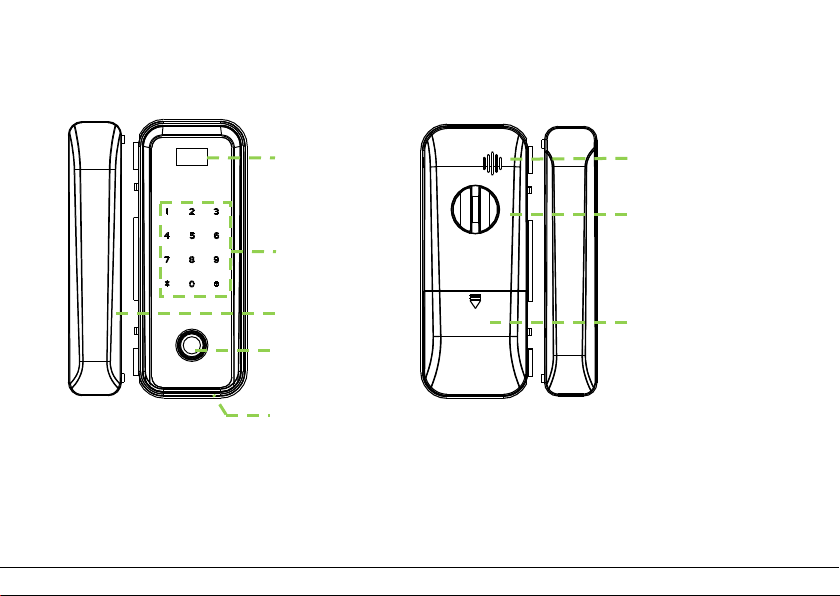
Lock Parts
Fingerprint sensor
K
Strike box
USB emergency
external power
Visual screen
Speaker
Thumb
Battery cover
eypad
Page | 2
-turn Knob
Page 6

Basic Function
Random Password
Users may enter any number of random digits before or after the correct password as
long as the maximum number of digits entered is 30 or less.
For example: If the correct password is 123456, the random password can be
89123456807, 1234562363, 389123456, etc.
Initialization
Initializing the lock means all data will be deleted and restored to factory default setting.
Operation steps: Press the reset button on the back body of the lock or enter the menu to
operate, the lock prompts the voice of “succeed”, and then the initialization is finished
completely.
Normal Open Mode
Normal open mode is to keep lock always unlocked. Rotate thum-turn knob to enable or
Page | 3
Page 7

disable the mode. Or press 2 and 8 after unlocking the door with administrator
verification. Press * to cancel.
Low Battery Warning
If the battery is low, the lock will prompt a low battery sound.
Note: Access to operation is not allowed in low battery status.
Others
Without any operation, the lock will power off automatically within 10 seconds.
Page | 4
Page 8

Capacity
Group Verification Mode Capacity
Password 1
Administrator
Normal Users
Note: 1. It can store one administrator and 99 regular users.
2. The maximum card/password/fingerprint capacity is 300 for all groups.
3. The password length is six to ten digits.
Fingerprint 300
Card 300
Password 300
Fingerprint 300
Card 300
Page | 5
Page 9

Operation Guide
Up Right
Confirm
Backspace
Down
Left
/Doorbell
Page | 6
Page 10

How to Use
Verify Administrator
Operating Steps
Tips: Please verify administrator before operating the lock. The default administrator
password is 0123456789.
Page | 7
Page 11

Modify Administrator Password/Card/Fingerprint
Operating Steps
Page | 8
Page 12

Add User
Operating Steps
Page | 9
Page 13

Delete User
Operating Steps
Page | 10
Page 14

Volume Adjustment
Operating Steps
Page | 11
Page 15

Time Setting
Operating Steps
Page | 12
Page 16

Remote Control
Page | 13
Page 17

ZK Building, Wuhe Road, Gangtou, Bantian, Buji Town,
www.zkteco.com
© Copyright 2018. ZKTeco Inc. ZKTeco Logo is a registered trademark of ZKTeco or a related company. All other product and company names
Longgang District, Shenzhen China 518129
Tel: +86 755-89602345
Fax: +86 755-89602394
mentioned are used for identification purposes only and may be the trademarks of their respective owners. All specifications are subject to
change without notice. All rights reserved.
Page | 14
 Loading...