

Page 1
85mm
User Guide
Reason™ ONE
AI Alarm Clock and Smart Home Hub
Model: AC01ZM
60mm 60mm 60mm 60mm 60mm
Quick Start Guide
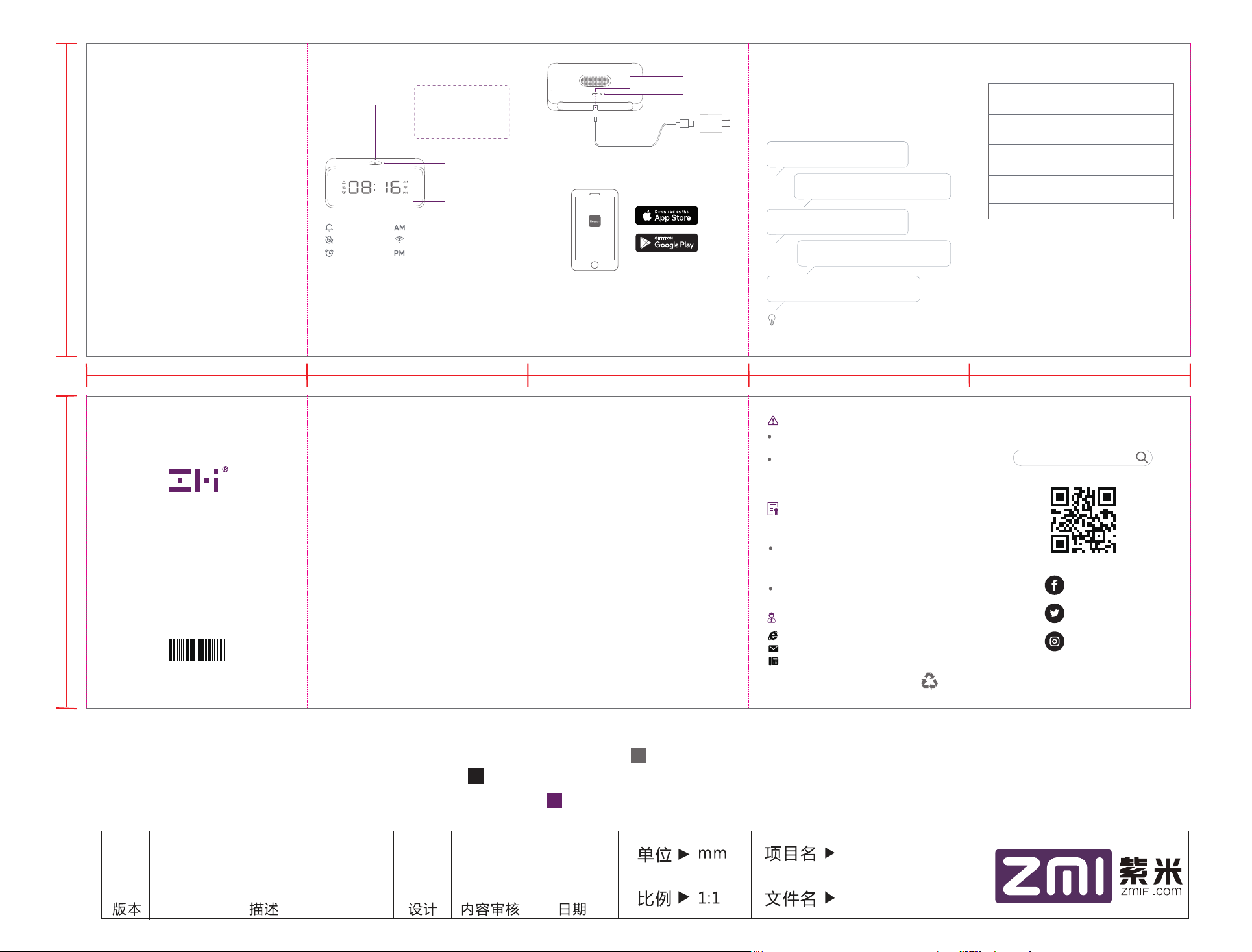
Action/Mute button
Reminder
Mute
Alarm
● Power up the alarm clock
Connect the alarm clock to the power adapter using the
included Micro-USB cable. Then, plug the power adapter
into a wall outlet and wait for the LED indicator to turn
orange. If not, reset the device by gently pushing a SIM
tool or paper clip through the reset recess hole.
Short press: Action
● start or stop voice control
● stop alarm, reminder, or
timer when it occurs
Long press: Mute
● mute or unmute microphone
Ring-shaped LED
indicator
Digital clock face
Ante meridiem
Wi-Fi connectio n
Post meridiem
Micro-USB
input port
Reset button
● Download and install the Reason Home app
Download the Reason Home app from your phone or
tablet’s app store.
Reason Home
Note: The alarm clock supports Wi-Fi 802.11 b/g/n 2.4 GHz
only. Please use a smartphone or tablet running iOS 9.0 (or
above) or Android 4.4 (or above).
Open the Reason Home app and tap "+" in the upper-right
corner of the Home screen to add the alarm clock to your
1
Reason Home account.
2 3 4
● Set up Alexa
Follow the on-screen instructions to connect the alarm
clock to your Wi-Fi network.
Tap the newly added alarm clock tile and link your
Amazon Alexa account. Then enjoy your Alexa voiceenabled services after completing the setup. Here are
some things to try:
“Alexa, set an alarm for 6 a.m.”
“Alexa, set a timer for 20 minutes.”
“Alexa, play my ash brieng.”
“Alexa, what's the weather today?”
“Alexa, turn on my bedroom light.”
Tip: To access more functions provided by Amazon
Alexa, please download the Amazon Alexa app.
Specifications
Model
Input
Connectivity
Operating Temperature
Dimensions
Weight
AC01ZM
5V=2.5A
Cortex-A35 1.3 GHz 4 coresCPU
2AMIN-AC01ZMFCC ID
Wi-Fi 802.11 b/g/n 2.4 GHz
32° to 95° F (0° to 35° C)
4.97 × 2.39 × 1.06 in
(126.2 × 60.8 × 27 mm)
6.0 oz (170 g)
Welcome
Thank you for choosing our product. Your support is most
appreciated.
In this section of the user guide you will learn about the
main features of this alarm clock and the terms of its
warranty. You will also find our customer support contact
information. Please contact us if you have any questions
or concerns.
85mm
Be in charge. Anytime. Anywhere.
0273301
Features
Alarms, reminders, and timers
Provides rich clock functions, such as setting alarms,
reminders, and timers, and checking calendar and time.
Check out the Reason Home app for detailed instructions.
Stream audio
Streams audio from Amazon Music, Pandora, iHeartRadio,
and more. You can also listen to audiobooks by Audible.
Voice control
Supports voice control of your smart home -- turn on
lights, adjust thermostats, lock doors, and more with
compatible connected devices.
Far-Field microphone array
The built-in microphone array can effectively filter out
ambient noise, and the voice recognition is farther and
more accurate. In the room, you can talk to the alarm clock
like a friend, tell it what you want hands-free.
RF Warning Statement
The device has been evaluated to meet general RF exposure
requirements.
The device can be used in portable exposure conditions
without restriction.
5 6 87
FCC
This device complies with Part 15 of the FCC Rules.
Operation is subject to the following two conditions: (1)
This device may not cause harmful interference, and (2)
this device must accept any interference received, including
interference that may cause undesired operation.
WARNING: Changes or modifications not expressly
approved by the party responsible for compliance could
void the user’s authority to operate the equipment.
NOTE: This equipment has been tested and found to comply
with the limits for a Class B digital device, pursuant to Part
15 of the FCC Rules. These limits are designed to provide
reasonable protection against harmful interference in a
residential installation. This equipment generates, uses
and can radiate radio frequency energy and, if not installed
and used in accordance with the instructions, may cause
harmful interference to radio communications. However,
there is no guarantee that interference will not occur in
a particular installation. If this equipment does cause
harmful interference to radio or television reception, which
can be determined by turning the equipment off and on,
the user is encouraged to try to correct the interference
by one or more of the following measures: (1) Reorient or
relocate the receiving antenna. (2) Increase the separation
between the equipment and receiver. (3) Connect the
equipment into an outlet on a circuit different from that
to which the receiver is connected. (4) Consult the dealer
or an experienced ratio/TV technician for help.
印刷颜色: PANTONE COOL GRAY 11C
K100
WARNING
This equipment complies with FCC radiation exposure
limits set forth for an uncontrolled environment.
This equipment should be installed and operated with
minimum distance 20cm between the radiator & your
body.
18-Month Limited Warranty
The product has an 18-month limited warranty, unless
the warranty is voided by one or more of the following:
Unauthorized repair, incorrect use, drop, negligence,
abuse, liquid damage, accident, alteration, improper
use with non-ZMI-branded accessories, or removing
or altering product labeling
Warranty expiration
Customer Service
Web: zmiusa.com/support
Email: [email protected]
Phone: +1 (844) 828-2302
ZMI USA Corporation, 120 San Lucar Ct,
Sunnyvale, CA 94086-5213, USA
材质:105克金东太空梭无光铜,上水性哑油
For FAQs and more information, please visit:
zmiusa. com/support
@zmiusa
@zmiusa
@zmiusacorp
V3.0
V2.0
V1.0
建立
PANTONE 519C
凌浩
AC01 美版
2019/06/20
说明书
 Loading...