

Page 1

BTT005
Bluetooth Audio transmitter
Before using………………………………2
1. About BTT005……………………………………….2
2. System requirements………………………………2
3. Overview…………………………………………….2
Starting to use……………………………2
1. Charging……………………………………………..2
2. Switching on/off the transmitter……………………3
3. Pairing with Bluetooth devices…………………….3
4. LED indicator………………………………………..4
Care and maintenance………………….4
FAQs……………………………………….5
Specification……………………………..5
Page 2
Welcome to use this Bluetooth audio transmitter,BTT005. Before using it,
please read this User Manual carefully.
Before using
1. About BTT005
BTT005 is a Bluetooth audio transmitter. The music from your walkman ,
and other devices can be transmitted wirelessly to your Bluetooth stereo
receiving devices with it.
The product has built-in battery, it can be used for 9-10 hours after being
charged fully.
2. System requirements
1) There is music player with 3.5mm audio-out jack.
2) There is Bluetooth stereo receiving device that supports Bluetooth
A2DP profile, such as Bluetooth stereo headset, Bluetooth speaker and
so on.
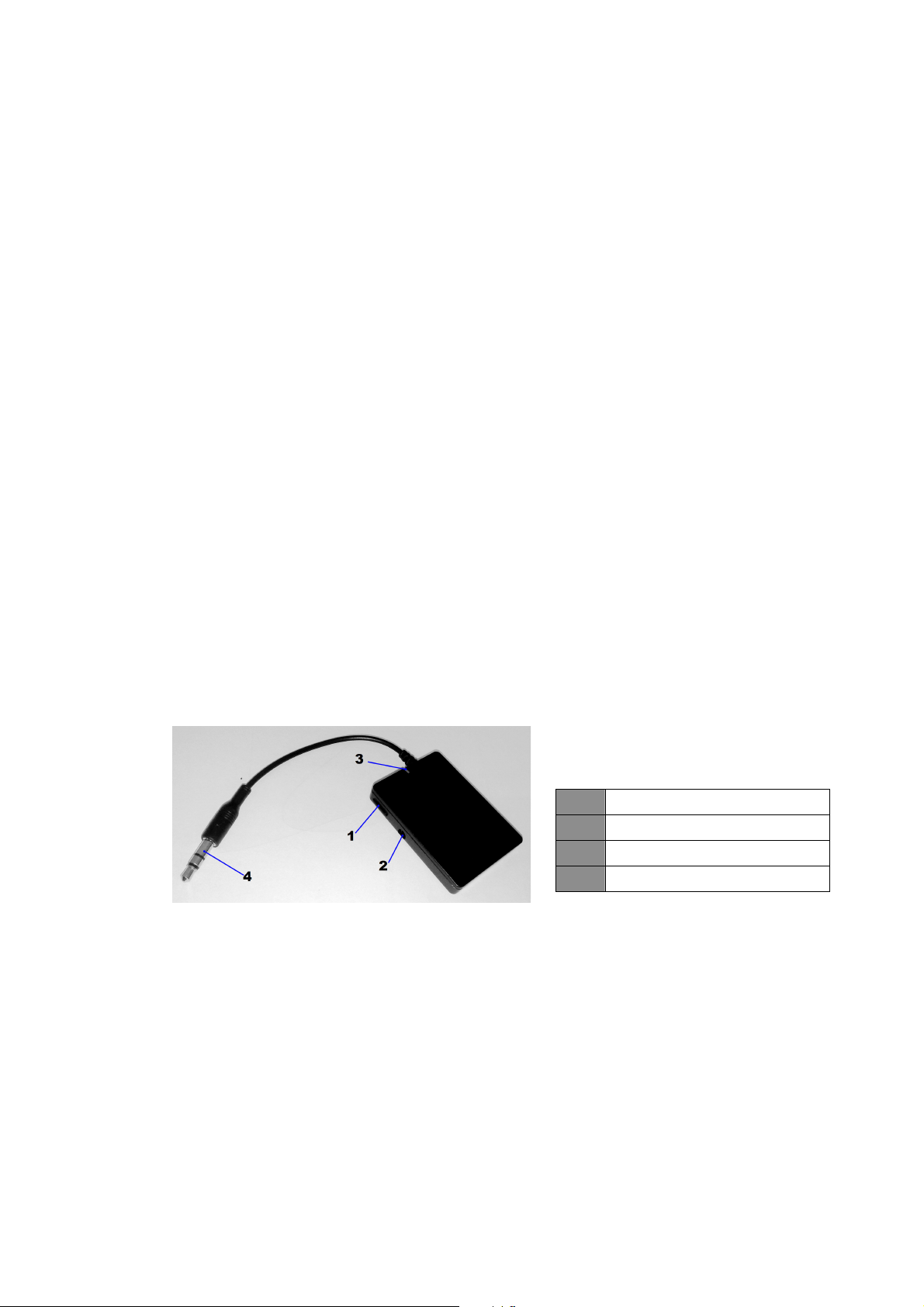
3. Overview
Multi-function button
1
Charging port
2
LED indicator
3
3.5mm audio-in plug
4
Starting to use
1. Charging
First using—You must charge the battery fully before first using.
Low power—It means low power if the red LED of the transmitter flashes
during using. At this time, you need to recharge the transmitter.
The charging steps as follows:
Step1: Connect charging cable to standard power outlet;
Step2: Connect the end of charging cable to charging port of the transmitter.
Page 3

When the red LED is on, it is charging.
When the red LED is off, it has charged full.
It will take about 2hrs to charge the transmitter full.
Remark:
You can charge the transmitter to reset it when it doesn’t work.
Please don’t attempt to take out battery from the transmitter, in case of
damaging the transmitter
3, Charging port only for PC USB power cable, no data communication.
Warning: The battery is recycled.
Do not dispose of the battery in fire, as it may cause
explosion.
2. Switching on/off the transmitter
Function Operation LED indicator
Switching on
the transmitter
Switching off the
transmitter
3. Pairing with Bluetooth devices
After the transmitter pairing and connecting with Bluetooth devices, you
can enjoy music wirelessly. Before pairing, please make sure your
Bluetooth receiving devices support Bluetooth A2DP profile.
The pairing steps as follows:
1) Keep the transmitter and your Bluetooth stereo receiving device within
5 meters.
2) Switch on your Bluetooth receiving device and make it enter into
pairing mode.
3) Switch on the Bluetooth transmitter, it will search, pair and connect
with Bluetooth device automatically.
4) After connecting is successful, red and blue LEDs flashing alternately
turns to the blue LED of the transmitter flashing twice every 2
seconds.
5) Connect the transmitter to your music player through 3.5mm audio
jack to play music.
Press multi-function
button for 3-5
seconds
Press multi-function
button for 3-5
seconds
The blue LED is on for about 1s
The red LED is on for 1 second
and then off
Page 4

Remark
The transmitter can pair with stereo Bluetooth receiving devices which
When the transmitter is switched on every time, it will connect with the
The transmitter will switch off automatically if pairing time is more than 5
PIN Nos. are:0000”,”1234”or ”1111”,”8888”.
latest pairing device automatically. If you need to pair it with other
devices, please switch off the current device paired with the transmitter ,
and then pair the transmitter with new device.
minutes or disconnect with Bluetooth devices for 5 minutes.
4. LED indicator
LED indicator The status of transmitter
Red and blue LEDs flash
alternately
Blue LED flashes twice every 2
seconds
Red LED flashes The battery is low power
Pairing mode or disconnect with
Bluetooth device
already connected with Bluetooth
device
Care and maintenance
Before using the BTT005, please read the following recommendations, it will
help you to enjoy the product for many years.
Keep dry and don’t put it in the wet place, in case of effecting the interior
circuit of product.
Don’t put the product under the sunlight or place in hot areas. High
temperature will shorten the life of electronic device and distort certain
plastic.
Don’t expose BTT005 to extreme temperatures, it may damage the
internal circuit board.
Don’t try to take apart the product, it may damage the product if you are
not professional.
Don’t fall off on the floor or knock the hard substance, it may damage
interior circuit.
Don’t use intensify chemical or detergent to clean the product.
Don’t scrap the surface with sharp things.
If the product can’t work normally, please send it to the regularly
asserted store, the staff will help you to solve the problem warmly.
Page 5

FAQs
1 Q: Why BTT005 can’t be switched on
A : Please charge it.
2 Q Why BTT005 can’t pair and connect with Bluetooth receiving devices?
A: 1) Make sure Bluetooth receiving device supports A2DP;
2) Make sure Bluetooth receiving device is placed within 5 meters;
3) Make sure Bluetooth receiving device has already entered into
pairing mode.
3 Q: Why can’t listen to music from Bluetooth receiving devices
A : 1) Make sure the transmitter connect well with player;
2) Make sure player is playing music.
Specification
Bluetooth version Bluetooth V2.1
Bluetooth profile A2DP
Frequency response 2.4GHZ-2.4835GHZ
Receiving sensitivity -74±4dB
Effective range Up to 10m
Charging input voltage
Working time Up to 10hours
Charging time About 2hours
Dimension 45*32*8mm
Weight 14g
DC 5V
150mA
This device complies with Part 15 of the FCC Rules. Operation is
subject to the following two conditions: (1) this device may not cause
harmful interference, and (2) this device must accept any interference
received, including interference that may cause undesired operation.
The changes or modifications not expressly approved by the party responsible for
compliance could void the user's authority to operate the equipment.
 Loading...