

Page 1

THANK YOU FOR YOUR PURCHASE
©2008 www.i-Luv.com
iPod is a trademark of Apple Inc. , registered in the U.S and other countries.
The illustrated product and specifications may differ slightly from that supplied.
iLuv is a trademark of jWIN Electronics Corp.
Designed in New York, USA / Made in China
Model : i730
Instruction Manual
iPod Dock with FM Transmitter and Bluetooth Caller ID
Page 2
INTRODUCTION
Thank you for purchasing the i730. Unpack the unit and make sure all the accessories are
put aside so they will not be lost. This product provides full control of your iPod and
hands-free operation of your Bluetooth mobile phone*
* Compatible with any iPod model with 30Pin
connector.
* Your Bluetooth mobile phone must support
HSP and HFP profiles to use hands-free and
voice dialing.
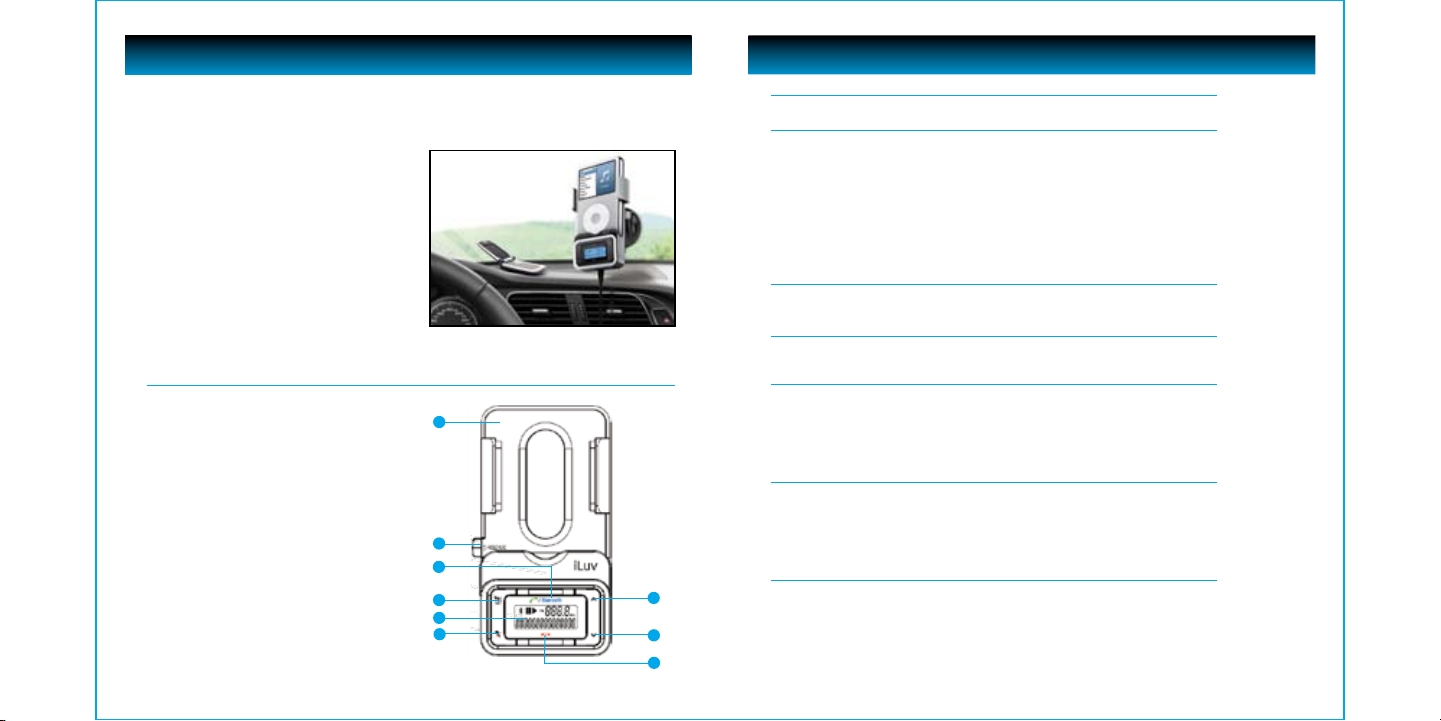
Location of Controls
1
1. iPod Dock
2. RELEASE Tab
3. CALL / Bluetooth Button
4. PRE SET Button
5. LCD Screen
6. MUTE Button
7. VOLUME + / TUNING UP Button
8. VOLUME - / TUNING DOWN Button
9. END CALL Button
1 | iLuv
2
3
4
5
6
TABLE OF CONTENTS
Introduction
Location of Control 1
Operational Instructions
Pairing Mode 3
Answering a Call 3
Rejecting a call 3
Microphone muting 3
Call transferring 3
Voice Dialing 3
FM Transmitter Mode 4
Frequency Preset 4
Preset frequency erasing 4
Using the preset frequency 4
Mounting and Installation
Mounting and Dismounting 5
Connecting the Unit to the Gooseneck 5
Troubleshooting Guide
No sound 6
Poor radio reception 6
Features and Specifications
Features 7
Bluetooth hands-free 7
iPod remote control 7
FM Transmitter 7
Other features 7
Specifications
User Safety Guide
Important Safety Warnings 9
Important Safety Instructions 9
Additional Safety Instructions 10
About Electromagnetic Interference (EMI) 11
FCC Notice to U.S. Users 11
Industry Canada Notice to Canadian Users 12
Additional Information
7
8
9
Helpful Tips on Getting Clear Sound 13
i730 | V10M10_IM_EN_03282008
8
iLuv | 2
Page 3

OPERATIONAL INSTRUCTIONS
OPERATIONAL INSTRUCTIONS
Pairing Mode
1. Press and hold CALL/Bluetooth button for approximately six (6) seconds.
2. The Bluetooth symbol on i730 LCD will flash repeatedly and a confirmation “double beep”
will sound.
3. Enter PIN Code: 0000.
Answering a Call
Press the CALL/Bluetooth button to answer an incoming call.
Press the CALL/Bluetooth button to end a call
Note: It can take from 3 to 5 seconds for the music playing to re-start after you end a call.
Rejecting a call
If there is an incoming call, press the END button to reject it.
Microphone muting
While talking, press the MUTE button to mute the microphone, the other party will not
hear you speaking. Press the MUTE button again to release the mute.
Call transferring
While talking, press and hold the CALL/Bluetooth button for three (3) seconds to transfer
the call from the i730 to your Bluetooth mobile phone.
Voice Dialing
Press the CALL/Bluetooth button when there is no incoming call or call in progress in
order to dial.
Note: You can only dial a call using voice dialing if your Bluetooth mobile phone supports
voice dialing.
FM Transmitter Mode
1. The i730 is always powered ON when it is connected to a power source and your iPod
is securely in the dock..
2. To search the dial for available frequencies, press the VOLUME -/TUNING DOWN or
VOLUME +/TUNING UP buttons.
3. Press and hold the VOLUME -/TUNING DOWN or VOLUME +/TUNING UP buttons
for quick seek.
Note: Default frequency is 91.1MHz
Frequency Preset
1. Press the VOLUME-/TUNING DOWN and VOLUME +/TUNING UP buttons to select a
desired frequency.
2. Press and hold the PRESET button for three (3) seconds to save the selected
frequency, the “ch 1” channel number will display on LCD.
3. Follow above 1-2 steps to save other frequencies on the memory, total 10 frequencies
can be saved.
Preset frequency erasing
1. Press the PRESET button to select the frequency you want to erase.
2. Press and hold the PRESET button for three (3) seconds until the channel number
disappears; the saved frequency will be erased.
Using the preset frequency
• Repeatedly press the PRESET button to select the frequency you want to use, the
channel number and frequency will display on LCD.
3 | iLuv
i730 | V10M10_IM_EN_03282008
iLuv | 4
Page 4

OPERATIONAL INSTRUCTIONS
TROUBLESHOOTING GUIDE
Mounting and Installation
To mount the i730 on a wall or window, follow these directions:
Note: To ensure the best hold, make sure the surface is dry and clean before mounting.
Mounting and Dismounting
1. Place the suction end on the surface.
2. Press the mounting tab forward as shown here.
3. The gooseneck mount will hold its place.
4. To dismount, squeeze the levers on the sides of
the tab as shown.
5. Use the surface tab on the suction cup to remove
compltely from the mounting surface.
Surface Tab
Connecting the Unit to the Gooseneck
1. Align the connection apparatus on the back of
the i730 unit with the corresponding end of the
gooseneck as shown.
2. Once connected, slide the i730 down or the
connecting end of the gooseneck up to secure
the connection.
No sound
• Your iPod is not connected into the 30pin connector properly. Connect again.
• Your car radio is not turned on. Turn on the radio.
• The i730 is not paired with your mobile phone. Follow pairing instructions in this manual
• Your iPod is not turned on. Turn on your iPod.
• Your mobile phone is not turned on. Turn on your phone
Poor radio reception
• The i730 is tuned to a frequency that is used by a local radio station. Find a frequency with
no interference.
• The antenna on your car is not extended. Extend your car antenna.
5 | iLuv
i730 | V10M10_IM_EN_03282008
iLuv | 6
Page 5

88.1
Page 6

USER SAFETY GUIDE
USER SAFETY GUIDE
IMPORTANT SAFETY PRECAUTIONS
Instructions on Environmental Protection
Do not dispose of this product in the usual household garbage at the end of its life cycle;
bring it to a collection point for the recycling of electrical and electronic appliances. This
symbol on the product means the instructions for use or the packing will inform about the
methods for disposal. The materials are recyclable as mentioned in its marking. By recycling,
material recycling, or other forms of re-utilization of old appliances, you make an important
contribution to protect the environment. Please inquire at your local community
administration for the authorized disposal location.
Important Safety Warnings
1. FCC regulations state that any change or modification to the equipment, not expressly approved by maker
or its authorized parties, could void user’s authority to operate this equipment.
2. To prevent fire or electric shock, do not expose the unit to rain or moisture.
3. Never attempt to open the cabinet. Always refer servicing to a qualified technician.
Important Safety Instructions
1. READ INSTRUCTIONS - All safety and operating instructions should be read before the appliance is
operated.
2. RETAIN INSTRUCTIONS - The safety and operating instructions should be retained in a secure place for
future reference.
3. HEED WARNINGS - All warnings on the appliance and in the operating instructions should be observed.
4. FOLLOW INSTRUCTIONS - All operating and use instructions should be followed.
5. WATER AND MOISTURE - The appliance should not be used near water. For example: near a bathtub,
kitchen sink, laundry tub, and/or swimming pool.
6. HEAT - The appliance should be situated away from heat sources such as radia¬tors, heat registers, stoves,
or other appliances (including amplifiers) that produce heat.
7. POWER SOURCES - The appliance should be connected to a power supply only of the type described in
the operating instructions or as marked on the appliance.
8. CLEANING - The appliance should only be cleaned with a dry cloth.
9. OBJECT AND LIQUID ENTRY - Care should be taken so that objects do not fall and liquids are not spilled
into the device’s openings.
IMPORTANT SAFETY PRECAUTIONS– CONTINUED
10. CARTS AND STANDS - The appliance should be used only with a cart or stand that is recommended
by the manufacturer. An appliance and cart combination should be moved with care. Quick stops,
excessive force, and uneven surfaces may cause the appliance and cart combination to overturn
causing possible injury to the user and/or damage to the unit.
11. DAMAGE REQUIRING SERVICE - The appliance should be serviced by qualified service professional when:
a. Objects have fallen into, or liquid has been spilled into the appliance’s apertures.
b. The appliance has been exposed to rain.
c. The appliance has been dropped and suffered damage.
d. The appliance does not appear to operate normally, or exhibits a change in performance.
12. SERVICING - The user should not attempt to service the appliance beyond what is described in the user's
operating instructions. All other servicing should be referred to qualified service professional.
13. LEAD AND MERCURY - This product may contain lead and/or mercury. Disposal of these materials may
be regulated by your local authorities due to environmental considerations. For more detailed disposal
or recycling information, please contact your local authorities or the EIA (Electronic Industries Alliance) –
http://www.eiae.org
Additional Safety Instructions
• When not in use, keep your device in a safe place where it will not be bent or crushed.
• Do not listen to music with high volume while driving. Warning horn sounds may not be heard which could
result in a traffic accident.
NOTE: Changes or modifications not expressly approved by the party responsible for compliance
could void the user’s authority to operate the equipment. Refer to 47 CFR Sec. 15.21.
9 | iLuv
i730 | V10M10_IM_EN_03282008
iLuv | 10
Page 7

USER SAFETY GUIDE
USER SAFETY GUIDE
About Electromagnetic Interference (EMI)
This device is designed and manufactured not to exceed the exposure limit for radio frequency energy,
which is set by the Federal Communications Commission of the U.S government.
The term “EMI” is short for the electromagnetic interference caused by the electromagnetic field generated
by electronic devices. In fact, most electrical appliances and devices emit electric and magnetic fields, and
most of modern electronic devices are susceptible to electromagnetic interference (EMI) if they are inadequately
shielded or designed.
• If you use any personal medical device, such as a pacemaker, please consult the manufacturer of the device
to determine if it is adequately shielded from electromagnetic interference. Your physician may assist you
in obtaining this information.
• Please turn off this device if you are instructed to do so, especially on an airplane and in a hospital.
• Please keep away from the medical instruments in a hospital or medical unit while using this device.
FCC Notice to U.S. Users
This device complies with Part 15 of the FCC Rules. Operation is subject to the following two conditions: (1)
this device may not cause harmful interference, and (2) this device must accept any interference received,
including interference that may cause undesired operation. Refer to 47 CFR Sec. 15.19.
This equipment has been tested and found to comply with the limits for a Class B digital device, pursuant
to Part 15 of the FCC Rules. These limits are designed to provide reasonable protection against harmful
interference in a residential installation.
This equipment generates, uses, and can radiate radio frequency energy and, if not installed and used in
accordance with the instructions, may cause harmful interference to radio communications, which can be
determined by turning the equipment off and on, the user is encouraged to correct the interference by one
or more of the following measures:
• Reorient or relocate the receiving antenna.
• Increase the separation between the equipment and receiver.
• Connect the equipment to an outlet on a circuit different from that to which the receiver is connected.
• Consult the dealer or an experienced radio/TV technician for help.
Industry Canada Notice to Canadian Users
Operation is subject to the following two conditions: (1) this device may not cause harmful interference, and
(2) this device must accept any interference received, including interference that may cause undesired
operation of the device. Refer to IC RSS 210 Sec. 5.11. The term “IC” before the certification or registration
number only means that the registration was performed based on a Declaration of Conformity and that
Industry Canada technical specifications were met. It does not imply that Industry Canada (IC) approved this
equipment. Refer to Self-Marking 6(f) and RSP 100 Sec. 4.
11 | iLuv
i730 | V10M10_IM_EN_03282008
iLuv | 12
Page 8

ADDITIONAL INFORMATION
Helpful Tips on Getting Clear Sound
• An FM transmitter employs frequency modulation to transmit songs to an FM radio, which can be disturbed
by a strong FM signal nearby. Thus, before transmitting songs with this unit, it is very important to select a
clear FM station, one which has no other broadcasting and renders only static noise.
• The sound quality of a FM transmitter also depends on the direction of its built-in antenna and its surroundings.
If you hear some static noises while listening to music using the FM transmitter, rotate or move the FM
transmitter around until you get a clearer sound.
13 | iLuv
Visit our website at www.i-Luv.com
iLuv is a trademark of jWIN Electronics Corp. iPod and iPhone are a trademarks of Apple Inc. All logos and brands are
property of their respective owners. iPod or iPhone is not included in this package. The Bluetooth word mark and logos
are owned by Bluetooth SIG, Inc. and any use of such marks by jWIN Electronics Corp. is under license. Mobile phone
not included in this package. Features and specifications are subject to change without prior notification.
©2008 jWIN Electronics Corp., All rights reserved. No portion of this printed material or product enclosed herewith
including design, shape, and graphics may be reproduced or transmitted in any form without the expressed written
consent of jWIN Electronics Corp., by any means electronic or mechanical including photocopying, recording, or use
of an information storage retrieval system. Any unauthorized distribution or reproduction of this printed material,
or any portion thereof, will be prosecuted to the fullest possible extent of the law.
Printed in China
i730 | V10M10_IM_EN_03282008
iLuv | 14
 Loading...