

Page 1
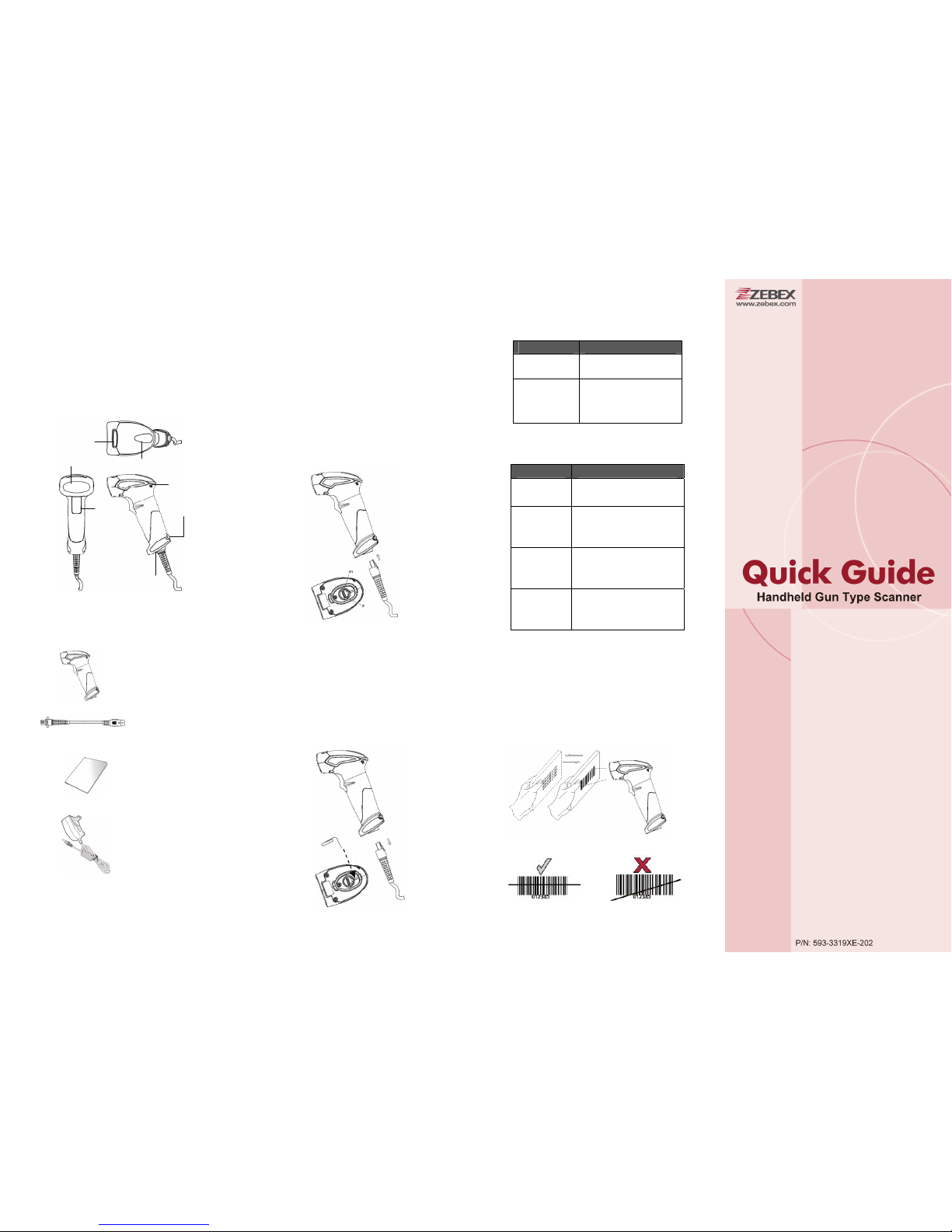
Product Overview Installation LED Indication
This scanner is a gun type rugged barcode
CCD/Laser scanner with a state of the art scan
engine. Featuring a superb scanning speed and
able to withstand 1.5 meter drop, it is ideal for
manufacturing and logistic sectors.
Logo Plate
LED Indicator
Buzzer
Trigger
Cable Connector
Exit Window
Strap Hol
e
Package Contents
The package includes the following items:
Gun type CCD/Laser
scanner
Communication
cable
(Model depends on
customer needs)
Quick Reference
Guide
5V Power adapter
(Only for specific
RS-232 cables as
optional accessory.
Model depends on
electrical
requirements of your
geographic location)
1. Connect the interface cable to the
scanner.
2. Connec
t the cable to the terminal’s
communication port.
3. Connect the power cord to the cable
connector if required.
4. To verify operation, point the scanner at
a barcode and pull the trigger. You
should hear a single beep indicating that
the label has been scanner successfully.
Removing Cable
1. Locate the small hole at the bottom of
the scanner.
2. Use a metallic pin and insert into the
hole.
3. Gently pull the strain-relief of the cable
once a faint “click” is heard.
LED Status
Indication
One blue
flash
A barcode has been
successfully decoded
Steady red
(optional for
specific models
only)
The scanner is in
programming mode
Beep Indication
Beep Indication
One beep
A barcode has been
successfully decoded
Four
consequent
beeps
The scanner has passed
the self-test and is
operating properly
Two
consequent
beeps
This indicates that the
scanner is in
programming mode
Continuous
beep tone
This is a failure
indication. Return the
unit for repair
Scanning Barcodes
1. Ensure all connections are secure.
2. Press the trigger and aim at the barcode
as illustrated.
3. When decoding is successful, the
scanner beeps and the LED indicates
blue.
Corr
ect and incorrect aiming are shown below.
Page 2
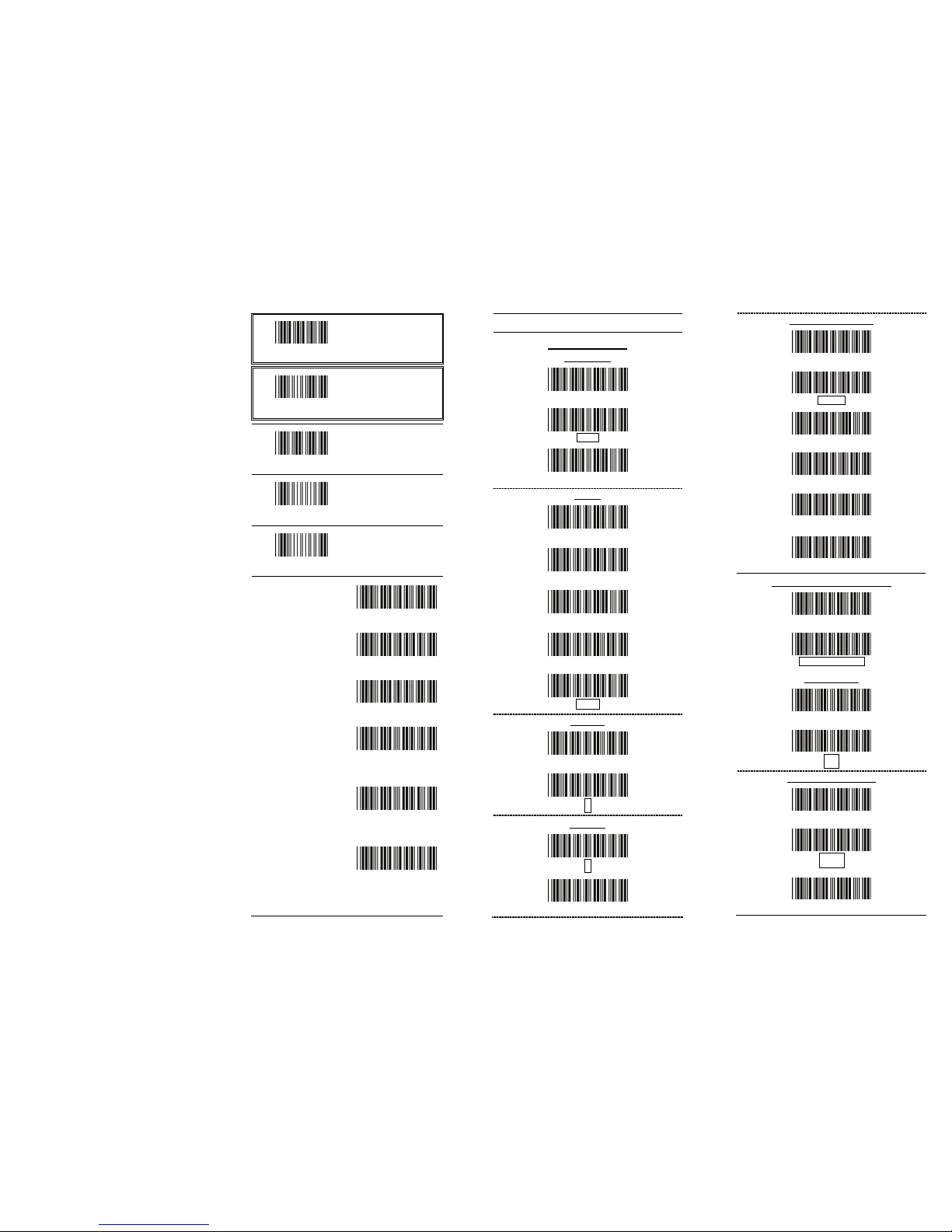
PROGRAMMING CARD
Introduction
This programming card contains only
frequently-used programming bar code labels
used to configure the scanners.
For detailed programming instructions and
safety notices please refer to “Programming
Guide for Handheld CCD/Laser Scanner.”
Important Notice
No warranty of any kind is made in regard to
this material, including, but not limited to,
implied warranties of merchantability or fitness
for any particular purpose. We are not liable for
any errors contained herein nor for incidental
or consequential damages in connection with
furnishing, performance or use of this material.
Specification or version may be subject to
change without notice. The actual specification
and version are based on the product
delivered.
Laser Safety
The laser scanner complies with safety
standard IEC 60825-1 for a Class I laser product.
It also complies with CDRH as applicable to a
Class IIa laser product.. Avoid long term staring
into direct laser light.
Getting Started
Once the scanner is connected, you must
program the scanner to match the interface it is
connected to before barcode data can be
transmitted.
Follow the procedures below to setup the
interface or other features.
1. Scan the ”Start of Configuration” barcode.
2. Scan the barcode of the desired feature.
Multiple features can be enabled/disabled
be
fore scanning the End o
f Configuration
barcode.
3. Scan the ”End of Configuration” barcode.
*The default parameter values are framed.
Start of Configuration
All program setup
must start with
reading this label
End of Configuration
All program setup
must end with
reading this label to
save any changes
RESET
Reset (return to
factory default)
ABORT
Exit programming
mode with no update
SHOW VERSION
Display firmware
version
Scan the barcode of
the interface you want
to use
USB
RS-232
USB virtual COM
IBM PC/AT/PS/2
Keyboard emulation
Stand-alone
ard Keybo
W tion
rmware
quired)
and emula
(Special fi
may be re
Frequently Used Settings
RS-232 Settings
Baud Rate
19200
9600
800
y
4
Parit
Even
Odd
Mark
Space
None
Data Bit
7
8
St top Bi
1
2
Messa torge Termina
None
CR/L F
CR
LF
H Tab
STX/ETX
USB/Keybo et nard S ti gs
International Keyboard (AL Method)
T
rd USA Keyboa
Capital Lock
On
Off
Message Ter minato r
None
tEn er
H Tab
 Loading...