

Page 1

.
TPW899
Thank you for purchasing this Ytora device. Please read these operating instructions carefully to
familarize yourself with the features and modes of operation before using the instrument.
Package Contents
Unpack and remove the contents carefully:
• 1x weather station main unit
• 1x stainless steel mast
• 1x thermo-hygro sensor
• 1x rain sensor
• 1x wind speed sensor
• 1x wind direction sensor
• Mounting screws
• Stainless steel accessory for fixing the mast and screws.
Technical Details
• Six keys: A,
֠֠֠֠
,▼,▲,
▼,▲,▼,▲,
▼,▲,M, SNOOZE/ LIGHT.
• Radio controlled clock DCF77
• Automatically switches to/from daylight saving time (summer/winter time)
• Time display in 12/24 format
• 24 adjustable time zones (+/-12 hours)
• Continuous perpetual calendar up to 2099
• Display of Date, Month and Day of week
• Day of week display available in 7 languages (German, English, Italian, French, Dutch
Spanish, Danish)
• Dual alarm with snooze function (5 minutes alarm interruption)
• 5 weather forecast icons: sunny, partly sunny, cloudy, rainy, storm .
• Barometer and bar chart for 12 hours air pressure history
• Indoor /outdoor temperature and humidity with trend
• Max./min. of temperature and humidity
• Thermometer measuring range inside: °C to +50 °C , outside -20°C to 60 °C
• Temperature display elective in °C or °F
• Temperature alert for indoor and outdoor
• Living space humidity
• Moon phase
• Wind speed in km/h (mph), wind speed 0~256km/h
• Wind direction in 16 directions
• Rainfall in mm and inch and display of 1hour, 24hour, TOTAL.
Page 2

Rain volume:(0~999.9mm)
• Low battery indication
• Blue LED background illumination
• Main unit batteries: 3 x AA, LR6, 1.5V (not included)
Outdoor sensor:
• Frequency: 433 MHz
• Transmission range: 100 meters in open area.
** Actual distance may vary depending on the environment, it will be shortened in real
buildings due to electrical interference, concrete walls etc.
• Batteries: 2 x AA, LR6 1.5V (not included)
Installation
• Installing the Batteries
• Open the main unit battery cover located at the back of the main unit and insert 3 pcs AA
batteries into the battery compartment and close the battery cover.
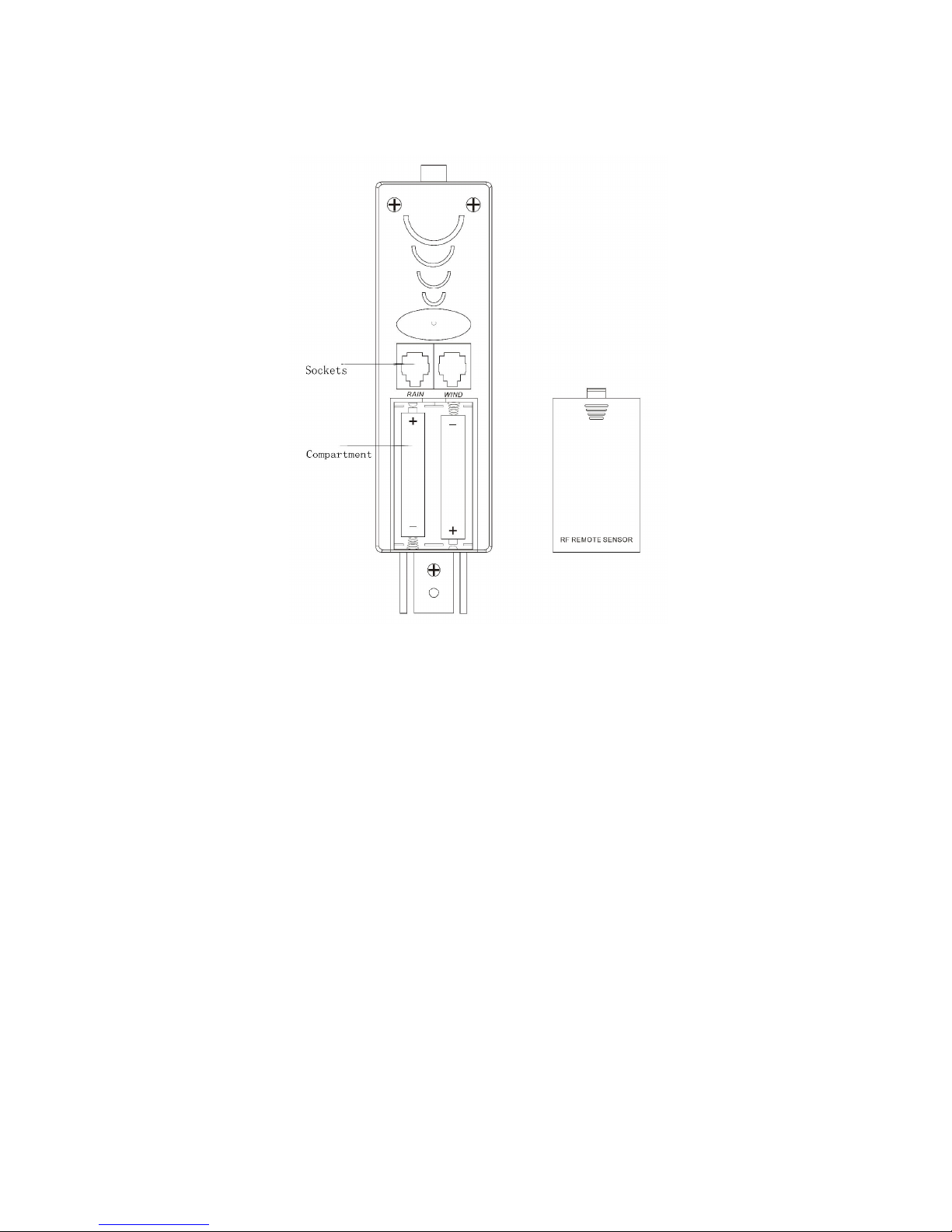
• Pull away the shower proof casing of the thermo-hygro sensor to reveal the 2 sockets (the
sockets for the wind sensor and rain sensor )
• 1. Connect the wind speed sensor cable into the socket at the bottom of the of the wind
direction sensor
2. Connect the cable from wind direction and the cable from rain sensor to the
corresponding sockets of the thermo-hygro sensor by clicking them into place.
Make sure that rain and wind cables are connected to the correct sockets.
Page 3
NOTES:
• First insert the batteries of main unit, then insert the batteries of the outdoor sensor within 3
minutes after the main unit is powered on, to assure that the sensor data is received well.
In case of the outdoor sensor data is not received, please press
֠֠֠֠
key for more than 3
seconds to synchronize the sensors signal again.
• Every time the batteries are replaced in the main unit, it will loose all the weather data.
• Every time the batteries are replaced in the sensor unit, it will synchronize with the main unit
only if you press the
֠֠֠֠
key for more than 3 seconds.
• Mounting the main unit
The main unit can be placed onto any flat surface or wall mounted at the desired location by
Hanging hole, It is important to check that the radio signal can be received before mounting.
Page 4
• Mounting the outdoor sensor onto the stainless steel mast
For accurate results, the outdoor sensor mast should be securely mounted onto a horizontal
surface and in an open area away from trees and other coverings where rainfall or wind
speed may be reduced causing inaccurate reading.
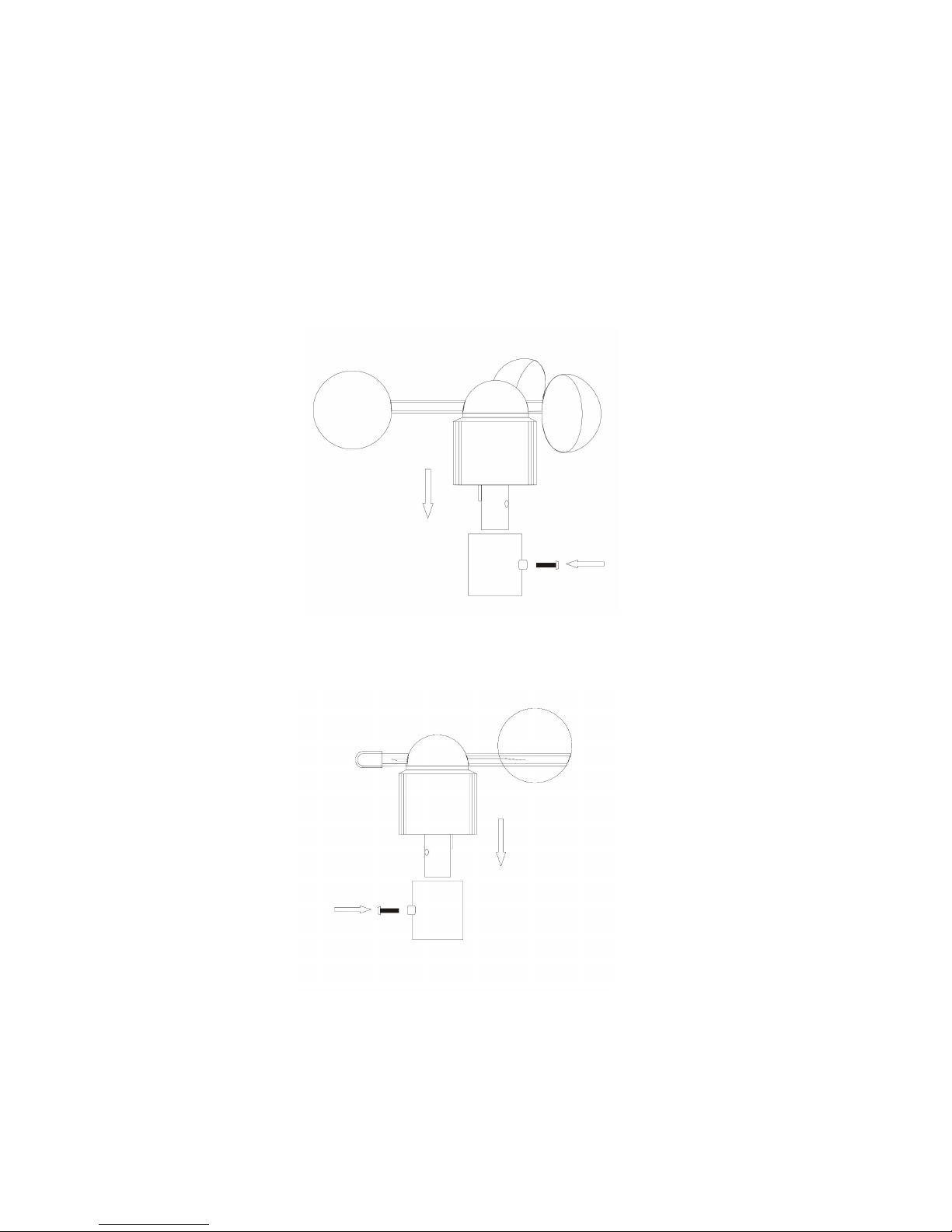
1. Mounting the wind speed sensor to the first plastic bracket::::first check the wind-fan
can rotate freely before fixing . The wind speed sensor should now be mounted onto the
bracket provided to allow the wind to travel around the sensor unhindered from all
directions.please follow the below display :
2. Mounting the wind direction sensor to the first plastic bracket: first check the wind
direction sensor before fixing,there is one cable from wind speed sensor, please insert it
into the socket under the wind direction sensor.please follow the below display:
3. Mounting the rain sensor to the second plastic bracket: there are vertical engraved
lines at the bottom edge of the round cover and the sensor part, you only need adjust the
two line into one position, then turn clockwise, the rain sensor part will be connected well,
Page 5
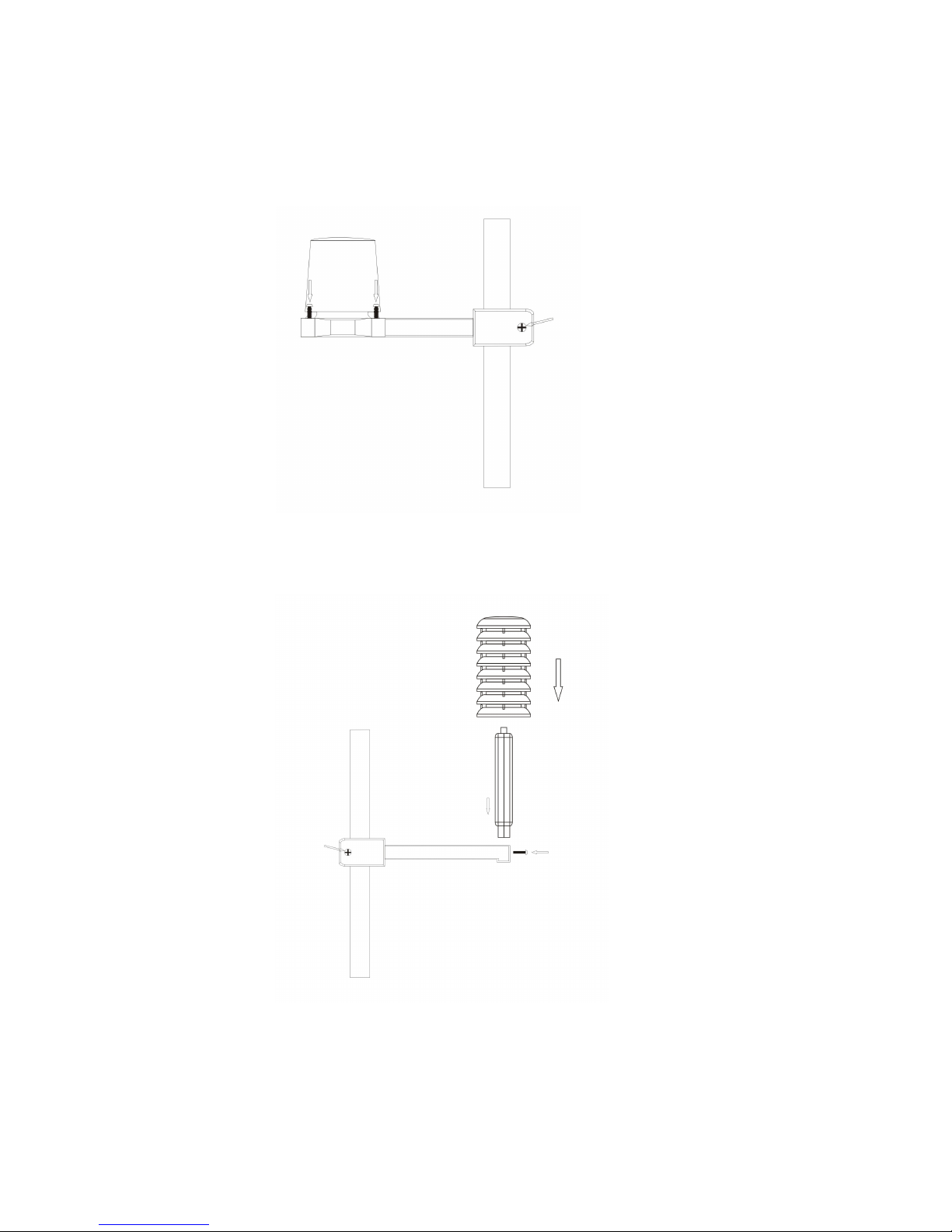
then fix them with 4 screws onto the plastic bracket ( don’t use only 2 screws ) please
follow the below dispay:
4. Mounting the thermo-hygro sensor to the third plastic bracket: once the wind
sensors and rain sensor are fixed onto the bracket, connect the cables to the
corresponding thermo-hygro sensor sockets with the plugs, so that data can be
transmitted to the main unit ,then put the house-like cover onto the thermo-hygro sensor,
please follow the below display:
Note: please don’t put in or take off the plug very offen,or put the plug outside in the air
so long time to avoid any damage of the plug , if so, there will be bad connection.
Page 6
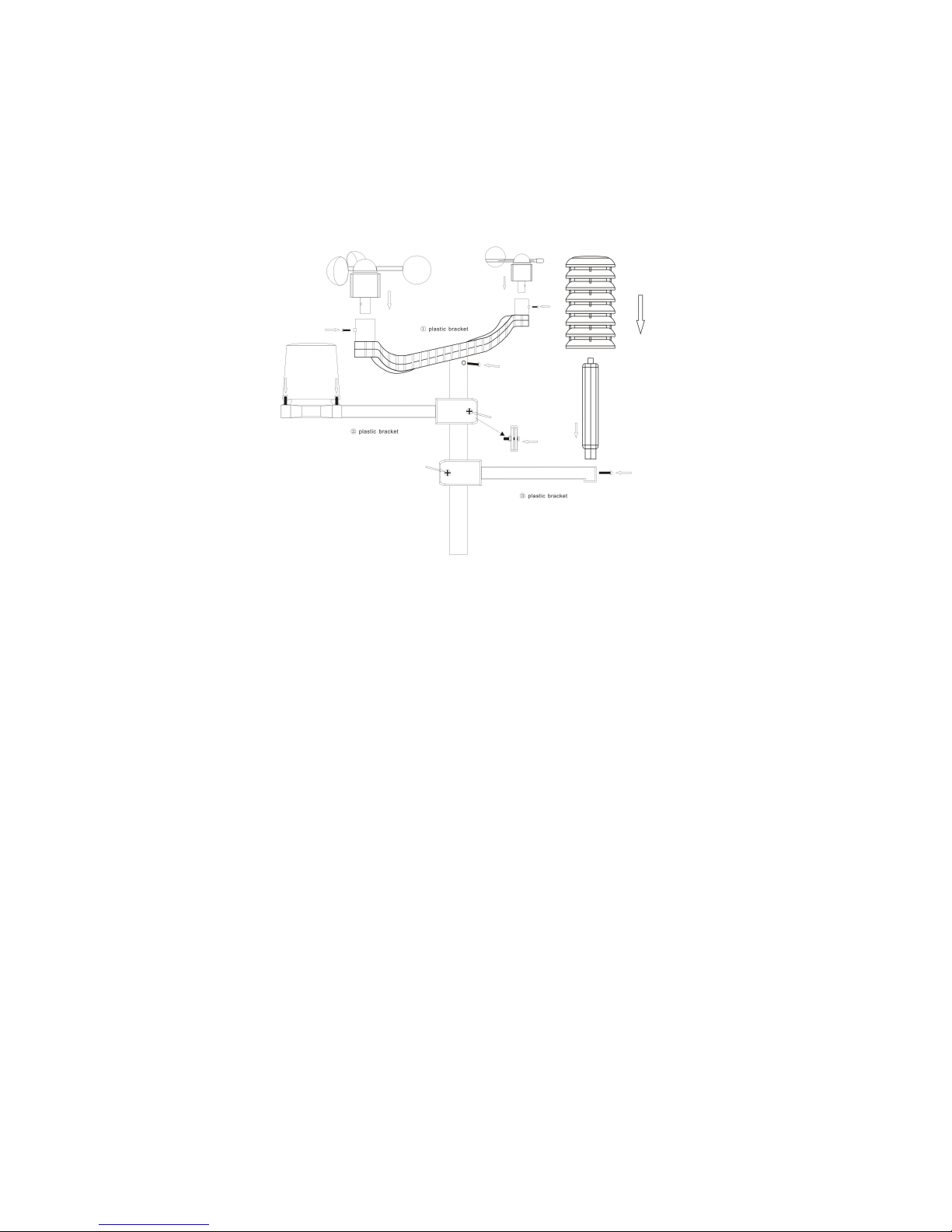
5. Mounting all the sensors onto the stainless steel mast and fix the whole parts at
outdoor open area :(note: please make sure all the cables are connected well into
the sockets)
Page 7
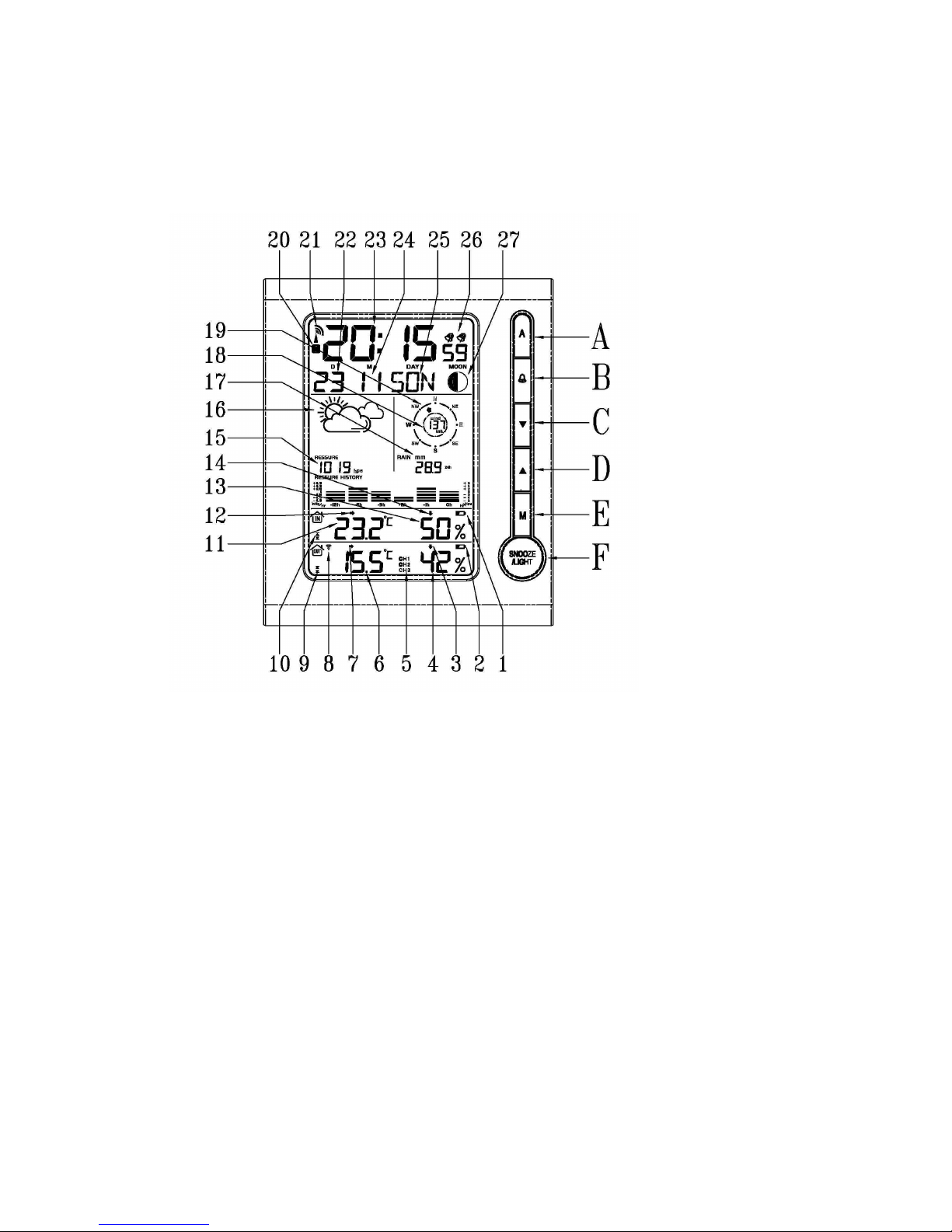
LCD overview
1. Indoor low battery 2. Outdoor low battery 3. Outdoor humidity trend 4. Outdoor
humidity 5. Channel 6. Outdoor temperature 7. Outdoor temperature trend 8. RF
symbol 9. Outdoor temperature alert 10. Indoor temperature alert 11. Indoor
temperature 12. Indoor temperature trend 13. Indoor humidity 14. Indoor humidity
trend 15. Air Pressure 16. Weather Forecast 17. Rainfall 18. Wind speed 19. Wind
direction 20. Summer time 21. RCC symbol 22. Date 23. Time 24. Month 25. Day of
week 26. Dual alarm 27.Moon Phase
Initial Operation
• After inserting the batteries, the main unit will connect with the outdoor sensor by RF signal.
The RF signal symbol at the out area will flash.
• This process takes about 3 minutes. Then the display shows the outdoor temperature
/humidity/wind speed/wind direction/rainfall, in case of failure of reception , pls press“֠“for
more than 3 seconds to receive again.
• the automatic receiving of the DCF radio signal begins after 3 minutes of outdoor RF
reception.
• This RCC reception process is going on,the flashing symbol “radio tower“ appears in the
time display area at the same time.
• Once radio signal receiving is successful, the display shows the symbol “radio
tower“ continuously.no flashing.
Page 8

If, due to bad reception,or no RCC automatic time reception is possible, follow the steps below
manually.
Manual time set-up
(Please also follow the steps to choose some setting, such as
12/24hour, time zone,languages etc. )
• Press and hold key “M“ for 3 seconds.
• The 12/24 hour flashing. Use “▲▲▲▲ “ and “▼▼▼▼ “ to select
• Press “M “ to confirm.
• The display for the time zone is flashing. Use “▲▲▲▲ “ and “▼▼▼▼ “ to select the time zone
(-12 to +12).
• Press “M “ to confirm.
• The DM/MD flashing, Use “▲▲▲▲ “ and “▼▼▼▼ “ to select
• Press “M “ to confirm.
• The display for the year is flashing. Use “▲▲▲▲ “ and “▼▼▼▼ “ to select the year.
• Press “M “ to confirm.
• The display for the month is flashing. Use“▲▲▲▲ “ and “▼▼▼▼ “ to select the month.
• Press “M “ to confirm.
• The display for the date is flashing. Use “▲▲▲▲ “ and “▼▼▼▼ “ to select the date.
• Press “M “ to confirm.
• The display for the hour is flashing. Use “▲▲▲▲ “ and “▼▼▼▼ “ to select the hour.
• Press “M “ to confirm.
• The display for the minutes is flashing. Use “▲▲▲▲ “ and “▼▼▼▼ “ to select the minutes..
• Press “M “ to confirm.
• The language selection for the display of the weekdays is flashing. Use “▲▲▲▲ “ and “▼▼▼▼
“ to select the language.
• Press “M “ to confirm
• The C/F for temperature flashing, Use “▲▲▲▲ “ and “▼▼▼▼ “ to select .
• Press “M “ to confirm.
• The hpa/inhg for air pressure flashing, Use “▲▲▲▲ “ and “▼▼▼▼ “ to select .
• Press “M “ to confirm.
• The mm/inch for rainfall and kmh/mpg flashing, Use “▲▲▲▲ “ and “▼▼▼▼ “ to select .
• Press “M “ to confirm.
Information:
• The clock automatically changes from set-up mode to time display mode if no keys are
pressed for 20 seconds.
• Explanation for the time zone display:
You can manually adjust the clock to the time zone of a country (up to 1500km distance to
Frankfurt/Main) where the clock receives the DCF signal but where the actual time differs
from the time received.
If, e.g. the time in a given country is 1 hour ahead of the German time, set the time zone
display to 01. The clock is now DCF controlled but the time is one hour ahead.
Page 9

Daily alarm set-up
• Press “M” to switch from time display to A1 display
• Press and hold the key “MODE” for 3 seconds ,the flashing alarm time are shown
• The hour display of the alarm time is flashing. Use “▲ “ and “▼ “ to select the hour.
Press “M” to confirm.
• then follow the minutes. Use “▲ “ and “▼ “ to select the minutes,
Press “M” to confirm.
• The same setting as for A2.
Daily alarm on/off
• 1st press “֠ “ to activate the alarm 1 with alarm symbol showing.
• 2nd press “֠” cancel the alarm 1, then activate the alarm 2 with alarm symbol showing
• 3rd press ֠ “ to activate the alarm1 and alarm 2 with alarm symbol showing.
• 4th press “֠” cancel all the alarms
Information:
• The clock automatically changes from set-up mode to time mode if no keys are pressed for
20 seconds.
• The alarm sounds for 2 minutes if no key is pressed to stop it.
Snooze function
To activate the snooze function, follow the steps below
• Press the key “SNOOZE/LIGHT“, while the alarm sounds, to activate the snooze function.
• If the snooze function is activated, alarm symbol is flashing.
• The alarm repeat after 5 minutes.
• The snooze function can be stopped by pressing any key.
12/24 hours mode
The time display can be in 12 (AM/PM)or 24 hours mode, please follow the manual set-up to
select
°C/°F temperature display
The temperature display can be in °C or °F, please follow the manual set-up to select.
Max./ Min. for the indoor/outdoor temperature and humidity
Press
“▲“
” for displaying of indoor/outdoor max./min. of temperature and humidity, hold
“▲“
for more than
3 seconds to clear up the max./min.
Temperature alert set-up
• Press “A” for more than 3 seconds, the upper limit of inside temperature is flashing, use
“▲
“ and “▼ “
to set the maximum alert temperature.
• Press “A “, the lower limit of inside temperature is flashing, use
“▲ “ and “▼ “
to set the
minimum alert temperature.
• Press “A” , the upper limit of outside temperature is flashing, use
“▲ “ and “▼ “
to set the
maximum alert temperature.
Page 10

• Press “A “, the lower limit of outside temperature is flashing, use
“▲ “ and “▼ “
to set the
minimum alert temperature.
• When the alert is activated, the alert symbol will be shown.
.
Temperature alert on/off
Press and hold the key “A“ to set the temperature alert on or off.
• Alert on: Temperature alert symbol shown in display
• Alert off: Temperature alert symbol goes out.
Information
• The set-up process cannot be completed if the maximum temperature selected is lower than
the minimum selected temperature.
• The minimum temperature selected must at least be 1°C below the maximum selected
temperature.
5 Weather forecast
Sunny Slightly Sunny Cloudy Rainy Storm
Remarks:as the weather is forecasted by air pressure only,
The display will have discrepancy with the actual weather sometime.
Barometer and bar and data of history for the past 12 hour of air pressure.
Air pressure can be in hPa and inHg ,and have bar of the past 12 hours.
Wind speed in mph/kmh ( 0~256kmh)
The wind speed can be shown in mph and kmh, please follow the manual set-up to select
mph/kmh, the display of the speed is updated in case of the sensor updated every 1 minitues.
Wind direction
There will be 16 wind directions, the display of the direction is updated in case of the sensor
updated every 1 minutes
Rainfall display ( 0~999.99mm)
• Rain fall can be shown in mm and inch, please follow the manual set-up to select the
mm/inch.
•
Press
“▼“ to show the rainfall in 1 hour, press again 24 hours, then TOTAL.
•
Press “▼“ for more than 3 seconds to clear up the volum accordingly, such as if showing 1 hour,
clear up the data in 1 hour, others unchanged, if showing 24 hours, clear up the data in 24 hour,
others unchanged.
•
The max. of the rainfall is up to 999.99mm (99.99inch), the display is flashing in case of the max.,
you have to clear up the data by hand, otherwise, the data can not be updated any more.
Page 11
Illumination
Press the key “SNOOZE/LIGHT“ to activate the display illumination for 8 seconds.
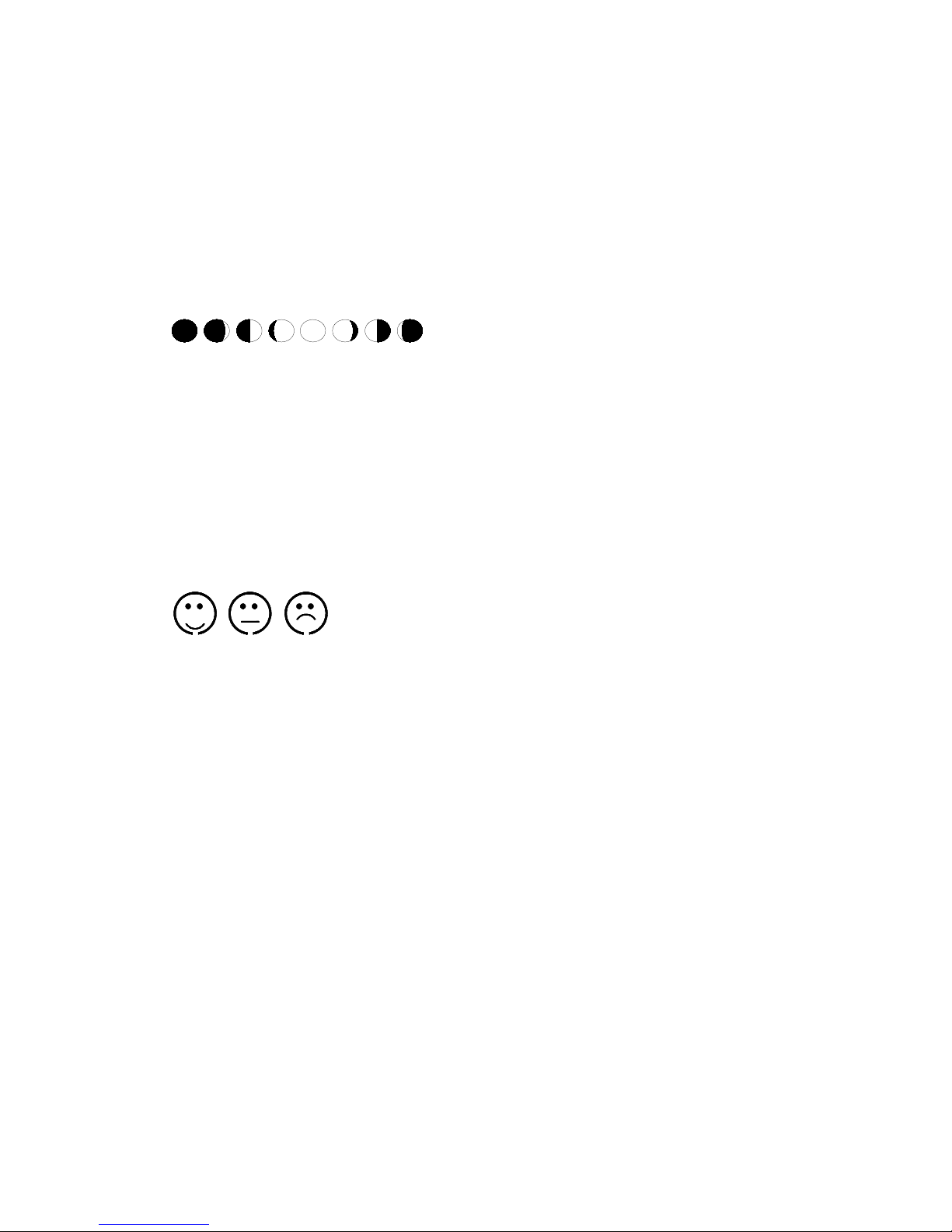
Moon phase display
The weather station uses saved data to show the moon phase
A B C D E F G H
A: New moon B: increasing crescent C: First half
D: increasing 3/4 E: Full moon F: decreasing 3/4
G: Last half H: decreasing crescent
Living space humidity
The weather station uses saved data to determine the humidity in the living space and shows the
respective symbols.
comfortable, dry, humid
Low battery condition display
The weather station displays the low battery condition symbol to remind the batteries of the
weather station or the outdoor sensor need to be exchanged.
• Weather station low battery condition display: within indoor area of the display
• Outdoor sensor low battery condition display: in the outdoor area of the display
RF connection to the outdoor sensor
• Press and hold the key “֠֠֠֠ “ for 3 seconds to search for outdoor sensor , the RF signal
symbol at the outside area will flashing when trying to connect . RF reception is weaker in
rooms with concrete walls (e.g. in the basement) and in office buildings, the distance will be
shorten if have interference. For extreme cases, please put the main unit near a window
Reception of radio controlled signal
• DCF radio signal search starts automatically about 3 minutes after battery exchange. The
“radio tower” signal is flashing.
• Press
“▼“,“▲“
for more than 3 seconds to enter or quit the Radio controlled signal reception
Page 12

• The clock synchronizes with the DCF radio signal automatically and daily from AM 1:00 to
3:00 to correct potential time deviations each hour. If the synchronization is unsuccessful
(“radio tower“ symbol disappears), a further synchronization attempt is made From 4:00 and
5:00 until success.This process is repeated up until 5:00 AM. If still not success, daily
reception stop.
Information
• Flashing “radio tower” symbol stands for DCF radio signal reception started.
• Continuous “radio tower” symbol stands for DCF radio signal reception successful.
• Please observe a minimal distance of 2.5m to sources of interference such as televisions or
computer screens.
• The radio signal is weaker in rooms with concrete walls (e.g. in the basement) and in office
buildings. For extreme cases, please put the main unit near a window.
• There are less atmospheric disturbances at night. A radio time signal reception is usually
possible at that time. One synchronisation per day is sufficient to keep the time display
accuracy at 1 second.
Tip
You can adjust the time manually in case the clock cannot receive the DCF radio signal (due to
interferences, large distance to the sender, obstructions like mountains, etc.) As soon as the radio
signal can be received, the clock wil be adjusted automatically.
Radio signal sender coverage up to 1500km distance to Frankfurt/Main.
 Loading...