

Page 1
99 Washington Street
Melrose, MA 02176
Phone 781-665-1400
Toll Free 1-800-517-8431
Visit us at www.TestEquipmentDepot.com
Digital Electronic Torque Wrench
Quick Start Guide
Model 60648
Page 2
BEFORE USING THE WRENCH
wrench during the sleep mode.
.
BATTERY INSTALLATION
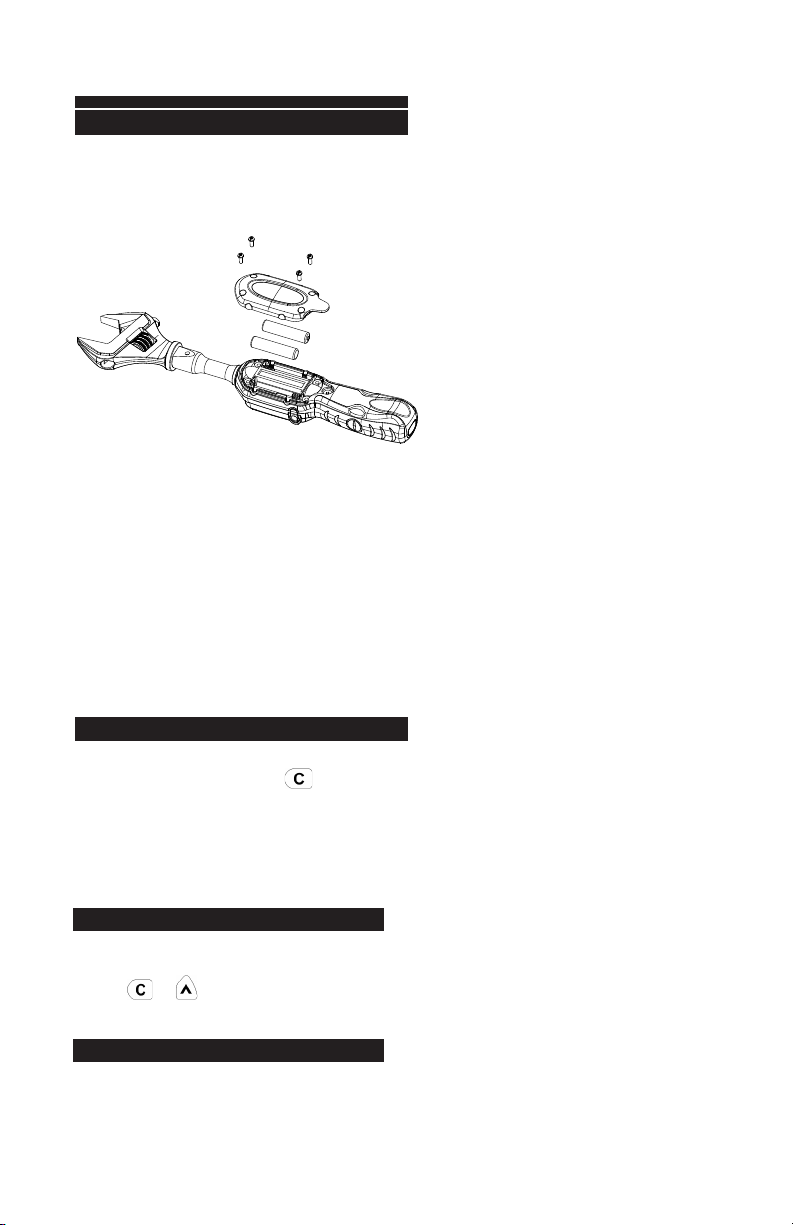
Remove the battery cover.
Insert two AAA batteries matching the
-/+ polarities of the battery to the battery compartment.
Put on the battery cover and fasten it tightly according to the following figures.
ATTENTION: When opening the battery cover of the wrench, you can see a viewing
window for the water contact indicator. Through this viewing window, you can check if
the wrench is damaged by water penetration where the water contact indicator turns red.
ATTENTION:
If an external force is applied to the torque wrench during the power-on/re-set or wake up
period, an initial torque offset will exist in the memory.
ACTIVATION DURING SLEEP MODE
The wrench will auto sleep after about 5 minutes
idle for power saving. Press to wake up the
wrench during sleep mode.
RESETTING THE WRENCH
ress together to reset the wrench.
P
LOW BATTERY VOLTAGE PROTECTION
I
f the battery serial voltage is in low voltage status, the wrench will display a battery symbol
and then turn off after a while.
Page 3
P
OWER ON
S
TEP
Pre-setting Unit: N-m
Press
Unit Selection: kg-cm
Unit Selection: in-lb
Unit Selection: ft-lb
Press
Press
Buzzer
(((((((( )))))))) ((((((( )))))))
Apply Torque
Current Torque Value
Current Torque Value
((…((… …))…)) ((…((… …)) …))
Buzzer
Setting Target To rque
Green LED
Reach 80% of Target Torque
Reach Target Torque
Reach 80% of Target Torque
*Note 3
*Note 2
SETUP
4
2
1
3
Unit Selection/Setting
Pre-setting No.
Power On/Clear
Up/Down Button
Red LED
Approached Target Torque
POWER ON
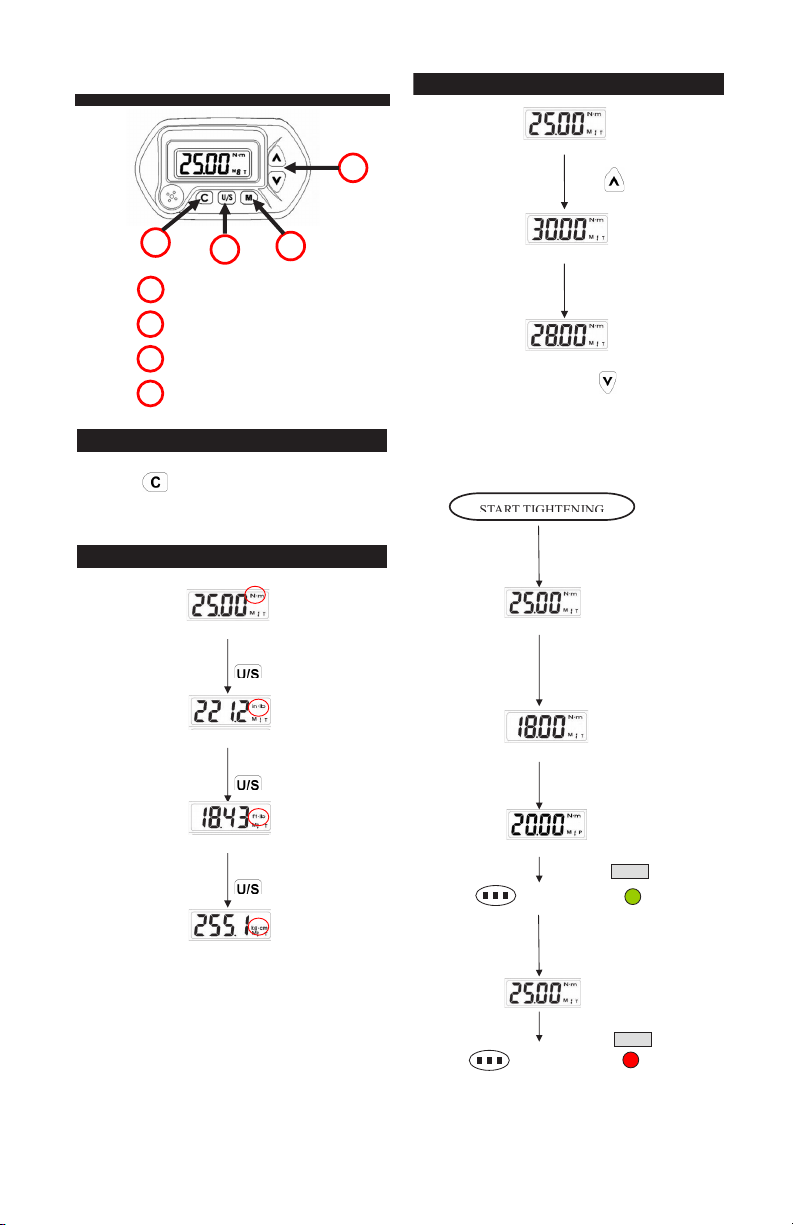
Press to power on the digital torque wrench.
STEP 1: UNIT SELECTION
STEP 2: SET TORQUE VALUE
Pre-setting To rqu e Value
Increase Target Torque Value
Pre-setting Unit: N-m
Press
Unit Selection: kg-cm
Unit Selection: in-lb
Unit Selection: ft-lb
Press
Press
Press
Press to power on the digital torque wrench.
1: UNIT SELECTION
Press
Page 4

MAINTENANCE AND STORAGE
ATTENTION:
To maintain accuracy, a one-year
periodic recalibration is recommended.
Please contact your local dealer for
calibration details.
CAUTION:
6. If the wrench gets wet, wipe it with a dry towel as soon as possible. The salt in seawater can
be especially damaging.
7. Do not use organic solvents, such as alcohol or paint thinner when cleaning the wrench.
8. Keep the wrench away from magnets.
9. Do not expose the wrench to dust or sand as this could cause serious damage.
10. Do not apply excessive force to the LCD panel.
11. Apply torque slowly and grasp the center of the handle. Do not apply load to the end of the
handle.
1. Over-torque (110% of Max. torque range) could cause
breakage or loss pf accuracy.
2. Do not shake violently or drop wrench.
3. Do not use the wrench as a hammer.
4. Do not leave the wrench in any place exposed to excessive heat,
humidity, or direct sunlight.
5. Do not use the torque wrench in water (not waterproof).
BATTERY MAINTENANCE
1. When the wrench is not used for an extended period of time, remove the battery.
2. Keep a spare battery on hand when going on a long trip or to cold areas.
3. Do not mix battery types or combine used batteries with new ones.
4. Sweat, oil and water can prevent a battery’s terminal from making electrical contact. To
avoid this, wipe both terminals before loading a battery.
5. Dispose of batteries in a designated disposal area. Do not throw batteries into a fire.
Test Equipment Depot - 800.517.8431 - 99 Washington Street Melrose, MA 02176
TestEquipmentDepot.com
 Loading...