

Page 1
Shenzhen Yangda Security Co., Ltd
Add:3F, Block 5, Ji An Tai Industrial Area,XiHe,FuYong,
BaoAn district,ShenZhen,China, 518057
Email: [email protected] Web: www.yangdaonline.com
Sky Eye-U30 30X Zoom Camera
(2-axis)
Warning and Disclaimer
Make sure not to adjust the gimbal or change its mechanical structure by yourself. Be
sure to mount the camera to gimbal before power on, and then install the gimbal on
the aircraft.
To avoid gimbal performance degradation or damage caused by imbalanced payload,
please do not add other peripherals for the gimbal camera (filter, hood, etc.).
When in aerial photography, make sure your aircraft flight control system is working
at the safe mode.
We strongly recommend that you remove aircraft propellers before doing gimbal
configuration. Use extra non-power battery for gimbal. Keep children away from the
www.yangdaonline.com
preset flight region.
Considering that we are not able to control user's specific usage, installation,
Assembly, modification (including the use of non-specified parts), and improper use.
Direct or indirect damage or injury caused by the behavior above, our company will
not cover any loss and responsibility.
Page 2
Shenzhen Yangda Security Co., Ltd
Add:3F, Block 5, Ji An Tai Industrial Area,XiHe,FuYong,
BaoAn district,ShenZhen,China, 518057
Email: [email protected] Web: www.yangdaonline.com
Main features
1) 690grams, light weight
2) 1/2.8-type Exmor CMOS
3) 30X optical zoom, 1080P/60 HDMI output for video downlink
4) 1080P/30 H.264 video recorded for on-board TF card
5) Auto object tracking
6) Geo tagging
7) PWM control and serial command control
8) Convenient wiring hub for RC receiver and video output
9) 2-aixs high stabilized gimbal system
10) Adjustable control speed: SLOW speed for large zoom range, accurate.
FAST speed for small zoom range, sensitive and quick.
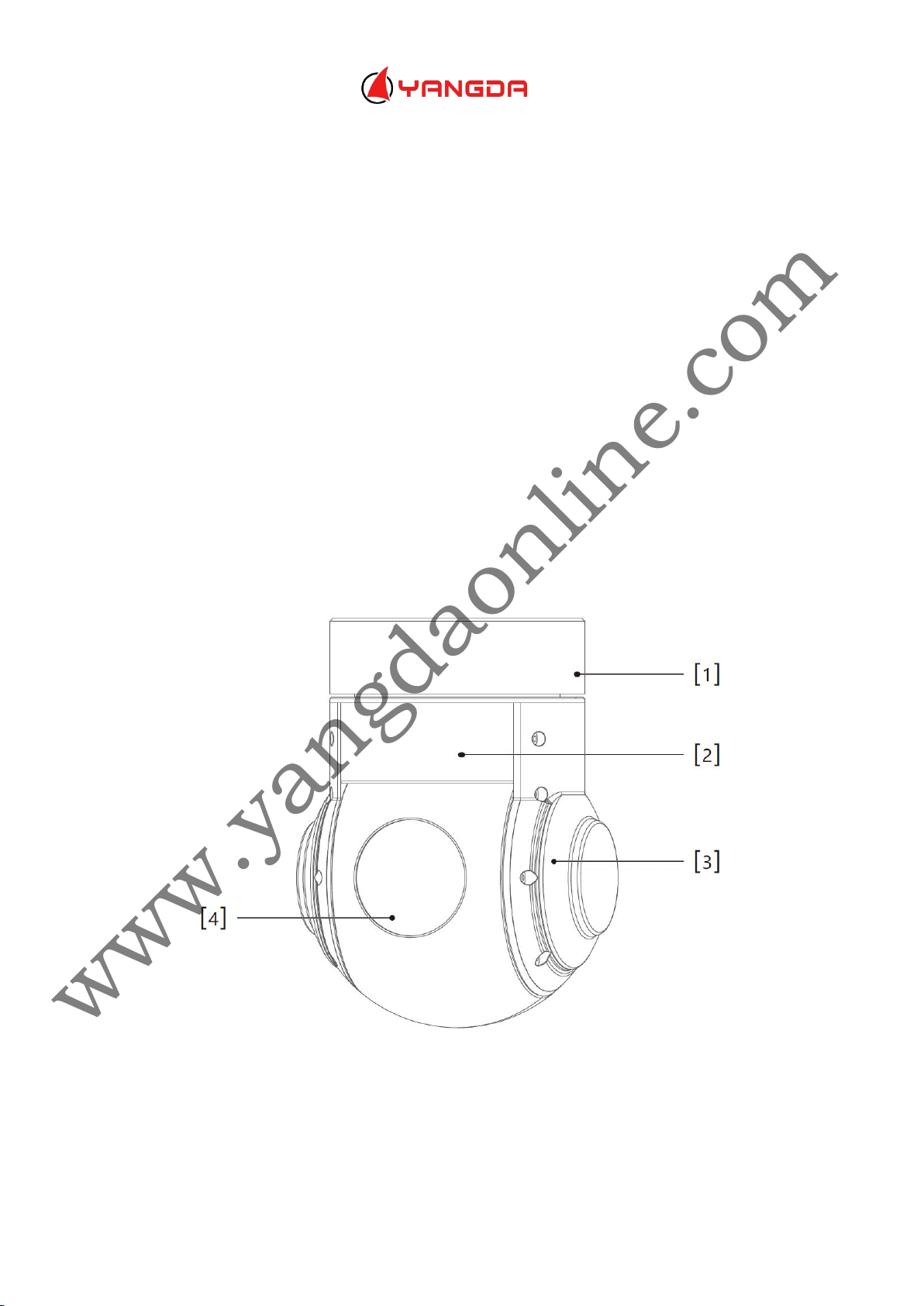
Gimbal description
www.yangdaonline.com
[1]Damping Box [2]Yaw axis motor
[3]Pitch axis motor [4]HD Camera
Page 3
Shenzhen Yangda Security Co., Ltd
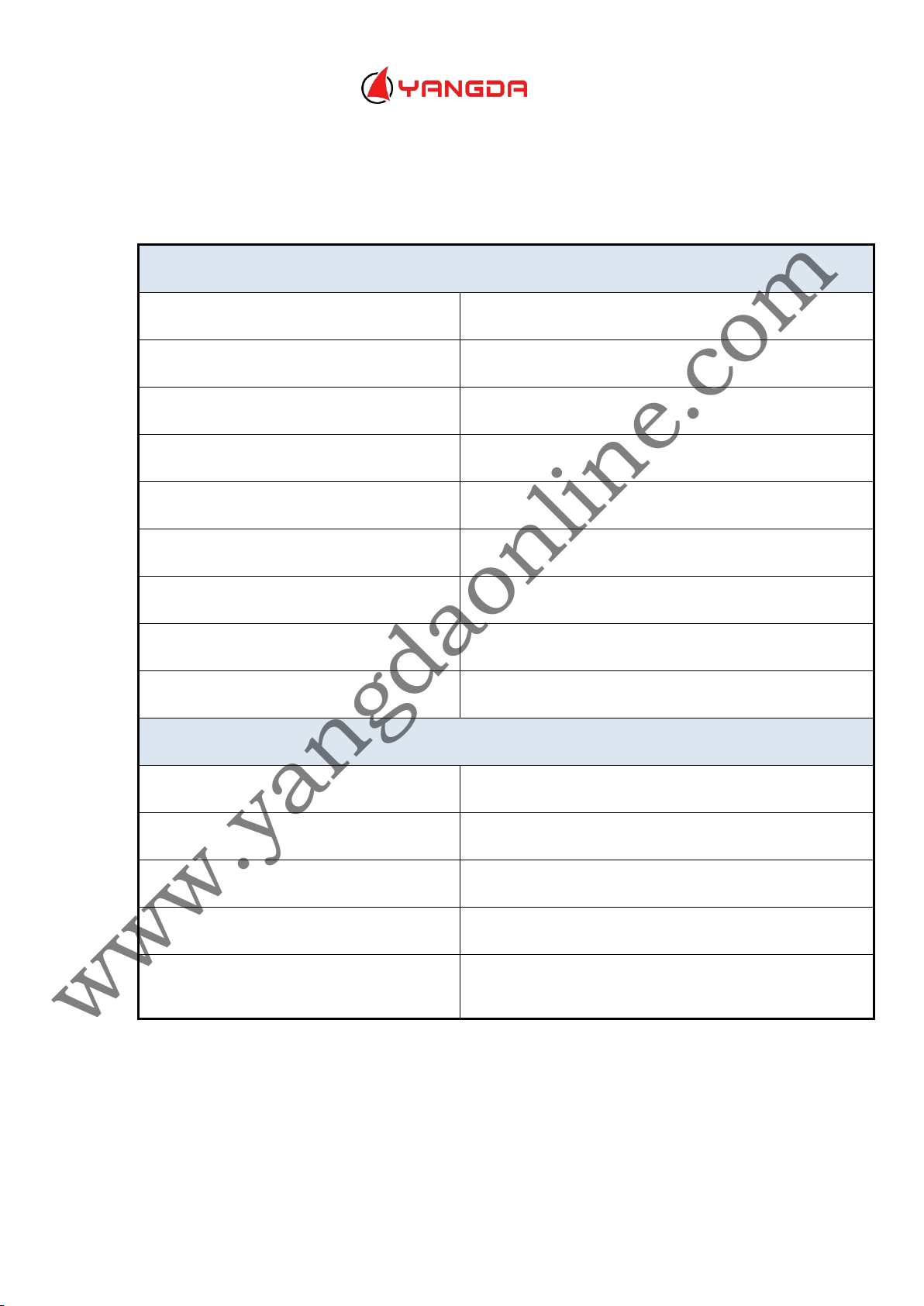
30X zoom camera(SONY FCB-EV7520)
Sensor
1/2.8-type Exmor CMOS
Video Output
1080P/60 HDMI
Video recorded
1080P/30 H.264
Focal length
30X optical focal zoom,4.3-129mm
Digital zoom
12X(360X with optical zoom)
Wide Dynamic
Up to 105dB
Auto focus
Less than 1S
Low illumination
Color: 0.01 lx (F1.6,AGC on,1/30s)
Aperture
Φ 16.0
Gimbal system
Input voltage
3S-6S
Rotate range
Pitch:±90° Yaw:±150°
Angle amount of jitter
Pitch:±0.02° Yaw:±0.03°
Control interface
PWM and serial command
Working Current
Static current:330mA(@12V)
Dynamic current:450mA(@12V)
Add:3F, Block 5, Ji An Tai Industrial Area,XiHe,FuYong,
Email: [email protected] Web: www.yangdaonline.com
System specification
BaoAn district,ShenZhen,China, 518057
www.yangdaonline.com
Page 4
Email: [email protected] Web: www.yangdaonline.com
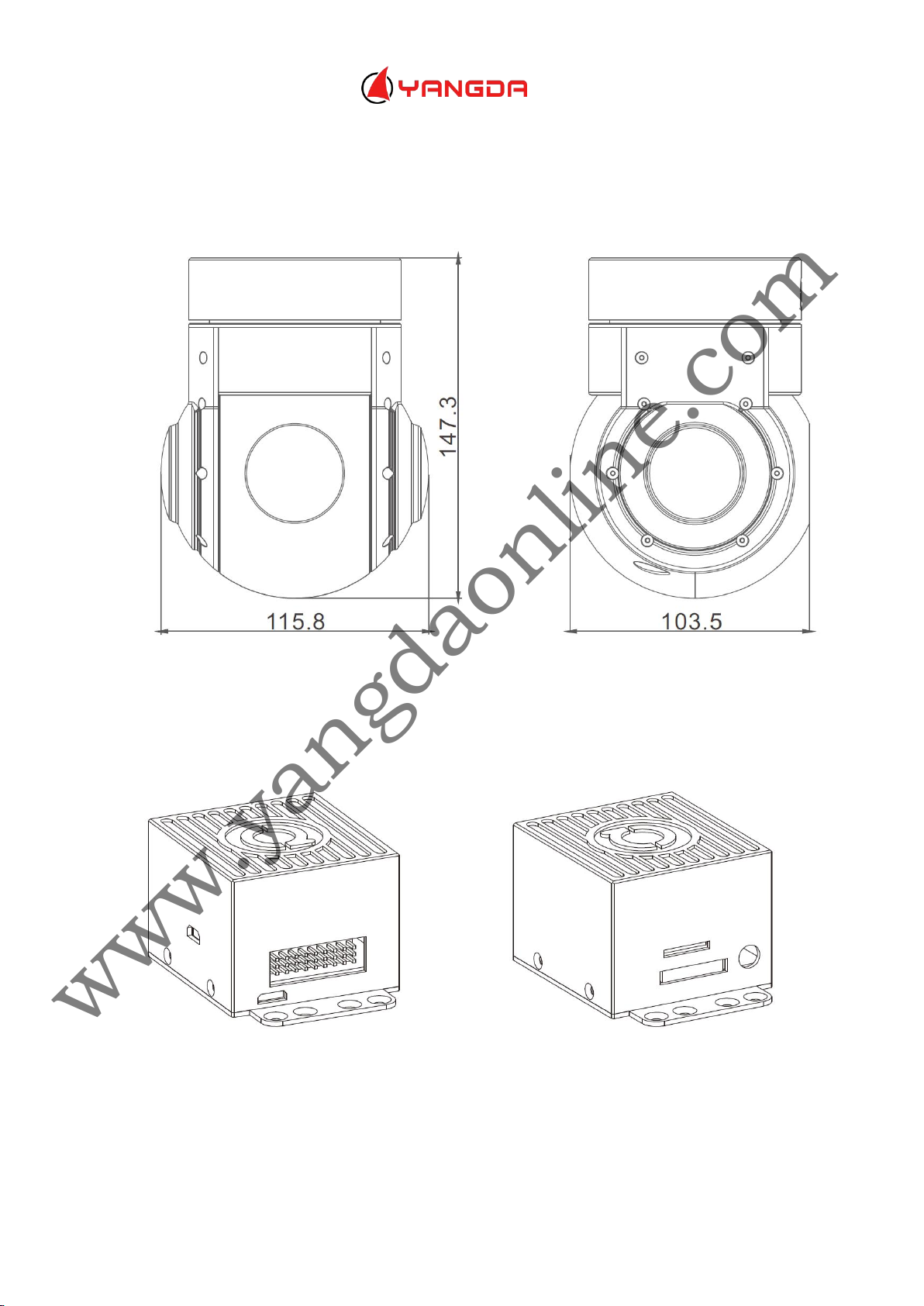
Dimension (mm)
Shenzhen Yangda Security Co., Ltd
Add:3F, Block 5, Ji An Tai Industrial Area,XiHe,FuYong,
BaoAn district,ShenZhen,China, 518057
Installation
49*45.4*35.7(mm)
www.yangdaonline.com
Page 5
Shenzhen Yangda Security Co., Ltd
Add:3F, Block 5, Ji An Tai Industrial Area,XiHe,FuYong,
BaoAn district,ShenZhen,China, 518057
Email: [email protected] Web: www.yangdaonline.com
Notice:
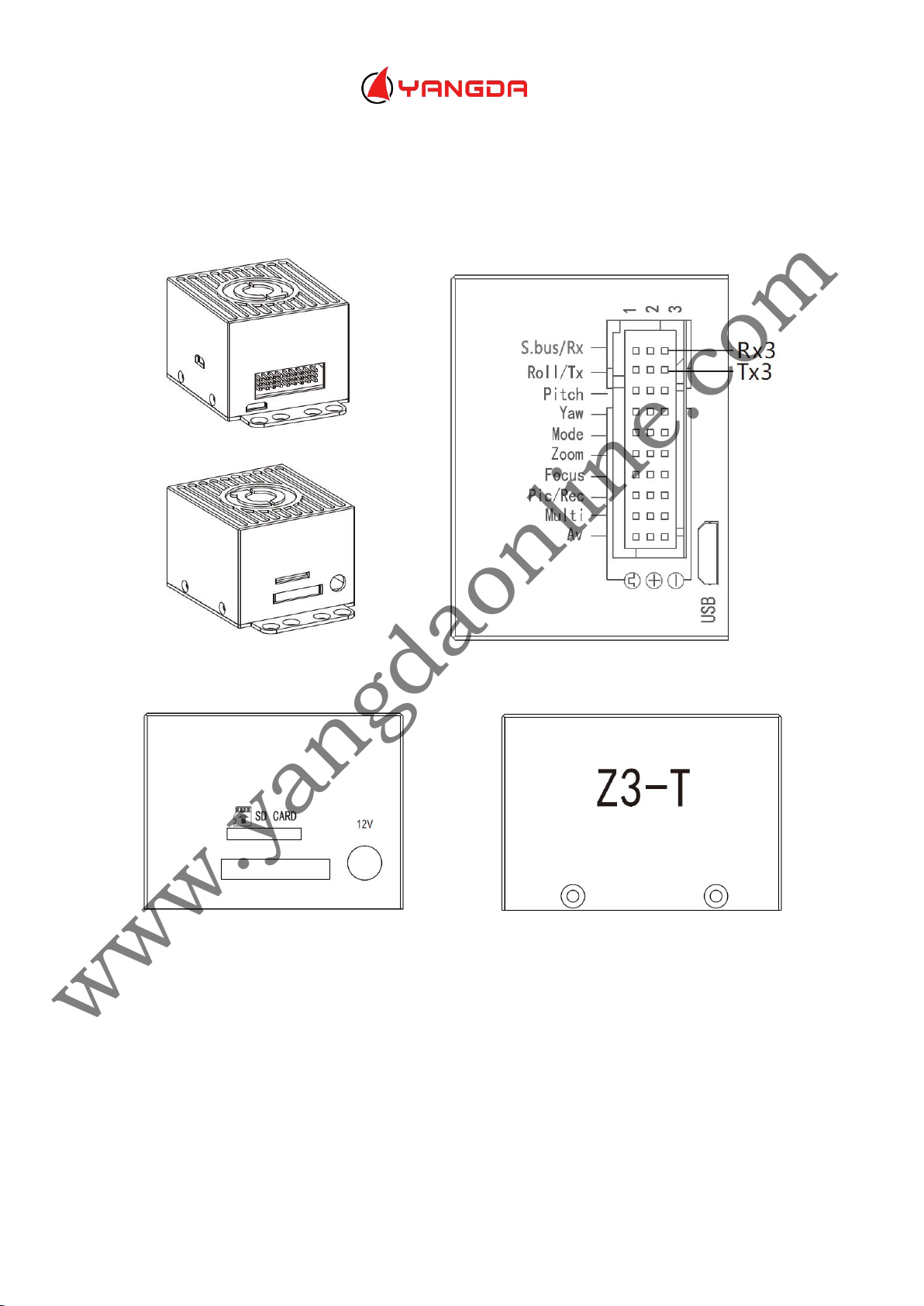
HDMI output is 1080P 30FPS, SD card supports max class 10 128G
GPS Baud rate: 9600, 8, 1, null
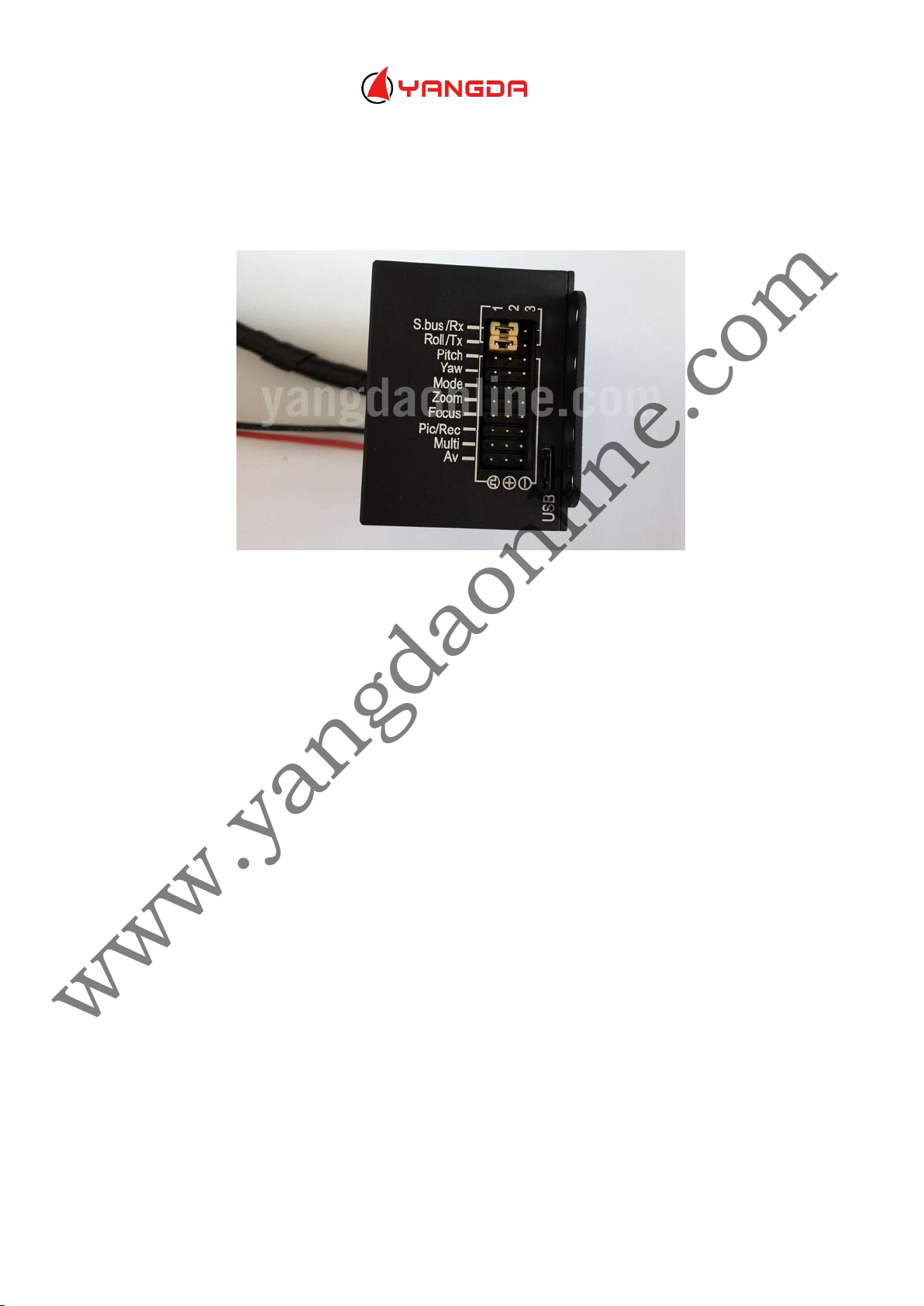
Serial ports will be needed (marked by the black box, see photo above), please
www.yangdaonline.com
connect RX1 and RX2, TX1 and TX2, with wire jumper. TX and RX from external serial
cable connect to TX3 and RX3 respectively. GND from external serial cable connect to
GND of the wiring hub.
Please notice:DO NOT connect 5V and GND to the ports marked by the black box.
Page 6
Shenzhen Yangda Security Co., Ltd
1)Yaw axis control: speed mode, connect Rocker channel(or 3 gears channel, push
2)Pitch axis control: speed mode, connect Rocker channel(or 3 gears channel, push
3)Mode control: angle mode, connect knob channel(speed mode: connect 3 gears
1)Zoom control: connect 3 gears or rocker channel
2)Focus: connect 3 gears or rocker channel for manual focus control.If do not connect
Add:3F, Block 5, Ji An Tai Industrial Area,XiHe,FuYong,
BaoAn district,ShenZhen,China, 518057
Email: [email protected] Web: www.yangdaonline.com
Gimbal and camera control via PWM
Gimbal control
gear to middle position to stop)
gear to middle position to stop)
channel or rocker channel)
If connecting knob channel, rotate to one end, the gimbal is at lowest speed when
controlling YAW and PITCH axis.
Rotate the knob to any position; gimbal is at higher speed when controlling YAW and
PITCH axis. Rotate to knob to another end, gimbal back to center position.
4) Multi: tracking control, connect 3 gears channel
Middle to low: quit tracking mode, cursor disappears
Low to middle: go to tracking mode, cursor appears
Middle to high: one square appears, object is locked, and tracking is activated
Middle to high again: re-track mode, cursor appears in the square. Gimbal is still
tracking the object, now you can move the cursor to track another object (middle to
high gear again).
www.yangdaonline.com
Camera control
any channel, then camera will auto focus after zooming
3)PIC/REC: taking picture/recording, connect 3 gears channel
Middle to high, recording start
Page 7
Shenzhen Yangda Security Co., Ltd
Add:3F, Block 5, Ji An Tai Industrial Area,XiHe,FuYong,
BaoAn district,ShenZhen,China, 518057
Email: [email protected] Web: www.yangdaonline.com
Middle to high again, recording stop
Middle to low, taking picture
Middle to low, taking another picture
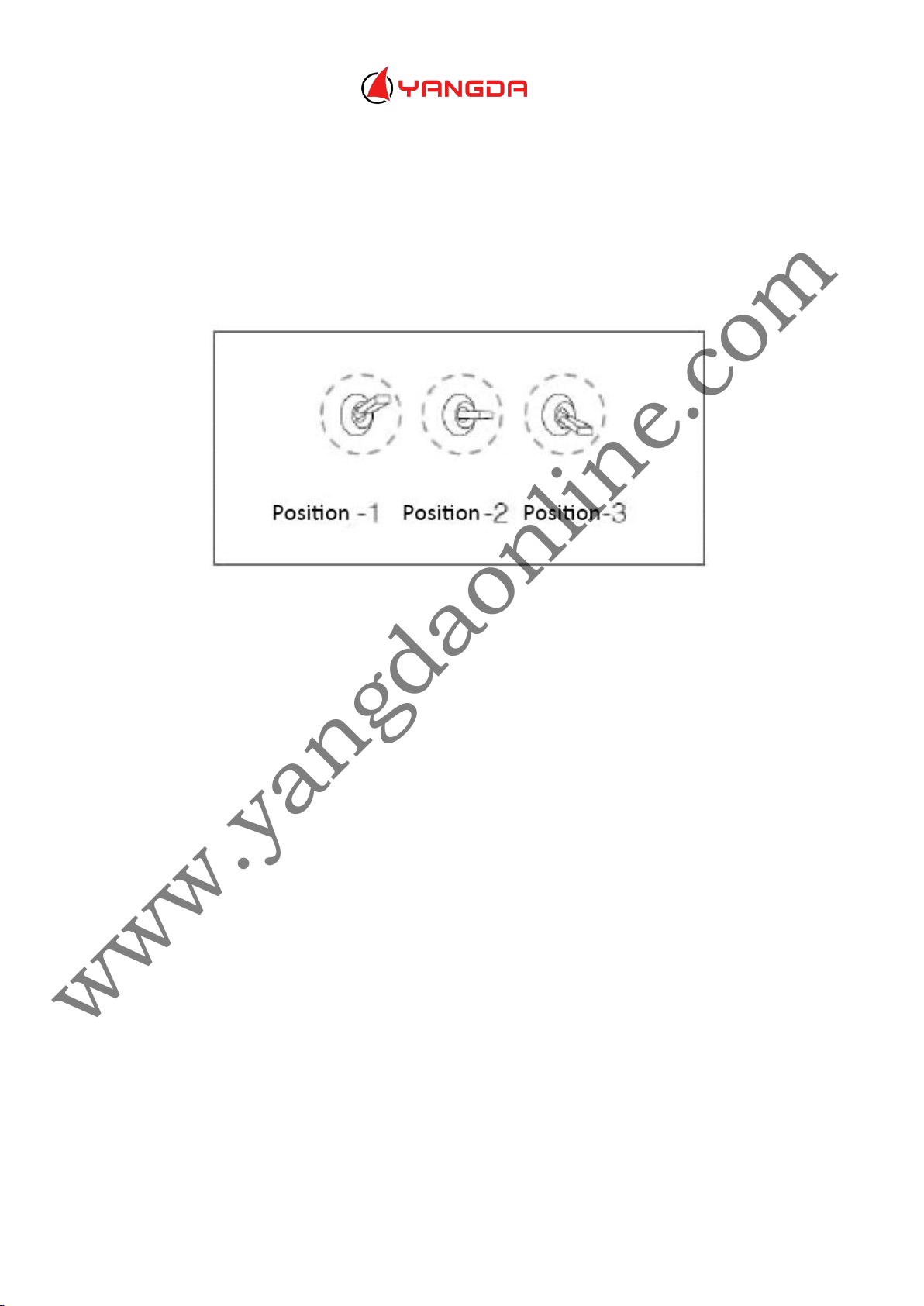
Mode switch (MODE PIN connect to 3 gears channel)
Flip 1 time between position 2 and position 1, gimbal return to center position
Flip 2 times between position 2 and position 1, gyro calibrate
Flip 3 times between position 2 and position 1, accelerator calibrate
Flip 4 times between position 2 and position 1, gyro temperature calibrate
Restart the gimbal after gimbal calibration complete
Flip 5 times between position 2 and position 1, accelerator temperature calibrate
Restart the gimbal after gimbal calibration complete
www.yangdaonline.com
 Loading...