

Page 1
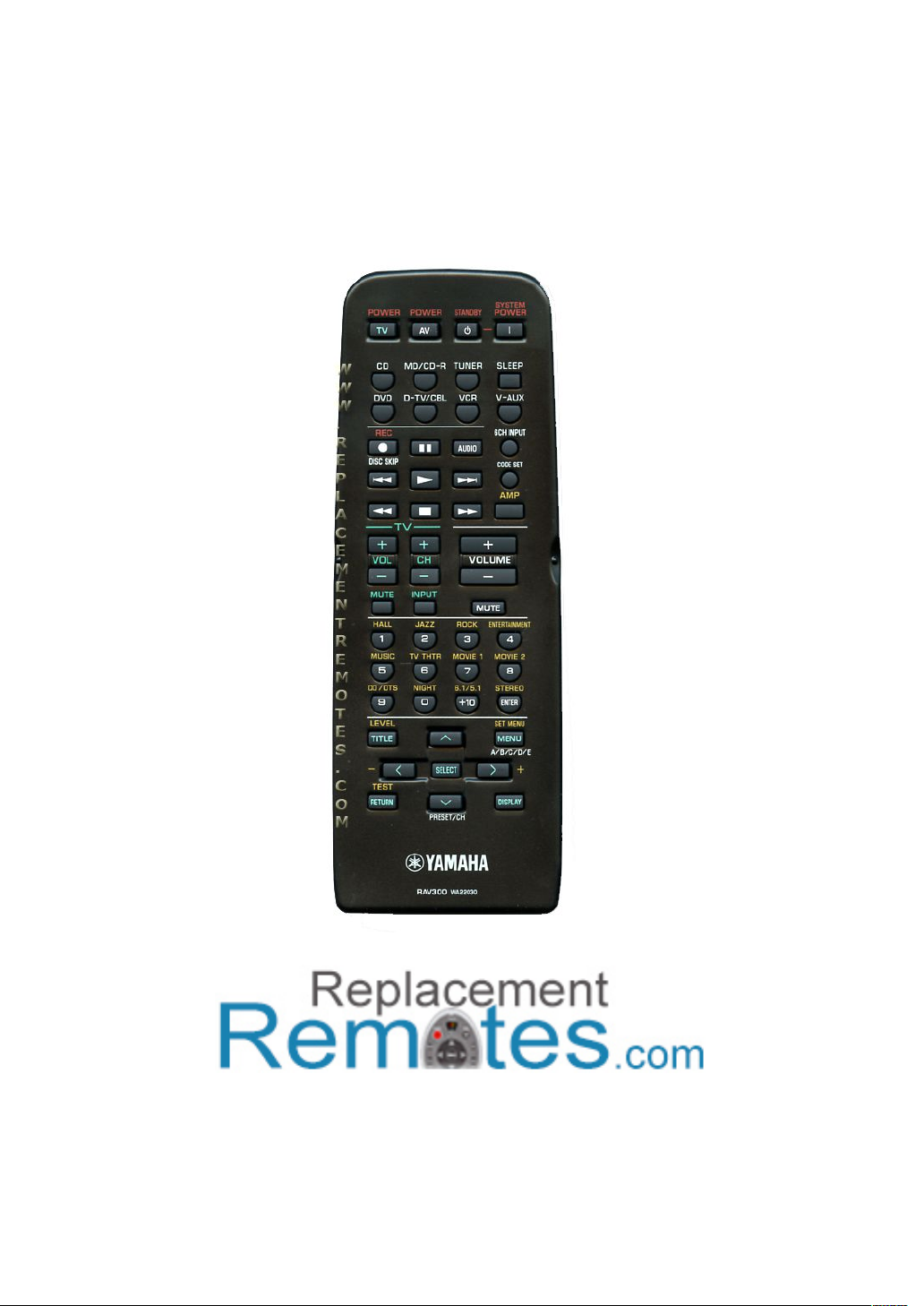
YAMAHA RAV300 REMOTE CONTROL
PROGRAMMING INSTRUCTIONS
www.ReplacementRemotes.com
To purchase this remote go to:
http://www.replacementremotes.com/yamaha/buy-rav300-wa220300-
audio-video-receiver-remote-control.html
Page 2
CONTROLS AND FUNCTIONS
Remote control
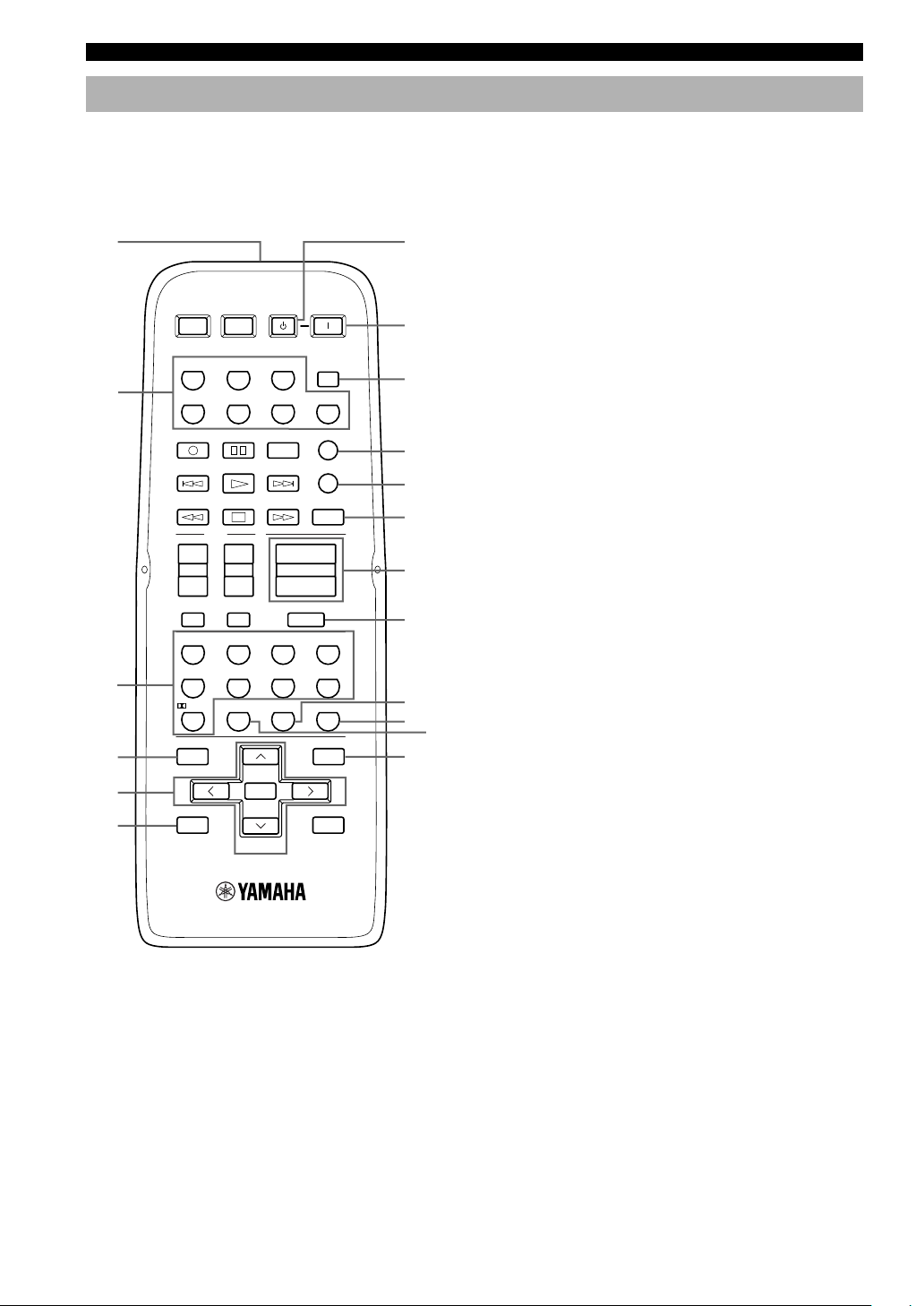
This section describes the controls and functions of the
remote control when it is set in AMP mode. Please make
sure to select AMP mode before beginning operation.
See “REMOTE CONTROL FEATURES” on page 43 to
operate other components with this remote control.
1
2
POWERTVPOWER
TV
REC
DISC SKIP
POWER
AV
STANDBY
AUDIO
SYSTEM
POWER
SLEEPTUNERMD/CD-RCD
V-AUXVCRD-TV/CBLDVD
6CH INPUT
CODE SET
7
8
9
0
q
AMP
w
TV
3
4
5
6
+
–
1
LEVEL
TITLE
–
TEST
RETURN
+
CHVOL
–
INPUTMUTE
NIGHT
09
PRESET/CH
SELECT
VOLUME
ROCKJAZZHALL
6.1/5.1
+10
+
–
MUTE
ENTERTAINMENT
432
MOVIE2MOVIE1TV THTRMUSIC
8765
STEREO /DTS
ENTER
SET MENU
MENU
A/B/C/D/E
DISPLAY
e
r
t
y
u
i
+
1 Infrared emitter
Outputs infrared control signals. Aim this emitter at the
component you want to operate.
2 Input selector buttons
Select the input source and change the control area.
3 Sound field program/Numeric buttons
Use to select sound field programs or input numbers.
4 LEVEL
Selects the effect speaker channel to adjust.
5 Cursor buttons u / d / j / i / SELECT
Use to select and adjust sound field program parameters
or SET MENU items.
6 TEST
Outputs the test tone to adjust the speaker levels.
7 STANDBY
Sets this unit in standby mode.
8 SYSTEM POWER
Turns on the power of the unit.
9 SLEEP
Sets the sleep timer.
0 6CH INPUT
Selects the audio source connected to the 6CH INPUT
jacks.
q CODE SET
Used to set up manufacturer codes (see page 44).
w AMP
Switches control from a previously selected component
by using the input selector buttons to this unit.
e VOLUME +/–
Increases or decreases the volume level.
6
Page 3
CONTROLS AND FUNCTIONS
r MUTE
Mutes the sound. Press again to restore the audio output
to the previous volume level.
t 6.1/5.1
Switches on or off the Dolby Digital + Matrix 6.1 or DTS
+ Matrix 6.1 decoder.
y STEREO
Switches between normal stereo and DSP effect
reproduction. When you select STEREO the unit mixes
down all Dolby Digital and DTS signals (except the LFE
channel) as well as those 2-channel signals without effect
sounds, to the front left and right speakers.
u NIGHT
Sets the unit in night listening mode.
i SET MENU
Selects the set menu mode.
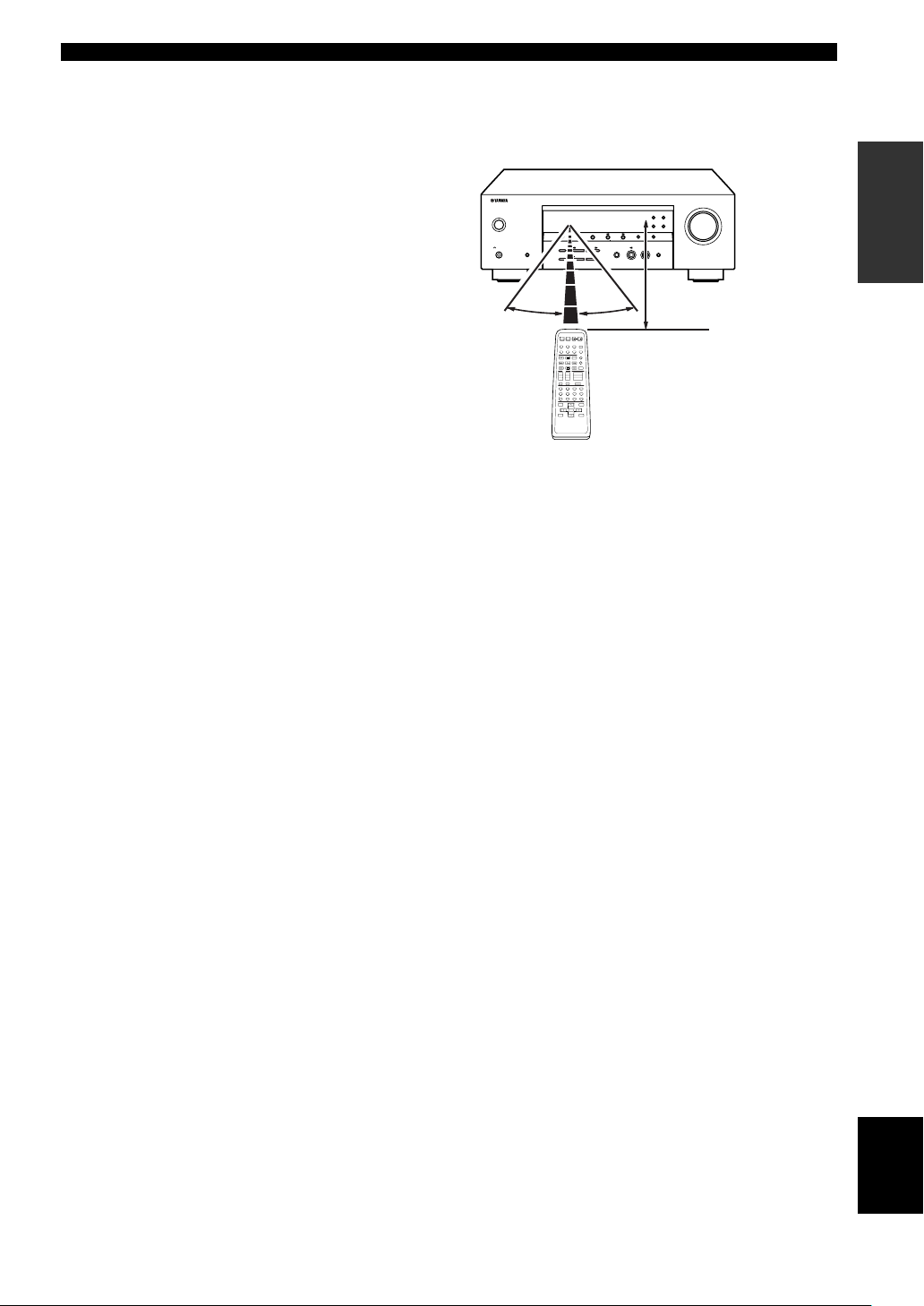
■ Using the remote control
The remote control transmits a directional infrared beam.
Be sure to aim the remote control directly at the remote
control sensor on the main unit during operation.
VOLUME
RDS MODE/FREQ EON
PTY SEEK
STANDBY
/ON
PHONES
SPEAKERS
A/B/OFF
SILENT CINEMA
30° 30°
PRESET/TUNING
FM/AM A/B/C/D/E
EDIT
NEXT
STEREO PROGRAM INPUT
EFFECT
CONTROL
BASS/TREBLE
SYSYTEM
STANDBY
POWERAVPOWERTVPOWER
POWER
TV
SLEEPTUNERMD/CD-RCD
V-AUXVCRD-TV/CBLDVD
6CH INPUT
REC
AUDIO
DISC SKIP
CODE SET
AMP
TV
+–+–+
VOLUME
CHVOL
–
INPUTMUTE
MUTE
ENTERTAINMENT
ROCKJAZZHALL
432
1
1 -
MOVIE THTR - 2MONO MOVIETV SPORTS
8765
STEREO
MATRIX 6.1
SELECT- /DTS
ENTER
+10
09
SET MENU
LEVEL
TITLE
MENU
A/B/C/D/E
SELECT
–
+
TEST
DISPLAY
RETURN
PRESET/CH
MODE START
PRESET/TUNING
MEMORY
TUNING MODE
SET MENU
MAN'L/AUTO FM
AUTO/MAN'L MONO
INPUT MODE 6CH INPUT
Approximately 6 m (20 feet)
■ Handling the remote control
•Do not spill water or other liquids on the remote
control.
• Do not drop the remote control.
• Do not leave or store the remote control in the
following types of conditions:
– high humidity such as near a bath
–high temperature such as near a heater or stove
–extremely low temperature
– dusty places
INTRODUCTION
7
English
Page 4
REMOTE CONTROL FEATURES
SYSTEM
POWER
STANDBY
POWER
AV
POWERTVPOWER
TV
V-AUXVCRD-TV/CBLDVD
SLEEPTUNERMD/CD-RCD
MUTE
6CH INPUT
VOLUME
+
–
ENTER
+10
09
STEREO /DTS
8765
432
1
ENTERTAINMENT
ROCKJAZZHALL
TV
INPUTMUTE
REC
AUDIO
DISC SKIP
+–+
–
CHVOL
SET MENU
SELECT
PRESET/CH
A/B/C/D/E
LEVEL
MENU
TEST
RETURN
DISPLAY
TITLE
+
–
6.1/5.1
NIGHT
TV THTR MOVIE1 MOVIE2MUSIC
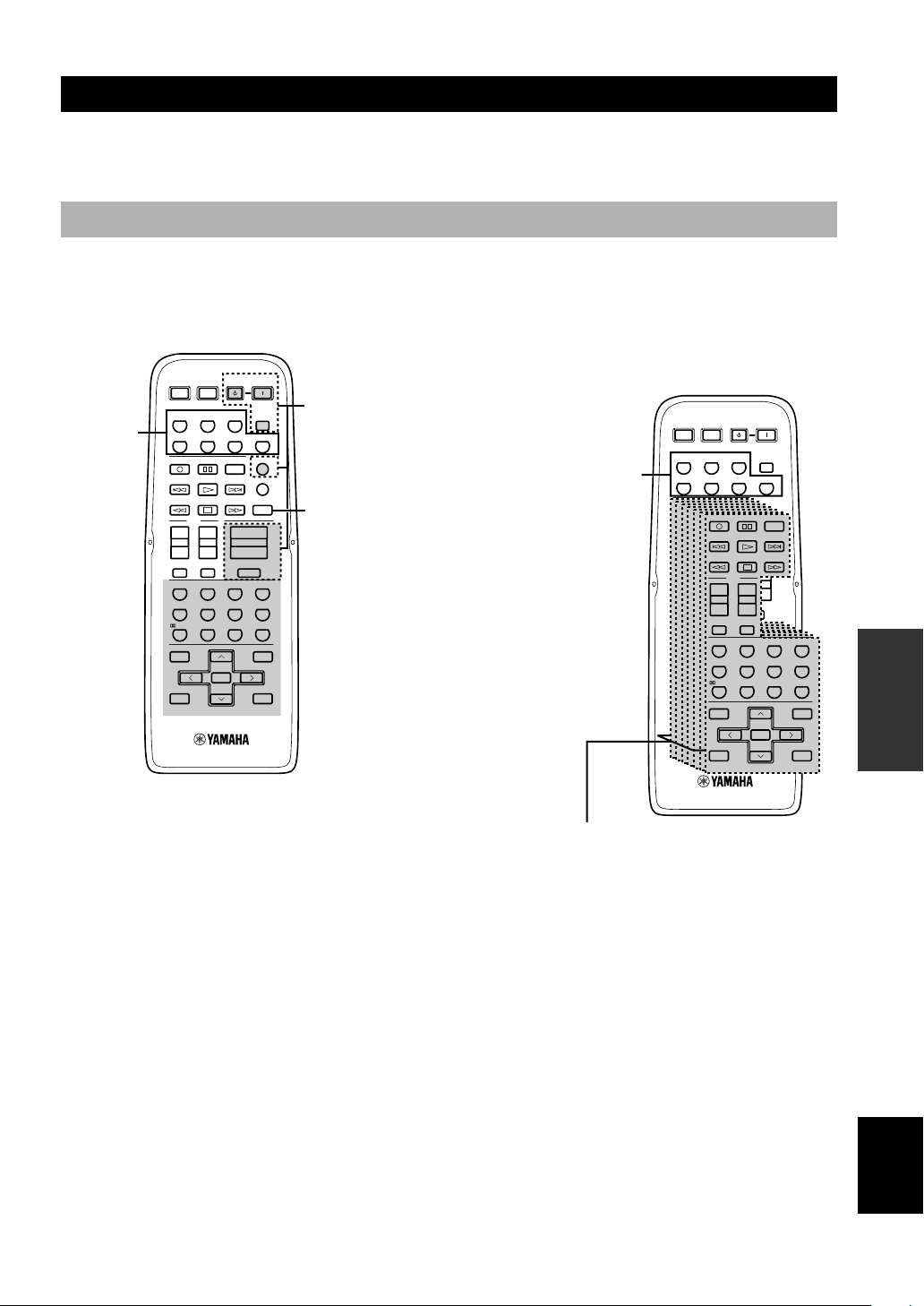
In addition to controlling this unit, the remote control can also operate other A/V components made by YAMAHA and
other manufacturers. To control other components, you must set up remote control with the appropriate manufacturer
codes.
Control area
■ Controlling this unit
The shaded areas below can be used to control this unit
when the AMP mode is selected. Press AMP to select the
AMP mode.
Input selector
buttons
POWERTVPOWER
TV
REC
DISC SKIP
+
–
1
LEVEL
TITLE
–
TEST
RETURN
POWER
TV
TV THTR MOVIE1 MOVIE2MUSIC
INPUTMUTE
NIGHT
AV
+
CHVOL
–
09
PRESET/CH
SELECT
AUDIO
VOLUME
ROCKJAZZHALL
6.1/5.1
+10
POWER
SLEEPTUNERMD/CD-RCD
V-AUXVCRD-TV/CBLDVD
6CH INPUT
CODE SET
AMP
+
–
MUTE
ENTERTAINMENT
STEREO /DTS
ENTER
SET MENU
MENU
A/B/C/D/E
DISPLAY
SYSTEM
STANDBY
The buttons in the
dotted lines (SYSTEM
POWER, STANDBY,
SLEEP, 6CH INPUT,
VOLUME +/– and
MUTE) function in
any mode.
Press AMP to control
this unit.
432
8765
+
■ Controlling other components
The shaded areas below can be used to control other
components. Each button has a different function
depending on the selected components. Select the
component you want to control by pressing an input
selector button.
Input selector buttons switch the
control area for each component.
OPERATION
ADVANCED
Component control area
You can control up to 7 different components by setting appropriate
manufacturer codes (see page 44).
English
43
Page 5
REMOTE CONTROL FEATURES
ENTER
+10
09
STEREO /DTS
8765
432
1
ENTERTAINMENT
ROCKJAZZHALL
TV
AMP
CODE SET
MUTE
INPUTMUTE
REC
6CH INPUT
AUDIO
DISC SKIP
VOLUME
+–+
–
+
–
CHVOL
SET MENU
LEVEL
MENU
TITLE
V-AUXVCRD-TV/CBLDVD
SLEEPTUNERMD/CD-RCD
TV
AMP
CODE SET
REC
6CH INPUT
AUDIO
DISC SKIP
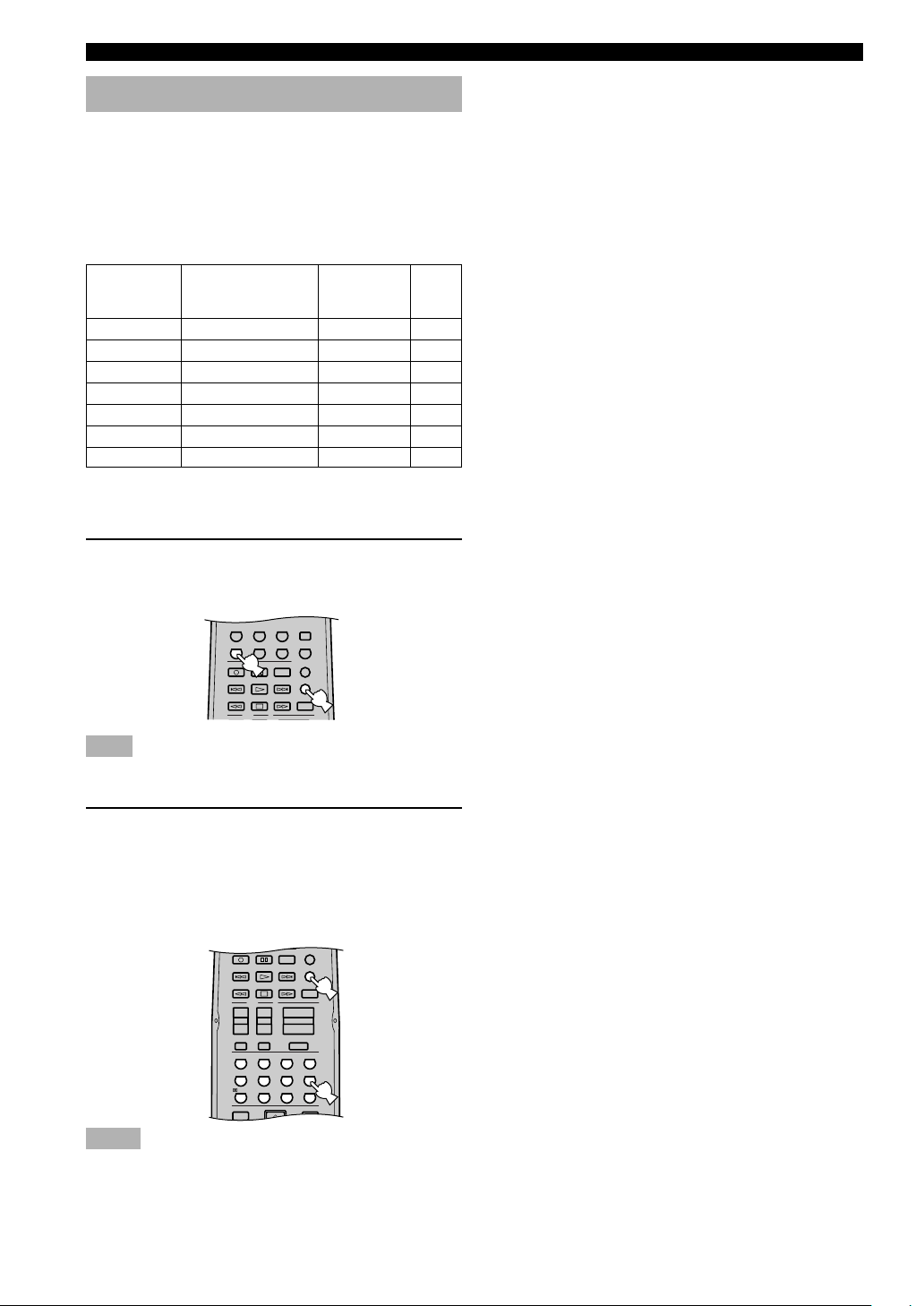
Setting manufacturer codes
You can control other components by setting the
appropriate manufacturer codes. Codes can be set up for
each input area.
The following table shows the default component
(Library: component category) and the manufacturer code
for each area.
Input area
Component category
Manufacturer
Code
(Library)
CD
MD/CD-R
TUNER*
DVD
D-TV/CBL*
V-AUX
VCR
1
2
CD player
CD recorder
Tuner
DVD player
–
–
–
YAMAHA
YAMAHA
YAMAHA
YAMAHA
–
–
–
199
499
Fixed
699
–
–
–
*1Yo u c a n c o nt r o l t h is u ni t an d ot h e r Y am a h a t u ne r s o n ly .
*2You can only set TV manufacturer codes for the D-TV/CBL
buttons.
1 Press and hold CODE SET. With CODE SET
depressed, press an input selector button to
select the component you want to set up.
Note
• You must press and hold CODE SET throughout this
procedure.
2 With CODE SET depressed, use the numeric
buttons to enter the 3 digit code of your
component’s manufacturer.
•Refer to the LIST OF MANUFACTURER’S
CODES at the end of this manual.
•To reset the code, enter the factory-set code for
each component shown in the above table.
TV THTR MOVIE1 MOVIE2MUSIC
6.1/5.1
NIGHT
Notes
•If the manufacturer of your component has more than one
code, try each of them until you find the correct one.
•You can only assign one manufacturer code to each input
selector button.
44
Page 6
Controlling other components
SYSTEM
POWER
STANDBY
POWER
AV
POWERTVPOWER
TV
ENTERTAINMENT
ROCKJAZZHALL
V-AUXVCRD-TV/CBLDVD
SLEEPTUNERMD/CD-RCD
TV
AMP
CODE SET
MUTE
INPUTMUTE
REC
6CH INPUT
AUDIO
DISC SKIP
VOLUME
+
–+–
+
–
CHVOL
ENTER
+10
09
STEREO /DTS
8765
432
1
ENTERTAINMENT
ROCKJAZZHALL
MUTE
SET MENU
SELECT
PRESET/CH
A/B/C/D/E
LEVEL
MENU
TEST
RETURN
DISPLAY
TITLE
+
–
6.1/5.1
NIGHT
TV THTR MOVIE1
MOVIE2
MUSIC
REMOTE CONTROL FEATURES
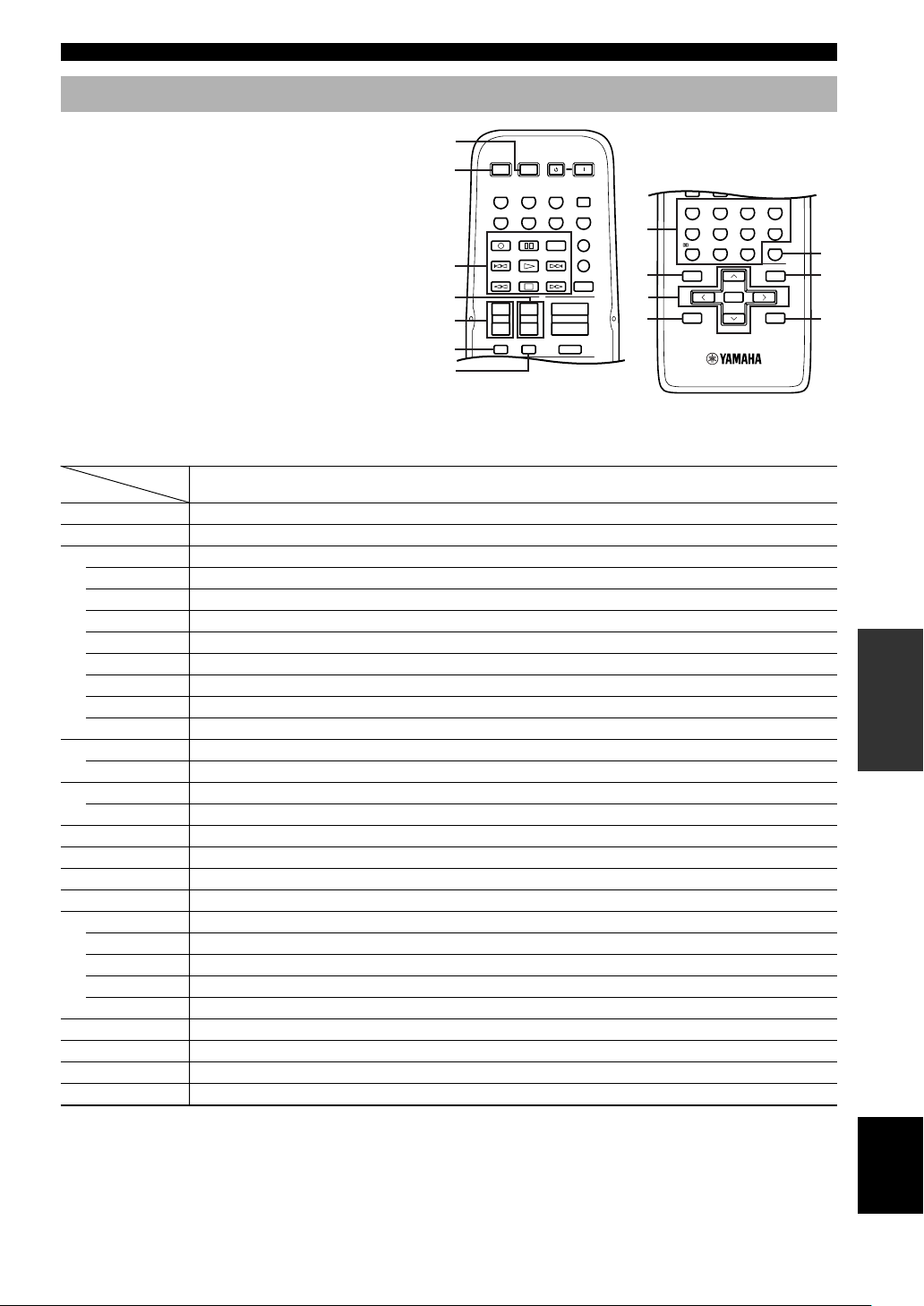
Once you set the appropriate manufacturer codes, you
can use this remote to control your other components.
Note that some buttons may not correctly operate the
1
2
selected component. Use the input selector buttons to
select the component you want to operate. The remote
control automatically switches to the appropriate
control mode for that component.
3
4
5
8
9
0
q
6
7
DVD player
1 AV POWER
2 TV POWER
3
REC/DISC SKIP
w
e
r
AUDIO
d
t
y
a
4 TV CH +
TV CH –
5 TV VOL +
TV VOL –
6 TV MUTE
7 TV INPUT
8 1-9, 0, +10
9 TITLE
0 PRESET/CH u
PRESET/CH d
PRESET/CH j
PRESET/CH i
SELECT
q RETURN
w ENTER
e MENU
*1This button functions only when the original remote control of the component has a POWER button.
*2These buttons can operate your TV without switching the input if the manufacturer code is set in D-TV/CBL.
*3These buttons can operate your VCR without switching the input to VCR if the manufacturer code is set in VCR.
r DISPLAY
*1
Power
*2
TV power
Disc skip
Play
Search backward
Search forward
Audio
Pause
Skip backward
Skip forward
Stop
*2
TV channel up
*2
TV channel down
*2
TV volume up
*2
TV volume down
*2
TV mute
*2
TV input
Numeric buttons
Title
Up
Down
Left
Right
Select
Return
Title/Index
Menu
Display
VCR
*1
Power
*2
TV power
Rec
Play
Search backward
Search forward
Pause
Stop
*2
TV channel up
*2
TV channel down
*2
TV volume up
*2
TV volume down
*2
TV mute
*2
TV input
Numeric buttons
VCR channel up
VCR channel down
Enter
TV, digital/cable TV
*3
VCR power
*2
TV power
*3
VCR rec
*3
VCR play
*3
VCR search backward
*3
VCR search forward
*3
VCR pause
*3
VCR stop
TV channel up
TV channel down
TV volume up
TV volume down
TV mute
TV input
Numeric buttons
Enter
CD player
*1
Power
*2
TV power
Disc skip
Play
Search backward
Search forward
Pause
Skip backward
Skip forward
Stop
*2
TV channel up
*2
TV channel down
*2
TV volume up
*2
TV volume down
*2
TV mute
*2
TV input
Numeric buttons
Index
Menu
Display
CD/MD recorder
*2
Rec (MD)
Search backward
Search forward
Skip backward
Skip forward
*2
TV channel up
*2
TV channel down
*2
TV volume up
*2
TV volume down
*2
*2
Numeric buttons
*1
Power
TV power
Play
Pause
Stop
TV mute
TV input
Index
Display
Tuner
*1
Power
*2
TV power
*2
TV channel up
*2
TV channel down
*2
TV volume up
*2
TV volume down
*2
TV mute
*2
TV input
Preset stations (1-8)
Preset up
Preset down
A/B/C/D/E
45
w
e
r
OPERATION
ADVANCED
English
Page 7

LIST OF MANUFACTURER CODES
LISTE DES CODES DES FABRICANTS
TV
Yamaha 299 292
Admiral 292 293
Aiwa 294 276 283 284
Akai 295 296
Alba 296
AOC 297
Bell&Howell 292
Bestar 298
Blaupunkt 229 222
Blue sky 298
Brandt 223
Brocsonic 297
Bush 296
Clatronic 298
Craig 224
Croslex 225
Curtis Mathis 297 226
Daewoo 297 298 224 227 228
Daytron 239
Dual 298
Emerson 297 224 239 232
Ferguson 223 265 266
First line 298
Funai 277 278
Fisher 295 233
Fraba 298
GE 293 297 234 235 236
LG/Goldstar 297 298 239 237
Goodmans 296 298 223
Grundig 229 238 249
Hitachi 297 239 242 243 285
ICE 296
Irradio 296
Itt/Nokia 244 245
JC Penny 293 297 234 237
JVC 296 246 247 286
Kendo 298
KTV 297 239
Loewe 298 248
LXI 293 297 225 226 233
Magnavox 297 225 239
Matsui 295
Mitsubishi 299 297 259 287
NEC 297 252 282
Nokia 244 245
Nokia Oceanic 245
Nordmende 265 266
Onwa 296
Panasonic 234 235 236 253 288 211
Philco 297 225 239
Philips 225
Pioneer 226 235 254 255 268
Portland 297 256
Quasar 234 235
Radio Shack 299 293 297
RCA 293 297 234 256 257 258
SABA 223 269 265 266
Samsung 297 239 248 262 275
Sanyo 295 233 279 272 273 274 212
Schneider 296
Scott 297
Sharp 292 239 232 213
Siemens 229
Signature 292
Sony 263 214
Sylvania 297 225
Telefunken 269 264 265 266
Thomson 223 266
Toshiba 292 226 267 215
Videch 297 242
Wards 297 239 232
VCR
Yamaha 399 392 393 394
Admiral 395
Aiwa 396 397 398 329
Akai 322 323 324
Audio Dynamic 392 394
Bell&Howell 393
Blaupunkt 325 326
Brocsonic 327
Bush 322
Canon 325 328
CGM 396 332
Citizen 396
Craig 396
Curtis Mathis 397 328 333
Daewoo 328 334 335
DBX 392 394
Dimensia 333
Emerson 327 334
Fisher 393 336
Funai 397
GE 328 333 387
LG/Goldstar 396 388
Goodmans 334 337
Grundig 332 338
Hitachi 325 333 349 342 343
Instant Replay 325 328
Itt/Nokia 393
JC Penny 392 393 394 328 333 349
JVC 392 394 344 345 346 347
Kendo 396
Kenwood 392 394 396
Loewe 396 337
Luxor 395
LXI 393 396 397 336 349
Magnavox 325 326 328
Marantz 392 394
Marta 396
Matsui 396
Memorex 328 336
Minolta 333 349
Mitsubishi 399 344 348 359 352 353
Multitech 397 348 354
NEC 392 394 344 383
Nokia 393 395
Nokia Oceanic 395
Okano 323
Olympic 325 328
Orion 327
Panasonic 325 328 355 378 384 385 386
Pentax 333 349
Philco 325 328
Philips 325 326 328 337 356 357
Phonola 337
Pioneer 325
Quasar 325 328
RCA/Proscan 325 326 328 333 335 349 358 369
Realistic 393 397 328 336 359 362
Samsung 354 358 363 364 365 366
Sansui 394
Sanyo 393 336 367
Schneider 337
Page 8

Scott 399 335 336 348 359 352 354 358
Seleco 322
Sharp 395 362 382
Siemens 393
Signature 2000 395 397
Sony 368 379 372 373 374 375
Sylvania 397 325 326 328
Symphonic 397
Tandberg 334
Tashiro 396
Tatung 392 394
Teac 392 394 397
Technics 325 328
Telefunken 376 377
Thorn 393 396
Toshiba 335 369 389
Universum 396 327 376
W.WHouse 396
Wards 395 396 336 362
DVD player
Yamaha 699 622 623 647
Denon 623 624
Funai 625
Hitachi 626
JVC 627
Kenwood 628
Mitsubishi 629
Onkyo 632 633 634
Panasonic 623 635
Philips 699 647
Pioneer 636 637 638
RCA 639
Samsung 642
Sharp 643
Sony 644
Toshiba 634
LG/Goldstar 645
Thomson 646
MD Recorder
Yamaha 599
CD player
Yamaha 199
CD Recorder
Yamaha 499
 Loading...