

Page 1

PC-D Series Firmware Update Manual
Introduction
Thank you for choosing this Yamaha product.
This manual explains how to update the PC412-D, PC412-DI, PC406-D, and PC406-DI
power amplifiers via the "ProVisionaire Amp Editor" application.
Precautions (Read First)
・ Performing updates is at the user’s own risk.
・ Note that the device may be damaged if it is not operated according to the procedures
described in this manual, such as turning off the device or disconnecting the cable while
the update is in progress (loading data).
f the update fails or the device does not operate correctly even after the update has been
・ I
attempted again, contact qualified Yamaha service personnel.
・ Y
amaha Corporation owns all copyrights for the device firmware, its update program, and
the manual.
authorized duplication or modification of part or all of the firmware, software, and
・ Un
the manual is prohibited.
・ The screen shots in this User’s Guide are for instructional purposes only and may differ
from the actual screens.
1
Page 2
Series Firmware Update Manual
PC-D
When newly installing ProVisionaire Amp Editor
Note
・ If you have already installed ProVisionaire Amp Editor on your computer, see the steps
for “If ProVisionaire Amp Editor is already installed” on the next page.
1. Download and install ProVisionaire Amp Editor V1.0.0 for Win 11/10 and firmware(x*)
from the Yamaha Pro Audio website on your computer.
*x indicates the identification number
2. Connect the computer and the amplifier.
3. L
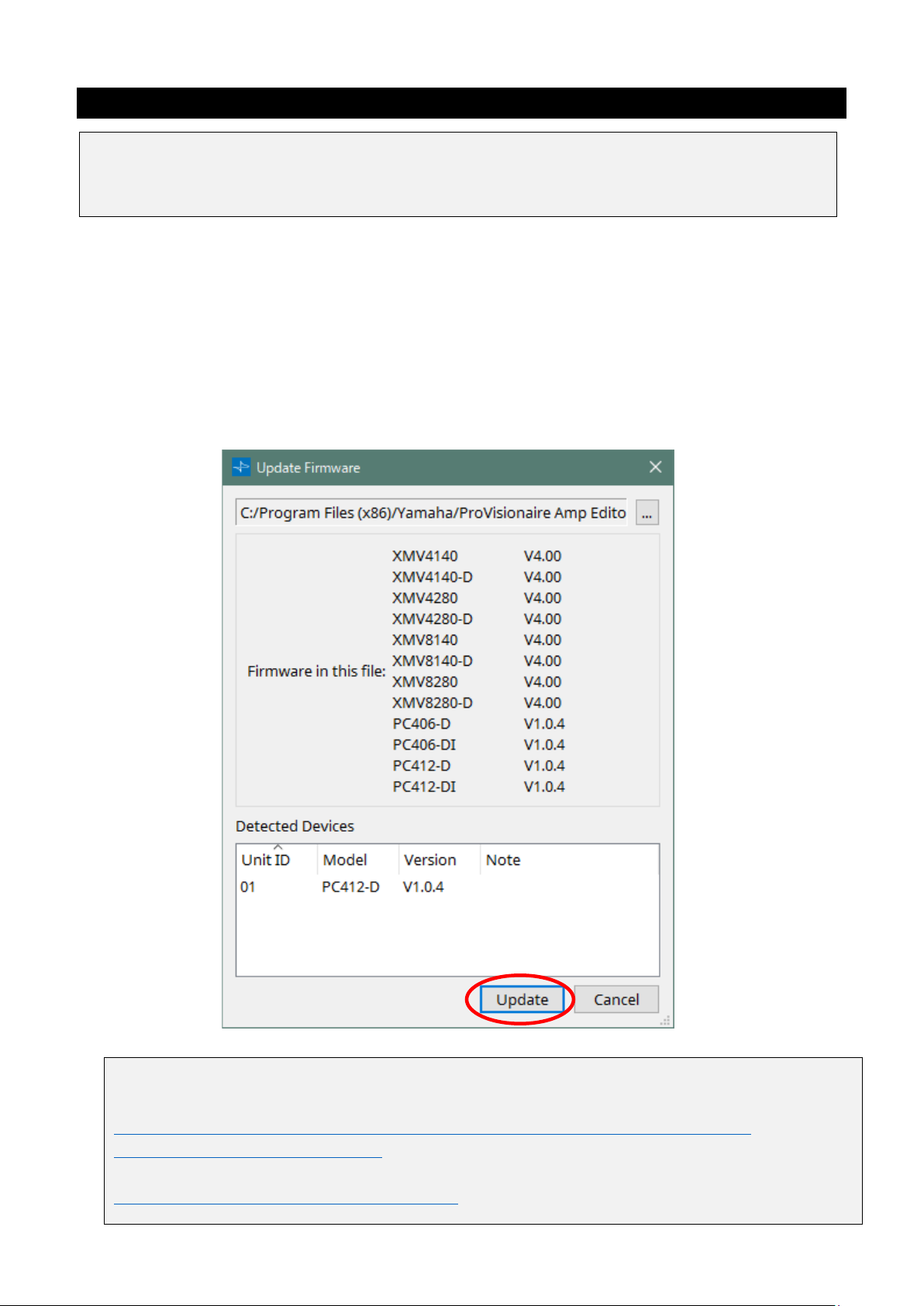
aunch the ProVisionaire Amp Editor, open the “Update Firmware” dialog and click the
[Update] button.
Note
・ Yamaha Pro Audio website:
https://asia-latinamerica-mea.yamaha.com/en/products/proaudio/power_amps/pcd_di/downloads.html#product-tabs
・Please refer to "ProVisionaire Amp Editor Setup Guide" for connection and detailed procedure.
https://manual.yamaha.com/pa/pv/pvae/en/
2
Page 3
Series Firmware Update Manual
PC-D
If ProVisionaire Amp Editor is already installed
1. Download ProVisionaire Amp Editor V1.0.0 for Win 11/10 and firmware (x*) from the
Yamaha Pro Audio website.
2. Extract the downloaded installer in advance. Just unpack and do not install.
3. Connect the computer and the amplifier.
4. L
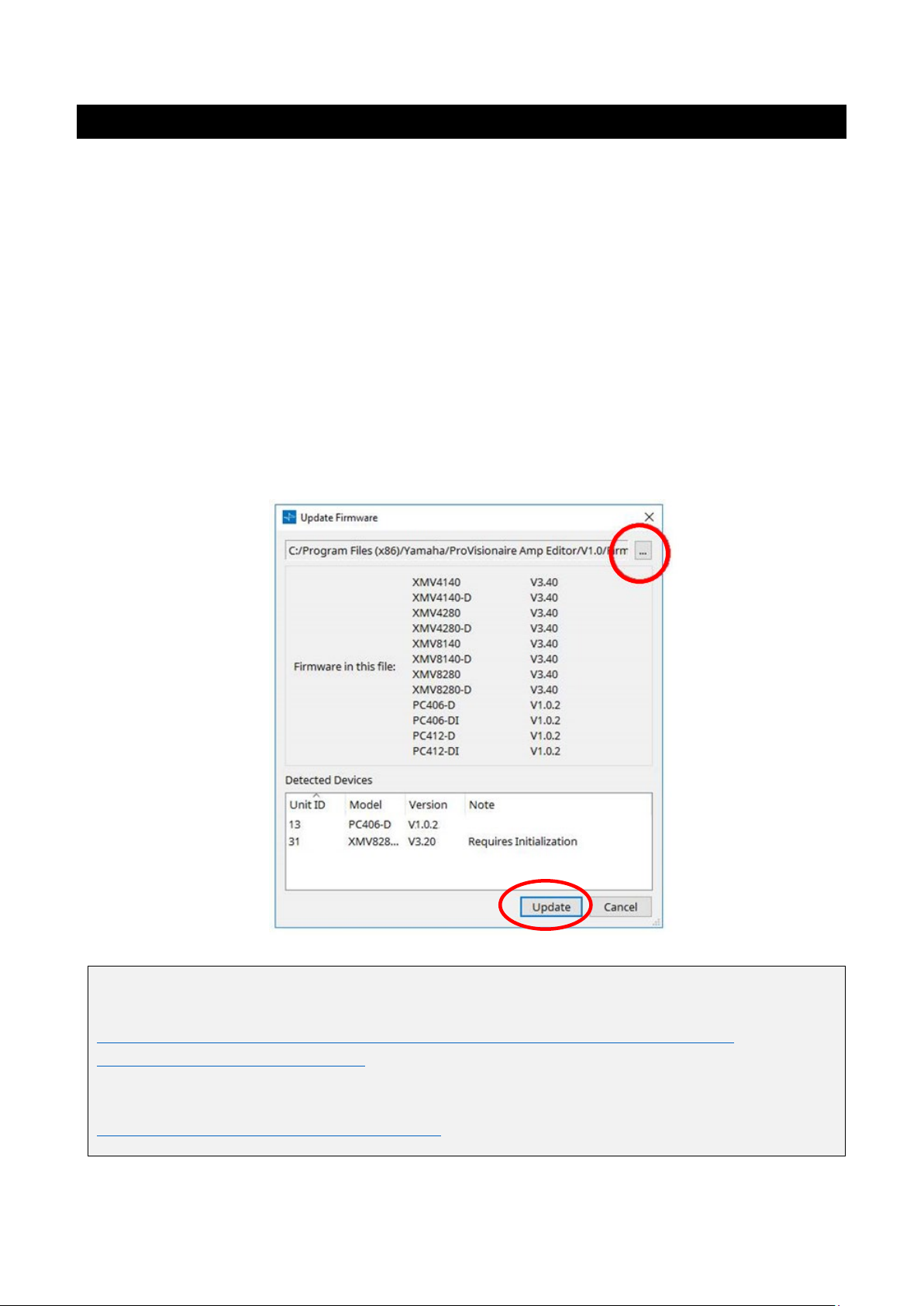
aunch ProVisionaire Amp Editor and open the “Firmware Update” dialog.
5. Select the extracted file from the [...] button on the upper right and click the [Update]
button.
The firmware file is in the following folder after extraction.
ProVisionaireAmpEditor_V100-x*/editor100_firm/Firmware
FirmwarePackage.fupd
x indicates the identification number.
*
Note
・ Yamaha Pro Audio website:
https://asia-latinamerica-mea.yamaha.com/en/products/proaudio/power_amps/pcd_di/downloads.html#product-tabs
・Please refer to "ProVisionaire Amp Editor Setup Guide" for connection and detailed procedure.
https://manual.yamaha.com/pa/pv/pvae/en/
3
Page 4

Series Firmware Update Manual
PC-D
Confirm the updates
Confirm if the firmware has been updated correctly.
If the message “Success” is displayed in the “Status” column of the “Device
Information” dialog of ProVisionaire Amp Editor, confirm that the updated version is
shown in the “Version” column.
Yamaha Pro Audio global website
https://www.yamahaproaudio.com/
Yamaha Downloads
https://download.yamaha.com/
© 2021 Yamaha Corporation
Published 10/2022
YJMA-B0
4
 Loading...