

Page 1
IHIFI960 HIGH-FIDELITY MUSIC PLAYER - 1 -
IHIFI960 MUSIC PLAYER USER MANUAL
Thank you for you choosing our company product with domestic
high-level IHIFI digital portable music player, the superior performance that
you can trust, and it will bring you to enjoy the perfect listening world. Please
read this manual before using it.
You can use computer to download the music, you will be able to enjoy
these music anywhere. At the same time, it is also a high performance digital
turntable through coaxial output / optical output interface to the external
decoder digital source.
Accessories
Please check the accessories in the package (except otherwise agreed
attachments)
IHIFI Music player USB communication cable
The fiber-optic communications cable
one point two headphone transfer lotus seat line
Dedicated 12V charger Manual Product warranty card (vip card)
Important Notice
1 This product belongs to precise electronic products, welding electrostatic,
mechanical force will cause serious damage, to prohibit unauthorized
disassemble and mount machine otherwise forfeited warranty rights.
2 Do not for a long time with a large volume in order to avoid damaging to
the headphones.
3 Formatting FLASH memory , please use FAT32 format.
4 Please use the high level headphones and high quality non destructive
music documents to play the best performance.
5 About the product: the machine after about 100 hours in normal use, the
sound and performance will reach the best state.
Page 2
IHIFI960 HIGH-FIDELITY MUSIC PLAYER - 2 -
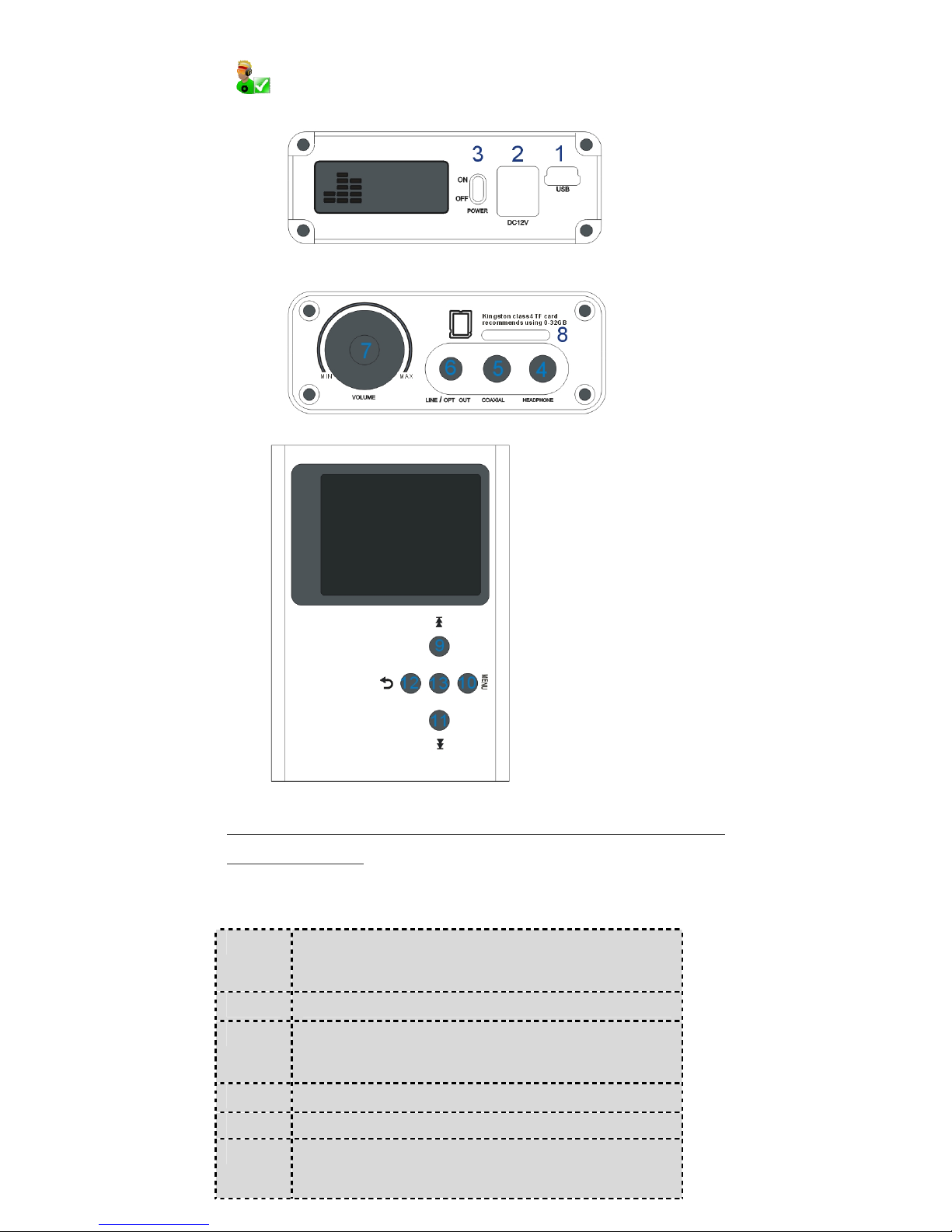
Notice : the middle button NO.13, press the button about 5 seconds to
turn on the machine
each part of the definition
1 USB communication interface
for copying files or system upgrade
2 Power port, please use dedicated charger
3 Power switch(reset),ON for open,
OFF to turn off the power
4 3.5mm headphone socket
5 Digital coaxial output socket (with RAC adapter)
6 Line-out socket (with RAC adapter) /
digital optical output socket (with optical fiber lines)
Page 3
IHIFI960 HIGH-FIDELITY MUSIC PLAYER - 3 -
7 Volume Control
8 TF card socket(Expansion capacity)
9 Previous/Rewind: press for more than 1s
for rewind (REW) while playing.
10 Menu/OK
11 Next/Speed, press for more than 1s
for speed (FF) while playing.
12 Exit/Back
13 Power On/Play/Pause
(called it PLAY in the following parts)
Operating methods
Power on: push “POWER”to“ON”and press“PLAY” key
about 5s starting up the machine.
Play music: In the play standby mode, press “PLAY” to start playing.
Select FF/REW: during music playing, short press “FF” for the next song;
short press “REW” for the previous song. Long press “FF” for speed and
“REW” for rewind.
Volume control: during music playing, revolve knob to adjust the volume at
an appropriate level. To protect your ears, we particularly suggest listening at
a lower volume.
Pause: during music playing, press “PLAY” to pause, press it again to
continue.
Power Off: press “PLAY” for 5s to turn the power off and push “POWER”
key to “ON”
Drive installation
Under the Windows ME/2000/XP/NT/vista/win7 or greater, and MAC OS 8.6
or greater, the drive installation is not required
Using the provided USB extension cord to connect IHIFI to PC USB port, PC
will prompt Found New Hardware.
When PC interface shows Found New Hardware device, install according to
the instructions.After installation, double click “My Computer”, you will find
a “Removable Disk” icon.If the above is abnormal, it might be the USB port
of your computer is destroyed or the operating system failed, we strongly
recommend that you switch to another computer.
Page 4
IHIFI960 HIGH-FIDELITY MUSIC PLAYER - 4 -
Connecting computer
Use our company USB line, do not use another USB line
After connecting to a PC USB port successfully with the provided USB line, you
can find a “Removable Disk” icon in “My Computer”.
Download music
A、This product supports WAV, APE, FLAC, AAC, WMA, OGG and MP3 loss or
lossless compressed music files, and the cue files of ape. It needs to notice
that because of ape files have different kinds of compression ratio, so as to the
high level ape files the product will skip them automatically for they take large
amount of resources. Please do not pull out USB connection suddenly while
reading or transferring files, otherwise the files would be broken or deleted.
B、The product can also be used as U Disk, you just need to copy files into
“Removable Disk”
C、If the abnormal situation, such as crackle, happened during music playing,
it mostly because the file is broken. Please format disk and recopy the file.
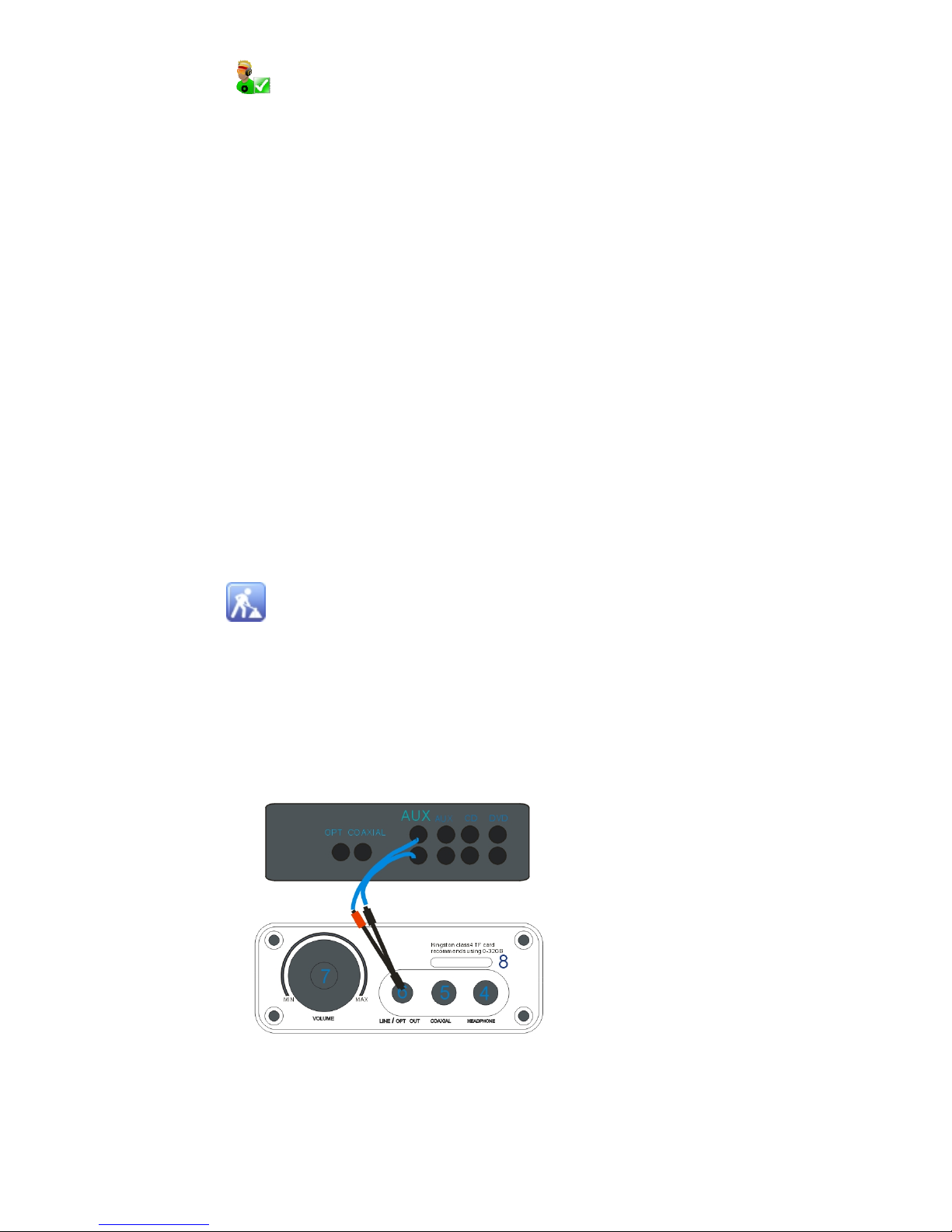
Using line out function: and random distribution one/two earphone
transmit lotus seat line ,round port is inserted into player “6“line/opt out.
Signal line is inserted into of an external power amplifier of Audio frequency
input port,Setting player in the state of play,then Signal source is transmitted
to an external power amplifier.At that time, the player is equivalent to high
quality CD PLAYER,Sound volume adjustment function invalide.
Page 5
IHIFI960 HIGH-FIDELITY MUSIC PLAYER - 5 -
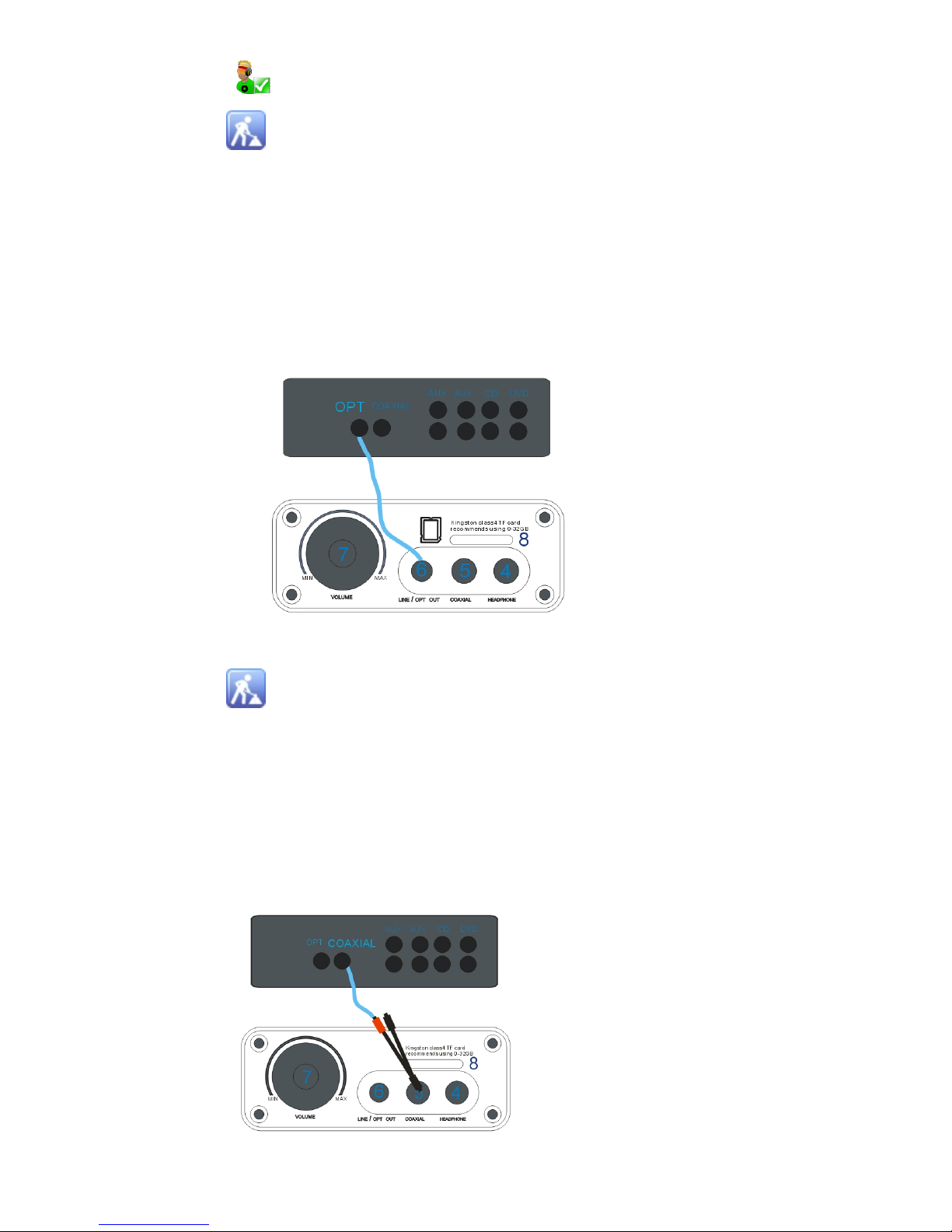
Using digital optical fiber transmission function:with round and square port
optical fiber line,round port is inserted into player “6“line/opt out. Square
port is inserted into optical fiber input function of an external encoder/power
amplifier of optical fiber input port,Setting player in the state of play,then
digital source is transmitted to an external decoder / power amplifier.At that
time, the player is equivalent to high quality digital turntable,Sound volume
adjustment function invalide.
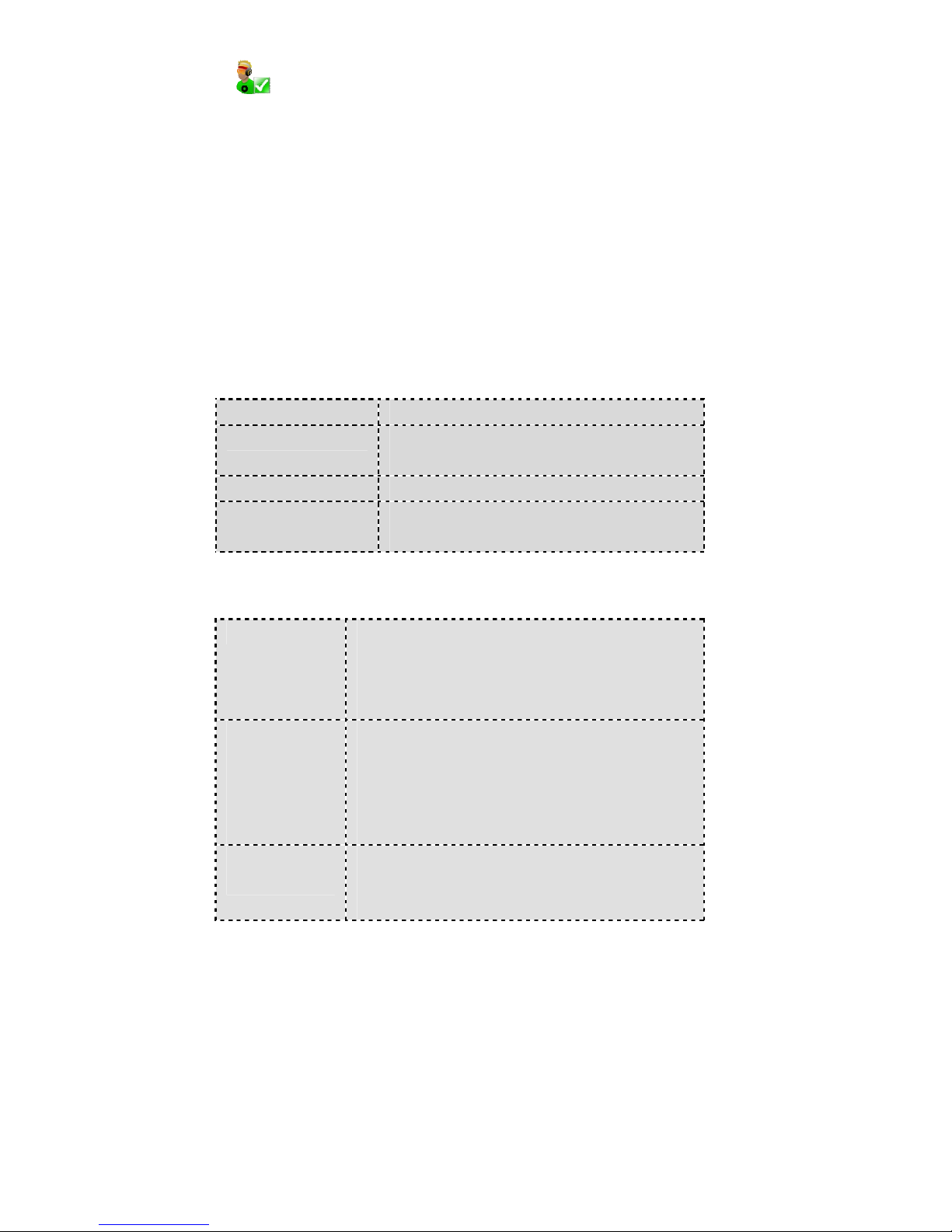
Using digital coaxial transmission function: and random distribution
one/two earphone transmit lotus seat line ,
plug port is inserted into player "“5“COAXIAL. Then whichever port use
rac line to insert into coaxial input function of an external decoder/amplifier of
coaxial input port ,player in the state of play .then digital source is transmitted
to an external decoder / power amplifier.At that time, the player is equivalent
to high quality digital turntable,Sound volume adjustment function invalide.
(Note:using coaxial input ,adapter cable two lotus seat of parallel state ,they
Page 6
IHIFI960 HIGH-FIDELITY MUSIC PLAYER - 6 -
both have coaxial input function ,additionally equipped with a RAC line
arbitrarily inserted therein a lotus seat)
Charging
1: IHIFI player has a built-in rechargeable Li-ion battery, must use original
through 12v dedicated charger.
2: During music playing, if the power is lower, the nachine will power off
automatically, please charge in time. This product different another digital
products, you can charge it in the power off.
General Description
Port USB2.0 (FULL SPEED)
Storage capacity Flash 16GB (External TF card maximum
supports 32G
Supported formats WAV APE FLAC AAC OGG MP3 WMA
Supported operating
system
Windows98/SE/ME/2K/XP、Mac OS 10、Linux
2.4.2
General Fault Detection
In order to continuous improving product sound quality and
performance,we reserve the right to product improvement.Like to change
other model of amplifier/decoder ,or to increase or reduce the correlation
output/setting port. if the changes,please refer to the lastest version( model)
or consult company service staff .The page offer content for the operation
mode and method of the general description.
Xue Lin Electronics Co., Ltd., Shenzhen 2012-09-20 First printing
No Power Please check battery is lower or no. If it is, please
charging after about ten minutes and then open
Make sure Power key has been in the “ON”, and
press 5 seconds the power button
Headphones
cannot hear the
sound
Make sure the volume is not in the" 0 "state, and
headphone concatenate , please keep the
headphones clean
The damage music files can cause varying degrees
of noise, and can not even play music
Not download
music normally
Please check USB line is destroyed or no.
Please check the driver is properly installed, or
replace a computer experiment
 Loading...