

Page 1
1. KichenHub
TM
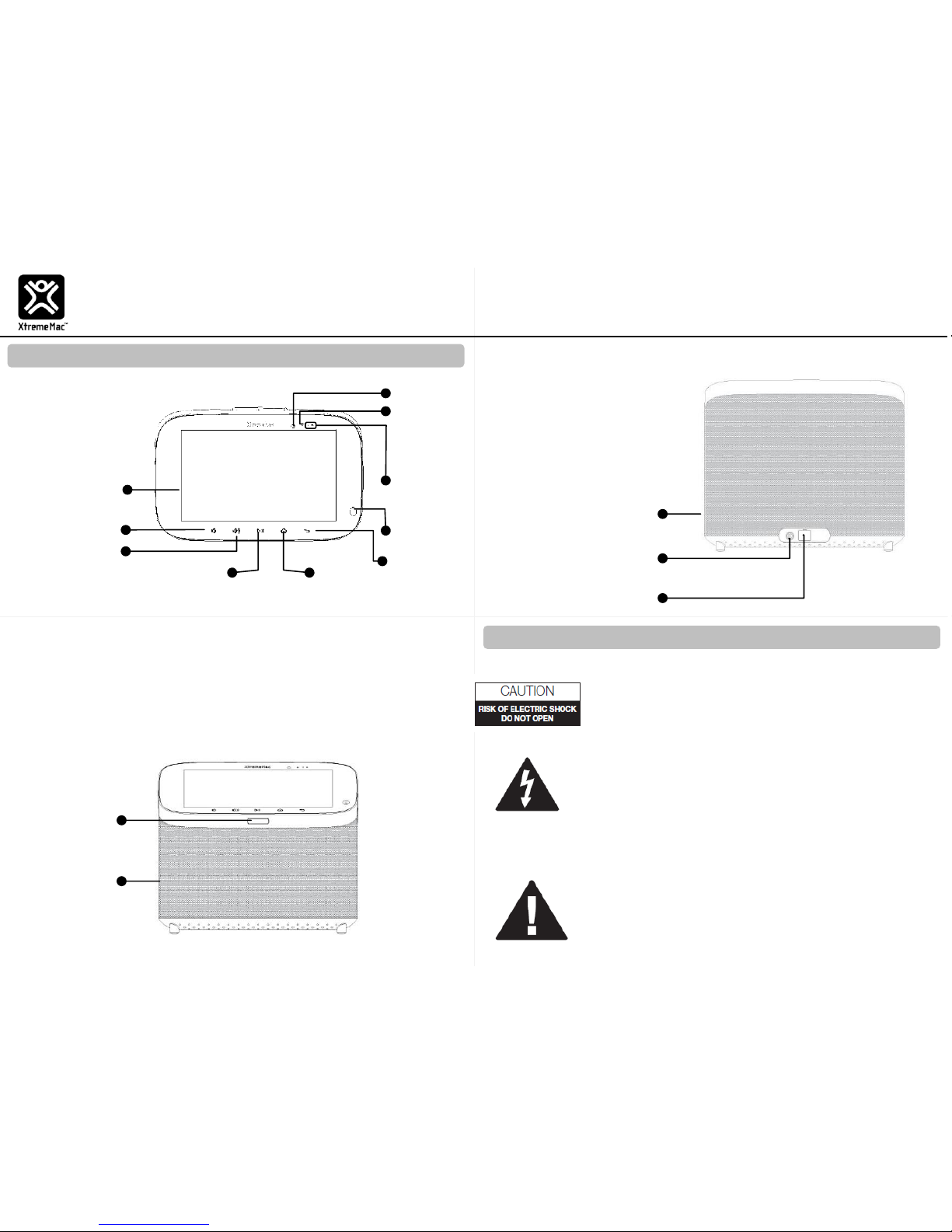
Key Functions
Top View
Camera
Indicator
Light
Camera
Back
Home
Monitor
Play/Pause
Volume Up
Volume Down
Proximity/
Ambient
Sensor
Front View
Speakers
Power Button
Speakers
Power Port
Micro USB Connector
Back View
2. Safety First
KitchenHubTM
Model: IPU-TTS-13
www.xmkitchenhub.com
Technical Support: (646)-801-1380
QUICK START GUIDE
Indicator Light Modes
• Blinking Blue – Operating (Battery mode)
• Blinking Red – Low battery (Battery mode)
• Constant Red – Sleep Mode (Battery mode)
• Constant Blue – Sleep Mode
DANGEROUS VOLTAGE: The lightning flash with
arrowhead, within an equilateral triangle, is intended to
alert the user to the presence of uninsulated dangerous
voltage within the product’s enclosure that may be of
sufficient magnitude to constitute a risk of electric shock
to persons.
CAUTION: To reduce the risk of electric shock do not
remove cover (or back). No userserviceable parts
inside. Refer servicing to qualified service personnel
Important: Please read all safety instructions before proceeding.
ATTENTION: The exclamation point within an
equilateral triangle is
intended to alert the user to the presence of
important operating and maintenance (servicing)
instructions in the literature accompanying the
appliance.
Page 2
3. Basic Instructions
Plug In the Device
1. Insert the power cable into the KitchenHub’s Power Port.
2. Plug the power cable outlet into a standard AC power.
NOTE:
The KitchenHub is meant to be kept plugged-in all times.
While unplugged, some elements or features (such as the
Music Speakers) are disabled.
Using Linkr KitchenHub Platform
To watch the Linkr KitchenHub tutorial:
From Home Screen tap Menu (at the top-left) Support Tutorial
Connect Your Mobile To The Device (via Bluttoth)
1. From Home Screen tap Menu (at the top-left) Connect To Mobile
2. Click the icon (next to “Connect To Mobile”)
3. Follow the on-screen instructions
Your device is equipped with an internal rechargeable battery that is nonremovable. You should never attempt to open or disassemble this device
. Doing so may cause damage that voids your warranty. Do not use or
store your device in extreme temperatures as your device might overheat
and may present a burn and fire risk and cease to function.
This device complies with Part 15 of the FCC Rules: Operation is subject to
the following two conditions:
1. This device may not cause harmful interference and
2. This device must accept any interference that is received, including any
interference that may cause undesired operation.
This device is acting as slave and operating in the 2.4 GHz (2412 ~2462
MHz) band. Ad Hoc function is supported but not able to operate on nonUS frequencies. Do not use the device with the environment which below
minimum -10 ℃ or maximum over 50℃ .
NOTE: This equipment has been tested and found to comply with the limits for a
Class B digital device, pursuant to part 15 of the FCC Rules. These limits are
designed to provide reasonable protection against harmful interference in a
residential installation. This equipment generates uses and can radiate radio
frequency energy and, if not installed and used in accordance with the
instructions, may cause harmful interference to radio communications. However,
there is no guarantee that interference will not occur in a particular installation.
This product only can be used with the socket outlet. It
cannot be used with multiple socket outlet.
WARNING: TO PREVENT FIRE OR SHOCK HAZARD, DO NOT
EXPOSE THIS UNIT TO RAIN OR MOISTURE.
Users of this product are cautioned not to make modifications or changes
that are not approved by XtremeMac S.AR.L. Doing so may void the
compliance of this product and may result in the loss of the user’s
authority to operate the equipment
Use only an approved charger to charge your device. Improper
handling of the charging port, as well as the use of an incompatible
charger, may cause damage to your device and void the warranty.
Turning Your Device On and Off
To turn on your device, press and hold the Power Button for a few
seconds. When you turn on your device for the first time, follow the
on-screen instructions to set up your device.
To turn off your device, press and hold the Power Button for a few
seconds and follow the prompts.
Initial Device Configuration
Follow the on-screen instructions to complete the setup process.
If this equipment does cause harmful interference to radio or television reception,
which can be determined by turning the equipment off and on, the user is
encouraged to try to correct the interference by one or more of the following
measures:
-Reorient or relocate the receiving antenna.
- Increase the separation between the equipment and receiver.
-Connect the equipment into an outlet on a circuit different from that to which
the receiver is connected.
-Consult the dealer or an experienced radio/TV technician for help
ATTENTION: The exclamation point within an equilateral
triangle is intended to alert the user to the presence of
important operating and maintenance (servicing)
instructions in the literature accompanying the
appliance.
Page 3

FCC statement
This device complies with Part 15 of the FCC Rules: Operation is subject to
the following two conditions:
1. This device may not cause harmful interference and
2. This device must accept any interference that is received, including any interfer
ence that may cause undesired operation.
Human exposure to RF emissions from mobile devices (47 CFR ¡ì2.1091) may be
evaluated based on the MPE limits adopted by the FCC for electric and magnetic
field strength and/or power density, as appropriate, since exposures are assumed
to occur at distances of 20 cm or more from persons.
This device is acting as slave and operating in the 2.4 GHz (2412 ~2462 MHz&
2402 -2480 MHz) band.
Ad Hoc function is supported but not able to operate on non-US frequencies.
Do not use the device with the environment which below minimum -10℃ or maximum
over 50℃ .
NOTE: This equipment has been tested and found to comply with the limits for
a Class B digital device, pursuant to part 15 of the FCC Rules. These limits are
designed to provide reasonable protection against harmful interference in a
residential installation. This equipment generates uses and can radiate radio
frequency energy and, if not installed and used in accordance with the
instructions, may cause harmful interference to radio communications.
However, there is no guarantee that interference will not occur in a particular
installation. If this equipment does cause harmful interference to radio or
television reception, which can be determined by turning the equipment off and
on, the user is encouraged to try to correct the interference by one or more of
the following measures:
- Reorient or relocate the receiving antenna.
- Increase the separation between the equipment and receiver.
-Connect the equipment into an outlet on a circuit different from that to which
the receiver is connected.
-Consult the dealer or an experienced radio/TV technician for help
 Loading...