

Page 1
APM013814.00G S-362-DC
L196XW210MM3105G X ROCKER(N) S-362-DC REV1.0 ROHS HR4040
Thank you for purchasing the X ROCKER! We know you will
enjoy your X Rocker experience as much as we do.
Welcome to the wor ld of interactive audio. W ith
your new X Rocker you can now not only hear your
music but actually FEEL it. Whether you are listening
to music, watching a movie, or playing a game, you
will become a part of it.
Get ready to experience sound as you never have!
Do not return this product to the store.
Email [email protected] or call
866-969-2603/931.359.2603 for troubleshooting advice.
IMPORTANT: You must keep your original retail receipt as proof of purchase.
HAVE THIS ITEM NUMBER READY WHEN CONTACTING CUSTOMER SERVICE: 51431
Page 2
A1 A3 A4
A2
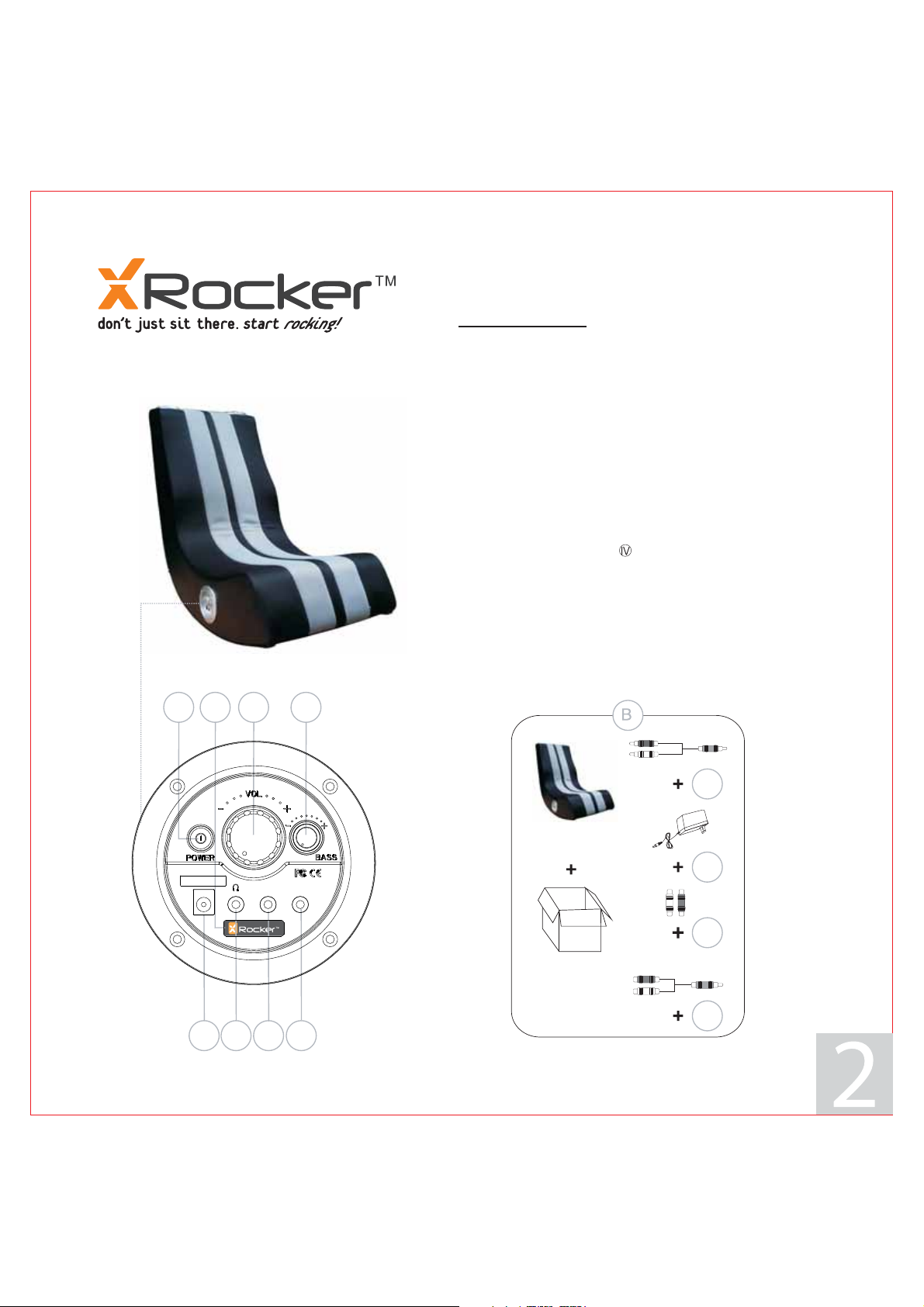
FEATURES
A-Control Panel
A1-Power On/Off Button Switch
A2-Power Indicator Light
A3-Volume Adjustment
A4-Bass Volume Adjustment
A5-9V DC Power Input Jack
A6-Headphone Plug in Jack
A7-Audio Input Jack
A8-Audio Output for linking multiple chairs
B-Accessories Supplied
B1-3m RCA Stereo to 3.5mm stereo plug cable(1 PC)
B2-INPUT:100-240V AC 50/60Hz
OUTPUT:9V DC 1.4A 12.6W Main POWER Adapter
(EFFICIENCY LEVEL: 115V )
B3-RCA female to female barrel adapter (2 PCS )
B4-0.15m RCA stereo female to 3.5mm stereo male cable (1PC)
C-Audio Specification
Signal-to-Noise Rate(Amplifier): Subwoofer :>50dB
Satellite :>60dB
Frequency Response: 60Hz~20kHz
Distortion: Subwoofer: <2%(F=100Hz)
Satellite: <1%(F=1kHz)
Input: DC 9V/1.4A
9.84ft/3m
A5 A6 A7 A8
*SOME PARTS MAY VARY SLIGHTLY
B1
B2
B3
0.492ft/0.15m
B4
Page 3
FUNCTIONS:
·
Foldable construction for ease of storage and portability
·
Side control panel with volume, bass control, and input/output jacks.
·
Ergonomic design with full back support.
.
READ BEFORE USAGE:
·
Always make sure velcro flap is attached before moving
·
Always make sure velcro flap is attached before sitting in the chair.
·
Excessive use of audio equipment could lead to hearing loss.
·
Excessive sound pressure from earphones and headphones can cause hearing loss
·
Children under the age of 13 should not use this product without adult supervision.
·
Strictly for indoor use. Do not expose to direct sunlight, moisture or extreme temperatures.
·
If cover becomes wet disconnect power immediately and don't use until completely dry.
·
Do not attempt to remove the cover or any components. Removal of the cover or tampering with components puts you
at risk for injury or death from electrical shock.
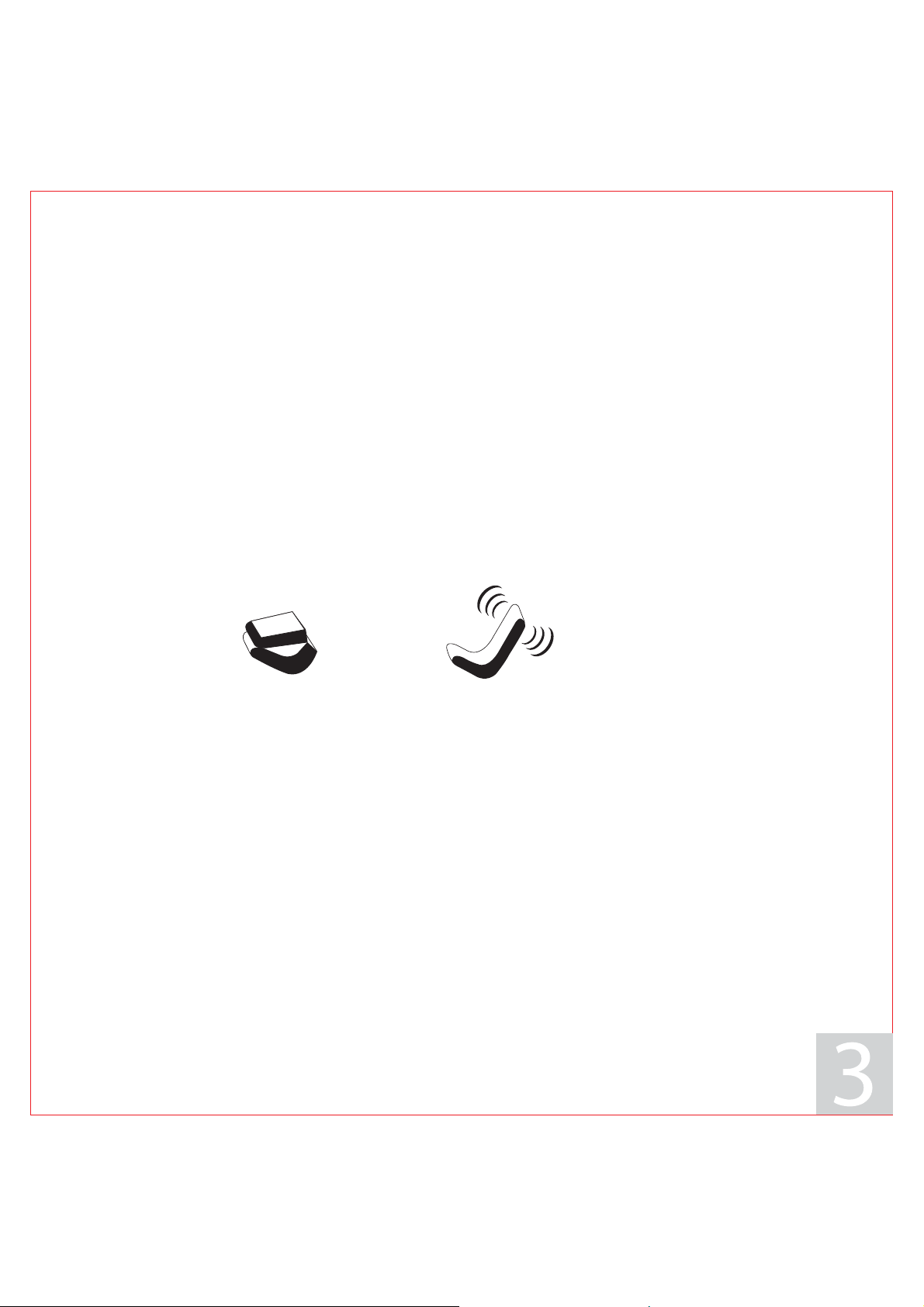
PICTURE OUT OF BOX SITTING POSITION
.
SE T UP:
1. Lift X Rocker out of box.
2. Keep the chair in the folded position and place it on the floor so that back side of the chair is facing up and
the bottom of the seat is touching the floor.
3. Review the set up diagrams to familiarize yourself with the X Rocker's components, accessories, and set-up.
4. Pull and secure the Velcro flap.
5. Unpack the power adapter and connect it to the main power outlet, then to the power jack on the control panel (A5).
6. Press the power button and confirm that the power indicator light (A2) is on.
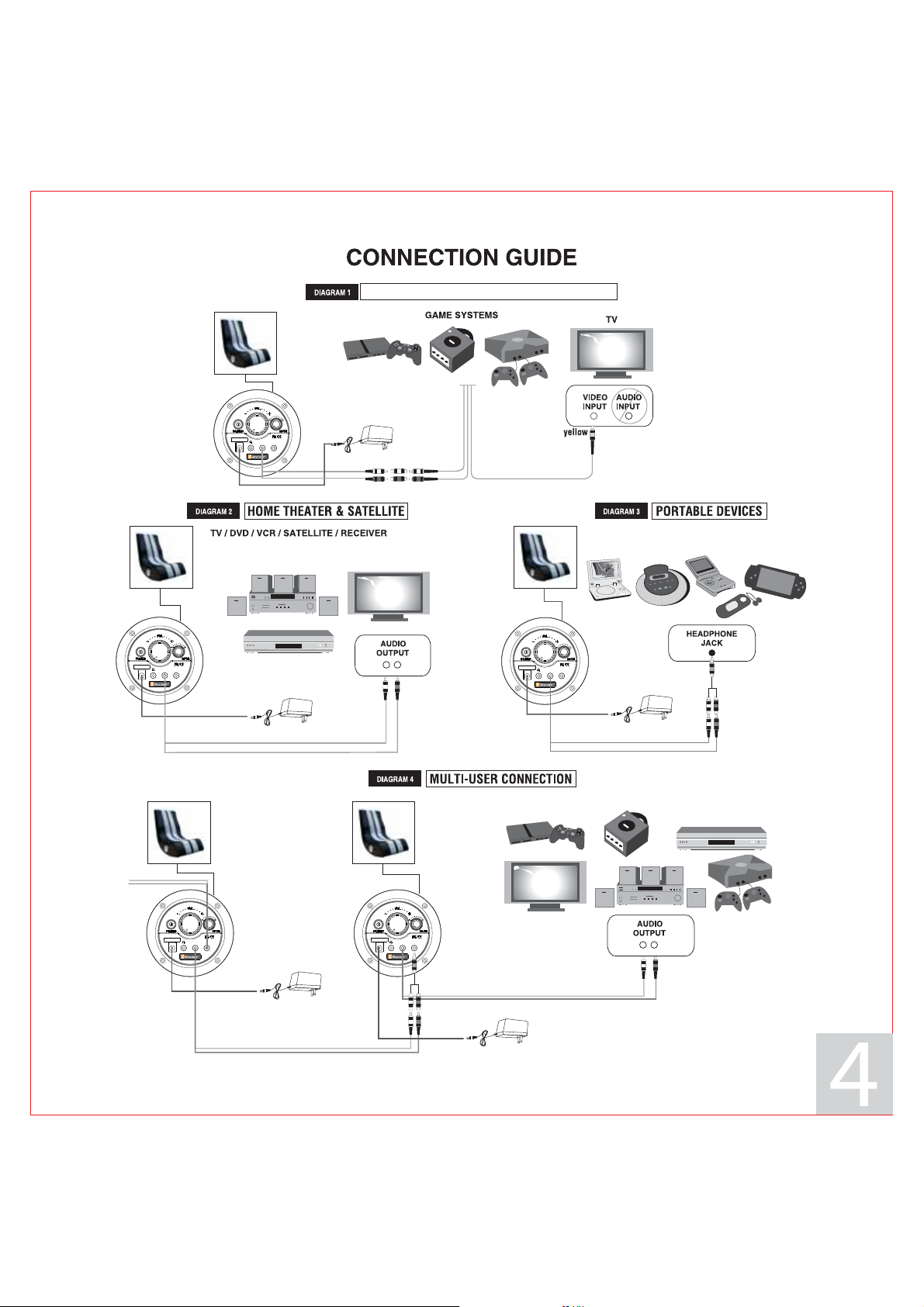
7. Follow the connection diagrams. They show how to connect the X Rocker to the audio source of your choice .
8. Adjust the bass and volume levels to your preference---start rocking.
Page 4
X Rocker
CONNECTION GUIDE
TM TM TM
XBOX , XBOX 360 , PLAYSTATION 3 & WII
white
red
X Rocker X Rocker
X Rocker X Rocker
To next chair
white
MP3 / CD / DVD / GAMES / PSP
green
red
red
white
red
white
white
red
Page 5

TROUBLE SHOOTING
- Unable to connect to game console -
Most gaming consoles are shipped from the manufacturer with an Audio/ Video RCA cable. The A/V RCA cable has three RCA
plugs: a video plug (yellow) and two audio plugs (red and white). If your gaming console came with an A/V RCA cable, please
follow the instructions supplied by the game console manufacturer for setting up your gaming console and connecting it to the
television. Please note that you must leave the red and white audio jacks on the A/V cable UNCONNECTED. Once the console is
properly connected to your TV, please follow the diagram in the Rocker Set-up guide to connect the gaming
console to the X Rocker.
If your gaming console was shipped with a coaxial cable, instead of an A/V RCA cable, you must follow an alternate set-up
procedure (coaxial cable is the same type of cable that is used to connect a VCR to the TV). You will quickly recognize if your gaming
console uses this type of cable. It connects the gaming console directly to the television and carries both the audio and video signal
over a single cable. If your gaming console uses a coaxial cable, you CAN NOT connect it directly to the X Rocker. Instead, you must
Use an intermediary A/V device (such as a TV, VCR, DVD, TiVO, etc) Please follow these steps:
a. Connect your gaming console to the intermediary A/V device via the coaxial cable.
b. Connect the X Rocker to the 'Audio Out' jack on the intermediary A/V device.
c. Follow diagram 2 in the X Rocker Set-up guide to connect the X Rocker to the intermediary A/V device and
finalize the setup.
If your gaming console is attached to an HD TV with an HDMI cable. You will need to connect the chair using either the audio out jacks
on the back of the TV or by plugging into the headphone jack on the front of the TV.
- Unable to hear any sound from the X Rocker -
illustrated X
1. Check to ensure that the power adapter is properly connected. When properly connected, the indicator light on the
control panel should light up. If the indicator light does not light up, try to use another power outlet in your home.
2. Make sure the power unit is turned on and indicator light on the control panel is lit. If it is not, please press the power
switch on the control panel.
3. Once you have successfully completed 1. and 2. please review the X Rocker illustrated set-up guide. Double check
all audio connections. Finally, check that the volume on the hand remote is turned to an audible level on both the TV
and the chair.
4. If you have completed 1- 3 and still do not hear sound, try connecting another audio source (CD player, television,
VCR or game console) and go through the steps again. Still not working? Help is as easy as 1,2,3:
1. Go to for FAQ answers.
2. Email [email protected].
3. Call our customer service department at 866.969.2603 or 931.359.2603. Office hours are 8:30am to 5:00pm
www.thexrocker.com
central standard time.
Page 6

IMPORTANT: You must keep your original retail receipt as proof of purchase.
WARRANTY PAGE
Limited Warranty :
Ace Bayou warrants this product (including any accessories) against defects in material and workmanship for a period of 90
days from the date of first consumer purchase. This warranty is enforceable only by the original purchaser.
ALL DAMAGED OR MISSING PARTS MUST BE REPORTED WITHIN 14 DAYS OF PURCHASE.
This warranty covers all defects in material and workmanship in this product, but DOES NOT COVER the following:
1. Damage, deterioration or malfunction resulting from:
a. Acts of God, accident, misuse, abuse, negligence, improper installation, maintenance or operation, or failure
to follow the instructions contained in this Owners Manual.
b. Any damage in the shipment of the products. (Claims must be presented to the carrier)
c. Repair, attempted repair, or modifications by anyone other than the Ace Bayou Service Center.
2. Any unit which has been modified of attempted to be modified or altered in anyway whatsoever.
3. Normal wear and periodic maintenance.
4. Any unit used for industrial or commercial purposes (including rental).
5. Products sold AS IS or WITH ALL FAULTS, or consumables (such as fuses, batteries, etc).
6. Customer instruction installation, set up adjustments or signal reception problems
Ace Bayou will repair or replace (at its discretion) units covered by this warranty, without charge to the consumer for labor or
materials. YOU ARE RESPONSIBLE FOR INITIAL SHIPPING CHARGES. However, we willpay the return shipping charges to any
destination within the USA if repairs are covered by the warranty.
REPAIR OR REPLACEMENT AS PROVIDED UNDER THIS WARRANTY IS THE EXCLUSIVE REMEDY OF THE CONSUMER. ACE BAYOU
SHALL NOT BE LIABLE FOR ANYINCIDENTAL OR CONSEQUENTIAL DAMAGES FOR BREACH OF ANY EXPRESSED OR IMPLIED
WARRANTY ON THIS PRODUCT. EXCEPT TO THE EXTENT PROHIBITED BY APPLICABLE LAW, ANY IMPLIED WARRANTIES,
INCLUDING WARRANTIES OF MERCHANTABILITY AND FITNESSFOR A PARTICULAR PURPOSE, ARE LIMITED IN DURATION TO
THE LENGTH OF THIS WARRANTY.
Some states do not allow the exclusion or limitation of incidental or consequential damages, or allow limitations on how
long and implied warranty lasts, so the above limitations may not apply to you.
FCC NOTE:
THE MANUFACTURER IS NOT RESPONSIBLE FOR ANY RADIO OR TV INTERFERENCE CAUSED BY UNAUTHORIZED
MODIFICATIONS TO THIS EQUIPMENT. SUCH MODIFICATIONS COULD VOID THE USER’S AUTHORITY TO OPERATE THE EQUIPMENT.
This device complies with Part 15 of the FCC Rules.
Operation is subject to the following two conditions:
1. This device may not cause harmful interference, and
2. This device must accept any interference received, including interference that may cause undesired operation.
DO NOT SHIP ANYTHING WITHOUT CONTACTING US FIRST. DO NOT SHIP ANY PARTS OF WHOLE UNITS TO THIS ADDRESS
FOR REPAIR.
For service assistance, product information, or to locate a dealer nearest you please call or write to:
Ace Bayou Corp
PO Box 1853
Lewisburg, TN 37091
1-866-969-2603
[email protected]
 Loading...