

Page 1
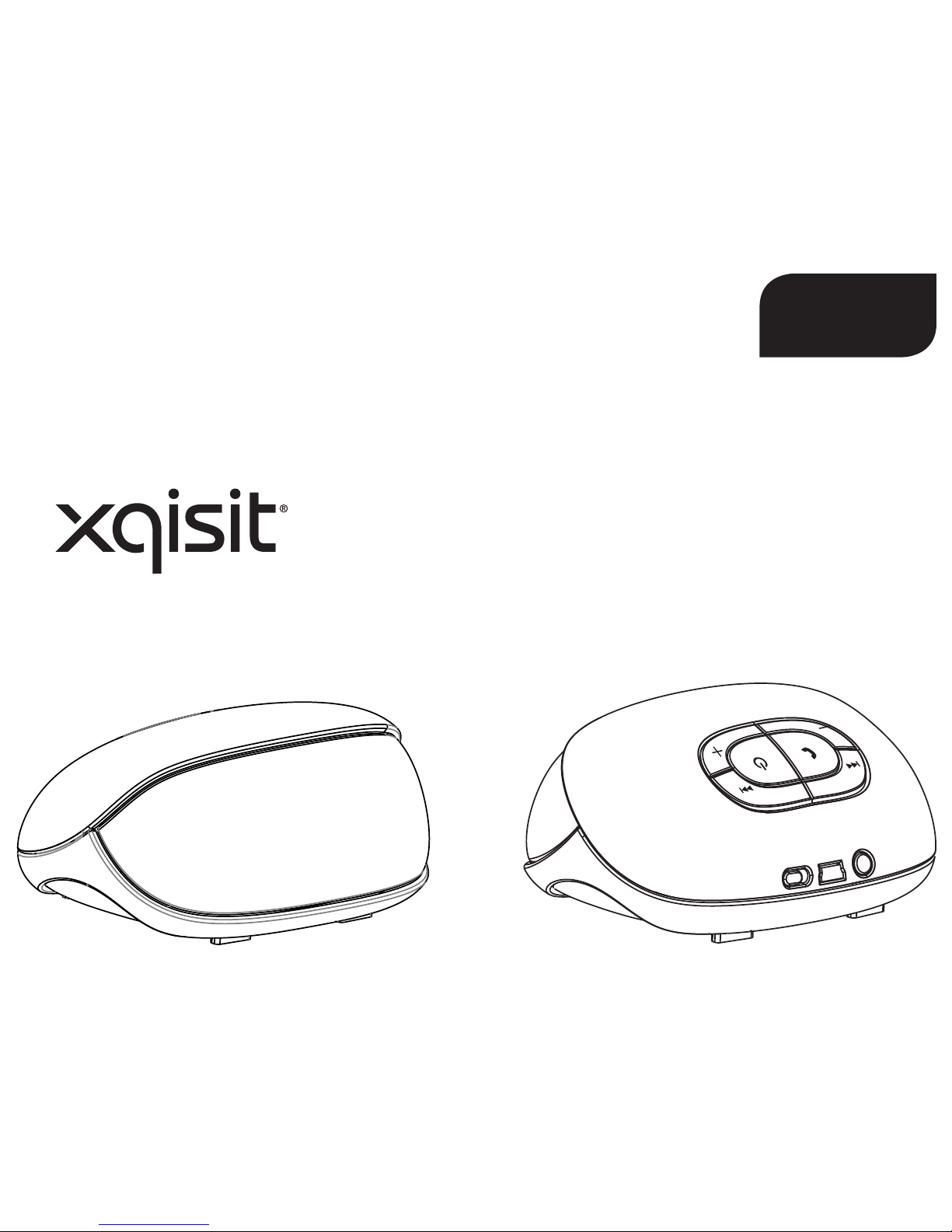
xqisit 2.0
EN
Page 2
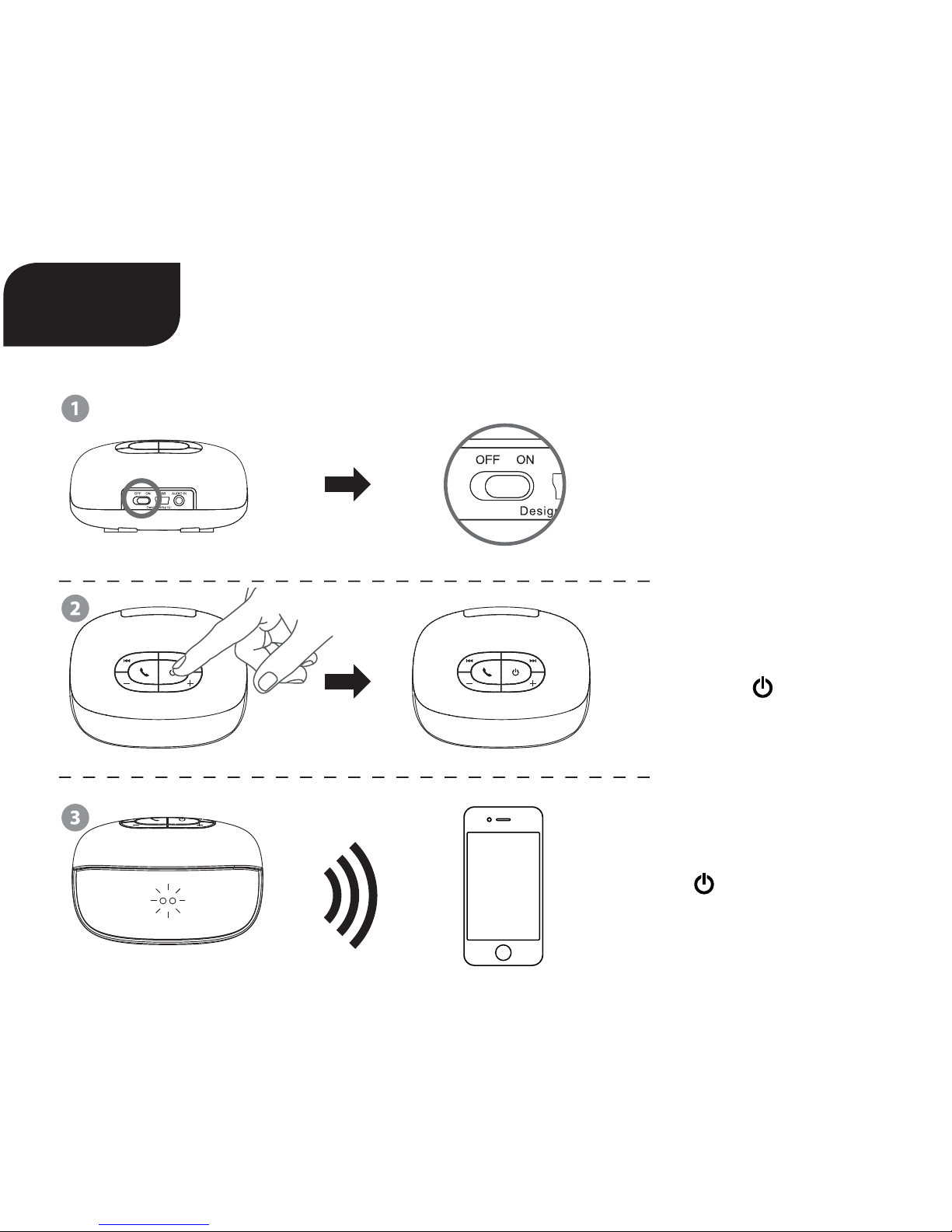
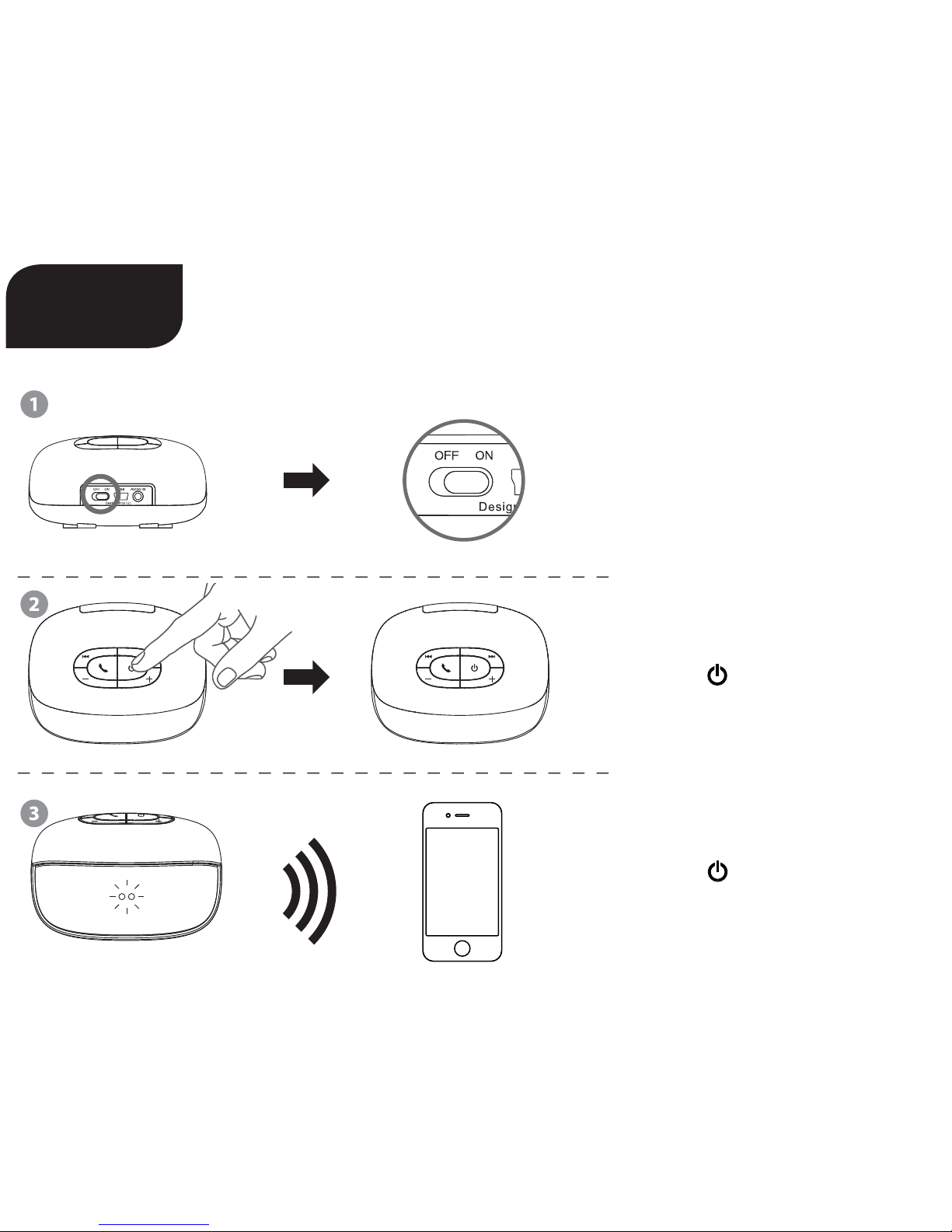
Quick start Guide
xqisit 2.0
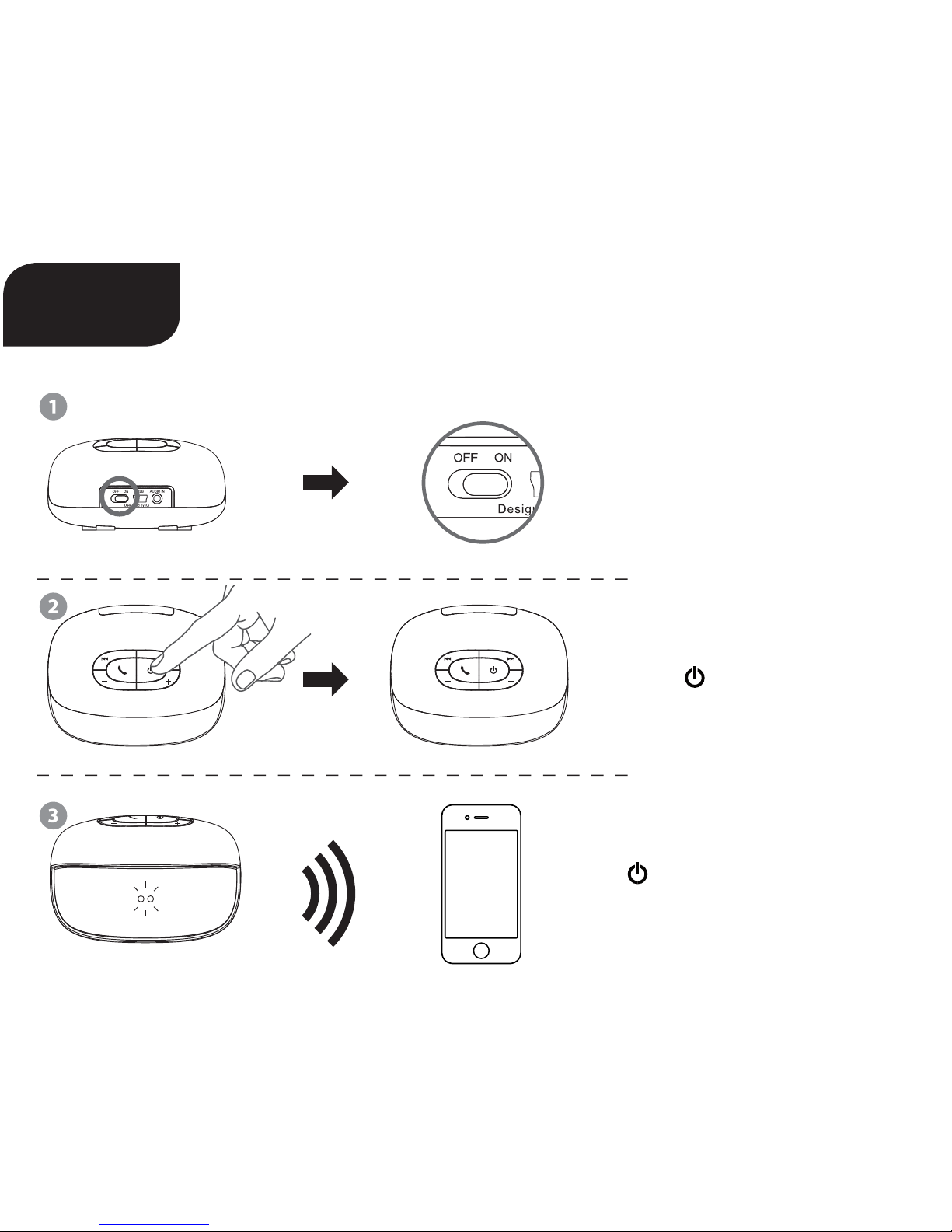
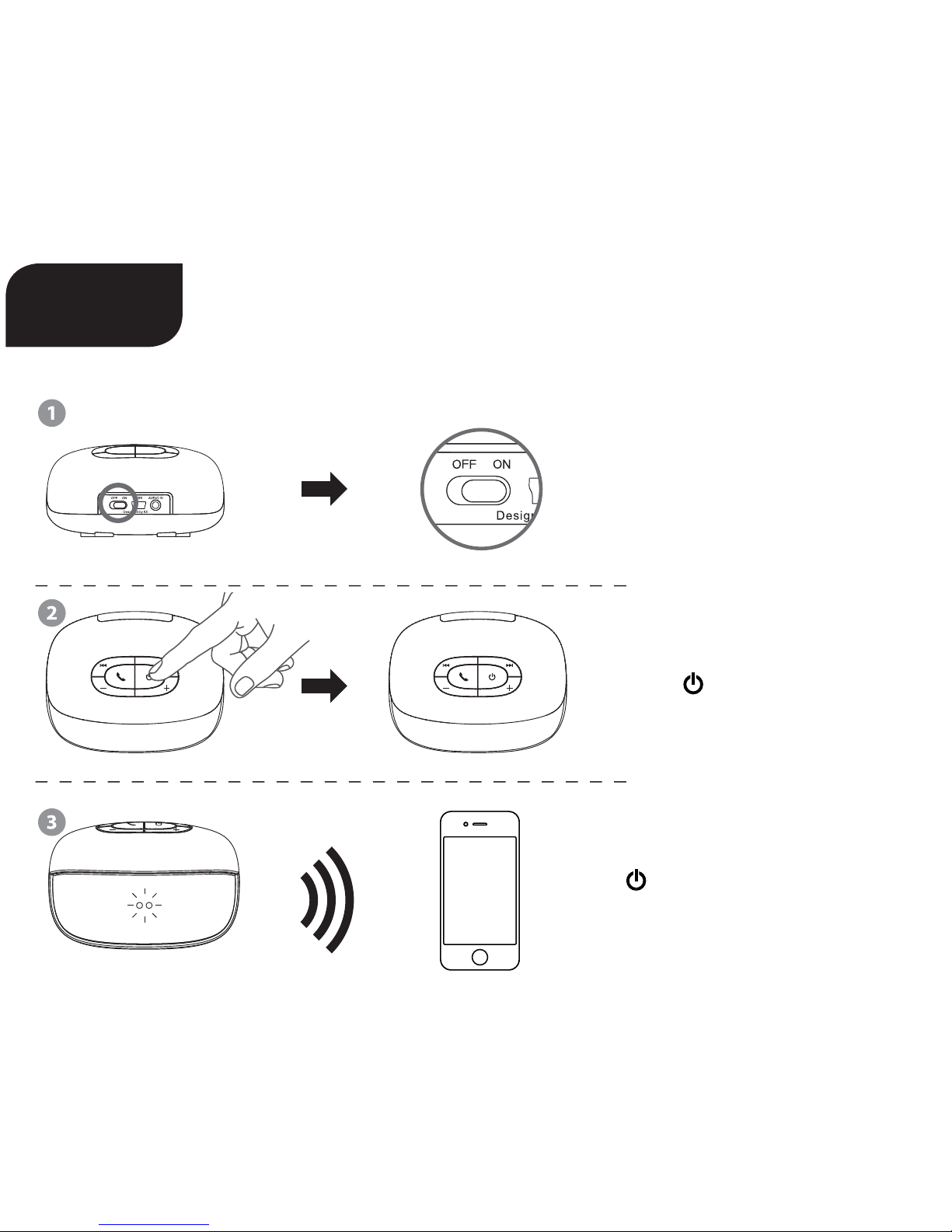
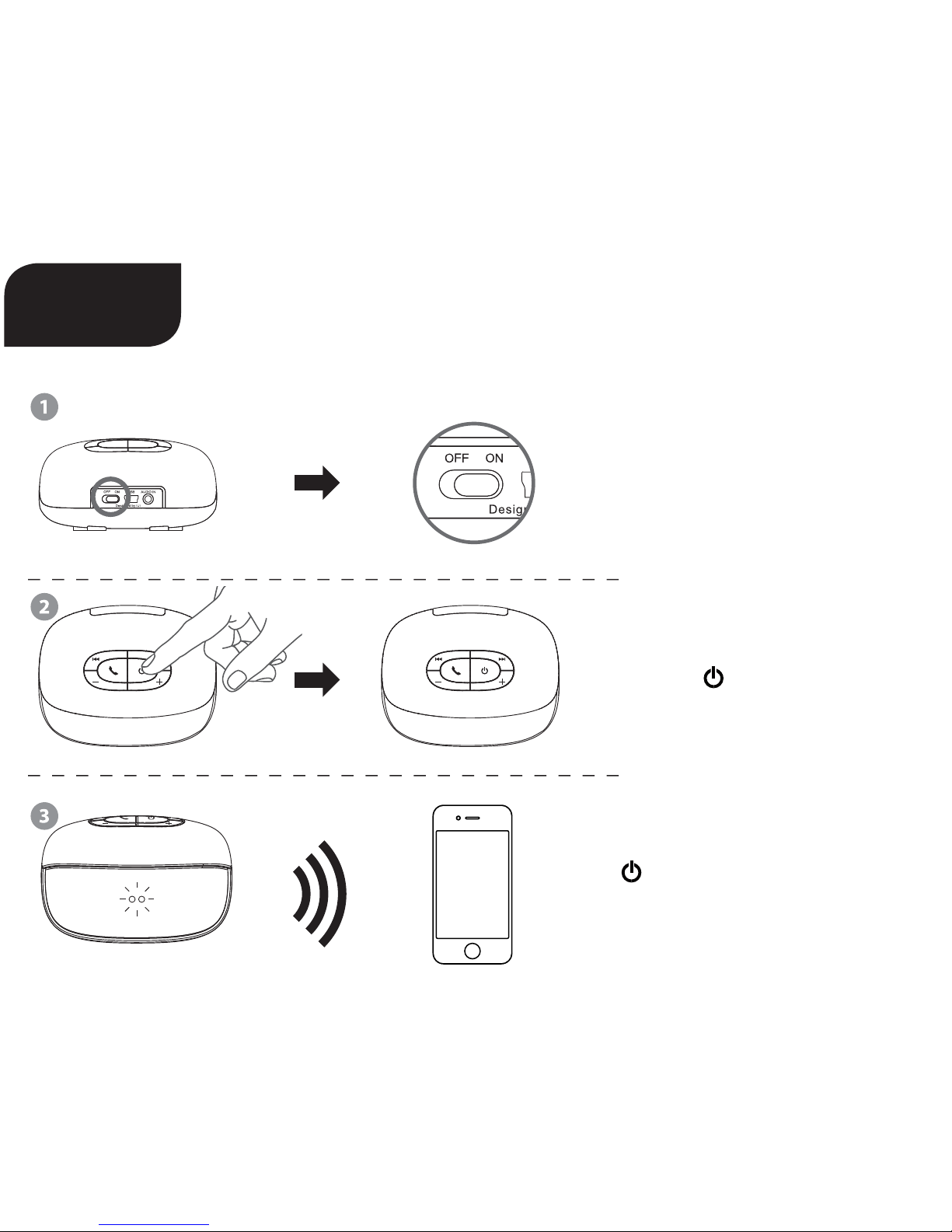
Put into „On“ Position
Long Press
Power On/O
Hold until
Flashing Blue + Red LED
Connect to your Device
EN
Page 3
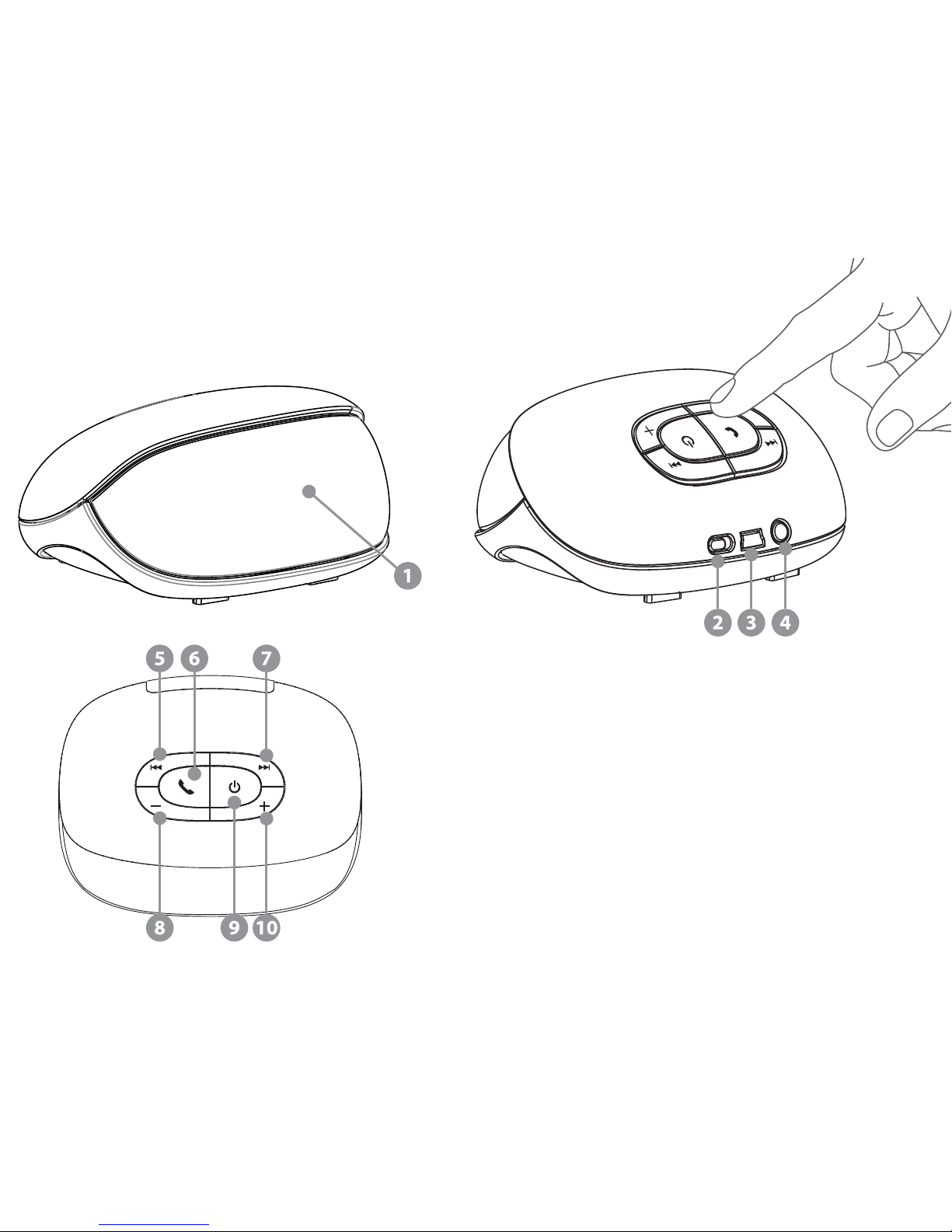
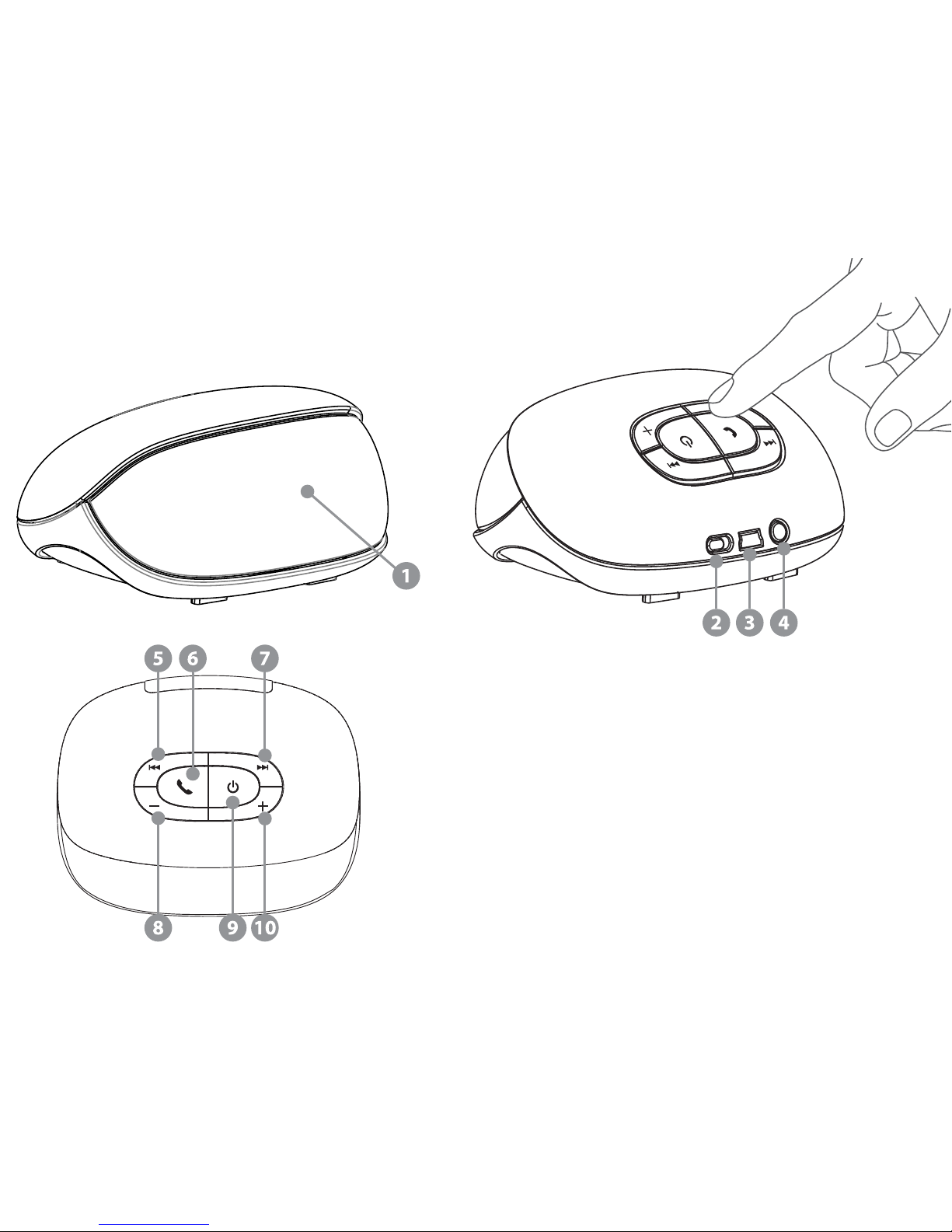
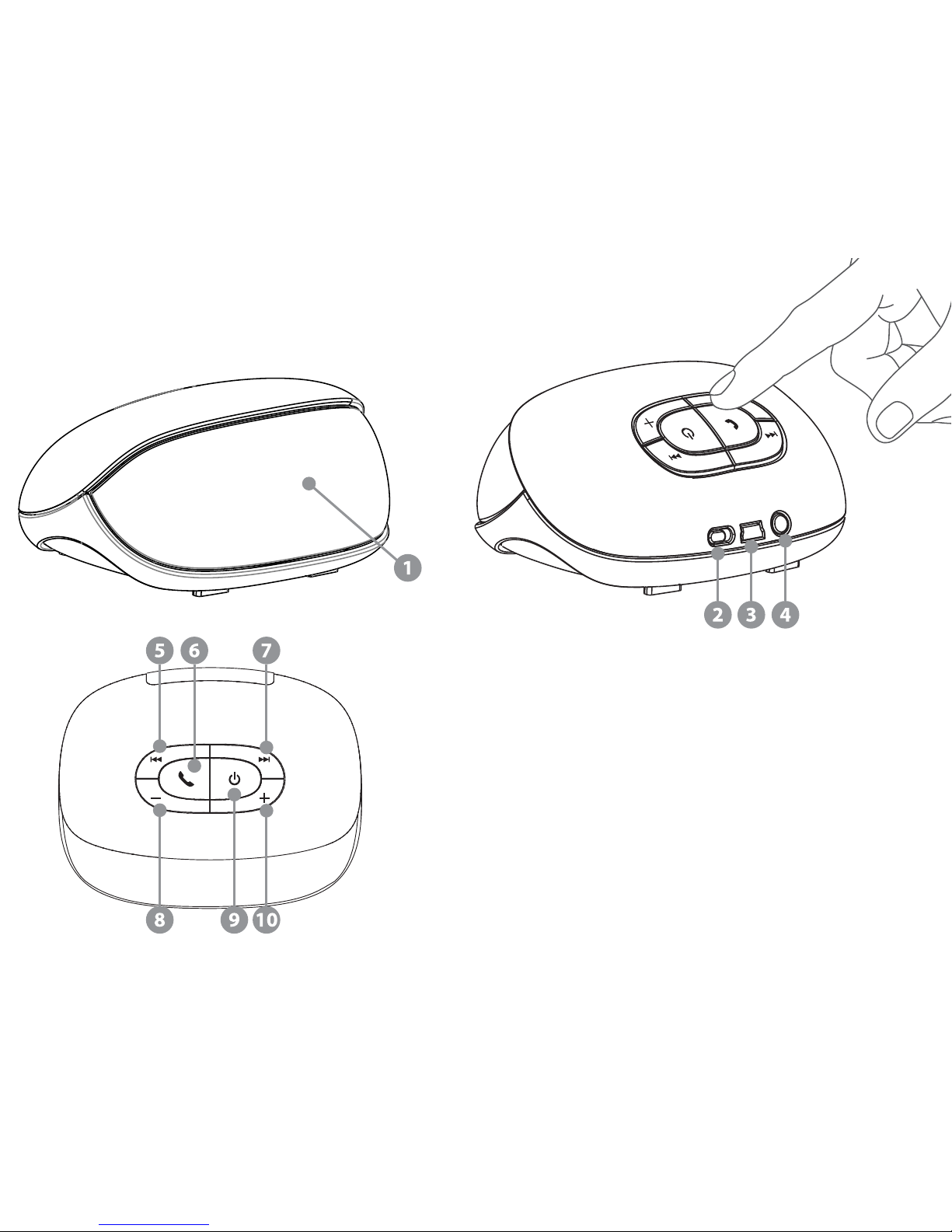
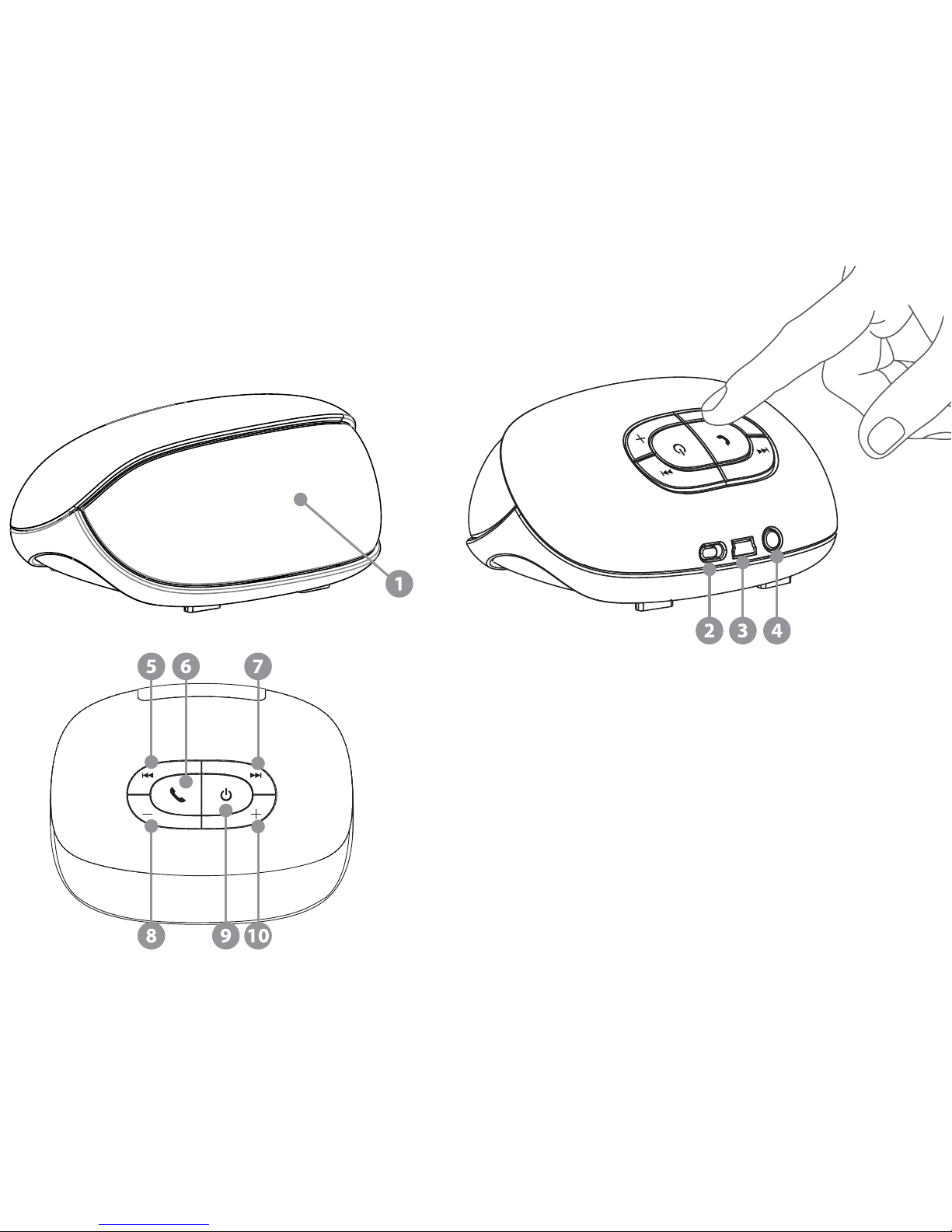
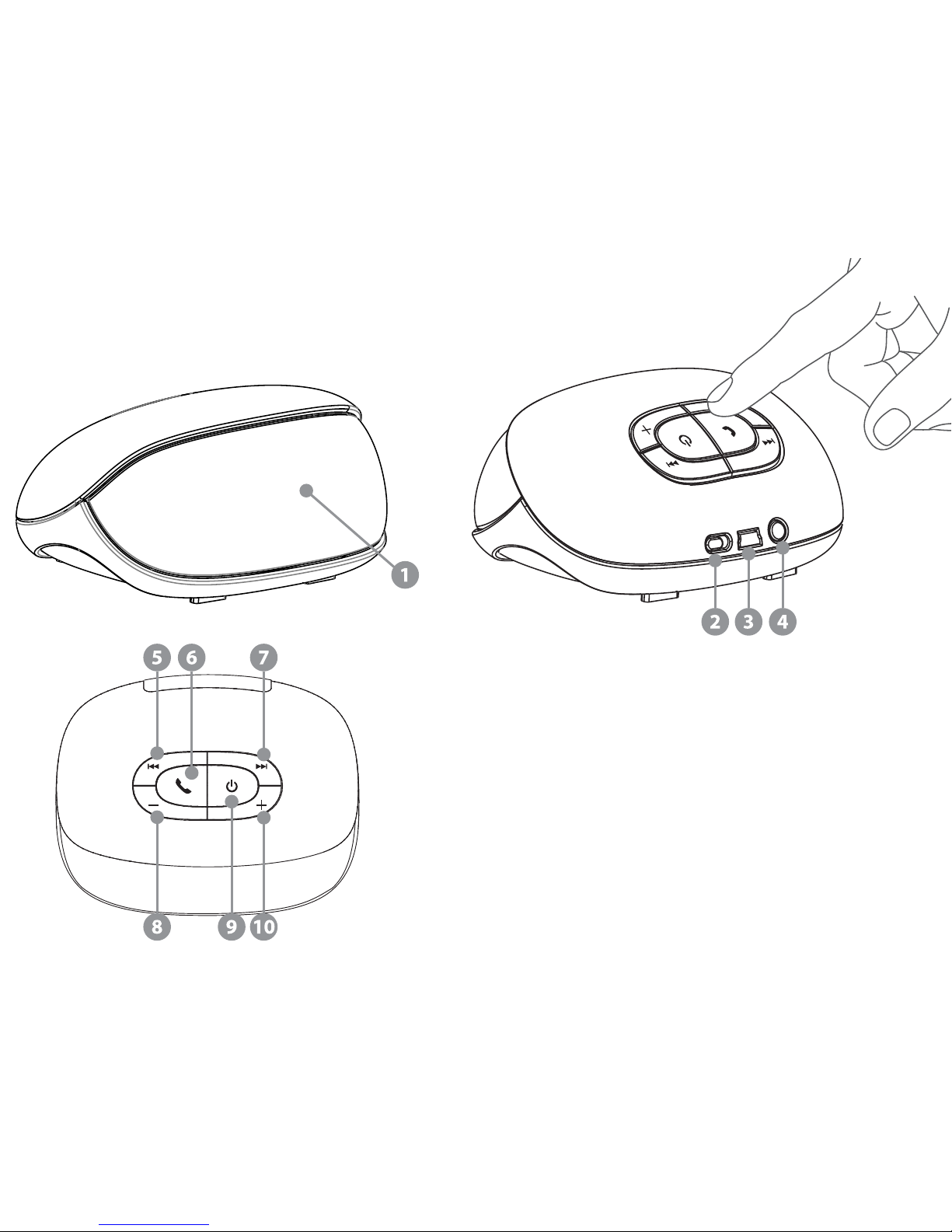
1 Battery Indicator
2 O & On Button
3 USB Port
4 3.5 mm Aux-in
5 Rewind
6 Phone, Play / Pause
7 Forward
8 Volume –
9 Power / Pair
10 Volume +
Page 4

Features
• Bluetooth version 2.1 + EDR with Special Audio Algorithm and DSP for clean, best-in-class wireless stereo sound
• Two 35 mm full range drivers deliver superb music delity
• Passive Woofer
• Convenient charging with USB charging cable
• Rechargeable Lithium-ion battery for up to 5 hours of playtime
• Voice Prompting (English)
• Battery Indicator on iPhone and Blackberry
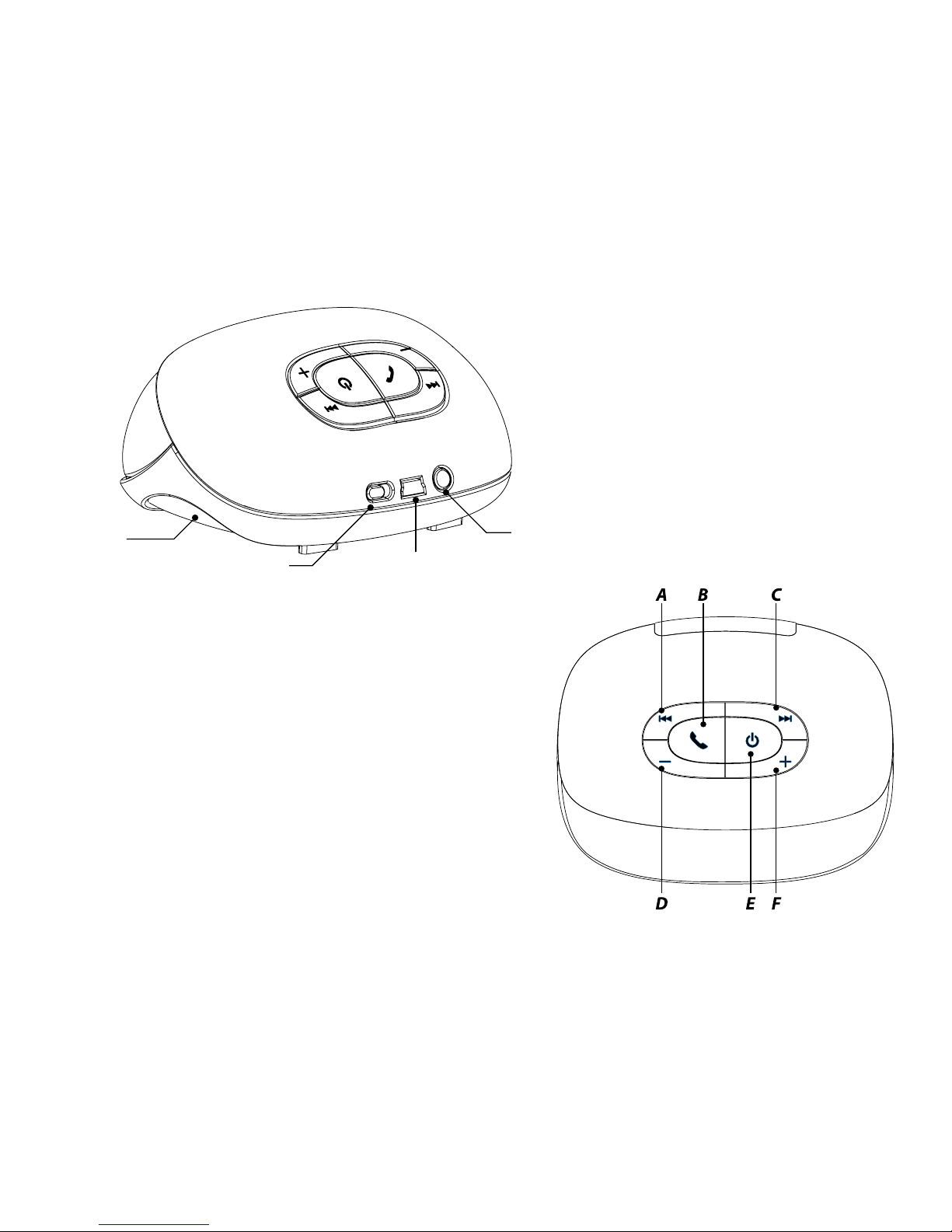
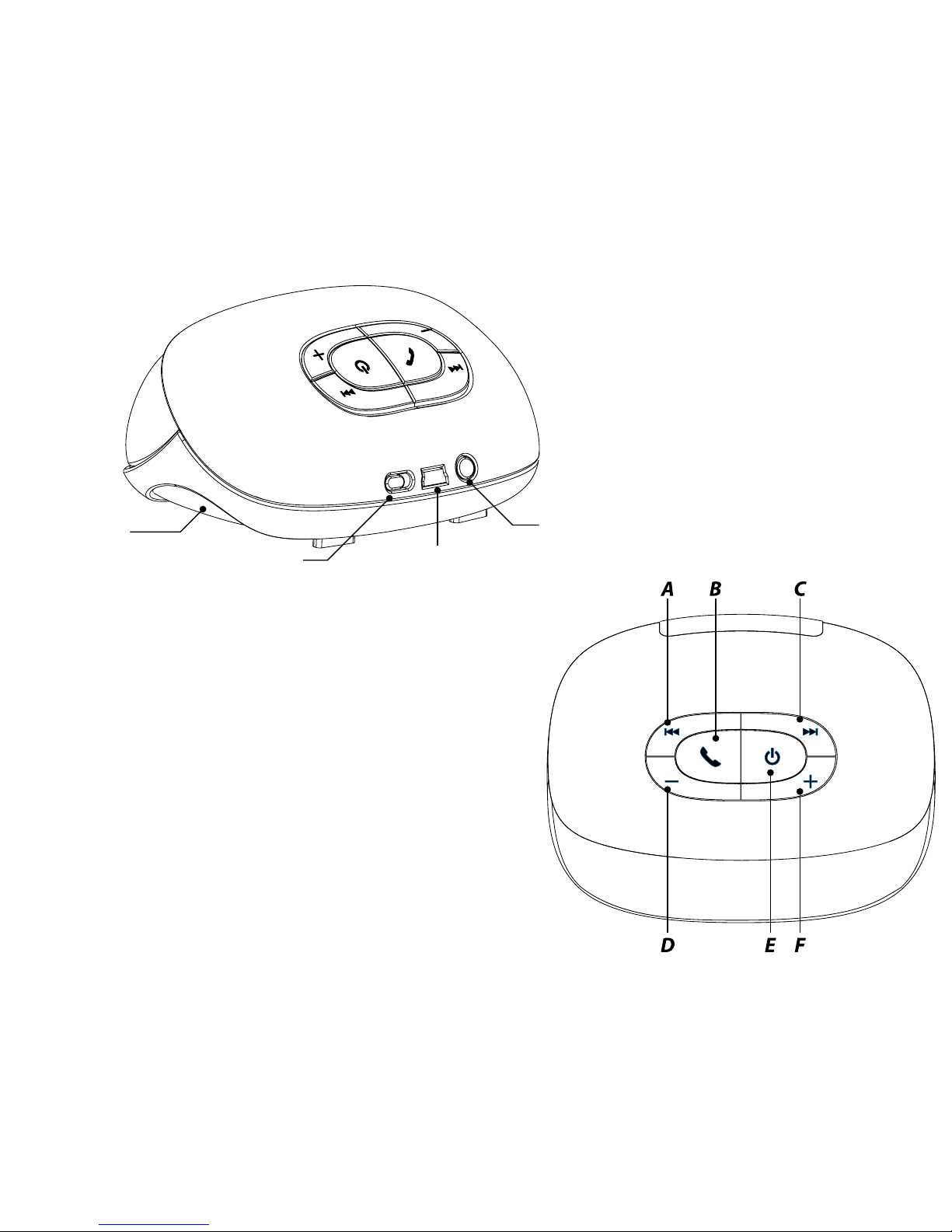
1) Anatomy
Button (in Bluetooth Music):
A Previous Track
B Play / Pause
C Next Track
D Volume -
E Power / Pair (Press and hold / Press long)
F Volume +
Button (during the phone call):
A (during the call): Mute / Unmute the Microphone
B (during Ringing): Answer Call (Short press) / Reject Call (Long press)
B (during the call): End of Call (Short press) / Toggle between Phone (Long Press)
C Volume –
D (during the call): Mute / Unmute the Microphone
F Volume +
Button (in General without Bluetooth connection):
E Power ON/OFF (Long press); Entry Pairing mode (Hold pressing from OFF)
Button (in Aux-in Music):
E Power OFF
Page 5
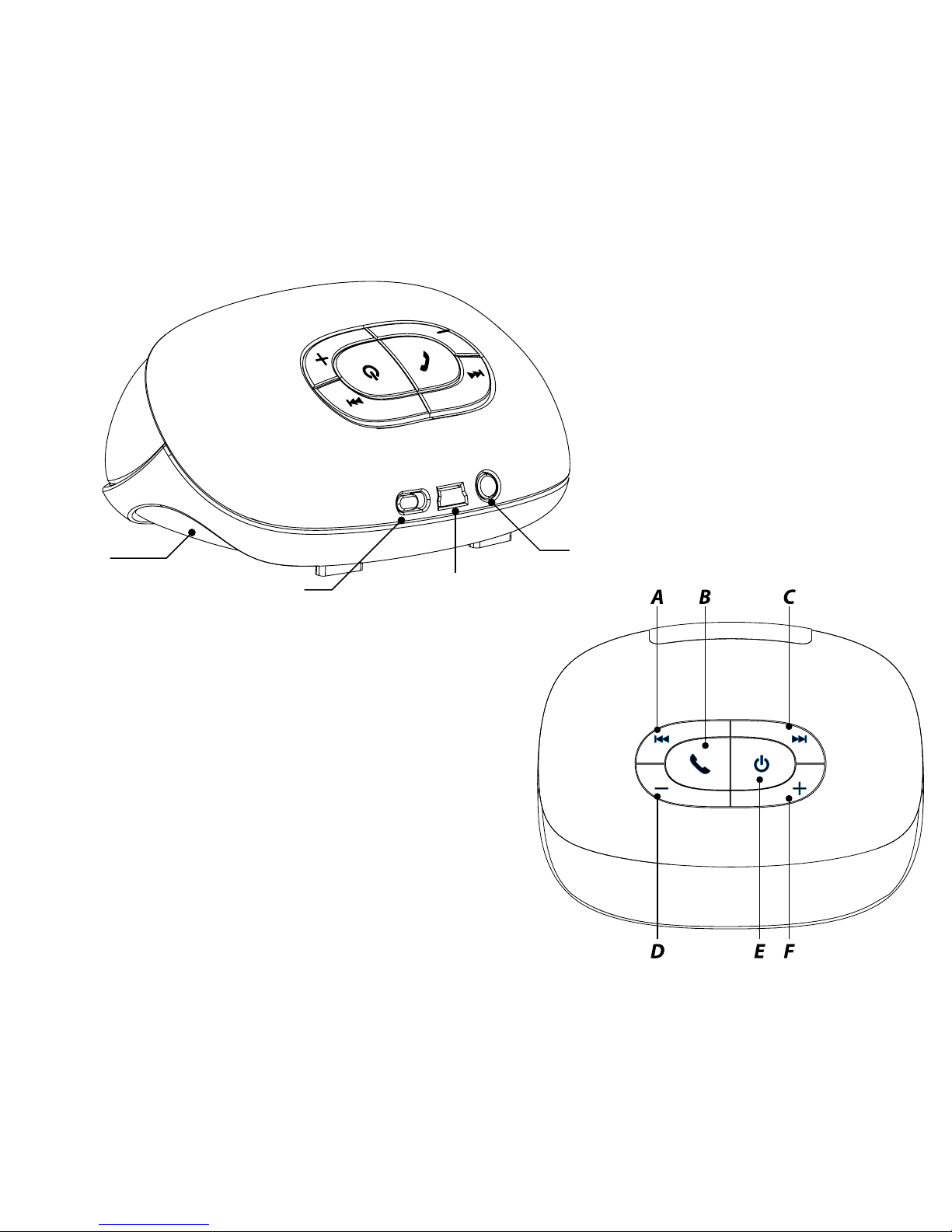
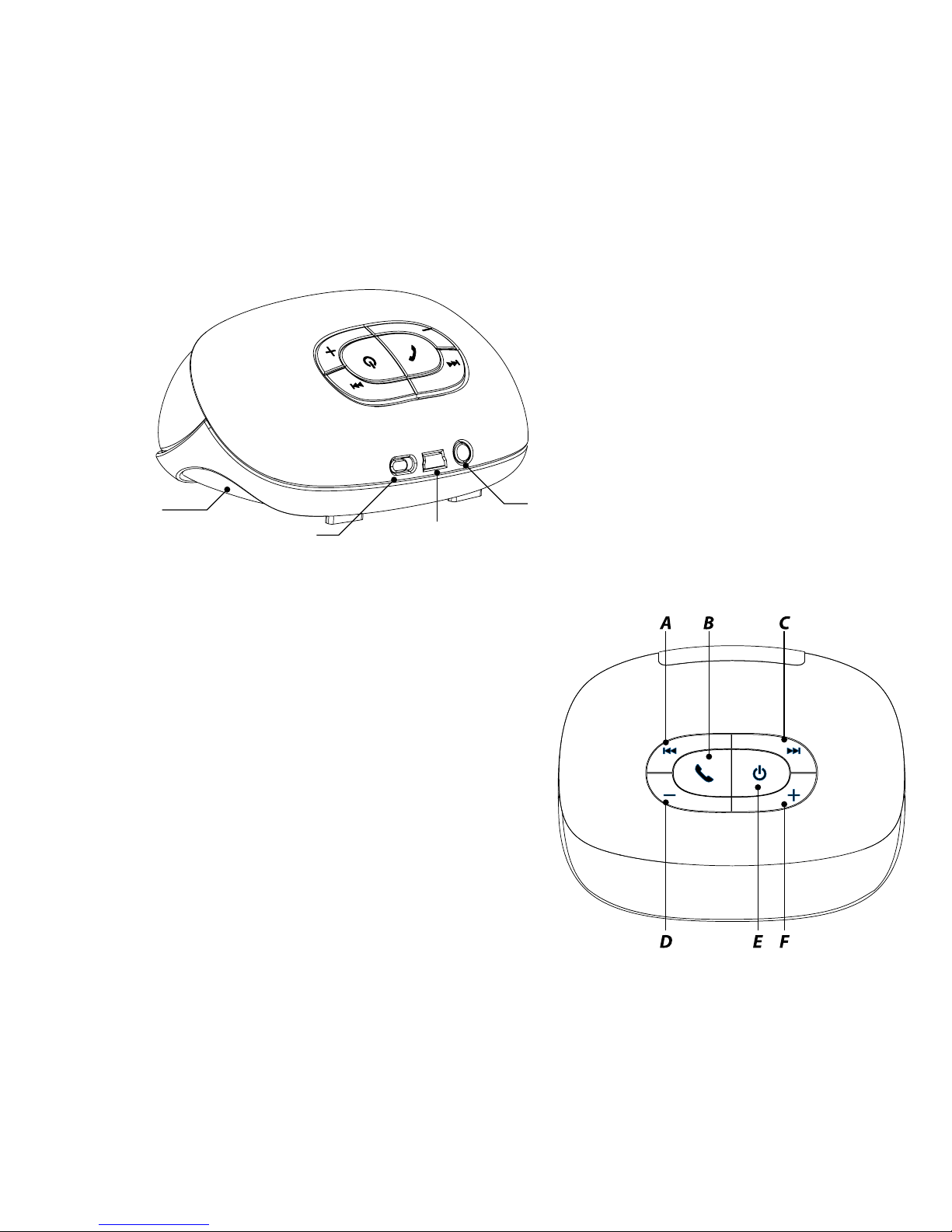
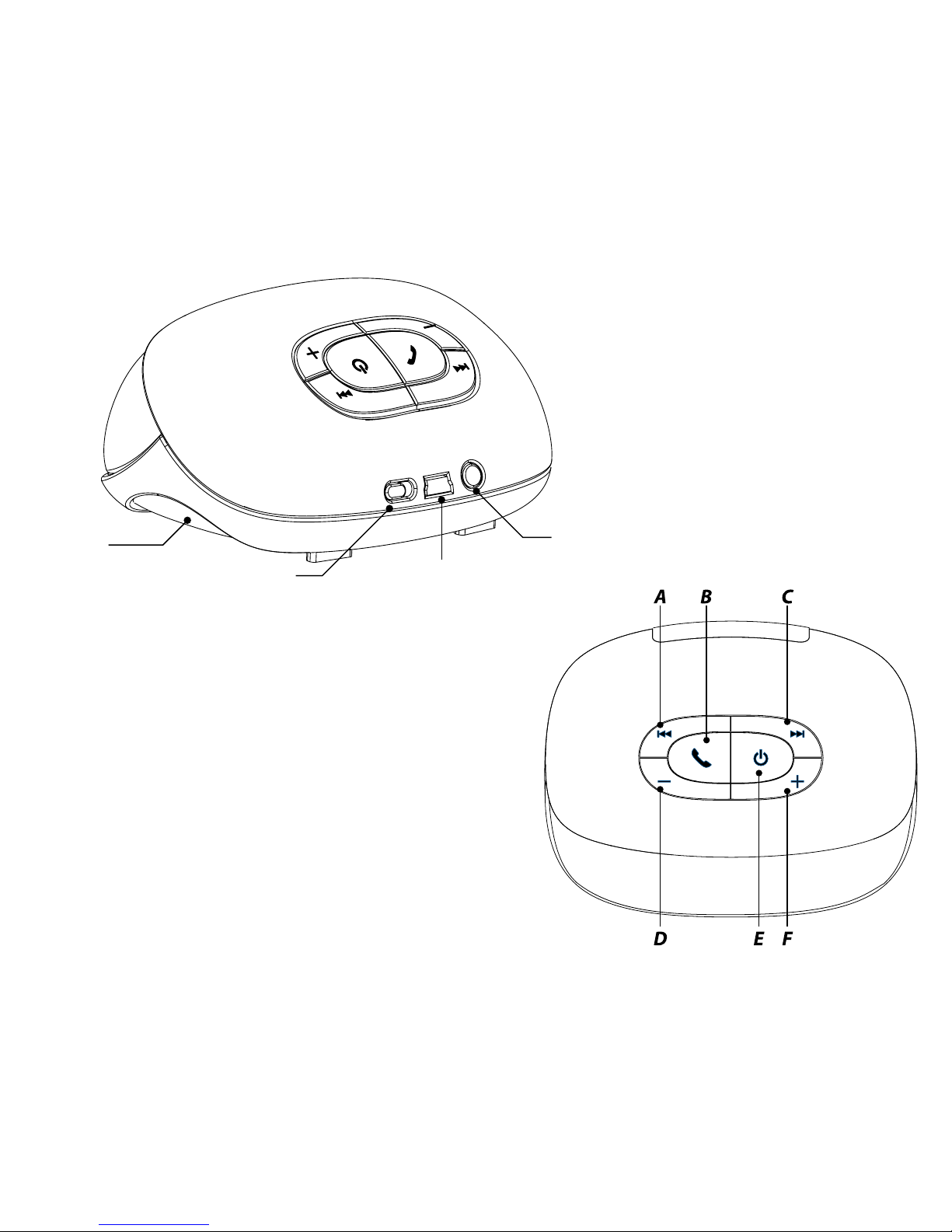
Passive
Radiator
Subwoofer
O and On Button
Aux-in
Port
USB Charging Port
Page 6

2) Power up xqisit 2.0
• Charge up xqisit 2.0 whenever it is needed by plug into computer via the USB cable
• Make sure the slide button is in the positon: “ON”
• Press key on the top panel until the front LED turns into blue
Remark: Fully charge xqisit 2.0 at least once a month
3) Pairing to xqisit 2.0
• Select a BT 2.0 or above device (mobile phone or music player) and turn on BT connection
• Activate your BT device to the searching mode (new device searching).
• Press and hold key until the front LED ashes in BLUE/RED, xqisit 2.0 has 3 mins (searchable time)
for your BT device to pair with.
• <<xqisit 2.0>> will be displayed in your BT device and select it for pairing. “0000” is the pairing code if necessary.
(Pairing code is not necessary for the iPhone, iPod , and iPad)
• Beep sound will be given when xqisit 2.0 is successfully paired and ashing stops
Remark: Pairing steps are for 1st time connection, automatic connection is allowed on most BT devices except iPhone
• Double check with your BT device to see if “xqisit 2.0” is connected.
You may also get into this pairing process by just pressing and holding the button: when the LED changes to
Red/Blue, release the button for pairing process; otherwise the unit will turn OFF.
Remark: xqisit 2.0 also stops ashing with a dierent sound to indicate pairing failure aer the 3mins.
4) Active Pairing on xqisit 2.0 (Alternative way to pair)
• Put your Bluetooth Device into the discovery mode, and put it close to the xqisit 2.0
• Get into the pairing process with the same procedure as shown in the 3), and wait for about 20s
• The “Pair Invitation” will pop-up on your Bluetooth Device, and just click the “Accept”.
“0000” is the pairing code if necessary.
Page 7
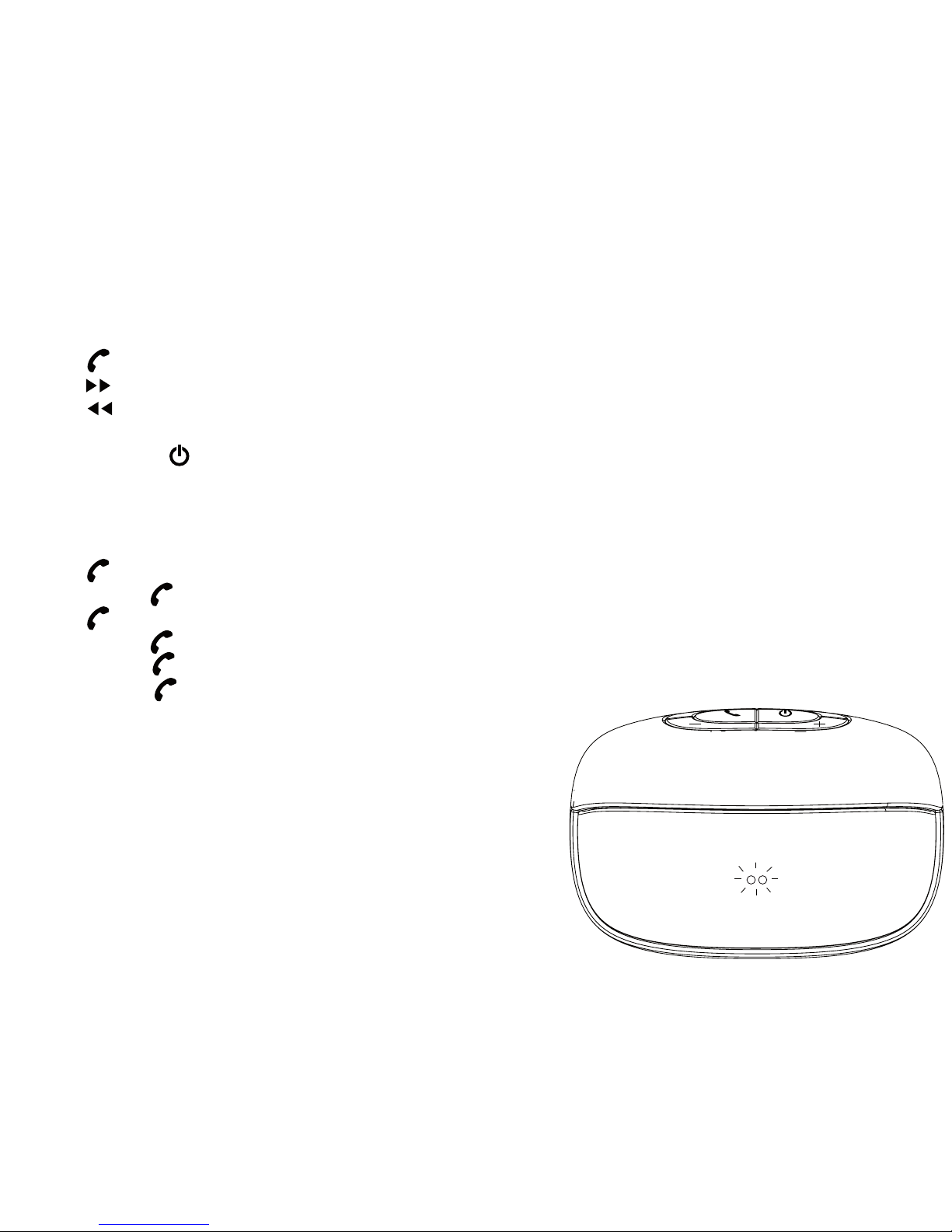
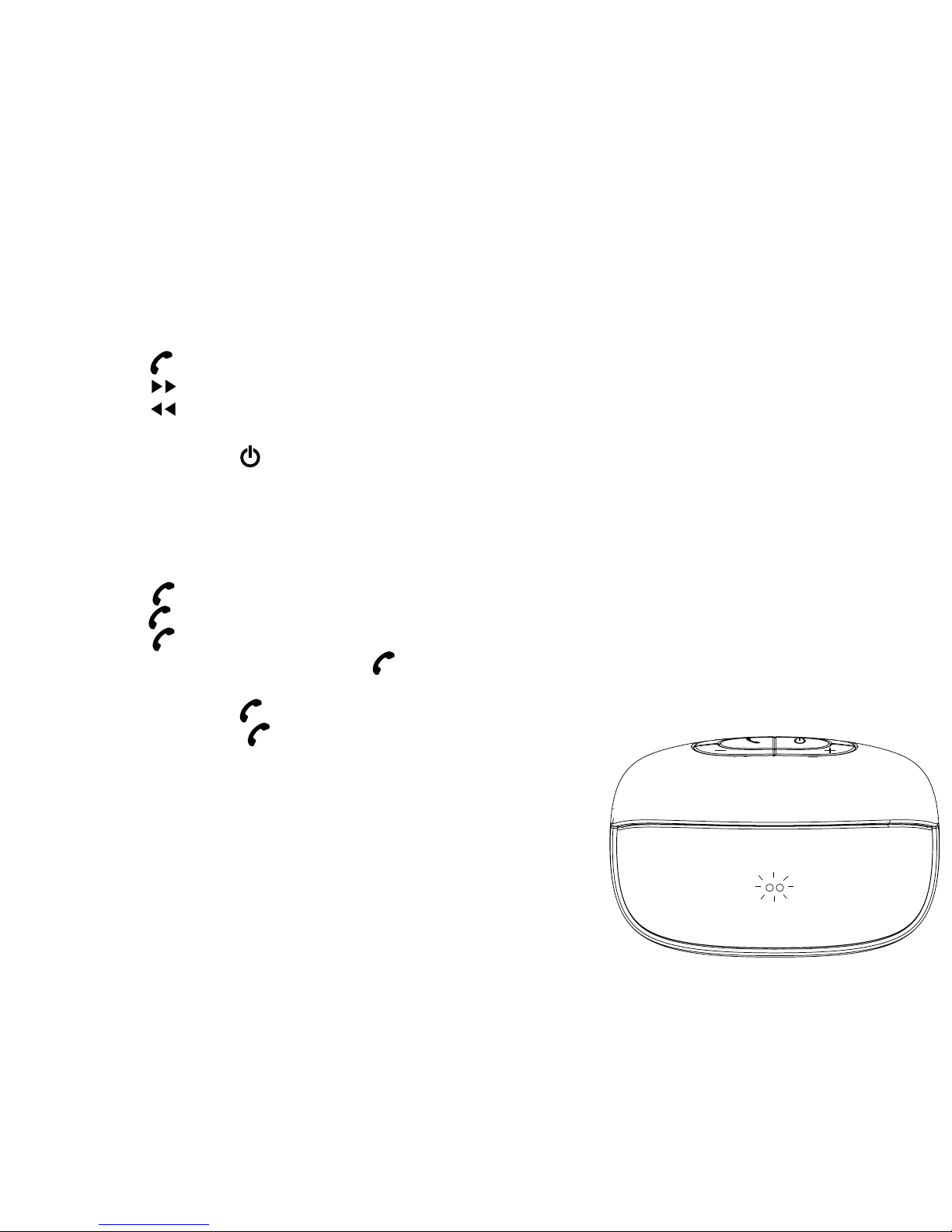
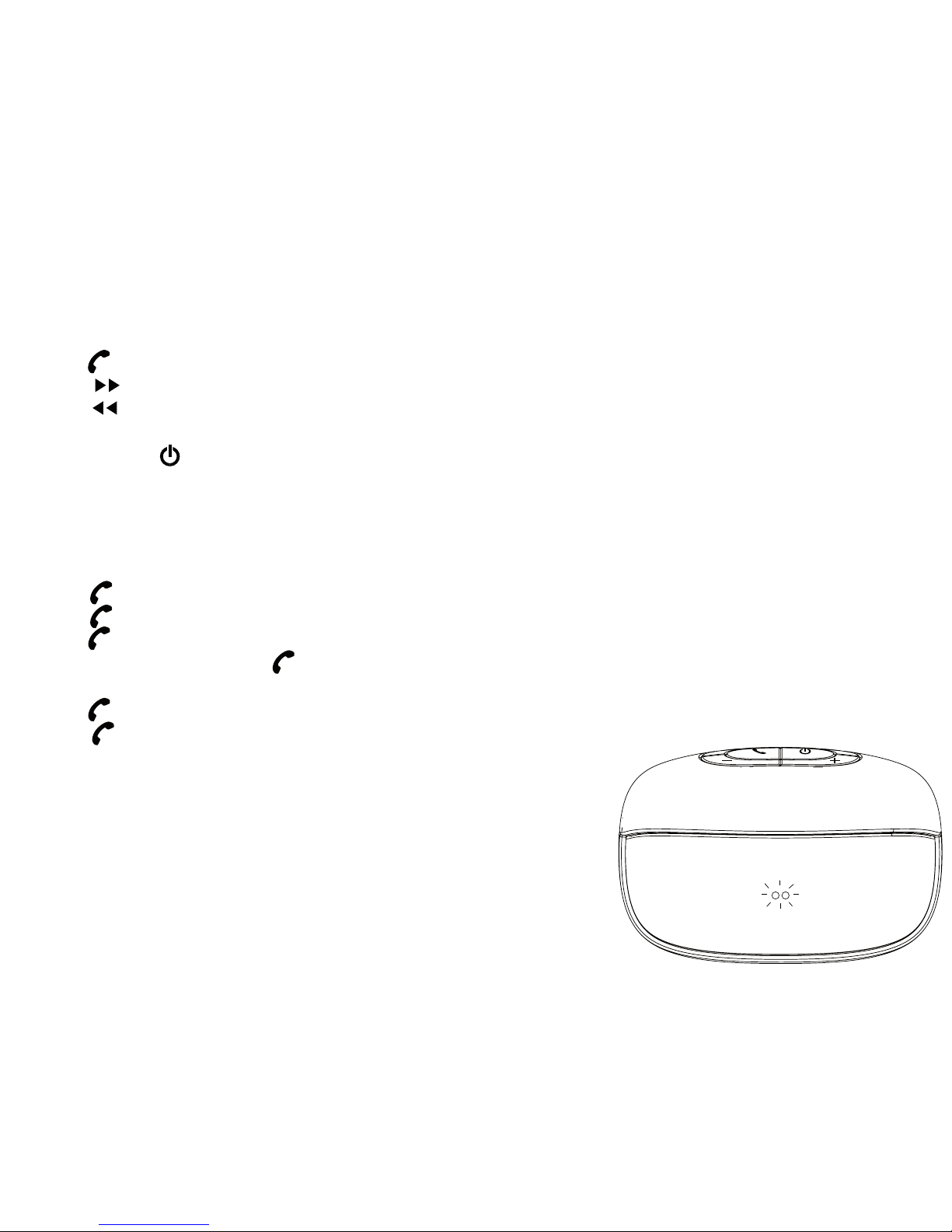
5) Listening to xqisit 2.0
• Stay connected to xqisit 2.0 via BT, repeat the pairing step if it has been disconnected
• Select music to play in BT device
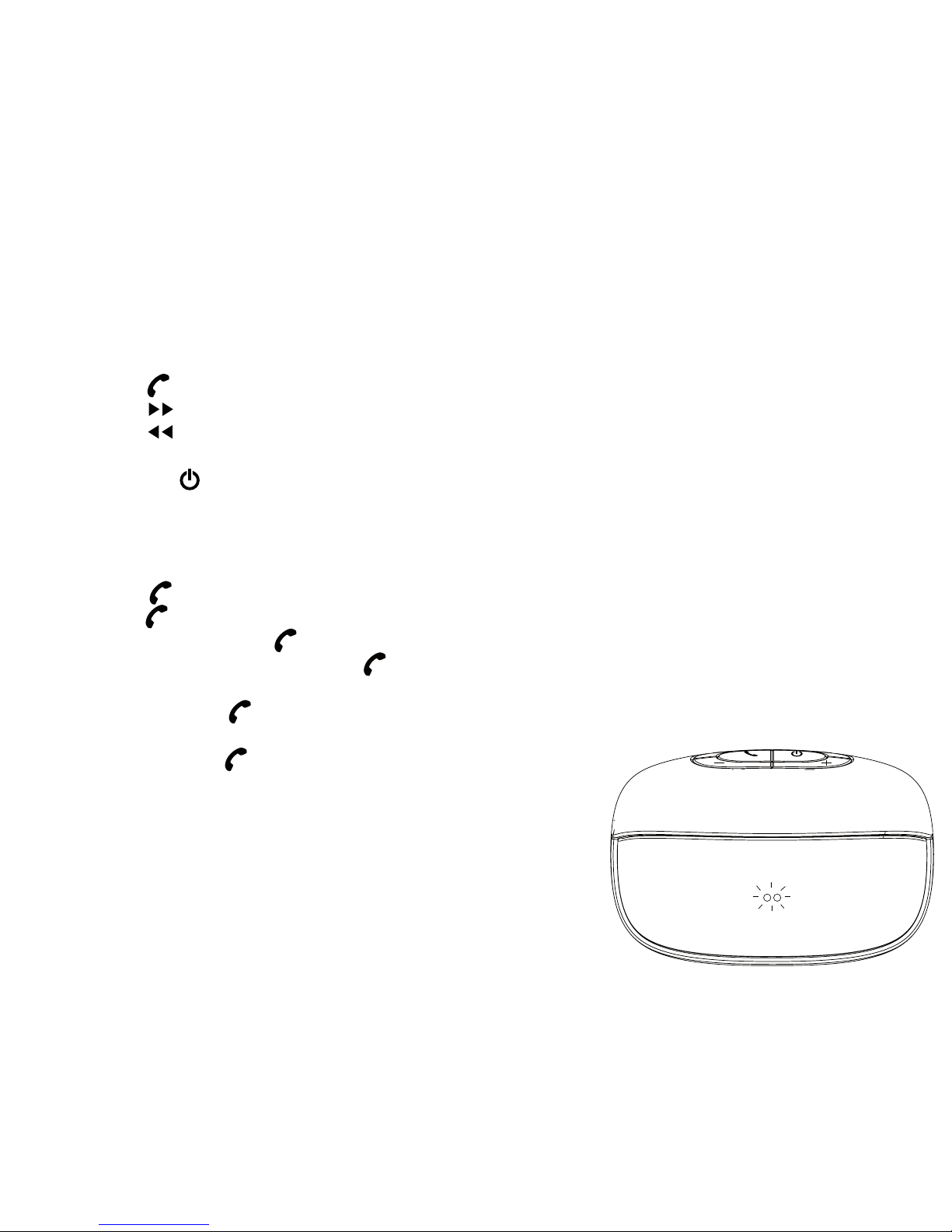
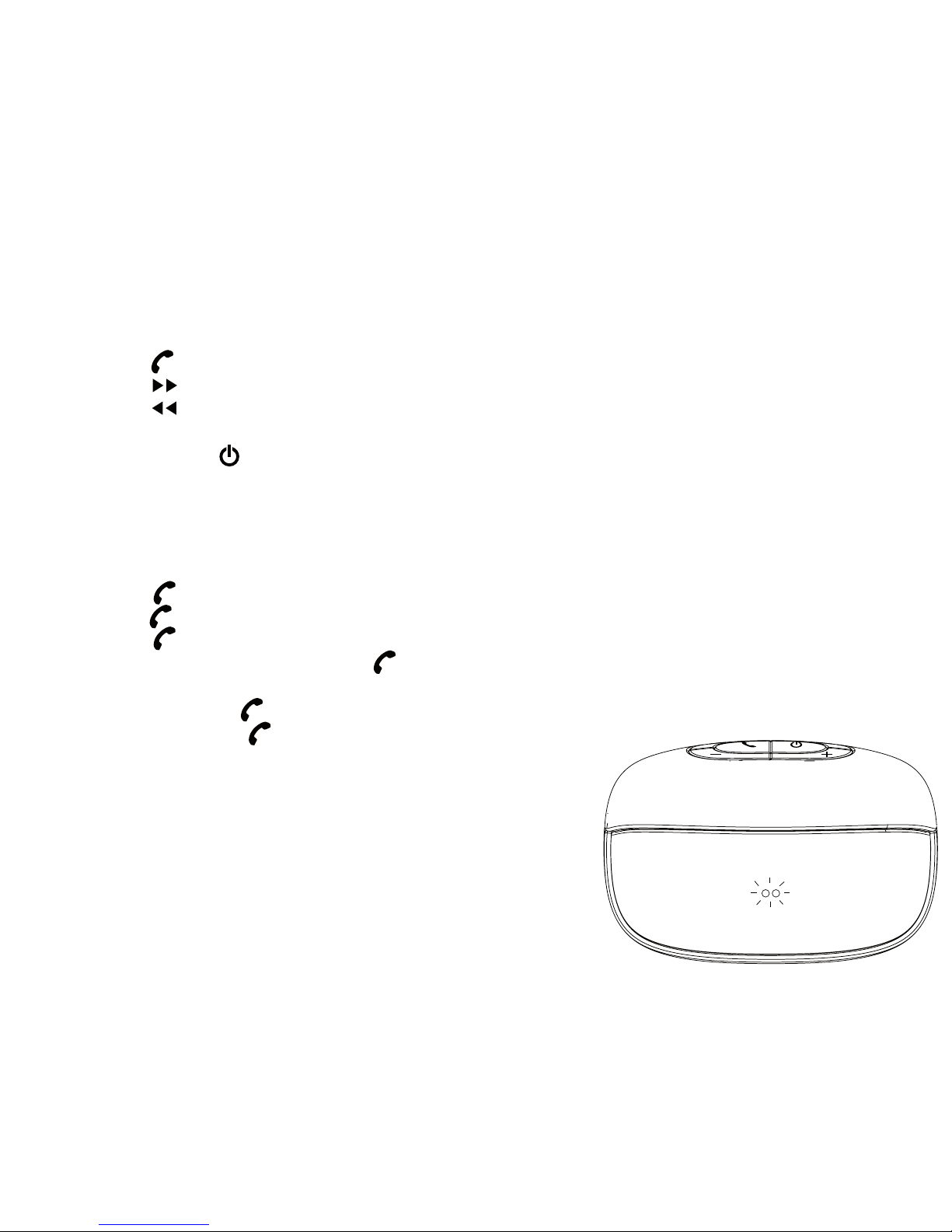
• Press for Play / Pause
• Press for next song
• Press for previous song
• Press + or – to adjust volume level or adjust it from your BT device
• Press and hold key until LED light o to switch o
6) Talking via xqisit 2.0
Remarks: Only available on BT mobile with HFP/HSP
• Press for answering a call
• Press & hold for rejecting the call
• Press to hang up when the call nish
• Press & hold during the call to switch between xqisit 2.0 and mobile
• Double Press to answer a call from 3rd party
• Double Press to toggle between original call and 3rd party
Page 8
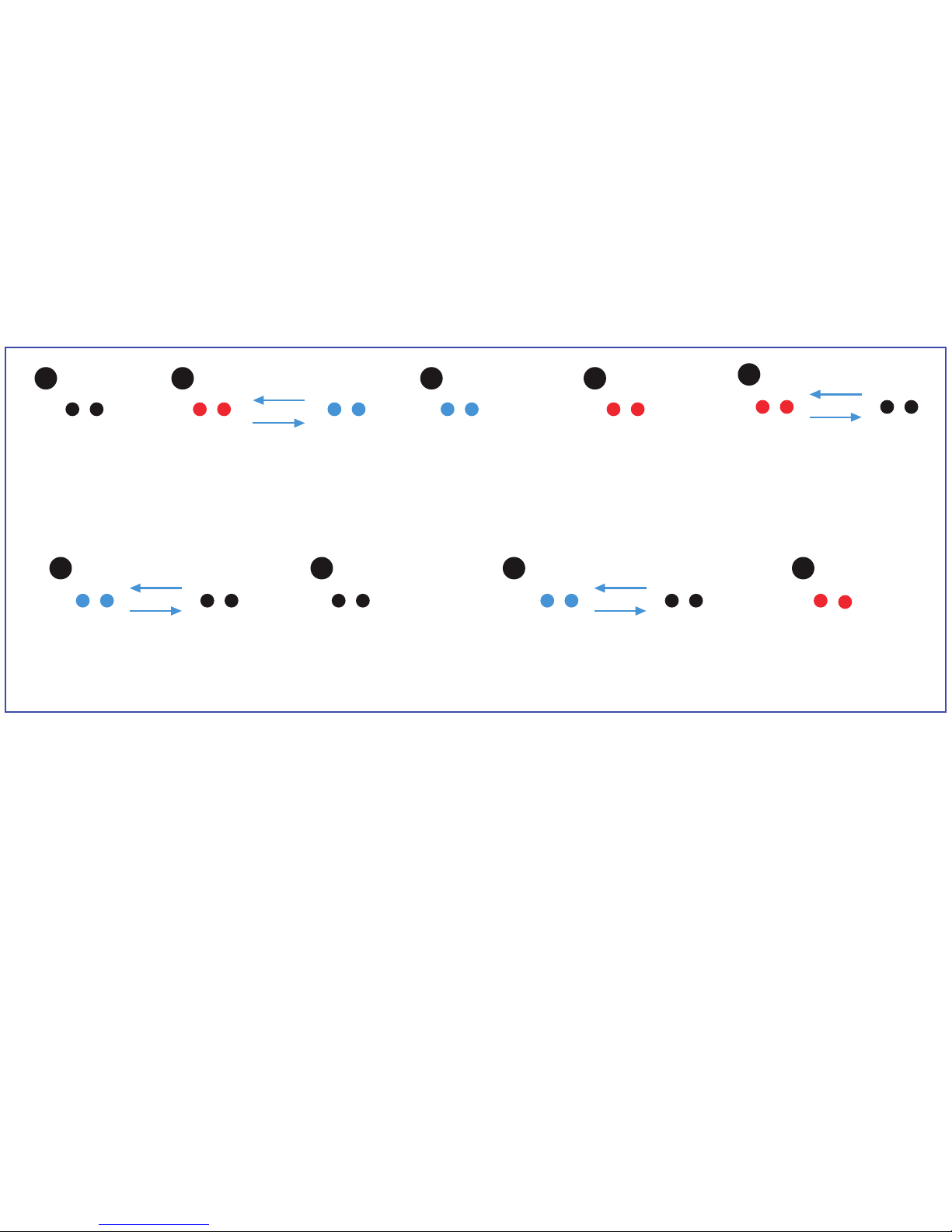
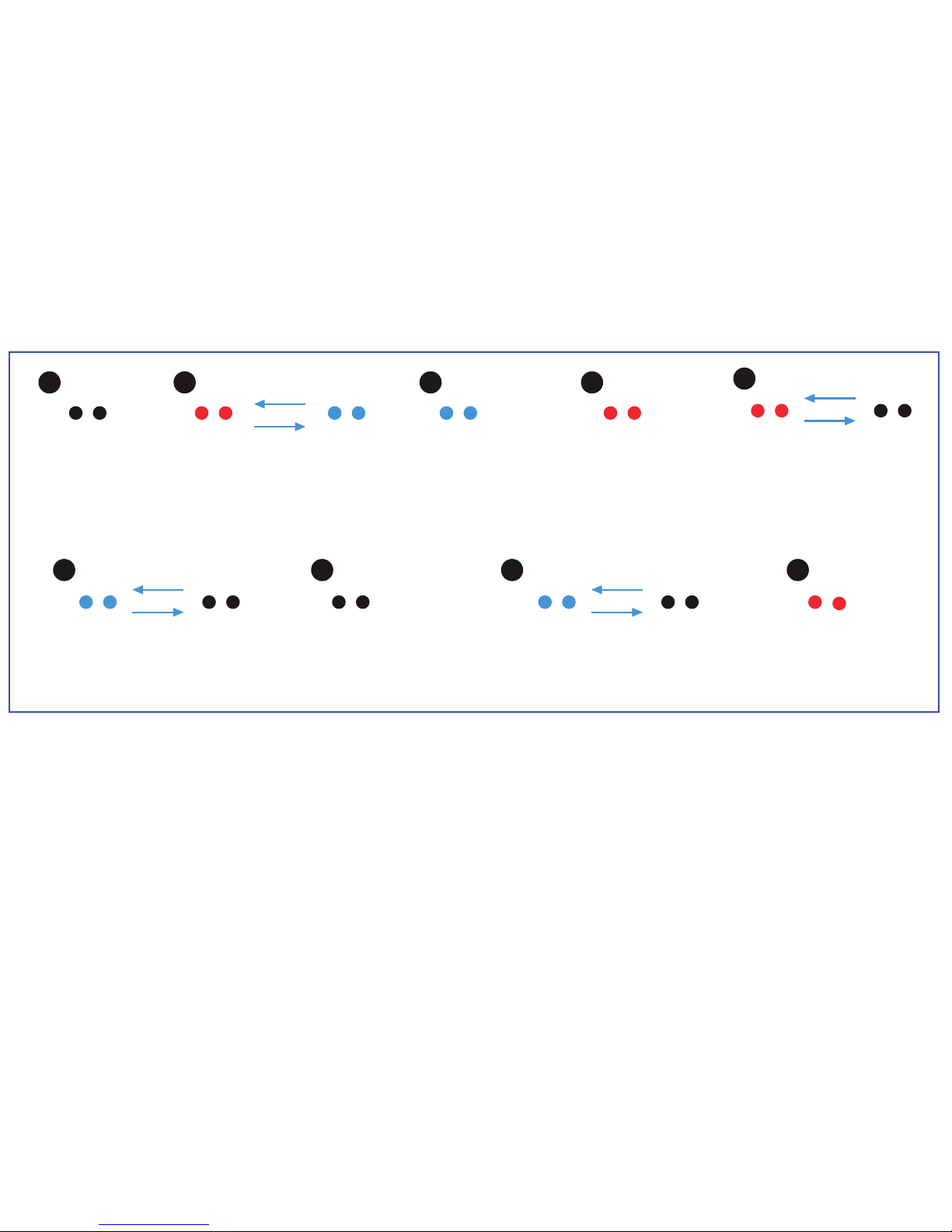
A
E
B
F H
C
G I
D
8) Specications
• Total 6W output (3W / Channel)
• Full-range (35mm) driver / Channel + Passive Radiator
• Distortion <= 10 %
• S/N ratio: >75dB@1W
• Frequency Response: 150Hz – 15k Hz
• Li-polymer battery: 1150mAh
• Playtime: 5 hours in 80% Volume
• Recharging Time: 2hours
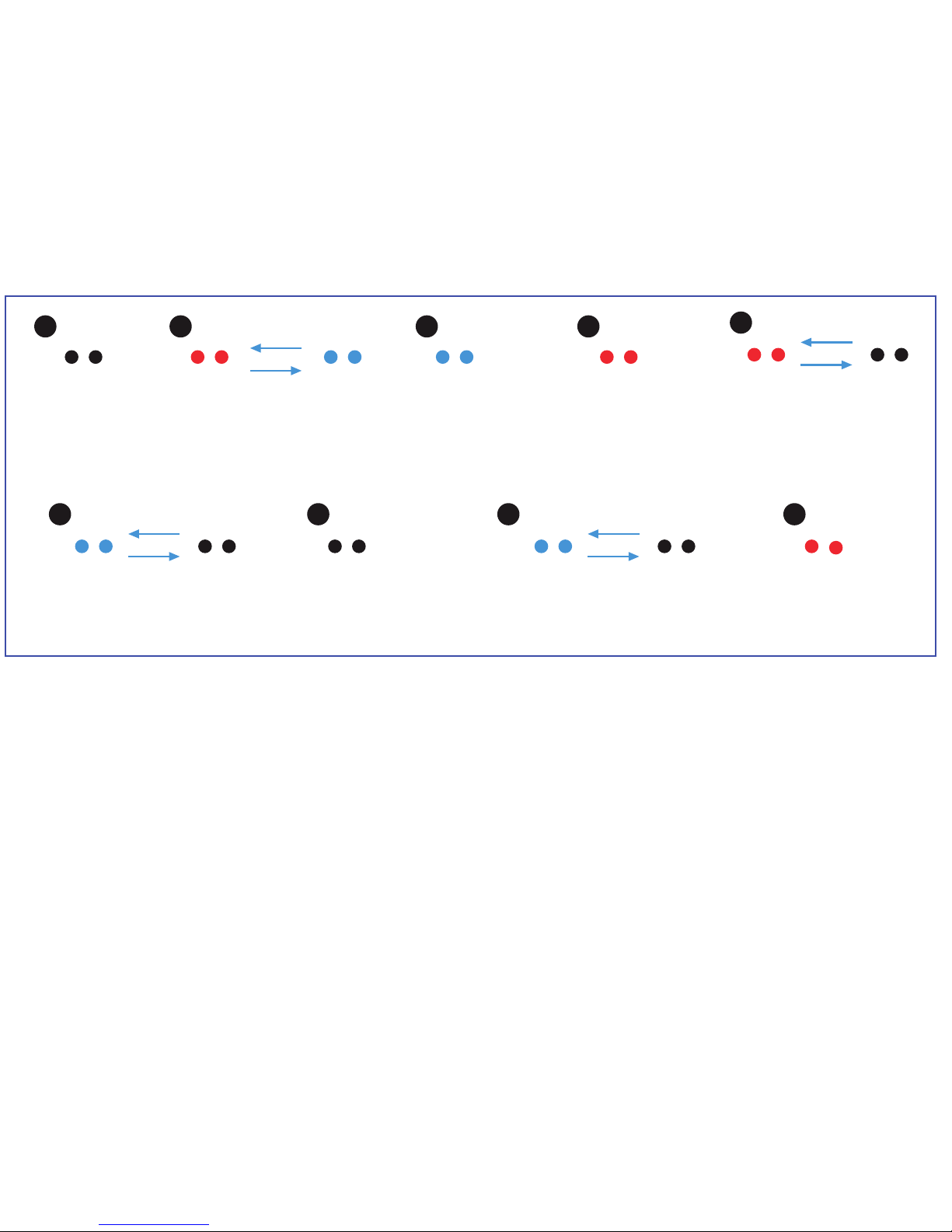
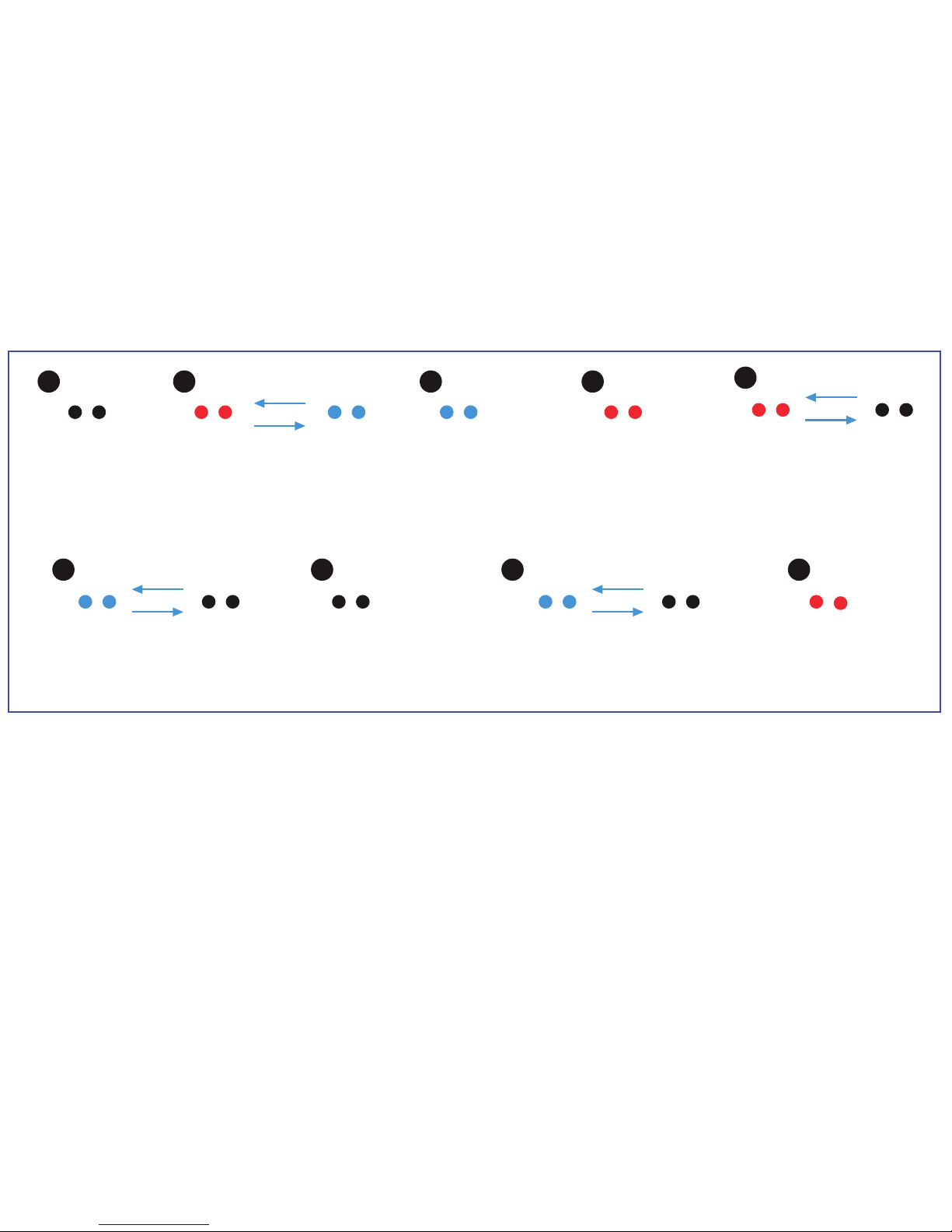
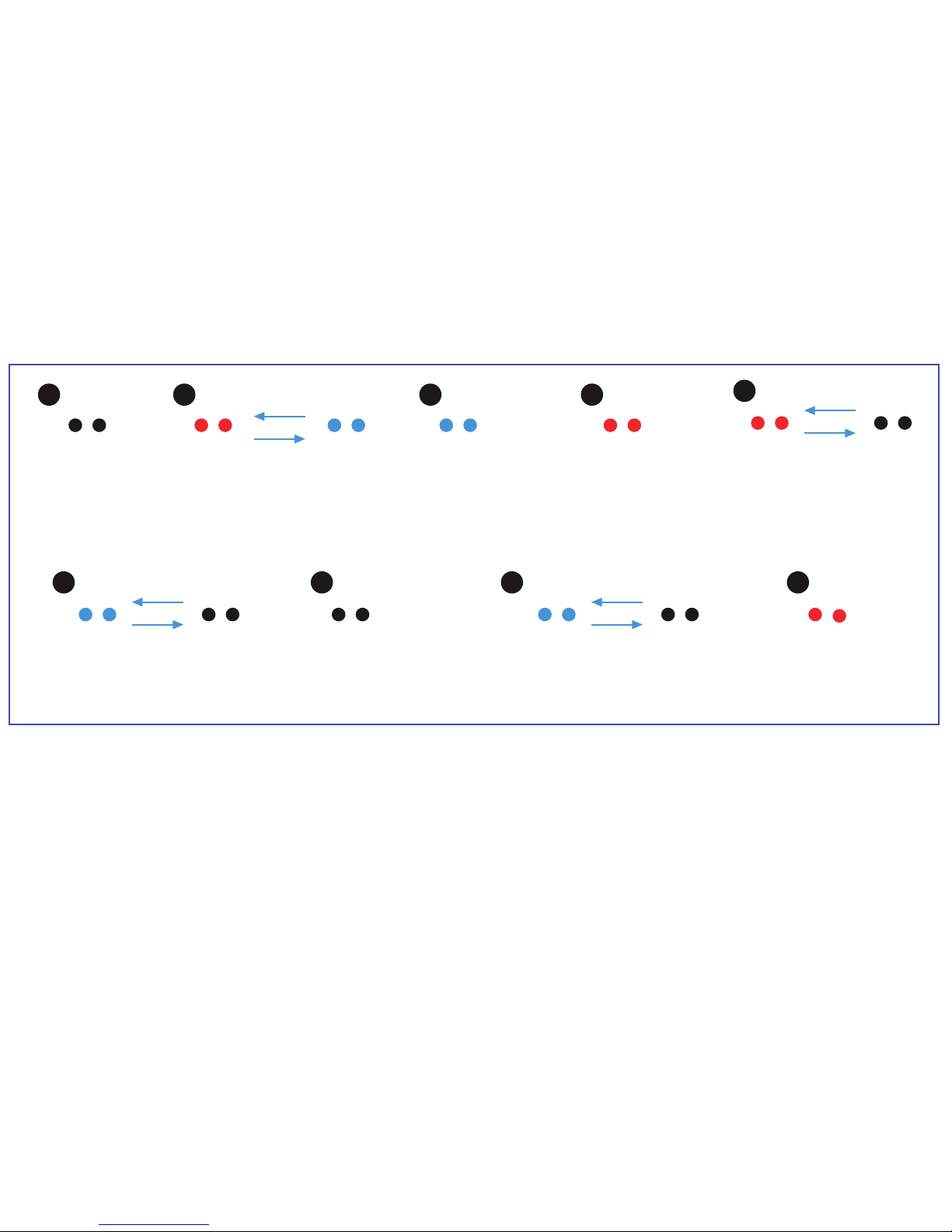
Power O
→ No Light
Power On
Battery Level <10%
→ Flashing Red
→ Enforced Power O in 5 mins
Pairing
→ Fast Flashing between
Blue & Red
Power On
Battery Level >60%
→ Solid Blue
Charging
No Matter Power On / OFF
→ Flashing Blue
Power On
Battery Level <30%
→ Solid Red
Power O
+ Full Charged
→ No Light
Mic muted
(during handsfree-mode)
→ Flashing blue
Upgrade mode
(USB attached)
→ Solid red
7) Front light indicator
Page 9

9) Compatibility (Bluetooth device)
• BT 2.0 or above device with A2DP / AVRCP / HFP/ HSP
• AAC music streaming support iOS 4.3.3 or higher version ONLY
10) Trouble Shooting
Sound not clear or no sound
→ Please check xqisit 2.0 or BT device volume level
Music playback is not transfered from BT device to xqisit 2.0
→ Make sure your BT device has A2DP
→ Check if both devices are connected
→ Restart xqisit 2.0 for auto connection with your BT device
LED no power
→ Make sure xqisit 2.0 is fully charged.
Sound is too small / too much distortion
→ Adjust the volume level of xqisit 2.0 or BT device
Phone call is not answered by xqisit 2.0
→ Make sure your mobile has HSP / HFP
→ Check if both devices are connected
→ Restart xqisit 2.0 for auto connection with your BT device
Music playback is not resumed aer hanging up a call
→ Press play to resume music
No music control by xqisit 2.0
→ Make sure your BT device has AVRCP
Page 10

Warning
Please read these safety warnings and cautions carefully to ensure your personal safety and prevent property damage.
Fire and Electric Shock Hazard
• Do not expose your xqisit xqisit 2.0 to liquid, moisture, humidity, or rain.
Do not use the xqisit xqisit 2.0 near a bathtub, sink, sauna, pool, or steam room.
Exposure of the xqisit xqisit 2.0 to moisture could result in electric shock.
• Do not drop, disassemble, open, crush, bend, deform, puncture, shred, microwave, incinerate, paint, or insert foreign
objects in to the xqisit xqisit 2.0 . Such actions could result in electric shock.
• Clean the xqisit xqisit 2.0 only with a dry cloth.
• Do not expose your xqisit xqisit 2.0 to extremely high or low temperatures.
• Do not leave your xqisit xqisit 2.0 in direct sunlight for extended periods of time.
• Do not leave your xqisit xqisit 2.0 near open ames such as cooking burners, candles, or replaces.
• Do not block any ventilation openings.
Battery/Charger Hazard
• Do not dispose of your xqisit xqisit 2.0 in a re. The battery could explode causing injury or death.
• Only charge the battery in accordance with the user instructions supplied with the xqisit xqisit 2.0 .
• Do not attempt to disassemble the xqisit xqisit 2.0 or force open the built-in battery because this may result
in electric shock.
• Do not charge the xqisit xqisit 2.0 in damp areas or in extremely high or low temperatures because this could result in
electric shock.
• Do not clean the xqisit xqisit 2.0 when it is being charged. Always unplug the charger rst before cleaning the Xqisit
xqisit 2.0 .
Automobile Accident Hazard
• Do not leave or store the xqisit xqisit 2.0 or any of its accessories near or over your automobile’s air bag because
serious injury may result when an airbag deploys.
Fall Hazard
• Do not place the xqisit xqisit 2.0 on high surfaces such as shelves. During music playback the xqisit xqisit 2.0 may
move which could cause the xqisit xqisit 2.0 to shi and fall o of the edge.
Page 11

Caution
• Do not use abrasive cleaners to clean your xqisit xqisit 2.0 because this could cause scratches and damage.
• Do not bring your xqisit xqisit 2.0 in to contact with any sharp objects because this could cause scratches and damage.
• Do not insert anything into your xqisit xqisit 2.0 unless otherwise specied in the user instructions. This may
damage the internal components.
• Do not attempt to repair, modify, or disassemble your xqisit xqisit 2.0 yourself, it does not contain any
user-serviceable components.
• Do not attempt to replace your xqisit xqisit 2.0 battery, it is built-in and is not changeable.
• Observe all signs and displays that require an electrical device or RF radio product to be switched o in designated
areas.
• Turn o your xqisit xqisit 2.0 prior to boarding an aircra. Do not use the xqisit xqisit 2.0 inside an aircra unless
allowed by your airline.
• Dispose of the xqisit xqisit 2.0 and the xqisit xqisit 2.0 ’s battery in accordance with local regulations. Do not dispose
of the battery with regular household waste.
FCC Statement
This equipment has been tested and found to comply with the limits for a Class C digital device, pursuant to Part 15 of
the FCC Rules. These limits are designed to provide reasonable protection against harmful interference in a residential
installation. This equipment generates uses and can radiate radio frequency energy and, if not installed and used in
accordance with the instructions, may cause harmful interference to radio communications. However, there is no
guarantee that interference will not occur in a particular installation. If this equipment does cause harmful interference
to radio or television reception, which can be determined by turning the equipment o and on, the user is encouraged to
try to correct the interference by one of the following measures:
• Reorient or relocate the receiving antenna.
• Increase the separation between the equipment and receiver.
• Connect the equipment into an outlet on a circuit dierent from that to which the receiver is connected.
• Consult the dealer or an experienced radio/TV technician for help.
Page 12
FCC NOTICE
This device complies with Part 15 of the FCC Rules. Operation is subject to the following two conditions:
1 This device may not cause harmful interference, and
2 This device must accept any interference received, including interference that may cause undesired operation.
FCC CAUTION
• Any changes or modications not expressly approved by the party responsible for compliance could void the user‘s
authority to operate this equipment.
• This device and its antenna(s) must not be co-located or operating in conjunction with any other antenna or
transmitter.
FCC ID: VL5PF304
To locate the FCC and IC identication numbers, please look on the underside of the xqisit xqisit 2.0 .
Model number PF304
The crossed-out wheelie bin symbol means that the product must be disposed of separately in the European
Union. These products must not be disposed of with unsorted household waste.
We, STRAX GmbH, declare under our sole responsibility, that the product xqisit xqisit 2.0 (Model-Nr PF 304),
conforms with the provisions of the following Directives: 1999/5/EC; 2004/108/EC and 2006/95/EC.
Distributor: STRAX GmbH, Belgische Allee 52+54, 53842 Troisdorf, Germany, www.strax.com
iPhone®, iPod® and iPad® are trademarks of Apple Inc., registered in the U.S. and other countries.
The Trademark BlackBerry® is owned by Research In Motion Limited and is registered in the United States and may be
pending or registered in other countries. STRAX is not endorsed, sponsored, aliated with or otherwise authorized by
Research In Motion Limited.
Page 13
xqisit 2.0
FR
Page 14
Mode d’emploi rapide
Mettre en position « ON » (marche)
Appui long Mettre en marche/
Arrêter
Maintenir enfoncé jusqu’à
ce que les LED rouge et bleu
clignotent.
Connecter à votre appareil.
xqisit 2.0
FR
Page 15
1 Témoin de charge de la batterie
2 Bouton de mise en marche et d‘arrêt
3 Port de rechargement USB
4 Entrée Aux 3,5 mm
5 Retour
6 Téléphone ; Lecture / Pause
7 Avance
8 Volume –
9 Marche / Arrêt / Appairage
10 Volume +
Page 16

Caractéristiques du produit
• Bluetooth Version 2.1 + EDR avec algorithme audio spécial et DSP pour un son stéréo sans l net et de qualité
• Deux pilotes large bande de 35 mm fournissent des sons d’une délité extraordinaire
• Caisson de basses passif
• Chargement confortable avec câble de chargement USB
• Batterie lithium-ions rechargeable pour jusqu’à 5 heures de fonctionnement
• Commandes vocales (en anglais)
• Indicateur de charge de la batterie pour iPhone et Blackberry
1) Anatomique
Bouton (pour la musique en Bluetooth) :
A Titre précédent
B Lecture / Pause
C Titre suivant
D Volume –
E Marche / Arrêt / Appairage (maintenir enfoncé / enfoncer longtemps)
F Volume +
Bouton (pendant une conversation téléphonique) :
A (pendant la conversation) : Couper / activer le microphone
B (pendant la sonnerie) : Accepter l’appel (appuyer brièvement) / Rejeter l’appel (appuyer longuement)
B (pendant la conversation) : Terminer la conversation (appuyer brièvement) / Basculer entre le téléphone
et xqisit 2.0 (appuyer longuement)
C Volume –
D (pendant la conversation) : Couper / activer le microphone
F Volume +
Bouton (en général, sans liaison Bluetooth) :
E Marche / Arrêt (appuyer brièvement) / Passer en mode d’appairage (maintenir appuyé à partir du
mode OFF [Arrêt])
Bouton (musique par l’entrée auxiliaire) :
E Arrêt
Page 17
Caisson
de basses
passif
Bouton de mise en
marche et d‘arrêt
Entrée
aux.
Port de rechargement
USB
Page 18

2) Charger xqisit 2.0
• En cas de besoin, rechargez le xqisit 2.0 avec l’ordinateur via le câble USB.
• Veillez à ce que le commutateur soit sur « ON » (marche).
• Appuyez sur le bouton sur le panneau de commande jusqu’à ce que le LED à l’avant s’allume en bleu.
Remarque : Chargez le xqisit 2.0 au moins une fois par mois complètement.
3) Appairer avec le xqisit 2.0
• Sélectionnez un appareil avec BT 2.0 ou plus (mobile ou lecteur de musique) et activez la liaison BT.
• Activez le mode de recherche de votre appareil BT (Recherche d’un nouvel appareil).
• Appuyez sur le bouton et maintenez-le enfoncé jusqu’à ce que le LED à l’avant clignote BLEU/ROUGE.
xqisit 2.0 a 3 minutes (temps de recherche) pour établir la liaison avec votre appareil BT.
• <<xqisit 2.0>> s’ache sur votre appareil BT. Sélectionnez-le pour l’appairage. Si un code est nécessaire
pour
l‘appairage, saisissez « 0000 ». (aucun code n‘est nécessaire pour iPhone, iPod et iPad.)
• Une fois l’appairage avec le xqisit 2.0 eectué, un bip sonore est émis et le clignotement s’arrête.
Remarque : Les étapes pour l’appairage ne sont nécessaires que la première fois ; un appairage
automatique est possible avec la plupart des appareils BT sauf l’iPhone.
• Vériez également sur votre appareil BT si la liaison avec « xqisit 2.0 » est établie. Vous pouvez
également accéder au mode Appairage en maintenant appuyé le bouton . Lorsque les LED pas
sent du rouge au bleu, relâchez le bouton , sinon l’appareil s’éteint.
Remarque : xqisit 2.0 arrête de clignoter et émet un autre son si l’appairage a échoué après 3 minu-
tes.
4) Appairage actif avec le xqisit 2.0 (méthode d’appairage alternative)
• Demandez à votre appareil Bluetooth de rechercher d’autres appareils Bluetooth et placez-le à
proximité du xqisit 2.0.
• Appairez les appareils comme décrit au point 3) et attendez 20 secondes.
• « L’invitation d’appairage » apparaît sur votre appareil Bluetooth, « acceptez » l’invitation et
saisissez si nécessaire le code d’appairage « 0000 ».
Page 19
5) Ecouter de la musique via le xqisit 2.0
• Conservez la liaison avec le xqisit 2.0 en BT, répétez les étapes d’appairage si la liaison a été coupée.
• Sélectionnez sur l’appareil BT la musique que vous souhaitez écouter.
• Appuyez sur pour la lecture/pause.
• Appuyez sur pour écouter la chanson suivante.
• Appuyez sur pour écouter la chanson précédente.
• Appuyez sur + ou – pour régler le volume ou réglez-le sur votre appareil BT.
• Appuyez sur le bouton et maintenez-le enfoncé jusqu’à ce que le LED s’éteigne.
6) Téléphoner via le xqisit 2.0
Remarque : Possible uniquement avec les mobiles BT avec HFP/HSP.
• Appuyez sur pour répondre à un appel.
• Appuyez sur et maintenez le bouton enfoncé pour rejeter un appel.
• Appuyez sur pour raccrocher quand la conversation est nie.
• Pendant la conversation, appuyez sur et maintenez le bouton enfoncé
pour basculer entre xqisit 2.0 et le mobile.
• Appuyez deux fois sur pour prendre un deuxième appel.
• Appuyez deux fois sur pour basculer entre le premier et le deuxième
appel.
Page 20
A
E
B
F H
C
G I
D
8) Caractéristiques techniques
• Puissance de sortie totale 6 W (3 W/canal)
• Pilote large bande (35 mm) par canal + caisson de basses passif
• Distorsion <= 10 %
• Rapport signal/bruit : >75 dB à 1 W
• Réponse en fréquence : 150 –15 000 Hz
• Batterie lithium polymère : 1150 mAh
• Durée de lecture : 5 heures à un volume de 80 %
• Temps de charge : 2 heures
Eteint
→ pas de
lumière
En marche
(batterie < 10 %)
→ Clignotement rouge
→ Arrêt automatique dans
5 minutes
Appairage
→ Clignotement rapide entre bleu
et rouge en alternance
En marche
(batterie > 60 %)
→ allumé en continu
(bleu)
Charge
(en marche et arrêté)
→ Clignotement bleu
En marche
(batterie < 30 %)
→ allumé en continu
(rouge)
Eteint et complètement
chargé
→ pas de lumière
7) Voyants lumineux sur la face avant
Microphone coupé
(en mode mains libres)
→ Clignotement bleu
Mode mise à niveau
(câble USB branché)
→ Allumé en continu
(rouge)
Page 21

9) Compatibilité (appareil Bluetooth)
• Appareil avec BT 2.0 ou plus avec A2DP / AVRCP / HFP / HSP
• AAC Music Streaming supporté à partir de l’iOS 4.3.3 ou plus
10) Dépannage
Son pas net ou pas de son
→ Vériez le réglage du son sur le xqisit 2.0 ou sur l’appareil BT.
En mode lecture de musique, aucune transmission entre l’appareil BT et xqisit 2.0
→ Vériez si votre appareil BT dispose du prol A2DP.
→ Vériez que les deux appareils sont reliés entre eux.
→ Redémarrez le xqisit 2.0 an qu’il établisse automatiquement une liaison avec votre appareil BT.
Le LED ne s’allume pas
→ Assurez-vous que le xqisit 2.0 est complètement chargé.
Le volume est trop faible / distorsion trop grande
→ Modiez le volume sur le xqisit 2.0 ou sur l’appareil BT.
L’appel n’est pas pris par le xqisit 2.0
→ Vériez si votre mobile dispose du prol HSP / HFP.
→ Vériez que les deux appareils sont reliés entre eux.
→ Redémarrez le xqisit 2.0 an qu’il établisse automatiquement une liaison avec votre appareil BT.
La lecture d’un morceau de musique ne reprend pas à la n d’une conversation téléphonique.
→ Appuyez sur Lecture pour poursuivre l’écoute.
Aucune commande de lecture via le xqisit 2.0
→ Vériez si votre appareil BT dispose du prol AVRCP.
Page 22

Avertissement
Veuillez lire avec attention ces avertissements concernant la sécurité pour assurer votre sécurité personnelle et éviter
les dommages matériels.
Risque d‘incendie et d‘électrocution
• N‘exposez pas votre xqisit xqisit 2.0 aux liquides, à l‘humidité ou à la pluie.
N‘utilisez pas le xqisit xqisit 2.0 à proximité d‘une baignoire, d‘un évier, d‘une piscine, d‘un sauna ou d‘un bain de
vapeur.
L‘exposition du xqisit xqisit 2.0 à l‘humidité est susceptible d‘entraîner un choc électrique.
• Veillez à ne pas laisser tomber, démonter, ouvrir, écraser, plier, déformer, percer, déchiqueter, passer au micro-ondes,
incinérer, peindre le xqisit xqisit 2.0 ou insérer des objets dans celui-ci. Ces actions peuvent entraîner un choc
électrique.
• Nettoyez le xqisit xqisit 2.0 uniquement avec un chion sec.
• N‘exposez pas votre xqisit xqisit 2.0 à des températures extrêmement hautes ou basses.
• Ne laissez pas trop longtemps votre xqisit xqisit 2.0 à la lumière directe du soleil.
• Ne laissez pas votre xqisit xqisit 2.0 à proximité d‘un feu nu tel qu‘une gazinière, une bougie ou une cheminée.
• Ne bloquez pas les orices d‘aération.
Risque lié à la batterie/ au chargeur
• Ne jetez pas votre xqisit xqisit 2.0 dans un feu. La batterie pourrait exploser, pouvant provoquer des blessures ou la
mort.
• Ne chargez la batterie que conformément au mode d‘emploi fourni avec le xqisit xqisit 2.0.
• N‘essayer pas de démonter le xqisit xqisit 2.0 ou de forcer l‘ouverture de la batterie intégrée, ceci pouvant
entraîner un choc électrique.
• Ne chargez pas le xqisit xqisit 2.0 dans des zones humides ou à des températures extrêmement hautes ou basses
car cela peut entraîner un choc électrique.
• Ne nettoyez pas le xqisit xqisit 2.0 lorsqu‘il est en cours de chargement. Débranchez toujours le chargeur avant de
nettoyer le xqisit xqisit 2.0.
Risque d‘accident automobile
• Ne laissez ou ne stockez pas le xqisit xqisit 2.0 ou l‘un de ses accessoires à proximité de votre air bag ou sur celui-ci
car le déploiement de l‘air bag peut alors entraîner des blessures graves.
Risque de chute
• Ne positionnez pas le xqisit xqisit 2.0 sur des surfaces hautes telles que des étagères. Pendant la lecture de
musique, le xqisit xqisit 2.0 peut bouger, ce qui risquerait de le faire tomber.
Page 23

Attention
• N‘utilisez pas de nettoyants abrasifs pour nettoyer votre xqisit xqisit 2.0 car ils pourraient provoquer des rayures et
endommager l‘appareil.
• Veillez à ce que votre xqisit xqisit 2.0 n‘entre pas en contact avec des objets pointus car ils pourraient provoquer des
rayures et endommager l‘appareil.
• N‘insérez aucun objet dans votre xqisit xqisit 2.0, à moins que cela soit spécié dans le mode d‘emploi. Cela peut
endommager les composants internes.
• N‘essayez pas de réparer, de modier ou de démonter votre xqisit xqisit 2.0 vous-même car il ne contient pas de
pièces remplaçables par l‘utilisateur.
• N‘essayez pas de remplacer la batterie de votre xqisit xqisit 2.0 : celle-ci est intégrée et ne peut pas être remplacée.
• Respectez tous les symboles et les achages indiquant qu‘un appareil électrique ou un produit de radio RF doit être
éteint dans les zones désignées.
• Eteignez votre xqisit xqisit 2.0 avant d‘embarquer dans un avion. N‘utilisez pas le xqisit xqisit 2.0 dans un avion,
sauf si votre compagnie aérienne vous l‘autorise.
• Eliminez le xqisit xqisit 2.0 et la batterie du xqisit xqisit 2.0 conformément aux règlementations locales. Ne jetez
pas la batterie dans la benne à ordures ménagères.
Déclaration de la FCC
Cet équipement a été testé et reconnu conforme aux limites imposées aux appareils numériques de classe C,
conformément à la partie 15 des règlementations de la FCC. Ces limites sont conçues pour fournir une protection
susante contre les interférences nuisibles dans les installations résidentielles. Cet équipement génère, utilise et peut
dégager de l‘énergie de radiofréquence et, s‘il n‘est pas installé et utilisé conformément aux instructions du fabricant,
provoquer un brouillage préjudiciable aux communications radio. Il n‘existe toutefois aucune garantie qu‘un équipement
particulier ne sera pas victime du brouillage. Si cet équipement entraîne un brouillage préjudiciable à la réception
des émissions radio ou de télévision, identiable en mettant l‘appareil hors puis sous tension, il est recommandé à
l‘utilisateur de tenter de résoudre ce problème au moyen d‘une ou plusieurs des mesures suivantes :
• Réorientez l‘antenne de réception ou changez la de place.
• Augmentez la distance séparant l‘équipement du récepteur.
• Branchez l‘équipement à une prise sur un circuit diérent de celui sur lequel est branché le récepteur.
• Consultez le vendeur ou un technicien radio/TV expérimenté pour obtenir de l‘aide.
Page 24
REMARQUE DE LA FCC
Cet appareil est conforme à la Partie 15 des règlementations de la FCC. L‘utilisation est soumise aux deux conditions
suivantes :
1 Cet appareil ne doit pas provoquer de brouillage préjudiciable, et
2 Cet appareil doit accepter tout brouillage reçu, y compris le brouillage pouvant entraîner un mauvais fonctionnement.
AVERTISSEMENT DE LA FCC
• Tout changement ou toute modication qui n‘a pas été expressément approuvé(e) par la partie responsable de la
conformité est susceptible d‘annuler l‘autorité de l‘utilisateur à utiliser cet équipement.
• Cet appareil et son/ses antenne(s) ne doivent pas être placés à proximité de ou utilisés en combinaison avec une autre
antenne ou un autre émetteur.
ID FCC : VL5PF304
Pour repérer les numéros d‘identication FCC et IC, regardez sous le xqisit xqisit 2.0.
Numéro de modèle PF304.
Le symbole de poubelle à roulettes barrée signie que le produit doit être éliminé séparément dans l‘Union
européenne. Ces produits ne doivent pas être jetés avec les ordures ménagères.
Nous, la société STRAX GmbH, déclarons sous notre seule responsabilité que le produit xqisit 2.0 BOX (n° de
modèle PF 304) est conforme aux dispositions des directives suivantes : 1999/5/CE; 2004/108/CE et
2006/95/CE.
Distributeur : STRAX GmbH, Belgische Allee 52+54, 53842 Troisdorf, Allemagne, www.strax.com
iPhone®, iPod® and iPad® are trademarks of Apple Inc., registered in the U.S. and other countries.
The Trademark BlackBerry® is owned by Research In Motion Limited and is registered in the United States and may be
pending or registered in other countries. STRAX is not endorsed, sponsored, aliated with or otherwise authorized by
Research In Motion Limited.
Page 25
xqisit 2.0
DE
Page 26
Schnellanleitung
Auf „ON“ (Ein) stellen
Lange drücken
Ein-/Ausschalten
gedrückt halten bis
Blaue + rote LED Blinken
Mit Ihrem Gerät verbinden
xqisit 2.0
DE
Page 27
1 Batterieanzeige
2 Aus- und Einschalttaste
3 USB-Ladeanschluss
4 3,5-mm-Aux-eingang
5 Zurück
6 Telefon; Wiedergabe / Pause
7 Vor
8 Lautstärke –
9 Ein / Aus / Koppeln
10 Lautstärke +
Page 28

Produktmerkmale
• Bluetooth Version 2.1 + EDR mit Spezial-Audioalgorithmus und DSP für sauberen und besten schnurlosen Stereoklang
• Zwei 35-mm-Breitbandtreiber liefern herausragende Klangtreue
• Passivtieöner
• Bequemes Laden mit USB-Ladekabel
• Wiederauadbare Lithium-Ionen-Batterie für bis zu 5 Stunden Laufzeit
• Sprachanweisungen (Englisch)
• Batterieanzeige bei iPhone und Blackberry
1) Anatomie
Taste (bei Bluetooth-Musik):
A Voriger Titel
B Wiedergabe / Pause
C Nächster Titel
D Lautstärke –
E Ein / Aus / Koppeln (Gedrückt halten / Lange drücken)
F Lautstärke +
Taste (während eines Telefongesprächs):
A (während des Gesprächs): Mikrofon stumm / aktiv schalten
B (während des Klingelns): Anruf annehmen (kurz drücken) / Anruf abweisen (lange drücken)
B (während des Gesprächs): Gespräch beenden (kurz drücken) / Zwischen Telefon und xqisit 2.0 umschalten (lange drücken)
C Lautstärke –
D (während des Gesprächs): Mikrofon stumm / aktiv schalten
F Lautstärke +
Taste (allgemein ohne Bluetooth-Verbindung):
E Ein-/Ausschalten (lange drücken); in den Kopplungs-Modus wechseln (von OFF [Aus] gedrückt halten)
Taste (Musik über den Auxeingang):
E Ausschalten
Page 29
Passiver
Subwoofer
Aus- und Einschalttaste
Auxeingang
USB-Ladeanschluss
Page 30

2) xqisit 2.0 auaden
• Laden Sie bei Bedarf den xqisit 2.0 mit dem Computer über das USB-Kabel auf.
• Achten Sie darauf, dass der Schiebeschalter auf „ON“ (Ein) steht.
• Drücken Sie die -Taste auf dem Bedienfeld, bis das vordere LED auf der Vorderseite blau leuchtet.
Hinweis: Laden Sie den xqisit 2.0 mindestens einmal im Monat voll auf.
3) Mit dem xqisit 2.0 koppeln
• Wählen Sie ein Gerät mit BT 2.0 oder höher aus (Handy oder Musikplayer) und schalten Sie die
BT-Verbindung ein.
• Aktivieren Sie den Suchmodus Ihres BT-Geräts (Suche nach neuem Gerät).
• Drücken Sie die -Taste und halten Sie sie gedrückt, bis das LED auf der Vorderseite BLAU/ROT
blinkt. xqisit 2.0 hat 3 Minuten Zeit (Suchzeit), um die Kopplung mit Ihrem BT-Gerät herzustellen.
• Auf Ihrem BT-Gerät wird <<xqisit 2.0>> angezeigt; wählen Sie dieses für die Kopplung aus. Das
Kennwort für die Kopplung lautet „0000“, falls es benötigt wird. (Für iPhone, iPod und iPad ist kein
Kopplungscode nötig.)
• Wenn die Kopplung mit dem xqisit 2.0 erfolgreich war, wird ein Signalton ausgegeben und das
Blinken
hört auf. Hinweis: Die Schritte für das Koppeln sind nur beim ersten Mal nötig; mit den meisten
BT-Geräten außer dem iPhone ist eine automatische Kopplung möglich.
• Prüfen Sie auch bei Ihrem BT-Gerät, ob die Verbindung mit „xqisit 2.0“ hergestellt ist.
Sie können auch in den Kopplungsmodus gelangen, indem Sie die -Taste drücken und gedrückt
halten: wenn die LEDs zwischen Rot und Blau wechseln, lassen Sie die -Taste los, andernfalls
schaltet sich das Gerät aus.
Hinweis: xqisit 2.0 hört auch auf zu blinken und spielt einen anderen Sound ab, wenn das Koppeln
nach 3 Minuten fehlgeschlagen ist.
4) Aktives Koppeln zum xqisit 2.0 (Alternativer Kopplungsweg)
• Lassen Sie ihr Bluetooth-Gerät nach anderen Bluetooth-Geräten suchen und platzieren Sie es in der
Nähe des xqisit 2.0
• Kopplen Sie die Geräte wie in 3) beschrieben, und warten Sie 20 Sekunden
• Die “Kopplungs-Einladung” erscheint auf ihrem Bluetooth-Gerät, jetzt „akzeptieren“ Sie die
Einladung, “0000” ist der Kopplungs-Code falls benötigt.
Page 31
5) Musikwiedergabe über den xqisit 2.0
• Die Verbindung mit dem xqisit 2.0 über BT aufrechterhalten, die Kopplungsschritte wiederholen,
wenn die Verbindung getrennt wurde.
• Wählen Sie auf dem BT-Gerät die Musik aus, die Sie wiedergeben möchten.
• Drücken Sie für Wiedergabe/Pause
• Drücken Sie für das nächste Lied.
• Drücken Sie für das vorige Lied.
• Drücken Sie + oder – um die Lautstärke zu regeln, oder regeln Sie sie an Ihrem BT-Gerät.
• Drücken Sie die -Taste und halten Sie sie gedrückt, bis die Beleuchtung des LEDs erlischt.
6) Über den xqisit 2.0 telefonieren
Hinweis: Nur bei BT-Handy mit HFP/HSP möglich.
• Drücken Sie , um einen Anruf anzunehmen.
• Drücken Sie und halten Sie die Taste gedrückt, um einen Anruf abzuweisen.
• Drücken Sie zum Auegen , wenn das Gespräch beendet ist.
• Drücken Sie während des Gesprächs und halten Sie die Taste gedrückt,
um zwischen xqisit 2.0 und dem Handy umzuschalten.
• Drücken Sie zweimal , um einen Anruf von einem zweiten Anrufer
anzunehmen.
• Drücken Sie zweimal , um zwischen dem ersten Anrufer und dem
zweiten Anrufer umzuschalten.
Page 32
A
E
B
F H
C
G I
D
8) Technische Daten
• Gesamtausgangsleistung 6 W (3 W/Kanal)
• Breitbandtreiber (35 mm) pro Kanal + passiver Tieöner
• Verzerrung <= 10 %
• Rauschspannungsabstand: >75 dB bei 1 W
• Frequenzgang: 150–15.000 Hz
• Li-Polymer-Batterie: 1150 mAh
• Laufzeit: 5 Stunden bei 80 % Lautstärke
• Auadedauer: 2 Stunden
Ausgeschaltet
→ Kein Licht
Eingeschaltet
(Batterie < 10%)
→ Rotes Blinken
→ Automatische Abschaltung
in 5 Min.
Kopplung
→ Schnelles Blinken zwischen Blau
und Rot wechselnd
Eingeschaltet
(Batterie > 60%)
→ Ununterbrochen
(Blau)
Auaden (ein- und aus-
geschaltet)
→ Blaues Blinken
Eingeschaltet
(Batterie < 30%)
→ Ununterbrochen
(Rot)
Ausgeschaltet und vollständig aufgeladen
→ Kein Licht
7) Leuchtanzeige auf der Vorderseite
Microfon aus
(während Freisprechen)
→ Blaues Blinken
Upgrade Modus
(USB angeschlossen)
→ Ununterbrochen
(Rot)
Page 33

9) Kompatibilität (Bluetooth-Gerät)
• Gerät mit BT 2.0 oder höher mit A2DP / AVRCP / HFP / HSP
• AAC Music Streaming wird unterstützt ab iOS 4.3.3 oder höher
10) Fehlersuche
Klang nicht sauber oder kein Ton
→ Prüfen Sie die Lautstärkeeinstellung am xqisit 2.0 oder am BT-Gerät.
Bei Musikwiedergabe keine Übertragung von BT-Gerät an xqisit 2.0
→ Prüfen Sie, ob Ihr BT-Gerät über das A2DP-Prol verfügt.
→ Prüfen Sie, ob beide Geräte miteinander verbunden sind.
→ Starten Sie den xqisit 2.0 neu, damit er automatisch eine Verbindung mit Ihrem BT-Gerät herstellt.
LED ohne Strom
→ Vergewissern Sie sich, dass der xqisit 2.0 vollständig aufgeladen ist.
Lautstärke ist zu niedrig / zu stark verzerrt
→ Ändern Sie die Lautstärke am xqisit 2.0 oder am BT-Gerät.
Anruf wird vom xqisit 2.0 nicht angenommen
→ Prüfen Sie, ob Ihr Handy über das HSP- / HFP-Prol verfügt.
→ Prüfen Sie, ob beide Geräte miteinander verbunden sind.
→ Starten Sie den xqisit 2.0 neu, damit er automatisch eine Verbindung mit Ihrem BT-Gerät herstellt.
Musikwiedergabe wird nach Beendigung eines Telefongesprächs nicht fortgesetzt
→ Drücken Sie auf Wiedergabe, um die Musikwiedergabe fortzusetzen.
Keine Wiedergabesteuerung über den xqisit 2.0
→ Prüfen Sie, ob Ihr BT-Gerät über das AVRCP-Prol verfügt.
Page 34

Warnung
Lesen Sie die Warn- und Sicherheitshinweise zu Ihrer eigenen Sicherheit und zur Vermeidung von Sachschäden genau
durch.
Gefahr von Feuer und Stromschlägen
• Lassen Sie Ihre xqisit xqisit 2.0 nicht in Kontakt mit Flüssigkeiten, Feuchtigkeit oder Regen kommen.
Verwenden Sie die xqisit xqisit 2.0 nicht in der Nähe einer Badewanne, eines Waschbeckens, einer Sauna, eines
Schwimmbeckens oder eines Raumes mit hoher Lufeuchtigkeit.
Der Kontakt von Flüssigkeit mit Ihrer xqisit xqisit 2.0 kann zu Stromschlägen führen.
• Lassen Sie die xqisit xqisit 2.0 nicht fallen, önen Sie sie nicht, nehmen Sie sie nicht auseinander, zerbrechen Sie sie
nicht, verbiegen und deformieren Sie sie nicht, stechen Sie keine Löcher hinein, schreddern Sie sie nicht, stellen Sie sie
nicht in die Mikrowelle, verbrennen Sie sie nicht, bemalen Sie sie nicht und halten Sie Fremdkörper aus dem Inneren
fern. Dies könnte zu Stromschlägen führen.
• Säubern Sie die xqisit xqisit 2.0 nur mit einem trockenen Tuch.
• Setzen Sie Ihre xqisit xqisit 2.0 keinen sehr hohen bzw. sehr niedrigen Temperaturen aus.
• Setzen Sie Ihre xqisit xqisit 2.0 nicht für längere Zeit direkter Sonneneinstrahlung aus.
• Plazieren Sie Ihre xqisit xqisit 2.0 nicht in der Nähe von oenem Feuer wie z. B. Gasbrennern, Kerzen oder Kaminfeuer.
• Blockieren Sie nicht die Lüungsönungen.
Akku/Gefahr beim Laden
• Entsorgen Sie Ihre xqisit xqisit 2.0 nicht durch Verbrennen. Der Akku könnte explodieren und zu Verletzungen und
tödlichen Unfällen führen.
• Laden Sie den Akku nur gemäß der Gebrauchsanweisung, die Ihrer xqisit xqisit 2.0 beiliegt.
• Versuchen Sie nicht, die xqisit xqisit 2.0 oder den eingebauten Akku zu önen. Dies kann zu Stromschlägen führen.
• Laden Sie die xqisit xqisit 2.0 nicht in feuchten Umgebungen oder bei extrem hohen bzw. sehr tiefen Temperaturen.
Dies kann zu Stromschlägen führen.
• Reinigen Sie die xqisit xqisit 2.0 nicht während des Ladevorgangs. Trennen Sie die xqisit xqisit 2.0 vor dem
Reinigen immer zuerst vom Stromnetz.
Unfallgefahr im Auto
• Platzieren Sie Ihre xqisit xqisit 2.0 oder ihre Zubehörteile nicht in der Nähe oder auf dem Airbag Ihres Fahrzeugs,
denn dies kann bei einer Auslösung des Airbags zu ernsten Verletzungen führen.
Gefahr durch Herabfallen
• Platzieren Sie die xqisit xqisit 2.0 nicht auf hoch gelegenen Oberächen wie Regalen. Bei der Wiedergabe von Musik
kann sich die xqisit xqisit 2.0 bewegen, was zu einer Verschiebung und damit zu einem Herabfallen der Xqisit xqisit 2.0
2.0 führen kann.
Page 35

Vorsicht
• Reinigen Sie Ihre xqisit xqisit 2.0 nicht mit scharfen Reinigungsmitteln, da dies zu Kratzern und Beschädigungen
führen kann.
• Vermeiden Sie den Kontakt Ihrer xqisit xqisit 2.0 mit scharfen Gegenständen, da dies zu Kratzern und
Beschädigungen führen kann.
• Halten Sie jegliche Fremdkörper aus dem Inneren Ihrer xqisit xqisit 2.0 fern, außer wenn dies in der
Gebrauchsanweisung vorgesehen ist. Dadurch können die internen Komponenten beschädigt werden.
• Versuchen Sie nicht, Ihre xqisit xqisit 2.0 selbst zu reparieren, zu modizieren oder zu önen. Sie enthält keine vom
Benutzer zu wartenden Komponenten.
• Versuchen Sie nicht, den Akku Ihrer xqisit xqisit 2.0 zu ersetzen. Er ist fest eingebaut und nicht austauschbar.
• Beachten Sie alle Schilder und Anzeigen, die es erforderlich machen, ein Elektrogerät oder Radio in bestimmten
Bereichen auszuschalten.
• Schalten Sie Ihre xqisit xqisit 2.0 vor dem Betreten eines Flugzeuges aus. Verwenden Sie die xqisit xqisit 2.0 nicht
an Bord eines Flugzeuges, sofern dies nicht von Ihrer Fluggesellscha erlaubt ist.
• Entsorgen Sie Ihre xqisit xqisit 2.0 sowie den Akku gemäß den lokalen Bestimmungen. Entsorgen Sie den Akku nicht
im regulären Hausmüll.
FCC-Bestimmung
Dieses Gerät wurde geprü und entspricht den Beschränkungen für digitale Geräte der Klasse C gemäß Teil 15 der FCCRegeln. Diese Beschränkungen sollen angemessenen Schutz vor schädlichen Auswirkungen einer Nutzung im privaten
Umfeld bieten. Dieses Gerät erzeugt und nutzt Hochfrequenzenergie und kann Hochfrequenzenergie ausstrahlen; bei unsachgemäßer Installation und Nutzung kann es gefährliche Funkverkehrsstörungen verursachen. Es kann jedoch selbst
bei einer bestimmungsgemäßen Installation nicht garantiert werden, dass keine Störungen aureten. Falls dieses Gerät
Störungen im Radio- oder Fernsehempfang verursacht (überprüfen Sie dies durch Ein- und Ausschalten des Geräts),
können Sie diese Funkstörungen möglicherweise wie folgt beheben:
• Richten Sie die Empfangsantenne neu aus.
• Vergrößern Sie den Abstand zwischen dem Gerät und dem funkgestörten Gerät.
• Verbinden Sie dieses Gerät mit einem Stromkreis, der unabhängig vom Stromkreis des funkgestörten Geräts ist.
• Setzen Sie sich mit dem Händler oder einem erfahrenen Radio-/Fernsehtechniker in Verbindung.
Page 36
FCC-HINWEIS
Dieses Gerät entspricht Teil 15 der FCC-Regeln. Der Betrieb unterliegt folgenden zwei Bedingungen:
1 Dieses Gerät darf keine schädlichen Störungen verursachen.
2 Dieses Gerät muss alle Störungen annehmen, einschließlich Störungen, die unerwünschte Reaktionen des Gerätes
verursachen können.
FCC-WARNUNG
• Jegliche Änderungen oder Modizierungen, die nicht ausdrücklich von der für die Einhaltung von Bestimmungen
verantwortlichen Partei genehmigt sind, können die Befugnis des Benutzers zur Inbetriebnahme des Geräts
annullieren.
• Dieses Gerät und seine Antenne(n) dürfen nicht mit einer anderen Antenne oder einem anderen Transmitter
zusammengeschaltet oder betrieben werden.
FCC ID: VL5PF304
Die FCC- und IC-Identikationsnummern benden sich an der Unterseite der xqisit xqisit 2.0.
Modell-Nr. PF304
Das Symbol der durchgestrichenen Abfalltonne auf Rädern bedeutet, dass das Produkt in der Europäischen
Union einer getrennten Müllsammlung zugeführt werden muss. Diese Produkte dürfen nicht über den
unsortierten Hausmüll entsorgt werden.
Wir, die STRAX GmbH, erklären gemäß unserer alleinigen Verantwortung, dass das Produkt xqisit 2.0 BOX
(Modell-Nr. PF 304) den Bestimmungen der folgenden Richtlinien entspricht: 1999/5/EG, 2004/108/EG und
2006/95/EG.
Vertrieb durch: STRAX GmbH, Belgische Allee 52+54, 53842 Troisdorf, Deutschland, www.strax.com
iPhone®, iPod® and iPad® are trademarks of Apple Inc., registered in the U.S. and other countries.
The Trademark BlackBerry® is owned by Research In Motion Limited and is registered in the United States and may be
pending or registered in other countries. STRAX is not endorsed, sponsored, aliated with or otherwise authorized by
Research In Motion Limited.
Page 37
xqisit 2.0
IT
Page 38
Guida rapida
Impostare su ON (acceso)
Premere a lungo On/O
Tenere premuto no a quando
i LED blu + rosso lampeggiano
Collegare con il vostro
dispositivo
xqisit 2.0
IT
Page 39
1 Indicatore batteria
2 Tasto accensione / spegnimento
3 Porta di ricarica USB
4 Ingresso Aux da 3,5 mm
5 Indietro
6 Telefono; play / pausa
7 Avanti
8 Volume giù
9 On / O / Accoppiamento
10 Volume su
Page 40

Caratteristiche prodotto
• Bluetooth version 2.1 + EDR con speciale algoritmo audio e DSP per il miglior suono stereo pulito e senza li
• Due altoparlanti a larga banda da 35 mm per un‘eccellente fedeltà del suono
• Woofer passivo
• Comoda ricarica grazie al cavo USB
• Batteria agli ioni di litio ricaricabile per una durata no a 5 ore
• Istruzioni vocali (in inglese)
• Indicatore batteria su iPhone e BlackBerry
1) Descrizione
Pulsanti (con musica Bluetooth):
A Traccia precedente
B Play / Pausa
C Traccia successiva
D Volume giù
E On / O / Accoppiamento (tenere premuto / premere a lungo)
F Volume su
Pulsanti (durante una telefonata):
A (durante la conversazione): disattivare / attivare il microfono
B (mentre squilla): rispondere alla chiamata (premere brevemente) / riutare la chiamata (premere a lungo)
B (durante la conversazione): terminare la chiamata (premere brevemente) / passare dal telefono all’xqisit 2.0
(premere a lungo)
C Volume giù
D (durante la conversazione): disattivare / attivare il microfono
F Volume su
Pulsanti (in generale senza connessione Bluetooth):
E On / O (premere a lungo); passare alla modalità di accoppiamento (tenere premuto da O [spento])
Pulsanti (musica da ingresso Aux):
E Spegnere
Page 41
Subwoofer
passivo
Pulsante On/O
Ingresso
Aux
Porta di ricarica USB
Page 42

2) Caricare l’xqisit 2.0
• In caso di bisogno caricare l’xqisit 2.0 con il computer tramite il cavo USB.
• Assicurarsi che il pulsante scorrevole sia posizionato su ON (acceso).
• Premere il pulsante sul pannello dei comandi no a quando il LED frontale non diventa blu.
Avvertimento: ricaricare completamente l’xqisit 2.0 almeno una volta al mese.
3) Accoppiamento all’xqisit 2.0
• Selezionare un dispositivo con BT 2.0 o superiore (cellulare o riproduttore musicale) e attivare la
connessione BT.
• Attivare la modalità di ricerca sul proprio dispositivo BT (cerca un nuovo dispositivo).
• Premere il pulsante e tenerlo premuto no a quando il LED frontale non lampeggia BLU/ROSSO.
L’xqisit 2.0 ha 3 minuti (tempo di ricerca) per stabilire l’accoppiamento con il vostro dispositivo BT.
• Sul vostro dispositivo BT apparirà <<xqisit 2.0>>, selezionatelo per l’accoppiamento. Se viene
richiesto, il codice per l’accoppiamento è “0000”. (Per iPhone, iPod e iPad non è necessario alcun
codice.)
• Quando l’accoppiamento con xqisit 2.0 è avvenuto, viene emesso un segnale acustico e cessa il
segnale lampeggiante. Avvertimento: la procedura per l’accoppiamento è necessaria solo la prima
volta. L’accoppiamento automatico è possibile con la maggior parte dei dispositivi BT eccetto
l’iPhone.
• Vericate l’avvenuto accoppiamento con “xqisit 2.0” anche sul vostro dispositivo BT. Si accede alla
modalità di accoppiamento anche premendo e tenendo premuto il pulsante : quando i LED
lampeggiano alternativamente rosso e blu rilasciate il pulsante , altrimenti il dispositivo si spegne.
Avvertimento: l’xqisit 2.0 cessa di lampeggiare e riproduce un suono diverso se dopo 3 minuti
l’accoppiamento non è avvenuto.
4) Accoppiamento attivo all’xqisit 2.0 (modalità di accoppiamento alternativa)
• Lasciate che il vostro dispositivo Bluetooth cerchi altri dispositivi Bluetooth e avvicinatelo all’xqisit
2.0
• Accoppiate i dispositivi come descritto al punto 3) e attendete 20 secondi
• Quando sul vostro dispositivo Bluetooth appare la “richiesta di accoppiamento”, accettatela. Se
richiesto, il codice di accoppiamento è “0000”.
Page 43
5) Riproduzione musicale tramite l’xqisit 2.0
• Mantenere il collegamento BT all’xqisit 2.0. Se si interrompe ripetere la procedura di accoppiamento.
• Selezionare sul dispositivo BT la musica che si desidera riprodurre.
• Premere per play/pausa
• Premere per la canzone successiva.
• Premere per la canzone precedente.
• Premere + o - per regolare il volume oppure regolatelo dal vostro dispositivo BT.
• Premere il pulsante e tenerlo premuto no a quando l’illuminazione del LED scompare.
6) Telefonare tramite l’xqisit 2.0
Avvertimento: possibile solo con cellulare BT con HFP/HSP.
• Premere per rispondere a una telefonata.
• Premere e tenere premuto per riutare una telefonata.
• Premere per riagganciare quando la telefonata è terminata.
• Premere durante la conversazione e tenere premuto il pulsante per
passare dall’xqisit 2.0 al cellulare.
• Premere due volte per rispondere a una seconda telefonata.
• Premere due volte per passare dalla prima alla seconda telefonata.
Page 44
A
E
B
F H
C
G I
D
8) Dati tecnici
• Potenza d’uscita totale 6 W (3 W/canale)
• Altoparlante a larga banda (35 mm) per canale + woofer passivo
• Distorsione <= 10%
• Rapporto segnale/rumore: >75 dB a 1 W
• Risposta in frequenza: 150–15.000 Hz
• Batteria ai polimeri di litio: 1150 mAh
• Durata: 5 ore con volume all’80%
• Durata di ricarica: 2 ore
Spento
→ nessuna luce
Acceso
(batteria < 10%)
→ lampeggia rosso
→ spegnimento automatico
tra 5 min.
Accoppiamento
→ lampeggia rapidamente e
alternativamente blu e rosso
Acceso
(batteria > 60%)
→ blu continuo
Ricarica
(acceso e spento)
→ lampeggia blu
Acceso
(batteria < 30%)
→ rosso continuo
Spento e completamente
carico
→ nessuna luce
7) Indicatore luminoso frontale
Microfono disattivato
(in modalità vivavoce)
→ lampeggia blu
Modalità upgrade
(USB collegato)
→ rosso continuo
Page 45

9) Compatibilità (dispositivo Bluetooth)
• Dispositivo con BT 2.0 o superiore con A2DP / AVRCP / HFP / HSP
• AAC Music Streaming supportato da iOS 4.3.3 o superiore
10) Identicazione e risoluzione problemi
Suono non pulito o nessun suono
→ Vericare il livello del volume sull’xqisit 2.0 o sul dispositivo BT.
Durante la riproduzione musicale nessun trasferimento dal dispositivo BT all’xqisit 2.0
→ Vericare se il vostro dispositivo BT dispone del prolo A2DP.
→ Vericare che entrambi i dispositivi siano collegati l’uno con l’altro.
→ Riavviare l’xqisit 2.0 anché stabilisca un collegamento automatico con il vostro
dispositivo BT.
LED senza corrente
→ Assicurarsi che l’xqisit 2.0 sia completamente carico.
Volume con distorsione troppo bassa / forte
→ Regolare il livello del volume sull’xqisit 2.0 o sul dispositivo BT.
L’xqisit 2.0 non accetta la telefonata
→ Vericare che il vostro cellulare disponga del prolo HSP / HFP.
→ Vericare che entrambi i dispositivi siano collegati l’uno con l’altro.
→ Riavviare l’xqisit 2.0 anché stabilisca un collegamento automatico con il vostro
dispositivo BT.
La riproduzione musicale non riprende dopo aver terminato una telefonata
→ Premere Play per riprendere la riproduzione musicale.
Impossibile gestire la riproduzione dall’xqisit 2.0
→ Vericare se il vostro dispositivo BT dispone del prolo AVRCP.
Page 46

Avvertenza
Si prega di leggere attentamente le seguenti avvertenze e precauzioni di sicurezza per garantire la propria sicurezza
personale ed evitare danni agli oggetti.
Pericolo di incendio e scosse elettriche
• Non esporre xqisit xqisit 2.0 a liquidi, umidità e pioggia.
Non usare xqisit xqisit 2.0 in prossimità di vasche da bagno, lavandini, saune, piscine o stanze per bagno turco.
Esponendo xqisit xqisit 2.0 all’umidità potrebbero vericarsi scosse elettriche.
• Non far cadere, smontare, aprire, schiacciare, piegare, deformare, forare, tagliuzzare, collocare nel microonde,
incenerire, verniciare o inserire oggetti estranei in xqisit xqisit 2.0 . Tali azioni potrebbero determinare scosse
elettriche.
• Pulire xqisit xqisit 2.0 unicamente con un panno asciutto.
• Non esporre xqisit xqisit 2.0 a temperature estremamente elevate o basse.
• Non lasciare xqisit xqisit 2.0 esposto alla luce diretta del sole per un periodo di tempo prolungato.
• Non lasciare xqisit xqisit 2.0 in prossimità di amme libere quali bruciatori di cottura, candele o camini.
• Non ostruire i fori di ventilazione.
Pericoli inerenti la batteria/il caricabatterie
• Non gettare xqisit xqisit 2.0 nel fuoco. La batteria potrebbe esplodere causando lesioni o morte.
• Caricare la batteria unicamente in conformità al manuale d‘istruzioni fornito con xqisit xqisit 2.0 .
• Non cercare di xqisit xqisit 2.0 o di aprire la batteria incorporata poiché potrebbero
vericarsi scosse elettriche.
• Non caricare xqisit xqisit 2.0 in un ambiente umido o sottoposto a temperature estremamente elevate o basse
poiché potrebbero vericarsi scosse elettriche.
• Non pulire xqisit xqisit 2.0 quando il dispositivo è in carica. Scollegare il caricabatterie prima di pulire Xqisit
xqisit 2.0.
Pericolo di incidenti stradali
• Non lasciare o custodire xqisit xqisit 2.0 o un qualunque suo accessorio in prossimità o sopra l’air bag dell’auto
poiché in caso di apertura di quest’ultimo potrebbero vericarsi gravi lesioni.
Pericolo di caduta
• Non collocare xqisit xqisit 2.0 su una supercie alta, per esempio su dei ripiani. Durante la riproduzione musicale
Xqisit xqisit 2.0 potrebbe vibrare e cadere.
Page 47

Attenzione
• Non utilizzare detergenti abrasivi per pulire xqisit xqisit 2.0 poiché possono causare gra o danni.
• Non portare xqisit xqisit 2.0 a contatto con oggetti appuntiti poiché potrebbero causare gra o danni.
• Non inserire alcun oggetto in xqisit xqisit 2.0 a meno che specicato nel manuale d‘istruzioni. Così facendo si
potrebbero danneggiare i componenti interni.
• Non cercare di riparare, modicare o smontare xqisit xqisit 2.0. Il dispositivo non contiene componenti riparabili
da parte dell’utente.
• Non cercare di sostituire la batteria di xqisit xqisit 2.0. È incorporata e non può essere cambiata.
• Osservare tutti i cartelli e le indicazioni che richiedono lo spegnimento di dispositivi elettrici o radio RF in particolari
aree.
• Spegnere xqisit xqisit 2.0 prima di salire su un aereo. Non utilizzare xqisit xqisit 2.0 in volo se non dietro
autorizzazione della compagnia aerea.
• Smaltire xqisit xqisit 2.0 e la sua batteria in conformità alle norme locali. Non smaltire la batteria nei normali
riuti domestici.
FCC Dichiarazione
FCC L’apparecchiatura è stata testata e giudicata conforme ai limiti stabiliti per dispositivi digitali di Classe C ai sensi
della Parte 15 della normativa FCC. Tali limiti vengono sanciti per assicurare un‘adeguata protezione nei confronti di
interferenze dannose che si possono presentare negli impianti residenziali. L’apparecchiatura genera, utilizza e può
emettere energia in radiofrequenza e, se non installata e usata secondo le istruzioni, può causare un’interferenza
dannosa alle trasmissioni radio. Tuttavia, non vi è alcuna garanzia che tale tipo di interferenza non si presenti in
una determinata installazione. Qualora l’apparecchiatura dovesse provocare interferenze dannose sulla ricezione
di apparecchi radiotelevisivi, cosa che può accadere accendendola e spegnendola, l’utente può provare a risolvere
l’inconveniente adottando una delle seguenti misure:
• Riorientare o riposizionare l’antenna di ricezione.
• Aumentare la distanza tra il dispositivo e il ricevitore.
• Collegare il dispositivo a una presa elettrica appartenente a un circuito diverso da quello a cui è collegato il ricevitore.
• Consultare il rivenditore o un tecnico esperto in impianti radiotelevisivi.
Page 48
AVVISO FCC
Questo dispositivo è conforme alla Parte 15 della normativa FCC. L’utilizzo è soggetto alle due seguenti condizioni:
1 il dispositivo non deve causare interferenze pericolose, e
2 il dispositivo deve accettare qualsiasi interferenza ricevuta, comprese quelle che possono provocarne un funziona-
mento indesiderato.
AVVERTENZA FCC
• Eventuali cambi o modiche non espressamente approvati dal soggetto responsabile della conformità potrebbero
annullare l’autorizzazione all’uso dell’apparecchiatura da parte dell’utente.
• Questo dispositivo e la/e sua/e antenna/e non devono essere abbinati o azionati congiuntamente ad altre antenne o
trasmettitori.
FCC ID: VL5PF304
Per i numeri di identicazione FCC ed IC, si prega di guardare la parte inferiore di xqisit xqisit 2.0.
Numero modello PF304
Il simbolo del cassonetto sbarrato indica che l’apparecchiatura deve essere smaltita separatamente
nell’Unione Europea. Il prodotto non va smaltito nell’indierenziata.
STRAX GmbH dichiara sotto la propria responsabilità che il prodotto xqisit 2.0 BOX (modello n. PF 304) è
conforme alle norme delle seguenti Direttive: 1999/5/CE, 2004/108/CE e 2006/95/CE.
Distributore: STRAX GmbH, Belgische Allee 52+54, 53842 Troisdorf, Germania, www.strax.com
iPhone®, iPod® and iPad® are trademarks of Apple Inc., registered in the U.S. and other countries.
The Trademark BlackBerry® is owned by Research In Motion Limited and is registered in the United States and may be
pending or registered in other countries. STRAX is not endorsed, sponsored, aliated with or otherwise authorized by
Research In Motion Limited.
Page 49
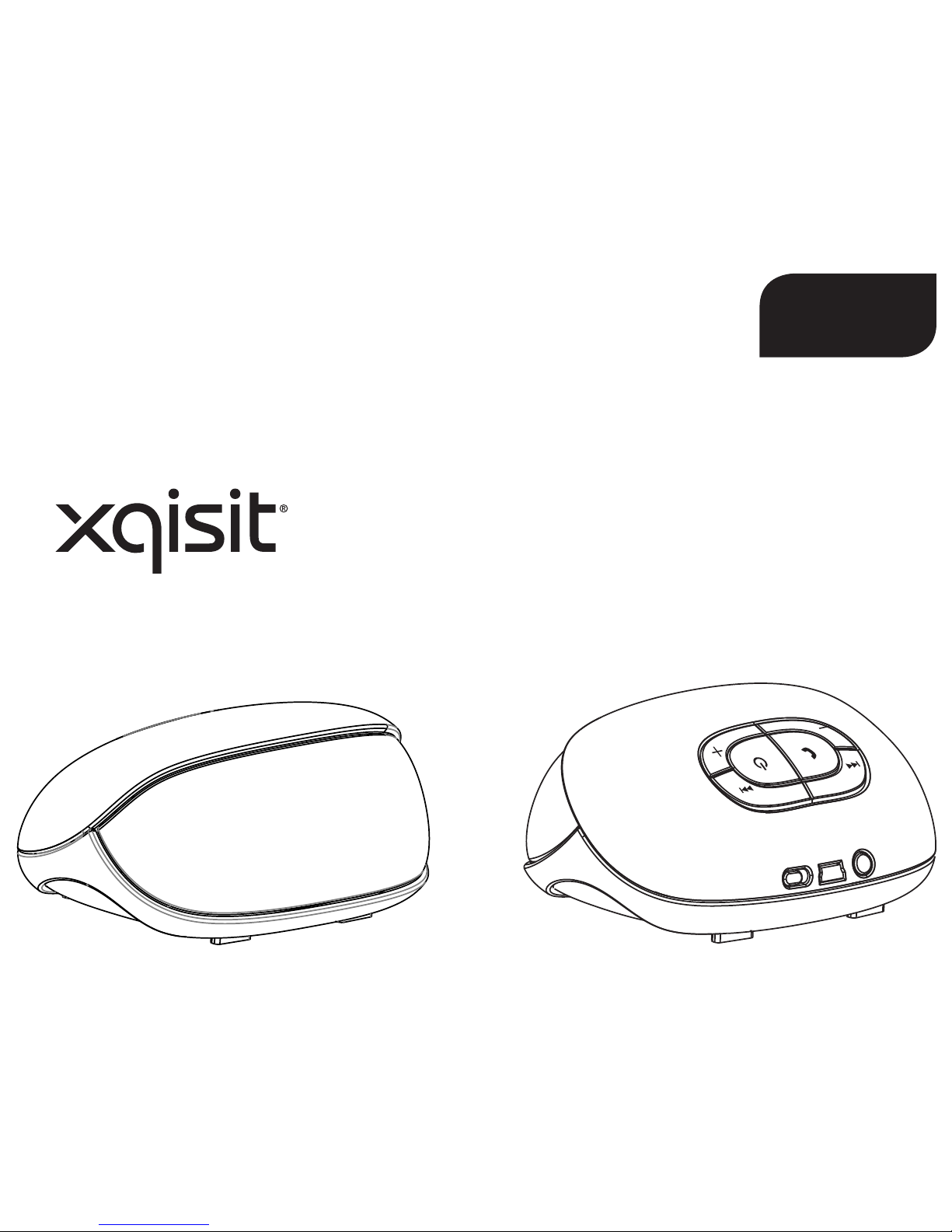
xqisit 2.0
NL
Page 50
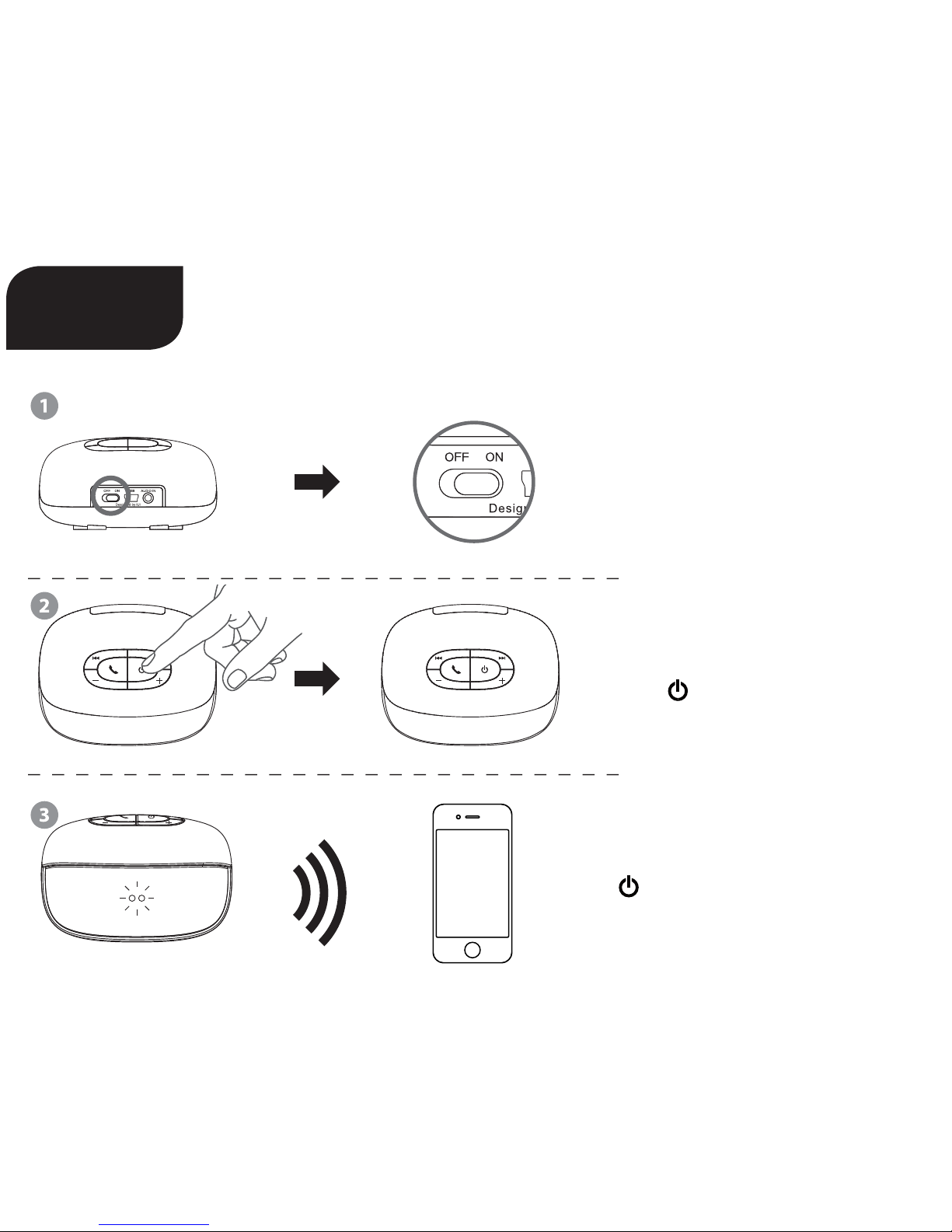
Beknopte handleiding
Op “ON” (Aan) zetten
Lang indrukken Aan-/uitzetten
ingedrukt houden tot blauwe
+ rode LED knipperen. Met uw
toestel verbinden
xqisit 2.0
NL
Page 51
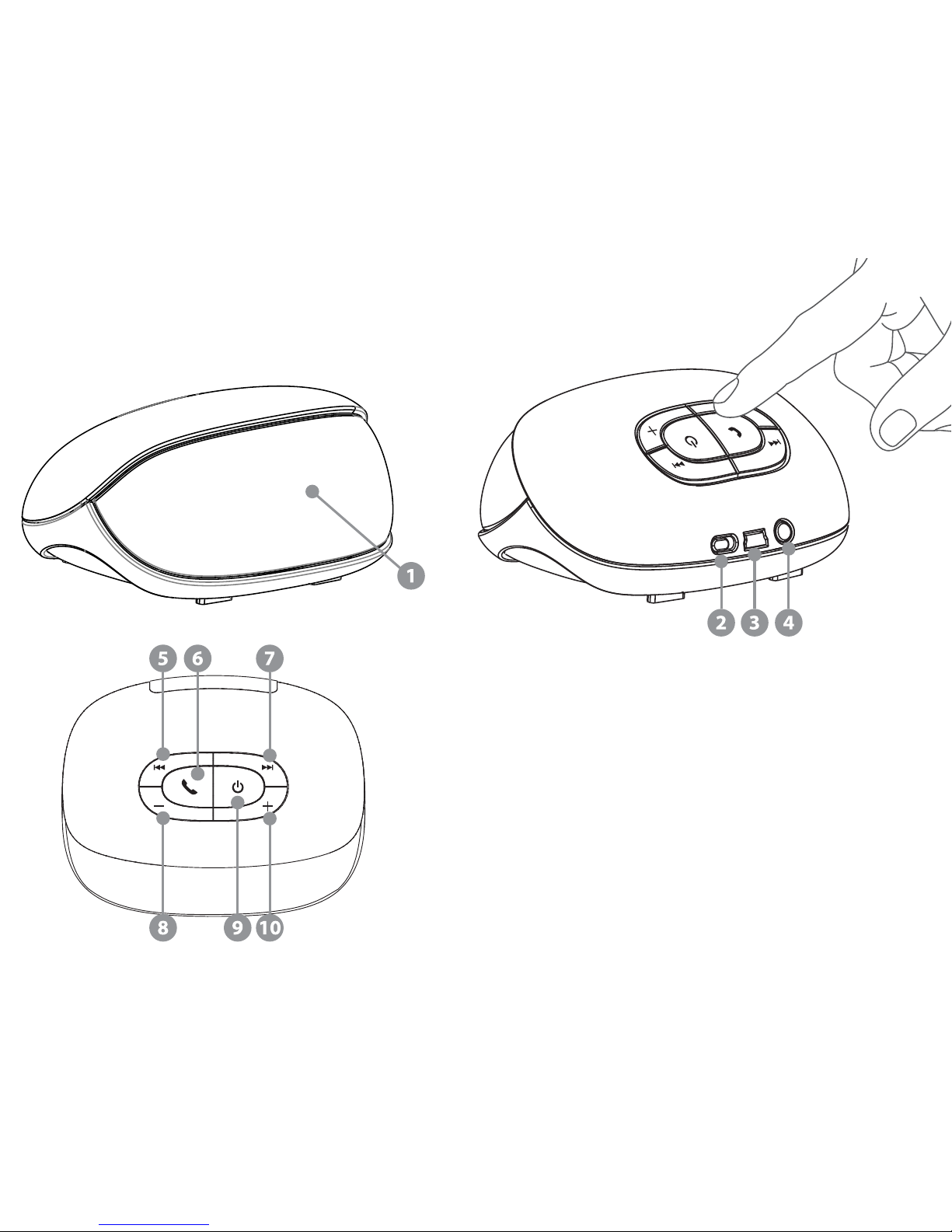
1 Accu-indicatie
2 Uit- en Aan-knop
3 USB-laadaansluiting
4 3,5-mm aux-ingang
5 Terug
6 Telefoon; Afspelen / Pauze
7 Vooruit
8 Volume –
9 Aan / Uit / Koppelen
10 Volume +
Page 52

Productkenmerken
• Bluetooth versie 2.1 + EDR met speciaal audio-algoritme en DSP voor het zuiverste en beste
draadloze stereogeluid
• Twee 35-mm breedbanddrivers zorgen voor een uitstekende geluidsweergave
• Passieve lage tonen
• Gemakkelijk laden met USB-laadkabel
• Oplaadbare lithium-ion-accu voor tot wel 5 bedrijfsuren
• Taalaanwijzingen (Engels)
• Accu-indicatie bij iPhone en Blackberry
1) Anatomie
Knop (bij Bluetooth-muziek):
A Vorig nummer
B Afspelen / Pauze
C Volgend nummer
D Volume –
E Aan / Uit / Koppelen (ingedrukt houden / lang indrukken)
F Volume +
Knop (tijdens een telefoongesprek):
A (tijdens gesprek): microfoon stil / actief schakelen
B (tijdens het overgaan): oproep aannemen (kort indrukken) / oproep weigeren (lang indrukken)
B (tijdens gesprek): oproep beëindigen (kort indrukken) / tussen telefoon en xqisit 2.0 wisselen (lang indrukken)
C Volume –
D (tijdens gesprek): microfoon stil / actief schakelen
F Volume +
Knop (algemeen zonder Bluetooth-verbinding):
E Aan- / uitzetten (lang indrukken); in de Koppelingsmodus wisselen (van OFF [Uit] ingedrukt houden)
Knop (muziek via de Auxingang):
Page 53
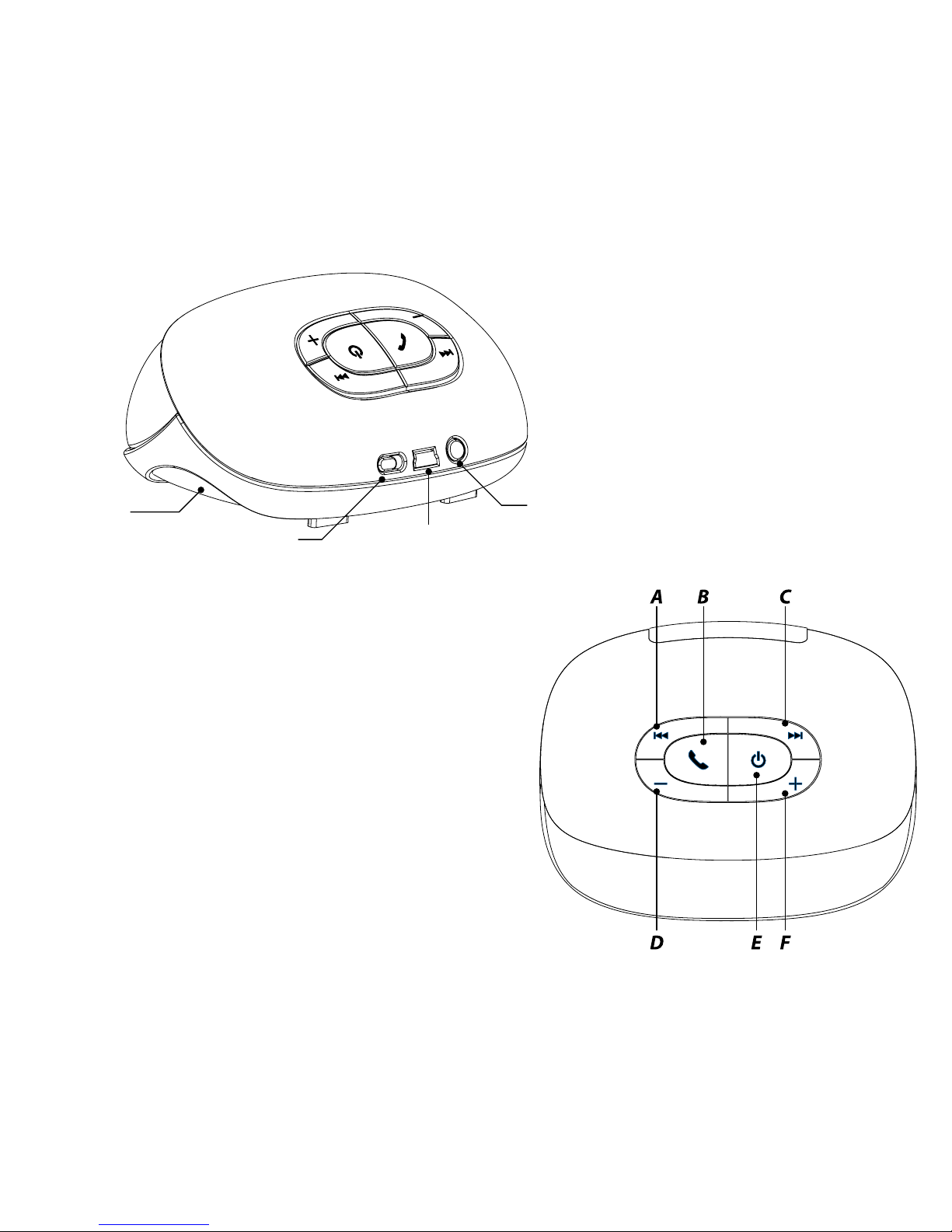
Passieve
subwoofer
Uit- en Aan-knop
Auxingang
USB-laadaansluiting
Page 54

2) xqisit 2.0 opladen
• Laad zo nodig de xqisit 2.0 op met behulp van de computer via de USB-kabel.
• Controleer of de schuifknop op “ON” (aan) staat.
• Druk op de knop in het bedieningsvlak tot het voorste LED op de voorkant blauw gaat branden.
Opmerking: laad de xqisit 2.0 minstens eenmaal per maand helemaal op.
3) Aan de xqisit 2.0 koppelen
• Kies een toestel met BT 2.0 of hoger uit (GSM-toestel of muziekspeler) en schakel de BT-verbinding in.
• Activeer de zoekmodus van uw BT-toestel (zoeken naar een nieuw toestel).
• Druk op de knop en houd hem ingedrukt tot het LED op de voorkant BLAUW/ROOD gaat knipperen.
xqisit 2.0 hee 3 minuten tijd (zoektijd) om de koppeling met uw BT-toestel tot stand te brengen.
• Op uw BT-toestel wordt <<xqisit 2.0>> weergegeven. Kies dit voor de koppeling. De code voor de
koppeling luidt “0000” als deze wordt gevraagd. (Voor iPhone, iPod en iPad is geen koppelingscode
nodig).
• Als de koppeling met de xqisit 2.0 is gelukt, wordt een geluidssignaal afgegeven en houdt het
knipperen op.
Opmerking: de stappen voor het koppelen hoe u alleen bij de eerste keer te doorlopen. Met de
meeste BT-toestellen, uitgezonderd de iPhone, is een automatische koppeling mogelijk.
• Controleer ook bij uw BT-toestel of de verbinding met “xqisit 2.0” tot stand is gebracht. U kunt ook in
de koppelingsmodus komen door de -knop in te drukken en ingedrukt te houden: laat de -knop
los wanneer de LED‘s tussen rood en blauw wisselen. Anders gaat het toestel uit.
Opmerking: xqisit 2.0 hoort ook op te knipperen en speelt een ander geluid af als het koppelen na 3
minuten is mislukt.
4) Actief koppelen met xqisit 2.0 (alternatieve koppelingsprocedure)
• Laat uw Bluetooth-toestel naar andere Bluetooth-toestellen zoeken en plaats het in de buurt van de
xqisit 2.0
• Koppel de toestellen volgens de aanwijzingen in 3) en wacht 20 seconden
• De “koppelingsuitnodiging” verschijnt op uw Bluetooth-toestel. “Accepteer” nu de uitnodiging,
“0000” is de koppelingscode als deze wordt gevraagd.
Page 55
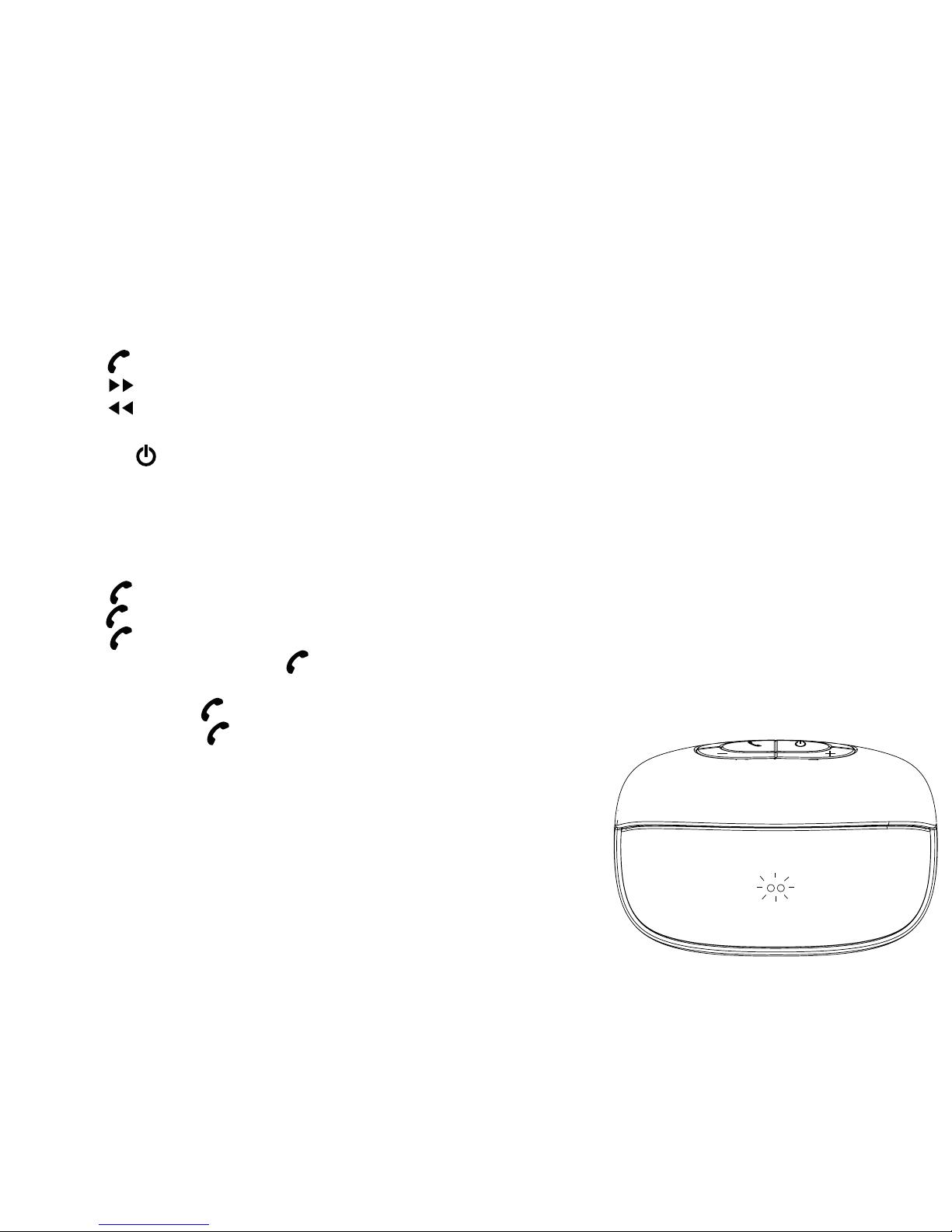
5) Muziek via de xqisit 2.0 afspelen
• Houd de verbinding met de xqisit 2.0 via BT in stand. Herhaal de koppelingsstappen als de verbinding werd verbroken.
• Kies op het BT-toestel de muziek die u wilt afspelen.
• Druk op voor Afspelen/Pauze
• Druk op voor het volgende nummer.
• Druk op voor het vorige nummer.
• Druk op + of – om het volume te regelen of regel het volume op uw BT-toestel.
• Druk op de -knop en houd hem ingedrukt tot de verlichting van het LED doo.
6) Via de xqisit 2.0 telefoneren
Opmerking: dit kan alleen bij een BT-mobiel met HFP/HSP.
• Druk op om een oproep te beantwoorden.
• Druk op en houd de knop ingedrukt om een oproep te weigeren.
• Druk op om op te leggen wanneer het gesprek ten einde is.
• Druk tijdens het gesprek op en houd de knop ingedrukt om tussen
xqisit 2.0 en een mobiel te wisselen.
• Druk tweemaal op om een oproep van een tweede beller te beantwoorden.
• Druk tweemaal op om tussen de eerste en de tweede beller over te
schakelen.
Page 56
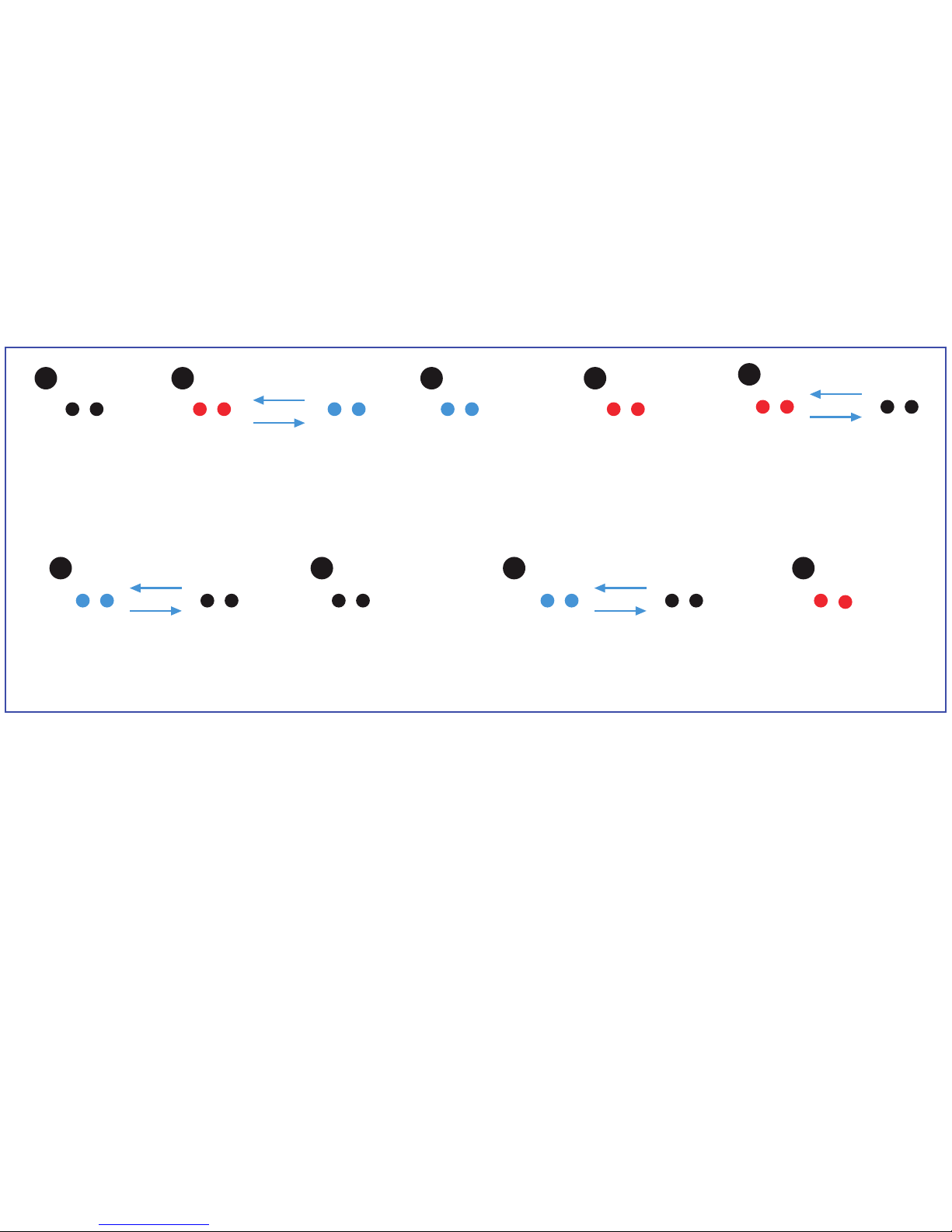
A
E
B
F H
C
G I
D
8) Technische gegevens
• Totaal uitgangsvermogen 6 W (3 W/kanaal)
• Breedbanddriver (35 mm) per kanaal + passieve lage tonen
• Vervorming <= 10 %
• Signaalruisafstand: >75 dB bij 1 W
• Responsie: 150–15.000 Hz
• Lipo-accu: 1150 mAh
• Bedrijfstijd: 5 uur bij 80% volume
• Oplaadtijd: 2 uur
Uit
→ Geen licht
Aan
(accu < 10%)
→ Rood knipperen
→ Automatisch uit in 5 min.
Koppeling
→ Snel knipperen tussen
afwisselend blauw en rood
Aan
(accu > 60%)
→ Ononderbroken
(blauw)
Opladen
(aan en uit)
→ Blauw knipperen
Aan
(accu < 30%)
→ Ononderbroken
(rood)
Uit en helemaal
opgeladen
→ Geen licht
7) Indicatielampje op de voorzijde
Microfoon uit
(tijdens handsfreegesprek)
→ Blauw knipperen
Upgrade-modus
(USB aangesloten)
→ Ononderbroken
(rood)
Page 57

9) Compatibiliteit (Bluetooth-toestel)
• Toestel met BT 2.0 of hoger met A2DP / AVRCP / HFP / HSP
• AAC Music Streaming wordt ondersteund vanaf iOS 4.3.3 of hoger
10) Problemen oplossen
Geluid niet zuiver of geen geluid
→ Controleer de volumeregeling op de xqisit 2.0 of het BT-toestel.
Bij het afspelen van muziek geen overdracht van BT-toestel naar xqisit 2.0
→ Controleer of uw BT-toestel over het A2DP-proel beschikt.
→ Controleer of beide toestellen met elkaar verbonden zijn.
→ Herstart de xqisit 2.0, zodat hij automatisch een verbinding met uw BT-toestel opbouwt.
LED zonder stroom
→ Controleer of de xqisit 2.0 helemaal opgeladen is.
Volume is te laag / te sterk vervormd
→ Wijzig het volume op de xqisit 2.0 of het BT-toestel.
Oproep wordt niet door xqisit 2.0 aangenomen
→ Controleer of uw mobiel over het HSP- / HFP-proel beschikt.
→ Controleer of beide toestellen met elkaar verbonden zijn.
→ Herstart de xqisit 2.0, zodat hij automatisch een verbinding met uw BT-toestel opbouwt.
De muziekweergave wordt na beëindiging van een telefoon gesprek niet hervat
→ Druk op Afspelen om de muziekweergave te hervatten.
Het afspelen kan niet via de xqisit 2.0 worden bediend
→ Controleer of uw BT-toestel over het AVRCP-proel beschikt.
Page 58

Waarschuwing
Lees deze veiligheidsaanwijzingen en waarschuwingen zorgvuldig door voor uw persoonlijke veiligheid en het voorkomen van schade.
Gevaar voor brand en elektrische schok
• Stel uw xqisit xqisit 2.0 niet bloot aan vloeistoen, vochtigheid of regen.
Gebruik de xqisit xqisit 2.0 niet bij een bad, wastafel, sauna, zwembad of stoomruimte.
Blootstelling van de xqisit xqisit 2.0 aan vocht kan leiden tot elektrische schok.
• Niet laten vallen, uit elkaar halen, openen, jndrukken, buigen, vervormen, doorboren, vermalen, in de magnetron
zetten, verbranden, verven of vreemde voorwerpen in de xqisit xqisit 2.0 steken. Deze handelingen kunnen leiden
tot elektrische schok.
• Maak de xqisit xqisit 2.0 alleen schoon met een droge doek.
• Stel uw xqisit xqisit 2.0 niet bloot aan extreem hoge of lage temperaturen.
• Zet uw xqisit xqisit 2.0 niet langere tijd in direct zonlicht.
• Plaats uw xqisit xqisit 2.0 niet dichtbij open vuur zoals fornuizen, kaarsen of open haard.
• Blokkeer de ventilatieopeningen niet.
Gevaren batterij/oplader
• Werp uw xqisit xqisit 2.0 niet in vuur. De batterij kan exploderen met letsel of dood als gevolg.
• Laad de batterij alleen op in overeenstemming met de gebruikersinstructies geleverd bij de xqisit xqisit 2.0.
• Probeer de xqisit xqisit 2.0 niet uit elkaar te halen of de ingebouwde batterij te openen; dit kan een
elektrische schok veroorzaken.
• Laad de xqisit xqisit 2.0 niet op in vochtige ruimtes of bij extreem hoge of lage temperaturen, omdat dit een
elektrische schok kan veroorzaken.
• Maak de xqisit xqisit 2.0 niet schoon als hij opgeladen wordt. Haal altijd de stekker van de lader uit het
stopcontact, voordat de xqisit xqisit 2.0 schoongemaakt wordt.
Gevaar voor ongevallen in de auto
• Plaats of bewaar de xqisit xqisit 2.0 of zijn accessoires niet bij of op de airbag van uw auto, omdat er sprake kan
zijn van ernstig letsel als de airbag in werking gesteld wordt.
Gevaar bij vallen
• Plaats de xqisit xqisit 2.0 niet op hoge oppervlakken zoals planken. Tijdens het afspelen van muziek kan de Xqisit
xqisit 2.0 zich verplaatsen, waardoor de xqisit xqisit 2.0 kan verschuiven en over de rand kan vallen.
Page 59

Waarschuwing
• Gebruik geen agressieve reinigingsmiddelen om uw xqisit xqisit 2.0 schoon te maken, omdat dit kan leiden tot
krassen en beschadigingen.
• Breng uw xqisit xqisit 2.0 niet in contact met scherpe voorwerpen, omdat dit kan leiden tot krassen en
beschadigingen.
• Steek niets in uw xqisit xqisit 2.0 tenzij anders aangegeven in de handleiding. Dit kan interne componenten
beschadigen.
• Probeer niet zelf uw xqisit xqisit 2.0 te repareren of uit elkaar te halen. Hij bevat geen componenten die door de
gebruiker onderhouden kunnen worden.
• Probeer niet om de batterij van uw xqisit xqisit 2.0 te vervangen. Deze is ingebouwd en niet vervangbaar.
• Let op alle aanwijzingen en borden die aangeven dat een elektrisch apparaat of radiofrequentieproduct
uitgeschakeld moet worden in de aangewezen gebieden.
• Schakel uw xqisit xqisit 2.0 uit voordat u aan boord gaat van een vliegtuig. Gebruik de xqisit xqisit 2.0 niet in een
vliegtuig tenzij dit door uw luchtvaartmaatschappij is toegestaan.
• Verwijder de xqisit xqisit 2.0 en de batterij van de xqisit xqisit 2.0 in overeenstemming met plaatselijke
regelgeving. Gooi de batterij niet weg met het huishoudelijk afval.
FCC-Verklaring
Deze apparatuur is getest en in overeenstemming bevonden met de beperkingen voor een klasse C digitaal apparaat,
conform Deel 15 van de FCC-bepalingen. Deze voorschien zijn opgesteld om een redelijke bescherming te bieden
tegen schadelijke interferentie bij gebruik binnenshuis. Dit apparaat genereert, gebruikt en kan radiofrequentieenergie uitstralen en kan, indien het niet volgens de instructies wordt geïnstalleerd of gebruikt, schadelijke storing op
radiocommunicatie veroorzaken. Er kan echter geen garantie worden gegeven dat bepaalde installaties storingsvrij
zullen functioneren. Als het apparaat storing veroorzaakt aan radio- of tv-ontvangst, wat getest kan worden door de
apparatuur uit en aan te schakelen, kan de gebruiker proberen om de storing te corrigeren door één van de volgende
maatregelen:
• Draai of verplaats de ontvangende antenne.
• Vergroot de afstand tussen de apparatuur en ontvanger.
• Sluit de apparatuur aan op een ander circuit dan dat waarop de ontvanger is aangesloten.
• Neem contact op met uw dealer of een ervaren radio-/televisiereparateur voor hulp.
Page 60
FCC-KENNISGEVING
Dit apparaat voldoet aan Deel 15 van de FCC-regels. Voor het gebruik moet worden voldaan aan twee voorwaarden:
1 Dit apparaat mag geen schadelijke interferentie veroorzaken, en
2 Dit apparaat moet elke ontvangen storing aanvaarden, zelfs als het gaat om een storing die ongewenst functioneren
veroorzaakt.
FCC-WAARSCHUWING
• Alle veranderingen aan het apparaat zonder uitdrukkelijke toestemming van de partij die verantwoordelijk is voor de
naleving, kunnen het recht van de gebruiker om het apparaat te gebruiken laten vervallen.
• Dit apparaat en zijn antenne(s) mogen niet samen geplaatst of gebruikt worden in combinatie met andere antennes of
zenders.
FCC ID: VL5PF304
Kijk voor de FCC en IC-identicatienummers aan de onderkant van de xqisit xqisit 2.0.
Modelnummer PF304
Het symbool met de doorgekruiste vuilnisbak betekent dat het product in de Europese Unie apart ingezameld
moet worden. Deze producten mogen niet met het ongesorteerde huishoudelijk afval weggegooid worden.
Wij, STRAX GmbH, verklaren onder onze exclusieve verantwoordelijkheid, dat het product xqisit 2.0 BOX
(modelnr. PF 304), voldoet aan de bepalingen van de volgende richtlijnen: 1999/5/EC; 2004/108/EC en
2006/95/EC.
Distributeur: STRAX GmbH, Belgische Allee 52+54, 53842 Troisdorf, Duitsland, www.strax.com
iPhone®, iPod® and iPad® are trademarks of Apple Inc., registered in the U.S. and other countries.
The Trademark BlackBerry® is owned by Research In Motion Limited and is registered in the United States and may be
pending or registered in other countries. STRAX is not endorsed, sponsored, aliated with or otherwise authorized by
Research In Motion Limited.
Page 61
xqisit 2.0
ES
Page 62
Guía de inicio rápido
Colocar en la posición “ON“
(Encendido).
Mantener pulsada para
encender/apagar.
Mantener pulsada hasta
que el LED azul + rojo parpadee.
Conectar a su aparato.
xqisit 2.0
ES
Page 63
1 Indicador de batería
2 Botón de encendido / apagado
3 Conexión para cargar vía USB
4 Entrada AUX de 3,5 mm
5 Anterior
6 Teléfono; Reproducción / pausa
7 Siguiente
8 Volumen –
9 Encendido / apagado / acoplar
10 Volumen +
Page 64

Características
• Bluetooth (BT) version 2.1 + EDR con algoritmo de audio especial y DSP para el mejor y más nítido
sonido estéreo inalámbrico
• Dos altavoces de banda ancha de 35 mm para una excelente delidad de sonido
• Subwoofer pasivo
• Cómodo proceso de carga con cable de USB
• Batería de iones de litio recargable para hasta 5 horas de autonomía
• Instrucciones de voz (inglés)
• Indicador de batería con iPhone y Blackberry
1) Anatomía
Teclas (reproducción de música vía Bluetooth):
A Título anterior
B Reproducción / pausa
A Siguiente título
D Volumen –
E Encendido / apagado / acoplar (mantener pulsado / pulsar prolongadamente)
F Volumen +
Teclas (durante una llamada telefónica):
A (durante la llamada): mantener micrófono mudo / activo
B (mientras suena el tono de llamada): aceptar llamada (pulsar brevemente) / rechazar llamada
(pulsar prolongadamente)
B (durante la llamada): nalizar llamada (pulsar brevemente) / conmutar entre teléfono y xqisit 2.0
(pulsar prolongadamente)
C Volumen –
D (durante la llamada): mantener micrófono mudo/activo
F Volumen +
Teclas (en general sin conexión Bluetooth):
E Encender / apagar (pulsar prolongadamente); cambiar a modo de acoplamiento (de OFF [apagado] mantener pulsada)
Teclas (reproducción de música vía entrada aux):
E apagar
Page 65
Subwoofer
pasivo
Tecla de encendido y
apagado
Entrada
AUX
Conexión para carga
vía USB
Page 66

2) Cargar el xqisit 2.0
• Si es necesario, cargue el xqisit 2.0 con el ordenador vía USB.
• Asegúrese de que el interruptor deslizante esté en “ON” (Encendido).
• Pulse la tecla del panel de control hasta que el LED tipo en la parte frontal se ilumine en azul.
Nota: Cargue el xqisit 2.0 por completo por lo menos una vez al mes.
3) Acoplar con el xqisit 2.0
• Escoja un aparato que soporte BT 2.0 o superior (teléfono móvil o reproductor de música) y encienda
la conexión BT.
• Active el modo de búsqueda de su dispositivo BT (búsqueda de un nuevo dispositivo).
• Pulse la tecla -y manténgala pulsada hasta que el LEDtipo en la parte frontal parpadee en AZUL/
ROJO. El xqisit 2.0 dispone de 3 minutos (tiempo de búsqueda) para acoplarse con su dispositivo BT.
• En su dispositivo BT aparecerá <<xqisit 2.0>>; selecciónelo para el acoplamiento. Si se requiere, la
contraseña para el acoplamiento es “0000”. (Para iPhone, iPod y iPad no se necesita código de
acoplamiento.)
• Una vez nalizado con éxito el acoplamiento al xqisit 2.0, se emitirá una señal acústica y el
parpadeo nalizará. Nota: Los pasos a seguir para realizar el acoplamiento solo son necesarios la
primera vez; con la mayoría de dispositivos BT, a excepción del iPhone, es posible realizar un
acoplamiento automático.
• Compruebe si su dispositivo BT ha establecido la conexión con el xqisit 2.0. También puede acceder
al modo de acoplamiento pulsando la tecla y manteniéndola pulsada. Cuando los LED se iluminen
intermitentemente en rojo y azul, suelte la tecla , de lo contrario el dispositivo se apagará.
Nota: Si transcurridos 3 minutos no se ha producido acoplamiento alguno, el xqisit 2.0 dejará de
parpadear y reproducirá otro título.
4) Acoplamiento activo al xqisit 2.0 (ruta de acoplamiento alternativa)
• Inicie la búsqueda de otros dispositivos BT en su dispositivo BT y colóquelo cerca del xqisit 2.0.
• Acople los dispositivos tal como se describe en 3) y espere 20 segundos.
• En su dispositivo BT aparece una “invitación de acoplamiento” que deberá aceptar. Si se requiere, el
código para el acoplamiento es “0000”.
Page 67
5) Reproducción de música con el xqisit 2.0
• Mantenga la conexión vía BT con el xqisit 2.0. Si ésta se interrumpe, repita los pasos de acoplamiento.
• En su dispositivo BT, seleccione los títulos que desee reproducir.
• Pulse para reproducción/pausa.
• Pulse para acceder al siguiente título.
• Pulse para acceder al título anterior.
• Pulse + ó – para regular el volumen o regúlelo directamente en su dispositivo BT.
• Pulse la tecla y manténgala pulsada hasta que se apague la iluminación del LEDtipo.
6) Realizar una llamada a través del xqisit 2.0
Nota: Solo es posible si se dispone de un teléfono móvil BT con HFP/HSP.
• Pulse para aceptar una llamada.
• Pulse y manténgala pulsada para rechazar una llamada.
• Pulse para colgar una vez nalizada la llamada.
• Durante la llamada, pulse y manténgala pulsada para conmutar entre el
xqisit 2.0 y el teléfono móvil.
• Pulse dos veces para aceptar una llamada de un segundo usuario.
• Pulse dos veces para conmutar entre el primer usuario y el segundo.
Page 68
A
E
B
F H
C
G I
D
8) Datos técnicos
• Potencia de salida total 6 W (3 W/canal)
• Altavoces de banda ancha (35 mm) por canal + altavoz de bajos pasivo
• Distorsión <= 10 %
• Relación señal/ruido: >75 dB a 1 W
• Respuesta de frecuencia: 150–15.000 Hz
• Batería de polím. de litio: 1150 mAh
• Autonomía: 5 horas al 80% del volumen
• Tiempo de carga: 2 horas
Apagado
→ sin luz
Encendido
(batería < 10%)
→ parpadea en rojo
→ desconexión automática
en 5 min.
Acoplamiento
→ parpadeo rápido e intermitente
rojo y azul
Encendido
(batería > 60%)
→ permanece
encendido (azul)
Carga
(encendido y apagado)
→ parpadea en azul
Encendido
(batería < 30%)
→ permanece
encendido
(rojo)
Apagado y completamente
cargado
→ sin luz
7) Indicador luminoso en la parte frontal
Micrófono apagado
(durante una conversación con
el modo manos libres)
→ parpadea en azul
Upgrade-modus
(USB Modo de actualización
USB conectado)
→ permanece encendido (rojo)
Page 69

9) Compatibilidad (dispositivo Bluetooth)
• Dispositivo con BT 2.0 o superior con A2DP / AVRCP / HFP / HSP
• Compatible con streaming de música AAC a partir de iOS 4.3.3 o superior
10) Solución de errores
Sonido poco limpio o sin sonido
→ Compruebe el volumen tanto en el xqisit 2.0 con en el dispositivo BT.
Sin transferencia del dispositivo BT al xqisit 2.0 durante la reproducción de música
→ Compruebe si el dispositivo BT dispone del perl A2DP.
→ Compruebe si ambos dispositivos están conectados entre sí.
→ Reinicie el xqisit 2.0 para que establezca automáticamente una conexión con su dispositivo BT.
LED sin corriente
→ Asegúrese de que el xqisit 2.0 esté cargado por completo.
Volumen demasiado bajo / demasiado distorsionado
→ Ajuste el volumen en el xqisit 2.0 o en el dispositivo BT.
El xqisit 2.0 no acepta la llamada.
→ Compruebe que su teléfono móvil dispone del perl HSP / HFP.
→ Compruebe si ambos dispositivos están conectados entre sí.
→ Reinicie el xqisit 2.0 para que establezca automáticamente una conexión con su dispositivo BT.
Al nalizar una llamada no se reinicia la reproducción de música.
→ Pulse Reproducir para reiniciar la reproducción de música.
Sin control de la reproducción vía xqisit 2.0
→ Compruebe si su dispositivo BT dispone del perl AVRCP.
Page 70

Advertencia
Lea atentamente las advertencias e indicaciones de seguridad para prevenir lesiones personales y daños materiales.
Peligro de incendio y de descarga eléctrica
• No sumerja su xqisit xqisit 2.0 en líquido alguno ni lo exponga a la humedad ni a la lluvia.
No utilice el xqisit xqisit 2.0 cerca de una bañera, fregadero, sauna, piscina o baño de vapor.
• Si se expone el xqisit xqisit 2.0 a la humedad, podría producirse una descarga eléctrica.
• No lance, desmonte, abra, aplaste, doble, deforme, perfore, corte, introduzca en el microondas, incinere o pinte el
Xqisit xqisit 2.0, ni introduzca cuerpos extraños en él. De lo contrario podría producirse una descarga eléctrica.
• Limpie el xqisit xqisit 2.0 únicamente con un paño seco.
• No exponga su xqisit xqisit 2.0 a temperaturas ni extremadamente altas ni extremadamente bajas.
• No exponga su xqisit xqisit 2.0 a la luz directa del sol durante periodos de tiempo prolongados.
• No deje su xqisit xqisit 2.0 cerca de llamas abiertas como las de los quemadores de la cocina, las de las velas o las
de una hoguera.
• No bloquee ninguna de las aperturas de ventilación.
Peligro por batería/cargador
• No tire su xqisit xqisit 2.0 al fuego. De hacerlo, la batería podría explotar causando lesiones e incluso la muerte.
• Cargue la batería únicamente de acuerdo con lo indicado en el manual de instrucciones suministrado junto con el
Xqisit xqisit 2.0.
• No intente desmontar la batería del xqisit xqisit 2.0 ni fuerce la apertura de la batería integrada, ya que ello podría
producir una descarga eléctrica.
• No cargue el xqisit xqisit 2.0 en áreas húmedas o si las temperaturas son extremadamente altas o bajas, ya que ello
podría producir una descarga eléctrica.
• No limpie el xqisit xqisit 2.0 mientras se esté cargando. Antes de limpiar el xqisit xqisit 2.0, desenchufe siempre el
cargador.
Peligro de accidente de coche
• No deje o guarde nunca el xqisit xqisit 2.0 ni sus accesorios cerca o sobre el airbag de su automóvil, ya que ello
podría causar lesiones graves en caso de activación del airbag.
Peligro de caída
• No coloque el xqisit xqisit 2.0 sobre supercies elevadas tales como estanterías. Al reproducir música, el Xqisit
xqisit 2.0 podría moverse, lo cual podría hacer que el xqisit xqisit 2.0 se desplazara y cayera.
Page 71

PRECAUCIÓN
• No utilice productos de limpieza abrasivos para limpiar su xqisit xqisit 2.0, ya que tales productos podrían producir
arañazos y daños en el dispositivo.
• No permita que su xqisit xqisit 2.0 entre en contacto con ningún tipo de objeto alado, ya que tales objetos podrían
producir arañazos y daños en el dispositivo.
• No introduzca nada en su xqisit xqisit 2.0, a no ser que en el manual de instrucciones se especique lo contrario. La
introducción de cualquier objeto no autorizado podría dañar los componentes internos.
• No intente reparar, modicar o desmontar su xqisit xqisit 2.0, no contiene ningún tipo de componente que el usuario
pueda aprovechar.
• No intente cambiar la batería de su xqisit xqisit 2.0, ya que ésta no es intercambiable.
• Cumpla todas las indicaciones que aparezcan en los símbolos o en las pantallas al respecto de la necesidad de apagar
un
dispositivo eléctrico o de radiofrecuencia en determinadas áreas.
• Apague su xqisit xqisit 2.0 antes de embarcar en un avión. No utilice el xqisit xqisit 2.0 dentro de un avión, a no ser
que la compañía aérea lo permita.
• Deseche el xqisit xqisit 2.0 y su batería de acuerdo con lo estipulado por la normativa local. No lo deseche con los
residuos domésticos corrientes.
Declaración FCC
Este equipo ha superado satisfactoriamente las pruebas de cumplimiento con los límites jados para dispositivos
digitales de Clase C, de acuerdo con la Parte 15 de la normativa FCC. Estos límites se han jado en aras de garantizar
una protección adecuada contra interferencias peligrosas en una instalación doméstica. Este equipo genera usos y
puede emitir energía de radiofrecuencia. Si no se instala y utiliza de acuerdo con lo especicado en las instrucciones,
puede producir interferencias que menoscaben las comunicaciones por radio. Sin embargo, no existe garantía alguna
de que no se vayan a producir interferencias en una instalación concreta. Si el presente equipo causa interferencias
perjudiciales que impiden la recepción de las ondas de radio o televisión, lo cual puede determinarse con sólo encender
y apagar el equipo, el usuario puede intentar corregir las interferencias con una de las siguientes medidas:
• Reoriente o recoloque la antena receptora.
• Aumente la separación entre el equipo y el receptor.
• Conecte el equipo a una salida de un circuito diferente del que está conectado el receptor.
• Solicite ayuda a su proveedor o a un técnico en radio/TV con experiencia.
Page 72
AVISO FCC
Este dispositivo cumple la Parte 15 de la normativa FCC. Sólo puede manejarse si se cumplen las dos condiciones
siguientes:
1 Este dispositivo no puede causar interferencias perjudiciales, y
2 Este dispositivo debe aceptar cualquier interferencia que reciba, incluidas interferencias que puedan causar un
funcionamiento no deseado.
PRECAUCIÓN FCC
• Cualquier cambio o modicación realizada sin previo consentimiento expreso de la parte responsable del cumplimiento
de la normativa podría resultar en la anulación de la autoridad del usuario para utilizar este dispositivo.
• Este dispositivo y su(s) antena(s) no pueden colocarse al lado de cualquier otra antena o transmisor, ni utilizarse
conjuntamente con tales dispositivos.
IDENTIFICACIÓN FCC: VL5PF304
Los números de identicación FCC e IC se encuentran en la parte inferior del xqisit xqisit 2.0.
Modelo PF304
El símbolo del contenedor de basura tachado signica que en la Unión Europea el producto debe desecharse
por separado. Estos productos no pueden desecharse con los residuos domésticos no separados para reciclaje.
STRAX GmbH declara bajo su responsabilidad exclusiva que el producto xqisit 2.0 BOX (n.° de modelo PF 304)
cumple con las disposiciones de las siguientes directivas: 1999/5/CE; 2004/108/CE y 2006/95/CE.
Distribuidor: STRAX GmbH, Belgische Allee 52+54, 53842 Troisdorf, Alemania, www.strax.com
iPhone®, iPod® and iPad® are trademarks of Apple Inc., registered in the U.S. and other countries.
The Trademark BlackBerry® is owned by Research In Motion Limited and is registered in the United States and may be
pending or registered in other countries. STRAX is not endorsed, sponsored, aliated with or otherwise authorized by
Research In Motion Limited.
Page 73
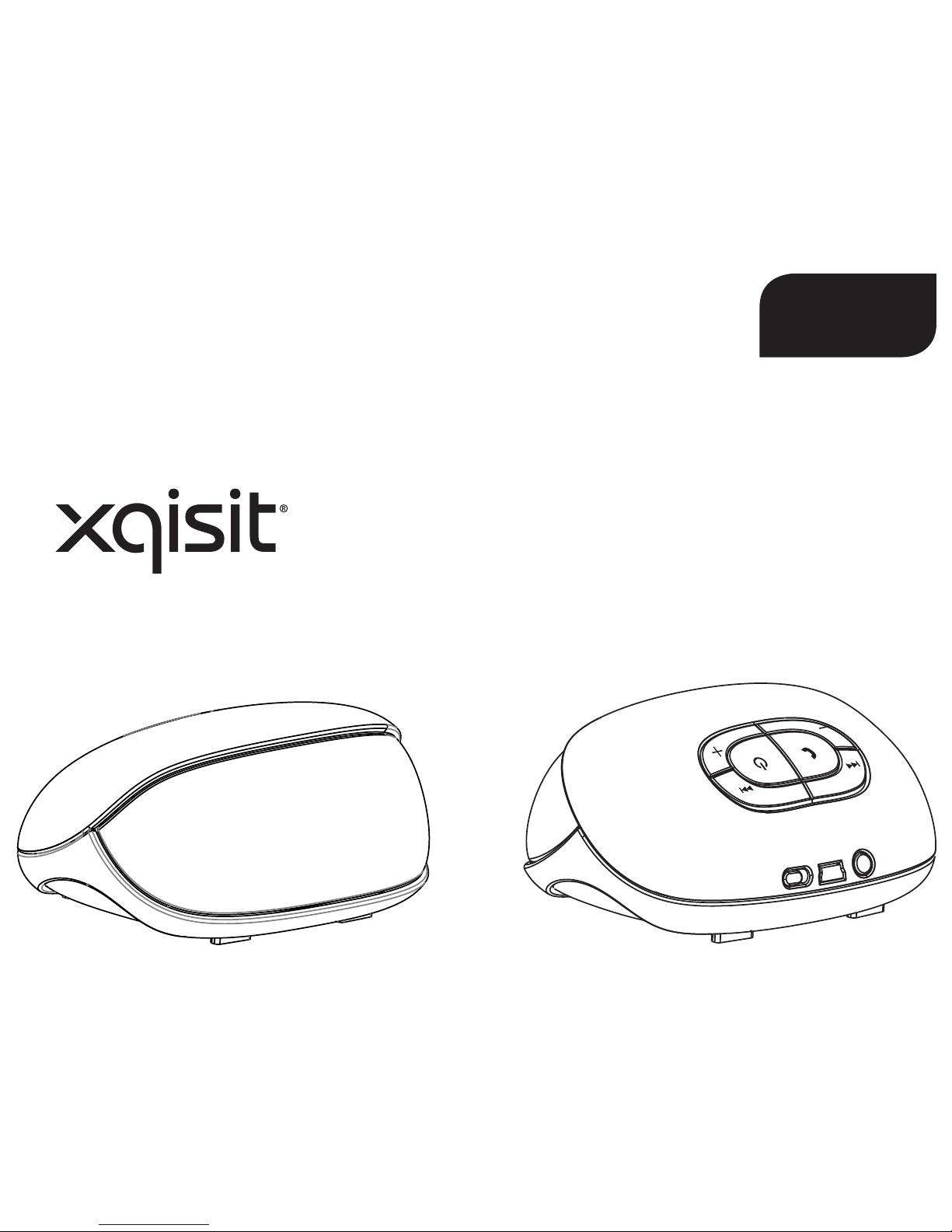
xqisit 2.0
PL
Page 74
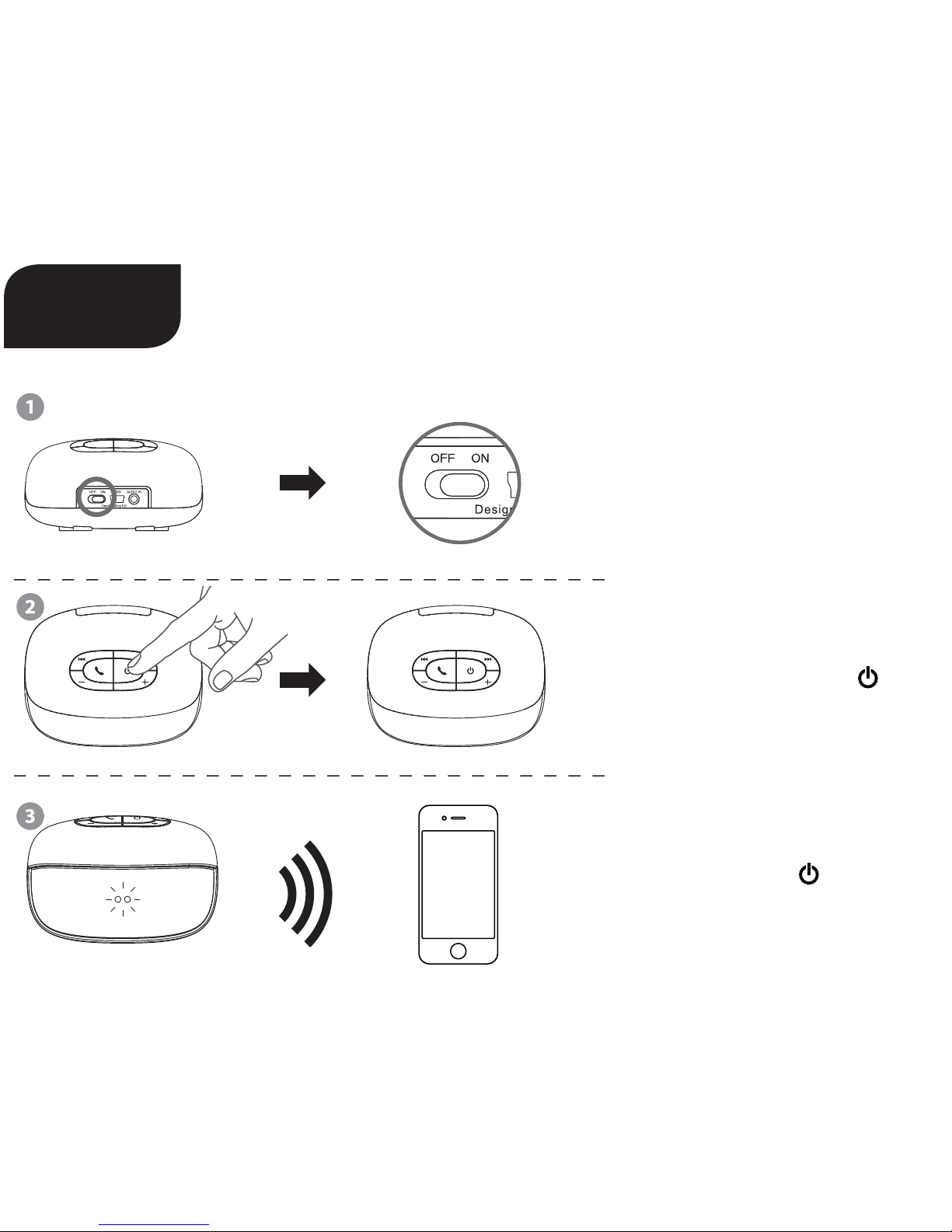
Skrócona instrukcja obsługi
Przesuń przycisk do pozycji „ON“
(włączony)
ciśnij i przytrzymaj przycisk , aby
włączyć/wyłączyć urządzenie
Przytrzymaj przycisk do momentu, aż niebieska + czerwona
dioda LED zaczną migać, aby
połączyć się z urządzeniem
xqisit 2.0
PL
Page 75
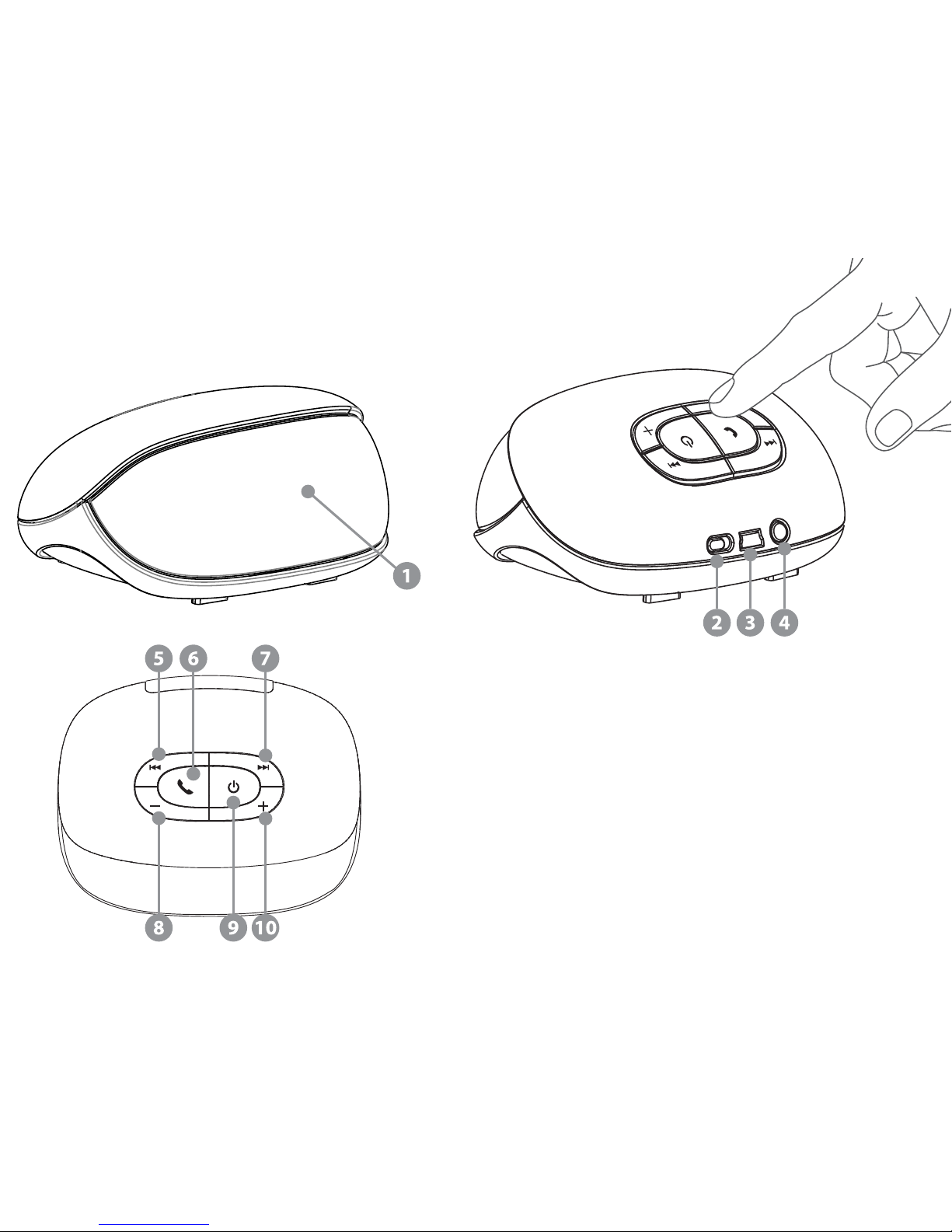
1 Wskaźnik stanu baterii
2 Przycisk włączania i wyłączania
3 Wejście USB do ładowania urządzenia
4 Wejście Aux 3,5 mm
5 Poprzedni
6 Telefon, odtwarzanie / pauza
7 Następny
8 Głośność –
9 Włączanie / wyłączanie / parowanie
10 Głośność +
Page 76

Cechy produktu
• Bluetooth wersja 2.1 + EDR ze specjalnym algorytmem audio i DSP dla czystego i najlepszego w
swojej klasie bezprzewodowego dźwięku stereo
• Dwa 35-milimetrowe głośniki szerokopasmowe zapewniają doskonałą jakość dźwięku
• Pasywny głośnik niskotonowy
• Wygodne ładowanie za pomocą kabla USB
• Ładowalna bateria litowo-jonowa umożliwiająca odtwarzanie do 5 godzin muzyki
• Instrukcje głosowe (po angielsku)
• Wskaźnik stanu baterii dla urządzeń iPhone i Blackberry
1) Funkcje
Przyciski (dla muzyki przez Bluetooth):
A Poprzedni utwór
B Odtwarzanie / pauza
C Następny utwór
D Głośność –
E Przycisk włączania i wyłączania / parowanie (naciśnij i przytrzymaj / długo przytrzymaj)
F Głośność +
Przyciski (podczas rozmowy telefonicznej):
A (podczas rozmowy): Wyłączenie / włączenie mikrofonu
B (gdy dzwoni telefon): Odebranie połączenia (naciśnij i krótko przytrzymaj) / odrzucenie połączenia
(naciśnij i długo przytrzymaj)
B (podczas rozmowy): Zakończenie połączenia (naciśnij i krótko przytrzymaj) / przełączenie między
telefonem i xqisit 2.0 (naciśnij i długo przytrzymaj)
C Głośność –
D (podczas rozmowy): Wyłączenie / włączenie mikrofonu
F Głośność +
Przycisk (funkcje ogólne bez połączenia Bluetooth):
E Włączanie / wyłączanie (naciśnij i długo przytrzymaj)
Przyciski (dla muzyki przez wejście Aux):
E Wyłączanie
Page 77
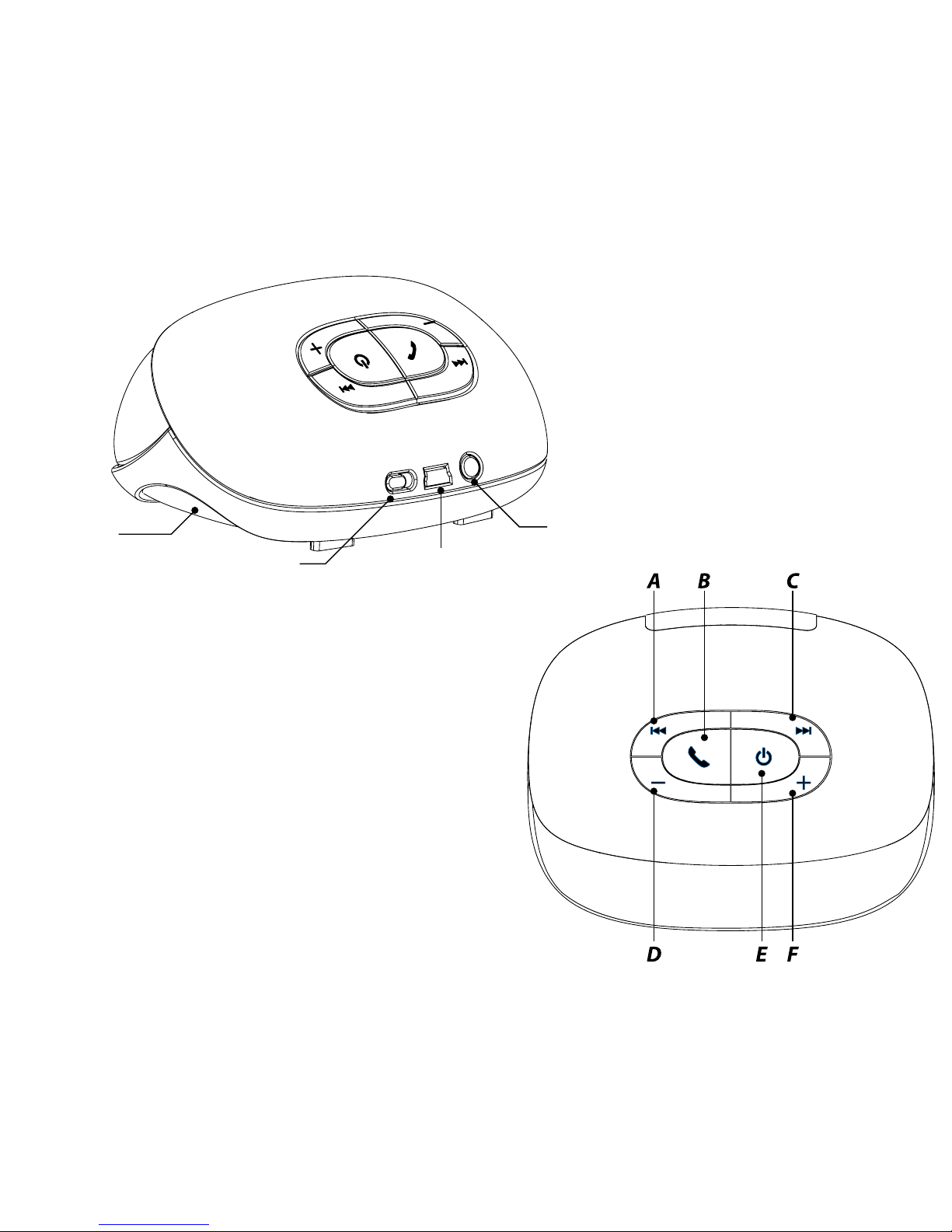
Subwoofer
pasywny
Przycisk włączania i
wyłączania
Wejście
Aux
Wejście USB do
ładowania urządzenia
Page 78

2) Ładowanie xqisit 2.0
• W razie potrzeby naładuj xqisit 2.0, podłączając urządzenie do komputera za pomocą kabla USB.
• Upewnij się, że przełącznik jest w pozycji „ON“.
• Naciśnij przycisk na panelu sterowania, przytrzymując go do momentu, aż LED z przodu nie
zostanie podświetlone na niebiesko.
Uwaga! Naładuj całkowicie urządzenie xqisit 2.0 przynajmniej raz w miesiącu.
3) Parowanie z urządzeniem xqisit 2.0
• Wybierz urządzenie wyposażone w BT 2.0 lub wyższe (telefon komórkowy lub odtwarzacz) i włącz
połączenie BT.
• Włącz tryb wyszukiwania urządzenia BT (wyszukiwanie nowego urządzenia).
• Naciśnij przycisk i przytrzymaj go do momentu, aż diody LED z przodu będą migać w kolorze
NIEBIESKO-CZERWONYM. W ciągu 3 minut (czas wyszukiwania) urządzenie xqisit 2.0 powinno
sparować się z urządzeniem BT.
• Na urządzeniu BT wyświetli się <<xqisit 2.0>>, wybierz tę opcję, aby dokonać parowania. Wprowadź
kod „0000“, jeśli kod parowania jest wymagany. (Kod parowania nie jest wymagany dla urządzeń
iPhone, iPod i iPad.)
• Jeśli parowanie z urządzenie xqisit 2.0 zakończy się pomyślnie, zostanie nadany sygnał dźwiękowy, a
diody przestaną migać.
Uwaga! Wykonanie powyższych kroków jest konieczne tylko przy pierwszym parowaniu, dla większości
urządzeń BT z wyjątkiem urządzenia iPhone możliwe jest automatyczne parowanie.
• W przypadku urządzenia BT należy również sprawdzić, czy uzyskane zostało połączenie z „xqisit 2.0“.
Tryb parowania można również aktywować, naciskając i przytrzymując przycisk : gdy kolor diod
LED zmieni się z czerwonego na niebieski, zwolnij przycisk , w przeciwnym razie urządzenie się
wyłączy.
Uwaga! Urządzenie xqisit 2.0 przestanie migać i nada inny sygnał dźwiękowy, aby zasygnalizować błąd
parowania po 3 minutach.
4) Aktywne parowanie z urządzeniem xqisit 2.0 (alternatywny sposób parowania)
• Ustaw tryb wyszukiwania innego urządzenia Bluetooth w urządzeniu Bluetooth i umieść je w pobliżu
urządzenia xqisit 2.0.
• Urządzenia należy sparować zgodnie z opisem w punkcie 3) i odczekać 20 sekund.
• Na urządzeniu Bluetooth pojawi się „zaproszenie do parowania“; należy „przyjąć“ zaproszenie i jeśli
jest wymagany kod, należy wprowadzić „0000“.
Page 79
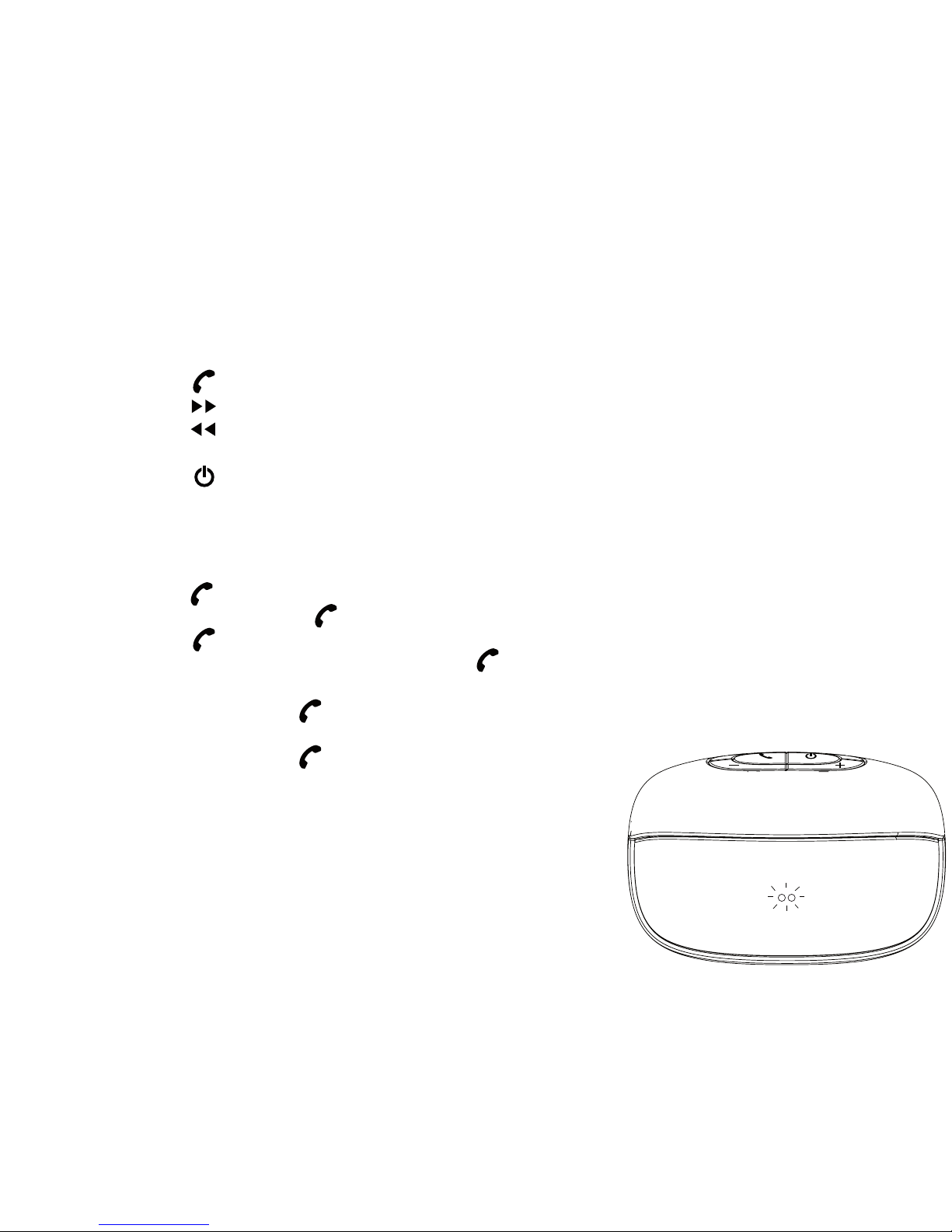
5) Odtwarzanie muzyki przez urządzenie xqisit 2.0
• Utrzymaj połączenie urządzeń BT i xqisit 2.0, w przypadku utracenia połączenia, powtórz kroki
opisane
w procesie parowania.
• Wybierz w urządzeniu BT muzykę, która ma być odtwarzana.
• Naciśnij przycisk , aby odtworzyć utwór/przerwać odtwarzanie.
• Naciśnij przycisk , aby odtworzyć następny utwór.
• Naciśnij przycisk , aby odtworzyć poprzedni utwór.
• Naciśnij + lub –, aby ustawić poziom głośności, albo ustaw głośność za pomocą urządzenia BT.
• Naciśnij przycisk i przytrzymaj go do momentu, aż LED zgaśnie.
6) Prowadzenie rozmów telefonicznych przez urządzenie xqisit 2.0
Uwaga! Dostępne tylko w telefonach komórkowych BT z HFP / HSP.
• Naciśnij przycisk , aby odebrać połączenie.
• Naciśnij i przytrzymaj przycisk , aby odrzucić połączenie.
• Naciśnij przycisk , aby zakończyć rozmowę.
• Podczas rozmowy naciśnij i przytrzymaj przycisk w celu przełączenia
między telefonem a urządzeniem xqisit 2.0.
• Naciśnij dwukrotnie przycisk , aby odebrać połączenie od drugiego
rozmówcy.
• Naciśnij dwukrotnie przycisk , aby przełączyć między pierwszym a
drugim rozmówcą.
Page 80
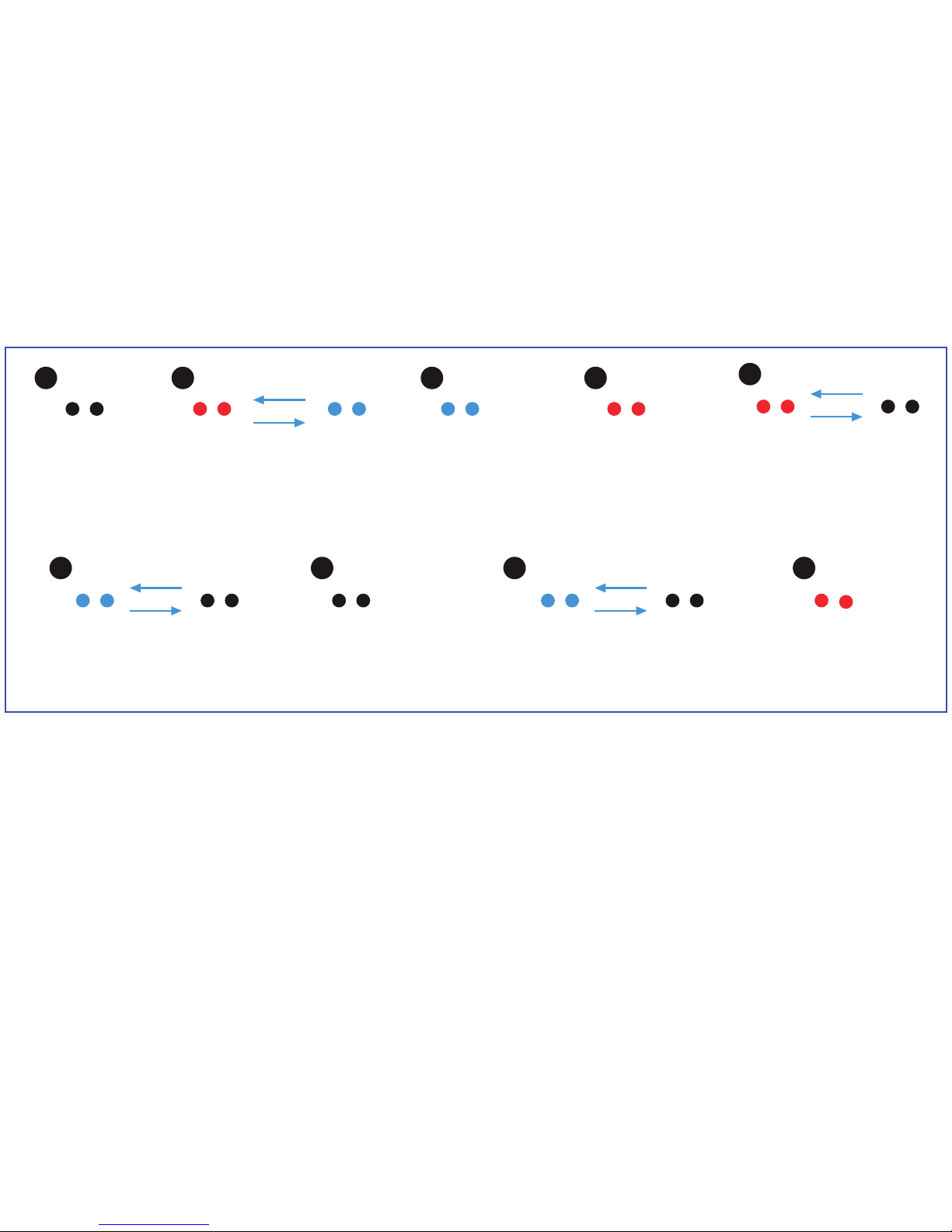
A
E
B
F H
C
G I
D
8) Specykacja techniczna
• Całkowita moc wyjściowa 6 W (3 W/kanał)
• Głośniki szerokopasmowe (35 mm) na kanał + subwoofer pasywny
• Zniekształcenia <= 10%
• stosunek sygnał/szum: > 75 dB przy 1 W
• Pasmo przenoszenia: 150-15 000 Hz
• Bateria litowo-polimerowa o pojemności: 1150 mAh
• Czas odtwarzania: 5 godziny przy 80% głośności
• Czas ładowania: 2 godziny
Zasilanie
wyłączone
→ Diody nie
świecą się
Zasilanie włączone
(bateria < 10%)
→ Diody migają na czerwono
→ Urządzenie wyłączy się
automatycznie w ciągu
5 minut
Parowanie
→ Diody migają na zmianę w
kolorze niebieskim i czerwonym
Zasilanie włączone
(bateria > 60%)
→ Światło ciągłe
(niebieskie)
Ładowanie
(urządzenie włączone i
wyłączone)
→ Diody migają na niebiesko
Zasilanie włączone
(bateria < 30%)
→ Światło ciągłe
(czerwone)
Urządzenie w pełni
naładowane i wyłączone
→ Diody nie świecą się
7) Dioda sygnalizacyjna z przodu urządzenia
Mikrofon wyłączony (w
trybie głośnomówiącym)
→ Diody migają na
niebiesko
Tryb aktualizacji
(kabel USB podłączony)
→ Światło ciągłe
(czerwone)
Page 81

9) Kompatybilność (urządzenie Bluetooth)
• Urządzenie BT 2.0 lub nowsze z A2DP / AVRCP / HFP / HSP
• Strumieniowa transmisja muzyki AAC jest obsługiwana w iOS 4.3.3 lub wyższej wersji
10) Rozwiązywanie problemów
Dźwięk nie jest czysty lub brak dźwięku
→ Sprawdź ustawienia głośności urządzenia xqisit 2.0 lub BT.
Podczas odtwarzania muzyki brak transferu danych z urządzenia BT na xqisit 2.0
→ Sprawdź, czy urządzenie BT ma prol A2DP.
→ Sprawdź, czy urządzenia są ze sobą sparowane.
→ Zrestartuj urządzenie xqisit 2.0 w celu automatycznego ustanowienia połączenia z
urządzeniem BT.
Brak zasilania LED
→ Upewnij się, że urządzenie xqisit 2.0 jest w pełni naładowane.
Za niska głośność / dźwięk mocno zniekształcony
→ Dostosuj poziom głośności urządzenia xqisit 2.0 lub BT.
Połączenie nie zostało odebrane przez urządzenie xqisit 2.0
→ Upewnij się, że telefon ma prol HSP / HFP.
→ Sprawdź, czy urządzenia są ze sobą sparowane.
→ Zrestartuj urządzenie xqisit 2.0 w celu automatycznego ustanowienia połączenia z
urządzeniem BT.
Odtwarzanie muzyki nie jest wznawiane po zakończeniu rozmowy telefonicznej
→ Naciśnij przycisk odtwarzania, aby wznowić odtwarzanie muzyki.
Brak możliwości kontroli odtwarzania muzyki za pomocą urządzenia xqisit 2.0
→ Sprawdź, czy urządzenie BT ma prol AVRCP.
Page 82

Ostrzeżenie
Aby zapewnić sobie bezpieczeństwo i zapobiec wystąpieniu szkód materialnych, należy uważnie przeczytać poniższe
uwagi i ostrzeżenia.
Zagrożenie pożarem i porażeniem prądem elektrycznym
• Urządzenie xqisit xqisit 2.0 należy chronić przed działaniem cieczy, wilgoci, wilgotności i deszczu. Nie należy go
używać w pobliżu wanny, zlewu, sauny, basenu czy łaźni parowej. Narażenie urządzenia xqisit xqisit 2.0 na działanie
wilgoci mogłoby doprowadzić do porażenia prądem elektrycznym.
• Urządzenia xqisit xqisit 2.0 nie wolno upuszczać, rozbierać, otwierać, zgniatać, wyginać, deformować, przebijać,
ciąć, wkładać do kuchenki mikrofalowej, zapalać, malować ani wkładać do niego ciał obcych. Takie działania mogłyby
spowodować porażenie prądem elektrycznym.
• Urządzenie xqisit xqisit 2.0 należy czyścić tylko suchą szmatką.
• Urządzenie xqisit xqisit 2.0 należy chronić przed działaniem skrajnie wysokich lub niskich temperatur.
• Urządzenie xqisit xqisit 2.0 należy chronić przed przedłużonym bezpośrednim działaniem promieni słonecznych.
• Urządzenia xqisit xqisit 2.0 nie należy zostawiać w pobliżu otwartego ognia, np. przy palnikach kuchenki, świecach
czy kominku.
• Nie blokować otworów wentylacyjnych urządzenia.
Zagrożenia związane z akumulatorem/ładowarką
• Urządzenia xqisit xqisit 2.0 nie wolno wrzucać do ognia. Akumulator mógłby eksplodować, powodując obrażenia
ciała lub śmierć.
• Akumulator należy ładować tylko zgodnie z instrukcją obsługi dostarczoną z urządzeniem xqisit xqisit 2.0.
• Nie wolno rozbierać urządzenia xqisit xqisit 2.0 ani na siłę otwierać zintegrowanego akumulatora, ponieważ
może to doprowadzić do porażenia prądem elektrycznym.
• Nie należy ładować urządzenia xqisit xqisit 2.0 w miejscach wilgotnych ani w skrajnie wysokich lub niskich
temperaturach, ponieważ mogłoby to doprowadzić do porażenia prądem elektrycznym.
• Nie czyścić urządzenia xqisit xqisit 2.0 w trakcie ładowania. Przed czyszczeniem zawsze należy najpierw odłączyć
ładowarkę.
Zagrożenie w razie wypadku drogowego
• Nie wolno zostawiać ani umieszczać urządzenia xqisit xqisit 2.0 ani jego akcesoriów na poduszce powietrznej
pojazdu ani w jej pobliżu, ponieważ w razie wystrzelenia poduszki można odnieść poważne obrażenia ciała.
Zagrożenie związane z upadkiem
• Nie umieszczać urządzenia xqisit xqisit 2.0 w wysoko położonych miejscach, na przykład na półkach. Ponieważ
podczas odtwarzania muzyki urządzenie xqisit xqisit 2.0 może się poruszać, mogłoby przesunąć się poza krawędź i
spaść.
Page 83

Uwaga
• Urządzenia xqisit xqisit 2.0 nie wolno czyścić za pomocą materiałów lub środków czyszczących o właściwościach
ściernych, które mogłyby je porysować i uszkodzić.
• Urządzenie xqisit xqisit 2.0 należy chronić przed kontaktem z ostrymi przedmiotami, które mogłyby je porysować i
uszkodzić.
• Nie wolno niczego wkładać do urządzenia xqisit xqisit 2.0, chyba że tak nakazuje instrukcja obsługi. Może to
uszkodzić elementy wewnętrzne.
• Nie wolno samodzielnie naprawiać, modykować ani rozbierać urządzenia xqisit xqisit 2.0, ponieważ nie zawiera
ono żadnych części naprawialnych przez użytkownika.
• Nie należy wymieniać akumulatora urządzenia xqisit xqisit 2.0, ponieważ jest to akumulator zintegrowany, który nie
podlega wymianie.
• Należy stosować się do wszystkich znaków i tablic, które nakazują wyłączenie urządzeń elektrycznych lub odbiorników
radiowych RF w wyznaczonych miejscach.
• Urządzenie xqisit xqisit 2.0 należy wyłączyć przed wejściem na pokład samolotu. Nie wolno używać urządzenia Xqisit
xqisit 2.0 w samolocie, chyba że dana linia lotnicza tego nie zabrania.
• Urządzenie xqisit xqisit 2.0 z akumulatorem należy utylizować zgodnie z lokalnymi przepisami. Nie wyrzucać
akumulatora z odpadami z gospodarstwa domowego.
Deklaracja FCC
Niniejsze urządzenie zostało sprawdzone i uznane za zgodne z ograniczeniami dotyczącymi urządzeń cyfrowych klasy C,
zgodnie z częścią 15 przepisów FCC. Ograniczenia te zostały opracowane, aby zapewnić należytą ochronę przed szkodliwymi zakłóceniami w instalacjach domowych. Urządzenie wytwarza, używa i może emitować energię o częstotliwości
radiowej, a w razie instalacji i użytkowania niezgodnie z instrukcją, może powodować szkodliwe zakłócenia komunikacji
radiowej. Nie można jednak zagwarantować, że takie zakłócenia nie wystąpią w konkretnej instalacji. Jeśli urządzenie
powoduje szkodliwe zakłócenia w odbiorze radiowym lub telewizyjnym, co można stwierdzić poprzez wyłączenie i
ponowne włączenie, użytkownik może spróbować zminimalizować zakłócenia w jeden z następujących sposobów:
• Zmienić kierunek lub miejsce zainstalowania anteny odbiorczej.
• Zwiększyć odległość między urządzeniem i odbiornikiem.
• Podłączyć urządzenie do innego gniazdka elektrycznego, niż to, do którego jest podłączony odbiornik.
• Zasięgnąć porady sprzedawcy lub poprosić o pomoc doświadczonego technika RTV.
Page 84
INFORMACJA FCC
Niniejsze urządzenie spełnia wymogi zawarte w części 15 przepisów FCC. Jego działanie podlega następującym dwóm
ograniczeniom:
(1) Urządzenie nie może powodować żadnych szkodliwych zakłóceń oraz
(2) urządzenie musi być odporne na wszelkie zakłócenia zewnętrzne, w tym również te, które mogą powodować
niepożądane działanie.
OSTRZEŻENIE FCC
• Wszelkie zmiany lub modykacje, które nie zostały wyraźnie zatwierdzone przez podmiot odpowiedzialny za zgodność,
mogą pozbawić użytkownika praw do użytkowania urządzenia.
• Niniejsze urządzenie i jego antena (anteny) nie mogą być umieszczane ani działać w połączeniu z inną anteną lub
nadajnikiem.
IDENTYFIKATOR FCC: VL5PF304
Numery identykacyjne FCC i IC znajdują się na spodzie urządzenia xqisit xqisit 2.0.
Numer modelu PF304
Symbol przekreślonego kontenera na odpady oznacza, że na terenie Unii Europejskiej produkt wymaga
oddzielnej utylizacji. Takich produktów nie wolno wyrzucać razem z niesortowanymi odpadami z gospodarstwa
domowego.
Firma STRAX GmbH oświadcza na swoją wyłączną odpowiedzialność, że produkt xqisit 2.0 BOX (model nr PF
304)
spełnia wymagania następujących Dyrektyw: 1999/5/WE; 2004/108/WE i 2006/95/WE.
Dystrybutor: STRAX GmbH, Belgische Allee 52+54, 53842 Troisdorf, Niemcy, www.strax.com
iPhone®, iPod® and iPad® are trademarks of Apple Inc., registered in the U.S. and other countries.
The Trademark BlackBerry® is owned by Research In Motion Limited and is registered in the United States and may be
pending or registered in other countries. STRAX is not endorsed, sponsored, aliated with or otherwise authorized by
Research In Motion Limited.
Page 85
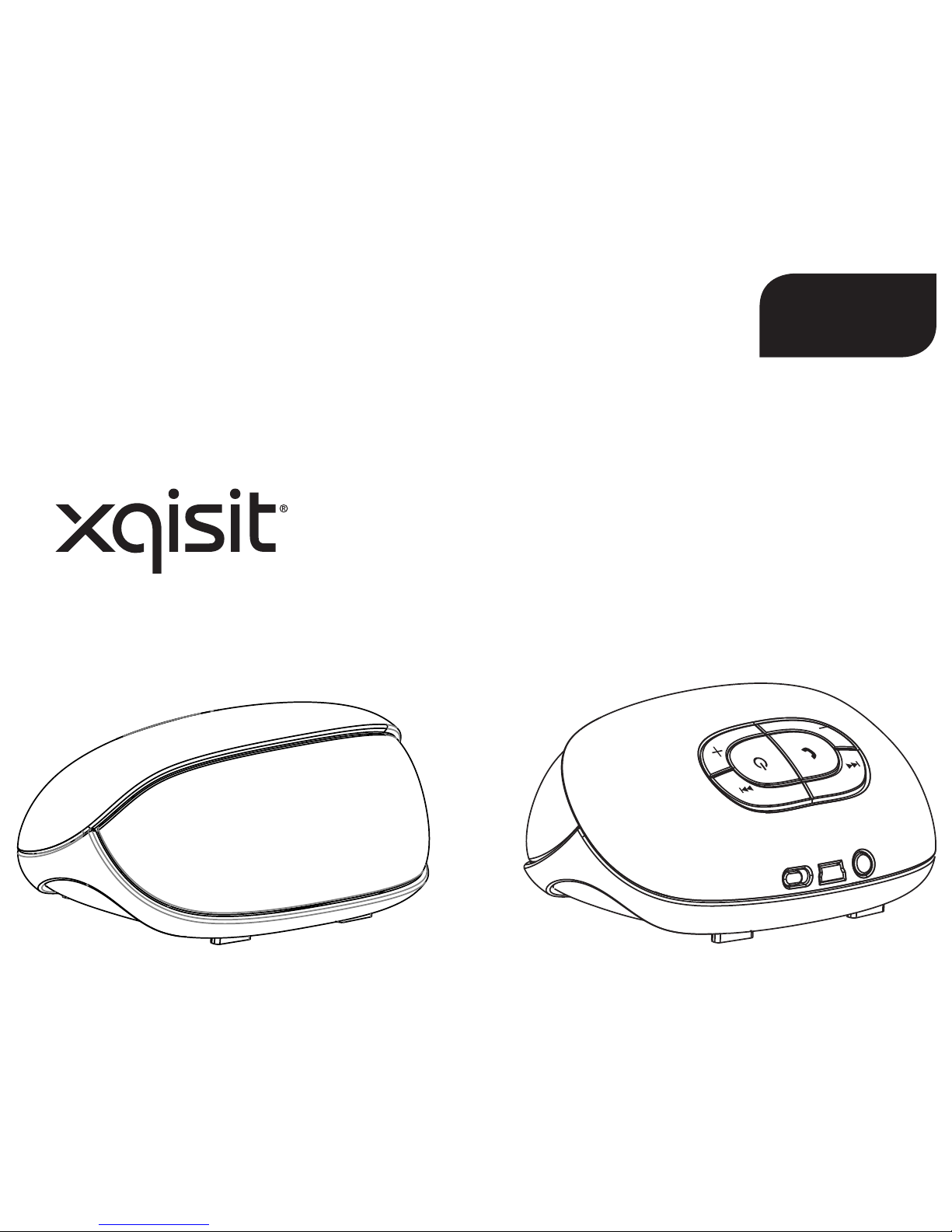
xqisit 2.0
SV
Page 86
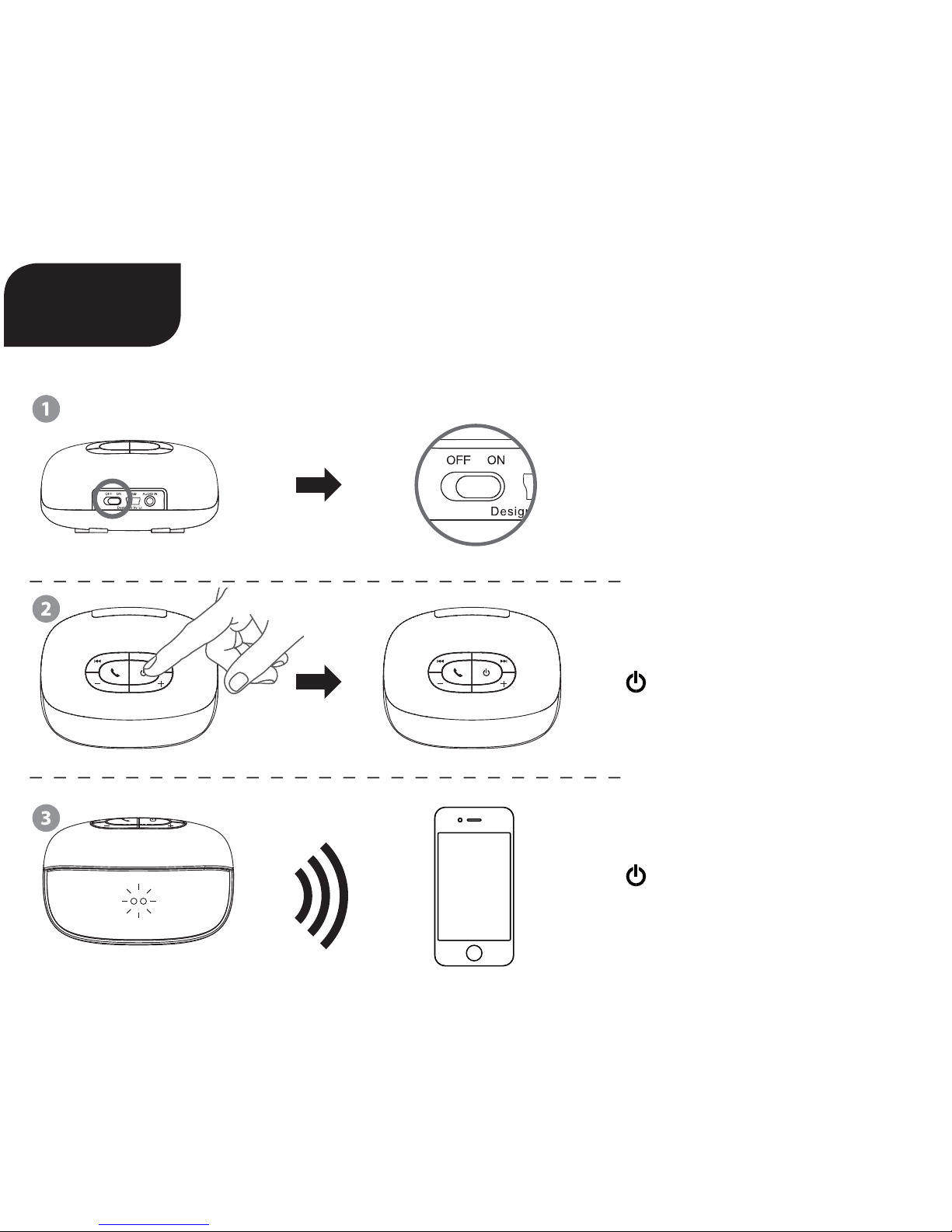
Snabbmanual
Ställ in på (På) „ON“
Tryck länge för att slå på/av
Håll intryckt tills blå + röd
LED blinkar, anslut till apparaten
xqisit 2.0
SV
Page 87
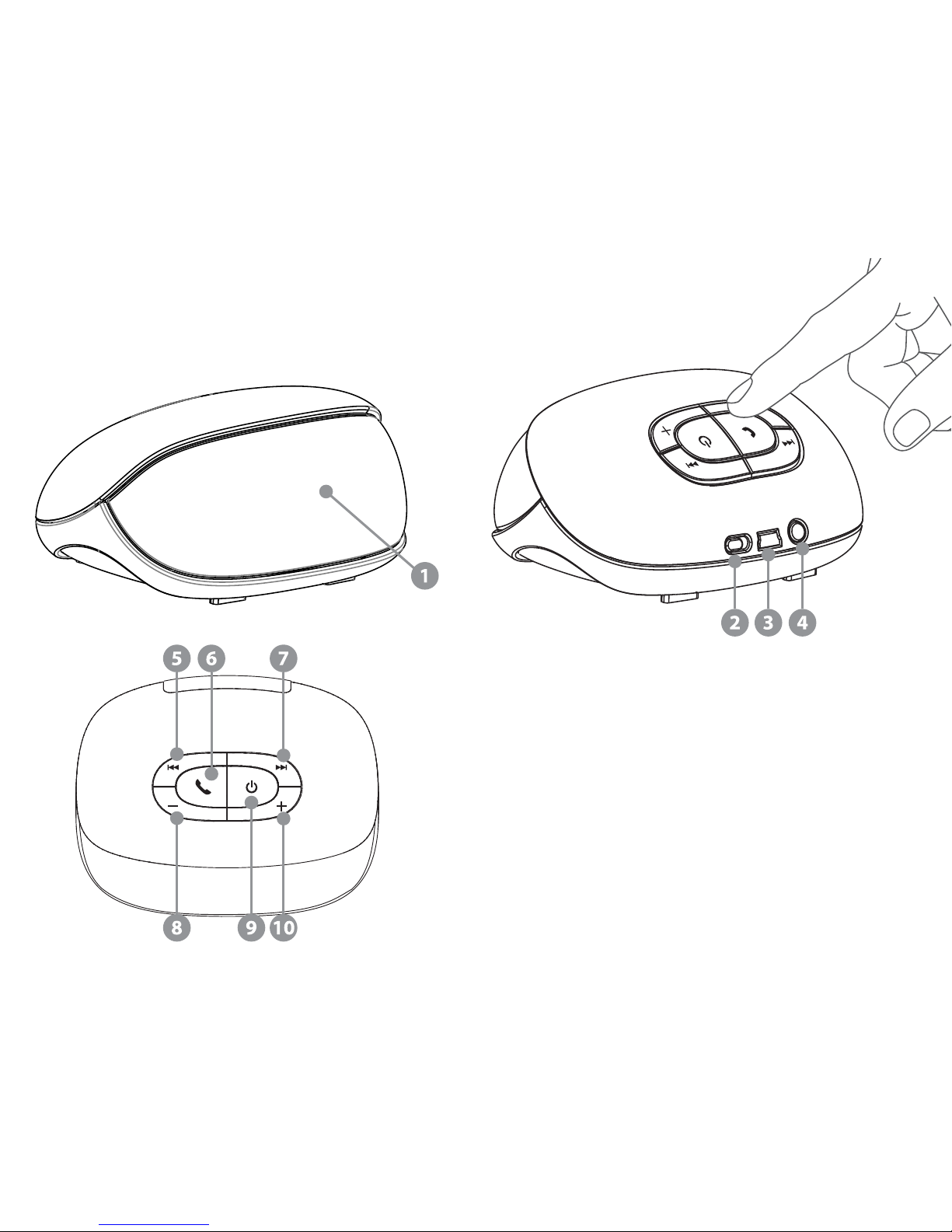
1 Batteriindikering
2 Av- och påknapp
3 USB-laddningsenhet
4 3,5-mm-Aux-ingång
5 Tillbaka
6 Telefon; Vidarekoppling / Paus
7 För
8 Ljudstyrka 9 Koppla / På / Av
10 Ljudstyrka +
Page 88

Om produkten
• Bluetooth version 2.1 + EDR med särskild audioalgoritm och DSP för rent och bästa trådlösa stereoljud
• Två 35 mm drivrutiner för bredband genererar enastående ljudåtergivning.
• Passiv subwoofer
• Bekväm laddning med USB-laddningskabel
• Uppladdningsbart litium-jon-batteri för uppemot 5 timmars löptid
• Språk för röstanvisningar (Engelska)
• Batteriindikering för iPhone och Blackberry
1) Anatomi
Knapp (för Bluetooth-musik):
A Föregående titel
B Uppspelning / Paus
C Nästa titel
D Ljudstyrka –
E Koppla På / Av (Håll nedtryckt / Tryck länge)
F Ljudstyrka +
Knapp (under ett telefonsamtal):
A (under ett samtal): Mikrofon tyst läge / på
B (när det ringer): Ta emot samtal (tryck kort) / Avvisa samtal (tryck länge)
B (under samtalet): Avsluta samtalet (tryck kort) / Växla mellan telefon och xqisit 2.0 (tryck länge)
C Ljudstyrka –
D (under samtalet): Mikrofon tyst läge / på
F Ljudstyrka +
Knapp (allmän utan Bluetooth-förbindelse):
E Slå på / av (tryck länge); växla till anslutningssläge (från OFF [Av] håll intryckt)
Knapp (Musik via Auxingången):
E Avstängning
Page 89
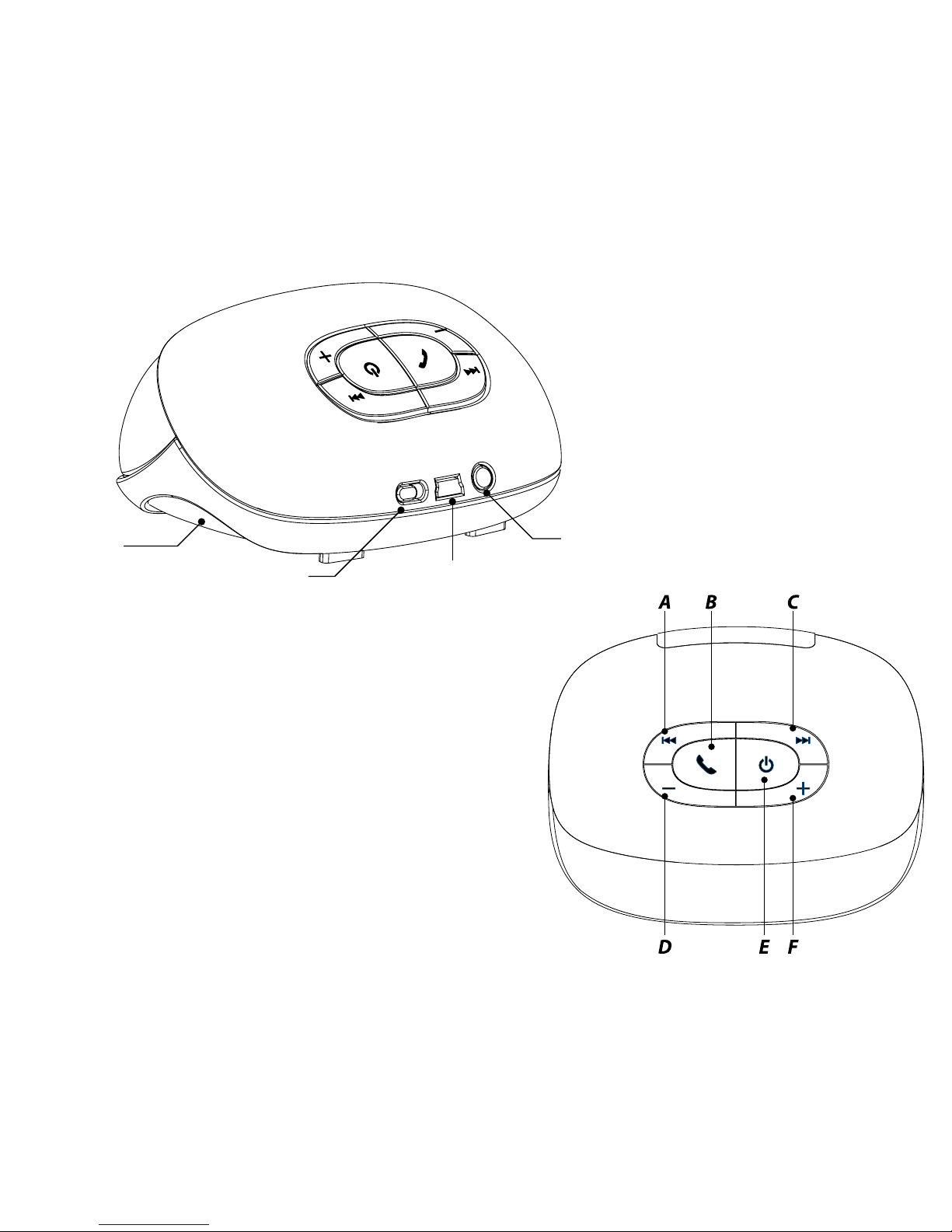
Passiv
subwoofer
Av- och På-knapp
Auxingång
USB-laddningsenhet
Page 90

2) Ladda xqisit 2.0
• Ladda vid behov xqisit 2.0 med datorn via USB-kabeln.
• Se till att skjutreglaget står på „ON“ (På).
• Tryck på knappen på kontrollpanelen tills den främre loggan på framsidan lyser blått.
Anmärkning: Ladda xqisit 2.0 helt och hållet åtminstone en gång i månaden.
3) Ansluta till xqisit 2.0
• Välj en apparat med BT 2.0 eller högre (mobiltelefon eller musikspelare) och slå på BT-förbindelsen.
• Aktivera sökläget för din BT-apparat (Sökning eer ny apparat).
• Tryck på knappen och håll den intryckt tills loggan på framsidan blinkar BLÅTT/RÖTT.
xqisit 2.0 har 3 minuter på sig (söktid) att upprätta anslutningen till din BT-apparat.
• På din BT-apparat visas <<xqisit 2.0>>; välj detta för din anslutning. Lösenordet för anslutningen är
„0000“, om det skulle behövas. (För iPhone, iPod och iPad behövs ingen anslutningsskod.)
• Om anslutningen till xqisit 2.0 gick bra hörs en signalton och blinkandet upphör.
Anmärkning: Anslutningsstegen är bara nödvändiga den första gången; för de esta BT-apparater
förutom iPhone, är automatisk anslutning möjlig.
• Testa även om förbindelse med „xqisit 2.0“ har upprättats. Du kan också gå till anslutningsläget
genom att trycka på -knappen och hålla den nedtryckt: när LED-ljusen växlar mellan rött och blått,
släpper du på -knappen, annars kommer apparaten att stänga av sig själv.
Anmärkning: xqisit 2.0 slutar även med att blinka och spelar upp ett annat ljud när anslutningen har
gått fel eer 3 minuter.
4) Aktiv anslutning till xqisit 2.0 (Alternativ anslutningsmetod)
• Låt din Bluetooth-apparat söka eer andra Bluetooth-apparater och placera den i närheten av
xqisit 2.0
• Koppla apparaterna som beskrivs i 3) och vänta i 20 sekunder
• En “Kopplingsinbjudan” kommer upp på din Bluetooth-apparat, nu ska du „acceptera“ inbjudan,
“0000” är anslutningskoden om den skulle behövas.
Page 91
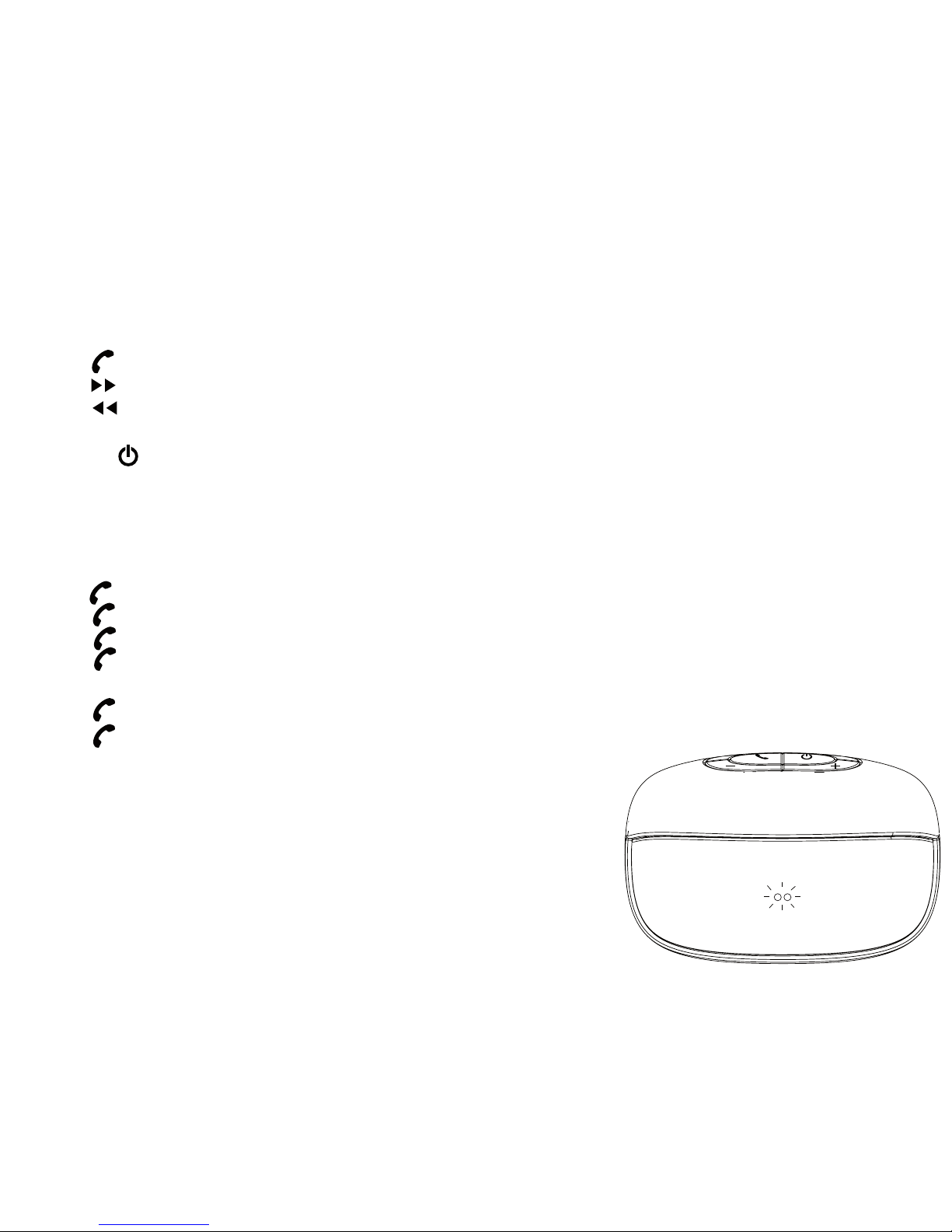
5) Uppspelning av musik via xqisit 2.0
• Upprätthåll förbindelsen till xqisit 2.0 via BT, upprepa anslutningsstegen om förbindelsen bröts.
• Välj ut den musik på BT-apparaten som du vill spela upp.
• Tryck för uppspelning/paus
• Tryck för nästa låt.
• Tryck för föregående låt.
• Tryck på + eller – för att justera ljudstyrkan eller justera den på din BT-apparat.
• Tryck på knappen och håll den intryckt tills belysningen av loggan släcks.
6) ringa via xqisit 2.0
Anmärkning: Endast möjligt för BT-mobiltelefon med HFP/HSP.
• Tryck för att ta emot ett samtal.
• Tryck och håll knappen intryckt för att avvisa ett samtal.
• Tryck för att lägga på när samtalet har avslutats.
• Tryck under samtalet och håll knappen intryckt för att växla mellan
xqisit 2.0 och mobiltelefonen.
• Tryck två gånger för att ta emot ett samtal från en andra person som ringer.
• Tryck två gånger för att växla mellan den första inringaren och den andra.
Page 92
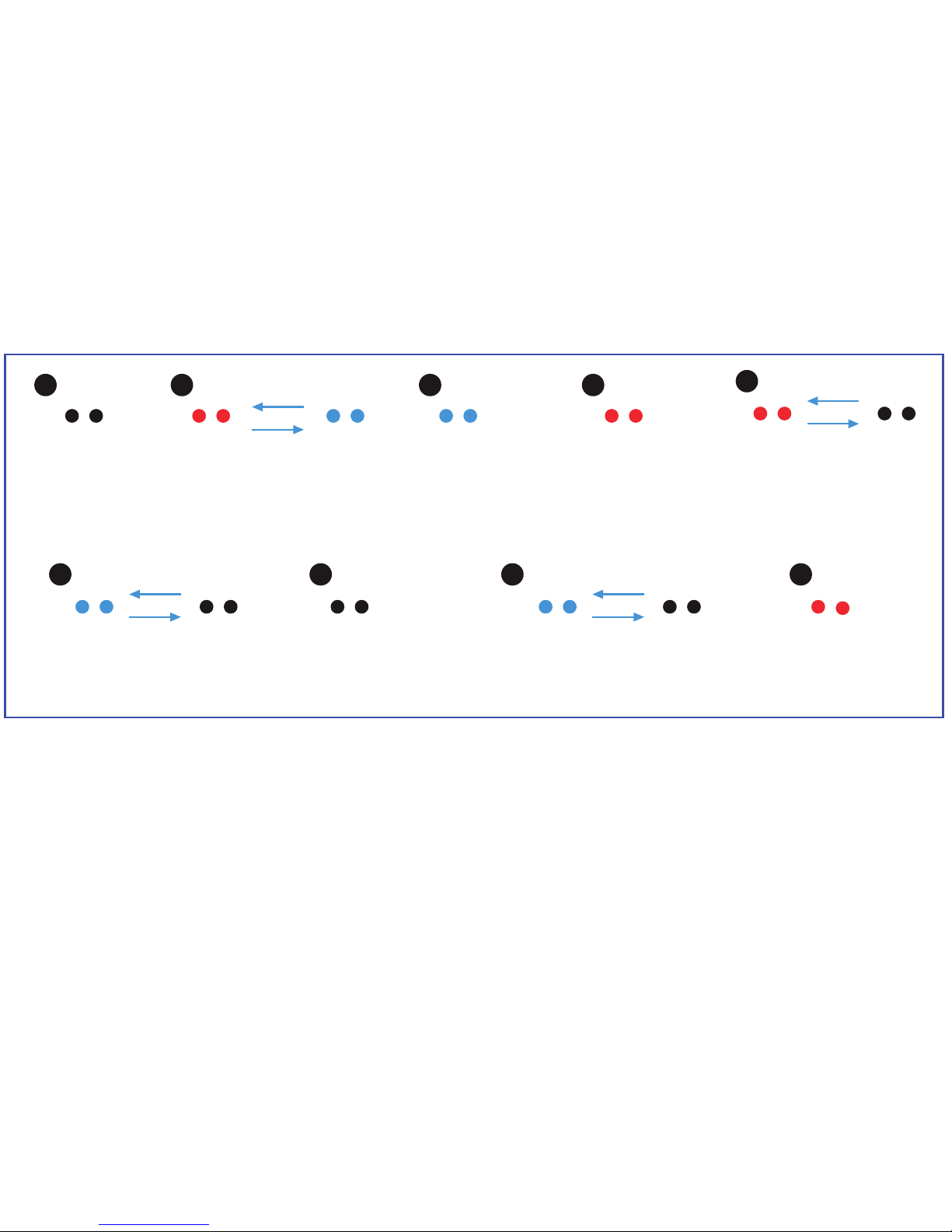
A
E
B
F H
C
G I
D
8) Tekniska data
• Total uteekt 6 W (3W/kanal)
• Bredbandsdri (35 mm) per kanal + passiv subwoofer
• Distorsion <= 10 %
• Brusspänningsavstånd: >75 dB vid 1 W
• Frekvenskurva: 150-15 000 Hz
• Li-polymbatteri: 1150 mAh
• Löptid: 5 timmar vid 80 % ljudstyrka
• Laddningstid: 2 timmar
Frånkopplad
→ Inget ljus
Påkopplad
(Batterie > 10%)
→ Blinkar rött
→ Automatisk avstängning
om 5 min.
Ansluter
→ Blinkar snabbt och växlar
mellan blått och rött
Påkopplad
(Batteri > 60%)
→ Konstant
(blå)
Laddar
(på- och avkopplad)
→ Blinkar blått
Påkopplad
(Batteri > 30%)
→ Konstant
(röd)
Avstängd och fulladdad
→ Inget ljus
7) Ljusindikering på framsidan
Mikrofon av
(för handsfree)
→ Blinkar blått
Uppgraderingsläge
(ansluten till USB)
→ Konstant rött
Page 93

9) Kompatibilitet (Bluetooth-apparat)
• Apparat med BT 2.0 eller högre med A2DP / AVRCP / HFP / HSP
• AAC-musikströmning stöds från iOS 4.3.3 eller högre
10) Felsökning
Inget rent ljud eller ingen ton
→ Testa inställningen för ljudstyrka på xqisit 2.0 eller på BT-apparaten.
Vid uppspelning av musik ingen överföring från BT-apparat till xqisit 2.0
→ Testa om din BT-apparat har en A2DP-prol.
→ Testa om båda apparaterna är anslutna till varandra.
→ Starta om xqisit 2.0 så att den automatiskt upprättar en förbindelse till din BT-apparat.
LED utan ström
→ Säkerställ att xqisit 2.0 är fullständigt uppladdad.
Ljudstyrkan är vriden till för lågt / för starkt
→ Ändra ljudstyrkan på xqisit 2.0 eller på BT-apparaten.
Det går inte att ta emot samtal från xqisit 2.0
→ Testa om din mobiltelefon har en HSP- / HFP-prol.
→ Testa om båda apparaterna är anslutna till varandra.
→ Starta om xqisit 2.0 så att den automatiskt upprättar en förbindelse till din BT-apparat.
Uppspelningen av musik fortsätter inte eer det att ett telefonsamtal har avslutats.
→ Tryck på uppspelning för att fortsätta med uppspelningen av musik.
Det går inte att styra uppspelning via xqisit 2.0
→ Testa om din BT-apparat har en AVRCP-prol.
Page 94

Varning
Läs noga dessa säkerhetsföreskrier och varningar för att se till att du inte blir skadad och för att förhindra skador på
egendom.
Risk för brand och elchock
• Se till att din xqisit xqisit 2.0 inte utsätts för väta, fukt eller regn.
Använd inte xqisit xqisit 2.0 i närheten av badkar, diskho, bastu, pool eller ångbastu.
Om xqisit xqisit 2.0 utsätts för fukt kan det resultera i en elchock.
• Se till att inte tappa, ta isär, öppna, klämma, böja, deformera, sticka hål på, slita sönder, mikra, bränna, måla eller
stoppa in främmande föremål i xqisit xqisit 2.0. Det kan leda till elchock.
• Rengör xqisit xqisit 2.0 med endast en torr trasa.
• Utsätt inte xqisit xqisit 2.0 för extremt höga eller låga temperaturer.
• Lämna inte xqisit xqisit 2.0 i direkt solljus under längre stunder.
• Lämna inte xqisit xqisit 2.0 i närheten av öppen eld, t.ex. gasspis, levande ljus eller eldstad.
• Blockera inte ventilationsöppningarna.
Risker med batteri/laddare
• Kasta inte xqisit xqisit 2.0 i öppen eld. Batteriet kan explodera och ge personskador eller dödsfall.
• Ladda endast batteriet enligt användarinstruktionen till xqisit xqisit 2.0.
• Försök inte ta xqisit xqisit 2.0 eller öppna det inbyggda batteriet med våld eersom det kan ge en
elchock.
• Ladda inte xqisit xqisit 2.0 på fuktiga platser eller i extremt höga eller låga temperaturer eersom det skulle kunna
medföra elchock.
• Rengör inte xqisit xqisit 2.0 under laddningen. Koppla alltid bort laddaren först innan du rengör xqisit xqisit 2.0.
Risk vid bilolycka
• Lägg inte xqisit xqisit 2.0 eller några av tillbehören i närheten av eller på bilens krockkudde, eersom det kan leda
till allvarliga skador när krockkudden aktiveras.
Risk att falla ned
• Placera inte xqisit xqisit 2.0 högt upp, t.ex. på hyllor. Vid uppspelning av musik kan xqisit xqisit 2.0 komma i
rörelse så att den yttar på sig och åker ut över kanten.
Page 95

Obs!
• Använd inte rengöringsmedel med slipmedel till xqisit xqisit 2.0 eersom det kan repa ytan.
• Håll xqisit xqisit 2.0 borta från vassa föremål för att undvika repor och andra skador.
• Stoppa inte in någonting i xqisit xqisit 2.0 om det inte anges i användarinstruktionerna. Det kan skada inre
komponenter.
• Försök inte reparera, förändra eller montera isär xqisit xqisit 2.0 på egen hand, den innehåller inte några komponen-
ter
som kan repareras av användaren.
• Försök inte byta ut batteriet i xqisit xqisit 2.0, det är inbyggt och kan inte bytas ut.
• Var uppmärksam på skyltar och anslag som uppmanar dig att stänga av elapparater eller radiosändare på vissa
platser.
• Stäng av xqisit xqisit 2.0 innan du går ombord på ett ygplan. Använd inte xqisit xqisit 2.0 i ygplanet om inte
ygbolaget har gett tillstånd.
• Avfallssortera xqisit xqisit 2.0 och batteriet till xqisit xqisit 2.0 enligt lokala föreskrier. Kasta inte batteriet i
hushållssoporna.
FCC-Deklaration
Denna utrustning har provats och befunnits uppfylla kriterierna för en digital apparat klass C, enligt FCC:s regler,
avsnitt 15. Dessa gränsvärden är utformade för att ge rimligt skydd mot skadlig interferens i installationer i hemmet.
Denna utrustning genererar, använder och kan utstråla radiovågor och om den inte installeras och används enligt
instruktionerna, kan den förorsaka skadlig interferens med radiokommunikation. Det nns ingen garanti att inte
interferens inträar i en viss installation. Om utrustningen orsakar skadlig interferens med radio eller TV-mottagning,
vilket kan konstateras genom att sätta på och stänga av utrustningen, uppmanas användaren att försöka rätta till
interferensen genom något av följande:
• Vrida på eller ytta mottagarantennen.
• Öka avståndet mellan utrustningen och mottagaren.
• Ansluta utrustningen till ett annat strömuttag än det där mottagaren är ansluten.
• Be återförsäljaren eller någon erfaren radio/tv-tekniker om hjälp.
Page 96
FCC-deklaration
Denna apparat uppfyller del 15 i FCC:s regler. Drien sker på följande två villkor:
1. Apparaten får inte orsaka skadlig interferens och
2. Apparaten måste acceptera interferens som mottas, även interferens som kan förorsaka oönskad funktion.
FCC VARNING
• Ändringar eller modieringar som inte uttryckligen godkänts av den part som ansvarar för att uppfylla lagar och
regler kan medföra att användaren inte får använda utrustningen.
• Apparaten och dess antenn(er) får inte samlokaliseras med eller användas tillsammans med andra antenner eller
sändare.
FCC ID: VL5PF304
FCC- och IC-identieringsnumren nns på undersidan av xqisit xqisit 2.0.
Modellnummer PF304
Symbolen med den överkryssade soptunnan innebär att produkten måste avfallssorteras inom Europeiska
Unionen. Dessa produkter får inte kastas i hushållssoporna.
Vi, STRAX GmbH, försäkrar på eget ansvar att produkten xqisit 2.0 BOX (modellnr PF 304), överensstämmer
med bestämmelserna i följande direktiv: 1999/5/EG; 2004/108/EG och 2006/95/EG.
Distributör: STRAX GmbH, Belgische Allee 52+54, 53842 Troisdorf, Tyskland, www.strax.com
Vi, STRAX GmbH, overtar ansvaret for at produktet xqisit 2.0 BOX (modell-nr. PF 304), er i samsvar med
bestemmelsene i de følgende direktivene: 1999/5/EF; 2004/108/EF og 2006/95/EF.
Forhandler: STRAX GmbH, Belgische Allee 52+54, 53842 Troisdorf, Tyskland, www.strax.com
iPhone®, iPod® and iPad® are trademarks of Apple Inc., registered in the U.S. and other countries.
The Trademark BlackBerry® is owned by Research In Motion Limited and is registered in the United States and may be
pending or registered in other countries. STRAX is not endorsed, sponsored, aliated with or otherwise authorized by
Research In Motion Limited.
 Loading...