

Page 1
1
USER GUIDE
USER GUIDE
Page 2

USER GUIDE
3 - 10
BENUTZERHANDBUCH
11 - 18
РУКОВОДСТВО ПОЛЬЗОВАТЕЛЯ
19 - 26
Page 3
3
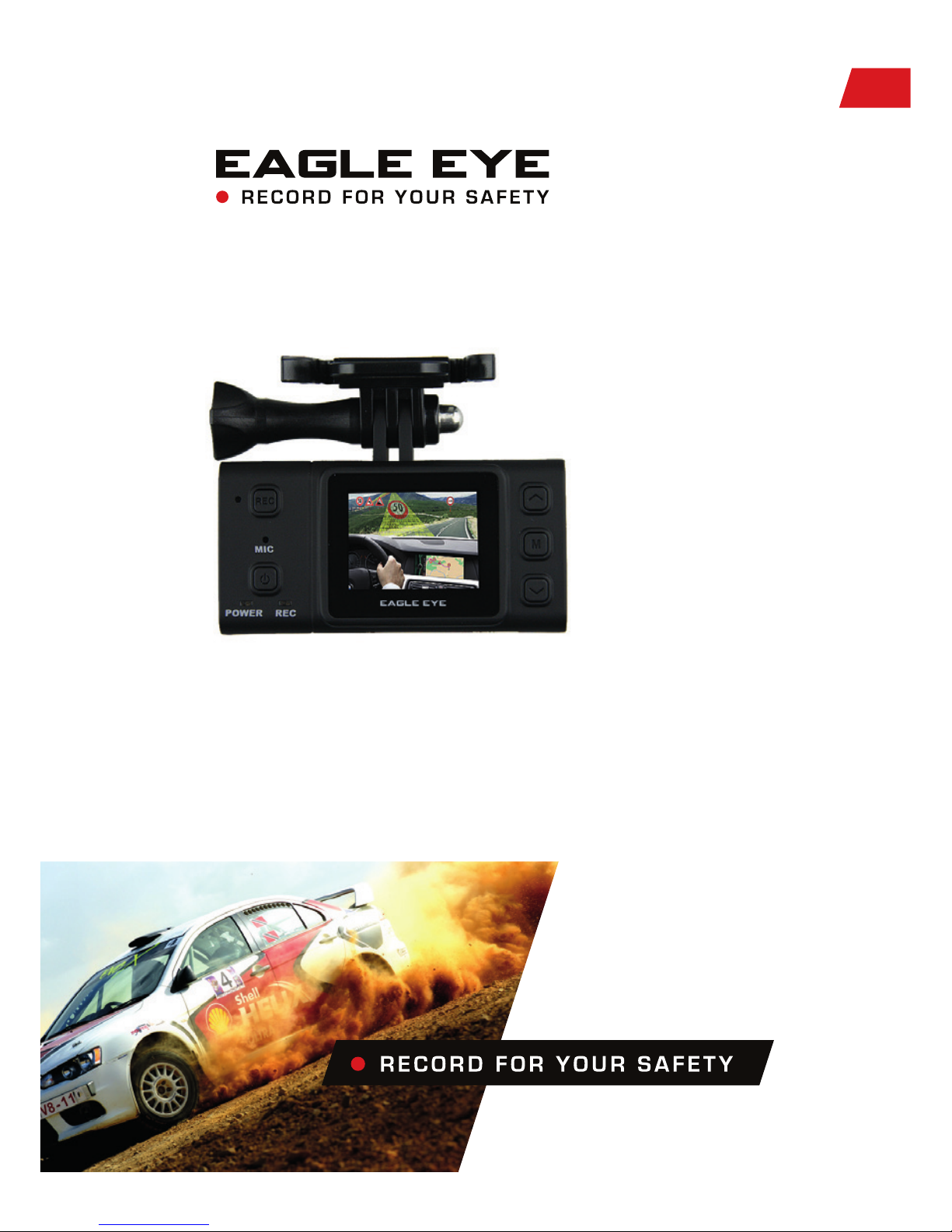
EAGLE EYE - is our most quality vehicle video recorder to
date. It provides excellent point-of-view (POV) shots on your
driving life. It got compact size and easy to mounted in the car,
equipped HD sensor and Super wide angle lens will capture full
range picture in every seconds for evidence purpose and safety
driving.
USER GUIDE
Page 4
4
PRODUCT INSTALLATION
PRODUCT OVERVIEW
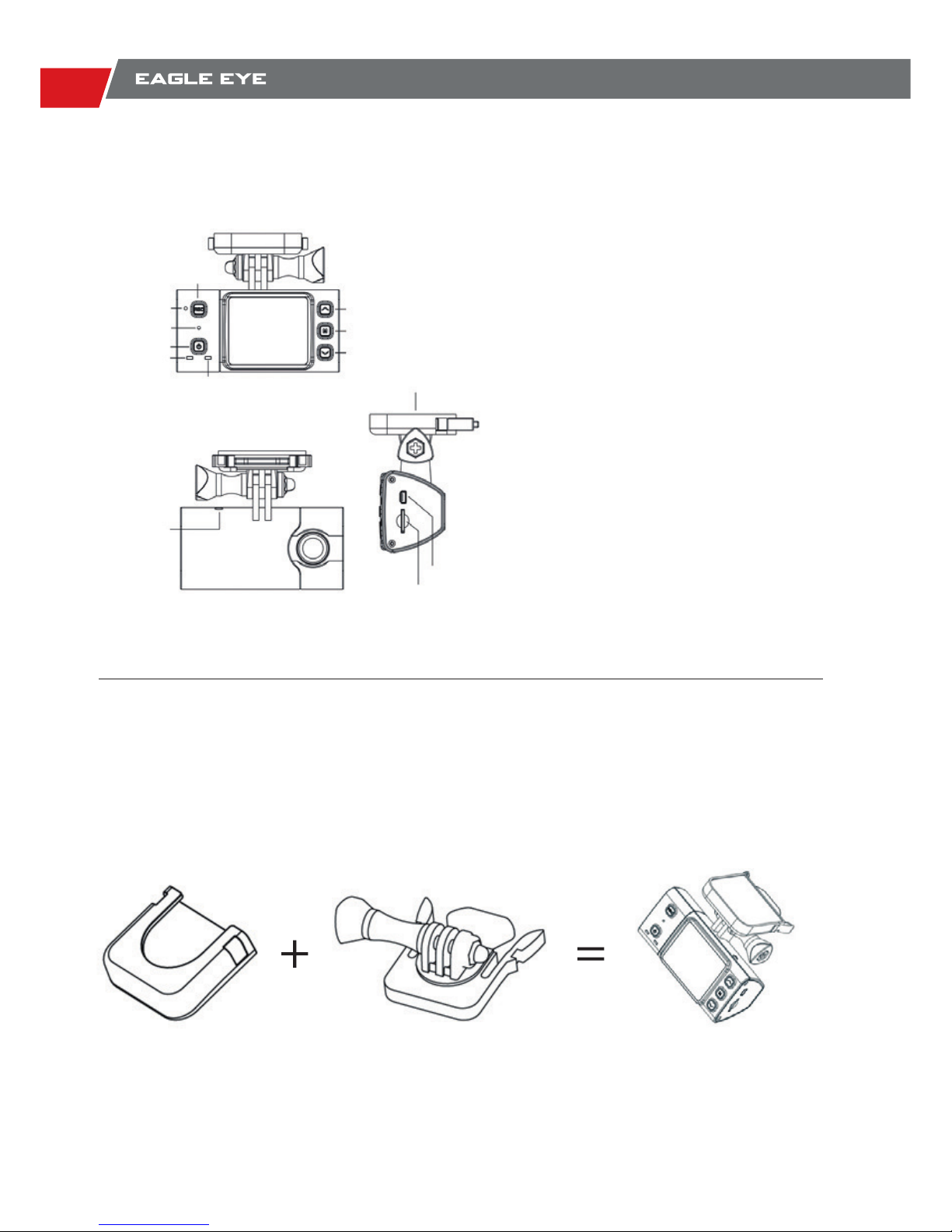
It is easy to install and mount the EAGLE EYE in the vehicle with offered mounts and 3 meters
car charger. The female at mount with reusable 3M adhesive and it will be more stable than
usual suction cup mount.
EAGLE EYE use the removable and angle adjustable male mount, it will easy to remove the box
and put away for safety, easy to capture different angle in different driving condition.
1.5” TFT LCD screen
5MP High denition image sensor
135° Super wide angle lens
1080P H.264 video recording
60FPS Smoothly pictures
Video playback available
Motion detect record
Loop Record
Continuous picture capture
Digital Zoom ( 720P)
Rec key
Up key
Menu key
Down key
Recording LED
GPS ANT
Socket
USB Port
TF Card slot
Mounting
Reset hole
Microphone
Power key
Power II
Charger LED
Page 5
5
USER GUIDE
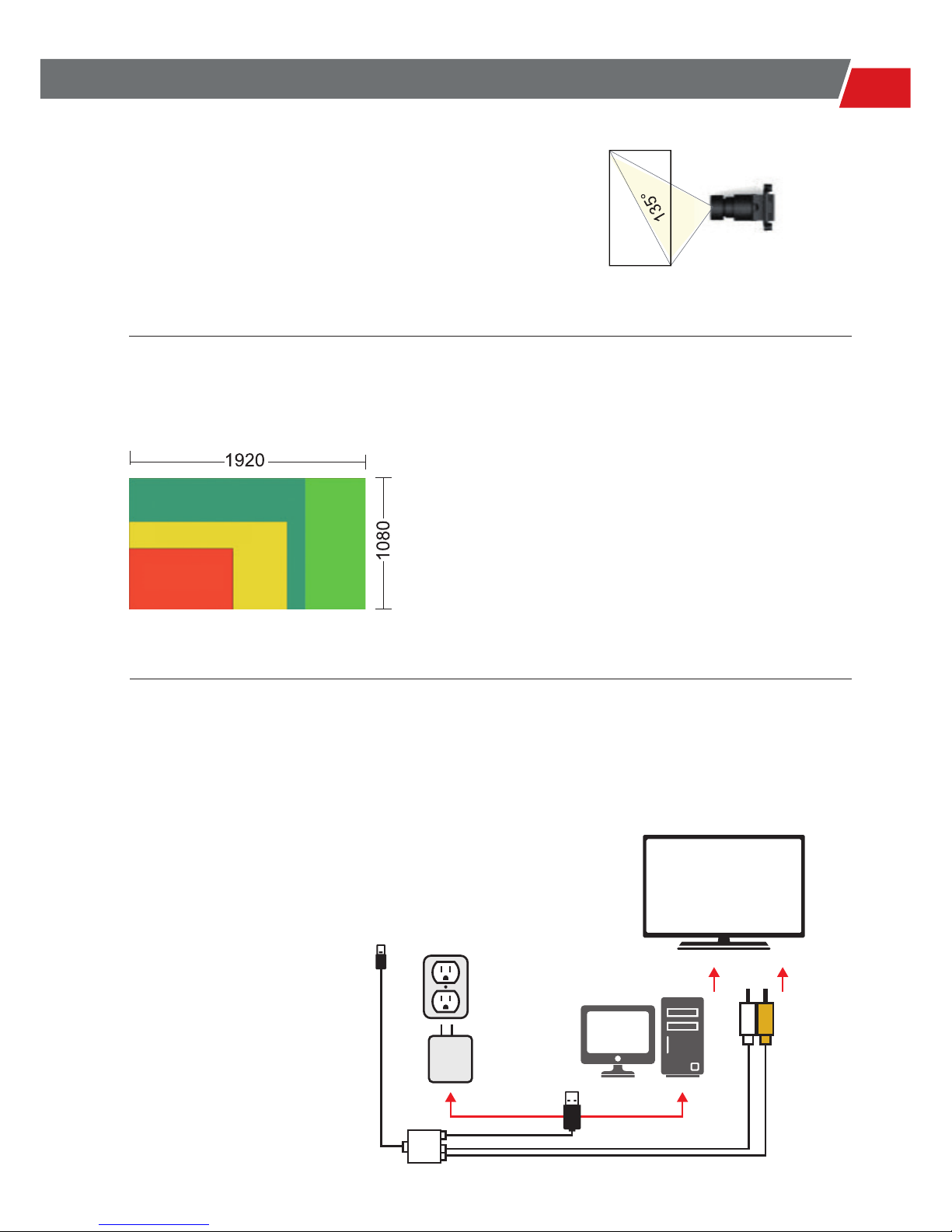
135° WIDE ANGLE LENS
FULL HD 1080P HIGH DEFINITION PICTURE QUALITY
Install EAGLE EYE in the vehicle, with its inside view
angle, you do not need to worry losing any moments
or Beautiful sences around during driving.
EAGLE EYE supports Full HD 1080P which means
the video size will be 1920 x 1080 high deniton, make
your own video with broadcast image qualit. Please
note it will cost more power and storage compare with
the lower resolution.
INTERFACE AND VIDEO OUTPUT
EAGLE EYE got mini USB port in the camera,
support RCA output to the display device and
standard USB for data transfer and power
charge with offered cable.
848 x 480
1280 x 720
1440 x 1080
TV or Entertainment system
Mini USB to camera
USB charger
Computer
Audio
Video
Page 6
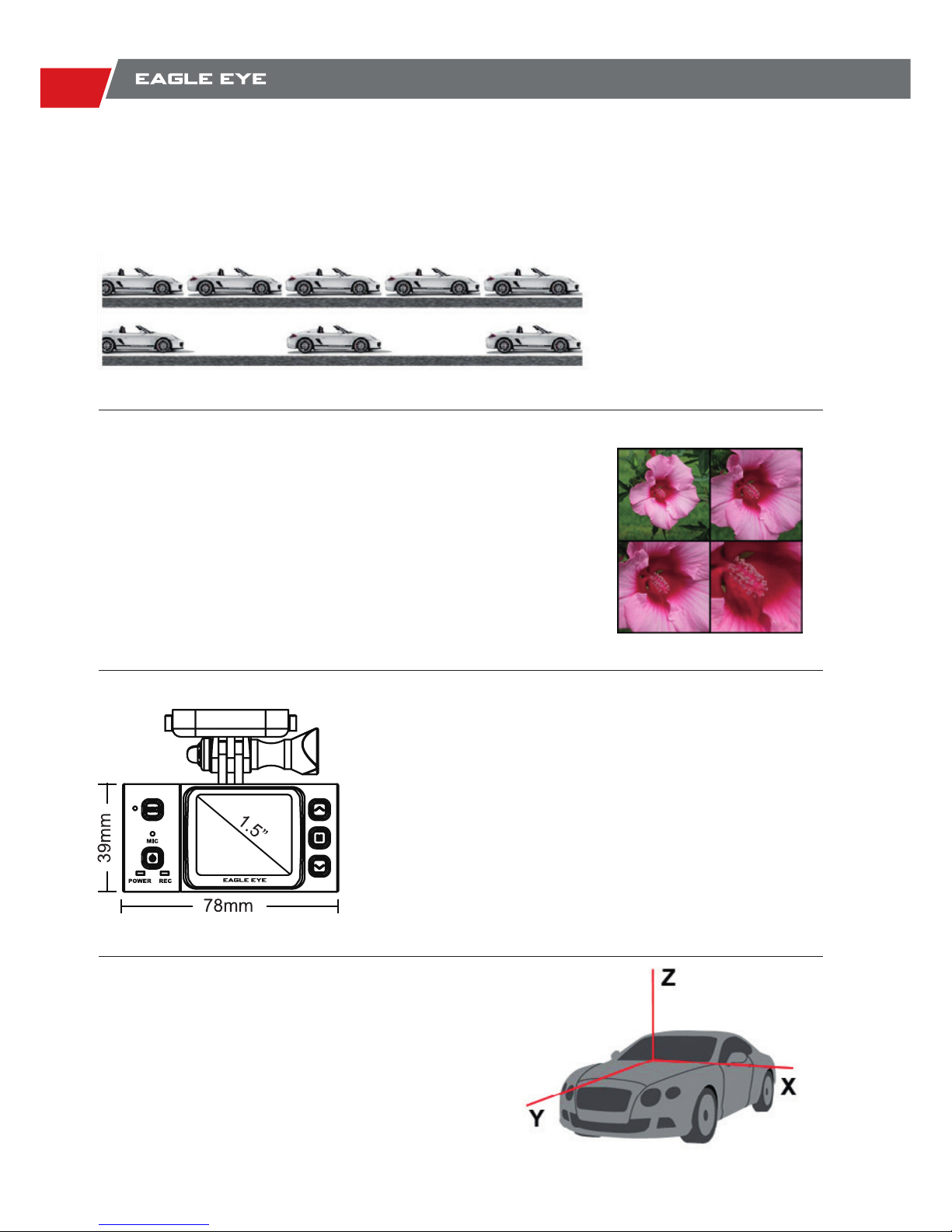
6
4X DIGITAL ZOOM
COMPACT SIZE AND
1.5” LCD PLAYBACK
G SENSOR
60FPS 720P, 30FPS 1080P
EAGLE EYE got mini USB port in the camera, support RCA
output to the display device and standard USB for data transfer
and power charge with offered cable.
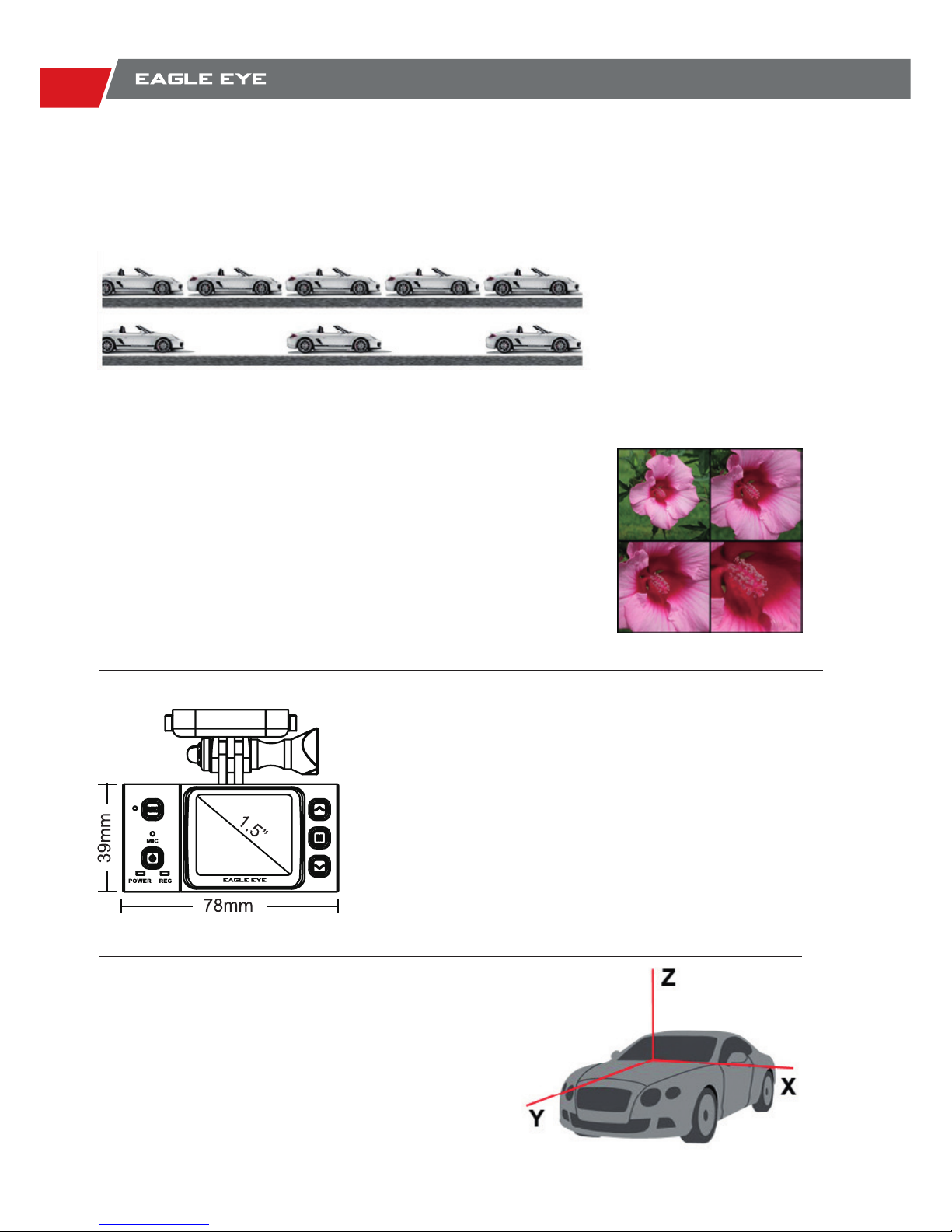
EAGLE EYE got compact size and very light, it won’t
shock even when driving on the uneven road. 1.5” screen
will show the real-time picture that the camera recorded
and playback the content that captured.
3 Axis G-sensor equiped in the EAGLE EYE, it could
detect movement to front and back, left and right, up
and down, it will active the recording according to
acceleration and orientation.
EAGLE EYE got high frame rate video option, with which you can get the
point that you need by watching the slow motion videos.
60FPS
30FPS
Page 7
7
USER GUIDE
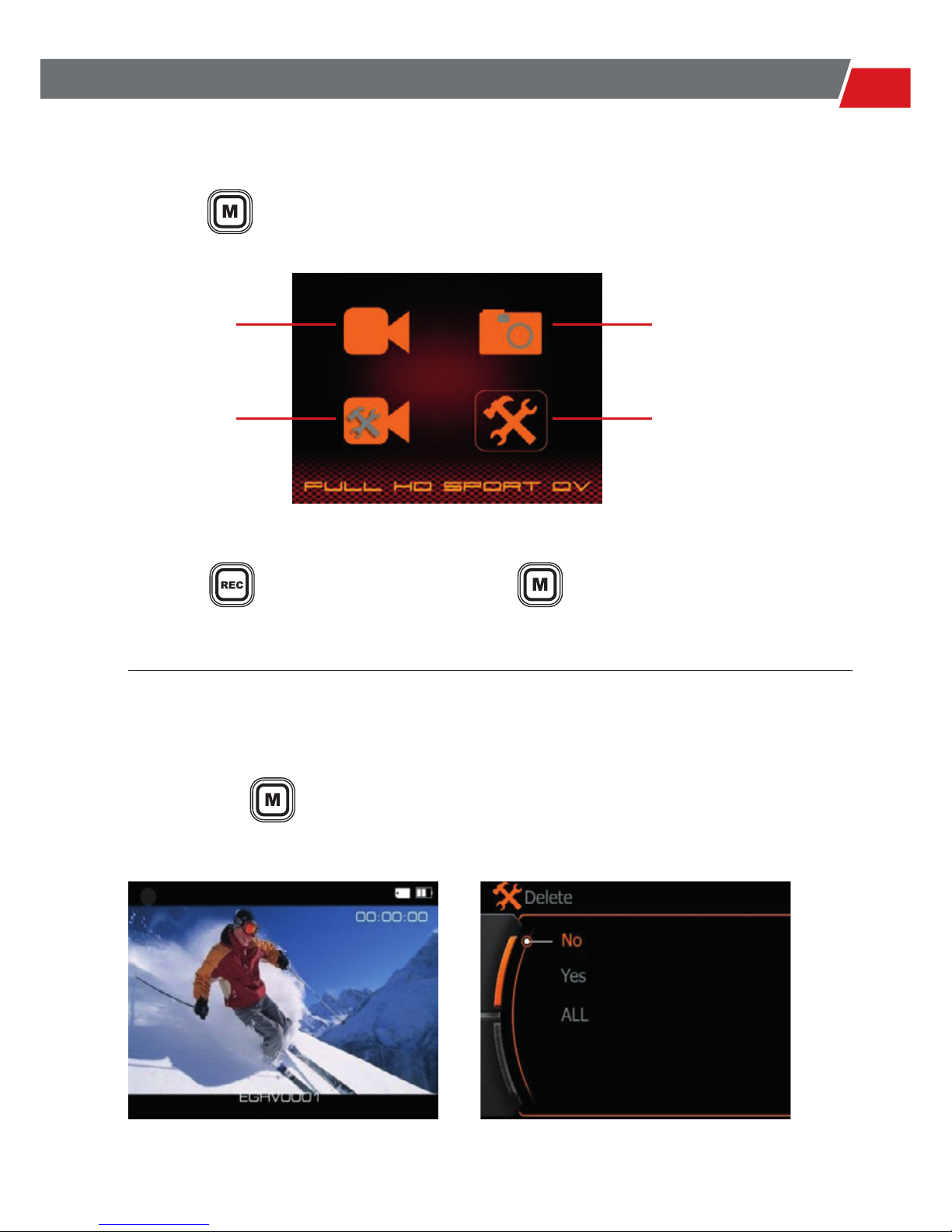
MAIN MENU
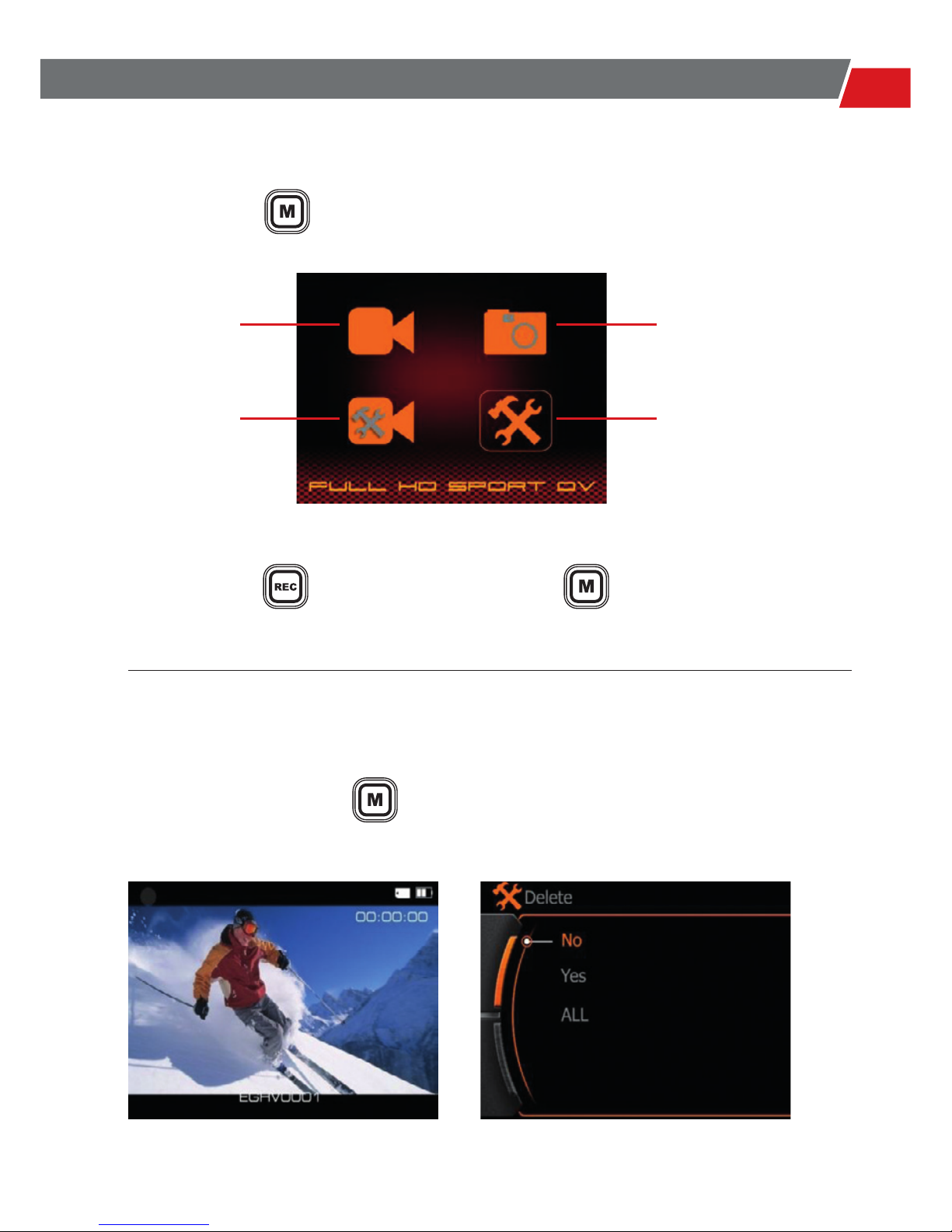
DELETE FILES
Long Press the button under playback mode of video/picture,
will display the Delete option menu.
Press the button to Conrm & Enter. Press go back.
Video Folder Picture Folder
Video Setting
Playback Mode Delete option
System Setting
Press the button to enter the main menu like below:
Page 8
8
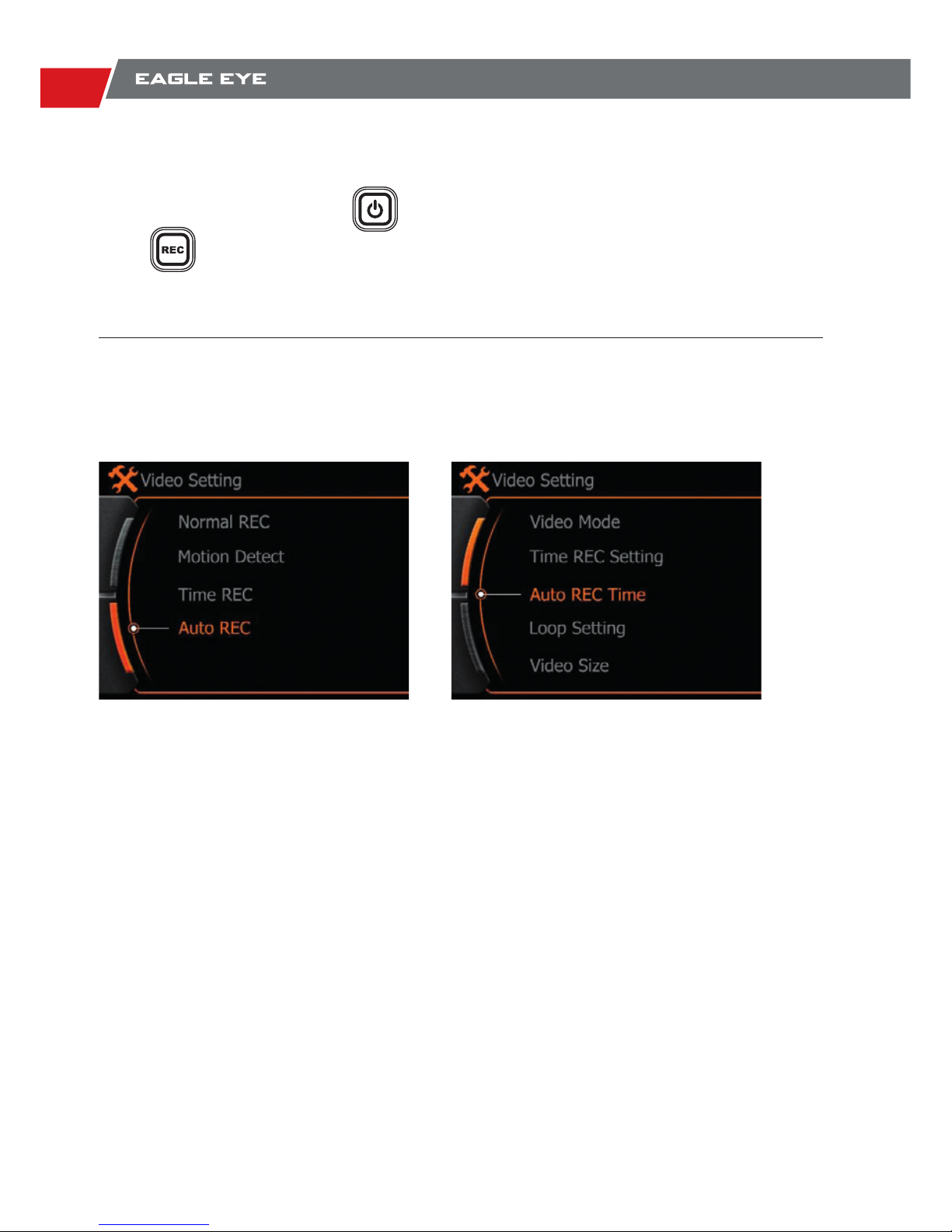
TAKE PICTURES & RECORD VIDEO
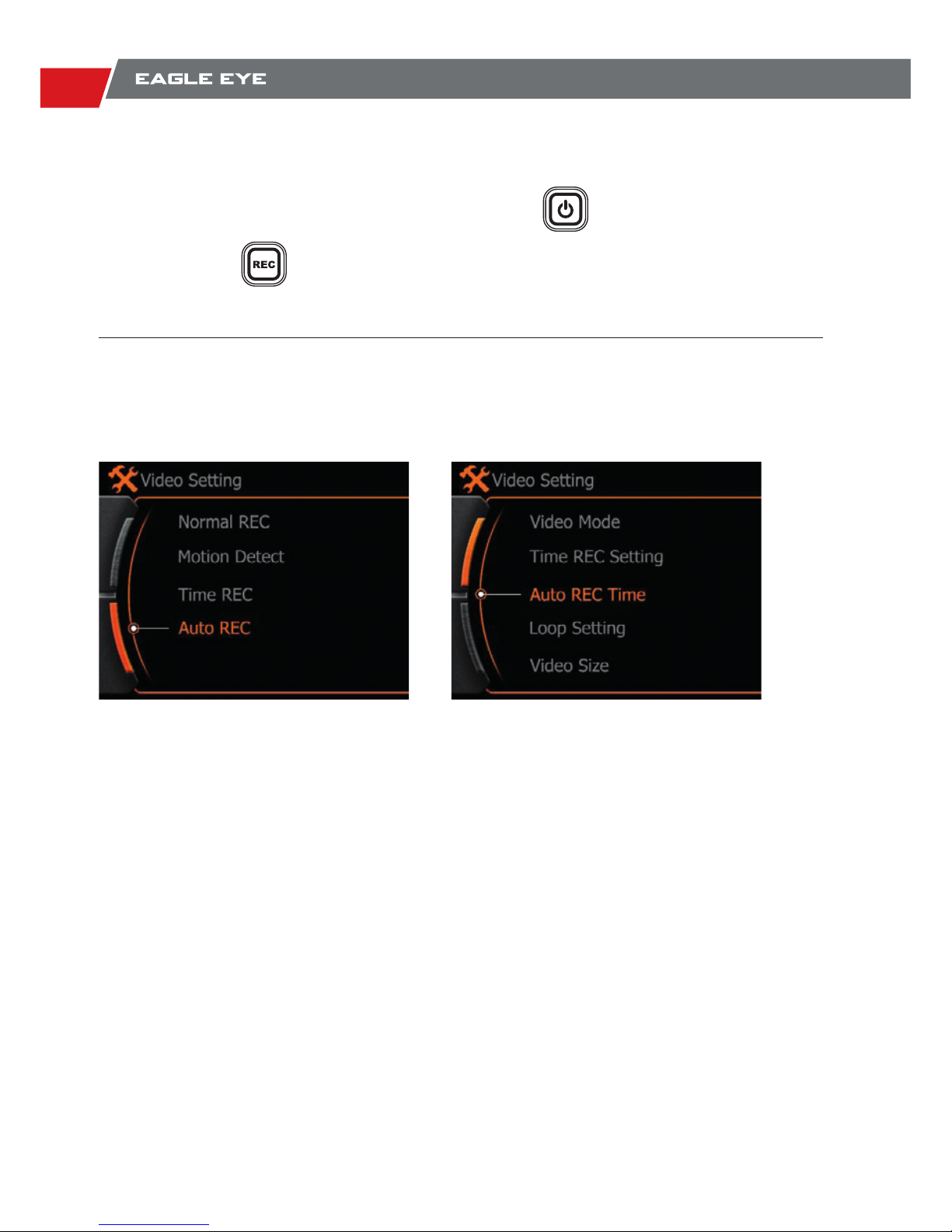
AUTO RECORD FEATURE OF CAR BLACK BOX
Under actual display mode, press button once to take a picture,
press once to start video record.
Note: The camera will start video record automatically only after you set these 2 features above.
Choose ‘ Auto REC’ Set a Time of Delay
Page 9

9
USER GUIDE
SPECIFICATIONS
Camera
Interface
Performance
Setup
Other
Feature
Battery
Camera Unit
Video Resolution Option
Picture Resolution Option
Lens Type HD CMOS Lens
Lens View Angle 135°Field of View
Sensor 5MP 1/2.5” digital Image sensor
Storage Micro SDHC/SD ; TF card 32GB max.
USB2.0 Battery charge & Data transfer
LCD 1.5” LCD for video playback;
USB-RCA RCA video output to monitor
Sound Built in MIC and Speaker
Loop Record Option 1 / 5 / 15 / 25 / 35 / 45 Minutes ; Off
Photo Shot Option Single Shot / Continuous Shot
Self –Timer Option 3 / 5 / 10 Seconds delay
Image Flip ON / OFF
Power Saving Auto Power Off / Auto Screen Off
Time Stamp ON / OFF
File protection under low power condition
MP4 ( H.264 ) video compression
Type Rechargeable Li-ion battery
Capacity 600mA
Running Time 1.5 Hours video record max in Battery
Dimension: 80 x 40 x 33 mm
Weight: 56g ( With battery)
1920 x 1080 @ 30FPS
1440 x 1080 @ 30FPS
1280 x 720 @ 60FPS
1280 x 720 @ 30FPS
848 x 480 @ 60FPS
4000 x 3000 12MP
3200 x 2400 8MP
2592 x 1944 5MP
Page 10

10
We value our customers very highly and would like to ensure that our products and service are
always of a top standard. However, if you are experiencing issues with your Xpro products, please
take a moment to read through the information below to establish whether your products are
covered under the warranty.
Any Xpro product purchased from store.xpro-cam.com or from an authorized dealer is set to a
warranty of one (1) year from the original date of purchase. Customers should be aware that this
warranty may not be offered to those purchasing Xpro products from non-authorized dealers.
This warranty does not apply under the following conditions:
● Product is damaged due to physical abuse, mishandling, accident, negligence or failure to follow
the supplied operating instructions;
● Product is physically modied by Purchaser in any manner other than that for which it was
intended or otherwise previously approved by the Manufacturer;
● Product is damaged or has developed defects caused by the use of unauthorized parts or by an
unauthorized repair service;
● The product has been subject to unsuitable operating or physical conditions outside those
recommended in product specications as provided by the Manufacturer;
● Product has it’s serial numbers altered or removed;
● Product is damaged due to improper packaging of the warranty return to the dealer or
manufacturer.
If your Xpro product fails under normal use within the warranty period, we will ensure that a repair
or replacement is sent out to you, the customer. It is essential that you inform the Xpro support
team or the retailer through email about the return of any faulty items. Returns that do not qualify
for warranty coverage will be returned to customers.
The warranty does not cover loss, accidental damage or costs incurred during the handling and
shipping of repairs or replacement products.
Xpro shall have no liability or responsibility whatsoever to the customer or any other person for any
loss, injury, death, or any damages derived from the use of the product or accessories.
If you have any questions regarding Xpro warranty procedure or terms, please do not hesitate
to contact us on www.xpro-cam.com , We will do our best to instruct you on how to obtain a
replacement product
Your Xpro Team
XPRO WARRANTY TERMS
Page 11
11
EAGLE EYE - ist unsere Fahrzeug Videocamcorder und
bietet einen hervorragenden Point-of-View (POV).
Eagle Eye hat eine kompakte Größe und ist einfach im
Fahrzeug zu befestigen. Ausgestattet mit einem HD-Sensor
und mit einem Super-Weitwinkel-Objektiv. Damit Du keine
Sekunde deines Sicheren fahren verpasst.
BENUTZERHANDBUCH
Page 12
12
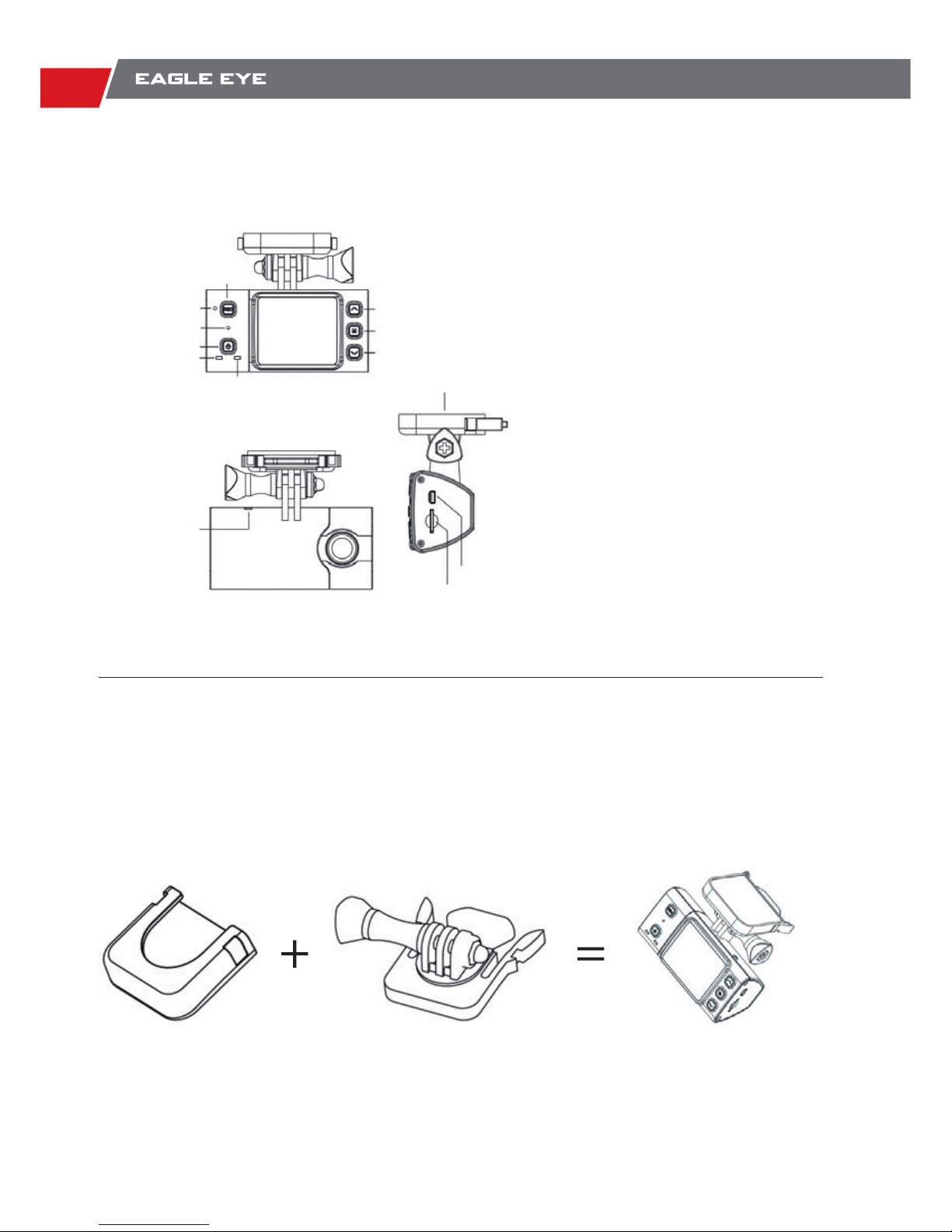
PRODUKTÜBERSICHT
EAGLE EYE RICHTIG BEFESTIGEN
Mit der mitgelieferten Halterung und dem 3 Meter Auto-Ladekabel ist EAGLE EYE einfach zu installieren und zu montieren. Mit unsere 3M Klebehalterung wird damit eine stabile Verbindung zur
Windschutzscheibe hergestellt und hält somit besser als eine Saugnapfhalterung.
EAGLE EYE besitzt eine Abnehmbare und Winkelverstellbare Halterung. Mit dieser Halterung ist
EAGLE EYE einfach zu demontieren und man kann sie dann vor Diebstahl verstauen.
1,5 “Farb-LCD-Bildschirm
5MP High-Denition-Bildsensor
135 ° Super-Weitwinkel-Objektiv
1080P H.264-Videoaufnahme
60fps Bildrate
Video- Foto Wiedergabe
Bewegungserkennung
Schleifenaufzeichnung “RecordLoop”
Dauer Bildaufnahme
Digital-Zoom 4x bei (720P)
Aufnahmetaste
Menufunktion Wahltaste
Hauptmenutaste
Menufunktion Wahltaste
Aufnahme LED
GPS ANT
Socket
USB Anschluss
SD Microkarte
Kamerahalter
Resettaste
Mikrofon
On/ Off Taste
Batterielade LED
Page 13
13
BENUTZERHANDBUCH
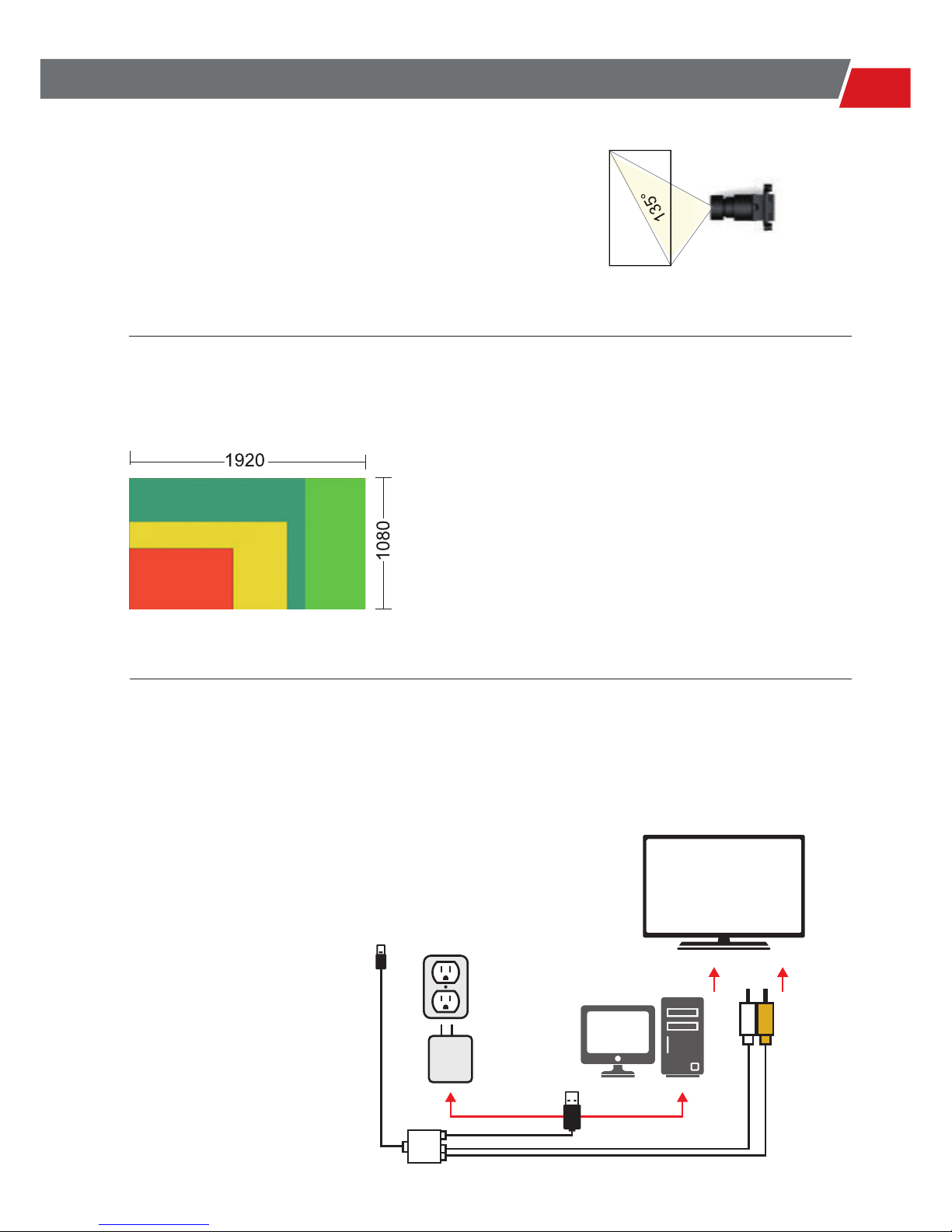
135 ° WEITWINKEL-OBJEKTIV
FULL HD 1080P HIGH DEFINITION BILDQUALITÄT
Befestige deine EAGLE EYE im Fahrzeug und mit
dem135° Weitwinkel-Objektiv, brauchst du Dir keine
Sorgen mehr machen das du irgendwelche Momente
oder Aufnahmen verpasst.
EAGLE EYE unterstützt Full HD 1080P, was bedeutet,
dieVideo-Größe werden1920 x 1080 Bildschärfe, machst
Du deine eigenen Videos in Broadcast Bildqualität.
SCHNITTSTELLEN UND VIDEOAUSGANG
EAGLE EYE hat einen Mini-USB-Anschluss zur
Datenübertragung und zum Laden,Unterstützung
RCA für TV oder Entertainment System
848 x 480
1280 x 720
1440 x 1080
TV or Entertainment system
Mini USB to camera
USB charger
Computer
Audio
Video
Page 14
14
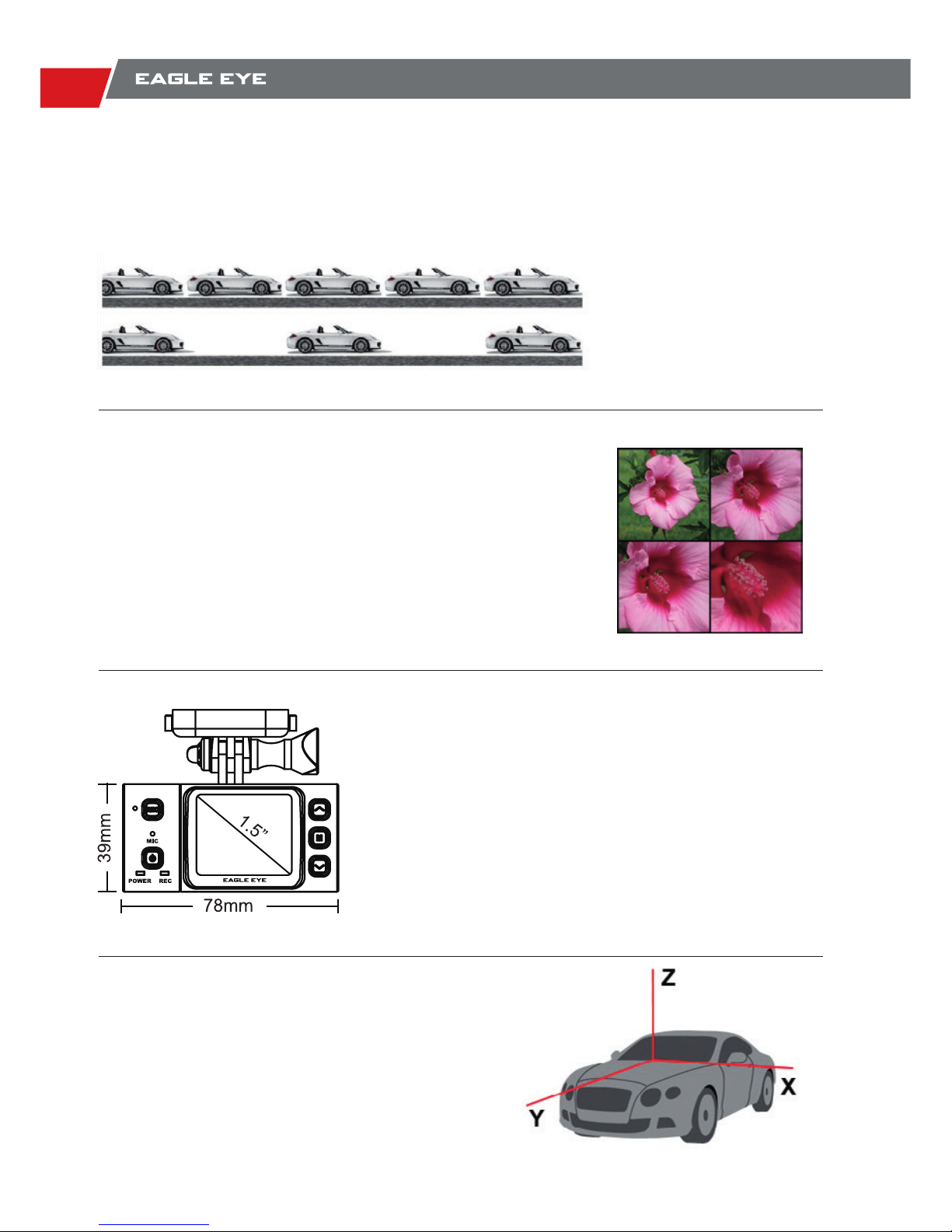
4X DIGITAL ZOOM
KOMPAKTE GRÖßE UND
1,5” LCD-BILDSCHIRM
G SENSOR
60FPS 720P, 30FPS 1080P
EagleEye hat sogar 4-fach digitalen Zoom in der Videoeinstellung 720P, somit werden deine Videoaufnahmen noch schaerfer
bei schwachen Tageslicht und bei Nacht.
EagleEye ist eine sehr leichte und kompakte Dashboard
Kamera die auf allen Strassen den Halt behält. Mit dem
1,5 “ grossen Bildschirm kannst Du deine Live Aufnahme
Videos anschauen oder die aufgenommenen Vidoes zur
jeder Zeit anschauen.
EagleEye ist mit einem 3-Achs G-Sensor ausgestattet,
der jede Bewegung erkennt.
EagleEye hat eine hohe Bildrate Video-Funktion, damit Du deine Videos
auch in Zeitlupe anschauen kannst.
60FPS
30FPS
Page 15
15
BENUTZERHANDBUCH
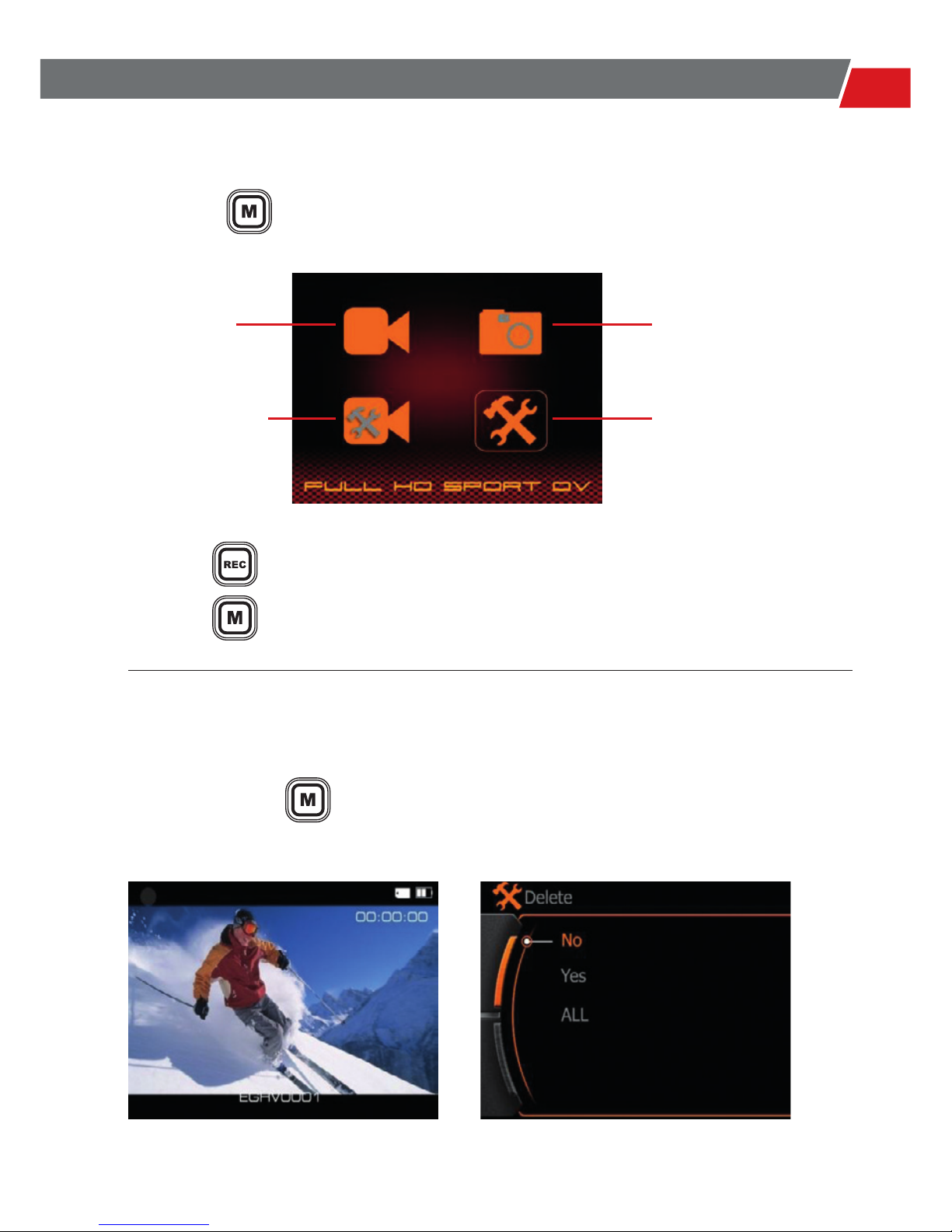
HAUPT MENU
DATEIEN LÖSCHEN
Langes Drücken der Taste, gelangt man in den Wiedergabemodus von Video / Bild, dann
kann man die Dateien auswaehlen die man löschen möchte.
Drücke die Taste um zu Bestätigen und zum Entern.
Drücke die Taste um zurück zugehen.
Video Ordner Foto Ordner
Video Einstellung
Wiedergabe Modus Lösch Option
System Einstellung
Druecke die Taste um in das Hauptmenu zugelangen
Page 16
16
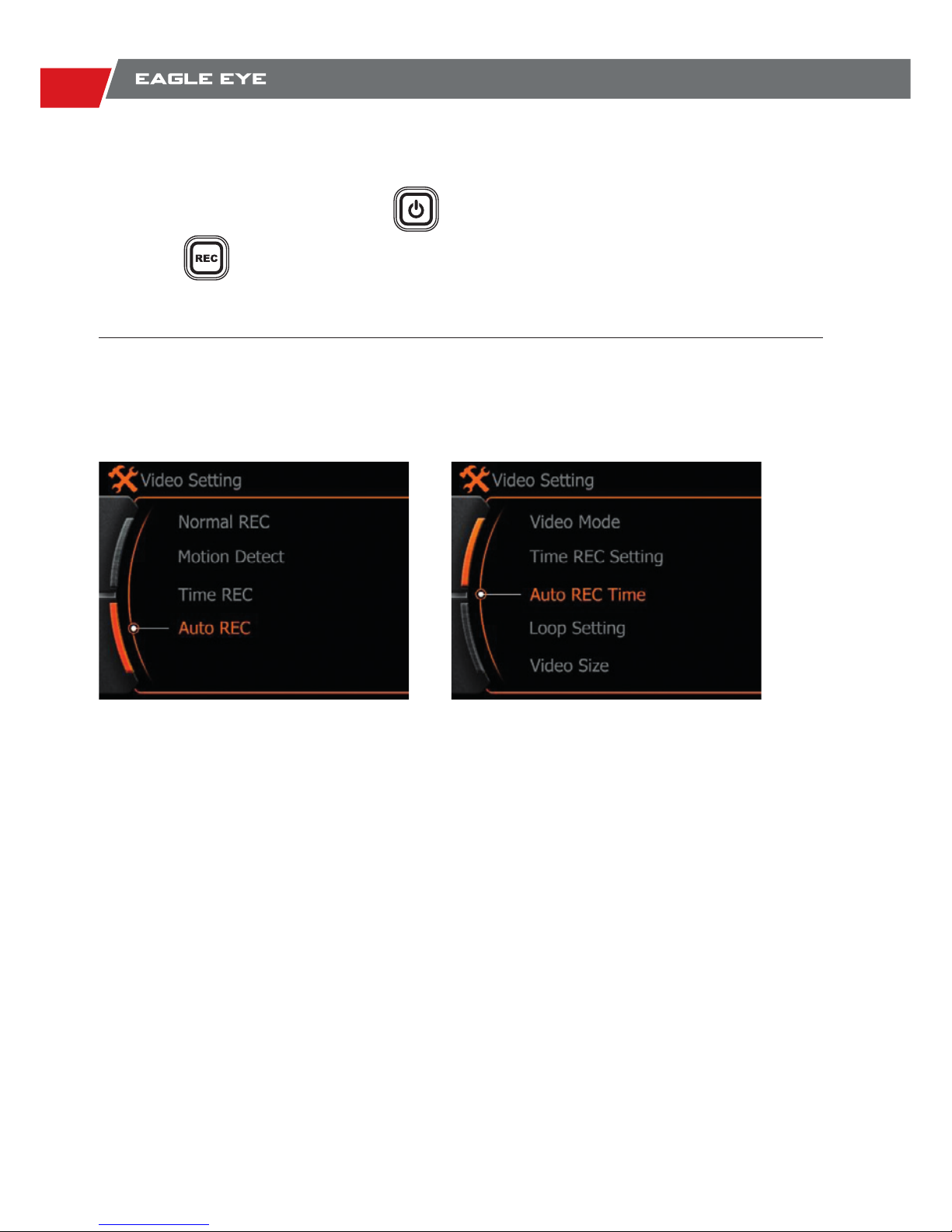
VIDEO & BILD AUFNAHME
AUTO AUFNAHME-FUNKTION DER EAGLEEYE
Im aktuellen Anzeigemodus, drücke die Taste einmal um ein Bild aufzunehmen,
Drücke die Taste einmal um die Videoaufnahme zu starten.
Hinweis: Die Kamera wird die Video-Aufzeichnung automatisch starten, nachdem Du diese 2
Funktionen eingestellt hast.
Wähle “Auto REC” Wähle eine Zeit, wann die EagleEye die
Aufnahme starten soll.
Page 17

17
BENUTZERHANDBUCH
TECHNISCHE DATEN
Kamera
Schnittstellen
Aufnahme
Leistung
Einstellungen
Andere
Merkmale
Batterie
Kamera
Dimension
Video Resolution Option
Picture Resolution Option
Lens Type HD CMOS Lens
Lens View Angle 135°Field of View
Sensor 5MP 1/2.5” digital Image sensor
Storage Micro SDHC/SD ; TF card 32GB max.
USB2.0 Battery charge & Data transfer
LCD 1.5” LCD for video playback;
USB-RCA RCA video output to monitor
Sound Built in MIC and Speaker
Loop Record Option 1 / 5 / 15 / 25 / 35 / 45 Minutes ; Off
Photo Shot Option Single Shot / Continuous Shot
Self –Timer Option 3 / 5 / 10 Seconds delay
Image Flip ON / OFF
Power Saving Auto Power Off / Auto Screen Off
Time Stamp ON / OFF
File protection under low power condition
MP4 ( H.264 ) video compression
Type Rechargeable Li-ion battery
Capacity 600mA
Running Time 1.5 Hours video record max in Battery
Dimension: 80 x 40 x 33 mm
Weight: 56g ( With battery)
1920 x 1080 @ 30FPS
1440 x 1080 @ 30FPS
1280 x 720 @ 60FPS
1280 x 720 @ 30FPS
848 x 480 @ 60FPS
4000 x 3000 12MP
3200 x 2400 8MP
2592 x 1944 5MP
Page 18

18
We value our customers very highly and would like to ensure that our products and service are
always of a top standard. However, if you are experiencing issues with your Xpro products, please
take a moment to read through the information below to establish whether your products are
covered under the warranty.
Any Xpro product purchased from store.xpro-cam.com or from an authorized dealer is set to a
warranty of one (1) year from the original date of purchase. Customers should be aware that this
warranty may not be offered to those purchasing Xpro products from non-authorized dealers.
This warranty does not apply under the following conditions:
● Product is damaged due to physical abuse, mishandling, accident, negligence or failure to follow
the supplied operating instructions;
● Product is physically modied by Purchaser in any manner other than that for which it was
intended or otherwise previously approved by the Manufacturer;
● Product is damaged or has developed defects caused by the use of unauthorized parts or by an
unauthorized repair service;
● The product has been subject to unsuitable operating or physical conditions outside those
recommended in product specications as provided by the Manufacturer;
● Product has it’s serial numbers altered or removed;
● Product is damaged due to improper packaging of the warranty return to the dealer or
manufacturer.
If your Xpro product fails under normal use within the warranty period, we will ensure that a repair
or replacement is sent out to you, the customer. It is essential that you inform the Xpro support
team or the retailer through email about the return of any faulty items. Returns that do not qualify
for warranty coverage will be returned to customers.
The warranty does not cover loss, accidental damage or costs incurred during the handling and
shipping of repairs or replacement products.
Xpro shall have no liability or responsibility whatsoever to the customer or any other person for any
loss, injury, death, or any damages derived from the use of the product or accessories.
If you have any questions regarding Xpro warranty procedure or terms, please do not hesitate
to contact us on www.xpro-cam.com , We will do our best to instruct you on how to obtain a
replacement product
Your Xpro Team
XPRO WARRANTY TERMS
Page 19
19
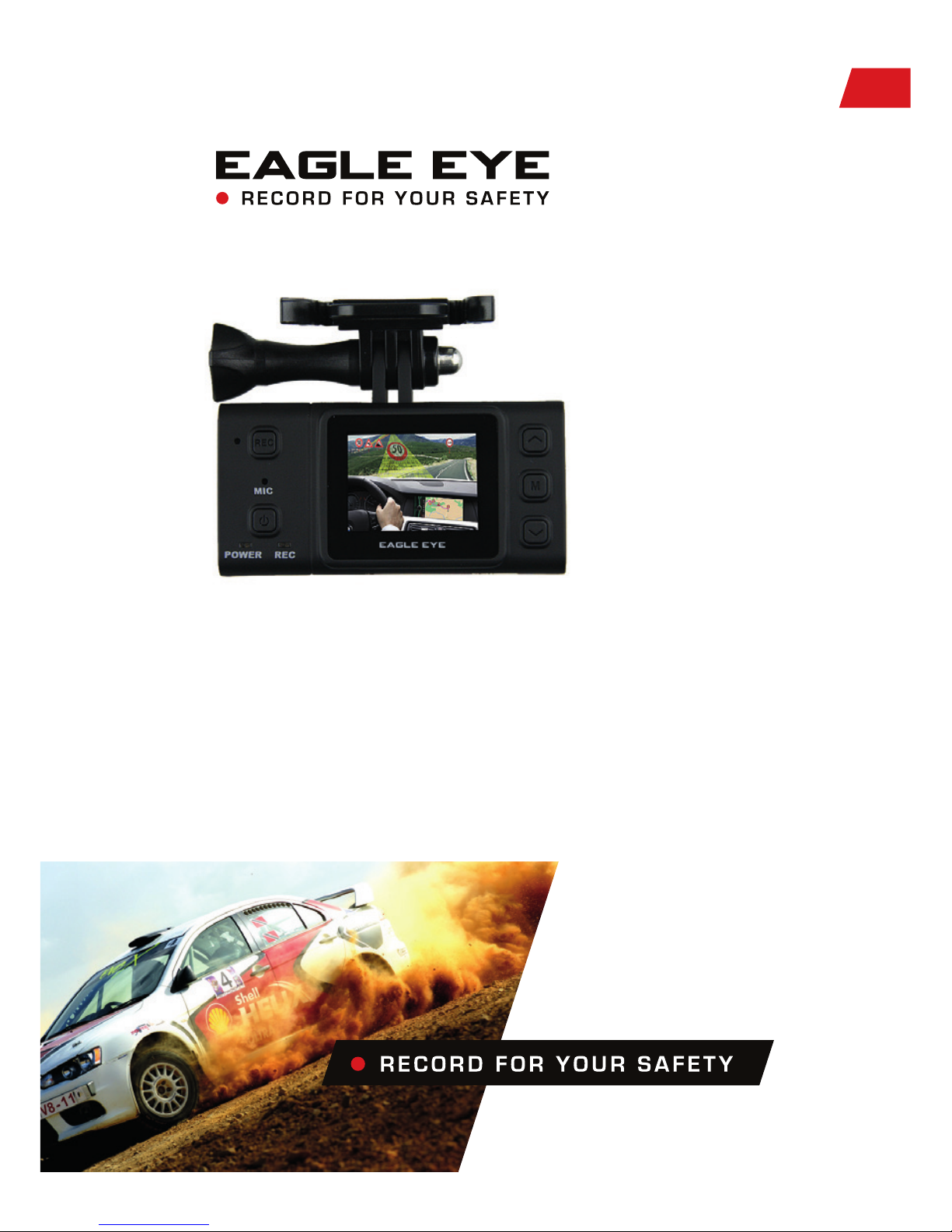
РУКОВОДСТВО ПОЛЬЗОВАТЕЛЯ
EAGLE EYE - один из лучших технически оснащённых автомобильных
видеорегистраторов на сегодняшний день. Оснащённый
сверхчувствительной матрицей высокой чёткости с рекордным в своём
классе углом обзора в 135°, он без труда запечатлит мельчайшие детали
(такие как: номерные знаки, разметку, сигнал светофора и др.) в любое
время дня и ночи. А крайне компактные размеры позволяют разместить
регистратор за пределами необходимого обзора водителя для
безаварийного управления транспортным средством, что дополнительно
повышает Вашу безопасность и уверенность на дороге.
РУКОВОДСТВО ПОЛЬЗОВАТЕЛЯ
Page 20
20
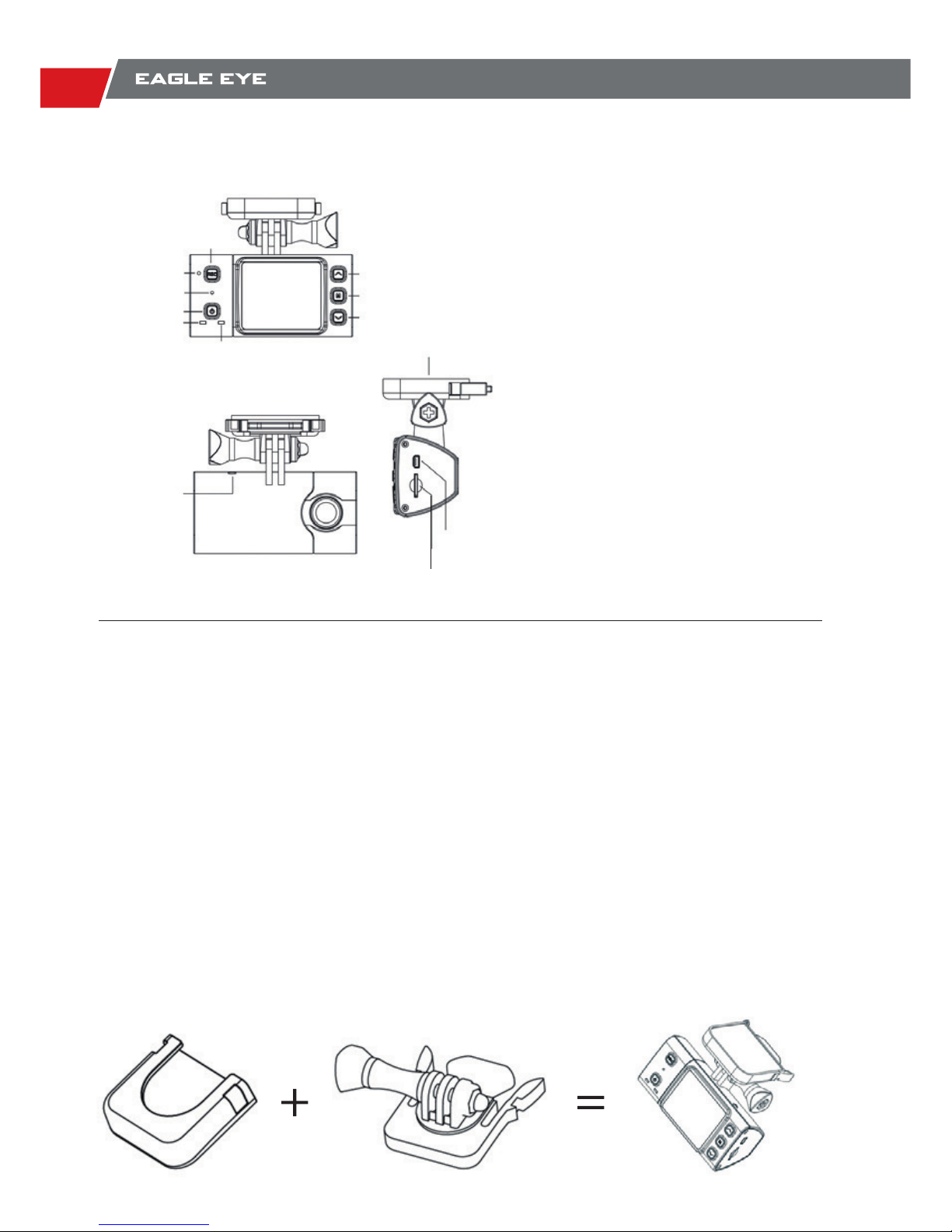
ОПИСАНИЕ
УСТАНОВКА
EAGLE EYE поставляется в расширенной комплектации с двумя видами крепления в
зависимости от вида эксплуатации и условий движения:
-вакуумная присоска (легко монтируется и удаляется на гладких поверхностях; позволяет
без труда отрегулировать необходимый угол или ракурс съёмки, развернуть или
перевернуть изображение на 360° и(или) 180° соответственно благодаря шарнирным
соединениям крепления;
-крепление на плоскую поверхность из двух частей: основная часть стационарно крепиться
на плоскую поверхность 3М-скотчем и служит гнездом для съёмной части крепления
регистратора (позволяет менять угол обзора по вертикали; быстро устанавливать/снимать
устройство).
В комплект так же входит зарядное устройство (з/у) автомобильного типа (длина шнура з/у
составляет 3 метра) + 10 фиксаторов для шнура.
1,5 дюймовый ЖК-экран
5MP матрица высокой чёткости
135° широкоформатного обзора
Full HD видеосъёмка: 1080р; кодек
Н.264
60 кадров в секунду при 720p
Воспроизведение отснятого видео на
устройстве (со звуком)
Встроенный датчик движения (авто.
запись)
Цикличная запись (запись “по кругу”)
Непрерывная запись
установленными отрезками времени
Цифровое увеличение изображения
(HD 720р)
Кнопка записи
Кнопка Вверх
Кнопка Меню
Кнопка Вниз
Индикатор
состояния записи
GPS ANT
Socket
Мини
USB-порт
Слот для micro SD до 32гб
Крепление
Сброс настроек
до заводских
Микрофон
Кнопка вкл/выкл
Индикатор
Питания/Зарядки
Page 21
21
РУКОВОДСТВО ПОЛЬЗОВАТЕЛЯ
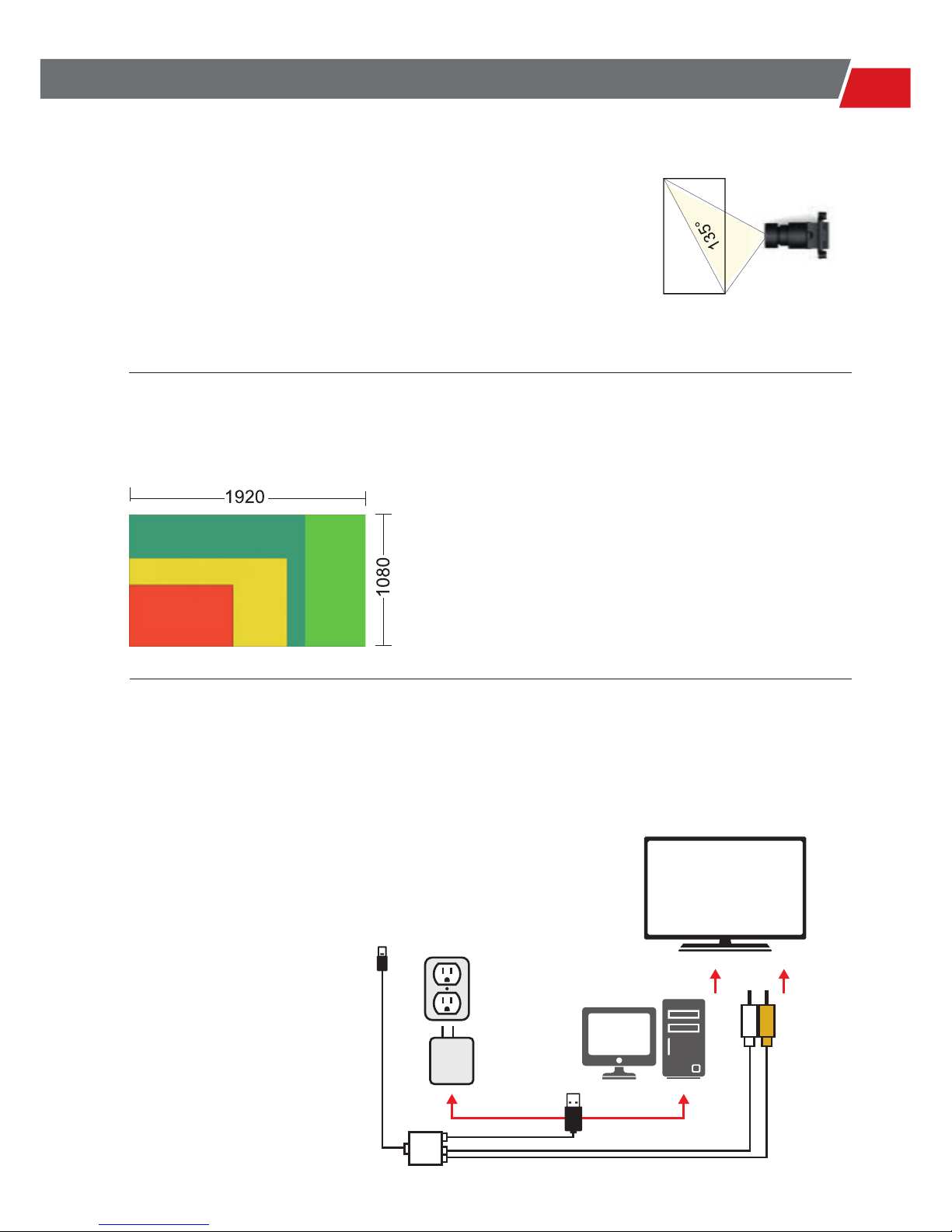
135° ШИРОКОУГОЛЬНЫЙ
ОБЪЕКТИВ
FULL HD 1080P КАЧЕСТВО ИЗОБРАЖЕНИЯ
ВЫСОКОЙ ЧЁТКОСТИ
Установив внутри EAGLE EYE с его широкоформатным
углом охвата в свой автомобиль - Вам больше не нужно
беспокоиться о потере ярких моментов или грандиозных
событий на протяжении всего Вашего путешествия за
рулём или рядом.
EAGLE EYE поддерживает Full HD 1080р.
Изображение 1920х1080 высокой чёткости
позволяет создавать видео собственных
приключений и делиться впечатлениями отснятого
с друзьями. Более низкие разрешения потребляют
больше энергии и памяти устройства.
МЕНЮ И ВИДЕОВЫХОД
EAGLE EYE получил мини USB порт и
универсальный кабель. Благодаря аудио и видео
разъёмам с одной и мини USB разъему с другой
стороны, можно проигрывать отснятые материалы
на дисплеях других устройств в режиме реального
времени, вести съёмку. А через стандартный USB
разъём вести зарядку и передачу данных между
видеорегистратором и портативными устройствами.
848 x 480
1280 x 720
1440 x 1080
Телевизор или др.
портативное устройство
Мини USB штекер для
регистратора
Штекер USB для
зарядки
Штекер USB
для подключения к ПК
Аудио и видео
штекеры
Page 22
22
4X DIGITAL ZOOM
КОМПАКТНЫЙ РАЗМЕР И
ПРОСМОТР ОТСНЯТОГО
МАТЕРИАЛА НА 1,5
ДЮЙМОВОМ ЖК-ДИСПЛЕЕ
G SENSOR
60FPS 720P, 30FPS 1080P
Благодаря 4-х кратному увеличению, доступного в HD
качестве (720р), при тусклом или ночном освещении,
запись видео с EAGLE EYE проходит с повышенной
точностью и детализацией.
EAGLE EYE компактен и лёгок, что делает запись
видео стабильным даже при сильной тряске и езде
по неровностям. 1,5 дюймовый экран покажет съёмку
реального времени, проиграет отснятое со звуком
или без.
Датчик движения, ориентированный на 3-ри оси
направления движения: вперёд-назад, вверхвниз, влево- вправо - даст сигнал о начале записи
видео при толчке или ускорении в заданных
направлениях.
Высокая частота кадров записи видео в формате HD, даёт
возможность замедленного просмотра интересующих вас моментов.
60FPS
30FPS
Page 23
23
РУКОВОДСТВО ПОЛЬЗОВАТЕЛЯ
ГЛАВНОЕ МЕНЮ
УДАЛЕНИЕ ФАЙЛОВ
Долгим нажатием на кнопку в режиме воспроизведения видео / изображения,
отобразится меню Удалить.
Нажмите кнопку для подтверждения. Нажмите для возврата назад.
Видео Папка Настройки видео
Изображения
Режим воспроизведения Настройки удаления
Настройка системы
Нажмите кнопку чтобы войти в главное меню, как показано ниже:
Page 24
24
ФОТО И ВИДЕО СЪЁМКА
НАСТРОЙКА АВТОМАТИЧЕСКОЙ ЗАПИСИ
Под фактической режиме отображения, нажмите кнопку один раз, чтобы сделать
снимок, нажмите один раз, чтобы начать видеозапись.
Примечание: Камера начнет видеозапись автоматически только после установки этих 2
функций выше.
Выберите “Auto REC “ Установите время задержки
Page 25

25
BENUTZERHANDBUCH
ТЕХНИЧЕСКИЕ ХАРАКТЕРИСТИКИ
Камера
Интерфейс
Производительность
Настройки
Другие
характеристики
Батарея
Физические
параметры единицы
продукта
Видео разрешения
Фото разрешения
Объектив CMOS высокой чёткости
Угол обзора объектива 135°
Матрица Цифровая 5МР 1/2,5”
Тип хранилища данных Micro SDHC/SD; TF card 32GB максимум
USB2.0 Заряд батареи и передаца данных
Дисплей 1,5 дюйма ЖК-дисплей для воспроизведения отснятого
Мини USB Воспроизведение отснятого на портативном устройстве в
режиме реального времени через видео-выход
Звук Встроенные микрофон и динамики
Цикличная запись 1/5/15/25/35/45 Минут; Откл.
Фото-режим Одиночное фото/Фотосессия
Таймер задержки автоспуска 3/5/10 секунд задержки
Перевернутое изображение Вкл./Выкл.
Режим энергосбережения Авто выключение дисплея Вкл./Выкл.
Отображение даты Вкл./Выкл.
Защита файлов при низком уровне заряда батареи
Формат видео MP4, (кодек H.264); видео компрессия
Батарея Литий-ионный аккумулятор
Ёмкость 600mA
Продолжительность работы 1,5 часа при записи видео
Размеры 80 x 40 x 33 mm
Вес 56грамм (с батареей)
1920 x 1080 @ 30FPS
1440 x 1080 @ 30FPS
1280 x 720 @ 60FPS
1280 x 720 @ 30FPS
848 x 480 @ 60FPS
4000 x 3000 12MP
3200 x 2400 8MP
2592 x 1944 5MP
Page 26

26
Мы ценим и уважаем наших клиентов, и хотим, чтобы наша продукция и услуги
соответствовали уровню мировых стандартов. Тем не менее, если у вас возникли проблемы
с продукцией Xpro , пожалуйста, найдите время , чтобы прочитать информацию ниже, чтобы
установить: распространяется ли действие гарантийных обязательств в вашем случае.
На любой продукт Xpro, приобретённый в store.xpro - cam.com или у авторизованного
дилера, действует гарантия 1 (один) год, начиная с дня приобретения. Гарантия не
распространяется на продукт, приобретённый у неавторизированных дилеров.
Данная гарантия не распространяется в следующих условиях :
● Продукт поврежден физически из-за небрежности, несчастного случая или неправильной
эксплуатации ;
● Продукт изменен покупателем внешне или не соответствует оригиналу производителя;
● Продукт поврежден или имеет дефекты из-за неавторизированного ремонта или
использования неоригинальных частей ;
● Продукт эксплуатировался не по назначению или в условиях, не соответствующих
спецификации или рекомендациям завода изготовителя ;
● Серийный номер продукта изменен или удалён ;
● Продукт поврежден из-за неправильной упаковки при гарантийном возврате дилеру или
производителю.
Если при правильной эксплуатации в период действия гарантии с вашим Xpro продуктом
возникли неисправности, мы гарантированно отремонтируем или заменим его. Очень
важно вовремя сообщить о возврате неисправного продукта в службу поддержки Xpro или
дилеру по электронной почте. Продукт, не попадающий под гарантийное обслуживание,
возвращается клиенту.
Гарантия не распространяется на потери, случайного повреждения или расходы,
понесенные во время обработки и отправки отремонтированных или замененных продуктов.
Xpro не несет никакой ответственности или ответственности перед клиентом или любым
другим человеком за любые убытки, травмы , смерти или любой другой ущерб , полученный
в следствии эксплуатации продукта или аксессуара.
Если у вас есть какие-то вопросы, касающиеся процедуры или условий гарантии продукции
Xpro, пожалуйста, не стесняйтесь обращаться к нам на www.xpro - cam.com , мы сделаем все
возможное, чтобы информировать Вас о том, как совершить гарантийный ремонт или замен.
Ваша команда Xpro
XPRO УСЛОВИЯ ГАРАНТИИ
Page 27

27
USER GUIDE
Page 28

www.xpro-cam.com
 Loading...