

Page 1
XMULTIPLE
XP1 Rechargeable
Battery/Cable Manual
Page 2

-Specification
-XP1 Accessories
-Xmultiple Ninety Days Limited Warranty
(For Additional information go to www.XP1power.com)
Safety Guidelines
Read following guidelines carefully for your acknowledgement
before using the XP1.
Batteries
Lithium-ion battery. Do not try to open the XP1 rechargeable
battery unit. Charges your iPhone/iPod and charges your
XP1-Power battery with the touch of a button.
Page 3

Connecting & Disconnecting
To connect or disconnect your XP1 power cable you must
place your fingers on the connectors and unattached them.
Never disconnect your unit by pulling on the cable. This can
damage your XP1 power cable.
XP1 products are not Water-resistant
Should moisture get in your XP1, please do not at tempt to
remove the battery or open the XP1, you may run the risk of
electrical shock.
Backup Copy (Just as a reminder)
Please remember to make backup copies of manual if
required.
Page 4

Connecting to other devices
XP1 XP-2500 units are only design to connect to USB
compatible products and to the iPhone a nd iPod'.
Restricting Children’s Access to your XP1
XP1 cables are not recommended for use by small children
under 12 years of age
Avoid dropping or impacting your XP1
Dropping or excessively impacting the XP1 will cause damage.
Cleaning your XP1
When cleaning the outside of your XP1:
- Make Sure your XP1 is unplugged.
Page 5

-Use a damp, soft, lint-free cloth. Avoid getting moisture in
the USB and device side connections, buttons or any other
openings.
- Don’t use aerosol sprays, solvents, alcohol, or abrasives.
Battery Maintenance
To maintain the best performance of your battery, please
carefully follow the guidelines listed below.
- Plug in the XP1 into the USB port of your computer or into
a AC power adapter and attach to a power source.
- Charge the battery only in temperatures that range from
0C to 40C. Charging in direct sunlight or in high humidity
areas may cause damage.
- Do not attempt to disassemble or short-circuit the
Page 6

battery.
- Make sure the metal contact on your cable USB connector
and the iPhone/iPod connector are always clean in order
to provide your XP1 with the best performance.
Important!!
Never dispose of the battery by incineration.
*Disposal of Lithium Ion (Li-Ion) Batteries:
-For safety , do not handle a damaged or leaking Li-Ion battery.
-For safe disposal options of your Li-Ion batteries, please
contact your nearest XP1 distributor.
Page 7
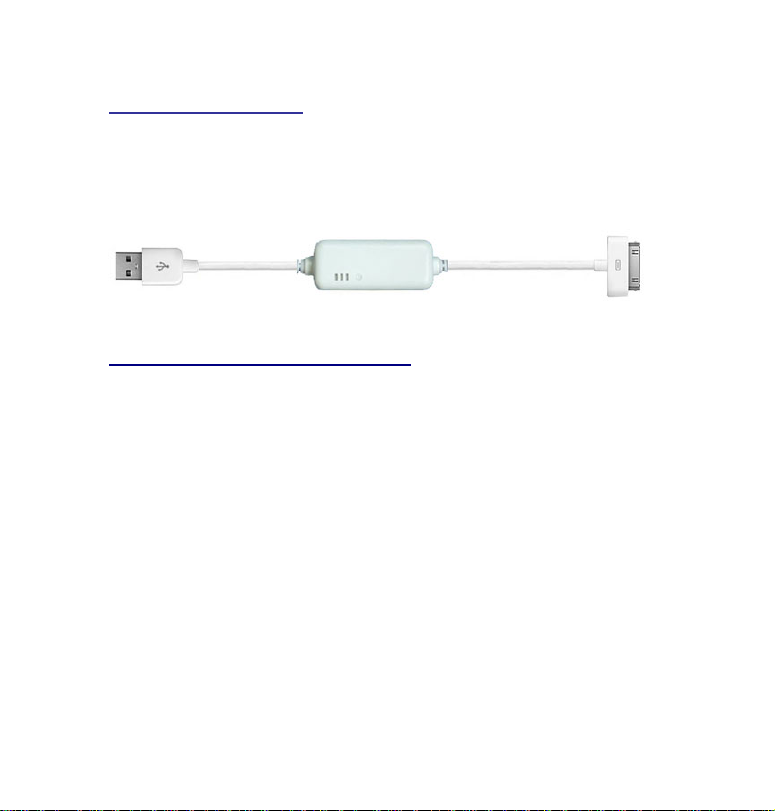
Package content:
1
XP1 Cable with Integrated Battery
1 Quick Start Manual.
Function Of LED Indicators
The XP1 power cable has three LEDs. The LED colors are green,
blue and red. When charging the XP1 and no device is attached,
the blue and red LEDs will illuminate. When XP1 is fully charged
the blue and green LEDs will be illuminated. The blue LED shows
the adapter which is charging and that the XP1 is working properly .
Page 8

Function Of LED Indicators for Battery Level Display
The XP1 LEDs also show the battery capacity level when used in
combination with the adjacent button. There are three LED lights
and each will illuminate separately to display the current capacity
level of the battery. The button must be pushed to see the battery
level status. To test the battery level of XP1 when you press the
button, different LEDs will be illuminated to show different battery
level status as following:
RED LED: 25% or less
BLUE LED: 25% to 75%
GREEN LED: 75% to 100%
Page 9
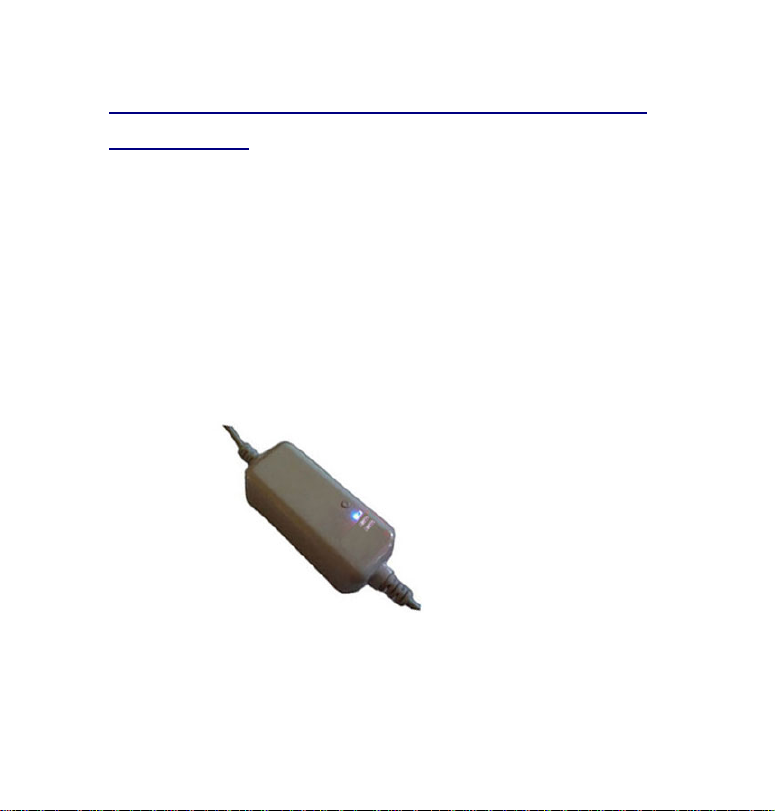
Button Functions for Charging Your XP1 and
iPhone/iPod
The button charging functions are listed below.
When you press the button, you can see the battery level of XP1.
then when you press the button for 3 seconds, it chooses to charge
iPhone/iPod or XP1. When iPhone/iPod is connected to the XP1 and
the XP1 is connected to a computer, it automatically will charge
iPhone/iPod and a blue LED illuminates.
Page 10
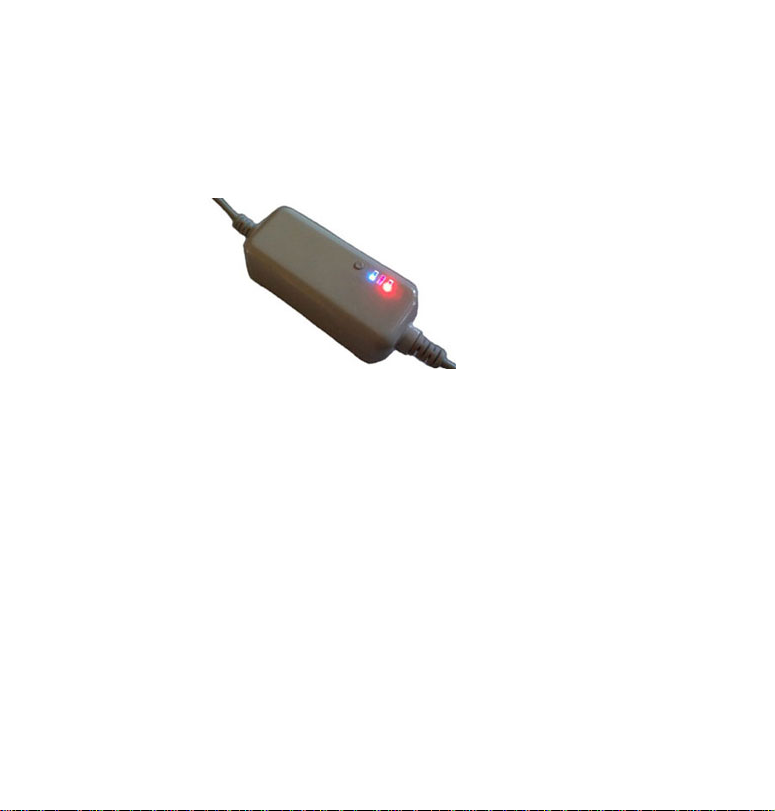
To charge the XP1 you press the button for 3 seconds and the XP1
charges and a blue and red LED will illuminate.
When XP1 is fully charged a blue and green LED illuminate.
Protection Mode—When Input voltage is more than 5.6V or less
than 4.2V, the three LEDs illuminate. it shows the input voltage is
unsteady and XP1 goes to protection mode.
Page 11

Getting Started
You must charge your XP1
Insert your XP1 cable into the USB port of a personal computer or
notebook to charge. The initial battery charge should be at least 4
- 6 Hours. Once your XP1 is charged, it charges itself every time
you plug your XP1 into a Personal Computer, Laptop or any of the
XP1 AC charging devices available on our web site under
accessories. The XP1 Battery is protected by a full charge
detection function to eliminate damage to your battery. (when the
voltage reaches 4.2V). The spec of the Li-ion battery is 3.7V , and
the full battery is set up @ 4.2V , and low battery is set up @ 3.4V.
However, the battery will be at auto-shut down @ 3.2V for
self-protection. When charging the LED #1 will illuminate and
Page 12

will stay on when fully charged.
Full-charge time: About 2 hours.
Recharge time 1 hour
Transfers : Approximately 50,000
NOTE: XP1 will not be charged when the Personal Computer or
Notebook is under “Standby Mode”, “Power Saving Mode” or
“Suspend Mode”. Therefore, please charge your XP1 while your
Personal Computer or Notebook is in use.
IF YOU NEED TO USE ANY EXTERNAL CHARGERS OTHER
THAN A PERSONAL COMPUTER or NOTEBOOK TO
CHARGE THE XP1, IT IS RECOMMENDED TO USE
XMULTIPLE’S PROPRIETARY XP1 CHARGERS ONLY.
Page 13

(Using another manufacture’s charger may cause
damage to your XP1 therefore voiding the 90-day
warranty)
(Do not remove the integrated battery to charge.
Simply insert the XP1 into the USB port of a
personal computer or notebook).
Page 14
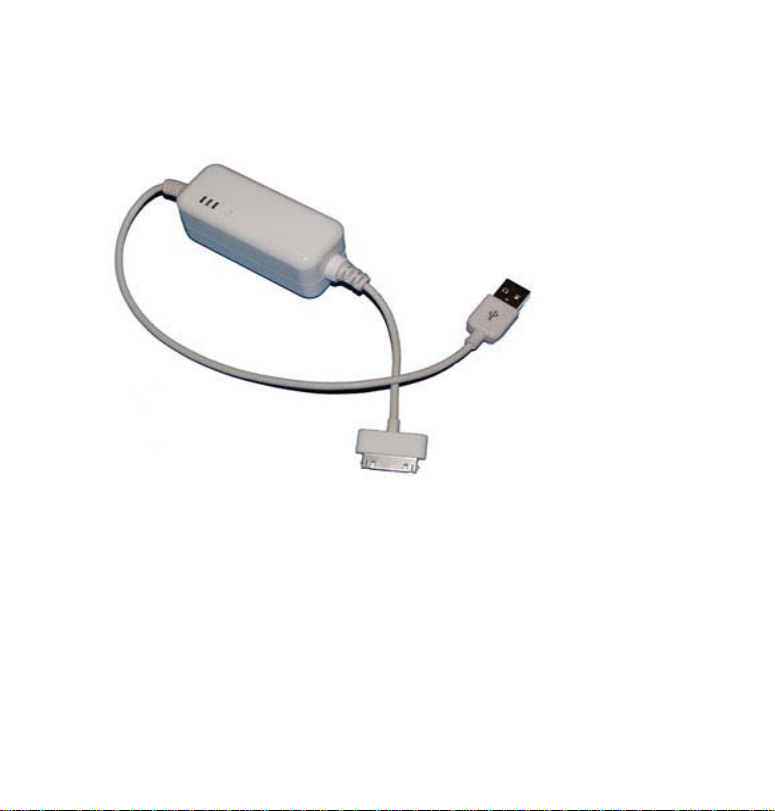
Using your USB XP1
Step 1: To turn on the power to your
personal computer or laptop. Insert the
XP1 male USB cable into the female USB
port of your computer or laptop.
Page 15

Step 2: Connect your XP1 male iPhone/iPod
connector to the female connector on your
iPhone/iPod. When connected, LED #1, 2
and 3 will illuminate.
Step 3: Only LED #1 will be illuminated
when the XP1 is fully charged.
Troubleshooting
Basic Troubleshooting Steps
Below is a listing of commonly asked XP1 questions and answers
and basic troubleshooting steps. Keep in mind that this is just a
select few of the questions and answers in our database. If you're
Page 16

encountering a more specific issue you sho uld call our customer
support. The XP1 is a very simple product to use and most users
never experience a problem.
1. No connection is made after plugging in the XP1 cable to both the
USB computer port and the attaching device.
Solution: Un-plug and re-plug all connect ions.
2. *If an Error occurs the XP1 LEDs will all illuminate simultaneously.
This means the XP1 not connected properly to the USB port of your
computer.
Solution: Check the USB connector and iPhone/iPod connector for
dirt or an obstruction. We move any foreign material and reinsert
the XP1 cable.
Page 17

3. When your iPhone/iPod is connected to the XP1 and the XP1 is
connected to a computer using a USB cable the iPhone/iPod will not
synchronize with iTunes or transfer any data.
Solution: This problem is normally a software issue and it is
recommended that your reboot your iTunes software.
4. Is recharge from a USB port fast and easy.
Solution: Yes, The power that is available from USB ports differs
depending on their design however they should all work with t he
XP1. . Recharging the XP1 should take approximately 60 minutes
after you plug it in to a computer USB port. For the fastest recharge
time, use a USB port from a AC-USB adapter. Alternately connect
the battery pack to a USB port which is located on your PC or laptop.
Do not recharge using an auxiliary USB port on a keyboard or
extension cable.
Page 18

Technical Support
Technical support is available to all registered users of Xmultiple
products. Technica l Support contact information can be found on
our website at www.XP1power.com
Web Support
XP1's website has most technical information you will need. Please
connect to our website at www.XP1power.com and click on the
"Technical Resource" butto n at the top of the homepage. You may
also find the answer to your problem in the Frequently Asked
Questions (FAQ) section of the Support area on the XP1 Website:
www.XP1.com.
Page 19

Telephone Support
There is no charge for technical support except long-distance
charges where applicable. Please visit www.XP1power.com for
telephone support hours. Please note the following when calling
support:
Please have the XP1 unit with you before you call our support from
a phone. Be prepared to provide information including: your name,
address, and telephone number and the symptoms of the problem
you are experiencing.
Registering Your Xmultiple/XP1 Product
Register your XP1 product online at www.XP1power.com.
Page 20

Xmultiple Ninety Days Limited Warranty
For additional information go to our web site
www.XP1power.com
Specification
Battery
Rechargeable Li-ion power module with DC or USB charge
Operation System
Operation system support Windows Vista/XP/2000/Me; MacOS9.X
or higher version.
Page 21

XP1 Accessories
To purchase and for more information on XP1 accessories, go to
www.XP1power.com
Car Adapter XPP01-A01
ACAdapter XPP01-A01(For USA)
AC Adapter XPP01-A02 (For Europe)
Car Adapter XPP01-A01
Page 22
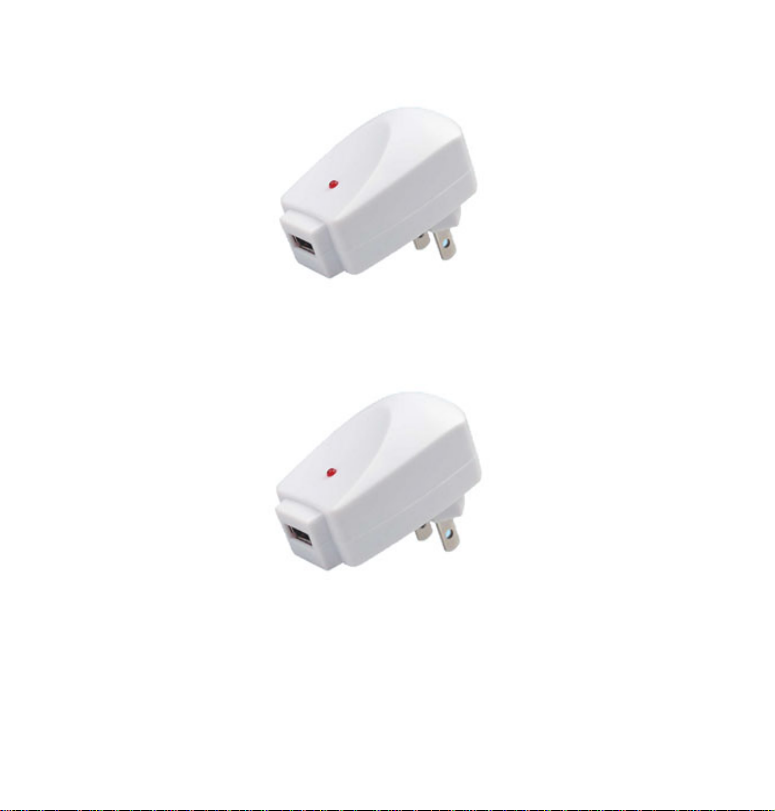
AC Adapter XFP01-A01 (For U.S.)
AC Adapter XFP01-A02 (For Europe)
Page 23

Xmultiple Ninety Days Limited Warranty
Xmultiple’s warranty obligations for this hardware product are
limited to the terms set forth below:
Xmultiple T echnol ogies, Inc. warrants this hardware product agains t
defects in materials and workmanship for a period of ninety (90)
days from the date of original purchase (“Warranty Period”). If a
defect arises and a valid claim is received by Xmultiple within the
Warranty Period, at its option, Xmultiple will (1) repair the product
at no charge, using new or refurbished replacement parts, (2)
exchange the product with a product that is new or which has been
manufactured from new or serviceable used parts and is at least
functionally equivalent to the original product.
Page 24

If a defect arises and a valid claim is received by Xmultiple after the
first one hundred and thirty (30) days of the Warranty Period, a
shipping and handling charge will apply to any repair or exchange of
the product undertaken by Xmultiple.
Xmultiple warrants replacement products or parts provid ed under
this warranty against defects in materials and workmanship from
the date of the replacement or repair for ninet y (90) days. When
a product or part is exchanged, any replacement item becomes your
property and the replaced item becomes Xmultiple’s property. When
a refund is given, your product becomes Xmultiple’s property.
Page 25

EXCLUSIONS AND LIMITATIONS
This Limited Warranty applies only to the hardware product
manufactured by or for Xmultiple that can be identified by the “XP1”
trademark, trade name, or logo affixed to it. This Limited Warranty
does not apply to any non-Xmultiple manufacturers, suppliers, or
publishers may provide a separate warranty for their own products
packaged with the Xmultiple hardware product.
Xmultiple is not liable for any damage to or loss of any programs,
data, or other information stored on any media contained within the
Xmultiple hardware product, or any non-Xmultiple product or art
not covered by this warranty . Re covery or reinstallation of programs,
data or other information is not covered under this Limited
War rant y.
This warranty does not apply: (a) to damage caused by accident,
Page 26

abuse, misuse, misapplication, or non-Xmultiple product; (b) to
damage caused by service performed by anyone other than
Xmultiple; (c) to a product or a part that has been modified without
the written permission of Xmultiple; or (d) if any Xmultiple serial
number has been removed or defaced.
TO THE MAXIMUM EXTENT PERMITTED BY LAW, THIS WARRANTY
AND THE REMEDIES SET FORTH ABOVE ARE EXCLUSIVE AND IN
LIEU OF ALL OTHER WARRANTIES, REMEDIES AND CONDITIONS,
WHETHER ORAL OR WRITTEN, EXPRESS OR IMPLIED. XMULTIPLE
SPECIFICALLY DISCLAIMS ANY AND ALL IMPLIED WARRANTIES,
INCLUDING, WITHOUT LIMITATION, WARRANATIES OF
MERCHANTABILITY AND FITNESS FOR A PARTICULAR PURPOSE. IF
FLASHPOINT CANNOT LAWFULLY DISCLAIM OR EXCLUDE IMPLIED
WARRANTIES UNDER APPLICABLE LAW, THEN TO THE EXTENT
Page 27

POSSIBLE ANY CLAIMS UNDER SUCH IMPLIED WARRANTIES SHALL
EXPIRE ON EXPIRATION OF THE WARRANTY PERIOD. No Xmultiple
reseller, agent, or employee is authorized to make any modifications,
extension, or addition to this warranty.
TO THE MAXIMUM EXTENT PERMITTED BY LAW, XMULTIPLE IS NOT
RESPONSIBLE FOR DIRECT, SPECIAL, INCIDENTAL OR
CONSEQUENTIAL DAMAGES RESULTING FROM ANY BREACH OF
WARRANTY OR CONDITION, OR UNDER ANY OTHER LEGAL THEORY,
INCLUDING ANY COSTS OF RECOVERING OR REPRODUCING ANY
PROGRAM OR DATA STORED IN OR USED WITH THE FLASHPOINT
PRODUCT, AND ANY FAILURE TO MAINTAIN THE CONFIDENTIALITY
OF DATA STORED ON THE PRODUCT. XMULTIPLE SPECIFICALLY
DOES NOT REPRESENT THAT IT WILL BE ABLE TO REPAIR ANY
PRODUCT UNDER THIS WARRANTY OR MAKE A PRODUCT
Page 28

EXCHANGE WITHOUT RISK TO OR LOSS OF PROGRAMS OR DATA.
FOR CONSUMERS WHO HAVE THE BENEFIT OF CONSUMER
PROTECTION LAWS OR REGULATIONS IN THEIR COUNTRY OF
PURCHASE OR, IF DIFFERENT, THEIR COUNT RY OF RESIDENCE,
THE BENEFITS CONFERRED BY THIS WARRANTY ARE IN ADDITION
TO ALL RIGHTS AND REMEDIES CONVEYED BY SUCH CONSUMER
PROTECTION LAWS AND REGULATIONS. TO THE EXTENT THAT
LIABILITY UNDER SUCH CONSUMER PROTECTION LAWS AND
REGULATIONS MAY BE LIMITED. XMULTIPLE’S LIABILITY IS
LIMITED, AT ITS SOLE OPTION TO REPLACEMENT OR REPAIR OF
THE PRODUCT OR SUPPLY OF THE REPAIR SERVICE AGAI N.
Page 29

Safety Instructions
XP1 customer should read our safety instructions carefully. It should
be noted that failure to read and follow these safety instructions
could result in electrical shock, fire, explosion, or other hazard,
causing serious and/or fatal injury and/or property damage. For this
instruction and safety guide this product i s known as XP1 and
applies to all models of this product line. Your XP1 is not user
serviceable. Do not attempt to open and remove the battery or
repair or modify this product. You can enhance performance by
following all fo these instructions.
Page 30

All Safety Instructions are important and are listed below:
1. Users of XP1 Rechargeable battery should follow common sense
and normal precautions for products made from batteries. The XP1
users a battery manufactured with the highest of quality and with
safety procedures. Please in using our XP1 product do not take our
battery unit apart or in any way disassemble, open, modify, drop,
crush, puncture, or attempt to destroy the Xmultiple XP1 Battery
2. The XP1 contains a lithium-polymer battery, which is highly
flammable as in the case of all batteries of this type. Therefore this
battery must be keep away from open flame and fire.
3. Your XP1 is not a children's toy and children should not play or use
this product.
Page 31

4. Always Inspect your XP1 for damage before use. If you have any
damage to your XP1 have it repaired or replaced before use.
5. Do not insert any metal objects of any type into the connectors
or the battery backup unit to avoid and prevent short circuit or other
potential hazards.
6. The XP1 connectors and battery unit section must remain dry.
Users should not operate or use this product with wet hands. The
XP1 can lead to electrical shock if there is moisture of any kind
present when in use. If the XP1 is exposed to moisture during it use
the user should disconnect the XP1 at both connection ends
immediately. If your believe your XP1 has been compromised with
moisture or by getting wet, please discontinue using the product
Page 32

and return the unit for our technicians to evaluate the product’s
safety before using.
7. The XP1 is made only to power the device listed in the users
guide. It would only be used with the intending device it was
manufactured to operate with and no other devices which be
attached to your XP1. Because of the high capacity of the integrated
battery, the XP1 may become warm during operation. During
operation of XP1 this is quite normal. Your XP1 should be used in
temperatures between 50–80°F (10–27°C). Over heating must be
avoided by keeping the area around the battery backup unit of the
XP1 ventilated. During operation do not place objects around the
battery backup unit or connectors. If you are around a heat source,
a heat vent, or in direct sunlight do not use your XP1.
Page 33

8. Your XP1 has two connectors at the ends of the cable which
should be attached complete when using the product. The USB and
device side connectors should be checked to make sure they are
firmly connected. Please remember that loose power cables can
generate harmful heat which can damage your XP1.
9. If the XP1 expands, swells, emits a strong odor, or becomes hot
to the touch, discontinue use.
10. Leakage of fluid from a battery can occur. If the battery inside
the XP1 leaks for any reason discontinue using the product. If your
skin come in contact with fluid from the battery by accident wash
the affected area immediately with water. If your eyes come in
contact with this material please seek medical attention
immediately.
Page 34

11. Do not leave the XP1 on for prolonged periods of time
unattended. When the XP1 is not in use disconnect both connectors
from their attaching devices.
Battery Maintenance
In most cases, short battery life for Lithium-ion batteries is mainly
caused by heat, rather than charge/discharge patterns. Do not store
your battery in places with excess heat.
1. When you are not going to use your XP1 for long periods of time
or plan to store the unit it is best to store with 60% or more of the
capacity level in the battery. The XP1 should not be stored when
fully charged. The XP1 should also not be stored with a complet e
discharged. Check the charge level before storing by attaching the
Page 35

USB connector to a power source and looking at the LED status
indicators.
2. Battery maintenance issues if followed will improve the life of
your battery . Users should not frequently fully discharge the battery
because this will add strain on the battery. For the best results from
your battery you should charge your XP1 between uses even if it is
not fully discharged. The lithium-polymer battery used in this
product has no “memory effect.” Batteries of this type perform best
if several partial discharges with frequent recharges are performed.
This is a better for the battery than one full discharge. You will
extend the life of the battery by following this instr uction.
Page 36

Disposing of your XP1
The XP1 battery should not be disposed of by exposing it to fire.
1. Do not incinerate or microwave.
2. The XP1 should not be placed in ordinary refuse.
3. Lithium-polymer batteries must be disposed of properly.
Consult your local municipal or civil authority for instructions on
correctly disposing of a lithium-polymer battery.
In the USA and Canada: This mark indicates your XP1 can be
recycled by the Rechargeable Battery Recovery Corporation
(“RBRC”). When you are ready to dispose of the XP1, please contact
the RBRC at 1-800-8-BATTERY or www.rbrc.org.
Page 37

FCC Statement
Federal Communication Commission Interference Statement
Note: The XP1 has been tested and found t o com ply wit h the l imits
for a Class B digital device, Pursuant to Part 15 of the FCC Rules.
These limits are designed to provide reasonable protection against
harmful interference in a resident ial installation. This equipme nt
generates, uses and can radiate radio frequency energy and, if not
installed and used in accordance with the instructions, may cause
harmful interference to radio communications. However , there is no
guarantee that interference will not occur in a particular installation.
If for any reason this equipment does cause harmful interference to
radio or television reception, which can be determined by turning
the equipment off and on, the user is encouraged to try to correct
the interference by one or more of the following methods:
Page 38

Move or relocate the receiving antenna
Move the equipment to increase the separation between the
equipment and receiver
Change the outlet by connecting the equipment into an outle t on a
circuit different than the circuit the receiver is connected.
Please consult the certified dealer for help
Federal Communication Commission Declaration of
Conformity
This product complies with Part 15 of the FCC rules. Operation is
subject to the following two
conditions: (1) This device may not cause harmful interference, and
(2) This device must accept any interference received, including
interference that may cause undesired operation. As defined in
Page 39

Section 2.909 of the FCC Rules, the responsible party for this devic e
is Xmultiple Technologies, Inc., XP1 Product Group, 543 Country
Club Drive, Suite G, Simi Valley, CA 93065, USA.
MODIFICATIONS: Modifications not expressly approved by XP1 may
void the user’s
authority to operate the device under FCC regulations and must not
be made.
Industry Canada Conformity Statement
Operation is subject to the following two conditions: (1) This device
may not cause interference, and (2) This device must accept any
interference, including interference th at may cause undesired
operation of the device. This Class [B] digital apparatus complies
with Canadian ICES-003
.
Page 40

OBTAINING WARRANTY SERVICE
Please review the online help resources referred to in the
accompanying documentation before seeking warranty service. If
the product is still not functioning properly after making use of these
resources, access the online website: www.xmultiple.com
instructions on how to obtain warranty service.
Xmultiple Technologies, Inc.
543 Country Club Drive, Suite G, Simi Valley, CA 93065. Tel: 805-579-1100, T oll Free US A
1-800-753-9526. Fax:805-579-7800, www.XP1power.com, www.xmultiple.com
for
 Loading...