

Page 1
X-Micro mini DisGo
USER GUIDE
V 1.0
Page 2

1
INFORMATION TO USER
Product Name: X-Micro mini DisGo
Model Name: XST-HU5X / XST-HU2X / XST-HU3X / XST-HU4X
This product is in compliance with the essential
requirements and other relevant provisions of the
FCC (Federal Communications Commission)
Authorized nuder Declaration of Conformity
according to 47 CFR, Part2 , Part15 and CISPR
PUB.22 of the FCC Rules.
This equipment has been tested and found to comply with the limits for a
class B HDD device, pursuant to part 15 of the FCC Rules. These limits
are designed to provide reasonable protection against harmful
interference in a residential installation.
This equipment generates, uses and can radiate radio frequency energy
and, if not installed and used in accordance with the instructions, may
cause harmful interference to radio communications. However, there is
no guarantee that interference will not occur in a particular installation. If
this equipment does cause harmful interference to radio or television
reception, which can be determined by turning the equipment off and on,
the user is encouraged to try to correct the interference by one or more of
the following measures:
---Reorient or relocate the receiving antenna.
---Increase the separation between the equipment and receiver.
Page 3
2
---Connect the equipment into an outlet on a circuit different from that to
which the receiver is connected.
---Consult the dealer or an experienced radio/TV technician for help.
This device complies with Part 15 of the FCC Rules. Operation is subject
to the following two conditions:
(1) This device may not cause harmful interference.
(2) This device must accept any interference received, including
interference that may cause undesired operation.
European COUNCIL DIRECTIVE 89/336/EEC
Low-voltage Directive (73/23/EEC)
This device complies with the specifications listed below:
European Standard EN 55022:1998/A1: 2000 Class B,
EN 61000-3-2:2000
EN 61000-3-3:1995 and EN 55024:1998/A1: 2001 (IEC 61000-4-2:1995,
IEC 61000-4-3:1995, IEC 61000-4-4:1995, IEC 61000-4-5:1995,
IEC 61000-4-6:1996, IEC 61000-4-8:1993, IEC 61000-4-11:1994).
Page 4
3
Copyright
Copyright 2005 by X-Micro Technology Corp., All rights reserved. No part
of this publication may be reproduced, transmitted, transcribed, stored in
a retrieval system, or translated into any language or computer language,
in any form or by any means, electronic, mechanical, magnetic, optical,
chemical, manual or otherwise, without the prior written permission of
X-Micro Technology Corp.
Disclaimer
X-Micro Technology Corp. makes no representations or warranties, either
expressed or implied, with respect to the contents hereof and specifically
disclaims any warranties, merchantability or fitness for any particular
purpose. Any software described in this manual is sold or licensed "as is".
Should the programs prove defective following their purchase, the buyer
(and not this company, its distributor, or its dealer) assumes the entire
cost of all necessary servicing, repair, and any incidental or consequential
damages resulting from any defect in the software. Further, X-Micro
Technology Corp., reserves the right to revise this publication and to
make changes from time to time in the contents hereof without obligation
to notify any person of such revision or change.
All brand and product names mentioned in this manual are trademarks
and/or registered trademarks of their respective holders.
Page 5

4
Index
English……………………………………………………………………..5
German……………………………………………………………………7
French……………………………………………………………………..9
Dutch………………………………………………………………………11
Italian……………………………………………………………….…13
Spanish…………………………………………………………………….15
Portuguese…………………………………………………………………..17
Russian……………………………………………………………………….19
Danish……………………………………………………………………… ..21
Swedish………………………………………………………………………23
Norwegian……………………………………………………………………25
Hungarian…………………………………………………………………….27
Traditional Chinese…………………………………………………………29
Page 6
5
Specification
Product name X-Micro mini DisGo
Capacity 5/20/30/40GB
HDD Toshiba 1.8inch
Bus interface USB 2.0
Transfer rate 480 Mbps
Spin 4200rpm
Power USB self-powered
LED Green for power, Orange for data transfer
Dimension 7 x 60 x 100 mm
Weight 85 g
Electrical +5V, 500mA Max.
OS support Windows ME/2000/ XP
Operating
requirements
Temperature from 0˚C to 50˚C
Relative humidity 5 - 90%
(Non-condensing)
Page 7
6
Hardware Installation
In order to get the USB 2.0 performance, make sure to properly install the
USB 2.0 driver to your desktop computer or USB 2.0 driver to your
notebook.
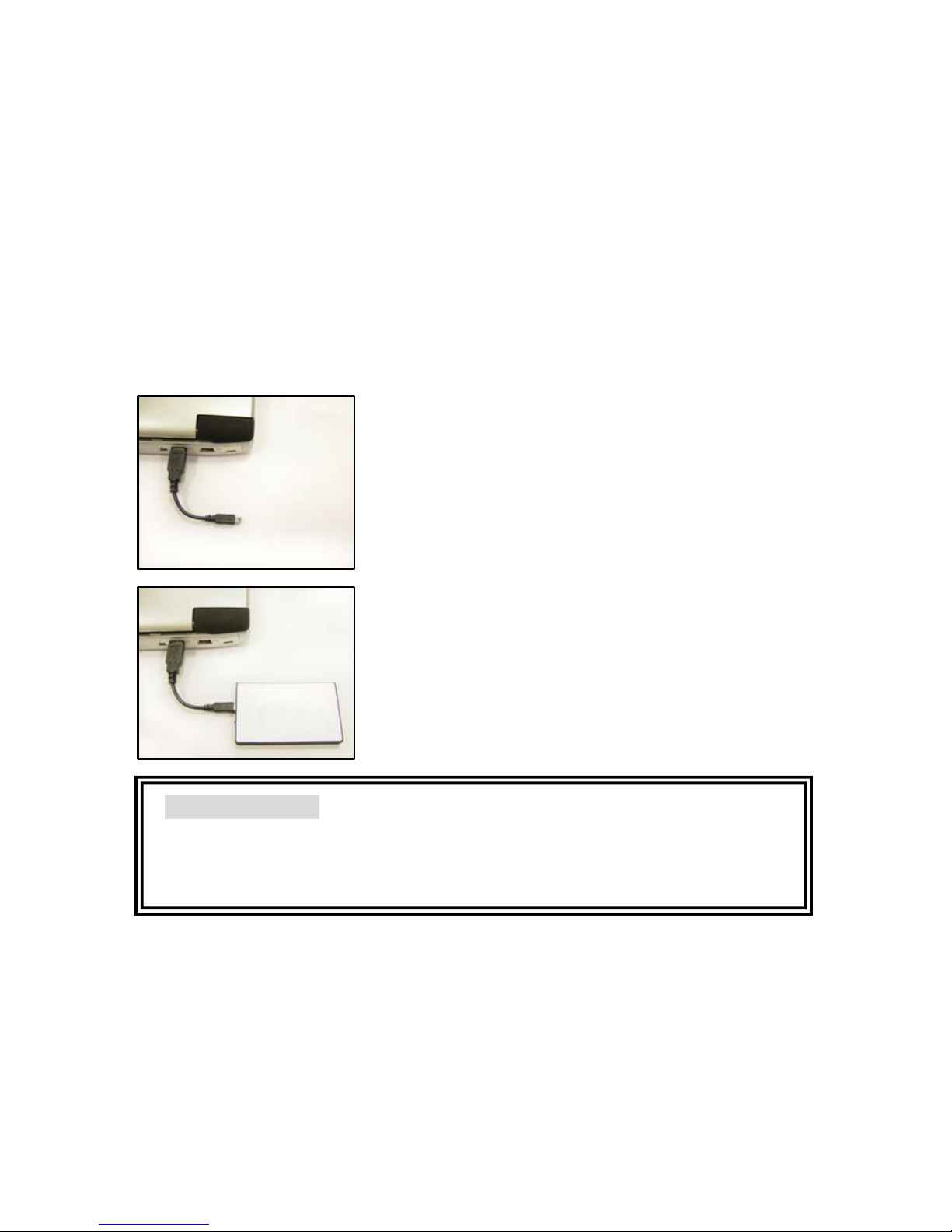
Step 1. Connect the USB 2.0 cable connector
to your desktop computer or notebook.
Step 2. Connect the USB 2.0 cable mini
connector to EX HDD housing.
The LED will light after the above steps are
properly installed. Now you can check your file
manager for new external hard disk.
Important Notice
Warranty will overdue if the housing has been opened.
Shock and vibration will damage HDD, try to avoid it!
Page 8
7
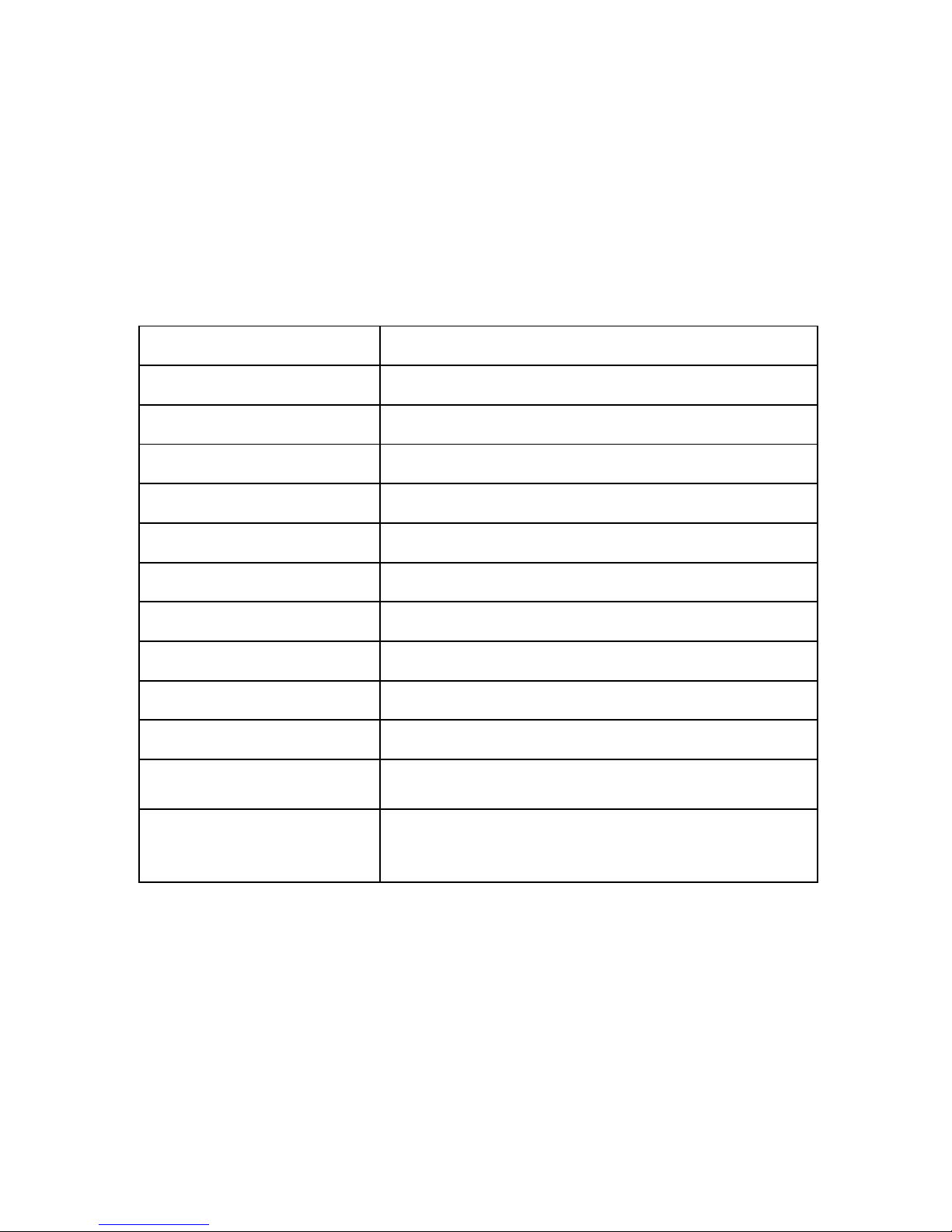
Spezifikation
Produktname X-Micro mini DisGo
Kapazität 5/20/30/40 GB
Festplatte Toshiba 1,8 Zoll
Bus-Schnittstelle USB 2.0
Übertragungsrate 480 Mbit/s
Umdrehung 4200 U/min
Stromversorgung USB-eigenversorgt
LED Grün bei Betrieb, Orange bei Datenübertragun
g
Abmessungen 60 x 98 x 8,5 mm
Gewicht 85 g
Elektrische Daten +5V, 500mA max.
Unterstützte
Betriebssystems
Windows ME/2000/ XP
Betriebsanforderungen
Temperatur zwischen 0˚C und 50˚C
Relative Luftfeuchte 5 - 90%
(nicht-kondensierend)
Page 9
8
Hardware-Installation
Für eine USB 2.0-Leistung muss der USB 2.0-Treiber richtig auf Ihrem
Desktop-Computer oder Laptop installiert worden sein.
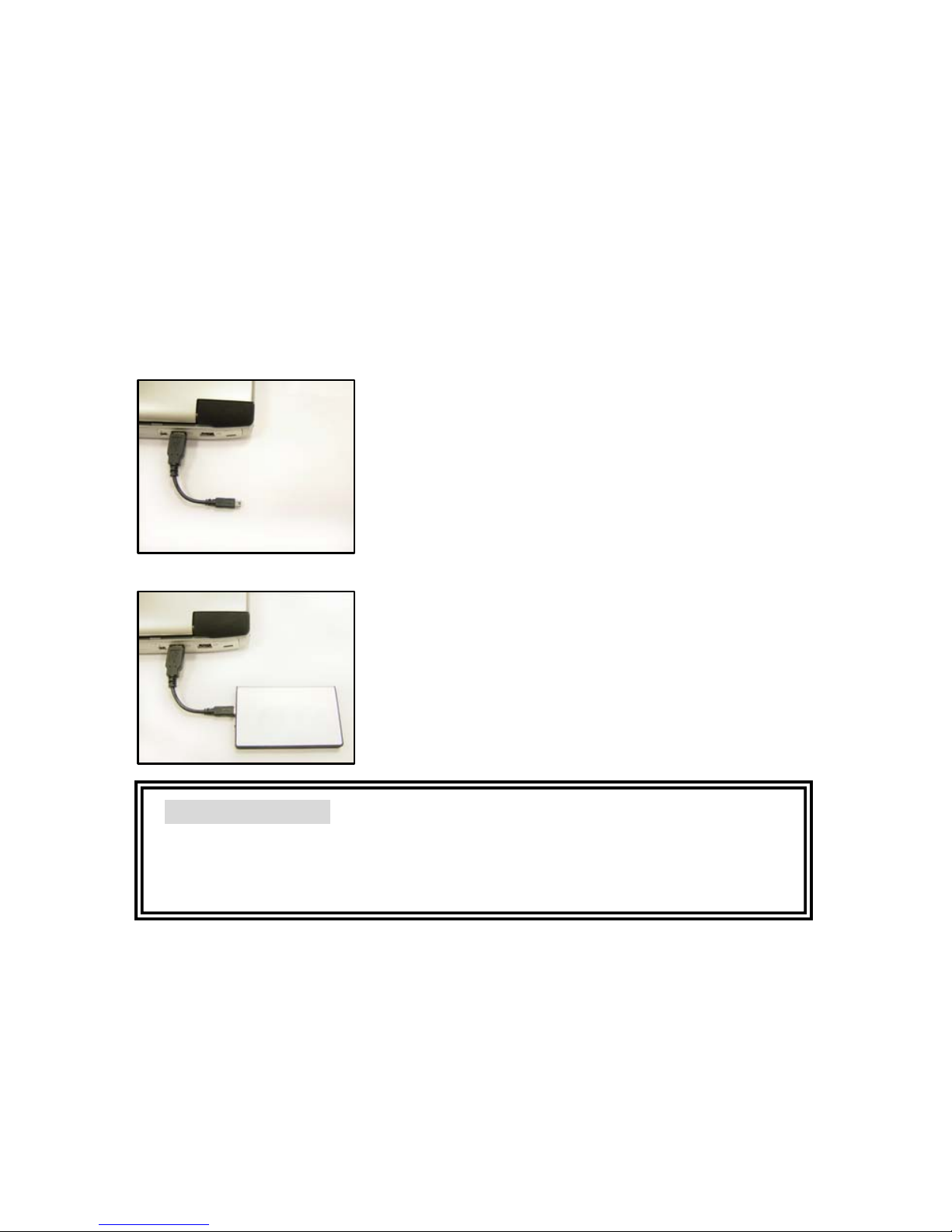
Schritt 1. Verbinden Sie den USB
2.0-Kabelstecker mit Ihrem Desktop-Computer
oder Laptop.
Schritt 2. Verbinden Sie den USB
2.0-Kabel-Ministecker mit dem externen
Festplattengehäuse.
Bei richtiger Installation gemäß den obigen
Schritten leuchtet die LED. Rufen Sie jetzt
Ihren Datei-Manager auf, um die neue externe
Festplatte zu erkunden.
Wichtiger Hinweis
Die Garantie erlischt, wenn das Gehäuse geöffnet wird.
Stoß und Erschütterung beschädigen die Festplatte und sollten daher
vermieden werden!
Page 10
9
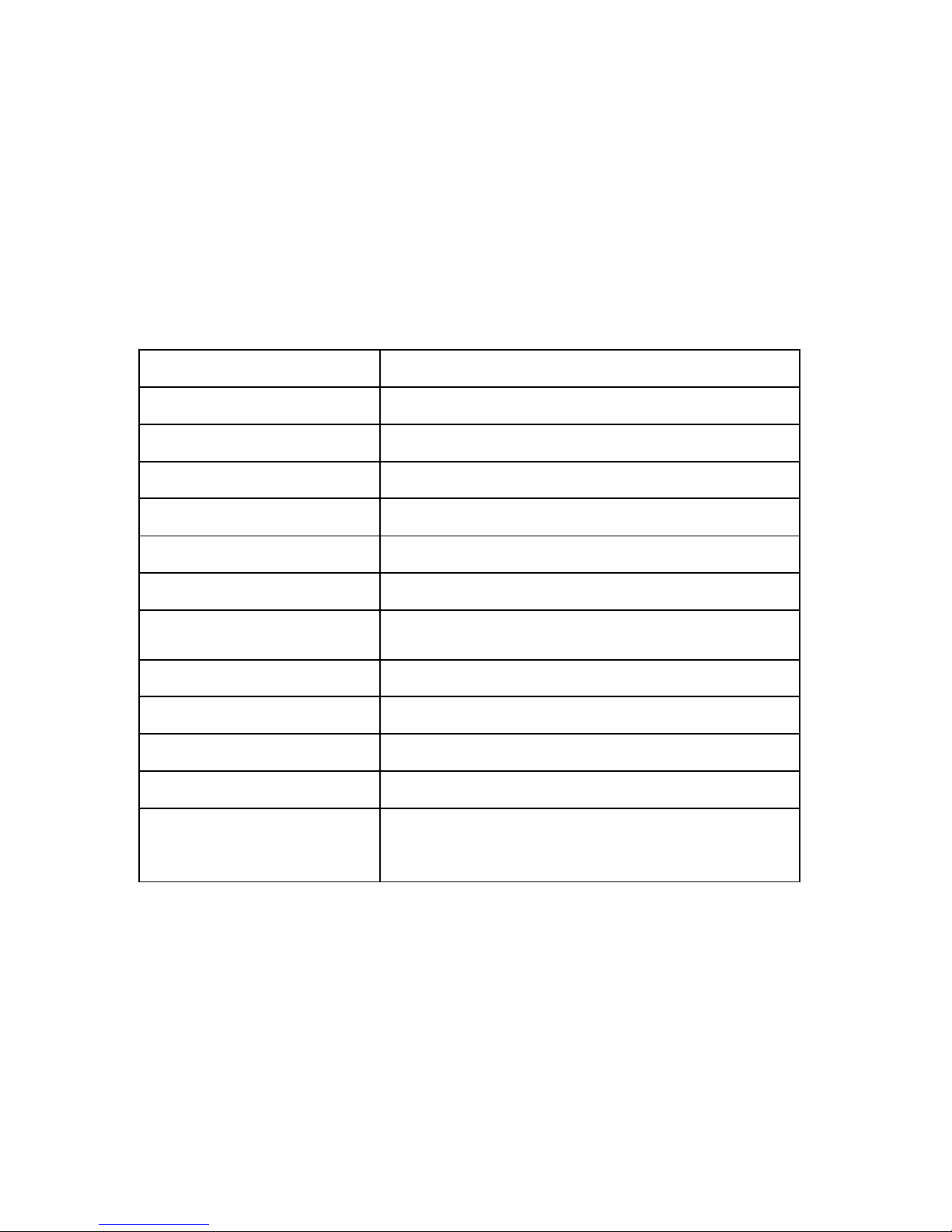
Spécification
Nom du produit X-Micro mini DisGo
Capacité 5/20/30/40GB
HDD Toshiba 1.8 pouce
Interface bus USB 2.0
Taux de transfert 480 Mbps
Vitesse de rotation 4200rpm
Alimentation Autoalimenté USB
LED
Verte pour l'alimentation, orange pour le
transfert de données
Dimensions 60 x 98 x 8.5 mm
Poids 85 g
Electricité +5V, 500mA Maxi.
Prise en charge OS Windows ME/2000/ XP
Conditions de
fonctionnement
Température entre 0˚C et 50˚C
Humidité relative 5 - 90%
(sans condensation)
Page 11
10
Installation matérielle
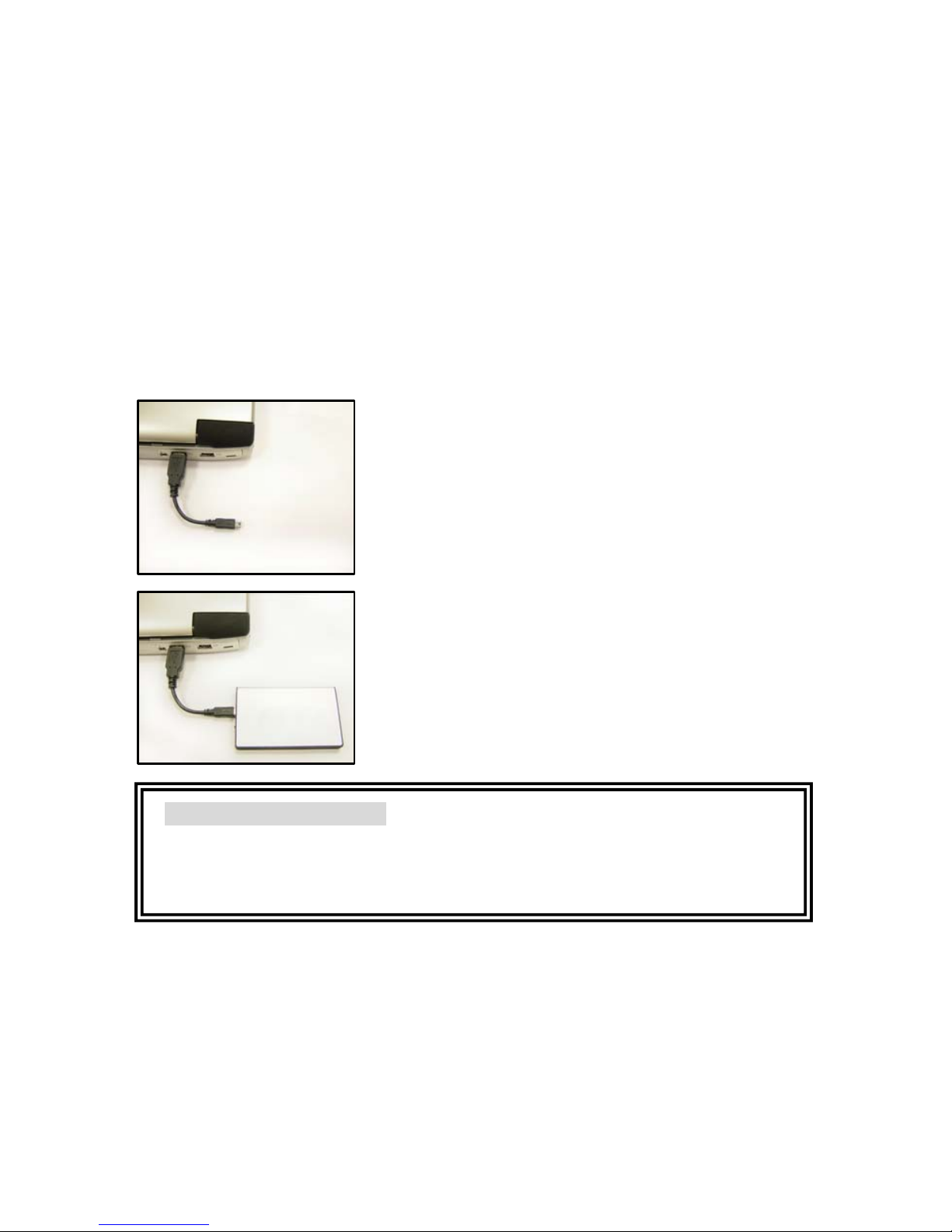
Afin d'obtenir les meilleurs performances USB 2.0, assurez-vous d'avoir
installé correctement le pilote USB 2.0 sur votre ordinateur de bureau ou
sur votre portable.
Etape 1. Branchez le connecteur du câble USB
2.0 sur votre ordinateur de bureau ou votre
portable.
Etape 2. Branchez le connecteur mini du câble
USB 2.0 sur le boîtier du HDD EX.
La LED s'allume une fois les étapes
d'installation ci-dessus effectuées. Vous
pouvez à présent vérifier la présence du
nouveau disque dur externe dans votre
gestionnaire de fichiers.
Avertissement important
La garantie est annulée si le boîtier a été ouvert.
Chocs et vibrations endommagent votre HDD, essayez de les éviter !
Page 12
11
Specificaties
Productnaam X-Micro mini DisGo
Capaciteit 5/20/30/40GB
HDD Toshiba 1,8inch
Bus-interface USB 2.0
Overdrachtsnelheid 480 Mbps
Omwentelsnelheid 4200rpm
Voeding USB zelf-aangedreven
LED
Groen voor stroom, oranje voor
gegevensoverdracht
Afmetingen 60 x 98 x 8,5 mm
Gewicht 85 g
Elektrisch +5V, 500mA max.
Ondersteunde
besturingssystemen
Windows ME/2000/ XP
Gebruiksvereisten
Temperatuur van 0˚C tot 50˚C
Relatieve vochtigheid 5 - 90%
(niet condenserend)
Page 13
12
Hardware-installatie
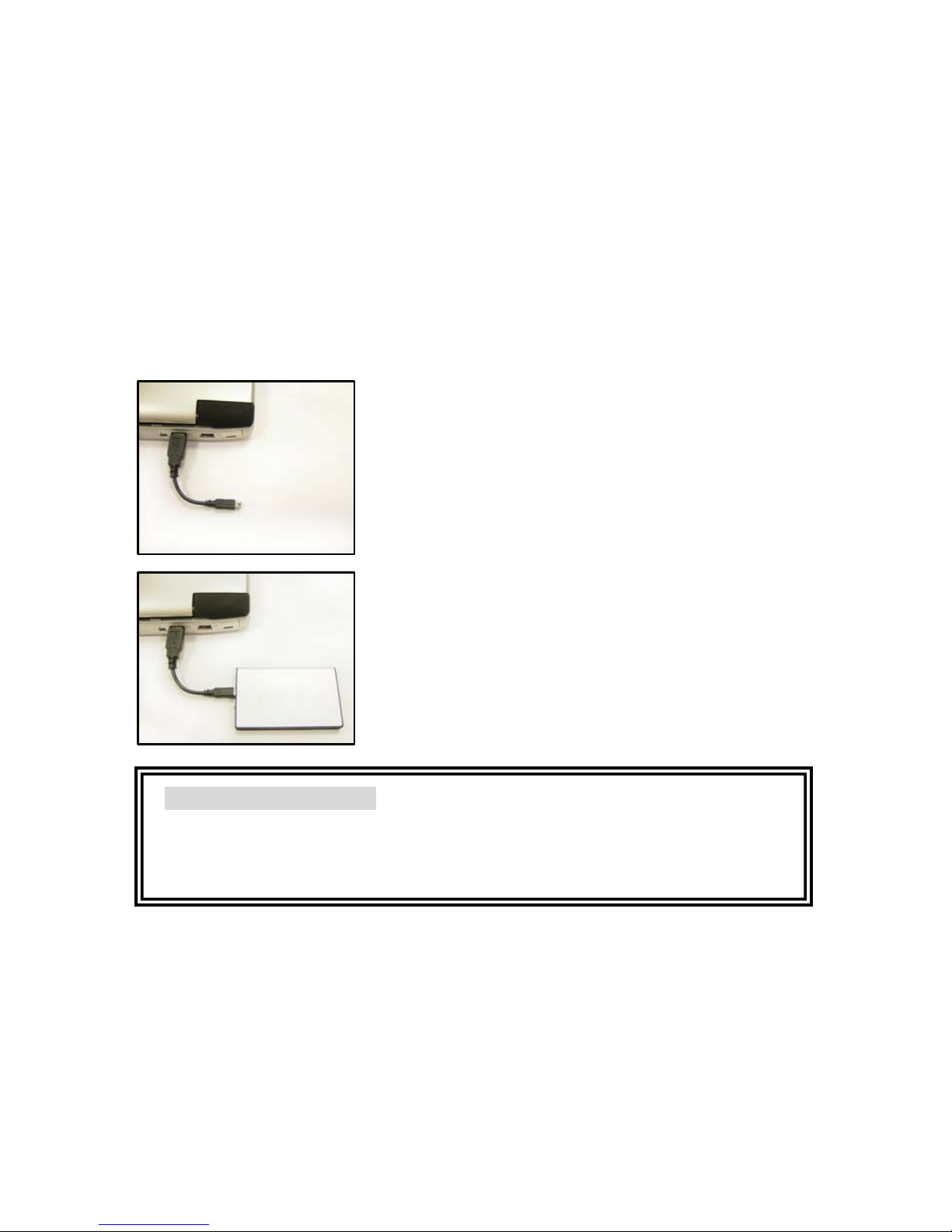
Om de USB 2.0-prestatie te kunnen gebruiken, dient u het correcte USB
2.0-stuurprogramma te installeren op uw computer of uw notebook.
Stap 1. Sluit de aansluiting van de USB
2.0-kabel aan op uw computer of notebook.
Stap 2. Sluit de mini-aansluiting van de USB
2.0-kabel aan op de behuizing van de EX HDD.
De LED zal oplichten nadat u de bovenstaande
stappen correct hebt uitgevoerd. In het
bestandsbeheer kunt u nu uw nieuwe externe
harde schijf weergeven.
Belangrijke mededeling
De garantie vervalt wanneer de behuizing werd geopend.
Schokken en trillingen zullen de HDD beschadigen. Probeer
dergelijke omstandigheden te vermijden!
Page 14
13
Specifiche
Nome prodotto X-Micro mini DisGo
Capacità 5/20/30/40GB
Disco rigido Toshiba da 1,8i pollici
Interfaccia Bus USB 2.0
Velocità di
trasferimento
480 Mbps
Giri 4200rpm
Alimentazione Autoalimentato da USB
LED Verde acceso, Arancione trasferimento dati
Dimensioni 60 x 98 x 8.5 mm
Peso 85 g
Caratteristiche
elettriche
+5V, 500mA Max.
Sistema operativo Windows ME/2000/ XP
Condizioni operative
Temperatura da 0˚C a 50˚C
Umidità relativa 5 - 90%
(Senza condensa)
Installazione hardware
Page 15
14
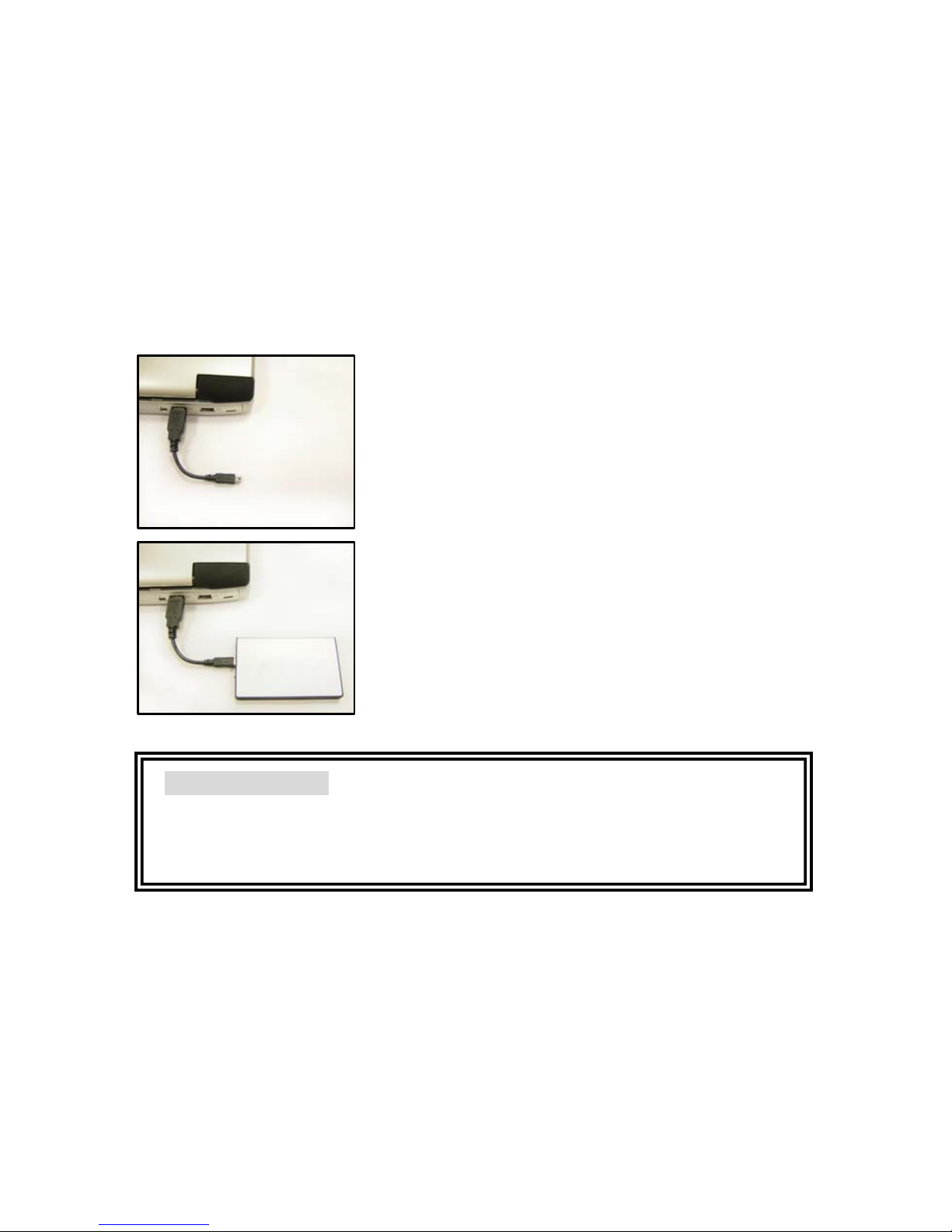
Per avere la velocità delle porte USB 2.0, assicuratevi di installare
correttamente il driver USB 2.0 sul desktop o sul computer portatile.
1. Collegare il connettore USB 2.0 del cavo al
desktop o al computer portatile.
2. Collegare il connettore mini USB 2.0
all’alloggiamento dell disco rigido esterno.
Il LED si accende se l’installazione è stata
eseguita correttamente. Adesso, da risorse del
computer è possibile verificare la presenza di
un altro disco rigido.
Avviso importante
In caso di apertura dell’alloggiamento, la garanzia cessa di avere
validità.
Evitare urti e vibrazioni perché possono danneggiare il disco rigido!
Page 16
15
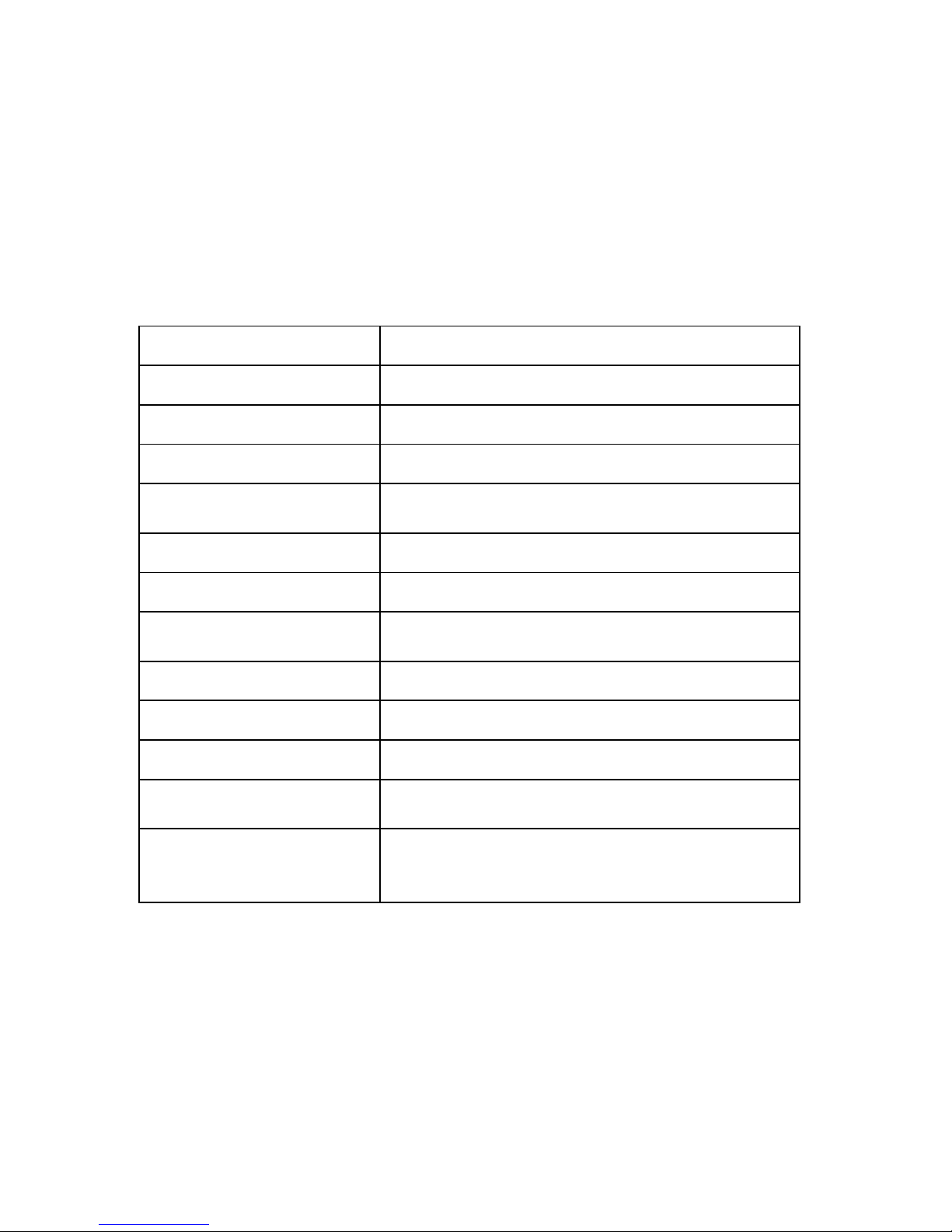
Especificación
Nombre del producto X-Micro mini DisGo
Capacidad 5/20/30/40GB
HDD Toshiba 1.8”
Interfaz de buz USB 2.0
Velocidad de
transferencia
480 Mbps
Giro 4200 rpm
Alimentación USB auto-alimentado
Indicador luminoso
Verde para energía, naranja para
transferencia de datos
Dimensión 60 x 98 x 8.5 mm
Peso 85 g
Electricidad +5V, 500mA Máx.
Soporte de sistema
operativo
Windows ME/2000/ XP
Requerimientos de
operación
Temperatura de 0˚C a 50˚C
Humedad relativa 5 - 90%
(No condensante)
Page 17
16
Instalación de Hardware
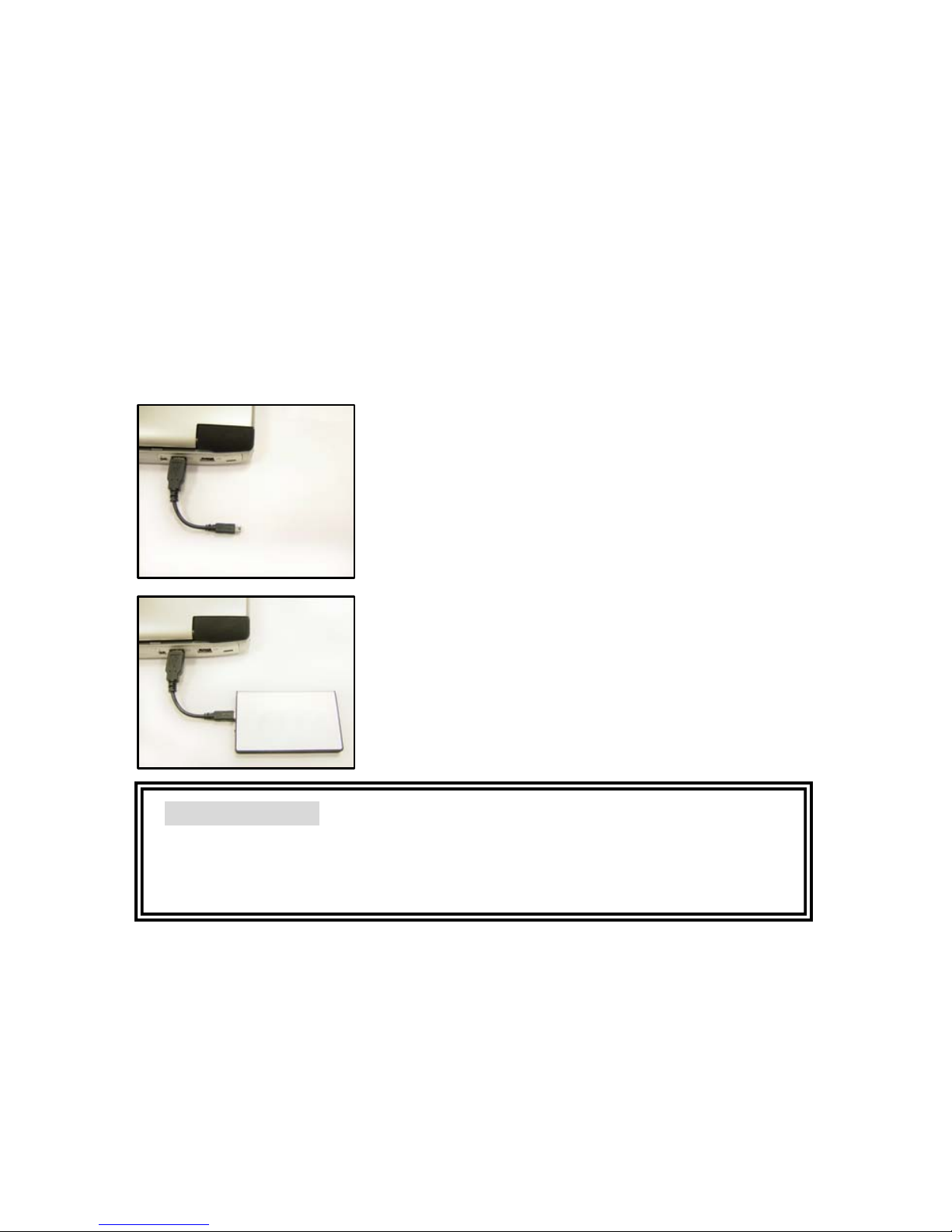
Para obtener el mejor funcionamiento del USB 2.0 asegúrese de instalar
adecuadamente el controlador USB 2.0 en su computadora de escritorio
o el controlador USB 2.0 en su computadora portátil.
Paso 1. Conecte el conector de cable USB 2.0
a su computadora de escritorio o computadora
portátil.
Paso 2. Conecte el mini conector de cable
USB 2.0 a la caja EX HDD.
El indicador luminoso se iluminará después de
haber realizado los pasos anteriores
adecuadamente. Ahora usted puede ver en su
administrador de archivos el nuevo disco duro
externo.
Important Notice
Warranty will overdue if the housing has been opened.
Shock and vibration will damage HDD, try to avoid it!
Page 18
17
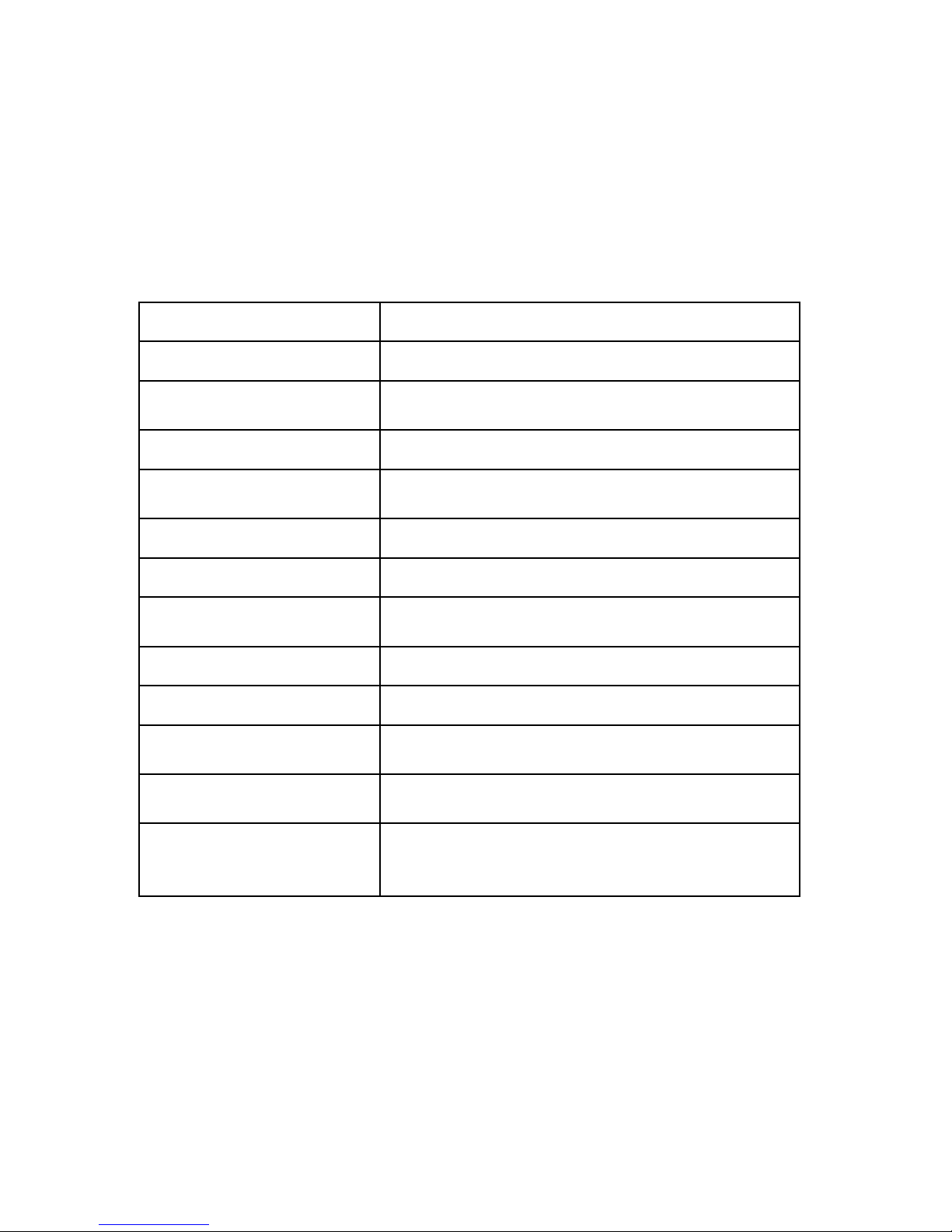
Especificações
Nome do produto
X-Micro mini DisGo
Capacidade 5/20/30/40 GB
Unidade de disco
rígido
Toshiba de 1,8"
Interface do bus USB 2.0
Velocidade de
transferência
480 Mbps
Rotação 4200 rpm
Alimentação Alimentação por USB
LED
Verde para a alimentação, cor-de-laranja
para a transferência de dados
Dimensões 60 x 98 x 8,5 mm
Peso 85 g
Especificações
Eléctricas
+5 V, 500 mA Máx.
Sistema operativo
suportado
Windows ME/2000/XP
Requisitos de
funcionamento
Temperatura entre 0 ˚C a 50 ˚C
Humidade relativa 5 - 90%
(sem condensação)
Page 19
18
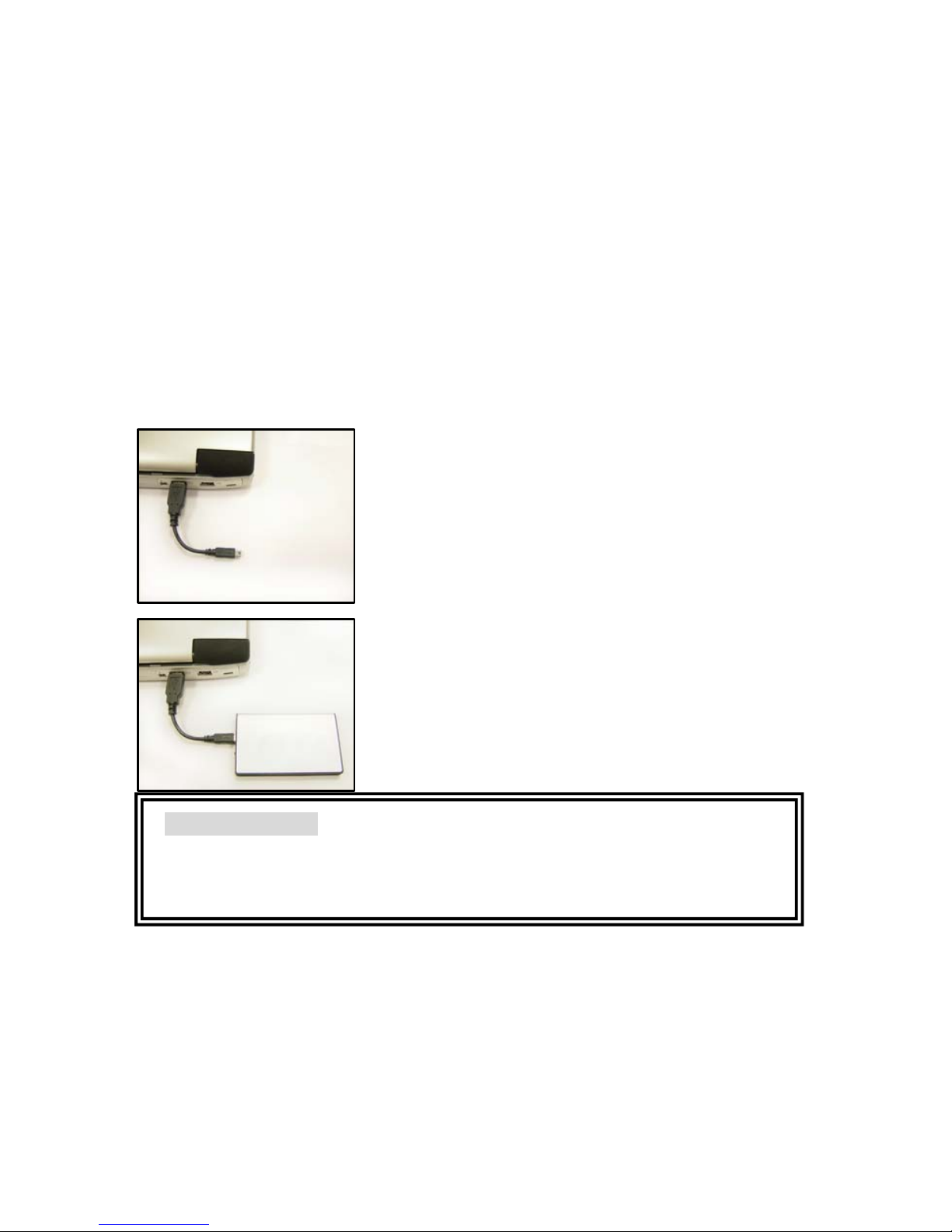
Instalação do hardware
De forma a poder desfrutar da funcionalidade USB 2.0, certifique-se de
que instala correctamente o controlador USB 2.0 no seu computador
desktop ou no seu Notebook.
Etapa 1. Ligue o conector do cabo USB 2.0 ao
seu computador desktop ou Notebook.
Etapa 2.Ligue o mini conector do cabo USB 2.0
à tomada da unidade de disco rígido externa.
O LED acende após a correcta execução das
etapas acima descritas. Agora já pode aceder
ao gestor de ficheiros do novo disco rígido
externo.
Aviso importante
A garantia perde a validade se a caixa da unidade for aberta.
Os choques e as vibrações podem danificar a unidade de disco rígido,
tente evitá-los!
Page 20
19
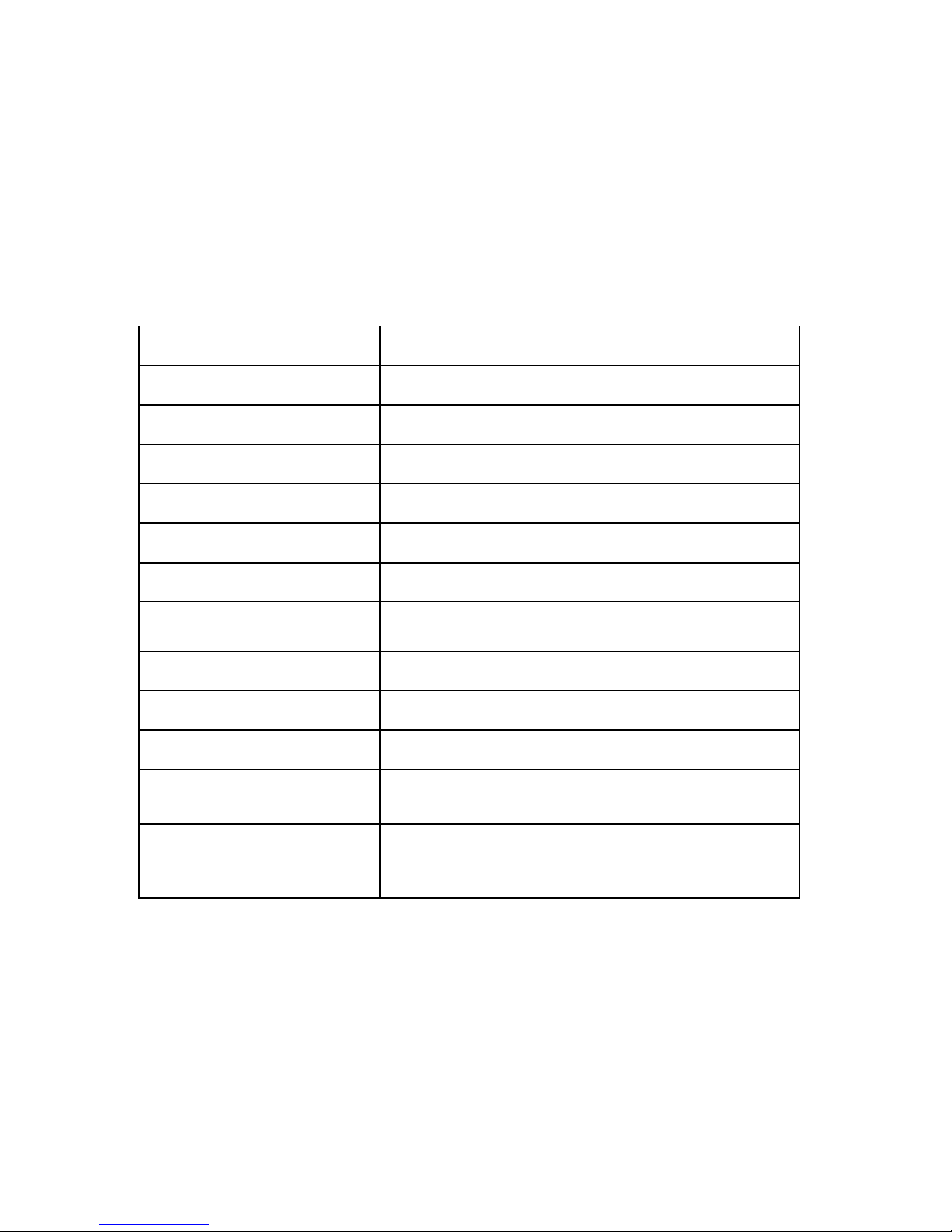
Спецификация
Имя продукта X-Micro mini DisGo
Объем 5/20/30/40GB
Жесткий диск Toshiba 1.8 дюйм
Интерфейс шины USB 2.0
Скорость передачи 480 Mbps
Подача информации 4200 rpm
Питание Безбатарейный USB
СИД
Зеленый – питание, оранжевый для
передачи данных
Размер 60 x 98 x 8.5 мм
Вес 85 г
Электропитание +5V, 500 mA Max.
Операционная
система
Windows ME/2000/ XP
Условия работы
Температура от 0˚C до 50˚C
Относительная влажность 5 - 90%
(неконденсирующая)
Page 21
20
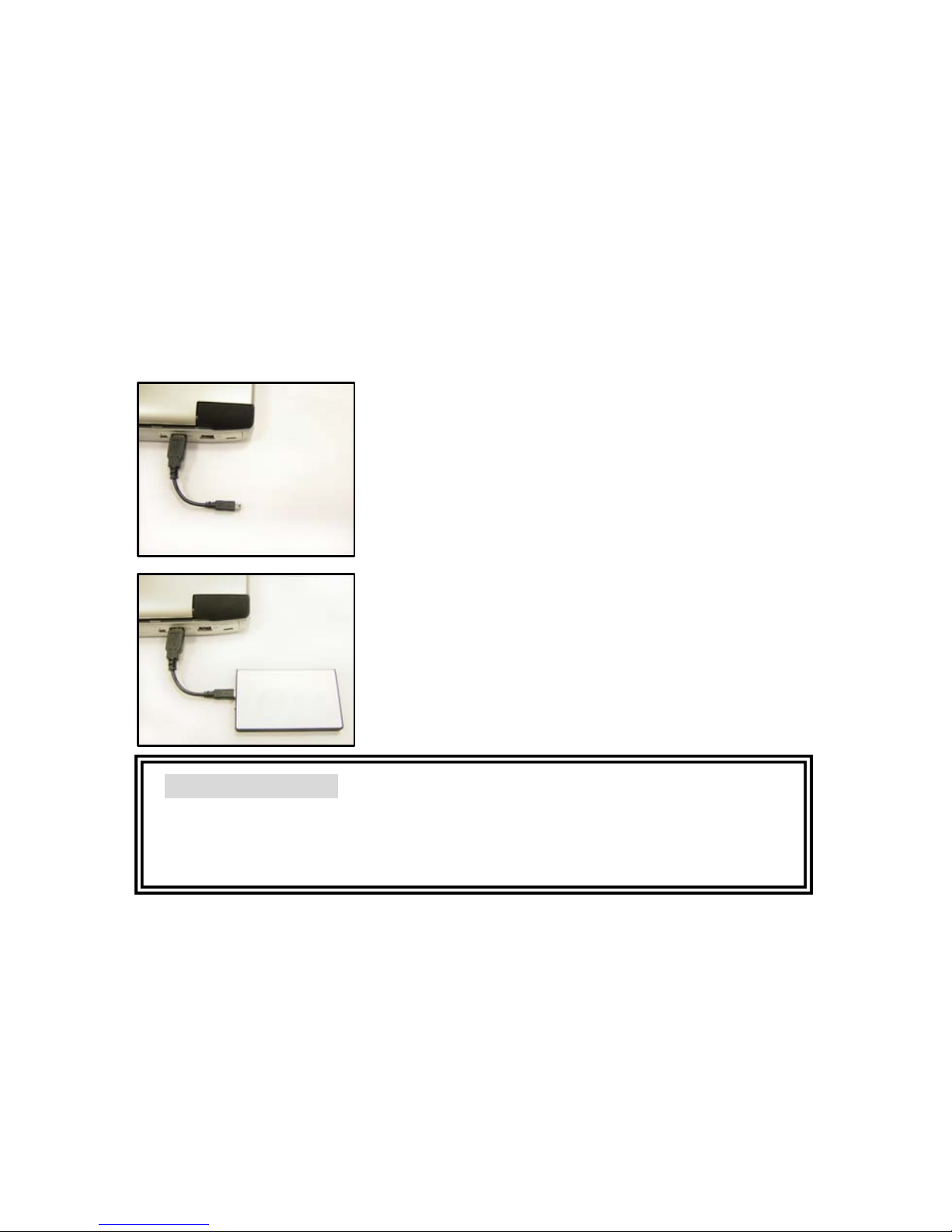
Установка Hardware Installation
Для работы через USB 2.0 убедитесь, что в Вашем стационарнном
компьютере или в ноутбуке установлен драйвер USB 2.0.
Шаг 1. Подключите кабель с коннектором
USB 2.0 к Вашему стационарному
компьютеру или к ноутбуку.
Шаг 2. Подключите мини коннектор USB 2.0
к внешнему жесткому диску.
После этих шагов загорится светодиод.
Сейчас Вы можете проверить наличие
внешнего жесткого диска при помощи
Диспетчера файлов.
Важное замечание
Гар ан ти руе м замену прибора в случае нарушения целостности
упаковки. Тряска и вибрация портят жесткий диск, старайтесь
избегать их!
Page 22
21
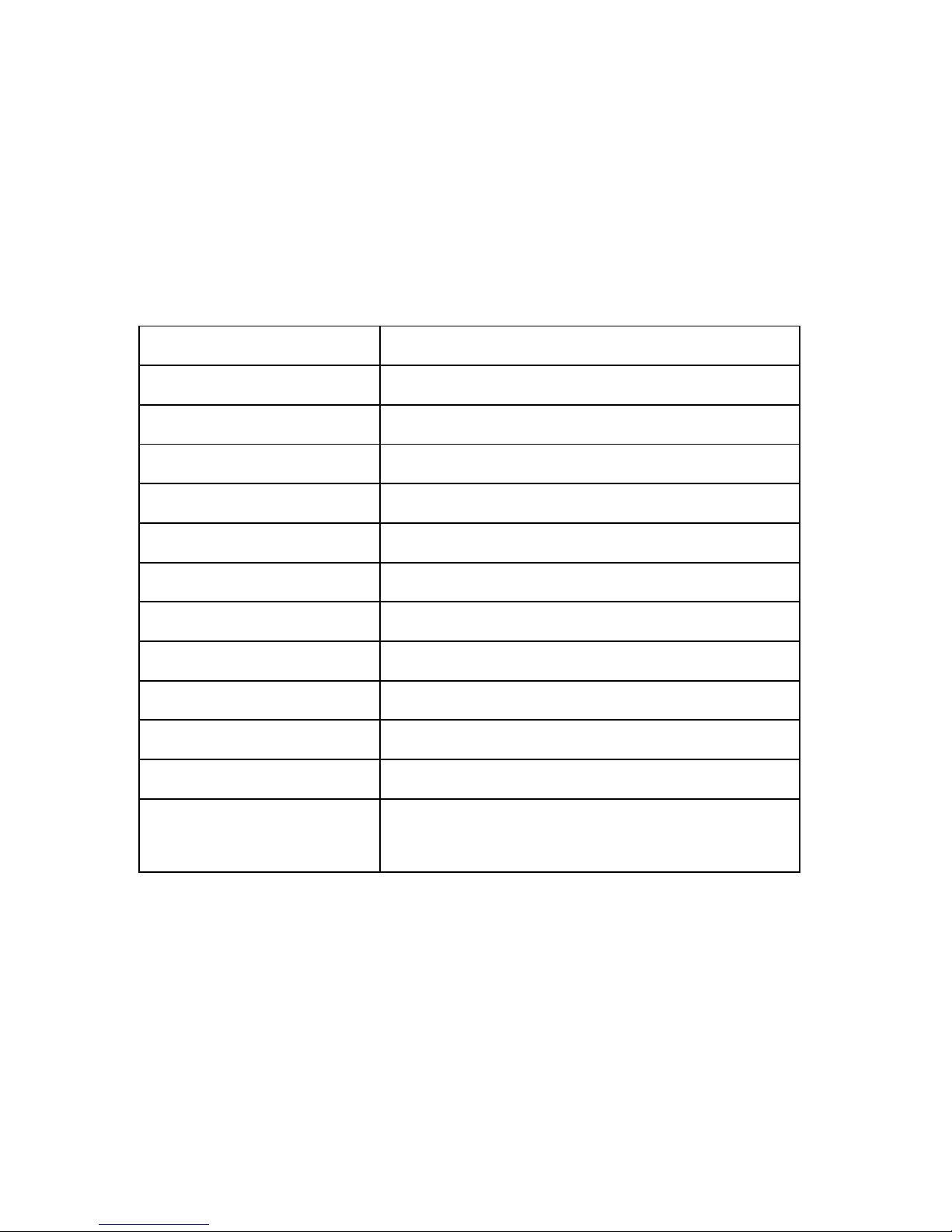
Specifikation
Produktbetegnelse X-Micro mini DisGo
Kapacitet 5/20/30/40 GB
HDD Toshiba 1.8”
Bus-grænsesnit USB 2.0
Overførselshastighed 480 Mbps
Rotation 4200 o/min.
Spænding USB med egen strømkilde
LED-lampe Grøn for spænding, Orange for dataoverførs
e
Dimensioner 60 x 98 x 8.5 mm
Vægt 85 g
Elektricitet +5V, maks. 500 mA
OS-understøttelse Windows ME/2000/ XP
Driftskrav
Temperaturer fra 0 ˚C til 50 ˚C
Relativ luftfugtighed 5 - 90%
(Ikke-kondensering)
Page 23
22
Hardware-installation
For at opnå fuld ydelse af USB 2.0, skal man sikre sig, at USB 2.0
driveren er korrekt installeret på den stationære pc eller på den bærbare
pc.
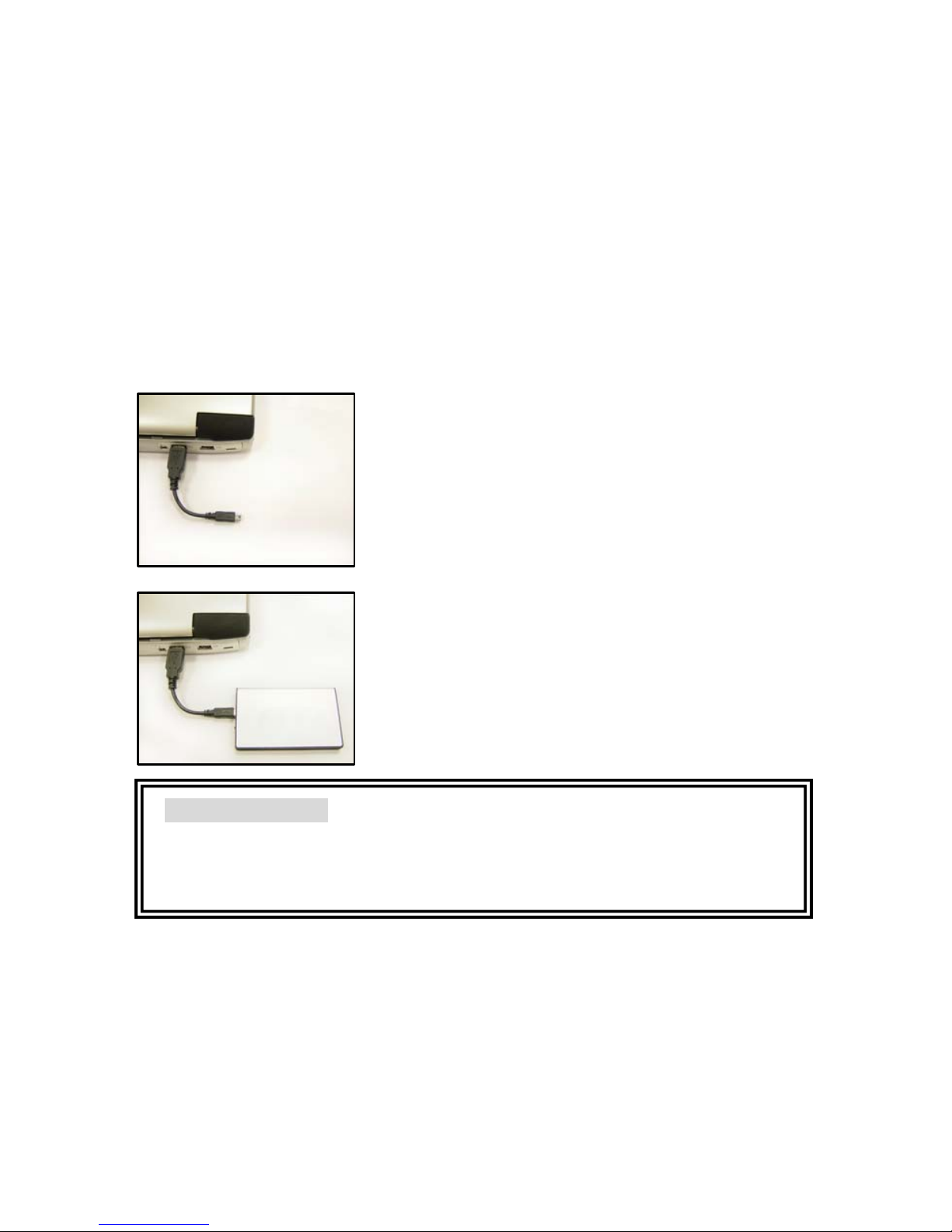
1. trin: Tilslut USB 2.0-kabelkonnektoren til din
pc.
2. trin: Tilslut USB 2.0-kablets mini-konnektor
til EX HDD-kabinettet.
Så snart disse trin er udført korrekt, lyser
LED-lampen. Derefter kan du kontrollere i din
Filhåndtering, at de(n) nye eksterne harddisk
er med.
Vigtig meddelelse!
Garantien er ugyldig, hvis kabinettet har været åbnet.
Harddisken skades af stød og rystelser, som derfor skal undgås helt!
Page 24
23
Specifikation
Produktnamn X-Micro mini DisGo
Kapacitet 5/20/30/40 GB
HDD Toshiba 1,8 tum
Bussgränssnitt USB 2.0
Överföringshastighet 480 Mbps
Rotation 4200 rpm
Ström USB självdrivning
Indikatorlampa Grön för ström, orange för dataöverföring
Mått 60 x 98 x 8,5 mm
Vikt 85 g
El +5 V, 500 mA max.
OS-stöd Windows ME/2000/ XP
Driftskrav
Temperatur från 0˚C till 50˚C
Relativ luftfuktighet 5 - 90 %
(icke-kondens)
Page 25
24
Maskinvaruinstallation
För att få USB 2.0-prestanda, installera USB 2.0-drivrutinen på ditt
skrivbord eller USB 2.0-drivrutinen på din bärbara dator på rätt sätt.
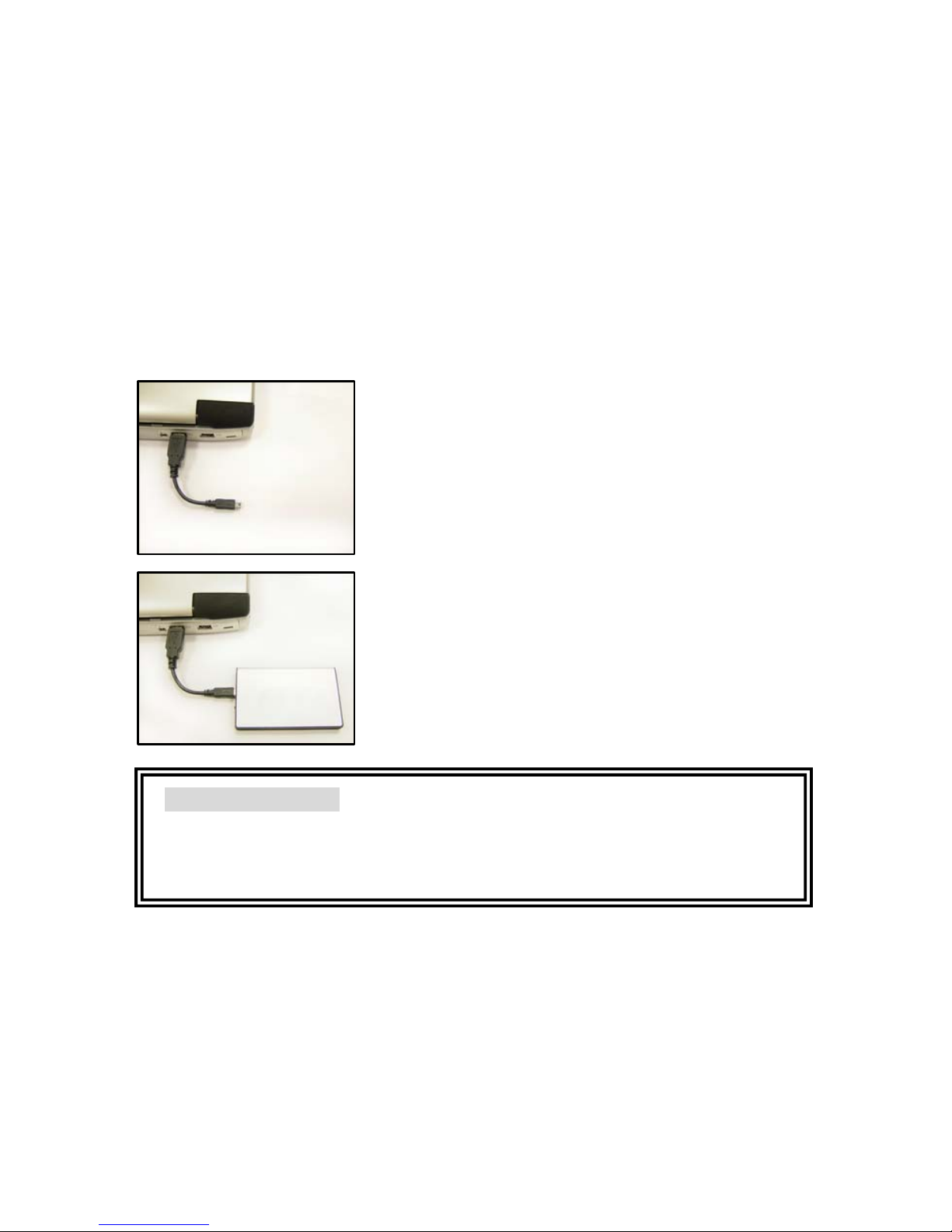
Steg 1. Anslut USB 2.0-sladdanslutningen till
din stationära eller bärbara dator.
Steg 2. Anslut USB 2.0-sladdens
mini-anslutning till EX HDD-höljet.
Indikatorlampan tänds när ovanstående steg
utförts på rätt sätt. Nu kan du söka efter den
nya externa hårddisken i filhanteraren.
Viktigt meddelande
Garantin upphävs om höljet öppnats.
Stötar och vibrationer skadar HDD, försök undvika detta!
Page 26
25
Spesifikasjon
Produktnavn X-Micro mini DisGo
Kapasitet 5/20/30/40GB
HDD Toshiba 1.8inch
Bus-grensesnitt USB 2.0
Overføringshastighet 480 Mbps
Spinn 4200rpm
Strøm USB selvforsynt
LED Grønn for strøm, oransje for dataoverføring
Mål 60 x 98 x 8.5 mm
Vekt 85 g
Elektrisk +5V, 500mA Max.
OS støtte Windows ME/2000/ XP
Driftsbetingelser
Temperatur fra 0˚C til 50˚C
Relativ luftfuktighet 5 - 90%
(ikke-kondenserende)
Page 27
26
Maskinvareinstallasjon
For å oppnå full ytelse av USB 2.0 , må installasjonen av USB 2.0
driveren til den stasjonære datamaskinen eller USB 2.0 driveren til
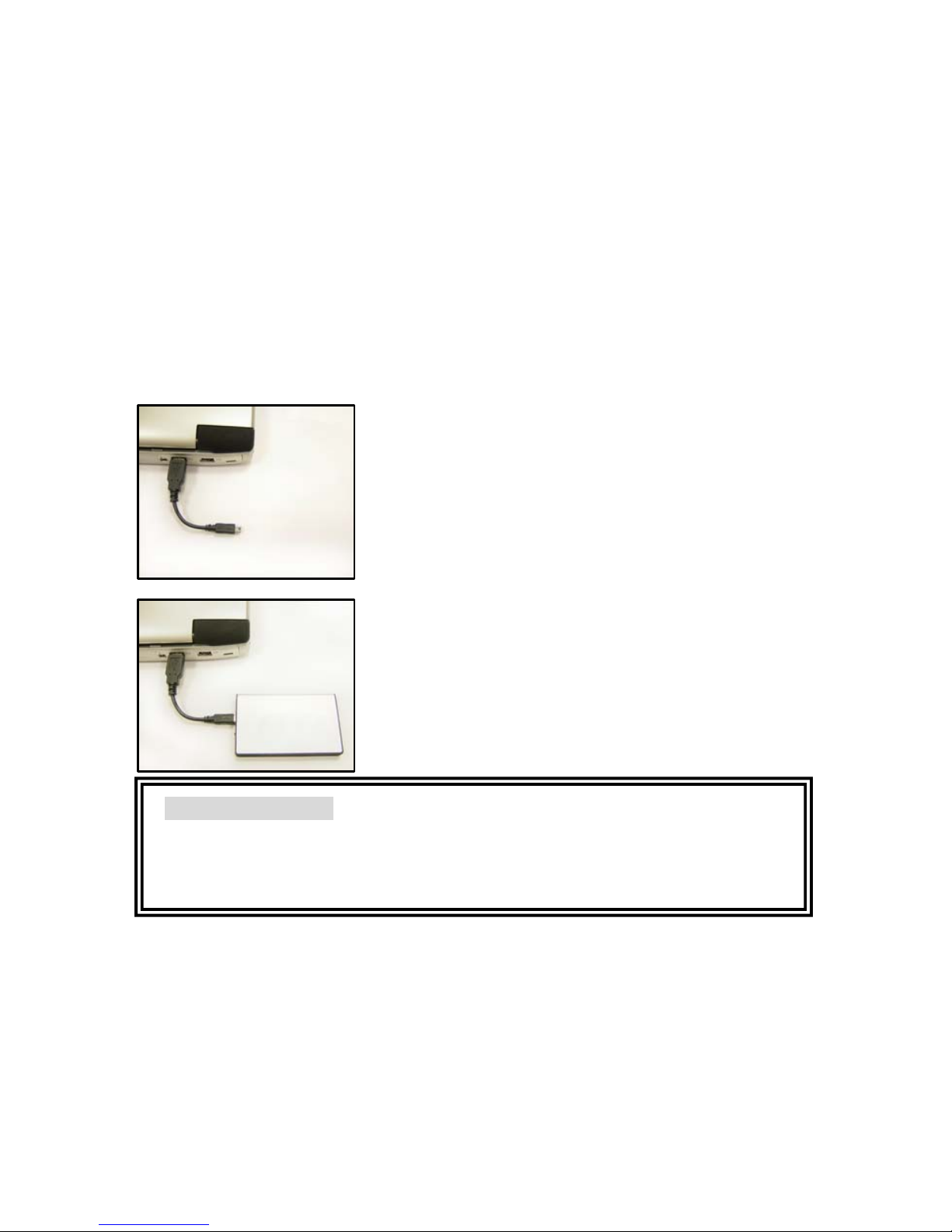
bærbar datamaskin være riktig.
Trinn 1. Koble USB 2.0 kabelkontakt til den
stasjonære eller bærbare datamaskinen.
Trinn 2. Koble USB 2.0 kabelens minikontakt til
EX HDD huset.
LED-en vil tennes etter at trinnene over er
utført . Nå kan du se i utforskeren etter en ny
ekstern harddisk.
Viktig informasjon
Garantien er ugyldig hvis huset er åpnet.
Støt og vibrasjon vil ødelegge HDD, forsøk å unngå det!
Page 28
27
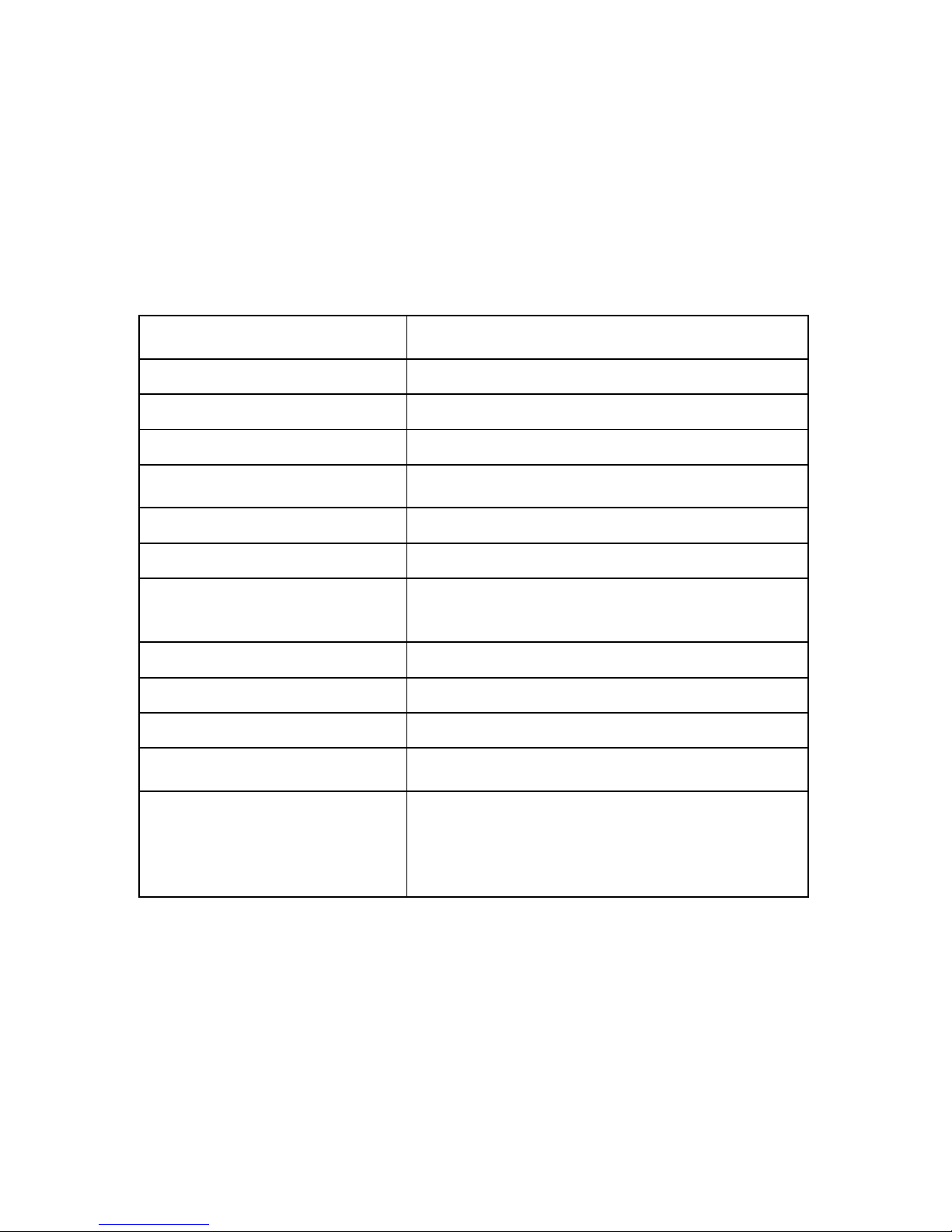
Műszaki adatok
Product nameTermék
elnevezése
X-Micro mini DisGo
CapacityKapacitás 5/20/30/40GB
HDDMerevlemez Toshiba 1.8inchToshiba 1,8 hüvelykes
Bus interfaceCsatolófelület USB 2.0
Transfer rateAdatátviteli
sebesség
480 Mbps
SpinForgási sebesség 4200rpm4200 fordulat/perc
PowerTápfeszültség USB self-poweredTápellátás USB-n keresztül
LED
Green for power, Orange for data transferZöld
= bekapcsolt állapot, Narancssárga =
adatátvitel
DimensionMéretek 60 x 98 x 8.5 mm 60 x 98 x 8,5 mm
WeightTömeg 85 g
ElectricalElektromos adatok +5V, 500mA Max.
OS supportOperációs
rendszer támogatás
Windows ME/2000/ XP
Operating
requirementsÜzemi
követelmények
Temperature from 0˚C to 50˚CHömérséklet:
0 – 50˚C
Relative humidity 5 - 90%Relatív páratartalom:
5 – 90 %
(Non-condensing)(nem kicsapódó)
Page 29
28
Hardvertelepítés
Az USB 2.0 nyújtotta teljesítmény érdekében ne feledje megfelelően
telepíteni az USB 2.0 eszközmeghajtót az asztali számítógépre, illetve
noteszgépre.
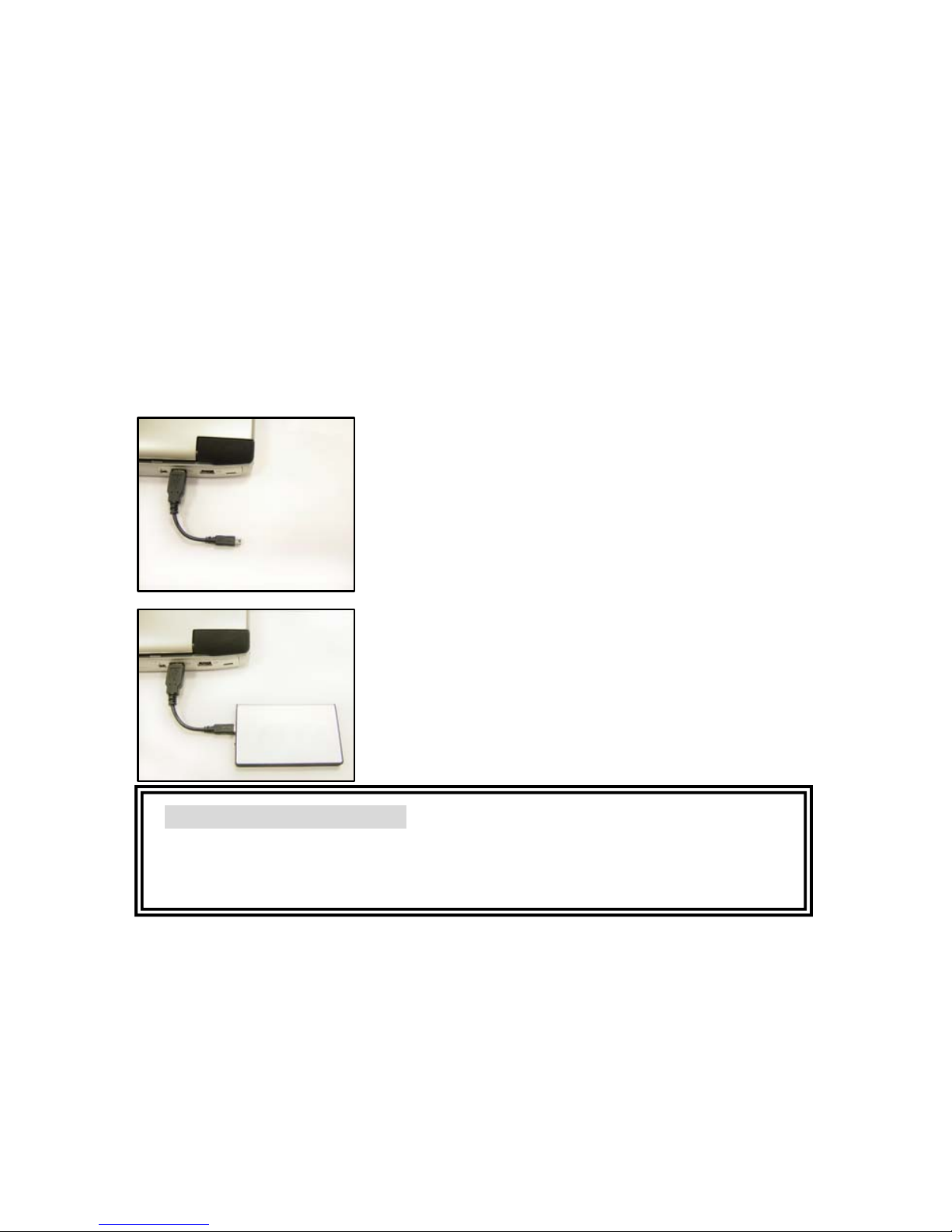
1. lépés: Csatlakoztassa az USB 2.0 kábel
dugóját az asztali számítógép, illetve
noteszgép csatlakozójához.
2. lépés: Csatlakoztassa az USB 2.0 kábel mini
dugóját a hordozható merevlemez házához.
A LED akkor fog világítani, ha a fenti lépéseket
megfelelően elvégezték. A fájlkezelőben
ellenőrizheti hogy, megjelent-e az új cserélhető
merevlemez.
FONTOS MEGJEGYZÉS!
A ház kinyitása a garanciát érvényteleníti!
Az ütődés és a rezgés a merevlemez megrongálódását okozhatja.
Lehetőle
g
kerülje ezeket!
Page 30
29
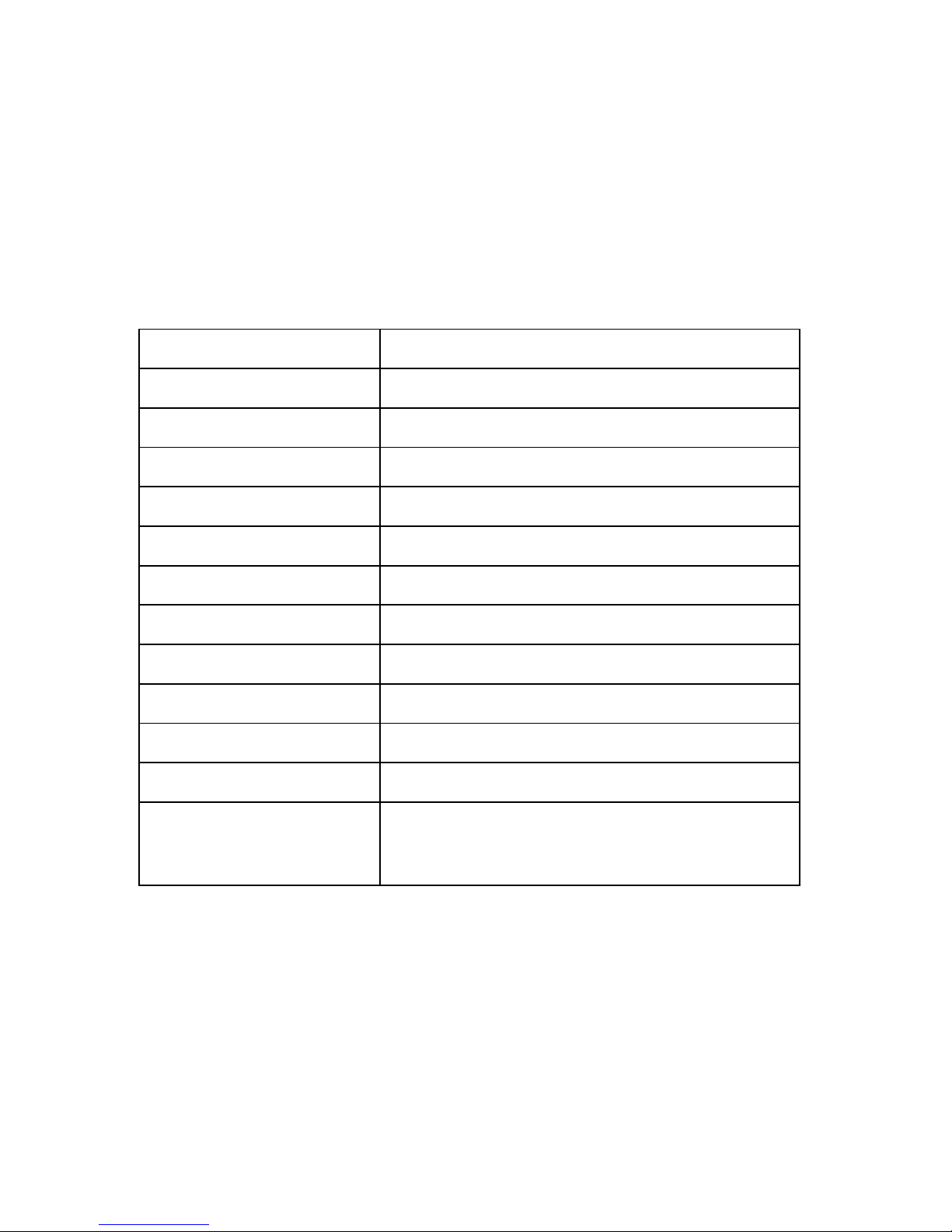
規格
產品名稱
X-Micro mini DisGo
容量
5/20/30/40GB
硬碟 Toshiba 1.8 吋
匯流排介面
USB 2.0
傳輸速率
480 Mbps
轉速
4200rpm
電源 USB 自我供電
LED 指示燈 綠色表示電源,橙色表示資料傳輸
尺寸 60 x 98 x 8.5 公釐
重量 85 公克
電源 最大+5V, 500mA
作業系統支援
Windows ME/2000/ XP
操作需求
溫度自 0˚C 至50˚C
相對濕度 5 - 90%
(非凝結狀態)
Page 31
30
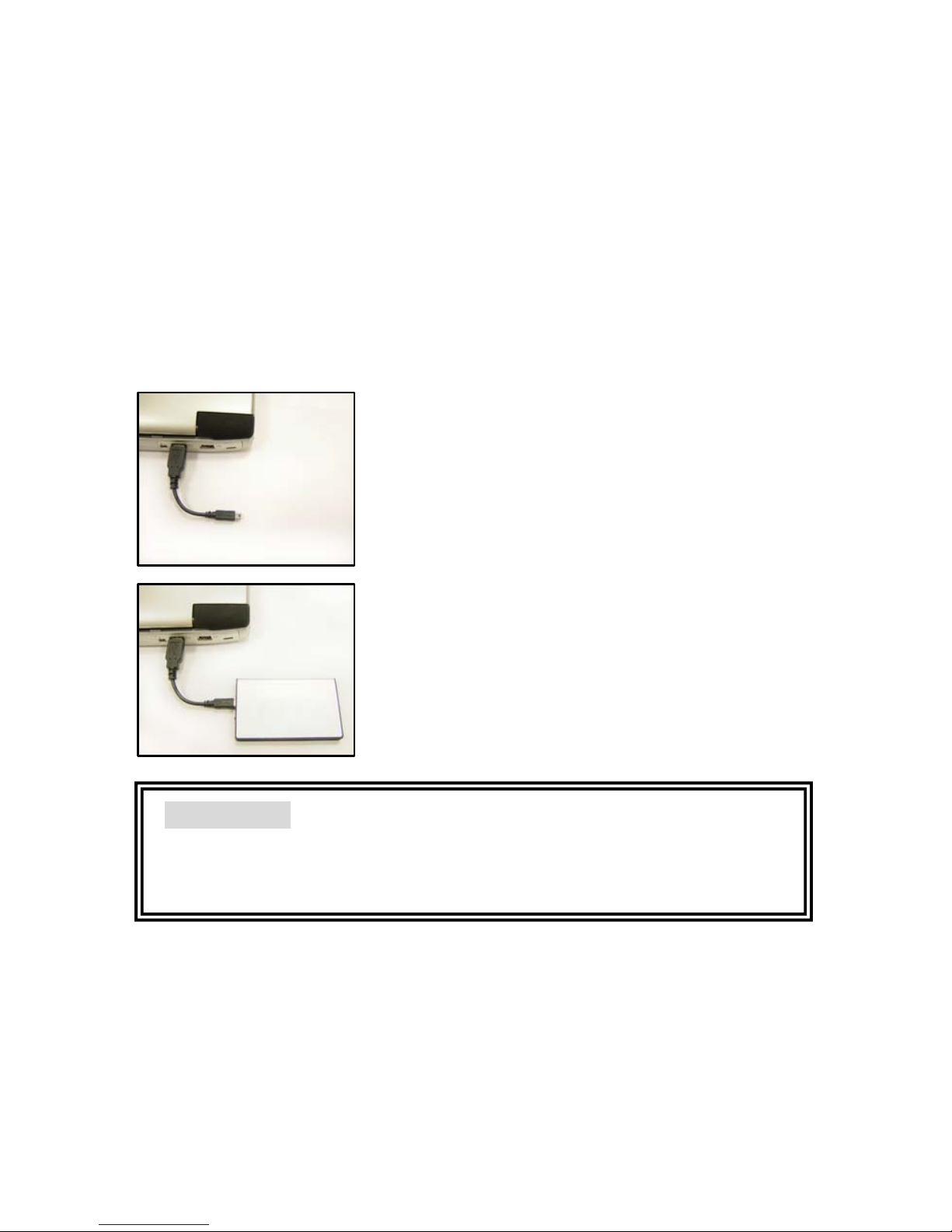
硬體安裝
為了要獲得 USB 2.0 的效能,請務必為您的桌上型電腦或筆記型電腦安裝
正確的 USB 2.0 驅動程式。
步驟 1. 將 USB 2.0 纜線接頭連接到桌上型電腦
或筆記型電腦上。
步驟 2. 將 USB 2.0 纜線迷你接頭連接到 EX
HDD 外殼上。
當正確完成以上的安裝步驟之後,LED 指示燈將
會亮起。現在您可以查看檔案總管中是否有新的
外接式硬碟了。
重要注意事項
如果開啟外殼,保固將會失效。
撞擊與震動將使硬碟損壞,請避免發生這種情況!
Page 32
www.x-micro.com
 Loading...