

Page 1
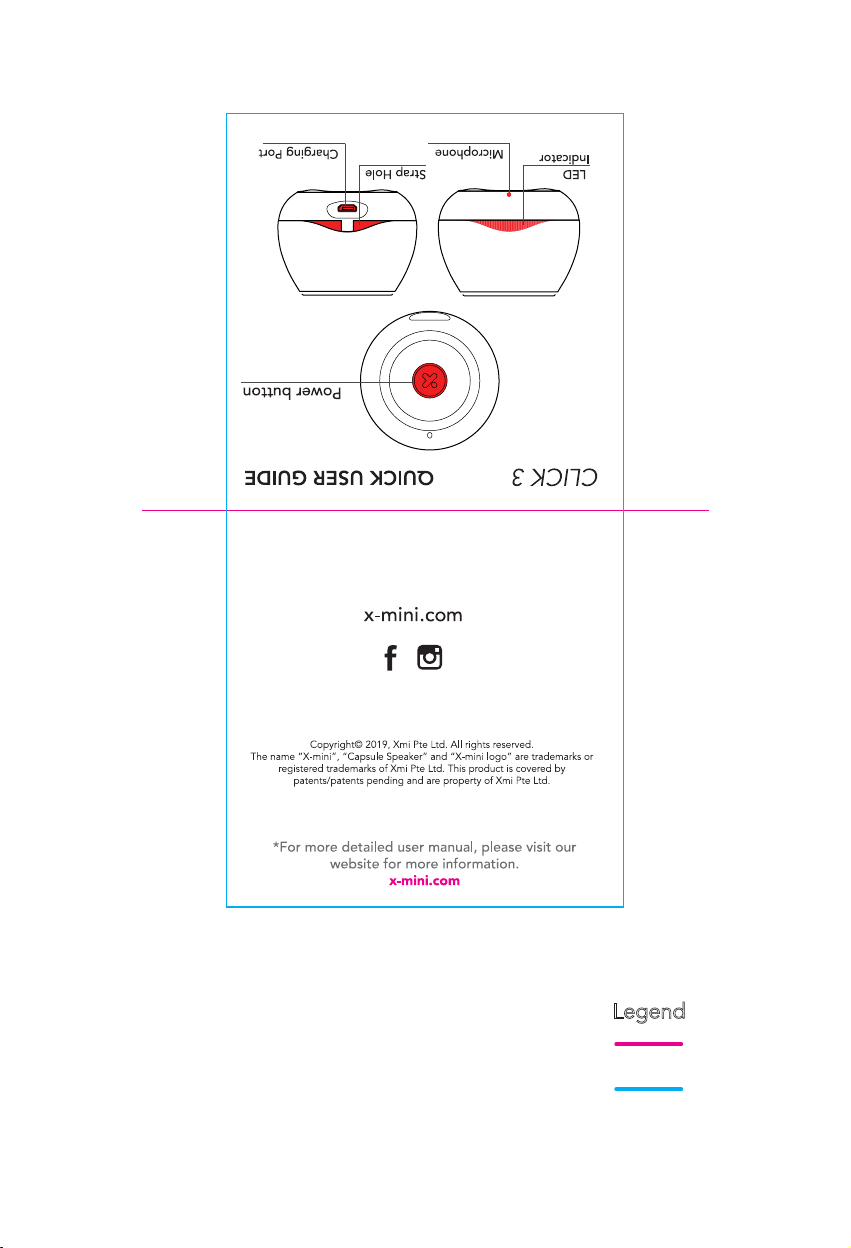
Product name: CLICK 3 QSG (Front)
Release date: 12 Jul 2019
Legend
Folding Line
Open size: 70mm x 140mm
Printing: 4C x 4C
Material: 105gsm White Art Paper
Finishing: Matte Lamination + Cut to size + Form to size
Die Line
Page 2
Product name: CLICK 3 QSG (Back)
Release date: 12 Jul 2019
Legend
Folding Line
Open size: 70mm x 140mm
Printing: 4C x 4C
Material: 105gsm White Art Paper
Finishing: Matte Lamination + Cut to size + Form to size
Die Line
Page 3
1
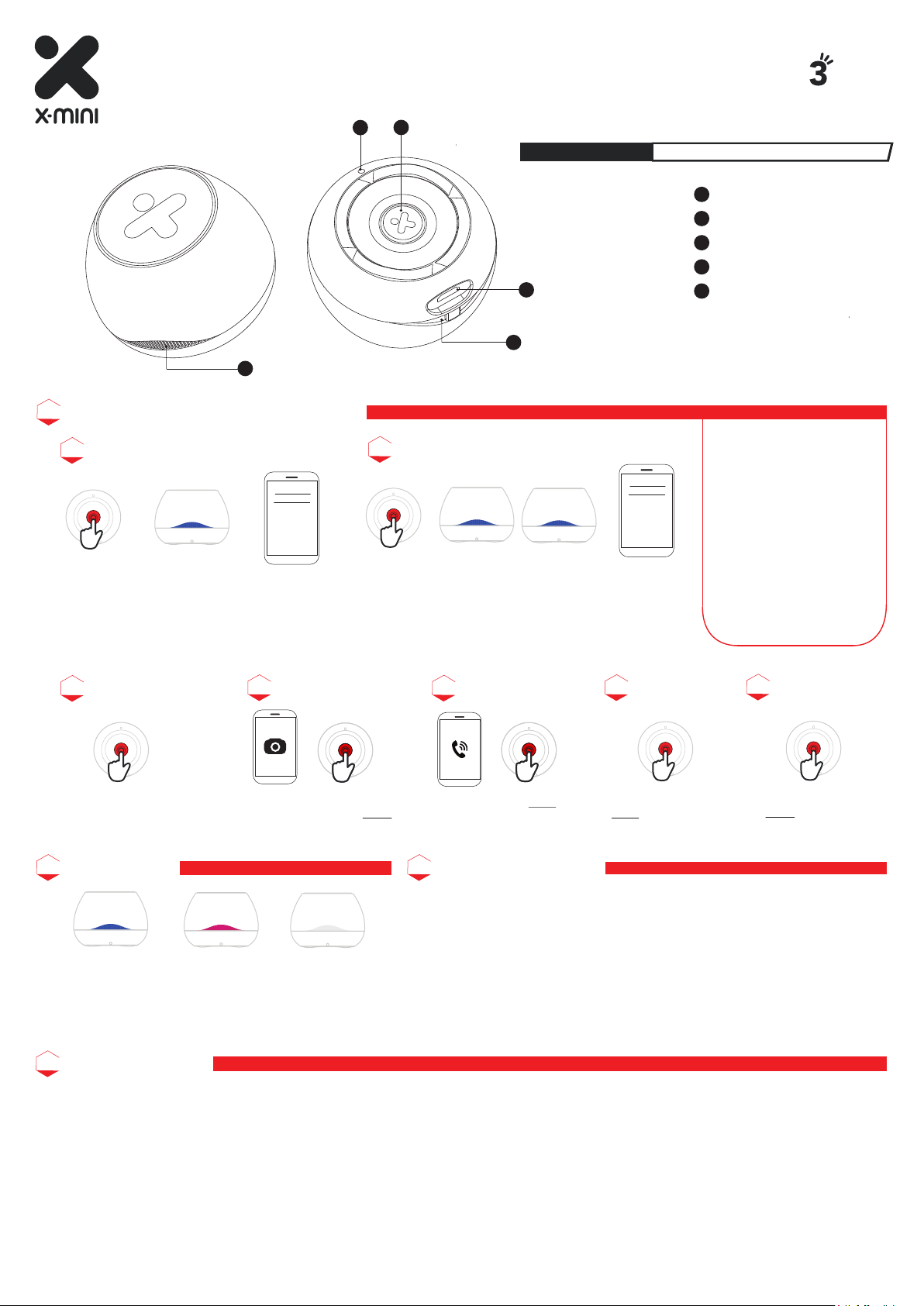
BASIC FUNCTIONS OF POWER BUTTTON
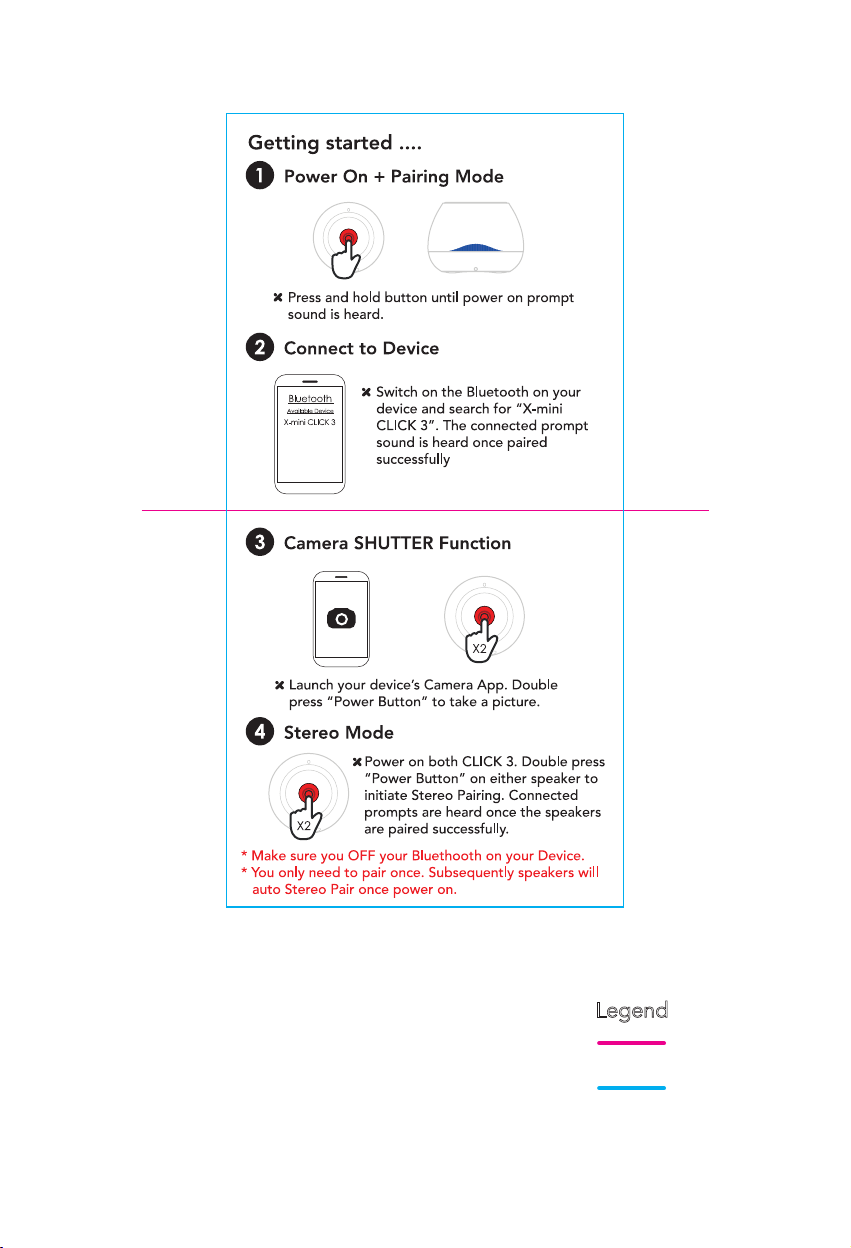
Power On and Pairing
Bluetooth
Available Device
X-mini CLICK 3
1. Press and hold power button until power on prompt
sound is heard.
2. Switch on the Bluetooth on your device and search for
“CLICK 3”. The connected prompt sound is heard once
paired successfuly.
3
2
USER MANUAL
USER MANUAL
4
5
Stereo Mode Pairing
X2
1. Power on both CLICK 3. Double press power button on either
speaker to initiate Stereo Pairing. Connected prompts are heard
once the speakers are paired successfully.
2. Switch on the Bluetooth on your device and search for “CLICK 3”.
The connected prompt sound is heard once paired successfuly.
CLICK 3 UM v1.0 - 07082019
THE X-MINI
™
CLICK
BIG SOUND, FUN SIZE
ULTRA PORTABLE BLUETOOTH SPEAKER
LED Indicator
1
Microphone
2
Power Button
3
Micro USB Charging Port
4
Strap Hole
5
Note:
Make sure you OFF your
1.
Bluethooth on your Device
Bluetooth
Available Device
X-mini CLICK 3
before pairing.
2.You only need to pair once.
Subsequently speakers will
auto Stereo Pair once power
on.
3. Double press power button
on either speaker to
disconnect TWS.
4. Speaker will turn off
automatically when
disconnected and idle for 5
min.
Power Off
Press and hold power button until
power off prompt sound is heard.
LED INDICATION
Camera Shutter
X1X2
Launch your device’s Camera
App. Press power button TWICE
to take a picture
Microphone
X1
X1
Press power button ONCE to
answer/end call
BATTERY INFORMATION
Play / Pause
X1
Press power button
ONCE to play or pause.
Disconnect TWS
X2
Press power button
TWICE to disconnect
TWS.
1. This product is built-in with non-removeable, rechargeable Lithium ion polymer
battery. Please use the bundle micro-USB to charge the product.
2. Don’t use a charger with current more than 5V/1A to charge the product.
3. Please full charge the product before initial usage.
1. Fast blinking blue:
Pairing mode/Incoming
call/TWS
2. Slow blinking blue:
Connected
Solid red: Charging
Off: Full charged
4. Use an authorized charger to charge the product. Using unathorized charger
may demage the product.
5. Repeated charging the product will cause battery performance degradation
over time.
LIMITED WARRANTY
1. If this product or any part thereof is proven to be defective by reason of faulty work faulty workmanship or defects in materials within 12
months of purchase, we will at our option repair or replace the product free of charge, on condition that the original invoice or sales receipt
with the date of purchase, or stamp from the dealer is presented together with the defective unit.
2. The warranty does not cover product failures which have been caused by use of accessories or other peripheral devices are not original
X-mini™ branded accessories intended for use with the product.
3. The warranty does not cover product failures caused by modifications, repairs and disassembly by any person who is not authorised by the
manufacturer.
4. Any defective unit or part shall become property of the manufacturer. The warranty does not cover any damage caused by misuse, drop, hit
or neglect.
Page 4

FCC Caution.
This device complies with part 15 of the FCC Rules. Operation is subject to the following two
conditions:
(1) This device may not cause harmful interference, and
(2) this device must accept any interference received, including interference that may cause
undesired operation.
Any Changes or modifications not expressly approved by the party responsible for compliance
could void the user's authority to operate the equipment.
Note: This equipment has been tested and found to comply with the limits for a Class B digital
device, pursuant to part 15 of the FCC Rules. These limits are designed to provide reasonable
protection against harmful interference in a residential installation. This equipment generates
uses and can radiate radio frequency energy and, if not installed and used in accordance with the
instructions, may cause harmful interference to radio communications. However, there is no
guarantee that interference will not occur in a particular installation. If this equipment does
cause harmful interference to radio or television reception, which can be determined by turning
the equipment off and on, the user is encouraged to try to correct the interference by one or
more of the following measures:
-Reorient or relocate the receiving antenna.
-Increase the separation between the equipment and receiver.
-Connect the equipment into an outlet on a circuit different from that to which the receiver is
connected.
-Consult the dealer or an experienced radio/TV technician for help.
The device has been evaluated to meet general RF exposure requirement. The device can be used
in portable exposure condition without restriction.
 Loading...