

Page 1

Quick start manual
Page 2

Page 3

THE ULTIMATE ACTIVITY TRACKER
DESIGNED FOR SWIMMERS
Page 4

Page 5

5
Welcome
• Package contents
• Buttons and LED
• General information
Before using the device
• Initial setup
• Setup mode
Getting started
• Start training session
• Audio feedback
6
•
•
•
8
•
•
11
•
•
Post training
• Sending data and analysis
• Battery charging
Safety and product
information
• Device care
• Health warnings
• Data privacy
12
•
•
13
•
•
•
The images presented in this manual have the only purpose to present the product.
CONTENTS
Page 6
6
WARNING!
Before using your device, fully read the quick start manual. Before starting any training
programs, always consult your doctor. For product warnings and other important
product information, refer to the last page of this manual.
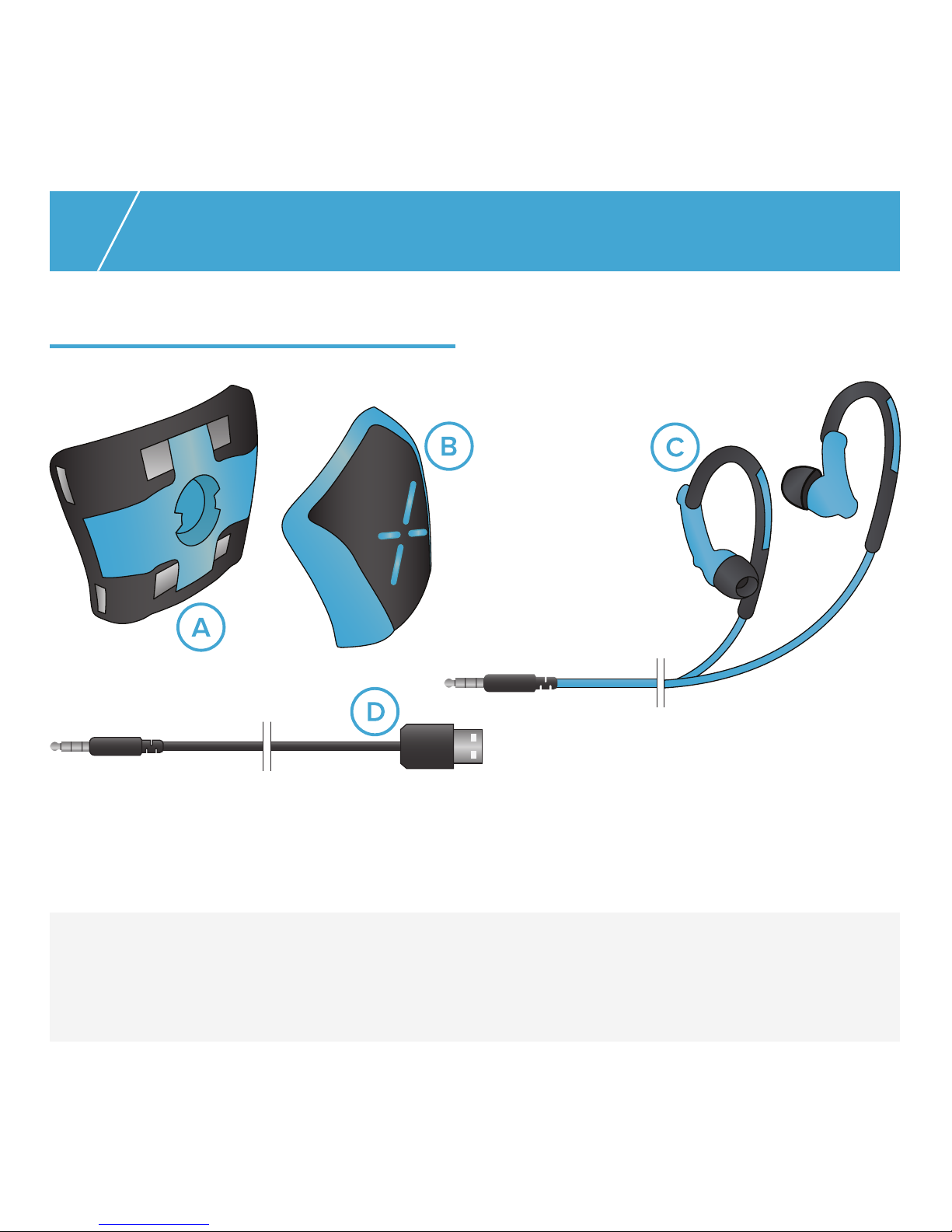
A. Silicone band B. Device C. Earphones D. USB cable
Package contents
WELCOME
Page 7
7
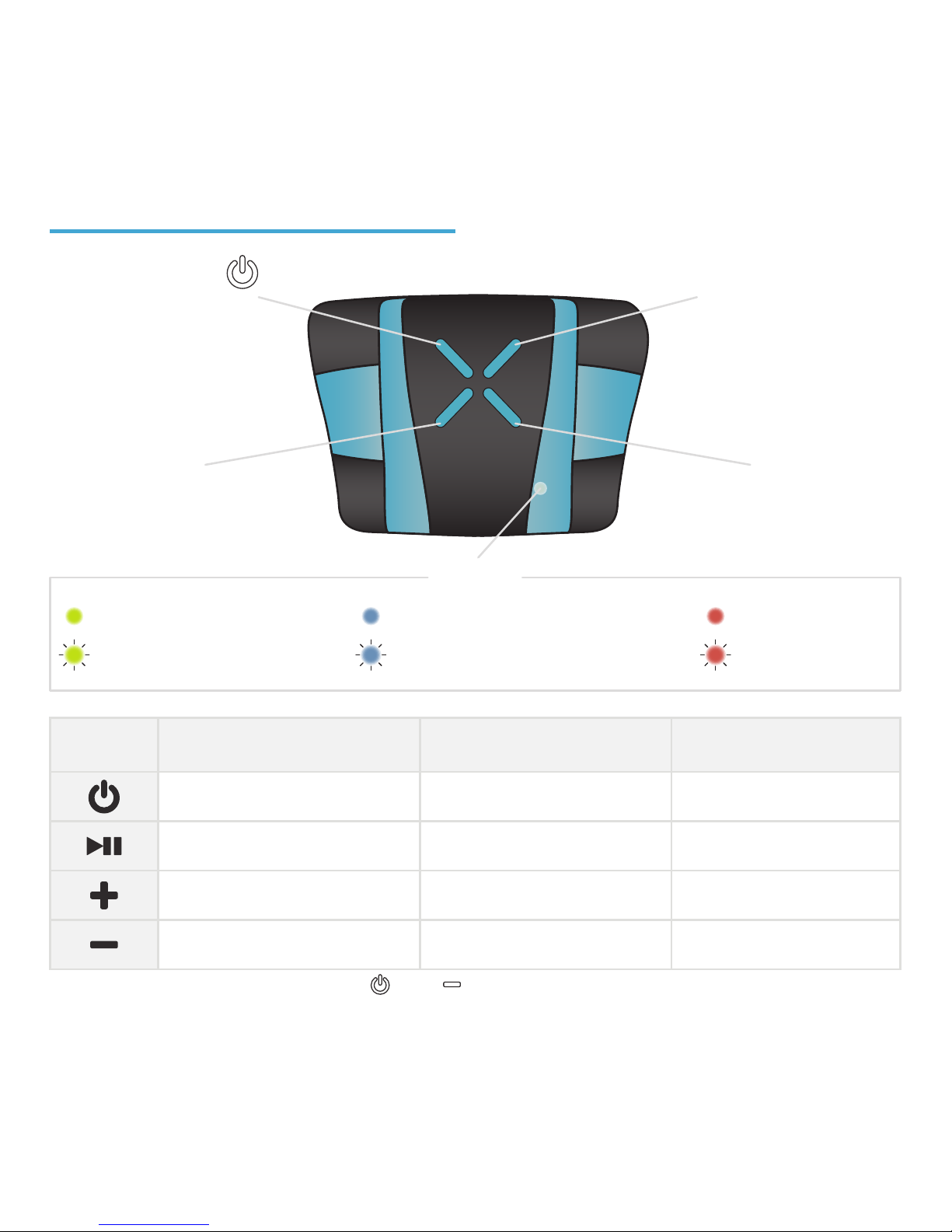
Buttons and LED
*available on XMETRICS® PRO only
RESET FUNCTION: press and hold
and together for a few seconds.
PRESS
on
start/pause recording
volume +
volume -
HOLD
o
audio menu starts
total time/laps summary
on/o Bluetooth
*
SETUP MODE
back
confirm selection
next setting
previous setting
device on/battery charged
data recording
Bluetooth on
*
Connected to XMETRICS® LINK
battery charging
low battery
LED
Page 8

8
General information
The XMETRICS® device is
simple to set-up and
easy-to-use, through its
on-device buttons and
user-friendly PC interface. To
modify the device settings use
XMETRICS® LINK when
connected to your PC, or the app
using tablet or mobile
(compatible with iOS, Android,
Windows) or use directly the
device audio menu and buttons
(it entails the use of the provided
earphones). You can swim with
the device without earphones,
by using the on-device buttons,
and data will still be recorded.
You do not need to remove the
silicone band clip on the goggle
to swim without the device.
Initial setup
Essential before using the
product:
• Download and install
XMETRICS® LINK on your
computer, available on the
website www.xmetrics.it.
• Software updates can be
downloaded from the website
www.xmetrics.it.
• Charge the device battery (with
supplied USB cable).
Now you can connect the device
to your computer via the supplied
USB cable
*
and proceed with the
BEFORE USING THE DEVICE
*for the registration of the device, and only in this case, it is not possible to use a tablet or the
Bluetooth connection.
Page 9

9
registration wizard on
XMETRICS® LINK. The LED on
the device will start blinking with
an alternating blue light (showing
the connection with XMETRICS®
LINK) and a red light (showing
that the battery is charging) until
the battery is completely charged.
• At the end of the registration
phase perform the calibration
phase following the instruction on
XMETRICS LINK.
Setup mode
You can customize the settings by
using:
• XMETRICS® LINK (see detailed
information on www.xmetrics.it)
• XMETRICS® device: in order to
access the audio menu, connect
the earphones to the device and
follow the indications.
Actions
• Press
for more than one
second to access the mode
menu. The device will
communicate the default
feedback. (In future use it will
be reported the last used
feedback).
• To navigate the feedback
menu press and .
• To select the feedback mode
press .
• To navigate the menu
subcategory/feedback
parameter press and .
• To select the feedback
sub-category press .
• The selected option will be
confirmed by the voice
command.
• To begin recording press
and start swimming.
Page 10
10
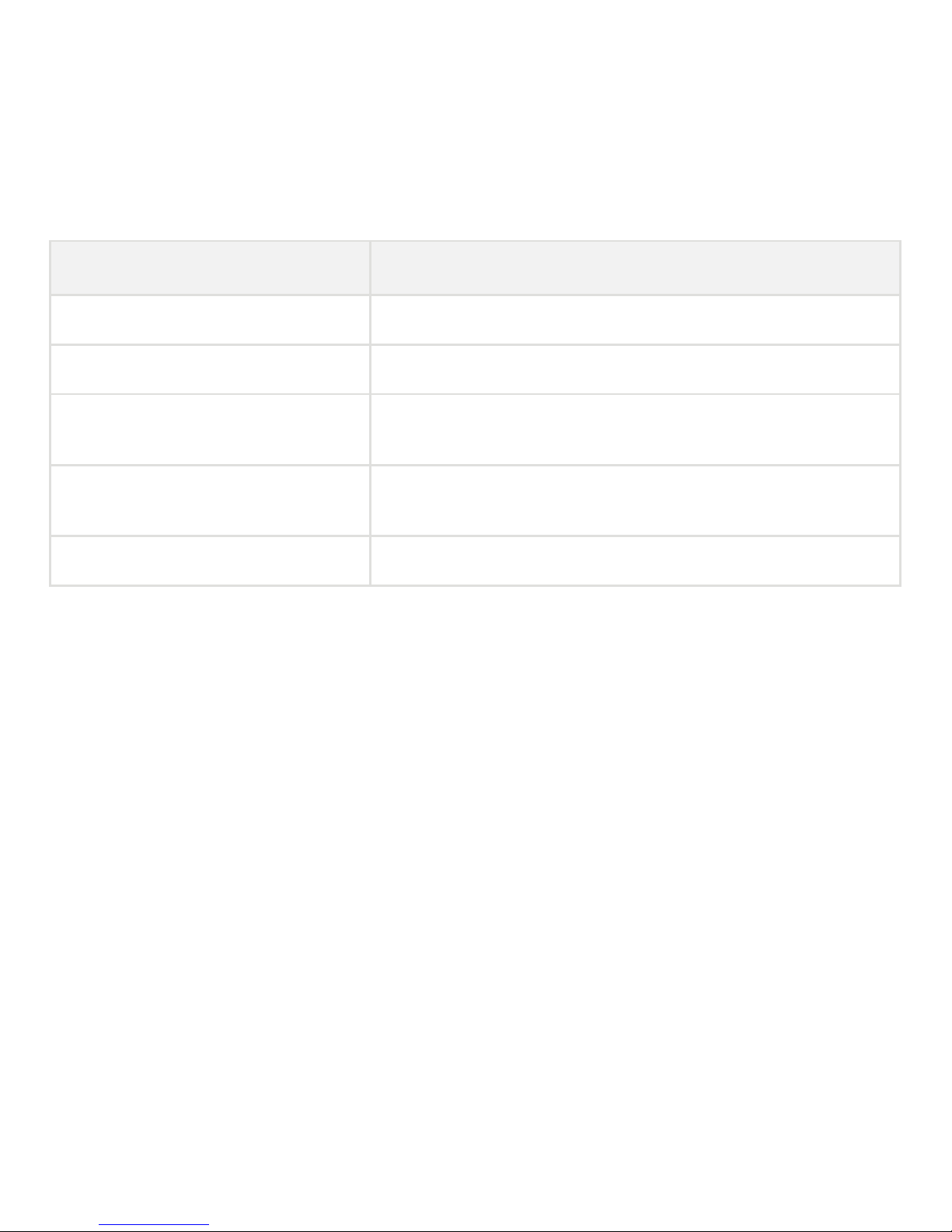
FEEDBACK TYPE
Laps-meter
Split time
Strokes frequency
Custom feedback: feedback
name and parameters
No feedback
FEEDBACK DESCRIPTION
Progressive number of completed laps
Time taken to swim the selected number of laps
Audio signal, beeps, to maintain the selected
number of strokes
Feedback selected on XMETRICS® LINK
Audio settings disabled (battery saving function)
*XMETRICS® LINK allows you to select additional feedback to support the PRO version
Available feedback from device
*
Useful terminology
LAPS: the length of the swimming pool.
TIMING: the time associated with one or more laps.
SPLIT: the distance that consists of a selectable number of laps.
STROKES: it is counted every time the arm makes one full turn.
Page 11

11
order to collect reliable
information.
It is recommended that you
switch o the device when the
training session is completed.
Feedback audio
To use the in-built audio
feedback capability while you
are swimming, connect the
earphones to the device. All
selected menu settings will be
audibly communicated through
the earphones.
GETTING STARTED
Start training session
Once the device has been set up,
you can start swimming using
your XMETRICS® device.
• To start recording your training
session press making sure to
hold the device in the swimming
pool direction, until a green LED
will start flashing. Using the
supplied earphones allows you to
receive an audio feedback (three
beeps).
• Press the button if your
training is finished or you wish to
take a rest.
• Press to continue your
training session.
By pressing for more than one
second while in setup mode, you
will receive the total time and the
number of completed laps.
You have to swim full laps in
Page 12

12
Sending data and analysis
Connect the device to your
computer in order to download
your training data and to analyze
your swimming performance.
Connect the device to your
computer or to your tablet by
using the supplied USB cable or
Bluetooth* technology to access
the data using XMETRICS® LINK.
Downloaded data will be saved
and you can always consult your
historical using the XMETRICS®
LINK platform or the App for
tablet and mobile (free download
available on www.xmetrics.it).
The XMETRICS® APP allows you
to change device settings and to
easily visualize your training
performance, using Bluetooth*.
Battery charging
Connect the device with your PC
or with any other USB charger to
charge the battery. Red led fixed
will indicate “charging status” of
the battery; “complete charging”
is indicated by a fixed green led.
At the first usage be sure that
the battery is fully charged.
POST TRAINING
WARNING!
Before connecting your device to USB cable, make sure that the connector is dry. In
case of problems during the connection or with data trasmission, extract the connector
and let it dry.
*available on XMETRICS® PRO only
Page 13
13
Device care
• Avoid extreme shocks and take
care of device.
• Carefully rinse out the device
with fresh water after exposure
to chlorine.
• Always dry the device after
using it.
• Do not use sharp objects to
clean the device.
• Avoid chemical cleaners and
solvents that can demage plastic
components.
• Do not store the device where
it could be exposed for a long
time to extreme temperatures in
order to avoid permanent
damages.
• The device is incompatible
with salt water.
• Avoid the exposition of device
to heat source or high
temperatures.
• Do not disassemble, modify,
reproduce, pierce or damage the
device.
• Do not dive the device in other
liquids (dierent from water).
• Do not repleace the battery.
• It is recommended to fully
recharge your device at least
once every three months, to
avoid battery charging degrade.
• Use only the supplied
connectors (earphones, USB
SAFETY AND PRODUCT
INFORMATION
WARNING!
Failure in following below information could cause serious and deadly injuries.
Page 14
cable) to ensure correct
functioning of the device.
• Keep away from
electromagnetic fields while
using in the swimming pool.
Please contact local authorities
for a correct disposal of
device/battery, according to laws
and local regulations.
Health warnings
If you have a pacemaker or other
electronical devices, ask your
doctor before using the device.
Data privacy
Information about personal data
are available on www.xmetrics.it.
With this document, XMETRICS® declares that this product is compliant with essential
requirements and other dispositions in the field as expeted from Directive 1999/5/CE.
This device complies with Part 15 of the FCC Rules. FCC ID: 2AE4YXM01-FIT-PRO contains
FCC ID: SQGBT830. Operation is subject to the following two conditions:
(1) this device may not cause harmful interference, and, (2) this device must accept any
interference received, including interference that may cause undesired operation.
Changes or modifications not expressly approved by the manufacturer could void the user’s
authority to operate the equipment.
For further information and updates: www.xmetrics.it.
Page 15

• Do not store the device where
it could be exposed for a long
time to extreme temperatures in
order to avoid permanent
once every three months, to
avoid battery charging degrade.
• Use only the supplied
connectors (earphones, USB
Page 16

Designed and made in Italy
www.xmetrics.it
 Loading...