

Page 1
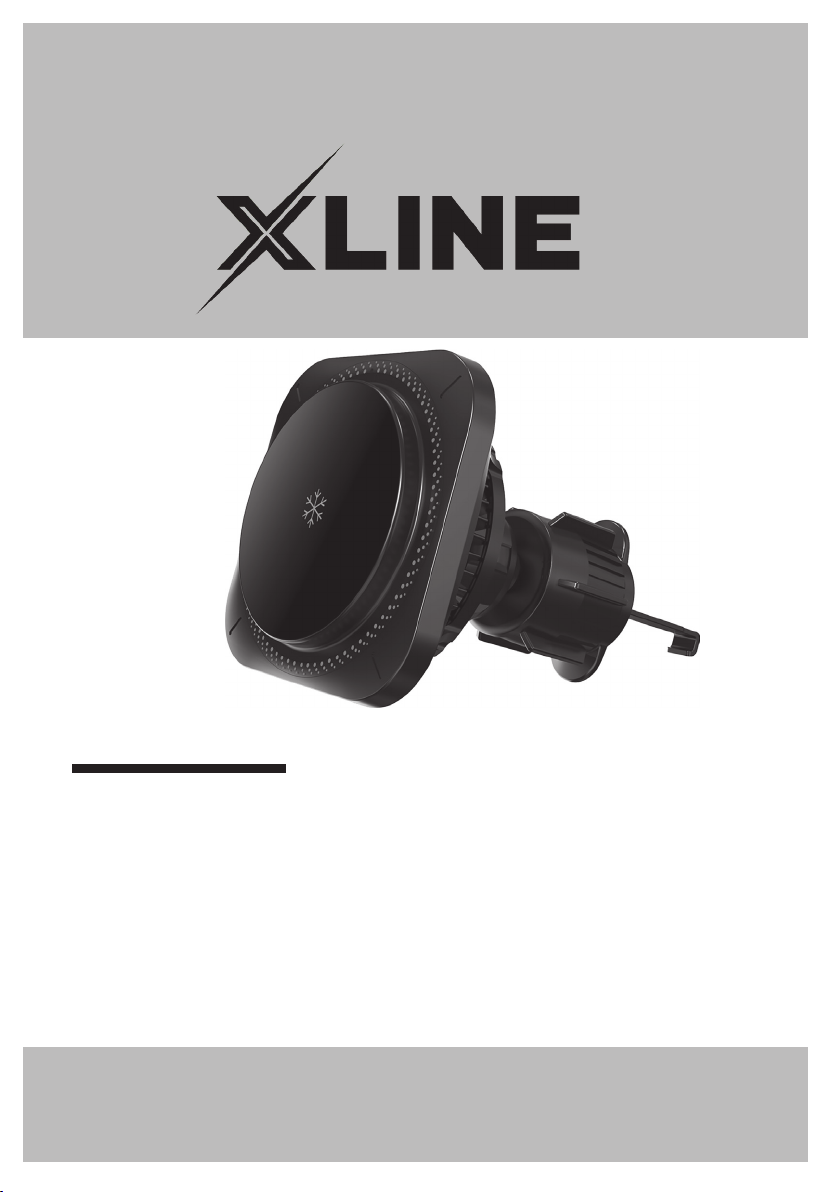
UCHWYT
SAMOCHODOWY CH800W
Instrukcja obsługi
iwarunki gwarancji
CH800W
CAR HOLDER
Operating Manual
& Warranty Terms
1
Page 2

WARUNKI BEZPIECZEŃSTWA
IZAGROŻENIA
Aby zminimalizować ryzyko zaprószenia
ognia, porażenia prądem, pożaru, okaleczenia:
Należy przeczytać uważnie instrukcję
1.
przed rozpoczęciem użytkowania urządzenia.
Urządzenie należy używać zgodnie
2.
zprzeznaczeniem opisanym winstrukcji
obsługi.
Urządzenie nie jest przeznaczone
3.
doużytku przemysłowego lub laboratoryjnego.
Nie należy zanurzać urządzenia wwodzie
4.
lub innych płynach.
Nie narażać produktu na szkodliwe
5.
warunki atmosferyczne.
6.
Nie montować urządzenia jeżeli jest
uszkodzone.
Niniejszy sprzęt może być użytkowany
7.
przez dzieci wwieku co najmniej 8 lat
iprzez osoby oobniżonych możliwościach fizycznych, umysłowych iosoby
obraku doświadczenia i znajomości
sprzętu, jeżeli zapewniony zostanie
nadzór lub instruktaż odnośnie doużytkowania sprzętu wbezpieczny sposób,
tak aby związane ztym zagrożenia były
zrozumiałe. Dzieci nie powinny bawić się
sprzętem. Dzieci bez nadzoru nie powinny
wykonywać czyszczenia i konserwacji
sprzętu.
Nie należy umieszczać urządzenia lub
8.
jego wyposażenia naniestabilnych lub
gorących powierzchniach, ani wich
pobliżu.
Należy upewnić się, że uchwyt jest prawi-
9.
dłowo zamontowany nakratce nawiewu
przed rozpoczęciem jazdy, aby zapobiec
upadkowi telefonu irozproszeniu uwagi
kierowcy.
Nie należy montować uchwytu wmiejscu,
10.
które ogranicza widoczność lub utrudnia
obsługę deski rozdzielczej pojazdu.
Należy regularnie sprawdzać, czy uchwyt
11.
jest mocno zamocowany wkratce wenty
lacyjnej.
Należy montować telefon nauchwycie
12.
przed rozpoczęciem jazdy iunikać regulacji urządzenia wtrakcie prowadzenia
pojazdu.
Nie należy stosować nadmiernej siły
13.
podczas montażu uchwytu, aby nie
uszkodzić kratki wentylacyjnej.
Należy korzystać zuchwytu zgodnie
14.
zprzeznaczeniem, unikając mocowania
zbyt ciężkich urządzeń, które mogą prze-
kroczyć jego wytrzymałość.
Należy regularnie sprawdzać stan
15.
techniczny uchwytu, zwracając uwagę
naelementy regulacyjne imocujące,
aby zapewnić bezpieczne użytkowanie.
Nie należy montować uchwytu bezpo-
16.
średnio przy działającej klimatyzacji
wskrajnych temperaturach, aby nie
wpłynąć na jego funkcjonalność ani
natelefon.
Przed montażem należy upewnić się,
1 7.
że uchwyt jest kompatybilny zkratką
wentylacyjną wpojeździe.
Przy każdym mocowaniu telefonu
18.
nauchwycie, należy upewnić się, że
jest prawidłowo osadzony naprodukcie,
aby zapobiec jego uszkodzeniu podczas
nagłych manewrów lub wstrząsów
nadrodze.
-
2
Page 3
WPROWADZENIE
Dziękujemy zazaufanie, jakim nas Państwo obdarzyli, dokonując zakupu urządzenia
marki XLINE.
Jesteśmy przekonani, że tobardzo dobrej jakości urządzenie zapewni Państwu
dużo radości isatysfakcji zjego użytkowania.
NALEŻY DOKŁADNIE PRZECZYTAĆ INSTRUKCJĘ OBSŁUGI IJEJ PRZESTRZEGAĆ!
Tourządzenie jest przeznaczone douży tku domowego lub podobnego, niedotyczą cego celów komercyjnych. Producent nie ponosi odpowiedzialności
zaszkody powstałe w wyniku użytkowania niewłaściwego lub niezgodnego
zprzeznaczeniem.
DANE TECHNICZNE
Model: CH800W
Kompatybilność: Telefony wyposażone wfunkcję
Wymiary płytki ładowania indukcyjnego
Rodzaj portu ładowania USB-C
Wejście
Wyjście
Odległość ładowania
Materiał obudowy
ładowania dzięki systemowi MagSafe.
55mm
DC 12V/2A
15W/10W/7.5W/5W
6mm
ABS, szkło hartowane
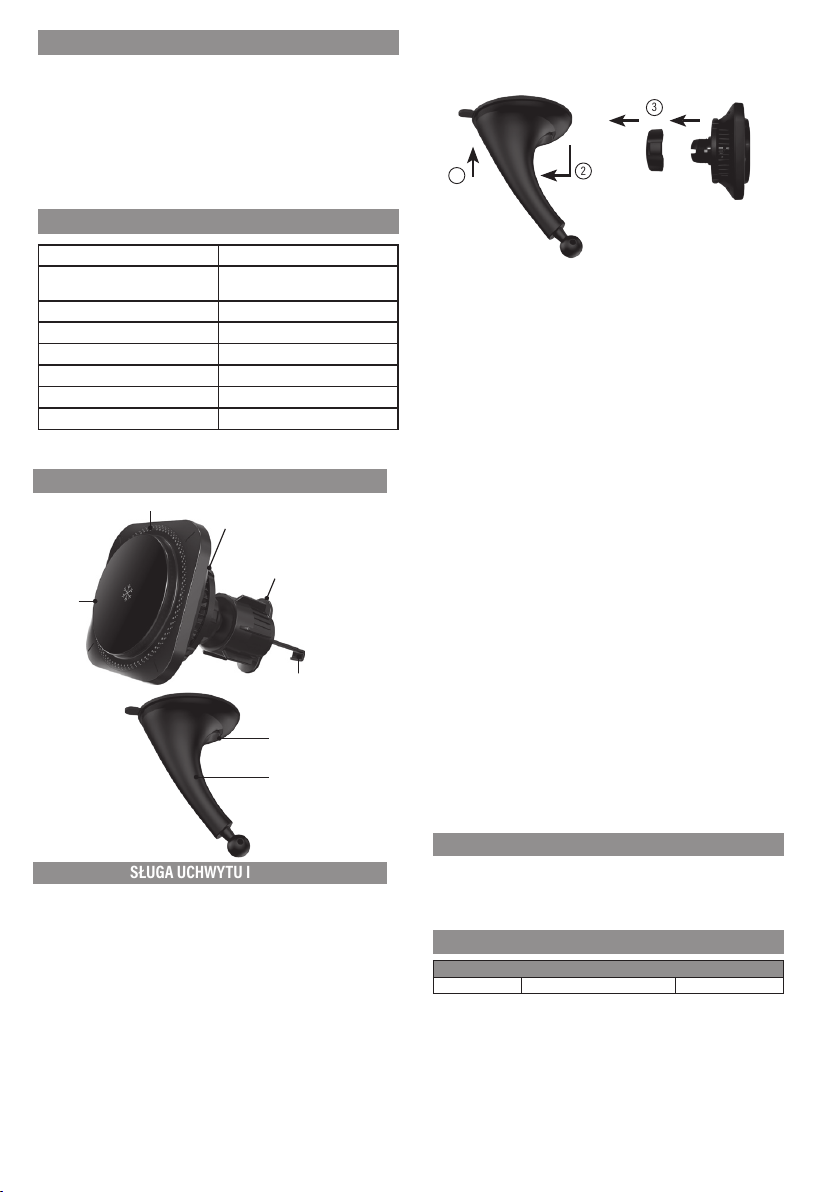
OPIS PRODUKTU
Płytka
ładowania
indukcyjnego
Dioda LED
Wentylator
Nakrętka
Hak
Zatrzask przyssawki
Ramię uchwytu
OBSŁUGA UCHWYTU IMONTAŻ
MONTAŻ UCHWYTU ZPRZYSSAWKĄ DOSZYBY
Przed montażem pozbądź się wszelkich folii ochronnych ioczyść miejsce montażowe.
1. Przyłóż ramię zprzyssawką doszyby idociśnij je.
2. Przestaw zatrzask przyssawki, aby zabezpieczyć ją naszybie.
3. Zamontuj uchwyt wramieniu izabezpiecz główny element urządzenia prze d
wypadnięciem, dokręcając delikatnie nakrętkę.
4.
Po zamontowaniu uchwytu, wyreguluj jego pozycję. Po ustawieniu właściwego
kąta nachylenia, dokręć nakrętkę, aby uchwyt pozostał stabilny.
3
1
5. Podłącz kabel USB-C dogniazda wuchwycie.
6.
Po wykonaniu powy ższych czynności możesz swobodnie umieścić telefon
zsystemem MAGSAFE wuchwycie. Pamiętaj aby port USB-C znajdował się
nadole.
Montaż uchwytu wkratce wentylacyjnej
1.
Zkońcówki przeznaczonej domontażu w kratce wentylacyjnej wysuń hak,
przekręcając pokrętło.
2. Włóż uchwyt zwysuniętym hakiem, tak aby zaczepił się za tylną część kratki
wentylacyjnej.
3. Przekręć pokrętło by zablokować hak nakratce wentylacyjnej.
UWAGA! PRZEKRĘCAJ POKRĘTŁO ZWYCZUCIEM. ZBYT MOCNE PRZYKRĘCENIE
HAKA MOŻE USZKODZIĆ ZARÓWNO URZĄDZENIE JAK IKRATKĘ WENTYLACYJNĄ.
4. Zamontuj główny element urządzenia nakońcówce izab ezpiecz, dokręcając
nakrętkę zwyczuciem. Port USB-C powinien znajdować się nadole.
5. Podłącz kabel USB-C dogniazda wuchwycie.
6.
Po wykonaniu powyż szych czynności możesz swobodnie umieścić telefon
zsystemem MAGSAFE wuchwycie.
Ładowanie indukcyjne
1. Podłącz urządzenie do ładowarki samochodowej za pomocą przewodu USB
zzestawu.
UWAGA! PRZED PODŁĄCZENIEM URZĄDZENIA UPEWNIJ SIĘ, ŻE SPECYFIKACJA
ŁADOWARKI JEST ZGODNA ZSEKCJĄ „DANE TECHNICZNE”.
2.
Po prawidłowym podłączeniu dioda LED naurządzeniu zaświeci się nazielono,
co oznacza gotowość urządzenia dopracy.
3. Po umieszczeniu telefonu zfunkcją ładowania bezprzewodowego wzasięgu
pola indukcyjnego uchwytu rozpocznie się ładowanie indukcyjne, co potwierdzi
zaświecenie się wskaźnika naniebiesko. Po rozpoczęciu ładowania włączy się
również wiatrak który zacznie chłodzić telefon podczas ładowania. Zaświecą
się również diody LED które są wbudowane wtyle ładowarki wkolorach RGB.
UWAGA! ABY ZAPEWNIĆ MAKSYMALNĄ WYDAJNOŚĆ ŁADOWANIA ZALECA SIĘ
KORZYSTAĆ ZCERTYFIKOWANYCH ŁADOWAREK SAMOCHODOWYCH SZYBKIEGO
ŁADOWANIA OZNACZONYCH QC 2.0/QC 3.0/QC 3.1.
UWAGA! NIEKTÓRE FUT ERAŁY, POKROWCE CZ Y OBUDOWY DO TELEFONÓW
MOGĄ POWODOWAĆ PRZERWY WŁADOWANIU LUB JEGO BRAK. WPRZYPADKU
PROBLEMÓW ZŁ ADOWANIEM NALEŻ Y ŚCIĄGNĄĆ ZTELEFONU WSZYSTKIE
DODATKOWE ELEMENTY.
2
CZYSZCZENIE IKONSERWACJA
Do czyszczenia uchwytu należy używać lekko zwilżonej ściereczki.
UWAGA! DO CZYSZCZENIA NIE NALEŻY UŻYWAĆ SILNYCH DETERGENTÓW!
UWAGA! CZYSZCZENIE UCHWYTU NALEŻY PRZEPROWADZAĆ WYŁĄCZNIE WTEDY,
KIEDY URZĄDZENIE NIE JEST PODŁĄCZONE DO ZASILANIA ORAZ KIEDY NIE JEST
WNIM ZAMONTOWANY TELEFON.
PROBLEMY IROZWIĄZANIA
PROBLEM PRZYCZYNA ROZWIĄZANIE
Uchwyt jest luźny. Nie wystarczająco dokręcona nakrętka. Dokręć nakrętkę.
3
Page 4
Uchwyt nie poddaje
13
się regulacji.
Uchwyt wypada
z kratki.
Uchwyt odpada od
szyby
Telefon nie ładuje
się lub występują
problemy z ładowa-
niem.
Zbyt mocno dokręcona nakrętka. Poluzuj nakrętkę i ułóż
Hak montażowy jest zbyt wysunięty. Wsuń hak montażowy za
Szyba przed zamontowaniem nie była
wystarczająco odtłuszczona
Telefon nie posiada funkcji ładowania
bezprzewodo wego
Pomiędzy polem ładowania a telefonem
znajdują się akcesoria, które mogą
powodować problemy z ładowaniem.
Podłączona ładowarka samochodowa
osiąga zbyt małą moc.
uchwyt według własnych
potrzeb. Następnie dokręć
nakrętkę aby ustabilizować
uchwyt.
pomocą nakrętki. Nakrętkę
dokręć tak, aby nie
uszkodzić kratek wentyl-
acyjnych
Wyczyść dokładnie szybę
i ponownie zamontuj
uchwyt
Aby telefon ładował się
na uchwycie, musi on
posiadać funkcję łado-
wania bezprzewo dowego
Zdemontuj wszelkie akce-
soria (np. etui), które mogą
powodować problemy
z działaniem ładowania
indukcyjnego.
Zaleca się stosowanie
ładowarek QC3.0. Mini-
malna moc ładowarki
powinna wynosić przy-
najmniej 5V 2A.
EKOLOGICZNA IPRZYJAZNA DLA ŚRODOWISKA
UTYLIZACJA
To urządzenie jest oznaczone, zgodnie zDyrektywą Parlamentu Europejskiego
iRady 2012/19/ UE zdnia 4 lipca 2012r. wsprawie zużytego sprzętu elektrycznego
ielektronicznego (WEEE), symbolem przekreślonego kontenera naodpady:
Nie należy wyrzucać urządzeń oznaczonych tym symbolem, razem zodpadami
domowymi.
Urządzenie należy zwrócić dolokalnego punktu przetwarzania iutylizacji
odpadów lubskontaktować się zwładzami miejskimi.
MOŻESZ POMÓC CHRONIĆ ŚRODOWISKO!
Właściwe postępowanie zezużytym sprzętem elektrycznym ielektronicznym
przyczynia się douniknięcia szkodliwych dla zdrowia ludzi iśrodowiska naturalnego konsekwencji, wynikających zobecności składników niebezpiecznych oraz
niewłaściwego składowania iprzetwarzania takiego sprzętu.
WARUNKI GWARANCJI DOTYCZĄCE UCHWYTU
SAMOCHODOWEGO
1.
ART-DOM Sp. z o.o. zsiedzibą wŁodzi (92-402) przy ul. Z akładowej 90/92
Numer Krajowego Rejestru Sądowego 0000354059 (Gwarant) gwarantuje, że
zakupione urządzenie jest wolne od wad fizycznych. Gwarancja obejmuje tylko
wady wynikające zprzyczyn tkwiących wrzeczy sprzedanej (wady fabryczne).
2.
Ujawniona wada zostanie usunięta nakoszt Gwaranta wciągu 14 dni od daty
zgłoszenia uszkodzenia doserwisu autoryzowanego lub punktu sprzedaży.
Wwyjątkowych przypadkach, np. konieczności sprowadzenia części zamien-
3.
nych od producenta, termin naprawy może zostać wydłużony do30 dni.
Okres gwarancji dla użytkownika wynosi 24 miesiące od daty wydania towaru.
4.
5.
Towar przeznaczony jest doużywania wyłącznie wwarunkach indywidualnego
gospodarstwa domowego.
6. Gwarancja nie obejmuje:
a. uszkodzeń powstałych naskutek używania urządzenia niezgodnie
zinstrukcją obsługi,
b. uszkodzeń mechanicznych, chemicznych lub termicznych,
c. napraw imodyfikacji dokonanych przez firmy lub osoby
nieposiadające autoryzacji producenta,
d. części znatury łatwo zużywalnych lub materiałów eksploatacyjnych
takich jak: baterie, żarówki, bezpieczniki, filtr y, pokrętła, półki,
akcesoria,
12
e. instalacji, konserwacji, przeglądów, czyszczenia, odblokowania,
usunięcia zanieczyszczeń oraz instruktażu.
Osposobie usunięcia wady decyduje Gwarant. Usunięcie potwierdzonej
7.
wady urządzenia nastąpi poprzez wykonanie naprawy gwarancyjnej lub
wymianę urządzenia. Gwarant może dokonać naprawy, gdy kupujący
żąda wymiany lub Gwarant może dokonać wymiany, gdy kupujący żąda
naprawy, jeżeli doprowadzenie dozgodno ści towaru (urządzenia) zgodnie
zudzieloną gwarancją wsposób wybrany przez kupującego jest niemożliwe
albo wymagałoby nadmiernych kosztów dla Gwaranta. Wszczególnie uzasadnionych wypadkach, jeżeli naprawa iwymiana są niemożliwe lub wymagałyby
nadmiernych kosztów dla Gwaranta może on odmówić doprowadzenia
towaru do zgodności zudzieloną gwarancją i zaproponować inny sposób
załatwienia reklamacji z gwarancji.
Wymiany towaru dokonuje punkt sprzedaży, wktórym towar został zakupiony
8.
(wymiana lub zwrot gotówki) lub autoryzowany punkt ser wisowy, jeżeli
dysponuje taką możliwością (wymiana). Zwracane urządzenie musi być
kompletne, bez uszkodzeń mechanicznych. Niespełnienie tych warunków
może spowodować nieuznanie gwarancji.
Wprzypadku braku zgodności towaru zumową sprzedaży, kupującemu zmocy
9.
prawa przysługują środki ochrony prawnej ze strony inakoszt sprzedawcy,
agwarancja nie ma wpływu nate środki ochrony prawnej.
10. Niniejsza gwarancja obowiązuje naterytorium Polski.
Warunkiem dokonania naprawy lub wymiany urządzenia wramach gwarancji
11.
jest przeds tawienie dowodu zakupu oraz uży tkowanie towaru zgodnie
zinformacjami zawartymi winstrukcji obsługi.
UWAGA!
Uszkodzenie lub usunięcie tabliczki znamionowej zurządzenia może
spowodować nieuznanie gwarancji.
Cały czas udoskonalamy nasze produkty, dlatego mogą się one nieznacznie
różnić od zdjęć przedstawionych na opakowaniu oraz w ins trukcji obsłu gi.
Przed przystąpieniem do użytkowania urządzenia przeczytaj instrukcję obsługi.
ART-DOM Sp. z o.o., ul. Zakładowa 90/92, 92-402 Łódź, [email protected].
Numer Krajowego Rejestru Sądowego 0000354059.
SAFETY CONDITIONS AND HAZARDS
To minimize the risk of starting a fire, electric
shock, fire, mutilation:
Read the operating manual carefully
1.
before using the device.
Use the device according to its intended
2.
purpose described in the operating
manual.
3. The device is not intended for industrial
or laboratory use.
4. Do not immerse the device in water or
other liquids.
Do not expose the product to harmful
5.
weather conditions.
Do not install the device if it is damaged.
6.
7.
This product may only be operated by
children 8 or more years old, mentally
and/or physically deficient persons and
4
Page 5
persons without knowledge of or expe-
fixed in the ventilation grille.
rience in operation of this appliance type
if supervised or instructed regarding the
use of the equipment in a safe manner so
that the risks involved are understood.
Children should not play with the device.
Unsupervised children should not carry
out the cleaning and maintenance of
the device.
Do not place the device or its equipment
8.
on unstable or on or near hot surfaces.
Make sure that the handle is correctly
9.
installed on the air grille before driving
to prevent the phone from falling and
distracting the driver.
Do not install the holder in a location that
10.
restricts visibility or hinders operation of
the vehicle dashboard.
11. Regularly check that the holder is firmly
18.
Whenever attaching the phone to the
holder, make sure that it is correctly
seated on the product to prevent it from
being damaged during sudden maneuvers or shocks on the road.
Thank you for the trust you have placed in us when you purchased your XLINE device.
We are convinced that this high quality device will provide you with a lot of joy and
satisfaction during its use.
PLEASE CAREFULLY READ AND FOLLOW THE OPERATING MANUAL!
This device is intended for domestic or similar, non-commercial use. The manufacturer
will not be held liable for damages resulting from improper or non-compliant use.
Model: CH800W
Compatibility: Phones equipped with the MagSafe
Inductive charging plate dimensions 55mm
Type of charging port USB-C
Input
Outputs
Charging distance
Case material
INTRODUCTION
TECHNICAL DATA
charging function.
DC 12V/2A
15W/10W/7.5W/5W
6mm
ABS, tempered glass
12.
Install the phone in the holder before
driving and avoid adjusting the device
while driving.
13. Do not use excessive force when installing the holder so as not to damage the
ventilation grille.
Use the holder as intended, avoiding
14.
attaching too heavy devices that may
exceed its structural limits.
Check the technical condition of the
15.
holder regularly, paying attention to the
adjustment and fixing elements to ensure
its safe use.
Do not install the holder directly with the
16.
air conditioning operating at extreme
temperatures, so as not to aect its functionality or that of the phone.
Before installation, make sure that the
1 7.
holder is compatible with the ventilation
grille in the vehicle.
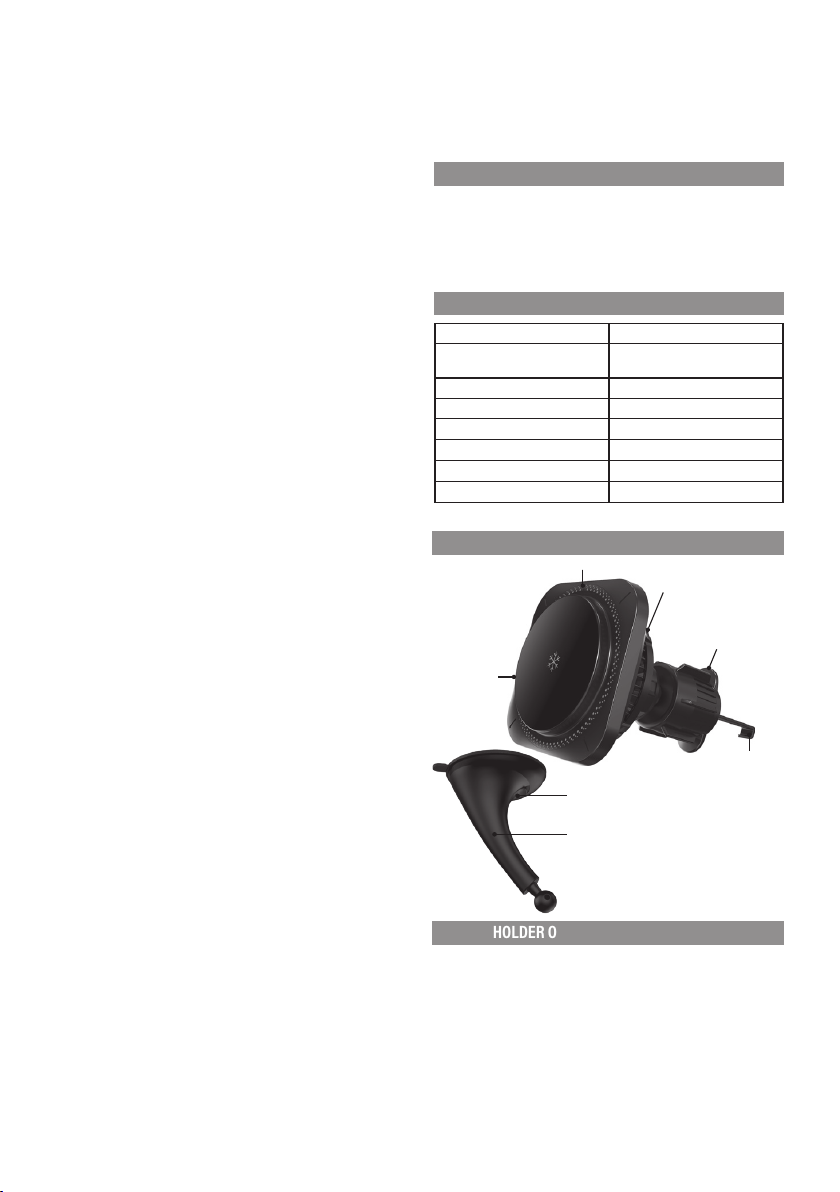
OPIS PRODUKTU
LED
Fan
Locking ring
Inductive
charging
plate
Hook
Cup latch
Holder arm
HOLDER OPERATION AND ASSEMBLY
INSTALLING THE HOLDER WITH SUCTION CUP ON WINDSCREEN
Before assembly, dispose of any protective films and clean the area.
1. Put the arm with the suction cup against the windscreen and press it down.
2. Move the suction cup latch to secure it on the windscreen.
5
Page 6
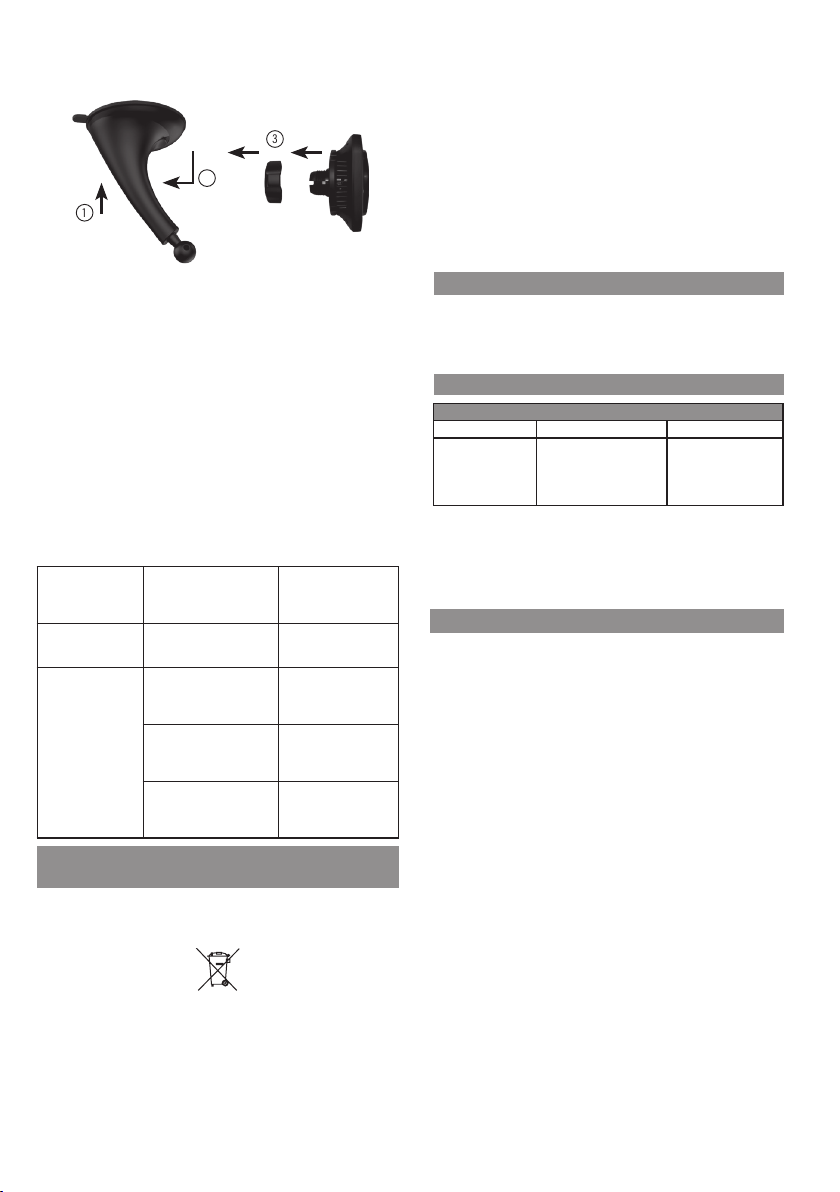
3.
in the holder.
Install the holder in the arm and secure the main element of the device against
falling out by tightening the nut gently.
4. After mounting the holder, adjust its position. After setting the correct angle of
inclination, tighten the nut so that the holder remains stable.
3
2
1
5. Connect the USB-C cable to the socket in the holder.
6. After completing the above steps, you can f reely place a MAGSAFE phone in
the holder. Remember to keep the USB-C port at the bottom.
Installing the holder in the ventilation grille
1. Ex tend the hook from the tip intended for installation in the ventilation grille,
by turning the knob.
2. Insert the holder with the hook extended so that it locks behind the back of
the ventilation grille.
3. Turn the knob to lock the hook on the ventilation grille.
CAUTION! TURN THE KNOB CAREFULLY. SCREWING THE HOOK TOO TIGHTLY MAY
DAMAGE BOTH THE DEVICE AND THE VENTILATION GRILLE.
Install the main element of the device at the end and secure it by tightening the
4.
nut sensitively. The USB-C port should be located at the bottom.
5. Connect the USB-C cable to the socket in the holder.
6.
After completing the above steps, you can freely place a MAGSAFE phone
The holder falls out of
the grille.
The holder falls o the
windscreen
Phone won’t charge
or there are issues with
charging.
The holder falls o the wind-
screen
Szyba przed zamontowaniem
nie była wystarczająco odtłusz-
czona
The phone is not equipped with
wireless charging function
Between the charging area and
the phone, there are accesso-
ries that may cause
problems with charging
The car charger connected
has insuicient power.
Retract the mounting hook
using the nut. Tighten the
nut so as not to damage
the ventilation grilles
Clean the windscreen
thoroughly and reassemble
the holder
In order for the phone to
charge in the holder, it
must have a wireless char-
ging function
Dismantle any
that may cause problems
with inductive charging.
We recommend using
QC3.0 chargers. Minimum
charger power should
be at least 5V 2A.
ECO-FRIENDLY AND ENVIRONMENTALLY FRIENDLY
DISPOSAL
This device is marked, in accordance with Directive 2 012/19/EU of the European
Parliament and of the Council of 4 July 2012 on waste electrical and electronic
equipment (WEEE), with the symbol of a crossed-out waste container:
Do not dispose of the device marked with this symbol together with household
waste.
For disposal return the device to your local waste treatment and disposal facility
or contact your local authorities.
Inductive charging
1. Connect the device to the car charger using the USB cable from the set.
CAUTION! BEFORE CONNECTING THE DEVICE, MAKE SURE THAT THE CHARGER
SPECIFICATION COMPLIES WITH THE “TECHNICAL DATA” SECTION.
2.
Once properly connected, the LED on the device will light up in green, indicating
that the device is ready for operation.
3.
After placing a phone equipped with wireless charging function within the range
of the inductive field of the holder, the inductive charging will start, confirmed
by indicator lighting up in blue. After charging begins, the fan will also turn on,
thus cooling the phone during charging. The LEDs that are built into the rear
of the charger will also light up in RGB colours.
CAUTION! FOR MAXIMUM CHARGING PERFORMANCE, IT IS RECOMMENDED TO
USE QC 2.0/QC 3.0/QC 3.1 CERTIFIED QUICK CHARGE CAR CHARGERS.
CAUTION! SOME CASES, COVERS OR PHONE HOUSINGS MAY CAUSE INTERRUPTIONS OR LACK OF CHARGING. IN CASE OF PROBLEMS WITH CHARGING, REMOVE
ALL ADDITIONAL ITEMS FROM THE PHONE.
CLEANING AND MAINTENANCE
Clean the holder using a slightly damp cloth.
CAUTION! DO NOT USE STRONG DETERGENTS FOR CLEANING!
CAUTION! ONLY CLEAN THE HOLDER WHEN THE DEVICE IS NOT CONNECTED TO
THE POWER SUPPLY AND WHEN THE PHONE IS NOT INSTALLED ON IT.
TROUBLESHOOTING
PROBLEM CAUSE SOLUTION
Handle is loose. Insuiciently tightened nut. Re-tighten the nut.
The arm is not adjust-
able.
Over-tightened nut. Loosen the nut and adjus t
the holder according to
your needs. Then tighten
the nut to stabilize the
holder.
YOU CAN HELP PROTECT THE ENVIRONMENT!
Proper handling of waste electrical and electronic equipment contributes
to avoiding harmful consequences for human health and the environment
resulting from the presence of hazardous components and improper storage and
processing of such equipment.
WARRANTY CONDITIONS FOR THE CAR HOLDER
1. ART-DOM Sp. z o.o. with its registered oice in Łódź (92-402) at ul. Zakładowa
90/92 National Cour t Register Number 0000354 059 (Guarantor) guarantees
that the purchased device is free from physical defec ts. The warranty covers
only defect s resulting from the causes inherent in the item sold (manufacturing defects).
2. A disclosed defect will be removed at the Guarantor’s expense within 14 days
from the date of reporting the damage to the authorized service or point of sale.
3.
In exceptional cases, e.g. the need to import spare parts from their manufacturer,
the repair period may be extended up to 30 days.
The warranty p eriod for the user is 24 months f rom the date of delivery of
4.
the goods.
The goods are intended for use only in the conditions of an individual household.
5.
6. The present warranty does not cover:
damage caused by using the device in a manner inconsistent with the
a.
user manual,
b. mechanical, chemical or thermal damage,
repairs and modifications made by c ompanies or persons that were not
c.
authorized to do so by the manufacturer,
d. par ts that are easy to use or consumables such as: batteries, bulbs, fuses,
filters, knobs, shelves, accessories,
installation, maintenance, inspection, cleaning, unlocking, removal of
e.
contaminants and instruction.
The Guarantor will select the mode of defect removal at its own discretion.
6.
Removal of a confirmed defect of the device will take place through warranty
repair or replacement of the device. The Guarantor may perform repairs when
6
Page 7

the buyer requests replacement or the Guarantor may perform replacements
when the buyer requests repair, if bringing the goods (device) into conformity
in accordance with the granted warranty in the manner selected by the buyer
is impossible or would require e xcessive costs at the part of Guarantor. In
particularly justifie d cases, if both repair and replacement are impossible or
would require excessive costs for the Guarantor, the Guarantor may refuse
to bring the goods into compliance with the granted warranty and propose
another way to settle the warranty claim.
7. The exchange of goods is made at the point of sale at which the goods were
purchased (replacement or refund) or an authorized service point, if it oers
such service (replacement). The returned device must be comple te, without
mechanical damage. Failure to comply with these conditions may result in
failure to accept the warranty claim.
8. In the event of non-compliance of the goods with the sales contract, the buyer
is entitled by law to legal protection measures on the part and at the expense
of the seller, and the warranty does not aect these legal protection measures.
9. The warranty is valid in Poland.
The condition for the warranty repair or replacement of the device is the
10.
presentation of proof of purchase and the use of the goods in accordance with
the information contained in the user manual.
CAUTION!
Damage or removal of the rating plate from the device may result in warranty
being deemed void.
We are constantly improving our products, so they may di er slightly from the
images presented on the packaging and in the user manual. Please read the
user manual carefully before operating the device.
ART-DOM Sp. z o.o., ul. Zakładowa 90/92, 92-402 Łódz, [email protected].
National Court Register number 0000354059.
7
 Loading...