

Page 1
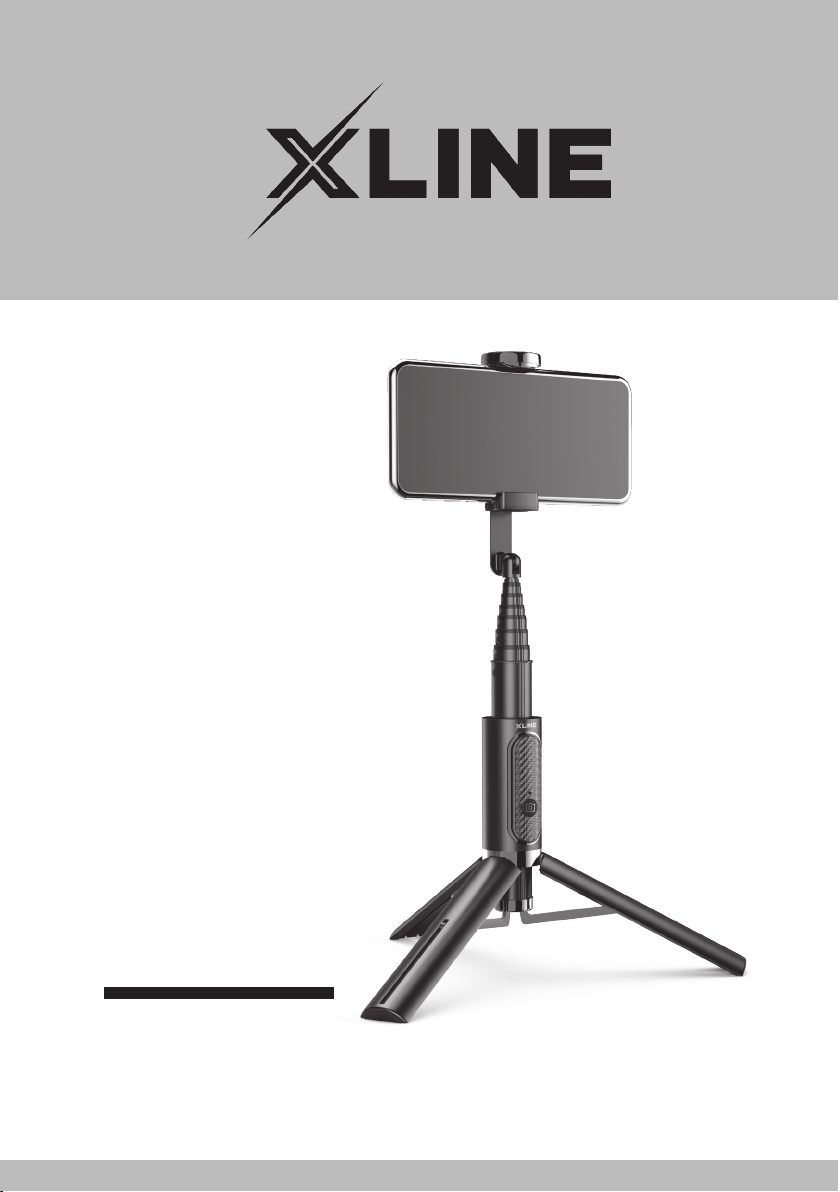
UCHWYT SELFIE
BSF
Instrukcja obsługi
iwarunki gwarancji
Page 2

2
Page 3

WARUNKI BEZPIECZEŃSTWA
IZAGROŻENIA
1.
Urządzenia nie należy umieszczać
w pobliżu źródeł ciepła np. grzejników,
kuchenek mikrofalowych, piekarników.
2.
Nie należy otwierać urządzenia i zmieniać
jego konstrukcji we własnym zakresie,
ponieważ grozi to uszkodzeniem urządzenia
i utratą gwarancji.
3. Nie wrzucać urządzenia do ognia. Może to
spowodować wybuch lub pożar.
4.
Niniejszy sprzęt może być użytkowany
przez dzieci w wieku co najmniej 8 lat
i przez osoby o obniżonych możliwościach
fizycznych, umysłowych i osoby o braku
doświadczenia i znajomości sprzętu, jeżeli
zapewniony zostanie nadzór lub instruktaż
odnośnie użytkowania sprzętu w bezpieczny
sposób tak, aby związane z tym zagrożenia
były zrozumiałe. Dzieci nie powinny bawić
się sprzętem. Dzieci bez nadzoru nie powinny
wykonywać czyszczenia i konserwacji
sprzętu.
Page 4

5.
Nie należy zanurzać urządzenia w wodzie ani
innych płynach.
6. Nie należy uruchamiać urządzenia jeżeli jest
ono uszkodzone. Urządzenie musi zostać
naprawione przez serwis lub osobę do tego
uprawnioną.
7.
Produkt może naprawiać i wymieniać
w nim aku mulator wyłącznie wykwalifikowany
serwis produ centa lub autoryzowany punkt
serwisowy.
8. Nie należy narażać urządzenia na szkodliwe
warun ki atmosferyczne jak nadmierne
nasłonecznienie i wilgoć.
9. Należy chronić urządzenie przed upadkami
oraz wstrząsami.
10. Urządzenie jest przeznaczone wyłącznie do
użytku domowego, nie komercyjnego.
11.
Ładowanie akumulatora powinno przebiegać
w miejscu suchym i dobrze wentylowanym,
gdzie temperatura utrzymuje się w zakresie
15-25°C.
12.
Nie należy uruchamiać uszkodzonego
urządzenia.
13.
Nie wolno ładować uszkodzonego
akumulatora.
4
Page 5

14. Nie wrzucać akumulatora do ognia.
15.
W przypadku uszkodzenia akumulatora,
należy zaprzestać użytkowania urządzenia
oraz unikać kon taktu ze skórą lub oczami.
W przypadku takiego kontaktu należy
przemyć miejsce wodą i zwrócić się o pomoc
do lekarza.
16.
Nie należy włączać urządzenia w miejscach,
w których zabrania się korzystania z urządzeń
elek tronicznych, ani wtedy, gdy może to
spowodować zakłócenia lub inne zagrożenia.
1 7.
Nie należy pozostawiać urządzenia w trakcie
łado wania bez nadzoru.
18.
Nie wolno niszczyć, przekuwać ani otwierać
akumu latora.
19.
Po okresie użytkowania nie wyrzucać razem
z nor malnymi odpadami z gospodarstw
domowych. Pro dukt i jego części należy
przekazać do punktu selek tywnej zbiórki
odpadów zgodnie z prawem.
Page 6

WPROWADZENIE
Dziękujemy zazaufanie, jakim nas Państwo
obdarzyli, dokonując zakupu urządzenia marki
XLINE.
Jesteśmy przekonani, że tobardzo dobrej jakości
urządzenie zapewni Państwu dużo radości
isatysfakcji zjego użytkowania.
NALEŻY DOKŁADNIE PRZECZYTAĆ INSTRUKCJĘ
OBSŁUGI IJEJ PRZESTRZEGAĆ!
To urządzenie jest przeznaczone do użytku
domowego lub podobnego, nie dotyczącego
celów komercyjnych.
Producent nie ponosi odpowiedzialności
zaszkody powstałe wwyniku użytkowania
niewłaściwego lub niezgodnego z przeznaczeniem.
6
Page 7
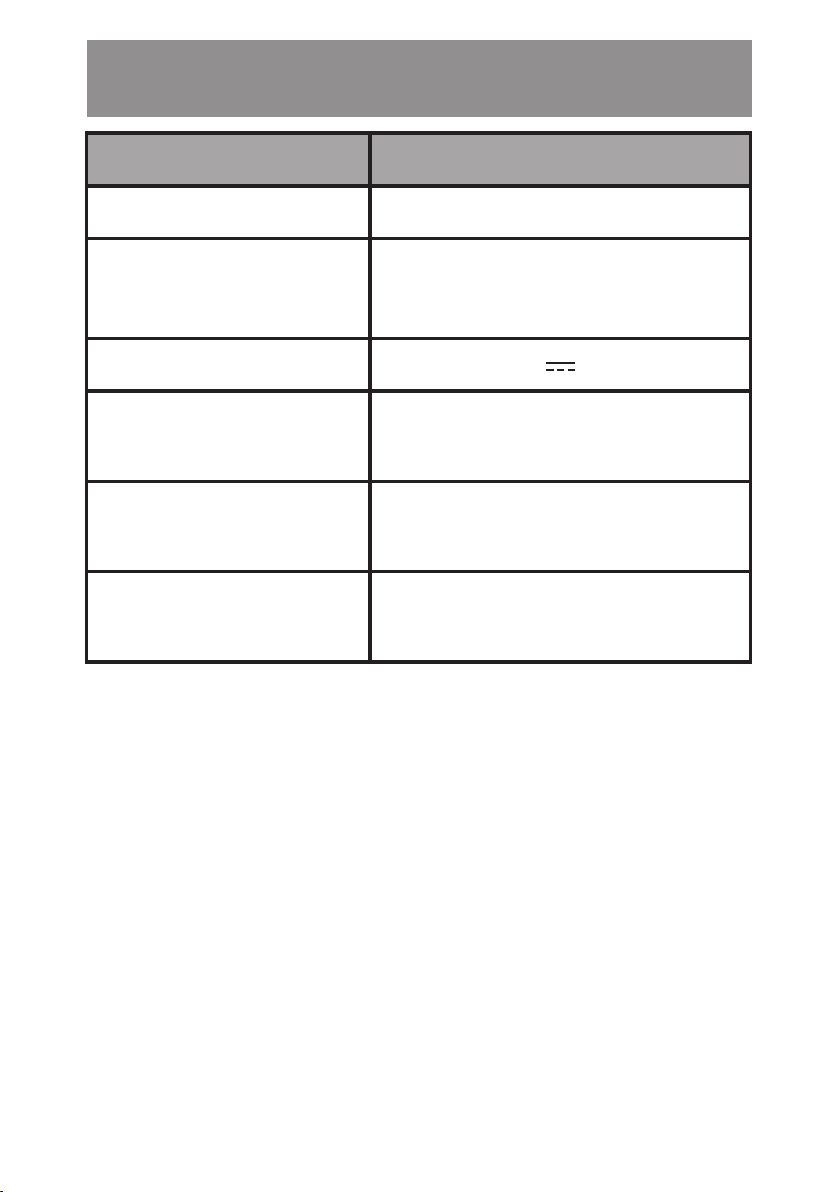
DANE TECHNICZNE
MODEL BSF
Łączność Bluetooth
Zakres regulacji
uchwytu telefonu
Wejście 5V 2A
Maksymalna moc
transmisji Bluetooth
Częstotliwość
transmisji Bluetooth
Zakres częstotliwości
Bluetooth
22-83 cm ±3mm na statywie
58-88 cm ±2mm z uchwytem
-1 dBm ÷ 1 dBm
2.4 GHz
2402-2480 MHz
Page 8
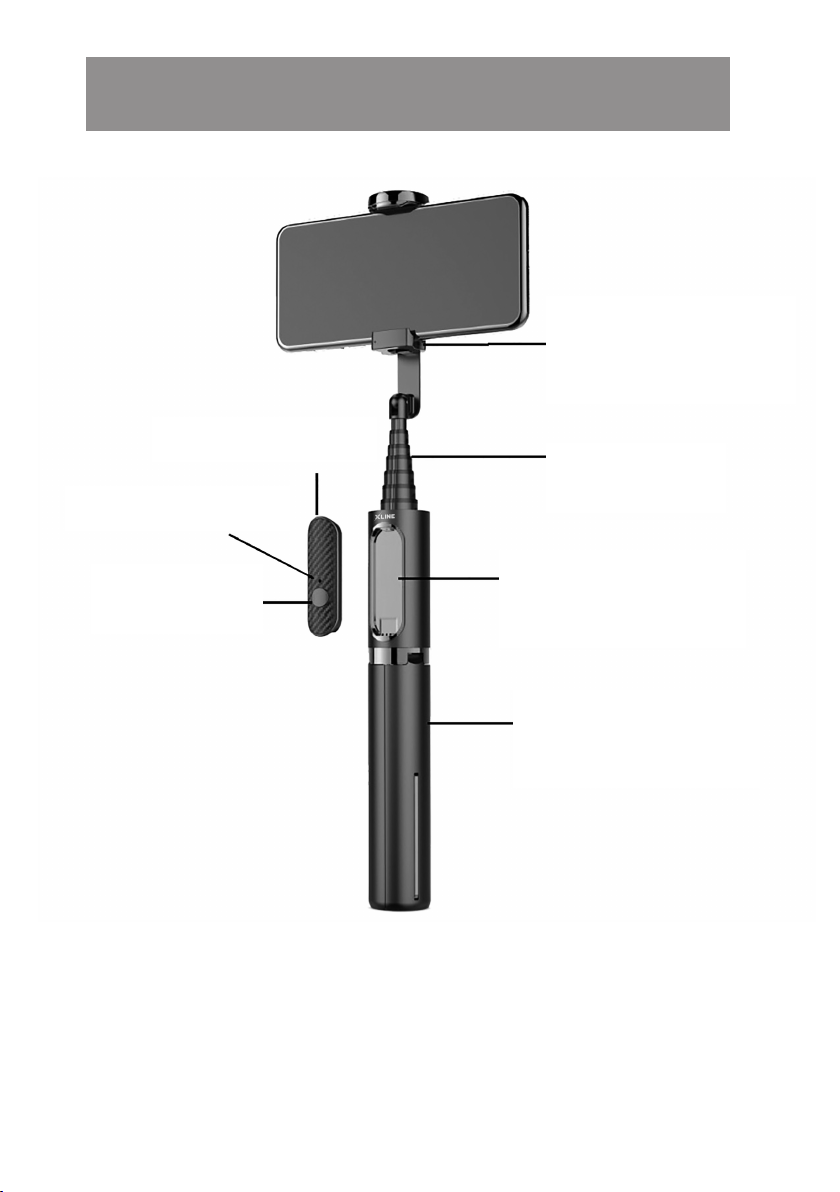
OPIS PRODUKTU
Obrotowy
uchwyt na
telefon
Pilot Bluetooth
Wskaźnik LED
Przycisk
wykonania
Rozsuwany
Teleskop
Uchwyt na pilot
Uchwyt/statyw
8
Page 9
PRZYGOTOWANIE DO UŻYCIA
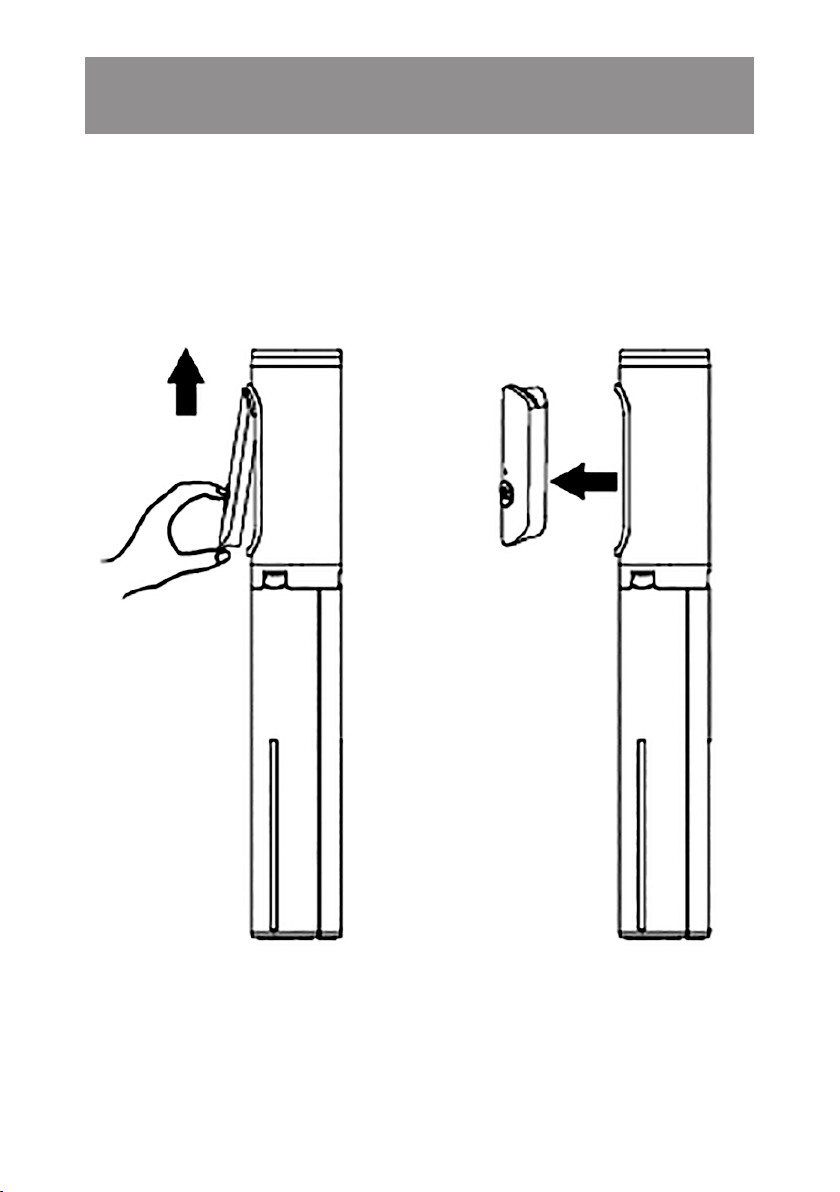
Wyjmowanie i mocowanie pilota w uchwycie
1.
Aby wyjąc pilot z uchwytu podważ jego dolną
krawędź i wyjmij:
Page 10
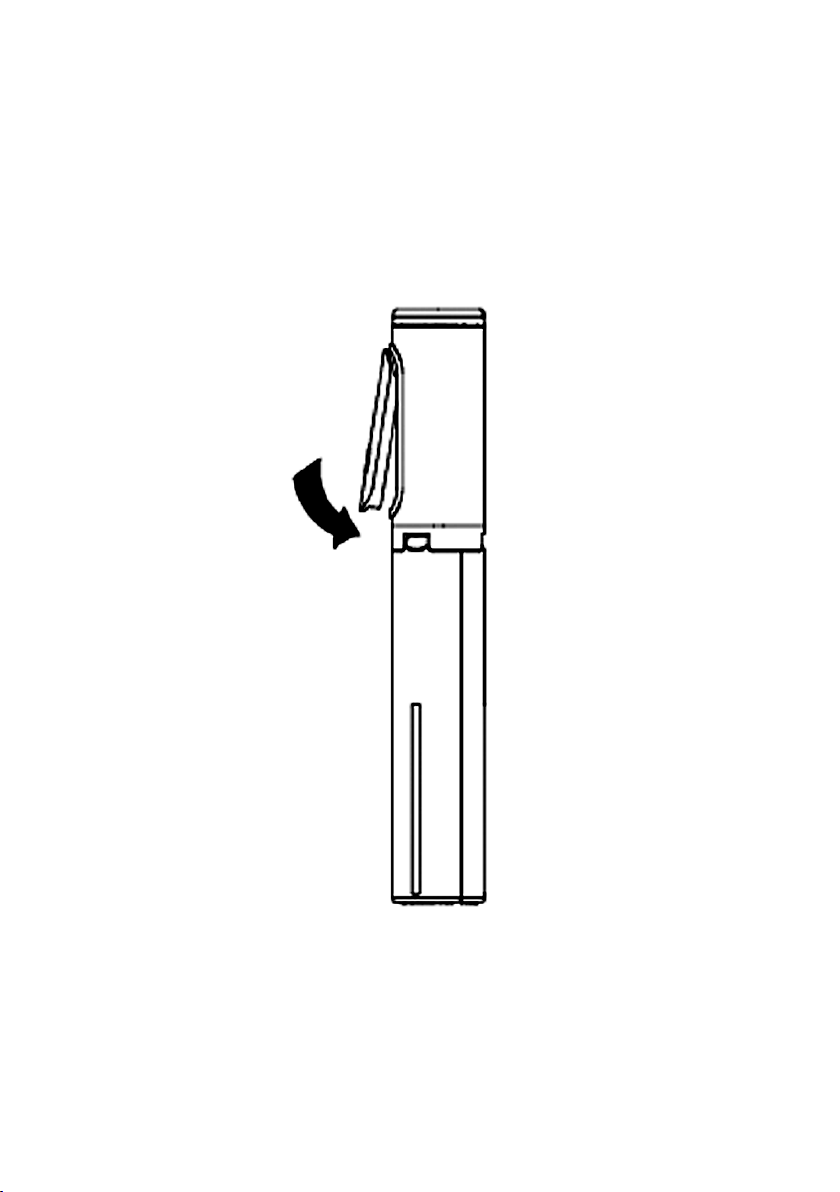
2.
Aby zamocować pilot w uchwycie umieść
najpierw jego górną część w uchwycie,
następnie dociśnij dolną część, aby
zablokować:
Rozkładanie i składanie uchwytu i statywu
1.
W celu rozłożenia teleskopu uchwytu chwyć
za uchwyt/statyw, drugą ręką chwyć za
górną część uchwytu na telefon:
10
Page 11
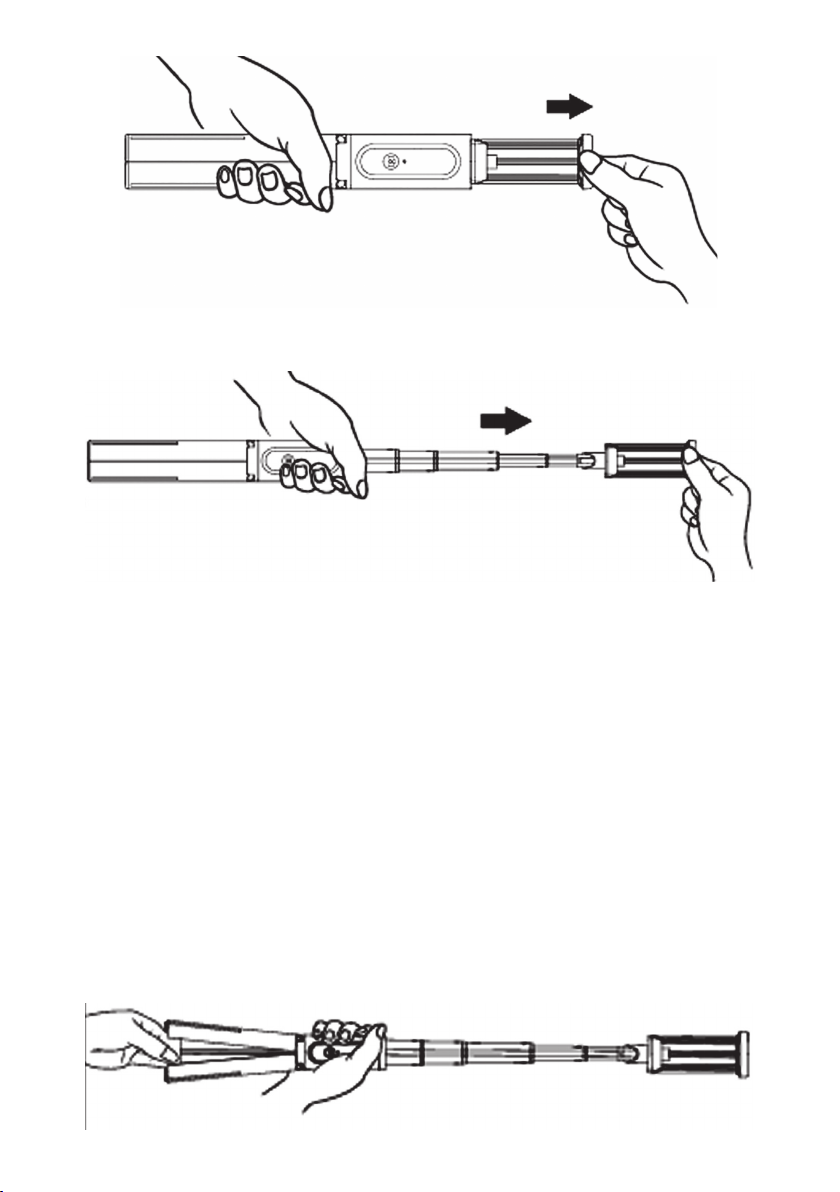
2. Rozłóż teleskop na odpowiednią długość:
Po całkowitym rozłożeniu teleskopu, gdy uchwyt/
statyw nie jest blokowany ręką, statyw powinien
rozłożyć się automatycznie.
3.
Rozłóż nogi statywu i postaw na równej
powierzchni.
UWAGA! NIE NALEŻY DOCISKAĆ STATYWU DO
PODŁOŻA NADMIERNĄ SIŁĄ, PONIEWAŻ MOŻE
TO PROWADZIĆ DO JEGO USZKODZENIA.
Page 12
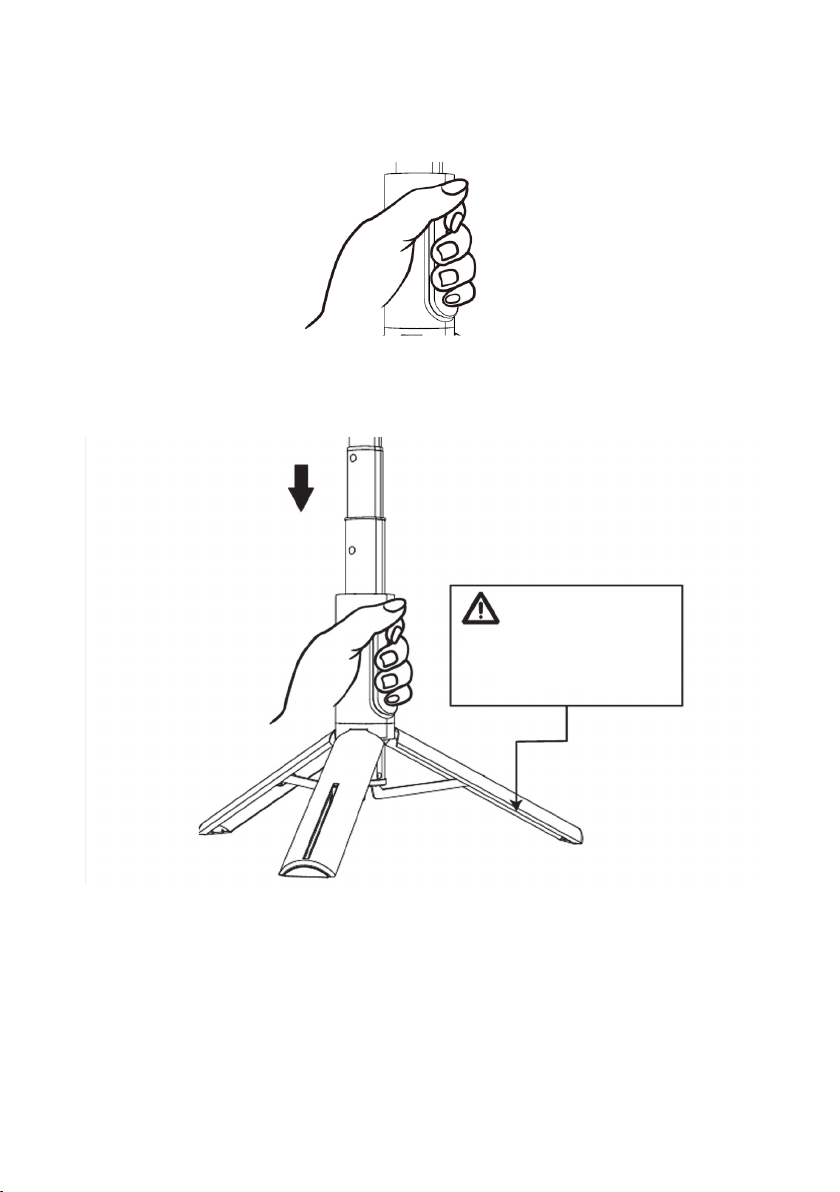
4. W celu szybkiego złożenia uchwytu chwyć
urządzenie w miejscu uchwytu na pilot:
i złóż teleskop, statyw złoży się automatycznie.
Nie wkładaj palców
pomiędzy nogi statywu
w trakcie jego składania.
Mocowanie telefonu w uchwycie
1.
Rozsuń uchwyt i zamocuj w nim telefon.
Upewnij się, że telefon jest stabilnie
zamocowany zanim zaczniesz wykonywać
zdjęcia.
12
Page 13
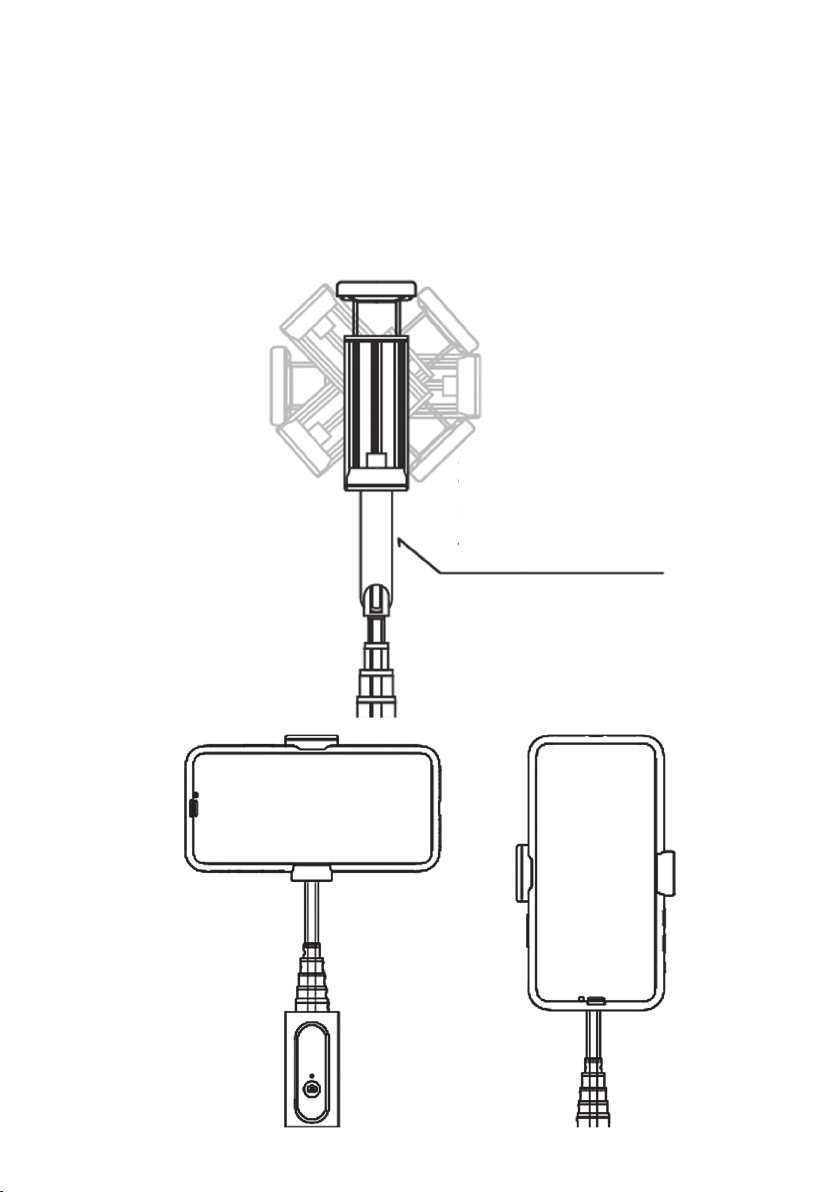
2.
Uchwyt na telefon jest obrotowy dzięki czemu
można mocować telefon poziomo i pionowo.
Przy pionowym mocowaniu telefonu należy
przesunąć go w uchwycie do góry:
Zachowaj odległość dla
pionowego mocowania
telefonu.
Page 14

POŁĄCZENIE BLUETOOTH
1. W celu sparowania urządzenia z telefonem,
wyjmij pilot z uchwytu, naciśnij i przytrzymaj
przycisk aż wskaźnik LED zacznie migać
w zielonym kolorze.
2.
Włącz funkcję Bluetooth w telefonie,
wyszukaj urządzenie „BSF800” i nawiąż
połączenie, wskaźnik zacznie świecić stale
w kolorze zielonym.
3.
Aby przerwać połączenie rozłącz parę lub
wyłącz Bluetooth w telefonie.
4.
Po ponownym uruchomieniu selfie, jeżeli
Bluetooth ostatniego sparowania telefonu
jest włączony, pilot automatycznie nawiąże
z nim połączenie. Jeżeli Bluetooth ostatniego
parowania jest wyłączony, wskaźnik będzie
migać w kolorze zielonym informując o
gotowości do nawiązania połączenia.
5.
W celu wyłączenia pilota naciśnij i przytrzymaj
przycisk, aż wskaźnik LED zgaśnie.
14
Page 15

WYKONYWANIE ZDJĘĆ
1.
Uruchom aparat fotograficzny w telefonie
i umieść telefon w uchwycie zgodnie z powyższą
instrukcją.
2. Sparuj pilot z telefonem za pomocą Bluetooth.
3.
Skieruj obiektyw telefonu w odpowiednią stronę
i naciśnij przycisk na pilocie aby wykonać
zdjęcie.
ŁADOWANIE AKUMULATORA
UWAGA! ZUŻYCIE AKUMULATORA PODCZAS
EKSPLOATACJI URZĄDZENIA JEST NATURALNYM
ZJAWISKIEM. ABY UTRZYMAĆ AKUMULATOR W
DOBREJ KONDYCJI I WYDŁUŻYĆ JEGO ŻYWOTNOŚĆ
NALEŻY STOSOWAĆ SIĘ DO PONIŻSZYCH ZALECEŃ:
1.
Gdy po włączeniu pilota Bluetooth wskaźnik
zacznie pulsować w kolorze czerwonym
należy niezwłocznie naładować akumulator
urządzenia.
2.
Podłącz wtyczkę przewodu Micro USB do portu
ładowania w pilocie a drugi koniec do ładowarki
Page 16

sieciowej. Wskaźnik zacznie świecić stale w
kolorze czerwonym i ładować akumulator.
3.
Po pełnym naładowaniu akumulatora wskaźnik
zacznie świecić w kolorze zielonym.
4.
Nie uruchamiaj urządzenia, jeśli akumulator
jest rozładowany.
5.
Akumulator ładuj zgodnie z danymi
o napięciu i prądzie ładowania podanymi na
tabliczce znamionowej.
6.
Przed dłuższym okresem przechowywania
naładuj akumulator do poziomu 50% oraz
doładowuj go co 3-4 miesiące. Jeśli w produkcie
nie ma możliwości ustalenia konkretnego
poziomu naładowania, rozładuj urządzenie, po
czym ładuj je przez połowę czasu potrzebnego
do pełnego naładowania. Pozostawienie
rozładowanego akumulatora na dłuższy okres
może skutkować jego uszkodzeniem lub utratą
jego właściwości.
7.
Przy regularnym użytkowaniu urządzenia unikaj
pełnego rozładowania akumulatora oraz zawsze
ładuj go do pełna.
8. Po naładowaniu akumulatora odłącz wtyczkę
16
Page 17

ładowarki od gniazda ładowania w
urządzeniu.
9.
Nie pozostawiaj urządzenia w trakcie
ładowania bez nadzoru.
10.
Używanie ładowarek oraz przewodów innych,
niż zalecane w instrukcji z urządzeniem,
może prowadzić do uszkodzenia produktu,
a nawet do eksplozji akumulatora.
11.
Ładowanie przeprowadzaj w miejscu
suchym, dobrze wentylowanym oraz nie
narażonym na bezpośrednie działanie
promieni słonecznych.
CZYSZCZENIE
1.
Przetrzyj uchwyt telefonu, teleskop oraz
statyw zwilżoną ściereczką.
2. Przechowuj urządzenie w czystym, suchym
i bezpiecznym miejscu.
Page 18
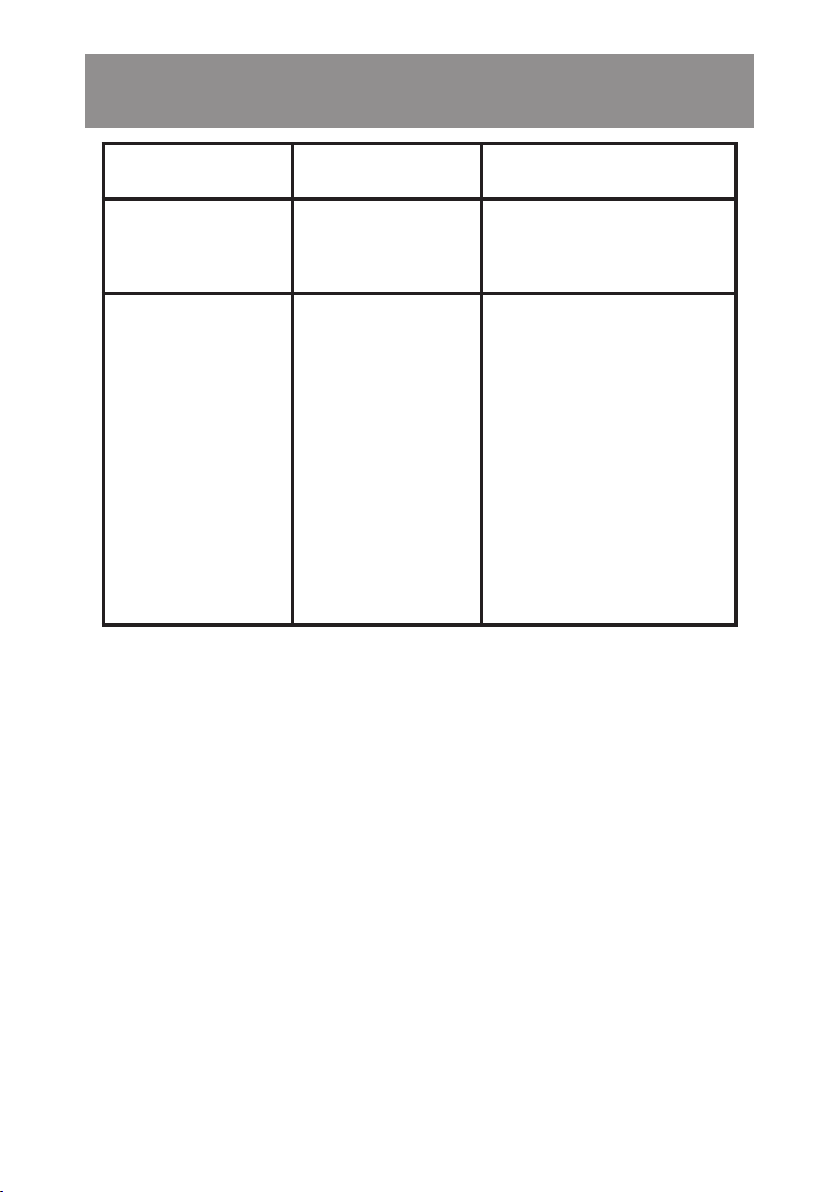
PROBLEMY I ROZWIĄZANIA
PROBLEM PRZYCZYNA ROZWIĄZANIE
Pilot nie
działa.
Pilot nie
łączy się
z telefonem.
Rozładowany
akumulator.
Pilot jest
aktualnie
połączony
z innym
urządzeniem.
Naładuj
akumulator pilota.
Rozłącz łączność
Bluetooth
z aktualnym
urządzeniem
i połącz z nowym
urządzeniem
zgodnie
z instrukcją.
DEKLARACJA
ART-DO M Sp. z o.o. niniejszym oświadcza, że
uchwyt selfie BSF800 jest zgodny z odnośnymi
wymaganiami unijnego prawodawstwa
harmonizacyjnego: dyrektywą 2014/53/UE i innym
unijnym prawodawstwem harmonizacyjnym. Pełny
tekst deklaracji zgodności UE jest dostępny pod
następującym adresem:
www.artdom.net.pl/deklaracja/BSF800/
Urządzenie zostało dopuszczone do użycia we
wszystkich krajach członkowskich UE.
18
Page 19

EKOLOGICZNA IPRZYJAZNA
DLA ŚRODOWISKA
UTYLIZACJA
Tourządzenie jest oznaczone, zgodnie zDyrektywą
Parlamentu Europejskiego iRady 2012/19/UE zdnia
4 lipca 2012 r. w sprawie zużytego sprzętu
elektrycznego ielektronicznego (WEEE) symbolem
przekreślonego kontenera naodpady:
Nie należy wyrzucać urządzeń oznaczonych tym
symbolem, razem zodpadami domowymi.
Urządzenie należy zwrócić dolokalnego punktu
przetwarzania iutylizacji odpadów lubskontaktować
się zwładzami miejskimi.
UTYLIZACJA ZUŻYTYCH AKUMULATORÓW
Zgodnie z dyrektywą UE 2006/66/EC z późn. zm.
o akumulatorach, produkt ten jest oznaczony
symbolem przekreślonego kosza na śmieci. Symbol
oznacza, że zastosowane w tym produkcie baterie
lub akumulatory nie powinny być wyrzucane razem
Page 20

z normalnymi odpadami z gospodarstw domowych.
Użytkownicy baterii i akumulatorów muszą korzystać
z dostępnej sieci odbioru tych elementów, która
umożliwia ich zwrot, recykling oraz utylizację.
Li-ion
MOŻESZ POMÓC CHRONIĆ ŚRODOWISKO!
Właściwe postępowanie zezużytym sprzętem
elektrycznym i elektronicznym przyczynia
się do uniknięcia szkodliwych dla zdrowia
ludzi i środowiska naturalnego konsekwencji,
wynikających z obecności składników
niebezpiecznych oraz niewłaściwego składowania
iprzetwarzania takiego sprzętu.
WARUNKI GWARANCJI
DOTYCZĄCE UCHWYTU SELFIE
1.
ART-DOM Sp. z o.o. z siedzibą w Łodzi (92-402) przy
ul. Zakładowej 90/92 Numer Krajowego Rejestru
Sądowego 0000354059 (Gwarant) gwarantuje,
że zakupione urządzenie jest wolne od wad
fizycznych. Gwarancja obejmuje tylko wady
20
Page 21

wynikające z przyczyn tkwiących w rzeczy sprzedanej
(wady fabryczne).
2.
Ujawniona wada zostanie usunięta na koszt Gwaranta
w ciągu 14 dni od daty zgłoszenia uszkodzenia do
serwisu autoryzowanego lub punktu sprzedaży.
3.
W wyjątkowych przypadkach, np. konieczności
sprowadzenia części zamiennych od producenta,
termin naprawy może zostać wydłużony do 30 dni.
4.
Okres gwarancji dla użytkownika wynosi 24 miesiące
od daty wydania towaru.
5.
Towar przeznaczony jest do używania wyłącznie w
warunkach indywidualnego gospodarstwa domowego.
6. Gwarancja nie obejmuje:
a. uszkodzeń powstałych na skutek używania
urządzenia niezgodnie z instrukcją obsługi,
b. uszkodzeń mechanicznych, chemicznych lub
termicznych,
c. napraw i modyfikacji dokonanych przez
firmy lub osoby nieposiadające autoryzacji
producenta,
d. części z natury łatwo zużywalnych lub
materiałów eksploatacyjnych takich jak:
baterie, żarówki, bezpieczniki, filtry, pokrętła,
półki, akcesoria,
e. instalacji, konserwacji, przeglądów,
Page 22

czyszczenia, odblokowania, usunięcia
zanieczyszczeń oraz instruktażu.
7.
O sposobie usunięcia wady decyduje Gwarant.
Usunięcie potwierdzonej wady urządzenia nastąpi
poprzez wykonanie naprawy gwarancyjnej lub
wymianę urządzenia. Gwarant może dokonać
naprawy, gdy kupujący żąda wymiany lub
Gwarant może dokonać wymiany, gdy kupujący
żąda naprawy, jeżeli doprowadzenie do zgodności
towaru (urządzenia) zgodnie zudzieloną gwarancją
w sposób wybrany przez kupującego jest
niemożliwe albo wymagałoby nadmiernych kosztów
dla Gwaranta. W szczególnie uzasadnionych
wypadkach, jeżeli naprawa iwymiana są niemożliwe
lub wymagałyby nadmiernych kosztów dla
Gwaranta może on odmówić doprowadzenia towaru
do zgodności zudzieloną gwarancją izaproponować
inny sposób załatwienia reklamacji z gwarancji.
8.
Wymiany towaru dokonuje punkt sprzedaży,
wktórym towar został zakupiony (wymiana
lub zwrot gotówki) lub autoryzowany punkt
serwisowy, jeżeli dysponuje taką możliwością
(wymiana). Zwracane urządzenie musi być
kompletne, bez uszkodzeń mechanicznych.
22
Page 23

Niespełnienie tych warunków może spowodować
nieuznanie gwarancji.
9.
Wprzypadku braku zgodności towaru zumową
sprzedaży, kupującemu z mocy prawa
przysługują środki ochrony prawnej ze strony
ina koszt sprzedawcy, agwarancja nie ma
wpływu na te środki ochrony prawnej.
10. Niniejsza gwarancja obowiązuje na terytorium
Polski.
11.
Warunkiem dokonania naprawy lub
wymiany urządzenia w ramach gwarancji
jest przedstawienie dowodu zakupu oraz
użytkowanie towaru zgodnie z informacjami
zawartymi w instrukcji obsługi.
UWAGA!
Uszkodzenie lub usunięcie tabliczki znamionowej
z urządzenia może spowodować nieuznanie gwarancji.
Page 24

Cały czas udoskonalamy nasze produkty, dlatego mogą się one nieznacznie
różnić od zdjęć przedstawionych na opakowaniu oraz w instrukcji obsługi.
Przed przystąpieniem do użytkowania urządzenia przeczytaj instrukcję obsługi.
ART-DOM Sp. z o.o., ul. Zakładowa 90/92, 92-402 Łódź. Numer Krajowego Rejestru
Sądowego 0000354059.
v. 1
24
Page 25

SAFETY AND HAZARD
CONDITIONS
1. The device should not be placed near heat
sources, e.g. heaters, microwave ovens,
ovens.
2.
Do not open the device and change its design
on your own, as this may damage the device
and void the warranty.
3.
Do not throw the device in fire. This may
cause an explosion or fire.
4.
This product may only be operated by
children 8 or more years old, mentally and/
or physically deficient persons and persons
without knowledge of or experience in
operation of this appliance type if supervised
or instructed in safe operation, with clear
understanding of all related risks. Children
should not play with the device. Children
without supervision should not carry out
the cleaning and maintenance of the device.
5. Do not immerse the device in water nor in
other liquids.
6. Do not start the device if it is damaged. The
device must be repaired by the service or a
Page 26

1. person authorized to do so.
2.
The product may only be repaired
and its battery replaced by a qualified
manufacturer’s service or an authorized
service centre.
3.
Do not expose the device to harmful
atmospheric conditions such as excessive
sunlight and moisture.
4. Protect the device from falls and shocks.
5.
The device is intended for domestic use only,
and not for commercial use.
6. The battery should be charged in a dry and
well-ventilated place, where the temperature
remains in the range of 15-25°C.
7. Do not switch on a damaged device.
8.
Do not attempt to charge a damaged battery.
9. Do not throw the battery into fire.
10.
If the battery is damaged, discontinue its use
and avoid contact with skin or eyes. In case
of such contact, wash the area with water
and seek medical assistance.
11.
Do not turn on the device in places where it is
forbidden to use electronic devices, or when
it may cause interference or other hazards.
12.
Do not leave the device unattended while
charging.
26
Page 27

13.
Do not damage, puncture or open the battery.
14.
After use, do not dispose of together with
normal household waste. The product and
its parts should be handed over to a separate
waste collection point in accordance with
the law..
INTRODUCTION
Thank you for the trust you have placed in us
when you purchased your XLINE device.
We are convinced that this high quality device
will provide you with a lot of joy and satisfaction
during its use.
PLEASE CAREFULLY READ AND FOLLOW THE
OPERATING MANUAL!
This device is intended for domestic or similar,
non-commercial use.
The manufacturer will not be held liable
for damages resulting from improper or
non-compliant use.
27
Page 28
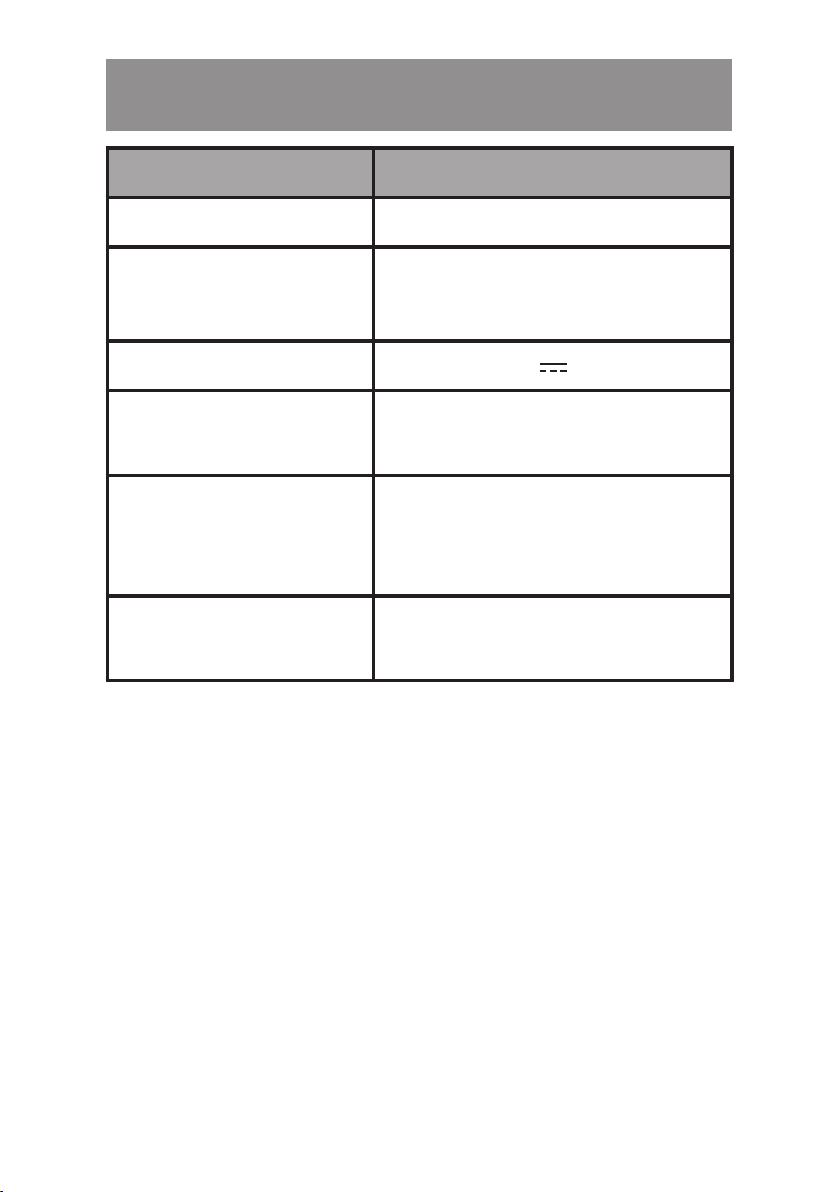
TECHNICAL DATA
MODEL BSF
Communication Bluetooth
Length range 22-83 cm ±3mm on a tripod
20-80 cm ±3mm on a stick
Input 5V 2A
Maximum Bluetooth
transmission power
Bluetooth
transmission
frequency
Bluetooth frequency
range
-1 dBm ÷ 1 dBm
2.4 GHz
2402-2480 MHz
28
Page 29
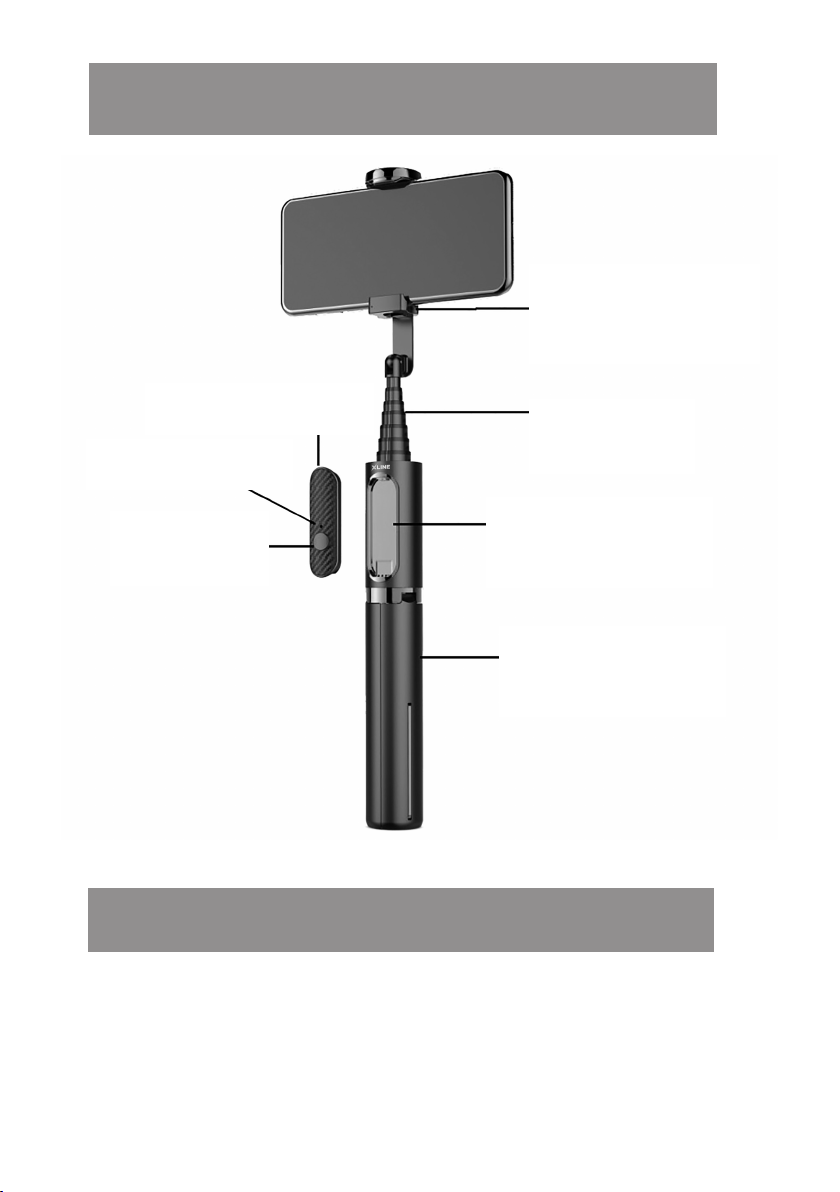
PRODUCT DESCRIPTION
Rotating Phone
Holder
Bluetooth remote
Indicator LED
Execute
button
PREPARING FOR USE
Extendable
Telescope
Remote control
holder
Handle/Tripod
Removing and attaching the remote
control in the holder
1. To remove the remote control from the
29
Page 30
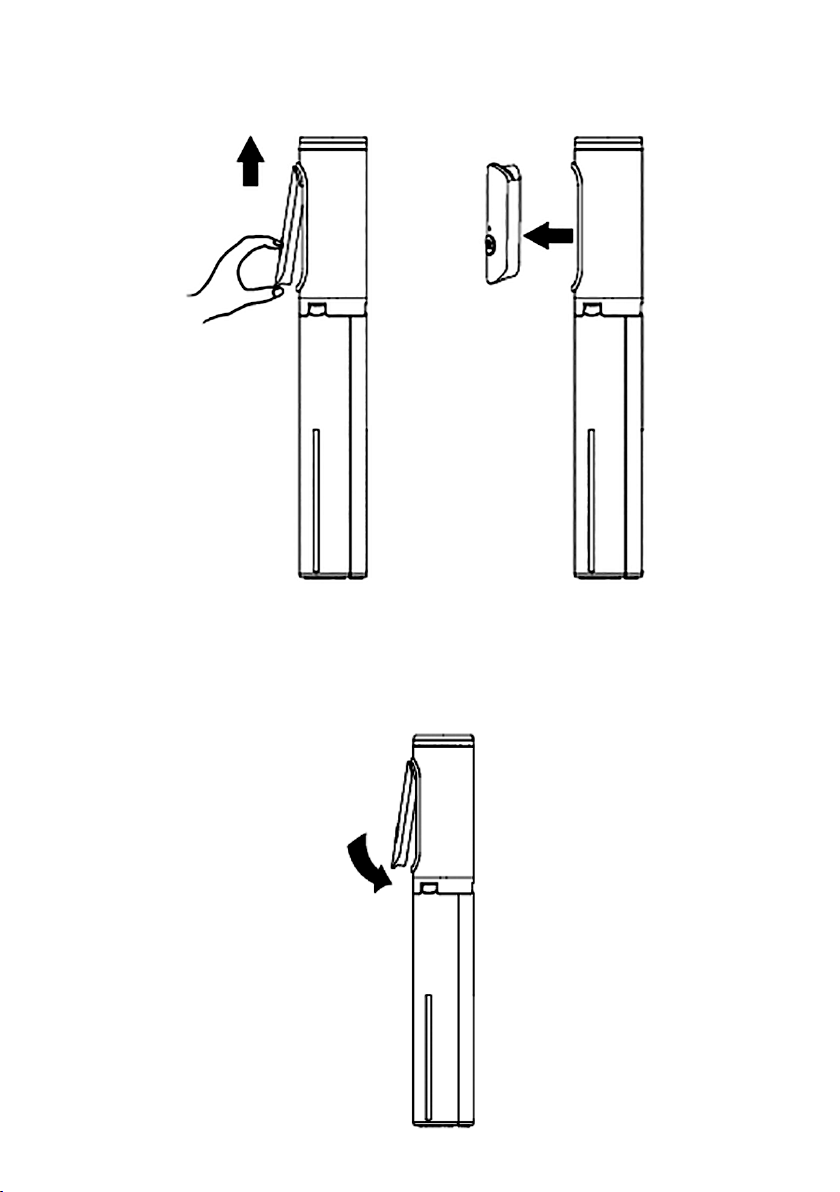
1. holder, pry up its lower edge and remove:
2.
To attach the remote control in the holder,
first place the upper part in the holder, then
press the lower part to lock:
30
Page 31
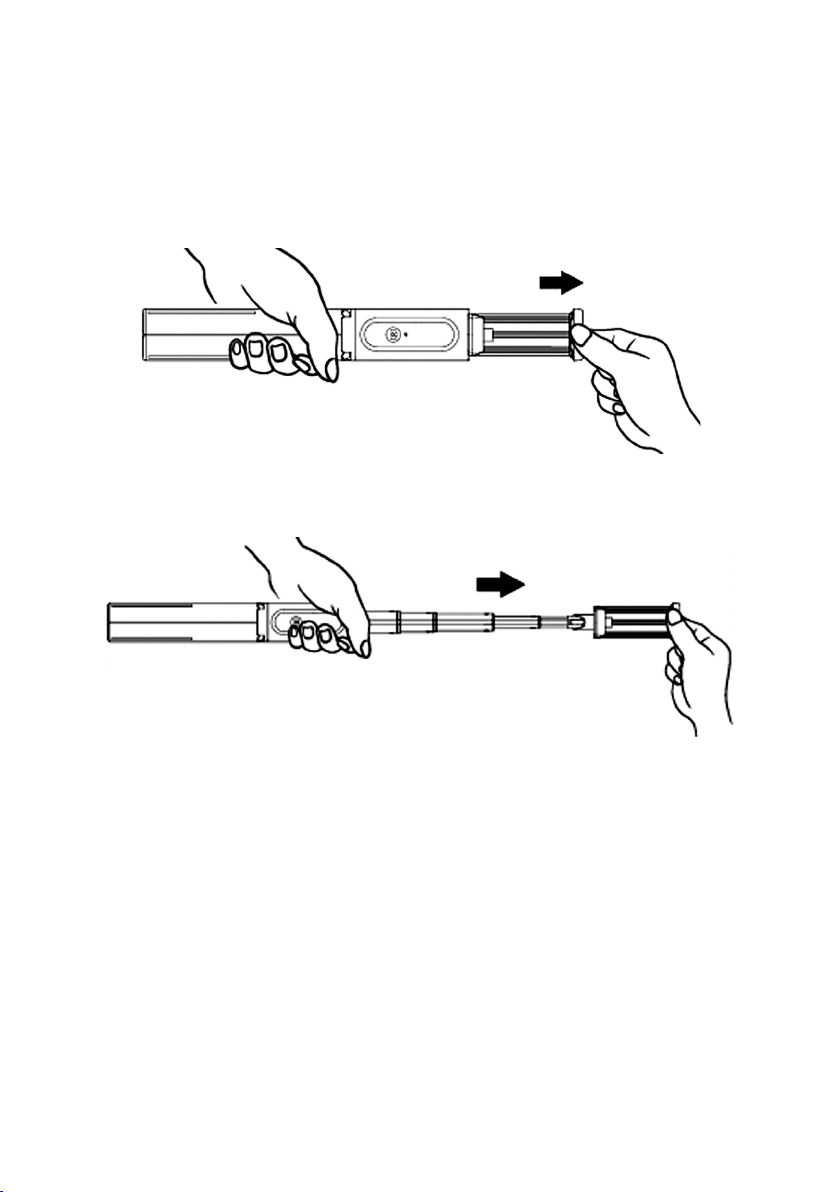
Unfolding and folding the handle and tripod
1.
To unfold the handle telescope, grasp the
handle/tripod, with the other hand grasp
the top of the phone holder:
2.
Spread the telescope to the appropriate
length:
When the telescope is fully unfolded, when the
handle/ tripod is not locked by hand, the tripod
will unfold automatically.
3.
Spread the tripod legs and place them on
a level surface.
CAUTION! DO NOT PRESS THE TRIPOD AGAINST
THE GROUND WITH EXCESSIVE FORCE, AS THIS
MAY DAMAGE IT.
31
Page 32
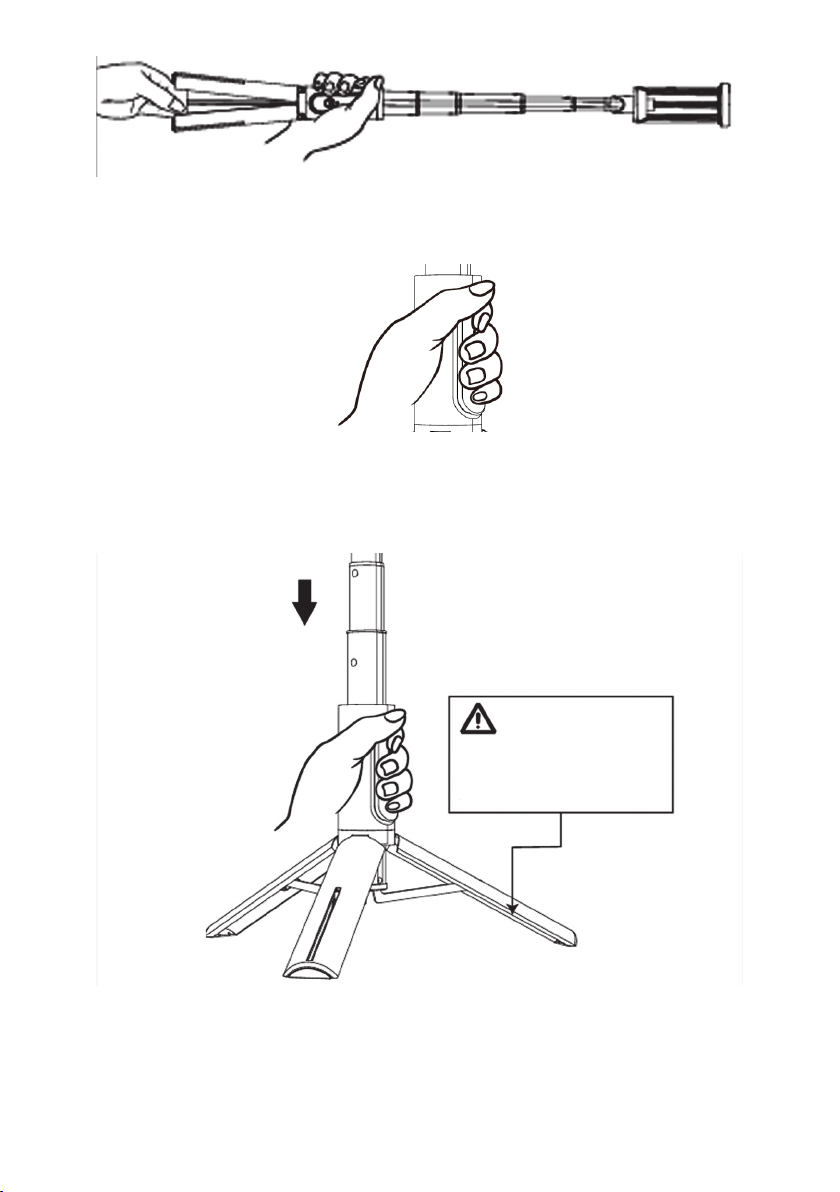
1. To quickly fold the handle, grasp the device
in place of the remote control holder:
and fold the telescope, the tripod will fold
automatically.
Do not insert fingers
between tripod legs.
Mounting the phone in the holder
1. Open the handle and fix the phone in it. Make
sure your phone is securely attached before
32
Page 33
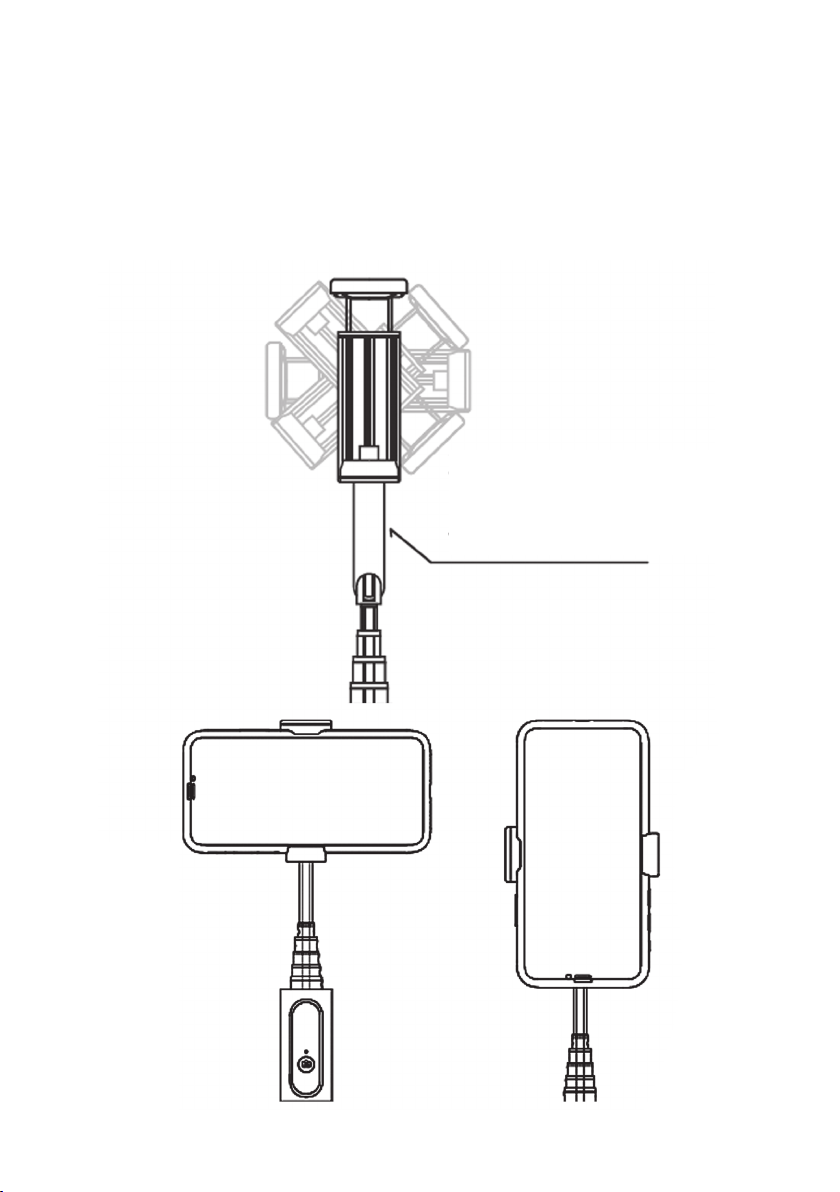
taking photos.
2.
The phone holder is rotatable so you can
mount your phone horizontally or vertically.
When mounting the phone vertically, move
it in the holder up:
Keep the distance for the
vertical mounting of the
phone.
33
Page 34

BLUETOOTH CONNECTION
1.
To pair the device with the phone, remove
the remote control from the holder, press
and hold the button until the LED indicator
flashes green.
2.
Turn on the Bluetooth function on the phone,
search for the „BSF800” device and establish
connection, the LED will start to glow solid
green.
3.
To disconnect, unpair or turn o the Bluetooth
on your phone.
4. After restarting the selfie, if the Bluetooth of
the last pairing of the phone is enabled, the
remote control will automatically connect to
it. If the Bluetooth of the last pairing is turned
o, the indicator will flash green to indicate
To turn o the remote control, press and hold
the button until the led indicator goes o.
5.
To turn o the remote control, press and hold
the button until the led indicator goes o.
34
Page 35

TAKING PHOTOS
1. Start the camera on your phone and place the
phone in the holder according to the above
instructions.
2.
Pair the remote with your phone using
Bluetooth
3.
Point the phone lens in the right direction
and press the button on the remote control
to take a photo.
CHARGING THE BATTERY
CAUTION! BATTERY DETERIORATION DURING
OPERATION OF THE DEVICE IS A NATURAL
PHENOMENON. TO KEEP THE BATTERY IN GOOD
CONDITION AND EXTEND ITS LIFE, PLEASE
FOLLOW THESE GUIDELINES:
1. When the indicator starts flashing red after
turning on the Bluetooth remote, charge the
battery of the device immediately.
2.
Connect the Micro USB cable plug to charging
port in the remote control and the other end
35
Page 36

1.
to the mains charger. The indicator will start
to glow solid red and charge the battery.
2.
When the battery is fully charged, the
indicator will turn green.
3.
Do not start the device if the battery is
discharged.
4. Charge the battery according to the voltage
and charging current data on the rating plate.
5. Before a longer storage period, charge the
battery to 50% and recharge it every 3-4
months. If it is not possible to determine
a specific charge level in the product,
discharge the device, then charge it for half
the time required to fully charge it. Leaving
a discharged battery for a prolonged period
of time may result in its damage or loss of
its properties.
6. When using the device regularly, avoid fully
discharging the battery and always charge
it fully.
7. Once the battery is charged, disconnect the
charger plug from the charging socket on
the device.
36
Page 37

8.
Do not leave the device unattended while
charging.
9.
Using chargers and cables other than those
recommended in the device manual with
may lead to damage to the product and even
an explosion of the battery.
10. Charge in a dry, well-ventilated place that is
not exposed to direct sunlight.
CLEANING
1.
Wipe the phone holder, telescope and tripod
with a damp cloth.
2. Store the device in a clean, dry place.
TROUBLESHOOTING
PROBLEM CAUSE SOLUTION
The remote
does not
work.
Discharged
battery.
37
Charge the remote
control battery.
Page 38
The remote
The remote
Disconnect
does not
connect
with the
phone.
is currently
connected to
another
device.
Bluetooth
with the current
device
and connect to
the new device
according to
the manual.
DECLARATION
ART-DOM Sp. z o.o. hereby declares that the
BSF800 selfie holder complies with the relevant
requirements of the Union harmonisation
legislation: Directive 2014/53/EU and other Union
harmonisation legislation. The full text of the
EU declaration of conformity is available at the
following address:
www.artdom.net.pl/deklaracja/BSF800/
The device has been approved for use in all
EU member states.
38
Page 39

ECOFRIENDLY AND
ENVIRONMENTALLY
FRIENDLY DISPOSAL
This device is marked, in accordance with
Directive 2012/19/EU of the European Parliament
and of the Council of 4 July 2012 on waste
electrical and electronic equipment (WEEE),
with the symbol of a crossed-out waste container:
Do not dispose of the device marked with this
symbol together with household waste.
For disposal return the device to your local waste
treatment and disposal facility or contact your
local authorities.
DISPOSAL OF WASTE BATTERIES
In accordance with the EU Directive 2006/66/
EC, as amended, on batteries, this product is
marked with the symbol of a crossed out waste
bin. The symbol indicates that the batteries or
rechargeable batteries used in this product
39
Page 40
should not be disposed of together with normal
household waste. Users of batteries and
rechargeable batteries must use the available
collection network for these elements, which
allows them to be returned, recycled and
disposed of.
Li-ion
YOU CAN HELP PROTECT THE ENVIRONMENT!
Proper handling of waste electrical and
electronic equipment contributes to avoiding
harmful consequences for human health and
the environment resulting from the presence of
hazardous components and improper storage
and processing of such equipment.
WARRANTY CONDITIONS FOR
THE SELFIE HOLDER
1. ART-DOM Sp. z o.o. with its registered oice
in Łódź (92-402) at ul. Zakładowa 90/92
National Court Register Number 0000354059
(Guarantor) warrants that the purchased
40
Page 41

1.
defects. The warranty covers only defects
resulting from the causes inherent in the item sold
(manufacturing defects).
2.
A disclosed defect will be removed at the
Guarantor’s expense within 14 days from the date
of reporting the damage to the authorized service
or point of sale.
3. In exceptional cases, e.g. the need to import spare
parts from their manufacturer, the repair period
may be extended up to 30 days.
4.
The warranty period for the user is 24 months from
the date of delivery of the goods.
5.
The goods are intended for use only in the conditions
of an individual household.
6. The present warranty does not cover:
a. damage caused by using the device in a
manner inconsistent with the user manual,
b. mechanical, chemical or thermal damage,
c. repairs and modifications made by
companies or persons that were not
authorized to do so by the manufacturer,
d. d. parts that are inherently easy to wear or
consumables such as: batteries, bulbs, fuses,
filters, knobs, shelves, accessories,
e. installation, maintenance, inspection,
41
Page 42

a. cleaning, unlocking, removal of
contaminants and instruction.
7.
The Guarantor will select the mode of defect
removal at its own discretion. Removal of a
confirmed defect of the device will take place
through warranty repair or replacement of the
device. The Guarantor may perform repairs
when the buyer requests replacement or the
Guarantor may perform replacements when
the buyer requests repair, if bringing the goods
(device) into conformity in accordance with the
granted warranty in the manner selected by the
buyer is impossible or would require excessive
costs at the part of Guarantor. In particularly
justified cases, if both repair and replacement
are impossible or would require excessive costs
for the Guarantor, the Guarantor may refuse to
bring the goods into compliance with the granted
warranty and propose another way to settle the
warranty claim.
8.
The exchange of goods is carried out at
the point of sale, at which the goods were
purchased (replacement or refund) or an
authorized service point, if it oers such
42
Page 43

service (replacement). The returned device
must be complete, without mechanical
damage. Failure to comply with these
conditions may result in failure to accept
the warranty claim
9.
In the event of non-compliance of the goods
with the sales contract, the buyer is entitled
by law to legal protection measures on the
part and at the expense of the seller, and
the warranty does not aect these legal
protection measures.
10. The warranty is valid in Poland.
11.
The condition for the warranty repair or
replacement of the device is the presentation
of proof of purchase and the use of the goods
in accordance with the information contained
in the user manual.
CAUTION!
Damage or removal of the rating plate from the device
may result in warranty being deemed void.
43
Page 44

We are constantly improving our products, so they may dier slightly from the images
presented on the packaging and in the user manual. Pleas read the user manual before
operating the device.
ART-DOM Sp. z o.o., ul. Zakładowa 90/92, 92-402 Łódź. National Court Register
number 0000354059.
44
v. 2
 Loading...