

Page 1
Mi Sphere Camera
Overview
Overview
Overview
Introduction to camera functions
1. Power on / o
Power on: perform a short press on the «Power»/«Mode» button, at the same
time photo and video indicators light up; when the current mode indicator lights
up, the camera is turned on.
Shutdown: hold down the «Power»/«Mode» button; when the current mode
indicator light o, the camera is turned o.
2. Switching between photo and video modes
By short pressing the «Power»/«Mode» button, you can switch between the photo
and video modes (the video mode is initially set).
3. Video shooting
In video recording mode, when the indicator of this mode constantly glows in
Introduction to camera functions
1. Power on / o
Power on: perform a short press on the «Power»/«Mode» button, at the same
time photo and video indicators light up; when the current mode indicator lights
up, the camera is turned on.
Shutdown: hold down the «Power»/«Mode» button; when the current mode
indicator light o, the camera is turned o.
2. Switching between photo and video modes
By short pressing the «Power»/«Mode» button, you can switch between the photo
and video modes (the video mode is initially set).
3. Video shooting
In video recording mode, when the indicator of this mode constantly glows in
blue, press the Shutter/Conrm button; the video recording indicator (red color)
will ash slowly for a short time to start the video recording. Pressing the
Shutter/Conrm button again will stop the video recording, the video recording
indicator will turn blue and blink rapidly 3 times.
4. Photo by second
In still picture mode, hold down Shutter/Conrm to start taking photos by second,
the photography indicator will ash slowly (in red), after 10 seconds, the camera
will automatically stop shooting. A time to take a photo by second can be changed
via the mobile application.
5. Photographing
In the photography mode, the indicator of this mode is constantly glowing in
blue. After a short press on the Shutter/Conrm button, the photography indicator
blinks 1 time.
Manual utilizare
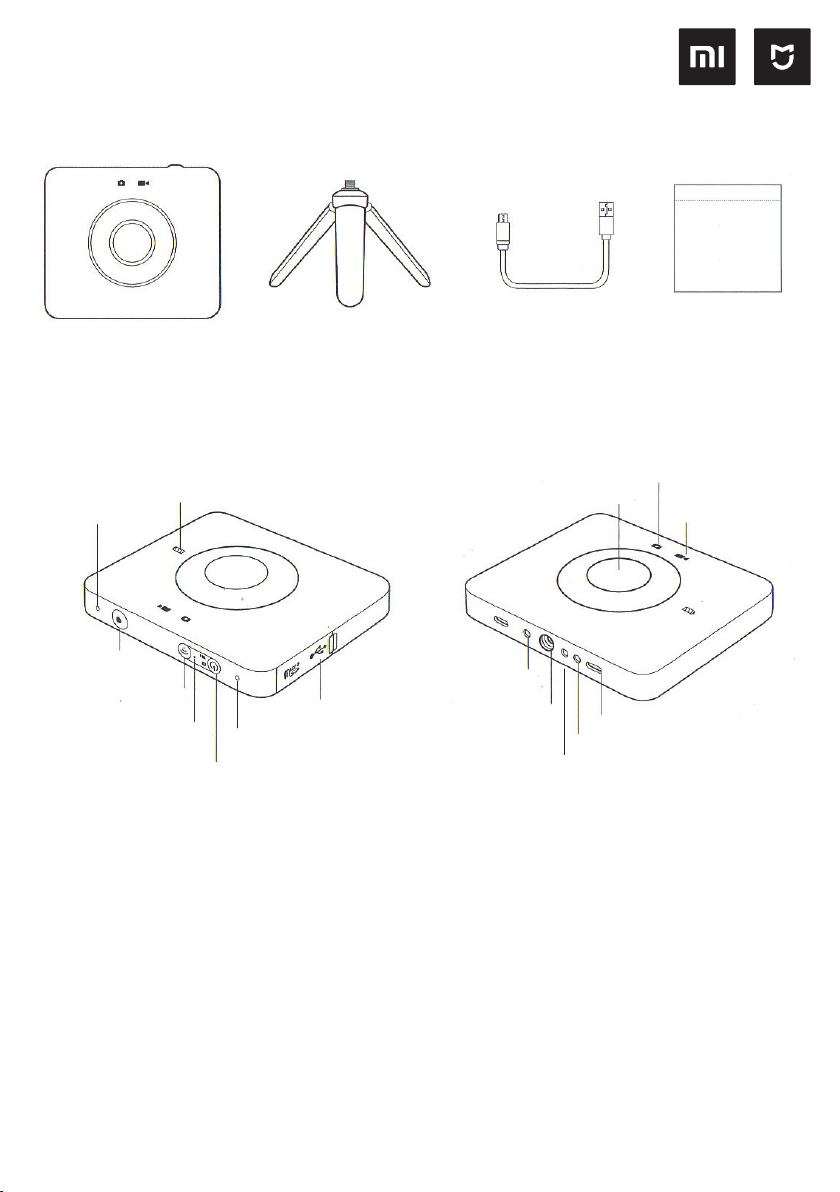
Pachetul contine: camera, cablu date, tripod, husa protectie, manual utilizare.
Beneciar: Xiaomi Communication Technology Co., LTD.
Producator: Beijing Fengjing Technology Co., LTD (Xiaomi Eco-chain Enterprise)
Address: Beijing City, Shijingshan District, Shixingda Street 30, Building 17, 4th Floor, 80
Suport online pe: www.mi.com/service
Mai multe informatii pe : www.mi.com
Descriere produs
Indicator nivel
incarcare
Microfon
360º camera
Manual
utilizare
Indicator
fotograere
Indicator video
Buton Foto /
Conrmare
Buton Wi-Fi
Indicator Wi-Fi
Buton «Start»/«Meniu»
Functii camera
1. Buton Start / Stop
Start: apasati scurt butonul «Start»/«Meniu», in acelasi
timp indicatoarele foto & video vor lumina si camera va
porni.
Stop: apasati lung butonul «Start»/«Meniu»
2. Comutare intre modurile foto si video
Prin apasarea scurta a butonului «Start»/«Meniu» se
poate comuta intre modurile foto si video (modul video
este setat initial)
3. Inregistrare Video
In modul inregistrare video, cand indicatorul dedicat
lumineaza constant albastru, apasati scurt butonul
«Conrmare».
Lumina rosie intermitenta a led-ului indica inceperea
inregistrarii video.
Apasati iar scurt butonul «Conrmare» pentru a opri
inregistrarea video.
Microfon
Port USB
Difuzor
Filet xare
tripod
Decupaj blocare tripod
Port micro USB
Led-ul indicator va lumina de trei ori intermitent albastru
/ rosu
4. Fotograerea din secunda in secunda
In modul foto, tineti apasat butonul «Conrmare»
pentru a porni fotograerea la 1 sec. Indicatorul foto va
lumina rosu intermitent si dupa 10 sec. de inactivitate
camera se va opri automat.
Modul foto la secunda poate controlat si cu ajutorul
aplicatiei mobile.
5. Fotograerea
In modul foto, led-ul indicator lumineaza constant
albastru. Dupa apasarea scurta a butonului Foto /
Conrmare, led-ul indicator va lumina 1 sec. pentru
ecare fotograe excutata.
6. Resetare parola Wi-Fi
Tineti apasat butonul Wi-Fi timp de 5 sec pentru a
reseta parola Wi-Fi
Page 2
7. Indicator baterie
Connection to cameraIntroduction to camera functions
1. Download and install the MiJia Panorama Camera mobile application;
2. Briey press the «Wi-Fi» button to turn on the Wi-Fi camera module, the Wi-Fi
indicator will glow blue.
3. Open the MiJia Panorama Camera mobile application, click on the «Camera»
button at the bottom of the screen, make connections according to the
instructions;
4. The initial password of the camera: 12345678.
Care of the camera
1. Extreme weather conditions can lead to a temporary decrease in the
functionality of the camera or activate the automatic shutdown function.
2. Avoid using the camera in environments with sudden changes in temperature
or humidity, condensation may form on the surface or inside the camera, if you
notice a condensation, immediately open the memory card slot cover to exit the
water vapor.
3. Using the camera, do not place it with the lens facing down on a rough surface
(for example, on the ground) to avoid scratching the lens.
Non-warranty cases
1. Unauthorized repairs, misuse, shocks, careless use, violation of the device’s
operating rules, liquid ingress, accidents, upgrades, improper use of optional
accessories not included with the device, as well as tearing o, spoiling or forging
the label, marking the protection against Forgery;
2. Malfunctions, that occurred after the end of the warranty period;
3. Damage, caused by force majeure circumstances;
4. Malfunctions, that not listed in the «Characteristic malfunction table»;
5. Malfunctions, caused by user, which led to damage to the elements, specied
in the «Table of Characteristic Faults».
Table of faults
1. Malfunction of switching on, o;
2. Malfunctions, associated with the image / sound;
3. Malfunctions, associated with indicators;
4. Problems with Wi-Fi / Bluetooth;
5. Malfunctions, associated with the buttons;
a) Cand incarcatorul este oprit:
Atentionare baterie descarcata: led-ul indicator va
lumina rosu intermitent.
Atentionare reincarcare baterie: led-ul indicator este
stins.
b) Cand incarcatorul este conectat:
In timpul incarcarii led-ul indicator va lumina rosu.
Incarcare completa: led-ul indicator lumineaza albastru.
8. Modul asteptare ( standby )
Daca timp de 120 sec camera nu primeste comenzi, ea
va intra automat in modul asteptare, iar led-ul indicator
va lumina albastru.
Apasati orice buton pentru a scoate camera din modul
asteptare.
9. Modul inregistrare video cu ajutorul telecomenzii
Folosind telecomanda (accesoriu vandut separat),
puteti comanda pornirea/oprirea inregistrarii video de la
o distanta de maxim 30m de camera.
Descarcare si instalare aplicatie
mobila
Accesati magazinul de aplicatii
dedicat sistemului de operare al
telefonului inteligent. Descarcati:
«MiJia Panorama Camera», sau
scanati codul QR alaturat.
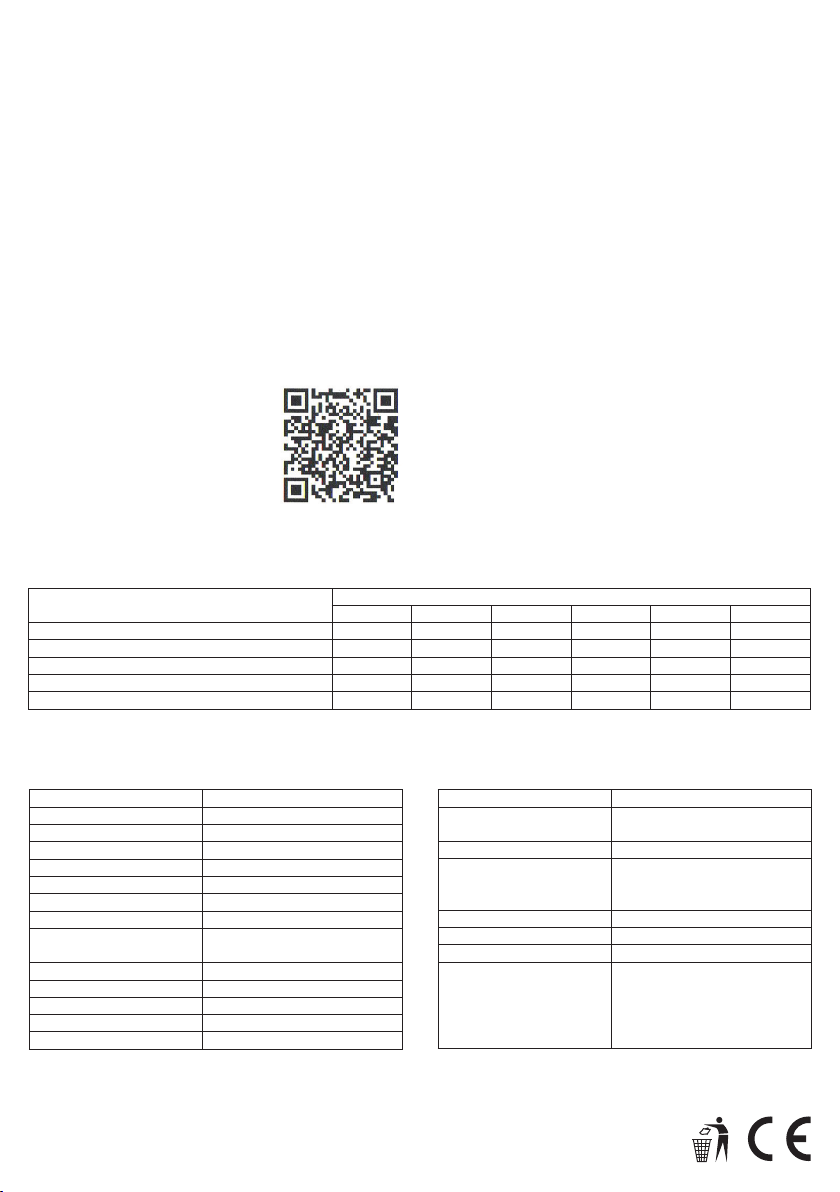
Continut substante toxice si periculoase
Nume Component
Carcasa
PCBA
Lentile
Senzor sunet si microfon
Suruburi, Garnituri, Alte componente mici
Acest tabel respecta prevederile standardului SJ/T11364 (O = nu contine substante toxice/periculoase).
(Pb) (Hg) (Cd) (CRVI) (PBB) (PBDE)
O O O O O O
O O O O O O
O O O O O O
O O O O O O
O O O O O O
Fisa tehnica
Denumire Produs Mi Sfere Camera
Versiune: QJTZ01FJ
Dimensiuni: 78,00 x 67.40 x 24,03 mm
Greutate: 108.3 q
Curent intrare: 5V = 2A
Consum: 3,8 W
Temperatura lucru: -10— 45°C
Temperatura stocare: -20 — 45°C
Umiditate maxim
admisa la stocare:
Distanta Focala 1,43
Deschidere: F2.0
Baterie: 1600 mAh
Protectie: IP67
Rezolutie foto max: 6912x3456
10% — 90%
Conectarea la camera
Dupa descarcarea aplicatiei mobile MiJia Panorama
Camera;
1. Apasati scurt butonul «Wi-Fi» pentru a porni
conexiunea Wi-Fi (led-ul indicator va lumina albastru)
2. Porniti aplicatia mobila MiJia Panorama Camera,
atingeti butonul «Camera» situat in partea de jos a
ecranului. (continuati setarile conform instructiunilor
de pe ecran)
3. Parola initila este: 12345678
Important
1. In conditii extreme de utilizare camera se poate
inchide temporar (pentru protectia componentelor
electronice & baterie).
2. Evitati folosirea camerei in conditii de schimbare
brusca a temperaturii si/sau umiditatii (se poate
forma condens pe interiorul carcasei / lentilei)
Daca sesizati condens, deschideti imediat capacul
de la cardul de memorie.
3. Evitati plasarea camerei pe suprafete rugoase pentru
a proteja lentilele.
Substante toxice si periculoase
Rezolutie video max: 3456x1758
Conexiune WiFi Wi-Fi IEEE 802.11 b/q/n
Bluetooth 4 0
Data storage: Card Micro SD Clasa 10,
Suport OS : Min Android 5 / IOS 8
CMIITID: 2016DP6594
Standard: Q/Madv0001-2016
Adaptor incarcare Intrare: 100-240-
2.4 GHz.
max 128 GB.
Recomandam Micro SD U3
50/60 Hz Iesire:
5V=2A/9V=2A/12V=1,5A
Suporta QC2.0, USB-A
www.blacktech.ro
 Loading...