

Page 1

XM Radio
Manual
September 2004
Page 2

FCC Warning
THE MANUFACTURER IS NOT RESPONSIBLE FOR ANY RADIO OR TV INTERFERENCE CAUSED BY UNAUTHORIZED
MODIFICATIONS TO THIS EQUIPMENT. SUCH MODIFICATIONS COULD VOID THE USER'S AUTHORITY TO OPERATE
THE EQUIPMENT.
Note
This equipment has been tested and found to comply with Part 15 of the FCC Rules. These rules are designed to
provide reasonable protection against harmful interference. This equipment may cause harmful interference to radio
communications if it is not installed and used in accordance with these instructions. However, there is no guarantee
that interference will not occur in a particular installation.
If this equipment does cause harmful interference to radio or television reception, which can be
determined by turning the equipment off and on, the user is encouraged to try to correct the interference by one of
more of the following measures:
• Reorient or relocate the receiving antenna.
• Increase the separation between the equipment and Sirius Receiver.
• Connect the equipment into an outlet on a circuit different from that to which the Sirius Receiver is connected
• Consult the dealer or an experienced radio/TV technician for help.
Page 3
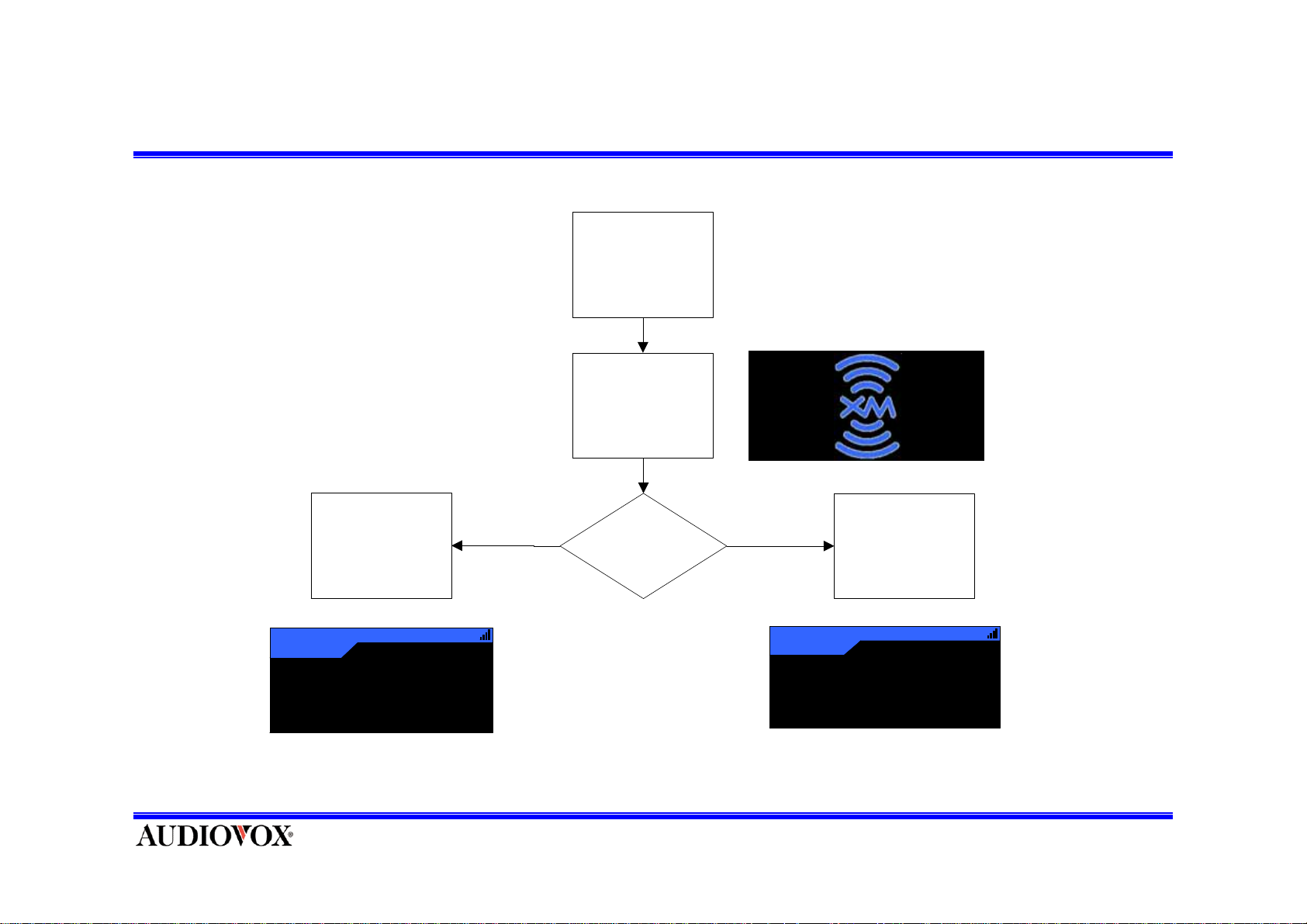
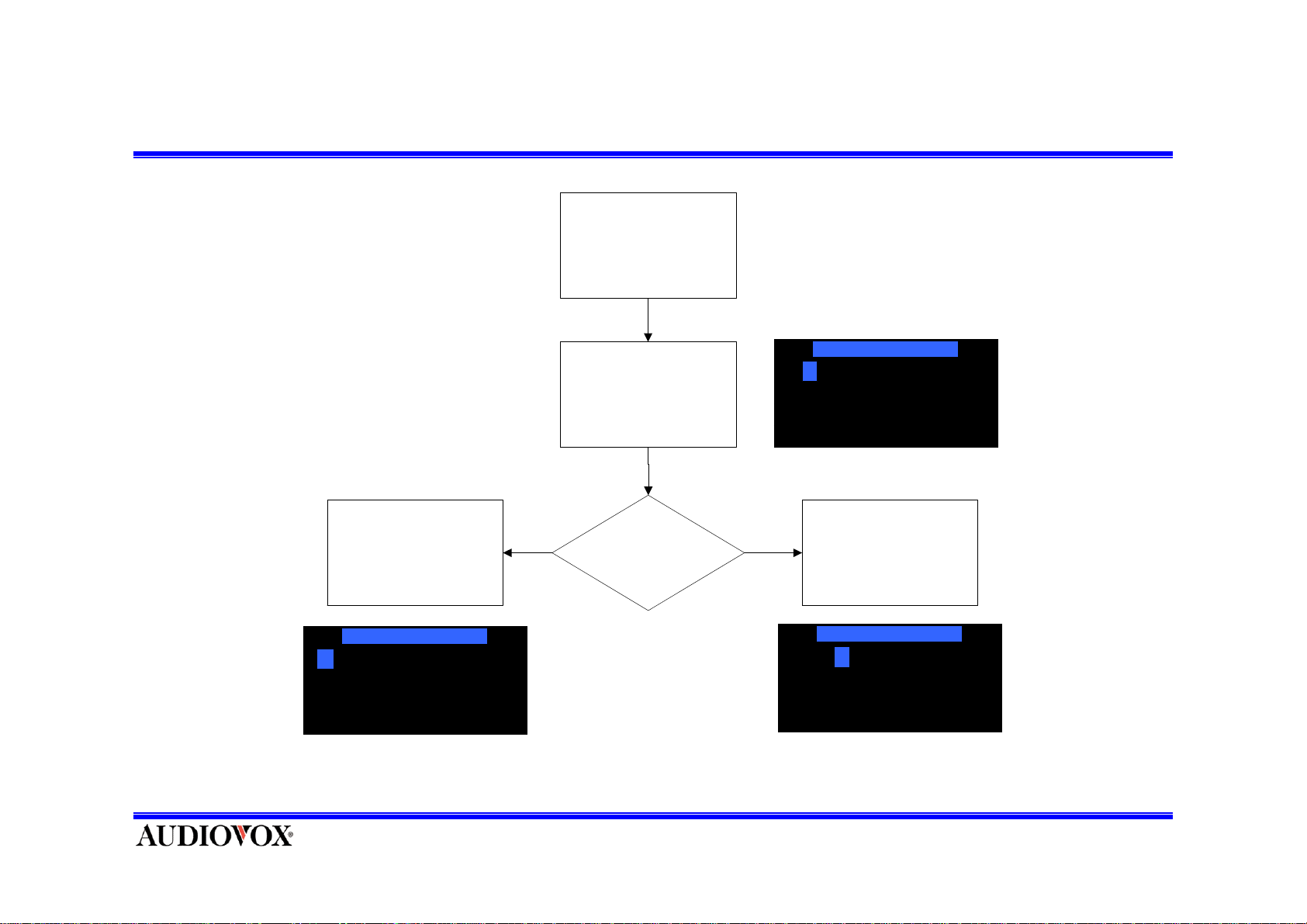
Power On
POWER ON
Press POWER
Button
Display XM Splash
sc reen for 3.0 sec.
Load Default
Values & Display
Default Screen
1
A - 1
XM Preview
XM Preview
12:34AM
YES
Initial Power Up?
NO
121
Load previous
set ting s & Displa y
Default Screen
Format
Country
A
John Denver
Annie's Song
12:34AM
America
Page 4
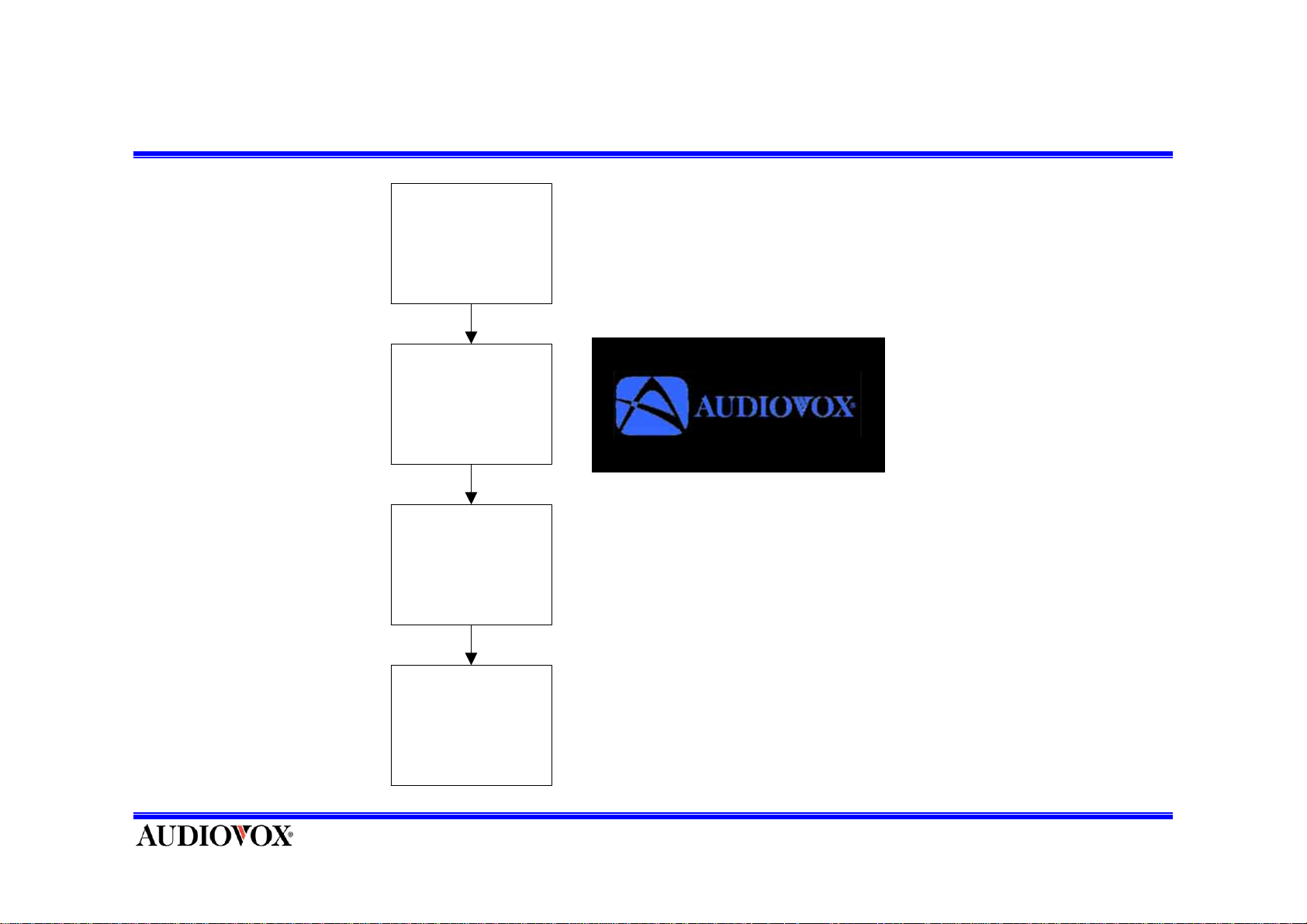
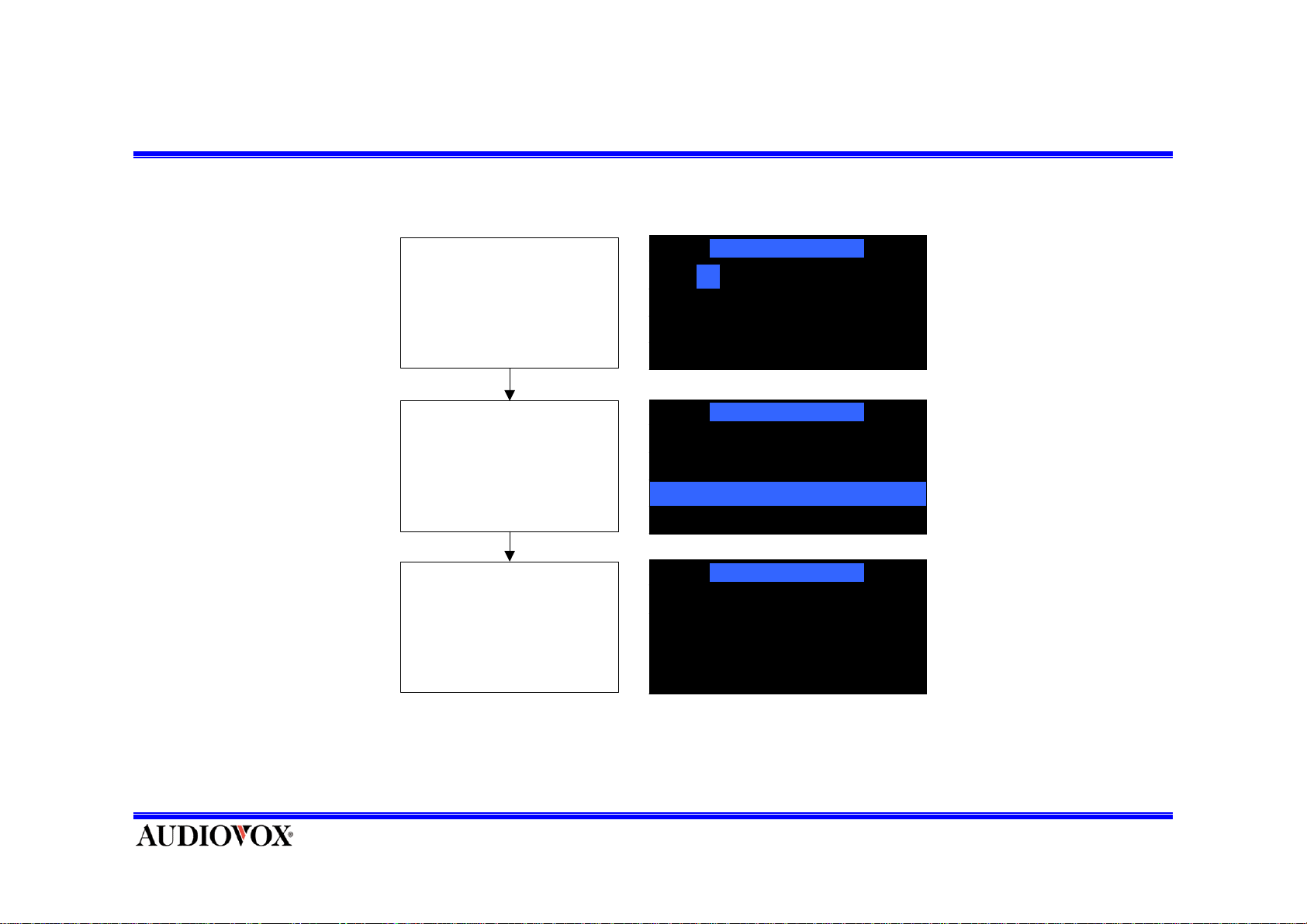
Power Off
POWER OFF
Press POWER
button
Display Audiovox
Splash screen for
3.0 sec.
Store current
settings & Display
Sc reen Format
C
Po wer down unit
Page 5
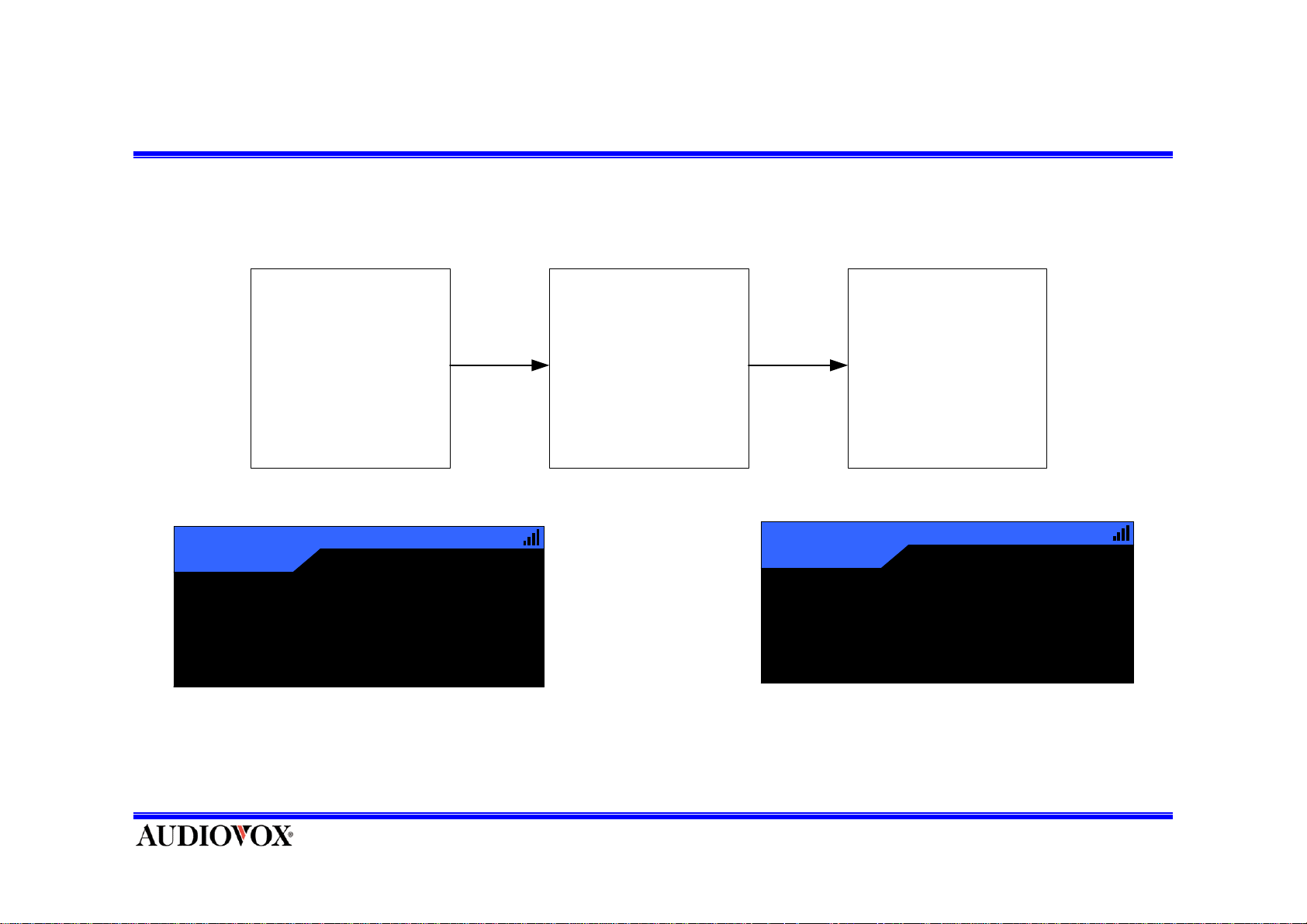
Channel Up/Down (Default Tuning Mode)
D ef aul t T uni ng Mode
Default Display
Pres s and release
CH UP/DOWN Button
Tune t he nex t
avai l abl e Channel
and dis pl ay c hannel
information
Country
121
A
John Denver
Annie's Song
12:34AM
America
122
Jazz & B
A
12:34AM
Frank’s
Frank’s
Count Basie
Honeysuckle Rose
Page 6
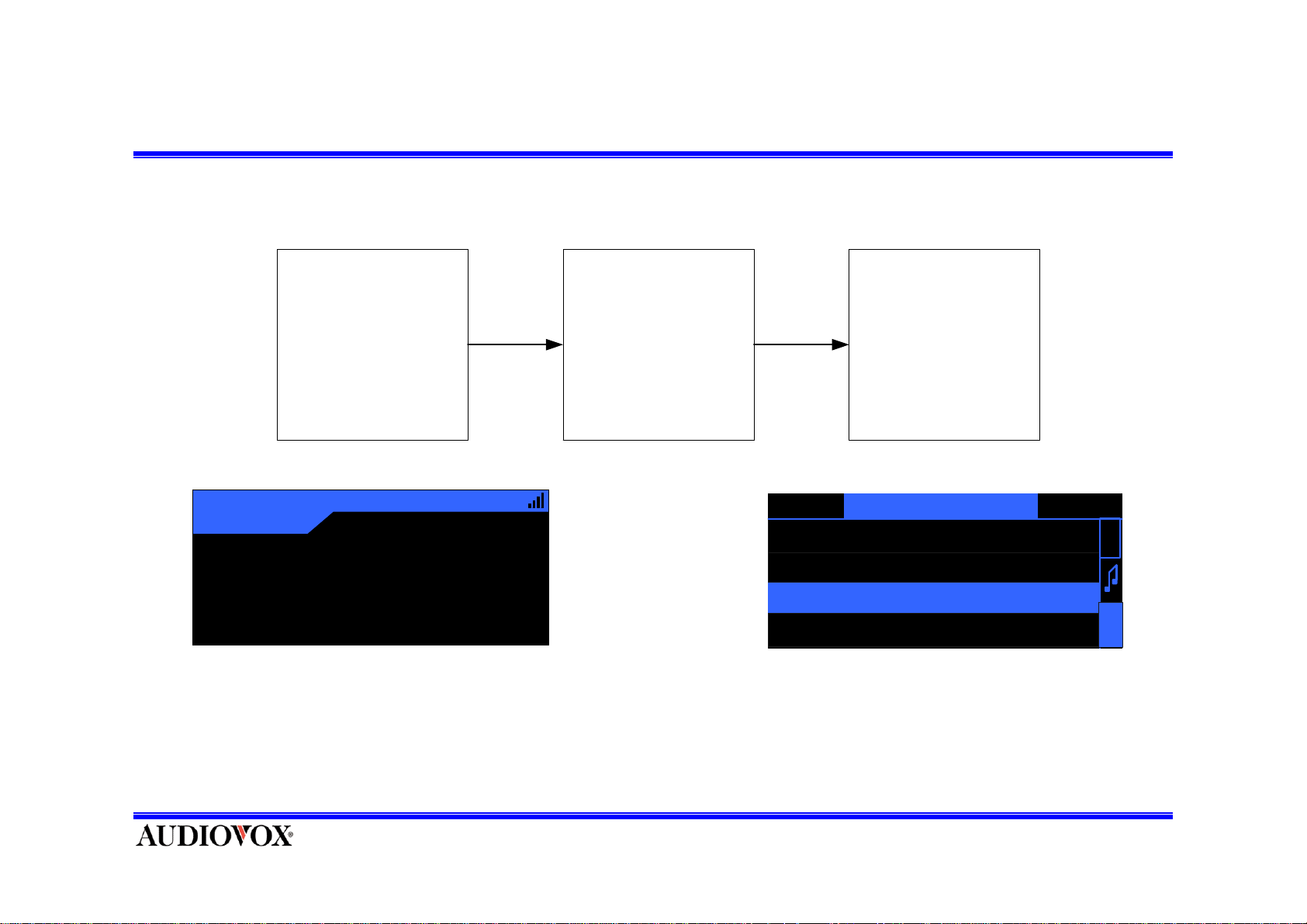
Enter category list mode
Preset T uni ng M ode
or
D efault Tuni ng M ode
Default Display
Country
3
A
John De nv e r
Annie' s Song
12:34AM
America
Pres s and releas e
CAT UP / DOWN
Button
Display the channels
data list in current
category
CATEGORY NAME1
1 CHANNEL N A M E
2 CHANNEL N A M E
3 CHANNEL N A M E
4 CHANNEL N A M E
A
R
C
H
Page 7
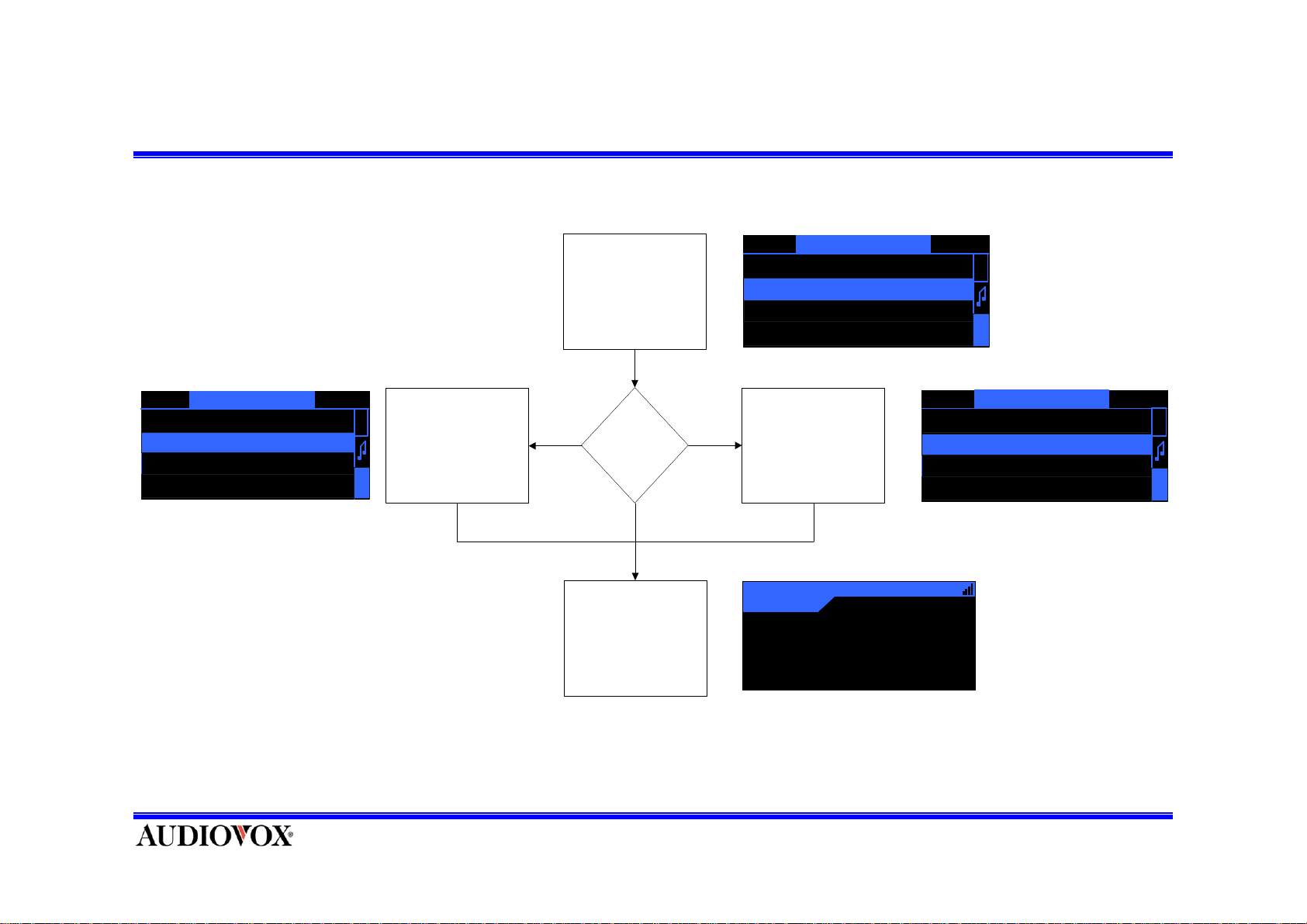
Move category in the category list
Press
CAT UP/DOWN Button
is coming to Category list
mode
CATEGO RY NAME2
1 CHANNEL N A M E
2 CHANNEL N A M E
3 CHANNEL N A M E
4 CHANNEL N A M E
A
R
C
H
CATEGORY NAME1
1 CHANNEL N A M E
2 CHANNEL N A M E
3 CHANNEL N A M E
4 CHANNEL N A M E
Category
A
R
C
H
Move to before
Category
Down
Press
CAT UP/DOWN
Button
Press SELECT button Select
HighLight Channel
Category
Up
Move to next Category
2
Country
A
John Denver
Annie's Song
* To exit without new tuning, Press and Hold SELECT Button.
* Preset exists by List in Category mode.
CATEGO RY NAME3
1 CHANNEL N A M E
2 CHA NNEL N A M E
3 CHANNEL N A M E
4 CHA NNEL N A M E
12:34AM
America
A
R
C
H
Page 8
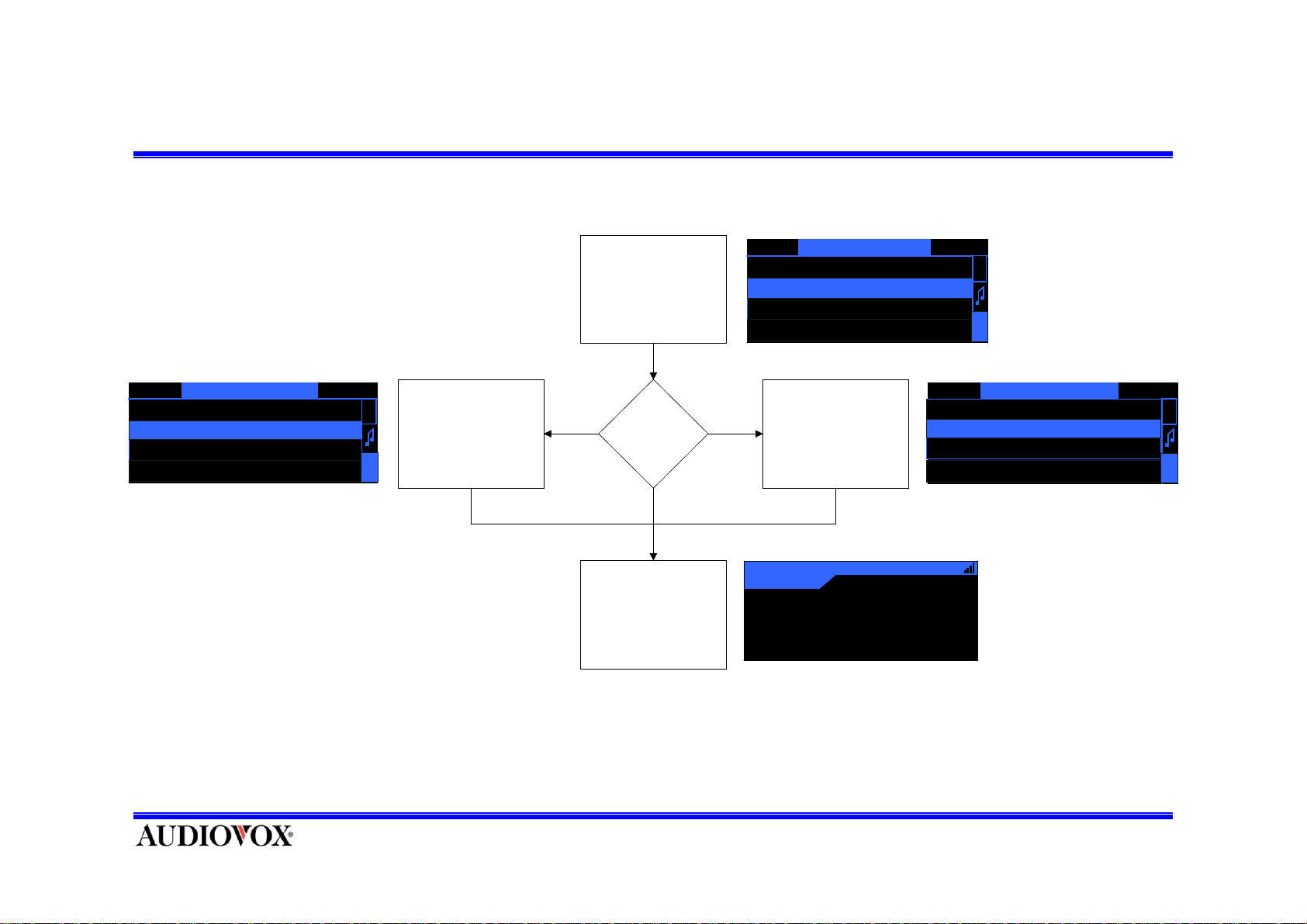
Move channel in category list
CAT UP/DOWN Button
is coming to Category
is coming to Category list
Pres
Press
sCategory Up or
Down
list
mode
mode
CATEGORY NAME 2
CATEGORY NAME 2
001 CHANNEL N A M E
1 CHANNEL N A M E
002 CHANNEL N A M E
2 CHANNEL N A M E
003 CHANNEL N A M E
3 CHANNEL N A M E
004 CHANNEL N A M E
4 CHANNEL N A M E
A
A
R
R
C
C
H
H
00
2 CHANNEL N A M E
2
00
3 CHANNEL N A M E
3
00
4 CHANNEL N A M E
4
00
5 CHANNEL N A M E
5
CATEGORY NAME 2
CHANNEL N A M
CHANNEL N A M
CHANNEL N A M
CHANNEL N A M
E
E
E
E
1
A
A
R
R
C
C
H
H
Mov e t o Low er
Channel
Channel
Down
Press SELEC T but t on
Return default screen
Press
Press
CH UP/DOWN
Category Up or
Button
Down
Select HighLight
Channel
Channel
Up
Up
Move to Upper
Mov e t o upper c hannelMove to lower channel
Preview
121
1
John Denver
A
A
XM Preview
Anni
XM Preview
Channel
's Song
e
* To exit without new tuning, press and hold SELECT KEY.
00
9 CHANNEL N A M E
9
00
1 CHANNEL N A M E
1
00
2 CHANNEL N A M E
2
00
3 CHANNEL N A M E
3
12:34
12:34AM
Classic
Preview
Country
CATEGORY NAME 2
CHANNEL N A M
CHANNEL N A M
CHANNEL N A M
CHANNEL N A M
1
E
E
E
E
A
A
R
R
C
C
H
H
Page 9
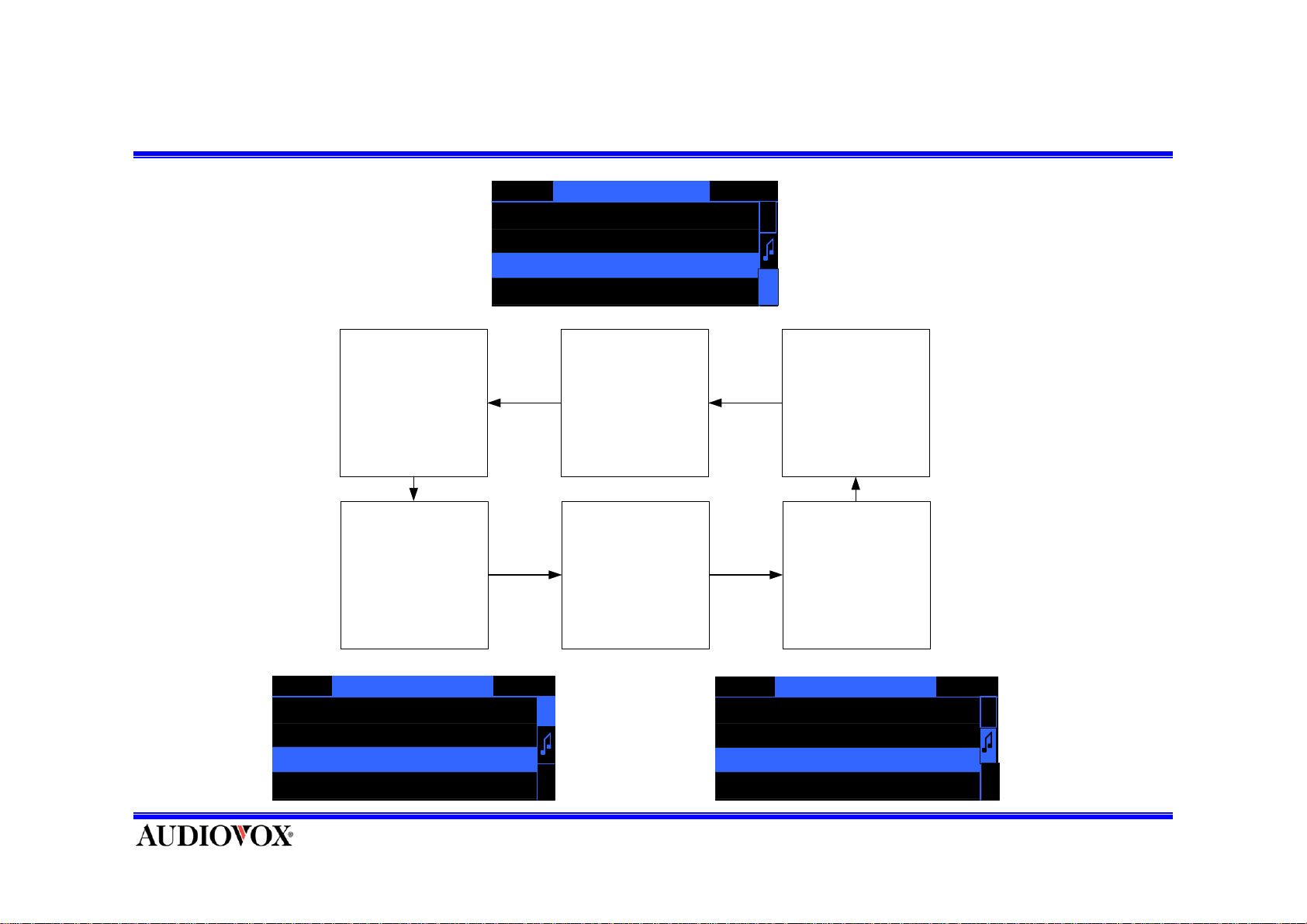
Change channel information in the category list
Pres s and release
DISPLAY Button
Cat egory Lis t Mode
Di splay ed dat a i s
artist nam e
CATEGORY NAME
1 CHANNEL N A M E
2 CHANNEL N A M E
3
CHANNEL N A M E
4 CHANNEL N A M E
Di splay ed data is
changed t o channel
name
Pres s and releas e
DISPLAY Button
1
A
R
C
H
Pres s and releas e
DISPLAY Button
Di splay ed data is
changed t o song ti tle
CATEGORY NAME1
1 A R T I S T N A M E
2 A R T I S T N A M E
3 A R T I S T N A M E
4 A R T I S T N A M E
CATEGORY NAME1
A
R
1 S O N G T I T L E
A
R
2 S O N G T I T L E
3 S O N G T I T L E
C
H
4 S O N G T I T L E
C
H
Page 10
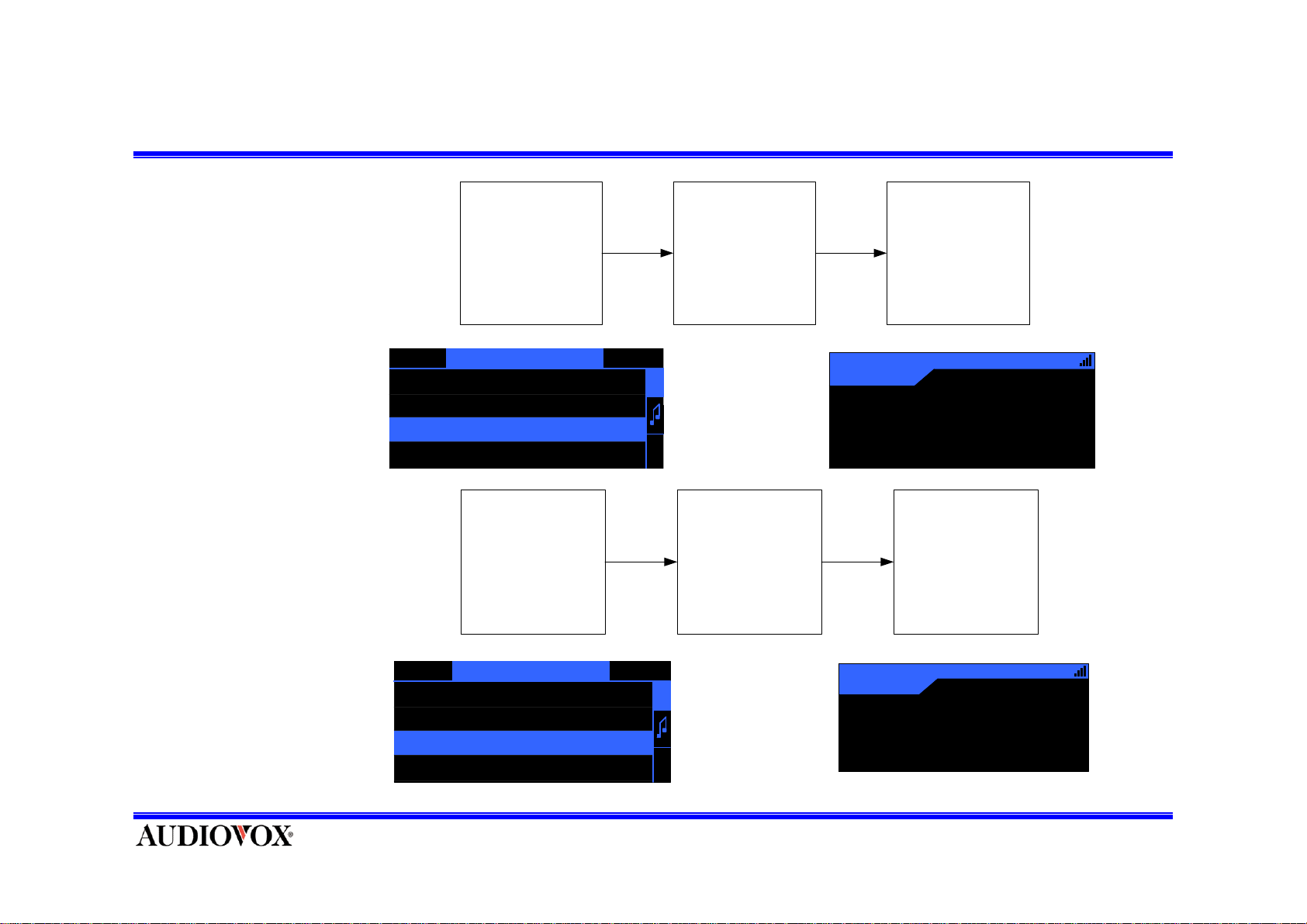
Exit category list
* To exit with new
tuning, press and
release SELECT KEY.
Category Li st M o de
Pres s and release
SELECT Button
Exit category list
mode, return the
Default Mode
Selected channel new
tuning
* To exit without new
tuning, press and Hold
SELECT KEY.
CATEGORY NAME1
1 A R T I S T N A M E
2 A R T I S T N A M E
3 A R T I S T N A M E
4 A R T I S T N A M E
Category List Mode
CATEGORY NAME1
1 A R T I S T N A M E
2 A R T I S T N A M E
3 A R T I S T N A M E
4 A R T I S T N A M E
A
R
3
Country
A
12:34AM
America
John Denv e r
C
H
Pres s and H ol d
SELECT Button
A
R
C
H
Annie' s Song
Exit c ategory list
mod e, r e tu r n the
Default Mode
without new tuning
121
John Denver
Annie's Song
Country
A
America
12:34AM
Page 11
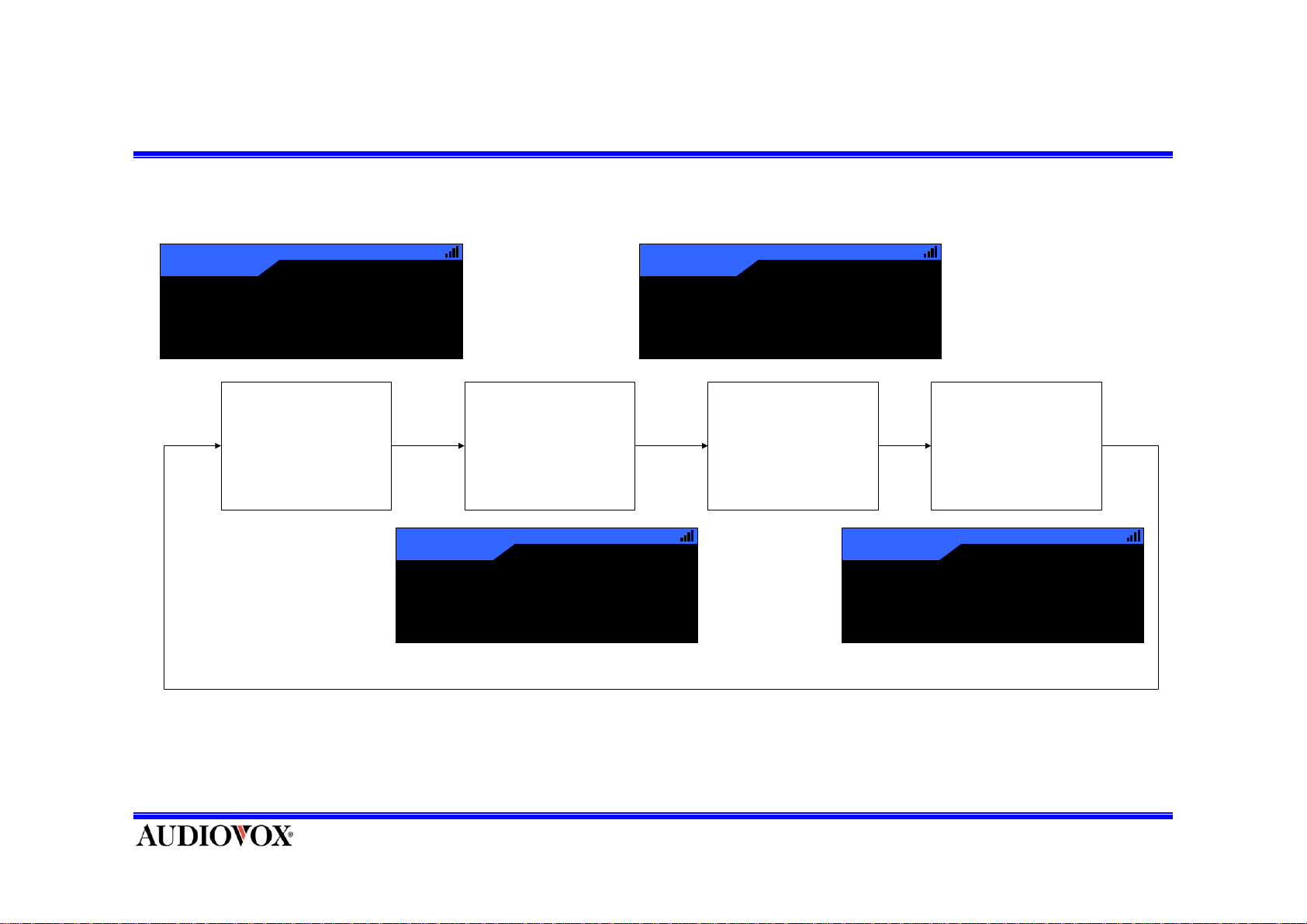
Change Preset
123
Country
A
Culture Club
It is A Miracle
Press PRESET Button
And Change to Preset A
12:34 AM
America
123
Culture Club
It is A Miracle
Press PRESET Button
And Change to Preset B
Country
B
123
Culture Club
It is A Miracle
12 :34 AM
America
Country
C
Press PRESET Button
And Change to Preset C
12 :34 AM
America
Press PRESET Button
And Change to Direct
tuning mode .
123
Country
Dir
Culture Club
It is A Miracle
12 :34 AM
America
Page 12
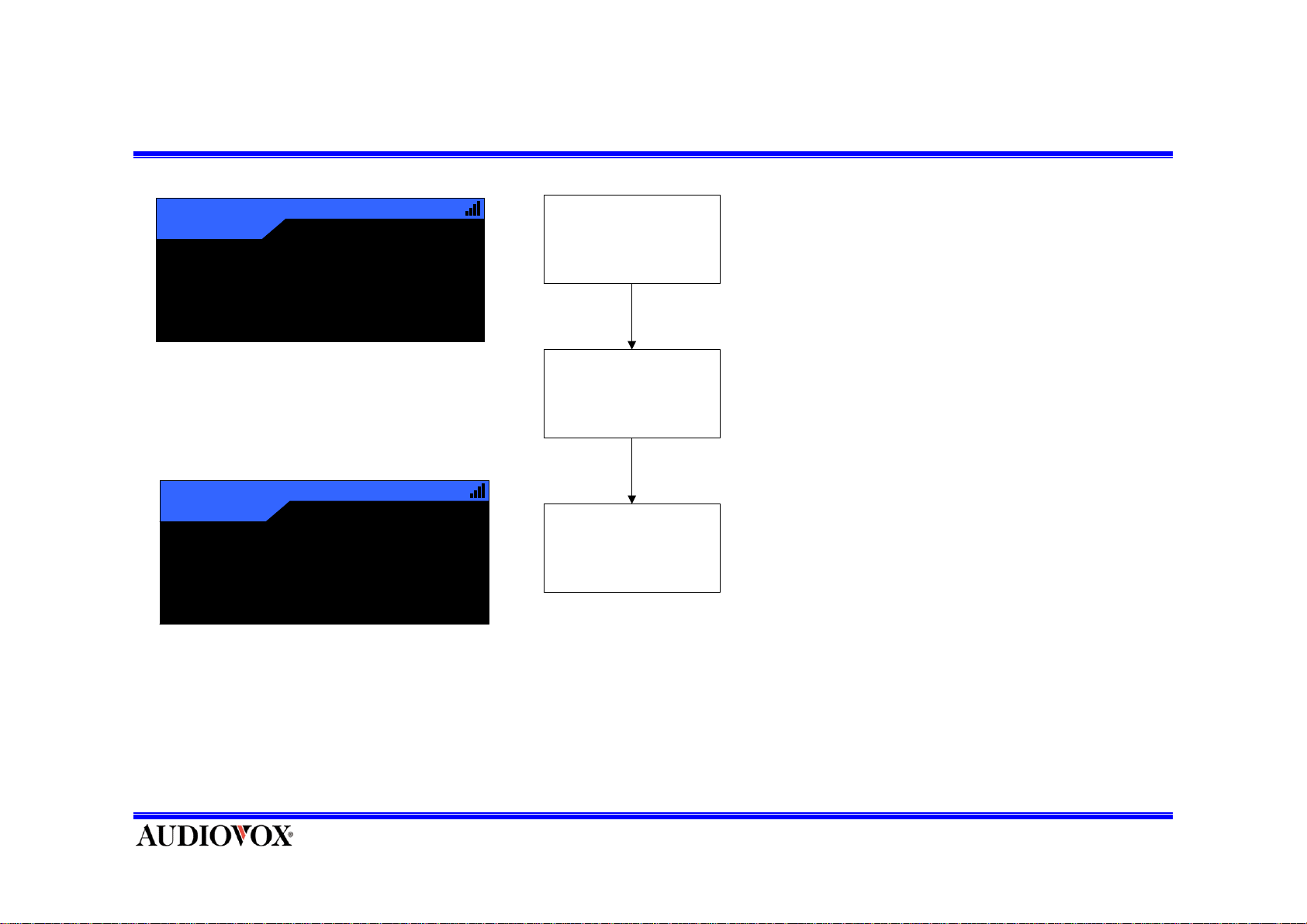
Selecting Channel Preset –Numeric Key
Country
121
A
John Denver
Annie's Song
Country
123
A - 3
Culture Club
It is A Miracle
12:34AM
America
12:34AM
America
Display Default Screen Format
(The Default tuning mode)
Selecting Preset Channel
Press and release
Numeric Butt o n
Channel and display is change
like this
• Press and release the Preset number button you want to hear the Audio.
Page 13
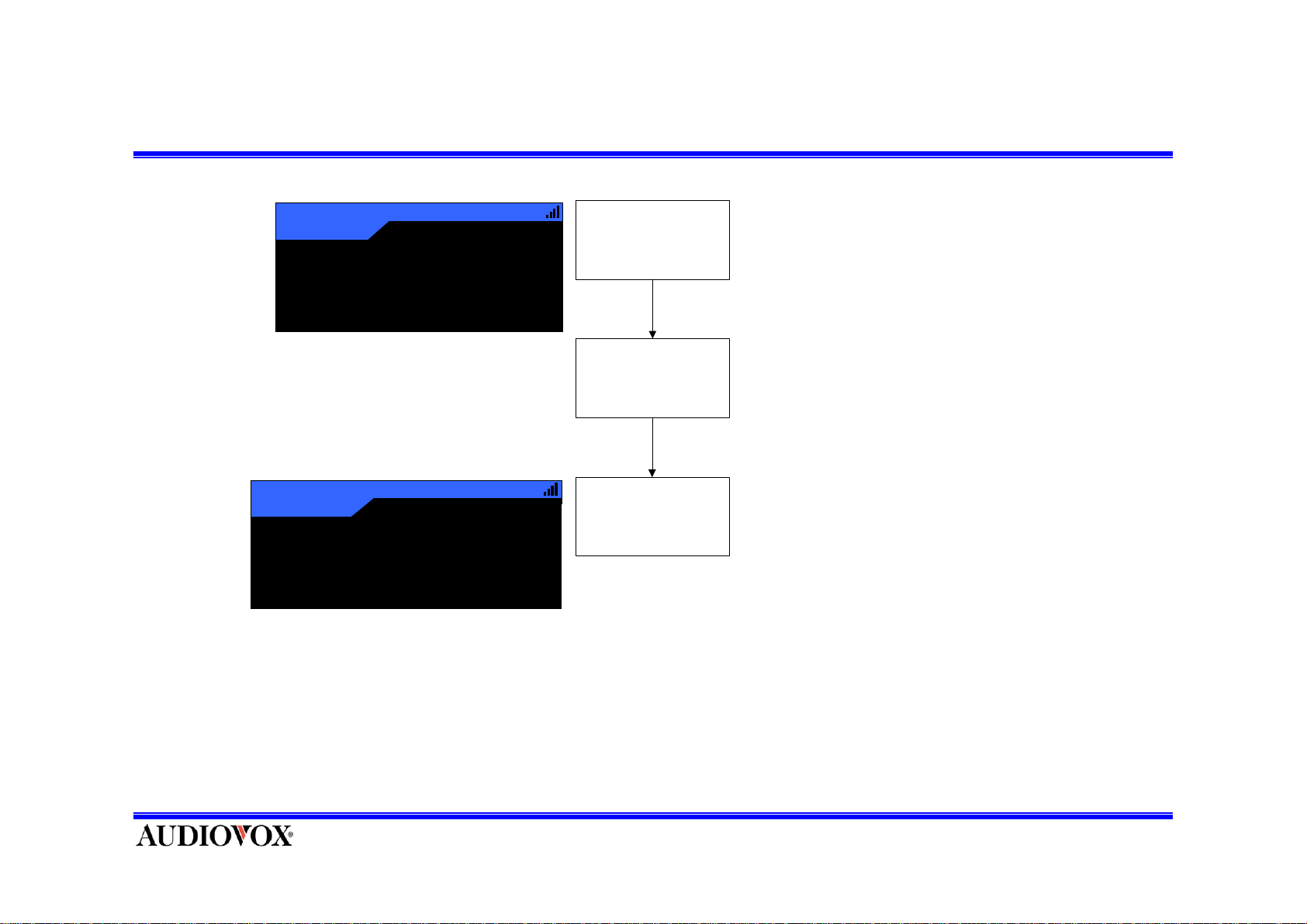
Setting Channel Preset –Press and Hold Numeric KEY (1)
121
Country
A
12:34AM
America
John Denver
Annie's Song
121
Country
A - 1
12:34AM
Amer ic a
Channel Stored
• Sele ct the stream yo u wa nt to pr eset.
Display Default Screen
Format
(The Default tuning mode)
Setting Preset Channel
Press and ho ld
Numeric Button
Channel is stored and then
display is change like this
• Hold the num b e r butto n you wa nt to stor e the stre a m in for a t lea st 1sec.
• The selecte d preset number will flash and then remain mark on the display
to show tha t it h a s b ee n me mor ized
Page 14
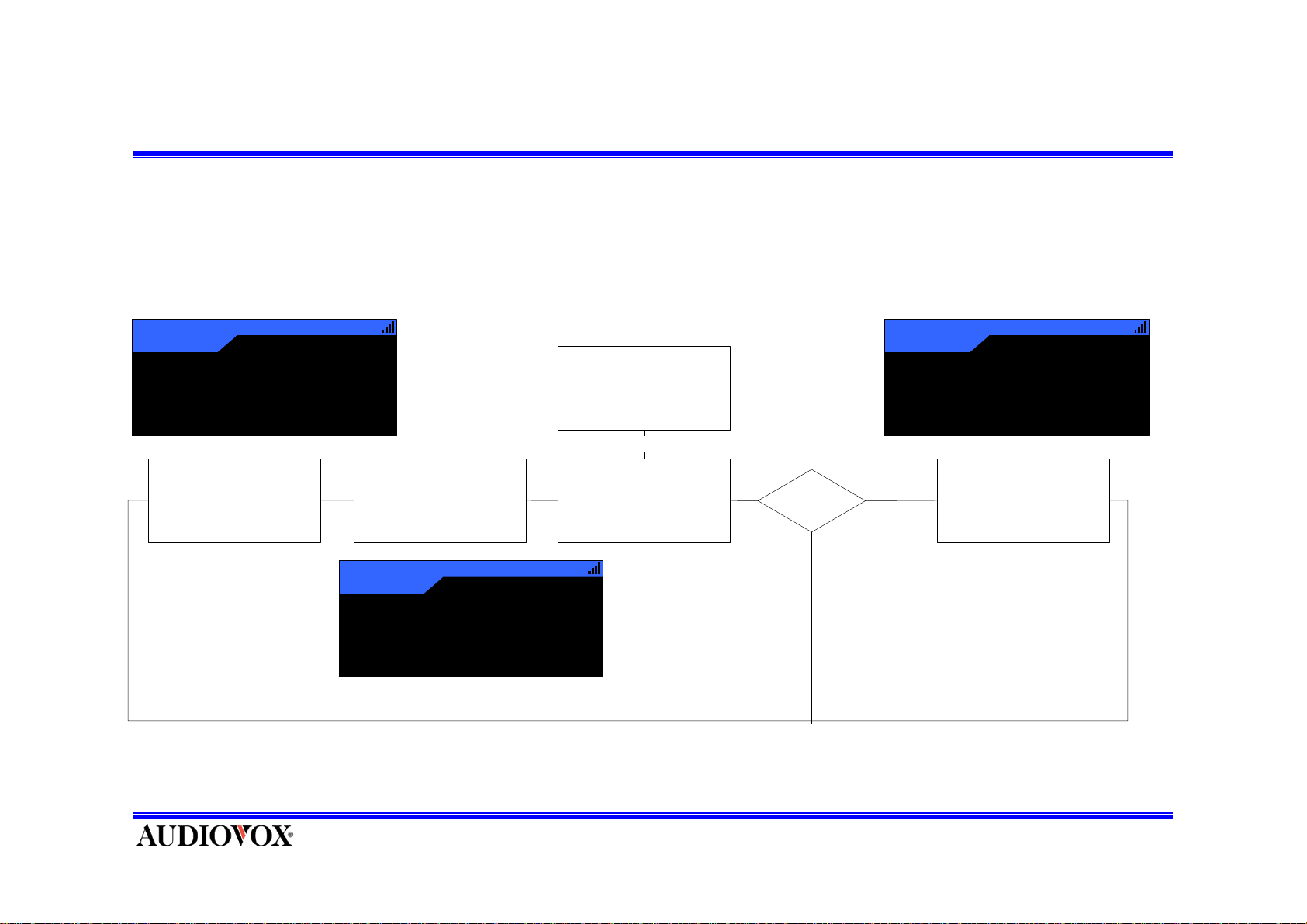
Change Display –DISPLAY KEY
• Pressing the DI SP LAY butto n f r o m the De f a ul t di s pl a y c hanges between the artist name, song titl e f iel ds a nd
data field.
• This will change the character size and cause the field to scroll.
123
Country
A-3
12:34AM
Culture Club
It is A Miracle
Display Default Screen
(The Default tuning mode)
Format
America
Press and release
DISPLAY Button
Di s play of i nf ormation i s
change to font size.
123
Country
12:34AM
AmericaA-3
Cultu re Clu
Press and release
‘Select’ Button Display of
information is circulate to
Kind of Extra Information.
‘Select’ Button
Press and release
DISPLAY Button
Di splay of i nf ormati on is
change to E xtr a
Informations.
Stock on?
No
123
Dance
A-3
12 :34AM
America
Culture Club / It i
XMSR 30.00
Yes
Press and release
DISPLAY Button
Di splay of i nf ormati on is
change
Page 15
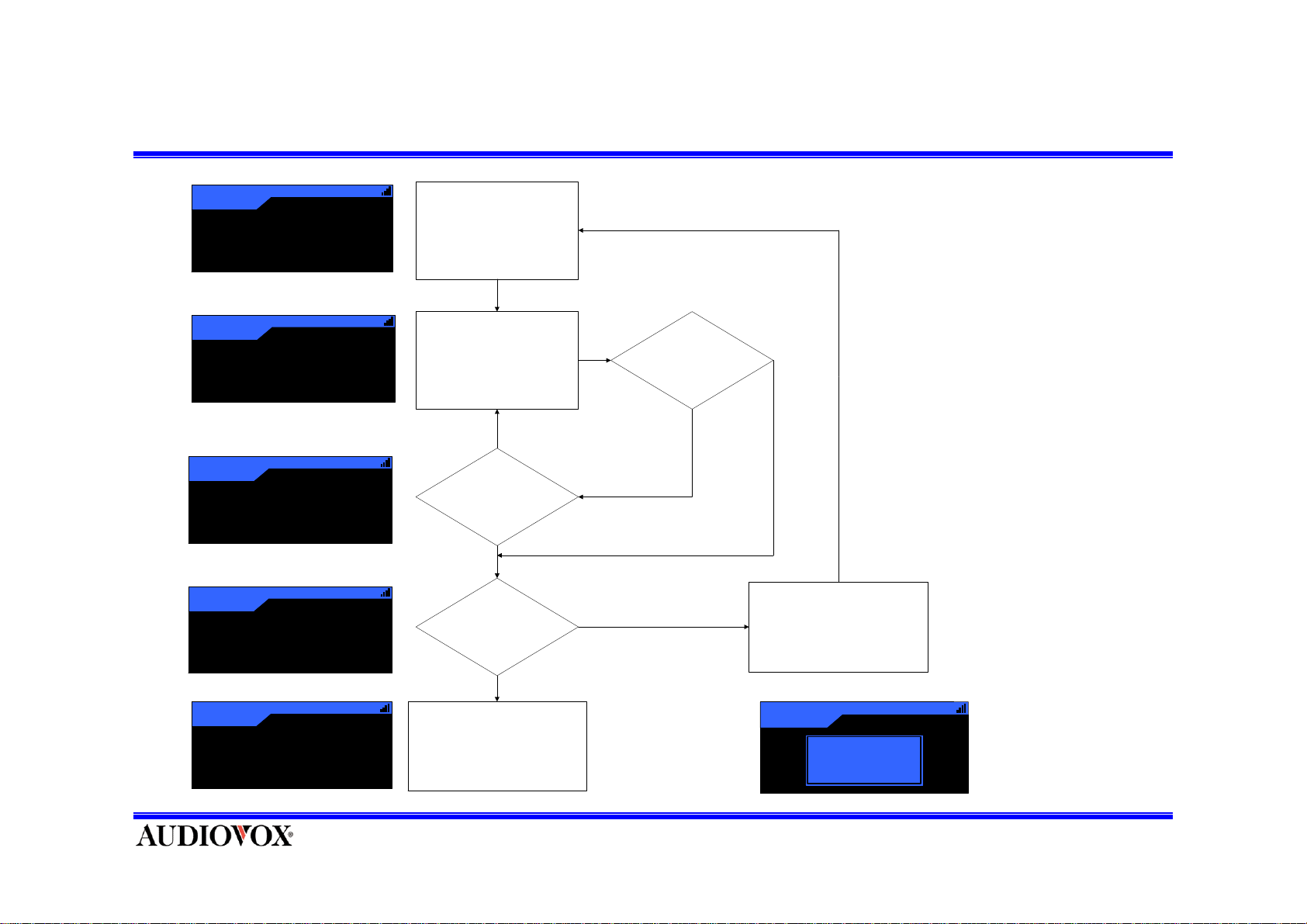
Direct Tuning Channel
Country
121
Dir
Classic Country
John Denver
Annie' s Song
Country
121
Dir
Classic Country
_ _ 1
Country
121
Dir
_ 1 2
Country
121
Dir
Cl assic Cou ntr y
1 2 3
12:34AM
12:34AM
12:34AM
12:34AM
Set direct tuning mode
to u se ‘D isplay’ Key .
Press and release Number
Button.
No
Input Number Keys on 3
Times
Yes
Available Channel?
If Not Input any number key
During 3 sec.
N
o
Yes
No
Display ----- Du ring 3 se c
an d return to previous C hanne l.
123
Dance
Dir
12:34AM
Industrial
Crystal M eth od
She’s My Pu sh er
Yes
Tuned Selecting Channel.
121
Country
Dir
12:34AM
---------
Page 16
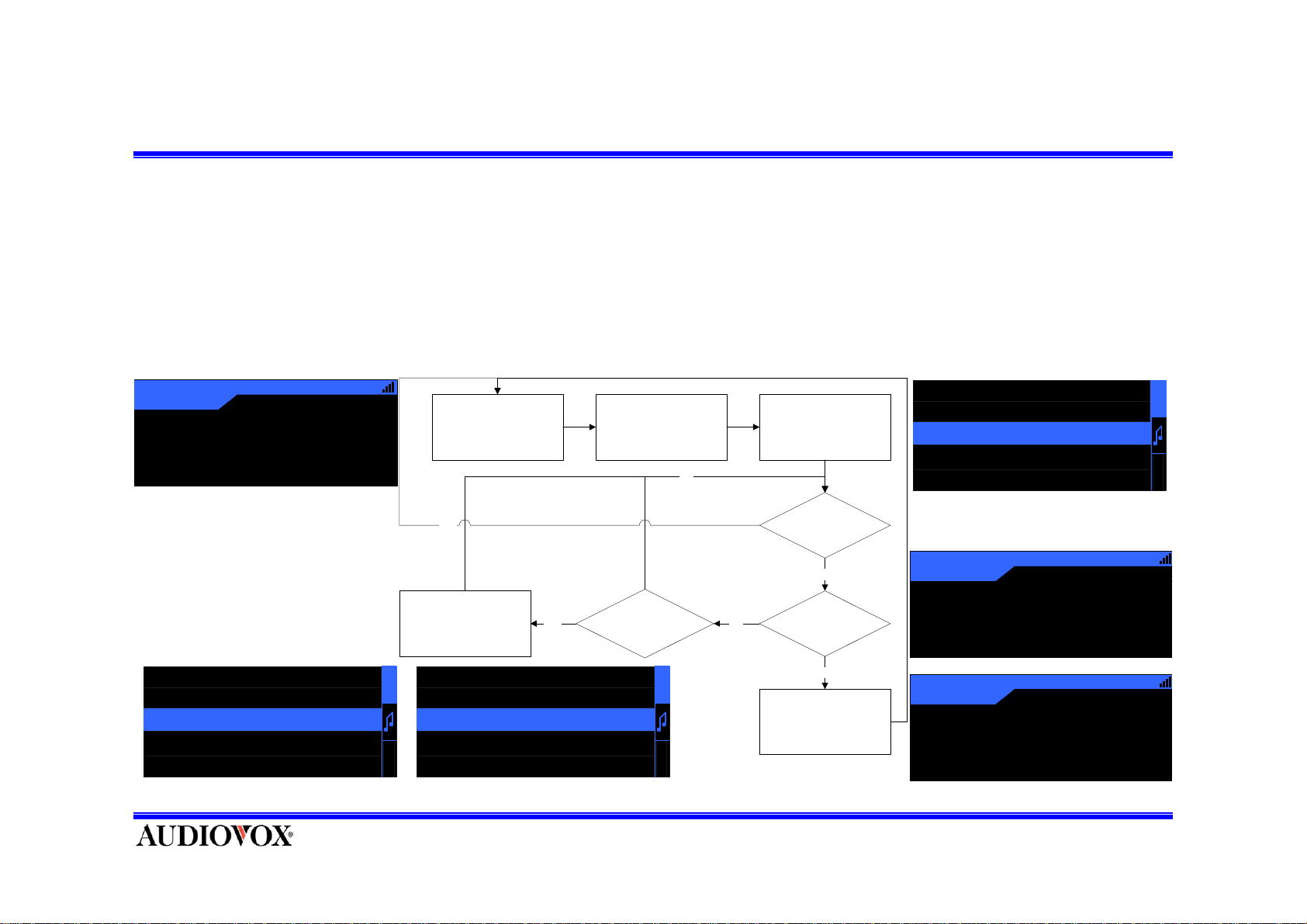
Select Channel in The List
• There are three ways to search and select music: by strea m (channel ), by artist, b y song
• Pre ss and ho ld the S ELECT b utton f o r 1se c while in the De f ault Tuning Mode.
• The List (Stream, artist, song) screen will appear, showing all available streams.
• Use the CH UP & DOWN butto ns to move through th e stream.
• If you stop on a str eam an d p ress th e SEL E CT button, it w ill p lay.
• Press and Hold SELECT b u tto n; this exits the De fault Tu ning Mo d e.
121
Country
A
John Denver
Annie's Song
118 ARTIST NAME
119 ARTIST NAME
120 ARTIST NAME
121 ARTIST NAME
122 ARTIST NAME
12:34AM
America
Display Def ault Screen
Format
(The D efault tuni ng mode )
YES
Di splay the lis t li ke th is
Select channel by
CH UP KEY or
CH DOWN Button
120 ARTIST NAME
A
R
121 ARTIST NAME
122 ARTIST NAME
123 ARTIST NAME
C
H
124 ARTIST NAME
YES
Press and hold
SEL ECT Button
(f or 1 s econd)
NO
Press and release
CH UP or DOWN Button
A
R
C
H
(by stream, artist, song)
NO
Display Default Screen
Display The List
Press and Hold
SELECT Button?
NO
Press and release
SELECT Button
YES
Format
Channel is changed
119 ARTIST NAME
120 ARTIST NAME
121 ARTIST NAME
122 ARTIST NAME
123 ARTIST NAME
120
Country
A
Artist Name
Song Title
122
Country
A
Artist Name
Song Title
A
R
C
H
12:34AM
America
12:34AM
America
Page 17
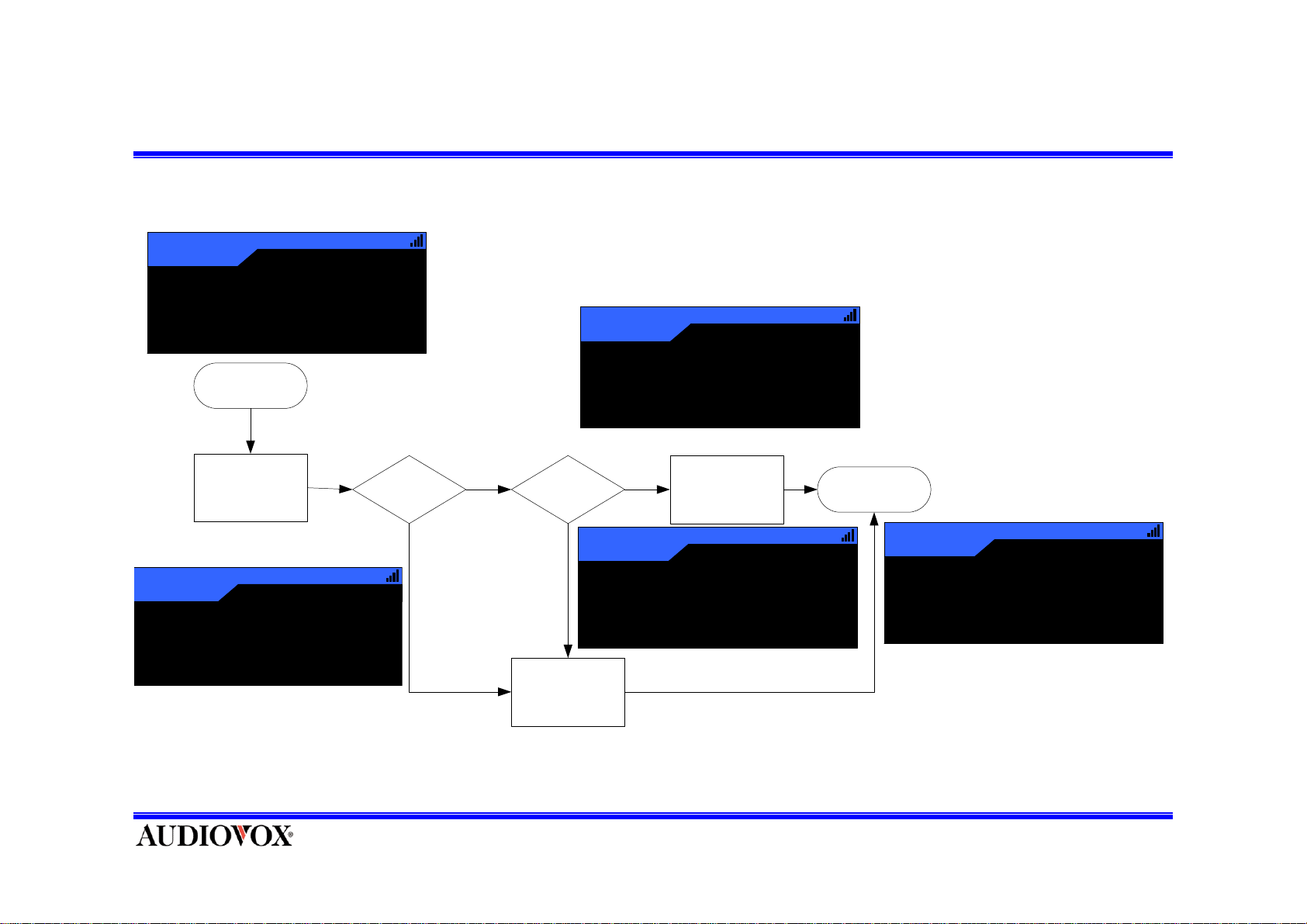
Save Artist/Song Data –Memo Key
Country
121
A
John Denver
Annie’s Song
Default Mode
Press and release
MEMO Button
121
Country
A
12 :34AM
Memory Full
12 :34AM
America
Memory Full?
America
(ov er 24)
Yes
No
121
Already
Stored?
Yes
Saving Memo
121
Failed
Country
A
12:34AM
America
Artis t / S ong
Data Saved
No
Memo Data Saved
Country
A
12 :34AM
America
Al r eady Sto r ed
Default Mod e
121
John Denver
Annie’s Song
Country
A
12 :34AM
America
Page 18
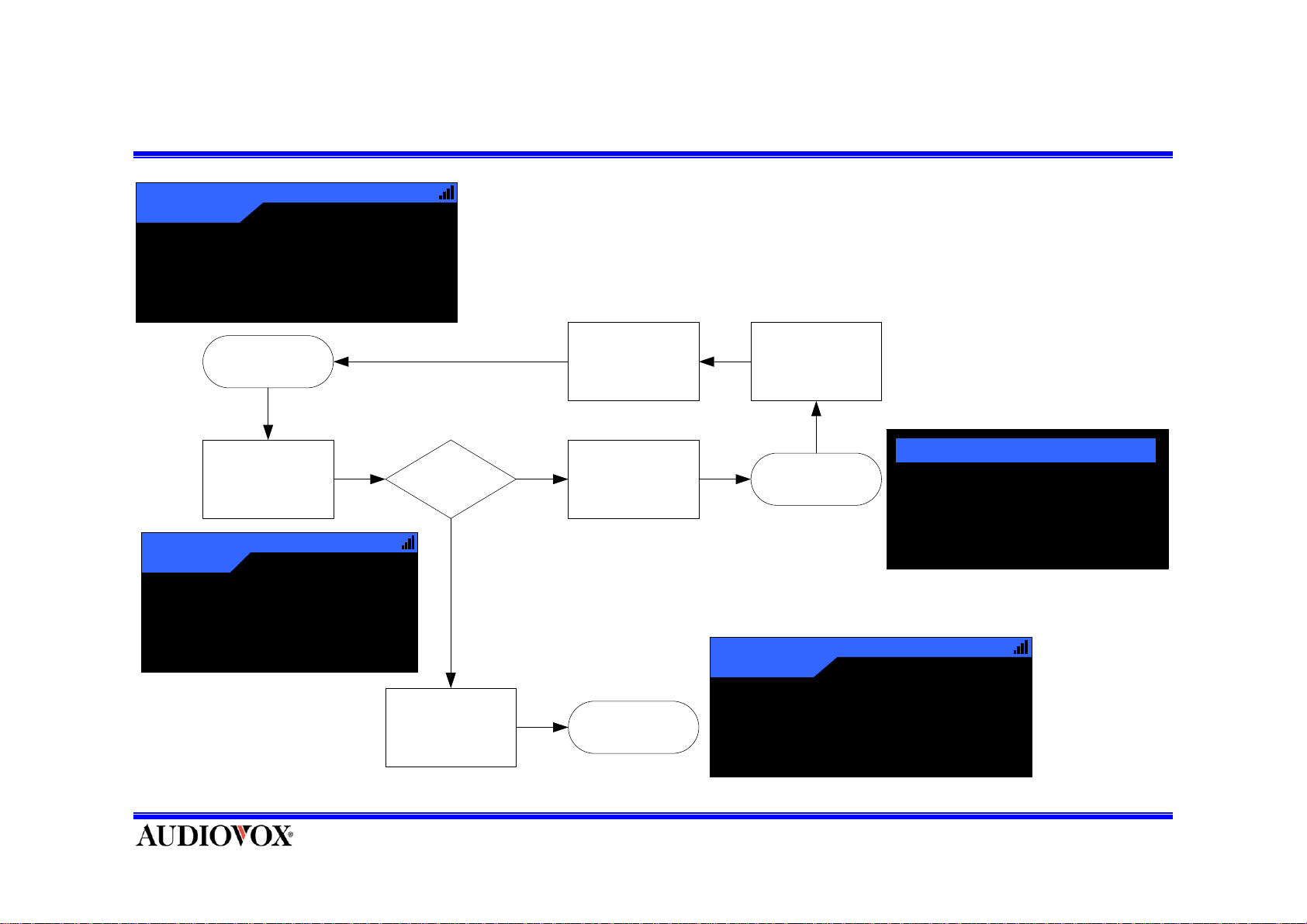
Memo Recall Mode Entering & Exiting
121
Country
A
12:34AM
America
Joh n D en ver
Annie’s So n g
Default Mode
Press and hold
MEMO Button
121
Country
A
12:34AM
America
Memory Empty
Memory
Empty?
Yes
No
Exiting Memo
Recall Mode
Success
Entering Memo
Recall Mode
Success
Press and Hold
121
MEMO Button
Memo Recall
Mode
Country
A
1 Paul Taylor / Under ..
2 Black Eyed Peas / Jo..
3 Micky /Hello, Jazz
4 Ramon Orlando / Si..
5 Arbol / Rosita
12:34AM
America
Joh n D en ver
Default ModeFailed to Enter
Annie’s So n g
Page 19
Getting Detail Information and Deleting Memo
Getting Detail Information
1 Black Eyed Peas / Jo ..
1 Pa u l T a y lor / Under ..
2 Black Eyed Peas / Jo..
3 M ic k y / Hello, J a z z
4 Ramon Orlando / Si..
5 Arbol / Rosita
1 Paul Taylor / Undercv..
Pa u l Tayl o r
Un derc o v e r
Press Mem o to D elete
Deleting Memo
Memo Recall
Mode
1 Black Eyed Peas / Jo ..
2 Paul Taylor / Undercv..
Pau l Ta y lo r
Und e rc o ve r
Pres s Mem o t o D elete
Press and release
SELECT Key
Mem o D e let e
Yes NO
Detail Information
Displayed
Press and release
MEMO Key
Memo Delete Pop-
Up Displayed
No
Memo
Delete?
Yes
Target Memo Date
Deleted
121
Country
A
12:34AM
America
Memory Empty
Memory Empty
Message
Displayed
Yes
Memory
Empty?
No
Memo Recall
Mode
Memo Recall
Mode
1 Paul T ay lor / U nd e r ..
2 Black Eyed Peas / Jo..
3 M ic k y / Hello, J azz
4 Ramon Orlando / Si..
5 Arb o l / R o s ita
1 Black Ey e d Peas / Jo..
2 M ic k y / Hello, J a z z
3 Ra mon Orland o / Si..
4 Ar b o l / R osita
Page 20
Enabling/Disabling Tune-Select to a Memo List
1 B la ck E y e d P e a s / J o ..
2 P a u l T a ylor / U n d e r ..
3 M ic k y / He llo , J a zz
4 R a mo n O r lan do / S i..
5 A rb o l / R os ita
Memo Recall Mode -
Tune-Select Disabled
Press and hold
SELECT Button
1 Black Eyed Peas / Jo..
√
2
3 Micky / Hello , Jazz
4 Ramon Orlando / Si..
5 Arbol / Rosita
Memo Recall Mode Tune-Select E nabled
Paul Taylor / Under ..
Page 21
Tune Select Activating and Tuning
1 Black Eyed Peas / Jo..
2Paul Taylor / Under ..
√
3 Micky /Hello, Jazz
4 Ramon Orlando / Si ..
√
√
5 Arbol / Rosita
Some memos are enabled
the Tune-Select
121
Country
A
12:34AM
John Denver
Annie’s Song
Default Mode
Default Mode
121
Country
A
12:34AM
John Denver
Annie’s Song
America
Memorized song
is played in other
channel
(1 matched)
Memorized songs
are played in other
channels
(many matched)
America
Paul Taylor / Under ..
Tune-Select
screen is
displ ayed
(single line)
Tune-Select
screen is
displayed
(multi line)
Paul Taylor / Under ..
Ramon Orlando / Si..
Arb o l / Rosita
No
Want to tune
target song?
Yes
121
Country
A
John Denver
Annie’s Song
Press and Hold
SELECT Key
Song select with
Ch Up/Down and
Press and release
SELECT Key
38
Rock
A
Paul Taylor
Undercover
12:34AM
America
Default Mode
(Canceled)
Default Mode
(Tuned to Target)
12:34AM
X M u si c Lab
Page 22
Volume Control
Country
3
A
14
Press ‘Vol -‘ Key Decrease
Volume Value
12:34AM
America
Selec tion Volume Controls on
Remote Controller Volume -/+
Keys.
Press
‘-’
Key
Press ‘-‘ or ’+’ Key
Country
3
A
John Denver
Annie' s Song
Press
‘+’
Key
Press ‘Vol +‘ Key Decrease
Volume Value
Country
3
A
16
12 :34AM
America
12:34AM
America
Page 23
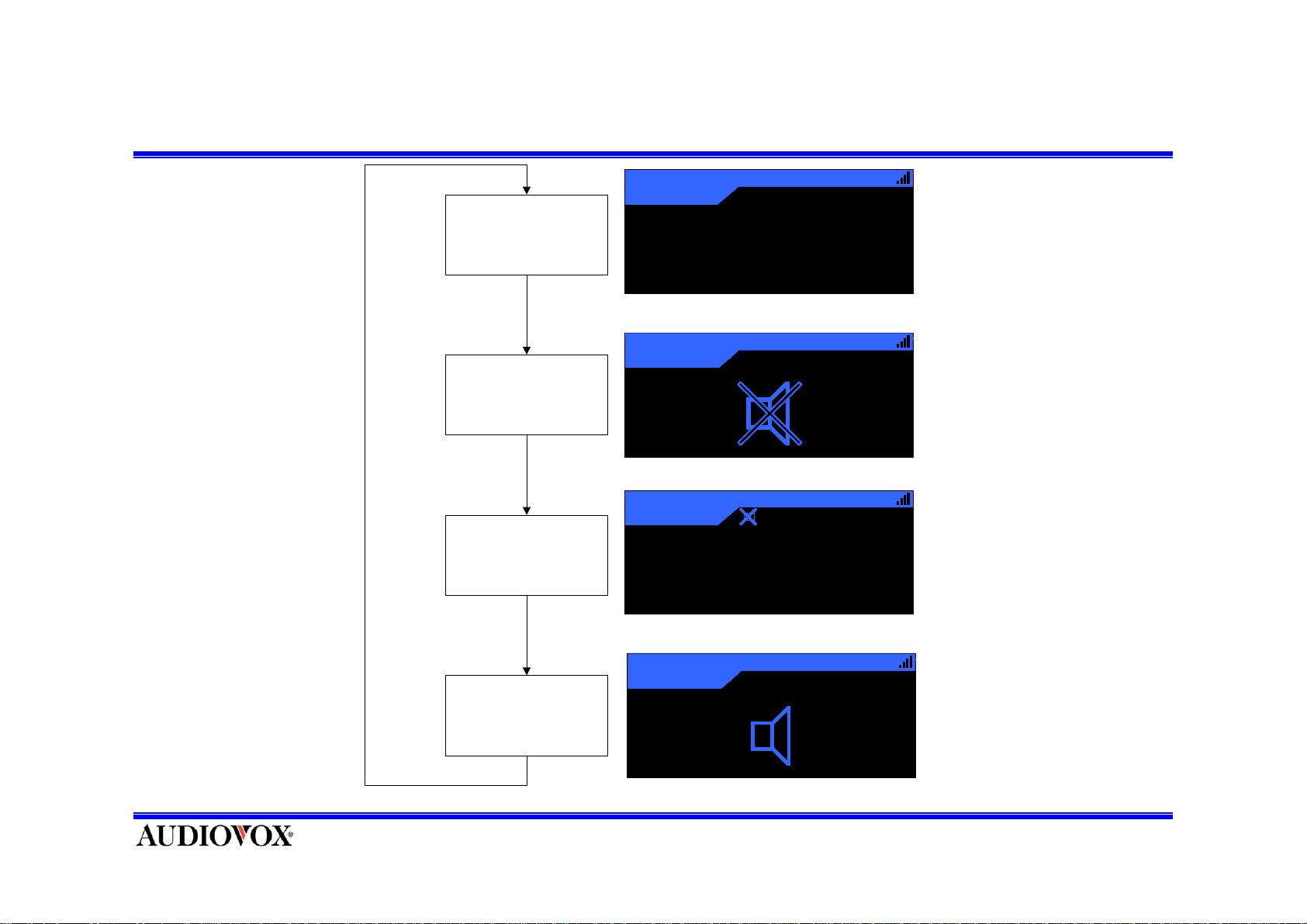
Mute
Press ‘Mute’ key is Mute on
Sound
Press
‘Mute’
Key
Display Mute icon on 3 sec
with sound Mute
Display small Mute Icon on
upper bar and keep Mute
Press
‘Mute’
Key
Country
3
A
Joh n Denver
Annie' s Song
Country
3
3
A
Country
A
Joh n Denver
Annie' s Song
Country
3
A
12:34AM
America
12:34AM
America
12:34AM
America
12:34AM
America
- Only Control on Remote Controller
Display speaker ic on on 3 sec
And sound play
Page 24
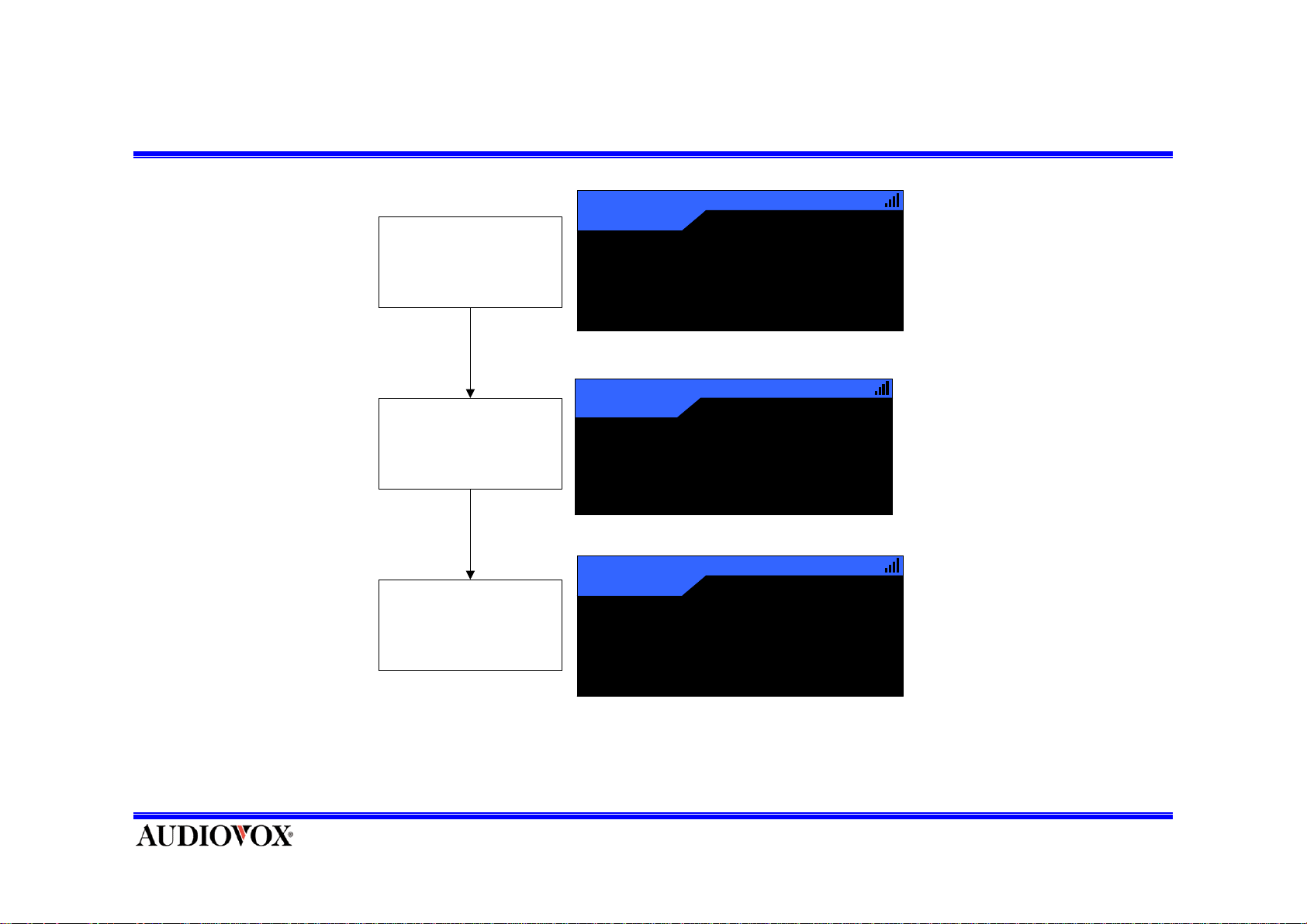
Previous Channel
Change other Channel
Wait for Success Tune other
channel.
Press and release ‘PREV’
Key on Remote Controller
then tune Previous Channel.
3
Country
A
12:34AM
John Denver
Annie' s Song
Dance
124
Dir
Cr ystal Meth o d
She’s My Pusher
Country
3
A
12:34 AM
Industrial
12:34AM
John Denver
America
America
- Only Control on Remote Controller
Annie' s Song
Page 25
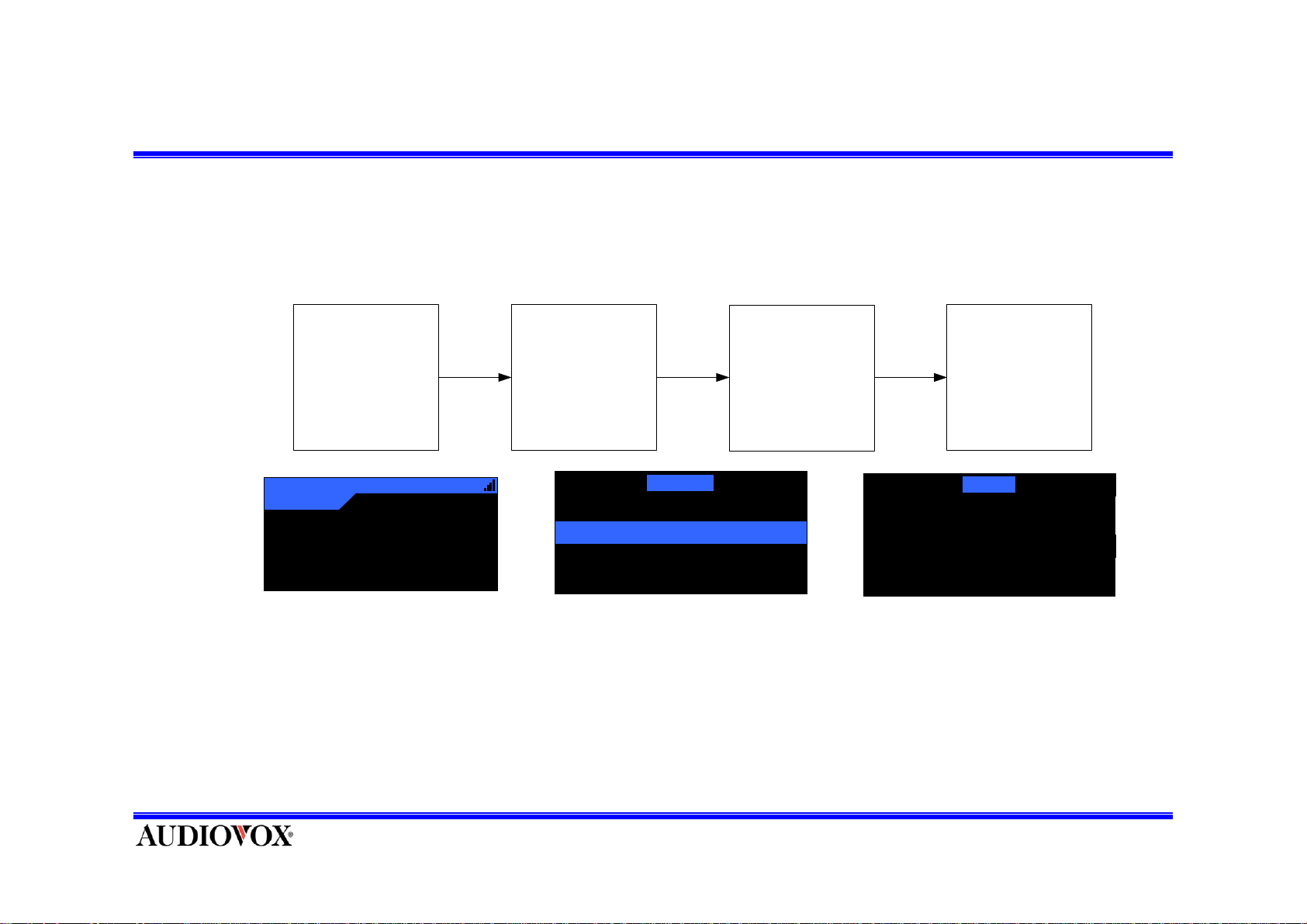
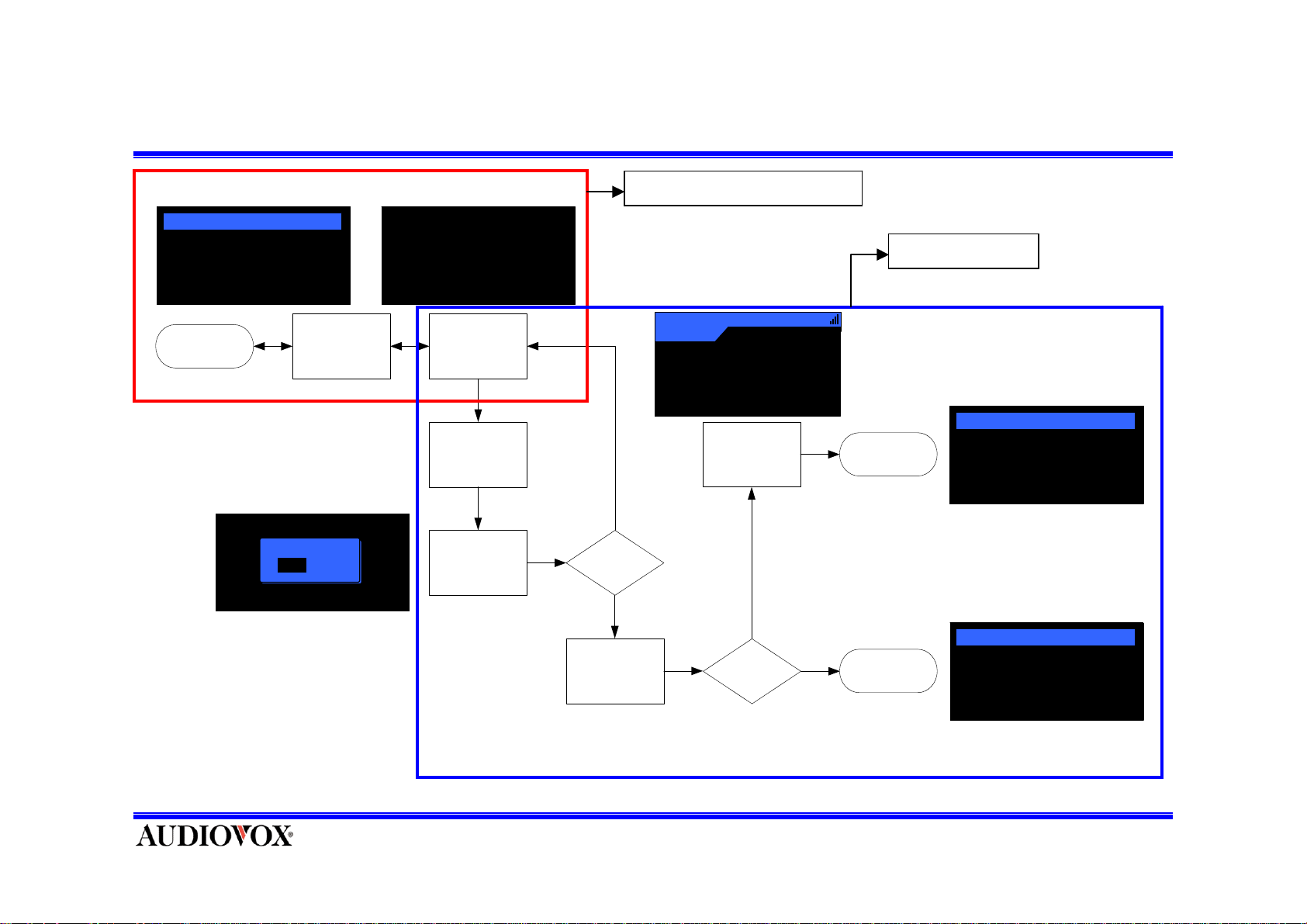
View Radio ID
Pres s M E NU B ut t on Display Main Menu Di spllay Radi o I D
121
Country
A-3
John Denver
Annie's Song
12:34AM
America
Fac t ory Default
Radio ID
Display Setting
Conf i rm Tone Opt i on
Main Menu
Select
Ra di o ID M enu
Main Menu
Radi o I D
36DH308
Page 26
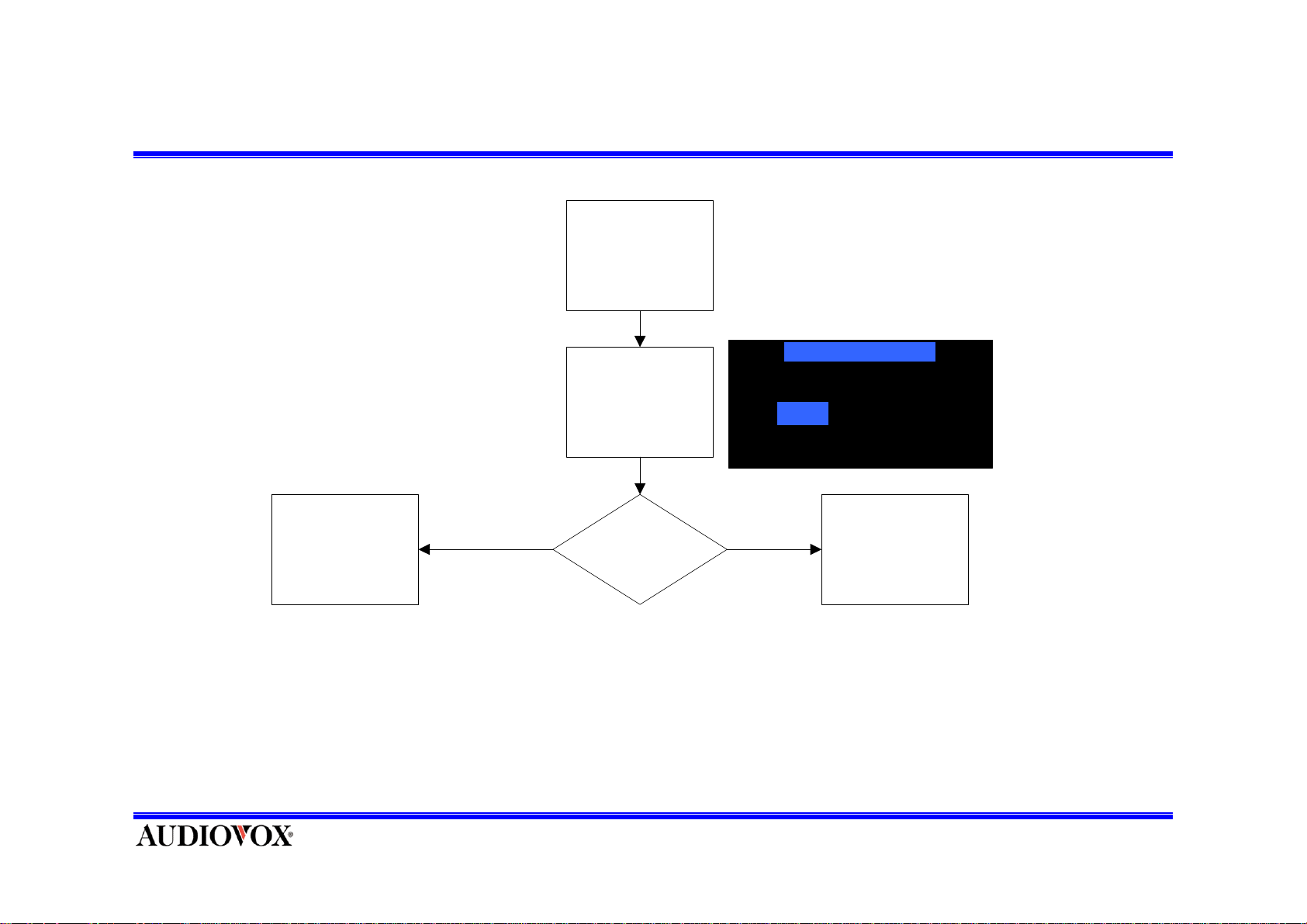
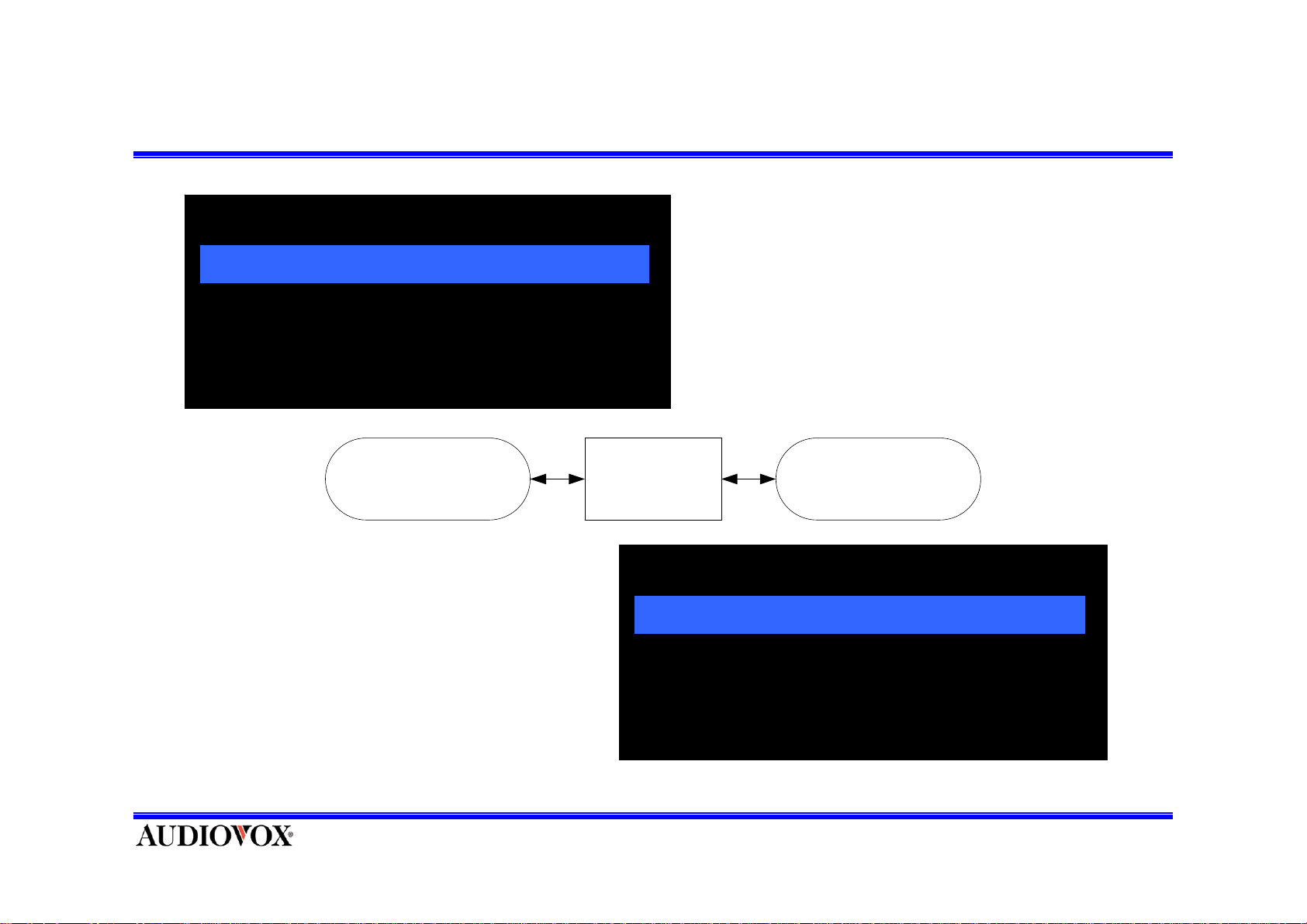
Confirm Tone Setting
Enter Confirm
Tone Setting Menu
Display Con firm
Tone Setting Menu
Confirm Tone Option
Yes No
NO
Select " On"
Press SELECT
Button
YES
Confirm Tone
On
-Turns the Confirmation Tone On or Off.
-Highlight the option you want to choose by pressing CAT UP or CAT
DOWN Button and press SELECT Button to make selection.
-To exit without change, press and release MENU Button.
Select "Off"
Press SELECT
Button
Page 27
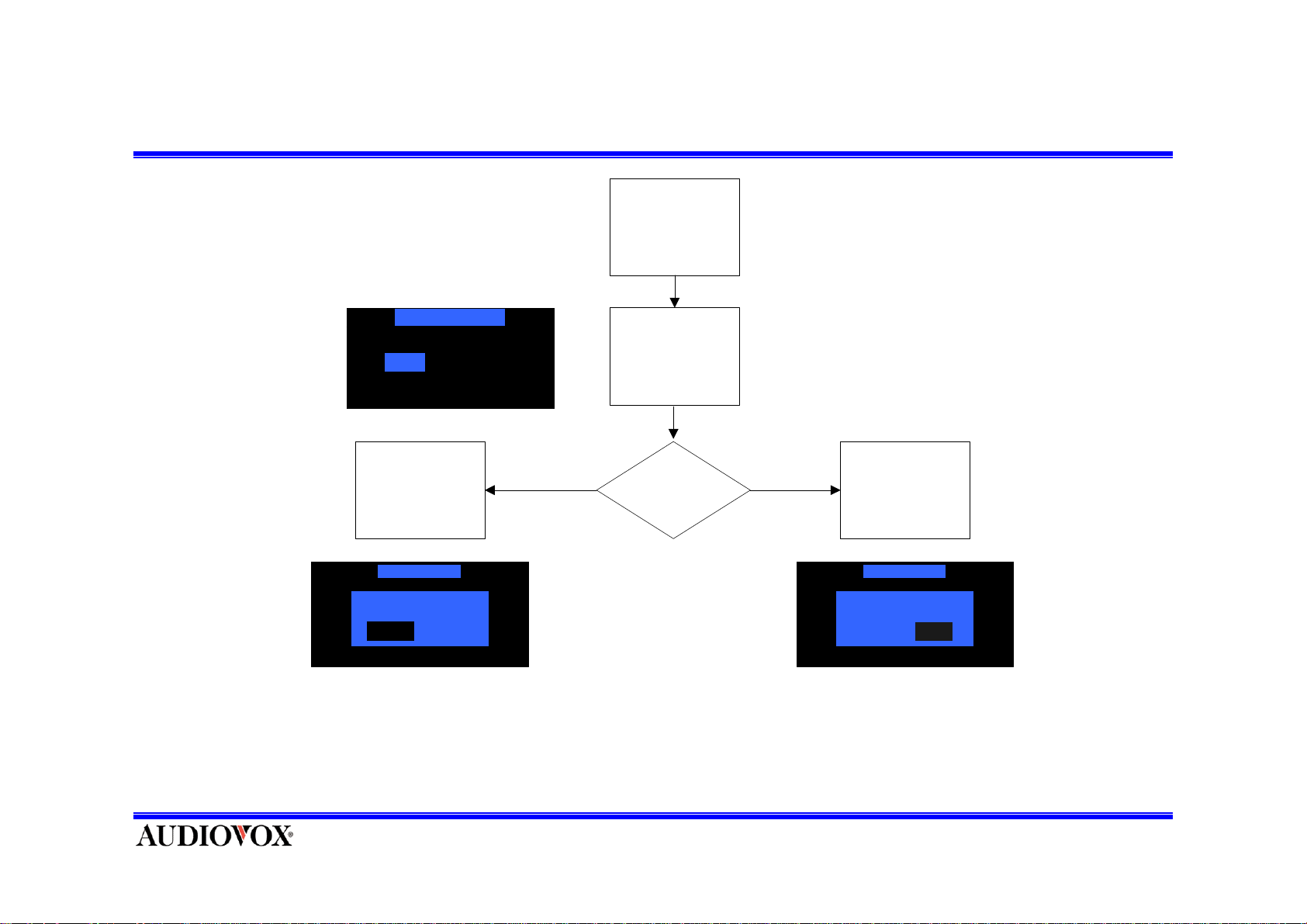
Clear all memorized data ( recall mode )
Enter Memory
Option Menu
Clear All Memory
Yes No
Select "Yes"
Press SELECT
Button
Cle ar All Me mory
Confi rm
Yes No
NoYes
YES
Memory" Item
Clear All
Memory
NO
Select "No"
Press SELECT
Button
Cle ar All Memo ry
Confi rm
Yes No
Yes
NoYes No
Highlight the option you wish to choose by pressing CH UP or CH DOWN Button and press SELECT
Button to enter the option between [Clear All Memories] and [Clear All Presets].
Select "C lea r All
Page 28
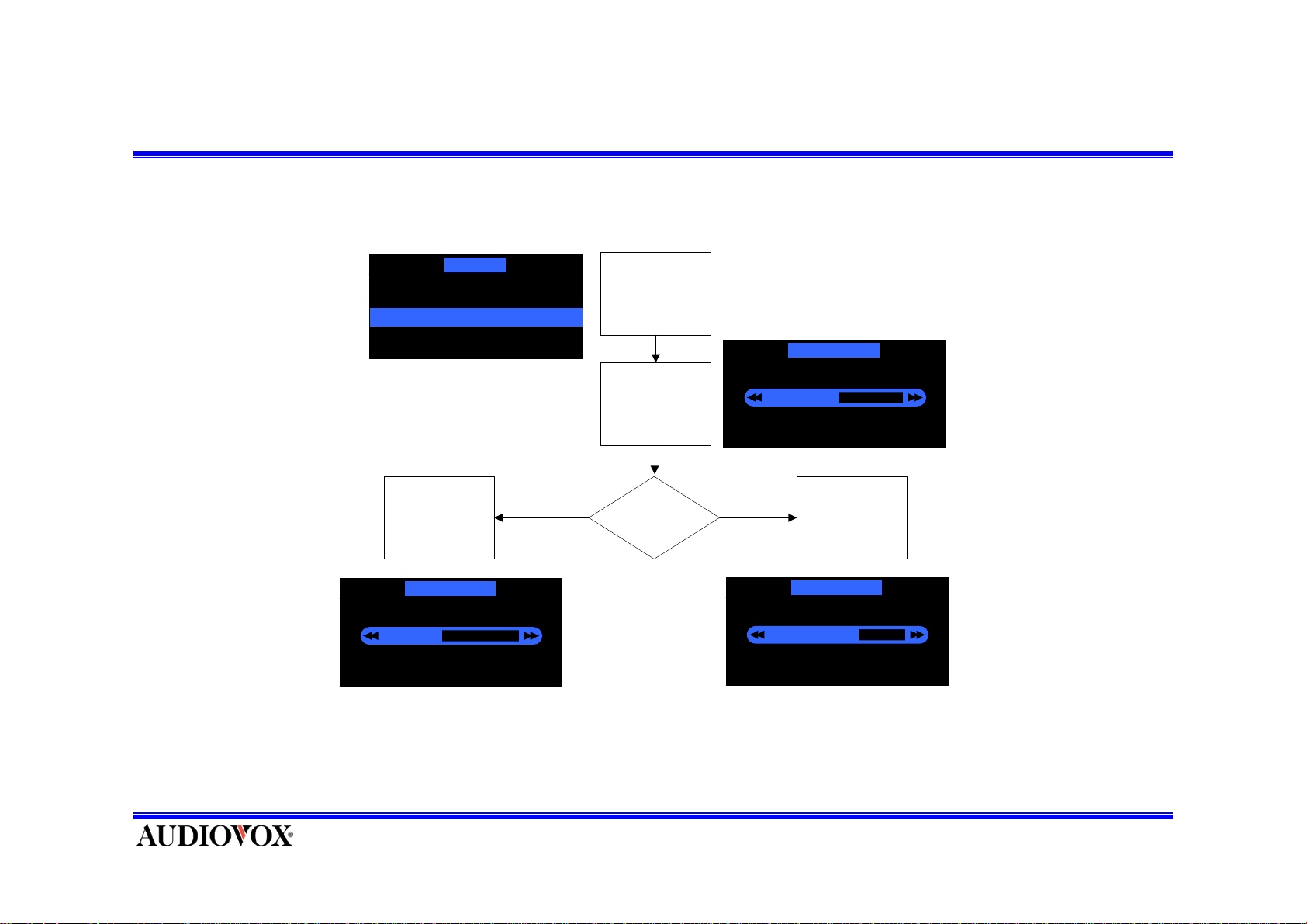
Display Settings ( Contrast )
To enter either of these modes, press CH UP or CH DOWN Button in the Setup Menu list to highlight the
option you wish to adjust and the press SEL Button to make the selection.
Disp lay Se tting
Dimming Control
Contrast Control
Enter Display
Setting s Menu
Sele ct "Con tr a st
Control"
Dimming Control
5
-The current setting
is indicated on the
horizontal bar graph.
Up
Press
SELECT Button
Dimming Control
Down
Press CAT
UP/DOW N Button
Press CAT UPDOWN
(It adjusts the bar
4
graph indication and
function accordingly.)
Press SEL Button to save the value and exit.
Press
SELECT Button
Dimming Control
6
Page 29
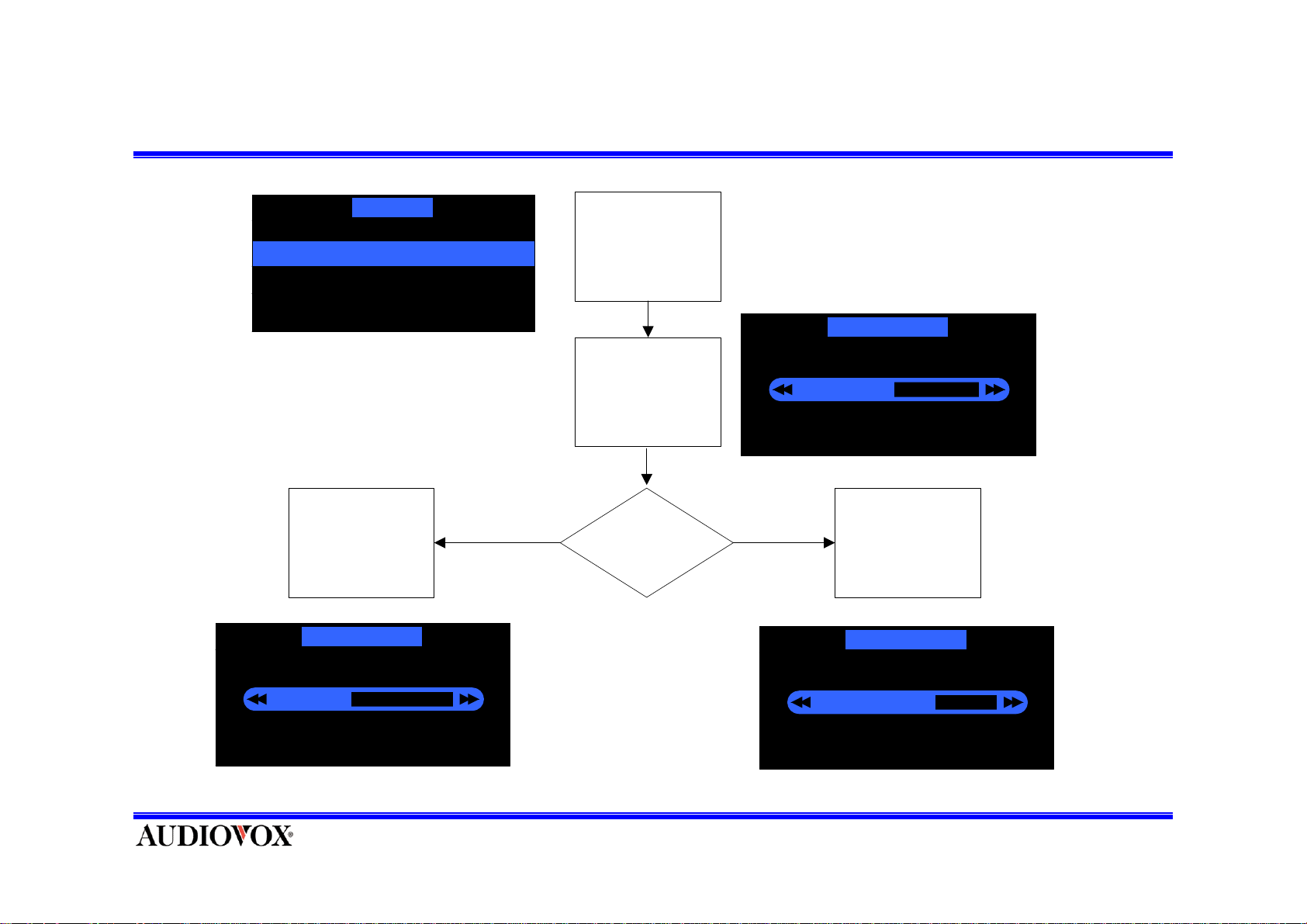
Display Settings ( Dimming )
Display Se t t in g
Enter Display
Dimming Control
Contrast Control
Settings Menu
Dimming Control
Press
SELECT Button
Dimming Control
4
Down
Select
"Dimming Control"
Press CAT
Up/Down Button
Press CAT UPDOWN
(It adjusts the bar
graph indication and
function accordingly.)
5
Up
Press
SELECT Button
Dimming Control
6
Page 30
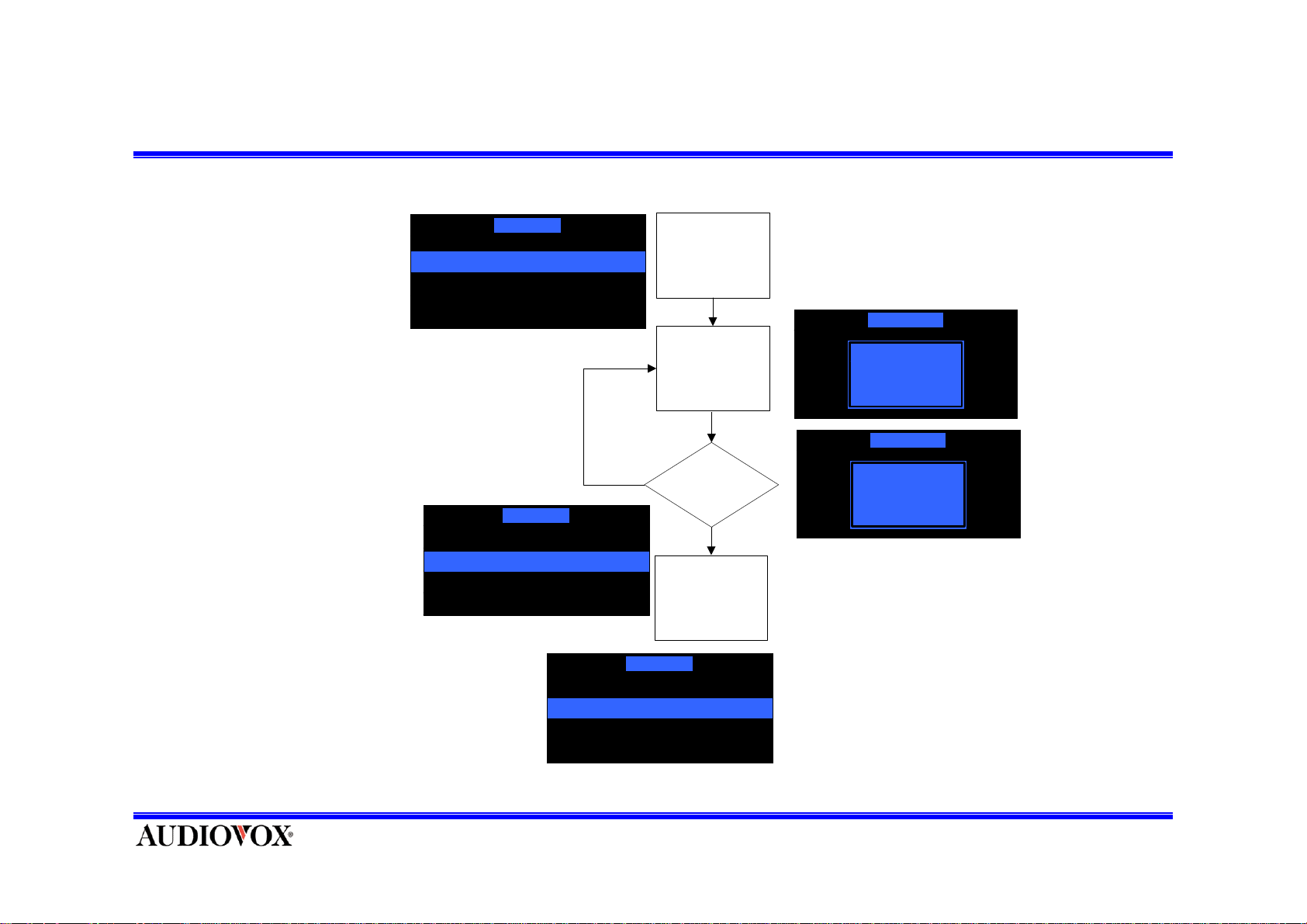
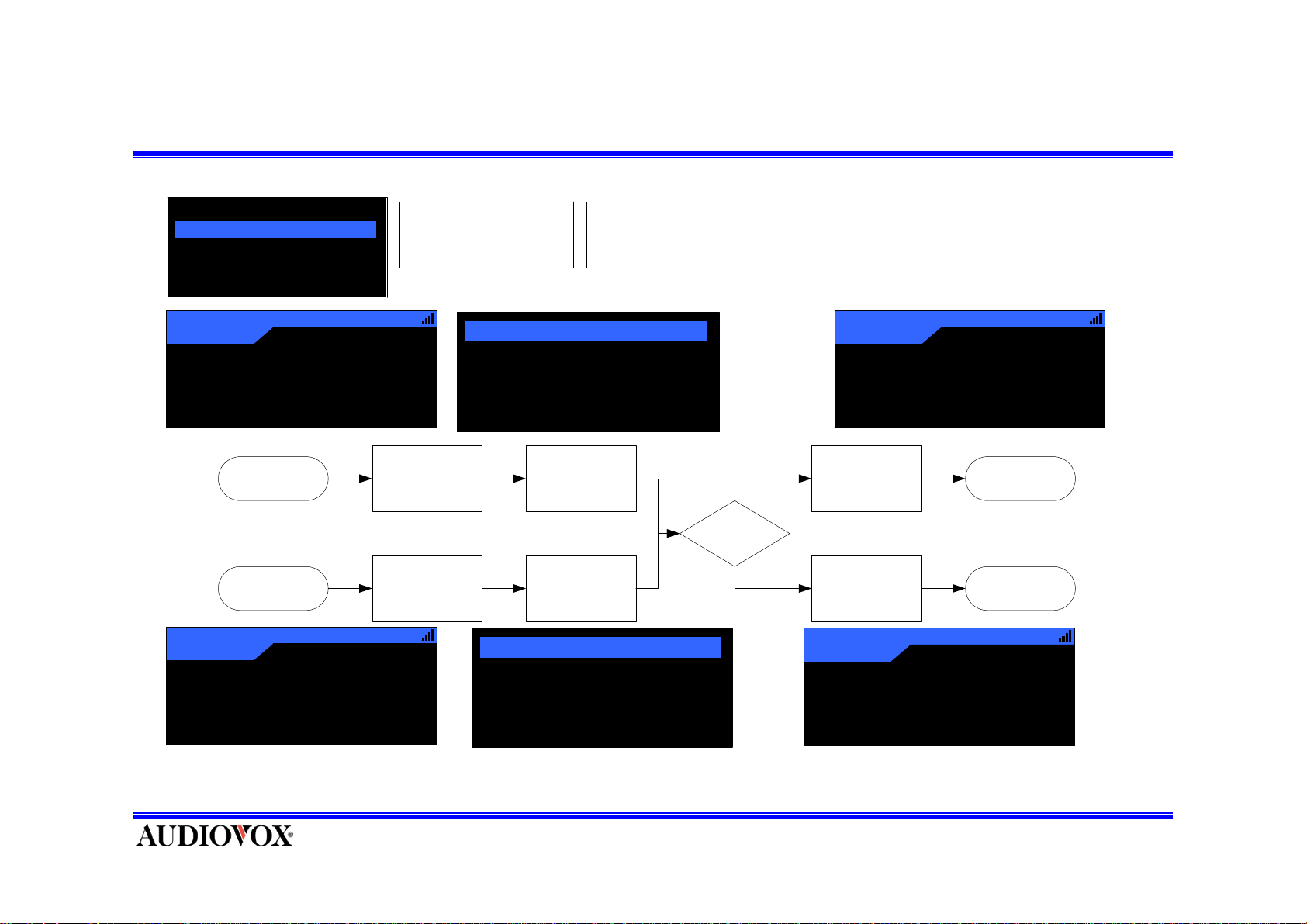
How to Lock Channel
Lock Option
Lock / Unlock
Edit Code
Enter Lock
Option s Menu
Lock / Unlock
To exit , press and release MENU Button.
Lock Option
223 TONE
1 Preview
1 US1
2 The Pulse
2 The Pulse
3 Pure Jazz
3 Pure Jazz
4 Country X
Press CH UP or CH DOWN to scroll the list
•Can’t skip 0 and 1 channel.
Select
"Lock/Unlock"
Menu
NO
Password
Right ?
YES
Displ ay Channel
List
Select the Channel
by SELECT Button
Lock Option
1 Preview
2 The Pulse √
3 Pure Jazz
4 Country X
Enter Code
Lock / Unlock
Enter Code
***
*
To exit without change, press and release
MENU Button.
Page 31
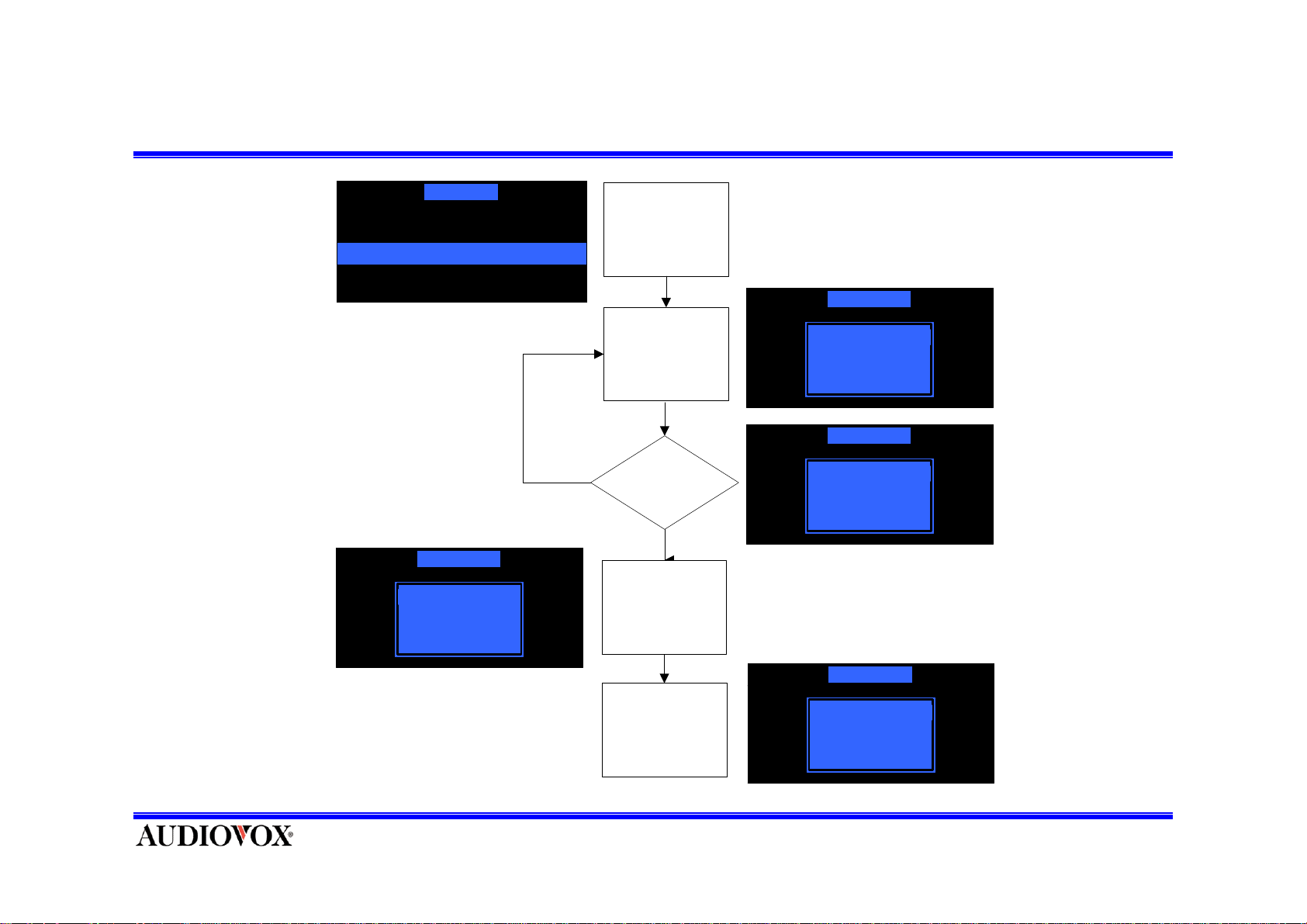
Edit password
Lock Option
Lock / Unlock
Edit Code
If the code is incorrect, “Wrong
Code” displays.
* To exit without change,
press and release MENU Button.
Lock / Unlock
New Code
NO
Enter Lock
Opti ons Menu
Select "Ed it Code"
Menu
Password
Right ?
YES
Display
New Code Input
Screen
Lock / Unlock
Ent er Code
Lock / Unlock
Ent er Code
***
*
- Then, The code is changed
- Returns the upper menu.
Input New Cod e
Press SELECT
Button
Lock / Unlock
New Code
***
*
Page 32
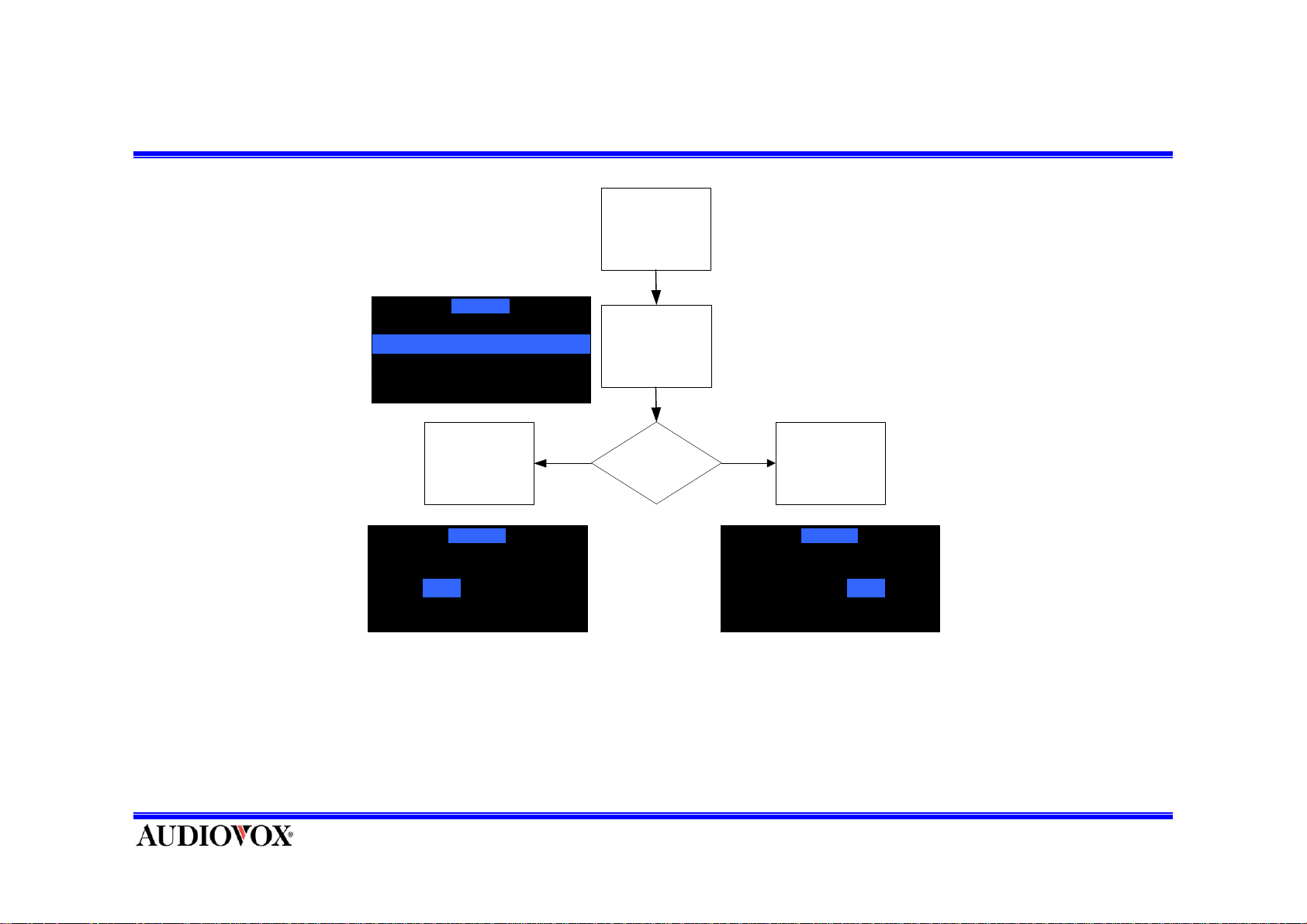
FM On/Off
Enter FM Setting
FM Setting
FM On/Off
Frequency Setting
Press
SELECT Button
FM On/Off
On Off
Select "FM On/Off"
Menu
FM On/Off
ON OFF
Press
SELECT Button
FM On/Off
On OffOn Off
Highlight the option you want to choose by pressing CAT UP or DOWN Button and press SEL Button to
enter the option.
* To exit without change, press and release MENU Button
Page 33
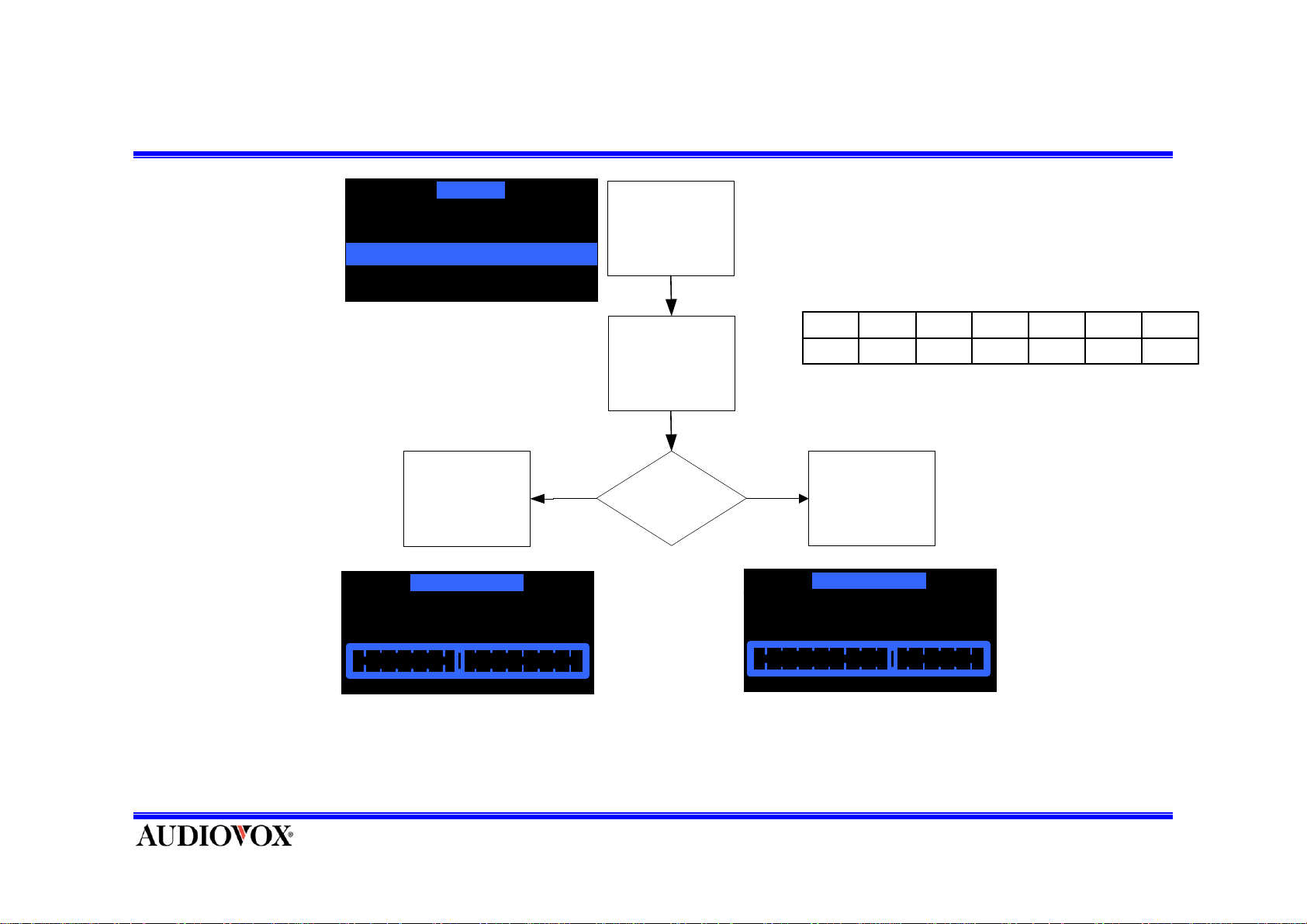
FM Frequency Setting
FM Setting
FM On / Off
Frequency Setti ng
Press
SELECT Button
Frequency Setting
89.3MHz
Enter FM Setting
Enter "Frequency
Setting"
CAT UP/DOWN
Down Up
-Current frequency is indicated in
the horizontal line.
-There are 14 frequencies.
89.389.188.988.788.588.388.1
107.9107.7107.5107.3107.1106.9106.7
Press
SELECT Button
Frequency Setting
89.7MHz
Press SEL Button to select frequency and exit.
•To exit without change, press and release MENU Button.
•Can Control in Press and Hold MENU Button on default mode
Page 34
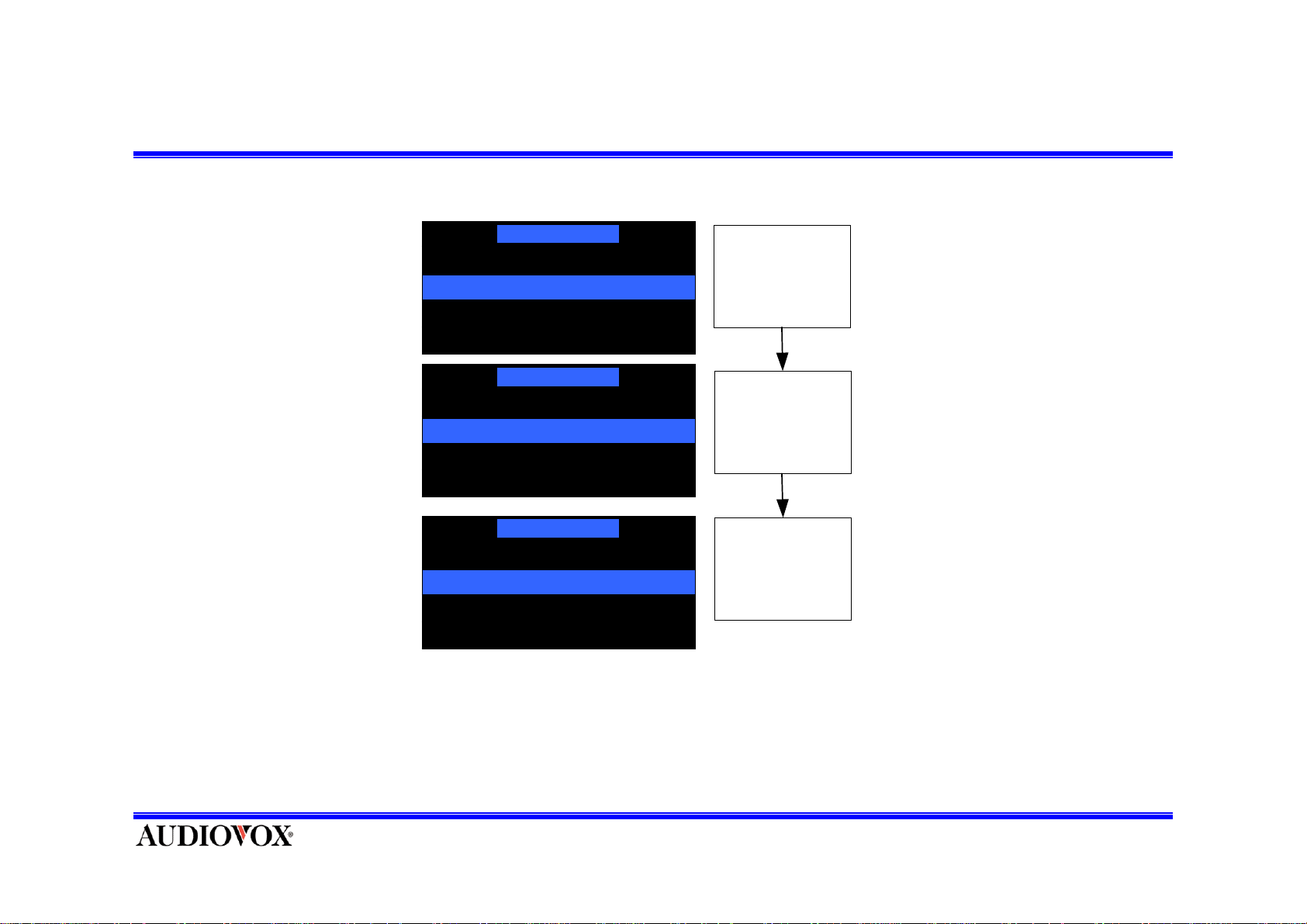
Channel Add/Skip
Upon entering this mode, a channel list shall be displayed with the current channel in play highlighted.
Channel Add/Skip
223 TONE
1 US1
2 The Pulse
3 Pure Jazz
Channel Add/Skip
1 US1
2 The Pulse
3 Pure Jazz
4 The 40's
Channel Add/Skip
1 US1
2 The Pulse
3 Pure Jazz
4 The 40's
( √ means that the channel is skipped)
Enter Channel
Add/Skip Menu
Select Channel
by SELECT
Button
Display List
√
•To exit without change, press and release MENU Button.
•Can’t skip 0 and 1 channel.
Page 35
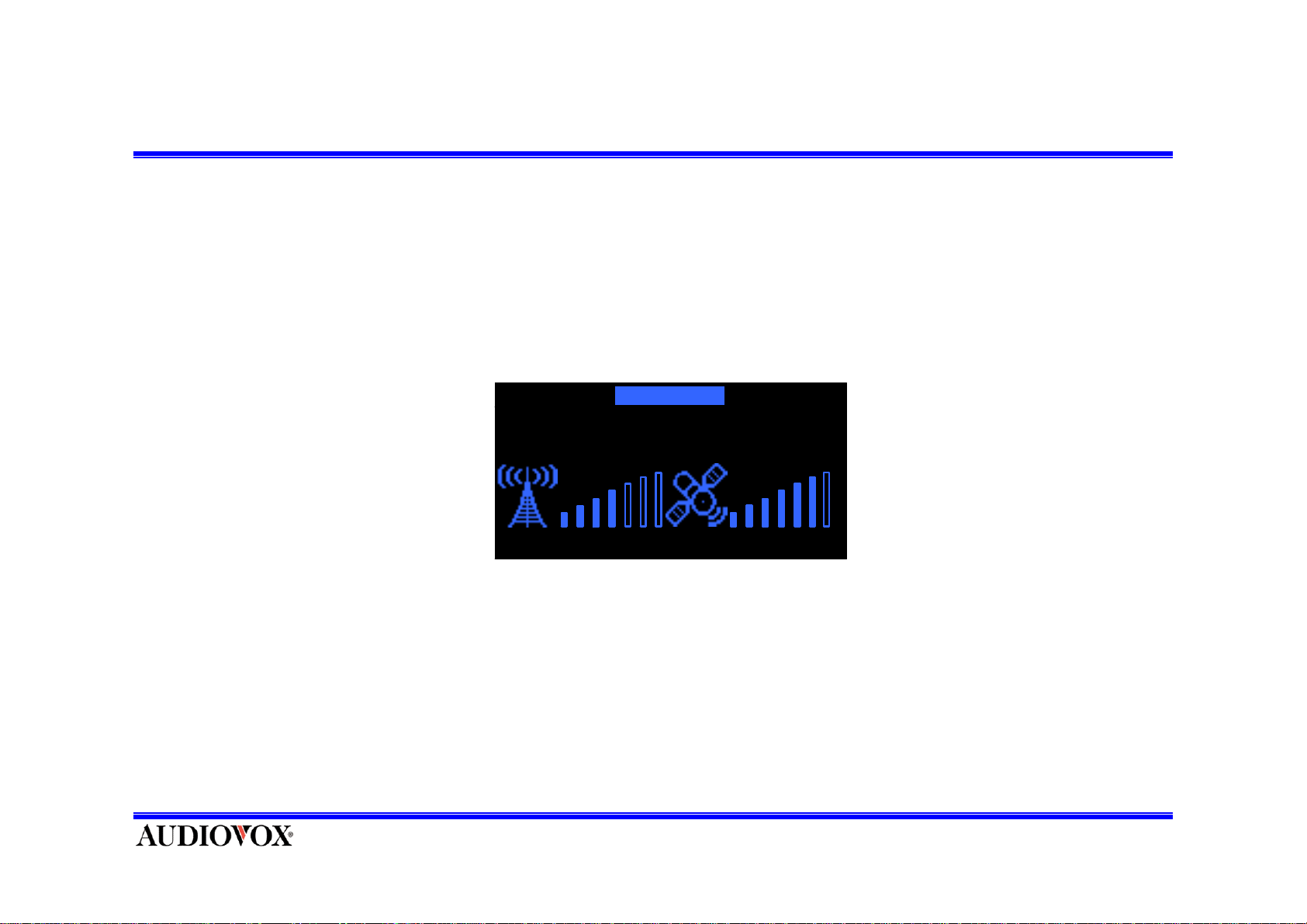
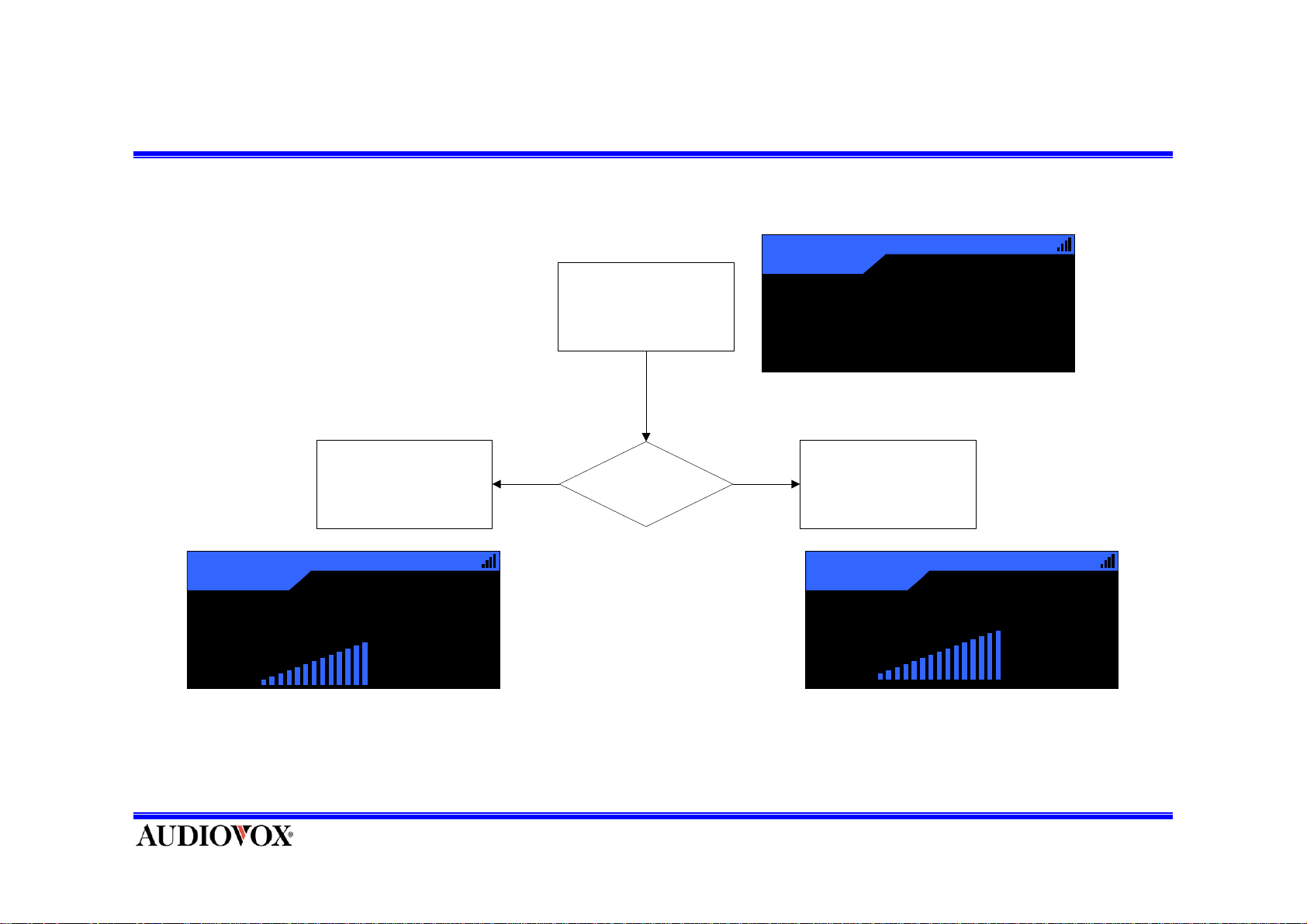
Antenna Aiming
Upon entering this mode, two kind of signal has each a 7 segment horizontal bar graph is displayed
with a “I” sign to the left and to the right. The current setting is indicated on the bar graph. Moving
the antenna location adjusts the bar graph signal strength indication, thus ensuring optimum reception.
Antenna Ai m i ng
To exit this function, press and release
SELECT button or MENU button.
Page 36
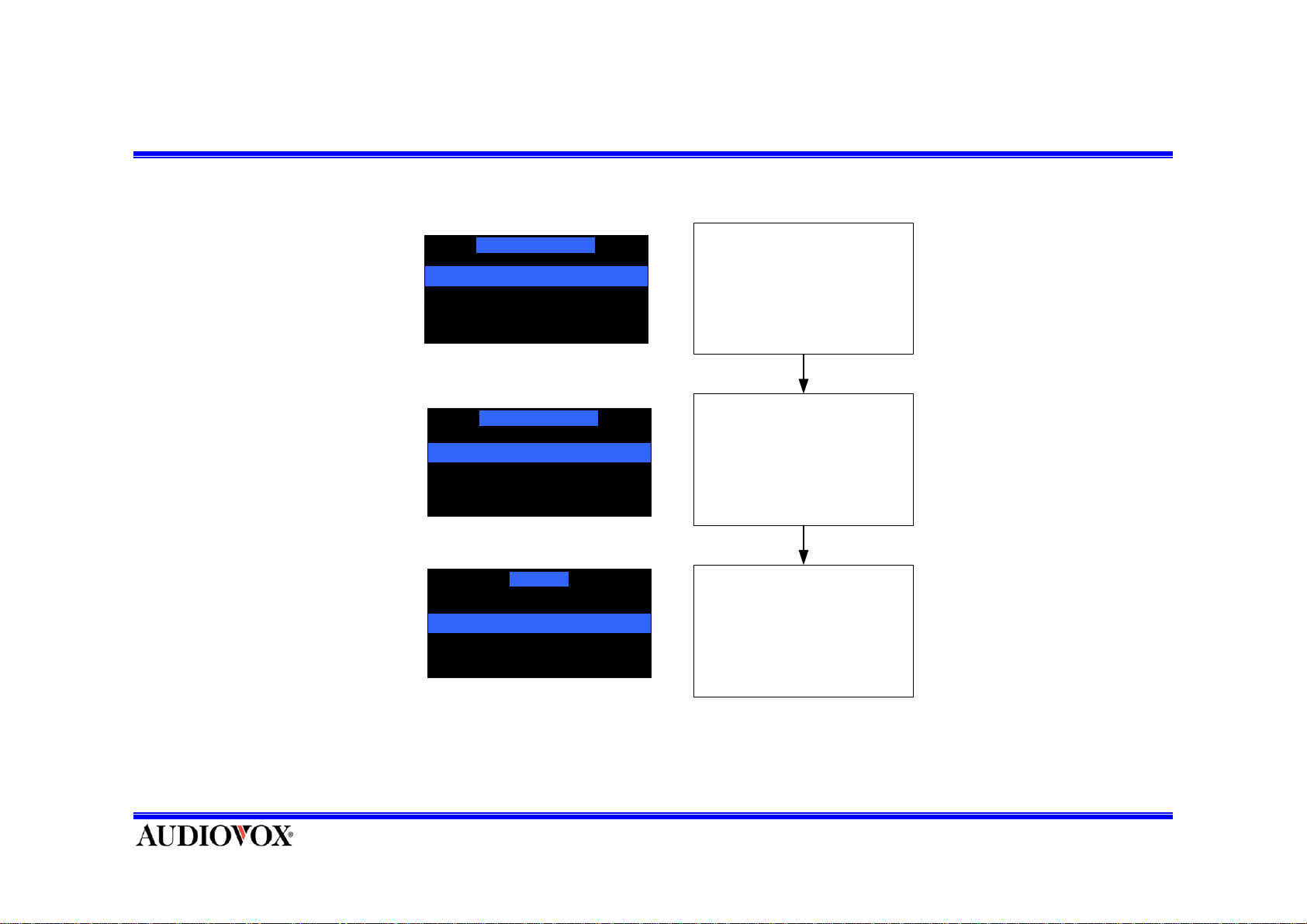
Time Based Features (Time Zone)
Time Based Features
Clock
Alarm Clock
Sleep Mode
Time Based Features
Time Zone
Dayli ght S avings Time
Time Zone
(GMT-09:00) Alaska
(GMT-08:00) Pacific
(GMT-07:00) Mountain
(GMT-06:00) Cent ral
Enter C l ock m enu
Enter Time Zone menu
Select Time Zone
Page 37
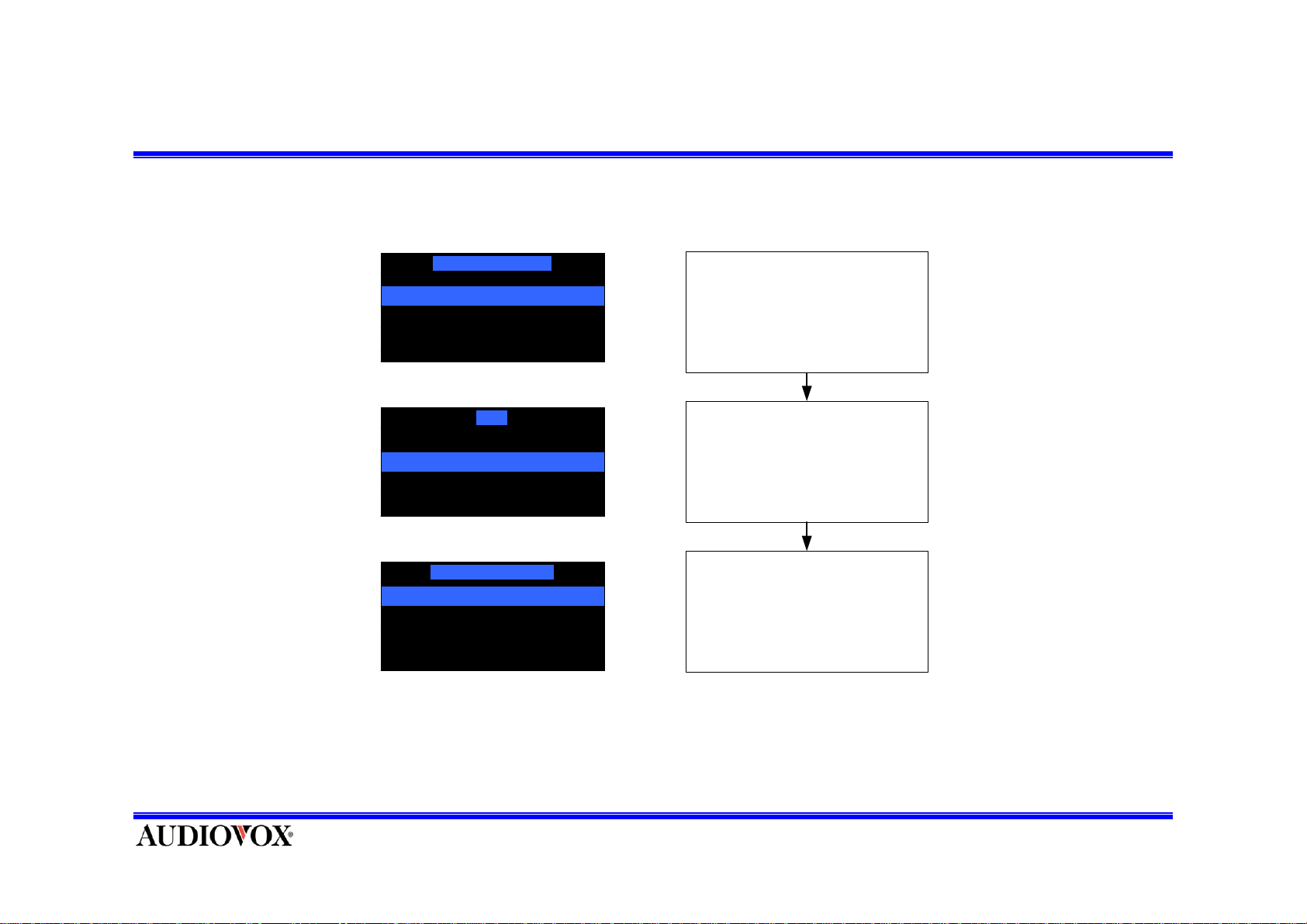
Time Based Features (Daylight Savings Time)
Time Based Features
Clock
Set Alarm
Sleep Mode
Clock
Time Zone
Daylight Savings Time
Daylight Savings Time
DST Observed
DST not Observed
Enter Time Zone menu
Enter D aylight Savings Time
menu
Select DST
obse rve /not observ e
Page 38
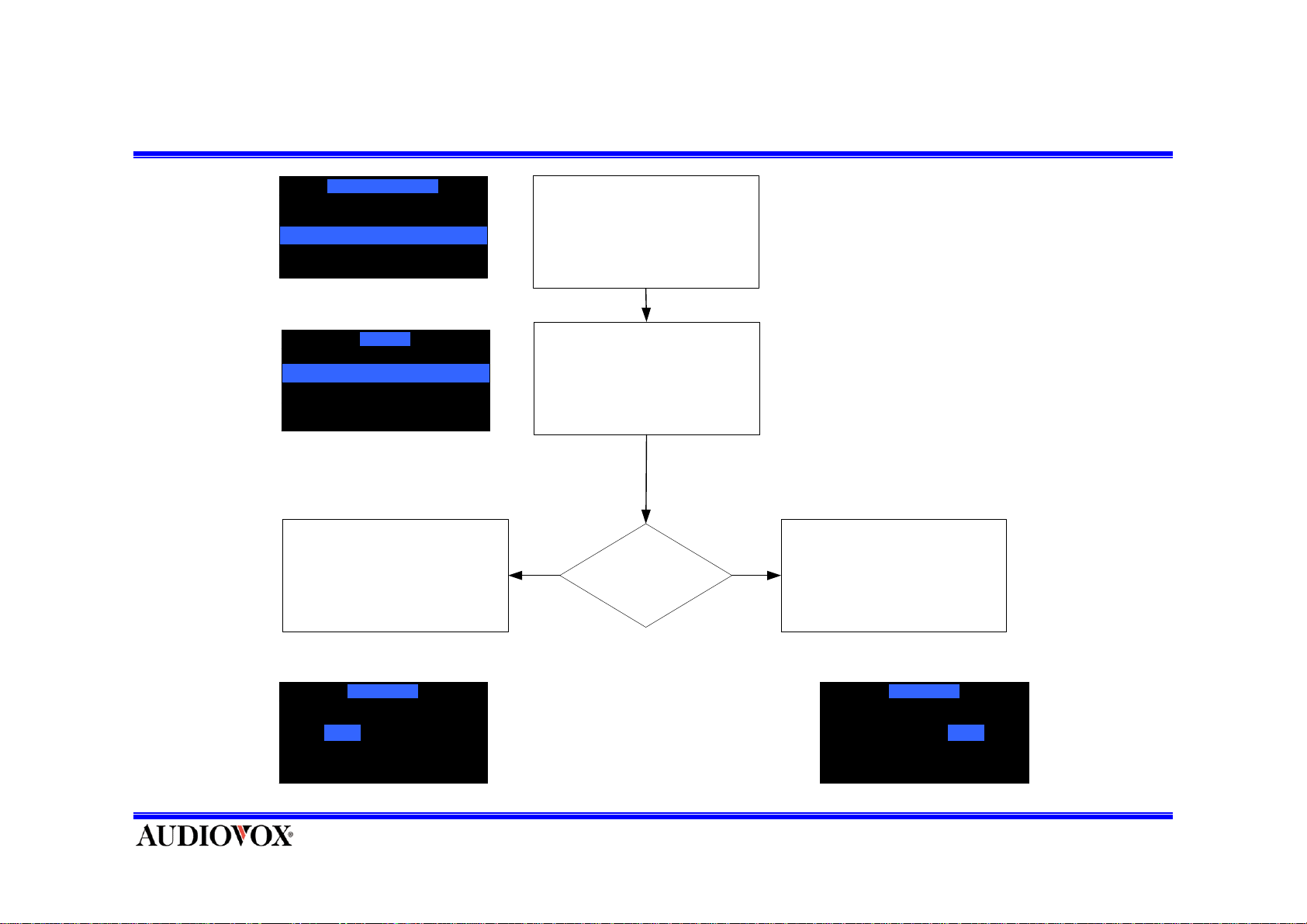
Time Based Features (Alarm On/Off)
Time Based Features
Clock
Set Alarm
Sleep Mode
Set Alarm
Enter Set Alarm menu
Alarm On/ Off
Alarm Time
Alarm On/ Off
Yes No
Enter Alarm On/Off menu
Yes
Enable Alarm? Pres s SEL ECT Butt onPress SELECT Butt on
No
Alarm On/ Off
Yes No
Page 39
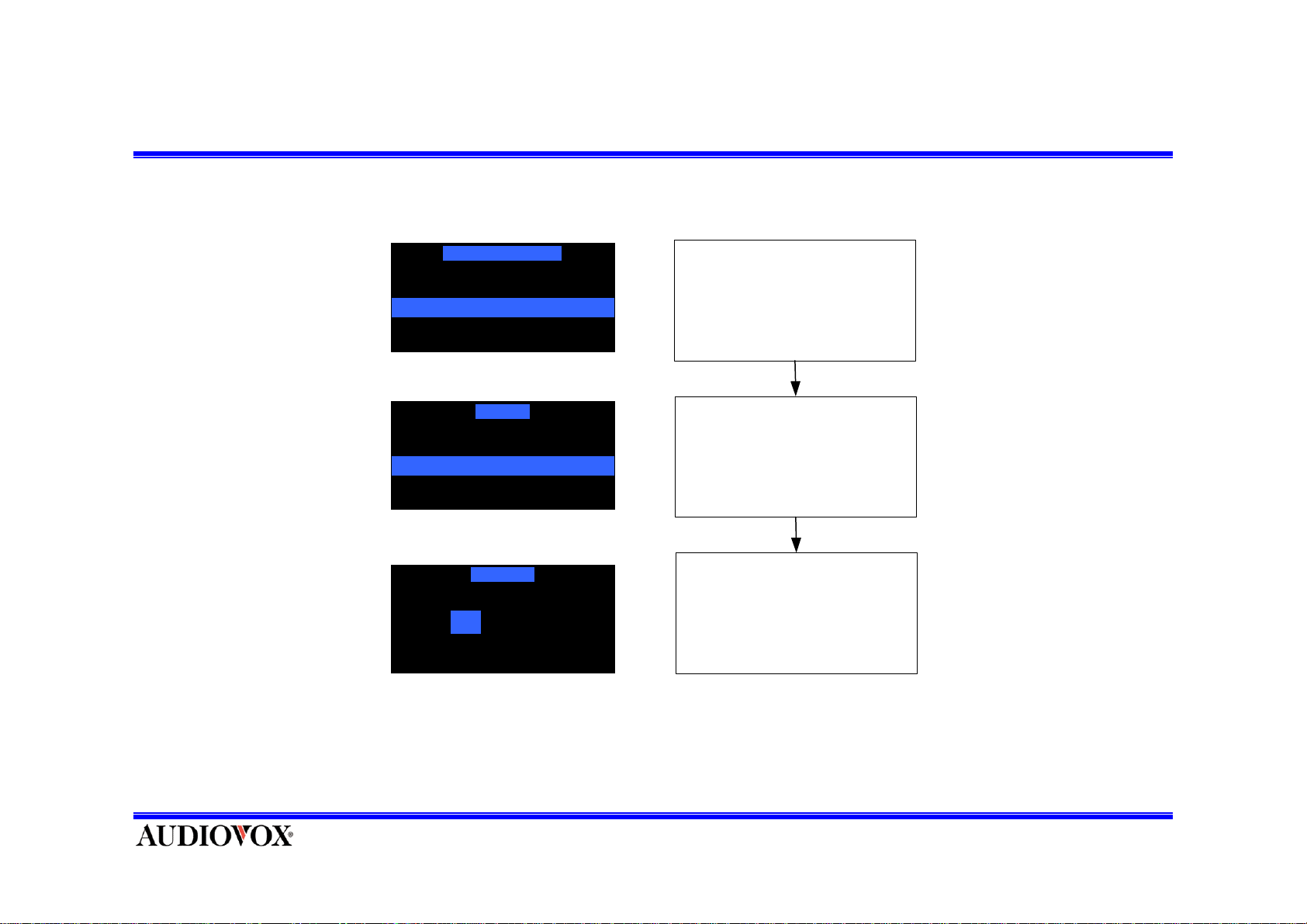
Time Based Features (Set Alarm1)
Time Based Features
Clock
Set Alarm
Sleep Mode
Set Alarm
Enter Set Alarm menu
Ala rm On/Off
Alarm Time
Alarm Time
12 : 00 AM12
12:00AM
Enter Alarm Time menu
Change A l arm T i m e
Page 40
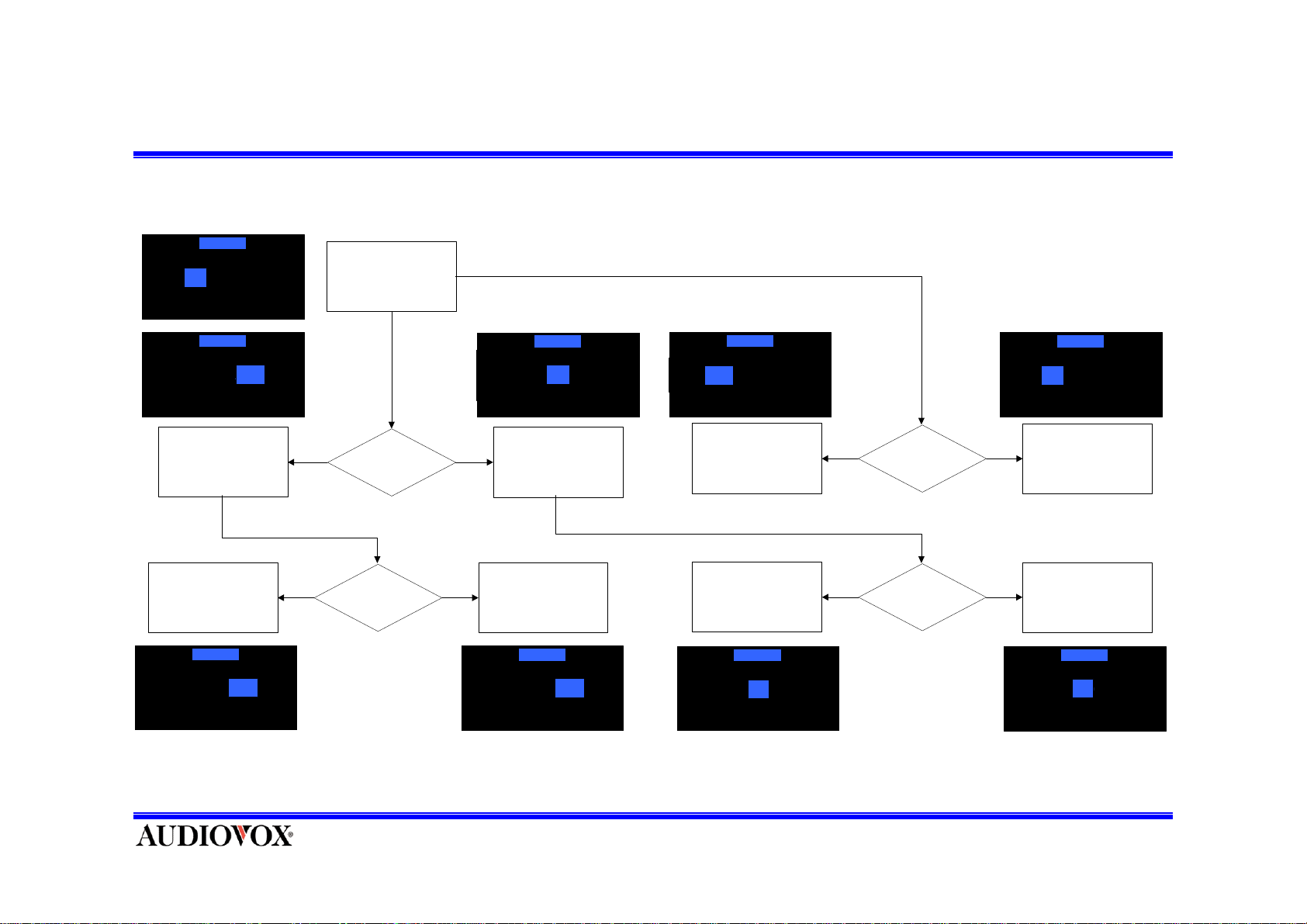
Time Based Features (Set Alarm2)
Alarm Time
12
12 : 00 AM
Alarm Time
12 : 00 AM
To Press Category Down Key
is Move to Back a Cursor.
When begin Cursor Position,
Press Category Down is move
Category Down Key is Change
on Reverse AM/PM
12 : 00 PM
AM
to End Cursor.
Alarm Time
AM
Down
Down
Press Channel Up/Down
Alarm Time Controls on
Category Up/Down ,Channel
Up/Down and 0~9 Number
Keys.
Press Category
Up/Down
To Press Category Up Key is
Up
Move to Back a Cursor.
When begin Cursor Position,
Press Category Down is move
Up
Category Up Key is Change
on Reverse AM/PM
Alarm Time
12 : 00 AM
Alarm Time
00
12 : 00 AM
to End Cursor.
PM
Alarm Time
11
12 : 00 PM
Press Channel Down Key,
Hour value is decrease.
Change AM/PM When Over
Hour Range
Press Channel Down Key,
Minute value is decrease.
Alarm Time
59
12 : 00 AM
Down
Down
Press Channel Up/Down
Press Channel Up/Down
Alarm Time
01
12 : 00 AM
Up
Press Channel Up Key ,
Hour value is increase.
Change AM/PM When Over
Hour Range
Up
Press Channel Up Key,
Minute value is increase .
Alarm Time
12 : 00 AM
01
Page 41
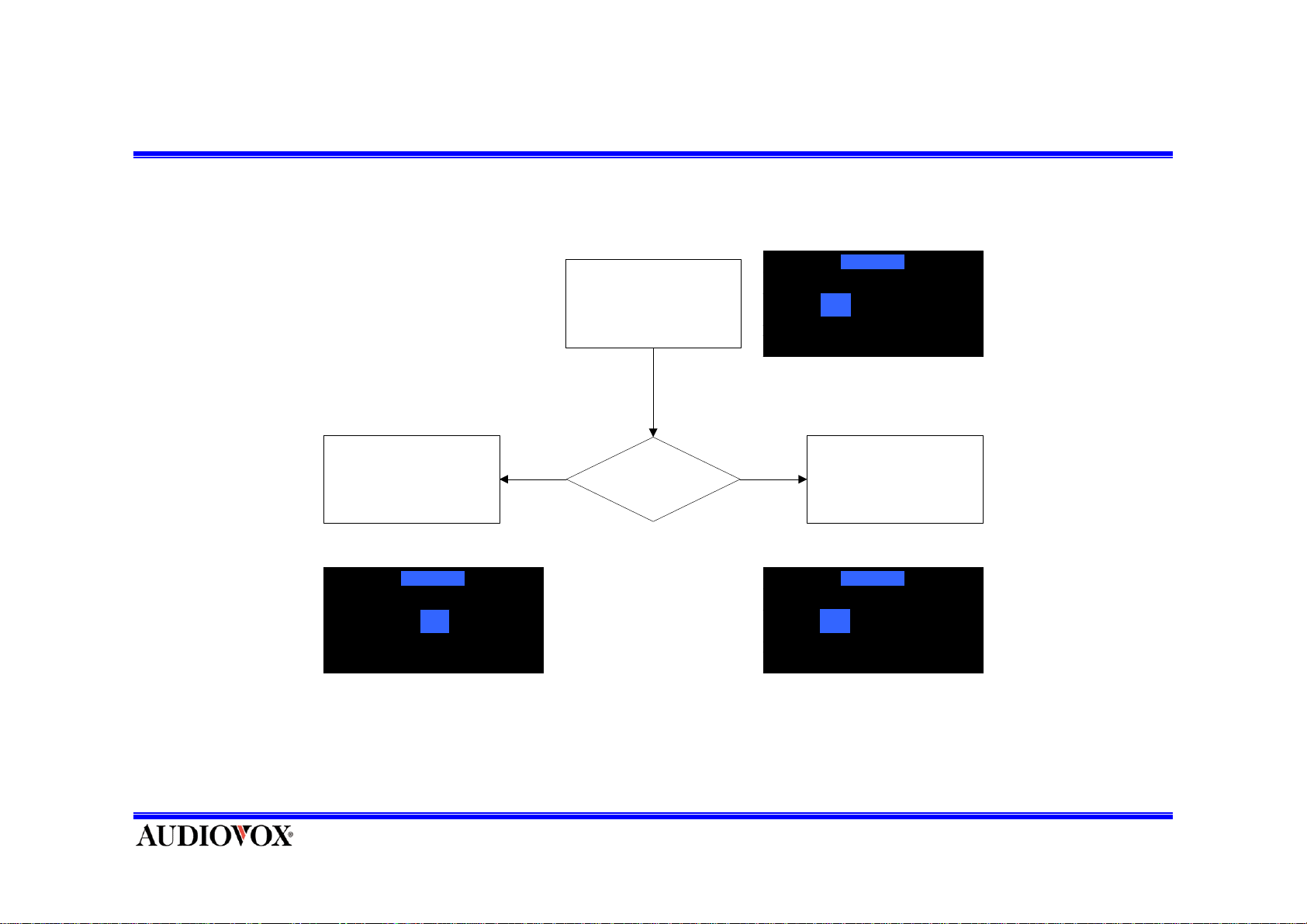
Time Based Features (Set Alarm3)
Alarm Time
Change Press Val ue And
Cursor move to Ne xt value.
Alarm Time
09 : 00 PM00
In
Range
Selection Value Controls on
Number Keys.
Press Number Key
12 : 00 AM12
Over
Range
Return to before value and
hold on Cursor
Alarm Time
12 : 00 AM12
Note : Change in Time Range. When Range is over, Return to Previous value And Cursor is Hold
Hour : 01~12 Minute : 0~59
Can’t Control AM/PM on Number Keys.
Page 42
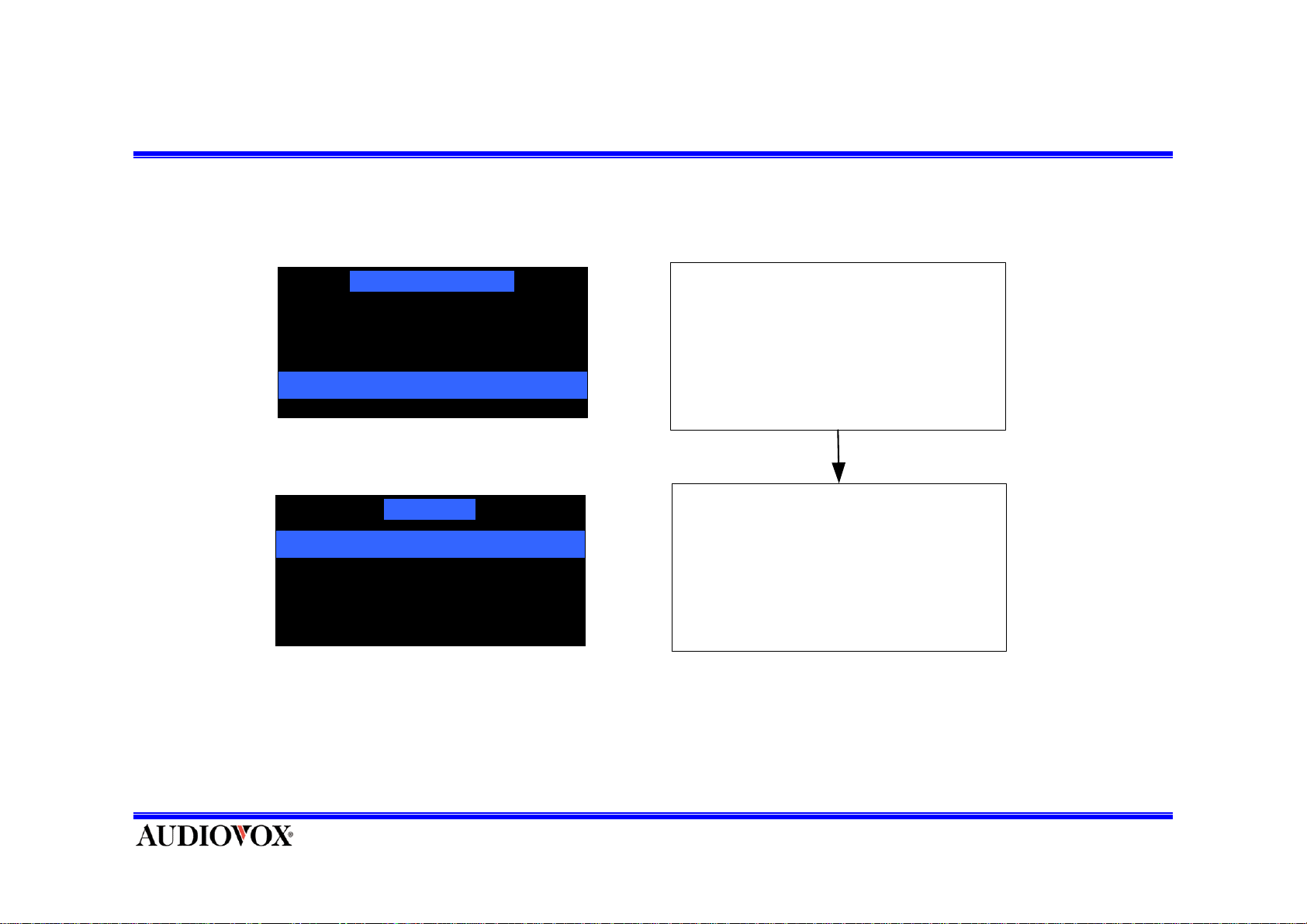
Time Based Features (Sleep Mode)
Time Based Features
Clock
Set Alarm
Sleep Mod e
Sleep Mode
Enter S l eep M ode m enu
Sleep Off
60 Minutes
120 Minutes
180 Minutes
Sel ect sl eep t i m e 0 ~ 180
minutes to CH Up or Down Keys
Page 43
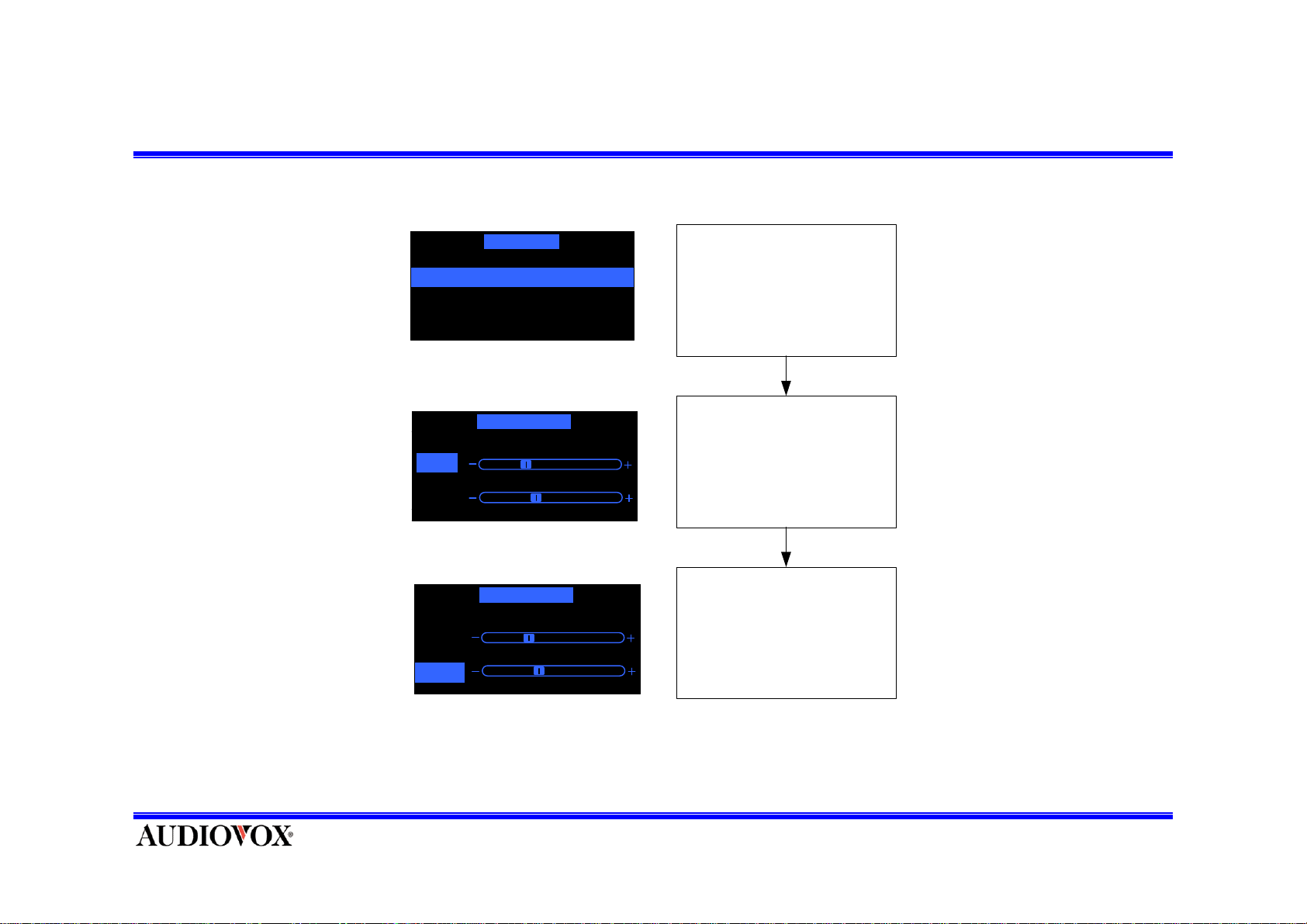
Audio Options (Equalizer)
Sound Opti on
Equalizer Setting
Volume Setting
Equalizer Setting
Bass
Treble
Equali zer Setting
Bass
Treble
Enter Equalizer Setting menu
Control the E quali zer Value
By ‘CH-‘ or ‘CH+’
Sel ect t he Equali zer band
By ‘CAT-‘ or ‘CAT+’
Page 44
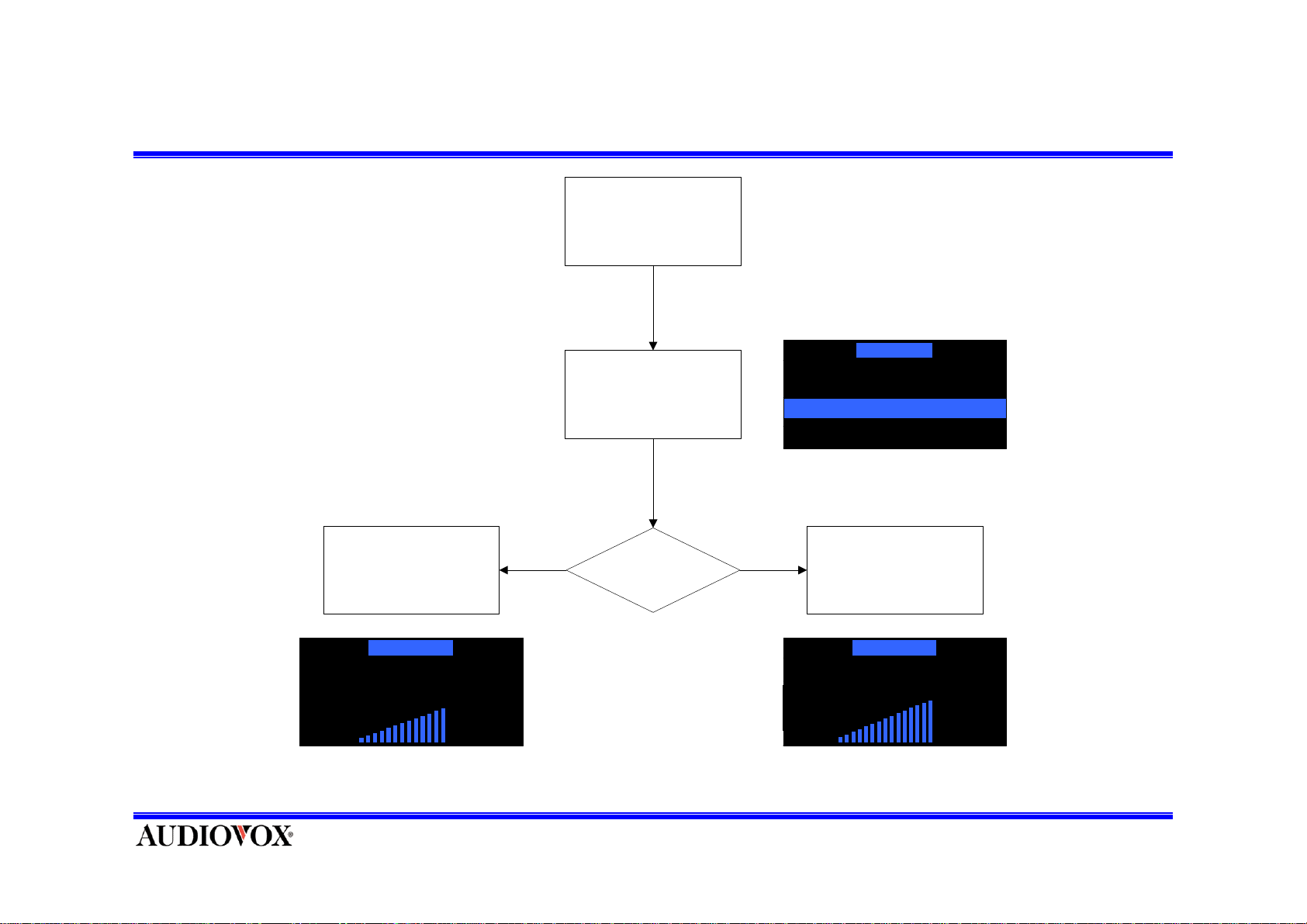
Audio Options (Volume Setting)
Enter Audio Options Menu
Sound Option
Press ‘CH -‘ Key Decrease
Volume Value
Volume Setting
Equalizer Setting
Volume Control
14
Press
‘CH-’
Key
Enter Volume Setting Menu
Press ‘-‘ or ’+’ Key
Press
‘CH+’
Key
Equalizer Setting
Volume Setting
Press ‘CH +‘ Key Decrease
Volume Value
Volume Setting
Equali zer Setting
Volume Control
16
Page 45
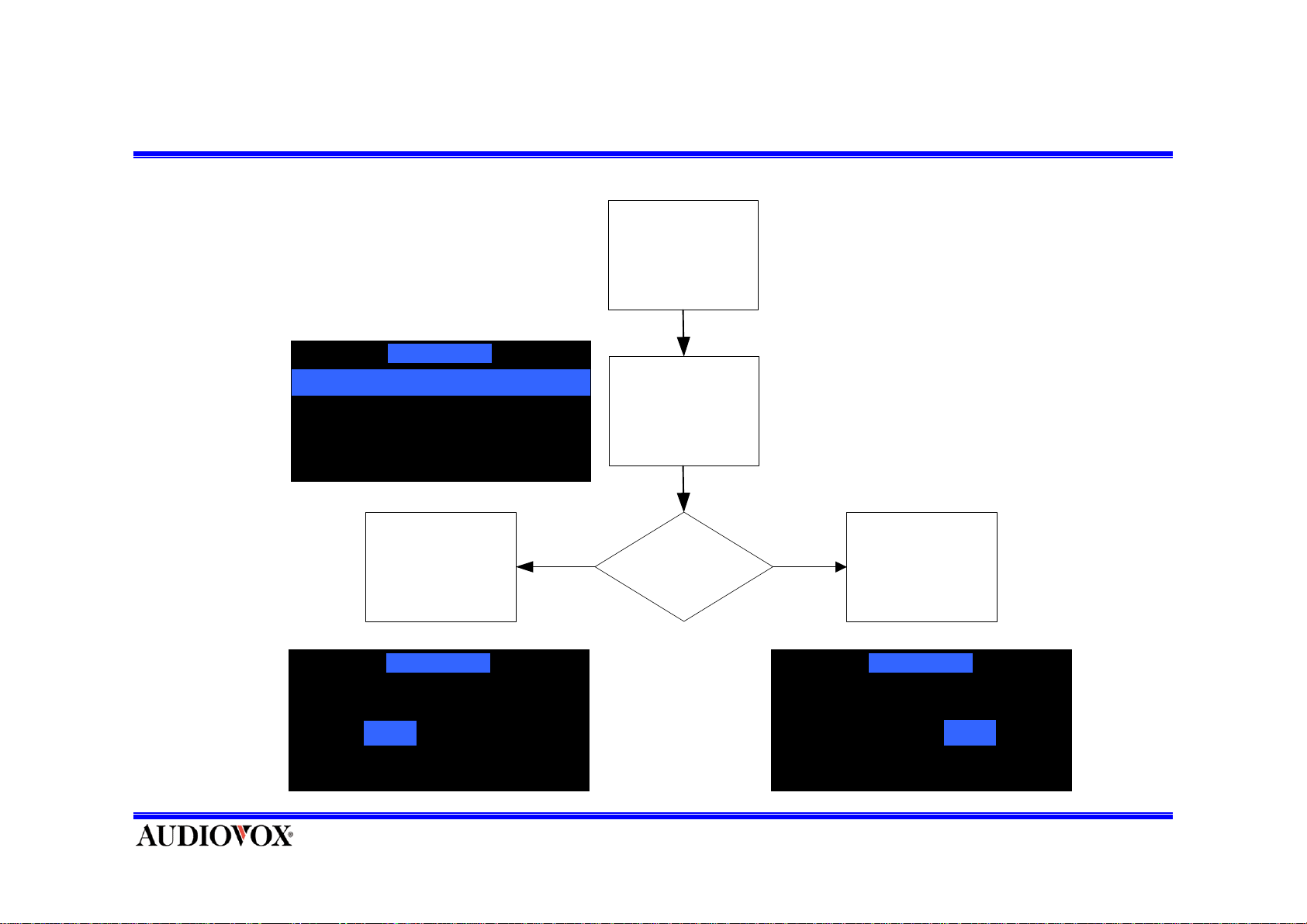
Stock Options (On/Off)
Stock Options
Stock On/Off
Stock Add
Stock Erase
Enter Stock
Options Setting
Select "Stock
On/Off" Menu
Press
SELECT Button
Stock Options
On Off
Stock On/Off
ON OFF
Press
SELECT Button
Stock Options
On OffOnOff
Page 46
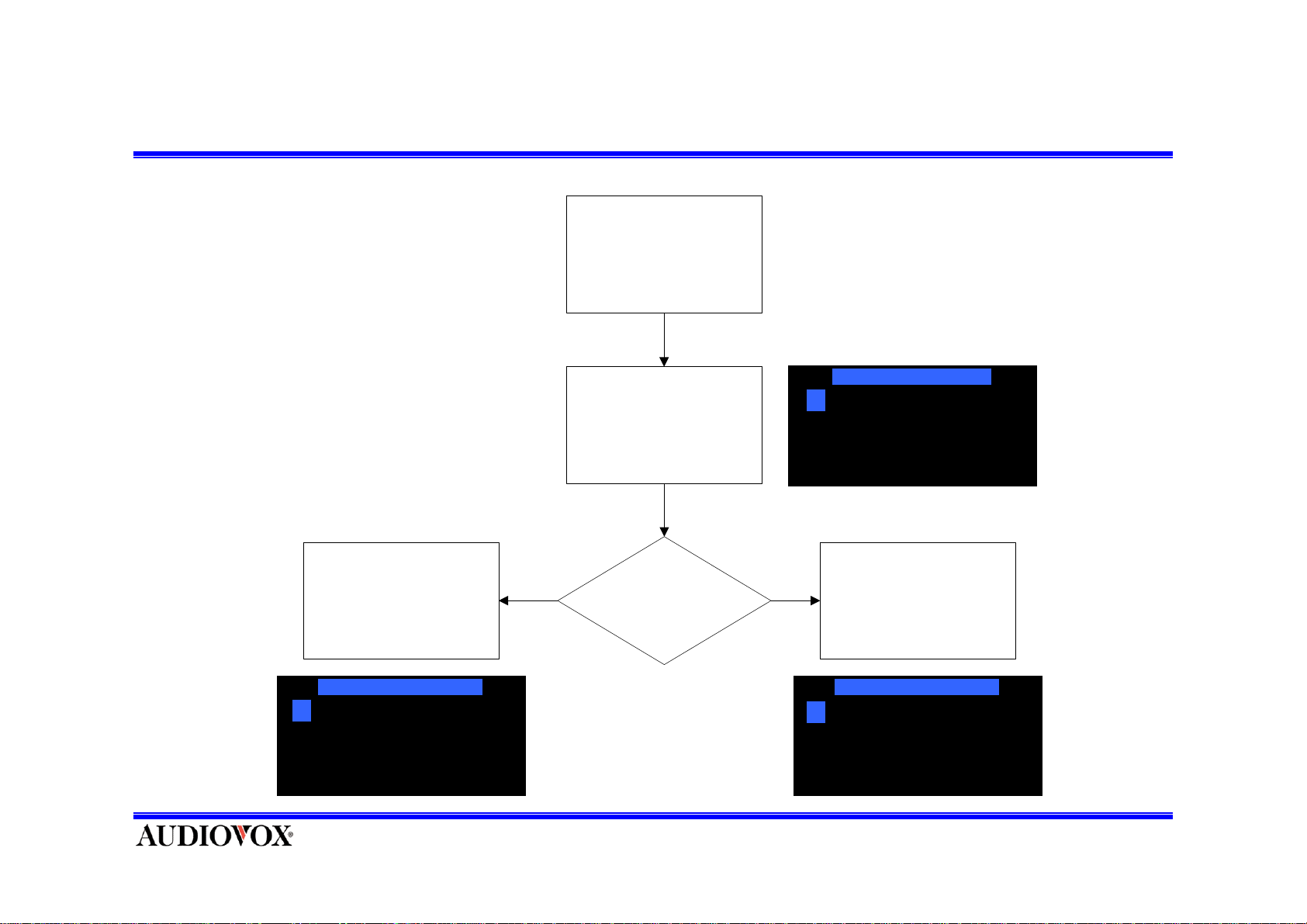
Stock Options (Add 1)
Enter Stock Add menu
Press CH to Change Char
A
Control the Character by
‘CH-‘ or ‘CH+’
Press ‘CH-’ Key is Change to
before Character in Cursor
@
Press
‘ CH-‘
Press ‘CH-’ or “CH+”
Press
‘ CH+‘
Press ‘CH+’ Key is Change to
Next Character in Cursor
Press CAT to move CursorPress CAT to move Cursor
B
Page 47
Stock Options (Add 2)
Moving the Cursor
Press CAT to move cursor
B A
Move the Cursor by
‘CAT-‘ or ‘CAT+’
A Cursor
Move to before character
Press CAT to move cursor
A
Press
‘ CAT-‘
Press ‘CAT-’ or “CAT+”
Press
‘ CAT+‘
Cursor Move to Next character
Press CAT to move cursor
B A
A
Page 48
Stock Options (Add 3)
If user ‘Select’ Key key in the
Next stock Menu
Press ME NU to cancel
B A
Searching...
Press ME NU to cancel
Select the stock code by
‘CH-‘ or ‘CH+’
Press ‘Select ‘ key and Added
B A
BAA
BAB
BAC
Press ME NU to cancel
B A B
Stored
Page 49
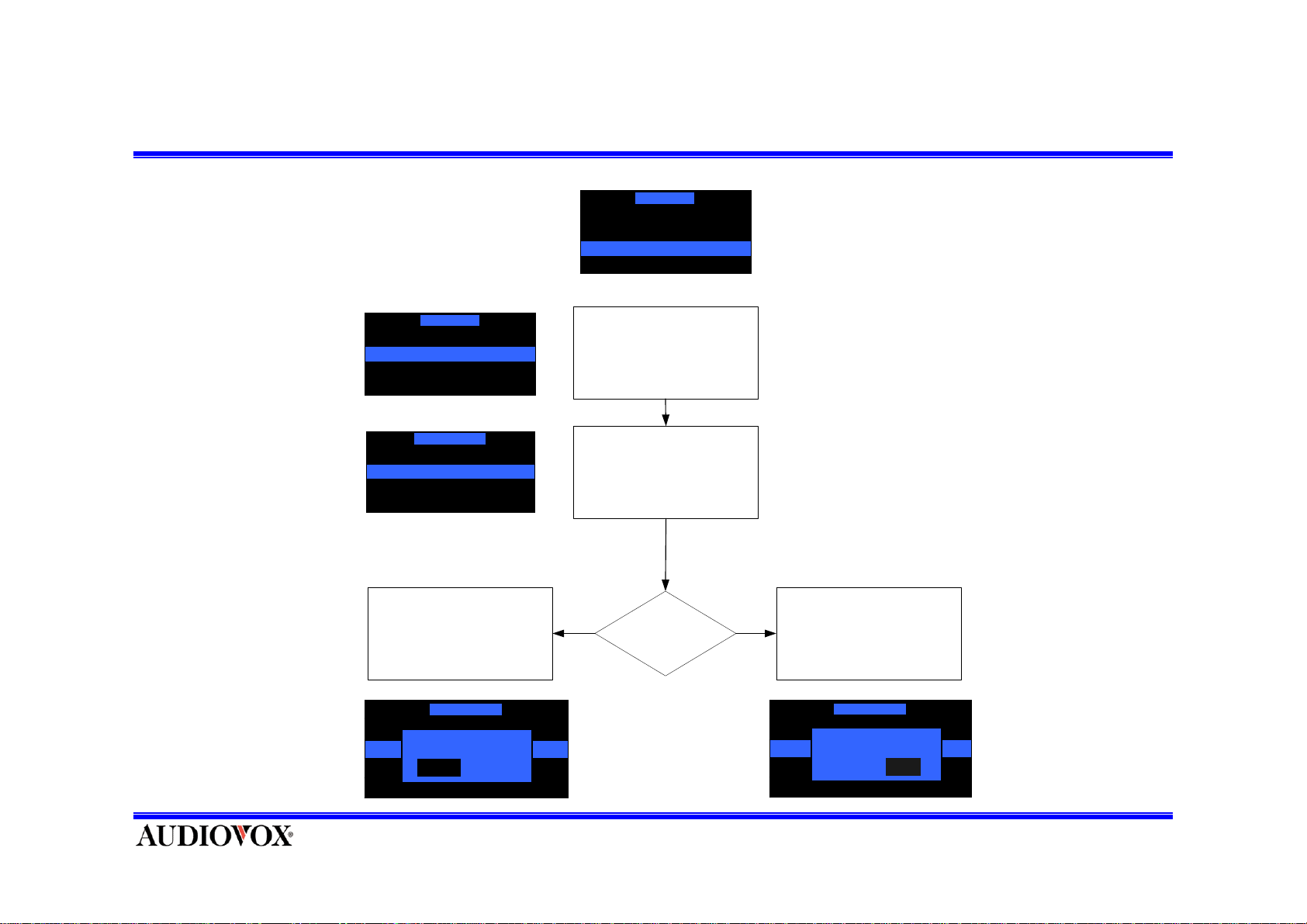
Stock Options (Erase 2)
Stock Options
Stock Opti ons
Stock On/Off
Stock Add
Stock Erase
ABC
ABD
ABE
ABF
ABC
ABD
ABE
ABF
Erase One
Erase All
Erase One Stock
Erase One Stock
Confirm
Enter Stock Erase m enu
Select the stock code t hat
user want t o er ase by
‘CH-‘ or ‘CH+’
Yes
No
Erase Stock? Press ‘SELECT’ ButtonPress ‘SELECT’ Button
Erase One Stock
ABC
ABD
NoYes
ABE
ABF
Yes
Confirm
NoYes No
Page 50
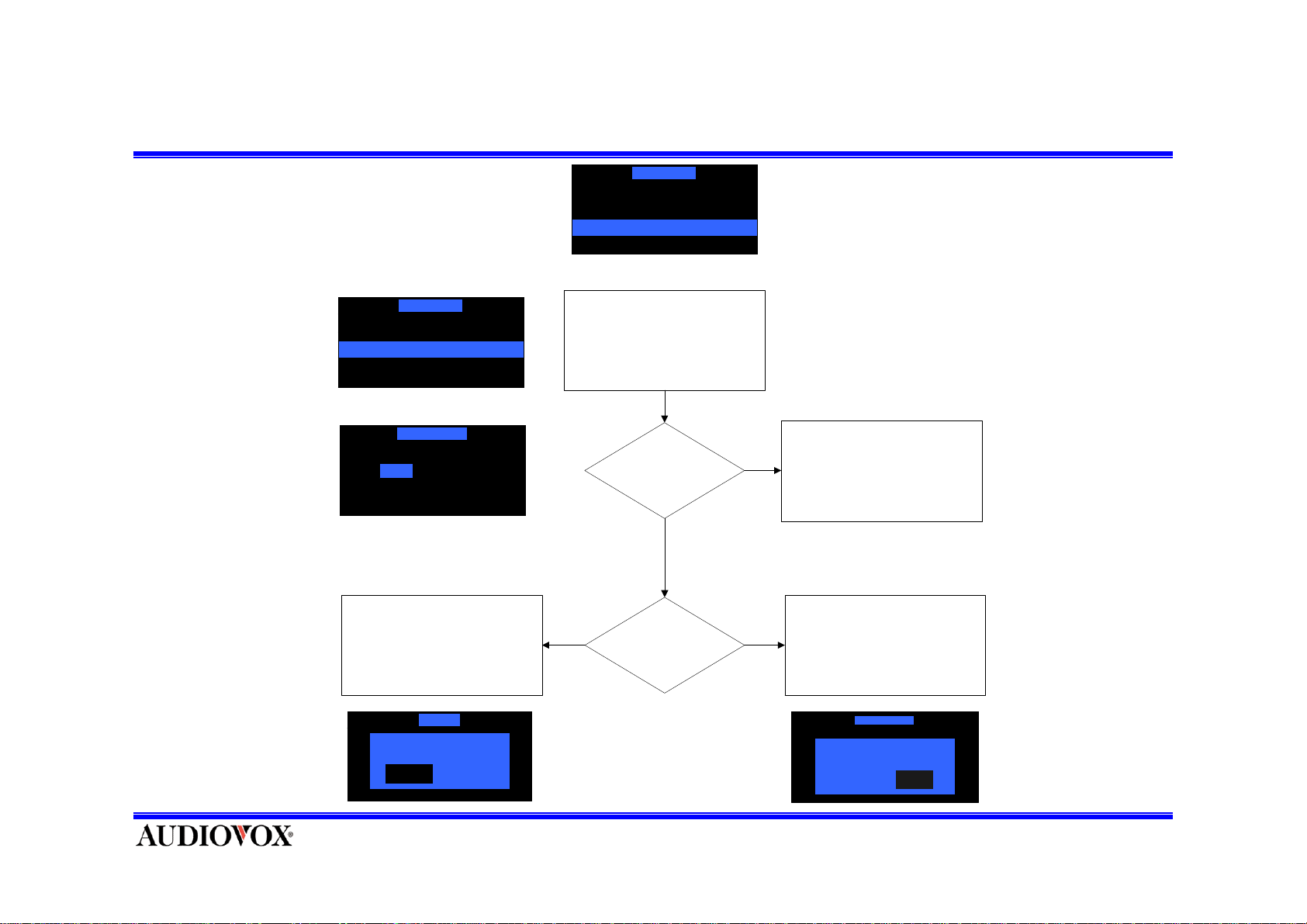
Stock Options (Erase 1)
Stock Options
Stock Options
Stock On/Off
Stock Add
Stock Erase
Erase One
Erase All Stock
Erase All Stock
Yes No
Pres s SELECT Button
To Era se All Stock
Erase All
Confirm
Yes No
NoYes
Ente r Erase All St o ck m e nu
Eras e All St o ck ?
Yes
Yes
Confirm?
No
No
No
Pres s SELECT Bu t ton
to Cancel
Press SELECT Button
to Cancel
Cle ar All Memory
Confirm
Yes No
NoYesNoYes
Page 51
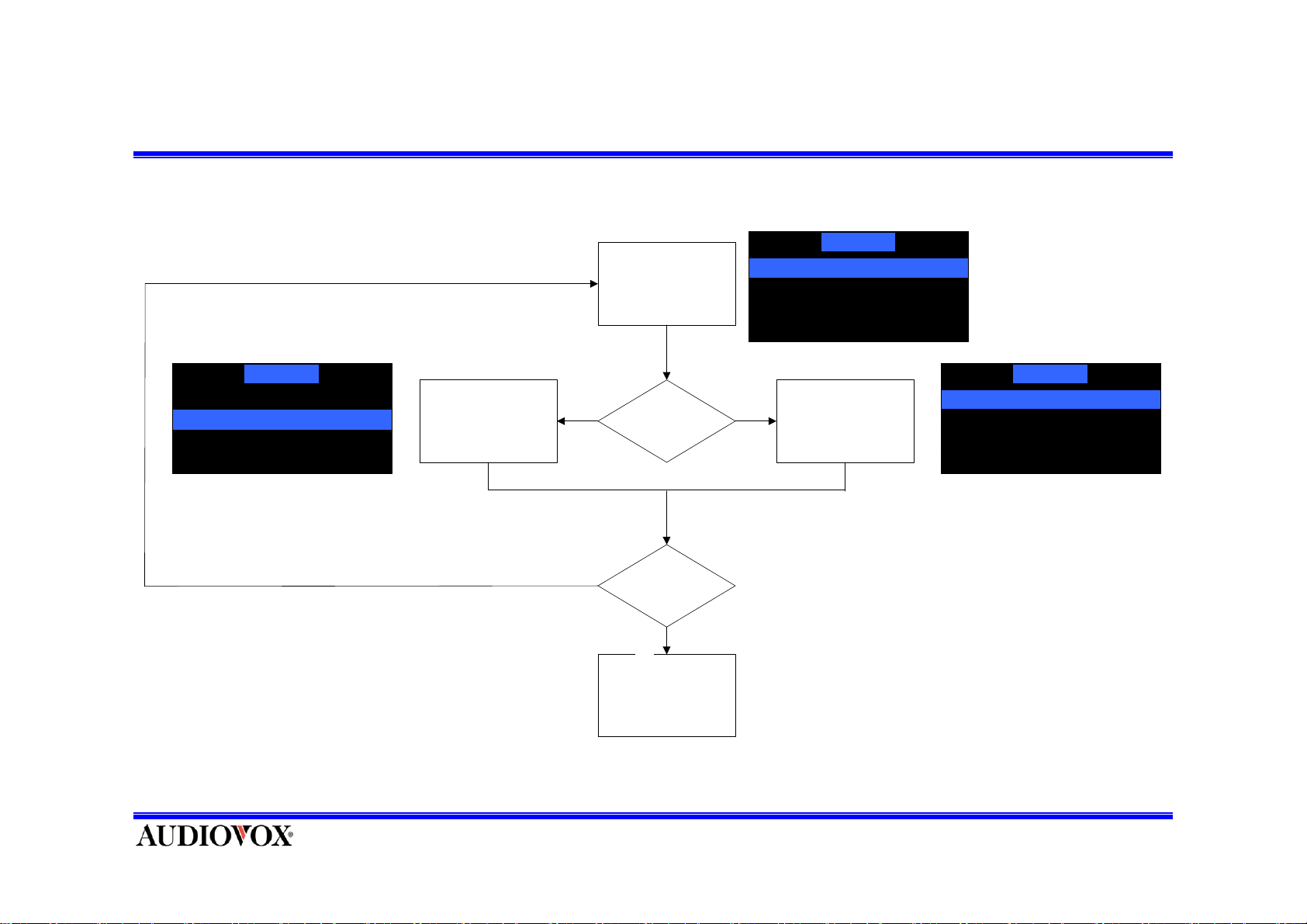
How to Select Display Items on Information Extras Menu(1).
Info Extras
►Sports
►News
►Horoscopes
(if when Highlight bar stay on
End of List then go to Start of
List.)
N
Press ‘CH’-or +
Keys to
Choose a Menu
on Lis t
Sel ect Highlight
Bar on Lower List
Item.
o
Down Up
CH up or
Down?
Do want
Menu?
Yes
►Sports
►News
►Horoscopes
Info Ex t ras
Select Highlight
Bar on Upper List
Item.
Info Extras
►Sports
►News
►Horoscopes
(if when Highlight bar stay on
Start of List th en go to End of
List.)
Press ‘Select’ Key
•
Because menu becomes update by stream, menu items can increase or decrease.
Page 52
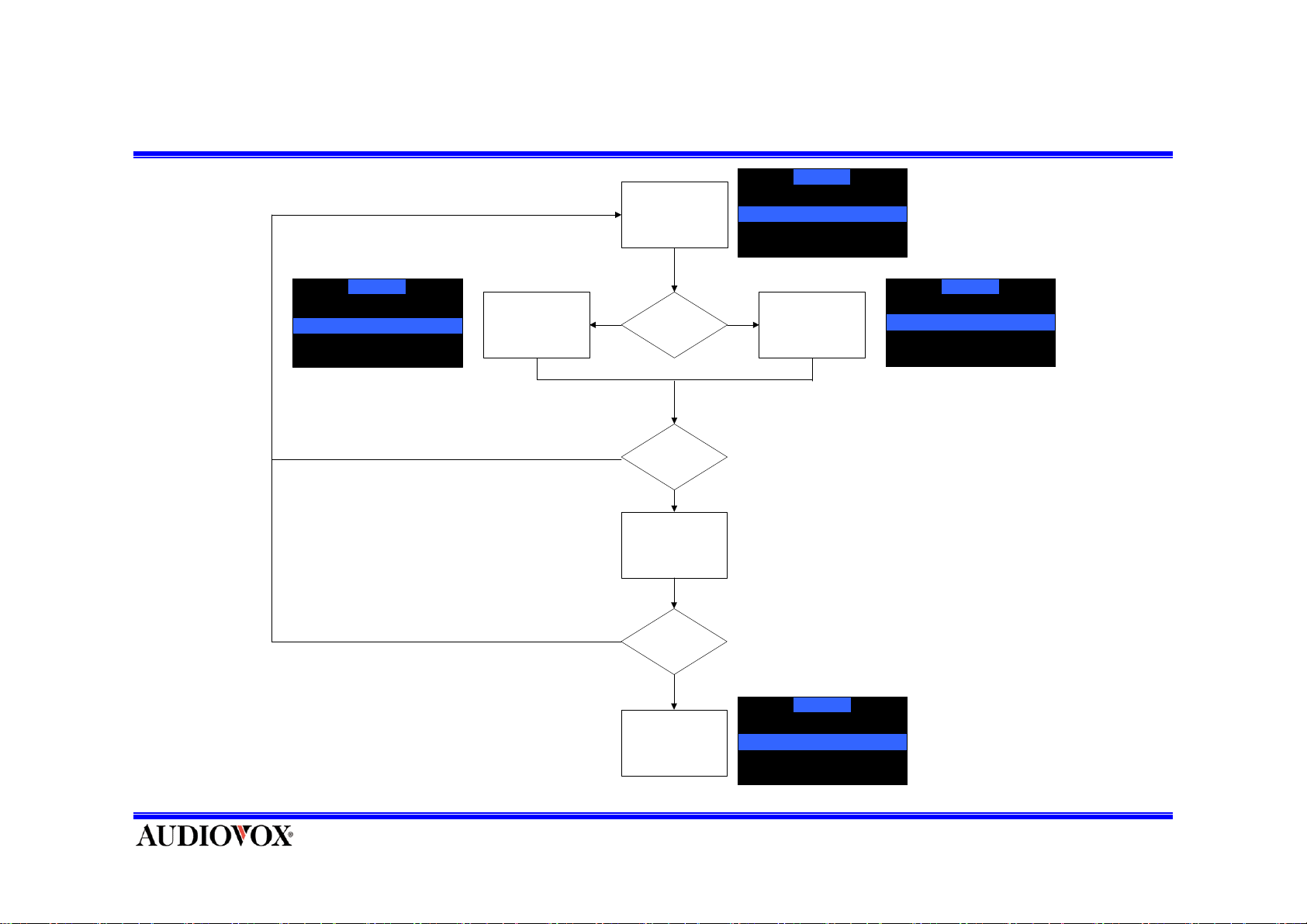
Select Display Items on Information Extras Menu(2).
Info Extras
►MLB
►NFL
►NBA
►NHL
(if when Highlight bar stay on
End of List then go to Start of
List.)
Yes
No
Select Highlight
Bar on Lower List
Item.
Press ‘CH’-or +
Choose a Menu
Down
Press ‘Select’ Key
Selected Sub
Keys to
on List
CH up or
Down?
Do want
Selection?
Yes
Do have
item?
Info Extras
□NCAA Football
►MLB
►NFL
►NBA
Up
Select Highlight
Bar on Upper List
Item.
(Example : Sports)
Info Extras
□NCAA Bastekball
□NCAA Football
►MLB
►NFL
(if when Highlight bar stay on
Start of List the n go to End of
List.)
•Because menu becomes update by
stream, menu items can increase or
decrease.
No
Selected
information item.
Info Extras
□ Toronto Blue Jays
√□ All Teams
□ Anaheim Angels
□ Arizona DiamondBacks
Page 53
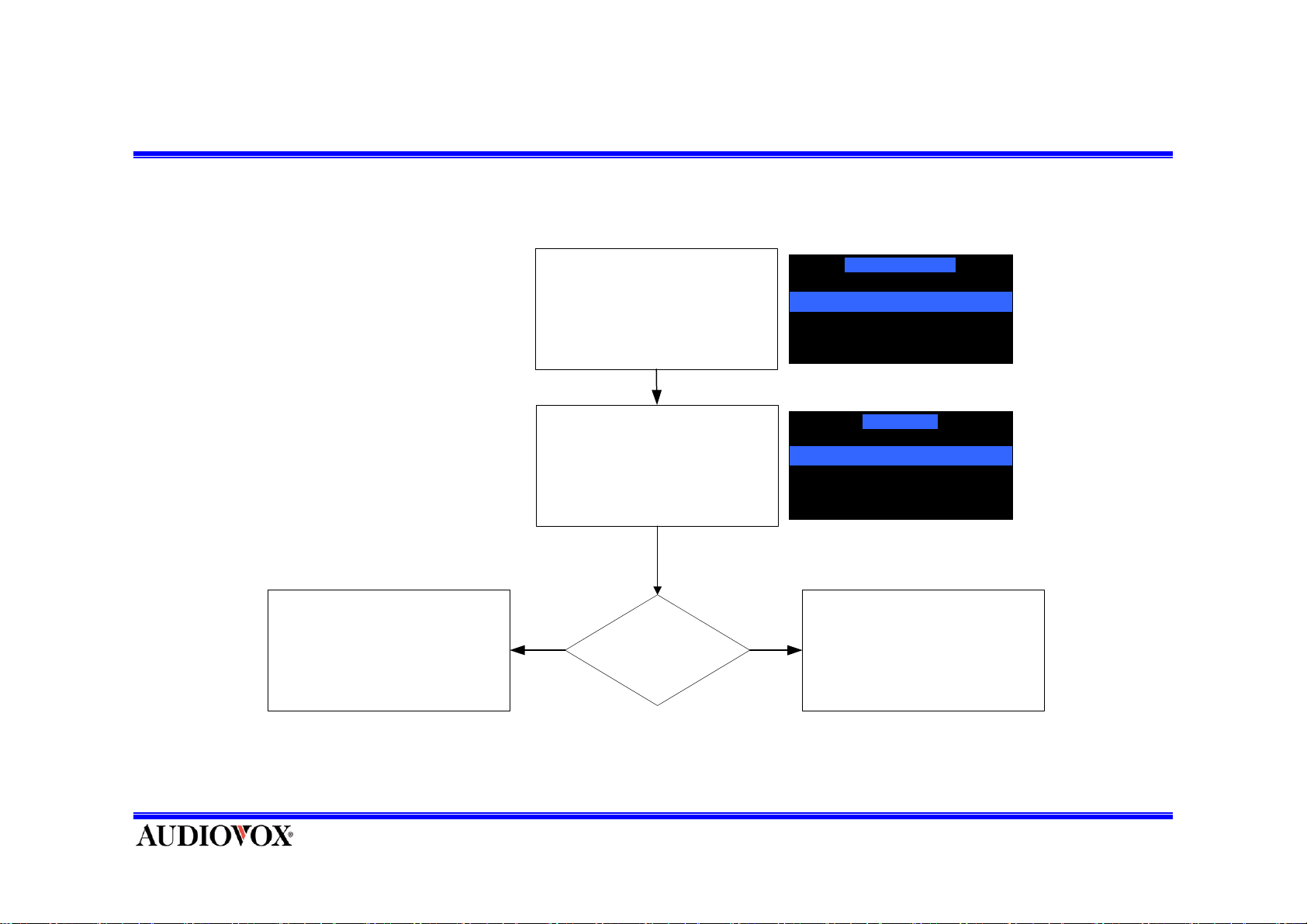
Set up Information Display Mode.
Info Display O p tions
Ente r Pa ge M od e menu
Select
Page Mode 1 or 2
Yes
PageMode Select?
Displ ay Mode
Scroll Speed
Displ ay Mode
Scroll Mode
Page Mode
No
Press ‘Menu’ ButtonPress ‘Select’ Button
Page 54
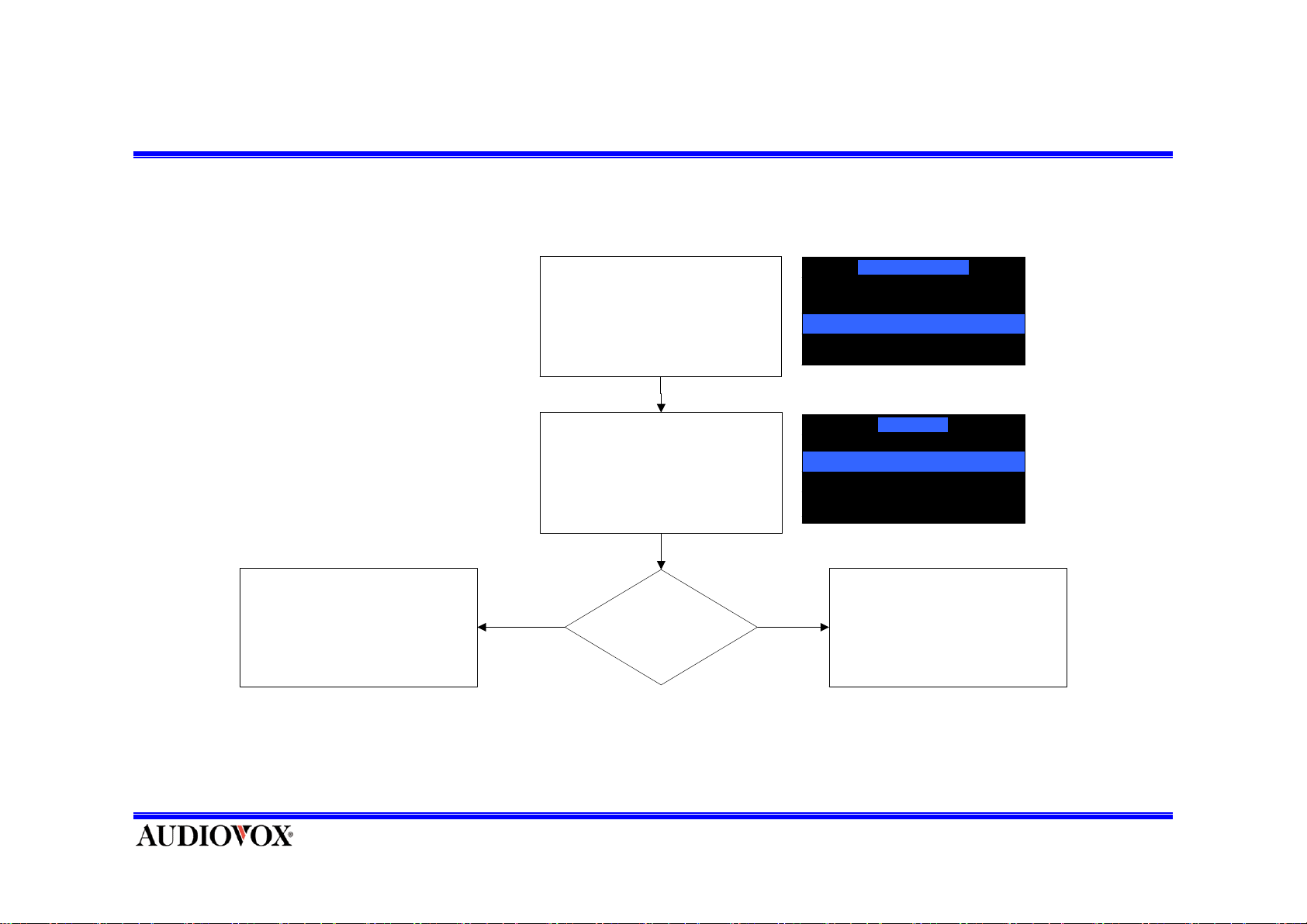
Set up Information Scroll Speed.
Info Displa y Options
Press ‘Select’ Button
Ent e r Sc roll Sp e ed men u
Select the
Normal or Slow Speed
Yes
Page Mode
Scroll Speed
Scroll Speed
Normal Speed Scroll
Slow Speed Scroll
XMSR 26.33 + 1.50
No
Press ‘Menu’ ButtonSelec t Speed?
Page 55
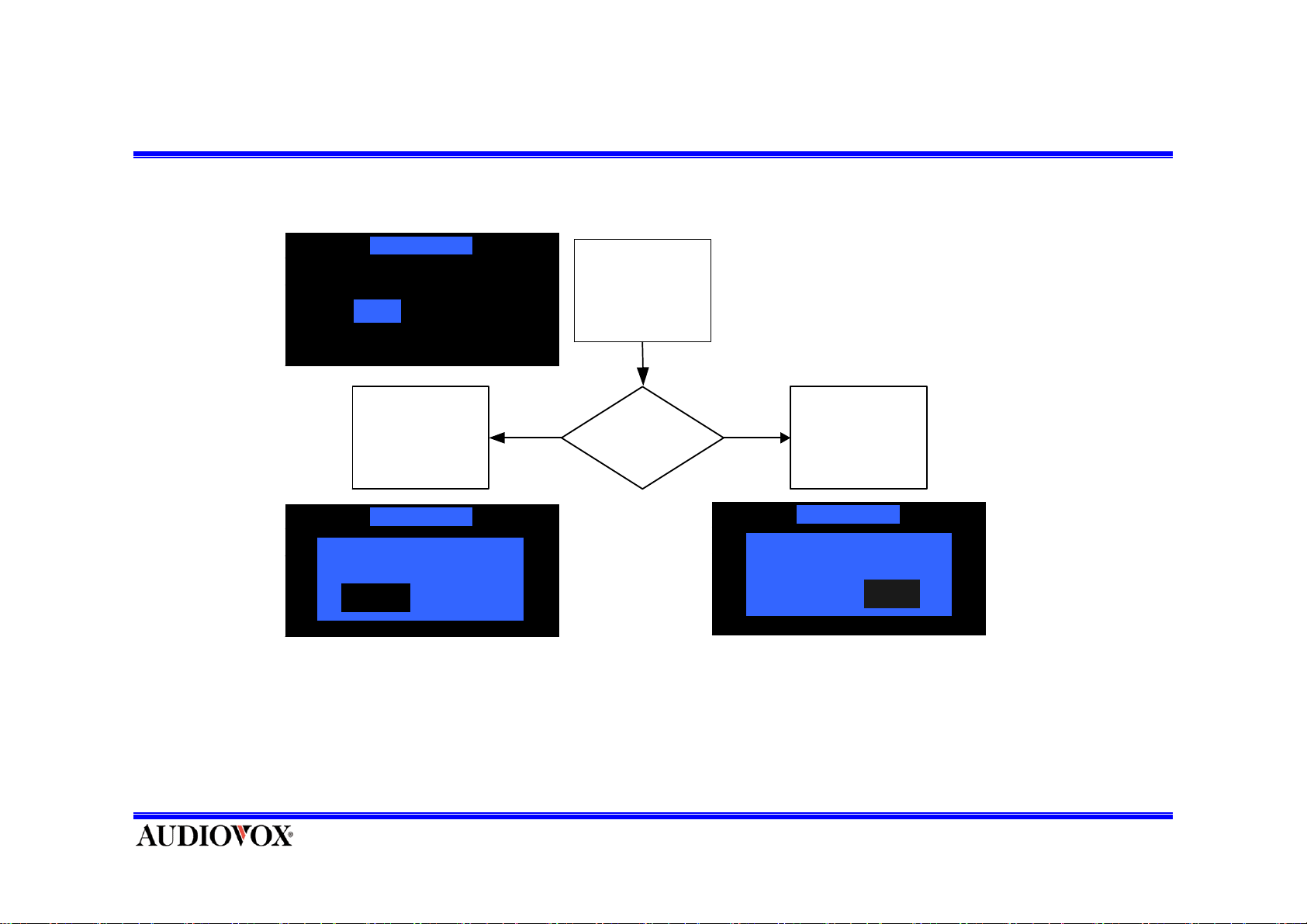
Factory Default
- Upon entering this mode, pressing CH UP or DOWN toggles Yes or No.
Factory Default
Enter Factory
On Off
Default Menu
Press
SELECT Button
Factory Default
Confirm
On Off
On Off
a
NoYes
YES NO
Factory
Default
Press
SELECT Button
Factory Default
Confirm
On Off
On Off
a
NoYes NoYes
Press SEL button to make selection and the unit reverts to the original factory settings for following
parameters:
* To exit without change, press and release MENU Button.
Page 56
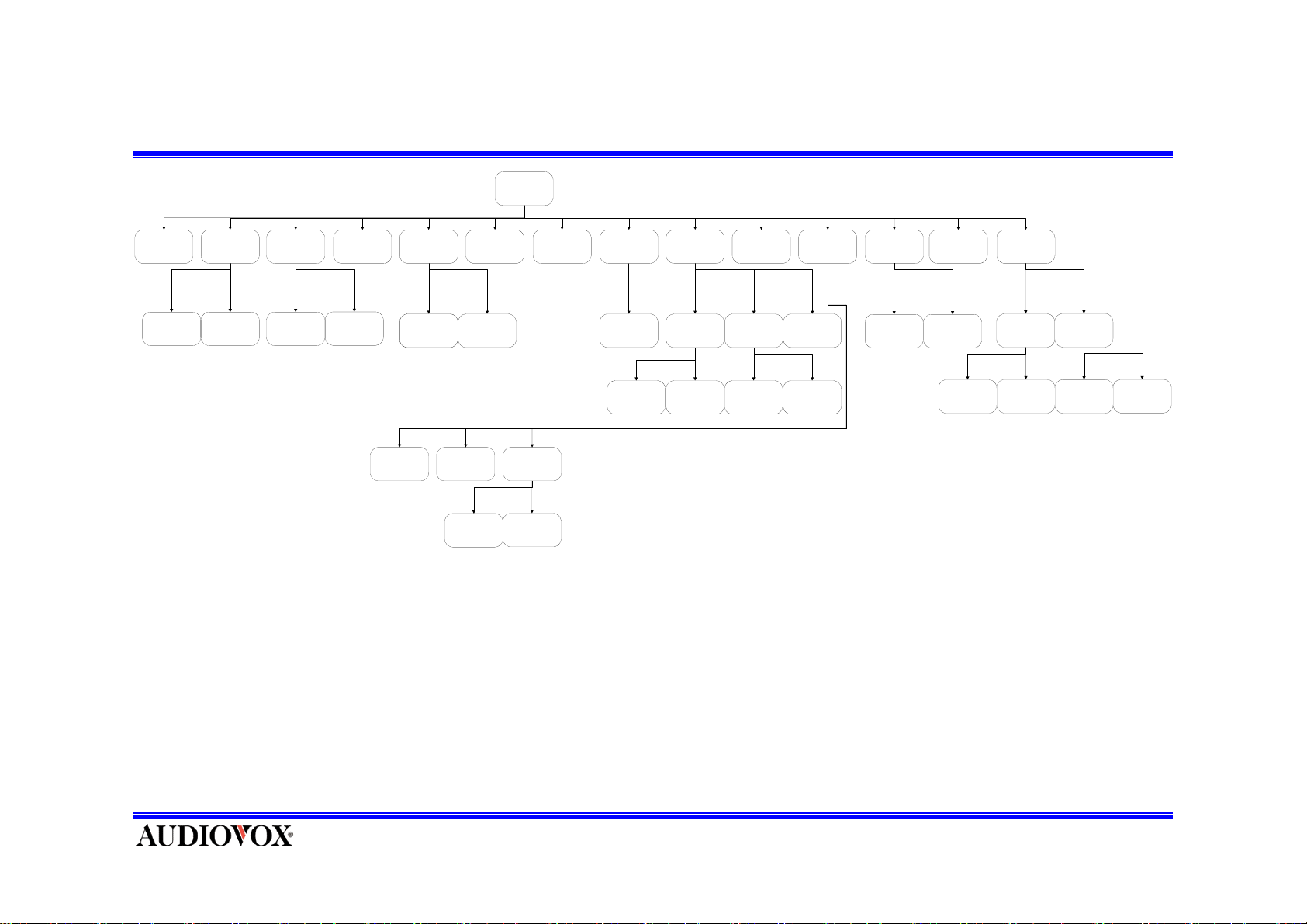
Menu Tree
Main Menu
Radio ID
Dimming
Control
Display
Setting
Contrast
Control
FM Setting
FM On/Off
Confirm Tone
Option
Frequency
Setting
Lock Option
Stock Add Stock EraseStock O n/Off
Erase All
Antenna
Aimming
Edit Code
Erase One
Channel
Add/Skip
Memory
Option
Clear All
Memories
Time Zone
Time Based
Features
Clock
Daylight
Savings Time
Factory
Default
Set Alarm
Alarm Clock
Stock Options
Sleep ModeLock/Unlock
Alarm On/Off
Sound
Options
Equalizer
Setting
Info Extras
Volume
Setting
Scroll Mo d e
Info Display
Options
Display Mode
Page Mode
Scroll Speed
Normal
Speed
Slow
Speed
 Loading...