

Page 1

Exhibit J
User Manual
Xanboo/Core Technologies
XRT750
Page 2

APPROVALS ///
FCC ID NUMBER: OU4-XRT750
STANDARDS
93/68/EEC, 89/336/EEC, BS EN 50082-1:1992, 73/23/EEC, EN60950:1992 CE
INSTRUCTIONS TO THE USER:
The user is cautioned that changes and modifications made to the equipment without the approval of manufacturer could void the user's
authority to operate this equipment.
This equipment has been tested and found to comply with the limits for a class B digital device, pursuant to part 15 of the FCC Rules.
These limits are designed to provide reasonable protection against harmful interference in a residential installation. This equipment
generates, uses and can radiate radio frequency energy and if not installed and used in accordance with the instructions, may cause
harmful interference to radio communications. However, there is no guarantee that interferences will not occur in a particular installation.
If this equipment does cause harmful interference to radio or television reception, which can be determined by turning the equipment off
and on, the user is encouraged to try to correct the interference by one or more of the following measures:
• Reorient or relocate the receiving antenna.
• Increase the separation between the equipment and receiver.
• Connect the equipment into an outlet on a circuit different from that to which the receiver is connected.
• Consult the dealer or an experienced radio/TV technician for help.
CE directive 93/68/EEC, LV directive 73/23/EEC.
Operation is subject to the following two conditions: (1) this device may not cause interference, and (2) this device must accept any
interference, including interference that may cause undesired operation of the device.
REPEATER
XRT750 USER’S GUIDE
Page 3
PRODUCT DESCRIPTION ///
The Xanboo™ Repeater “repeats” signals coming from any wireless Xanboo™ device and
“re-transmits” that signal, effectively doubling the range of any of your Xanboo™ devices.
PACKAGE CONTENTS ///
■
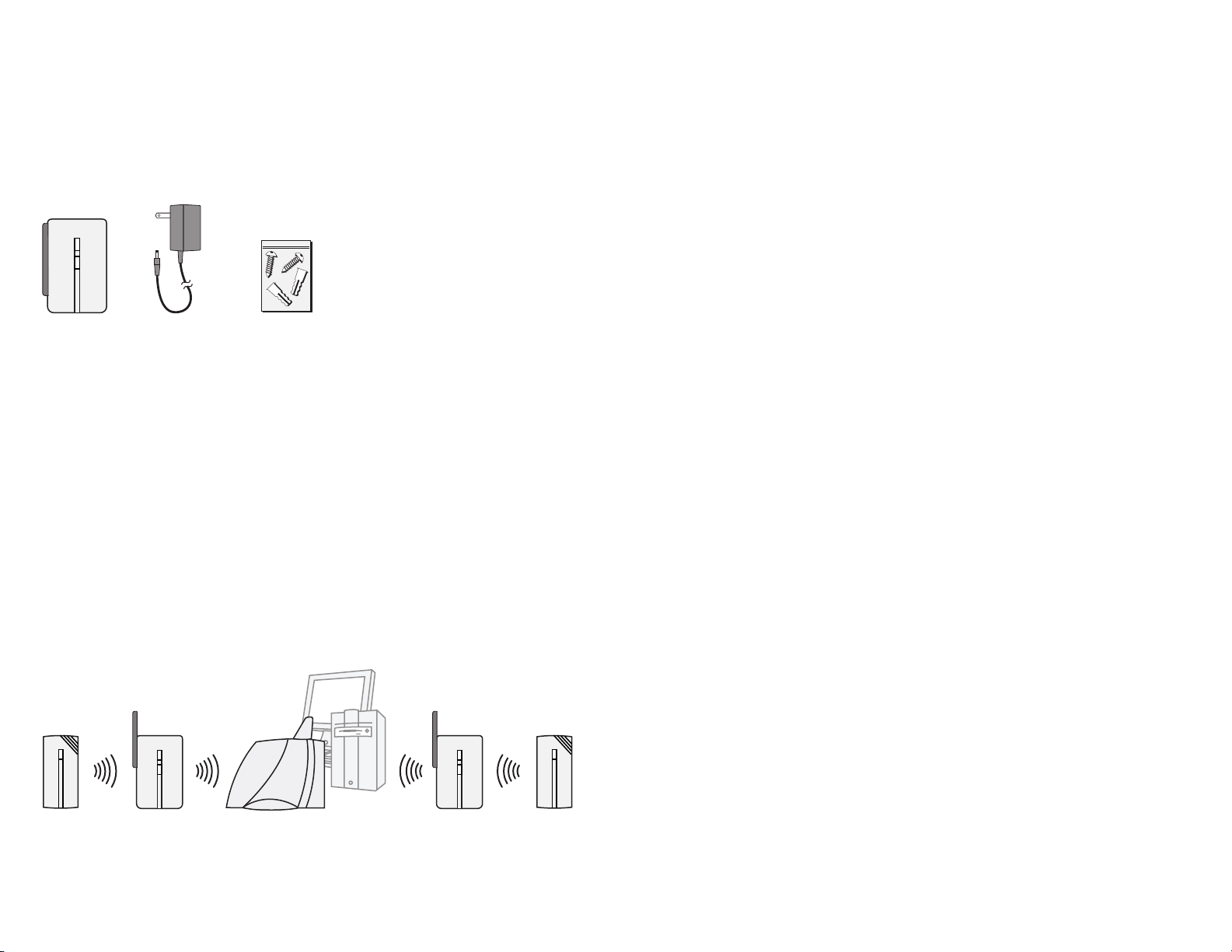
(1) Repeater
■
(1) 9V Power Adapter
■
(1) Wall Mounting Kit
HELPFUL HINTS ///
■
The Xanboo™ Repeater is suitable for indoor use only.
FAQ’S ///
HOW FAR AWAY CAN THE REPEATER BE PLACED FROM THE CONTROLLER?
Typically 60 feet.
CAN I PLACE THE REPEATER IN A DIFFERENT ROOM FROM THE CONTROLLER?
Yes, the Repeater uses radio frequencies to communicate with the Controller.
These frequencies can travel through objects such as walls, ceilings, and floors.
HOW MANY SENSORS CAN I USE WITH MY CONTROLLER?
The Controller can support up to 20 sensors.
TROUBLE SHOOTING ///
REPEATER
INSTALLATION ///
9V POWER ADAPTER
WALL MOUNTING KIT
The Xanboo™ Repeater should be mounted indoors, at a height of 6-8 feet. It should be placed
to facilitate other devices’ communication with the Controller. If one of your Xanboo™ devices
is having difficulty communicating with the Controller, mount the Repeater in between the two.
If communication is restored, that is a good place for the Repeater.
NOTE: You can only have one Repeater in between the device and the Controller. Though you
can have more than one Repeater per system, repeaters will not communicate with each other,
so you need to make sure that a device can make contact with the Controller using only
one Repeater. Below is an example of a multi-repeater installation.
1. Peel the paper strip from the double-sided tape located on the back of the Repeater.
You can also mount the Repeater more securely using the screws in the wall mounting kit.
Affix the screws leaving 1/16” space between the screw head and the object.
2. Mount the Repeater onto the screws and slide down to lock into place.
PROBLEM
Controller does
not recognize
the Device
during discovery
SOLUTION
1.Position the Device in closer proximity to the Controller and try again.
2.Ensure there are no other wireless devices interfering with the
Motorola Device, which transmits on the 418MHz frequency.
3.If you determine that the Device is simply too far away from the
Controller, then you have the option of purchasing a Motorola Repeater
to effectively double the range of the Device.
Events are not
triggered
Device does
not respond
when used
1.Has the Device been registered properly with your Gateway?
2.Ensure that you have the proper settings configured for the new Device.
1.Ensure the new Device has been registered properly with the Controller
by viewing the status of the Device on your PC Software.
2.Place the Device in another location closer to the Controller.
3.Press the ‘Test’ button on the Device to confirm that it is working.
4.If you determine that the Device is too far from the Controller, you can
add a Repeater to the system to effectively double the range of the Device.
TECHNICAL SPECS ///
■
Attaches to vertical flat surfaces (antenna must point up)
■
Test/Discover button
Typical Range Outdoors: 250 feet
Typical Range Indoors: 60 feet
Frequency Range: 418 MHz
SENSOR
REPEATER 1 SENSORREPEATER 2CONTROLLER/PC
THERE CAN ONLY BE ONE REPEATER IN BETWEEN THE DEVICE AND THE CONTROLLER
2I
 Loading...