

Page 1
Motion Detector Alarm
EN
with Remote Control
Instruction manual
1
5
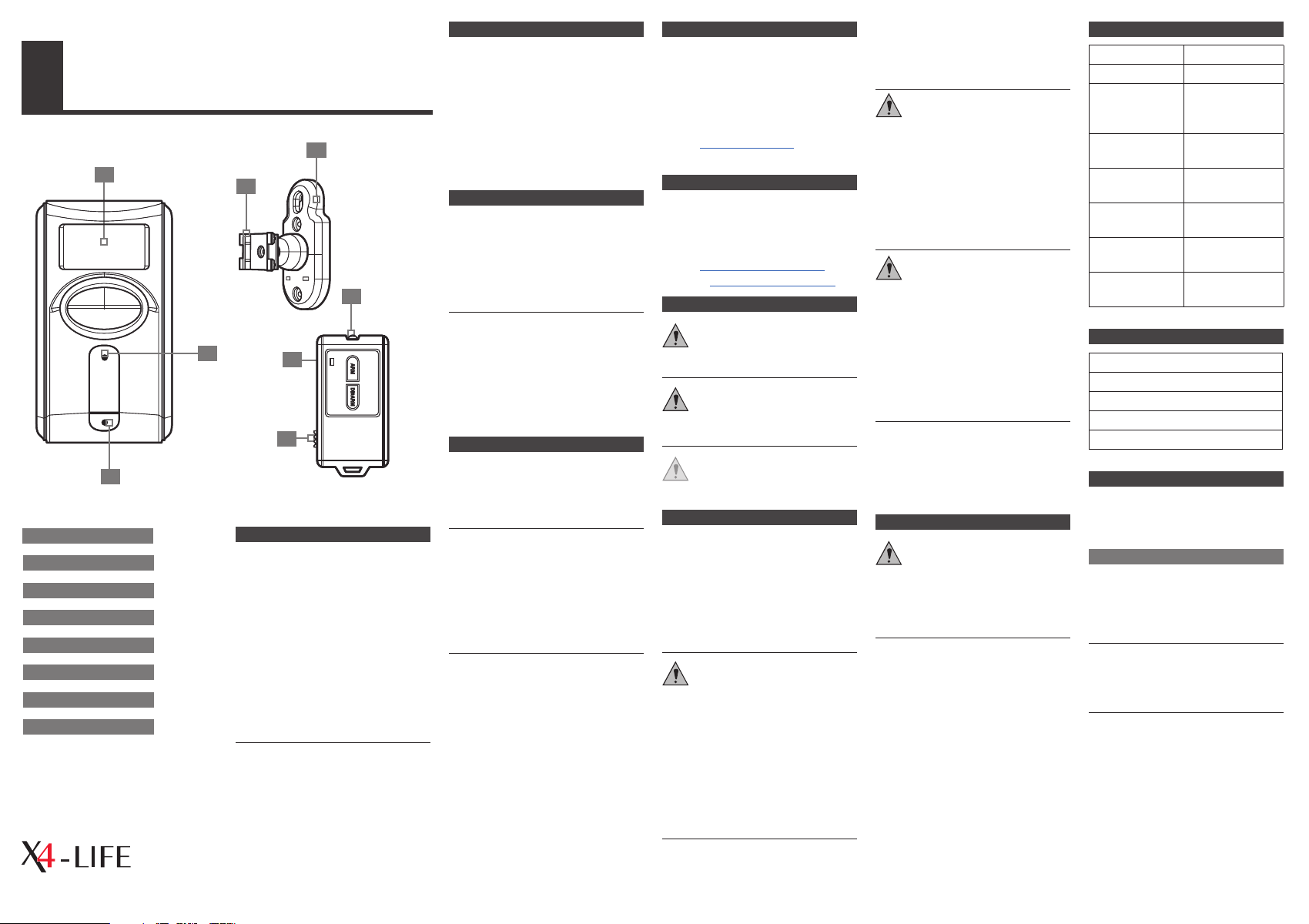
1. PIR-sensor
2. Mounting bracket
3. Halteclip
4. Indicator light
5. IR-sensor
6. IR-sensor
7. Indicator light
8. ALARM/CHIME button
3
4
We are pleased that you have decided to buy our product. We wish you
have a lot of fun with this product.
Information on this user manual.
This user manual contains important
information for the safe use of the
product. Therefore, for your own
safety and for a successful use, please
read this user manual completely
before assembling and using the
product.
Keep the packing and user manual
in a safe place for future transport.
When passing on the product to
another person, be sure to include
the user manual.
LIABILITY
No liabilities will be taken for
damages or claims resulting out of
not reading and/or not following
the user guide and/or any form of
SERVICE ADDRESS
lived non food GmbH
TOR 8 – 9
Donaustraße 20
D-38120 Braunschweig
modication on or in the product.
Under these circumstances, no war-
2
ranty services will be given. Liability
cannot be taken for consequential
damages.
DESIGNATED USE
This motion-detector alarm is a
simple, wireless security system for
Phone: +49 (0) 531 224 356 82
E-Mail: [email protected]
Internet: www.x4-life.de
IMPORTER ADDRESS
lived non food GmbH
Donaustraße 20
D-38120 Braunschweig
your home and only suitable for
indoor use. Additionally, it can be
used as a gong or panic alarm via
6
remote control.
The designated use is also dened
by the instruction manual and in
7
following the appliance and the war-
E-Mail: [email protected]
Internet: www.lived-non-food.de
SIGNAL WORDS
DANGE R High risk! Failureto
observe thisregulationmay
meandanger to lifeandlimb!
nings mentioned in this user manual.
This device is only designed for your
personal safety and convenience not
for commercial or industrial use.
8
GENERAL NOTES
All mentioned company and product
names are registered trademarks
under the rights of their owners.
© All rights reserved.
The contents of this user manual may
dier from the product. If so, please
consult additional manuals in the
packing. Keep this user manual in a
safe place. If you give this product
away to a third party, make sure that
you also pass on the user manual.
The CE conformity has been declared
and proven, and the corresponding
documents have been deposited
WARN ING Medium risk! Failure
to observe this regulation may
lead to property damage.
CAUTI ON Little or no risk!
Regulations to observe when
handlingthis product.
SAFETY GUIDE
Please read the safety guide before
using the product. This information
is for your safety and the protection
of the device and devices connected.
You will also nd specic safety
instructions in the following chapters
of this user manual.
DANG ER! Dangerous for
children or other groups of
people!
with the manufacturer. For the
reason of safety and CE-licensing it
is not allowed to modify this unit in
any way and/or use it for functions,
other than the designated use. Only
original spare parts may be used.
This product or its packaging are no
toys and should not be handled by
infants and small children. Children
cannot assess the dangers connected with electrical devices and/or
Keep batteries and rechargeable
batteries away from children. Expired
or damaged batteriescan causecauterizationoncontactwith the skin.
DANG ER! Danger to life!
This device should only be opened
and/or repaired by an expert or a
person who is qualied to do so. Only
original spare parts may be used. If
you have doubts on the function or
questions, please contact your local
dealer or our service center.
WARN ING Misuse may lead to
property damage!
Use indoors only.
Keep this product away from water or
any other dampness. If the product
is moved from a cold to a warm
room, condensation can occur within
the unit. Let the device reach room
temperature, before using it.
The product may not be subjected to
extreme heat or cold. Do not expose
the product to intense sunlight, open
re or other heat sources: Working
temperature: 0°C to 40°C
CLEANING AND MAINTENANCE
WARN ING Always use a soft,
dry and lint-free cloth to clean
the unit’s exterior. If the device
is extremely dirty you can use a soft
cloth, dampened with water or a mild
cleaning solution to clean.
Never use any abrasive or harsh
cleaning agents (e.g. alcohol, petrol
or thinners) as these could damage
the controls, casing, accessories or
any markings and labels found on
the device.
TEC HNI CAL DATA
Frequency Infrared
Protection Class IP20
Power Suppl y
Infrare d Remote
Control
Power Suppl y
Motion Detecto r
Dimensions
Motion Detecto r
Weight Moti on
Detector
Dimensi ons Infrared
Remote Control
Weight Inf rared
Remote Con trol
CONTENTS
Motion detecto r
Remote control
Mounting base
Batteries
Manual DE/EN
INTRODUCTION
1x 3 V batter y
(CR2032)
3x 1,5 V batte ries
(AA, L6/LR6)
115 x 66 x 34 mm
82 g
64 x 33 x 8 mm
14 g
The infrared motion detector triggers
an alarm when people or animals
move at its detection zone.
The system feat ures three func tions
1. A LAR M: A loud and continuous
alarm signal sounds when
something is moving at the
detection zone.
2. CHI ME: The sound of a chime
is activated when something is
moving at the detection zone.
3. PANIC ALARM: When pressing
both buttons of the remote control
for 2 seconds, the alarm signal is
activated immediately.
packaging material. Do not leave the
packaging material lying around.
Art.- Nr. 701387
Page 2
CONNECTION AND START-UP
The motion detector can be placed
wall mount using the bracket. The
xing clip can be turned in dierent
directions.
Safety Information
☛ Take care when drilling, to ensure
that no cables or in-wall wiring is
damaged. Other wise, this mayresultin
a life-threateningelectricshock! Use
appropriate search equipment to
reveal hidden cables.
Personal protective equipment, as
well as protective goggles have to be
used at any time. While working near
the alarm signal hearing protectors
are required.
☛ Please ensure your safety when
working with electrical tools. Follow
the safety instruction of the manuals.
Select your desired location to
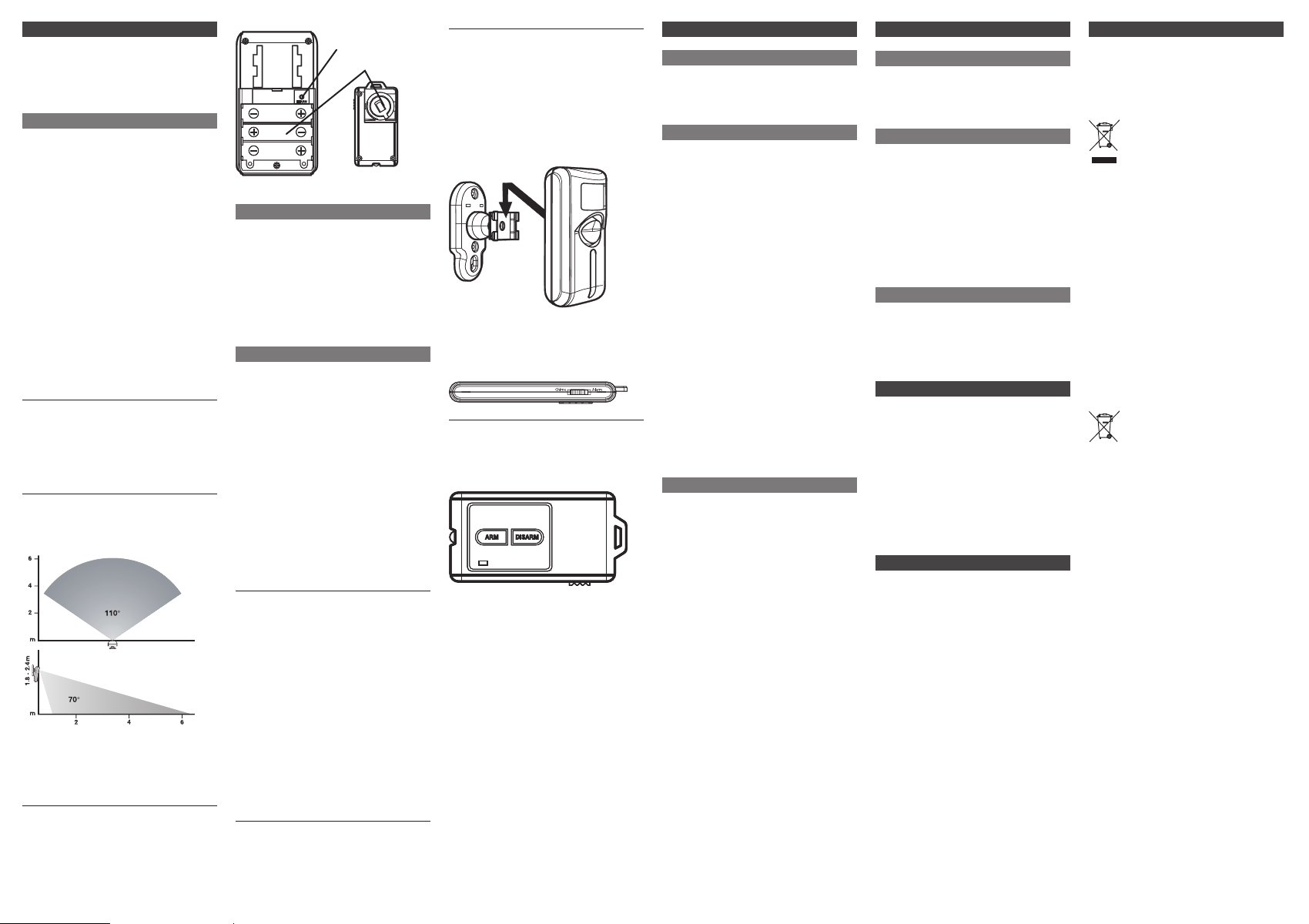
mount the Motion Detector. Ideal installation height is 1,8 to 2,4 meters.
Please note the detection zone via
this table:
2. Please note the detection zone via
this table:
3. Mount the wall bracket using the
included screws at your desired
location.
4. Install the batteries. (LEARN
button, battery compartment)
LEARN-button
Battery ompartment
Installing batteries Remote Control
The remote control uses a 3 V
battery (CR2032).
Slide of the cover of the battery
compartment
Install the battery with the PLUS-
pole at the top.
Close the battery compartment.
Installing batteries Motion Detector
The Motion Detector uses three
1,5 V batteries (AA, L6/LR6).
Remove the screw of the battery
compartment and slide of the
cover.
Install the batteries. The MINUS-
pole has to be set to the spring.
Close the battery compartment
and secure the screw.
The Motion Detector is provided
with a batter y control lamp. When
the lamp ashes, batteries have to
be replaced.
5. Setting up a connection
a. Open the battery compartment
(for further advice please see
“Install batteries”)
b. The batteries have to be installed.
c. Press the “LEARN” button.
d. Point the remote control at the
front of the Motion Detector and
press the “ARM” button. After a
successfully set up connection a
single short tone will sound and
the lamp will stop ashing.
e. Close the battery compartment.
6. When connecting the Motion
Detector to the wall bracket pay
attention to the “Click” sound.
It ensures a secure hold of the
Motion Detector.
7. Choose the desired mode “ALARM/
CHIME” with the remote control.
8. Turn on the function via the
remote control.
ALARM
Alarm Function
The alarm function is used to set o a
loud alarm when motion is detected
at the detection zone.
Activate
Slide the switch at the remote control
to “Alarm”. Point the remote control
towards the front of the motion
detector and press the “ARM” button.
The alarm sounds and the warning
lamp starts ashing.
After a 45 seconds exit delay the
alarm sounds. This exit delay allows
to leave the protected area.
As soon as a motion is detected at
the detection zone the lamp starts
ashing and a short tone will sound.
The alarm will start 30 seconds later,
to allow switching o the alarm with
the remote control. If not switched
o, the alarm will sound for 30 seconds. 15 seconds later the detection
zone will be scanned again. If still
motion is detected the alarm will
start again. This procedure is repeated until the alarm is switched o.
Deactivate
Point the remote control at the
front of the motion detector and
press “DISARM”. The alarm is now
deactivated.
The alarm has to be switched o within
30 seconds or the alarm is triggered.
CHIME
Chime Function
The chime function is used to warn
when motion is detected at the
detection zone.
Activate
Slide the switch at the remote control
to “Chime”. Point the remote control
towards the front of the motion
detector and press the “ARM” button.
The chime will be immediately
activated when motion is sensed at the
detection zone.
Deactivate
Point the remote control at the
front of the motion detector and
press “DISARM”. The chime is now
deactivated.
PANIC FUNCTION
To release an immediate alarm signal
point the remote control towards
the front of the motion detector and
press “DISARM” and “ARM” simultaneously for 2 seconds. To deactivate
the panic function point the remote
control towards the front of the
motion detector and press “DISARM”.
TESTING THE MOTION DETECTOR
Slide the switch of the remote control
to “CHIME”, point it towards the
motion detector and press “ARM”.
The chime sounds once. Please wait
for 15 seconds and move at the detection zone. If the chime is activated
immediately, the motion detector is
working properly.
DISPOSAL
Electrical- and electronic devices
must never be disposed of in the
regular household waste!
Consumers are legally
obligated and responsible
for the proper disposal of
electronic and electrical
devices by returning them to
collecting sites designated for
the recycling of electrical and
electronic equipment waste.
For more information
concerning disposal sites,
please contact your local
authority or waste management co mpany.
Do not throw batteries and rechargeable batteries into the household
waste!
Customers are legally obliged
to return used and
rechargeable batteries,
whether they contain
harmful substances* or not,
designated disposal sites or
collecting sites in shops
selling batteries. By doing
so you are contributing to a
better and cleaner
environment.
* marking: Cd= Cadmium;
Hg= Mercury; Pb= Lead
 Loading...