

Page 1

User Manual
WTM-T56N(Ver:5.0) Board
Supports AMD-E240、AMD-E350、AMD-T48E Processor
with DC POWER
1*RTL8105E LAN /1*SATA/4*COM/ 1*DDR3 SODIMM/
1*MINI-SATA/2*VGA
User Manual
Manual Rev.: 5.0
Book Number: WTM-T56N-2013.06.06
Page 2

User Manual
Copyright 2013
All Rights Reserved.
Manual’s first edition:
For the purpose of improving reliability, design and function, the information in this document is su bject to change without
prior notice and does not represent a commitment on the part of the manufacturer.
In no event will the manufacturer be liable for direct, indirect, special, incidental, or consequential damages arising out of
the use or inability to use the product or documentation, even if advised of the possibility of such damages.
This document contains proprietary information protected by copyright. All rights are reserved. No part of this manual may
be reproduced by any mechanical, electronic, or other means in any form without prior written permission of the
manufacturer.
Trademarks
WTM-T56N is a registered trademarks of WTM; IBM PC is a registered trademark of the International Business Machines
Corporation; Pentium is a registered trademark of Intel Technologies Inc; Award is a registered trademark of Award
Software International Inc; other product names mentioned herein are used for identification purposes only and may be
trademarks and/or registered trademarks of their respective companies.
Page 3

CPU
Supports AMD-E240、AMD-E350、AMD-T48E CPU
Chipset
AMD Brazos eOntario + Hudson E1 Chipset芯片组
Memory 1 * 204-pin SODIMM Sockets for DDR3 1066/1333 SDRAM up to 4G
Expansion Slots
1 * PCI 8X slot(选配), 1 * Mini-PCIE(选配)
Storage
1* Serial ATA2 3Gb/s connectors
1 * Mini-SATA 3Gb/s connector
Audio Realtek ALC662 HD Audio CODEC
Ethernet LAN 1*RTL8105E LAN
LVDS NO
USB 8 * USB 2.0
Special Features
Support DC FAN
Rear Panel I/O
4 * USB 2.0
2 * VGA port
1 * RJ-45 port
1 * Line-out
DC 12V Power In
Internal I/O
4* USB 2.0 ports
1* Serial ATA2 3Gb/s connectors
1* GPIO header
1* Parallel header
1 * Mini-SATA 3Gb/s connector
1 * Mini-PCIE connector
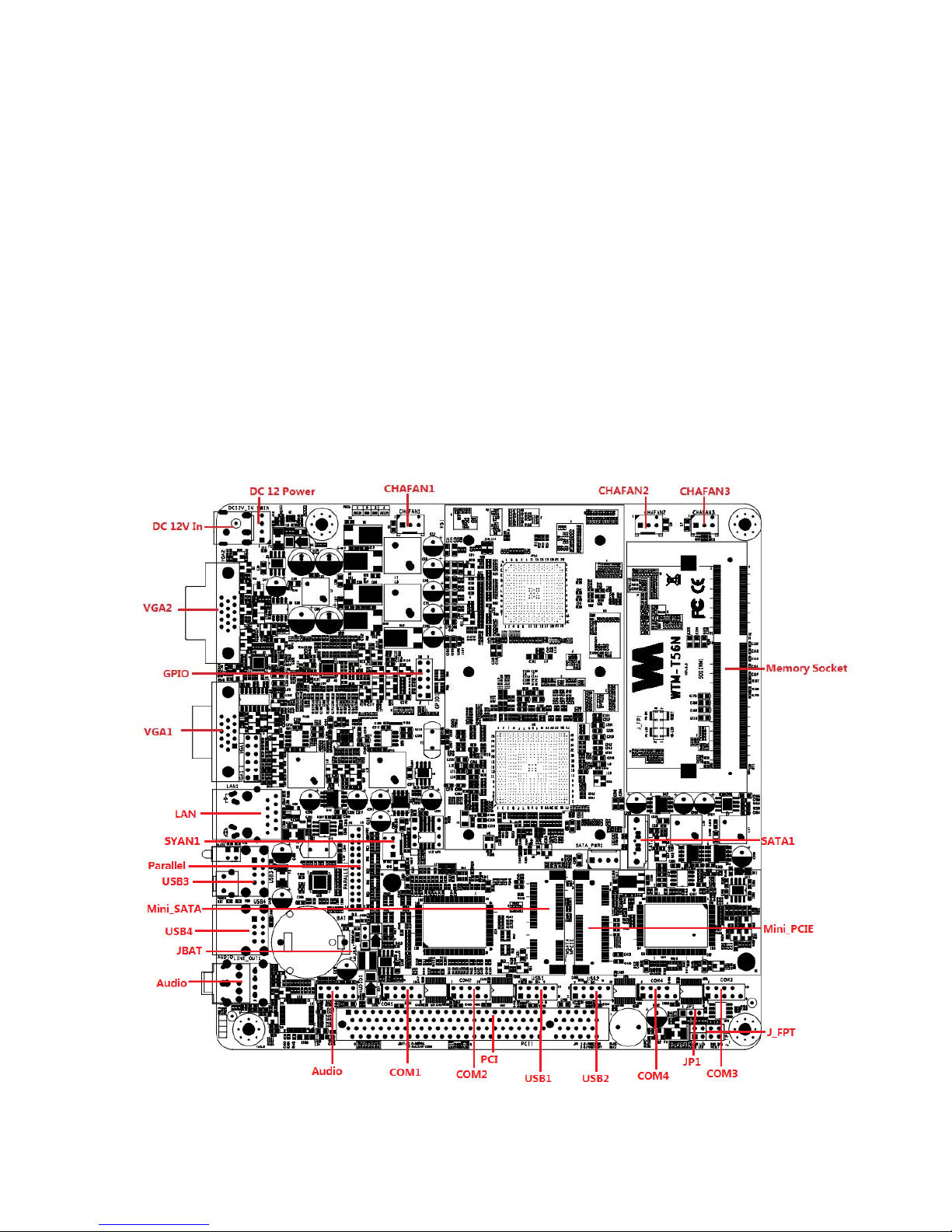
3 * NB / Chassis Fan connectors;
1 * AUDIO header
1 * PCI 8X slot,
4* COM(RS232) connector
BIOS AMI 16MB EFI Flash ROM
Functional ATM, Automation, medical Equipment, Security, Networking, POS, General Application, Gaming
Machine, Transportation
Packing Color Box Dimension200(W) x 200(D) x 100(H)mm
Certificate CE, FCC, RoHS
Temperature Operating within 0~60 centigrade (Suggest to use system FAN)
Storage within -20-85 centigrade
Form Factor Mini ATX Form Factor(17cmx17cm)
User Manual
Specifications
Page 4
Package Contents
Check if the following items are included in the package.
l * WTM-T56N board
l * Quick Manual
l * Software Utility CD
Locations(TopSide)
Page 5
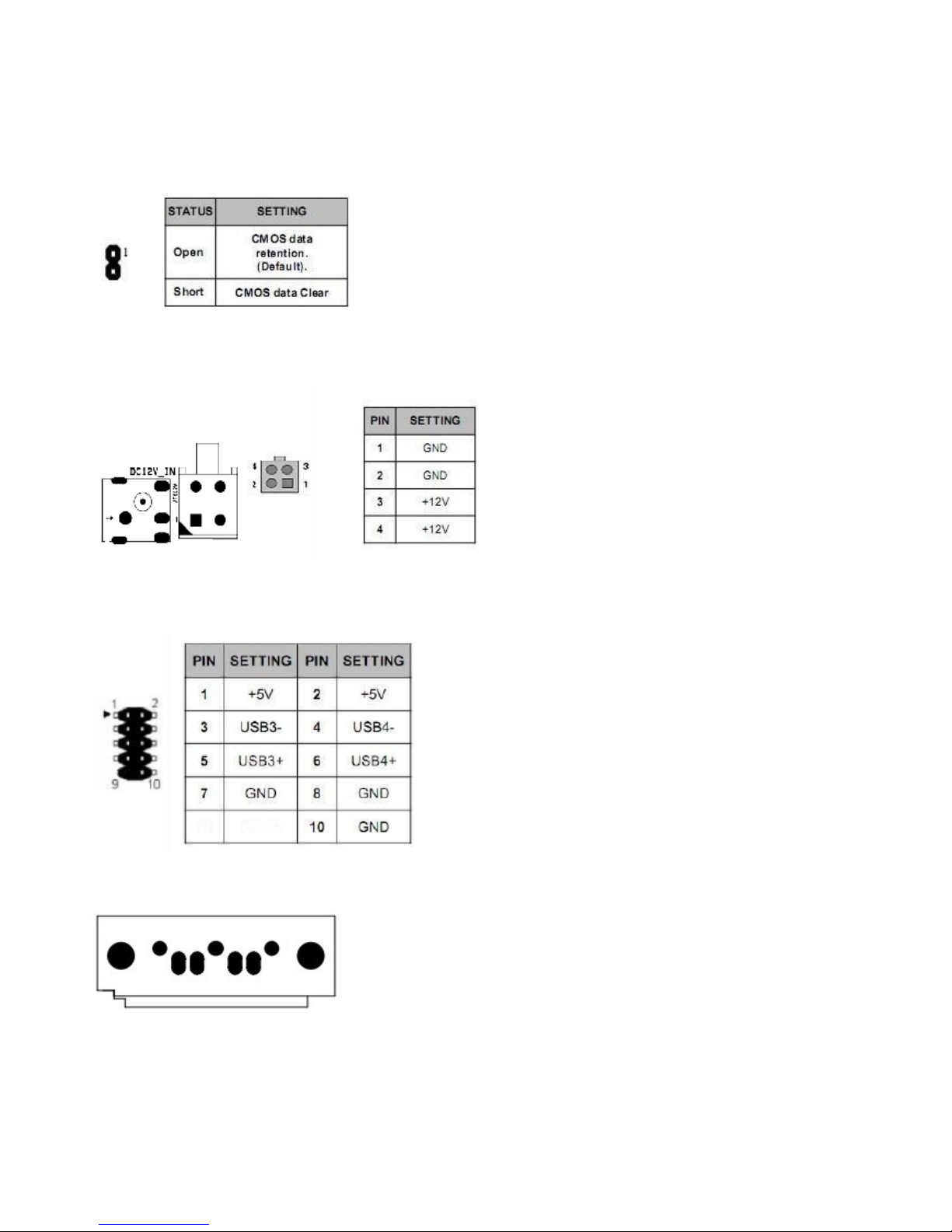
Connector and Jumper Setting
1)JBAT :CMOS Data retention/clear
2)ATX 12V_IN:External +12V DC Power input connector
3) Internal USB2.0 connector
,
4)SATA1:SATA device connector #1
#2
#3
#4
Page 6
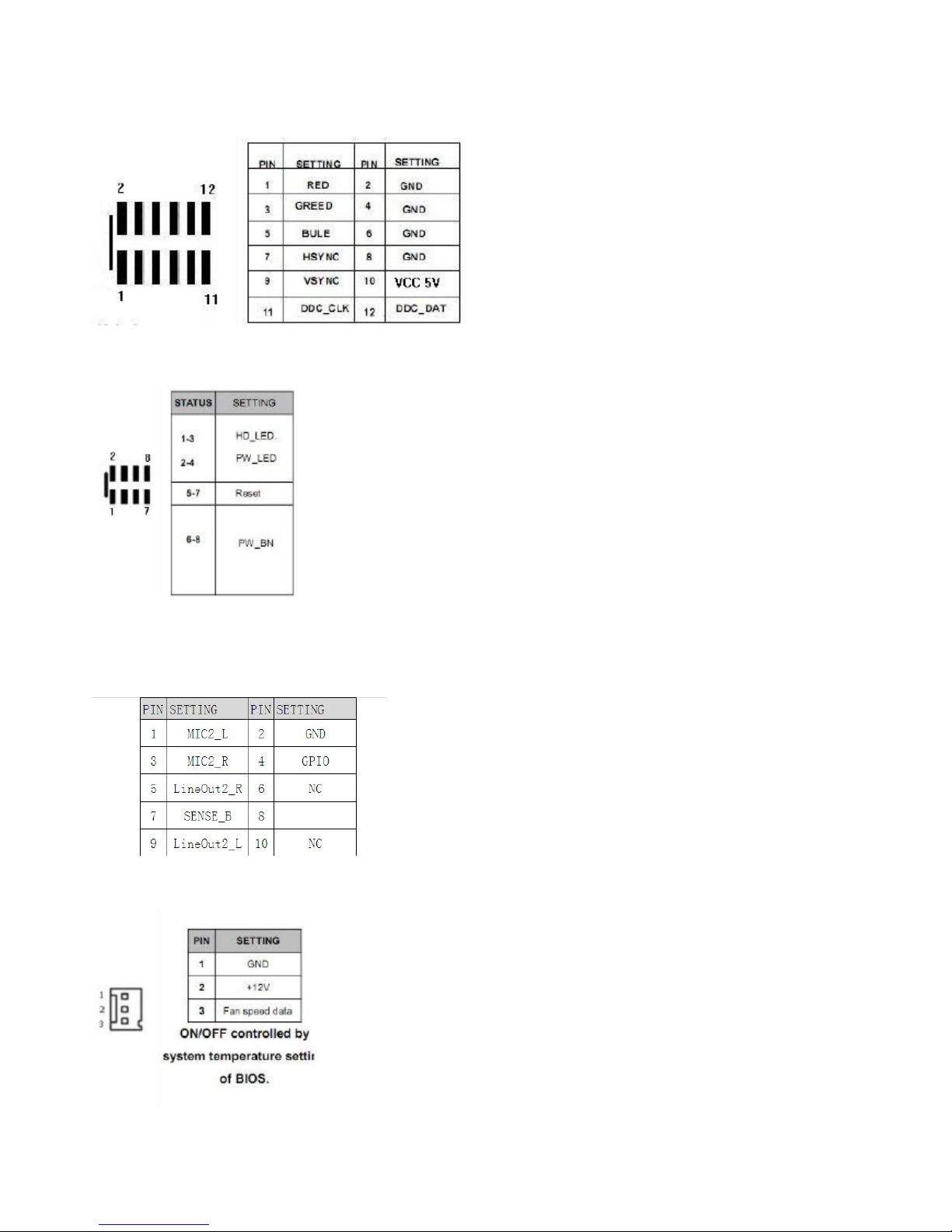
5)VGA1:Extra VGA Signal connector
6)FP1:Front panel connector
7)AUDIO 2:5.1channels Audio signal connector
8)CHAFAN
CPUFAN:System DC fan connector
Page 7
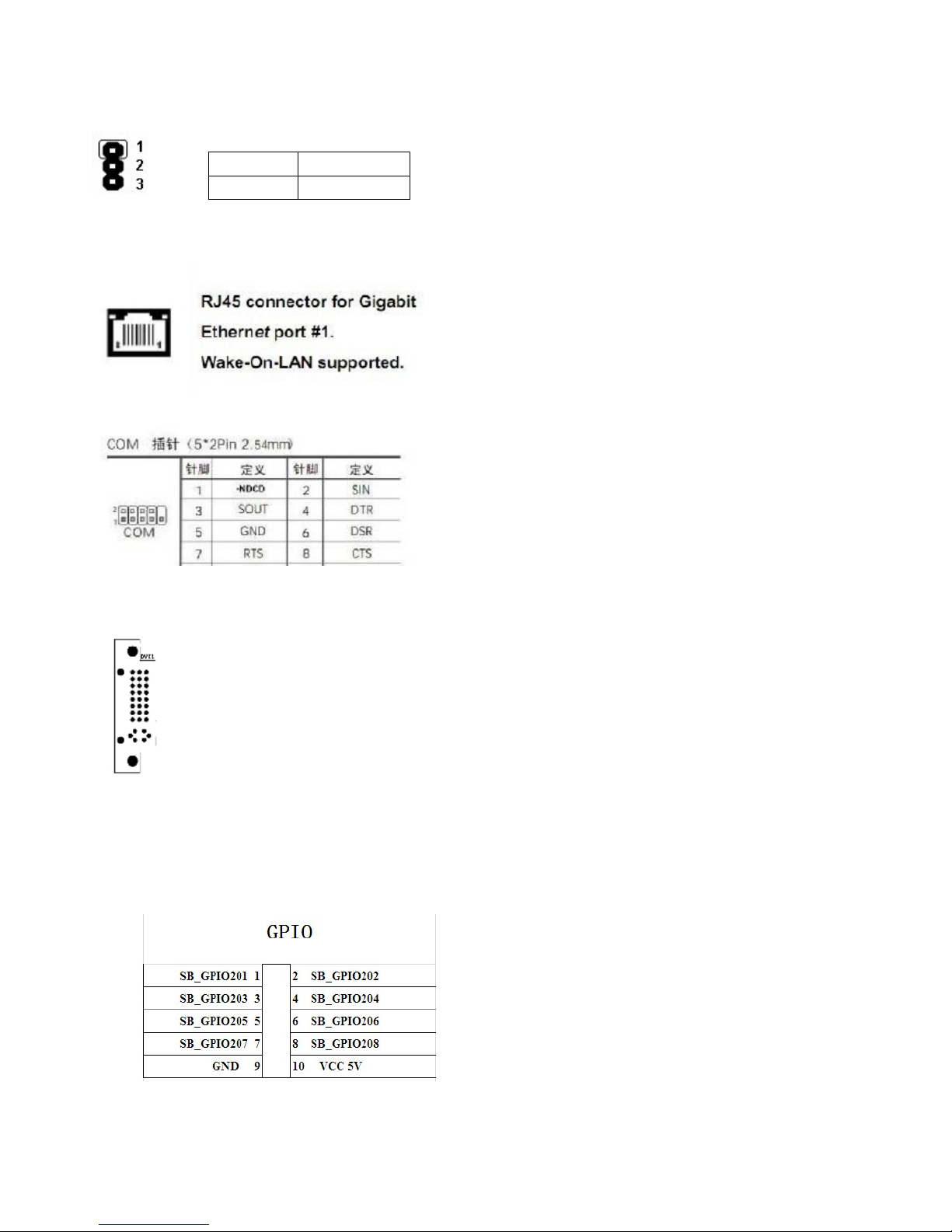
1-2 POWER ON
2-3 POWER OFF
9)JP3:POWER
voltage selection
10)LAN:RJ45 connector for Ethernet port
11)COM1-2:COM connector
12) DVI1:DVI connector
13)GPIO
Page 8

Page 9

BIOS SETTING
This chapter describes the BIOS menu displays and explains how to perform common tasks
needed to get the system up and running. It also gives detailed explanation of the elements found
in each of the BIOS menu displays. The following topics are covered:
Main Setup
Advanced Setup
Chipset Setup
Boot Setup
Security Setup
Exit Setup
Once you enter the BIOS CMOS setup utility, you can use the control keys that listed at the
bottom of the menu to select the desired value in each item.
 Loading...