

Page 1
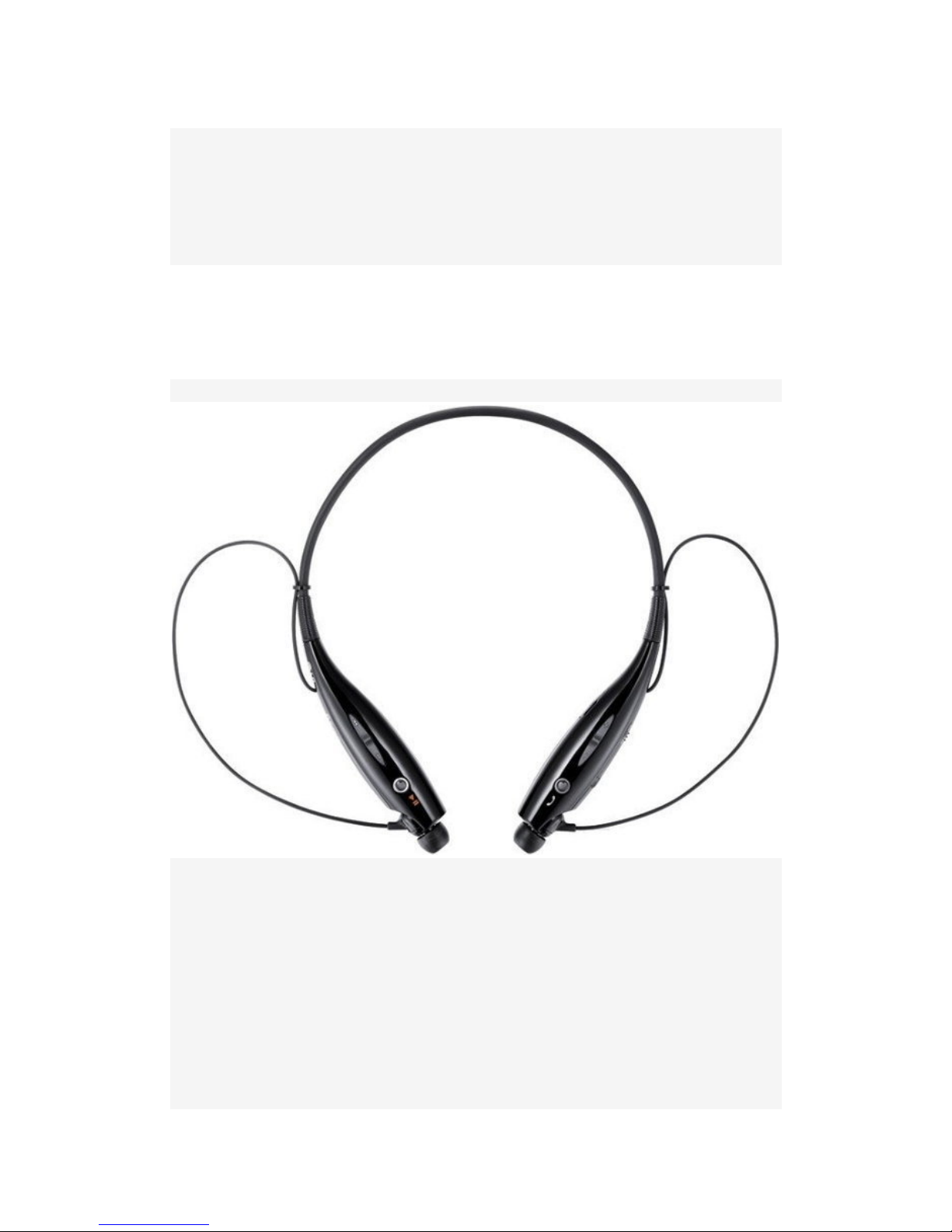
Bluetooth headset
User Manual
Model name:TF830
Brand name:Wsound
FCC ID:2ACQVTF830
Thank you for using the TF830 Bluetooth headset
TF830 is the most convenient stereo Bluetooth headset in the world'.
It allows you to have more interactive and entertainment in the music space,
with compatible Bluetooth mobile phone connection can also synchronize the
work of your hands, at the same time enjoy the music
and innovative design concepts and comfortable design, the fast pace of
modern life, call the complete liberation of his hands.
Product Features:
1. the lightweight pendant design, docile neck, even in the exercise can also
be with the body to maintain optimal equilibrium, long wearing and not be tired.
2. vibrate when a call to remind, regardless of the phone is set to vibrate can
not hear ring tones, also will not miss a call.
Page 2
3.Waterproof design, even a rainy day can be used normally.
4 .earbuds and earplugs slot is using magnet design, the earplug into the ear
plugs when not in the groove, convenience and safety.
5.Earplugs design is the length of the line from the neck to the ears, it is very
light sense of gravity.
6.Receive calls, sound regulation, listen to music, up and down the operation
of the song is to use more flexible and convenient key operation.
Specification
Item Description
Bluetooth Specification V4.0 (headset / hands-free / A2DP)
Battery Battery 3.7V/170mAh lithium polymer battery
Life time / talk time up to 12-15hours / up to 8 hours
Music playback time up to 8 hours
Charging time of less than 2.5 hours
Operating temperature
-10℃-60℃
Dimensions / Weight
136mm (W) × 167mm (length) × 17mm (H) / 31.1 g
Page 3

Start using the TF830
Using Bluetooth for the first time, we recommend that the first battery is fully
charged, the charge will switch to the "OFF" side, charging fully charged to
blue lights, paired in the fully charged Bluetooth headset with
Bluetooth-enabled mobile phone.
Bluetooth pairing
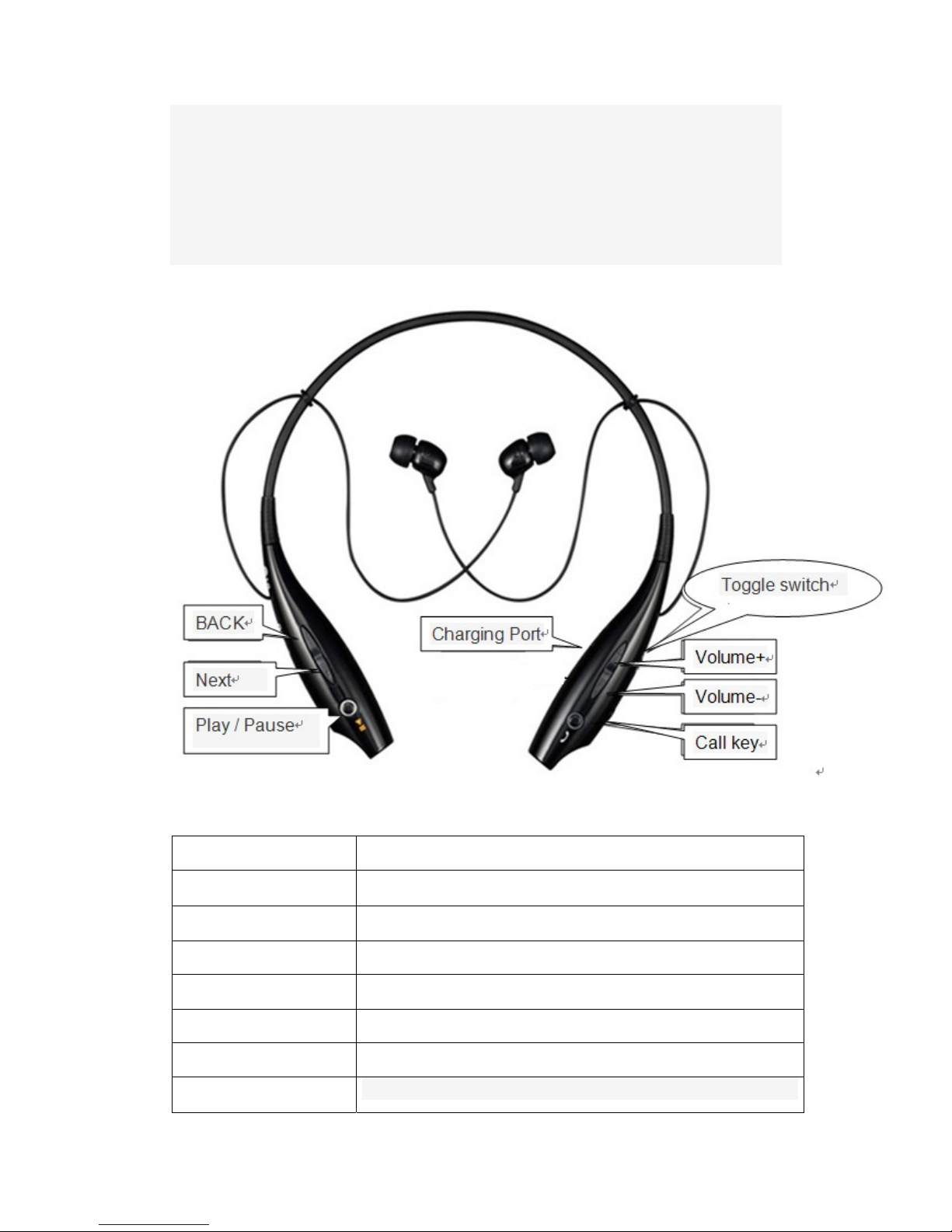
1.When the power switch to the "ON" side, TF830 boot vibrating alert,
headset into pairing mode, LED indicator light is on Blu-ray
2.Use your phone to find the Bluetooth menu "search" or "Add new device.
Select from the list of devices in the TF830 and paired with the phone.
3.If the phone asks to enter a passcode / PIN code, enter "0000" * Note: If
your phone supports secure pairing, you do not need to enter a passcode /
PIN code. When the pairing is complete, the headset into standby.
Use your Bluetooth headset
Bluetooth headset switch machine
The power switch to the "ON" side, waiting for 3S blue lights flash 4 under
tone and vibrating alert.
The power switch to the "OFF" side, the red light flashes 3 under.
Bluetooth headset charging
Make sure the power switch to the "OFF" side, Insert the charger plug into
the Bluetooth headset charging cradle connected to AC power charger option
can be selected, and can also be connected to the PC USB data cable, when
charging, the red indicator Light Always, when fully charged, the blue indicator
light.
Answer an incoming call
When there is an incoming call, the Bluetooth headset will be vibration and
tone, press the call key,you can answer a call, or use the mobile phone to
answer an incoming call (depends on your phone settings) will be
automatically transferred to the headset.
To reject a call
If you want to reject a call, when ringing , double-click the "call key" to reject
the current call.
Stop the call
After the end of the call, press the call key, or terminate the call as usual
using a mobile phone.
Bottom redial
In the connected state,press the call key twice quickly, you can redial the last
number. If you call from the phone, call (depending on your phone settings)
automatically transfer to the headset
Adjust the volume
(Call or play music) press the volume "+", the volume increases. Each time you
press the volume increased by an order, "drop" the tone when the volume to
Page 4

maximum, the volume is not increased.
(Call or play music )press the Volume "-", the volume decreases. Each press
volume down order, there will be no sound when the volume to lowest.
Tips: appropriate to adjust the volume, the volume over the General Assembly
affecting your hearing.
Voice Dialing
Correspond to the names of the online store or the number to be dialed press
the call key, then say phone contacts facing the Bluetooth headset, the phone
prompts.
Note: Before using the voice capabilities of the TF830 Bluetooth headset,
make sure that your mobile phone has been recorded voice phrases (such as
a person's name), and make sure your mobile phone's voice dialing feature is
turned on, on how to record sound phrases, see the user manual of your
mobile phone.
Bluetooth Play / Pause
Bluetooth headset with mobile phone connected into the mobile phone playlist,
press the Play / Pause button will automatically play music, play music process,
click the play / pause button to pause.
Selections adjustment
When play music, click on a button will automatically play the previous song.
Click next a button, it will automatically play the next song.
Troubleshooting
Can not boot: check whether the Bluetooth headset battery is full.
Mobile devices can not communicate with the Bluetooth headset: Check
whether the phone supports Bluetooth functionality or handsfree Bluetooth
profile
Mobile devices can not be paired with a Bluetooth headset: Check and make
sure the headset is turned on, the headset into pairing mode
If you are on the headset and the mobile phone can be connected, try the
following steps
Make sure the headset is activated and can be charged
Ensure that the headset is paired with your mobile phone
Make sure that the headset is within 10 meters of the mobile phone, no
obstructions, such as: walls, or other electronic devices.
Use Rules
• the headset in your pocket or bag before, first turn off the headphones, to
avoid accidentally press the headset call key
• Do not use abrasive solvents to clean the headset
• Do not use the headset is placed in the temperature is extremely high or
extremely low, the best storage environment -10 ℃ -60 ℃
• Do not use the headset being exposed to open flames, to avoid the risk of
explosion
• Do not attempt to modify, repair or dismantling
• Do not use non-original TF-700+ charger to charge the headset
Page 5

• Do not place heavy objects on the device
• Avoid the unit gets wet and infected dust
• If you do not use headphones for a long period of time, make sure to place it
in a dry place, if placed in more than a month to be on time to give the charge
to ensure the performance of the battery and headphones
The above content is based on user habits and mobile phone set is different.
This information is for reference only, product specifications and design are
subject to change without notice
This device complies with part 15 of the FCC rules. Operation is subject to
the following two conditions:
(1) this device may not cause harmful interference, and
(2) this device must accept any interference received, including interference
that may cause undesired operation.
Changes or modifications to this unit not expressly approved by the party
responsible for compliance could void the user’s authority to operate the
equipment.
 Loading...