

Page 1

Table Top Order System
User's manual
Rev.20150213_R2
Table Terminal ・・・・WP-D801E
Cradle ・・・・・・・・・・・WP-C801E
Holder Cradle ・・・・・WP-C822E
Importer: Global Network Resources, Inc.
Address: 2241 Calle de Luna, Santa Clara, CA 95054
1
A3400789A
Page 2
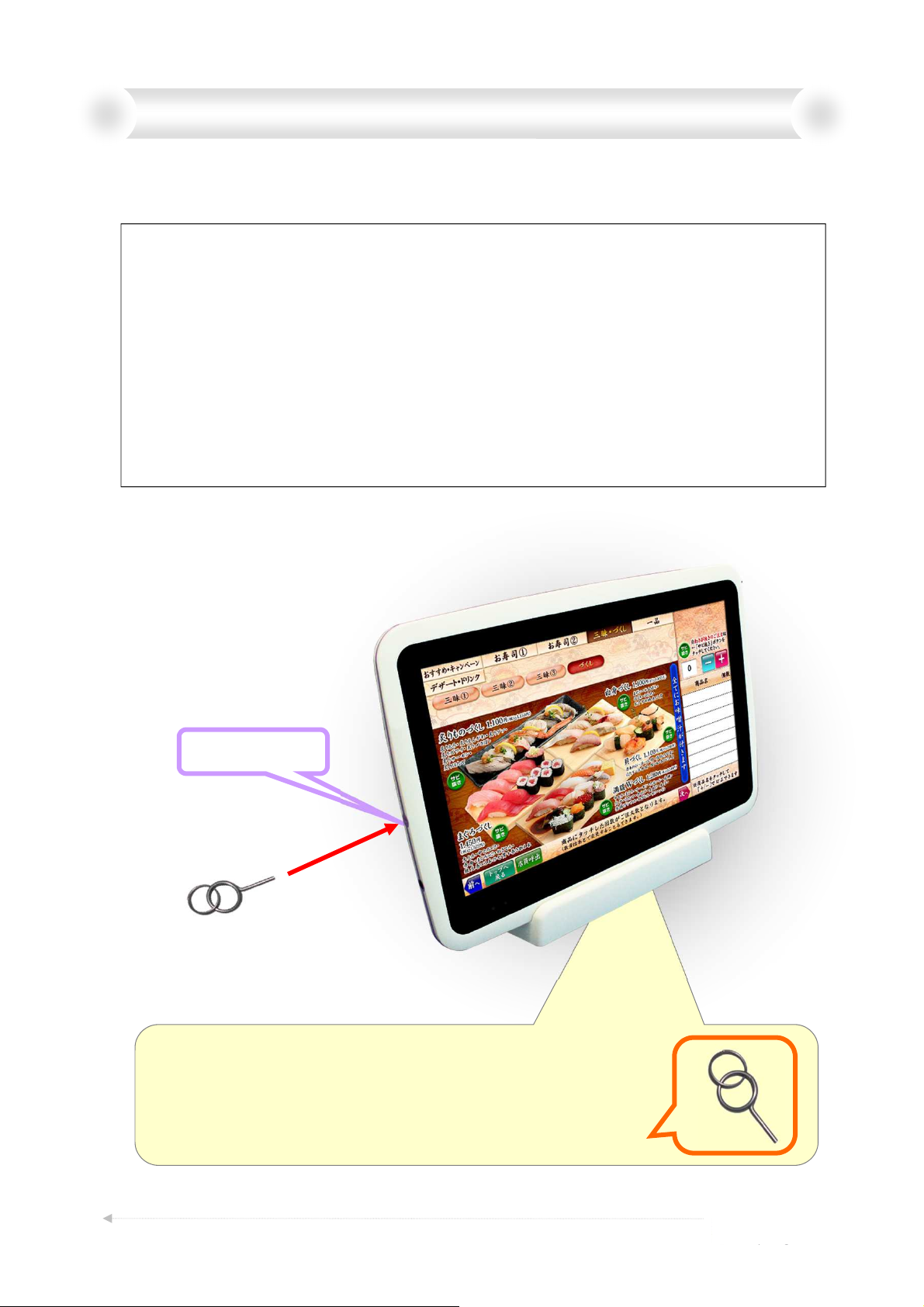
Chapter 1. Terminal switch operation
When the condition of the Terminal is not good,
it may be improved by ON/OFF of the power switch.
[Example] which needs operation of power switch.
• The Terminal doesn't start working.
• Pictures on the Terminal doesn't change, even if check-in/-out is operated.
• Terminal doesn't accept touch operation, so can't order.
(It seems like “hung-up”.)
• Even if "Clear Error" is operated by MIS, Error display doesn't go off.
(communication error)
Note: Please do not operate power switch as much as possible,
except trouble shooting.
Power switch
Special Reset Pin
Power switch is in the hole of the diameter 2mm
on the terminal left side.
Please don’t use except when dealing with trouble.
Please use Special Reset Pin to operate Power Switch.
A3400789A
2
Page 3
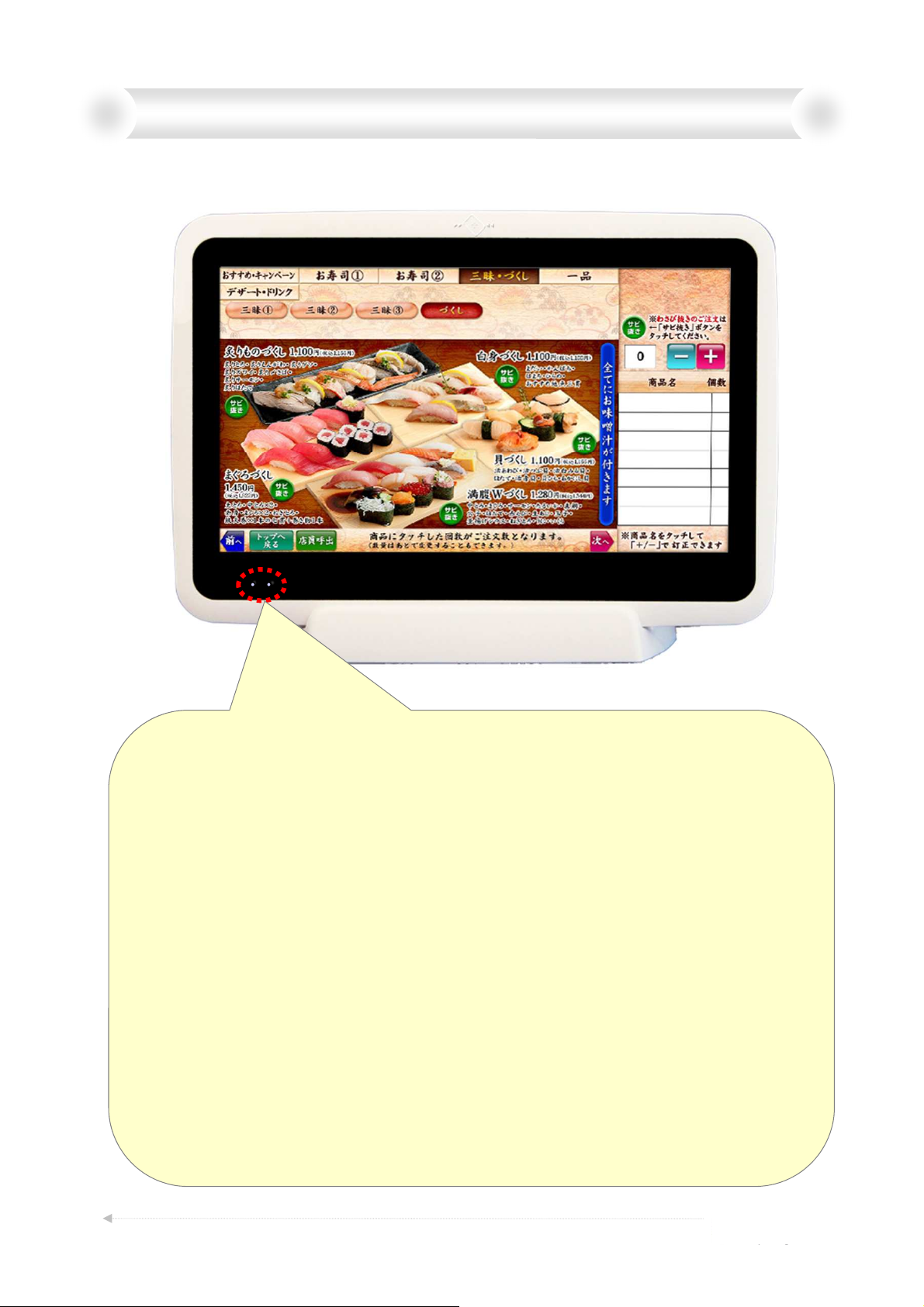
Chapter 2. Details of the front lower left side lamp
Two LED lamp Description (Left and Right)
• Left LED
Blink Slow (1sec) … Charging. (Need to be placed on Cradle.)
Blink Fast (0.5sec)…Detecting Charge Error. (Need to be placed on Cradle.)
Unlight …………… Not Charging (Charge completed / Not placed on Cradle)
• Right LED
Light ……… Power On, and Placed on Cradle.
Blink ……… Power On, but Not Placed on Cradle.
Unlight …… Power Off
Color ……… Connection state of WLAN .
Green ……… Connecting on Good Condition.
Amber……… Connecting, but not so Good.
Red ………… Disconnecting WLAN.
Note: WLAN does not work until you select “Operational mode”.
Please refer to next page for more information.
A3400789A
3
Page 4
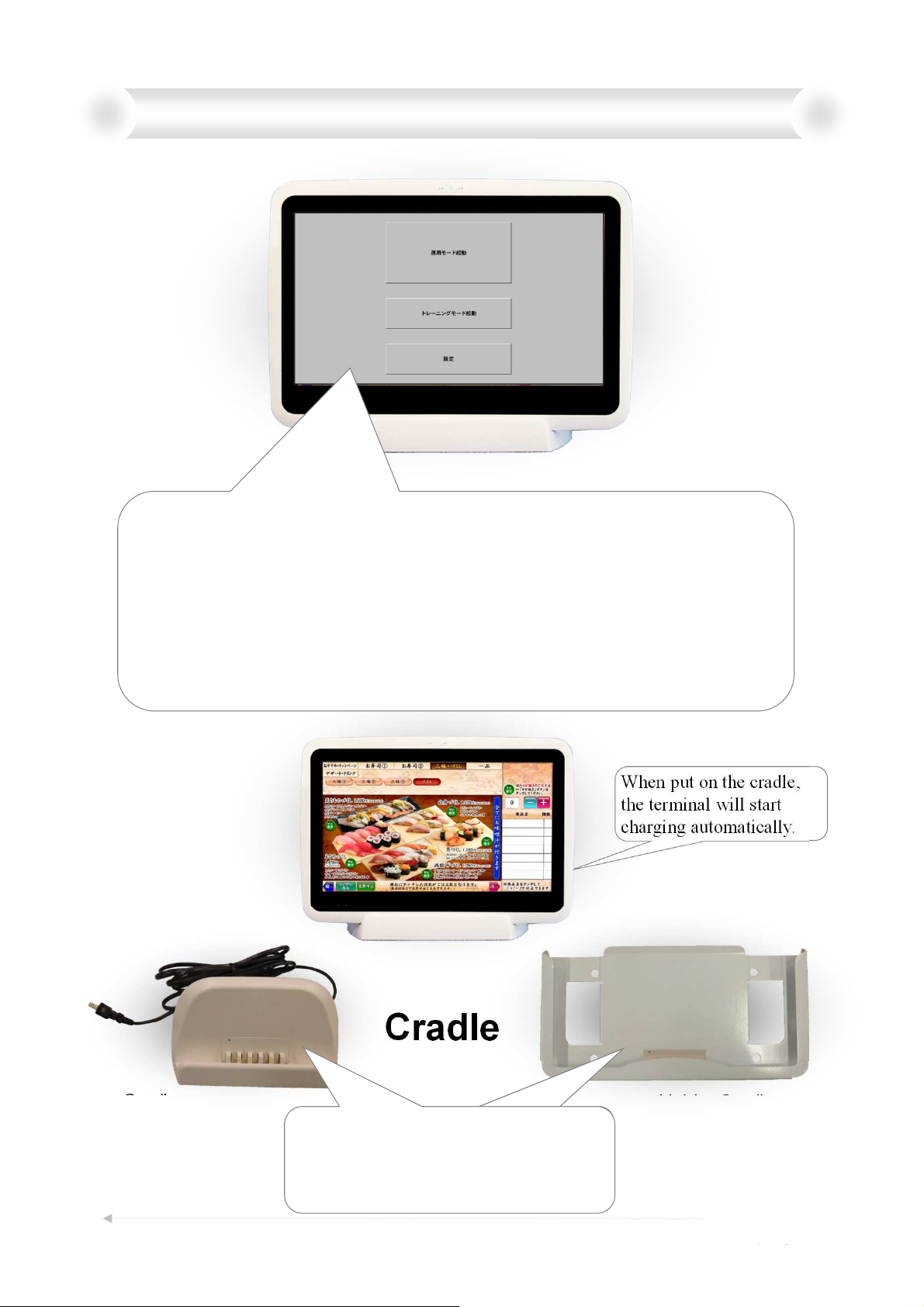
Chapter 3. After start-up mode selection
(1) Please wait until this screen appears when you turn on the power switch.
Then you can choose "Setting mode“, "Training mode" and "Operation mode".
(2) When you choose "Setting mode", you can adjust “volume tune”, “brightness” or other condition
of the terminal.
(3) When you choose "Training mode", the menu can be operated as a stand-alone terminal demo.
WLAN does not working in this mode.
(4) When you choose “Operational mode”, the terminal will start working in actual system
environment with WLAN.
(5) Please note that the system will not work without actual WLAN system environment in “Operation
mode”.
Cradle
WP-C801E
(Desktop type)
Cradle
These cradles were designed for safety,
the output voltage from electronic pin
will be supplied only when the terminal is
put on it .
4
When put on the cradle,
the terminal will start
charging automatically.
Holder Cradle
WP-C822E
(Wall-mount type)
A3400789A
Page 5

Chapter 4. Products Specifications
Table Terminal
Model: WP-D801E
Dimension: 267mm(W)×184mm(H)×16.5mm(D)
Weight: 750g
Display: 10.1 WSVGA 1024×600 (200cd/m2)
Horizontal: 45°45°
Vertical: 20°45°
WiFi : IEEE-802.11b & g
Power: DC12V, 10W or less power consumption form built-in battery
Built-in battery: 6hours, (At the lowest brightness setting)
Charging method: Charging by dedicated cradle, DC input from AC adapter.
Touch screen: Projective Capacitive(multi-touch)
OS: LINUX 2.6.32
Wireless device (Inside Table Terminal)
・Operational frequency: 2412 to 2462 MHz (5MHz step, 11 channels)
・IEEE802.11 b/g compliant Wireless LAN
・Data rate
IEEE802.11b: 1, 2, 5.5 and 11 Mbps
IEEE802.11g: 6, 9, 12, 18, 24, 36, 48 and 54 Mbps
Cradle
Model: OST Cradle (WP-C801E) and OSH Cradle(WP-C822E)
Input/Output voltage: DC 12V 2A
Battery
Model: 6010459AY
Classification of the battery: Lithium Pllymer Battery
Rated voltage: 7.4V
Capacity: Typical 3900mA
Battery Type: 6010459AY
Manufacturers: SPRINGPOWER TECHNOLOGY(SHENZHEN)LIMITED
A3400789A
5
Page 6

Chapter 5. Operating Considerations
(§2.1077(a)(1))
Company: Worldpicom Corporation
Model name: Table Terminal
Model number: WP-D801E
FCC ID: PRTWP-D801
(§2.1077(a)(3), §2.909)
Subsidiary of the U.S. information: Global Network Resources, Inc.
Address: 2241 Calle de Luna, Santa Clara, CA 95054
Phone: 408.727.1900 / Fax: 408.727.1910
(§15.21)
Notice: The changes or modifications not expressly approved by the party responsible for
compliance could void the user’s authority to operate the equipment.
IMPORTANT NOTE:
To comply with the FCC RF exposure compliance requirements, no change to the antenna
or the device is permitted. Any change to the antenna or the device could result in the
device exceeding the RF exposure requirements and void user’s authority to operate the
device.
(§15.105)
FCC INFORMATION
The Federal Communication Commission Radio Frequency Interference Statement
includes the following paragraph:
NOTE: This equipment has been tested and found to comply with the limits for a Class B
digital device, pursuant to part 15 of the FCC Rules. These limits are designed to provide
reasonable protection against harmful interference in a residential installation. This
equipment generates, uses and can radiate radio frequency energy and, if not installed and
used in accordance with the instructions, may cause harmful interference to radio
communications. However, there is no guarantee that interference will not occur in a
particular installation. If this equipment does cause harmful interference to radio or
television reception, which can be determined by turning the equipment off and on, the
user is encouraged to try to correct the interference by one or more of the following
measures:
—Reorient or relocate the receiving antenna.
—Increase the separation between the equipment and receiver.
—Connect the equipment into an outlet on a circuit different from that to which the
receiver is connected.
—Consult the dealer or an experienced radio/TV technician for help.
The user should not modify or change this equipment without written approval form
Worldpicom Corporation. Modification could void authority to use this equipment.
This device complies with part 15 of the FCC Rules. Operation is subject to the following
two conditions: (1) This device may not cause harmful interference, and (2) this device
must accept any interference received, including interference that may cause undesired
operation.
A3400789A
6
Page 7

Chapter 6. NOTICE: RADIO EQUIPMENT
(English)
The term “IC:” before the radio certification number only signifies that Industry
Canada Technical specifications were met.
Operation is subject to the following two conditions: (1) this device may not cause
interference, and (2) this device must accept any interference, including
interference that may cause undesired operation of the device.
(Français)
Le terme "IC:" devant le numéro de certification radio signifie uniquement que les
spécifications techniques d'Industrie Canada ont été respectées.
Le présent appareil est conforme aux CNR d'Industrie Canada applicables aux
appareils radio exempts de licence. L'exploitation est autorisée aux deux
conditions suivantes : (1) l'appareil ne doit pas produire de brouillage, et (2)
l'utilisateur de l'appareil doit accepter tout brouillage radioélectrique subi, même si
le brouillage est susceptible d'en compromettre le fonctionnement.
A3400789A
7
Page 8

FCC Statement:
This equipment has been tested and found to comply with the limits for a Class B digital
device, pursuant to part 15 of the FCC Rules. These limits are designed to provide
reasonable protection against harmful interference in a residential installation. This
equipment generates, uses and can radiate radio frequency energy and, if not installed and
used in accordance with the instructions, may cause harmful interference to radio
communications.
However, there is no guarantee that interference will not occur in a particular installation. If
this equipment does cause harmful interference to radio or television reception, which
can be determined by turning the equipment off and on, the user is encouraged to try to
correct the interference by one or more of the following measures:
• Reorient or relocate the receiving antenna.
• Increase the separation between the equipment and receiver.
• Connect the equipment to an outlet on a circuit different from that to which the
receiver is connected.
This device complies with part 15 of the FCC rules. Operation is subject to the following two
conditions: (1) This device may not cause harmful interference, and (2) this device must
accept any interference received, including interference that may cause undesired operation.
Note: Modifications to this product will void the user’s authority to operate this equipment.
 Loading...