

Page 1

WORLDE EASYCONTROL MIDI CONTROLLER
USER’S MANUAL
Page 2

Contents
Introduction ....................................................................................................................................... 3
Features ........................................................................................................................................... 3
Parts and their functions .................................................................................................................. 4
Setup ................................................................................................................................................ 5
Making detailed settings ................................................................................................................... 6
Global ........................................................................................................................................ 6
Knobs ........................................................................................................................................ 6
Sliders ....................................................................................................................................... 7
Assignable buttons .................................................................................................................... 7
Transport butt ons ...................................................................................................................... 8
Specifications ................................................................................................................................... 9
Page 3

Introduction
Thank you for purchasing the WORLDE EASYCONTROL USB controller. To help
you get the most out of your new instr ument, please read this manual carefully.
In order to use the functions of this product, you’ll need to make set t ings
in the application you’re u sing. M ake settings as described in the owner’s
manual for your applicatio n.
Features
9 assignable control knobs.
9 assignable control sliders.
11 assignable buttons.
6 transport buttons assignable to controllers.
4 banks for different settings.
USB interface, adaptable to USB 2.0(FULL SPEED). Power supplied
by USB.
Compatible with Win7/XP/Vista and Mac OS X. Drive free and
hot-plug supported.
Edited by the WORLDE software Editor.
Page 4
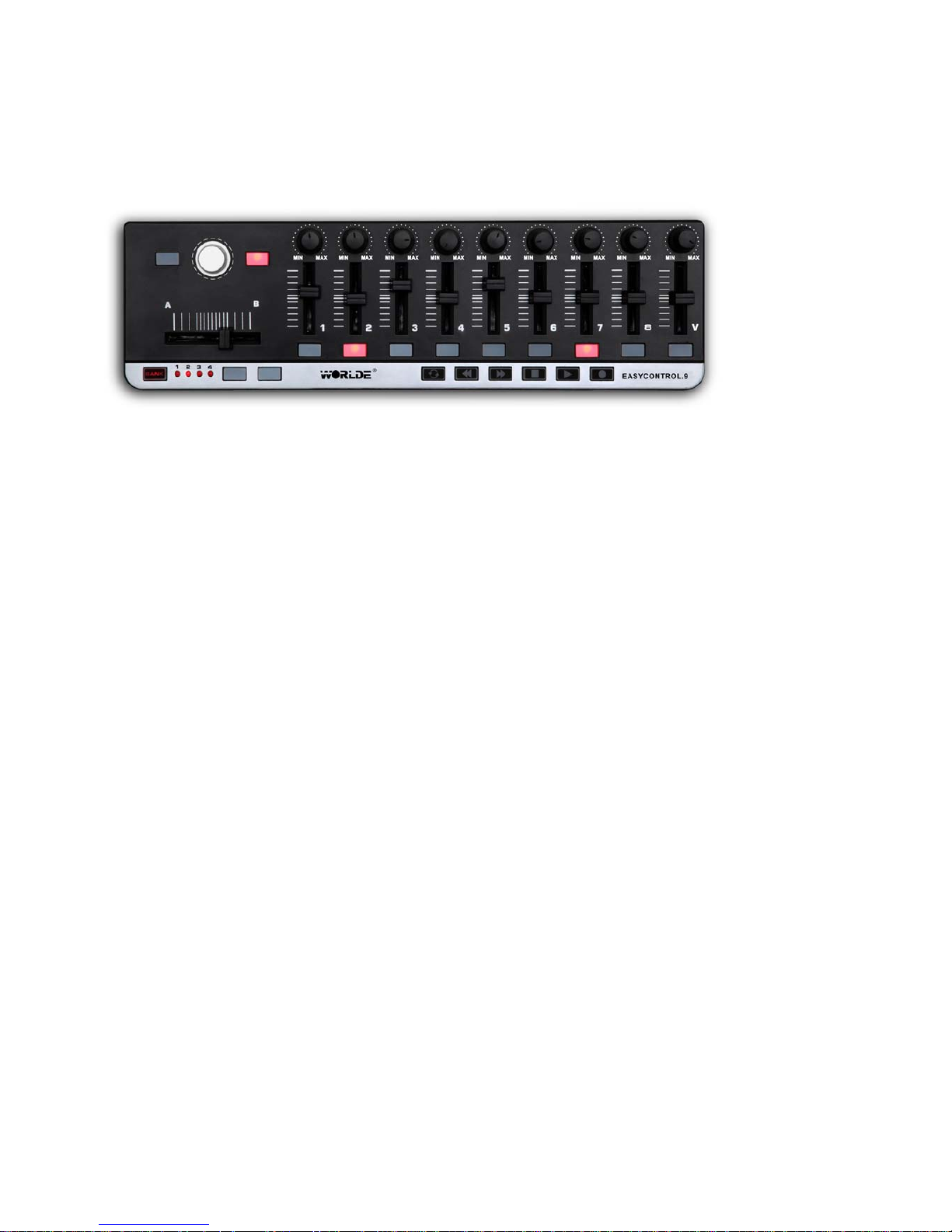
Parts and their functions
1. MIDI control group
A knob, slider, button are collectively called a MIDI control group. The EASYCONTROL has nine
MIDI control groups.
a. Knob
These knobs transmit control change messages.
b. Slider
These sliders transmit control change messages.
c. Button
These buttons trans mit control change messages or note messages.
2. Transport button
There are six transport buttons: [REW ], [PLAY], [FF], [LOOP], [STOP], and [REC]. These buttons
transmit control change messa ges or MMC (MIDI Machine Control) messages.
3. Assignable buttons
These two buttons can be used as MIDI CC switches or Note.
4. Bank buttons
Use this button to switch between the four banks. A “bank” is a set of parameter assignments for
the controllers (knobs, sliders and buttons, etc.) so that the controllers can be used to operate
your DAW or software synthesizer. The EASYCONTROL has four banks. The four banks are
collectively called a “bank set.” You can use EASYCONTROL software Editor to change the
assignment of each controller. (➞ “Making detailed settings”)
Page 5
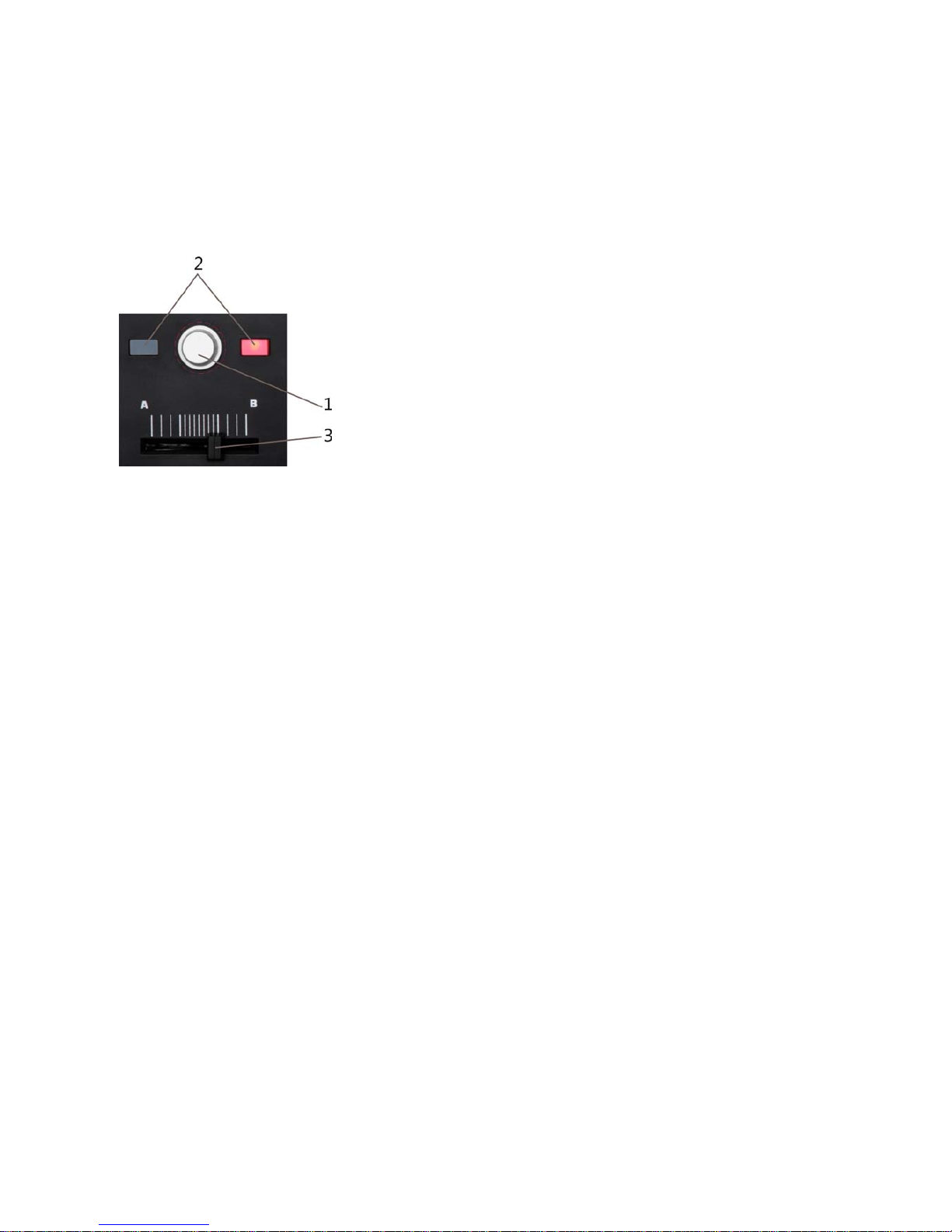
5. Bank LEDs
The LED of the selected bank wi ll lig ht up.
6. USB connector
Connect the EASYCONTROL to your computer with a USB cable via this port.
7.Settled controller
1:the knob for adjusting t he program change. It can’t be edited.
2:buttons used to send settled control message(controller number:64/67), it’s not editable for
these two buttons.
3:the slider is only for adjusting the master volume, it can’t be edited.
Setup
Operating requirements
Apple Macintosh computer: computer with an Intel or PowerPC processor that has a USB port
and satisfies the requirem ents for running Mac OS X.
Operating system: Mac OS X 10.3.9, Mac OS X 10.4.7 or later.
Windows Computer: Computer that has a USB port and satisfied the requirements for running
Microsoft Windows7/XP/Vist a ( a USB chipset made by the Int el Corporation is recommended).
Operating system: Micros oft Windows XP SP2 or later, or Microsoft Windows Vista SP 1.
Connections and power: Con nect the EASYCONTROL to your computer with a USB ca bl e.
Page 6

Making detailed settings
The following settings cannot be edited from the EASYCONTROL itself, so you ’l l need to use the
EASYCONTROL software Editor. You can download the EASYCONTROL software Editor from
the website www.worlde.com.cn.
Global
Scene MIDI channel [1...16]
This specifies which MIDI channel the EASYCONTROL will use to transmit note messages, as
well as MIDI messages that are sent when you press the button or move the sliders and knobs.
This should be set to match t he M I DI channel of the MIDI applicatio n t hat you’re controlling.
Tran sport MIDI Channel [ 1... 16/Scen e MIDI Channel]
Specifies the MIDI channel on which MIDI messages will be transmitted when you operate the
transport button. Set this to match the MIDI channel of the MIDI application you’re controlling. If
you set this to “Scene MIDI Channel,” the message will be transmitted on the Scene MIDI
Channel.
Group MIDI Channel [1...16/Scene MIDI Channel]
Specifies the MIDI channel on which each MIDI control group will transmit MIDI messages. Set
this to match the MIDI channel of the MIDI application you’re controlling. If you set this to “Scene
MIDI Channel,” messages w ill be t r ansmitted on the Scene MIDI Channe l.
Knobs
Operating a knob will transmit a control change message. You can enable/disable each knob,
specify its control change number, and specify the values transmitted when the knob is turned
fully left o r fully right..
Knob Enable [Disable/Enable]
Enables or disables the knob. If you’ve disabled a knob, turning it will not transmit a MIDI
message.
CC Number [0...127]
Specif ies the control change number of the cont r ol c hange message that is transmitted.
Left Value [0...127]
Specif ies the v alue o f the contr ol chan ge messa ge t rans mitted w hen y ou t urn the knob all the w ay
Page 7

to the left.
Right V al ue [ 0. . . 127]
Specif ies the v alue o f the contr ol chan ge messa ge t rans mitted w hen y ou t urn the knob all the way
to the right.
Sliders
Operating a slider will transmit a control change message. You can enable/disable each slider,
specify its control change number, and specify the values transmitted when the slider is moved
fully upward or fully downward.
Slider Enable [Disable/Enable]
Enables or disables the slider. If you’ve disabled a slider, moving it will not transmit a MIDI
message.
CC Number [0...127]
Specif ies the control change number of the cont r ol c hange message that is transmitted.
Upper Value [0...127]
Specifies the value of the control change message transmitted when you move the slider all the
way upward.
Lower Value [0...127]
Specifies the value of the control change message transmitted when you move the slider all the
way downward.
Assignable buttons
The button transmits a control change message. You can choose whether this button will be
enabled, the type of button operation, the control change number, and the values that will be
transmitted when the button is pressed. These MIDI messag es are trans mitted on t he Global MI DI
Channel.
Assign Type [No Assign/Note/Control Ch ange ]
This specifies the type of message that will be assigned to the button. You can disable the button
(no assignment), or assig n a note message or a control change.
Button Behavior [ Mome ntary/Toggle]
Selects one of the follow i ng two modes:
Momentary: Pressing th e button will send a contro l change messa ge w ith the On v alue, r ele asing
Page 8

the button will send a control cha nge message with the Off valu e.
Toggle: Each time that you press the button, the control change message will alternate between
the On value and the Off v alu e.
Note Number [C-1...G9]
This specifies the note numb er of the note message that is transmitted.
CC Number [0...127]
Specifies the CC number of the control change message that will be transmitted.
On Value [0...127]
Specif ies the On value of the control change or n ot e on message.
Off V al ue [0...127]
Specifies the Off value of the control change message. You can set this only if the assign type is
“Control Change.”
Transport buttons
Operating the transport buttons will transmit either control change messages or MMC messages,
depending on the assign type. For each of these six buttons, you can specify the message that is
assigned, the way in which the button will operate when pressed, the control change number, or
an MMC command.
Assign Type [Control Change/ MMC/No Ass i gn]
Specif ies the ty pe o f m essage a ssi gned to the t ran s port but ton. You can specify that the button be
disabled, or assign a contr ol change message or MMC messag e.
Button Behavior [ Mome ntary/Toggle]
Selects one of two types of behavior for the button:
Momentary: A control change message with a value of 127 will be transmitted when you press
the transport button, and wit h a value of 0 when you release the button.
Toggle : Each time you press the tr anspor t button, a control change message w it h a value of 127
or 0 will be transmitted alternately. You can’t specify the button behavior if the assign type is
“MMC.” If you’ve specified “MMC,” an MMC command will be transmitted eac h t ime you press t he
button.
CC Number [0...127]
Specif ies the control change number of the cont r ol c hange message that is transmitted.
MMC Command [Stop/Play .../MMC Reset]
Selects one of the following thirteen types of MMC command as the MMC message that will be
transmitted. Stop, Play, Deferred Play, Fast Forward, Rewind, Record Strobe, Record Exit,
Page 9

Record Pause, Pause, Eject, Chase, Command Error Reset, MM C R eset.
MMC Device ID [0...127]
Specifies the device ID of the MMC message. Normally you will specify 12 7. If t he device ID is 127,
all devices will receive the M MC m essage.
Specifications
Connectors: USB connector (mini B type)
Power supply: USB bus pow er mo de
Current consumption: 100 mA or less
Dimensions (W x D x H): 13.4 x 3.9 x 0.8 inches / 340 x 100 x 20 mm
Weight: 14 oz / 445 g
Included items: USB cable, O w ner’s manual
* Specific at ions and appearance are subject t o change without notice.
Sales Head Office:
Hangzhou Worlde Digita l Piano Co., Ltd
Add:5 Houshan Rd, Wuchang Industrial Park, Yuhang District, Hangzhou, 310023, P.R.China
Tel:0086 571 88 730848 Fax:0086 57 1 88730748
Email:[email protected] Website:www.worlde.com.cn
 Loading...