

Page 1
Assembly & Installation Instructions:
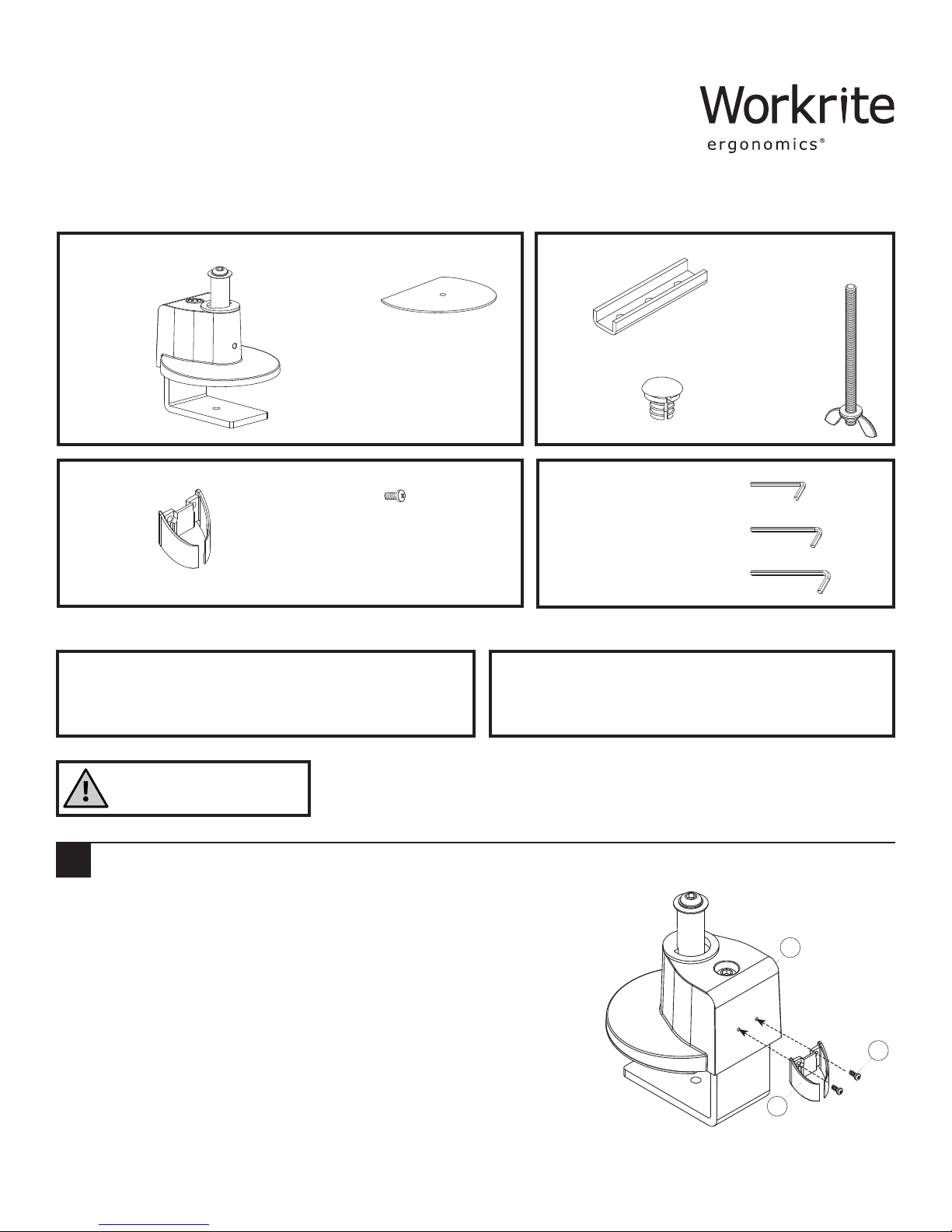
Conform C-Clamp & Grommet Base CONF-BSE-CCG-S
Parts Included
Desk Base Set
A
Qty: 1
Adhesive Pad
B
Qty: 1
U-Bracket
E
Qty: 1
Hole Cover Cap
F
Qty: 1
Cable Management Clip
C
Qty: 1 D
M3×6 mm Screws
Qty: 2
Required Parts Sold Separately Tools Required
Conform Monitor Arm.
A Phillips head screwdriver and included Allen Wrenches.
If a grommet mount hole is required, you'll need a
drill and .375" bit.
2.5 mm Allen Wrench
H
Qty: 1
4 mm Allen Wrench
I
Qty: 1
5 mm Allen Wrench
J
Qty: 1
Grommet Bolt, Wing
G
Nut & M8 Steel Washer
Qty: 1
Do not use on hollow core tables.
Do not exceed 48 lb.
Attach Cable Management Clip
1
Use M3 × 6 mm screws (D) to attach the Cable Management Clip (C) to
the Conform Base (A) with Phillips head screwdriver.
Note:
If you plan to use C-Clamp Mount, proceed to Step 2.
If you plan to use Grommet Mount, proceed to Step 3.
1 of 3 Workrite Ergonomics | 800.959.9675 www.workriteergo.com
A
D
C
Page 2
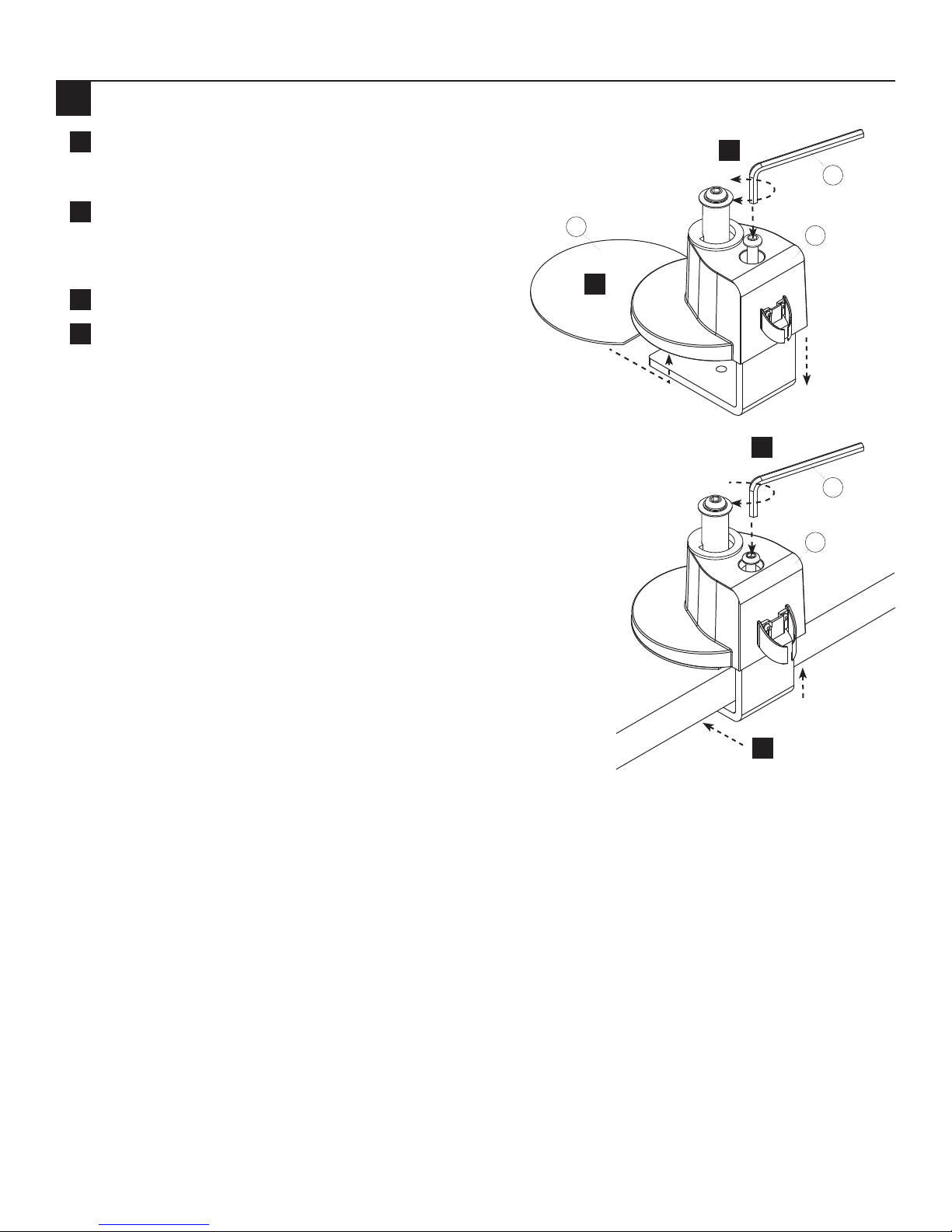
C-Clamp Installation
2
Using 5 mm Allen wrench (J), loosen the C-Clamp bolt on
a
the Desk Base (A) wide enough to fit over the edge of the
worksurface.
Remove the Adhesive Pad (B) backing. Apply the pad
b
to the bottom surface of the base, adhesive side up, so
that it aligns with the front edge of the base and sticks
in place.
Place C-Clamp over the rear edge of the worksurface
c
Tighten the clamp by turning the C-Clamp Bolt clockwise,
d
using 5 mm Allen wrench (J) until secure.
a
Loosen
B
J
A
b
Loosen
d
Tighten
J
A
Tighten
c
2 of 3 Workrite Ergonomics | 800.959.9675 www.workriteergo.com
Page 3
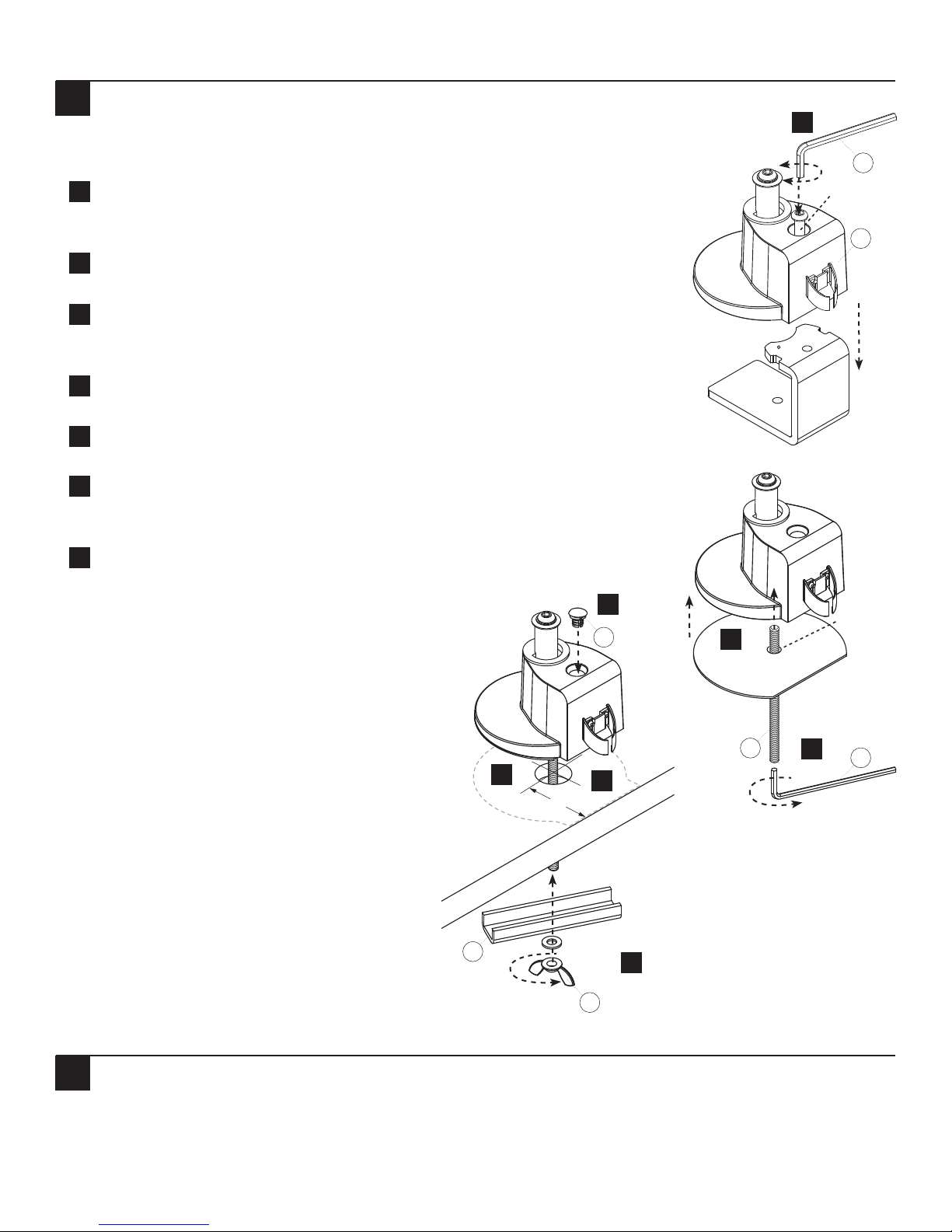
Grommet Mount Installation
3
Note: A grommet hole or small hole is required in your worksurface to install
the grommet mount.
Drill a .375hole in worksurface if needed. The minimum distance from
a
the edge of the worksurface to the center of the grommet hole is 2.125"
The grommet mount can accommodate existing holes up to 3" in diameter.
Using 5 mm Allen wrench (J), loosen the C-Clamp bolt on the Desk Base (A)
b
to remove C-Clamp from the Base. Also remove the C-Clamp bolt.
Remove the pad's pre-punched hole and remove the adhesive cover. Apply
c
the adhesive side to the bottom of the Desk Base, aligned with the front
edge of Base, and stick in place.
Insert Grommet Bolt (G) through the adhesive pad's hole and into the Desk
d
Base (A). Tighten with 4 mm Allen Wrench (I).
Loosen
b
J
Remove
A
Remove
Insert the installed Desk Base Bolt (G) through the grommet hole of worksurface.
e
Make sure the mount does not overlap the edge of the worksurface.
From under the worksurface, place the U-Bracket (E) onto the Grommet Bolt (G)
f
then place the M8 Steel Washer (G) followed by the Wing Nut (G) onto the Bolt
and tighten Wing Nut to secure the base to the desktop.
Insert Hole Cover Cap (F) to cover the C-Clamp bolt hole.
g
e
≤2.125"
a
g
Hole
F
Tighten
c
G
d
I
Ready for Arm Installation
4
You are now ready to attach your selected Conform Monitor Arm (sold separately).
3 of 3 Workrite Ergonomics | 800.959.9675 www.workriteergo.com
E
f
Tighten
G
#1500250 Rev E
 Loading...