

Page 1
*8100129*
8100129
Rev. A
4
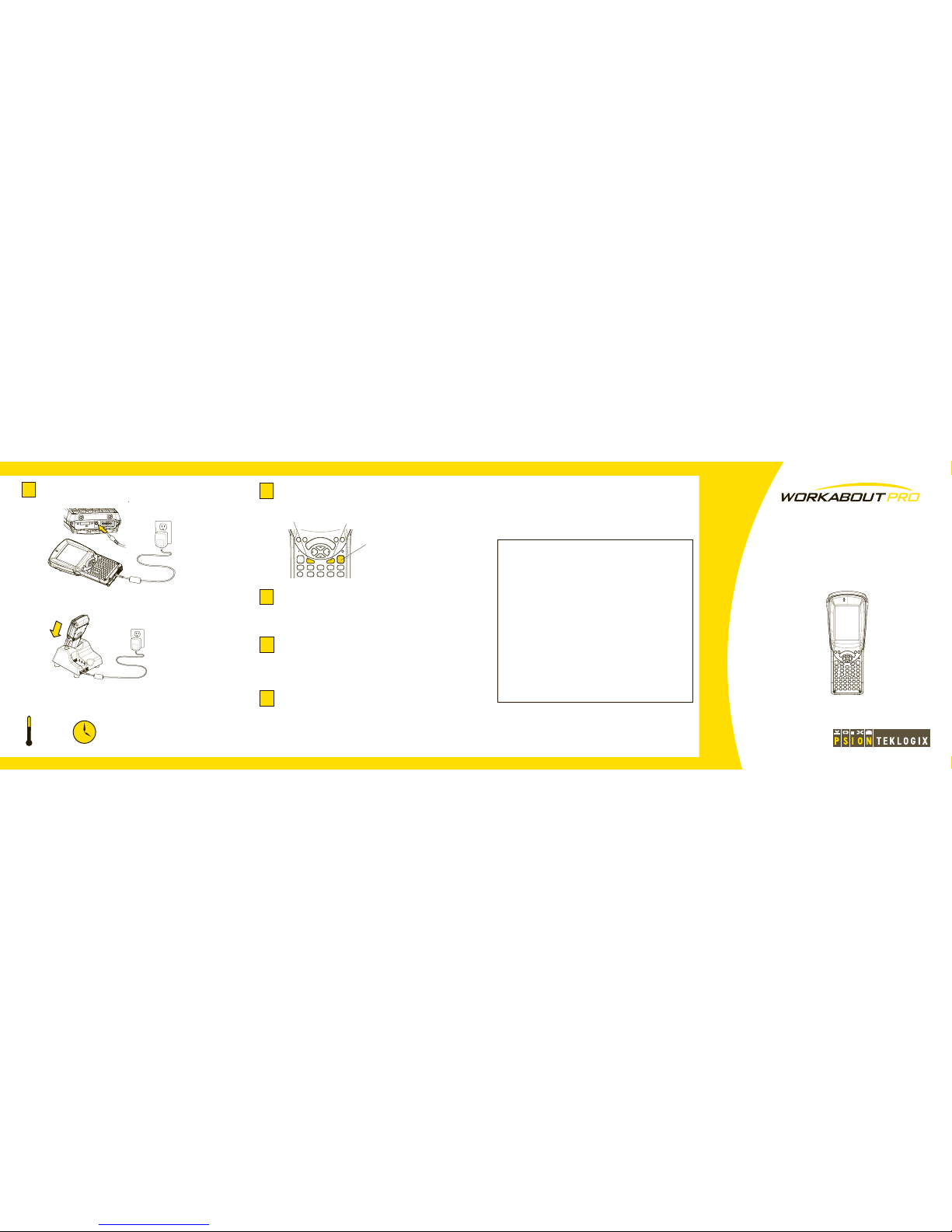
Charge the battery. The power adaptor may
be plugged directly into the WORKABOUT PRO.
The WORKABOUT PRO may also be charged
in a Docking Station.
Turn the unit on. Press the red Enter/On key
for six seconds.
5
Resetting the unit
To warm-reset the WORKABOUT PRO:
· Press the Blue FN key, the Orange FN key, and the Enter/On
key simultaneously for six seconds. The WORKABOUT PRO
cold-resets.
During a cold reset, running programs are halted and RAM
memory is cleared. The contents of flash memory and the
registry are preserved. The operating system is reloaded.
· Press the Blue FN key and the Enter/On key simultaneously for
six seconds. The WORKABOUT PRO warm-resets.
During a warm reset, running programs are halted. The contents
of RAM, flash memory and the registry are preserved.
To cold-reset the WORKABOUT PRO:
Enter/On key
Blue FN key
Orange FN key
ISO 9001 Certified
Quality Management System
Hand-Held Computer
C Version
Quick Start Guide
March 16, 2007 PN: 8100129.A
To turn the WORKABOUT PRO off, do one
of the following:
· Press and release the Blue FN key, then press and release the
Enter/On key.
· Select Shut down from the Start menu.
Important: Resetting may result in data loss.
Install ActiveSync®.
Follow the onscreen instructions provided by
ActiveSync to establish a connection between
the host computer and the WORKABOUT PRO
in the Docking Station.
Configure ActiveSync.
Download ActiveSync® 4.5 or higher from
http://www.microsoft.com and follow the
instructions to install it onto the host computer.
7
8
Connect the WORKABOUT PRO to the
host computer. Connect using a Tether Port to
USB cable, or through a Docking Station.
6
6h
5 - 40 °C
Allow the WORKABOUT PRO to charge
for 6 hours.
41 - 104 °F
Note: Full battery performance is
only reached after the first few full
charge/discharge cycles.
Note: Use only the
universal AC power
adaptor approved by
Psion Teklogix for the
WORKABOUT PRO.
Page 2
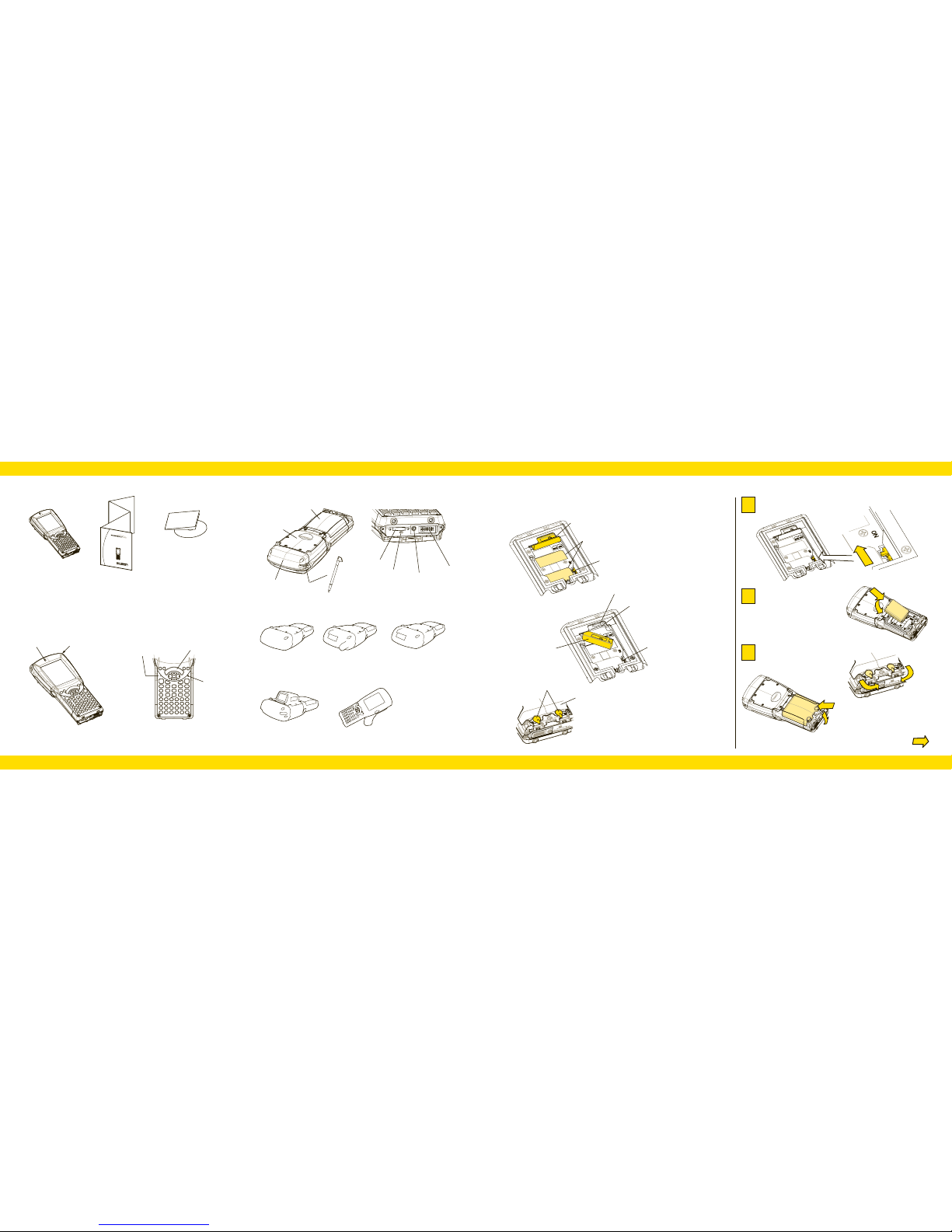
Features: Front
Features: Back and Ports
Battery cover
Endcap
Back cover
LIF Port
Speaker
Stylus
Stylus
Contents of the box:
This Guide
The WORKABOUT PRO
ISO 9001 C
ert
ified
Quality
Management System
H
and-H
eld
C
o
m
pu
t
er
C
V
ers
ion
Quick Start Guide
M
a
r
c
h
1
6
,
2
0
0
7
P
N
:
8
1
0
0
1
2
9
.
A
Additional documentation
(dependent on order)
DC Input
Tether Port
Beeper Port
Scan Bar
LED
Indicator
Microphone Port
Features: The Battery Compartment
On/Off switch
Card gate (closed)
Note: The SIM Card slot
may be covered on your unit.
Switch the hardware on.
1
Getting Started
Insert the battery.
2
Close and lock
the battery cover.
3
Version with GSM
radio and scanner
in endcap
Features: Typical Variants
Version without
scanner or
GSM radio
Version with scanner
in pod
Version with pistol grip
Battery fasteners
On/Off switch
Card gate (open)
SD Card slot
SIM Card slot
FCC Labels
Turn the latches towards
the centre of the unit
to lock the battery cover.
Battery cover
Version with scanner
in endcap
Over
ON
 Loading...